






Still downloading templates?
There’s an easier way. Try a free AI Agent in ClickUp that actually does the work for you—set up in minutes, save hours every week.
Sorry, there were no results found for “”
Sorry, there were no results found for “”
Sorry, there were no results found for “”
Event marketing drives amazing ROI. 52% of marketers credit events for a major share of their deals, and 72% say deals close faster after prospects attend an event.
But a typical event marketing strategy still relies on manual checklists and disconnected tools. By the time you chase down post-event surveys and follow-up emails, the moment is gone.
This guide shows you how to build an AI-powered event funnel. And if you want it to be high ROI, we recommend using ClickUp as your event marketing and planning hub.
We’ll walk you through all event marketing funnel stages, show where common gaps hide, and give you a blueprint to close them.
An event marketing funnel is the path your prospects take to engage with your events. It starts when they first hear about your event. It ends when they take action—register, attend, or become a lead. Think of it like a buyer’s journey.
The funnel does four key things:
When each stage works well, events create pipeline and relationships. When it breaks, your spend looks wasteful.
A standard event marketing funnel has four core stages:
🤝 Friendly Reminder: Each stage needs different content, systems and metrics. Awareness leans on broad reach and ad/campaign performance. Interest relies on landing pages and email nurture. Decision needs simple and quick registration and reminders. And, finally, action requires great onsite experience and timely follow-up.
Most teams still run these stages with disconnected tools and manual handoffs. Spreadsheets for invite lists. A separate platform for ticket sales. Email tools that don’t sync with your CRM. And after-event surveys that land weeks too late.
This creates four issues:
Want to turn events into revenue engines? Let’s show you how to fix those gaps with AI.
The traditional marketing funnel may not be enough to maximize event ROI. Here’s why you need an AI-driven funnel:
| What you’re doing | AI-powered funnel | Traditional funnel |
| Managing data | AI pulls together attendee behavior and CRM data automatically | Data sits in separate tools requiring manual merging + cleanup |
| Targeting audiences | AI Models predict who will convert and when to reach them | Teams use basic rules of thumb, missing signals |
| Creating content | Generative AI drafts custom emails and messages for each segment | Generic emails for everyone |
| Running campaigns | AI handles outreach, reminders, and follow-ups | Heavy manual work |
| Onsite experience | Real-time suggestions based on live data | Printed schedules and ad-hoc messages |
| Measuring results + attribution | Models link events to revenue quickly | Patchy tracking that can’t prove ROI |
| Speed and cost | Faster execution with fewer people | Slow, labor-intensive processes |
AI solves the exact problems that make events expensive and hard to scale. Here’s what it fixes:
AI finds people most likely to register and convert, based on engagement patterns. That means fewer wasted ads and better results from the same budget.
Tasks like drafting emails, running reminder sequences, routing onsite notes, and updating CRM records can be automated with generative AI and workflow agents. This reduces manual errors and speeding execution. Your team focuses on strategy instead.
🧠 Fun Fact: In 2024–25, 95% of event teams reported improving focus on ROI and measurement as a top priority.
AI can stitch registrations, attendance, engagement and post-event behaviors into a single attribution model. Thus, you can link events to pipeline and revenue quickly.
Real-time recommendations improve satisfaction. Which sessions should someone attend? Who should they meet? AI suggests the best options—turning casual attendees into actionable leads.
When AI handles the heavy lifting—segmentation, content drafts, basic comms, attribution—you can run more events without hiring more people.
Let’s walk through how each event funnel stage works with AI. You’ll see concrete event marketing examples that you can apply to your event planning right now.
At the top of the funnel, your goal is broad reach and capturing attention. But you can’t just spray messages everywhere and hope something sticks. AI helps you create content that’s optimized for the awareness stage.
Use generative AI tools such as ClickUp Brain to draft blog posts, social-media snippets or ad copy that are SEO optimized for keywords your audience searches. ClickUp Brain is the world’s most complete work AI assistant, grounded in your company’s knowledge—so all of its suggestions are tailored for your tasks.
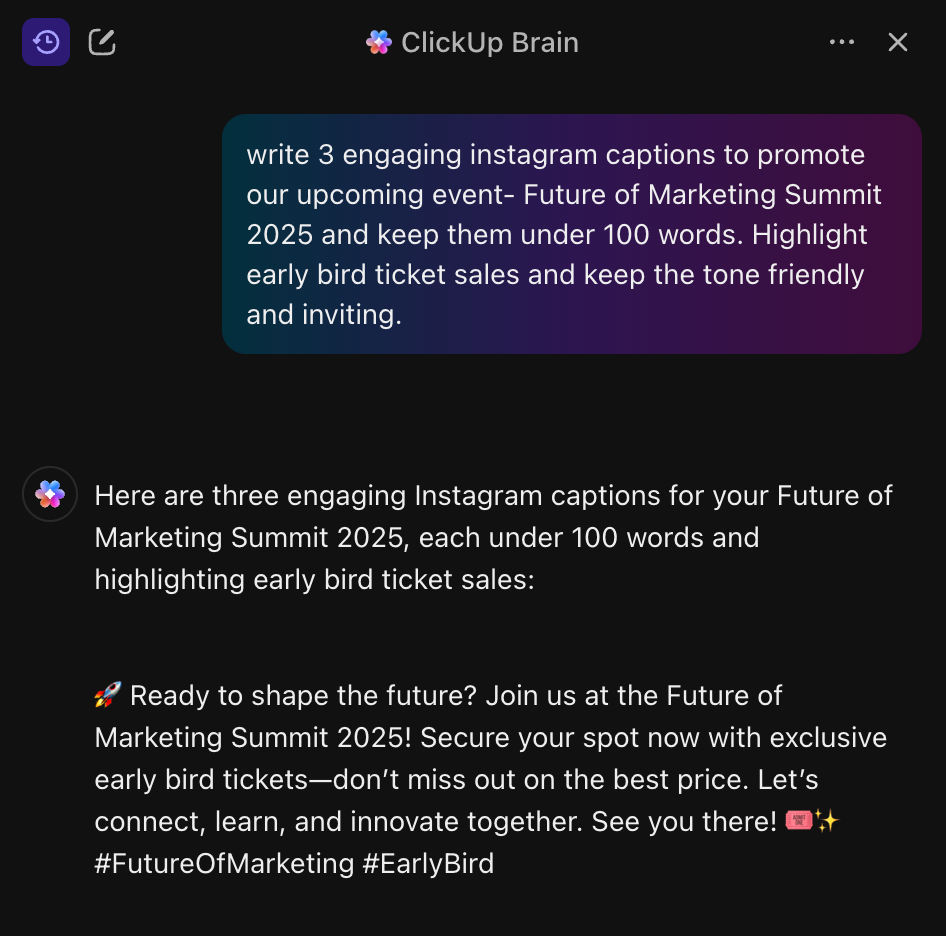
Meanwhile, AI ad targeting tools analyze behavioral signals (time of day, device, past content consumption) to serve the right message to the right people.
📌 For example, AI might predict which audience segments care about your conference on AI Sprawl. Then it generates variations of creative and places them across distribution channels. You can tie it all back into a tool like ClickUp for Marketing Teams.
Once people know about your event, nudge them to engage.
Some AI-powered options include:
💡 Pro Tip: Turn every chatbot conversation into a Task in ClickUp.
This keeps leads moving forward.
This is the stage where prospects decide whether to commit.
AI really plays a differentiator here.
Predictive lead-scoring models study real-time behavior (pages visited, session interest, chatbot answers) and assign a likelihood to register or attend.
Your email automation engine can use AI to send ultra-targeted nurturing sequences: if someone clicked the session about “Industry Trends”, send a brief 60-sec video teaser of your keynote speaker plus a “why you’ll want to be there” snippet.
Your team only intervenes when leads are warm. No wasted effort.
Minimal friction and maximum relevance. That’s the mantra at the conversion point, whether it’s registration or payment.
AI powers recommendation engines that make it possible. If someone wants “customer success content,” the system pushes the right session. It even adds a time-sensitive discount—”Register in 48 hours for VIP access.”
Why? AI notices near-conversion behavior and adds contextual incentives automatically. So, your checkout drop-off goes down.
The funnel doesn’t end with the event. Retention, follow-up and community building determine whether your event generates pipeline and long-term relationships—or becomes a one-off cost.
AI analyzes survey feedback. It detects sentiment and flags at-risk attendees. Recurring complaints about “generic sessions” get routed automatically. High-value attendees get personal outreach. Dissatisfied ones get an apology and offer.
AI also identifies attendees with shared interests. Then, it generates networking invites or discussion prompts to boost event-to-event registration.
Putting all these stages together, your event funnel becomes a connected system. You move away from manual checklists into strategic impact.
📮 ClickUp Insight: Only 10% of our survey respondents regularly use automation tools and actively seek new opportunities to automate.
This highlights a major untapped lever for productivity — most teams are still relying on manual work that could be streamlined or eliminated.
ClickUp’s AI Agents make it easy to build automated workflows, even if you’ve never used automation before. With plug-and-play templates and natural language-based commands, automating tasks becomes accessible to everyone in the team!
💫 Real Results: QubicaAMF cut reporting time by 40% using ClickUp’s dynamic dashboards and automated charts—transforming hours of manual work into real-time insights.
AI turns event promotion and management from a series of manual handoffs into an orchestrated system.
Many marketing teams already use AI event tools like Cvent or Bizzabo for registrations, HubSpot or Marketo for emails, and chatbots to answer questions and qualify leads. Others use analytics tools to track engagement and ROI.
The problem is that these tools don’t talk to each other well. Work gets split across platforms, and teams lose time moving data around, creating massive costs of Work Sprawl.
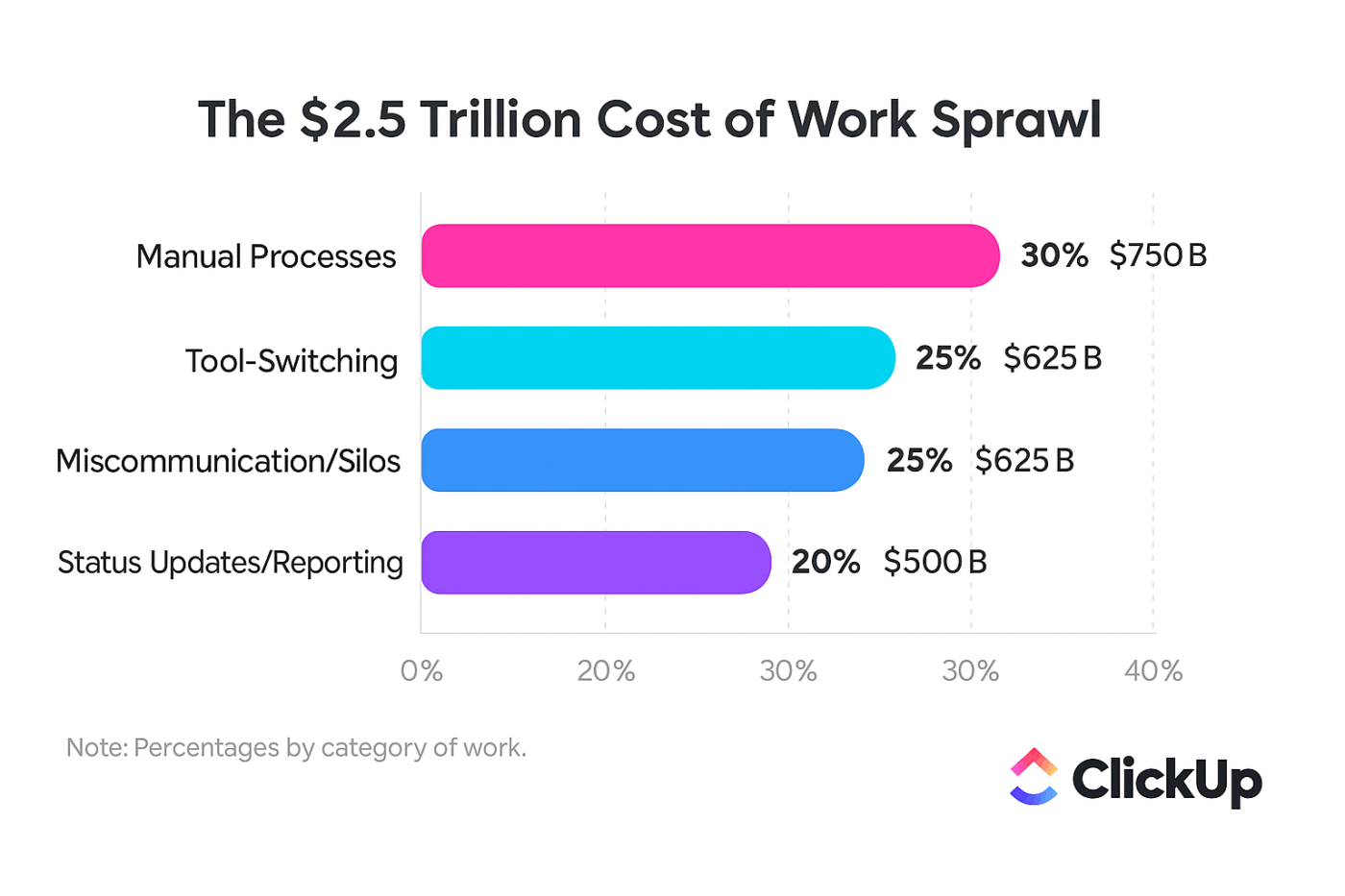
This is where ClickUp fits in. Your ClickUp Event Management System is made up of your Workspace + AI Agents + Automations + Forms + Dashboards. Stitch them together and you get a single place to plan, run, and measures events end-to-end.
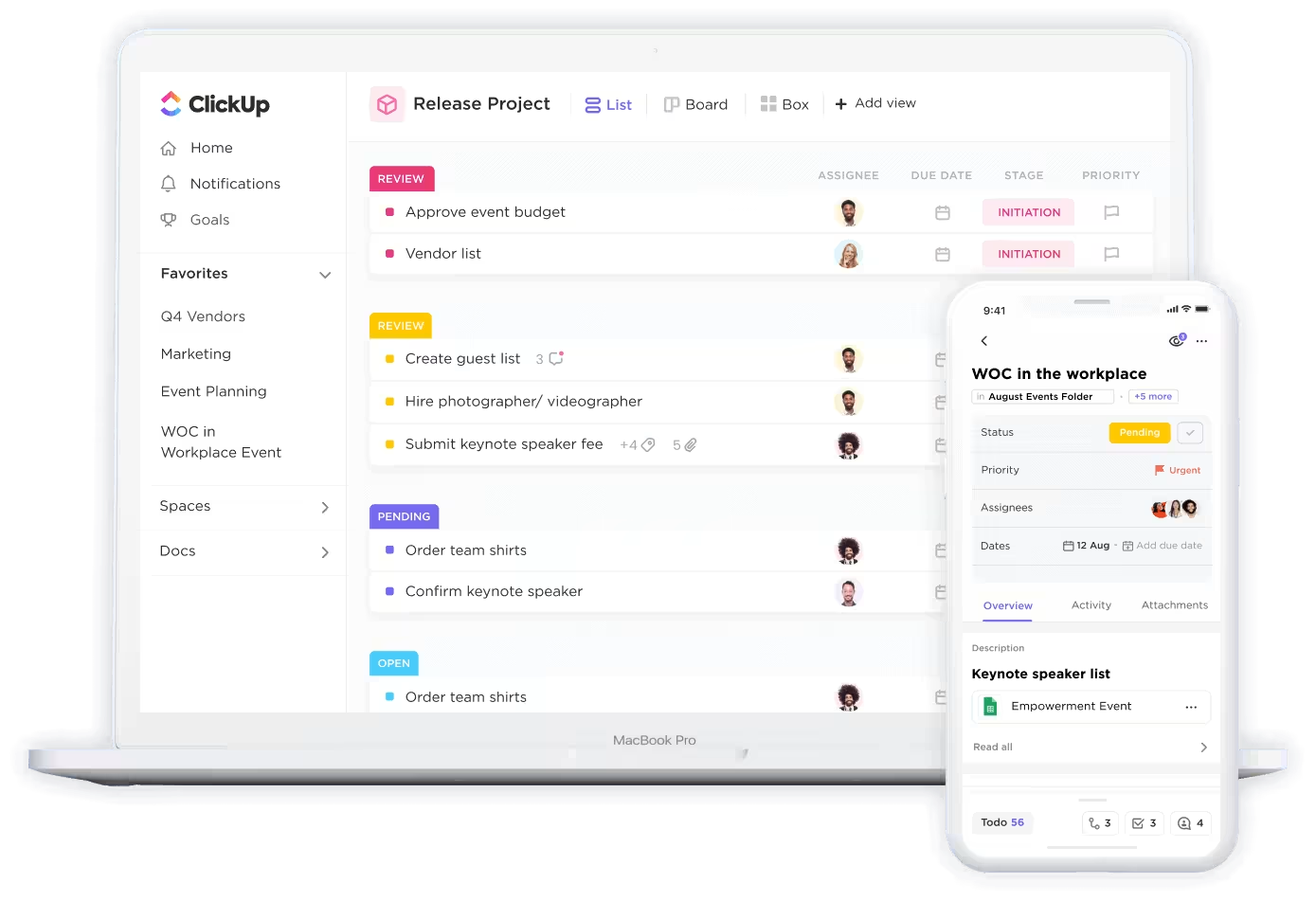
Here’s how:
You start by creating a dedicated ClickUp Space for your event campaigns. This becomes your command center. It contains all event-related task lists, documents, and communications.
Each to-do for your event marketing becomes a ClickUp Task (say, inviting speakers, creating social media posts, etc.). You can club related Tasks together into a ClickUp List. Each event can have its own List to keep things clean.
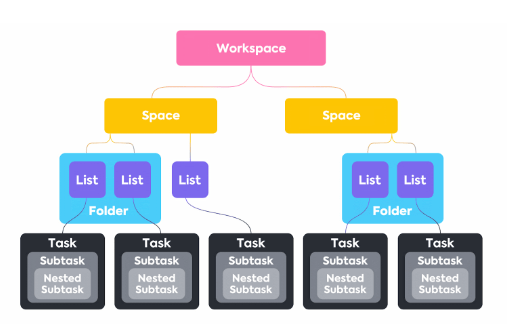
You can use ClickUp’s Custom Fields to track essential details like event date, location, campaign owner, and priority.
Define each stage of your event marketing funnel as a Custom Status or Custom Field in ClickUp—such as “Intake,” “Planning,” “Promotion Ongoing,” “RSVPs Collected,” “Event Day,” and “Post-Event Follow-Up.”
📚 Also Read: How to Use AI for Event Planning
At the heart of ClickUp’s event management solution are its Contextual AI Agents and automations. They take on repetitive tasks and keep your team focused on high-value work.
Once your funnels are ready, set up no-code ClickUp Automations to move tasks through each funnel stage based on triggers.
📌 For example:
ClickUp’s AI can automatically assign tasks based on criteria such as event location or campaign type.
📌 For example, if your team manages events across multiple regions, you can set up automations so that tasks for US events are assigned to one manager, while UK events go to another. Similarly, AI can set due dates for each task or subtask. This ensures deadlines are always aligned with your event timeline.
Watch this video to see how AI Autofills Task Properties inside ClickUp:
As your team works through campaign tasks, ClickUp’s AI Fields can generate instant summaries and action items for each subtask as it’s marked “ready.” These summaries are automatically added to the parent task, giving campaign owners a bird’s-eye view of progress without having to dig through every detail.

You can also ask ClickUp Brain questions in natural language to stay up-to-date on the latest status.
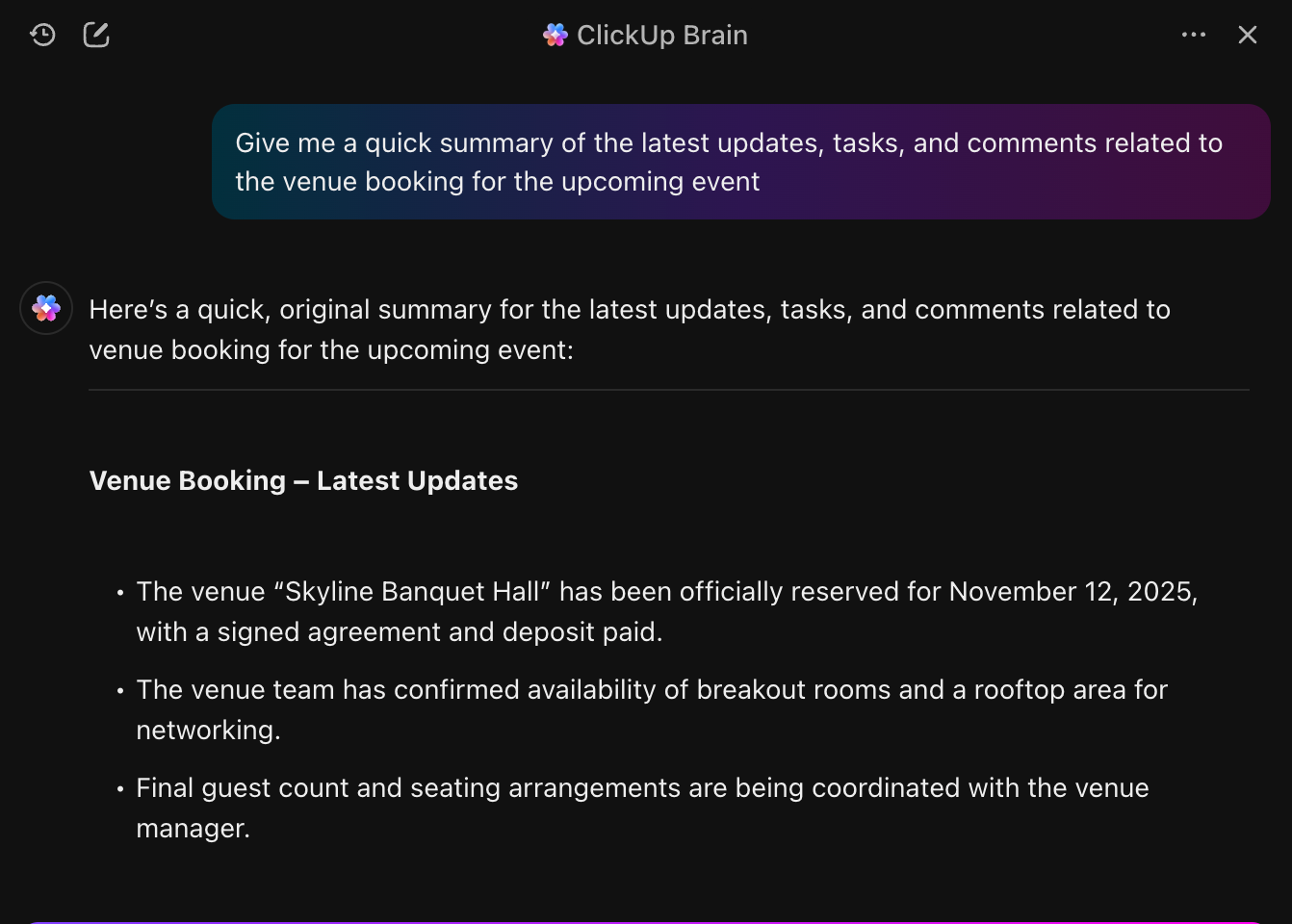
ClickUp’s Content Creator Agent can generate ready-to-use copy for social media posts, email announcements, and landing pages directly within your campaign tasks. This means your team can go from idea to launch faster, with less time spent on blank-page syndrome.
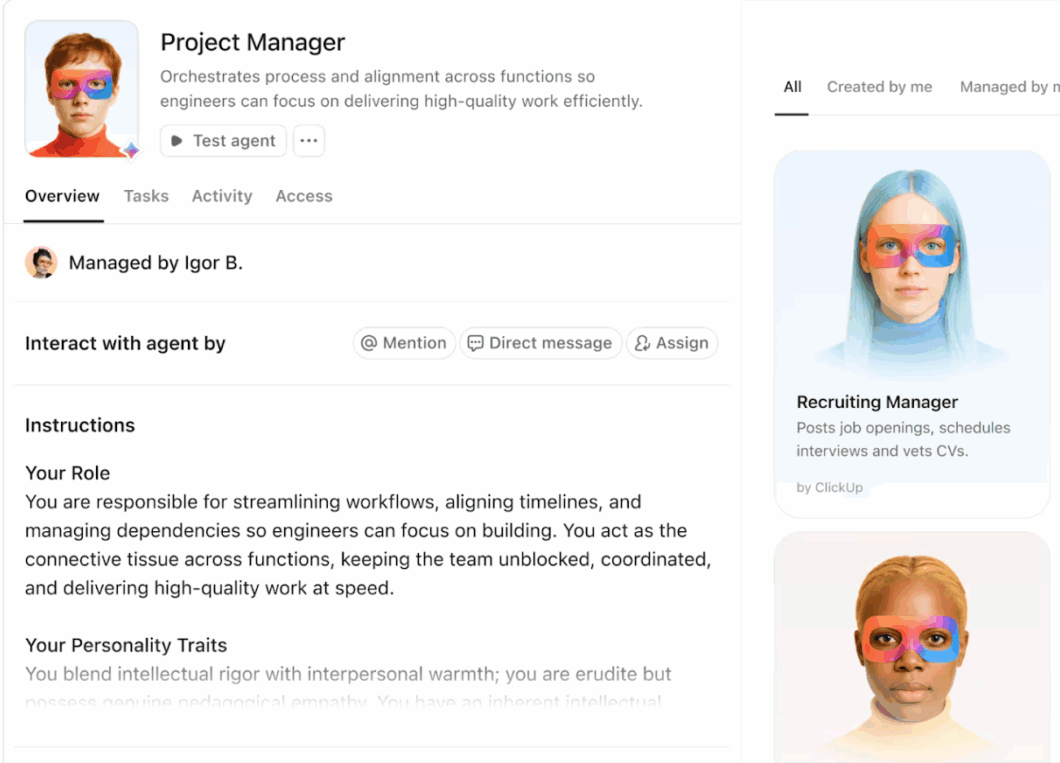
This is a sample workflow you can use to create your own agent. And no, you don’t need to code. You can build one using plain English:
💡 Pro Tip: You can customize the AI Agent’s prompts/instructions to match your brand voice or campaign goals, ensuring every piece of content feels authentic and on-message.
Watch this handy tutorial to build your first agent in ClickUp:
ClickUp Dashboards let you visualize every aspect of your event marketing funnel. Track metrics like lead volume, RSVP rates, campaign engagement, and task completion—all in one place.
💡 Pro Tip: Set up alerts or notifications for key metrics (e.g., “Send me a message in ClickUp Chat if RSVP rate drops below 50%”) to stay proactive.
ClickUp Forms are a powerful way to collect attendee information, manage RSVPs, and gather post-event feedback. The best part? They can also trigger automated workflows throughout your funnel.
Here’s a practical guide:
💡 Pro Tip: Use ClickUp’s reporting features (or just ask ClickUp Brain) to analyze feedback trends and identify areas for improvement in future campaigns.
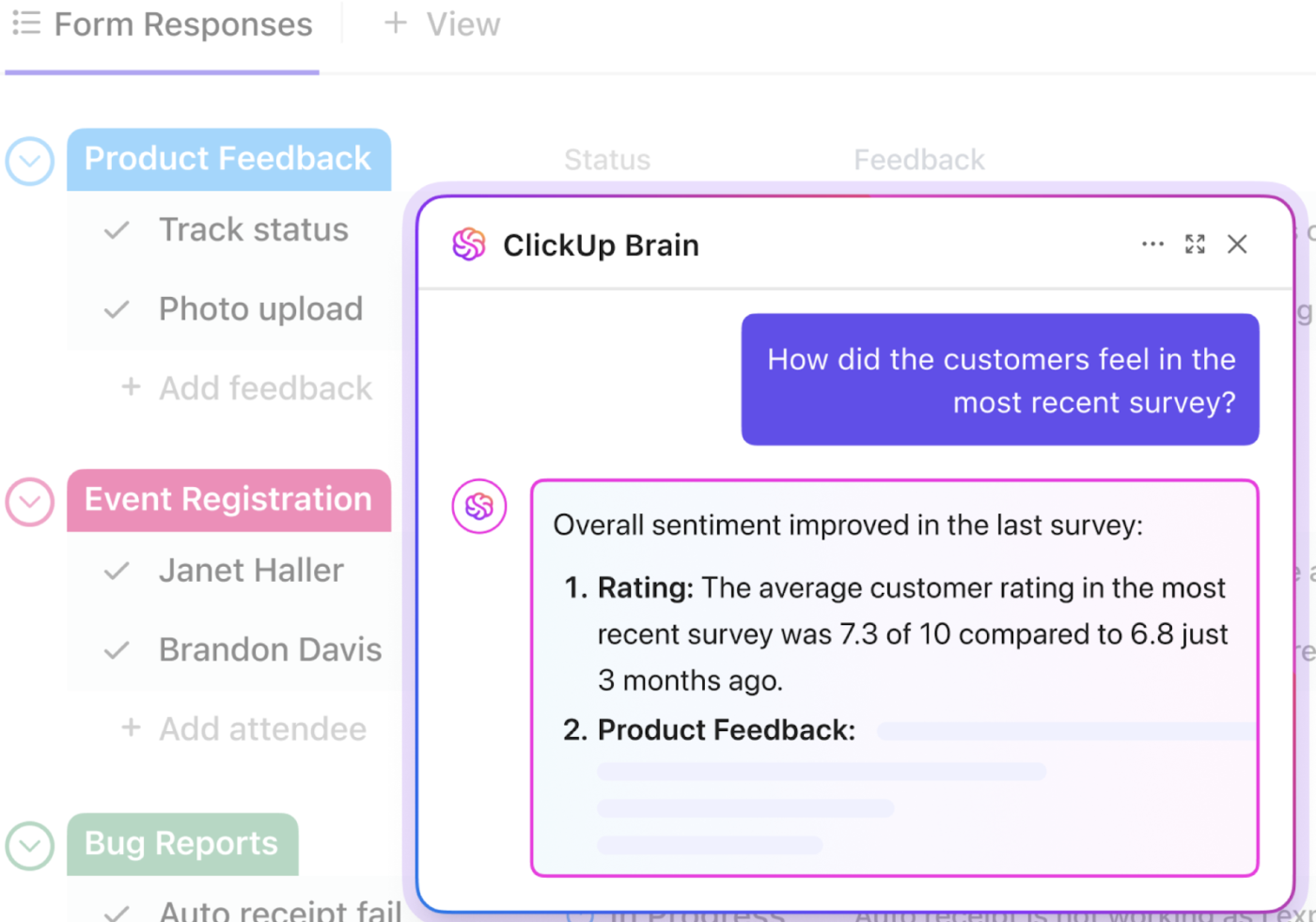
Whether you’re managing a single event or an entire calendar of campaigns, ClickUp’s AI tools give you the structure and flexibility to do it all.
Building an AI-driven event funnel in ClickUp is a simple yet customizable process. One that will help you guide every event from the first idea to post-event analysis.
Here’s a clear sequence you can follow:
Make a Space called “Event Campaigns.” Add a reusable Event Management Template in ClickUp that includes subtasks for planning, promotions, logistics and post-event follow-up. You should also add Custom Fields (event date, budget, owner, lead source, event score). Event planning templates save time and create consistency across events.
ClickUp’s Event Marketing Plan Template gives you a structured way to plan and execute event promos. It breaks work into stages like planning, implementation, and evaluation, and uses custom fields to track budgets, dates, and owners. With task lists and calendar views, your team stays aligned on responsibilities and timelines. It’s ideal for event managers who need a repeatable plan that keeps every detail in view and on schedule.
We already explained this step when we intrdouced you to ClickUp’s Event Management Platform.
Here’s a quick summary:
Define the funnel stages using ClickUp’s Custom Statuses. This can look like Intake → Planning → Promotion Ongoing → RSVPs Collected → Event Day → Post-Event.
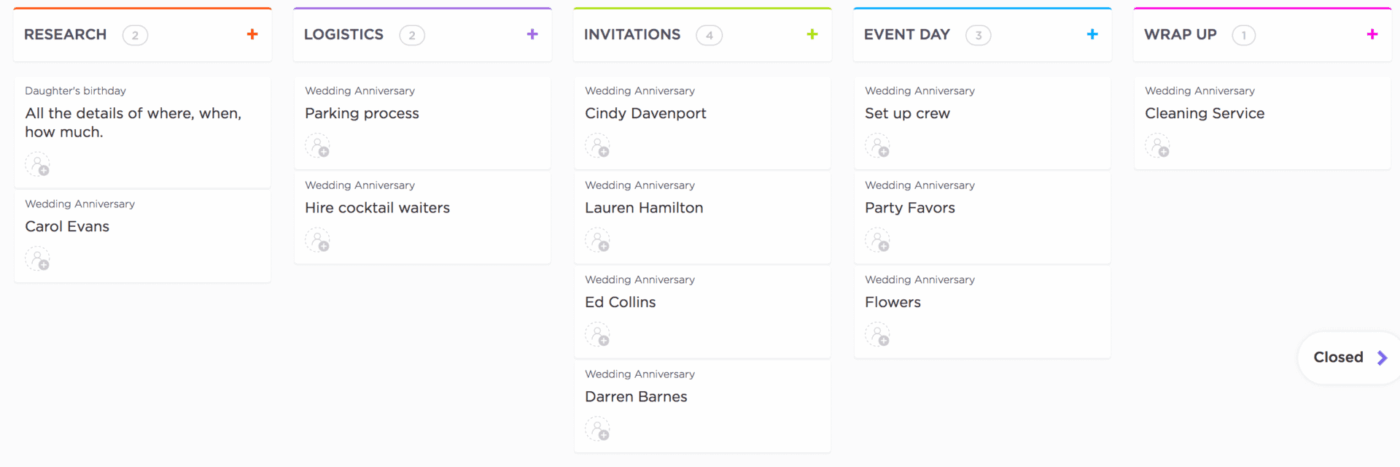
Map lead scores, attendee types and session interests as Custom Fields. This makes the data you need for AI structured.
This is the starting point for every event. You need a way for team members, clients, or stakeholders to submit event ideas or requests in a structured format.
Use ClickUp Forms to create a simple, shareable form. Include fields for event name, date, location, goals, and any other details you need.
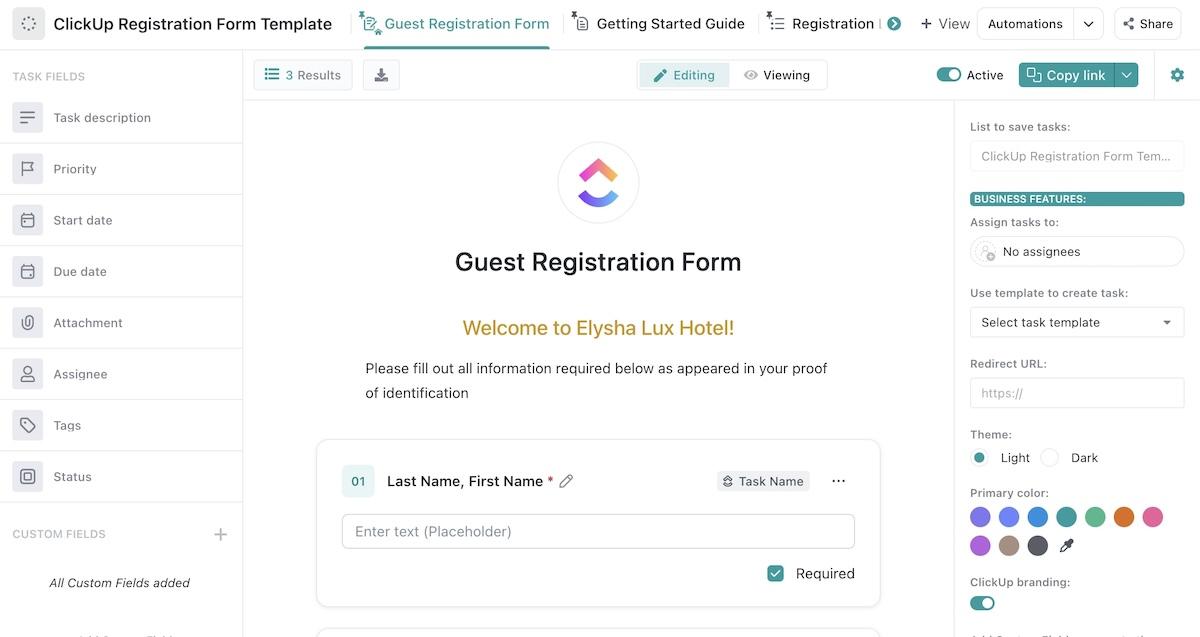
When someone submits the form, ClickUp automatically creates a new task in your Event Activation List, capturing all the information in one place.
Once an event request is in the system, it’s time to review, assign owners, and flesh out the plan. This stage often involves multiple people and lots of moving parts.
Having repeatable processes helps.
ClickUp lets you create templates for common event types (like webinars, conferences, or workshops). When you apply a template, it automatically adds all the necessary subtasks, checklists, and dependencies to your event task.
You can also set up AI Super Agents to do this heavylifting.
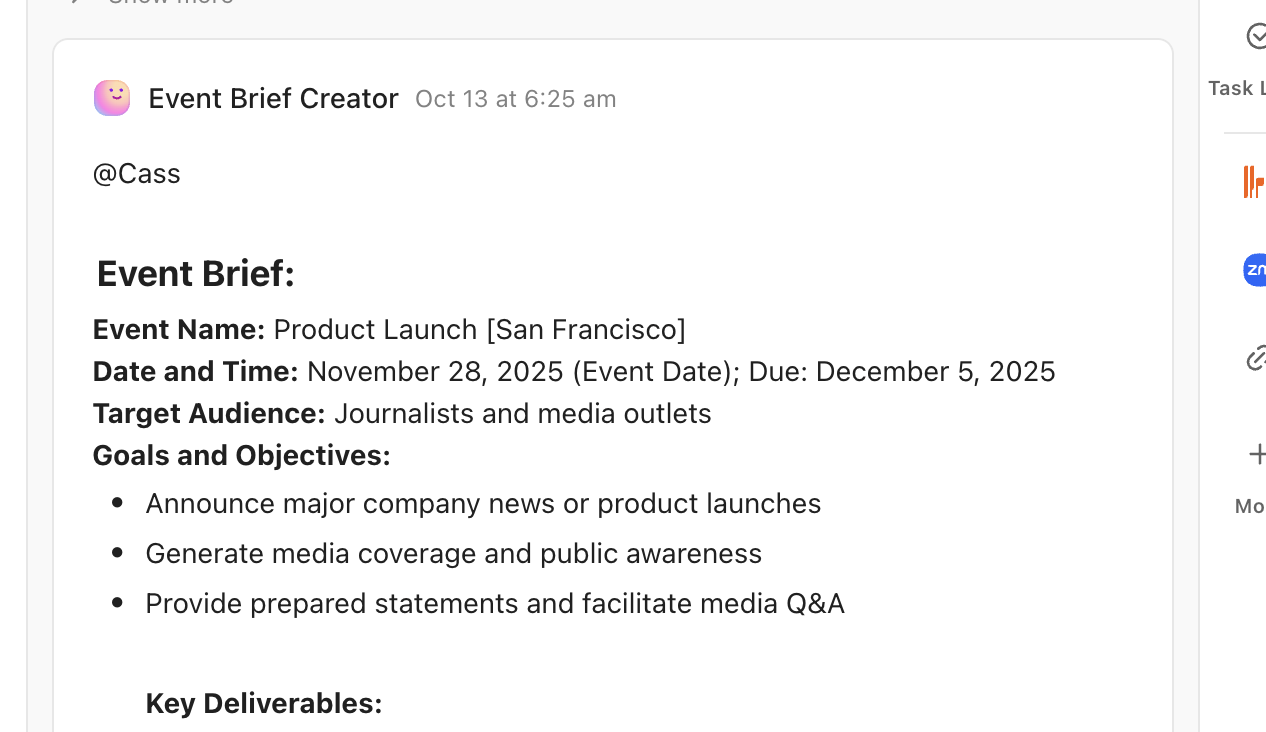
📌 For example, an Event Brief Creator Agent can automatically generate a summary of the event’s key details, making it easy for the assigned owner to get up to speed.
Now it’s time to market your event and collect registrations. This involves creating and scheduling promotional content, building landing pages, and tracking responses.
We’ve already shown you the example of a Content Creator Agent to help with promotions. And ClickUp Forms to capture RSVPs in one place and trigger follow-ups.
💡 Pro Tip: Set up audience signals and predictive scoring for higher event ROI.
Capture behavioral signals (form answers, page visits, prior attendance) in Custom Fields. Feed them into a simple predictive lead score (e.g., points for role, company size, session interest). Use Automations to route high-score leads to Sales or trigger VIP invites.
On event day, coordination is everything. You need to ensure everyone knows their role and the schedule is clear.
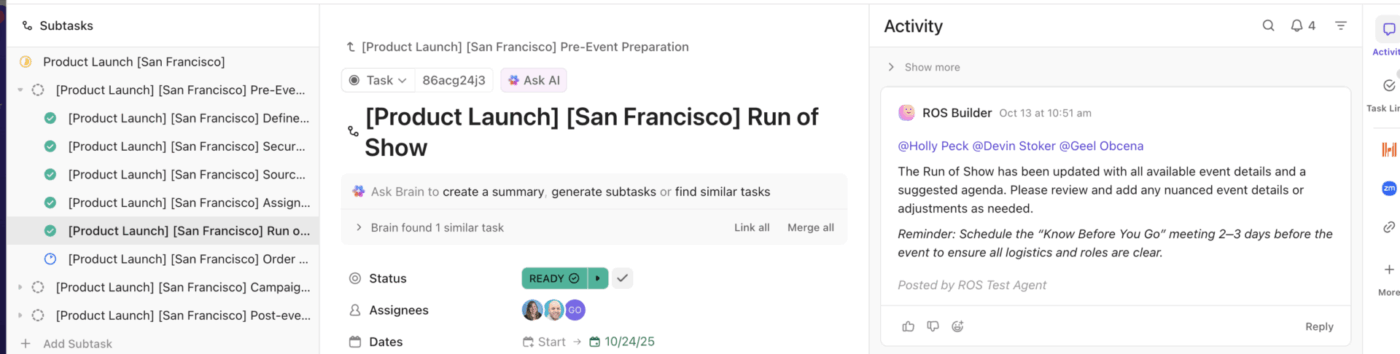
You can create a Run of Show Agent in ClickUp. This agent generates a detailed schedule for the event, including timing, activities, and assigned leads.
And when you need to communicate with your team in real time? Use @mentions in ClickUp Chat or hop on quick Sync Ups to keep things moving fast!

📚 Also Read: Run of Show Templates
After the event, it’s crucial to gather feedback, share resources, and nurture leads for future engagement.
Trigger a post-event form when status changes to “Post-Event.”
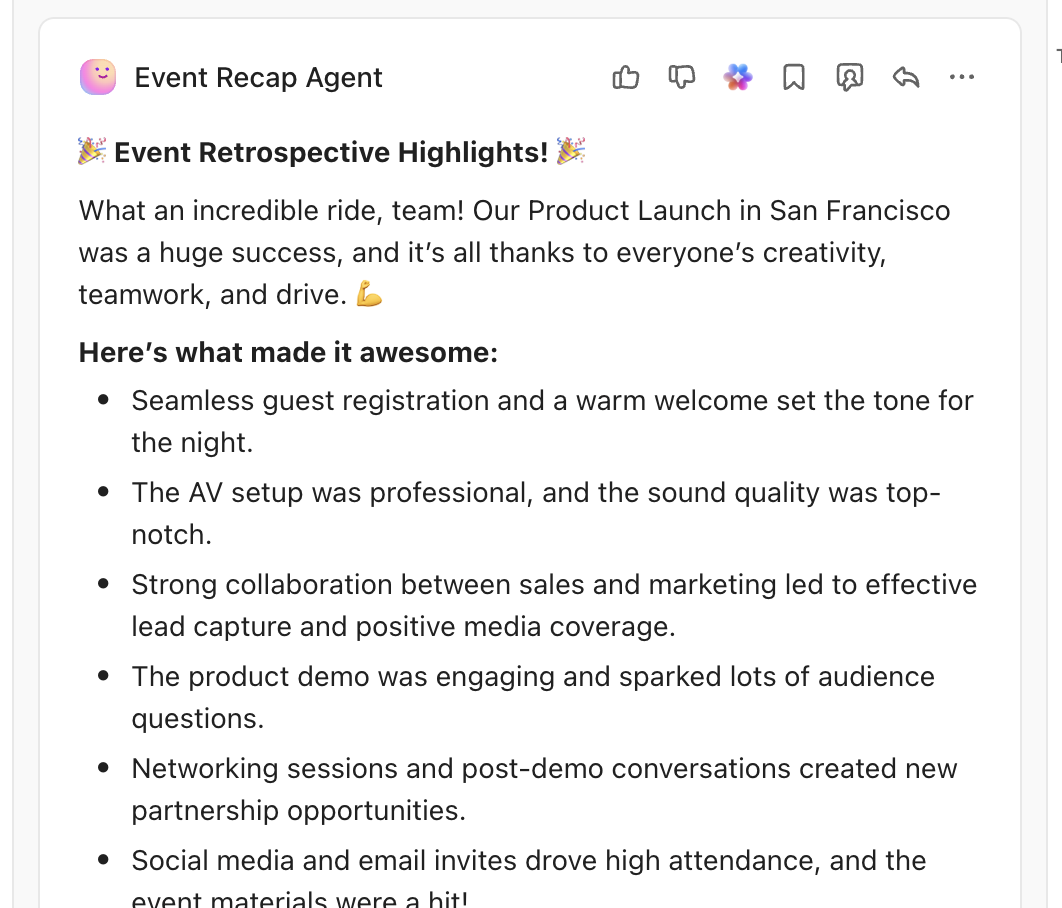
Let an Event Recap Agent analyze responses, score sentiment, and create follow-up tasks (testimonials, nurture sequences, sales outreach) in ClickUp based on the rules you define.
You can also build a ClickUp Dashboard showing funnel metrics: registrations by source, conversion rates between stages, attendance vs RSVPs, and pipeline attributed to the event. Review these after every event and tweak templates to improve outcomes.
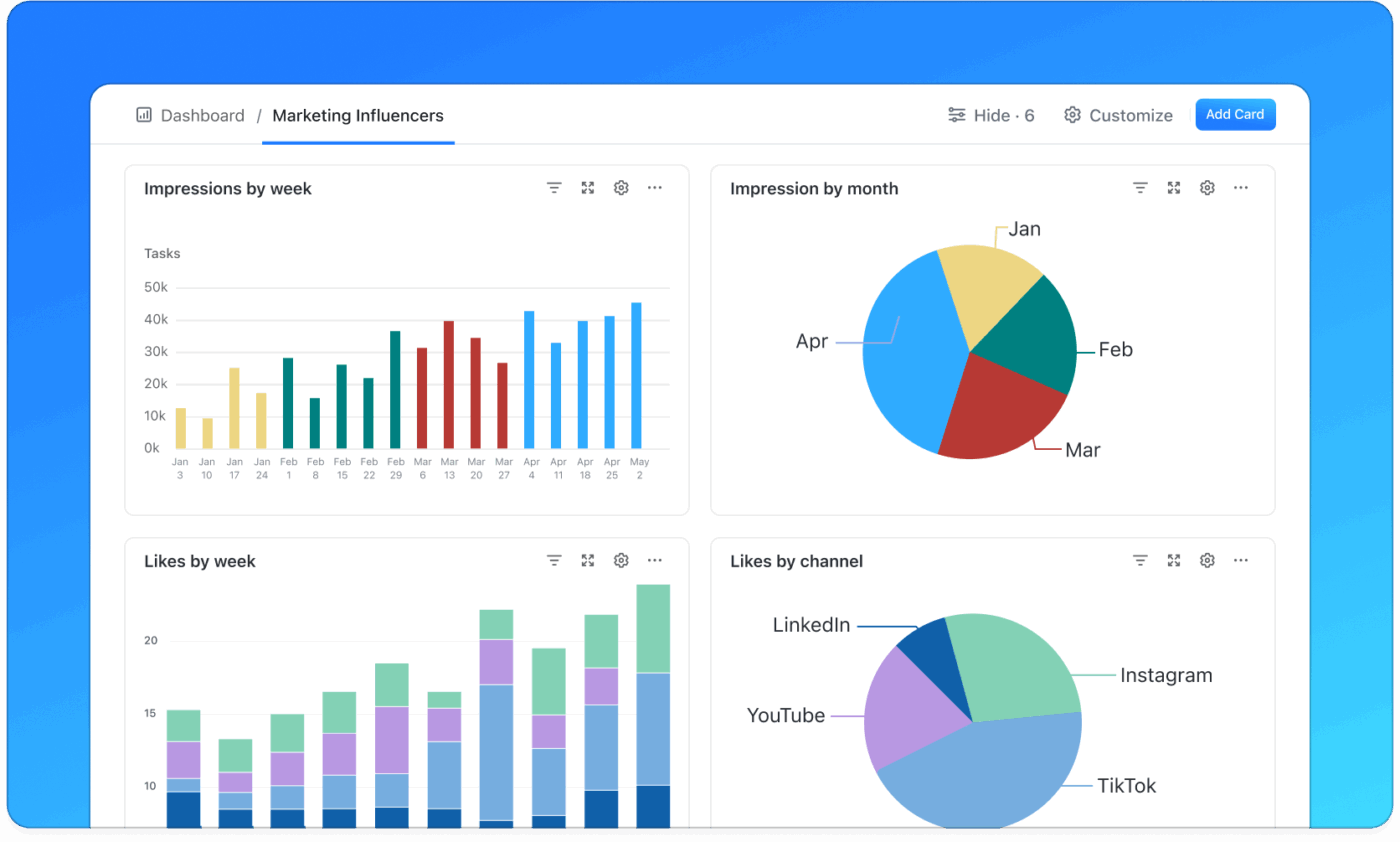
Another way is to use ClickUp’s Campaign Tracking Template to coordinate your email, social, and event campaigns, measure performance, and spot bottlenecks early. This makes it easier to keep campaigns aligned and optimize for better results.
And that’s the blueprint for an AI-driven event funnel that’s easy for your whole team to understand and use!
AI isn’t magic. It does help scale personalization and automation. But it also has practical, ethical and technical limits. Every event team should plan for them up front.
These are Achilles’ heels. AI models are only as good as the data fed into them. Fragmented attendee records, inconsistent tags, and missing CRM fields produce weak predictions and wrong segmentations.
👀 Did You Know? Academic reviews and industry research show integration and messy data as leading causes of poor AI outcomes.
Accuracy matters for brand trust. Generative models can draft great copy or summarize feedback. But they can also produce misleading claims. That’s why human review is non-negotiable.
If historical data reflects skewed patterns, AI amplifies them. For example, prioritizing introductions to similar profiles reduces diversity. Test for bias actively to avoid ethical and legal exposure.
Personalization needs cross-channel data. Regulations like GDPR require explicit consent about what you collect and how you use it.
Misplaced expectations can hurt. AI should amplify human planners, not replace them. Complex logistics, on-the-ground decisions, and vendor relationships still need human oversight. Treat AI as an assistant that reduces repetitive work. Design workflows where humans own final decisions.
Here are examples from real companies using AI to improve event results in practical ways:
Web Summit is one of the world’s largest global tech conferences. It brings together startups, investors, and enterprise leaders.
Web Summit uses AI inside its event app to match attendees, speakers, and investors. The system looks at profiles, interests, and past activity. It then suggests the most relevant people to meet. This has led to tens of thousands of one-to-one meetings. Instead of random networking, attendees get real business conversations that often turn into deals.
Agora is a real-time engagement platform used by developers and product teams building live audio and video experiences.
It ran its RTE (Real-Time Engagagement) 2022 event using Bizzabo’s AI-powered platform. The event reached around 2,650 in-person and virtual attendees. Organizers used analytics and targeted messages to keep both groups engaged. Sessions, reminders, and follow-ups were adjusted based on behavior. This shows how AI-powered platforms help hybrid events feel more personal and more effective.
Google I/O uses developer profiles to personalize the event experience. Attendees select their interests—such as tools, platforms, or programming languages—and Google uses this data to recommend sessions and content. This powers “My I/O,” a custom agenda that helps people find what’s most relevant to them.
AI is already reshaping how events are planned, promoted, and measured. The next months will decide which capabilities become standard expectations and which remain experimental. This is where the industry is heading:
AI adoption will grow—but not evenly. While most marketing leaders plan to invest in AI, only a small number of teams use it today to improve the attendee experience. Many are still running small pilots. The teams that turn these pilots into everyday workflows will see the biggest gains.
Major event project management platforms now offer AI features. Recommendation engines, session matching, and personalized agendas are the standrad for large events.
These features help attendees find the right people and sessions faster. Events that don’t offer this level of guidance will fall behind.
Event measurement will get smarter. AI helps connect attendance and engagement data to pipeline and revenue. This makes it easier to see which events actually worked and adjust budgets between events. More detailed, predictive reporting is already rolling out across major platforms
AI works best with clean data, strong integrations, and human review. Messy systems and privacy risks can slow progress. Teams that invest in clean, consented data and solid workflows will get better results.
Finally, the event planner’s role will change. As AI handles repetitive work, planners will focus more on strategy, curation, and partnerships. Industry reports already point to this shift. Recommendations include investment in people + AI governance rather than pure headcount.
The bottom line? AI in event marketing is shifting from novelty to infrastructure. Teams that invest early in data, measurable pilots, and human review will transform events into predictable revenue channels.
Events work best when they run as a system, not a scramble.
An AI-driven event marketing funnel helps you reach the right people, guide them through the journey, and measure real business impact without extra manual work.
When your data and workflows live in one place, AI can move faster and help teams make smarter decisions. That’s where ClickUp fits in naturally.
ClickUp combines AI, automation, and reporting in a single workspace. You can plan events, promote them, run them smoothly, and review results without jumping between tools.
The result is fewer drop-offs, clearer ROI, and events that truly move the needle.
If you’re building a high ROI, AI-first event marketing funnel, start for free with ClickUp!
Tools like Cvent and Bizzabo help with registration and attendee data, while marketing platforms such as HubSpot automate emails and lead nurturing. ClickUp brings these workflows together by automating tasks, generating promo content, and tracking progress in one workspace.
Events like Web Summit and Salesforce Dreamforce use AI for matchmaking and session recommendations. These features help attendees find relevant content and connections, which leads to higher engagement and stronger business outcomes.
Yes. AI uses attendee data such as role, interests, and past behavior to tailor emails, landing pages, session recommendations, and follow-ups. This makes communication more relevant and increases registration and engagement rates.
Track registrations, attendance, engagement, and follow-up actions in one system. AI helps link these signals to pipeline and revenue, so you can see which events and activities drove real business results.

© 2026 ClickUp

There’s an easier way. Try a free AI Agent in ClickUp that actually does the work for you—set up in minutes, save hours every week.