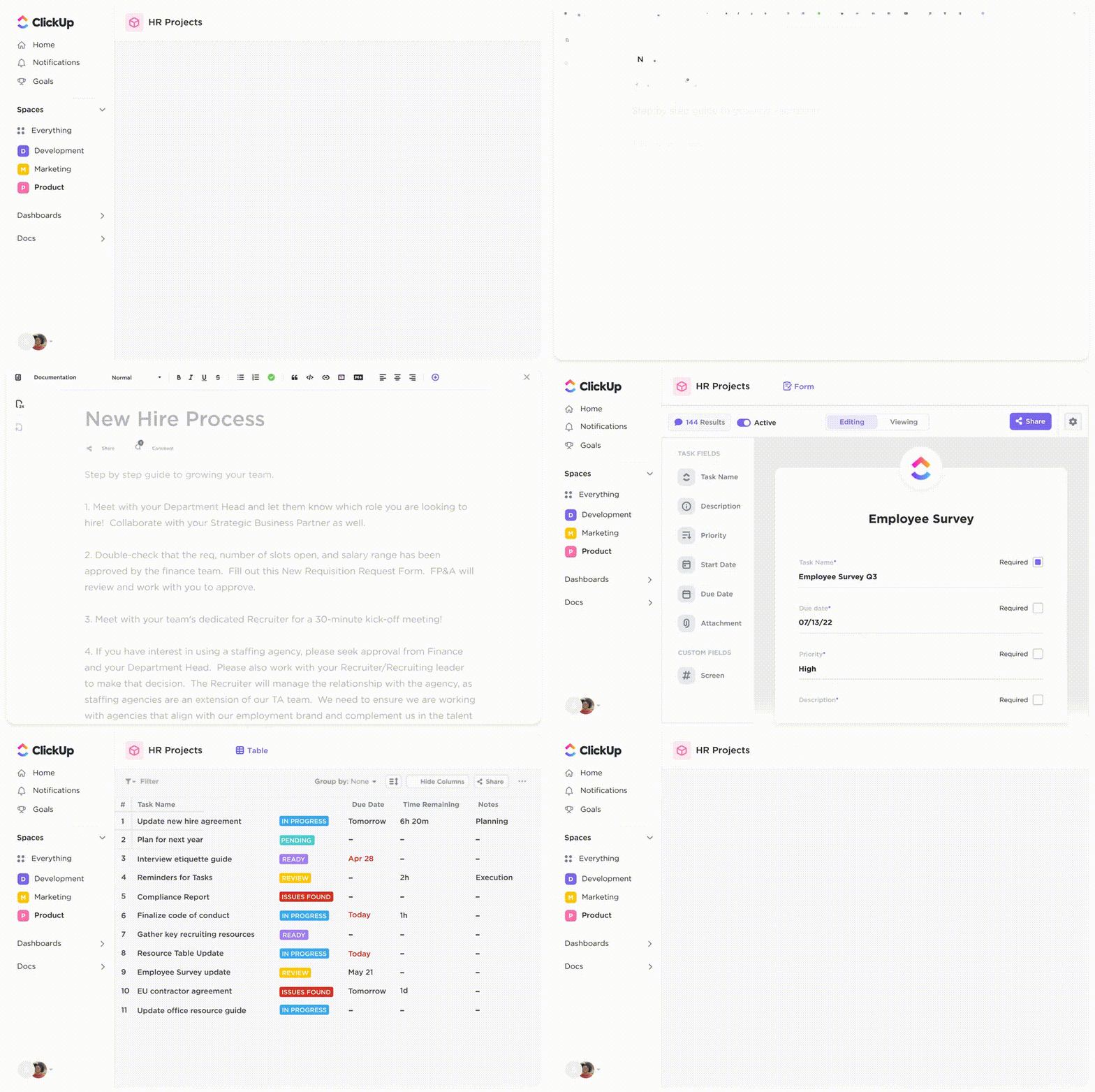

Sorry, there were no results found for “”
Sorry, there were no results found for “”
Sorry, there were no results found for “”
SOP, or standard operating procedure, is what enables a business to scale over the long term by helping to create a standardized approach to common tasks and activities.
SOP software provides a centralized platform for creating, managing, and distributing standard operating procedures, making them easily accessible across departments.
The right SOP management software helps document processes, reduce human error, and maintain continuous improvement as teams grow.
This article’ll explore the best standard operating procedure software available. These will help you standardize your operations and build a reliable process documentation system with written instructions.
Here’s a quick comparison of the top SOP software solutions to help you choose the right fit. We’ll look at their key features, pricing, and user ratings.
| Tool | Best For | Key Features | Pricing* | Ratings |
| ClickUp | All-in-one SOP creation and collaboration for teams of all sizes | Structured SOPs, task linking, real-time editing, version control, automations | Free plan available; Custom pricing available for enterprises | G2: 4.7/5 Capterra: 4.6/5 |
| Trainual | Structured onboarding and process training for large teams | Role-based SOPs, multimedia support, progress tracking, built-in tests | No free plan; Paid plans start from $249/month per user | G2: 4.7/5 Capterra: 4.8/5 |
| Scribe | SOP generation from real-time workflows for small teams | Screen capture, step-by-step guide creation, annotations, embed/share options | Free plan available; Paid plans start from $15/month per user | G2: 4.8/5 Capterra: Not enough reviews |
| Process Street | Recurring workflows and SOP execution for mid-sized teams | Dynamic checklists, conditional logic, task assignments, AI workflows, approvals | Custom pricing (Free trial available) | G2: 4.6/5 Capterra: 4.7/5 |
| Document360 | AI-powered searchable SOPs and knowledge base for large businesses | Version control, markdown/WYSIWYG editing, multilingual support, Audio Assist, reusable content blocks | Custom pricing(Free trial available) | G2: 4.7/5 Capterra: 4.7/5 |
| Tallyfy | SOP execution with approvals and automation for small or mid-sized teams | Role-based assignments, approval flows, escalation rules, workflow tracking | No free plan; Paid plans start from $5/month per user | G2: Not enough reviews Capterra: Not enough reviews |
| SweetProcess | Simplifying SOPs for growing teams | Clean UI, image/video checklists, revision history, internal and public SOP management | Free trial available; Paid plans start from $99/month per user | G2: Not enough reviews Capterra: Not enough reviews |
| Coassemble | SOPs as interactive team training modules for large teams | Course builder, SOP-linked lessons, progress tracking, quizzes, centralized updates | Free plan available; Paid plans start from $30/month per user | G2: 4.6/5 Capterra: 4.5/5 |
| Dozuki | Frontline SOP training and digital work guides for large manufacturing teams | Rich media work instructions, skills tracking, multilingual support, compliance workflows | Custom pricing | G2: 4.4 Capterra: Not enough reviews |
| Notion | AI-powered documentation and project collaboration for small to large teams | AI writing, templates, database views, team wikis, task checklists | Free plan available; Paid plans starting from $10/month per user | G2: 4.7/5 Capterra: 4.7/5 |
*Please check the tool website for the latest pricing
The right SOP software should make it easy to create, manage, and scale fully customizable standard operating procedures without adding complexity.
To achieve this, look for standard operating procedure (SOP) management software that offers:
The right SOP software tool should also have integrations with your regular work software, such as Microsoft Teams, CRM tools, and learning systems. Bonus points if it comes with dedicated support, security, scalability, and custom pricing options.
If your team still relies on informal knowledge to run daily operations, these best SOP software tools will help you easily build a centralized knowledge base.
Our editorial team follows a transparent, research-backed, and vendor-neutral process, so you can trust that our recommendations are based on real product value.
Here’s a detailed rundown of how we review software at ClickUp.

When processes live in scattered documents or exist only in people’s heads, consistency takes a hit.
That’s where ClickUp steps in—not just as a documentation tool, but as a central hub for creating and sharing your SOPs across the organization ✅.
Whether you’re onboarding new hires, standardizing team checklists, or refining multi-departmental workflows, ClickUp provides the structure and flexibility to keep everyone aligned.

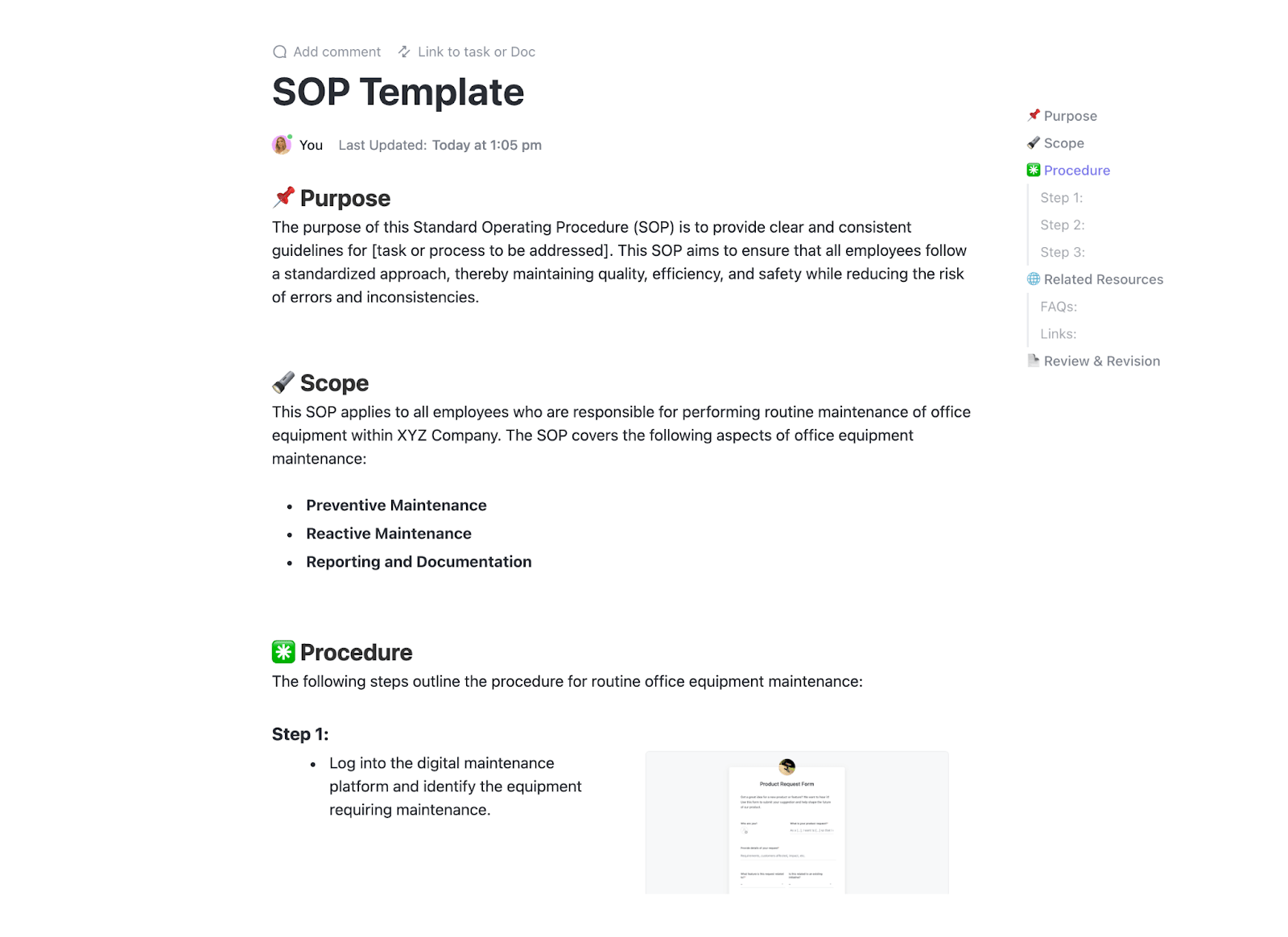
Teams can create SOPs in ClickUp from scratch or select from pre-existing SOP templates.
Collaborative ClickUp Docs, which allow for nested pages, tables, images, and links to tasks, let teams develop detailed step-by-step guides.
ClickUp’s live collaboration feature makes it easy for multiple users to work on SOPs at the same time. With live cursors, in-context comments, and task assignments, teams can make updates in real time.
Creating SOPs for the first time? ClickUp’s SOP Template is ideal for businesses building their first set of procedures.
The template helps standardize document management workflows, improve collaboration, and reduce training costs by providing teams with a structured, repeatable framework for documenting processes.
You can also explore the ClickUp Standard Operation Procedures Template for cross-functional projects, or the ClickUp HR SOP Template for HR-specific use cases.
Wondering how you can keep track of all your SOP documents? ClickUp’s AI Knowledge Management centralizes all your company knowledge in a searchable Docs Hub with filters, tags, and permissions.
With version control, teams can see what changed, when, and by whom. You can restore older versions or compare edits, ensuring transparency and process consistency when updating your SOPs.

ClickUp centralized our day-to-day operations, SOPs, and promoted collaboration across the department.
This is what Briettny Curtner, Program Manager at Utah Valley University, said about ClickUp.
📖 Also Read: Best Work Instructions Software
And that’s not all. ClickUp Brain helps you turn ideas into action with AI-powered document generation and inline writing assistance.
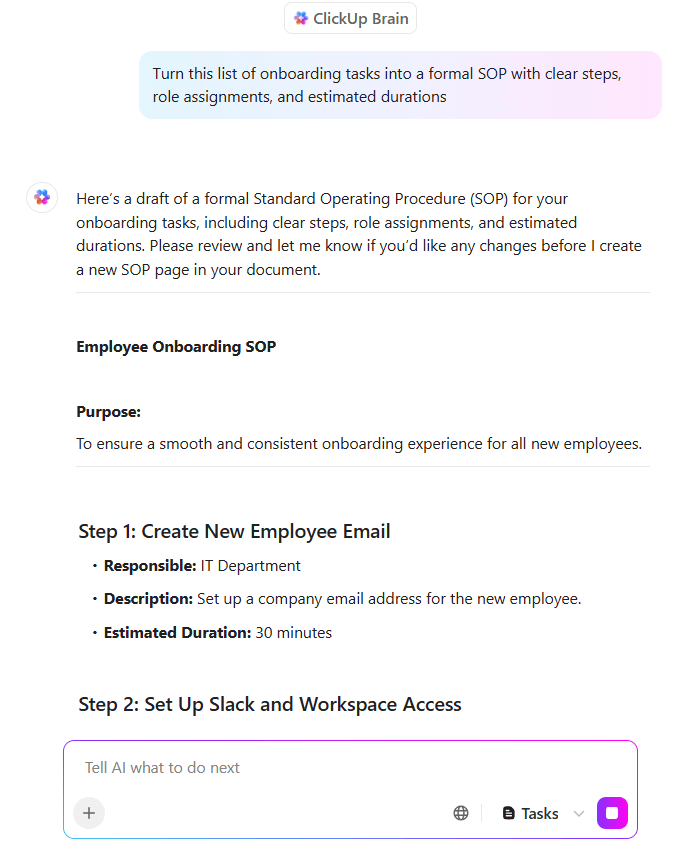
This AI assistant can summarize lengthy SOPs, suggest process steps, or rephrase instructions.
In addition, you can use ClickUp’s AI Agents to monitor task progress, answer SOP-related questions, and even update SOPs when key details change. This way, your team doesn’t waste time chasing updates or rewriting documents manually.
💡 Pro Tip: Tired of wasting hours updating docs manually? Using AI for documentation streamlines your processes and cuts hours of effort.

ClickUp Automations help eliminate manual steps in SOP execution by triggering actions.
For example, when an SOP for client onboarding reaches the “Review Completed” stage, ClickUp can automatically assign the next task to the account manager and send a follow-up reminder.
Additionally, you have access to over 100 automations to streamline SOP-driven actions, such as assigning tasks, updating statuses, and sending reminders.
This G2 review noted:
We especially appreciate the built-in docs, time tracking, and automation tools that help us reduce context switching and manual work. The hierarchy structure (Spaces, Folders, Lists, Tasks, and Subtasks) makes it easy to keep everything organized without feeling overwhelmed.
💡 Pro Tip: If your team is confused about next steps, it’s likely your processes, not your people. In How to Write Standard Operating Procedures (SOPs), learn how to create step-by-step guides that remove guesswork and boost consistency.

SOPs often exist, but teams still ask the same questions. Why?
Because those SOPs aren’t connected to roles, tracked for completion, or easy to access.
Trainual fixes that by turning your documentation into interactive, role-based training modules with built-in tests and progress tracking.
Trainual’s structured system of ‘Subjects’ and ‘Topics’ allows you to create, categorize, and assign SOPs by role or department. For example, you can build a complete sales onboarding process with embedded videos, images, and tests, then assign it to all new hires in that department.
The centralized knowledge base and AI search ensure that employees can get quick answers to any process or policy-related questions.
This G2 review captured:
By turning informal knowledge into formal, structured content, we’ve been able to create repeatable processes that support consistency and quality across the organization.

Writing detailed SOPs can slow teams down, especially when processes change often or are done instinctively.
Scribe removes this bottleneck by automatically capturing your screen, clicks, and keystrokes as you complete a task, then turning that into a step-by-step guide.
With Scribe’s browser or desktop extension, you can walk through a process once and let the process management platform generate a shareable, editable guide with screenshots and written steps.
The paid variants of the tool let you redact sections of your screenshots to protect sensitive information.
This Capterra review highlighted:
Many of my job duties are easier. I create SOPs for various job titles. I used to dread every time a new one came up. With Scribe, it is so easy and fun.
🧠 Did You Know: 66% of organizations are already piloting automation, yet many miss out on the simple workflow changes that can save hours every week. The blog Workflow Automation Examples and Use Cases breaks down how to make those changes with real tools and examples.

Even well-written SOPs fall flat when teams struggle to follow them consistently.
Process Street solves this by combining SOP documentation with action.
With this tool, every SOP becomes a dynamic checklist where you can assign tasks, set deadlines, and include rich media like videos or documents. Whether it’s employee onboarding or client handoffs, each run of the workflow becomes easily tracked and optimized.
In a rush? Use the AI Workflow Generator to quickly create workflows suited to your specific requirements, with tasks, due dates, and more.
This G2 review shared:
Process Street is essential to how we deliver repeatable value. It lets us standardize, scale, and track complex workflows
📮 ClickUp Insight: The average professional spends 30+ minutes a day searching for work-related information—that’s over 120 hours a year lost to digging through emails, Slack threads, and scattered files. An intelligent AI assistant embedded in your workspace can change that. Enter ClickUp Brain. It delivers instant insights and answers by surfacing the right documents, conversations, and task details in seconds—so you can stop searching and start working.
💫 Real Results: Teams like QubicaAMF reclaimed 5+ hours weekly using ClickUp—that’s over 250 hours annually per person—by eliminating outdated knowledge management processes. Imagine what your team could create with an extra week of productivity every quarter!”

Poor search and a lack of version control can quickly lead to outdated or duplicated processes, especially when managing internal policies, training materials, and compliance documents across departments.
Document360 solves this by offering a powerful AI-powered documentation platform that makes it easy to organize, search, and update SOPs with precision.
Ideal both for internal teams and external stakeholders, it provides a clean, searchable interface and rich authoring tools that make maintaining up-to-date procedures effortless.
With granular access controls, version history, search engine optimization, and powerful categorization, Document360 ensures SOPs are easy to find, follow, and maintain across the organization.
This Capterra review noted:
The ability to customize the knowledge base to fit our brands and needs is a significant advantage. It offers a wide range of features, including version control and collaborative editing.
📖 Also Read: The Best Process Improvement Methodologies

For teams stuck manually chasing approvals and tracking repetitive steps, SOPs often become a bottleneck instead of a solution.
Tallyfy tackles this by turning your SOPs into live, trackable workflows with automation built in. It is ideal for non-technical teams that wish to standardize and centralize their processes and workflows.
This AI-powered, no‑code SOP and workflow management platform can also double as an SOP generator that is especially useful for processes that require stakeholder sign-offs, task dependencies, and time-sensitive routing.
This G2 review noted:
I love that Tallyfy lets me map out complex processes into simple, actionable, repeatable steps, then quickly deploy a new process and ensure no steps are missed, while being able to assign steps of the process to different people.
✨ Fun Fact: The original McDonald’s kitchen was designed like a factory line, and its SOPs were so precise that workers practiced with chalk outlines of where to stand.

For many growing teams, SOPs often start as scattered docs or personal notes, making it hard to utilize company knowledge effectively.
SweetProcess steps in to streamline how businesses document, update, and follow their SOPs in one place.
With collaborative editing, version control, and real-time updates, SweetProcess ensures that SOPs stay accurate and accessible, making it easy for teams to follow procedures, train new employees, and maintain operational efficiency as they scale.
The document automation software also supports single sign-on (SSO) and integrates with over 1,000 apps via Zapier, helping teams automate workflows and maintain security as they scale.
This G2 review highlighted:
SweetProcess’s best features are its centralized SOP creation and organization, task delegation and progress tracking capabilities, and notification reminders. These features help businesses streamline processes, improve workflow, and hold team members accountable.
📖 Also Read: Best AI Writing Tools for Content

For teams that struggle to get employees to use and retain SOPs, Coassemble bridges the gap between documentation and engagement.
Instead of handing over a static PDF or shared doc, you can turn SOPs into bite-sized, interactive training modules.
This makes it easier to onboard new hires, standardize procedures, and reduce compliance risks. Growing teams benefit from having repeatable, trackable processes that feel more like learning experiences than documents.
The integrated AI in the platform also lets you generate and refine content in a few minutes.
This Capterra review noted:
It’s easy to create interactive trainings. Users can customize the look and feel of the training. It’s also easy to integrate the training with apps you use every day (Gmail, Slack, and Mailchimp).

Frontline teams face uncertainty when SOPs reside in outdated manuals.
Dozuki solves this by turning standard procedures into rich, accessible digital work instructions. It’s purpose-built for manufacturing and industrial settings where consistency, compliance, and real-time updates are essential.
With tools for training, multilingual support, and integrated quality checks, Dozuki enables faster onboarding and better performance across shifts and sites.
Moreover, by enabling workers to share feedback on the quality of instructions, the tool helps companies continuously improve their documentation.
This G2 review featured:
Dozuki has made it a point to have dedicated resources available for our team to best utilize their software and to fit our business. That alone has been the best experience next to having software that is intuitive, and the ease of use has enabled our team to create standard work.
📖 Also Read: Free Runbook Templates for Streamlining Processes

Most platforms either help you store knowledge or get work done, but Notion bridges both.
It’s an all-in-one workspace where teams can write, plan, manage projects, create training programs, and automate workflows. Plus, you can organize internal knowledge through knowledge-sharing features like wikis, databases, and SOPs.
Notion AI enhances this further by turning scattered information into smart, actionable content: meeting notes, sprint plans, research insights, and more.
This G2 review shared:
I like using the Notion AI tool to find tasks and documents. It helps me draft diplomatic communications and is a whiz at creating SOP documents. Big win.
Here are three additional SOP documentation software tools that can be helpful for you
✨ Fun Fact: Disney employees are trained to point with two fingers (never one) to avoid being perceived as rude in certain cultures. Disney’s park operations SOPs codify this practice for all interactions with guests.
Most SOP tools help you write things down. But when it’s time to actually follow those processes—assign tasks, track steps, adapt to change—they fall short.
ClickUp changes that. It helps create standard operating procedures in the same management system where work happens. Every documented process becomes part of a live workflow.
ClickUp also comes with key features, such as automation, task ownership, version history, and team-wide visibility, and helps implement standard operating procedures.
Whether you’re onboarding new hires, managing compliance, or scaling operations, ClickUp helps you go from confusion and repetitive tasks to team clarity and success.
Ready to turn SOPs into action? Sign up on ClickUp for free.

Arya P Dinesh
Max 27min read

Manasi Nair
Max 27min read
Manasi Nair
Max 32min read

© 2026 ClickUp