


Customer relationship management (CRM) software allows you to input client-related data into a single platform, ensuring that all your internal teams, such as sales, marketing, product, customer support, etc, are in sync. However, since each department has unique requirements, they can use specialized tools that address a specific business area.
In an ideal world, customer data should flow seamlessly between all your tools. Unfortunately, that is not the case with most businesses. Businesses are dealing with vast amounts of customer data coming in from multiple channels, and this needs to sync up so that companies can make data-driven decisions and improve customer experience.
If seamlessly connecting all your applications and platforms feels like a dream, CRM integrations are just what you need. This blog explains how CRM integrations work and looks at some of the top CRM integration tools that should be part of your technology stack.
5 Must-Have CRM Integrations for Your Business in 2024

 Summarize this article for me please
What are CRM Integrations?
CRM integration is the process of connecting your CRM software with third-party applications seamlessly. It helps you eliminate the need for constant toggling between systems and updates information in real-time. Thus, integrations allow you to create automatic pathways instead of manually updating or copy-pasting information in two tools.
For example, if you use a third-party tool to manage your email marketing, information like the number of emails delivered, opened, link clicks, and other metrics will be tracked by the email marketing tool. This is also crucial information for your sales team, as it helps your teams understand the level of engagement and interest. But here is the catch: all this data is currently in different tools, so your teams may get outdated or incomplete data.
With CRM integration, you can connect both tools and ensure that information is updated in real time. Thus, when an email marketing campaign is launched, results are automatically tracked and populated within your CRM system. This also syncs with each account or contact, ensuring your sales teams get complete information on customer engagement and can make accurate sales pitches.
Summarize this article for me pleaseBenefits of CRM Integrations
Integrating your CRM with other tools in your tech stack has several benefits. You can gain accurate and up-to-date information, no matter your tool or platform. Additionally, you gain the following benefits of CRM integration:
Improved efficiency
Say goodbye to repetitive tasks like manual data entry across different systems. Integrations automate data transfer, freeing your team for more strategic and impactful work. Using CRM integration, you can:
- Automatically capture new leads from your marketing campaigns and instantly populate this information in your CRM system, saving sales reps precious time
- Track prospects’ actions on your website, email campaigns, and other marketing channels into lead scores that your sales teams can use to prioritize which leads to go after first
- Close a deal and generate an invoice with a single click, accelerating payment cycles
- Enable support agents to instantly see a complete customer history, resulting in faster and more informed ticket resolutions
Accurate data
An integrated CRM helps ensure that data is always accurate and updated in real time. This enables you to avoid any errors or mismatches caused by your records not being in sync.
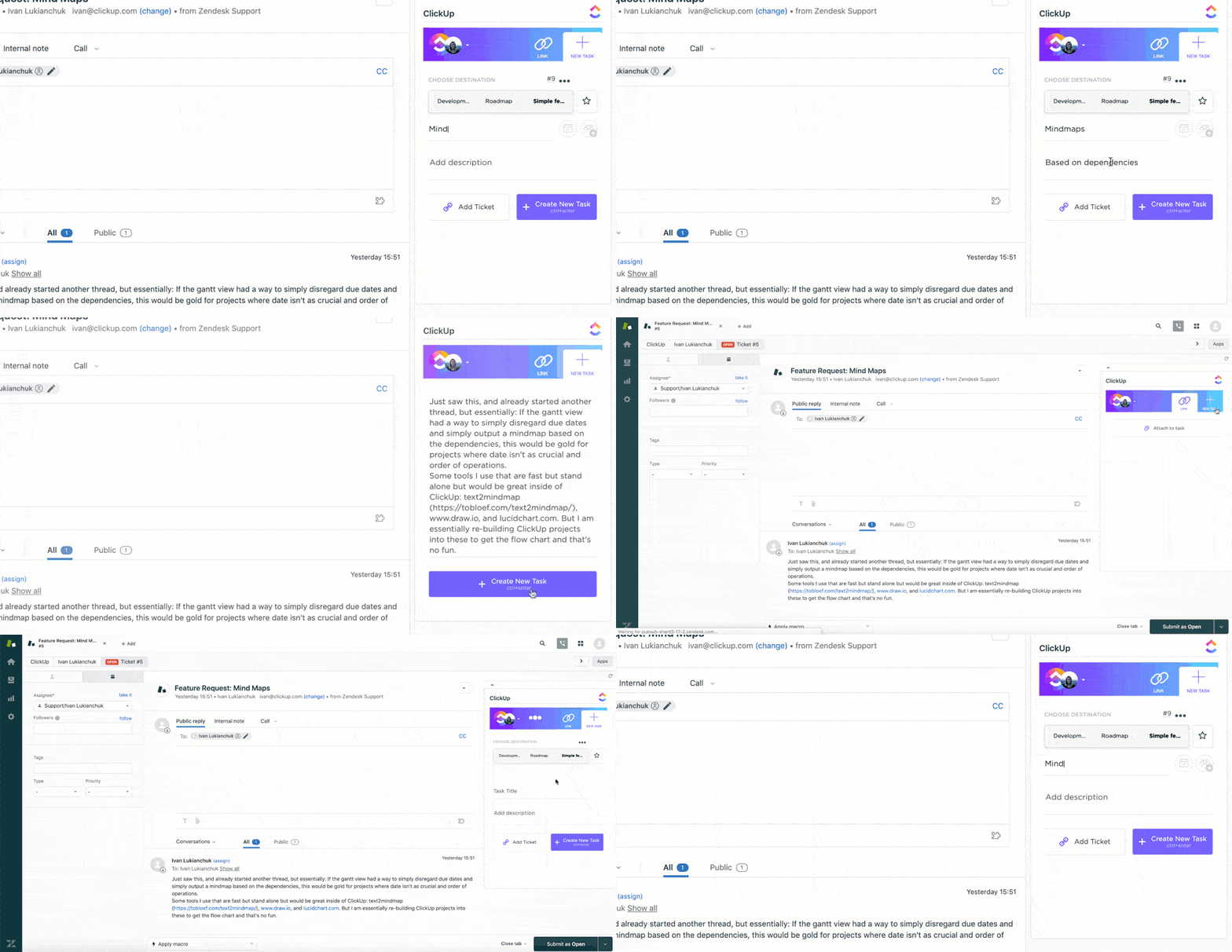
For example, if you are using Zendesk CRM for your ticketing and customer data management, you can use the ClickUp Zendesk Integration to:
- Assign tickets to support agents as tasks
- Automatically add ticket information to tasks, including assignees, due dates, and other information in one place
- Create subtasks within a Zendesk ticket for easy referencing
View links in ClickUp and Zendesk with real-time status updates
Improved customer experiences
When your CRM platform is integrated with your entire tech stack, you can always get up-to-date and complete information about your customer interactions. This helps you to:
- Personalize conversations since your sales reps have all the information they need
- Engage leads and prospects with relevant content based on their interests and behavior, keeping them warm and moving them closer to conversion
- Improve support functions as your teams can anticipate customer needs based on past interactions, offering timely and personalized assistance
By breaking down data silos and fostering a connected experience, you build stronger relationships, boost customer satisfaction, and, ultimately, drive loyalty and advocacy.
Enhanced collaboration
Since your crucial customer information no longer resides in data silos, each team can access data in real time, improving overall team communication and collaboration. Thus, your teams can collaborate and work together more effectively, helping you run your business more innovatively and streamline operations. Moreover, with all teams working from a single source of truth, teams can make decisions faster and with greater confidence.
Higher revenue generation
Seamless data updation ensures that your sales teams get accurate information and that this data is not lost in translation between multiple systems. This helps you to:
- Convert more leads using streamlined workflows, personalized outreach, and timely lead nurturing
- Gain all the relevant data at your fingertips, helping your sales reps close deals with confidence and speed
- Leverage Customer satisfaction (C-Sat) data to help predict customer churn and notify sales teams to address concerns, personalize communication, or take other steps to help salvage a valuable customer relationship
- Improve customer experiences, thereby creating more repeat buyers and enhancing opportunities to cross-sell or up-sell
Thus, CRM integrations catalyze sales growth, helping you acquire new customers, retain existing ones, and maximize your revenue potential.
Powerful data-driven insights
With all your data integrated into your CRM system, you gain valuable insights into your customer journey. This empowers you to track customer behavior across multiple channels and understand how they engage with your brand, which is vital for your marketing, sales, and support teams to function effectively.
You can use this customer information for further data analysis and to create robust funnel reports. This lets you gain insights into your sales, marketing, and support efficiency. You can pinpoint potential bottlenecks in your overall strategy.
With this data-driven approach to CRM, you can make informed decisions about your marketing, sales, and customer service strategies, ensuring they align with your audience and drive real results.
Summarize this article for me pleaseCommon CRM Challenges
CRM platforms are constantly evolving, as are communication channels, business tools, and other applications. These small changes can often hamper the seamless flow of information and lead to CRM integration challenges:
- Difference in technologies: Platforms that want to integrate could be based on technologies or protocols that don’t work well together. For example, tools could use different technologies (SOAP Vs. REST), transfer protocols (HTTP vs. HTTPS), digital certificates, authentication protocols (oAuth 2.0), and so on. This can create problems in information sharing and syncing
- Data security concerns: CRM integrations will fail if vendors don’t agree to information sharing. For example, if a billing tool doesn’t offer APIs or share information with other tools, citing concerns about sensitive information, it would not be possible to integrate the tool with a CRM.
The ideal way to prevent these issues from coming up is to check proactively whether the tools and CRM you opt for provide the required integrations.
For instance, a comprehensive CRM platform like HubSpot is ideal for multiple requirements, including marketing, sales, service, CMS, and operations. Plus, it offers seamless connectivity and several integrations, including a ClickUp and HubSpot integration. This allows you to:
- Sync data both ways using the two-way sync, ensuring that information is always up-to-date across both systems
- Use trigger workflows from either platform to ensure that any update in the customer journey, including those spanning multiple teams, gets updated in both systems automatically

Related: The best Hubspot integrations
Summarize this article for me pleaseTypes of CRM Integration
There are different types of tools and CRM integrations that you can opt for, depending on your specific needs and budget. To make this decision, it is vital to understand the types of CRM integration available.
Let us explore some key types of CRM integrations to help you supercharge your sales, marketing, and productivity requirements:
Email integrations
Email marketing software is crucial to any organization’s outreach and sales efforts. There were 4.26 billion email users in 2022, making email one of the most promising channels to connect with prospects, customers, and partners.
Integrating your email marketing solution with your CRM is a great option, as it will help you automatically capture and organize your customer information. Plus, you can track vital metrics like bounces, unsubscribes, and undelivered emails.
Email integration will allow you to automate processes such as sending welcome emails to new leads, triggering lead nurturing sequences based on the customer lifecycle journey and behavior, and personalizing sales proposals using CRM information.
Popular email integrations for CRMs include Gmail, Microsoft Outlook, Mailchimp, and Omnisend.
Calendar integrations
Want to supercharge your meetings and overall planning? Calendar integrations can help you do this by enabling you to track and organize appointments from within your CRM. You can schedule important customer events and automate processes like sending meeting invites, reminders, and notifications. This helps you avoid double-booking and get a holistic view of your team’s schedules when setting up meetings.
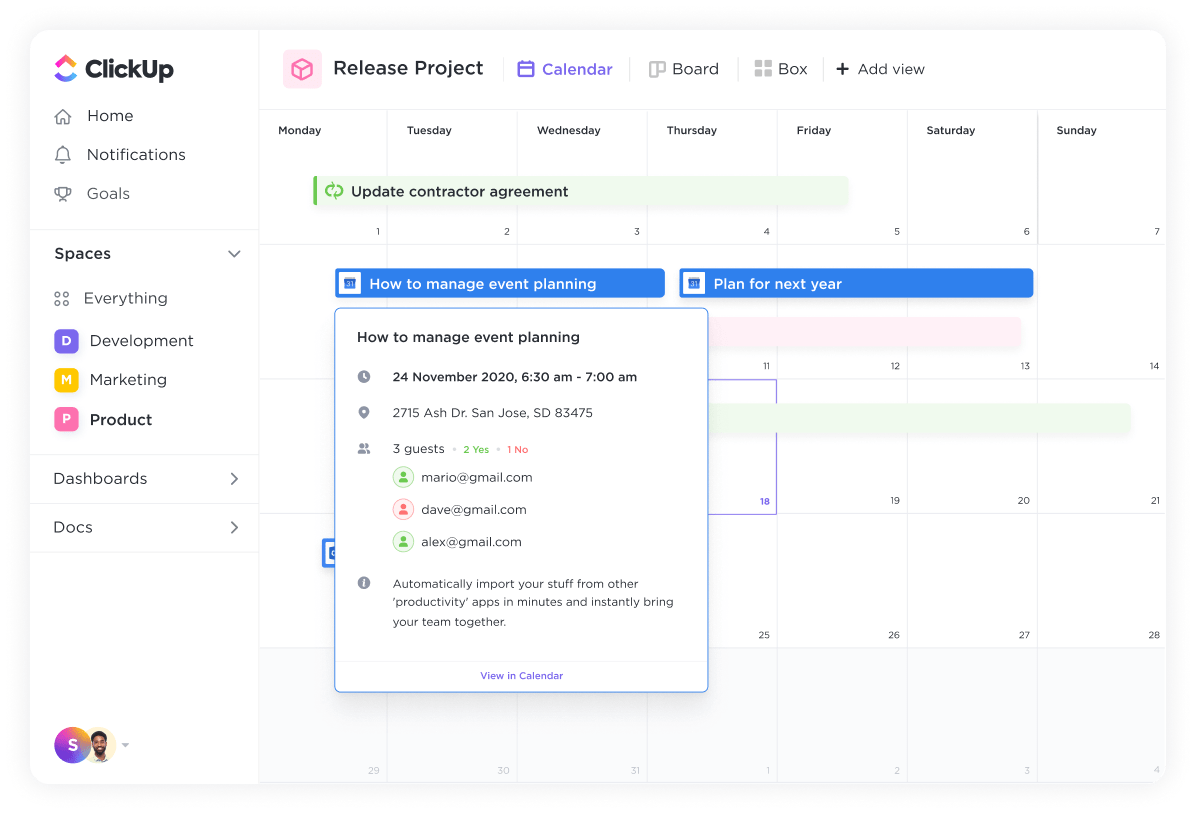
Popular Calendar integrations for CRMs include Google Calendar, Microsoft Office 365 Calendar, Calendly, and Notion Calendar.
Communication integrations
Want to offer real-time support to website visitors? Or have chat conversations with customers so they get the support they need? This can all be done using communication integrations. These integrations allow users to chat with your support teams or sales team using a familiar channel or app and automatically record these conversations in your CRM. Some of the best CRM integrations in this category include:
- Messenger platforms: You can integrate your CRM with messenger platforms like Slack, WhatsApp, Telegram, or others. This integration allows your customers to get support through convenient channels that they are familiar with and helps to build closer connections or keep track of support messages
- Phone: Integrate your phone system with your CRM or other tools to streamline communication and enhance call management
- Virtual meeting tools: Platforms like Zoom, Google Meet, and Microsoft Teams allow for face-to-face video conferencing, fostering a more personal connection with your customers. You can use this to conduct product demos, deliver remote presentations, or host webinars to gain new leads
- Live chat: Allow your customers to get answers to their specific queries by offering a live chat option with tools like Claude, Chatsonic, Jasper Chat, Zapier Chat, and others on your website or social media channels. Using these Live Chat CRM integrations, you can automatically sync these conversations with your CRM, helping your sales team gain valuable insights into the customer’s pain points and queries, which can be used for targeted marketing campaigns or outreach
Accounting integrations
Account management integrations focus on enhancing customer billing, invoicing, and other account-related activities. By integrating these with your CRM platform, you can automatically generate invoices for closed deals, sync customer payments with accounting software, and reconcile customer invoices and payments.
Examples include FreshBooks, Zero, QuickBooks, and Paycove.
Help desk integrations
Most businesses rely on helpdesk software for customer support and ticketing requirements. These solutions help sync your customer tickets with CRM platforms, allowing agents to access customer information and history and track past issues to provide a quick and satisfactory resolution.
Examples include Freshdesk, Zendesk, Salesforce, ServiceNow, and Microsoft Office Dynamics 365 Customer Service.
Summarize this article for me please5 Top CRM Integration Tools
CRM integrations are the secret sauce for efficient workflows, happy customers, and improved productivity. To help you pick the correct integration platform for your CRM tools, here are the top 5 CRM integration tools based on usability, features, and customer ratings.
1. ClickUp
ClickUp is an all-in-one productivity platform that offers all the key features required by sales and marketing teams to streamline customer relationship management processes. You can automate CRM tasks, keep track of your client timelines and projects, and visualize your sales pipeline in over 15+ unique views, including Calendar, List, Table, Kanban-like Board view, and more.
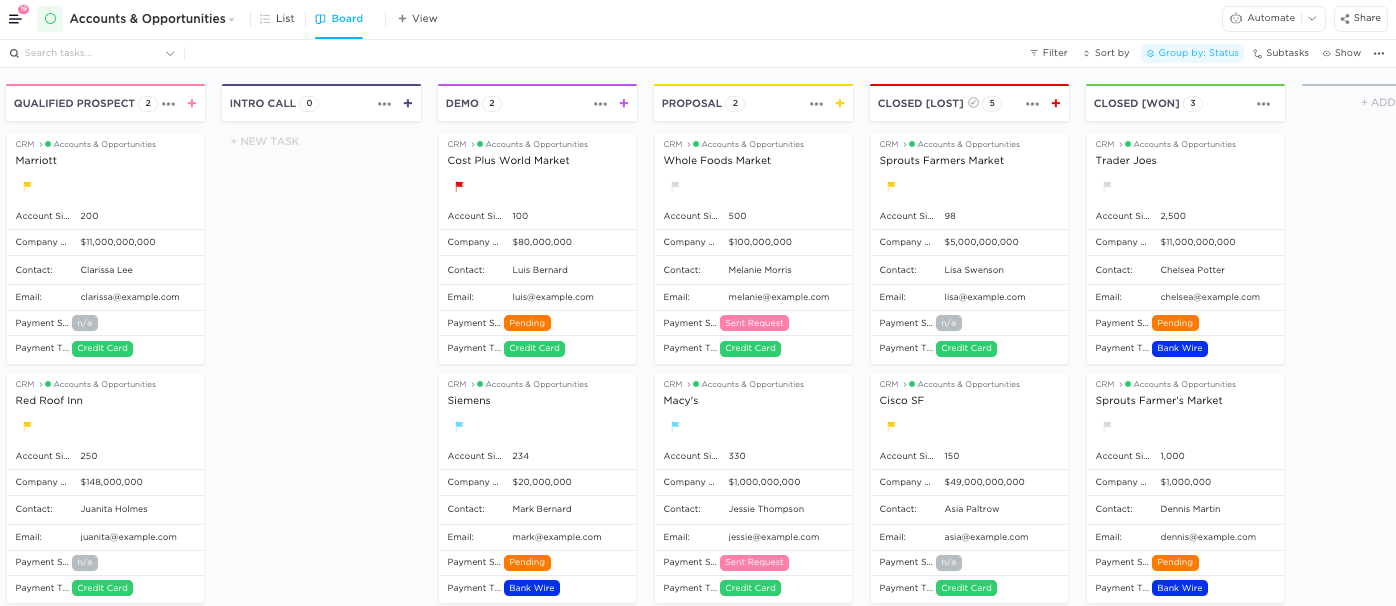
ClickUp also boasts an impressive array of integrations with popular CRMs like HubSpot, Zendesk, Salesforce, Zoho CRM, Pipedrive, Freshworks, and more.
ClickUp best features
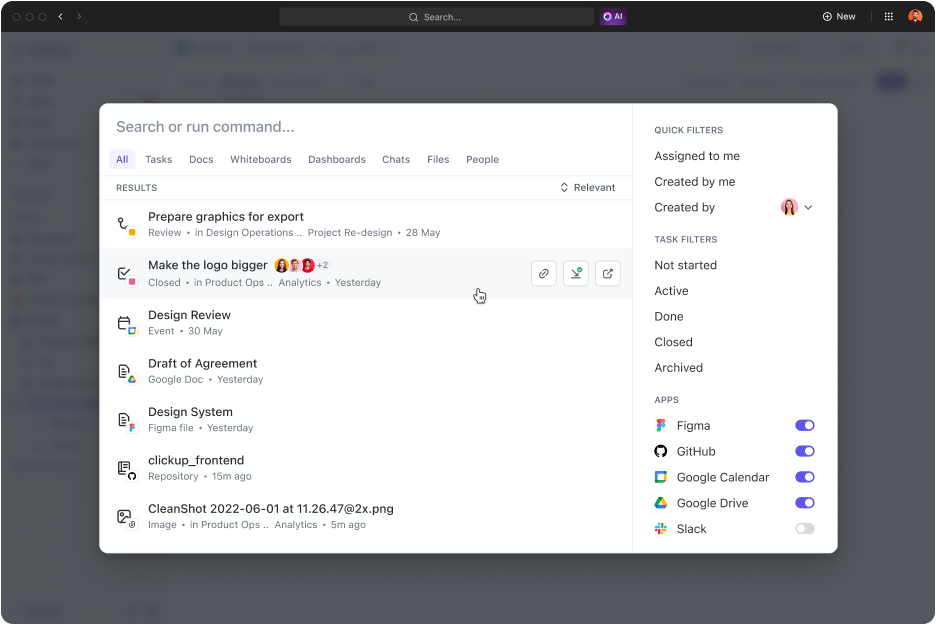
- Universal Search: Effortlessly find and manage integrations, monitor performance, and discover new tools
- Native Automation: Streamline workflows with automated tasks triggered by events in your CRM or integrated apps
- ClickUp Docs: Collaborate on documents within your CRM data, eliminating information silos and boosting communication
- Custom API Integrations: Build tailor-made connections for unique needs, ensuring a genuinely unified ecosystem
ClickUp limitations
- Due to the vast number of features, new users might take time to get comfortable
ClickUp pricing
- Free Forever
- Unlimited: $7/month per user
- Business: $12/month per user
- Enterprise: Contact for pricing
ClickUp ratings and reviews
- G2: 4.7/5 (9000+ reviews)
- Capterra: 4.6/5 (4000+ reviews)
2. Zapier
Zapier is a no-code automation tool that helps you create workflows and automate multiple processes. It allows you to integrate with 6000+ tools, and you can use it to perform multiple tasks such as exporting data into Google Sheets, contacting clients via Slack, sending emails via WooCommerce, and capturing all this information in a CRM.

Zapier best features
- Integrate with virtually any app you can imagine, catering to specific needs beyond standard options
- Create basic automation without technical expertise, ideal for users comfortable with visual workflows
- Explore numerous pre-built ‘Zaps’ for common integrations, saving time and effort
Zapier limitations
- Has a steep learning curve for non-tech users compared to its competitors
- Complex integrations for most tools on their APIs restrict the functionality and updates that you can gain from these tools
Zapier pricing
- Forever Free plan
- Starter: $29.99/month per user
- Professional: $73.50/month per user
- Team: $103.50/month
- Company: Custom pricing
Zapier ratings and reviews
- G2: 4.5/5 (1200+ reviews)
- Capterra: 4.7/5 (2000+ reviews)
3. Mulesoft Anypoint Platform
MuleSoft is an integration platform (IPaaS) that helps you use APIs, CRM integration, and automation to craft unique workflows and processes. The best part about this tool is the drag-and-drop interface with pre-built integrations and API management, and it is ideal for large-scale enterprises with complex integration requirements.

Mulesoft best features
- Ensure data protection and compliance for large organizations with its robust security features
- Benefit from the flexibility and scalability of having APIs as the central point of integration
- Enjoy the benefits of cloud computing, like scalability and ease of management
Mulesoft limitations
- Many developers found that it has a steep learning curve and isn’t value for money for the features it provides
- Tough to set up and limited capabilities compared to other tools on the list
Mulesoft pricing
Custom pricing based on API requests
Mulesoft ratings and reviews
- G2: 4.5/5 (600+ reviews)
- Capterra: 4.4/5 (500+ reviews)
4. Integrately
Integrately is an automation software with 8 million pre-built workflows for 1100+ apps. Using this platform, you can connect your CRM with multiple apps and platforms, simplifying complex tasks using one-click automation and workflows.

Integrately best features
- Clean and manipulate data seamlessly for consistent formats across integrated applications
- Create integrations without coding, simplifying the process for less technical users
- Ensure instant data updates across all connected systems
Integrately limitations
- The workflow builder is difficult to use
- Troubleshooting errors is difficult for non-technical folks
Integrately pricing
- Free plan
- Starter: $29.99/month
- Professional: $49/month
- Growth: $124/month
- Business: $299/month
Integrately ratings and reviews
- G2: 4.7/5 (500+ reviews)
- Capterra: Unavailable
5. Zendesk
Zendesk is a cloud-based customer support, sales, and services platform that can help you automate ticketing and support operations. This tool can help you manage customer communication through various channels, automate customer relationship management tasks, create auto-replies, manage knowledge bases, and streamline overall communication. Zendesk also offers integrations with 1600+ apps, including top CRM platforms like Zoho CRM, Dynamics 365 Connector, and Hubspot CRM.

Zendesk best features
- Offer robust ticketing, reporting, and self-service options for efficient customer support
- Connect effortlessly with popular CRM systems like HubSpot and Salesforce
- Unify support interactions with customer data in your CRM for a holistic view
Zendesk limitations
- The tool can be costly, especially for small or mid-size organizations
- Tough initial setup and learning curve, making it difficult to navigate without the assistance of an expert
- Offers only basic collaboration options, making it difficult to work smoothly with a larger team
Zendesk pricing
- Suite Team: Starts at $69/month per agent
- Suite Growth: Starts at $115/month per agent
- Suite Professional: Starts at $149/month per agent
- Suite Enterprise: Custom Pricing
Zendesk ratings and reviews
- G2: 4.3/5 (5000+ reviews)
- Capterra: 4.4/5 (3000+ reviews)
Summarize this article for me pleaseOptimize Your CRM Integrations with ClickUp
As the business landscape becomes more complex and multi-dimensional, the right CRM is crucial to help you keep track of all your operational tasks, be it marketing, sales, support, or product operations. CRM integration plays a pivotal role by connecting multiple tools and apps into a single platform, providing the proper context to every department.
However, maximizing your business potential goes beyond just business optimization. Each team member needs to perform their tasks effectively and ensure that they reflect overall results. To facilitate this process, ClickUp offers an all-in-one platform consolidating various tools and applications for streamlined collaboration.

Each team member can effectively prioritize tasks, manage their time efficiently, track projects, and understand customer requirements on a single platform using ClickUp’s ready-to-use CRM templates and integrations. Having all your apps and customer data in one place also has a crucial benefit: the ability to find information quickly.
With ClickUp Universal Search, find any file, document, query, or customer data with a simple search query. The search algorithm will scan every connected database and tool to help you get personalized and relevant results in the blink of an eye.
Sign up for a free trial to learn more about ClickUp CRM and take it for a spin. Start your journey today and experience the difference!
Summarize this article for me pleaseCommon FAQs
1. What is CRM API Integration?
CRM API integration connects your CRM system with other tools and platforms using Application Programming Interfaces (APIs). These APIs act as connectors, allowing data to flow back and forth seamlessly. With an easy data flow across multiple systems, businesses can improve marketing efforts and get real-time information.
2. What are ERP and CRM integration?
Enterprise Resource Planning (ERP) software manages your core business processes, including finance, inventory, and manufacturing. Conversely, Customer Relationship Management (CRM) software manages customer relationships and external stakeholders. By integrating both these systems, businesses can gain a unified view of the customer journey, from the prospect stage to order fulfillment.
3. Is it secure to integrate my CRM with other platforms?
Since data from one system will be shared with other systems, looking into APIs and the data-sharing requirements is essential. When choosing integration tools, it is always recommended to prioritize providers with robust security measures like data encryption, access controls, and regular security audits. ClickUp, for example, adheres to strict security protocols and industry standards to ensure data remains safe at all times.
4. How do I maintain data consistency across different integrated systems?
Data consistency is crucial for smooth operations and accurate insights. Look for data integration tools that offer seamless connectivity and automatically sync products. ClickUp’s two-way sync ensures that any changes made on one platform are automatically reflected in all connected applications, ensuring that the data in both systems is always up-to-date.
5. How can I measure the success of my CRM integrations?
To track the impact of your integrations, you should analyze metrics like lead-to-conversion rate, churn rate, ticket volume, customer lifetime value, resolution time, customer acquisition costs, and more. This data helps you identify areas for improvement and optimize your overall customer experiences.


Everything you need to stay organized and get work done.

Recent Articles
AI Workload Management: A Practical Guide for Teams in 2026 
AI Workload Management: A Practical Guide for Teams in 2026
ClickUp Custom Fields: How I Built a Connected Property Management System for Vendors and Work Orders 
ClickUp Custom Fields: How I Built a Connected Property Management System for Vendors and Work Orders
