






Still downloading templates?
There’s an easier way. Try a free AI Agent in ClickUp that actually does the work for you—set up in minutes, save hours every week.
Sorry, there were no results found for “”
Sorry, there were no results found for “”
Sorry, there were no results found for “”

You wrap up a productive day, patting yourself on the back for ticking everything off your list. But then, you check your time log and realize half your work hours weren’t tracked.
The timer had silently stopped, again, because the desktop app froze during a system update. Now, you’ve got actual work hours missing from billable hours.
If you’re using TMetric and running into these challenges, it might be time to switch things up.
Here are some of the best TMetric alternatives that offer more reliability. 🧰
TMetric offers great time tracking features, but it’s not without its hiccups. If you’re a freelancer working with multiple clients or a team lead trying to streamline internal workflows, here are some common roadblocks you might face. 💁
🔍 Did You Know? Before punch cards and apps, early civilizations in Egypt, Babylon, Greece, China, and medieval Islamic societies used sundials, water clocks, and even star positions to track time for farming and daily life.
Here’s a table distinguishing the best TMetric alternatives:
| Tool | Best features | Best for | Pricing* |
| ClickUp | Advanced task management, built-in time tracking, customizable workflows, and robust integrations | Individuals, small businesses, mid-market companies, and enterprises looking to track time across multiple projects and devices with smart AI insights | Free; customization available for enterprises |
| Toggl Track | One-click time tracking, detailed reporting, and project dashboards | Individuals, freelancers, and small teams who need simple, flexible time-tracking | Free; paid plans start at $10/month per user |
| Harvest | Simple time tracking, invoicing, and expense tracking | Individuals, small businesses, and teams who need time-tracking with invoicing | Free; paid plans start at $13.75/month per user |
| Rescue Time | Automatic time tracking, distraction and time blocking, and productivity reports | Individuals and freelancers looking to boost focus | Free; paid plans start at $12/month per user |
| Clockify | Unlimited time tracking, reporting, and team management | Individuals, small businesses, and teams that need unlimited time tracking and shift scheduling | Free; paid plans start at $4.99/month per user |
| Time Doctor | Employee monitoring, distraction alerts, detailed productivity reports, and payroll integration | Small to mid-sized businesses and remote teams that need detailed employee monitoring and payroll features | Paid plans start at $8/month per user |
| Everhour | Real-time time tracking, budgeting, and reporting | Small to mid-sized companies that need embedded time-tracking for their project management tools | Free; paid plans start at $10/month per user |
| Hubstaff | Employee monitoring, GPS tracking, and productivity measurement | Small to mid-sized businesses and remote and field teams that need productivity oevrsight | Free; paid plans start at $7/month per user |
| My Hours | Unlimited projects, client management, expense tracking, and reporting | Individuals, freelancers, and small teams juggling multiple clients | Free; paid plans start at $9/ month per user |
| TimeCamp | Automatic time tracking, productivity analysis, and invoicing | Small to mid-sized businesses that need automatic tracking, analytics, and attendance tools | Free; paid plans start at $1.99/month per user |
Our editorial team follows a transparent, research-backed, and vendor-neutral process, so you can trust that our recommendations are based on real product value.
Here’s a detailed rundown of how we review software at ClickUp.
While TMetric is great for capturing hours, it often misses the bigger picture: how that time connects to deliverables, affects team bandwidth, and influences deadlines.
Let’s look at the best time-tracking software designed to address these issues. ⚒️
ClickUp, the everything app for work, brings more than basic time tracking tools to the table. It’s an all-in-one control center for managing time, workflows, deadlines, and deliverables.
A common challenge while tracking time is dealing with multiple devices and work environments. If you’re at your desk, on the move, or switching between tasks, it’s easy to forget to log hours.
ClickUp Project Time Tracking solves this instantly. You can start and stop timers from desktop, mobile, or even a browser extension. Prefer entering time after the fact? You can log time manually or even backdate entries.
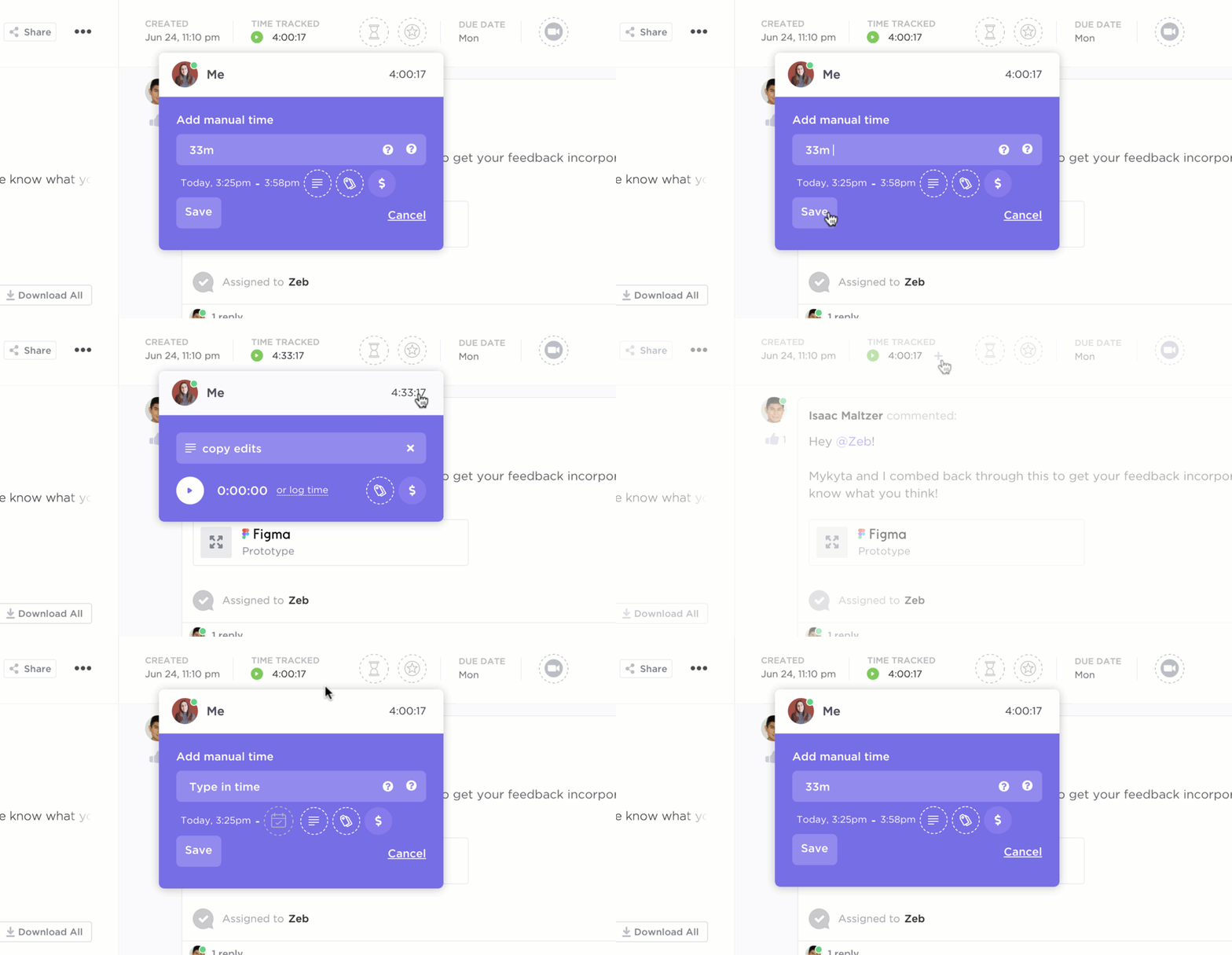
📌 For instance, a freelance designer can track live time while working on a homepage redesign, while a remote development team might prefer logging their sprint hours retroactively. All time entries are tied directly to tasks, ensuring every minute is accounted for and traceable.
Now, tracking is only half the battle; understanding where that time goes is just as important. TMetric users turn to separate spreadsheets for reports to do this, adding friction and sprawl to your work.
ClickUp eliminates this with ClickUp Timesheets.
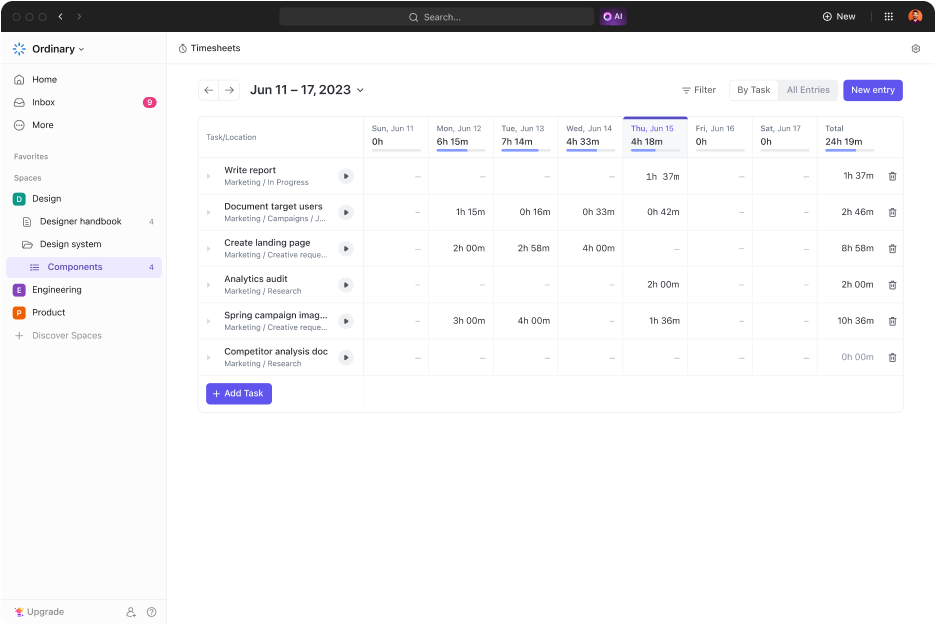
The customizable timesheets let you group and filter entries by day, task, or team member. It helps you see the bigger picture or delve into the details.
A project manager leading a distributed team might use the timesheet dashboard to spot when time is over budget or when someone is overbooked. Similarly, a solo consultant could generate reports to include with invoices, complete with billable vs. non-billable breakdowns.
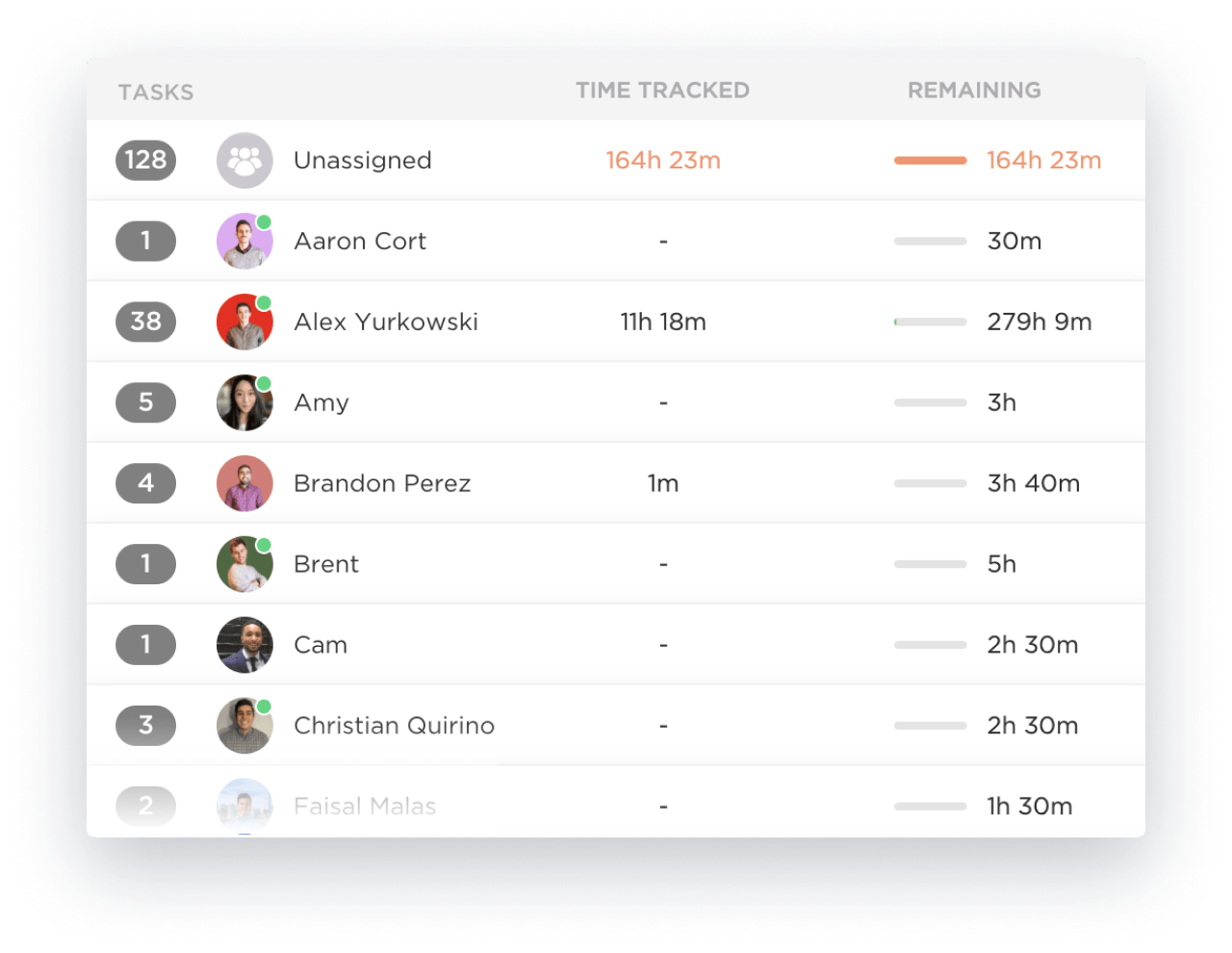
Team members can also submit timesheets for review, and admins can approve or request changes, ideal for companies needing time tracking for compliance or payroll.
With ClickUp’s Time Management features, you can set time estimates for tasks and compare them against actual logged hours. Let’s say you estimate 8 hours to write a client proposal, but log 12. That’s a sign you need to adjust your quoting for future work or refine your writing process. Over time, this kind of insight helps teams become more efficient and avoid burnout.
While using such features is the best time management tip, scheduling and workload visibility are also significant hurdles. This is especially true for teams coordinating across time zones or juggling shifting deadlines.
The AI-powered ClickUp Calendar is the best way to manage deadlines across clients. It color-codes tasks for clarity and syncs with Google or Outlook to align everything. It lets you view all tasks by day, week, or month and provides a high-level overview of workload and deadlines, helping prevent missed due dates.
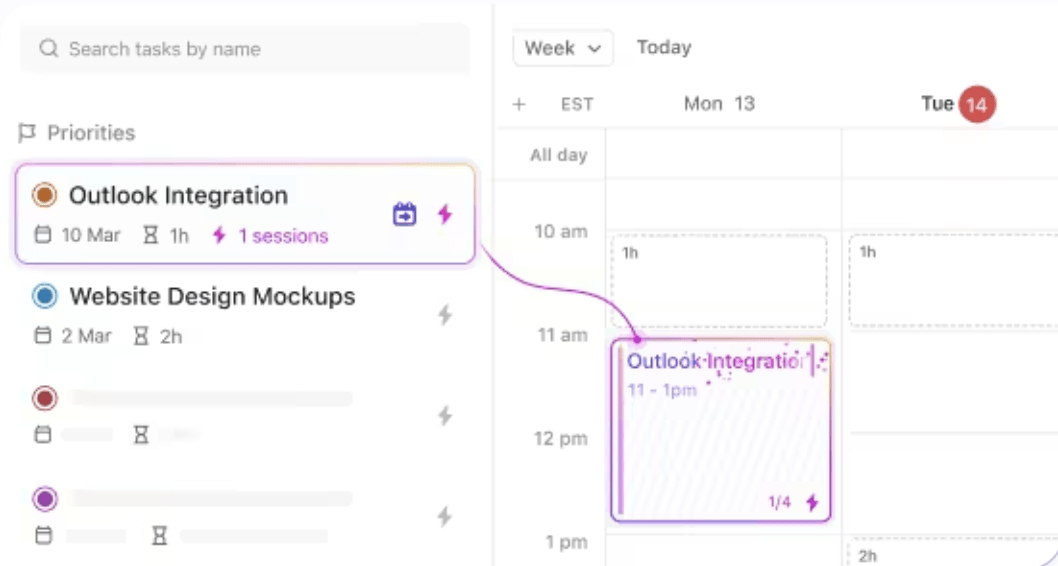
For instance, a freelance content strategist managing three client blogs can set custom date fields like ‘Draft Due,’ ‘Client Review,’ and ‘Publish Date’ for each article. The calendar shows all upcoming content milestones, lets you drag and drop tasks to adjust publishing cycles, and syncs everything to your Google Calendar.
🎥 Watch this video to find out how ClickUp Calendar helps you auto-prioritize and auto-schedule your most important work:
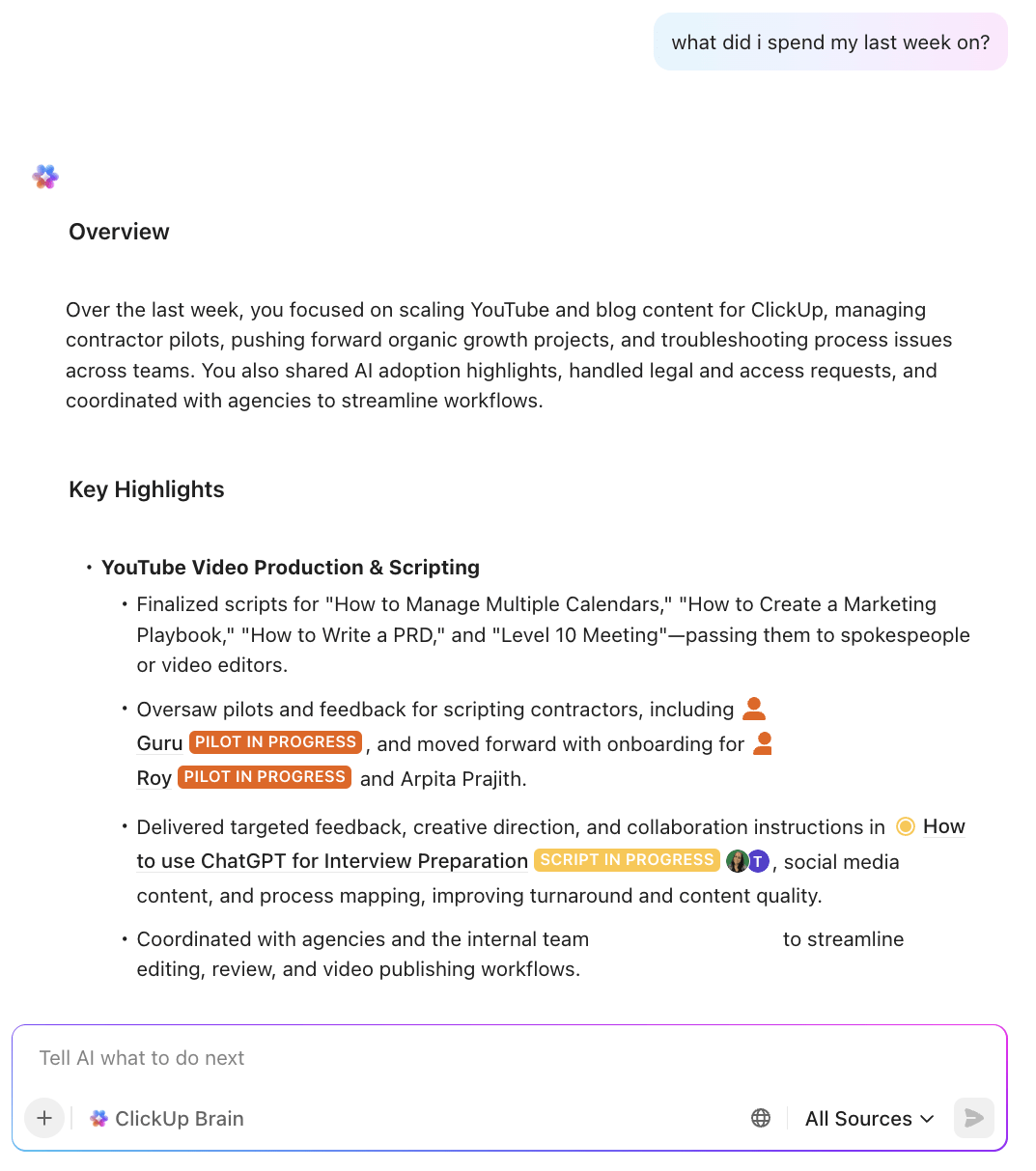
💡 Pro Tip: Turn tracked time into contextual insights with ClickUp Brain, the world’s most complete work AI. Try asking “what did I spend my day/week on?”, to get an AI-organized timeline and insights that tie your effort back to actual deliverables. That’s smarter than time tracking—it’s context tracking.
This G2 review really says it all:
ClickUp has completely transformed the way we manage our internal tasks at the agency. It allows me to track the entire team’s workflow in one place, prioritize urgent matters, and keep communication centralized. The ability to automate processes, switch between multiple views (like list, board, and calendar), and integrate with other tools has significantly boosted my daily productivity. It’s an all-in-one platform that adapts perfectly to our workflow and makes team management much more efficient.
📖 Also Read: Timesheet Templates
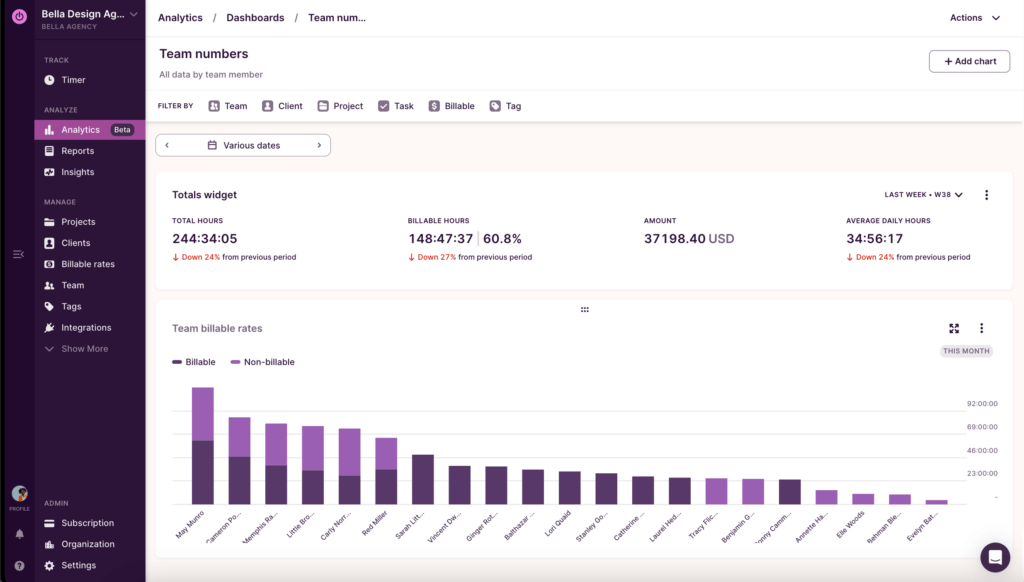
Toggl Track gives freelancers, remote teams, and project managers every tool they need to turn time into money. You can use the app to set hourly rates, track billable vs. non-billable time, and generate detailed timesheet reports that reflect exactly how your team spends every hour.
Using Toggl’s built-in invoicing tool, you can turn time entries into clean, professional invoices—no spreadsheets, no copy-pasting. This means you get paid faster, and your clients always know what they’re paying for. You can also analyze tracked time to improve profitability, forecast revenue, and better plan your projects.
Straight from a Capterra review:
I like that I can customize it based on different projects that I am working on. It is very useful for independent contract work.
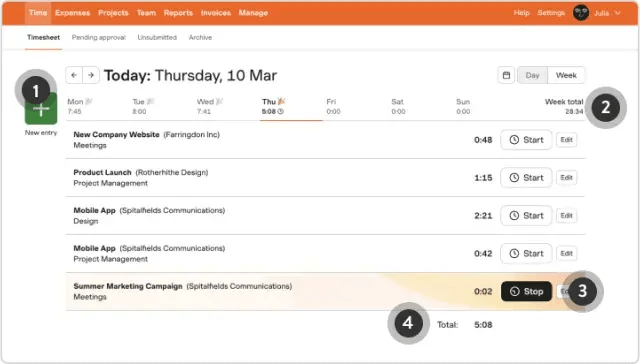
With Harvest’s project and team setup tools, you can create new projects, assign tasks, and invite collaborators in minutes. Once everything’s set, tracking time is easy: use real-time timers, manual entry, or even Google Calendar integrations to capture every billable hour accurately.
Plus, it offers a timeline view to help you see exactly how your team’s time is distributed across projects. The Team Overview and Project Progress reports let you see who’s overbooked or underutilized and spot when projects go off track. You can also set up automated reminders and thank-you emails, so you spend less time chasing payments.
See what this G2 reviewer had to say:
It has a user-friendly interface, free to use platform and flexibility in editing time tracking for a task. It can easily be implemented with other project management platforms like Asana.
🧠 Fun Fact: The Code of Hammurabi (circa 1772 BC) included laws about tracking labor and paying wages based on time worked. That’s nearly 4,000 years before your project management app.
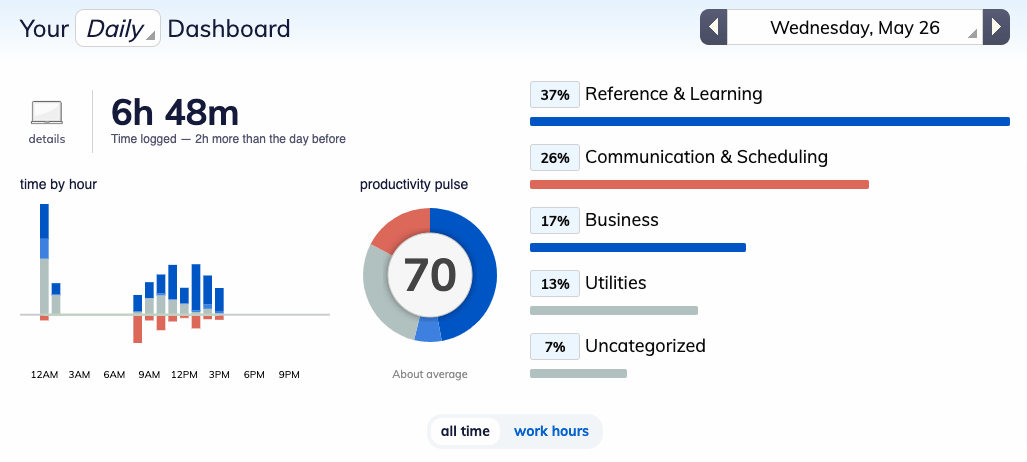
The best part of using Rescue Time is how it runs quietly in the background, automatically tracking which apps, websites, and files you use and for how long. Its automatic time tracking feature also categorizes all your activities by type and productivity level. This feeds into Detailed Reports and a neat Productivity Pulse that gives you a daily score based on how productive your digital habits were.
Freelancers and client-facing teams will also love the Visual Timesheets, which map out your day in detail so you can easily log billable hours or review how much time went into a project. At the end, you’ll get a weekly report to help you plan ahead.
Here’s a first-hand perspective:
RescueTime runs in the background and automatically records the time I spend on numerous apps and websites, giving me a clear view of my daily behaviors.
📮 ClickUp Insight: 92% of knowledge workers use personalized time management strategies.
But, most workflow management tools don’t yet offer robust built-in time management or prioritization features, which can hinder effective prioritization.
ClickUp’s AI-powered scheduling and time-tracking features can help you transform this guesswork into data-driven decisions. It can even suggest optimal focus windows for tasks. Build a custom time management system that adapts to how you actually work!
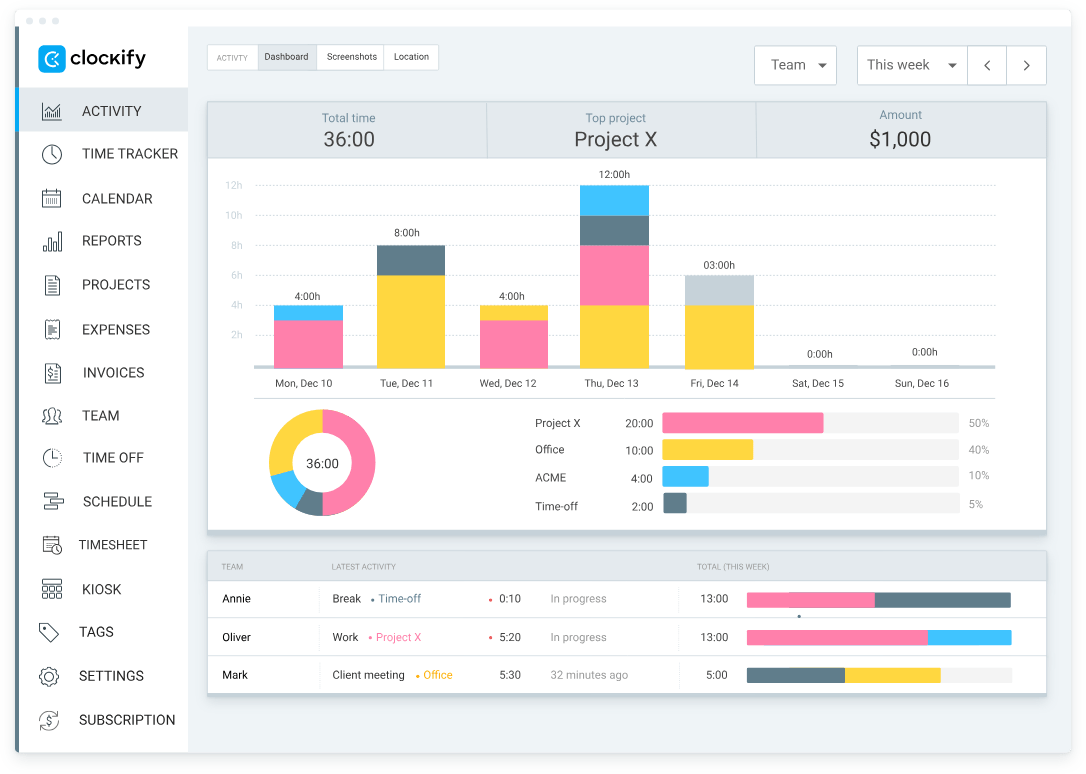
Clockify is a time-tracking and productivity platform that logs hours, tracks projects, and keeps everyone accountable with minimal setup. Forgot to log something? No problem, it lets you edit past entries and categorize time by client, project, or task.
You can especially benefit from the platform’s timesheet management tools, including bulk editing, approval workflows, and time attendance dashboards. With built-in shift scheduling and project planning, you can map out your team’s workload and compare estimated vs. actual time spent.
A user on G2 shared this feedback:
It’s super helpful, so whether you’re logging hours for work, personal projects, or just staying on your productivity, it’s easy to use.
🔍 Did You Know? Punch cards once ruled the office! Daniel M. Cooper’s 1894 invention, the Rochester Recorder, was the first card-based system to help companies automatically log hours. It was analog automation at its finest.
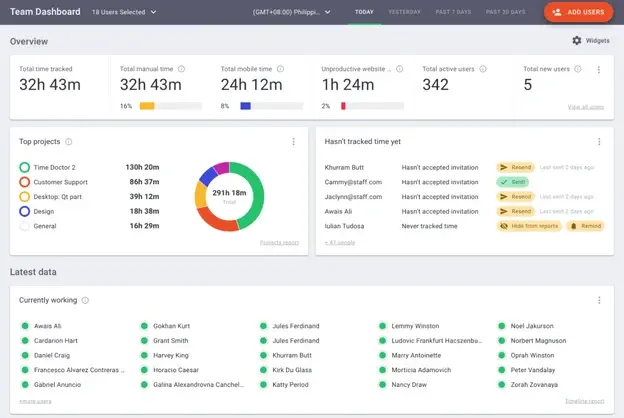
Time Doctor is a full-scale productivity management platform for remote, hybrid, and in-office teams who thrive on visibility and accountability. You can use it to set up custom schedules and compare planned hours to actual time worked, helping you optimize workloads and reduce burnout.
For businesses that bill a client hourly, Time Doctor shines with automated payroll and invoicing features. Generate accurate invoices from logged hours and seamlessly pay your team, without extra admin work. Teams also rely on it to track offline time, making sure that work done away from the screen or during poor internet connections is still accounted for.
One G2 reviewer says:
I really like Time Doctor for its robust tracking features that give me a clear picture of our team’s productivity. It helps me keep tabs on total hours worked, as well as what’s considered productive versus unproductive time, and even idle time.
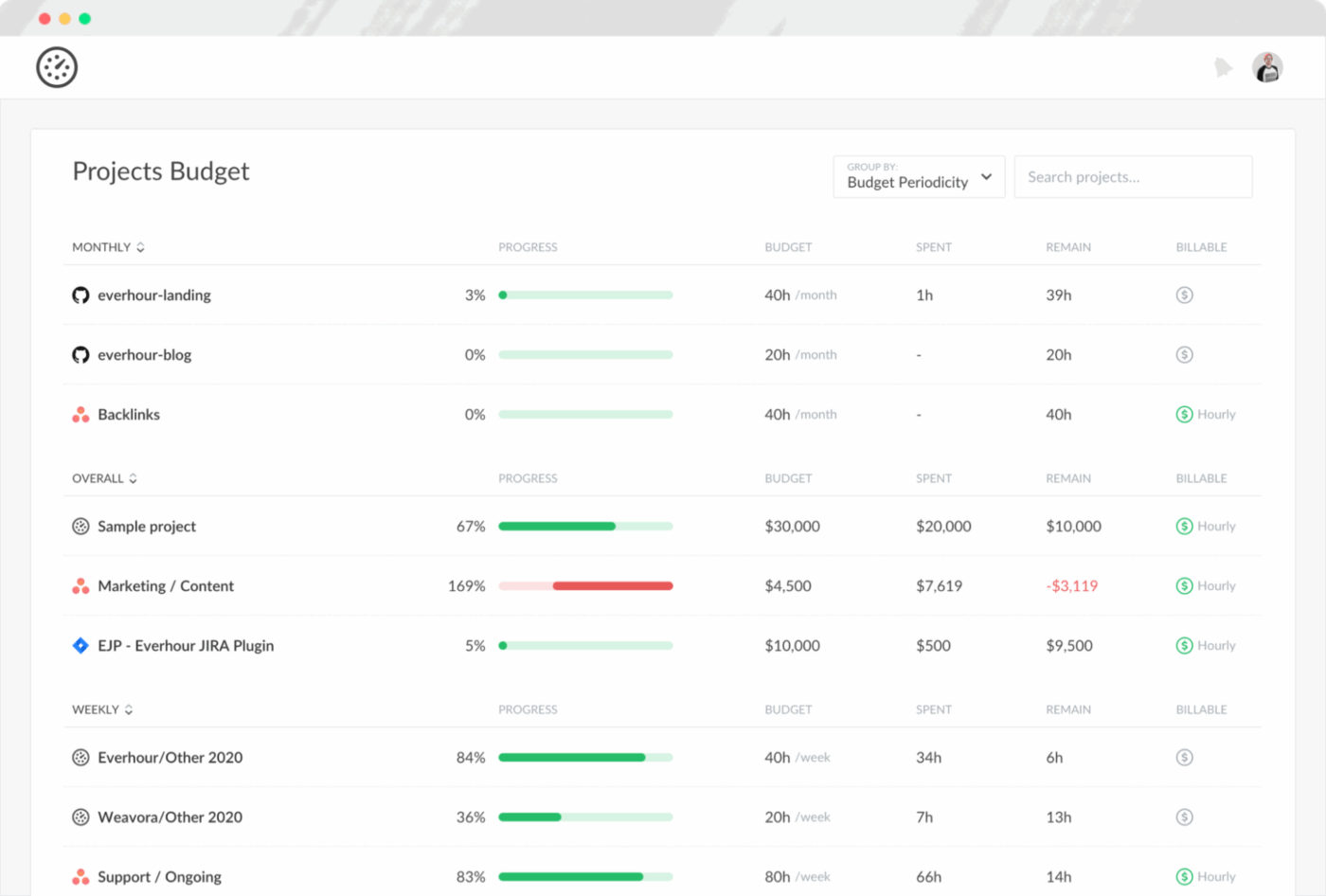
Everhour is a smart, intuitive project time management, tracking, and budgeting tool that integrates directly with the tools your team already uses, such as Asana, Trello, and ClickUp. You can set time or fee-based budgets, create recurring time limits, and compare actual hours worked against estimates.
The platform also gives managers visibility into team availability, making it easier to balance workloads. This goes a long way toward making planning more effective and avoiding employee burnout. Everhour simplifies billing and invoicing as well. You can create professional invoices based on tracked time and expenses and even sync with accounting tools like QuickBooks and Xero for a fully connected workflow.
A snippet from a real user reads:
We use Everhour along linear.app for tracking not only the hours but also our project budgets as an IT consultancy. The various tables, charts, and other analytical visuals are making it really easy to track who is working on what.
🧠 Fun Fact: In 1888, Willard Bundy invented the first mechanical punch clock, which made it easier for companies to track when workers started or ended their shifts.
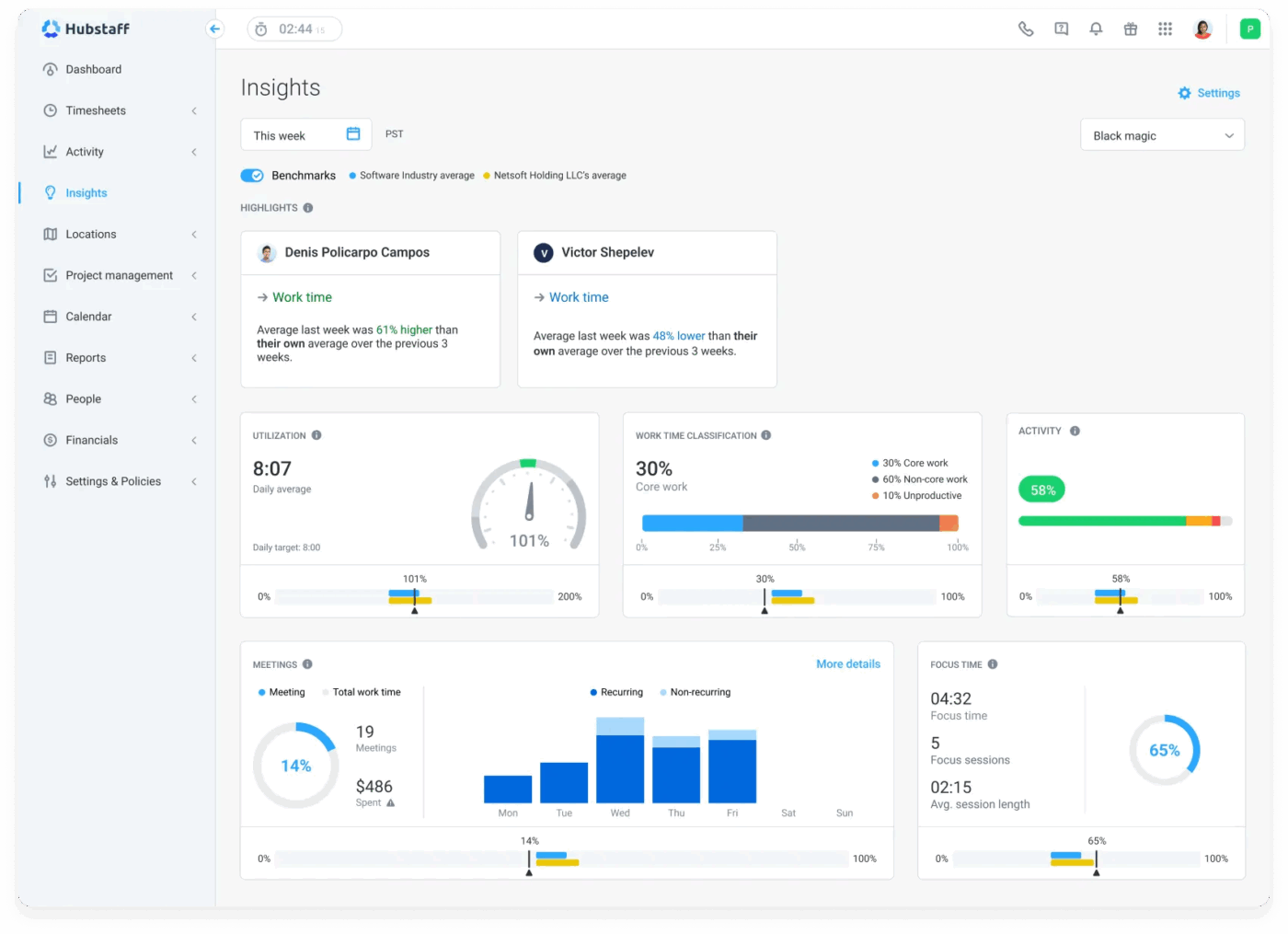
With Hubstaff, managers get full visibility into productivity with app and URL tracking, activity levels based on keyboard/mouse movement, and optional screenshots that can be blurred or deleted for privacy.
Plus, if you’re managing budgets and deadlines, Hubstaff lets you set project budgets, get alerts as you near limits, and use detailed reports to track time, productivity, and costs across teams. The platform offers over 20 customizable reports, so you can drill into exactly what matters.
Bonus features like idle time discard, achievement badges, and privacy-first controls (no keystroke logging, no webcam monitoring) ensure a balance between oversight and autonomy.
One review puts it this way:
It allows me to monitor productivity without being invasive, generate accurate reports for clients, and maintain full transparency on the work being done. The integration with other project management tools is also a huge plus.
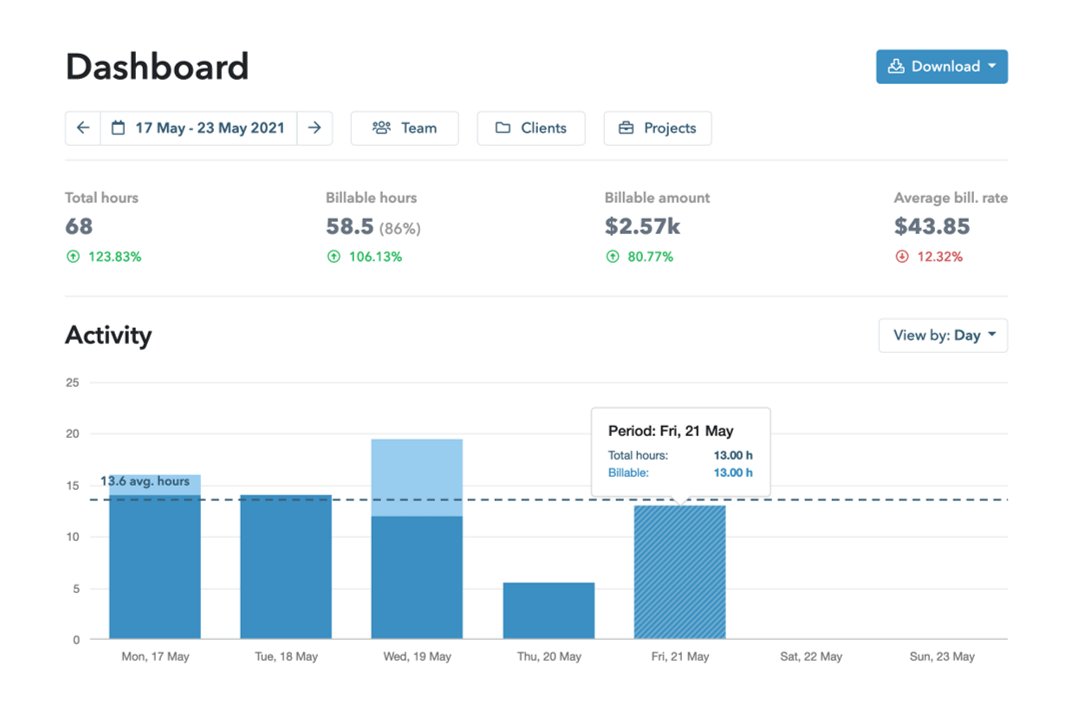
Built as a cloud-based time tracking platform, My Hours reduces the overhead of maintaining timesheets and completing administrative tasks. It offers rich features like task assignment, project budgeting, and customizable hourly rates by project, task, or user.
My Hours supports unlimited users with built-in approval workflows and alerts to ensure timesheet accuracy. Teams can generate detailed reports to analyze productivity and billable hours, schedule automated report delivery, and even send invoices directly from the platform.
This is how one user described their experience:
We love the ability to manage project budgets directly against time spent on them so that the whole team is clear if we are running ahead or behind.
🔍 Did You Know? The time tracking software market size is projected to reach $11.48 billion by 2032, exhibiting a compound annual growth rate of 16.5% during the forecast period.
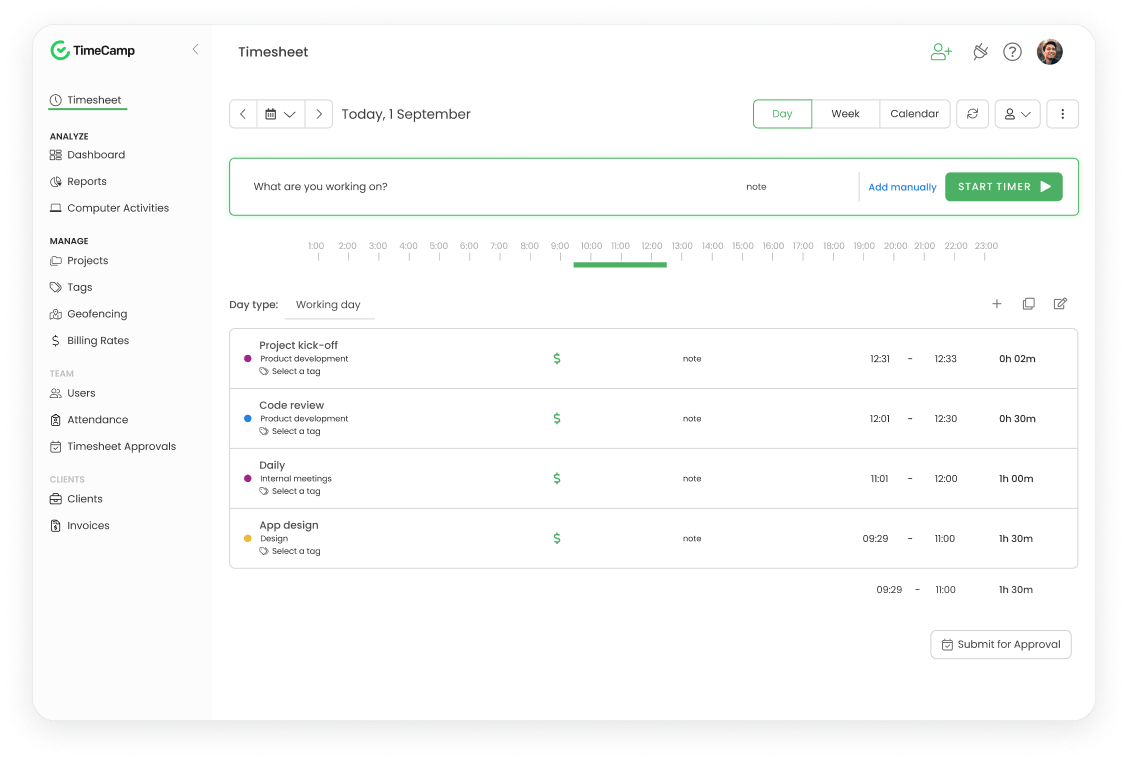
TimeCamp is a strong time tracking software tool designed for automatic and manual time management. It works across web, desktop, mobile, and browser extensions, making it easier to log hours accurately.
Beyond tracking time, it delivers insights into team productivity. It monitors app and website usage, categorizes activities by productivity levels, and can even capture screenshots for enhanced accountability. You can track attendance, manage time-off requests, and generate detailed reports for performance reviews, payroll, and invoicing.
Here’s what a Capterra user had to say about TimeCamp:
There are different ways to input your tracked time. You can register your tasks in real time or you can input it per day or week. This allows all of our employees the flexibility of tracking the way they want to.
📖 Also Read: Best TimeCamp Alternatives and Competitors
With so many great tracking tools out there, it’s clear that you don’t have to settle for the basics.
Do you need help hitting deadlines, collaborating with your team, and meeting your goals faster with just a few clicks?
ClickUp, the everything app for work, combines accurate time tracking, customizable timesheets, workload management, and calendar syncing—all in one platform.
So, why wait? Sign up on ClickUp for free today! ✅

© 2026 ClickUp

There’s an easier way. Try a free AI Agent in ClickUp that actually does the work for you—set up in minutes, save hours every week.