








Still downloading templates?
There’s an easier way. Try a free AI Agent in ClickUp that actually does the work for you—set up in minutes, save hours every week.
Sorry, there were no results found for “”
Sorry, there were no results found for “”
Sorry, there were no results found for “”
A successful software development project thrives on the power of effective planning. From juggling resources to implementing changes, everything is achievable with thorough and meticulous preparation.
Think of it as trying out a new recipe.
First, you start by taking stock of the ingredients available. Then, you check whether you have the requisite capability and equipment. Finally, you see whether you have that kind of time to put your culinary skills to the test. In essence, it is all about capacity planning!
Join us as we explore the topic of software development capacity planning and see how it can drive project success.
Let’s start with understanding the what, why, and who of capacity planning.

Software development capacity planning is a multifaceted process that balances resources, timelines, and workloads for the successful execution of projects. It involves a series of activities ranging from assessing current needs to projecting future requirements. Typically, the key considerations in software development capacity planning revolve around four factors:
The resulting well-rounded and holistic analysis allows managers to build realistic software development roadmaps. At the same time, teams can maintain a healthy margin to adjust priorities, accommodate change requests, or scale resources whenever necessary.
Now that you understand what software development team capacity planning is, let’s move on to why businesses should care about it. Simply put, measuring your team’s capacity offers the following benefits:


Overall, capacity planning in software development aids resource planning, combating risks, making projects predictable, and delivering successful outcomes to benefit the entire organization.
Finally, we answer who is responsible for conducting every capacity planning session.
Realistically, accurate capacity planning involves the following stakeholders:
In other words, capacity planning results from the concerted efforts of different stakeholders typically involved in capacity building.
We’ve emphasized the importance of resources while discussing a team’s capacity. As a result, it may seem like effective capacity planning is almost the same as resource planning. However, they are two distinct concepts, as highlighted below:
| Differentiating Factor | Capacity Planning | Resource Planning |
| Focus | Primarily concerned with assessing how much capacity an organization, team, or individual possesses to meet demands and deliver corresponding outputs | Revolves around identifying resources, such as personnel, equipment, and materials, required to execute various tasks or activities and allocating them |
| Scope | Takes a broader view while answering questions like whether the team has sufficient capacity to meet its goals, whether it requires additional capacity, and how to optimize capacity to support growth | Since it is mainly concerned with allocating specific resources to enable individual activities, it is more granular and task-oriented. It only deals with who, what, and when of resources |
| Timeframe | Spans longer durations as it takes into account a long-term perspective of organizational objectives, extending across past performance, present condition, and future demand | The focus on immediate requirements makes it more short-term and tactical, with an eye on the current project and its given period and priorities |
| Flexibility | Often more flexible and adaptable as organizations change the capacity plan in response to demand variations, market conditions, and overarching goals | Comparatively less flexible as businesses may add more resources, remove them, or reallocate them based on project plans and schedules |
Despite these nuanced differences, project managers can utilize tools like ClickUp for resource management and capacity planning!
Capacity planning strategies allow the project manager to effectively plan capacity, allocate resources, and manage workloads during the software development lifecycle. Use any of the following four strategies as a guide for adding structure to the capacity planning process:
The lag strategy is one of the most conservative capacity planning strategies. Here, you add capacity after the actual demand increases. It suits businesses with a stable customer base and predictable demand, as demand spikes can render them volatile. You may also use it to add capacity in case of budget constraints or limited time.
A company that designs custom software solutions may follow the lag strategy. It maintains a core team of software developers who use available resources to deliver products.
Let’s say that a specific period, such as a particular season or an event, increases the demand for custom software products. Rather than immediately hiring new team members, the company continues to use existing resources and current capacity to keep up with the demand.
It will consider increasing capacity by adding more resources only when the demand rises consistently to the point where it exceeds team capacity and accrues backlog.
The corresponding capacity plan manages costs while staying responsive to changing capacity needs.
The lead strategy is quite the opposite of the lag strategy. You increase the current capacity to match anticipated demand in this capacity plan. Businesses that see overnight shifts in customer loyalties or are highly confident in a stellar rise in current demands may opt for lead capacity planning. It is also a good option if you have an appetite for risk and the budget to support it.
A company specializing in developing mobile applications is confident it will see a surge in demand for its services during the spring. The season often corresponds with businesses launching new apps or updating existing ones before the spring sales.
By embracing the lead capacity planning strategy, the company proactively hires more developers to increase capacity to meet demand. In addition to recruiting new talent, they work on expanding the software development teams and invest in scaling up their infrastructure.
The resulting capacity plan allows the company to capitalize on opportunities by preparing ahead of time.
The match strategy is the middle ground between the lag and lead capacity planning strategies. It involves adding capacity in direct proportion to the demand, making it cost-effective yet highly responsive. You may choose this capacity planning style if you have somewhat volatile market demand and a customer base but are confident they will ramp up soon.
Say you run a software consultancy business that offers various services, from architecture design to code testing and review. The demand for these services fluctuates based on business needs, technological advancements, and market conditions. Your company keeps a close eye on these factors to follow the match strategy.
Whenever you witness the signs of an increase in demand, you promptly increase capacity by hiring talent and scaling up resources. On the other hand, economic downturns cause you to scale back capacity and streamline available resources.
As a result, your consultancy keeps up with the changing market conditions and customer needs without overspending.
Agile capacity planning manifests in the form of an adjustment strategy.
Since it is an agile capacity planning process, it requires continuously monitoring market conditions, customer demands, and technological upgrades. Then, the insights from the previous sprints fuel adjustment in the next sprint, allowing teams to respond to fluctuations in real time.
This agile capacity planning strategy suits businesses operating in highly unpredictable and dynamic environments where the demand patterns may change unexpectedly.
Suppose you manage a software development project that experiences frequent changes in scope and timeline due to evolving market conditions and customer requirements. You have the baseline capacity to handle the typical development workload.
However, an unexpected event occurs, pushing you back several steps. This change in circumstances should make you resort to the adjustment strategy.
In this strategy, you reallocate resources, redistribute workloads, and adjust schedules after every sprint to stay in tune with the requirements. This strategy is hypersensitive, flexible, and adaptable without being costly or wasteful.
Regardless of your industry or the capacity planning tools you use, every capacity planning process includes the following six steps:
Measuring current team capacity is a three-part process that includes:
Once you’re done, you’ll have your team’s capacity as a measurable entity.
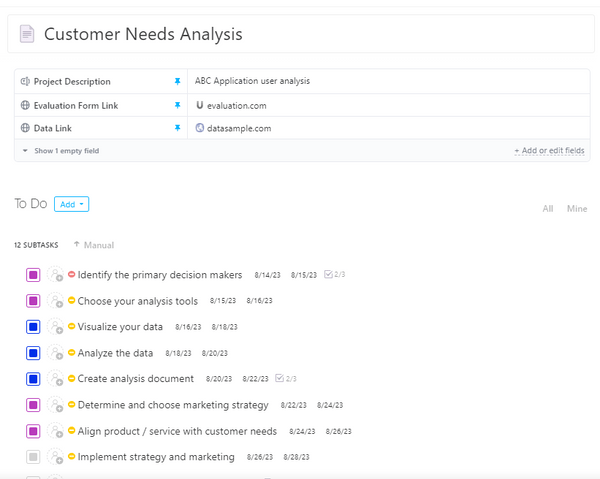
Conducting demand analysis helps visualize a change in demand in the distant or near future.
To predict future demands, perform a comprehensive market analysis to get a hold of ongoing industry trends, competitor offerings, and customer preferences.
Alternatively, you may look internally in the project pipeline for new projects or upcoming software development initiatives. Measure the demand in terms of scope, volume, timelines, or complexities.
Work with the stakeholders to flesh out these details further to get a baseline understanding of the key requirements and expectations of the project. From collecting feedback to hosting focus groups, engage stakeholders to get a realistic idea of demand changes and specifics.

Approximate the capacity change based on your demand estimates.
Use AI-powered predictive models that leverage trend analysis and historical data to forecast future workloads, resource requirements, and capacity constraints.
Combine this with scenario planning to get a well-rounded idea of potential outcomes for different conditions. Knowing the most likely, best-case, and worst-case scenarios beforehand will leave you better prepared to perform risk mitigation and handle uncertainties.
Project management platforms like ClickUp offer t-shirt sizing tools for agile capacity planning. T-shirt sizing uses software development templates to understand a project’s scope, effort, complexity, and timeline. It then represents capacity needs as the appropriate size, ranging from XS to XXL.
Once you have a simplified representation of the project’s capacity, you can measure if a project is the right “fit” for your software development team!
Use the ClickUp Skills Gap Analysis Template to help centralize all your team members grouped by skill type with their department, skill name, rating, total score, target score, action steps, gap, and priority level. The target score is 0 for the lowest and 25 for the highest by default, but you can customize it to your preference.
You have your current capacity and your projected capacity. Now, subtract these to measure the capacity gap!
Capacity gap analysis helps understand areas where you need fewer or more resources, what workflows need optimization, and how you can bridge the gap. It also shares practical insights on whether your team can take on a new project or change request.
Once the capacity gap analysis diagnoses, you can proceed with capacity optimization.
Start with strategic resource allocation, as you want to get to the critical tasks first. Assign these to suitable team members depending on their skill, expertise, capabilities, and availability. Investing in the right tools and technologies, or even upgrades, amplifies their efforts by increasing efficiency and productivity.
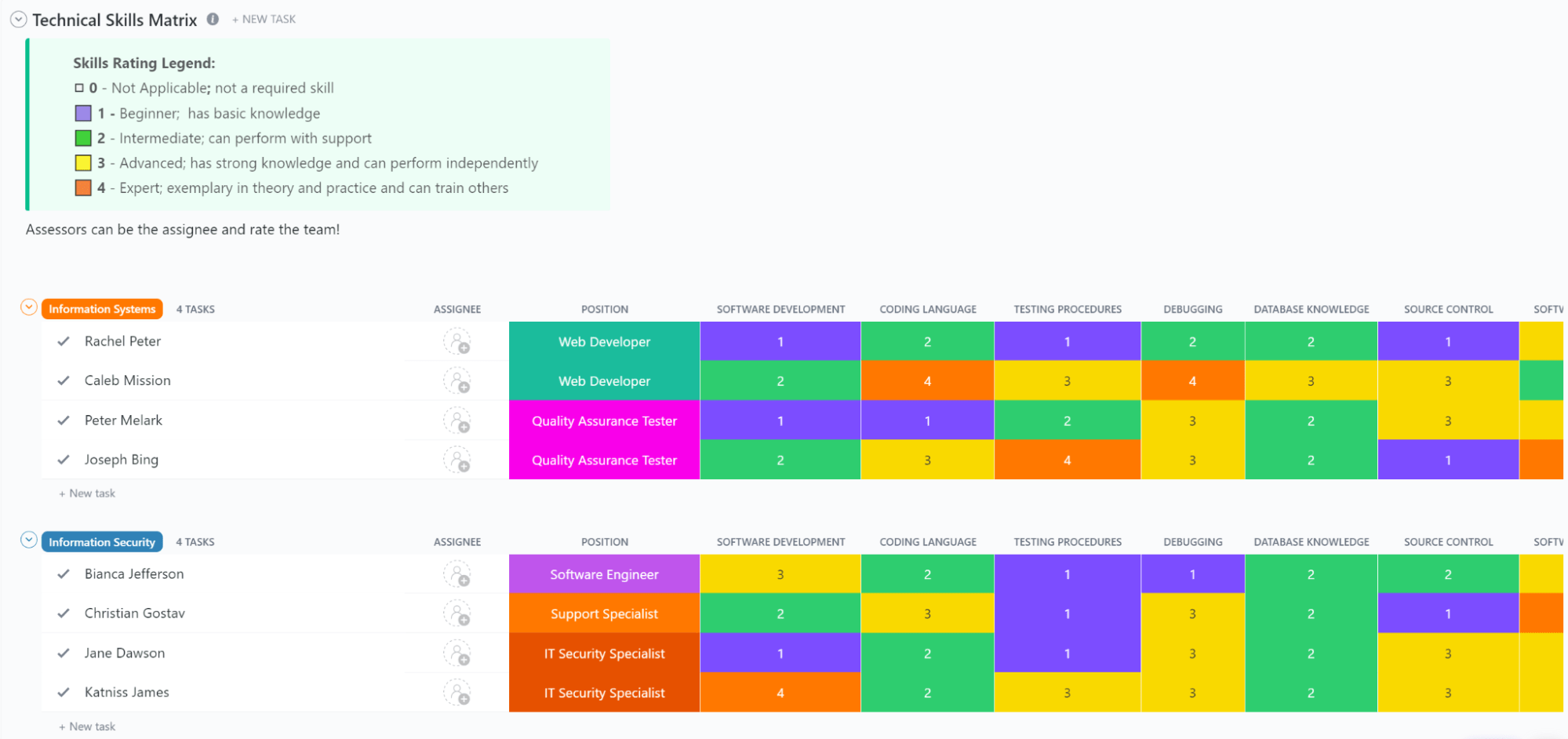
Leverage ClickUp’s Technical Skills Matrix Template to monitor technical skills within your workforce. Each department gets one row dedicated to each employee. Each column focuses on a specific skill, such as software development, debugging, coding languages, testing procedures, etc. This way, each employee can be rated on particular skills important for the role or project.
Support dynamic resource allocation with complementary risk management strategies to minimize setbacks or hurdles.
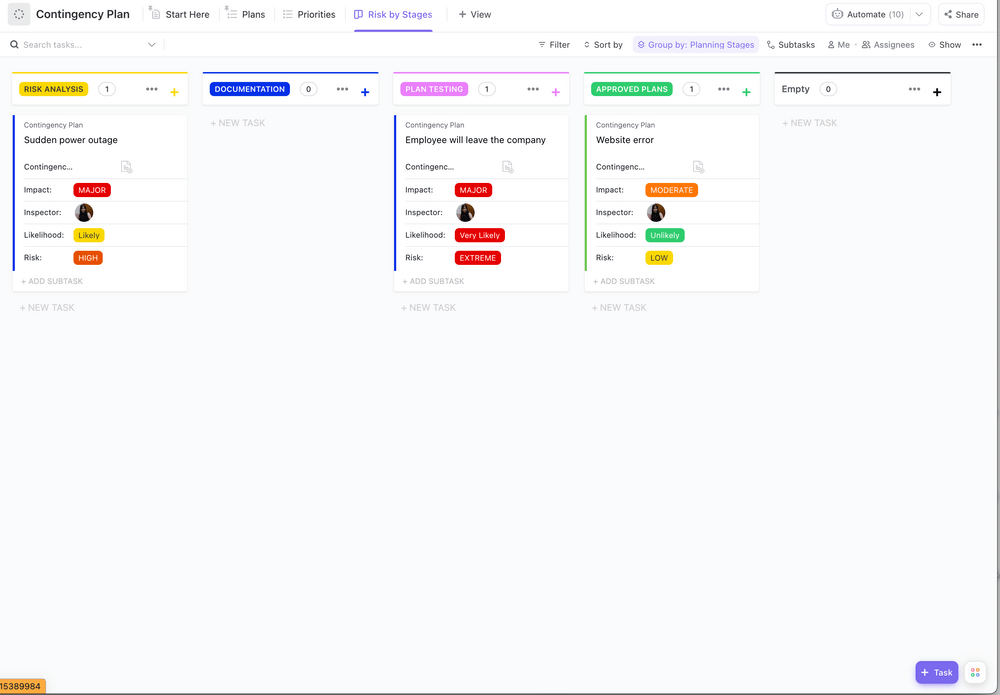
ClickUp’s Contingency Plan Template helps you create a clear roadmap for unexpected events by helping you:
Use the right contingency plans to overcome bottlenecks, address skill gaps, and manage unforeseen challenges. Concurrently, monitor and evaluate progress against predefined performance metrics and benchmarks to proactively identify capacity requirements. Strengthen this stage with continuous feedback loops and open communication to ensure alignment between teams and organizational goals.
These six stages are just one software development capacity planning phase. You must stay vigilant while monitoring resources, make suitable adjustments, gather and work on feedback, and improve planning iteratively. Doing so facilitates long-term capacity planning and puts you on path to continuous improvement!
Planning is a continuous process. So, even if you’ve nailed the five steps of software development capacity planning, you can enhance it using the tips, tricks, and best practices we’re about to share.
Here’s what helps:

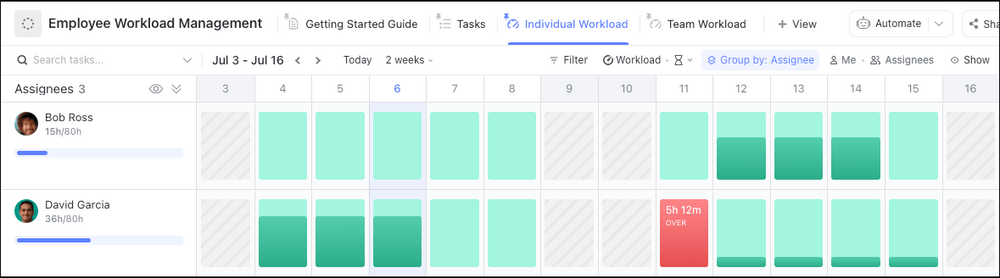
With ClickUp’s Employee Workload Template, you can set expectations and plan out tasks to manage your team workload. It will help you gauge the capacity of each employee and assign them tasks accordingly, as well as ensure that each task has an owner. This way, you can set expectations and avoid burnout.
Remember how we talked about ClickUp being the superhero of capacity planning? It wasn’t a humble brag—we honestly meant it! Here’s your guide on using ClickUp for software development capacity planning.
With ClickUp, you can:
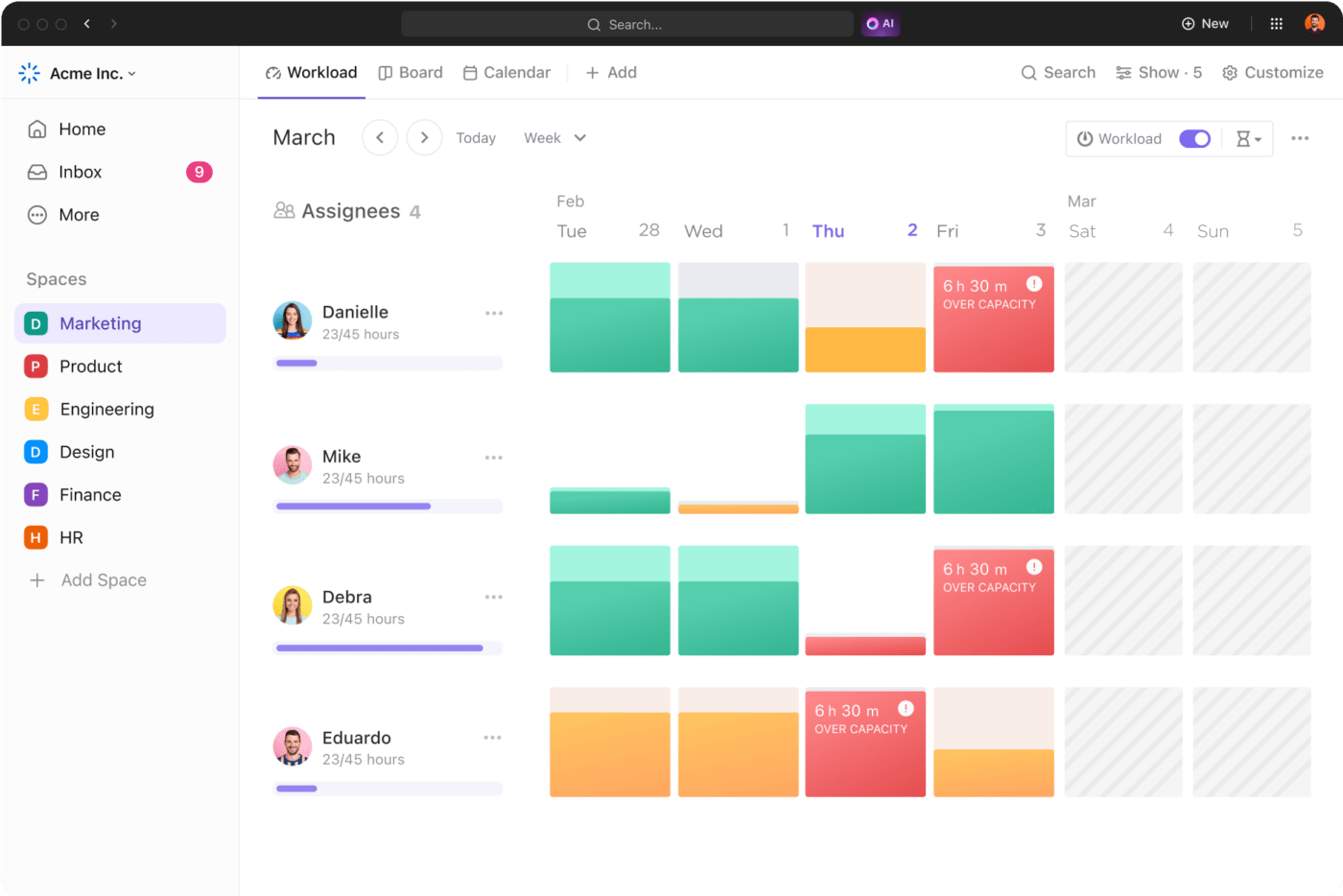
ClickUp is an effective resource management tool. It allows the project manager to assign projects or specific tasks to team members depending on their skills and competencies. Allocate resources depending on the task’s impact, importance, and urgency, as well as view who is doing what and when.
The intuitive dashboard displays resource availability, engaged and shared resources status. As a result, managers can effectively spot resource requirements or constraints and make informed decisions.
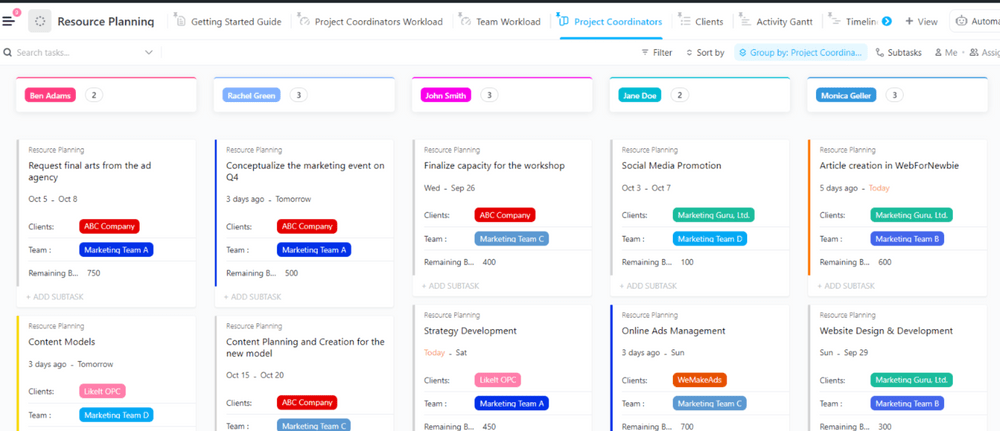
You can also access ClickUp’s Resource Planning template, which does all the work for you!
This resource planning template helps you visualize all tasks and resources in one place and align teams around what is the most important for achieving team goals. With it you can allocate tasks efficiently and optimize workloads. Apart from custom fields and statuses, it also allows for time-tracking and dependency warning.
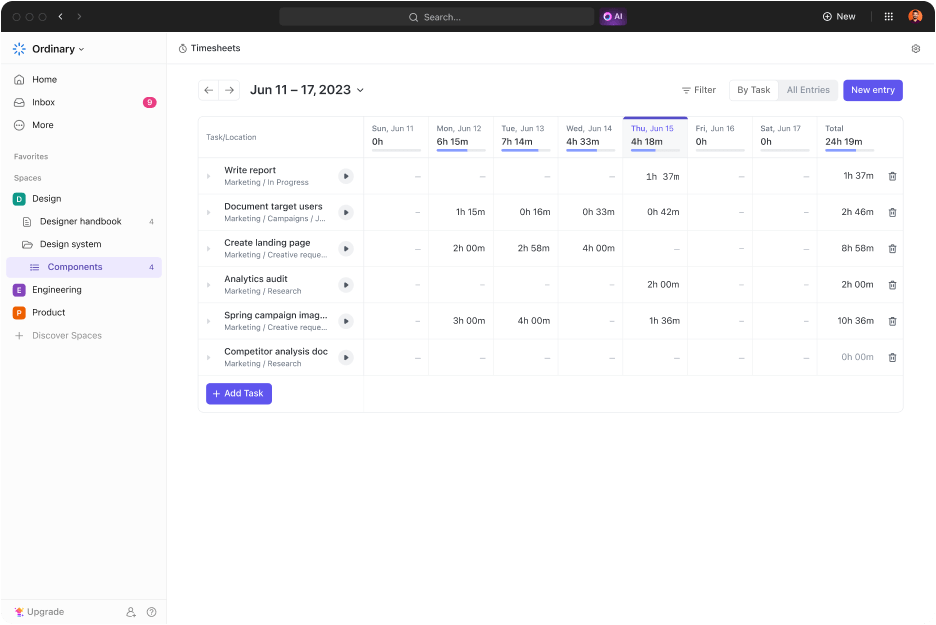
ClickUp features a built-in time-tracking tool to record time spent on different tasks and activities. This data is useful in assessing capacity as a function of the team’s time, capabilities, and resource utilization. It also grants visibility into underutilized or overburdened resources that may inject time inefficiencies. Use project time tracking on ClickUp to deliver software products right on schedule!

ClickUp allows users to assign priorities to tasks and projects like every project management tool. However, what ClickUp does better is that you can assign four levels of priorities to represent importance and urgency. Such granularity in assigning priority levels, ranging from urgent to no priority, allows teams to focus on tasks that matter. The resulting priority list maximizes team productivity and capacity, ensuring project success!
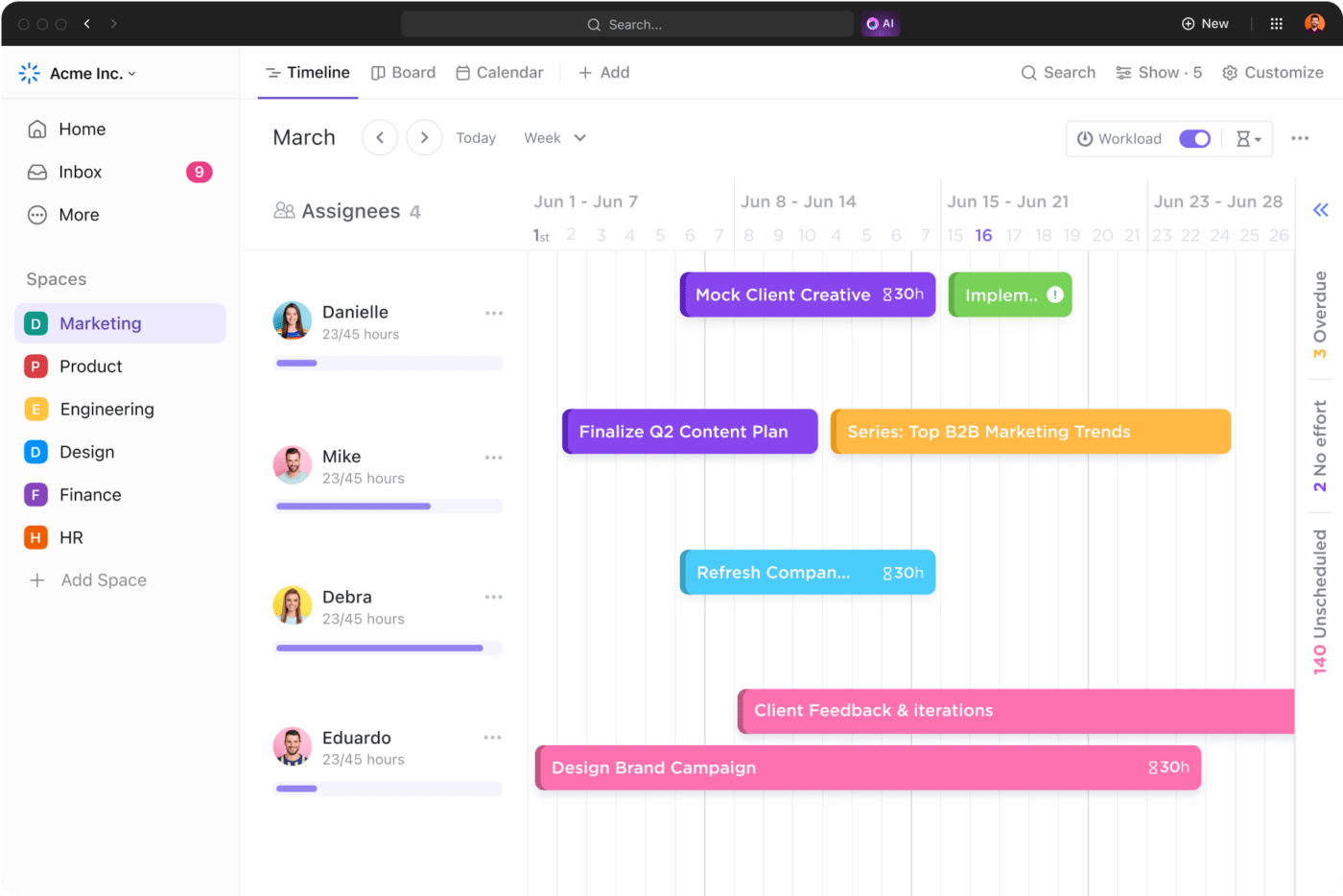
ClickUp offers a Timeline View that allows managers to visualize workloads in real time and dynamically distribute them across teams, members, and projects. Such proactive workload management improves team productivity, prevents burnout, enhances product quality, and ensures adherence to timelines.
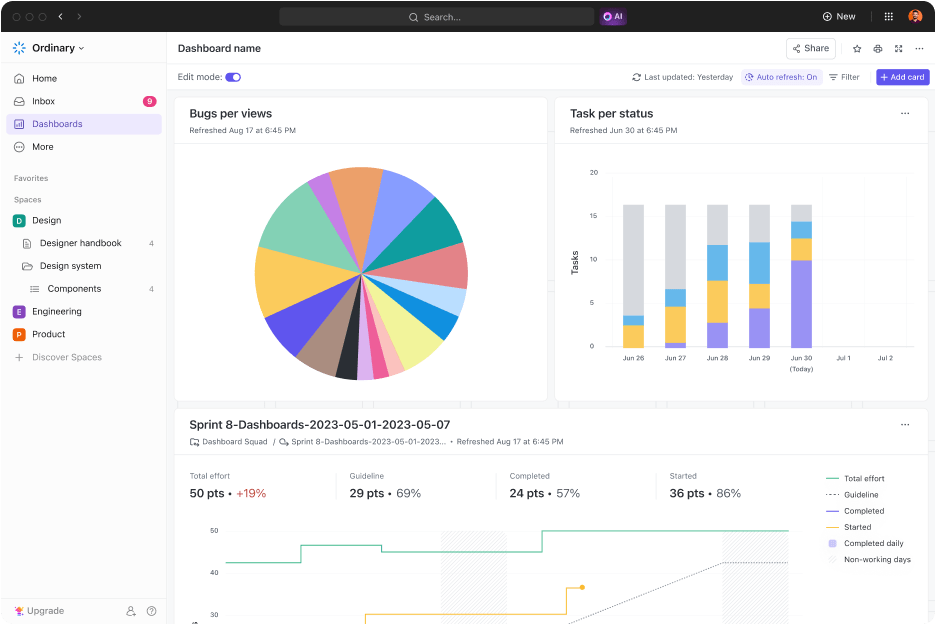
ClickUp Dashboards are in a league of their own. Their robust reporting and analytical capabilities allow users to track key performance indicators (KPIs), balance resources, and capture stakeholder feedback.
Use dashboards to generate detailed reports on project progress, resource utilization, and workload distribution to enhance team performance. Plus, these data-driven insights help with long-term capacity planning for sustained success!
At ClickUp, we value efficiency, so we don’t want you reinventing the wheel. To enable this, we have a library of ready-to-use and highly customizable templates that help with capacity planning. Use them to estimate your team’s software development capacity, future resource requirements, and capacity gaps. It saves on resources like time and effort that go into the capacity planning process, which you can reallocate to more productive work.
We stand at an inflection point where technological advancements, automation, and data analytics will empower businesses to make smarter capacity-related decisions. In addition to making capacity planning more data-driven, introducing machine learning and artificial intelligence algorithms will increase predictability in capacity assessments, estimations, and management.
As a result, organizations will effectively anticipate demand fluctuations and resource requirements with greater ease and accuracy.
These trends will push aggregate planning, where businesses can manage capacity and resources across multiple teams, operational units, or projects. With capacity planning tools like ClickUp, you can strategically provision resources, scale operations, and respond to real-time demand. In short, you will have an agile team reinforced with the necessary capabilities.
Sign up for free and see how ClickUp helps you amp up production capacity and agility!
Software capacity planning is a qualitative and quantitative process of assessing resource requirements. Whether these resources are available in the form of hardware, software, personnel, time, or budget, capacity planning involves matching current capacity to future demands to meet project objectives.
The five stages of capacity planning include:
Then, you rinse and repeat!
For IT projects, capacity planning typically involves determining the resources required for the development, deployment, and maintenance of IT tools, systems, and applications. It spans activities like assessing network bandwidth and storage requirements, preventing server outages, complying with the latest security and industry standards, etc., to ensure that the IT product meets the performance, scalability, and availability parameters.
The difference between long-term and short-term capacity planning is listed below:

© 2026 ClickUp

There’s an easier way. Try a free AI Agent in ClickUp that actually does the work for you—set up in minutes, save hours every week.