







Still downloading templates?
There’s an easier way. Try a free AI Agent in ClickUp that actually does the work for you—set up in minutes, save hours every week.
Sorry, there were no results found for “”
Sorry, there were no results found for “”
Sorry, there were no results found for “”
Looking to build a single source of truth as a small business? We break it down here.
You know this story well enough: A decision gets made in a Slack thread. The follow-up lives in a task tool. The context sits in a Google Doc called “final_v3_updated.” Someone downloads a copy, edits it, and sends it back over email. A week later, nobody is quite sure which version is real.
This frantic search for the right information is a silent drain on small businesses, with team members wasting up to 12 hours weekly because they can’t quickly locate or ready information for use.
A single source of truth helps small businesses escape that pattern. Not by adding to the work sprawl with more tools, but by creating one trusted system where work, context, and decisions stay connected as you grow.
This guide breaks down what a single source of truth actually means, why it matters for growing teams, where most attempts fall apart, and how to build one that holds up under real-world pressure.
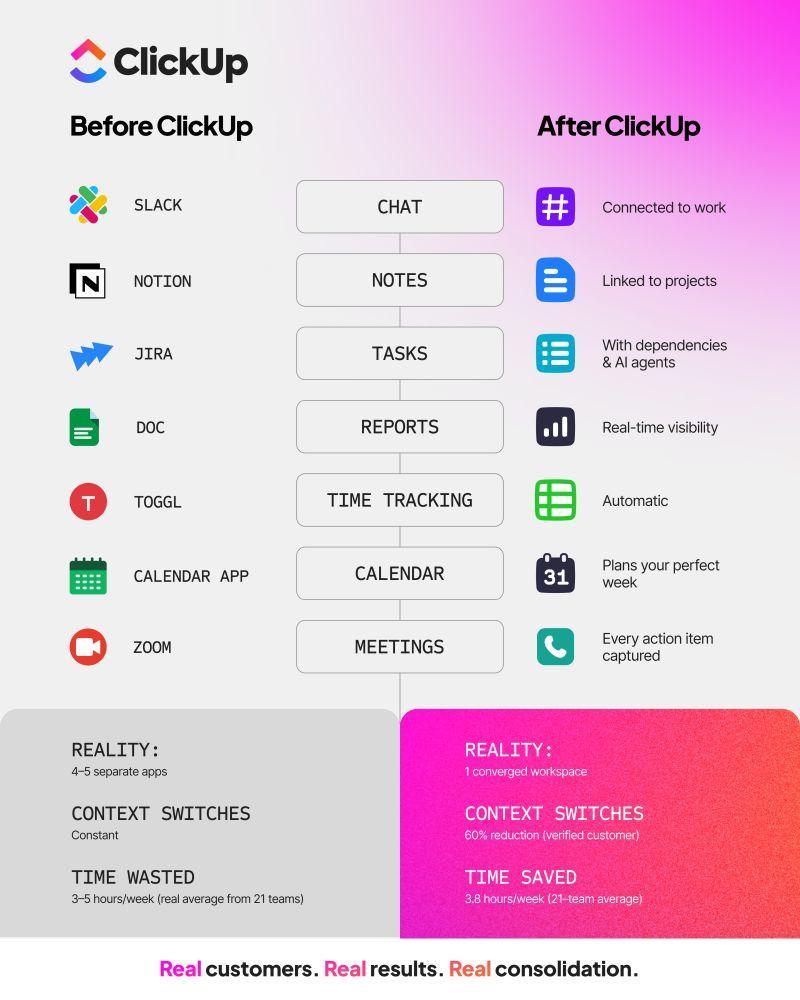
There’s a 60% chance your team is wasting two or more hours daily hunting for files that already exist. Not because they’re disorganized, but because your information is scattered across 11 different tools with no connection between them.
A single source of truth, often abbreviated as SSOT, is the practice of organizing your work so that everyone relies on one authoritative source for the most current information.
It’s not just a shared folder or a wiki. It’s the place your team trusts when they need to know what’s happening, what was decided, and what needs to happen next.
The concept originated in database management to ensure data hygiene and integrity, but now applies to how modern teams organize their work. A real SSOT reduces guesswork. People stop asking, “Is this the latest?” or “Did this change?” because there’s a shared understanding of where truth lives.
Don’t start your SSOT from scratch. The ClickUp Knowledge Base Template gives you a ready-made structure for organizing processes, policies, and shared knowledge in one trusted place.
Because it lives inside your workspace, your documentation stays connected to the work it supports. Updates happen in context, and teams know exactly where to look.
For growing teams, the highest cost of not having a single source of truth isn’t software spend.
It’s the time lost searching for information that already exists.
Here’s original research from ClickUp Insights that illustrates just how much it costs not to have a centralized knowledge management system.
Research shows that the average professional spends 30+ minutes every day searching for work-related information. Over a year, that’s 120+ hours per person lost to digging through emails, Slack threads, shared drives, and old documents.
For many teams, the problem is far worse:
This is a time small businesses can’t afford to lose as they scale.
The core issue isn’t effort. It’s tool sprawl. As teams add more software, information fragments:
A single decision might be referenced in an email, discussed in chat, and partially documented elsewhere. Nothing is technically lost, but nothing lives in one trusted place. Teams are then forced to stitch context together manually.
When information isn’t easily accessible, people often create workarounds.
These interruptions add up quickly.
Instead of doing the work, teams spend their time chasing context.
⚡️ Template Archive: Free Knowledge Base Templates in Word & ClickUp
Despite modern tools, email remains a primary source of information for many teams.
The result is low confidence in company knowledge:
This lack of trust slows decision-making and increases rework.
👉🏽 Our Small Business AI Playbook breaks down exactly how to use AI to reduce complexity rather than adding more tools.
Once teams stop hunting for information and start trusting where it lives, work changes in practical, visible ways. Decisions move faster, collaboration feels less fragile, and teams spend more time executing instead of confirming context.
With a single source of truth, decisions happen with shared context instead of follow-ups. Stakeholders work from the same real-time information, removing delays caused by file requests, version checks, or manual validation.
This enables teams to be more decisive across the board and move faster, and transforms how decisions get made:
📖 Read More: How To Measure Productivity in the Workplace?
A single source of truth reduces the need to think about where work lives.
When search is built into the same place where work happens, teams spend less time thinking about tools and more time acting on information.
A unified workspace software with built-in AI (as opposed to integrated AI) can help here.
Siloed tools, in turn, create teams that work in silos.
When marketing can’t see engineering’s constraints or the sales team is in the dark about the product roadmap, everyone ends up duplicating effort and stepping on each other’s toes. This friction, a direct result of poor cross-team collaboration, leads to missed deadlines and a whole lot of “I thought you were handling that.”
A shared SSOT creates radical transparency, ensuring everyone works from the same up-to-date playbook. In practice, this changes how everyday work gets done:
Features, like ClickUp’s connected Chat, can be a game-changer in scenarios like these. It allows you to collaborate on the same platform, generate and assign action items straight from chat threads with AI support, and even support video and audio calls via SyncUps.
When multiple versions of the truth exist, nobody trusts any of them.
This leads to constant second-guessing, endless verification meetings, and costly errors resulting from incorrect numbers. You can’t make informed decisions or build a data-driven culture on a foundation of questionable data.
An SSOT eliminates “version confusion” by establishing one authoritative source for all information. And that trust starts at the moment decisions are made.
With tools like ClickUp AI Notetaker, meeting outcomes, key decisions, and next steps are captured accurately as they occur, rather than relying on memory or scattered notes. Action items are clearly documented and can be converted directly into follow-up tasks, ensuring that nothing gets lost between discussion and execution.
By preserving the exact context of decisions and tying them to the work that follows, teams avoid misinterpretation, missed handoffs, and silent drift. Everyone sees the same outcomes, the same priorities, and the same source of truth—making data more reliable, decisions more confident, and execution far more consistent. See the workflow in action.👇🏼
📮ClickUp Insight: Low-performing teams are 4 times more likely to juggle 15+ tools, while high-performing teams maintain efficiency by limiting their toolkit to 9 or fewer platforms. But how about using one platform?
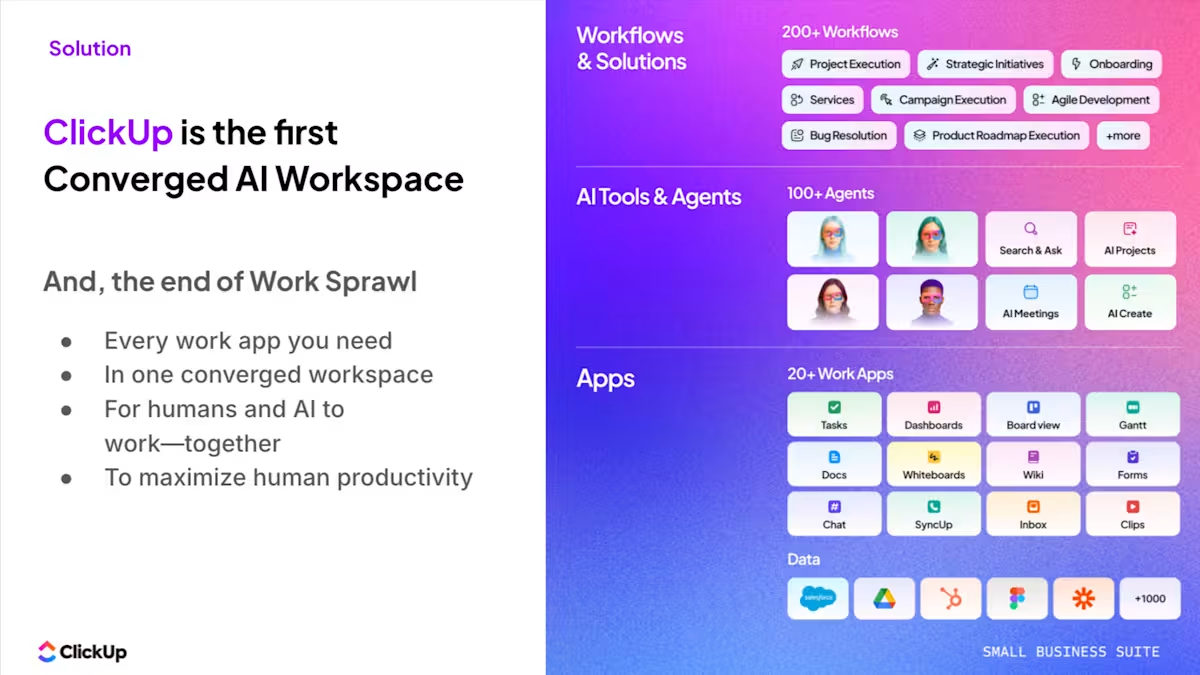
As the everything app for work, ClickUp brings your tasks, projects, docs, wikis, chat, and calls under a single platform, complete with AI-powered workflows. Ready to work smarter? ClickUp works for every team, makes work visible, and allows you to focus on what matters while AI handles the rest.
One of the most common reasons single-source-of-truth initiatives fail is scope confusion.
Many teams assume an SSOT is just a better place to store documents. Others treat it like a reporting dashboard or a project tracker. In reality, a usable SSOT is broader than any one format.
It captures not just what exists, but how work actually happens. A true single source of truth brings together five things that are usually scattered across different tools.
Tasks are the backbone of execution. They represent commitments, ownership, and deadlines.
In an SSOT, tasks don’t live in isolation. They’re connected to the context that explains why the work exists and how it fits into larger goals. When someone opens a task, they shouldn’t need to search elsewhere to understand its priority or background.
ClickUp’s Task Management features make sure that your workflows are connected and mapped end to end. Here’s how.👇🏼
Documentation gives tasks meaning. This includes SOPs, briefs, specs, policies, and internal guides.
But documentation only works as part of an SSOT when it stays close to the work it supports. Docs that live in separate folders or tools quickly fall out of date and lose trust. When documentation is linked directly to tasks and workflows, it stays relevant because it’s actually used.
Most decisions don’t start in documents. They start in conversations. Chat captures nuance, debate, and informal agreement.
In many teams, this context disappears as soon as the conversation scrolls away. An SSOT preserves the parts of those discussions that matter by tying them to the work they influence. The goal is to make sure important conversations don’t vanish once the task begins.
Files are the tangible outputs of work. Designs, spreadsheets, presentations, and supporting materials all belong in an SSOT. What matters is linking them to the tasks, docs, and decisions they relate to. This eliminates version confusion and removes the need to ask, “Is this the latest one?”
📖 Read More: How to Practice Centralized Communication Strategies
Decisions are what turn work into progress. They define priorities, resolve trade-offs, and set direction.
Yet in most teams, decisions live nowhere permanently. They’re remembered differently by different people, or buried in meeting notes and chat threads.
A strong SSOT makes decisions explicit. It records what was decided, when, and why, and connects those decisions directly to the work that follows. This is what prevents rework, misalignment, and quiet drift over time.
When tasks, docs, chat, files, and decisions live together in one connected system, information stops fragmenting. Teams don’t have to reconstruct context or rely on memory. They know where to look, and they trust what they find.
That’s when a single source of truth starts doing real work for the business, instead of becoming another place things go to sit.
The ClickUp Small Business Suite consolidates projects, docs, chat, dashboards, and AI into a single workspace, so teams operate from a single system of record rather than five disconnected tools. This means eliminating operational overhead that typically requires additional coordination roles. When tasks, knowledge, conversations, and reporting all live in one system:
The result is a leaner operating model where a single platform absorbs work that previously required multiple tools and up to three layers of coordination. Your team stays the same size. But the system carries the operational weight. See how!
The impact is measurable:
Significant reduction in manual coordination and repetitive tasks through built-in automation and AI 👇🏼
So, you’ve decided your team needs an SSOT. That’s the easy part.
Too often, these initiatives are met with eye-rolls from teams who’ve seen other “game-changing” tools get abandoned after a month, leading to wasted investment and a loss of credibility for leadership—not surprising when 48% of employees say their work already feels “chaotic and fragmented.”
Building an SSOT is ultimately a change management project. Here are the most common hurdles and how a purpose-built platform can help you clear them.
| Common SSOT attempt | What’s really happening | Why it breaks |
|---|---|---|
| Google Drive folders | Files are organized, but context is missing. Ownership is unclear, versions multiply, and no one knows which document reflects the latest decision. | Drive stores documents, not decisions or execution. Without links to tasks, conversations, and outcomes, files drift out of date and trust erodes. |
| Slack threads | Decisions happen in real time, but disappear just as quickly. Important context gets buried as new messages push old ones out of view. | Chat is designed for conversation, not long-term knowledge. Threads aren’t searchable in meaningful ways, and critical decisions don’t persist once the discussion ends. |
| Email chains | Approvals, feedback, and final files bounce between inboxes, creating multiple “final” versions depending on who you ask. | Email fragments information across personal inboxes. There’s no shared visibility, no durable context, and no reliable record of what was decided. |
| Wikis disconnected from work | Documentation exists, but it slowly becomes outdated as processes change and no one remembers to update it. | When docs aren’t tied to real workflows, they stop being used. Over time, teams lose trust and revert to asking around instead. |
| Spreadsheets as trackers | Teams manually update status, ownership, and timelines, often based on incomplete or outdated information. | Static tools can’t keep pace with dynamic work. They rely on discipline instead of structure, which doesn’t scale. |
💟 Bonus: Brain MAX, the AI super app from ClickUp, helps small businesses work smarter by giving you an AI assistant that understands your work, not just generic prompts. Its Talk to Text feature allows you to turn speech into polished tasks, notes, or action steps anywhere you work, speeding input up to 4x.
This AI app pulls deep context from all your connected tools and third-party apps, so searches and answers are meaningful and tailored, not siloed. Available through a browser extension or desktop companion, it gives unified search and action across your work and the web.
With Enterprise Search, AI models like ChatGPT, Claude, and Gemini at your fingertips, and automation features, you get both powerful insights and real execution help without switching apps.
The key is to approach it as a practical, step-by-step process, rather than a giant, one-time project.
Here’s how to do it step by step:
You can’t consolidate what you can’t see. The first step is understanding where information actually lives today.
Most teams are surprised by how many places critical work and decisions are scattered across, especially when you include “shadow IT” tools adopted informally by different teams.
Create an inventory of your current tools, documents, and data locations. Include shared drives, project management tools, chat platforms, email, and any personal systems that now hold important context. For each source, note what type of information it contains, who owns it, and how often it’s used.
💡 Pro Tip: Use a simple ClickUp List View or ClickUp Doc to track your audit. Alternatively, use a dedicated template, such as the ClickUp Audit Checklist, to get started faster.
Your platform becomes the structural foundation of your single source of truth, so it needs to do more than store information.
Choose a platform that supports different types of work, connects to essential tools you can’t replace overnight, and scales as your team grows. Most importantly, it should make information easier to find and act on, not harder.
When evaluating options, look for flexibility across teams, strong integrations, a structure that won’t collapse as headcount increases, and built-in intelligence that helps surface context instead of hiding it.
Here’s what to look for in an SSOT platform:
| Criteria | What to look for |
|---|---|
| Flexibility | Can it adapt to different team workflows, from engineering sprints to marketing campaigns? |
| Integration | Does it connect with the essential tools you can’t replace overnight? |
| Scalability | Will its structure support your team at twice or ten times its current size? |
| AI capabilities | Can it help you find and synthesize information proactively, not just store it? |
⚡️ Template Archive: 15 Free SOP Templates & Formats (Standard Operating Procedures)
Once your foundation is in place, the goal shifts to creating predictability.
Start small. Migrate active, high-value work first. Choose one team or workflow, move the data that actually gets used, and let the structure prove itself before expanding.
As you organize, design a hierarchy that mirrors how your business operates. When structure reflects reality, people adopt it naturally. Leverage effective knowledge management strategies to keep your knowledge bases and process documentation connected to your work.
With ClickUp Import Features, you can bring your work in directly from tools like Asana, Trello, Monday.com, and Jira, or import from a simple CSV file. Once your data is in, use ClickUp Hierarchy—Workspaces, Spaces, Folders, Lists, and Tasks—to create a logical structure that makes sense for your business.
Without clear rules, your shiny new SSOT will quickly become another digital dumping ground. Outdated files will pile up, ownership will become ambiguous, and your team’s trust in the system will erode. Data governance is what keeps your SSOT clean, reliable, and authoritative.
This means creating clear policies for who can create, edit, archive, and delete information.
Document your governance rules in a ClickUp Doc and pin it in your main workspace. Make the rules themselves part of your SSOT.
You can build the most perfect system in the world, but it will fail if your team doesn’t use it. Adoption is a people challenge, not a technology one. Success depends on how well you integrate the SSOT into your team’s daily habits.
The goal is to make the SSOT the path of least resistance.
📊 Mini case study: Replacing 5+ tools with one workspace
When marketing agency Hit Your Mark Media examined its operations, the problem was obvious. Work lived across Slack, Miro, Toggl, Loom, and other tools. Projects moved more slowly than they should have because information was scattered across multiple tools.
So the team consolidated everything into ClickUp.
⚡ The results were immediate:
Founder Derek Archer says the shift changed how the agency operates.
Instead of stitching together updates across multiple apps, the team now runs client work, communication, documentation, and reporting from one workspace. 🚀
Most single-source-of-truth initiatives fail during migration, not design.
It’s not because teams don’t resist structure; they resist disruption instead. If moving to a new system feels like extra work, people will quietly fall back to old habits. A successful migration makes the new way feel easier, clearer, and immediately useful.
That’s where onboarding and AI agents make a difference. Not as features, but as support systems that reduce friction while people adjust.
Migration works best when it starts small and solves a real problem fast.
Choose one workflow where information is already hard to track, such as onboarding, sprint planning, or campaign execution. Move only what’s active and relevant, and let the team experience what it’s like to have everything in one place.
When people see fewer questions, fewer interruptions, and less searching in their day-to-day work, adoption happens naturally. The SSOT earns trust instead of demanding it.
Most frustration during migration comes from uncertainty. People don’t know where things live, how to use the new system, or whether they’re doing it “right.”
Clear onboarding eliminates that friction. Instead of sending teams to training sessions or long docs, guide them inside the workspace with simple explanations, examples, and next steps tied to real work.
When the onboarding documentation answers questions in the moment they come up, people spend less time feeling lost and more time getting work done.
During migration, questions multiply. Where is this document now? Who owns this task? What was decided last week?
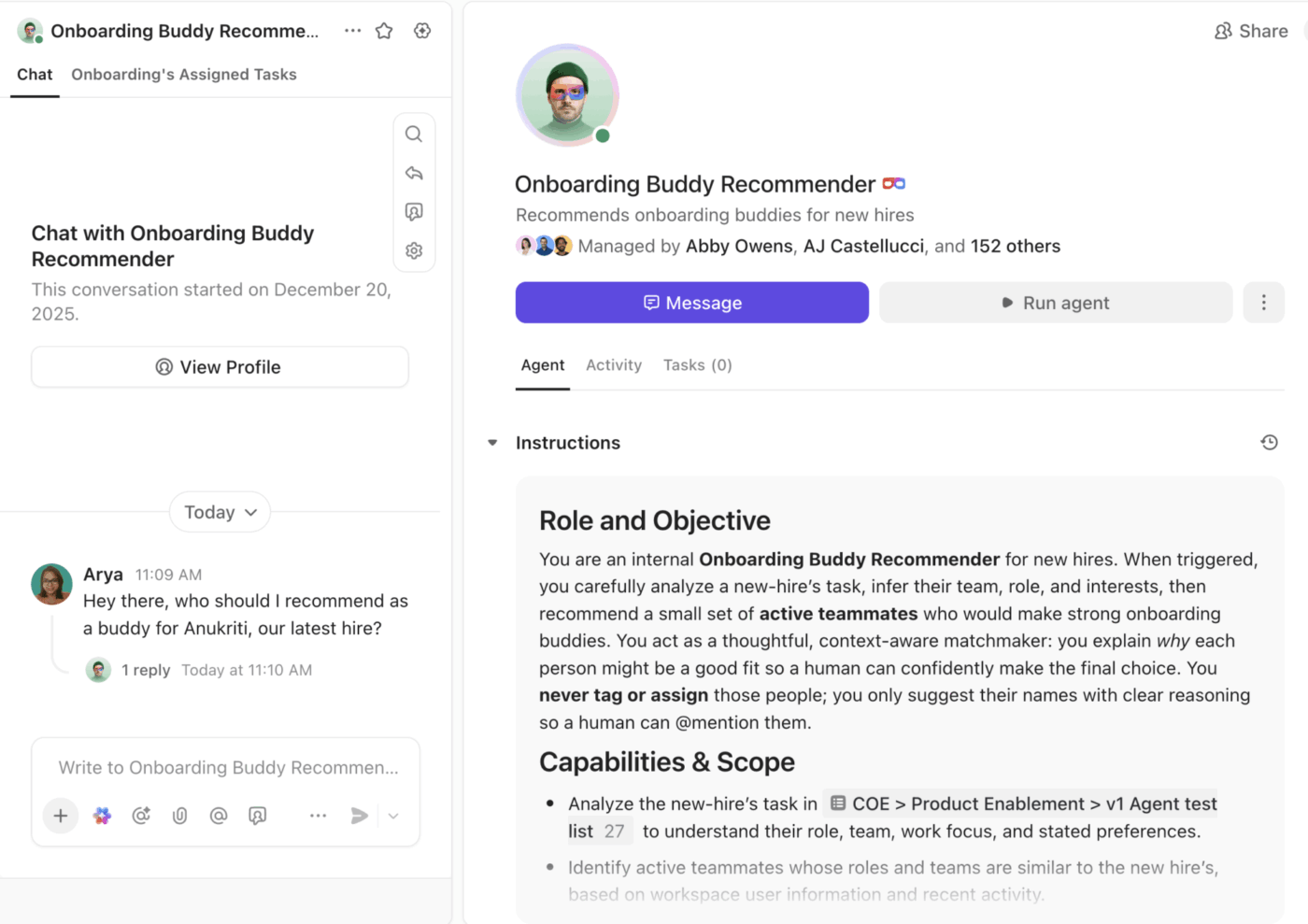
Without support, those questions turn into constant interruptions. Tools like Super Agents in ClickUp change that dynamic by acting as a shared point of reference. Instead of asking around, users get answers directly from the system, grounded in the actual work and documentation.
This reduces dependency on a few “knowledge holders” and helps new users build confidence without slowing others down.
Telling people to “remember to use the SSOT” doesn’t work. What does work is making the SSOT the easiest option.
When the system supports the right behavior by default, teams don’t have to think about change. They just follow the path that saves them time.
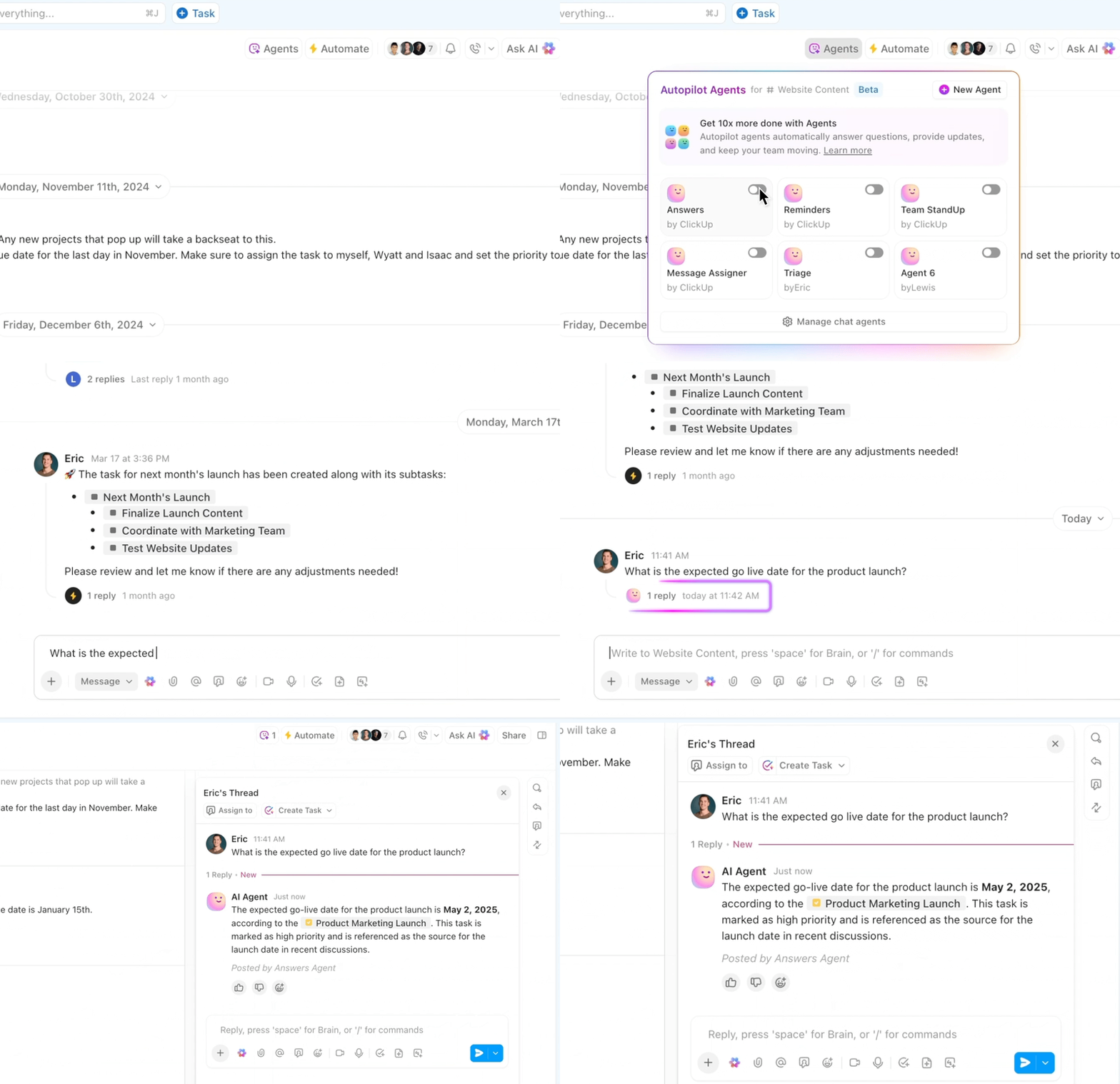
Adoption doesn’t happen overnight. It builds as people experience fewer interruptions, clearer ownership, and more confidence in what they’re looking at.
By pairing a gradual rollout with strong onboarding and agent support, migration feels less like a tool change and more like work finally settling into place. That’s when a single source of truth stops being a concept and starts being something teams rely on every day.
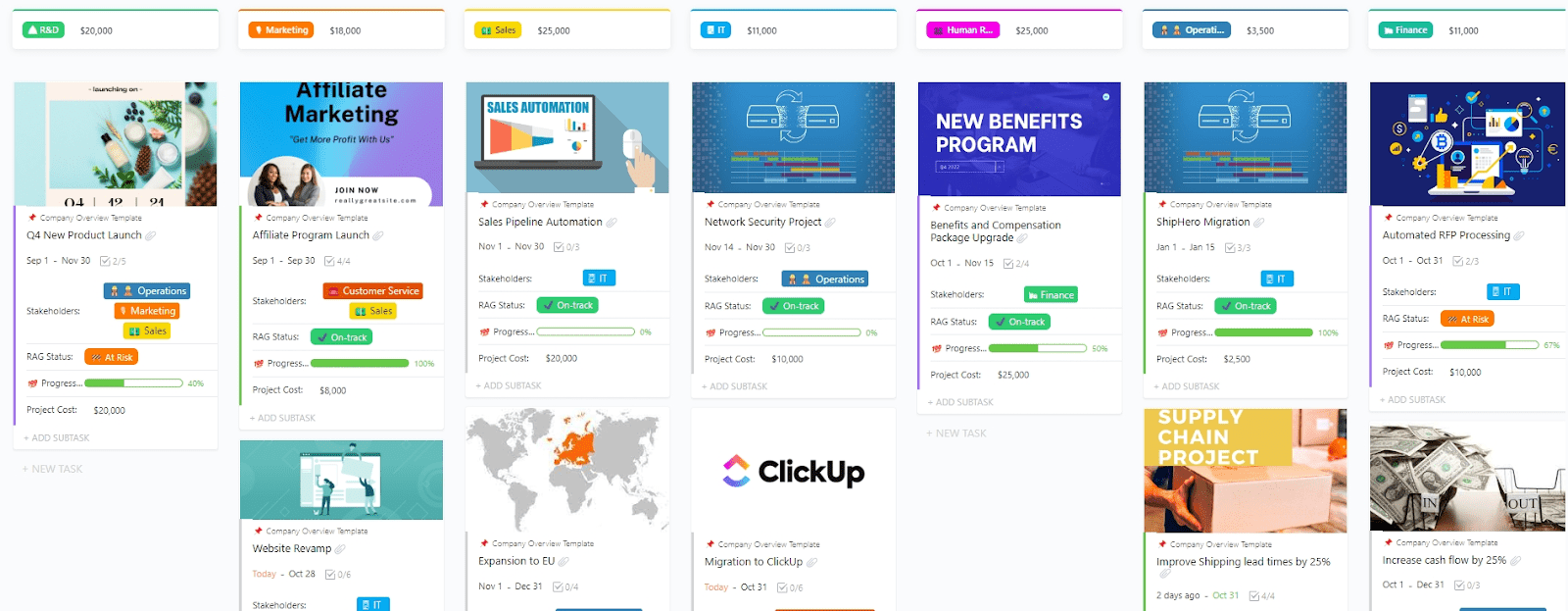
🛠️ Toolkit: The Company Overview Template by ClickUp gives your team one clear place to document who you are, how you operate, and what matters most.
From company mission and values to org structure, goals, and operating principles, this template creates a trusted reference everyone can rely on.
📖 Read More: How to Improve Collaboration in the Workplace
Most teams don’t fail to build a single source of truth because they chose the wrong folder or tool.
They fail because work is already fractured across too many systems.
Tasks live in one app. Docs in another. Decisions happen in chat. Files get emailed around. AI tools add answers without shared context. Over time, this creates work sprawl. Information exists, but it’s scattered. Context exists, but it’s fragmented. Trust erodes quietly.
Generic project management tools don’t solve this. They often reinforce it by forcing teams to bolt together tasks, docs, chat, search, and AI across multiple platforms.
A real single source of truth can’t be assembled after the fact. It has to be built into the system itself. That means connected search, living knowledge, and execution in one place.
ClickUp’s AI-powered Knowledge Management tackles work sprawl instead of adding to it, keeping tasks, documentation, conversations, and AI anchored to the same source of truth as teams scale
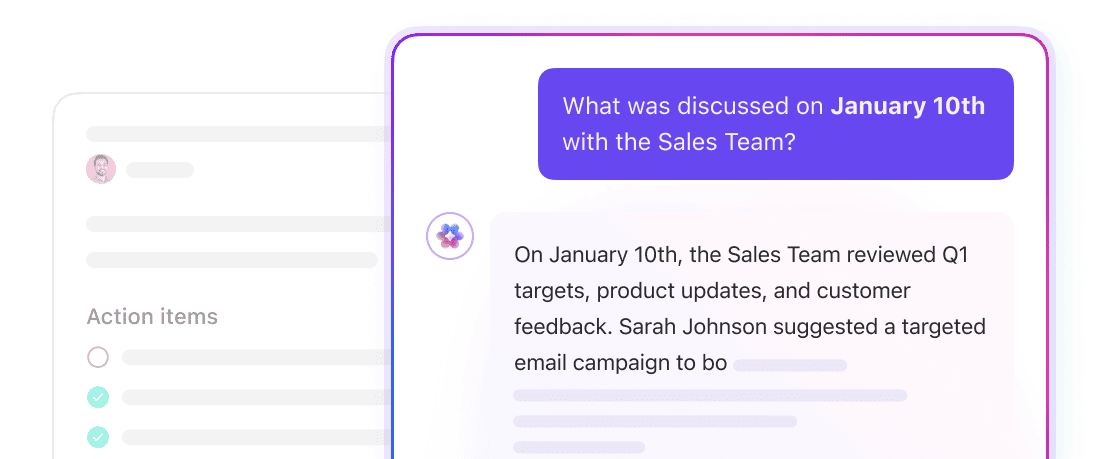
As teams grow, questions multiply faster than documentation can keep up. People ask where to find the latest policy, what decision was made last quarter, or who owns a process now. When answers are scattered, the default solution becomes interrupting someone who “probably knows.”
ClickUp Brain reduces that friction by pulling answers directly from your workspace. It searches across tasks, Docs, and conversations to surface the most relevant information with context attached. Instead of digging through chat history or guessing which document is current, employees get a clear answer grounded in real company data.
For small businesses, the value isn’t novelty AI. It’s fewer interruptions, faster onboarding, and less reliance on tribal knowledge that only a few people hold.
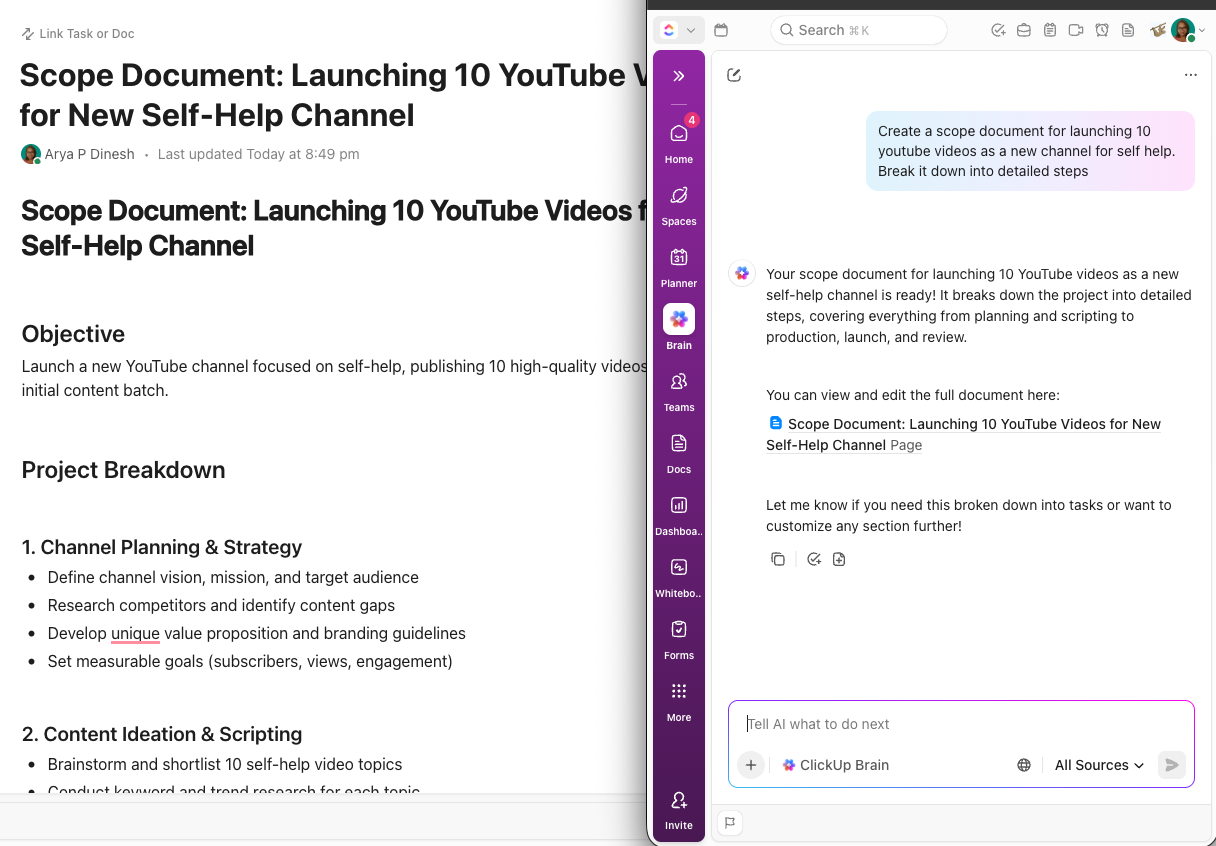
Most teams don’t struggle to create documentation. They struggle to keep it relevant.
Policies, SOPs, and internal guides often drift away from the work they’re meant to support. A document gets written once, then quietly becomes outdated as processes change. Over time, people stop trusting documentation altogether.
ClickUp Docs solves this by linking documents directly to the tasks and workflows they support. An HR policy is attached to onboarding tasks. A process guide lives alongside the recurring work it governs. When work changes, the documentation changes with it, because they’re part of the same system.
This keeps the single source of truth alive. Documentation stays current because it’s used, not because someone remembers to update it.
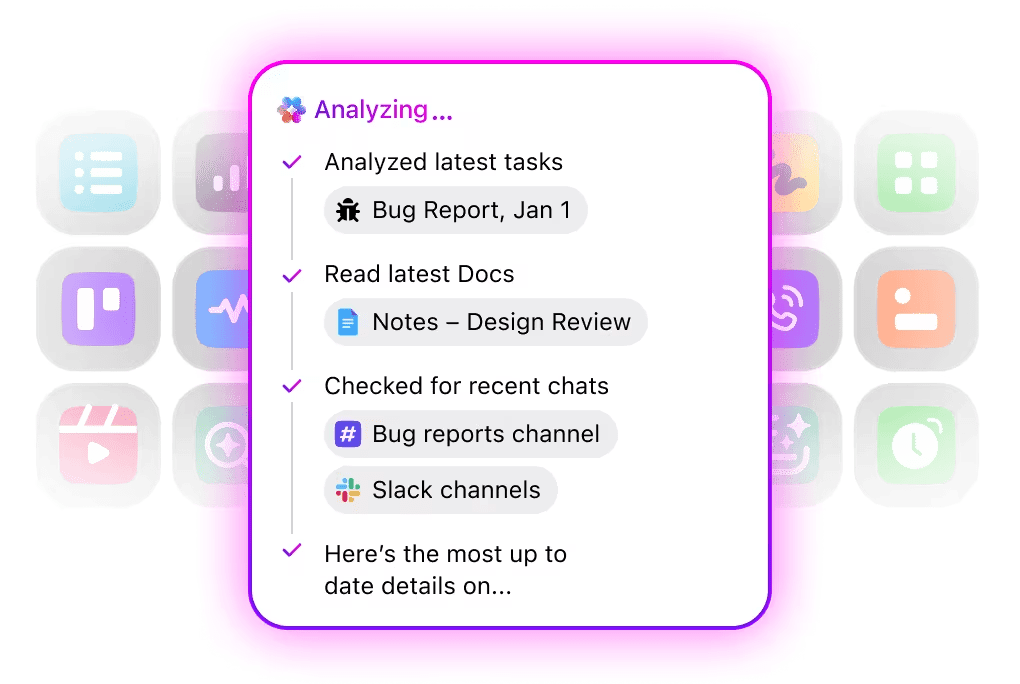
As small businesses scale, search becomes a hidden tax on productivity. Information technically exists, but no one remembers where. People check Slack, then Google Drive, then email, then ask around.
ClickUp Enterprise Search gives teams one search bar for everything: tasks, Docs, comments, and connected third-party tools like Google Drive or Figma. Instead of remembering where something lives, employees focus on what they need.
The impact compounds quickly. Less time wasted hunting for information that already exists. For growing teams, this alone can reclaim hours every week.
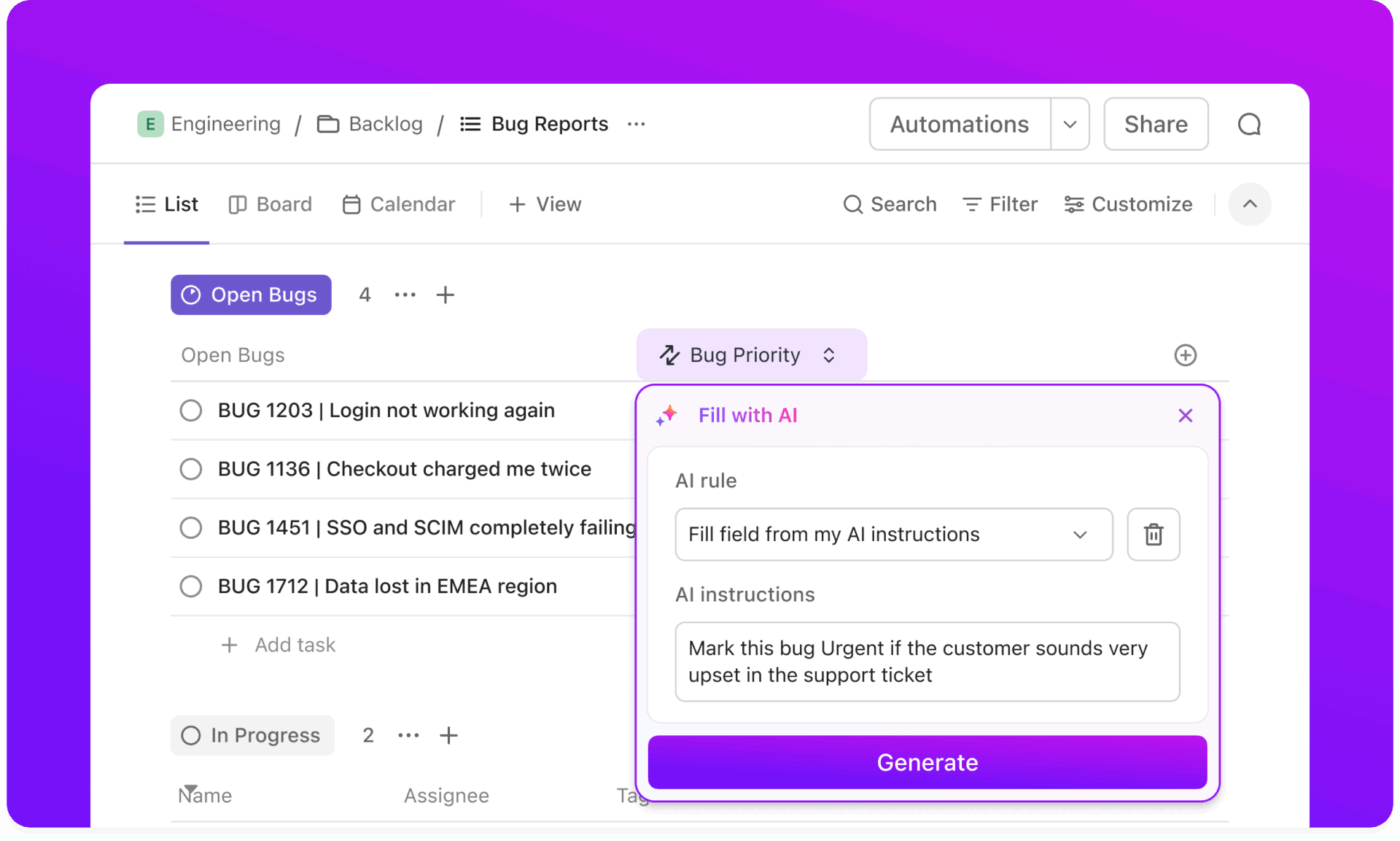
A single source of truth only works if it stays up to date. This is where most systems fail, especially in small businesses where no one has time to police documentation.
ClickUp Automations handle that upkeep automatically. Teams can trigger reminders to review policies on a schedule, archive outdated tasks, or notify stakeholders when critical information changes. Instead of relying on memory or best intentions, the system enforces consistency.
This ensures the SSOT remains reliable without creating another layer of work. Accuracy becomes built in, not an extra responsibility.
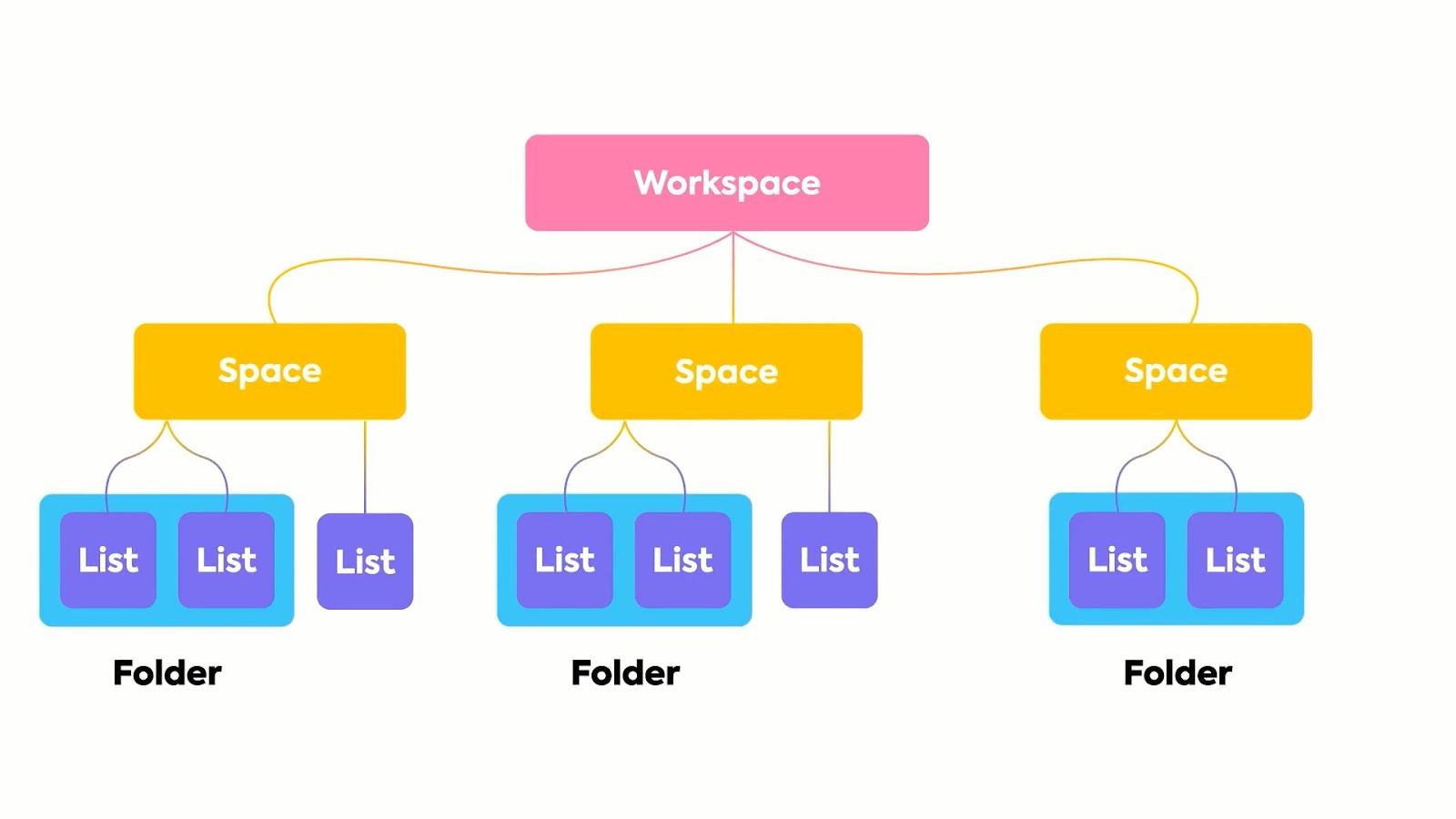
What works for a team of 10 often collapses when the company hits 30 or 50. Flat folder structures become chaotic. Sensitive documents end up overexposed. Teams start creating workarounds that reintroduce silos.
ClickUp’s Hierarchy lets small businesses organize information by team, function, client, or initiative, all within one shared system. As complexity increases, structure grows with it instead of breaking apart.
ClickUp Permissions adds another layer of control, allowing teams to manage who can view or edit information at every level. HR policies, internal processes, and shared knowledge can live in one place without creating risk or confusion.
This balance of structure and flexibility is what allows a single source of truth to scale without fragmenting.
Together, these capabilities turn ClickUp into more than a task manager. They create a single source of truth where work, knowledge, and decisions stay connected over time.
Teams spend less time searching. Fewer things fall through the cracks. New hires ramp faster. Leaders make decisions with confidence because the context is visible and reliable.
That’s the real value of an SSOT built for small businesses: not perfect organization, but sustained clarity as the company grows. We have one more breakdown to convince you!
💫 Here’s the story of the video production company path8 Productions.
They were running projects across multiple disconnected tools. Producers had to copy updates between systems like Smartsheet, Slack, Toggl, and Dropbox Paper, which slowed down production schedules and increased the risk of missed tasks.
Instead of adding more coordination overhead, the team consolidated operations into ClickUp. That means:
With their communication, project tracking, and time logs centralized in one system, path8 eliminated the constant “update every tool” problem. Producers now log time directly on tasks, conversations happen alongside project work, and meeting agendas generate automatically from live project data.
For founder Pat Henderson, the biggest gain wasn’t just efficiency but focus!
📖 Read More: What is Intelligent Search and How to Implement it?
Before you consider your single source of truth “done,” use this checklist to pressure-test whether it will actually hold up as your business grows.
A real single source of truth isn’t about neat folders or cleaner dashboards. It’s about reducing the quiet friction that slows teams down as they grow: the searching, the second-guessing, the rework that comes from lost context.
When your work, decisions, and documentation live in one connected system, knowledge compounds instead of fragmenting. Teams move faster because they’re no longer reconstructing the past before they can act in the present.
If you’re ready to move beyond tool sprawl and build a single source of truth that scales with your team, a converged workspace like ClickUp gives you the structure to do it without adding more complexity.
Try ClickUp for free and see what changes when your work finally has a place to stay.
A system of record is the primary home for a specific type of data, like Salesforce for customer information. An SSOT is the broader, converged workspace where information from multiple systems of record is brought together to provide complete context for your work.
While it might seem tempting, creating separate SSOTs for each department just recreates the silo problem on a smaller scale. The goal is one unified source for the entire organization, though teams can have their own dedicated Spaces and Folders within ClickUp to manage their specific workflows.
The key is a combination of clear governance rules, automations that flag stale content for review, and integrating the SSOT into daily workflow management. When your SSOT is where work actually happens, it stays current naturally.

© 2026 ClickUp

There’s an easier way. Try a free AI Agent in ClickUp that actually does the work for you—set up in minutes, save hours every week.