






Still downloading templates?
There’s an easier way. Try a free AI Agent in ClickUp that actually does the work for you—set up in minutes, save hours every week.
Sorry, there were no results found for “”
Sorry, there were no results found for “”
Sorry, there were no results found for “”
If you are chasing financial independence, you have probably had at least one moment like, “Wait, where is all my money going?” Your brokerage app shows one number. Your bank app shows another. Your retirement spreadsheet might be buried in a folder called “Final_V3_Updated_NEW.”
That confusion is common and human. A recent survey found that about 60% of Americans have a retirement savings account, yet only half of them expect to live comfortably in retirement.
This gap between saving and feeling secure shows how challenging it is to understand real progress without a clear view of your numbers. If you are on a FIRE (Financial Independence and Retire Early) journey and hope to retire early, guessing is not enough.
In this blog, we will walk through simple FIRE tracker templates that help you see your net worth, spending, and investments clearly so you can decide whether your current plan truly supports the future life you want.
💡 Friendly Tip: As explained in The Psychology of Money, true financial success comes from mastering your mindset and habits—not just your math. Prioritize saving consistently, avoid lifestyle creep, and remember that “doing well with money has little to do with how smart you are and a lot to do with how you behave.”
Browse through our collection of all the free ClickUp and other FIRE tracker templates:
| Template Name | Download Template | Ideal For | Best Features | Visual Format |
| ClickUp Simple FIRE Budget Template | Get free template | FIRE beginners and busy earners who want a simple monthly budget that supports their plan | Clear income and expense categories; views for Budget Plan, Income, Net Cash, and Expenses; quick view of how much is left to save or invest | List, Table, Dashboard |
| ClickUp Finance Management Template | Get free template | Individuals and small teams managing personal, household, or business finances in one place | Space-level setup for finance projects; custom statuses for tasks; calendar view for upcoming payments and reviews | List, Calendar |
| ClickUp Retirement Checklist Template | Get free template | Anyone who wants a structured list of retirement to-dos on a FIRE path or closer to retiring | Document-style checklist that converts into tasks; sections for expenses, income, savings targets, and reviews; ability to assign tasks and dates | Doc, List, Gantt, Calendar |
| ClickUp Personal Budget Template | Get free template | People who want a repeatable monthly budget to understand spending and free up cash for investing | Categories for essentials, discretionary spend, debt, and savings; multiple views for monthly breakdowns; alignment of due dates with income | List, Board, Calendar |
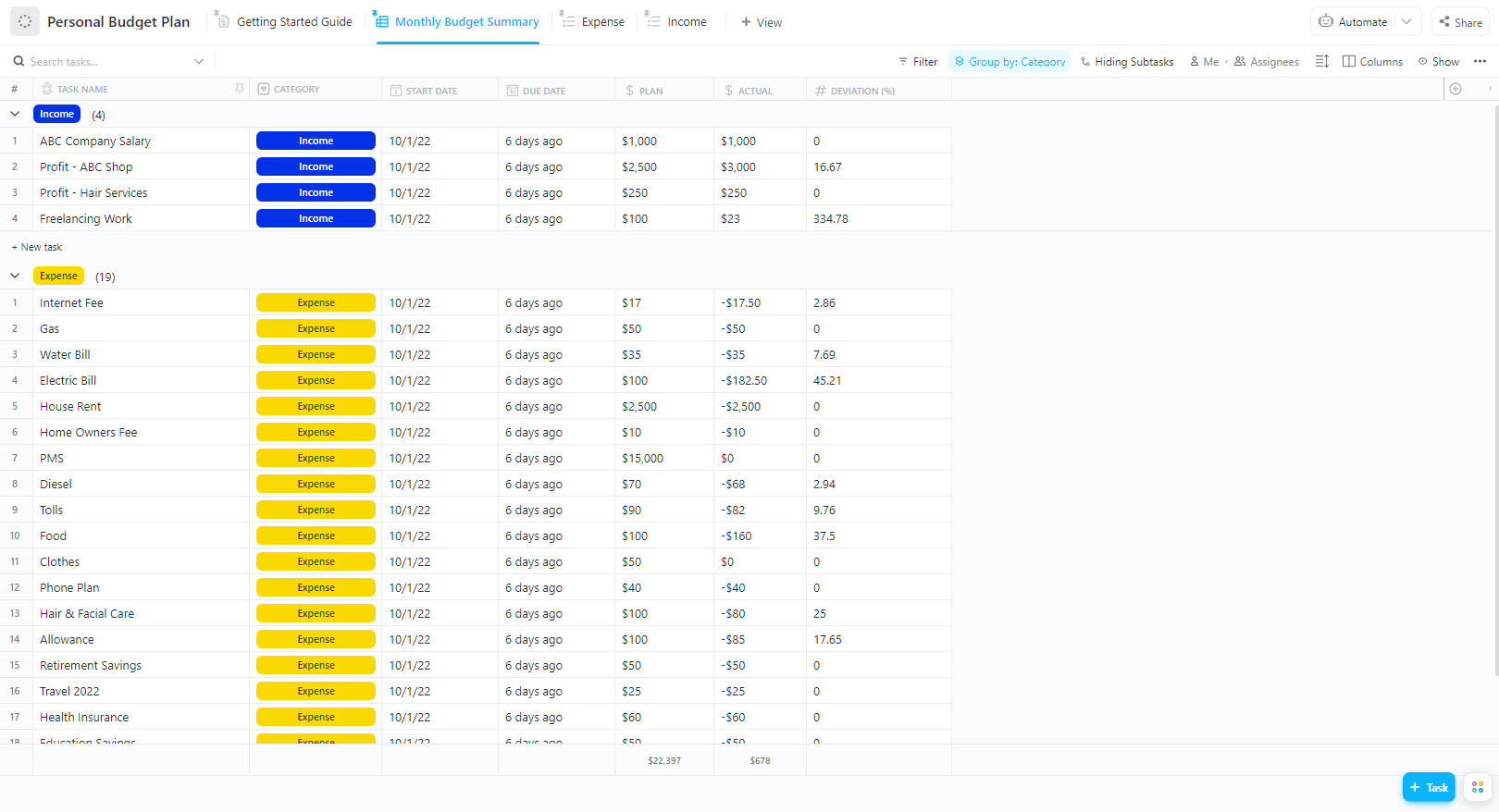
| ClickUp Personal Budget Plan Template | Get free template | Anyone who wants one steady layout they can reuse each month instead of rebuilding a budget | Separate areas for income, fixed costs, savings targets, and flexible spending; side-by-side planned vs actual view; running log for daily spend | List, Table |
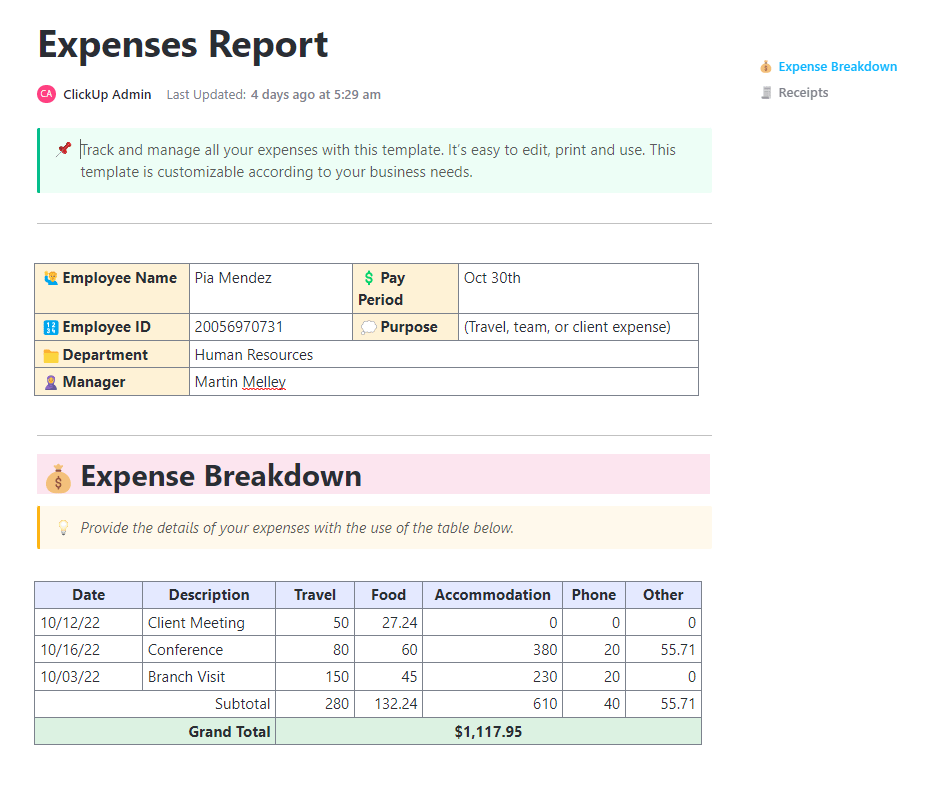
| ClickUp Expenses Report Template | Get free template | Individuals and small teams who need a clean record of expenses for budgeting and tax prep | Table-style log for date, vendor, category, and amount; simple statuses from submitted to approved; attachment space for receipts | Doc, Table, List, Calendar |
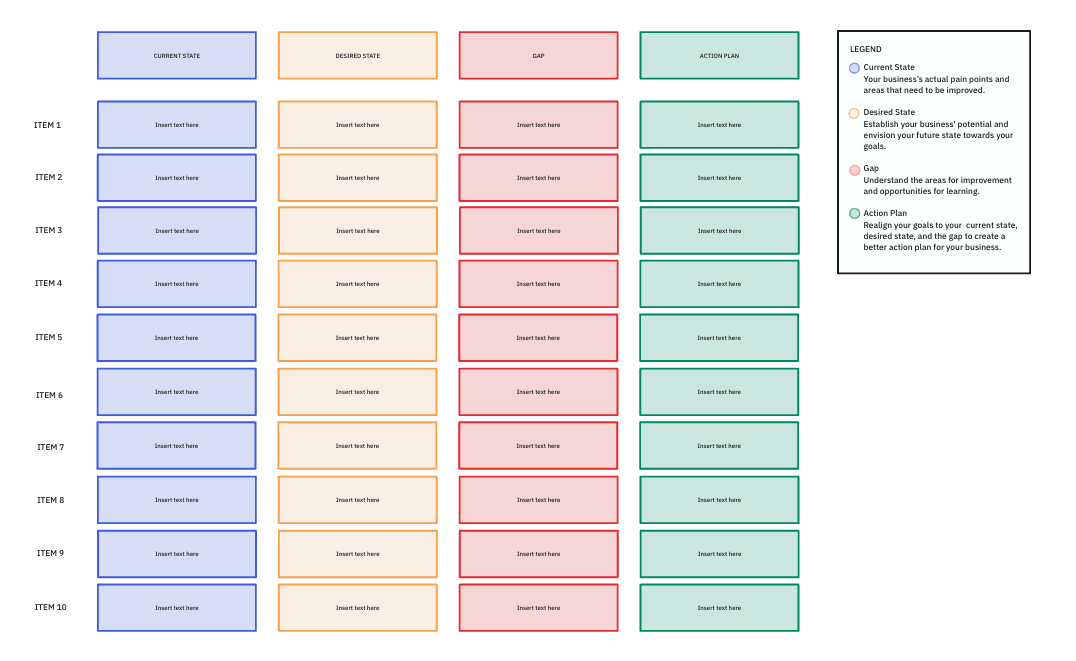
| ClickUp Retirement Gap Analysis Template | Get free template | FIRE planners who want to compare their current path with their target retirement numbers | Whiteboard-style layout for current net worth vs target FIRE number; quick mapping of savings rate, returns, and expenses; tasks to close identified gaps | Whiteboard, List |
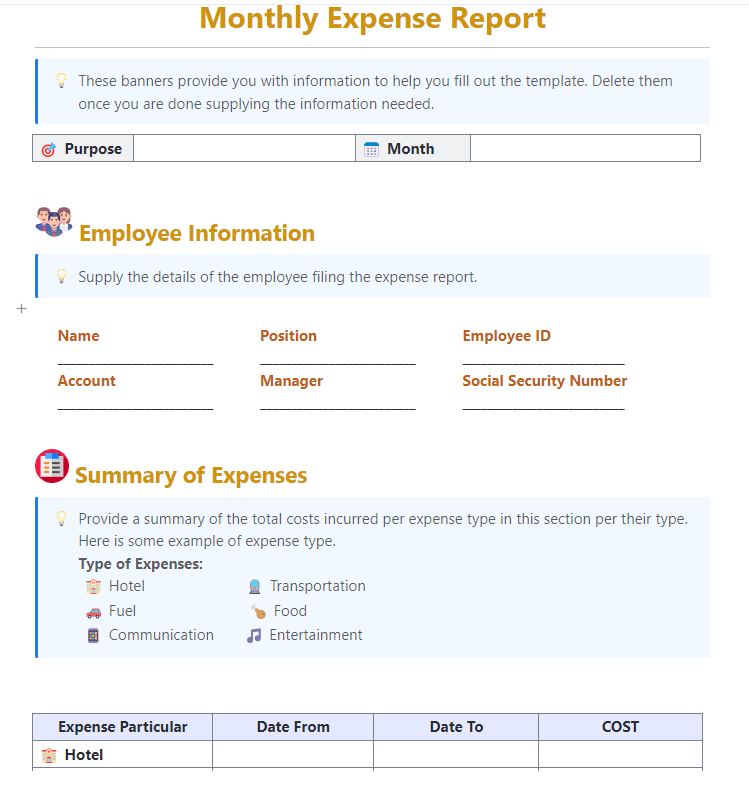
| ClickUp Monthly Expense Report Template | Get free template | Anyone who wants a month-by-month view of where their money actually goes | Table for listing each expense with details; category totals for fast reviews; ability to compare months and forecast upcoming costs | Table, Calendar, Doc |
| ClickUp Yearly Goals Template | Get free template | People who want an annual roadmap that connects FIRE targets with other life and work goals | Goal sections by theme; tasks and milestones for each goal; timeline and calendar views to spread work across the year | Doc, List, Gantt, Calendar |
| ClickUp Personal Development Goal Setting Template | Get free template | Anyone who wants to set and track growth goals that support their FIRE plan and future lifestyle | SMART goal prompts; effort and status views like On Track or Crushing; worksheets to break big goals into smaller tasks and schedule check-ins | List, Board, Calendar, Doc |
A simple FIRE tracker is a lightweight tool that helps you monitor your progress toward Financial Independence and Retiring Early (FIRE) by tracking just the essential numbers—no complex spreadsheets or financial jargon needed.
But first, let’s define FIRE.
Financial Independence and Retire Early (FIRE) is a lifestyle and financial strategy centered on a single goal: saving and investing aggressively to achieve retirement years or even decades earlier than the traditional retirement age.
It has become popular among millennials and young professionals who want more control over their time, career, and lifestyle—not just wealth.
Most simple FIRE trackers include fields such as:
You can also add other fields like:
You can log updates monthly or quarterly, compare how your net worth moves, and see how much of your money goes to day-to-day spending versus future freedom.
👀 Fun fact: In one survey, 86% of people said they budget regularly, and more than 84% of them reported that budgeting helped them either avoid debt or pay it off.
A good FIRE tracker keeps your money picture clear, current, and easy to act on. You should be able to glance at it and instantly see whether you are moving closer to financial independence or drifting off track.
Look for trackers that:
A strong FIRE tracker also supports a repeatable money routine. You return to the same sheet each month, refresh your numbers, review your progress, and decide what to adjust next.
That is how FIRE becomes a series of small, informed decisions instead of a vague dream you only think about once in a while.
👀 Fun fact: Traditional retirement savers put aside about 10%–15% of their income, while many FIRE investors save 50% or more during their working years. That big gap is why even small improvements to your savings rate can dramatically change how soon you reach financial independence.
A good FIRE tracker template makes your financial picture easy to read and update. It should help you see how your income, expenses, and investments are working together to move you toward financial independence.
The ideal template should include:
📮 ClickUp Insight: 78% of our survey respondents make detailed plans as part of their goal-setting processes. However, a surprising 50% don’t track those plans with dedicated tools. 👀
With ClickUp, you seamlessly convert goals into actionable tasks, allowing you to conquer them step by step. Plus, our no-code ClickUp Dashboards provide clear visual representations of your progress, showcasing it and giving you more control and visibility over your work. Because “hoping for the best” isn’t a reliable strategy.
💫 Real Results: ClickUp users say they can take on ~10% more work without burning out.
FIRE tracking usually breaks before the math does. One tab holds your net worth, another has your monthly budget, and your FIRE number, withdrawal rate, and “what-if” AI chats sit in different apps. That pileup is called work sprawl—where your FIRE plan is split into pieces, so you never really see the full financial picture.
ClickUp helps you pull that into one Converged AI Workspace. Your simple FIRE tracker, money tasks, review reminders, docs, and even a personalized FIRE wiki for rules and account details can all live under one roof together.
👀 Did You Know: Over a three-year period, organizations using ClickUp achieved an estimated 384% return on investment (ROI), according to Forrester Research. These organizations generated about US $3.9 million in incremental revenue through projects enabled or improved by ClickUp.
In the sections below, you will find ten ClickUp templates you can plug straight into your FIRE routine, so you spend less time rebuilding spreadsheets and more time making clear, confident money decisions.
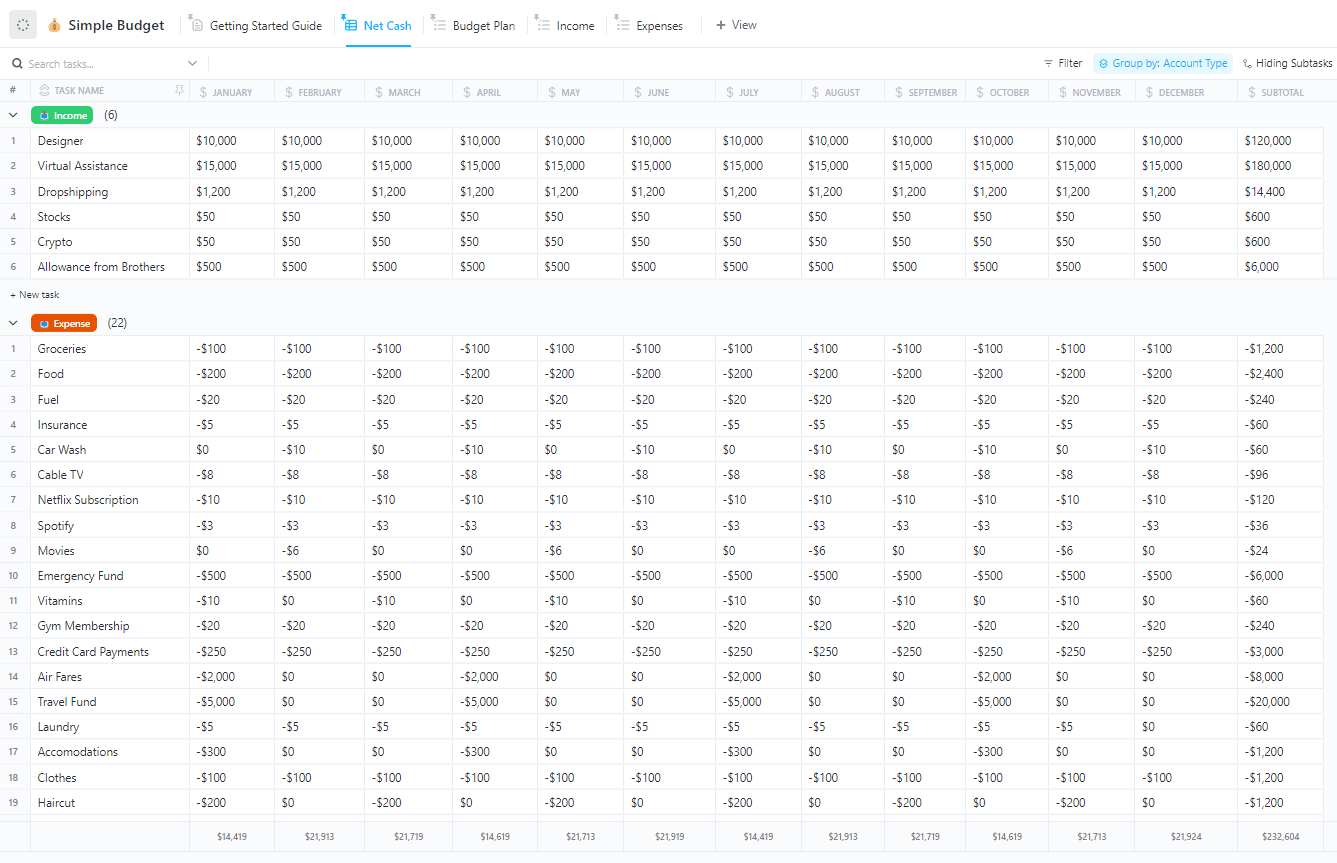
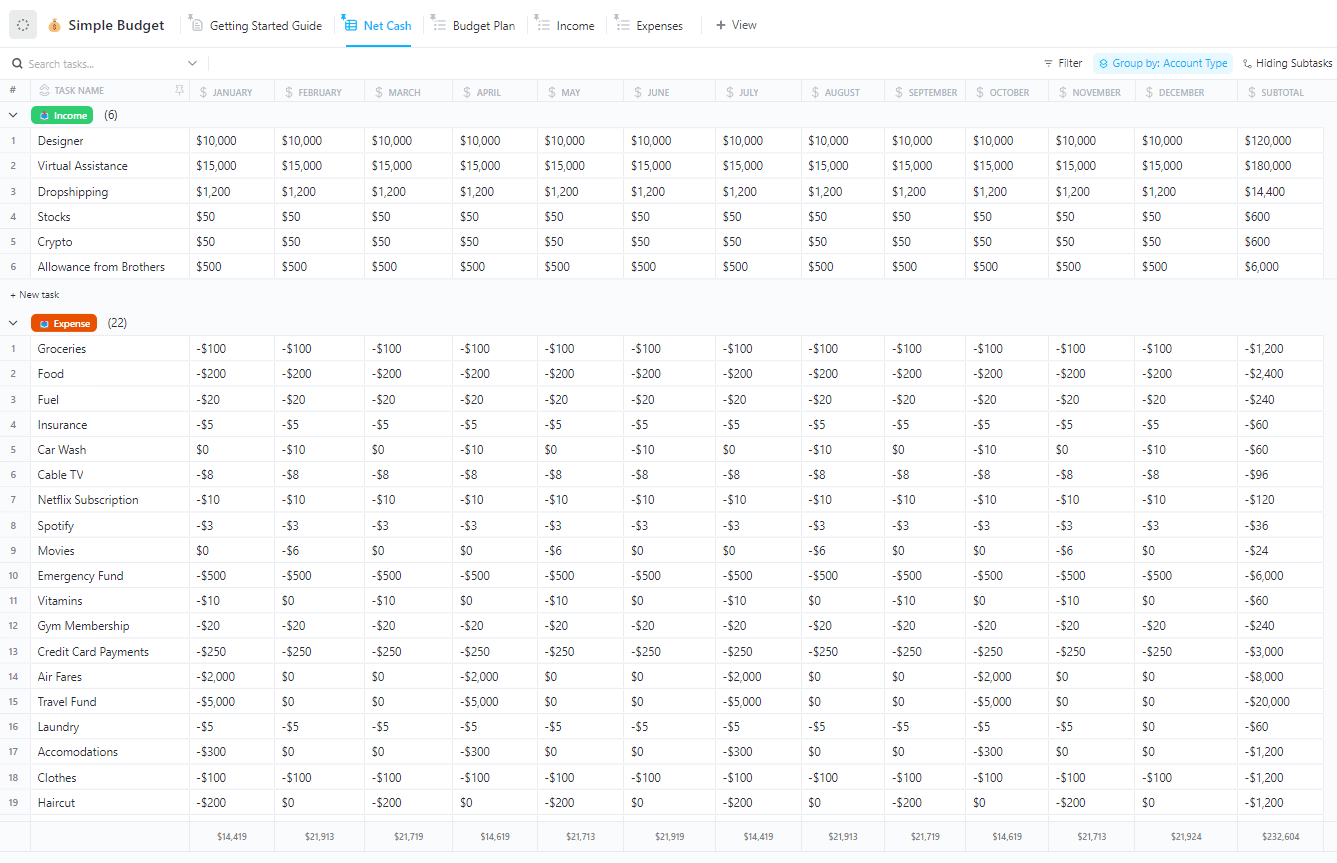
The ClickUp Simple FIRE Budget Template gives you a clear, month-by-month view of what your money is actually doing. Instead of juggling separate sheets for income, spending, and savings, you get one place to see what comes in, what goes out, and what is left to invest toward your FIRE number.
You can group your budget into straightforward categories for fixed bills, flexible spending, and savings, so you are not guessing where your cash flow slipped. Views like Budget Plan, Income, Net Cash, and Expenses make it easier to spot patterns across the month and see how small changes in spending free up more for investments.
✨ Ideal for: FIRE-focused individuals and couples who want a simple, reusable monthly budget that shows exactly how much they can invest without guessing.
💡 Pro tip: Use Custom Fields for paycheck amount, side income, bill category, due date, and budgeted vs. actual spend. That way, your FIRE budget can automatically update summary calculations and give you a quick snapshot of whether this month is on track or needs a few adjustments.
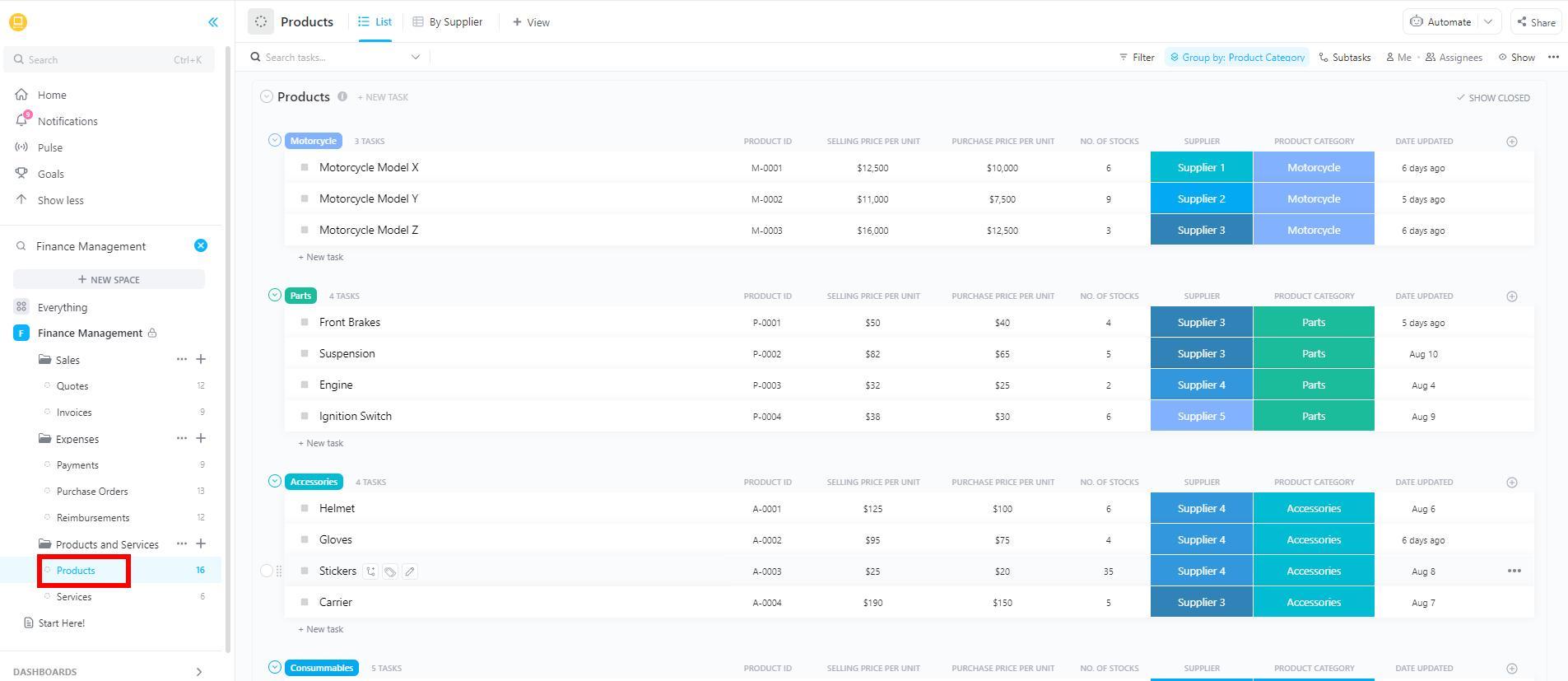
The ClickUp Finance Management Template gives you a single command center for your money life. Instead of separate folders for household bills, side hustles, business expenses, and retirement planning, you can group everything into one space with clear lists for each area.
ClickUp Tasks help you keep track of payments, reviews, and planning sessions, so “remember to pay that” turns into a simple, visible workflow you can follow every month.
You can see upcoming obligations, overdue items, and completed tasks at a glance. Then, zoom out to understand how those decisions affect your long-term plan to reach financial independence.
✨ Ideal for: Individuals and families who want a central system to manage all their financial tasks and reviews instead of patching together separate to-do lists and reminders.
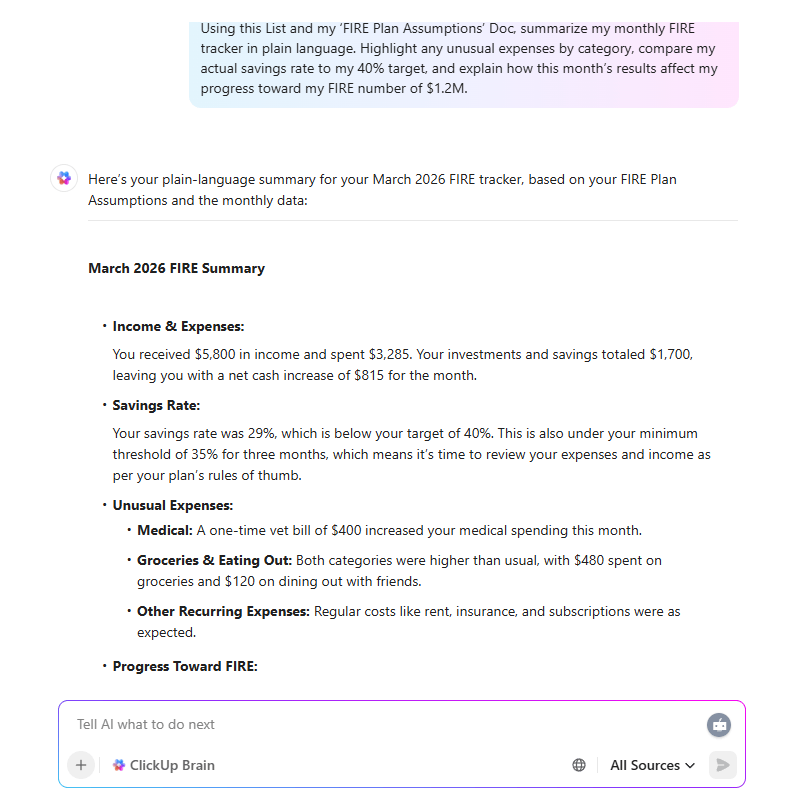
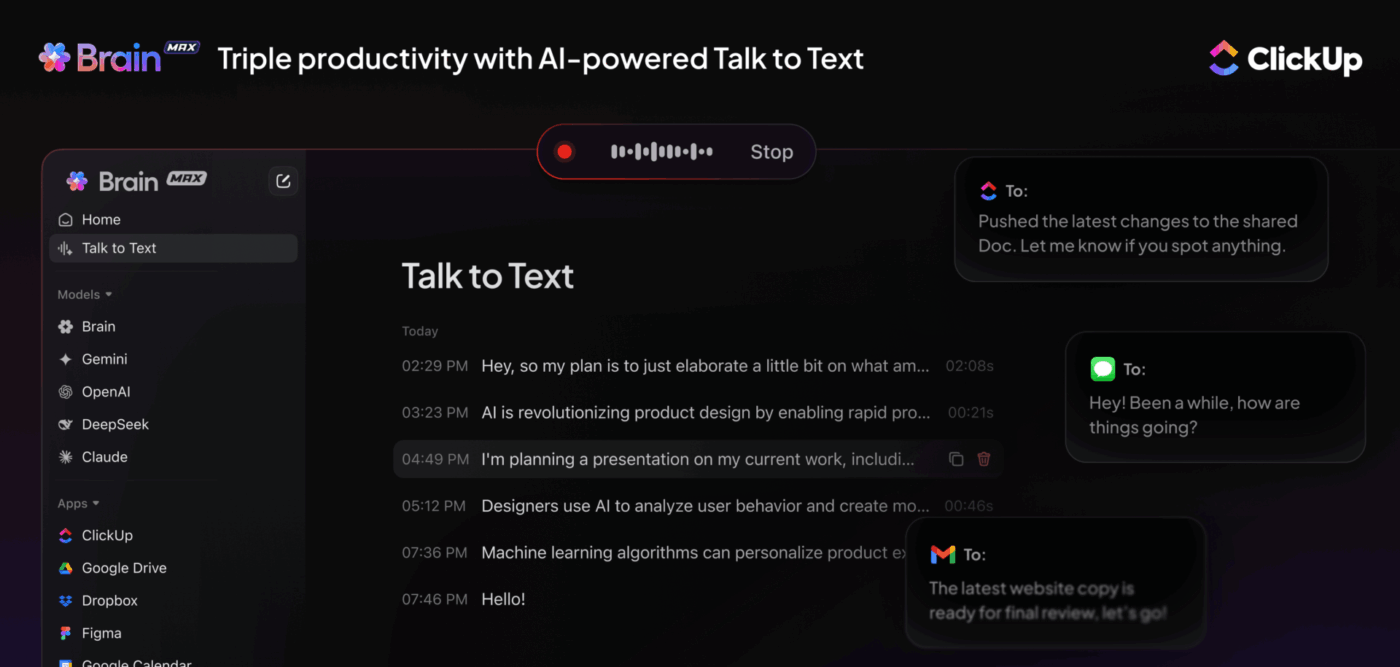
💡 Pro Tip: Use ClickUp Brain to make sense of your numbers, not just store them. Ask it to summarize your monthly FIRE tracker, highlight unusual expenses, or explain how your current savings rate affects your FIRE number in plain language.
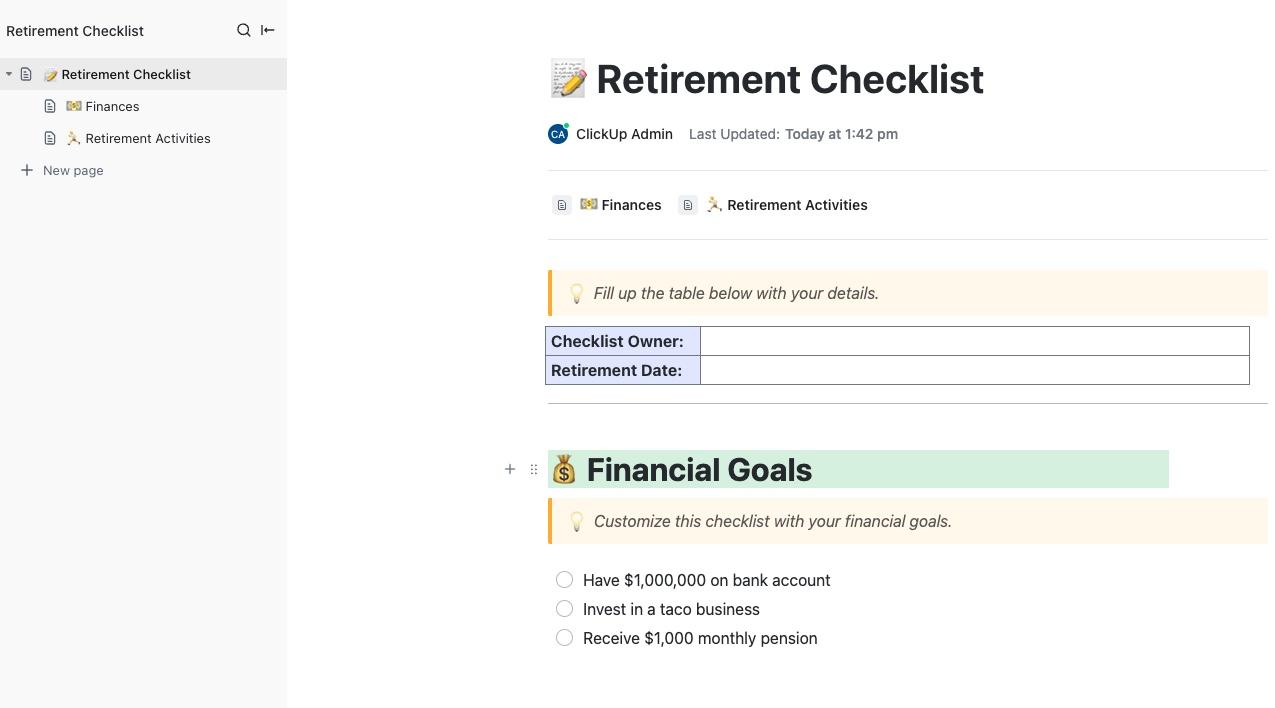
The ClickUp Retirement Checklist Template gives you a structured way to get ready for life after full-time work. Instead of scattered notes about pensions, investments, and future expenses, you get one organized checklist.
It lays out what to review, decide, and update over time. It turns “I’ll deal with retirement later” into a clear set of steps you can actually follow. You can start simple with a checklist-style Doc, then grow it into a fuller workflow with lists, calendars, or Gantt views as your plan gets more detailed.
Break retirement preparation into stages, such as estimating expenses and mapping income sources. This helps calculate how much you still need to save and sets recurring review dates, ensuring your plan stays current as life and income change.
✨️ Ideal for: Anyone who wants a structured way to prepare for retirement, from early planners on a FIRE path to people in their final decade before leaving full-time work.
💡 Friendly Tip: Tracking your FIRE journey means monitoring multiple data points—savings rate, investment growth, expense categories, net worth milestones, and years until financial independence. ClickUp BrainGPT provides instant answers about your financial progress based on all your tracked data in one place.
The ClickUp Personal Budget Template gives you a month-by-month view of where your money actually goes. Instead of scattered bank alerts and half-finished spreadsheets, you get one place to group income, essentials, nice-to-haves, debt payments, and savings. This way, you can see how each month supports your long-term FIRE goals.
You can log every transaction into categories that match your real life, then move between List, Board, and Calendar views to see both the daily details and the bigger pattern. Over time, the template makes it easier to spot habits, smooth out cash flow, and decide how much realistically goes toward today versus early retirement.
✨️ Ideal for: Anyone who wants a simple, repeatable monthly budget to understand their spending habits and free up more money for savings and investments.
Quick Hack: Create a ClickUp Dashboard that displays your key FIRE metrics in real-time—current net worth, savings rate trends, investment growth charts, and countdown to your target retirement date.
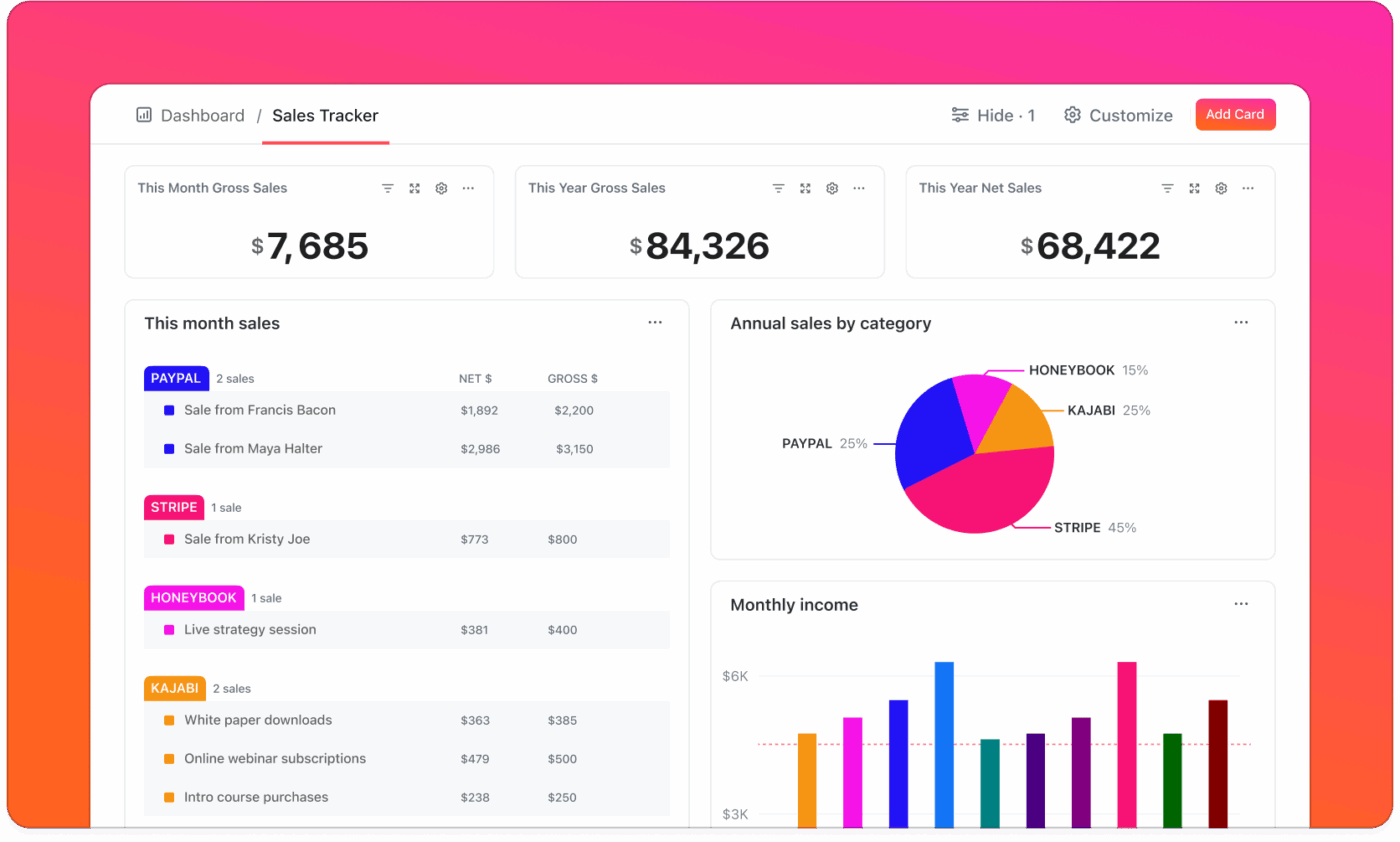
Add widgets that show monthly expense breakdowns by category, progress bars toward your next net worth milestone, and year-over-year comparison charts. Your entire financial picture lives on one customizable screen you can check daily without opening spreadsheets or switching between multiple finance apps.
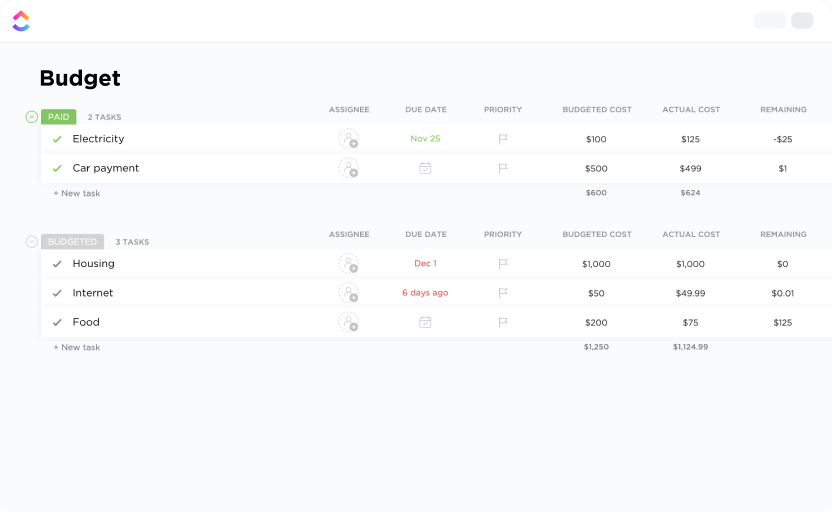
The ClickUp Personal Budget Plan Template turns “I’ll budget next month” into a no-nonsense, repeatable system. Instead of rebuilding a new spreadsheet every time, you get one structure for income, fixed costs, savings targets, and flexible spending that you can reuse month after month.
You set your core categories once, then duplicate the layout so you always know exactly what to fill in. One view serves as your overall plan for the month, another functions as a running log for day-to-day spending, and a summary-style view compares what you planned with what actually happened.
Over time, that makes it much easier to spot where your habits support your FIRE goals and where small leaks are slowing you down.
✨️ Ideal for: Anyone who wants a consistent personal budget plan that shows how everyday spending choices add up over time toward larger savings and FIRE goals.
📽️ Watch a video: If you’re planning to review your FIRE numbers weekly in ClickUp, watch this video on how to use AI for productivity:
📖 Also Read: Best AI Productivity Tools to Use
The ClickUp Expenses Report Template gives you one clean place to see where your money actually goes. You log each expense into a simple table with fields for date, vendor, category, amount, and payment method.
Tag entries for work, personal, or FIRE-related spending and use statuses like Submitted, In Review, and Approved so you always know what is pending.
Views like List and Calendar help you align charges with paydays and bills, while file attachments keep receipts conveniently next to each entry for easy reference later. Over time, the template evolves into a living expense log that you can scan to identify patterns, trim leaks, and keep your FIRE plan grounded in real numbers instead of guesses.
✨️ Ideal for: Individuals and small teams who want a clear, reusable expense report that supports smarter budgeting, tax prep, and long-term financial planning.
📖 Also Read: Free Household Budget Templates for Google Sheets
The ClickUp Retirement Gap Analysis Template helps you move from the idea, “I hope this is enough,” to, “I know what needs to change.” Instead of vague targets in your head, you lay out your current net worth, savings rate, and projected returns on one side, and your target FIRE number, safe withdrawal rate, and retirement expenses on the other.
The template features a simple whiteboard-style layout, allowing you to drag notes, charts, and callouts around until the story makes sense.
As you identify gaps, you turn them into tasks, such as increasing contributions, adjusting your retirement age, or testing different return and inflation assumptions. Over time, the dashboard becomes a working board you revisit each year to see whether you are closing the gap or need to course-correct.
✨️ Ideal for: FIRE-minded planners who want a clear, visual way to compare where they are today with the retirement they want and decide what to change next.
The ClickUp Monthly Expense Report Template gives you a clear snapshot of where your money actually went each month. You can group entries into categories that match your real life or business, so it is easy to see how much goes to housing, food, subscriptions, travel, or work costs in one place.
Views like table and calendar help you see when expenses hit and how they line up with your paychecks, while a summary-style view rolls everything up by category.
As the months add up, you start to see real patterns, trim recurring costs that don’t support your FIRE goals, and keep your spending closer to the budget you planned.
✨️ Ideal for: Anyone who wants a clear month-by-month expense report to support smarter budgeting, cost control, and long-term FIRE planning.
Quick Hack: Set up ClickUp Reminders to prompt regular financial check-ins that keep your FIRE tracking accurate. Create recurring reminders for monthly net worth updates, quarterly investment rebalancing reviews, or weekly expense logging sessions.
You can also set milestone reminders when you’re approaching savings goals or annual FIRE number recalculations.
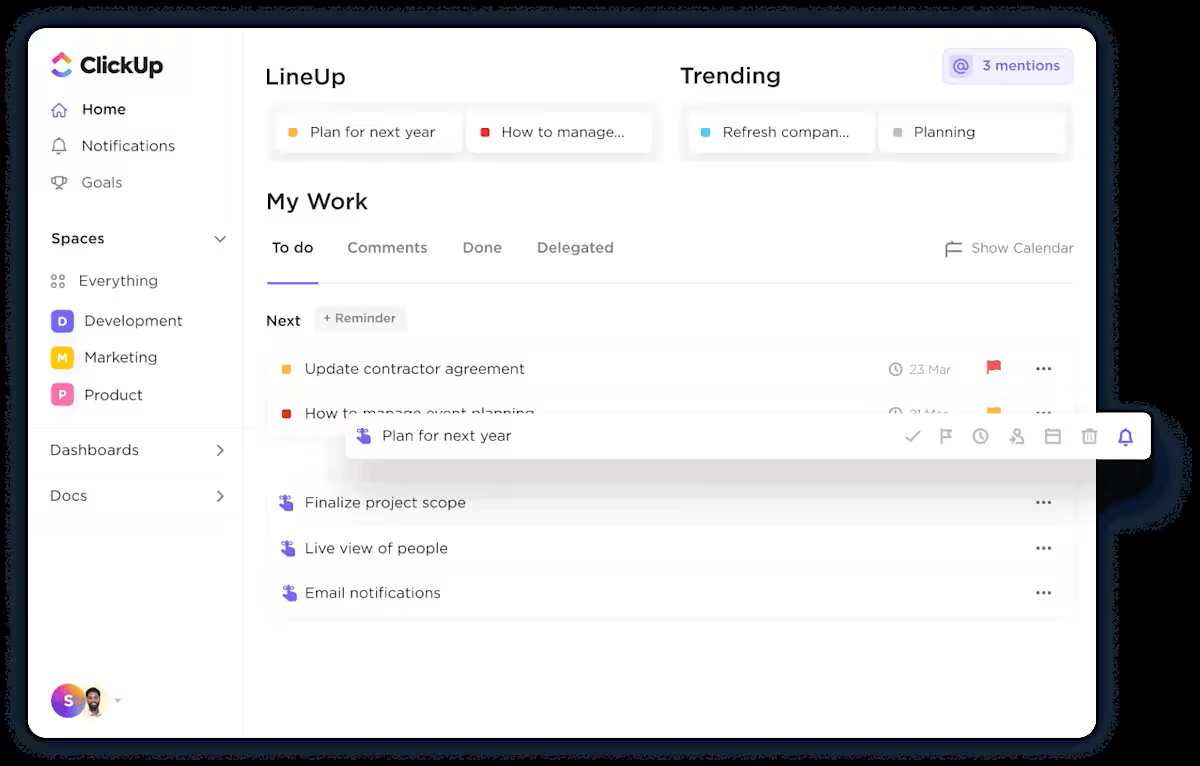
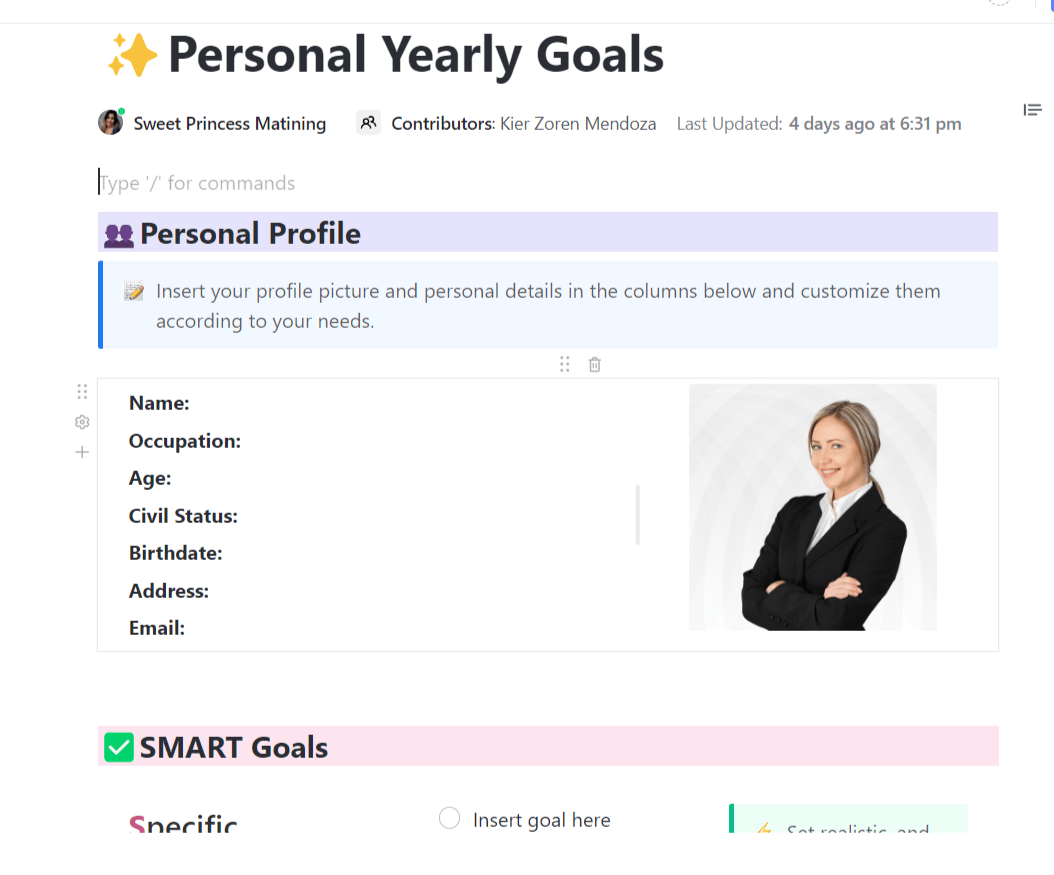
The ClickUp Yearly Goals Template provides you with a clear roadmap for the year, rather than a list of resolutions that you’ll likely forget by March. You can map out FIRE targets, savings milestones, career moves, and lifestyle changes in one place, then revisit them regularly instead of relying on memory.
If you prefer to check progress on your phone, you can also pair the templates with your favorite goal-tracking apps, so your biggest money and life goals stay visible between reviews.
The template begins as a simple Doc-style outline that you can use to create tasks, timelines, and milestones. You group your goals into themes, such as money, work, and life, then break each one into smaller steps that actually fit into your calendar.
✨️ Ideal for: Anyone who wants an annual roadmap that connects FIRE targets, savings goals, and life priorities in one organized plan.
Most people set goals, but very few set the kind of goals they can actually achieve. The problem? Not having a clear goal-setting system. Learning how to set long-term goals can guide your life, career, and personal growth.
📽️ In this video, we’ll break down:
📖 Also Read: Best Goal Tracking Apps
The ClickUp Personal Development Goal Setting Template gives your growth plans the same structure as your money plans. You can turn vague ideas like “learn more about investing” or “negotiate a better salary someday” into clear goals that fit around work, family, and everything else.
That way, personal development becomes a practical part of your FIRE strategy, not something that keeps slipping to “later.” Inside the template, simple prompts and views help you outline big themes (career, skills, finances, lifestyle), then break each into smaller, time-bound tasks.
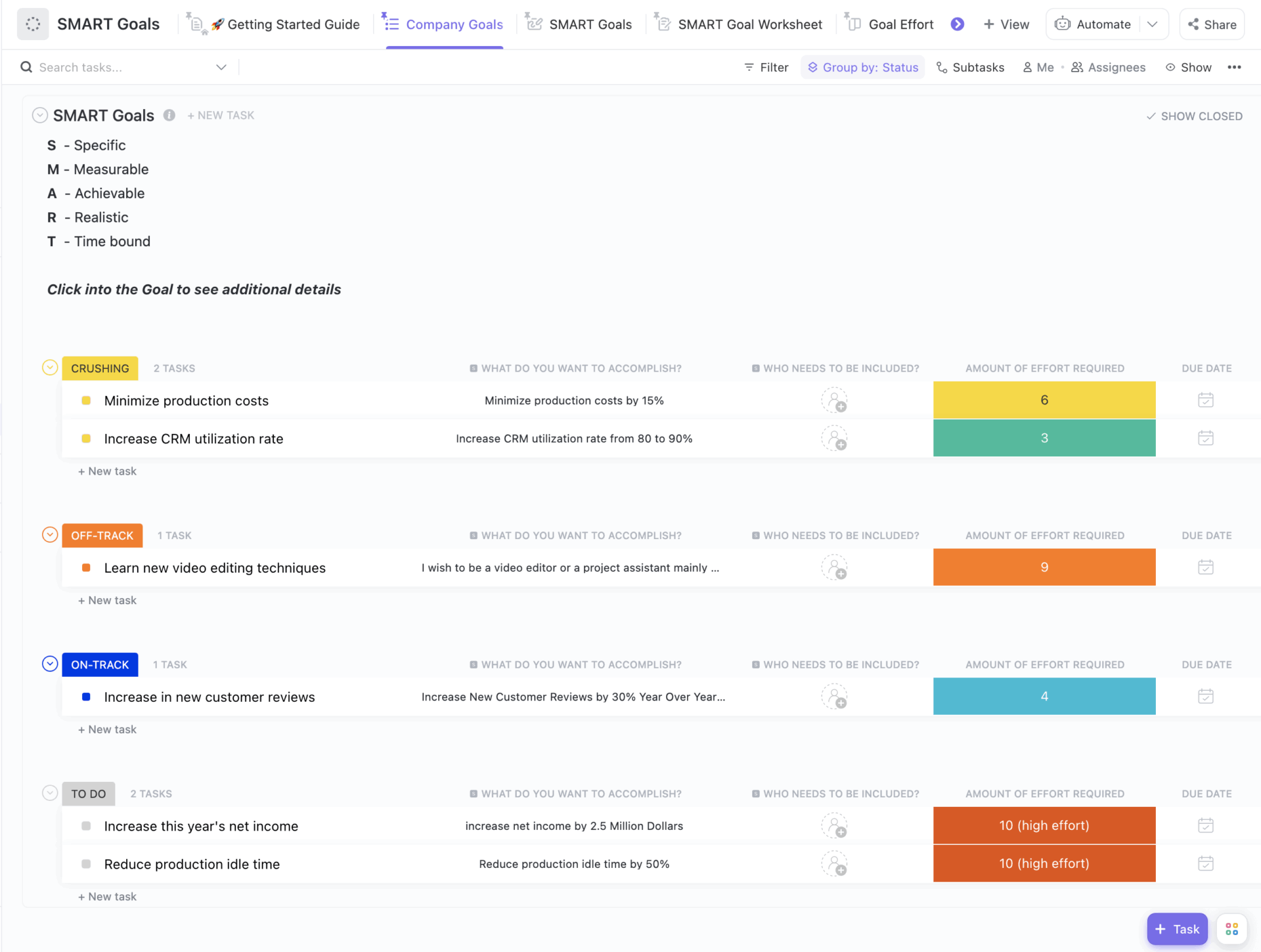
You can use statuses like “On Track,” “Off Track,” and “Crushing” to see progress at a glance, while views such as SMART Goals, Goal Effort, and guided worksheets make it easier to define what success looks like, choose where to focus your energy, and schedule regular check-ins so your growth keeps pace with your financial independence plans.
✨️ Ideal For: Anyone who wants a simple way to set, track, and follow through on personal development goals that support the life they want before and after retirement.
💡Quick Tip: If you are still clarifying what you want to work on, this guide to personal development goals can help you find clear starting points before you plug them into the template.
Reaching financial independence is less about one big decision and more about hundreds of quiet, repeatable choices. A simple FIRE tracker gives those choices a shape, instead of leaving them as vague intentions in your head.
ClickUp gives you a place where you can shape your intentions and create financial security. ⭐️
Your simple FIRE tracker sits next to your budgets, retirement checklists, yearly goals, and personal development plans. Tasks, notes, and reminders are located in the same place as the numbers they affect, making it easier to adjust when life, income, or plans change.
For example, you might track your assets and mortgage in a Google Sheets FIRE tab that feeds into your ClickUp Tasks, change the number in the first row, and your FI number, portfolio balance, savings percentage, and other calculations automatically update. Choose your own financial freedom.
Because the tracker reflects your own situation rather than a generic template, every review becomes an opportunity to make more informed decisions about what truly drives your long-term growth.
Sign up for ClickUp today to keep your FIRE plan, money tasks, and next steps together in one workspace.

© 2026 ClickUp

There’s an easier way. Try a free AI Agent in ClickUp that actually does the work for you—set up in minutes, save hours every week.