


Sorry, there were no results found for “”
Sorry, there were no results found for “”
Sorry, there were no results found for “”
Picture this: You’re throwing a party. Your house is full of celebrating guests. Someone says, “I’m getting hungry… Let’s order some pizzas!”
You’re trying to figure out how many pizzas to order. Too many pizzas, and you’ll be stuck eating leftover pepperoni for days. Too few and some of your guests won’t get a slice.
But you’re also limited by counter space and the money in your wallet.
How do you feed everyone while also getting the most value out of your money?
Like party organizers, every project manager should know how to allocate resources wisely. No project has an unlimited budget or amount of team members, but you can use resource allocation to maximize productivity and project success.
It’s all about thorough preparation and strategic planning around making the most out of what you have.
Learn how to allocate enough resources to all your projects so that you get the job done—and everyone gets a slice of pizza. Let’s party!
Resource allocation is the process of identifying all your available resources—whether it’s labor or monetary—for a project and then strategically assigning them to tasks that enable them to do their best work.
For agencies juggling multiple projects for different clients, resource allocation is key to making sense of creative chaos. Matching the right person, or resource, with the right project makes everyone happier in the end. Your staff gets to work on the projects they’re best suited for, so clients are likely to receive high-quality project deliverables and results.
As projects evolve and client expectations change, resources are reallocated to keep progress on track with project timelines.
Your resources are all the company assets necessary to complete tasks or projects. These may include:
Usually, project managers are responsible for resource allocation because they have the most visibility and control over project budgets, scope of work, and task management. However, large organizations might separate these responsibilities across several roles or have dedicated resource management departments.
Related: Resource Leveling
Not allocating your resources well is like sending just one person to pick up ten pizzas on their own while the other 15 people chat at home. It’ll take one person much more effort and time to get those pizzas, which runs the risk that everyone might be stuck eating cold pepperoni.
Bummer!
Why not send three people to help out, so everyone can enjoy a warm slice ASAP?
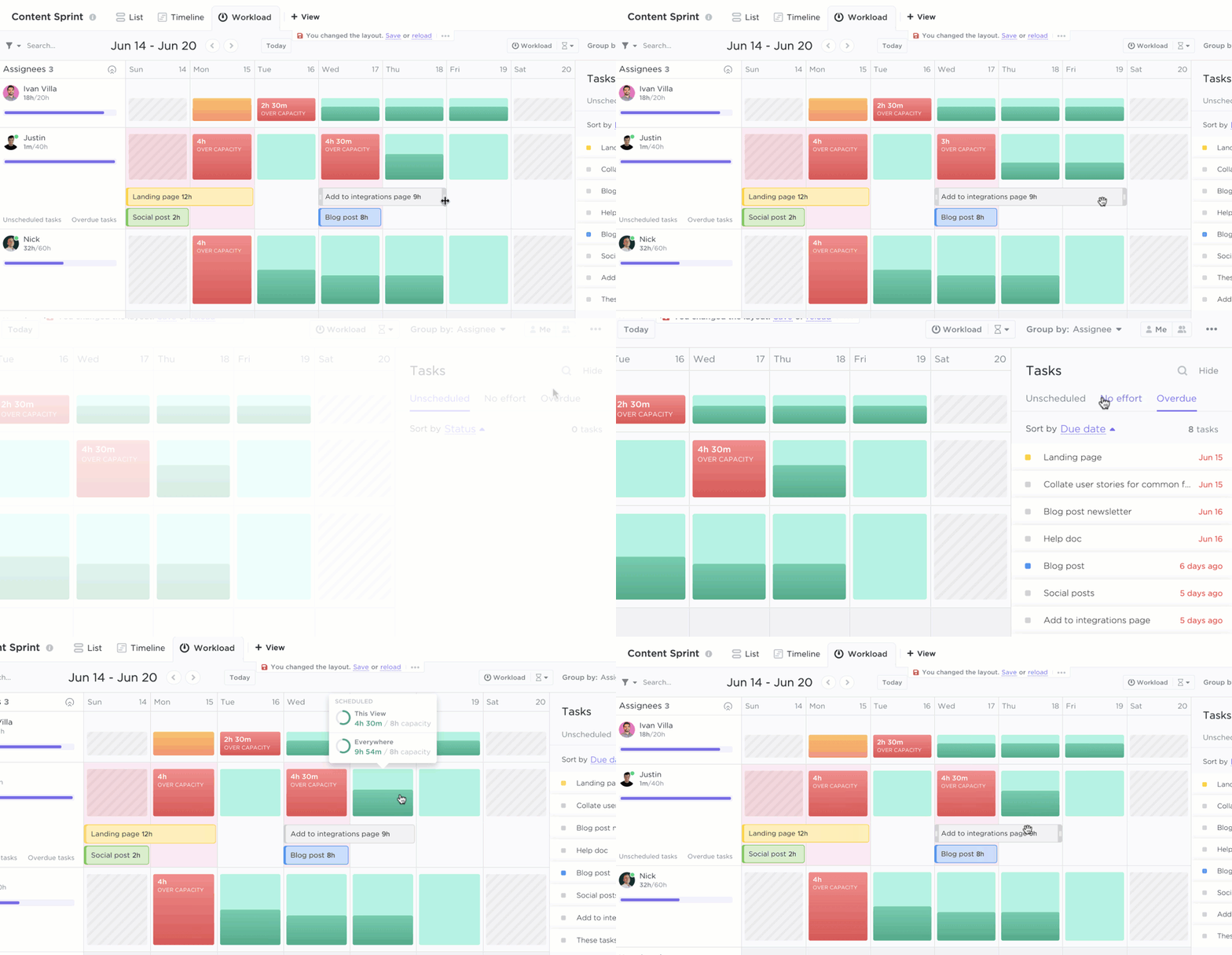
Resource allocation enables you to use your labor, money, and assets to their full potential, so clients are likely to receive high-quality work. At the same time, your agency minimizes team burnout by distributing work evenly.
Other benefits of resource allocation include:
Since resource allocation takes stock of the available resources for a project at a given time, it is a short-term plan—but it has long-reaching effects. It’s a critical tool for capacity planning and managing client expectations. With effective resource allocation, your project has everything and everyone it needs to be successful, including the right resources and a realistic time frame.
Bonus: Capacity Planning Tools & Capacity Planning Templates
No chef starts cooking without picturing what they’re going to cook, right?
Similarly, the first step in project management is to define the scope of your project. Without understanding your project scope, making resource allocation decisions is impossible!
As part of your project scope, you need to define the following:
Your project scope helps you plan out and understand a new project at a high level. Use this information to:
Before picking toppings for your pizza, you have to know what toppings are available—and what everyone’s preferences are. Similarly, to pick the best resources for a job, you must first understand what each person does best and what kind of work they prefer to do.
When project planning, you should understand the capability of your team and the quality of resources you have at your disposal. That way you can allocate those resources where they’ll be most effective.
What are their strengths and core areas of expertise? Match your project requirements to the resources that can execute those needs.
Say your project involves running a pay-per-click ad campaign for a B2B SaaS client in the business intelligence sector. You have two PPC managers at your agency: Jason, who has worked with other B2B tech clients before, and Sara, who has mainly worked with B2C direct sales clients.
Sara says she’s less comfortable managing PPC for this client because she doesn’t know much about B2B software, much less a highly technical industry like BI. Meanwhile, Jason is confident he’s the right person for the job due to his past B2B experience.
For this project, you’d definitely want to place Jason on the account!
What is the availability and bandwidth of your resources? Team members rarely work on just one thing at once, but everyone is limited by the number of hours per week or day they can work. You want to ensure that your team has enough work hours to assign to this specific project.
Remember that absences, whether planned or unplanned, affect availability, so assign employees to tasks with contingency periods in mind. Employees can (and should) take paid time off or sick leave, which means they’re unavailable on those days.
Meetings can take employees away from project tasks even during regular work days. Plus, everyone needs at least 15 minutes in their day to walk the pup or get a pumpkin spice latte!
Never over-allocate resources. Overallocation can lead to burnout and lower productivity. The success of your project is never worth sacrificing the happiness and usefulness of your team.
Refer to calendars and schedules when allocating your resources, and adjust timelines accordingly to accommodate resource availability. Optimize resource utilization so that your projects always have just what you need.
Once you know what your project team can achieve, the next step is to delegate the right tasks to each person based on their skill sets and availability.
Set your team up for success! Provide as much information as possible to ensure everyone understands what’s expected of them. Clarify all the need-to-know details for each task—the responsibilities, expected results, and due dates.
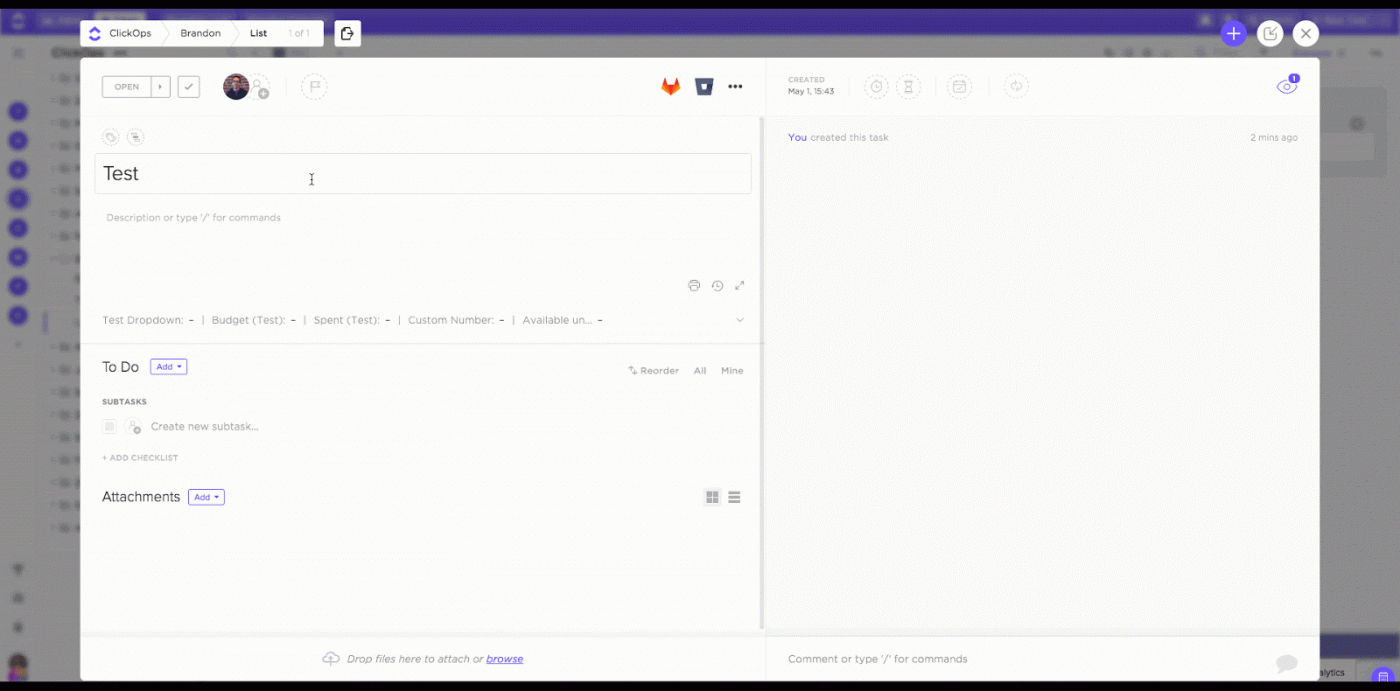
In ClickUp, it’s easy to cut your pizza of a project into smaller slices with tasks, subtasks, and checklists. You can then quickly assign each action item to your team members in just a few clicks!
Here’s a closer look:

For some tasks, a single person is just not enough—especially when you have tight deadlines.
Luckily, with multiple assignees in ClickUp, you can quickly assign more people to a task if needed. So the next time a task needs that extra pair of hands, you’ll be able to assign them in a jiffy.
The pizza delivery person won’t reach your doorstep unless they can park first. If your driveway is full, the pizza party is off – and that’s simply not an option.
Similarly, projects inherently have dependencies—relationships between tasks and resources that affect those resources’ availability.
Consider resource dependencies, where multiple tasks require the same limited resource. Let’s say you need 10 new graphics designed by Friday, but only have one designer on the team who’s already allocated to other projects until Wednesday.
In this case, you would need to adjust your project schedule to realistically accommodate your team’s limited availability. Or look to hire another graphic designer, whether full-time or freelance, to provide the support needed to meet your deadlines.
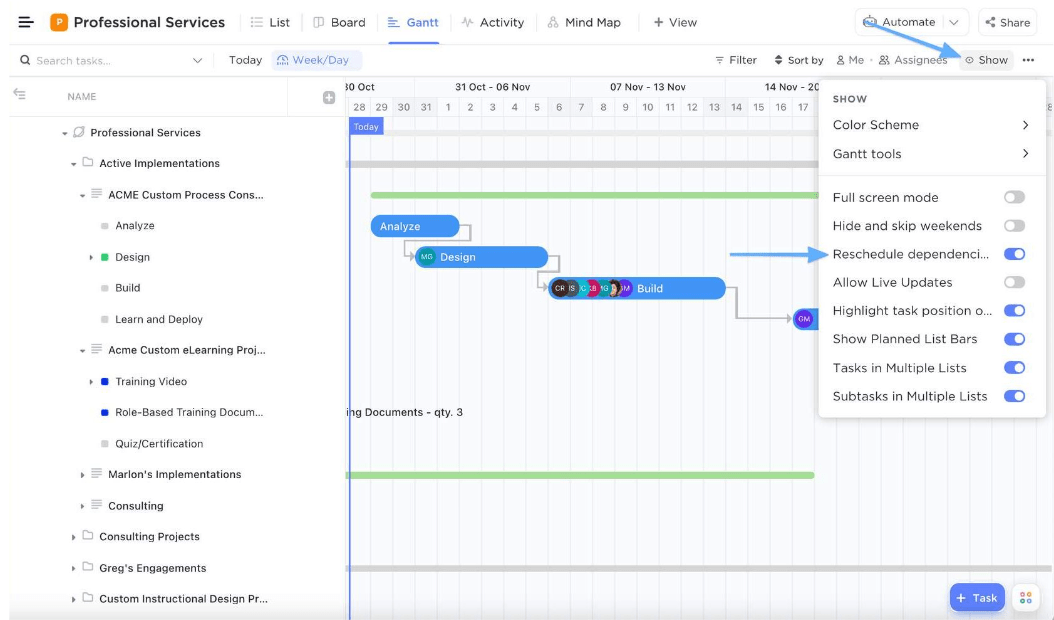
Task dependencies also occur when one task’s progress depends on the progress of a separate task. For example, you have to wait for clients’ feedback before completing project revisions in line with their requests. Like rolling out a lump of pizza dough into a perfect pie before adding tasty toppings!
Stagger and schedule tasks based on these dependencies. Keep an eye on any potential bottlenecks and make sure that no one is left waiting on others for too long. Maintain constant communication around outstanding tasks and action items, and adjust expectations accordingly around project delays.
Consider adopting an Agile or Scrum project management methodology to eliminate or circumvent dependencies.
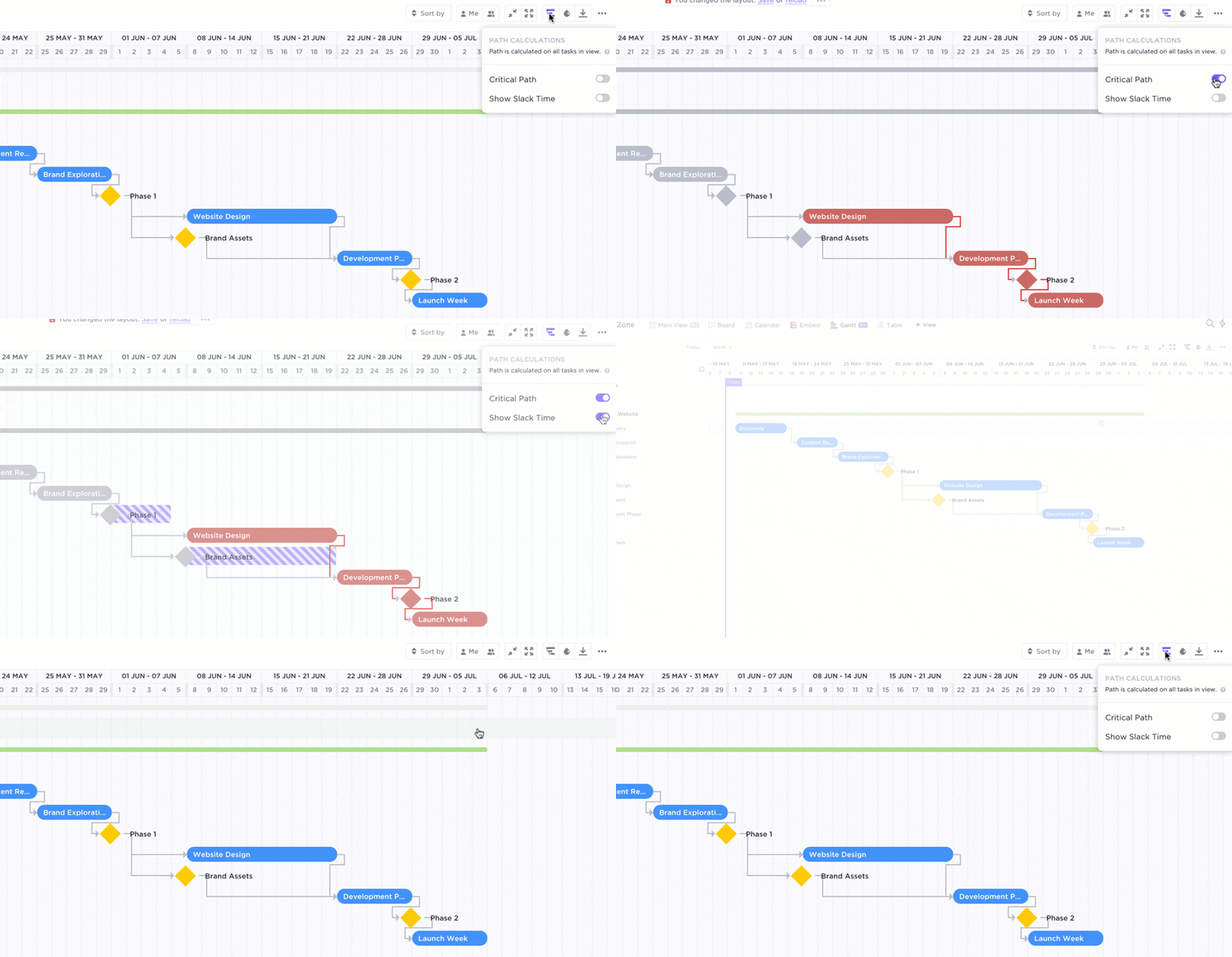
ClickUp’s Dependencies help you map out the links between tasks and resources. This way, you’re able to keep tabs on all your project dependencies before they ever have a chance to become blockers.
Here are more ways that Dependencies keep your team focused:
You can add Dependencies to individual tasks manually, or visually by drawing links between tasks on a Gantt chart.
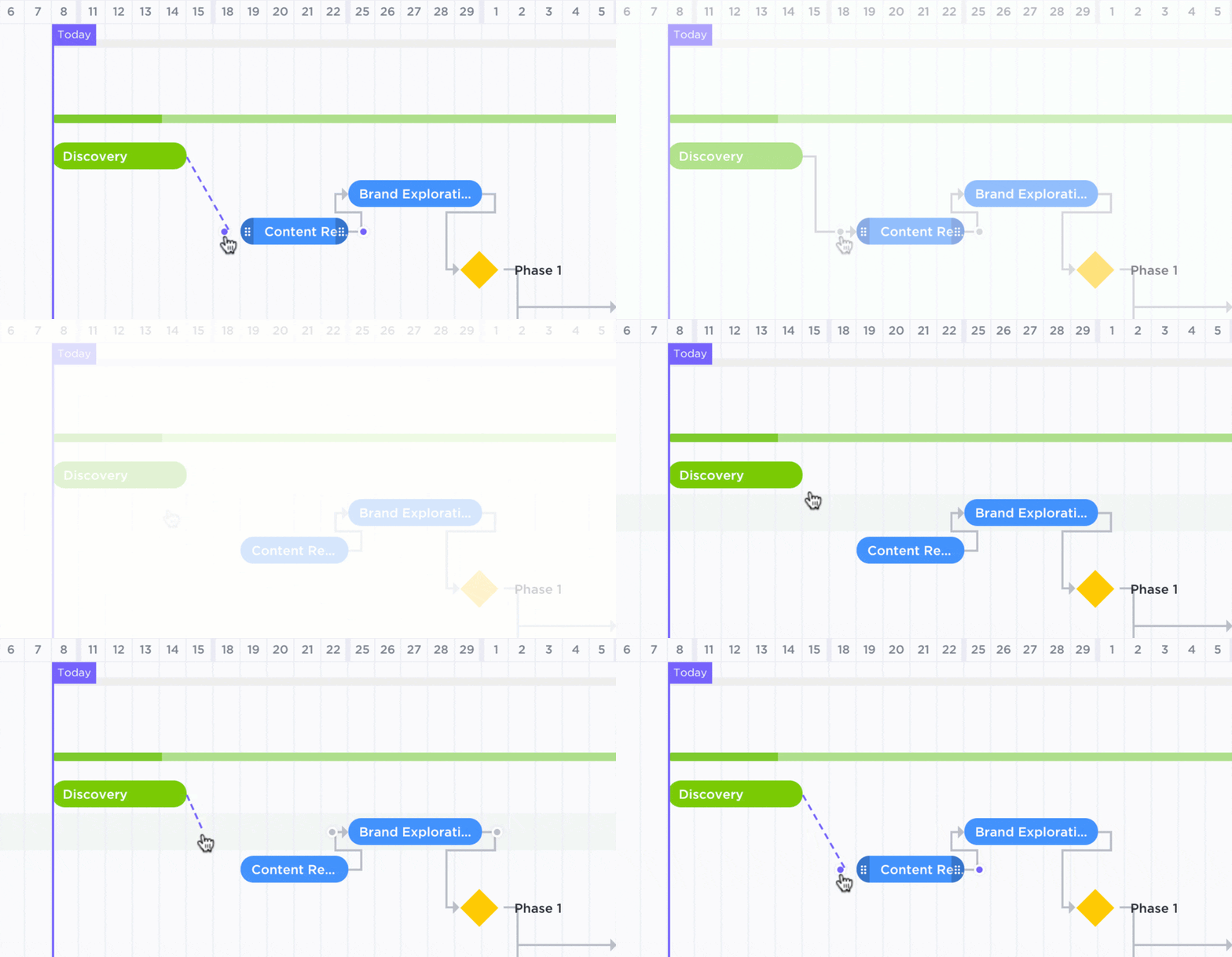
Ideally, you set resources for a project, and it goes according to plan. But if there are any delays or changes, you may need to reallocate resources.
Don’t panic! Reallocation is a normal part of resource management.
The first step is to keep a close eye on team capacity as it relates to fulfilling your project requirements. Ask these questions when looking at your current capacity:
If so, the next step is communicating changes with your client or project stakeholders. Keep them in the loop about your project’s progress as early and often as possible, including any potential shifts in scope or delays.
This helps manage expectations so stakeholders are less likely to be caught off guard, disappointed, or surprised by changes or setbacks.
The resource allocation process may involve rescoping your project and finding additional team members to help with the extra work. Some companies create a backup resource allocation plan by identifying employees with relevant skills that can fill in as needed or maintaining a pool of freelancers who can provide support on the fly.
You also may need to adjust timelines and deadlines for all tasks in your project to reflect your team’s capacity and account for unanticipated delays.
Allocating your resources by itself, plus reallocating tasks down the line, can be a lot of work, but it doesn’t have to be hard work!
Consider using resource management tools that keep your team on track with centralized visibility. No need to dig up all your various spreadsheets, docs, and post-its, or constantly switch between all your team members’ calendars.
We might be biased, but we believe ClickUp is a great (dare we say the best?) resource allocation tool. It brings all that information into one place so you can keep track of your progress and team capacity in real-time. You can create customizable Dashboards to see how your team is doing and where you might fall behind.
That’s one way Diggs uses ClickUp to stay on top of its projects. The results? Greater transparency into workload management, less time spent on back-and-forth communication, and more productive use of everyone’s time.
We’d call that a win!
You can order what you think is enough pizza for everyone at your party, but you can’t always anticipate how much they’ll eat. What happens if you unexpectedly run out of pizza?
Aside from shedding some tears (understandably), you now need to shift gears to meet your goal of feeding all your guests.
This is a case of scope creep—a project expanding beyond its original scope and requiring additional resources, including extra time, money, and people. Scope creep threatens your project’s success by adding extra work without extending the project timeline, creating extra pressure on your team members to do more in less time.
You can try your best to prevent scope creep by setting firm boundaries in your project scope statement, but sometimes it’s unavoidable. In those cases, good change management puts structures and processes in place to mitigate scope creep.
It establishes expectations that decision-makers will inform you about scope changes ASAP and give you the space and time to reallocate or add resources accordingly.
Going with the flow is important, but so is preventing overwork by overloading your team! They have a pizza party to get to, after all.
Let’s say you’re a project manager in charge of launching an influencer marketing campaign for Marinara, a mobile Pomodoro timer productivity app. Here’s an example of what your resource allocation plan might look like:
Ready to identify and allocate your resources? ClickUp is here to help! It’s completely free to sign up and start using in seconds. Get started with these resource allocation templates, designed to kickstart your project management into hyperdrive today!
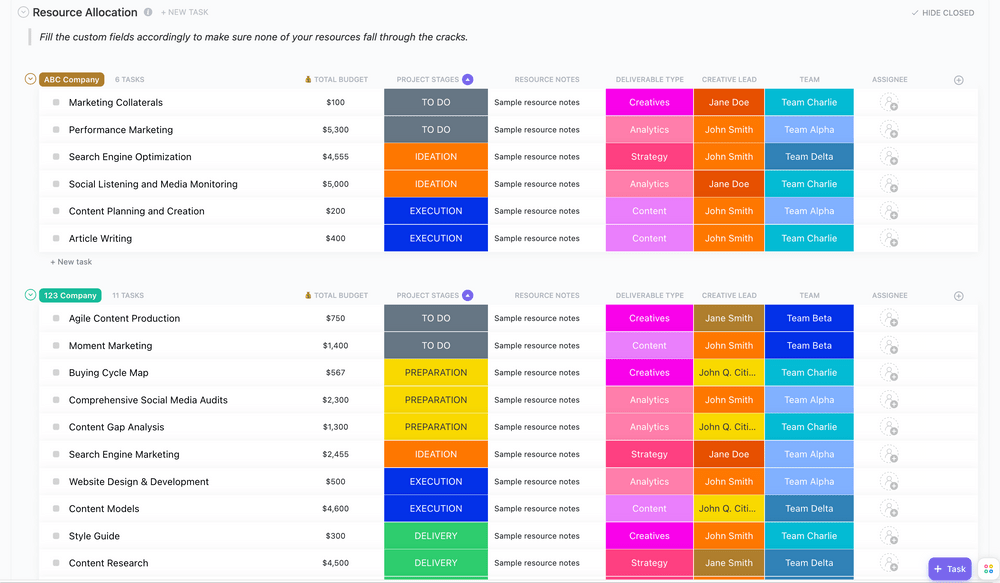
ClickUp’s Resource Allocation Template helps you keep track of the capacity and availability of all your organization’s resources in one place. It comes with these convenient Views:
This template is fully customizable to fit your resource management workflows. Leverage this template to get a comprehensive overview of your team’s capacity and progress toward project completion and deliverables.
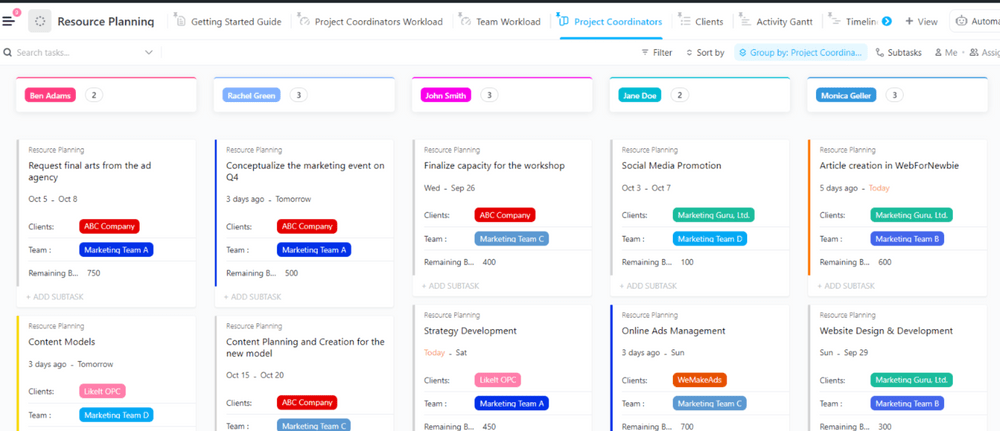
ClickUp’s Resource Planning Template offers a variety of ways to visualize and allocate your resources throughout your team.
In addition to the views included in the first template, this template provides two more Views:
This template helps you proactively plan around your available resources, including budgets and team members’ schedules. Like all of our templates, it’s customizable, so you can tailor it to your needs and make it your own.
Related: Enterprise Resource Planning Software
You don’t just allocate resources before your project starts and call it a day. You have to keep a finger on the pulse of your projects, balancing your team’s capacity carefully against your project requirements. Since factors that can impact your project success are constantly changing, you also need to be flexible enough to adjust your resource allocation strategy as needed.
ClickUp is the best project management software for teams, with a robust set of features to help you manage your resources, keep your projects on track, and get things done quickly. We help project managers and key decision-makers allocate resources and oversee the complete project lifecycle like pros.
See how ClickUp can help you and your team by signing up for free today!
And keep your favorite pizza spot on speed dial — because you’ll never run out of cheesy goodness with our help!
The most common mistake is assigning work based on availability instead of skill fit. This leads to rework, delays, and burnout. Use a workload tool like ClickUp Workload View to match people to tasks based on capacity and expertise.
You’ll know your team is overallocated if deadlines slip, tasks queue up behind one person, or work quality drops. A real-time capacity view—such as ClickUp’s Workload and Timeline View—can highlight overload before it becomes a problem.
Tools with visibility into capacity, timelines, dependences, and budgets work best. ClickUp combines all of these with Workload View, Gantt charts, time tracking, and AI summaries, so you don’t need spreadsheets or multiple apps.
Centralize every project, workload, and deadline in one place. A unified view—like ClickUp’s Portfolio + Workload combination—lets you see conflicts, overlap, and unused capacity across all clients or workstreams.
© 2026 ClickUp



