








Still downloading templates?
There’s an easier way. Try a free AI Agent in ClickUp that actually does the work for you—set up in minutes, save hours every week.
Sorry, there were no results found for “”
Sorry, there were no results found for “”
Sorry, there were no results found for “”


You’ve got the campaigns, the strategy, and the results. But when someone asks, ‘Can you send over a portfolio?…you freeze.
Not because you don’t have the work, but because your portfolio is either buried in scattered folders or stuck in a half-finished doc.
If that sounds a little too real, don’t worry, we’ve got you covered.
In this blog post, we’ve rounded up the best free marketing portfolio templates from ClickUp (and other platforms!) to help you present your work with clarity, structure, and a touch of flair.
Let’s dive in! 💪🏼
A marketing portfolio template is a pre-designed framework that helps marketers organize and present their work, skills, and accomplishments to potential clients and collaborators.
These templates often include structured sections for case studies, campaign timelines, design mockups, audience targeting strategies, and performance metrics, such as engagement rates or return on investment (ROI). Many also include space for team roles, tools used, and iteration notes to highlight collaboration and process.
🧠 Fun Fact: The word ‘portfolio’ comes from the Italian portafoglio, meaning a case to carry loose sheets of paper. In the 18th Century, artists and architects carried physical samples of their work to win commissions, early versions of today’s marketing portfolios.
A well-structured marketing portfolio template highlights a marketer’s past successes and provides a platform to demonstrate their strategic thinking and creativity. Here are some features to look for:
🔍 Did You Know? Spec campaigns (like mock rebrands or social posts for brands you admire) are a common way to fill a portfolio site with relevant work examples.
Here’s a look at the top marketing portfolio templates:
| Template name | Download template | Ideal for | Best features | Visual format |
| ClickUp Portfolio Management Template | Get free template | Strategic leaders and PMOs managing multiple projects by business impact | Scoring system to rank project value, Intake Project Inventory, Portfolio Master List View | Table and dashboard views |
| ClickUp Project Management Portfolio Template | Get free template | Project managers and department heads tracking status and progress | PMO Roadmap View, Weekly Status Reports, phase tags and metrics | Roadmap and team views |
| ClickUp Design Portfolio Template | Get free template | Designers and creative teams showcasing design phases | Design Stages View, built-in statuses, custom fields | Kanban-style layout |
| ClickUp Design Portfolio Task Template | Get free template | Freelancers and design leads tracking individual design tasks | Custom fields for Design Stage, Design Category, and Final Output | Task-based board |
| ClickUp Case Study Template | Get free template | Marketers, consultants, and client teams documenting success stories | Fields for client info, pain points, solutions, impact tracking | Doc and Gantt views |
| ClickUp Marketing Agency Template | Get free template | Agencies managing multiple client campaigns | List template with campaign type folders, status tracking, tailored fields | List and category-based view |
| ClickUp Marketing Proposal Template | Get free template | Teams and consultants creating collaborative marketing proposals | Editable Doc blocks that convert to tasks; integrated workflow | Doc-style layout |
| ClickUp Marketing Plan Template | Get free template | Marketing strategists organizing campaigns and KPIs | Quarter, Effort, and Impact fields; Key Results View for performance tracking | Roadmap and dashboard views |
| ClickUp Marketing Campaign Management Template | Get free template | Cross-functional teams managing overlapping campaigns | Kanban layout with 11 custom fields; ClickUp Portfolios | Kanban and portfolio views |
| Digital Marketing Specialist Portfolio Template by SlidesGo | Download this template | Digital marketers showcasing campaigns, results, and credentials | 20 editable slides; PowerPoint, Google Slides, and Canva compatible | Presentation slides |
| Green Stone UGC Creator Portfolio by Canva | Download this template | UGC creators showcasing brand collaborations and creative samples | Space for short-form case studies, media embeds, animations | Slide deck (Canva) |
| Illustrative Marketing Portfolio Presentation Template by Canva | Download this template | Creatives who want expressive, colorful, personality-driven slides | Custom fonts, transitions, fun layout | Canva presentation |
| Portfolio Template by Freepik | Download this template | Professionals combining resume + portfolio | Space for testimonials, clean visual hierarchy | One-page PDF/Doc layout |
Below, we cover some marketing portfolio template options from ClickUp and additional sources. 👇
And, if you’re looking for more than a template to simplify your marketing ops, we have a pro tip for you! Try ClickUp!
Built to support every stage of marketing execution, ClickUp for Marketing Teams helps you brainstorm, plan, launch, and track campaigns all in one place. From multi-channel strategy to content calendars and performance dashboards, ClickUp turns your day-to-day work into a portfolio of measurable wins.
In fact, here’s what a marketer had to say about using ClickUp:
With ClickUp, we can show what’s happened with our marketing initiatives in a regional view or a campaign view. This includes looking at what types of activities we’re running and what funnel stage we’ve tagged them to. This way, senior management can easily get up to speed on a project’s status.
But for now, let’s show you the templates you need!
When you’re managing a portfolio of creative or strategic projects, it’s easy to lose clarity. The ClickUp Portfolio Management Template tackles this head-on with a scoring system that ranks project value based on business impact. Projects are categorized into Must-Have, Should-Have, or Could-Have buckets, allowing you to focus your efforts.
What sets this template apart is the Intake Project Inventory, where new project requests flow in with scoring guidance clearly visible at the top. It ensures every idea gets evaluated consistently. The Portfolio Master List View gives you a bird’s-eye look at all projects, while dedicated folders like Projects at Risk and Completed Projects sort your progress like a true PMO dashboard.
🌼 Why you’ll love this template
📌 Ideal for: Strategic leaders and PMOs who need to evaluate, rank, and track a high volume of project proposals based on business impact
📮 ClickUp Insight: 74% of employees use two or more tools just to find the information they need—while jumping between emails, chat, notes, project management tools, and documentation. This constant context-switching wastes time and slows down productivity.
As the everything app for work, ClickUp unifies all your work—email, chat, docs, tasks, and notes—into a single, searchable Converged AI Workspace, so everything is exactly where you need it.
If you’re just getting started with organizing project portfolios and need a clean, intuitive system, this one’s for you. The ClickUp Project Management Portfolio Template offers a beginner-friendly setup that helps you see everything across departments in one place.
The PMO Roadmap View gives you a stage-wise layout to instantly spot stuck or overdue work. Need to dig deeper? Flip to Weekly Status Reports or the Team View to get updates grouped by department or owner.
Each task in this project portfolio management template includes phase tags like Discovery or Design, along with time estimates, success metrics, and a space for detailed descriptions. This makes it easier to justify project progress in stakeholder reviews or client updates.
🌼 Why you’ll love this template
📌 Ideal for: Project managers and department heads who require a simple, visual way to monitor project health and status updates across teams
🚀 The ClickUp Advantage: Unlock your marketing portfolio’s full potential with ClickUp BrainGPT, the AI desktop companion that understands your campaigns, content, and creative workflows so you can work with more clarity and speed.
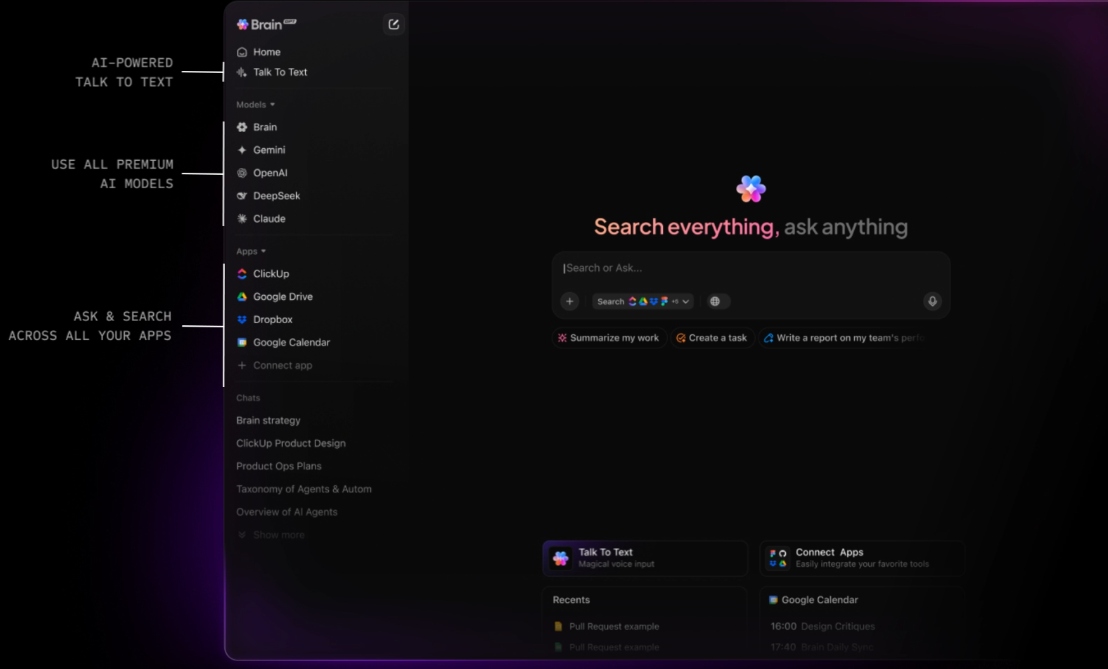
With BrainGPT, you get:
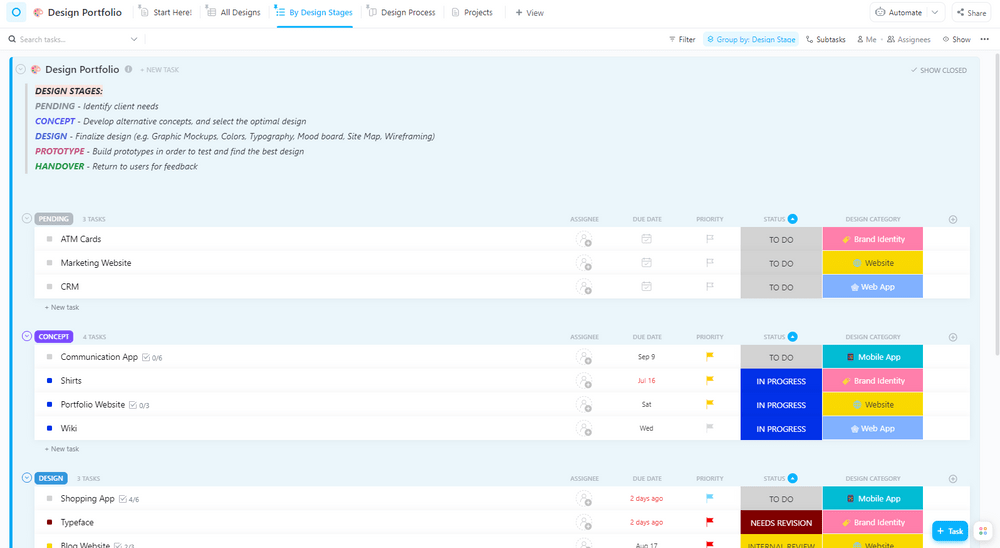
When your creative work is strong but your presentation of it lacks flow, accountability, or clarity, the ClickUp Design Portfolio Template is what you need. This template helps you show your thinking, stages, and expertise at every step of design project management.
The real power is in the Design Stages View, which sorts your work into clearly labeled phases: Pending, Concept, Design, Prototype, and Handover. You can map every project, from a marketing website to a mobile app, into these visual buckets so clients, stakeholders, or mentors instantly know what’s cooking and what’s done.
Each task includes built-in fields like Design Category (e.g., Brand Identity, Web App) and phase-specific statuses like Needs Revision or Internal Review, so there’s zero confusion about what needs your attention.
🌼 Why you’ll love this template
📌 Ideal for: Designers and creative teams who want to present their work professionally while clearly communicating project phases and design rationale
💡 Pro Tip: Create a section titled ‘Marketing Sandbox’ to test ideas like revised copy, new campaign angles, or mockups within the template. Treat it like a mini-experiment space.
If your portfolio looks good but your design process feels scattered, this template fixes that gap at the task level. The ClickUp Design Portfolio Task Template zooms into the individual building blocks, the actual tasks inside each design project.
Use it when you need to keep tabs on dozens of marketing plans running in parallel, especially if you’re constantly switching between categories like brand identity, UI design, or marketing assets.
Even better? Instead of building a design portfolio from scratch and sifting through vague task names or folders, you get three essential Custom Fields: Design Stage (e.g., Concept, Final, Handoff), Design Category (the type of work), and Final Output.
🌼 Why you’ll love this template
📌 Ideal for: Freelancers or design leads who need clarity at the task level to stay on top of stages, categories, and final outputs.
⚙️ Bonus: Want to build a pipeline of high-quality clients for your marketing agency? Check out this guide on how to find clients for a digital marketing agency. It breaks down real strategies like leveraging niche positioning, tapping into B2B platforms, and using case studies to attract the right leads.
You can also watch this video explainer for a quick overview of our best tips!
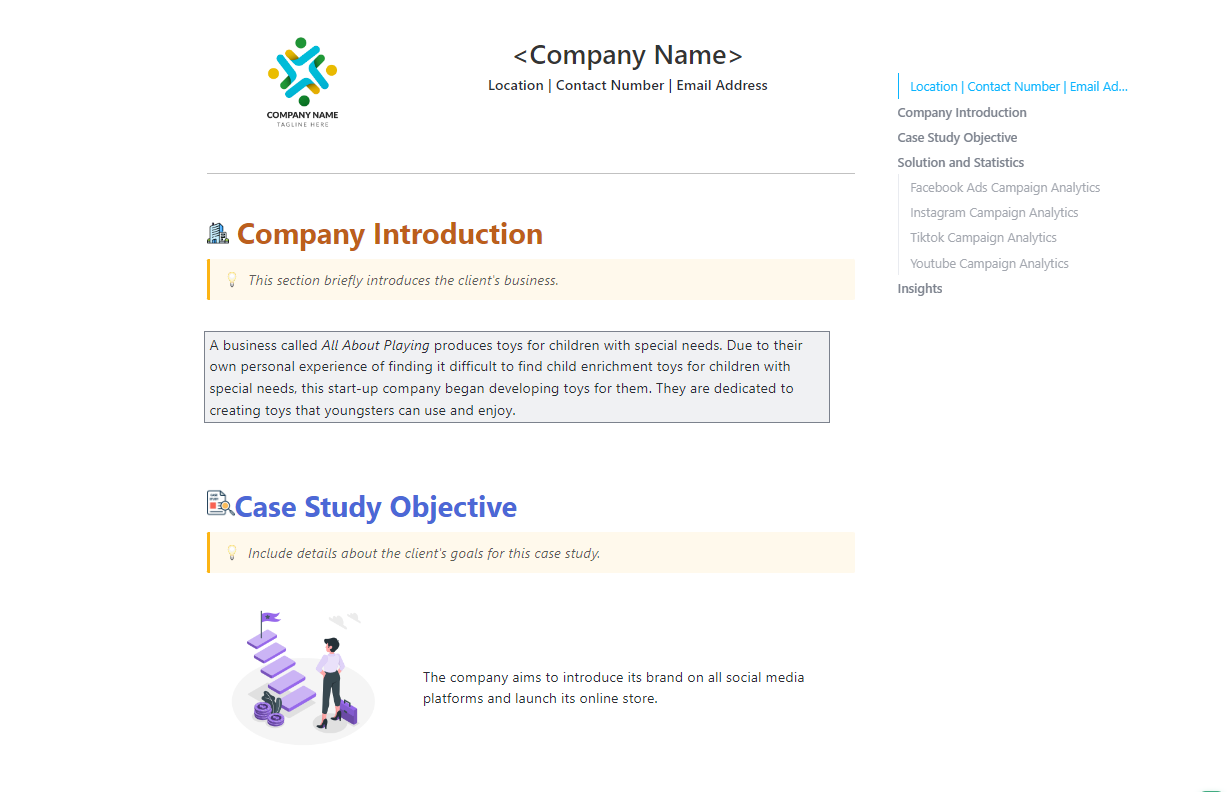
The ClickUp Case Study Template turns your past work samples into a well-organized, presentation-ready story. It works best when you need to break down a successful campaign, client project, or product launch in a way that’s both credible and easy to digest.
You’ll find a dedicated space to plug in other creative brief templates and essential client info like website, company summary, and background. Plus, it comes pre-equipped with statuses to track how far along your write-up is, fields to tag your data (like pain points, solutions, impact), and views to switch between a Gantt chart, Workload, or Calendar as your case study evolves.
🌼 Why you’ll love this template
📌 Ideal for: Marketers, consultants, and client service teams who need a repeatable structure to document project success stories
🧠 Fun Fact: In the mid-1910s, Harvard Business School professor Melvin Thomas Copeland began teaching one of Harvard’s earliest courses focused on marketing activities. His work—later published in Marketing Problems (1920)—helped formalize marketing as a distinct field within business education.
Managing multiple client contracts while trying to keep campaigns on track is a daily headache for agencies. The ClickUp Marketing Agency Template flips that mess into a clean, visual workflow.
It’s structured as a List template divided by campaign type: Paid, Content, and Creatives, so each scope has its own trackable space. You can sort projects based on real-time contract statuses like Execution, Draft, Performance, or Review, which gives your team and clients a crystal-clear picture of what’s moving and what’s stalled.
It also includes six tailored fields like Account, Contract Size, Completion, Documents, Ideation Progress, and Category. This will help you set up your marketing roadmap across campaigns and clients without losing sight of the details.
🌼 Why you’ll love this template
📌 Ideal for: Agencies managing multiple clients and campaigns who require a centralized space to align contract statuses, deliverables, and team responsibilities
💡 Pro Tip: Duplicate and customize your main portfolio for different roles or clients within ClickUp. You can add or hide sections based on what the audience cares about.
Drafting a solid proposal takes more than a clean layout. With the ClickUp Marketing Proposal Template, you get a Doc template that acts like a structured, pre-built deck with editable blocks.
What makes it different? Its ability to plug into the rest of your workflow instantly! You can turn sections of the doc into tasks and even assign them to team members.
🌼 Why you’ll love this template
📌 Ideal for: Marketing teams and consultants who want to pitch ideas collaboratively and convert proposal sections into actionable, trackable tasks
🚀 The ClickUp Advantage: Take the busywork out of managing your marketing portfolio with AI Fields in ClickUp. Instead of filling in fields or chasing updates, ClickUp can automatically generate things like quick summaries, progress notes, sentiment checks, or action items based on what’s already in the task. It’s an easy way to keep your portfolio accurate and up-to-date.
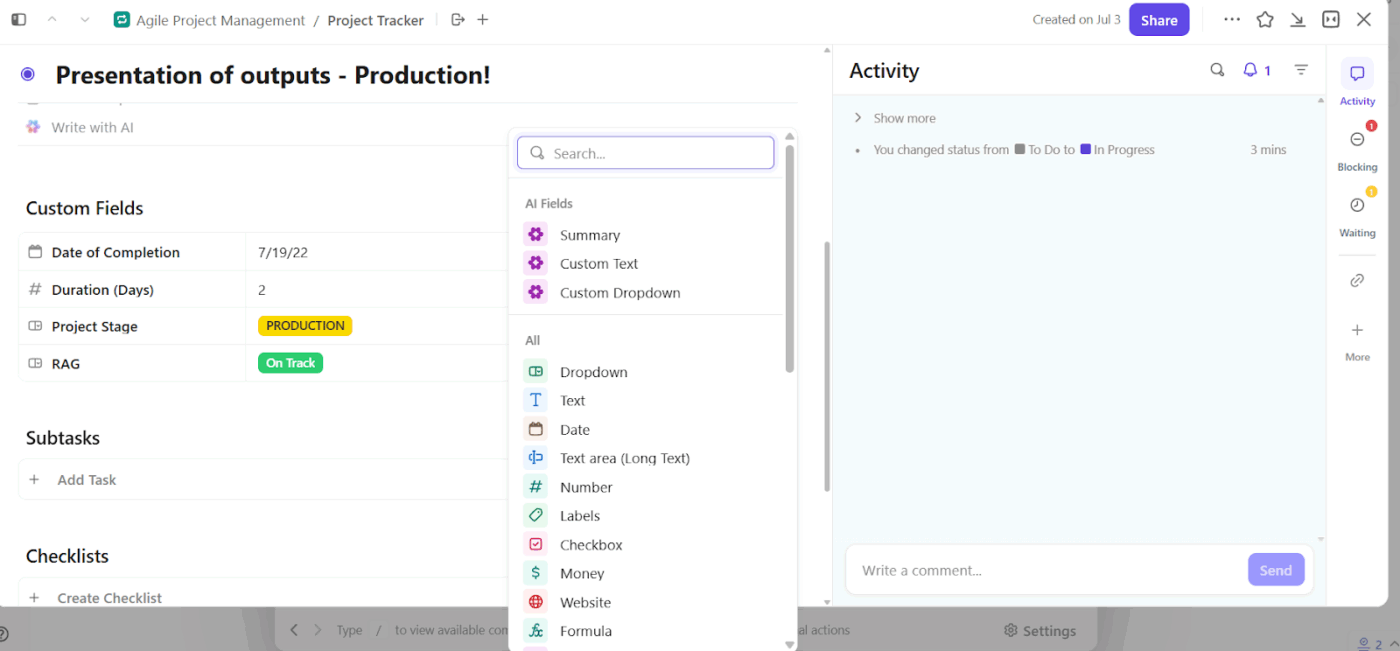
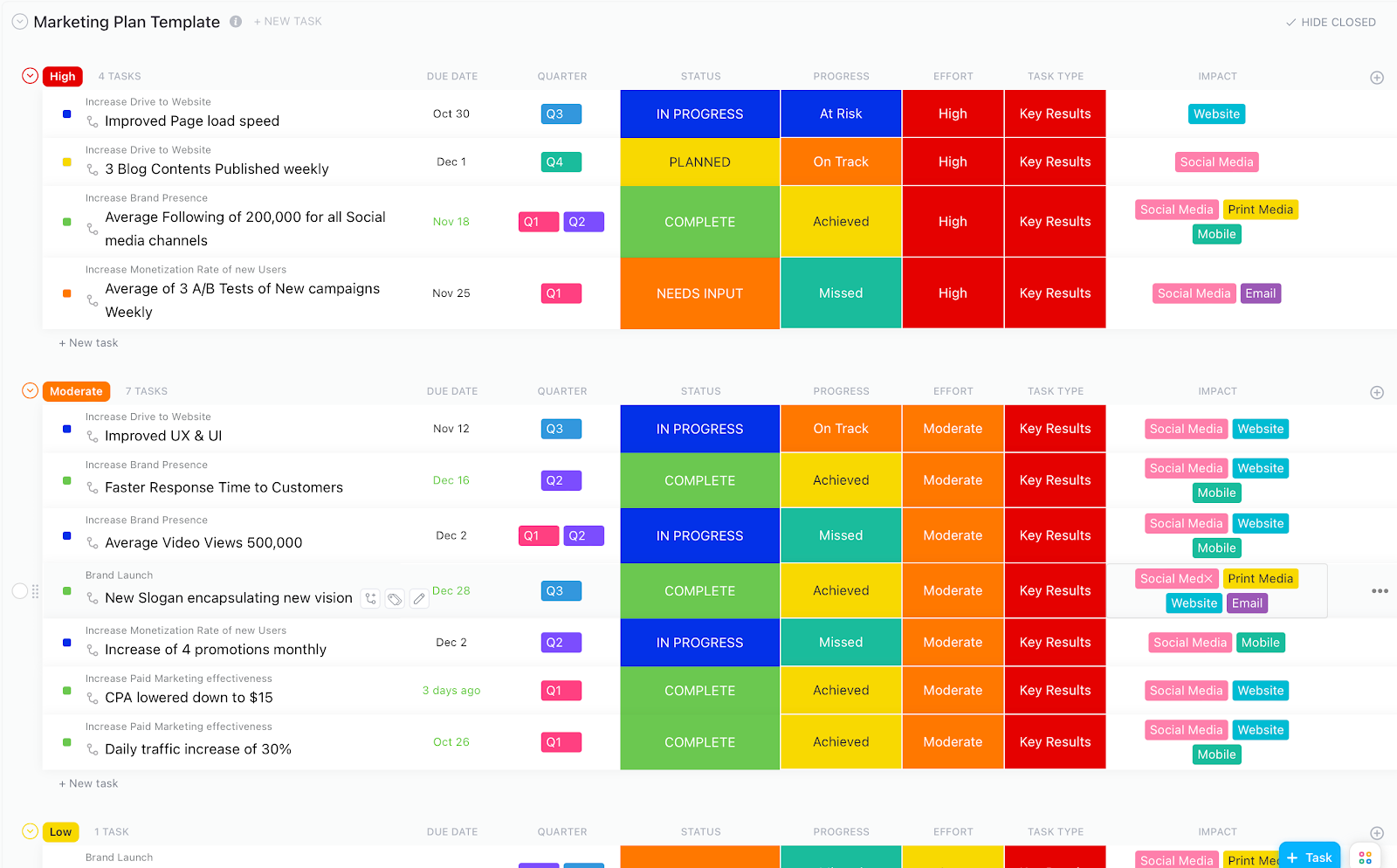
The ClickUp Marketing Plan Template helps you build a portfolio-ready roadmap of every campaign you’ve executed or are planning to. Unlike the Marketing Proposal Template, which focuses on pitching ideas, this one shows how those ideas are actually tracked and delivered across time, effort, and channels.
It’s perfect when you need to prove impact without sifting through a mess of docs and project portfolio dashboards. You can categorize tasks using Quarter, Effort, and Impact fields to show effort vs. result metrics for each initiative. The Key Results View acts like a live dashboard for stakeholders to track progress at a glance, with color-coded labels for risk, status, and progress.
🌼 Why you’ll love this template
📌 Ideal for: Marketing strategists and growth teams who need to organize campaigns by quarter and track performance metrics
See how to create your own marketing plan:
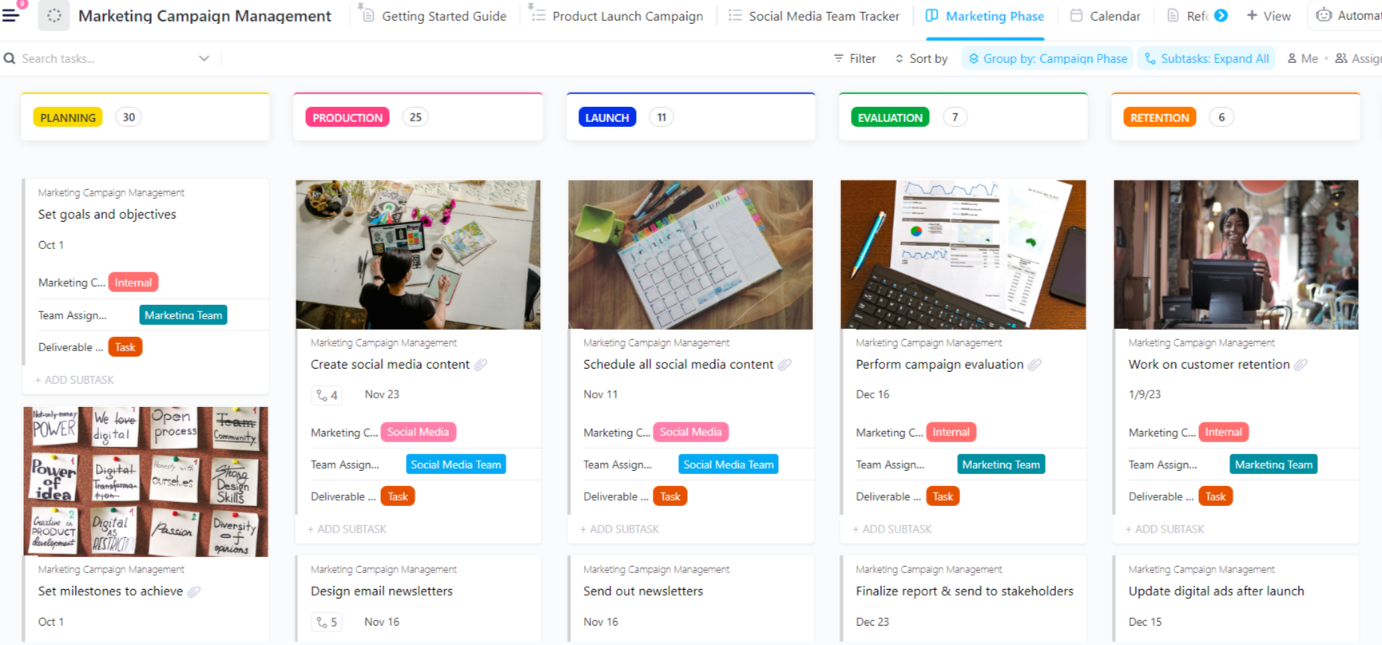
The ClickUp Marketing Campaign Management Template maps your entire campaign lifecycle—Planning, Production, Launch, Evaluation, and Retention—into a clean, Kanban-style layout where every phase is trackable at a glance.
What makes it portfolio-ready is how visually distinct and context-rich each task is. You get 11 Custom Fields, including Marketing Channel, Team Assigned, Deliverable Type, and Final Content, so you can differentiate between internal tasks, social posts, email campaigns, and performance evaluations without opening a single card.
But when you’re dealing with multiple campaigns across channels, teams, and client accounts, a single template isn’t always enough. That’s where ClickUp Portfolios come in.
With ClickUp Portfolios, you can group and monitor all your campaigns, like social, email, paid, and organic, in one high-level view. You can align each campaign with company OKRs, track how every project is progressing in real time, and adjust priorities as results come in.

🌼 Why you’ll love this template
📌 Ideal for: Cross-functional teams running multiple campaigns simultaneously who want complete visibility into execution stages, deliverables, and team assignments
🚀 The ClickUp Advantage: When you’re building a marketing portfolio, the hardest part is documenting the story behind the work. ClickUp Brain, ClickUp’s native AI assistant, helps by pulling every piece of writing you’ve created across a project—briefs, campaign notes, content drafts, task updates, and analytics comments—and turning that into a clean, cohesive case study.
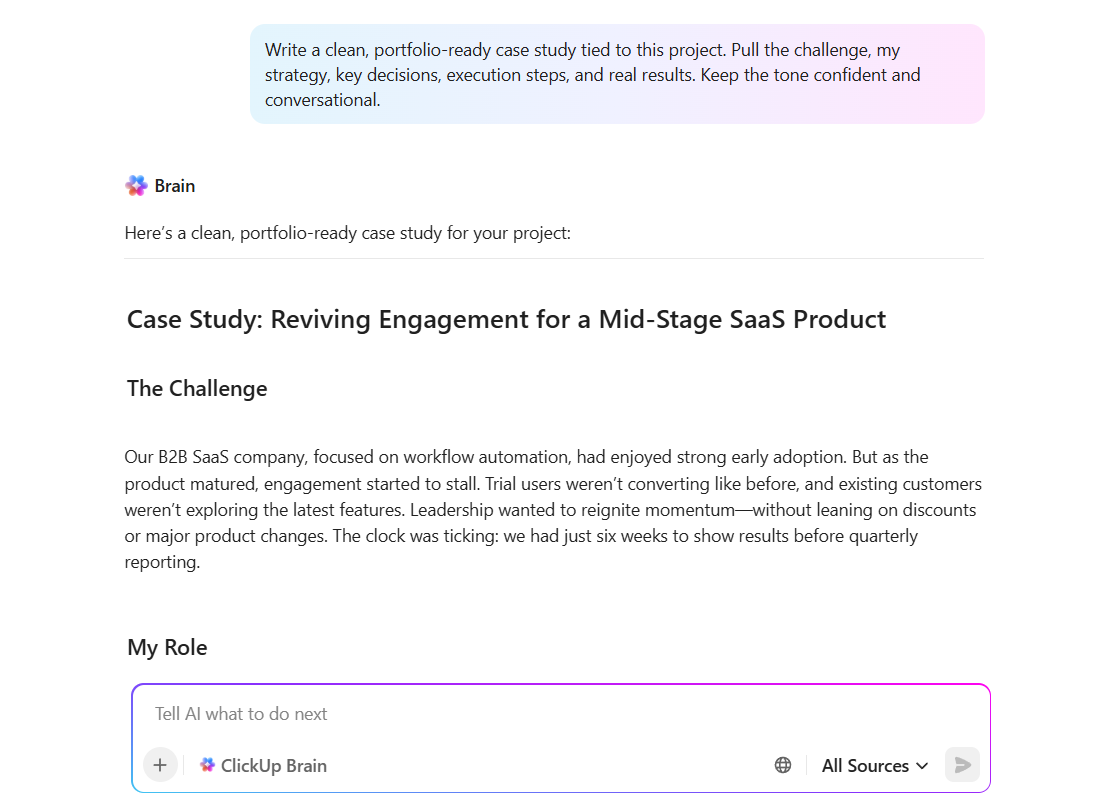
Say you managed a product-launch email campaign. Instead of digging through scattered docs to remember why you chose a certain angle or what performance looked like, ClickUp Brain pulls:
Then it rewrites all of that into a polished narrative with a clear flow: the challenge, your strategy, how you executed, and the results. The writing stays in your tone, but the structure becomes tighter, the details become sharper, and the story becomes something you can confidently put in your portfolio.
📌 Try this prompt: Write a clean, portfolio-ready case study using all tasks, docs, comments, and analytics tied to this project. Pull the challenge, my strategy, key decisions, execution steps, and real results. Keep the tone confident and conversational.
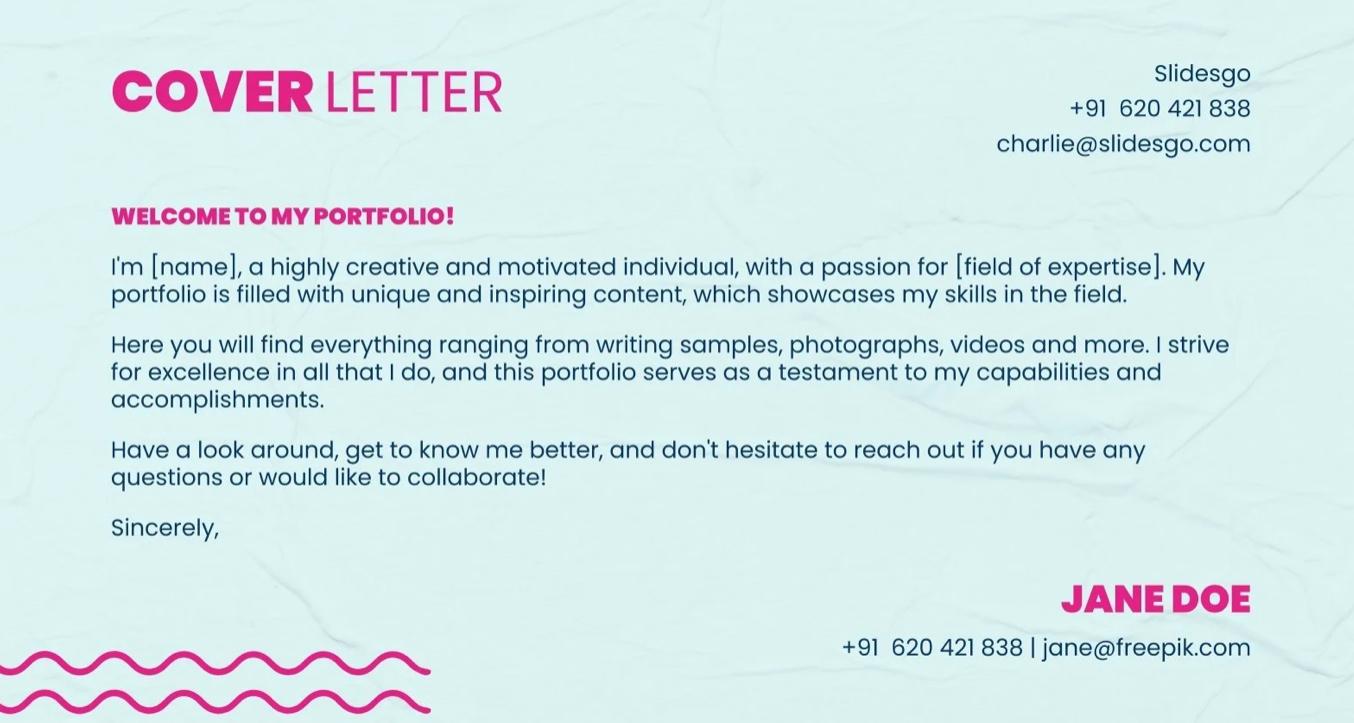
If you want to package your digital campaigns, results, and certifications into a polished, scroll-worthy format, this Digital Marketing Specialist Portfolio Template keeps things sharp without going over the top. You get 20 fully editable slides that work seamlessly across Google Slides, PowerPoint, and Canva, so no matter where you’re building, your flow stays intact.
Fonts, color schemes, and even attribution credits are already mapped out, so all that’s left is dropping in your metrics, aligning them with your brand kit, and adding project screenshots.
🌼 Why you’ll love this template
📌 Ideal for: Digital marketers who wish to showcase their certifications, KPIs, and past campaigns in a presentation format
💡 Pro Tip: Marketing rarely happens in a vacuum. Instead of just saying ‘I increased engagement by 60%,’ give credit to collaborators and outline how you worked with designers, PMs, or engineers. That kind of team awareness is gold to hiring managers.
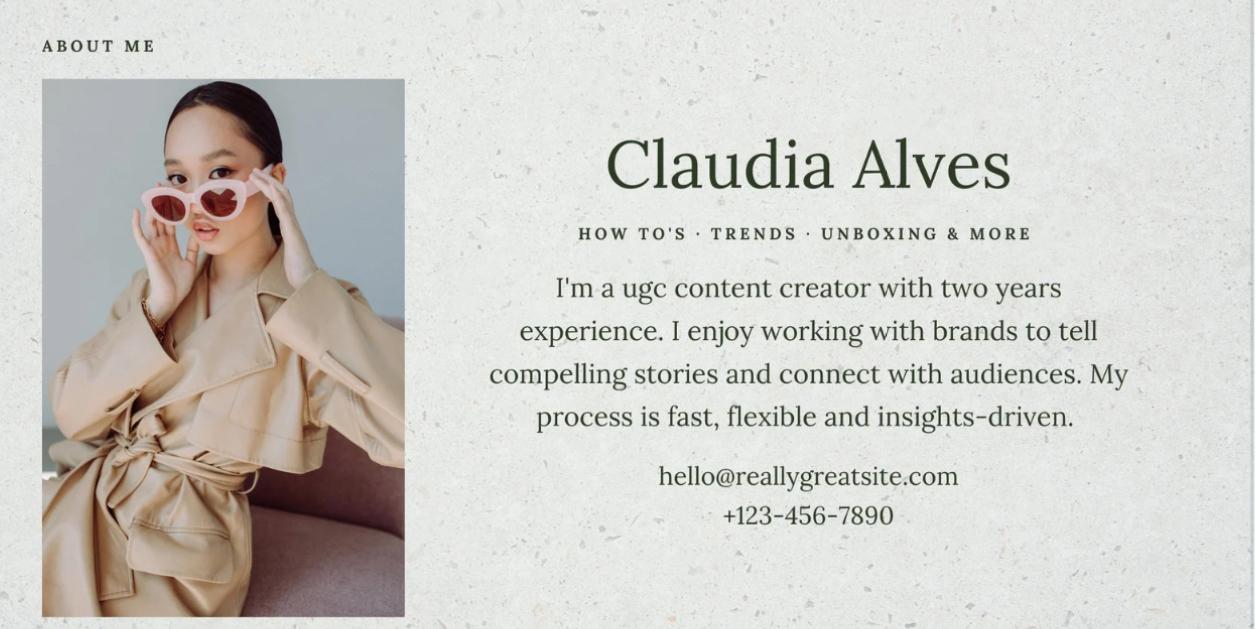
The Green Stone UGC Creator Portfolio Presentation is built with content-first creators in mind. Unlike traditional resume-based layouts, this one leans into a slide deck format, making it great for presenting campaign results, brand partnerships, and platform-specific performance data visually.
You get space for short-form case studies, creative samples, and even reels or motion previews through embedded animations and transitions, making project portfolio management even more effective.
🌼 Why you’ll love this template
📌 Ideal for: UGC creators and influencers who need to visually showcase brand collaborations, social proof, and creative work in a storytelling format
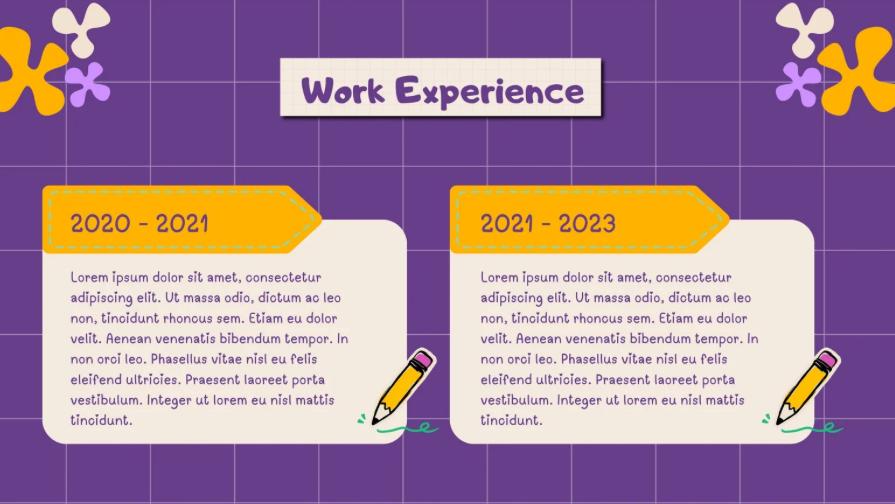
If you’re leaning toward a portfolio that’s colorful, fun, and a little more expressive, this template might be your match. Designed in a bright, cartoon-like style with fonts like Adigiana Toybox and Lulu Font TH, it’s great for creatives who want to inject a bit of personality into their slides without losing structure.
You can edit everything in-browser using Canva, add transitions, and present live, no downloads needed.
🌼 Why you’ll love this template
📌 Ideal for: Creatives and freelancers who want to express their personality while organizing projects, testimonials, and campaign results in a structured layout
💡 Pro Tip: Treat the About Me section in your digital marketing portfolio like a mini elevator pitch. Skip the clichés like ‘passionate about marketing’ and make it useful. Add 2-3 bullet points about what you’re known for (‘I specialize in fixing broken email funnels’ or ‘I love transforming dense blogs into SEO rockets’). Think of it as positioning you like a product.
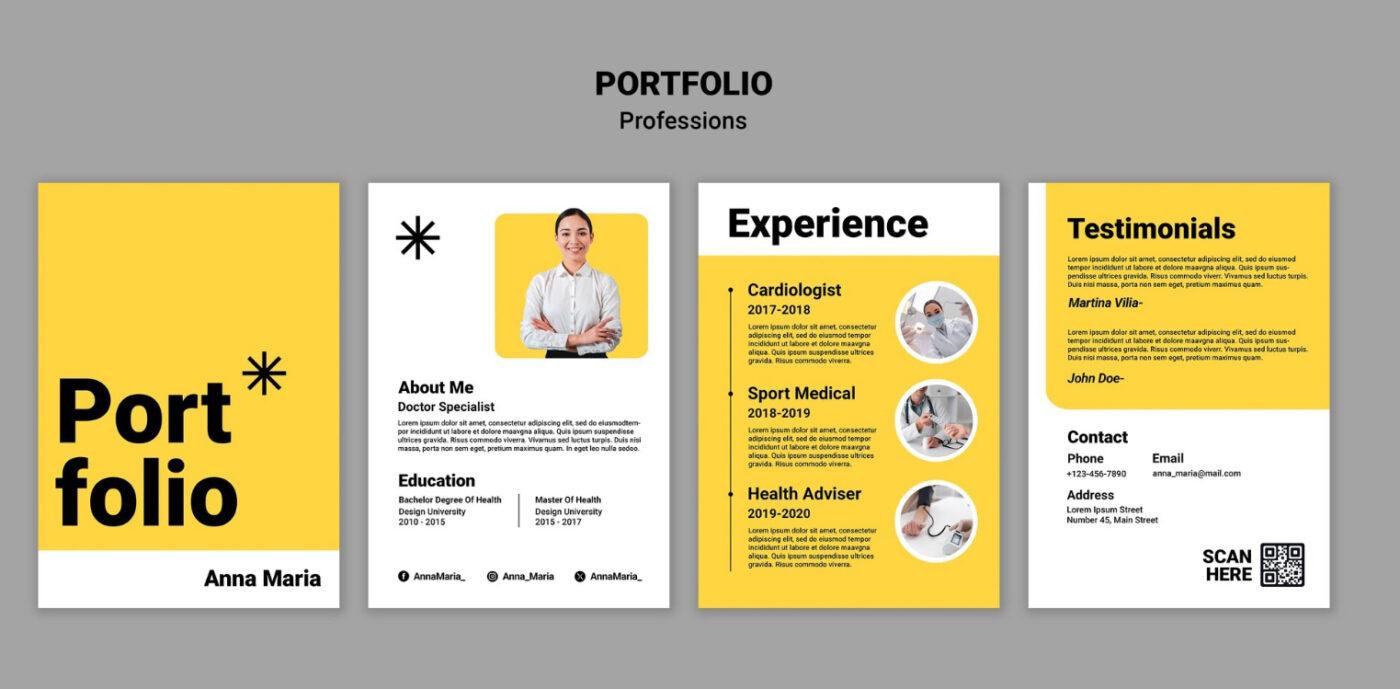
This Professional Portfolio and Resume Design by Freepik keeps things clean and concise. It’s structured like a resume but with the flexibility to function as a full portfolio.
The template has built-in space for testimonials, making it easy to add client quotes or performance highlights without the clutter. Its design leans heavily on a visual hierarchy, with bold headers, clean icons, and a smart use of white space.
🌼 Why you’ll love this template
📌 Ideal for: Professionals who want to combine resume highlights with portfolio samples in a compact, one-page format
ClickUp’s marketing portfolio templates make it easy to bring all your work together. You can organize campaigns, strategies, results, and notes in one place and update them anytime.
These templates are built for collaboration, quick edits, and confident sharing. Use them to present your work clearly, keep everything consistent, and show up with a professional portfolio that speaks for itself.
Sign up for ClickUp and say hello to a portfolio that works as hard as you do. 🗂️

© 2026 ClickUp

There’s an easier way. Try a free AI Agent in ClickUp that actually does the work for you—set up in minutes, save hours every week.