






Still downloading templates?
There’s an easier way. Try a free AI Agent in ClickUp that actually does the work for you—set up in minutes, save hours every week.
Sorry, there were no results found for “”
Sorry, there were no results found for “”
Sorry, there were no results found for “”
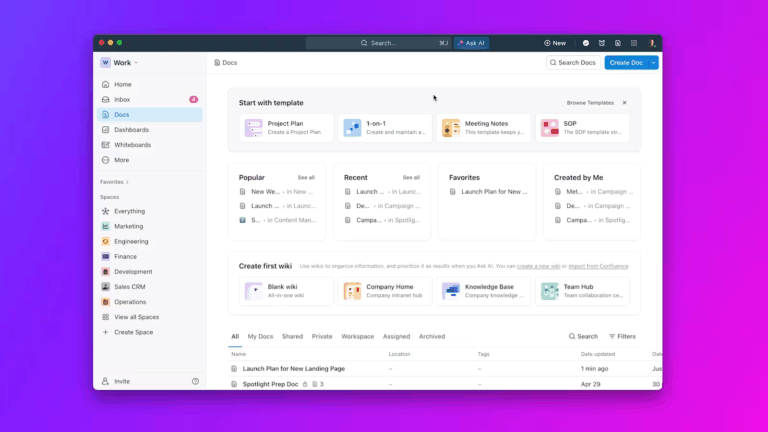
According to research, 37% of knowledge workers at large organizations spend 2 hours a day just searching for information or tracking down colleagues who have the answers they need. 1 in 20 workers spends over half of their working day looking for information, rather than getting work done.
The fragmentation of work-related information across disconnected tools, channels, and storage systems forces teams to waste time piecing together what they need. This context sprawl affects every team size and function—product, engineering, operations, design—especially as remote and hybrid work becomes standard
This guide walks you through proven strategies to manage context sprawl across your teams, from consolidating tools and unifying search to leveraging AI to surface the right information at the right time.
You know that feeling when you have to open 10 different tabs, search through old chat threads, and dig through a shared drive just to find the information you need to start your actual work? That frustration is the daily cost of context sprawl.
Context sprawl is when your team’s essential information—the who, what, when, where, and why of your work—gets scattered across dozens of disconnected apps and systems.
It occurs when teams waste hours searching for the information they need to do their jobs, switching between apps, hunting down files, and repeating the same updates across multiple platforms.

This isn’t just about being disorganized. It’s a structural problem where project plans live in one tool, conversations about them happen in another, and the final assets are stored elsewhere entirely. No single place gives you the full picture.
As teams adopt more specialized SaaS tools—with companies now running 101 apps on average—each one creates a new data silo, making the problem of work sprawl worse.
👀 Did You Know: Employees switch between apps and windows more than 3,600 times daily, wasting 4 hours per week reorienting themselves
This constant information scavenger hunt forces you to piece together context manually, draining your time and mental energy.
The solution is a converged AI workspace—a single, secure platform where projects, documents, conversations, and analytics live together, with contextual AI embedded as the intelligence layer that understands your work and helps move it forward.
This is a single, unified environment that brings all your work apps, data, and workflows together, giving you 100% context without the chaotic app-switching.
📚 Also Read: ClickUp 4.0: The End of Work Sprawl
When you can’t find the information you need, you’re faced with a bad choice: move forward with incomplete context and risk making a mistake, or stop working entirely while you hunt for answers. This decision latency, repeated by everyone on your team every day, creates a massive drag on productivity. Every minute spent searching for context is a minute not spent creating, innovating, or solving problems.
This systemic friction goes beyond individual tasks. It slows down entire projects and departments. When conversations happen in silos, key stakeholders miss critical updates, leading to misalignment and rework. The compounding effect of this operational drag can stall a team’s momentum completely.
The consequences are clear and costly:
Context sprawl doesn’t happen overnight. It’s the result of many small decisions that, over time, create a tangled web of information. It’s usually a combination of your team’s tool choices, communication habits, and documentation practices that work against each other, creating widespread digital chaos.
Many teams fall into the “best-of-breed” trap. You adopt a specialized tool for project management, another for documentation, and a third for communication. While each tool might be great at its one job, they don’t talk to each other, creating a landscape of disconnected data islands. This is the heart of tool sprawl.

Even when you set up integrations, they often act as flimsy bridges. Information syncs imperfectly, requires constant manual maintenance, and rarely captures the full context of your work.
This leads to a few key problems:
The only real solution is to reduce the number of tools you rely on.
📮ClickUp Insight: 1 in 4 employees uses four or more tools just to build context at work. A key detail might be buried in an email, expanded in a Slack thread, and documented in a separate tool, forcing teams to waste time hunting for information instead of getting work done.
ClickUp converges your entire workflow into one unified platform. With ClickUp, everything stays connected, synced, and instantly accessible. Say goodbye to “work about work” and reclaim your productive time.
💫 Real Results: Teams are able to reclaim 5+ hours every week using ClickUp—that’s over 250 hours annually per person—by eliminating outdated knowledge management processes. Imagine what your team could create with an extra week of productivity every quarter!
A decision is made in a Slack DM, the feedback is in an email thread, and the final approval is in a task comment. When conversations are detached from the work itself, the “why” behind decisions gets lost. This is a classic symptom of scattered communication channels.
This forces your team to constantly ask, “Where did we discuss this?”
This problem is even worse for remote and hybrid teams who rely on asynchronous communication. With more channels comes more places for important context to hide.
The fix is to bring communication into the same place where work happens, so conversations are automatically attached to the relevant tasks and projects.
Your team might have a wiki or a shared drive, but if it’s a place where information is isolated, it’s likely a documentation graveyard. It’s a place where information goes to be forgotten, quickly becoming outdated and untrustworthy.
This forces your team to rely on “tacit knowledge“—the critical information that lives only in a few key people’s heads.
When that knowledge isn’t written down, it’s incredibly fragile. If that person is busy, on vacation, or leaves the company, the information is lost forever.
Even when documentation does exist, poor organization and weak search functionality can make it impossible to find. Documentation needs to be an active part of your workflow, not a dusty digital archive.
You might feel like your team is constantly spinning its wheels, but you can’t quite pinpoint why. Before you can fix context sprawl, you need to diagnose it. Look for these concrete signals in your daily workflows. 🛠️
Try this simple audit: Make a list of every single tool your team uses. Next to each tool, write down what kind of information lives there. The resulting map will make the fragmentation and work sprawl immediately visible, giving you a clear starting point for consolidation.
Once you’ve identified the problem, you can start to fix it. These strategies are actionable approaches that address the root causes of context sprawl. They work best when used together as part of a holistic plan to unify your team’s work.
The most direct way to fight context sprawl is to reduce the number of places where context can hide. Juggling five different subscriptions and trying to make them work together wastes time and energy. Consolidating your work into a single platform means you’re no longer the human integration layer between your tools.
This doesn’t mean sacrificing functionality. A true “one platform” solution offers more than just project management—it brings your documents, communication, and workflows into a single, unified environment.
💪🏻 How to do this:
Bring everything together so context stays unified from the start by using a Converged AI Workspace like ClickUp. When your ClickUp Project Management, ClickUp Docs, and ClickUp Chat all live in the same place, search actually works, and nothing falls through the cracks.

Most organizations can’t switch to a single platform overnight. In the meantime, the pain of searching for a file across Google Drive, Dropbox, and your project tool is a constant productivity tax. You know the information exists, but you waste precious time trying to remember where.
What you need is a way to search across all your tools from one place. Instead of relying on each app’s native search, which only sees its own data, you need a search that can look everywhere at once.
💪🏻 How to do this:
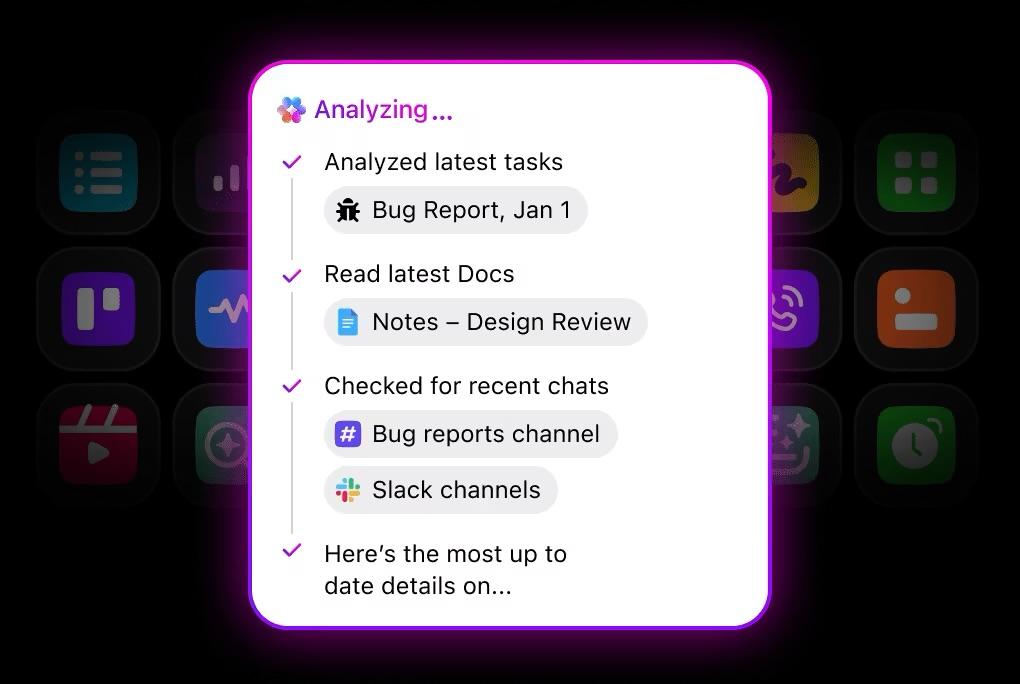
Find anything across your entire workspace and all your connected apps from a single search bar with ClickUp Enterprise Search. You search once and get what you need, instantly. This eliminates the mental burden of remembering where every piece of information is stored.
Traditional search is reactive; you have to know what to look for. The next step is to use AI to proactively bring the right context to you.
Context-aware AI flips the script on traditional search. When you start a new task, all the related documents, past conversations, and stakeholder notes can be automatically surfaced for you—without searching at all.
💪🏻 How to do this:
Stop searching and start asking with ClickUp Brain. Because it’s connected to all your work data, you can ask natural language questions like, “What’s the history of this project?” or “Summarize the key decisions from the last meeting.” The AI assistant does the work of finding and synthesizing the information for you.

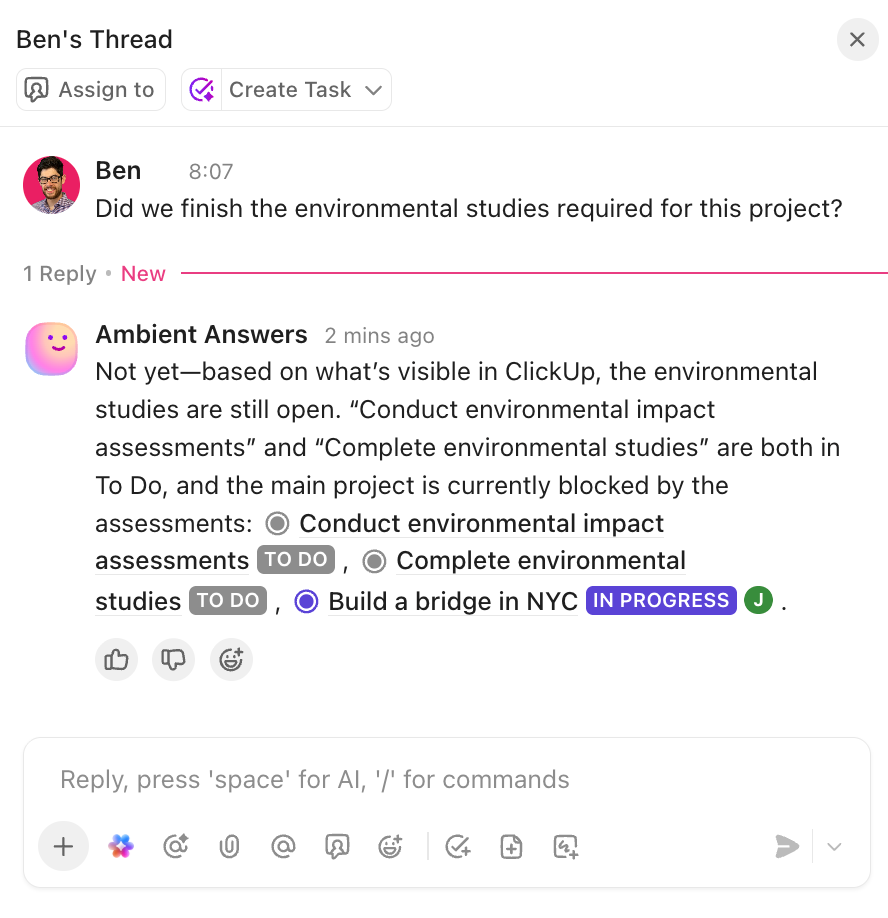
💡 Pro Tip: Ambient Answers in ClickUp helps your team find answers quickly. Just set it up in a Chat Channel (you can even customize the knowledge it can access). For more complex questions, there is always ClickUp Brain, available with a simple @ mention!
The sheer volume of information in a modern company is more than any human can manually organize. As your team grows, the problem gets exponentially worse. This is where AI can help reduce work sprawl at scale. Its role goes far beyond simple search.
| AI Capability | How It Reduces Sprawl |
|---|---|
| Summarization | Condenses long documents, task comment threads, or project histories into short, actionable summaries so you can get up to speed in seconds |
| Connection | Identifies relationships between tasks, documents, and conversations that a human might miss, creating a web of connected knowledge |
| Synthesis | Pulls together information from multiple sources across your workspace to answer complex questions that would otherwise require manual research |
| Automation | Triggers workflows to share context automatically, like notifying a team when a related project’s status changes |
However, be careful of AI sprawl—the unplanned proliferation of AI tools, models, and platforms with no oversight, strategy, or idea of who’s using what, leading to wasted money, duplicated effort, and security risks.
👀 Did You Know: Gartner predicts 40% of enterprise applications will have embedded task-specific AI agents by the end of this year, making it crucial to have a strategic approach to AI adoption.
Adding yet another disconnected AI tool can actually make your context problem worse.
Watch this video to better understand the risks and implications of AI sprawl and why a strategic, unified approach to AI adoption is essential for avoiding these pitfalls.
💡 Pro Tip: The solution is an AI that’s embedded directly into your primary workspace. ClickUp Brain is designed specifically for this use case. It’s not a generic AI bolted on; it’s deeply integrated with your tasks, docs, and chats, allowing it to understand the context of your work and provide relevant answers.
You’ve likely tried other tools that only address one problem, leaving you to continue juggling apps. As a Converged AI Workspace, it’s built to eliminate all forms of work sprawl.
Instead of switching between disconnected tools, you can manage everything in one place. Here’s how ClickUp’s connected features create a single source of truth:
With these connected workflows, context travels with the work automatically. Your team is no longer managing tools; they’re managing work in one unified, intelligent platform.
🎥 This video shows you in greater detail how a platform like ClickUp can prevent work sprawl.
Adopting a unified platform is the biggest step, but you also need to build good habits to keep the sprawl from creeping back in. Preventing context sprawl is an ongoing practice, not a one-time fix. Here are the key habits your team should adopt. ✨
These practices are much easier to follow when your workspace is designed for convergence from the start.
💟 Bonus: Meet Brain MAX—your new AI-powered desktop companion designed to make teamwork effortless. Think of it as a smart collaboration tool that brings all your team’s conversations, documents, and tasks together in one place.
With Talk to Text in Brain MAX, you can simply speak your ideas or instructions, and it will instantly turn them into notes or messages for your team—no typing required.
Need to find a file, recap a meeting, or assign follow-up actions? Brain MAX uses advanced AI to search across all your connected apps and summarize information, so everyone stays in the loop and nothing gets missed.
It even automates routine work, like creating reports or tracking project progress, freeing up your team to focus on what matters most.
Context sprawl isn’t just a minor annoyance; it’s a structural problem that quietly drains your team’s productivity and slows down the entire organization. The daily hunt for information across scattered tools creates friction, delays decisions, and leads to costly rework.
The solution is to consolidate your work into a unified platform, supercharge it with universal search, and leverage embedded AI to surface context automatically. By addressing the root causes of work sprawl, you can give your team the one thing they need most: the ability to focus on their actual work.
The organizations that solve context sprawl now will gain a competitive advantage as AI adoption accelerates.
If you’re ready to eliminate context sprawl for good, get started for free with ClickUp today.
Tool sprawl is having too many disconnected software applications. Context sprawl is the direct result: the fragmentation of your team’s information across those tools, which makes it impossible to find the full picture for any task.
It’s even more damaging for remote and hybrid teams because they rely heavily on written documentation and async communication. Without in-person conversations to fill in the gaps, scattered information creates bigger blind spots and more misunderstandings.
Absolutely, if you simply add another disconnected AI tool to your tech stack. The solution is an AI that’s embedded directly within your primary workspace and is connected to your actual work data, not a separate app that creates yet another information silo.

© 2026 ClickUp

There’s an easier way. Try a free AI Agent in ClickUp that actually does the work for you—set up in minutes, save hours every week.