Sorry, there were no results found for “”
Sorry, there were no results found for “”
Sorry, there were no results found for “”
Have you ever had that sinking feeling when a key team member announces they’re leaving?
The challenge is not just about filling their position but ensuring that all the critical information they hold—whether it’s project details, workflows, or key contacts—is passed on to the rest of the team to avoid disruptions.
Effective knowledge transfer templates can make all the difference in such situations. They provide a structured way to organize and share vital information, ensuring no knowledge is lost during the transition. Knowledge transfer templates can also help with seamless onboarding and training of new employees.
Let’s explore some of the best knowledge transfer templates to safeguard institutional knowledge.
Knowledge transfer templates are structured documents designed to capture and share essential information within an organization. They enable a standardized approach for transferring knowledge.
These templates ensure that critical knowledge—like processes, key contacts, project details, product knowledge training, and best practices—is effectively documented and accessible to others. This way, even when employees leave or change roles, their valuable insights remain within the team.
The purpose of a good knowledge transfer template is to ensure seamless knowledge transfer without gaps, enabling smooth handovers and consistent workflows. It must have:
With a solid understanding of what makes a good knowledge transfer template, let’s look at some top options that can help simplify your team’s knowledge-sharing process.
📮 ClickUp Insight: 46% of knowledge workers rely on a mix of chat, notes, project management tools, and team documentation just to keep track of their work. For them, work is scattered across disconnected platforms, making it harder to stay organized. As the everything app for work, ClickUp unifies it all. With features like ClickUp Email Project Management, ClickUp Notes, ClickUp Chat, and ClickUp Brain, all your work is centralized in one place, searchable, and seamlessly connected. Say goodbye to tool overload—welcome effortless productivity.
Here are 15 free knowledge transfer templates to make knowledge sharing a breeze:
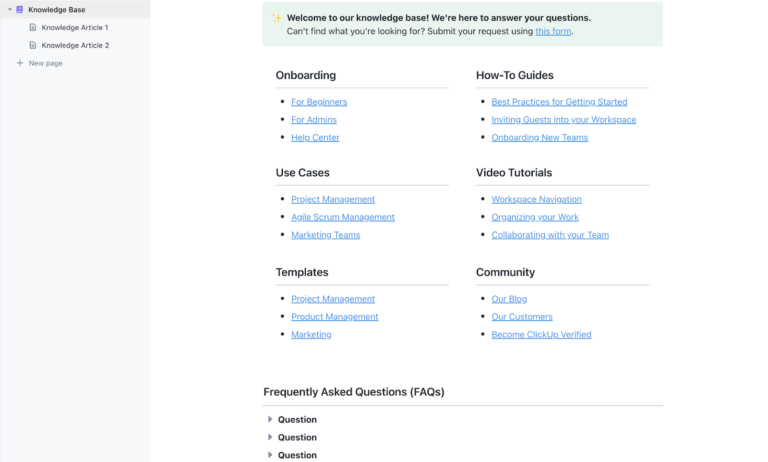
The ClickUp Knowledge Base Template centralizes FAQs, project details, and critical insights in a single, searchable hub. It minimizes downtime and eliminates information silos for critical knowledge areas. With real-time collaboration, intuitive organization, and fully customizable layouts, this template adapts to your team’s unique workflows, making knowledge sharing easier and smarter.
With this template, you can:
That’s not all! ClickUp’s Connected Search makes it easy to locate specific information quickly—no more sifting through long documents or scattered files.
🌟 Ideal for: Departments like HR, IT, and Customer Support need a consistent repository of information for new hires, clients, or customers.
💡Pro Tip: For even more efficiency, use ClickUp Reminders for periodic reviews so content stays fresh and relevant.
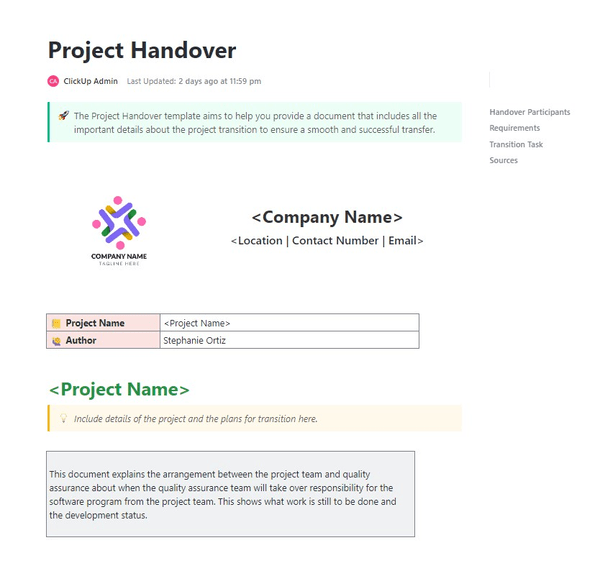
The ClickUp Project Handover Template is a lifesaver for project transitions between team members or departments.
This template provides a structured way to document essential project details and transfer knowledge. With sections to outline project objectives, deliverables, timelines, and important notes, it keeps everyone aligned and informed from the get-go.
Plus, with built-in collaboration tools like ClickUp’s Assigned Comments, the outgoing and incoming teams can add comments and discuss details directly within the document, enhancing clarity.
With this template, you can:
🌟 Ideal for: Teams in fast-paced environments who regularly transition projects and want to ensure operational continuity, clarity, and consistency through every handoff.
💡Pro Tip: Use ClickUp’s Reminder feature to follow up on any pending tasks from the handover document.
The ClickUp HR Knowledge Base Template simplifies HR processes by creating a single, organized space for essential HR information. HR teams can use it to store everything from onboarding guides and employee policies to benefits information and compliance documents.
This resource makes it easy for employees to access the information they need without having to contact HR for every question.
This template’s knowledge transfer effort ensures everyone stays up-to-date with the latest changes and regulations, reduces time spent searching for or updating policies, and promotes accuracy and consistency across the board.
🌟 Ideal for: HR departments looking to centralize information, improve employee self-service, and simplify onboarding and policy updates.
The ClickUp Process and Procedures Template highlights the tasks you need to do to create a living process document.
You can prepare a dynamic guide that evolves with your team’s workflows and captures up-to-date steps, best practices, and improvements. Unlike static documentation, it adapts as processes change, ensuring relevance and efficiency.
For example, an onboarding process document might start with basic steps like sending welcome emails and scheduling calls but evolve to include new tools, updated milestones, or refined timelines. Similarly, a bug resolution workflow can grow with new tools or streamlined escalation steps.
The template also offers visual organization options like Kanban boards, making it easy to set up, track, and complete tasks from start to finish.
🌟 Ideal for: Operations, project management, and any team looking to streamline workflows, improve consistency, and ensure compliance across tasks and departments.
The ClickUp Company Processes Document Template ensures effective knowledge management. It helps you outline company-wide procedures in a centralized document, ensuring adheres to the company guidelines.
The template also provides space for adding key details, visual aids, and assigned roles, so everyone knows who’s responsible for each step. With ClickUp’s powerful document collaboration features like the ClickUp Task Checklists, your team can stay on top of your onboarding tasks and keep the document up-to-date with real-time edits and comments.
🌟 Ideal for: Companies looking to create a unified source of truth for all major procedures, ensuring consistency and transparency across departments.
📖 Read More: Top 10 Knowledge Management System Examples
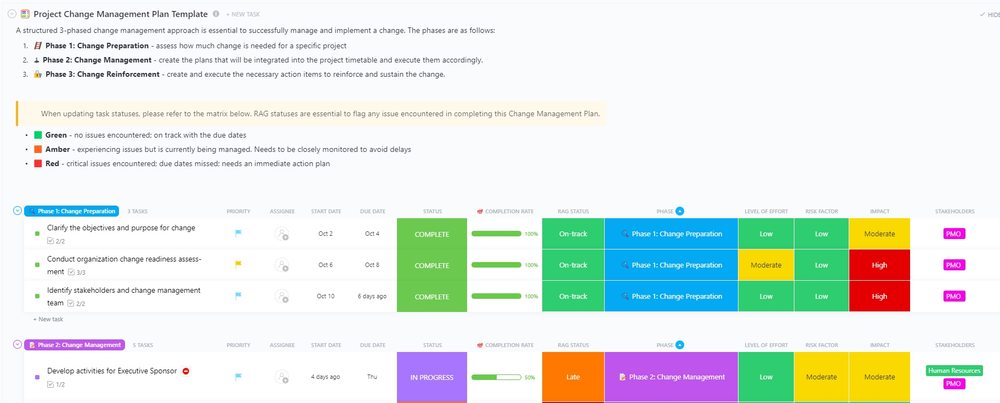
The ClickUp Change Management Transition Plan Template provides a clear framework for planning, implementing, and tracking change initiatives. It helps teams adapt to new systems, processes, or structures with minimal disruption and enables smooth and efficient handling of organizational changes.
This change management template covers every detail you need to manage the transition effectively and is divided into three key phases:
🌟 Ideal for: Organizations undergoing transformations or implementing new processes and any team needing a solid, transparent plan to guide them through change.
👀 Did You Know?: Roughly 70% of organizational change initiatives fail due to poor planning and communication.
📖 Read More: How to Build and Optimize Your AI Knowledge Base
Change is inevitable, but managing it effectively can be daunting. The ClickUp Change Management Plan Document Template helps you plan, execute, and evaluate new initiatives, minimizing disruption and maximizing adoption.
Here’s how you can use this template to create a structured knowledge transfer plan:
🌟 Ideal for: Companies that want to set clear, measurable goals for change and keep everyone involved in the loop.
A rebranding project can be a complex undertaking, involving everything from visual identity updates to messaging overhauls—and that’s where the ClickUp Rebranding Project Template comes in.
While this template isn’t directly designed for a knowledge transfer strategy, it can play a crucial role in ensuring a smooth transition of information during a rebrand. By breaking down the rebranding process into organized, actionable steps, you can document key decisions, changes, and project details. This makes it easier for team members to stay aligned on the new brand identity and ensure consistency across all communications.
With built-in tools for assigning tasks, setting deadlines, and collaborating in real time, it keeps all stakeholders aligned and on schedule. Visual dashboards and progress trackers provide an at-a-glance overview, making it easy to monitor milestones and address bottlenecks.
🌟 Ideal for: Organizations undergoing a rebranding who want a structured approach to ensure every detail—from logos to messaging—is implemented consistently across the board.
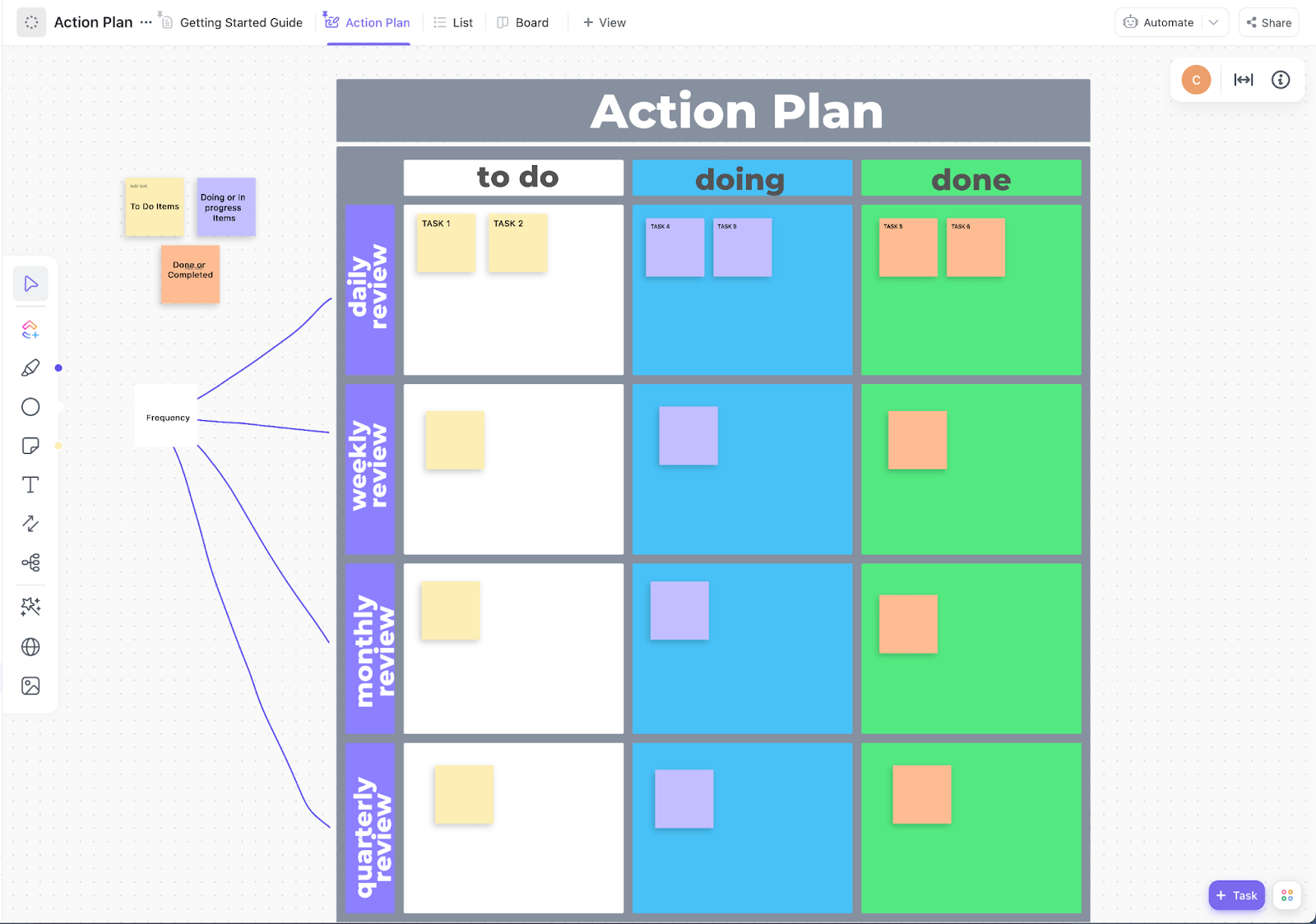
Creating a goal isn’t enough! You need an action plan that turns goals into achievable steps and keeps your team aligned, accountable, and motivated. The ClickUp Action Plan Template helps you break down goals into clear tasks, timelines, and responsibilities.
With features like task prioritization, progress tracking, and real-time collaboration, this template ensures everyone stays accountable and focused.
You can use it to:
🌟 Ideal for: HR and Operations teams preparing for a structured, safety-focused return to work, with a need for flexibility and ongoing progress tracking.
A well-executed knowledge transfer plan is essential for business continuity. However, unforeseen circumstances can disrupt even the best-laid plans.
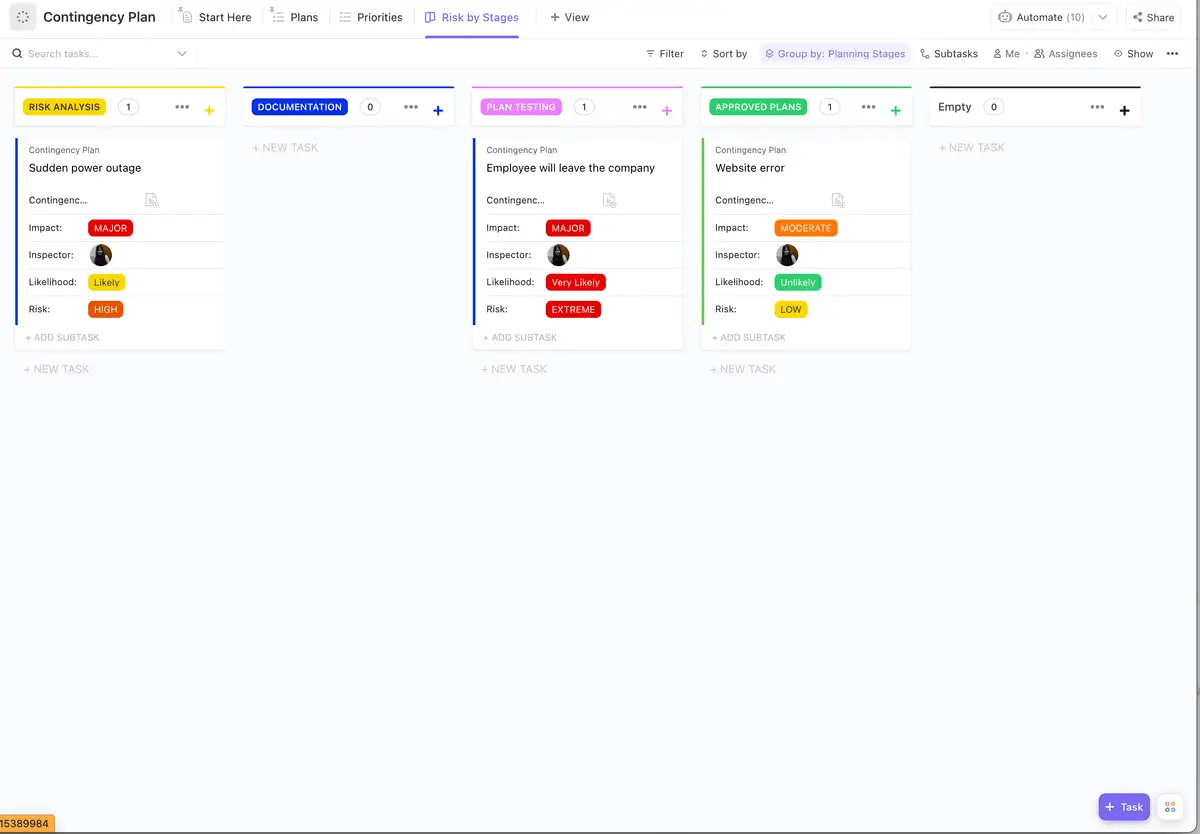
That’s where the ClickUp Contingency Plan Template comes in. It helps you identify potential risks and develop strategies to mitigate them, ensuring a smooth knowledge transfer process.
How to use this template for knowledge transfer:
You can also track and update the plan as new risks emerge or circumstances change, keeping your team proactive and prepared.
🌟 Ideal for: Operations, IT, and project teams who need a reliable framework to handle disruptions, emergencies, or unexpected challenges.
The ClickUp Employee Development Plan Template enhances team members’ skills and strengthens knowledge transfer within an organization. Managers can document skill gaps, development goals, and necessary resources, making it easier to share knowledge effectively and prepare employees for future roles.
It comes with Custom Views, including :
🌟 Ideal for: HR teams, managers, and team leads focused on promoting a growth-oriented culture and building a pathway to career progression for every employee.
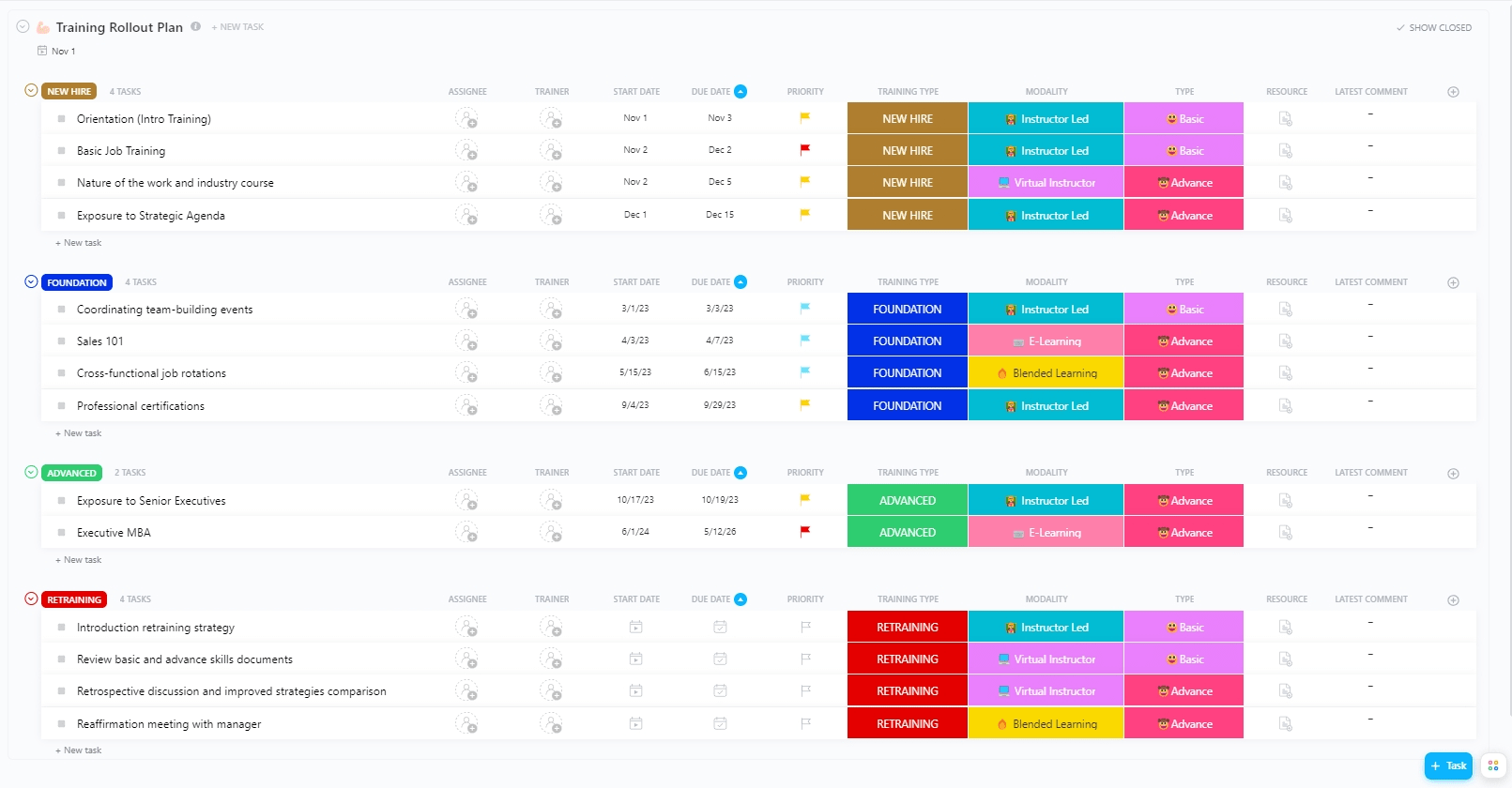
Rolling out a successful training program is no small feat, but with the ClickUp Training Rollout Plan Template, it’s a breeze. This template helps you organize every stage of training, whether it’s a fresh onboarding initiative, on-the-job training, specialized skill development program, or a company-wide program.
It comes with:
With the template’s consistent and adaptable format, you can easily adjust training and internal knowledge base as your organization evolves. Use it to reduce the time spent managing materials and ensure training sessions are uniform and measurable.
🌟 Ideal for: HR teams, training coordinators, and department heads who want to deliver seamless training experiences that build skills and boost team readiness.
👀 Did you know? Investing in employee training can increase productivity by 17% and profits by 21%.
A strong foundation of technical skills is vital for any organization. The ClickUp Technical Skills Matrix Template helps you assess your team’s skills, identify gaps, and develop a comprehensive training plan.
With this template, you can build highly specific at-a-glance views like:
🌟 Ideal for: HR professionals, team managers, and project leaders.
💡Pro Tip: Use this template to identify potential leaders by tracking advanced skills and certifications within your team
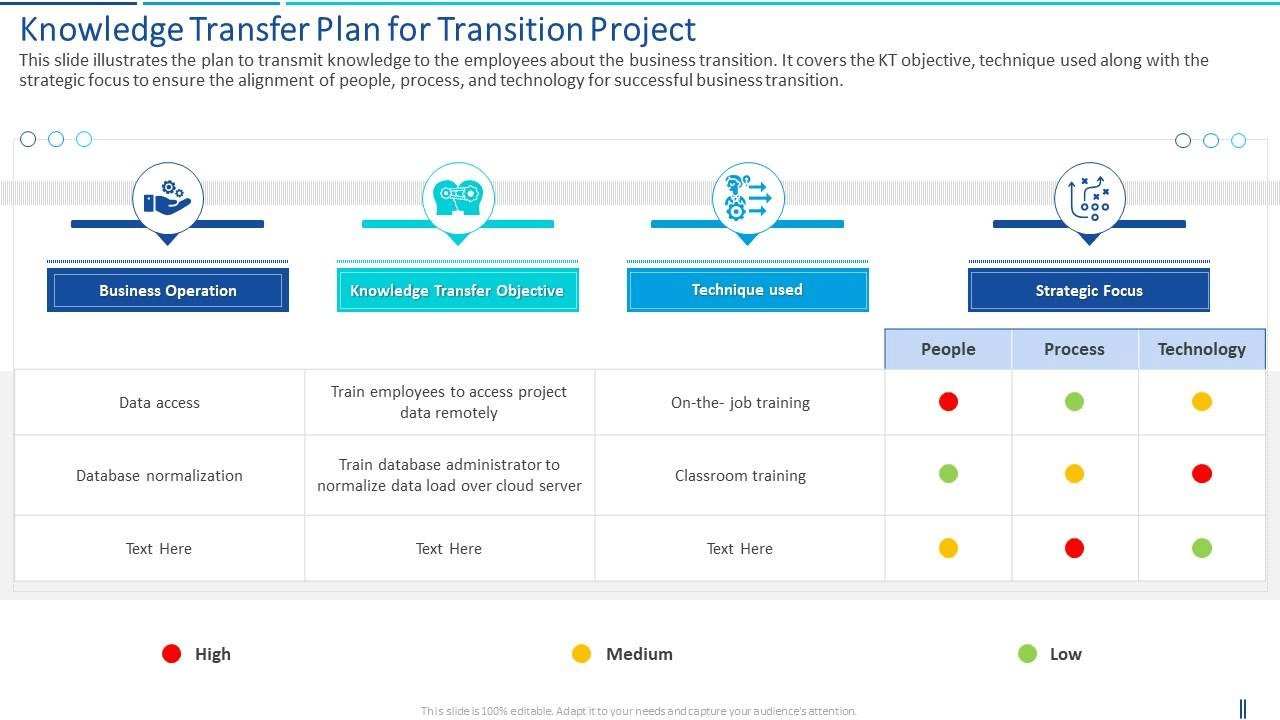
The PowerPoint Transition Knowledge Transfer Plan Template by Slide Team provides a comprehensive framework for transferring knowledge during a business transition. It outlines clear KT objectives, methodologies, and strategic approaches to align people, processes, and technology for a smooth and successful transition.
The template ensures that employees are equipped with the necessary knowledge to adapt to changes seamlessly.
🌟 Ideal for: Transition managers, HR teams, and project leaders overseeing major shifts or reorganizations in business operations.
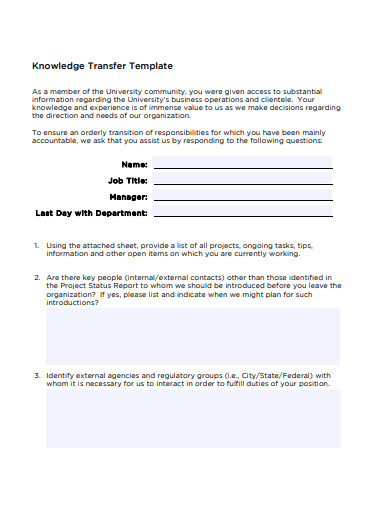
The Knowledge Transfer Plan Template by Template.Net is a manual template to seek detailed information from employees leaving your organization. The template provides a comprehensive set of questions to capture details about project records and files, equipments, reference documents, and project status.
The KT plan template also includes a table at the end to provide an overview of all the project statuses, budgets, clients, and file locations.
🌟Ideal for: Organizations and teams that need to efficiently manage and share complex knowledge.
👀 Did you know? A well-documented knowledge transfer process can lead to a 20% increase in productivity during transitions.
Effective knowledge transfer is the backbone of a thriving organization. By capturing, sharing, and preserving knowledge, you can improve efficiency, reduce errors, and ensure smooth business continuity.
ClickUp’s customizable knowledge transfer templates simplify this process, enhance collaboration, and keep your team aligned. Whether you’re onboarding new hires, managing transitions, or building a training program, these templates come in handy.
Ready to optimize your knowledge transfer process? Sign up for ClickUp for free and take the first step toward seamless knowledge sharing and continuous team development.

PMO Team
Max 9min read

Praburam Srinivasan
Max 16min read
Praburam Srinivasan
Max 21min read

© 2026 ClickUp