






Still downloading templates?
There’s an easier way. Try a free AI Agent in ClickUp that actually does the work for you—set up in minutes, save hours every week.
Sorry, there were no results found for “”
Sorry, there were no results found for “”
Sorry, there were no results found for “”


AI doesn’t replace creativity—it amplifies it. Writing with ChatGPT isn’t about losing your voice, but about refining it with limitless possibilities.
Once upon a time, not long ago, you found yourself staring at your screen, silently wrestling with words. Your cursor blinked mockingly, your coffee grew cold, and rewriting that paragraph felt like pulling teeth.
“If only,” you sighed dramatically, “there was someone who could rewrite this for me without rolling their eyes or charging by the hour.”
Imagine having an AI-powered sidekick ready to turn your jumbled thoughts, stiff corporate emails, or overly complex paragraphs into clear, crisp, and catchy prose—in seconds. It’s not magic, but it sure feels close.
From marketers needing to boost conversions with snappier copy to students looking for smarter ways to say, well, anything. ChatGPT transforms the tedious task of rewriting texts into moments of joy (or at least relief!).
Even professional writers sometimes wish their words sounded a little less Shakespeare and a bit more Netflix. ChatGPT makes that possible.
This guide will show you exactly how to ask ChatGPT to rewrite something step by step without confusion or guesswork. And who knows? By the end, you might wonder how you ever managed without your digital rewriting companion.
The process of rewriting with ChatGPT is an interesting ride since paraphrasing is mostly about
elevating your content. Whether you’re refining a blog post, polishing an email, or restructuring a marketing message, ChatGPT can transform your writing instantly—if you give it the right instructions.
🔎 Fact Check: ChatGPT’s website receives over 5.19 billion visits per month, ranking it among the top 10 most visited websites in the world
Follow these five actionable steps to master how to ask ChatGPT to rewrite text effectively.
Imagine walking into a café and asking the barista for “a drink.” They’d probably stare at you, waiting for more details.
ChatGPT works the same way. If you just say “Rewrite this,” you’ll get something but it might not be what you want.
Instead, before you even type a prompt, ask yourself:
Let’s say you wrote this:
“We are reaching out to inform you about an upcoming change in our billing system that will take effect soon.”
😴 Yawn.
Now, instead of just saying “Rewrite this,” tell ChatGPT exactly what’s wrong.
Better Prompt: “Make this sentence sound friendlier and more engaging.”
The AI rewrite will be:
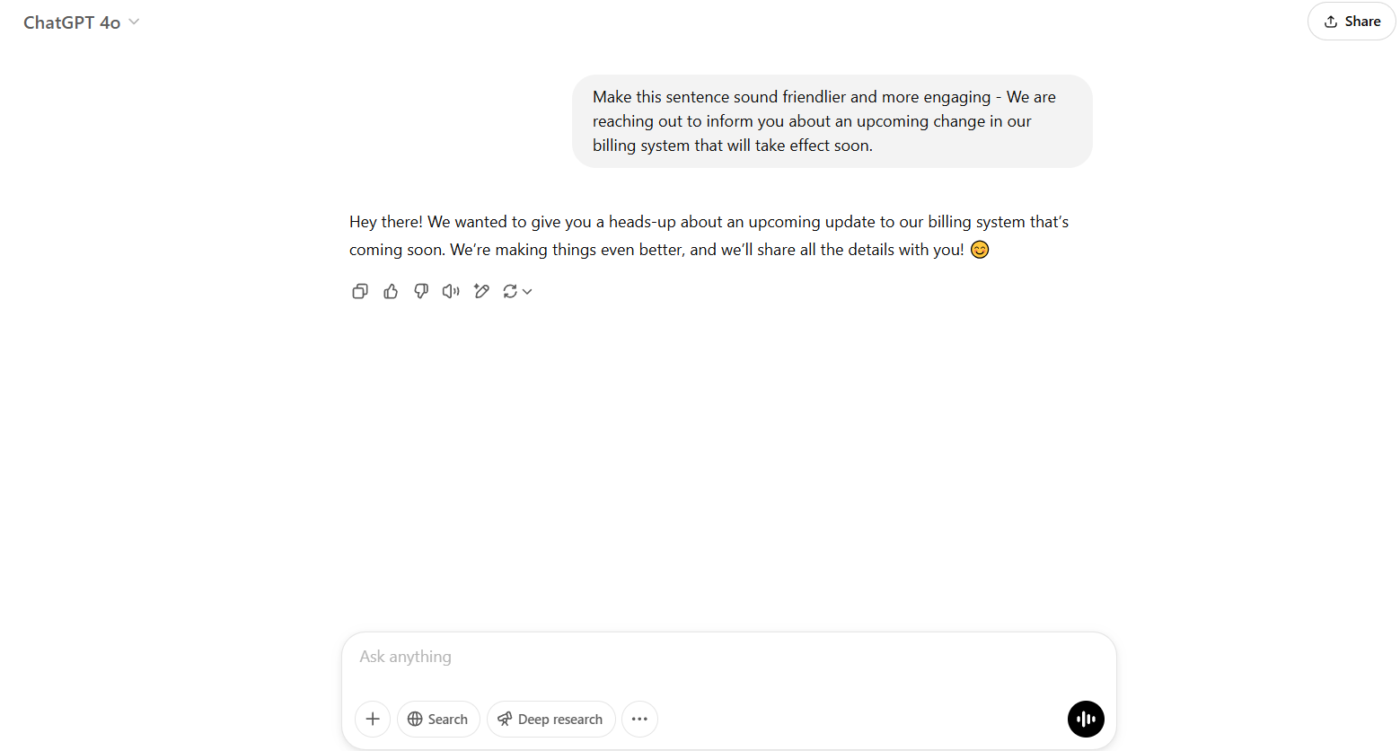
🎯 Why this works:
What is the moral of the story? If you don’t know what you want, ChatGPT won’t either.
Now that you’ve figured out what to improve, let’s move on to writing the perfect prompt.
💟 Bonus: One of the biggest frustrations with writing in ChatGPT is having to feed it your entire context every single time you want to write something. 🫠
ClickUp Brain and ClickUp Brain MAX solve this problem by being deeply integrated into your work; they’re true AI companions that understand what you need help with, when you need it.
As you tackle tasks and projects, they keep track of your workflow and can instantly jump in to offer relevant support, without you having to start from scratch. Plus, Brain MAX’s talk-to-text feature lets you speak your thoughts out loud, cutting down on unnecessary typing and boosting your productivity by up to 40%. With ClickUp Brain and Brain MAX, you get seamless, context-aware writing help exactly when you need it.
Ever played charades with someone who gives the worst clues? They wave their arms frantically, but you have no idea if they’re acting out an airplane or a guy swatting a mosquito.
That’s exactly what happens when you give ChatGPT a vague prompt. If you just type, “Rewrite this”, you’ll get something—but probably not what you were hoping for.
📖 Also Read: How to Use AI for Copywriting (With Prompt Examples)
Learning how to ask ChatGPT to rewrite a paragraph isn’t a mammoth task. You just need this simple formula to get precise, high-quality content:
📝 [Action] + [Context] + [Specific Instructions]
❌ Weak prompt: “Rewrite this paragraph.”
✅ Strong prompt: “Rewrite this paragraph in a more engaging style, using a conversational tone and active voice. Keep it under 30 words.”
Let’s test it practically:
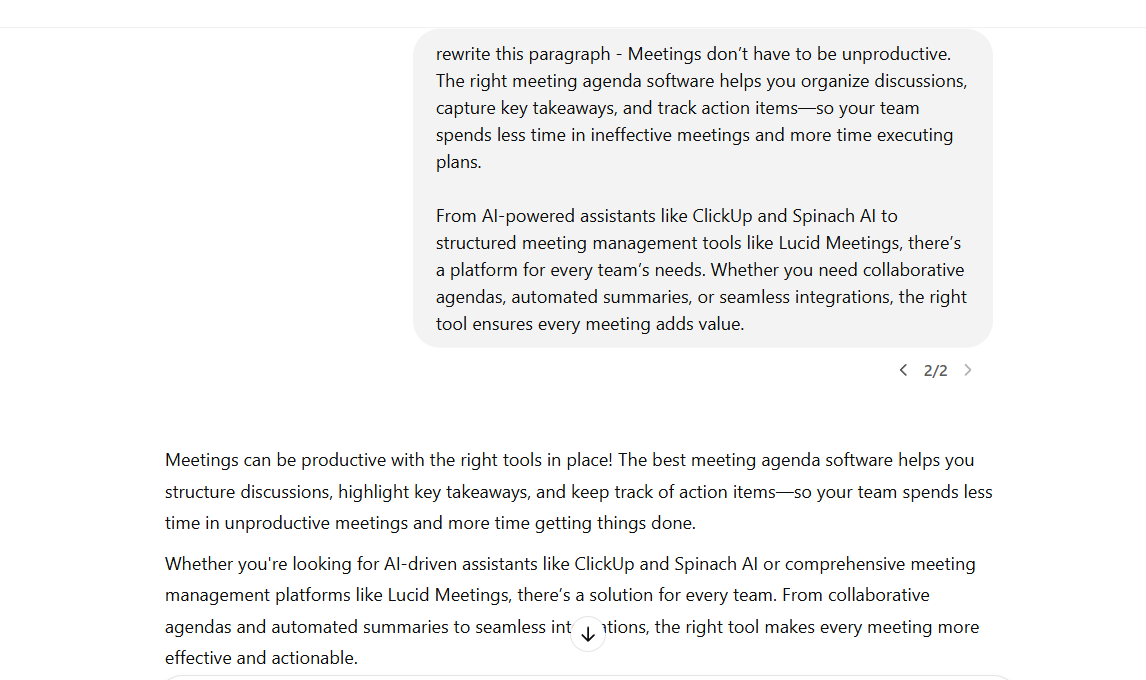
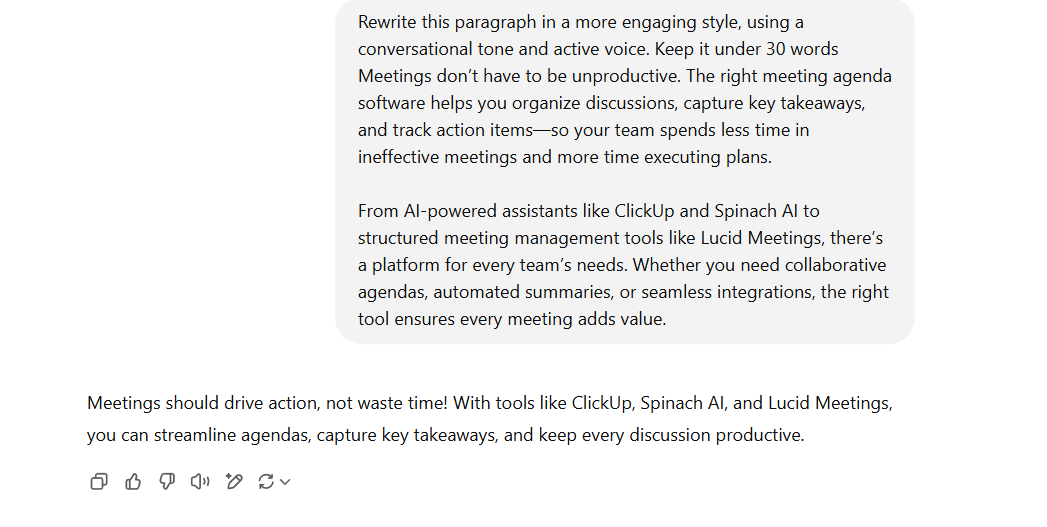
See the difference? The second prompt actually tells ChatGPT what to do, how to do it, and what the output should look like.
📌 Want a simpler rewrite?
“Rewrite this paragraph using simpler language while keeping all key points.”
📌 Need a persuasive touch?
“Rewrite this sales pitch to sound more compelling and action-driven.”
📌 Cutting down word count?
“Rewrite this in under 20 words without losing key information.”
📌 Optimizing for SEO?
“Rewrite this paragraph while naturally including the phrase ‘rewrite text’ without making it feel forced.”
💡 Pro tip: If you’re rewriting content for search engine visibility, ask ChatGPT to retain relevant keywords while making the text sound natural
If your prompt is too vague, ChatGPT will take wild guesses when trying to rewrite text. But when you give it clear, specific instructions, it rewrites text exactly how you want it.
Now that you’ve mastered prompt writing, let’s talk about why multiple rewrites can help you find the perfect version.
If you’ve ever asked ChatGPT to rewrite something and thought, “Meh, that’s not quite it,” you’re not alone. The first draft isn’t always the best—and that’s okay.
Think of ChatGPT as a personal stylist for your words. You wouldn’t walk into a store, try on the first outfit, and buy it without checking the mirror, right? The same applies here. The magic happens when you ask for multiple rewrites and compare them.
Instead of settling for the first result, try the following:
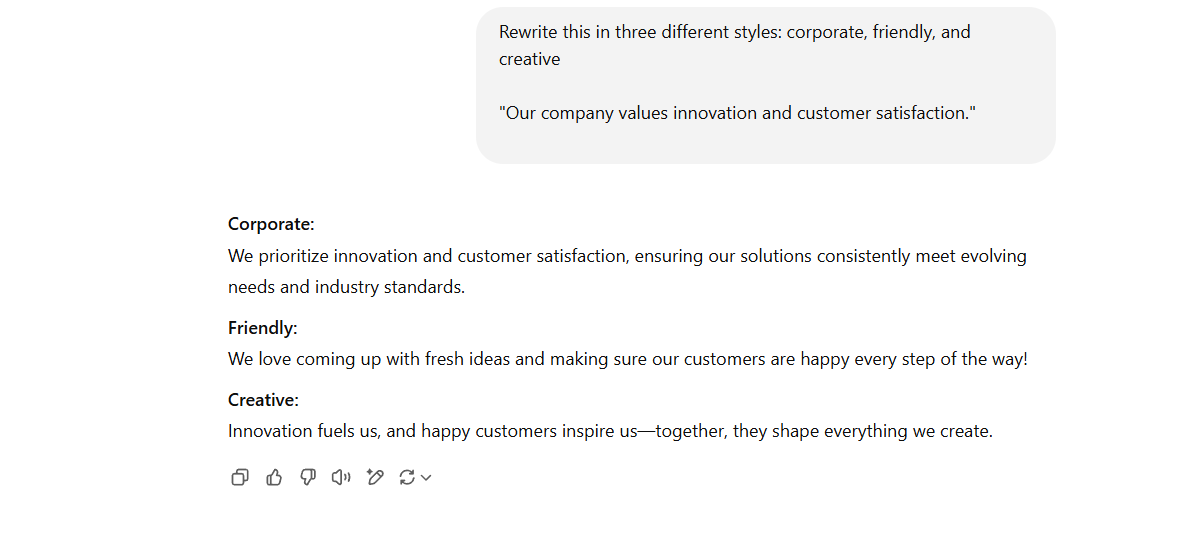
Let’s say your original sentence is: “Our company values innovation and customer satisfaction.”
You ask ChatGPT: “Rewrite this in three different styles: corporate, friendly, and creative.”
AI-generated rewrites:
Not every rewrite is perfect on the first try. Maybe it’s too formal, too wordy, or just not quite right. Instead of starting from scratch, you can refine ChatGPT’s output with quick follow-up instructions and improve clarity.
The best part? You don’t have to rewrite your entire prompt—just tell ChatGPT what to adjust.
Instead of typing a whole new request, use direct tweaks like:
Let’s say you asked ChatGPT to rewrite this:
Original sentence: “We encourage all employees to submit feedback regarding company policies.”
AI Rewrite:
“Our organization encourages employees to provide valuable feedback regarding company policies to enhance workplace efficiency.”
But that sounds too corporate. Instead of starting over, you refine it.
Follow-up instruction: “Make this sound more friendly and inviting.”
Final rewrite: “We’d love to hear your thoughts on our company policies, and your feedback helps us make the workplace better for everyone!”
Why does this work?
Rewriting is a process, and ChatGPT gets better with small adjustments. Instead of settling for an almost-good rewrite, use quick, precise follow-ups to make it perfect.
🙌 Read More: Ready to start using AI for content refinement? Check out the Best Article Rewriter Tools for Paraphrasing
Now, let’s talk about why fact-checking your final rewrite is critical.
ChatGPT is fast, efficient, and great at rewriting text—but it’s not a journalist, proofreader, or mind reader. Sometimes, the output looks perfect at first glance, but a closer look reveals minor errors, awkward phrasing, or even completely made-up facts (yes, AI does that).
Before you hit “publish” or send that rewritten text to your boss, ensure it’s accurate, human-like, and polished.
📖 Also Read: AI vs. Human Generated Content
Let’s say ChatGPT rewrote this sentence:
Original text: “The Earth orbits the Sun once every 365 days.”
ChatGPT’s rewrite: “The Earth circles the Sun every 360 days.”
🚨 Problem? ChatGPT changed the fact! (Spoiler: A year isn’t 360 days long.)
✅ Fixed version: “The Earth takes approximately 365 days to complete one orbit around the Sun.”
Why is this step critical?
The rewriting process can be fast with ChatGPT, but improving content requires reviewing the output and making edits for accuracy. A quick fact-check, a human touch, and a final polish will make sure your text is accurate, natural, and ready to go.
📖 Read More: How to Edit AI Content?
ChatGPT is a lifesaver when you need a quick rewrite, but let’s be real—it’s not perfect. Sometimes, it nails the job. Other times, it spits out something that sounds a little too robotic, off-brand, or just… weird.
If you’ve ever copied a ChatGPT rewrite, stared at it, and thought,
“Okay, but why does this feel so unnatural?” You’re not alone.
AI is fast, but it still has a few quirks that make rewriting a little more complicated than just pressing a button
ChatGPT is great at swapping words, but that doesn’t mean it truly understands what you’re trying to say. Sometimes, the rewrite is technically correct but completely misses the tone, audience, or intent.
It doesn’t stop to ask, “What’s the goal here?” It just throws out a reworded version and hopes for the best
The problem: If you’re looking for a rewrite that improves clarity, tone, or engagement, you’ll probably have to tweak it yourself—again
🙌 Also Read: Best Copywriting Tools & Software For Writers
Ever found yourself scrolling endlessly through ChatGPT conversations trying to find that one rewrite you liked? Yeah, ChatGPT doesn’t exactly keep track of versions. If you don’t copy and paste your rewrites into another tool, they’re gone the moment you start a new request
The problem: When managing multiple rewrites, keeping track of which version was approved, which one needs edits, and which one was the best turns into an organizational headache
ChatGPT has one job: to rewrite text.
But the catch is that it doesn’t verify whether the text is actually accurate. If you’re working with stats, references, or industry-specific details, there’s always a chance that AI alters the meaning or introduces made-up facts
The problem: Just because a rewrite sounds polished doesn’t mean it’s factually correct. That means every AI-generated rewrite needs a human fact-checker before it goes live
Writing rarely happens in a vacuum. If you’re working with a team, you probably need feedback, approvals, and multiple iterations before a rewrite is finalized. ChatGPT doesn’t support any of that. Once it gives you a rewrite, you’re on your own
The problem: Without an easy way to share drafts, track approvals, or see past feedback, rewriting becomes a never-ending cycle of copying, pasting, and chasing people for input
📖 Also Read: Best ChatGPT Alternatives To Try
ChatGPT is great for rewriting text, but it doesn’t help you manage rewrites. There’s no structure, no organization, and no easy way to move from draft to final version without extra manual work.
So, let’s talk about a tool that enhances AI-powered content creation without these gaps.
ChatGPT is great for rewriting text, but it stops there. It doesn’t help you track edits, organize rewrites, or manage approvals. That means once you generate a rewrite, you’re left with handling everything else manually.
You have to move content between tools, send it for feedback, and make sure it aligns with past versions. This is where ClickUp helps. ClickUps’ AI assistant, ClickUp Brain takes AI-powered writing to the next level. It not only helps rewrite content but also manages the entire workflow—from the first draft to the final version.
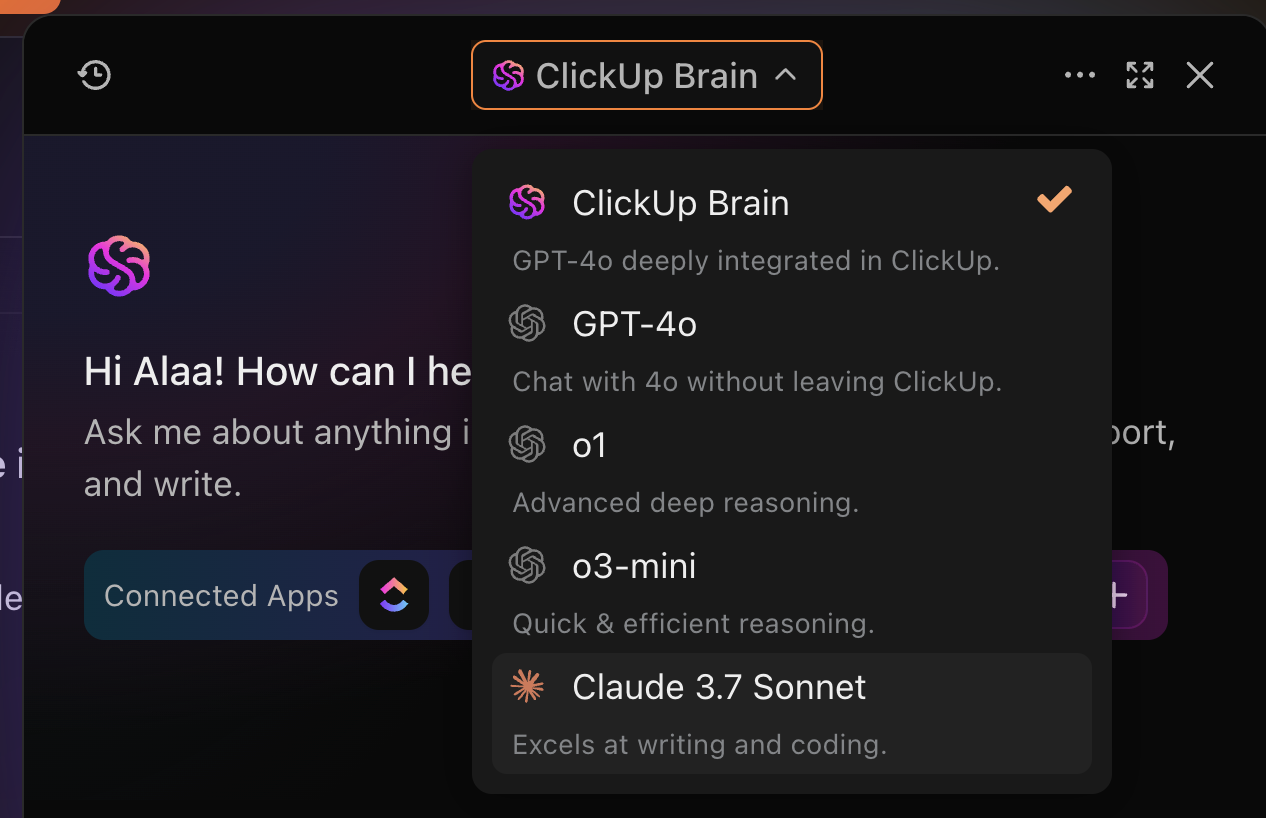
Here’s how ClickUp Brain fills the gaps where ChatGPT falls short:
ChatGPT rewords sentences based on patterns. It rewrites without context and can’t collaborate.
Instead of just tossing out rewrites, ClickUp Brain helps you write smarter, not just differently. It connects AI-powered rewriting with structured workflows, meaning you don’t just get a new version; you get a better version, backed by collaboration, organization, and clarity.
Example:
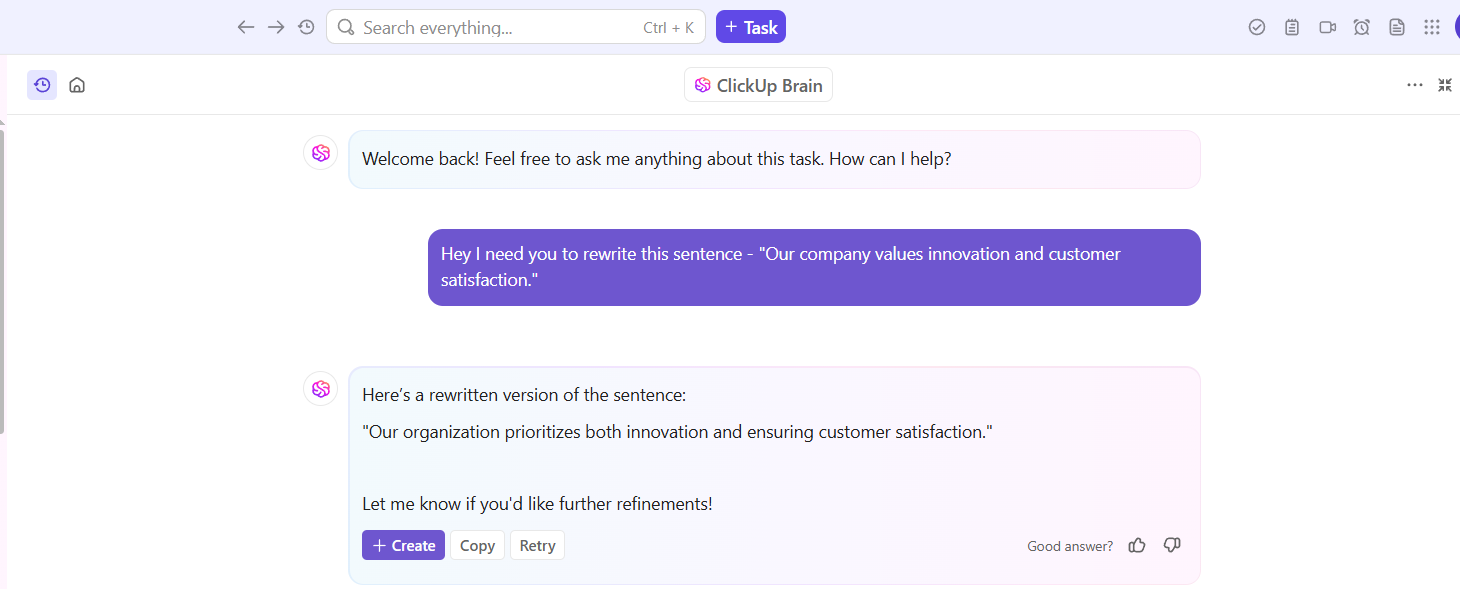
ClickUp Brain doesn’t just generate rewrites—it manages them within the full content process.
A vast list of capabilities makes ClickUp Brain sound like a Doremon for writers. And if you want to know more about its amazing offerings, check out this video 👇
ChatGPT generates rewrites, but where do you store them? Once you have multiple versions, feedback loops, and revisions, keeping track of it all can get chaotic.

With ClickUp Docs, everything stays in one place, making rewrites easy to manage and refine.
Instead of jumping between ChatGPT, Google Docs, and scattered emails, ClickUp ensures every draft is structured, reviewed, and ready to use.
📮ClickUp Insight: 92% of knowledge workers risk losing important decisions scattered across chat, email, and spreadsheets. Without a unified system for capturing and tracking decisions, critical business insights get lost in the digital noise
A major limitation of ChatGPT? It doesn’t support collaboration. It provides text, but after that, you’re left sending files around for feedback, waiting on approvals, and managing rewrites manually.
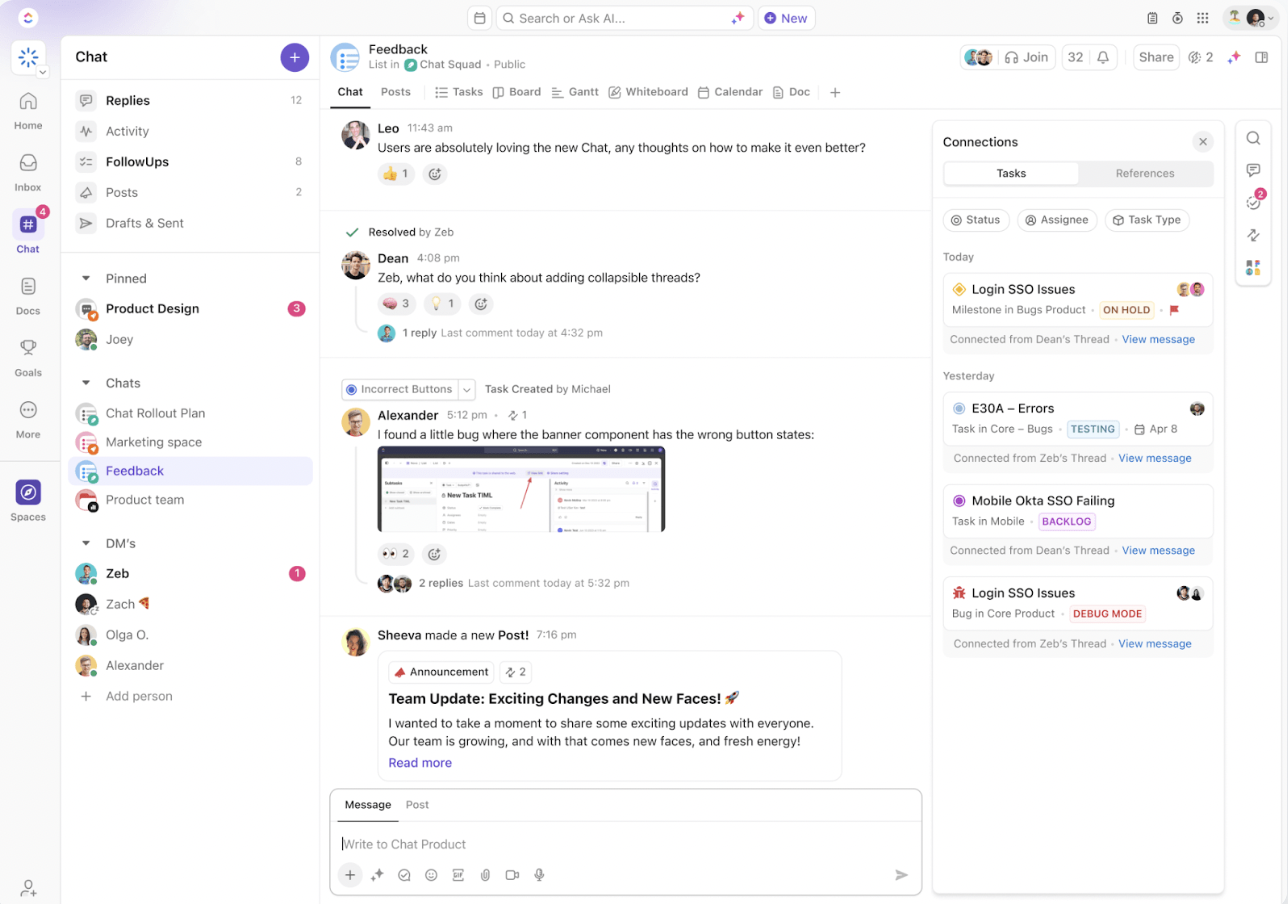
With ClickUp Chat and ClickUp Tasks, the entire feedback process happens within your workflow.
ClickUp bridges the gap between AI-generated rewrites and real-world collaboration, keeping teams aligned from start to finish.
📖 Also Read: How to Automate Content Creation?
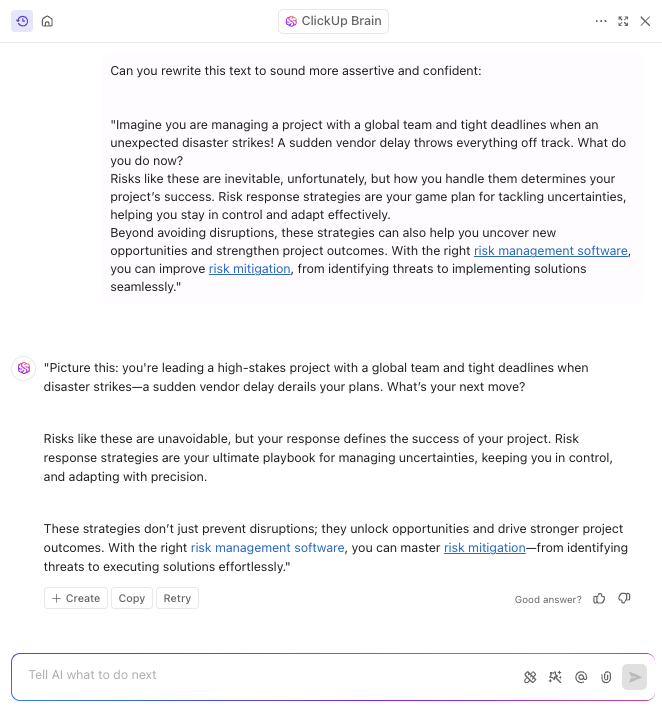
ChatGPT can rewrite text, but it doesn’t tell you if the text is actually good. It won’t flag clarity issues, structural problems, or tone mismatches. It just gives you another version without considering your target audience or how to simplify complex concepts for better readability.
ClickUp Brain is a powerful tool that helps you write smarter by offering AI-powered insights that:
Instead of blindly generating rewrites, ClickUp Brain enhances the writing itself, ensuring every piece is effective, engaging, and aligned with your goals. By helping you craft prompts effectively, it ensures AI-generated rewrites are not just different but genuinely better.
Did You Know? Ernest Hemingway famously rewrote the ending of A Farewell to Arms 47 times before he was satisfied with the tone and clarity
It seems rewriting content for improving clarity was always a normal everyday task for writers!
ChatGPT stops at the rewrite. Once you have the text, you still need to track approvals, manage deadlines, and publish. This means more manual work.
ClickUp Brain seamlessly connects writing to execution:
Bonus: Leverage the ClickUp KPI Template to monitor content performance post-publication
Rewriting is just one piece of the puzzle—ClickUp ensures that piece fits into the bigger picture of content strategy and execution.
📖 Read More: Which Generative AI Tool is the Best?
You started this journey staring at your screen, wishing for an easier way to rewrite content. Now, you’re ready to ask ChatGPT the right questions and avoid common rewriting pitfalls. You can refine your writing style, make professional text sound casual, or adjust for a more formal tone.
But remember, even the best rewrites need organization, collaboration, and a workflow that keeps your content on track. ClickUp Brain takes your writing beyond quick fixes and gives you the tools to manage your entire content creation process—all in one place.
Whether you need just a few examples to guide your creative writing or a structured system for tracking multiple rewrites, the tool ensures every version stays polished and purposeful.
Ready to transform rewriting from a dreaded task into your favorite part of the day? Sign up for ClickUp and experience it for yourself.

© 2026 ClickUp

There’s an easier way. Try a free AI Agent in ClickUp that actually does the work for you—set up in minutes, save hours every week.