






Still downloading templates?
There’s an easier way. Try a free AI Agent in ClickUp that actually does the work for you—set up in minutes, save hours every week.
Sorry, there were no results found for “”
Sorry, there were no results found for “”
Sorry, there were no results found for “”

Here’s the truth: You don’t get to decide if your product is perfect. Your customers do.
If they can’t find value in it, feel stuck halfway through a workflow, or keep wishing it had that one feature, your version of perfect doesn’t matter.
Customer feedback reveals what people actually think about your product or service, and what they expect from it.
When you analyze this feedback, you gain valuable insights into which improvements to prioritize, which new features to launch, and what could make your product perfect.
In this blog, we explain why customer feedback is important and how to leverage it to improve your product/service. We also show you how to collect, analyze, prioritize, and act on customer feedback.
At its core, customer feedback is structured and unstructured information shared by users about their experience with your product—what works, what doesn’t, what confuses them, what delights them, and what they wish existed.
Customer input comes in different forms.
One user might leave a heartfelt comment on your social media post, while another rates your service via an email survey. Then, there’s the user who rants for two paragraphs in a Reddit thread. 😅
To analyze the voice of the customer (VoC) effectively, you must understand the nuances of each feedback type:
This is feedback you proactively ask for. You own the conversation, the timing, and the feedback questions. This forces the user to focus on exactly what you’re trying to fix.
📌 Example: NPS/CSAT surveys, in-app polls, user interviews, and beta testing surveys.
Pros:
This is feedback users share on their own terms, usually driven by strong emotions. For instance, when they either love a feature or they’re ready to quit because of a bug.
📌 Example: Support tickets, social media rants, G2/Capterra reviews, and conversations in focus groups.
This includes structured data—numbers, ratings, percentages, etc. It shows measurable patterns across your entire target audience.
📌 Example: Net promoter score (NPS), churn rates, feature usage metrics, click-through rates, and heatmaps.
This is messy, unstructured feedback that reflects real pain points, customer concerns, emotions, etc. It provides the necessary context to interpret quantitative ratings.
📌 Example: Open-ended customer survey comments, customer interviews, call recordings from customer support interactions, etc.
⭐ Bonus: Whether you’re in product, marketing, customer success, or leadership, this walkthrough will help you reduce guesswork, prioritize what customers actually care about, and build features and experiences that land.
Customer feedback does two things well for the product development process: it reduces the risk of building the wrong thing and accelerates the delivery of real value.
Here’s how:
⚡ Template Archive: Free Customer Review Templates to Understand Your Customers Better
🧠 Fun Fact: Long before computers, 19th-century scholars performed manual sentiment analysis by counting words in religious and literary texts. They manually tracked the frequency of specific emotional terms to uncover moral patterns and emotional shifts in public discourse. Pretty much what AI does in milliseconds today.
Feedback collection is the first phase of your feedback analysis process. Here are four steps to gather feedback.
We’ll also show you how ClickUp’s Product Management Software simplifies things at every step.
Start by mapping out the entire customer journey. List every customer interaction with your product or service from start to finish.
These are your key touchpoints. Your goal is to capture customer expectations and sentiment in real time across each of these.
📌 Examples of key touchpoints:
Next, decide which channels you’ll use to collect product feedback at each touchpoint. For example, use emails to gather detailed feedback once a purchase is completed. Similarly, in-app popups help collect quick, immediate feedback when a user tries a new feature.
🔔 Friendly Reminder: Timing is everything. If you ask for a rating 20 minutes after a user closes the app, they’ve already forgotten the details. Always ask right after the experience—within 60 seconds for in-app prompts and 24 hours for email.
It’s best to use a whiteboard to visually lay out every step your customer takes—from initial discovery to becoming a loyal user.
With ClickUp Whiteboards, you can map and organize the entire customer journey in real time.
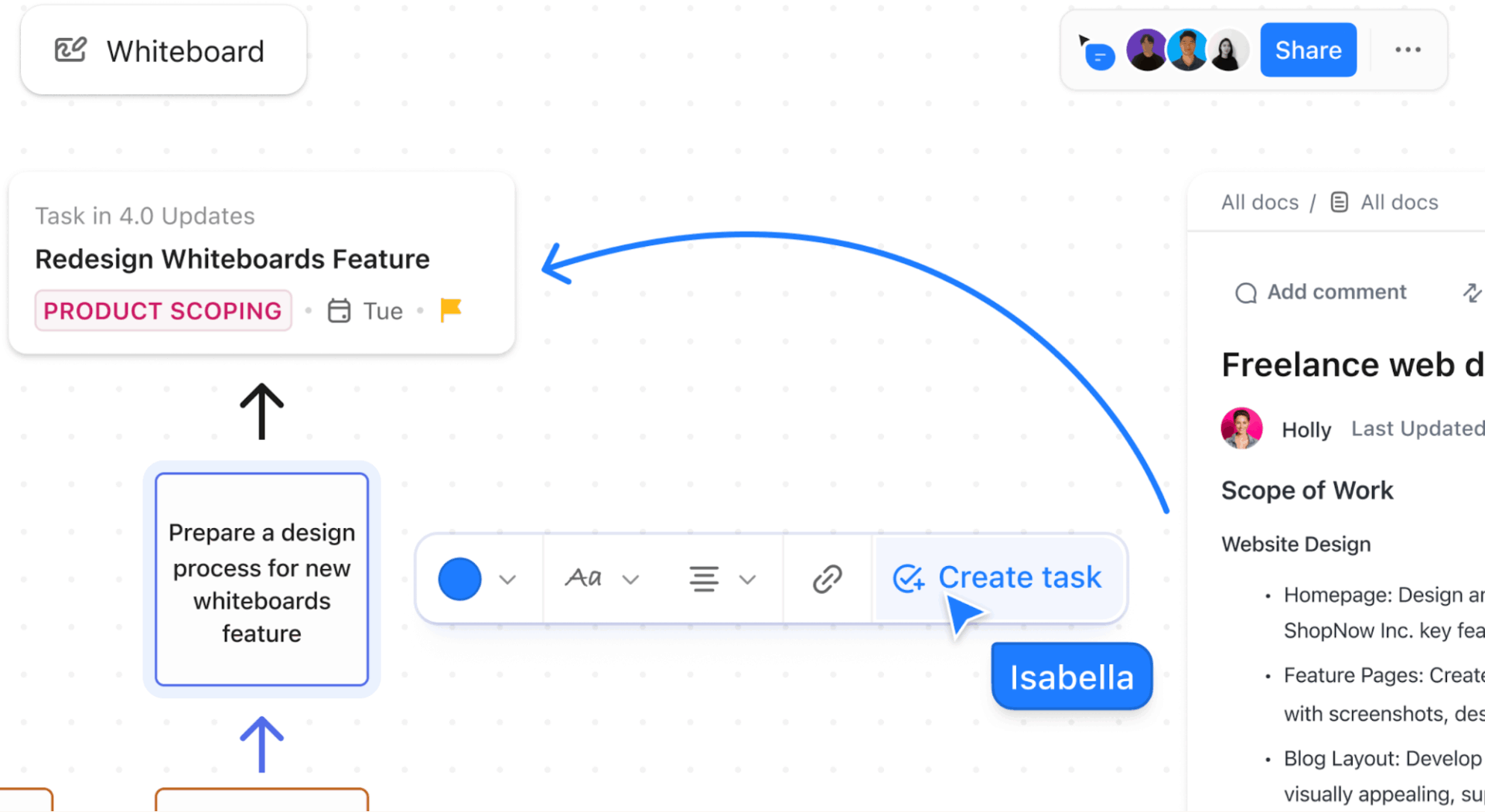
Here’s how:
You can also invite your team to the Whiteboard so everyone can add insights, comment on specific notes or shapes, and brainstorm solutions in real time.
The easiest way to gather structured and unstructured feedback in one go is to combine ratings with comments. Whenever you ask a user to rate something on a form, always provide an optional text box immediately after.
For example, if a user rates a feature a 3 out of 5, your follow-up question should be: “What’s the one thing we could change to make this feature better?”
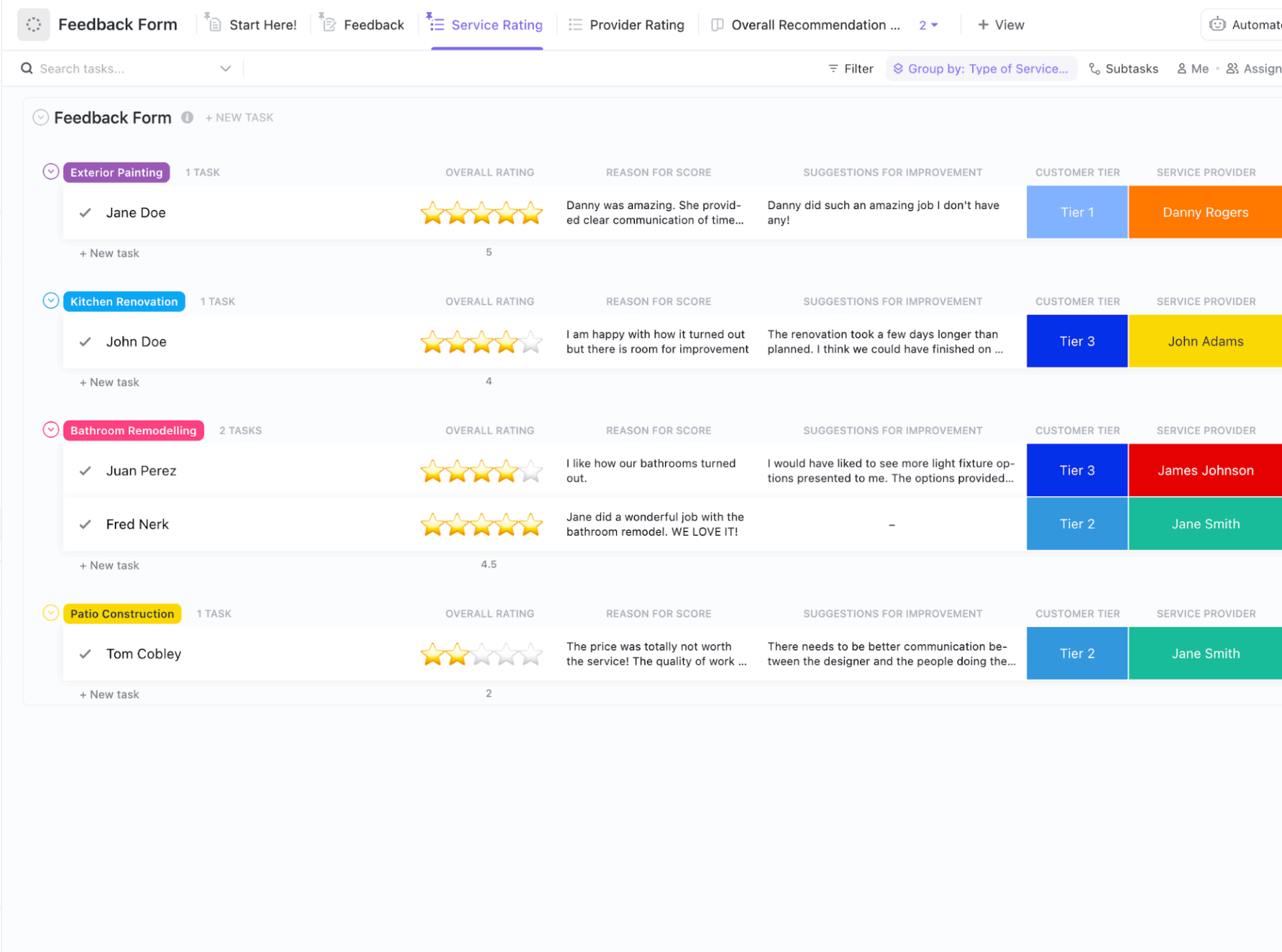
ClickUp offers two powerful, user-friendly feedback form templates that let you capture both numerical data and textual feedback:
ClickUp’s Customer Feedback Form Template is a pre-built form that you can quickly customize to go live in minutes.
Use it to gather comprehensive feedback from customers, automatically organize collected insights, and improve customer satisfaction for long-term success.
Key features of this template:
This template is ideal for ongoing feedback collection, post-launch surveys, or even event follow-ups.
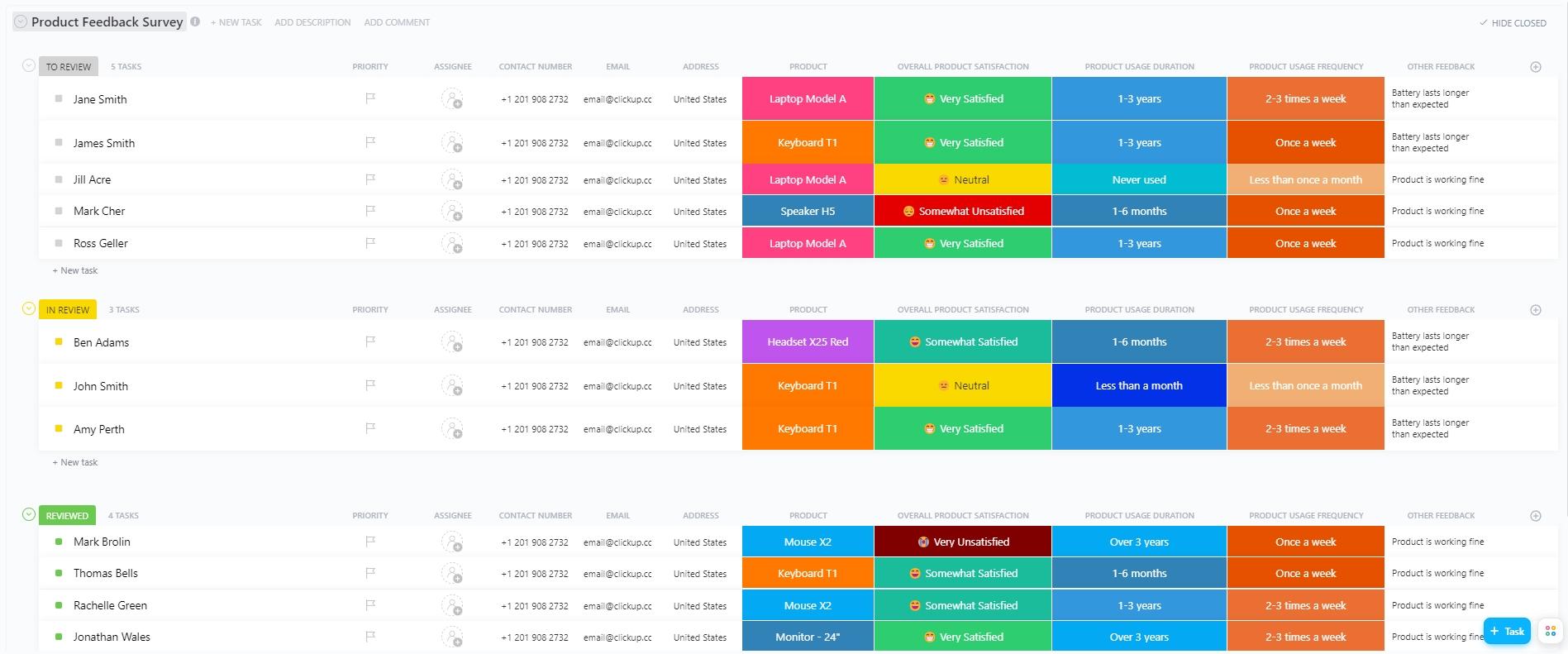
ClickUp’s Product Feedback Survey Template helps product teams systematically gather and analyze user insights about specific features.
For example, send out this survey after a major feature launch, asking users to rate new features, describe any issues they face, and suggest additional improvements.
Key features of this template:
This template is perfect for structured product research, beta testing feedback, or ongoing product health checks.
👀 Did You Know? Around 1750 BCE, a Mesopotamian man named Nanni wrote a stinging complaint on a clay tablet to a merchant named Ea-nasir. He was furious about being sold sub-standard copper and having his messenger treated rudely. It is officially recognized as the oldest customer complaint in history.
No one likes filling out long, confusing forms—including you.
Follow these best practices to boost your response rates and improve the quality of your customer insigh
Manually designing forms or coding custom logic is a lot of work. ClickUp Forms offers an easy way out.
Create product or service feedback forms almost instantly using a visual drag-and-drop builder. You can add, remove, and reorder questions by simply dragging them!

Here’s how you can create industry-standard surveys using ClickUp Forms:
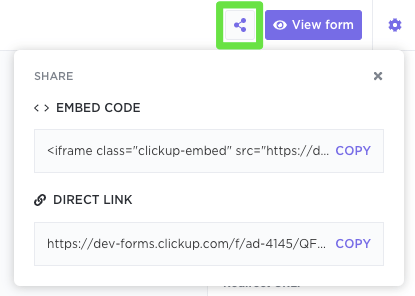
💡 Pro Tip: Each form submission can directly become a task in your List in ClickUp, helping keep all feedback in one place.
It’s much easier to spot trends when every response lives in one place. No one misses important feedback, and all teams stay on the same page.
With ClickUp, you don’t even need to build a central repository—it’s already there.
As a converged AI workspace, ClickUp brings your data and AI capabilities under one roof so you can manage feedback without jumping between tools.
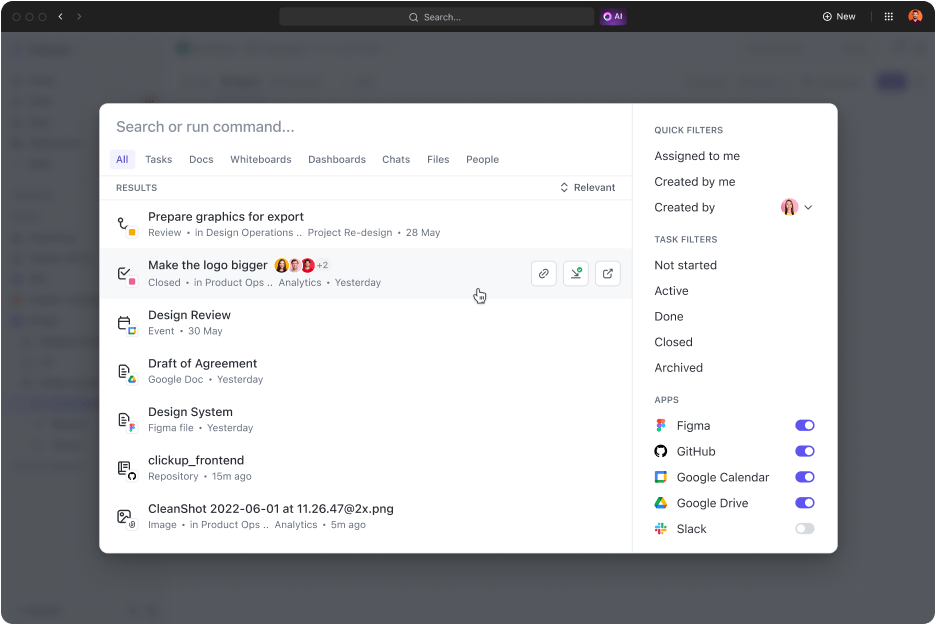
For starters, you can use ClickUp’s Enterprise Search to quickly find any feedback response, form, or file across your entire workspace. Simply type your query in the ClickUp search bar, and it will pull the right info in seconds.
ClickUp also offers 1000+ native app integrations to automate the flow of feedback into ClickUp. Every response, regardless of its origin, lands in your central ClickUp workspace, ready for analysis.
📮 ClickUp Insight: 13% of our survey respondents want to use AI to make difficult decisions and solve complex problems. However, only 28% say they use AI regularly at work.
A possible reason: Security concerns! Users may not want to share sensitive decision-making data with an external AI. ClickUp solves this by bringing AI-powered problem-solving right to your secure Workspace. From SOC 2 to ISO standards, ClickUp is compliant with the highest data security standards and helps you securely use generative AI technology across your workspace.
You’ve done the gruntwork of collecting customer feedback from multiple channels. It’s time to dig in and extract meaningful insights.
Here’s how to do it, and how a platform like ClickUp can help.
This step includes two kinds of assessment:
However, manually reading and tagging every response is time-consuming and prone to bias, which can compromise your results.
Meet ClickUp Brain, the AI assistant integrated within ClickUp. It acts as your intelligent feedback analyst that you can simply chat with to analyze precise feedback.
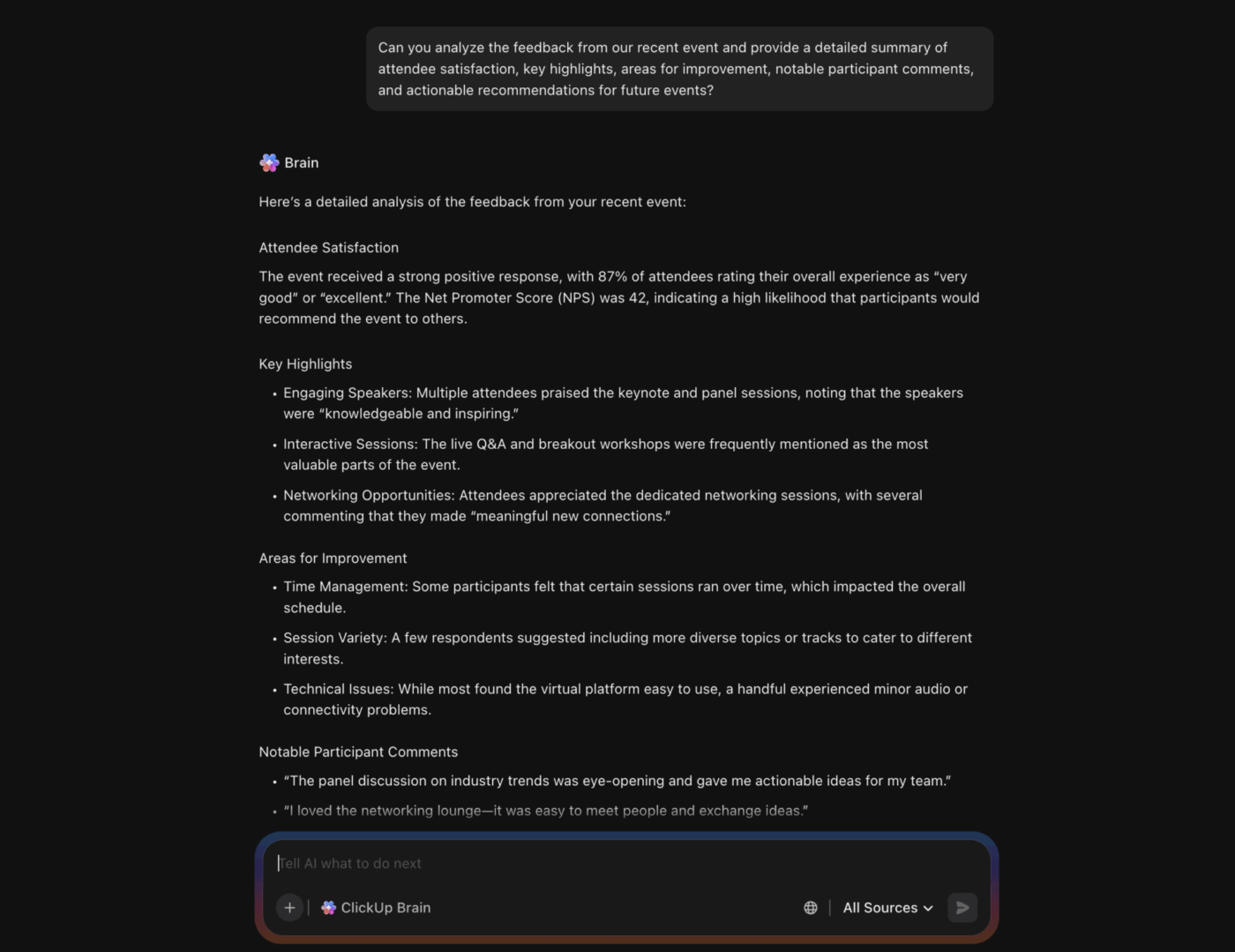
Here’s a simple example of how this works out in practice:
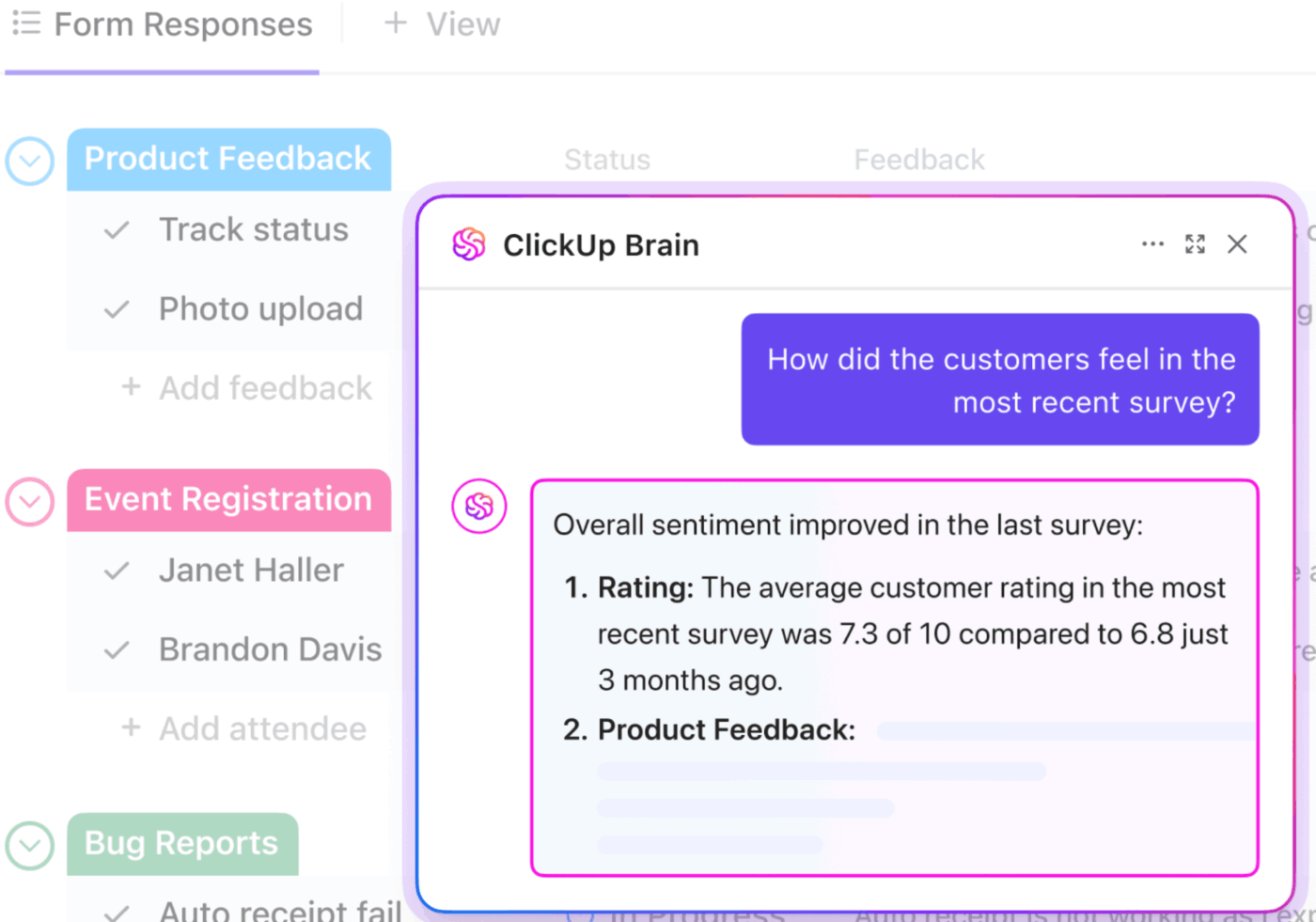
ClickUp AI Fields take feedback categorization to the next level by combining AI analysis with automation. As soon as a feedback response turns into a task, AI fields automatically generate or analyze information based on the prompts you write.
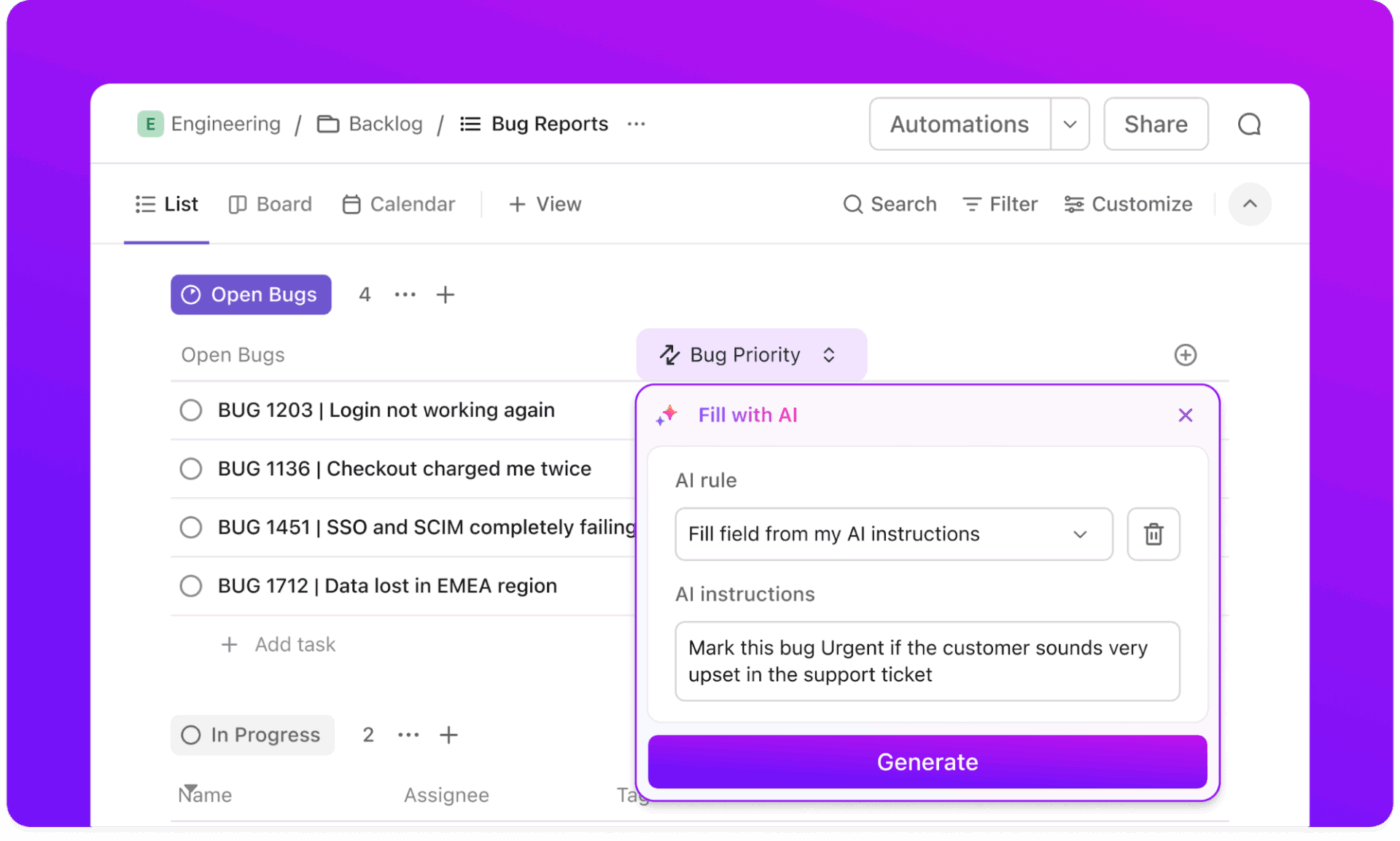
Some ways to use AI Fields:
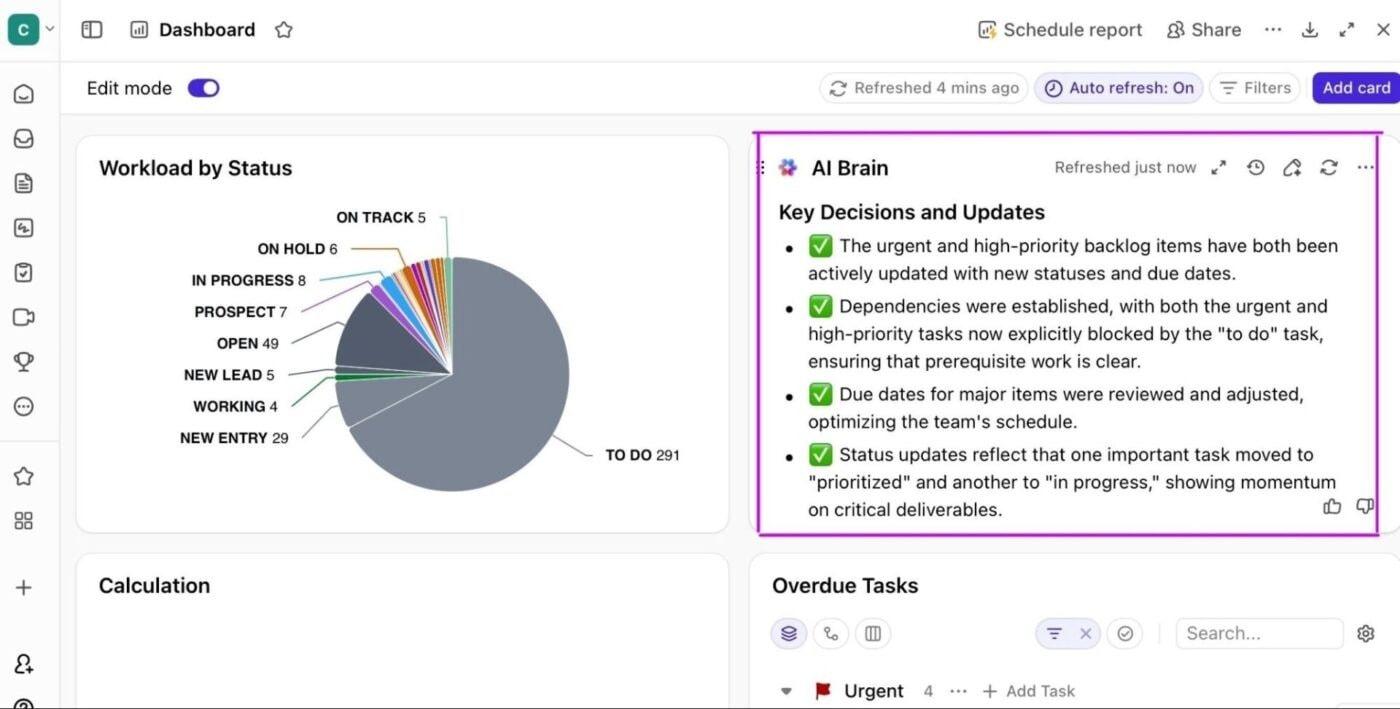
Once you’ve analyzed data and generated the necessary insights, you must ensure they reach the right people.
Set up role-based dashboards to track how customer demand and sentiment shift over time, identify which features trigger the most complaints, and monitor how often competitors are mentioned.
In ClickUp, you can turn raw customer feedback into clear, actionable insights for every team and stakeholder with ClickUp Dashboards.
They pull feedback data from any list, folder, or space and display it using a variety of visual cards—bar charts, pie charts, line graphs, and more.
Because feedback tasks can be tagged and categorized with ClickUp Custom Fields (like sentiment, product area, urgency), you can filter and group your dashboard data in real time. Want to see only negative feedback about onboarding? Just filter by those fields.
Most importantly, ClickUp Dashboards are fully customizable, so you can build different views for different roles like product managers, support teams, executives, etc.
💡 Pro Tip: Use AI Cards to scan thousands of feedback tasks and instantly generate concise summaries alongside your dashboards. For example, an AI Summary Card can highlight the most common themes, top pain points, or frequently requested features.
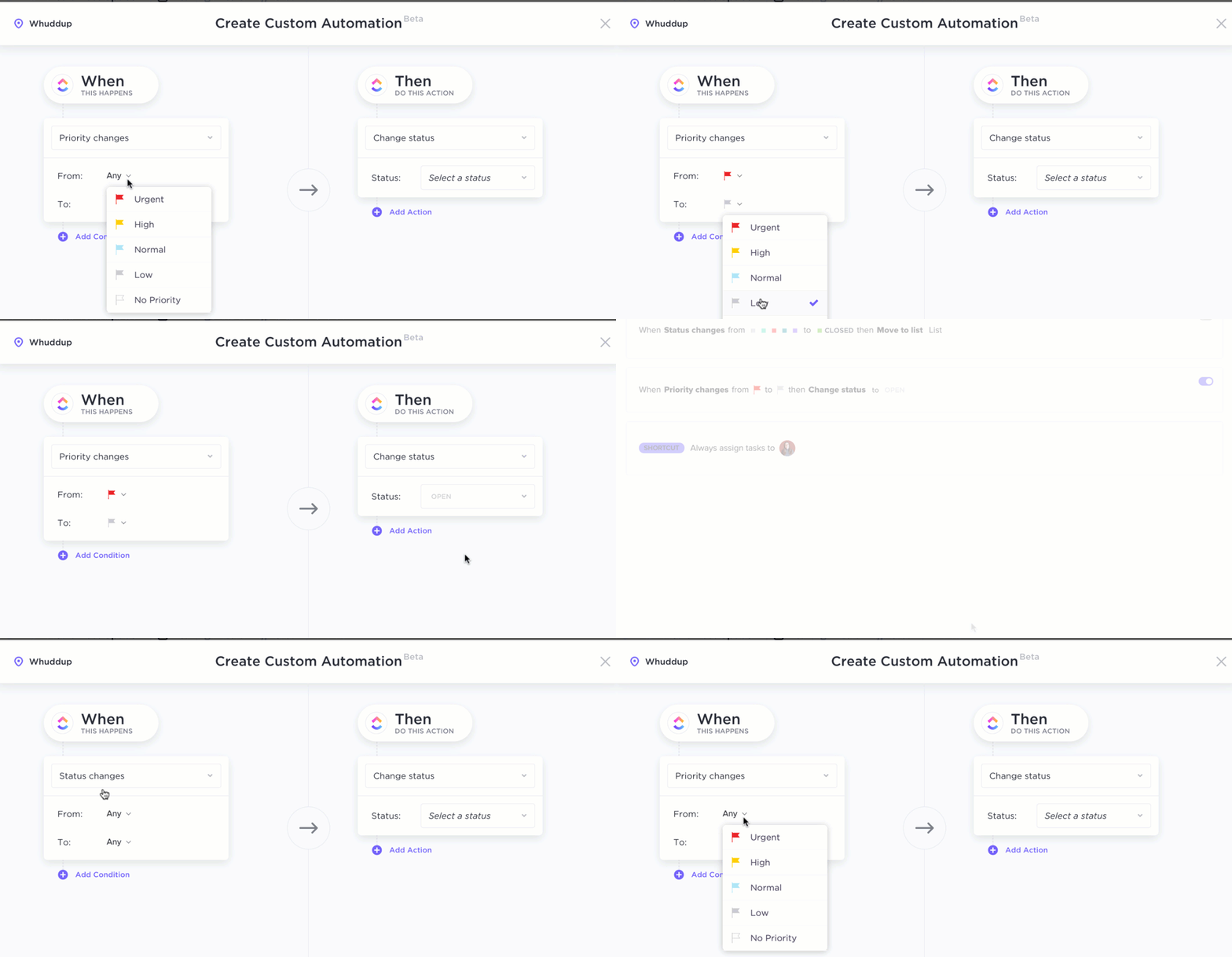
Use AI and automation to collect, sort, and analyze feedback automatically. This allows you to focus on product improvements rather than manual data entry. You can also track key performance indicators like response volume and survey completion rates to optimize your process.
Create rule-based automations in ClickUp so that whenever a new feedback form is submitted, a task is automatically created in your feedback list.
You can further configure ClickUp Automations to:
For example, when a customer submits a bug report, ClickUp assigns it to the QA team, sets the status to “To Review,” and tags it as “High Priority.”
💡 Pro Tip: AI Super Agents in ClickUp can take care of a lot of the operational work for you.
Use an Automation to trigger the Super Agent when a new feedback task is created (or when a status changes to “New”). What the Super Agent can do on trigger:
Once triaged, the Super Agent can help with outbound responses by:
Learn how to create your first Super Agent:
You have the feedback now. But how to use it to prioritize the right product features for improvement?
A prioritization framework is a simple way to evaluate and score product features or ideas against predefined criteria. It helps you rank development projects based on potential impact, estimated effort, and value to your customer base.
Below are three common frameworks for prioritizing feedback:
RICE stands for Reach, Impact, Confidence, and Effort. Teams use it to score each feature based on:
You assign a score to each of these criteria and calculate the overall RICE score using the formula:
RICE score = (Reach x Impact x Confidence)/ Effort
The higher the score, the higher the priority.
MoSCoW breaks valuable feedback into four buckets:
This method prevents overbuilding and helps maintain focus under tight timelines or release deadlines.
📚 Also Read: What is the MoSCoW Prioritization Method?
This is a simple 2×2 matrix where you plot feedback based on the value it delivers to the user versus the effort required to build it.
To use it, first map each request from feedback on two axes (X = effort, Y = value).
Now, you’ve got four quadrants:
💡 Pro Tip: Reassess your project prioritization rules regularly as customer needs and market trends change. What counted as “high value” six months ago might not be worth the same effort today.
Prioritize quick wins and strategic bets first.
A quick win might take only a day or two to design and ship, but it immediately reduces frustration and shows customers you listen.
While strategic bets are projects that might take a full quarter and require coordination across teams, they materially change your product’s positioning and long-term stickiness.
📚 Read More: How to Implement Kano Model Analysis (+ Examples)
Working with a small pool of customer feedback data? Simply link pain points to affected business outcomes or goals to prioritize feedback.
Start by analyzing pain points and grouping them under common themes. Then link each pain to a clear outcome, such as reducing user churn or enhancing customer satisfaction (CSAT) score.
Finally, quantify the impact by estimating ROI, effort, and resources needed.
📌 Example: Users complain that your mobile app is slow. You realize that while a one-second speed boost costs 50 engineering hours, it could increase Daily Active Users (DAU) by 10%. Now, you have a data-backed reason to put that at the top of your list.
🚀 ClickUp Advantage: Why struggle with complex manual formulas when you can prioritize features visually?
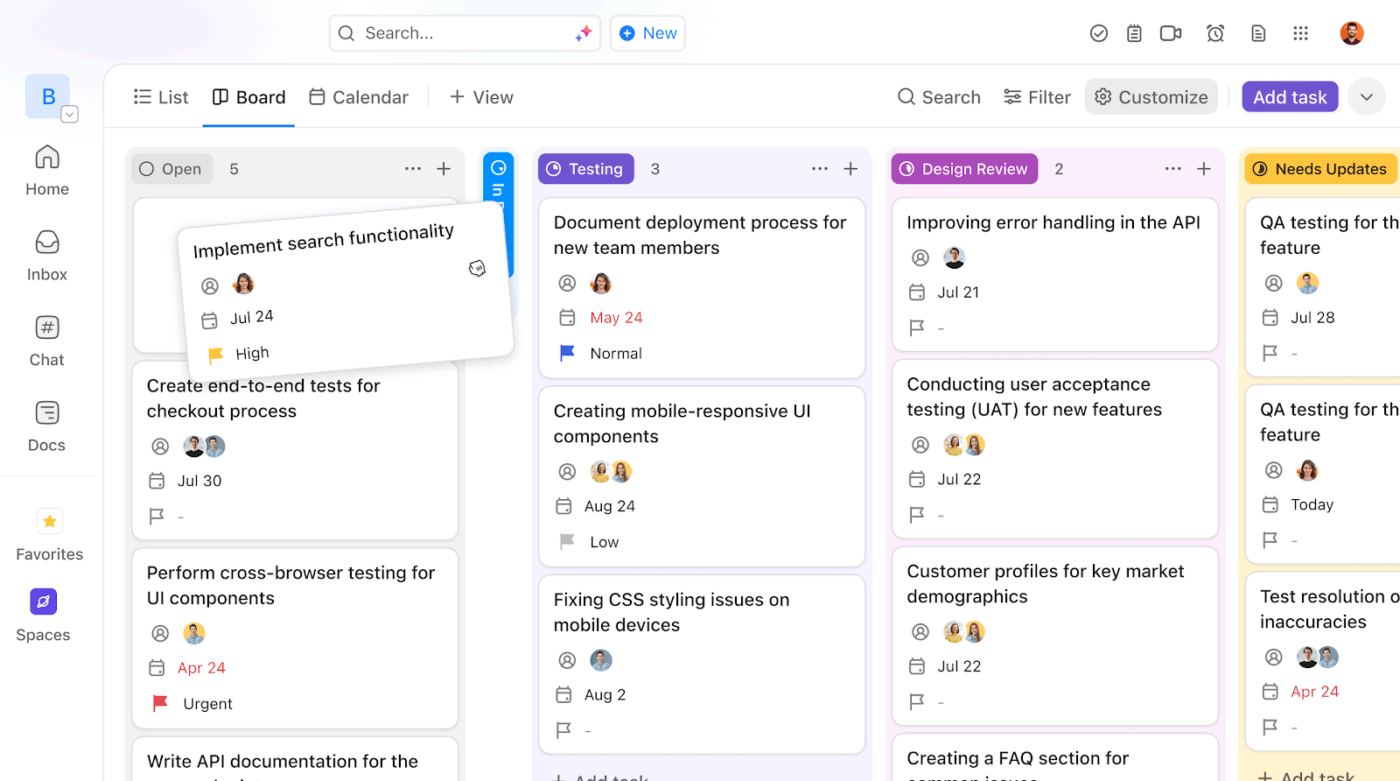
With ClickUp’s Board View, you can organize feedback on a Kanban board and add Custom Fields for urgency, impact, effort, or customer segment.
To prioritize, simply filter the board. Need to see high-impact requests from enterprise customers? Just filter by “Impact” and “Enterprise Segment” to instantly see exactly what needs to be built next.
Here are some practical applications of using customer feedback for product development:
Customer feedback helps you understand where users get lost in your product or sections that are hard to reach. You can then use this data to reorganize menus, rename buttons, and redesign workflows.
📌 Example: If users constantly mention they can’t find “Account Settings,” move that option to a more prominent spot in the header.
Users are quick to report bugs or glitches that disrupt their experience. You can collect and categorize this feedback to spot patterns, prioritize critical issues, and address them promptly.
📌 Example: When users report that data exports consistently fail at 90%, you can isolate the specific environment and ship a fix before the issue scales.
Are you still picking features for your product roadmap based on gut feelings? Customer feedback provides you with a direct line to the requests that actually move the needle. Instead of wasting engineering hours on vanity projects, you use real-world demand to filter for features that drive retention and growth.
📌 Example: 70% of your enterprise clients ask for a specific CRM integration. You add this demand to the top of the next sprint to unlock a new revenue segment and meet customer expectations.
High drop-off rates during the first five minutes of product usage usually mean your onboarding is too complex.
Implementing customer feedback loops reveals the exact moment a user feels overwhelmed or confused by your setup process. Product teams use these insights to trim unnecessary steps, add tooltips where users get stuck, and get them to the product’s core value faster.
📌 Example: App sign-up data shows users quit onboarding when asked to “Invite Teammates.” You redesign the workflow and shift this step to the onboarding so that users can explore the app completely first.
📚 Read More: UX Research Methods for Enhancing User Experience
Collecting data is useless if it dies in your inbox or dashboards. To get buy-in for new features, you must:
⚡ Template Archive: Free Agile Requirements Gathering Templates
If you collect feedback but never announce the fix (i.e., close the loop), users assume their input went into a black hole.
To avoid this, make sure you:
⚡ Template Archive: Free Customer Review Templates to Collect Client Feedback
Below are two real-world examples of companies that successfully leveraged customer feedback to drive product improvement:
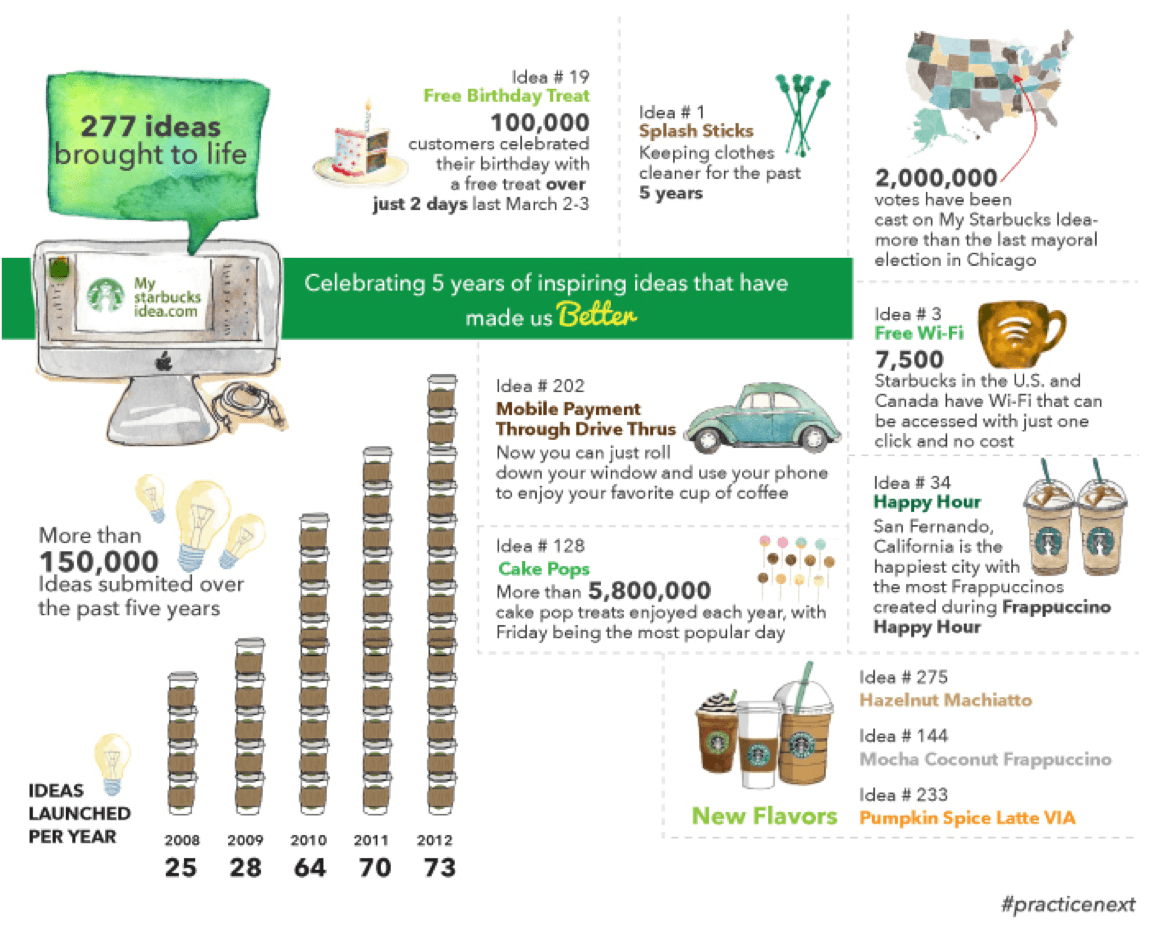
In 2008, Starbucks faced tanking stock prices, product quality, and customer service experiences.
To fix it all, they launched “My Starbucks Idea,” a digital community where customers could submit, vote, and comment on suggestions.
✅ Result: Fans submitted over 150,000 ideas, out of which hundreds were adopted and launched. These include: mobile payments through drive-thrus, cake pops, free Wi-Fi, new flavors like Hazelnut Machiatto and Pumpkin Spice Latte VIA, etc.
After nearly going bankrupt in the early 2000s, LEGO realized its internal designers were out of touch with what “AFOLs” (Adult Fans of LEGO) actually wanted.
They launched LEGO Ideas, a platform where fans submit their own designs. If a fan design gets 10,000 votes, LEGO reviews it for official production.
✅ Result: This feedback program created massive LEGO hits like the NASA Apollo Saturn V and The Office sets.
⚡ Template Archive: Free Product Management Templates
It’s the customers’ world—brands just live in it.
Taking customer feedback lightly has serious consequences: a decline in product quality, a misaligned roadmap, higher customer churn, and a wider gap between you and your competitors.
ClickUp takes the load off your shoulders and automates feedback loops end-to-end. You can create survey forms in minutes, use contextual AI to analyze different types of feedback, and share actionable insights with your team.
By doing so, you shift your focus from analyzing feedback to putting it into action and improving your product/service.
Sign up for ClickUp today to get started.
The most effective approach combines prompted and unprompted methods. Use in-app surveys for immediate reactions, email for detailed insights, and social listening to capture unfiltered opinions about customer experience. Timing is crucial—always ask for feedback and collect customer insights while the experience is still fresh in the user’s mind.
Start by aggregating quantitative scores to spot trends. Then use AI to perform sentiment analysis on qualitative comments. Categorizing responses into themes like “usability” or “pricing” helps you move past individual complaints to identify recurring issues.
Both quantitative and qualitative feedback are essential for improving customer experience. Numbers tell you what is happening (like high churn), while open-ended comments explain the why. Combining these allows your team to validate technical data with the real-world emotional drivers of your users.
Review high-level sentiment and urgent bug reports daily. However, conduct a deep-dive analysis weekly or bi-weekly to align feedback with your product roadmap.
Tools like ClickUp are ideal for scaling feedback loops. ClickUp centralizes data from forms, emails, and chats, using built-in AI to tag sentiment and summarize thousands of responses instantly. This turns a mountain of raw data into an organized, actionable roadmap.

© 2026 ClickUp

There’s an easier way. Try a free AI Agent in ClickUp that actually does the work for you—set up in minutes, save hours every week.