






Still downloading templates?
There’s an easier way. Try a free AI Agent in ClickUp that actually does the work for you—set up in minutes, save hours every week.
Sorry, there were no results found for “”
Sorry, there were no results found for “”
Sorry, there were no results found for “”

Eesel works well as a smart Q&A layer. Just connect Slack, plug in your docs, and watch repetitive ‘where is…?’ questions disappear. It shines when the goal is to surface knowledge quickly and reduce basic lookup requests.
However, once teams start managing higher volumes, new product lines, or specialized internal workflows, gaps appear quickly. A single bot shared across multiple audiences, limited workflow automation, and shallow reporting make it challenging to work with.
In this guide, you’ll explore Eesel AI alternatives that are built for more than just quick answers. You’ll see tools that can handle multiple bots and audiences, plug deeply into helpdesks and project spaces, and automate ticket triage and follow‑ups.
Let’s get started!
Here’s a table comparing all Eesel alternatives in this blog. 📊
| Tool | Best for | Best features | Pricing |
| ClickUp | All-in-one knowledge and task management with AI-augmented automation and cross-tool workflows for teams of all sizes coordinating projects, tickets, and docs across functions | Unified workspace with Tasks, lists, Docs & goals, ClickUp Brain, multiple AI models, and custom Automations | Free forever; customizations available for enterprises |
| Featurebase | Customer support and product feedback workflows with AI-driven insights for mid-sized to large support and product teams | AI support agent (Fibi), omnichannel inbox, centralized feedback hub, changelogs & roadmaps, AI feedback prioritization | Free; Paid plans start at $37/month per user |
| Intercom | Conversational support automation, customer engagement, and workflow routing for managers and large teams, focusing on personalized messaging and high-value customer journeys | Fin AI Copilot for automated responses, API access, multi-step task automation, live chat & messaging tools | Paid plans start at $39/month per user |
| Helpjuice | Knowledge management and self-service workflows for mid-sized teams building internal and external knowledge bases | Advanced Markdown editor, AI actions for search, granular permissions, and analytics on article use | Paid plans start at $249/month for 30 users |
| GPTGO | Quick information retrieval and content generation workflows for individual users needing fast research, summaries, or responses | Natural language querying, instant answers across web sources, easy-to-use interface for rapid insights | Free |
| SiteGPT | Personalized AI chatbot workflows trained on your website content for lean internal ops teams | Custom chatbot trained on your URLs/docs, 24/7 answer automation, multilingual support | Paid plans start at $59/month per user |
| ChatGPT | Flexible conversational AI for drafting content, summarizing docs, and answering queries for individuals or small teams needing adaptable AI across diverse tasks | Natural language understanding, conversational context memory, GPT Store custom assistants, code/data analysis | Free; Paid plans start at $20/month per user |
| Zendesk | End-to-end customer support workflows with advanced ticketing, routing, and omnichannel experiences for medium to large support operations | AI-powered triage & routing, conversational bot support, sentiment analysis, integrated ticketing, agent copilots | Paid plans start at $25/month per user |
| Tidio | Real-time chat and basic AI chatbot automation for customer support teams in ecommerce and SMB environments | Lyro AI chatbot, live chat widget, visual automation builder, multichannel inbox, product recommendations | Paid plans start at $29/month |
| Freshdesk | AI-enhanced help desk and ticketing workflows for large teams needing omnichannel support and integrated self-service | Freddy AI for smart replies & summaries, ticket automation & routing, sentiment insights, customizable workflows | Paid plans start at $25/month per user |
Our editorial team follows a transparent, research-backed, and vendor-neutral process, so you can trust that our recommendations are based on real product value.
Here’s a detailed rundown of how we review software at ClickUp.
Many teams hit Eesel AI’s ceiling when they need deeper workflows, multiple bots, or tighter integration with their core knowledge management systems.
Here are some features to look for when evaluating Eesel alternatives. 👇
🧠 Fun Fact: Even before digital support systems, innovations in call center technology helped manage customer traffic better. Erna Schneider Hoover invented computerized telephone switching logic in the 1960s that prioritized calls and prevented overload during peak traffic. This was an early form of support load-balancing automation.
If your team is outgrowing simple Q&A deflection, these Eesel AI alternatives offer stronger resolution paths, routing, segmentation, and insights for real internal support. 🚀

When Eesel AI is layered on top of a fragmented stack, it can answer questions and route tickets, but the underlying work, processes, and knowledge remain scattered across tools.
ClickUp for Custom Service Teams flips this. As the world’s first Converged AI Workspace, it brings AI, documentation, tasks, and workflows into a single system. Your SOPs, internal docs, and support playbooks live right next to the tickets, projects, and processes.
This eliminates work sprawl by keeping documentation tied to the work itself, so when processes change, your SOPs can be updated in context.
Let’s explore some of its best features! 🤩
Build an internal and external knowledge base directly in your workspace using ClickUp Docs. You can create product FAQs, playbooks, SOPs, and release notes, then link those Docs directly into support Lists or ClickUp Tasks so every ticket has the right runbook one click away.
Create your own knowledge base. 👇
Now that you’ve created a centralized knowledge base, turn to ClickUp Brain, the platform’s built-in AI assistant, for answers.
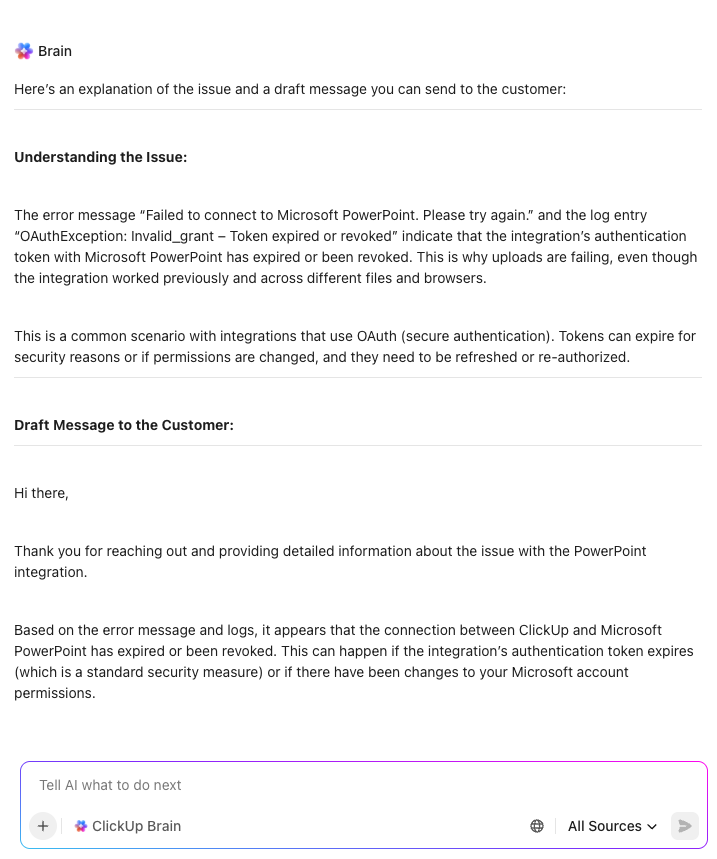
Unlike Eesel AI, it can see current tickets, linked Docs, previous customer interactions, and related tasks already in your platform. This way, it synthesizes suggestions using your workspace’s context. To use this AI tool for knowledge management, simply ask it questions in natural language.
📌 Example prompts:
ClickUp Brain is equally useful when you’re creating or maintaining your knowledge base. For instance, you can draft new knowledge base articles, macros, SOPs, or postmortems from raw ticket history, comments, or meeting notes.
ClickUp Super Agents are AI-powered teammates that can perform multi-step workflows, answer questions, take actions, and much more.
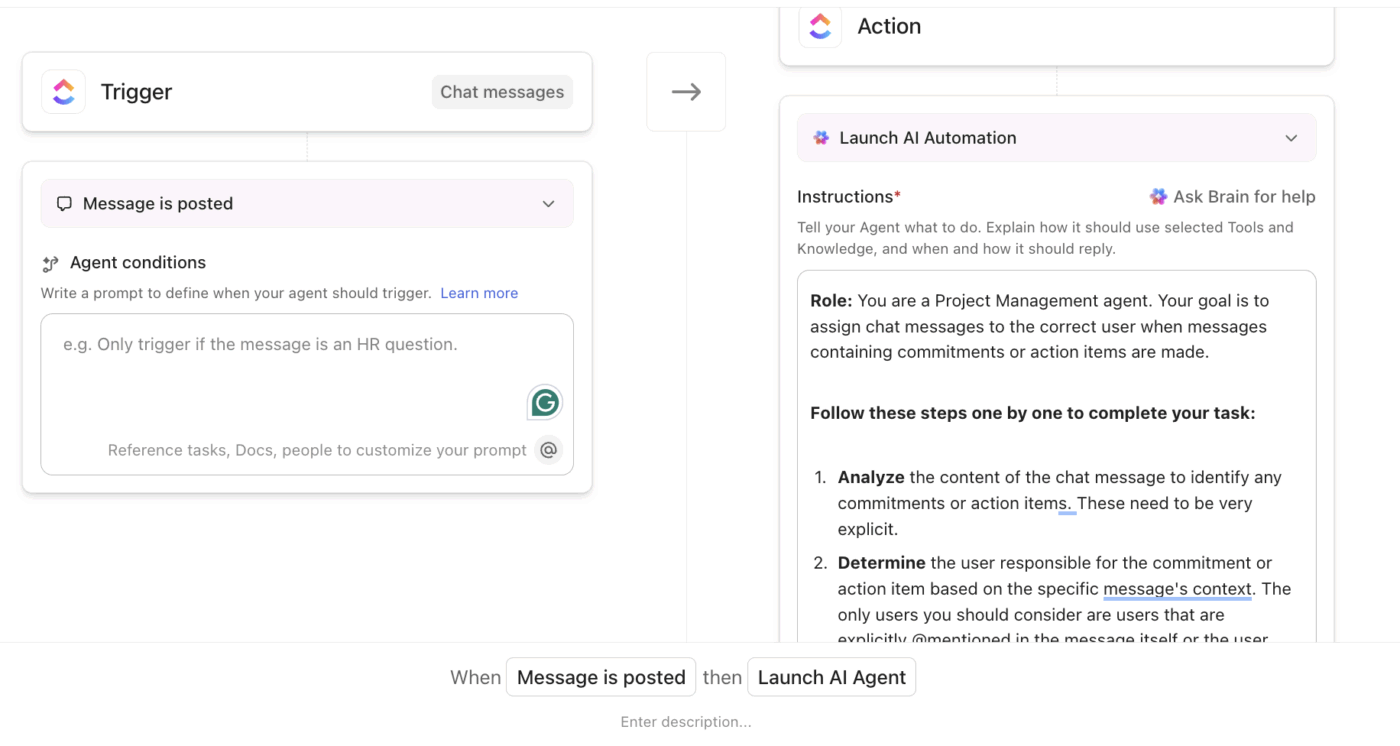
For example, when an IT request is submitted via ClickUp Forms or a connected help desk, the ClickUp IT Ticket Management AI Agent analyzes the issue, assesses urgency, and routes it to the appropriate IT queue or owner. It also surfaces related incidents, bugs, or past tickets, so technicians start with full context.
ClickUp BrainGPT connects you to external tools like Google Docs, OneDrive, SharePoint, GitHub, and even the web. This makes it a unified AI search platform that can look for past support tickets and Docs in ClickUp as well as product specs, contracts, and external KBs in other systems.
For example, when working on a ticket, BrainGPT can pull in API docs from Drive, architecture notes from GitHub, and policy Docs from SharePoint while still anchored to the ClickUp Task.

Unlike Eesel AI, BrainGPT doesn’t rely on a single large language model. Instead, it uses a multi‑model setup and lets you select the most appropriate engine for the task at hand.
Additionally, Talk to Text in ClickUp lets you give voice prompts like, ‘Summarize the last five P1 incidents and create follow-up tasks for each team.’ It’ll instantly transcribe the request and give you the summaries using information from Tasks, Docs, projects, and connected tools.
One review that sums it up:
I absolutely love using ClickUp! Managing tickets, documents, and all associated information has never been this easy and seamless. Everything I need is in one place, structured in a way that just makes sense.
One of the biggest wins for us: every new employee who joins from other platforms—especially Jira—immediately notices how intuitive ClickUp is. The learning curve is almost nonexistent. They quickly realize how much easier, faster, and simply better it is to work with ClickUp compared to the old tools.
ClickUp has truly transformed the way we organize and manage work. It feels lighter, smarter, and more user-friendly, yet still powerful enough to handle complex workflows.
📮 ClickUp Insight: 20% of our survey respondents confess they’ve kept up to 15 tabs open for weeks! Yes, weeks!
These “zombie tabs” 🧟 eat memory and mental space, quietly draining focus even when ignored. It’s classic attention residue where unfinished items pull energy in the background.
With ClickUp’s AI-powered Enterprise Search, you can safely let go of those browser graveyards. Anything important is instantly searchable across your workspace and integrated third-party tools.
You can even ask ClickUp’s AI what was discussed in last Friday’s meeting, and it will fetch the notes for you!
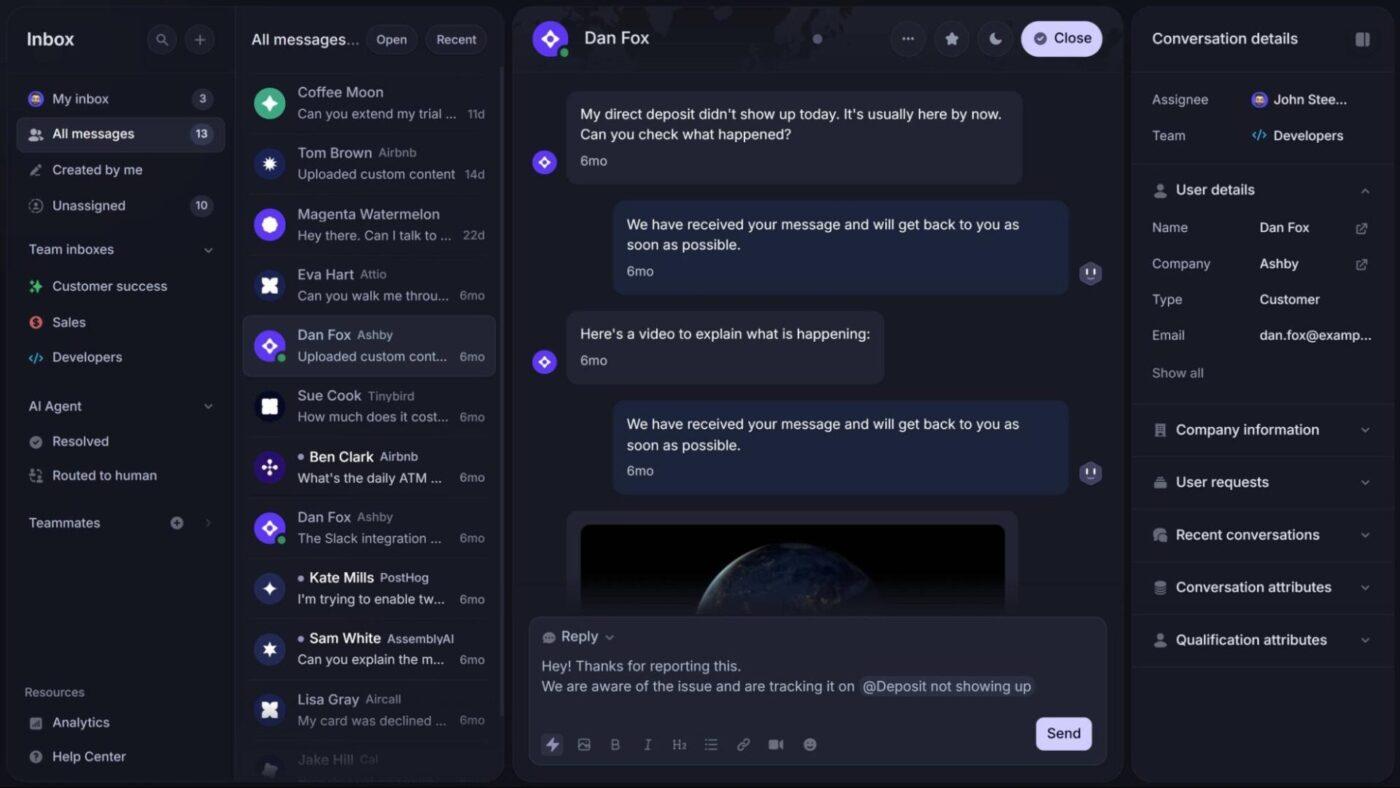
Featurebase positions itself as a layer between customer conversations, product feedback, and internal sales teams.
Support conversations from in-app chat, email, and community channels flow into one inbox. And feedback submitted through portals, widgets, or custom integrations becomes structured input tied to real users and accounts.
Teams can deliver instant self-serve answers through AI search directly inside the help center, pulling accurate responses from documentation without extra clicks.
Product updates can be published and segmented using branded changelogs and in-app widgets so your users see the changes at the right time. And when things need a human touch, no-code automation handles SLAs, routing, follow-ups, and internal handoffs.
Here’s what a customer had to say:
We enjoy using Featurebase because it makes posting change logs for our users simple and straightforward. […] We also make use of the feature request option, which allows other users to view and upvote suggestions, helping us gain traction more quickly. […] However, we’re not particularly satisfied with the available viewer options when it automatically sends a changelog update to Slack. Because of this, we use the auto-send feature mainly for internal team updates.
🚀 ClickUp Advantage: When tickets come in faster than teams can process them, manual workflows become a bottleneck. ClickUp Automations replace manual coordination with automated rules that route tickets and maintain the knowledge base.
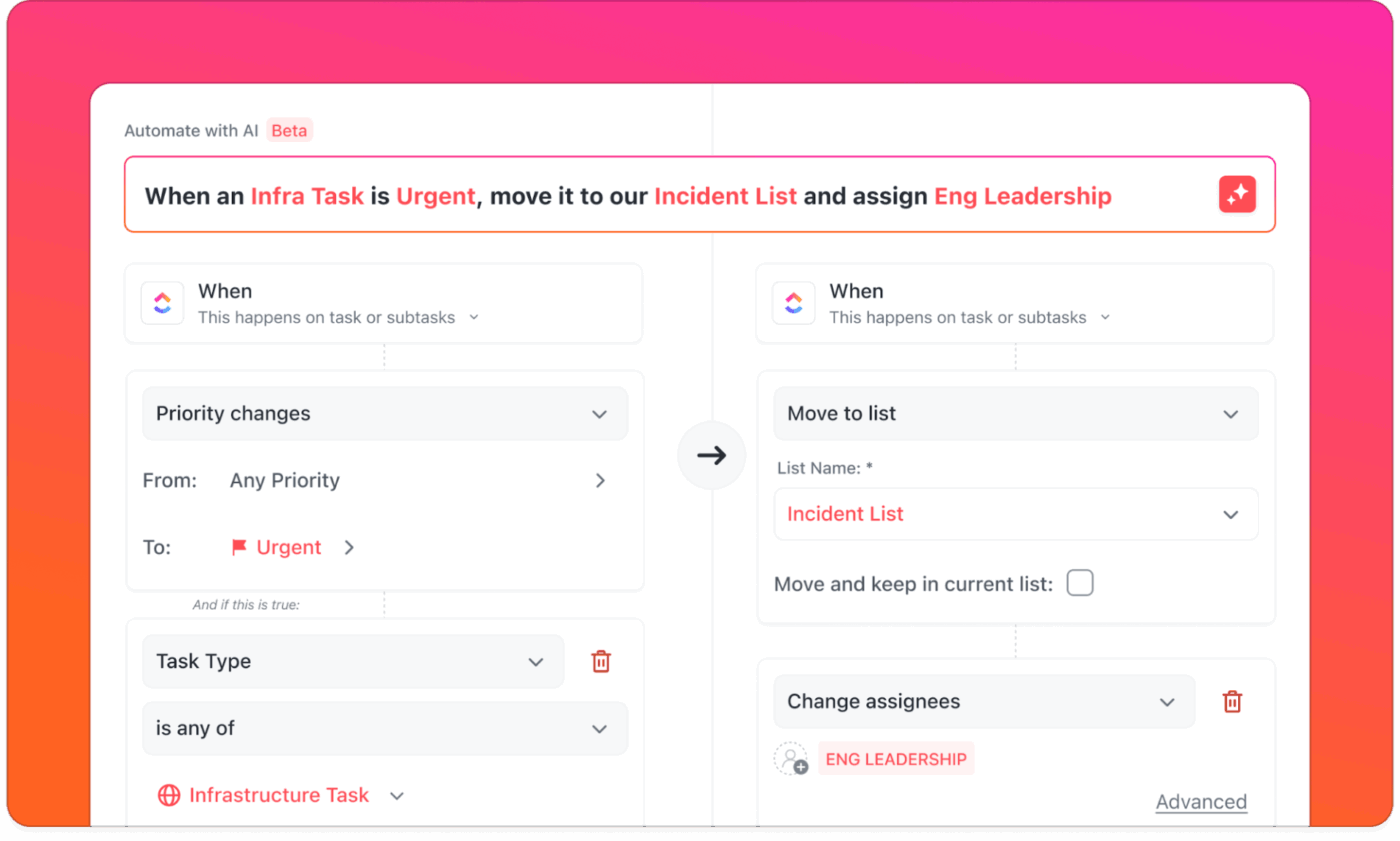
📌 Example automation: When a new ticket is created with Priority = Urgent, assign it to the Support Lead, set the due date to tomorrow, and post an internal comment.
To take your knowledge management even further, ClickUp AI Fields sit on top of those workflows to standardize and enrich ticket data automatically.

AI Fields can:
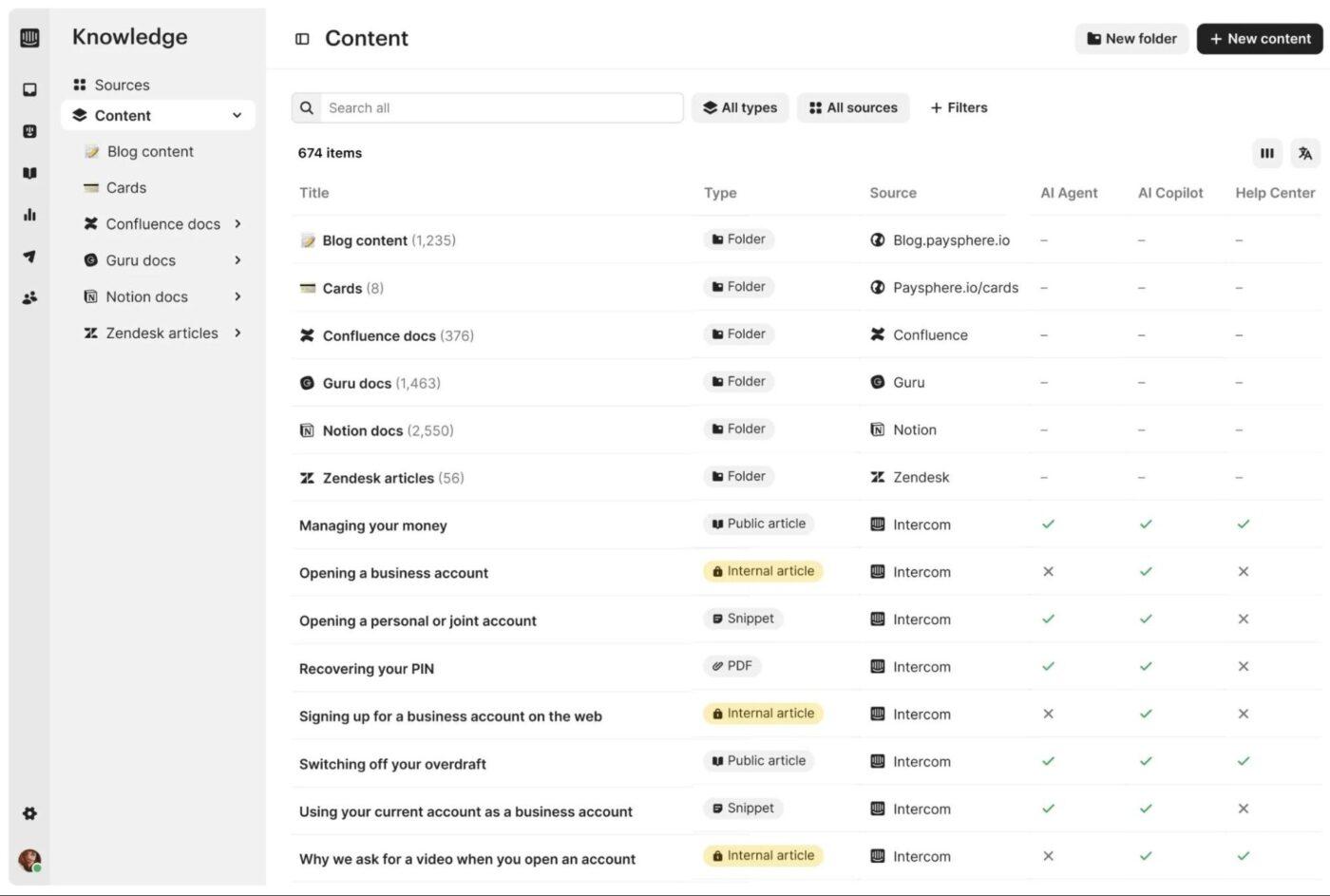
Intercom is an AI-powered customer communication and support platform built to handle real-time, high-volume customer interactions. It works throughout the lifecycle, from onboarding and education to issue resolution and retention.
Teams can deploy Intercom either as a full customer service suite (with its own next-gen helpdesk) or plug its flagship AI agent, Fin, into an existing helpdesk like Zendesk or Salesforce.
The platform’s strength lies in how it treats AI as a first responder. Fin is trained on your procedures, policies, and knowledge sources and tested in simulated conversations before launch. Then it’s deployed consistently across chat, email, voice, and social channels.
When AI can’t resolve an issue end-to-end, it hands it off to human agents, supported by Copilot.
Straight from a G2 review:
Fin has been a great addition to our support workflow. It provides fast, accurate answers and helps reduce response times significantly. Our clients appreciate the immediate assistance, and our team can focus on more complex cases. […] Sometimes the answers feel too generic or lack the right context for specific client questions. Better control over tone and more training options to align it with our brand voice would make a big difference.
📖 Also Read: Best Intercom Alternatives for AI Customer Service
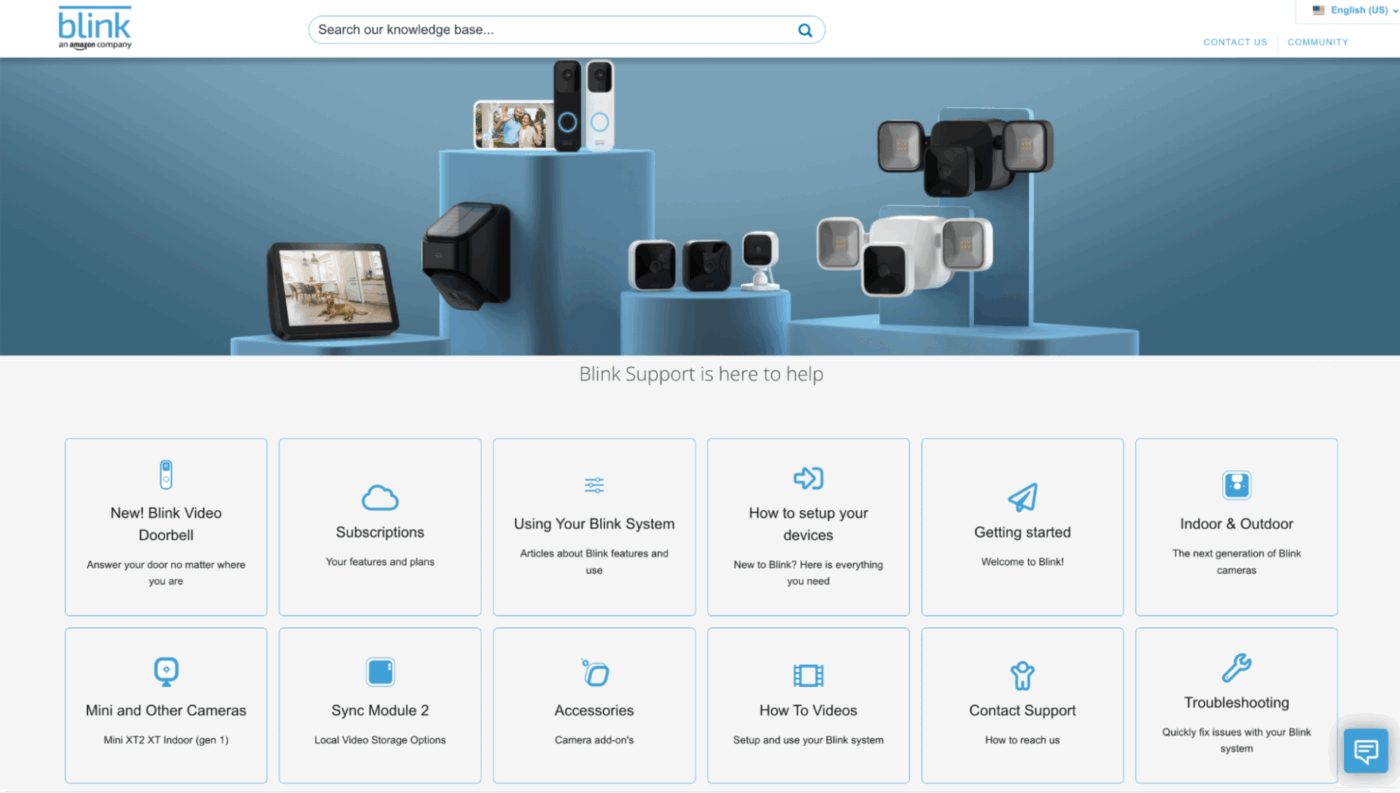
Helpjuice is a dedicated knowledge base platform designed for teams that want answers to surface instantly. Unlike other AI tools for knowledge workers, it focuses on turning documentation into a high-performance retrieval system.
Teams publish customer-facing help centers or internal wikis, then rely on AI-powered search and chat to translate vague, poorly worded questions into precise answers in under a second.
Product and enablement teams use the same system to onboard new hires faster, document processes once, and keep updates synced across languages and versions.
It also fits well into existing ecosystems, surfacing answers inside Slack, Teams, browsers, or embedded widgets, making it better than other Helpjuice alternatives.
A verified user puts it best:
The livechat staff are very helpfull and quick to respond. The integration and customisation is very easy. This is coming from someone who has a VERY basic understanding of coding. There is also a free AI chatbot which can save a lot of time if you have a tech/customer support team… New features are often released before they’re fully cooked. We often wait for a release, give it a couple months for the kinks to be ironed out, then implement. If you find a bug or ask about a upcoming release, there is never an SLA or ETA given. We’ve sometimes just had to find a workaround and live with it.
🔍 Did You Know? Beyond tech, consumer psychology influences how users perceive automated systems. Studies show that when AI feels more socially present, when customers feel understood rather than “talking to a machine,” they are more likely to view the experience positively and adopt automated assistants.
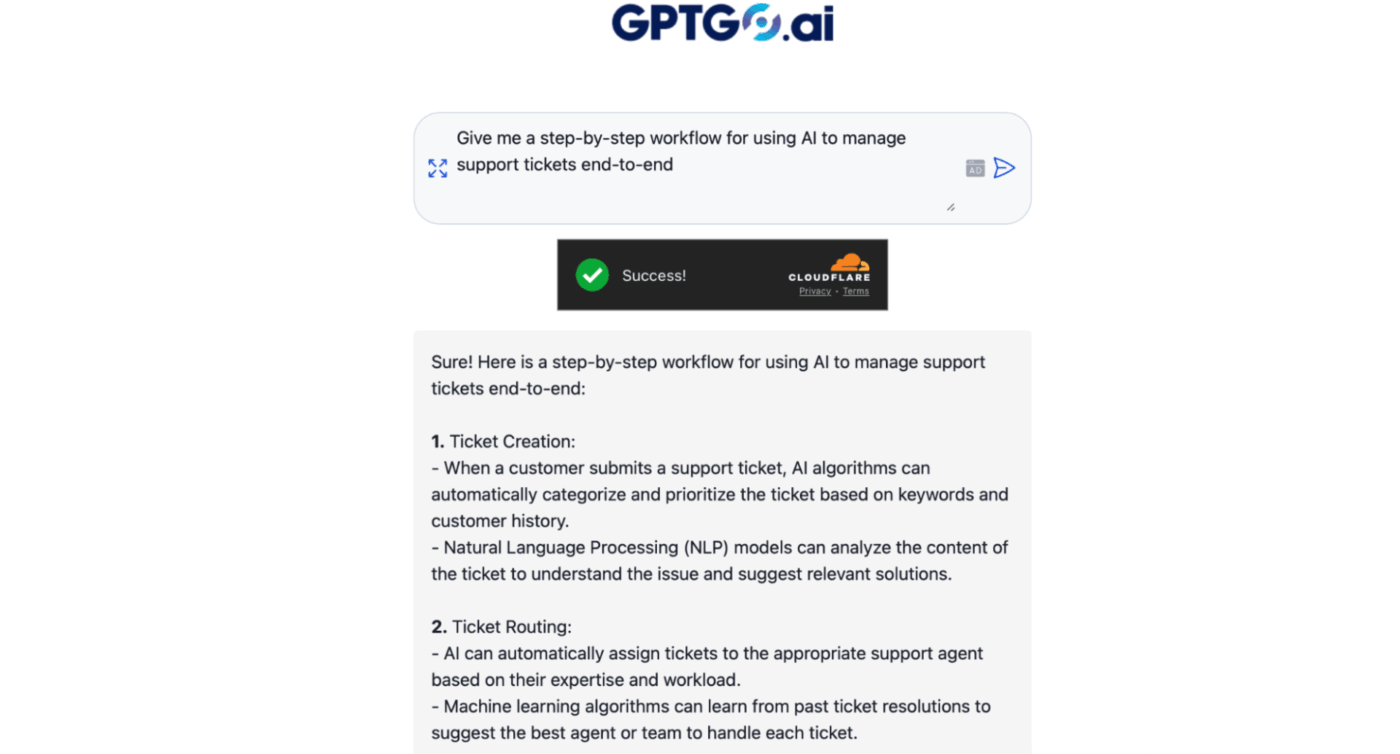
Unlike a traditional knowledge base or AI agent platform, GPTGO (formerly known as GooGPT) is a hybrid AI search layer that blends Google-style web results with ChatGPT-style answers. There’s no setup or ingestion of internal docs, making it fundamentally different from tools like Eesel AI, which rely on curated knowledge sources.
GPTGO can be used as a research companion and to quickly understand unfamiliar issues, draft responses, or sanity-check answers before publishing them into a real knowledge base.
Plus, it doesn’t require an account and emphasizes anonymity. That means you can use it in early investigation phases, like when teams want fast context without logging into internal tools or exposing proprietary data.
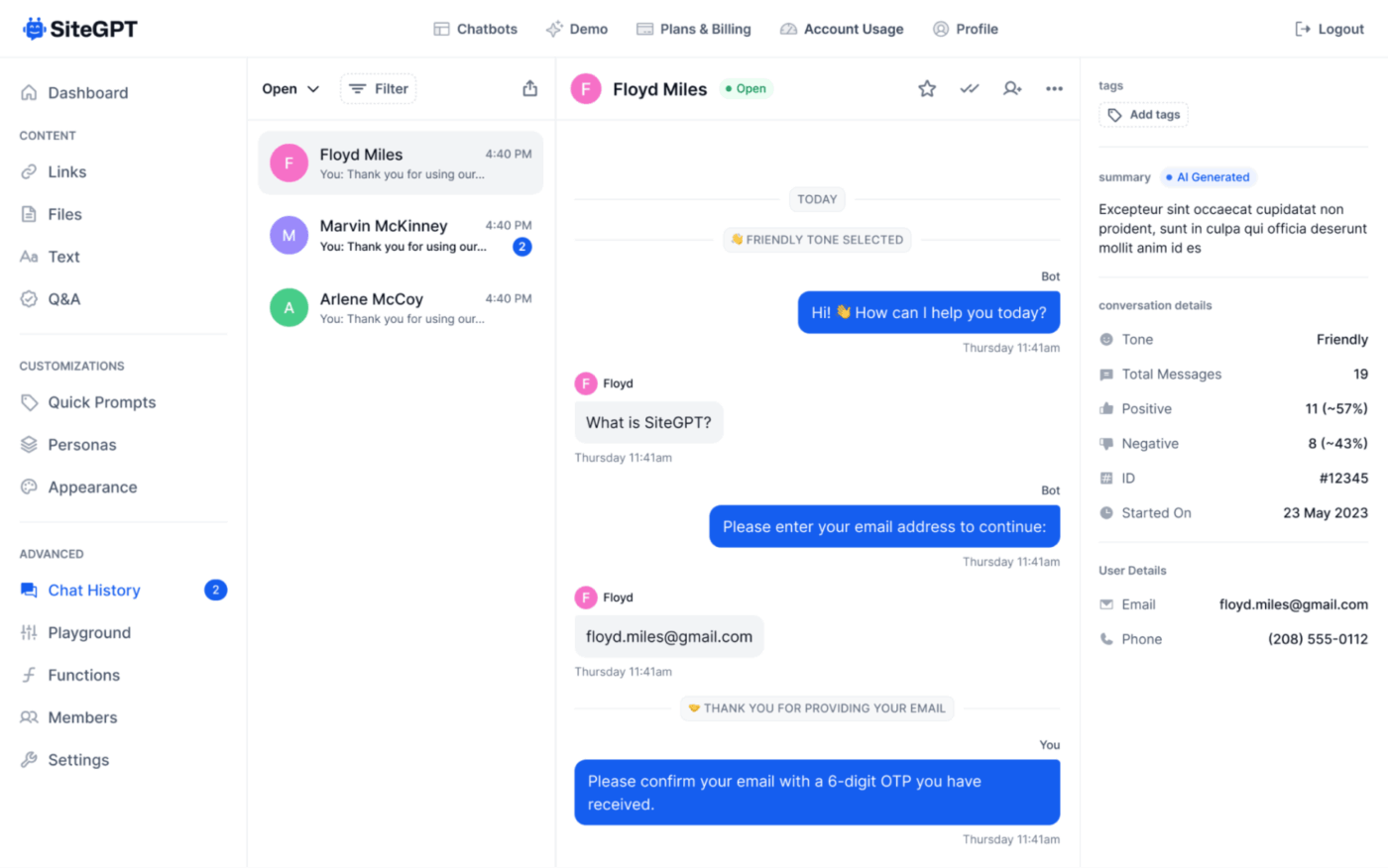
SiteGPT approaches AI support from the outside-in. Instead of asking teams to curate a separate knowledge base or migrate content into a new system, it starts with what already exists. This includes your website, help center, PDFs, and public-facing docs, and then turns that into a live, conversational interface.
You drop in a URL or upload files, and SiteGPT scans, interprets, and operationalizes that content into a chatbot that behaves like a product expert.
It fits best in high-traffic environments where questions repeat, context is public, and speed matters more than deep workflow integration. For instance, support leaders can use it to deflect repetitive ‘how does this work?’ questions before tickets ever hit the queue.
What customers are actually saying:
It offers an actual practical way to interact with it for users of all levels. Whether you are a mother at home looking for cooking recipes or a high level executive looking for new business ventures. They have definitely starting the A. I. Revolution, but they have not kept up-to-date with all the modern trends. And there are definitely better features to be found elsewhere, but GP. T still does everything even if they don’t do everything right
🧠 Fun Fact: In the early 2000s, the SmarterChild bot on AOL Instant Messenger and MSN Messenger engaged millions of users with conversational responses and playful personality traits.
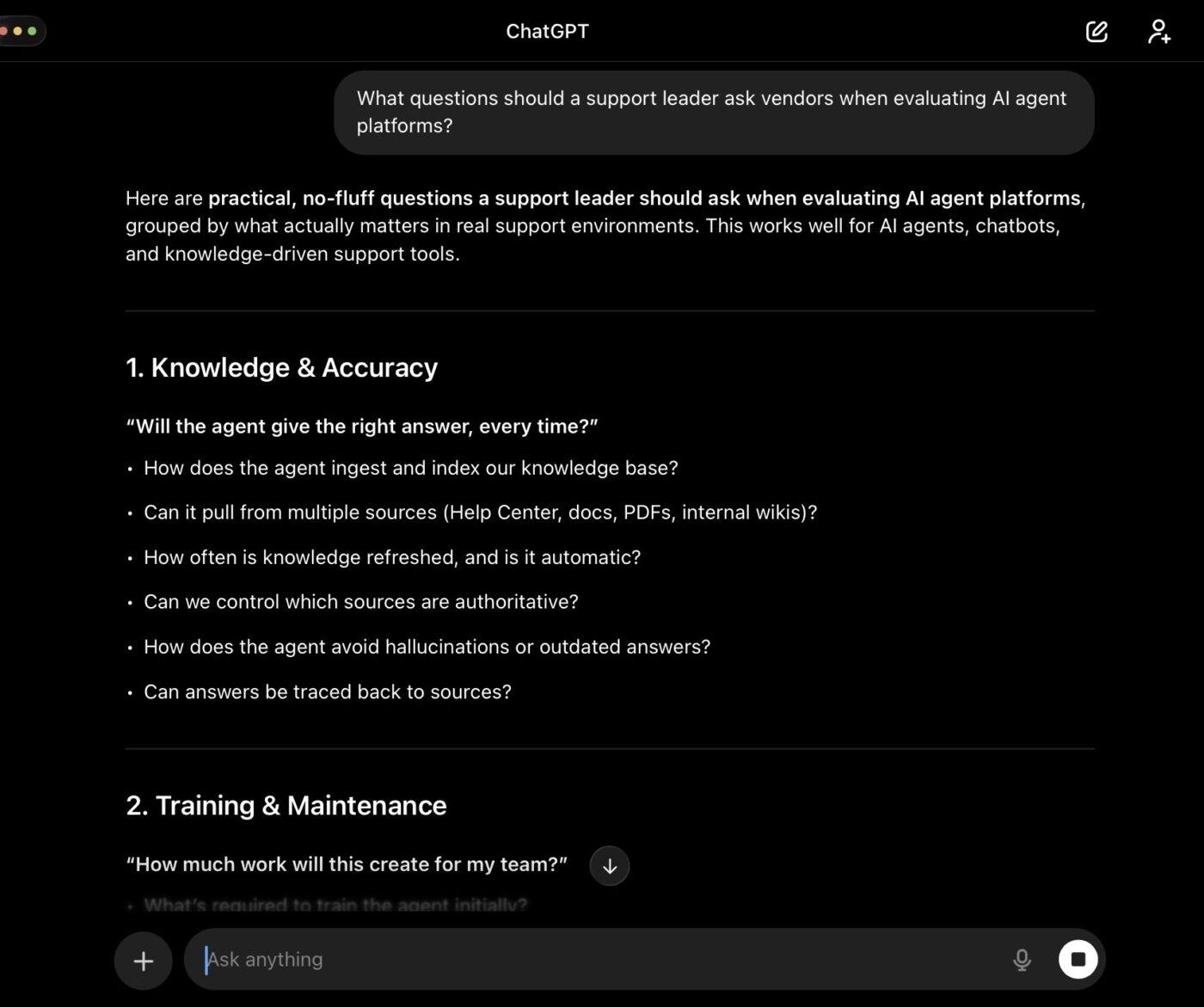
Unlike Eesel AI, which is designed around training agents on internal docs and tickets, ChatGPT starts as a blank but highly capable model that can be shaped through prompts, uploaded files, Projects, or Custom GPTs.
Use it to reason through edge-case tickets, draft nuanced replies, or summarize long customer threads. You can even interrogate large documents, synthesize scattered information, or pressure-test documentation clarity before publishing.
Custom GPTs allow teams to approximate an ‘internal AI assistant’ by uploading docs and defining behavior, without committing to a full customer-facing deployment.
While ChatGPT doesn’t natively sit inside your helpdesk or auto-deflect tickets the way Eesel does, it excels as a thinking partner and external intelligence hub.
A firsthand review worth reading:
What I appreciate most about ChatGPT is how well it understands context and delivers immediate solutions. It assists me in drafting professional emails, refining my grammar, and quickly coming up with content ideas. […] Sometimes, the information provided can be factually incorrect or outdated, so I always have to cross-check important data. Also, the free version often becomes slow or unavailable during peak hours, which can be frustrating when working on urgent tasks. It would be great if it had more real-time data access.
📖 Also Read: ChatGPT Alternatives and Competitors
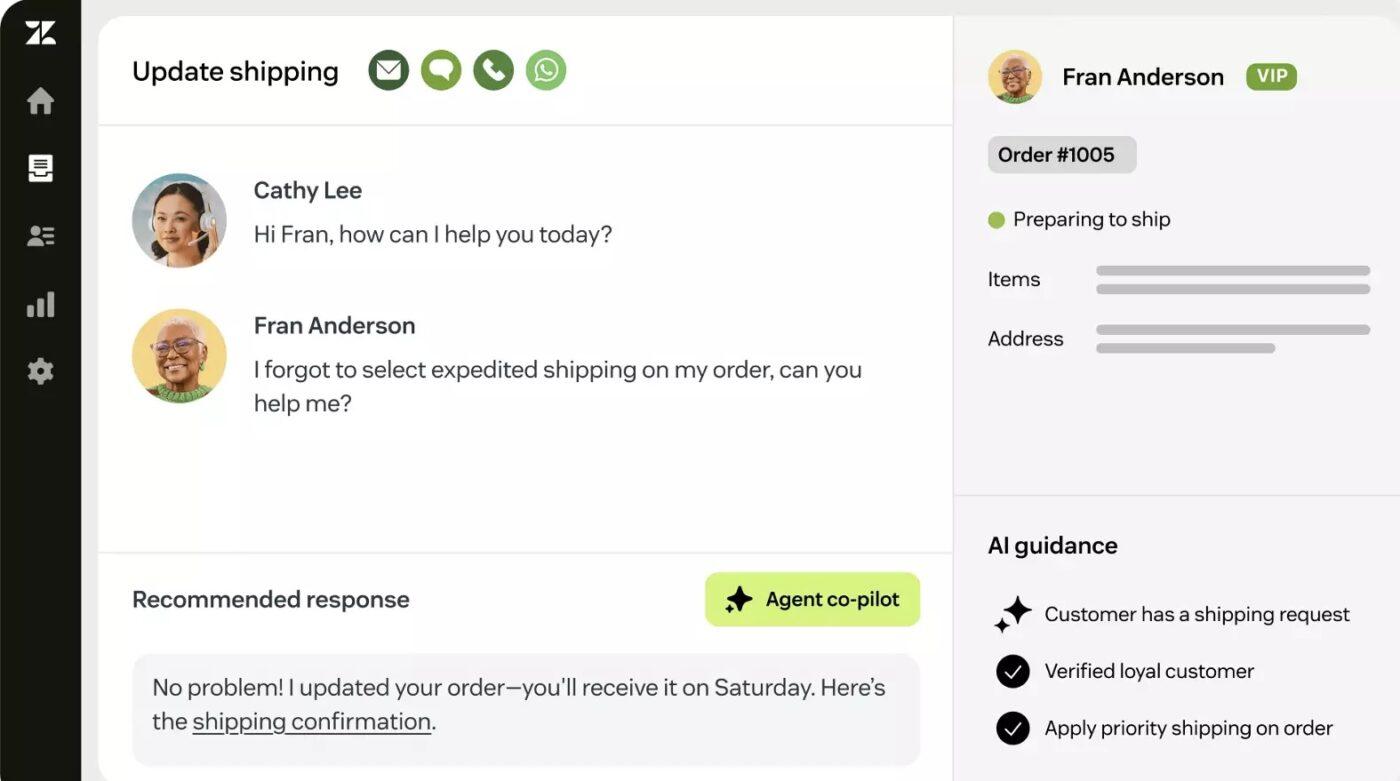
As one of the top knowledge base chatbots, Zendesk helps teams use AI to resolve issues within the helpdesk. Its AI agents draw from help centers, Confluence, and historical tickets to handle real requests end-to-end.
Rather than starting with documents and building agents around them, Zendesk begins with live customer interactions and layers intelligence directly into tickets, conversations, and channels.
It centralizes conversations using Omnichannel Ticketing that unifies email, chat, voice, social, and messaging. Then every message on these channels becomes a structured unit of work with a full history attached.
This review really says it all:
1. Well and easily integrated platform with all the necessary extensions required in ticket handling. 2. Secured and reliable platform. The dashboard is extremely easy to navigate and see the options directly. 3. We can see the history of the ticket and can create and search for relevant KBs directly in the ticket panel only. Calculating the workforce, and doing chats and calls is just perfect and won’t require any guidance to start and work […] Interface is very slow if the laptop gets disconnected from the company VPN and directly connects to the internet.
🔍 Did You Know? When users engage with well‑designed conversational systems, they experience less cognitive load compared to navigating complex menus or searching dense documents. Studies show that reduced mental effort leads to better performance and lower frustration.

Tidio takes a simpler, more front-line approach to AI support compared to other tools.
Its strength lies in combining live chat, a basic help desk, and an AI agent (Lyro) into one easy-to-run platform. This alternative works best when your goal is automating repetitive customer questions and capturing leads.
Lyro AI is trained only on verified content you provide, which keeps answers controlled and on-brand. However, this also means it’s less flexible than tools designed to reason across multiple internal systems.
For e-commerce brands and SMBs, this tradeoff is often worth it. Tidio prioritizes speed, cost efficiency, and ease of use over complex knowledge orchestration.
Pulled from customer feedback:
What I value most is how intuitive the platform is and how quickly it can be set up on a website without the need for advanced technical knowledge […] Although it works well, I have noticed that some automations could be more flexible and customizable. At certain times, the learning curve of chat flows becomes a bit confusing and requires trial and error. I also miss more advanced reporting and analytics options, as the current ones are useful but somewhat limited if a more detailed tracking is desired.
🧠 Fun Fact: In the 1980s, Interactive Voice Response (IVR) systems emerged, letting callers interact with pre‑recorded or synthesized menus without human operators.
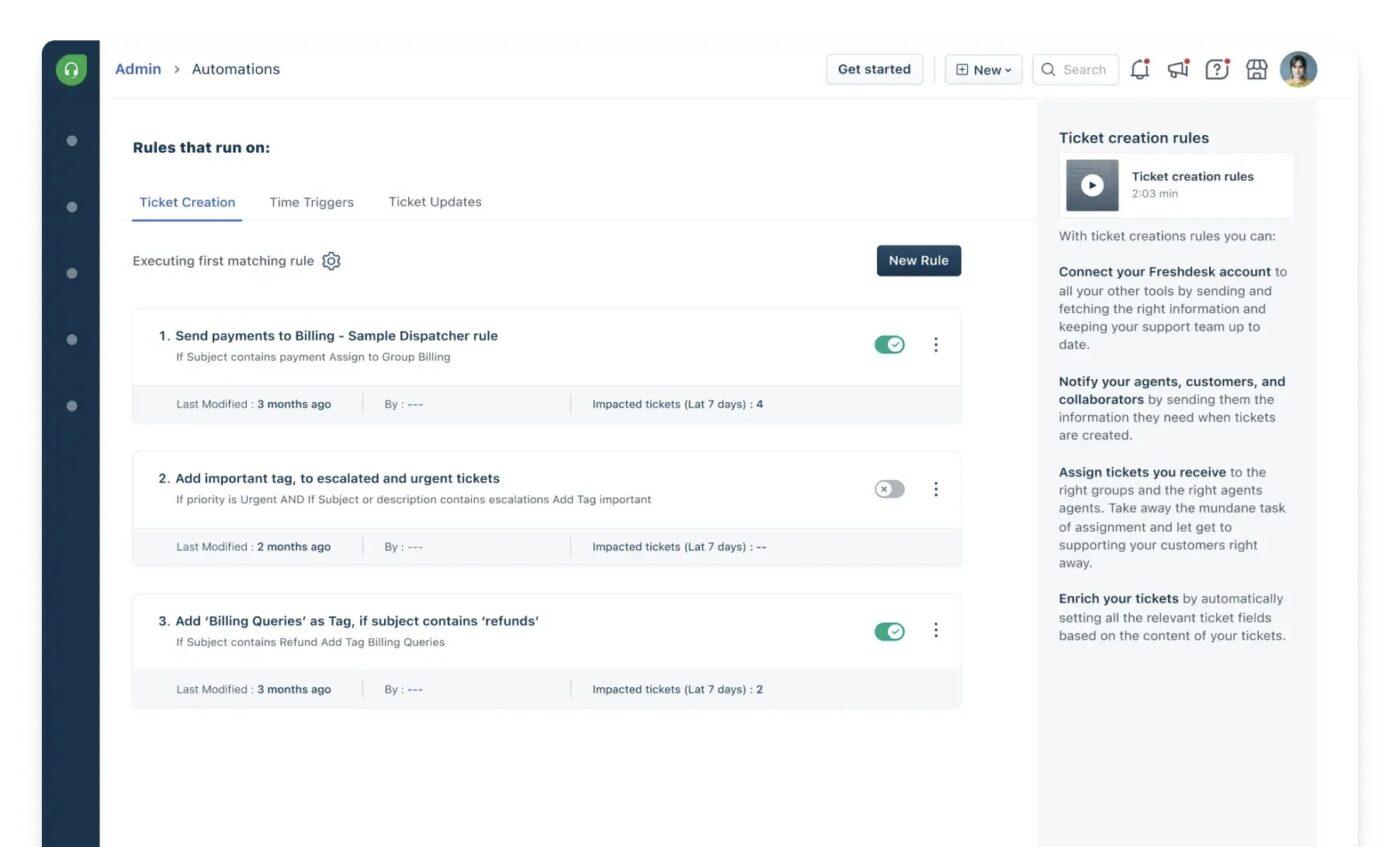
Freshdesk is a cloud-based, AI-powered customer service software from Freshworks that helps businesses manage customer interactions across multiple channels (email, chat, social media, phone).
It uses a helpdesk and ticketing system to streamline support, increase agent productivity, and improve customer satisfaction. Every interaction becomes a ticket with history, ownership, and accountability. Freddy AI works in the background to automate routing, suggest responses, and even resolve routine issues.
A customer insight worth noting:
I find Freshdesk incredibly helpful, especially for aligning tickets to the respective agents. It’s a very good tool with a lot of automation in ticket handling, which boosts productivity. […] I’ve reached out to customer support many times, and it’s a bit tedious to get things resolved. Sometimes the automation doesn’t work as expected, with tickets being assigned to the wrong agent.
🔍 Did You Know? Philosopher Michael Polanyi pointed out a paradox: we often know more than we can explicitly explain. This “tacit knowledge” has been a psychological and technical challenge for automation, because early systems struggled to replicate human intuition and judgment. However, modern AI’s learning models have emerged to eliminate this.
Most Eesel alternatives shine as standalone tools, or as add-ons you stack alongside other software to build a complete workflow. They’re great at covering specific slices of the problem space, whether it’s knowledge search, chat-based answers, or support automation.
But stitching multiple tools together still means juggling context, permissions, and switching between apps to get work done.
That’s where ClickUp stands apart. It gives you the full knowledge management and support ecosystem in one place.
ClickUp Docs, Tasks, and Chat all work together, avoiding fragmentation and tool sprawl. While ClickUp Brain offers AI support across tasks and knowledge, ClickUp Automations help teams cut the repetitive busywork that slows projects down. Sign up to ClickUp today for free! ✅

© 2026 ClickUp

There’s an easier way. Try a free AI Agent in ClickUp that actually does the work for you—set up in minutes, save hours every week.