







Still downloading templates?
There’s an easier way. Try a free AI Agent in ClickUp that actually does the work for you—set up in minutes, save hours every week.
Sorry, there were no results found for “”
Sorry, there were no results found for “”
Sorry, there were no results found for “”
Most therapists spend more time documenting sessions than they’d like.
Nuance Communications found that clinicians averaged about 13.5 hours per week generating documentation.
This happens when your tracking system fights you instead of helping you. But it doesn’t always have to be the case.
A client therapy session tracker template gives you a pre-built structure to log session details, track progress, and manage follow-ups. With these templates in place, you needn’t reinvent your workflow every time. And you can use them irrespective of whether you’re a solo practitioner or part of a group practice.
A client therapy session tracker template is a structured document or digital tool that helps therapists log session dates, client concerns, interventions used, and progress observations.
It ensures every important detail is captured consistently, session after session. With most such templates, you get fields for recording
These templates are used by licensed therapists, counselors, social workers, and psychologists to maintain clear and organized documentation.
🤝 Friendly Reminder: A simple session log might just track dates and basic notes, but a comprehensive tracker helps you monitor progress toward treatment goals and measure client outcomes over time. You can also choose from specific documentation formats, such as SOAP (Subjective, Objective, Assessment, Plan), DAP (Data, Assessment, Plan), or BIRP (Behavior, Intervention, Response, Plan), making them adaptable to your practice’s requirements.
| Template name | Download link | Ideal for | Best features | Format/platform |
|---|---|---|---|---|
| Patient Management Template by ClickUp | Get free template | Therapists managing full caseloads | Centralizing client records, session history, and follow-ups | Digital (ClickUp) |
| Patient List Template by ClickUp | Get free template | Solo practitioners | Maintaining a simple, organized client roster | Digital (ClickUp) |
| Case Report Template by ClickUp | Get free template | Therapists writing formal reports | Creating structured case summaries for referrals or legal needs | Digital (ClickUp Docs) |
| Client Success Template by ClickUp | Get free template | Goal-oriented therapy practices | Tracking progress toward treatment goals over time | Digital (ClickUp) |
| Legal Client Management Template by ClickUp | Get free template | Forensic or court-mandated cases | Managing high-compliance documentation and deadlines | Digital (ClickUp) |
| Self-Care Plan Template by ClickUp | Get free template | Between-session engagement | Assigning and tracking client homework and routines | Digital (ClickUp, client-shareable) |
| Manager Log Template by ClickUp | Get free template | Clinical supervisors | Oversight of therapists, supervision notes, and licensure | Digital (ClickUp) |
| Therapy Session Schedule Template by Template.net | Download this template | Appointment planning | Organizing weekly therapy schedules | Downloadable document |
| Printable SOAP Note Template by Goodocs | Download this template | SOAP-based documentation | Writing structured SOAP progress notes | Google Docs / Word |
| Time Tracking Template by Vertex42 | Download this template | Billing-focused practices | Tracking billable and non-billable time | Spreadsheet |
Choosing the wrong template can create more work, not less. So, it’s important to look for a tool that fits your existing clinical workflow instead of forcing you into a new one. Before you commit, make sure the template meets these key criteria.
In this round-up, we’ve got the perfect templates that address these needs in different ways.
Let’s show you some templates designed to help therapists organize session documentation, track client progress, and reduce administrative tasks. The first seven templates are built in ClickUp. It’s the world’s first Converged AI Workspace where you can capture notes, manage follow-ups, and keep client information in one place. The remaining templates are external options you can explore based on your practice needs.
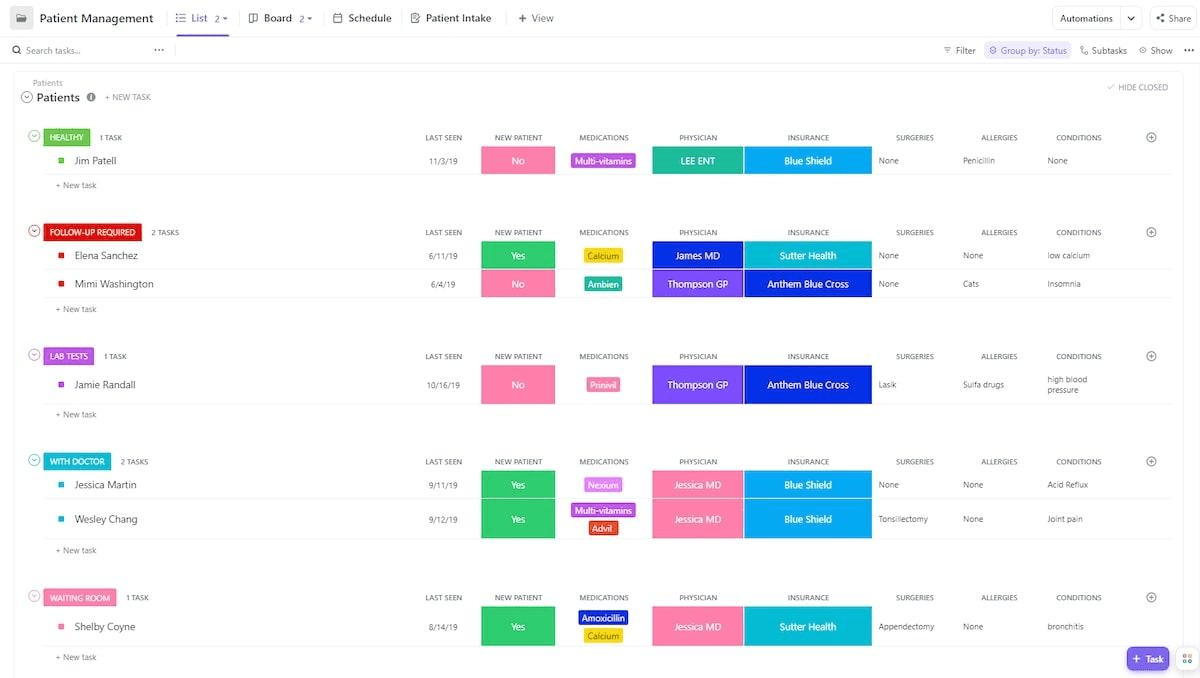
Does managing a full caseload feel like juggling too many things at once? With client information scattered across calendars, note-taking apps, and separate files, you end up wasting time searching for info.
What’s more? Amid all the scramble, the important details may fall through the cracks. This comprehensive Patient Management Template by ClickUp™ solves that by creating a centralized hub for all patient information, appointments, and session history in one workspace.
It’s ideal for therapists who need quick access to a client’s entire journey without switching between dozens of tools.
🌟 Why you’ll like this template:
Stuck choosing between a simple spreadsheet and a full-blown client management system?
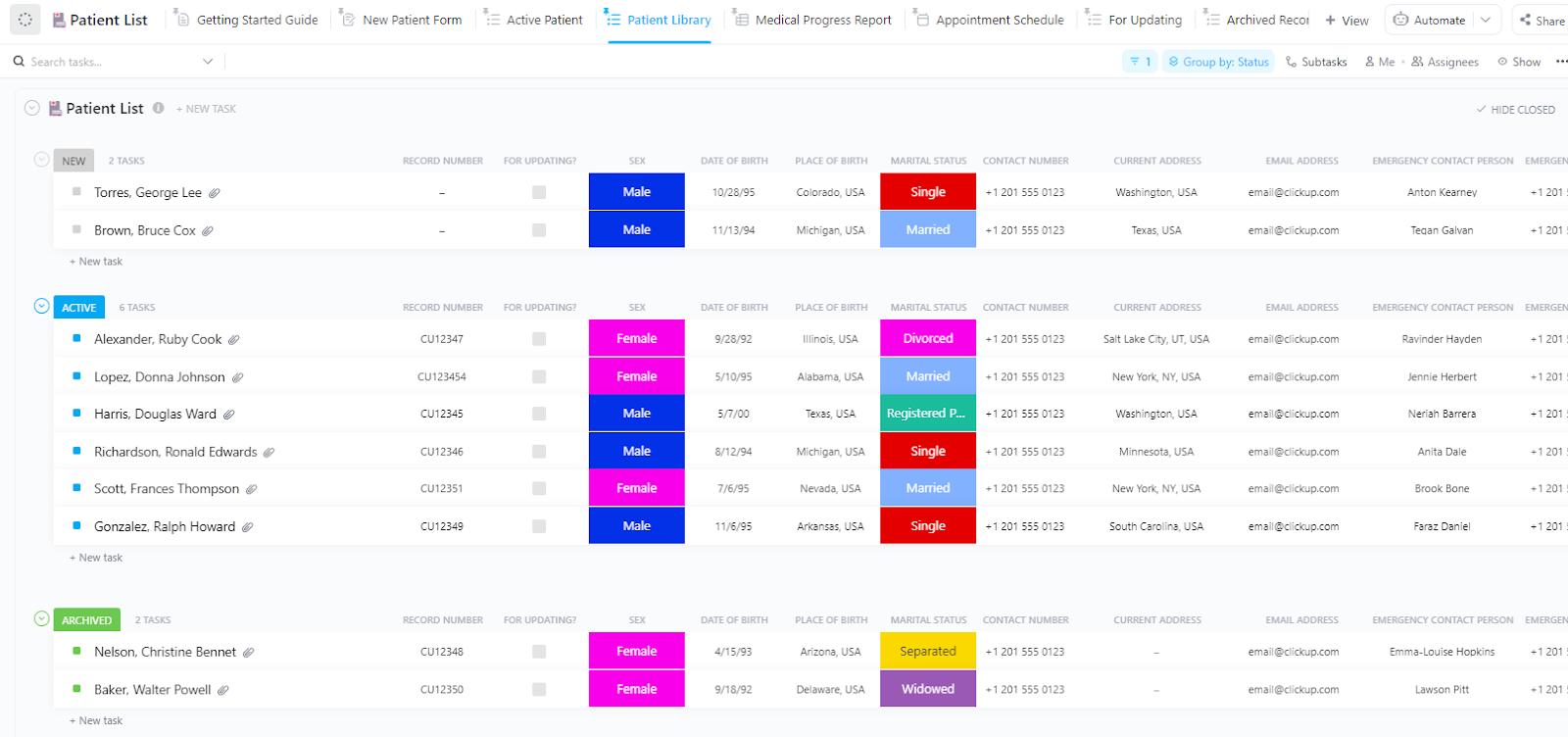
The choice can be extremely frustrating, especially as a solo practitioner. A simple spreadsheet may feel too clunky and disconnected. While a complex system can be overkill, with features you might never use. The Patient List Template by ClickUp™ offers a solid middle ground.
Use it to build a simple, organized client roster with essential details available at a glance. It’s a perfect starting point that can grow with your practice. You can add more detailed tracking later without having to rebuild your system from scratch.
🌟 Why you’ll like this template:
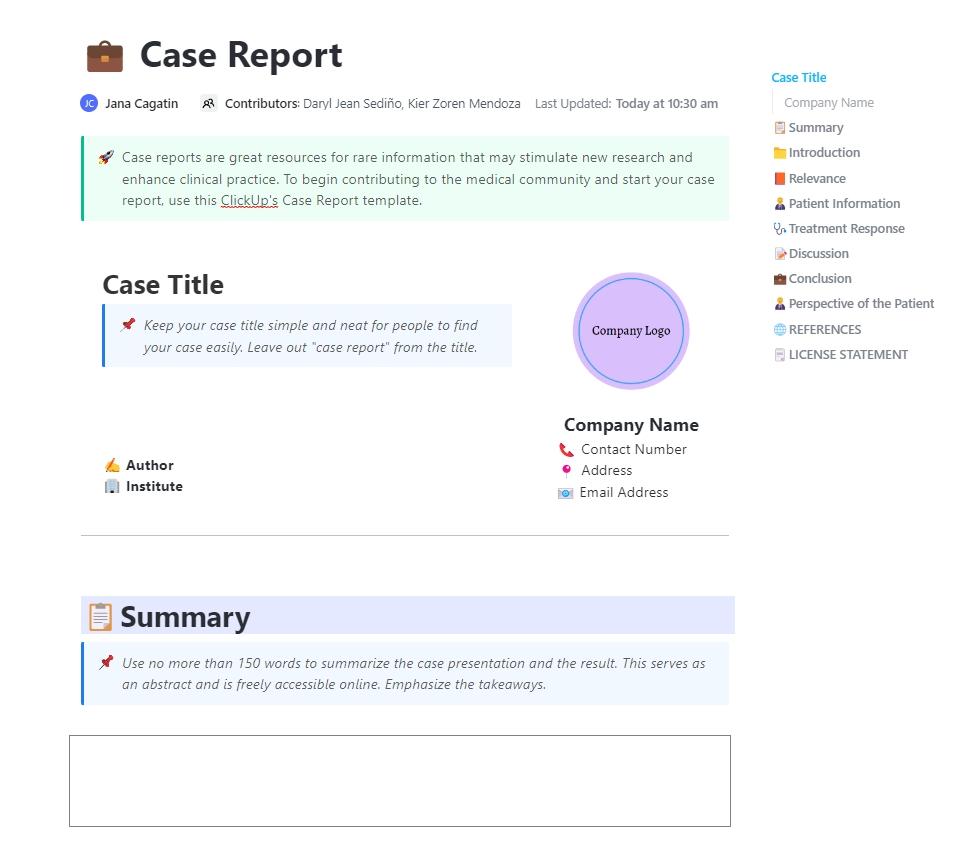
Compiling case reports for referring physicians, schools, or legal entities often involves a tedious process of copying and pasting from scattered session notes. This manual work is not only time-consuming but also prone to errors, risking incomplete or inaccurate documentation. This Case Report Template by ClickUp™ streamlines the entire process by integrating your notes and reports into a single, cohesive system.
It’s designed for clinicians who need to produce structured, professional documentation for external parties.
🌟 Why you’ll like this template:
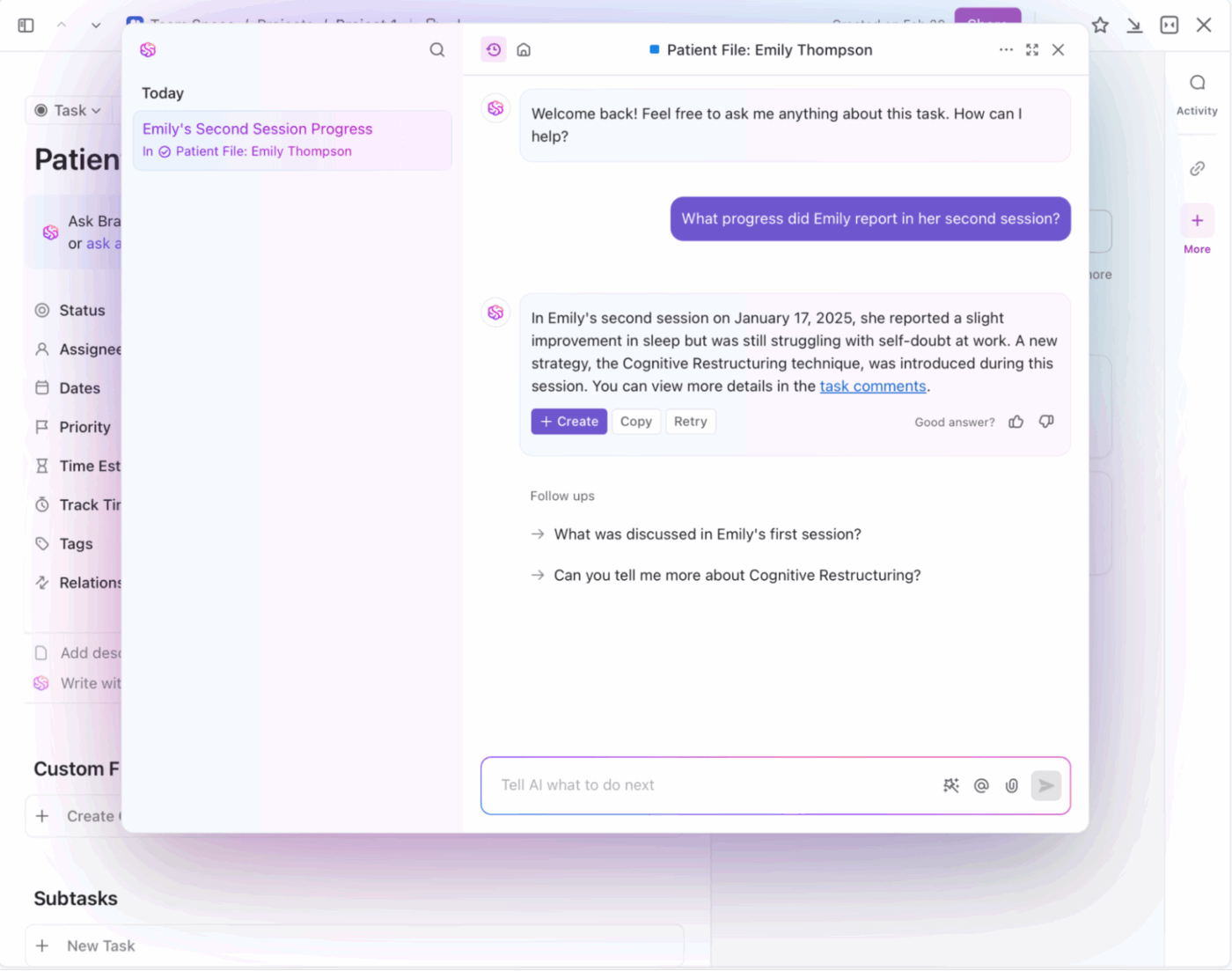
📮 ClickUp Insight: The average professional spends 30+ minutes a day searching for work-related information—that’s over 120 hours a year lost to digging through emails, Slack threads, and scattered files. An intelligent AI assistant embedded in your workspace can change that. Enter ClickUp Brain. It delivers instant insights and answers by surfacing the right documents, conversations, and task details in seconds—so you can stop searching and start working.
💫 Real Results: Teams like QubicaAMF reclaimed 5+ hours weekly using ClickUp—that’s over 250 hours annually per person—by eliminating outdated knowledge management processes. Imagine what your team could create with an extra week of productivity every quarter!
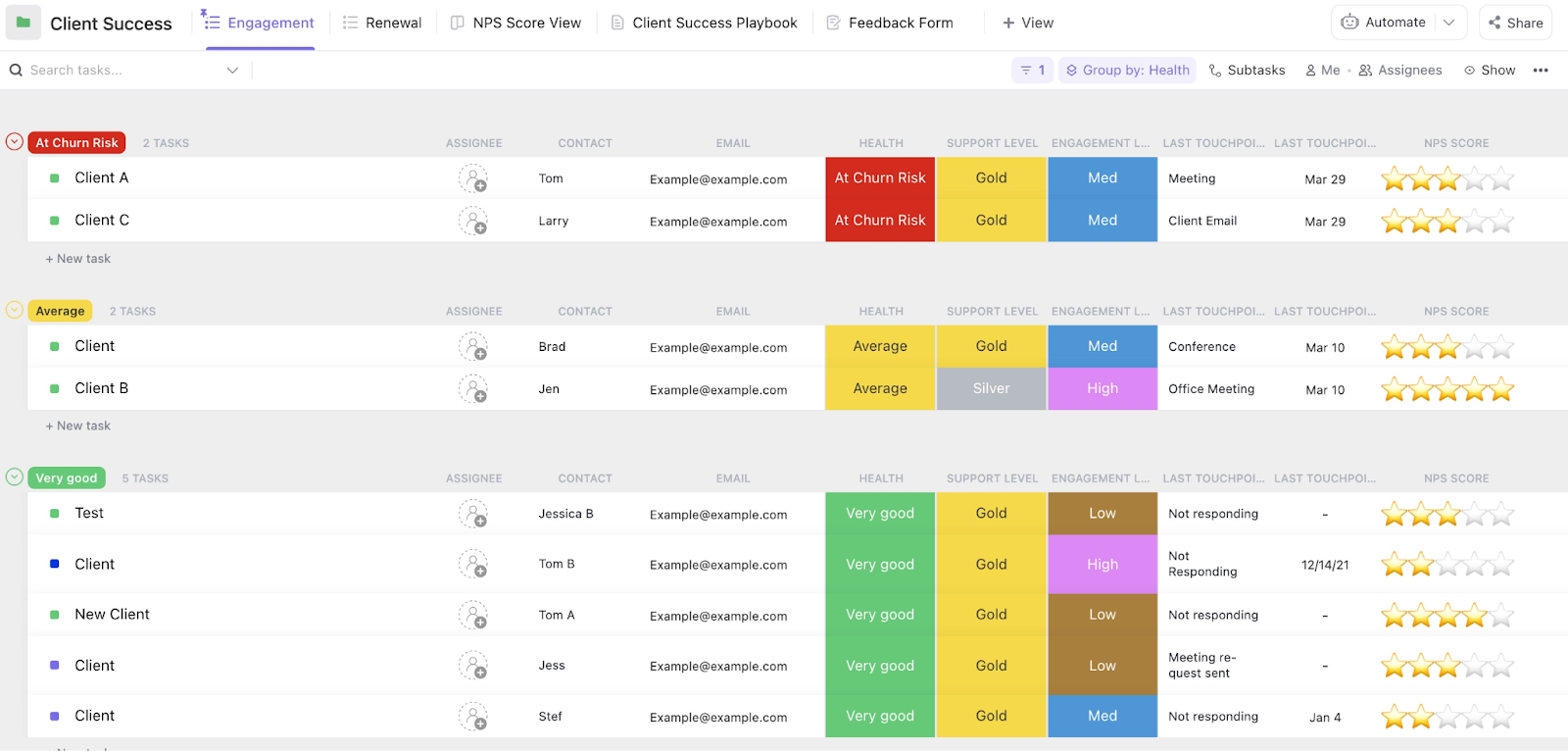
When you’re focused on individual session notes, it can be difficult to see the big picture of a client’s progress over time. This makes it hard to spot long-term patterns, adjust treatment plans effectively, or demonstrate therapeutic progress to the client. This goal-oriented Client Success Template by ClickUp™ shifts the focus from single sessions to the entire treatment journey.
While it was originally built for CRMs, you can easily adapt it to session progress by modifying the default Custom Statuses to your liking.
🌟 Why you’ll like this template:
🎥 Bonus: To see how you can build a custom client dashboard that visualizes your therapy data and tracks key metrics across your entire practice, watch (and adapt) this step-by-step tutorial.
The Legal Client Management Template by ClickUp™ is a godsend for cases that bring a heavy burden of compliance and documentation in their wake. Yes, we’re talking about forensic cases, court-mandated clients, and so on.
It’s the tool you need in your arsenal when a single missed deadline or a poorly documented interaction can have serious legal and professional consequences. You can trust it to provide the meticulous record-keeping needed for these high-stakes situations.
While built for legal professionals, its structure is perfectly suited for therapists who require detailed, defensible documentation.
🌟 Why you’ll like this template:
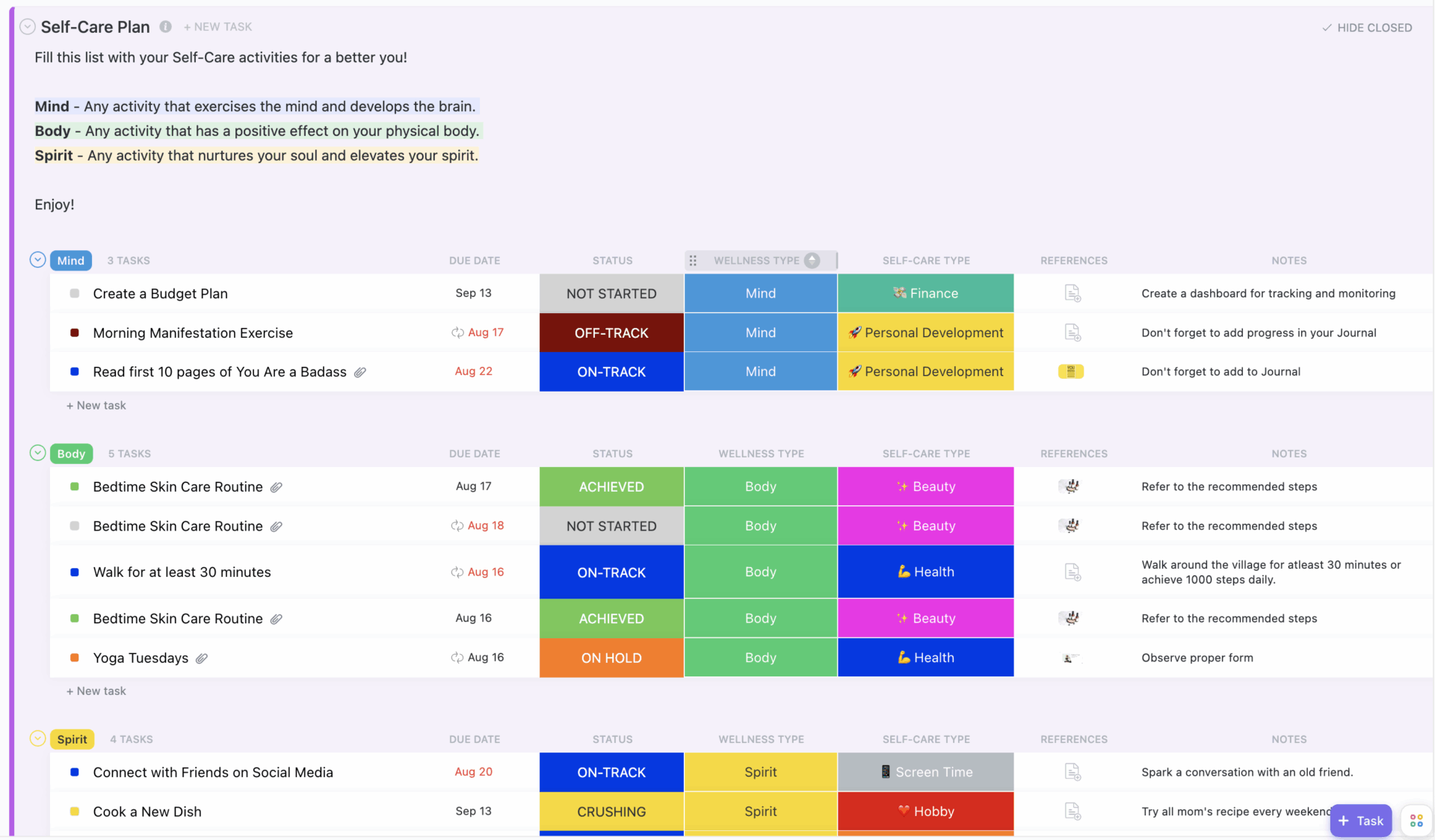
Here’s a scenario almost every therapist knows too well: you assign between-session homework—journaling prompts, grounding exercises, mood tracking, or exposure tasks—so clients can make progress outside the therapy room. But by the next session, the work is either incomplete or totally forgotten.
The result? You keep spending valuable session time re-explaining tasks instead of building on them. This Self-Care Plan Template by ClickUp™ solves that by giving you and your clients a shared, digital space for between-session work.
It helps you extend the therapeutic process into your clients’ daily lives, keeping them engaged and accountable.
🌟 Why you’ll like this template:
👀 Did You Know? Therapist wellbeing impacts client outcomes: In a 2024 cohort study, patients treated by therapists experiencing burnout were less likely to show clinically meaningful improvement in PTSD symptoms compared with those whose therapists were not burned out.
Make sure you’re taking care of your needs too, as you support your clients with theirs!
Now this one’s for clinical supervisors or practice managers who oversee multiple therapists.
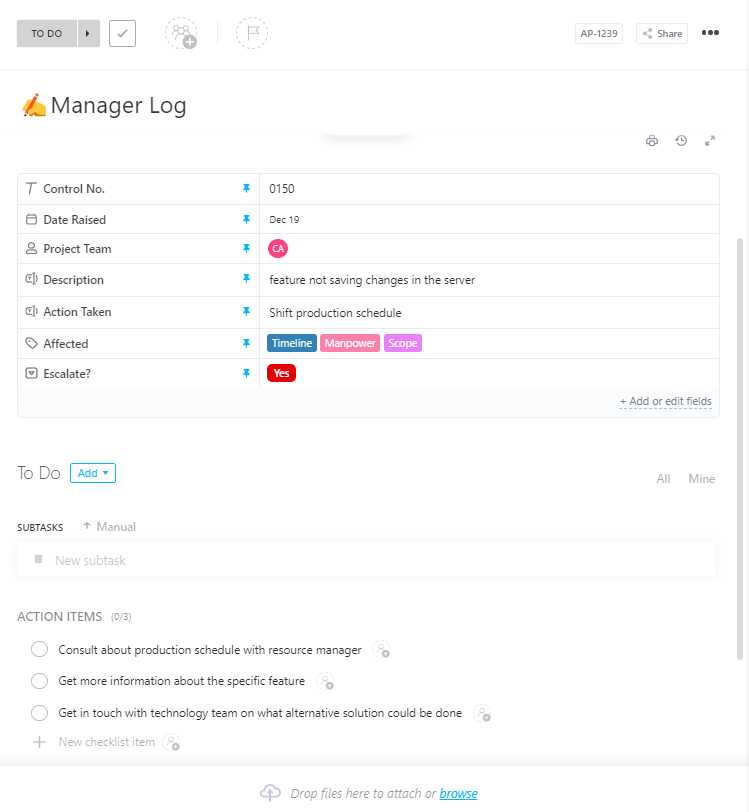
With supervision information siloed in different emails, spreadsheets, and conversations, visibility breaks down. Caseloads are hard to compare, supervision notes are easy to miss, and critical dates, like licensure renewals, become easy to miss.
This Manager Log Template by ClickUp™ centralizes all your supervisory and administrative oversight into one organized system. You can track therapist caseloads, log supervision sessions, document feedback and action items, and monitor compliance milestones in one place. You don’t have to chase updates or piece together context from multiple tools.
In a nutshell, it helps you maintain quality of care and compliance without micromanaging your team.
🌟 Why you’ll like this template:
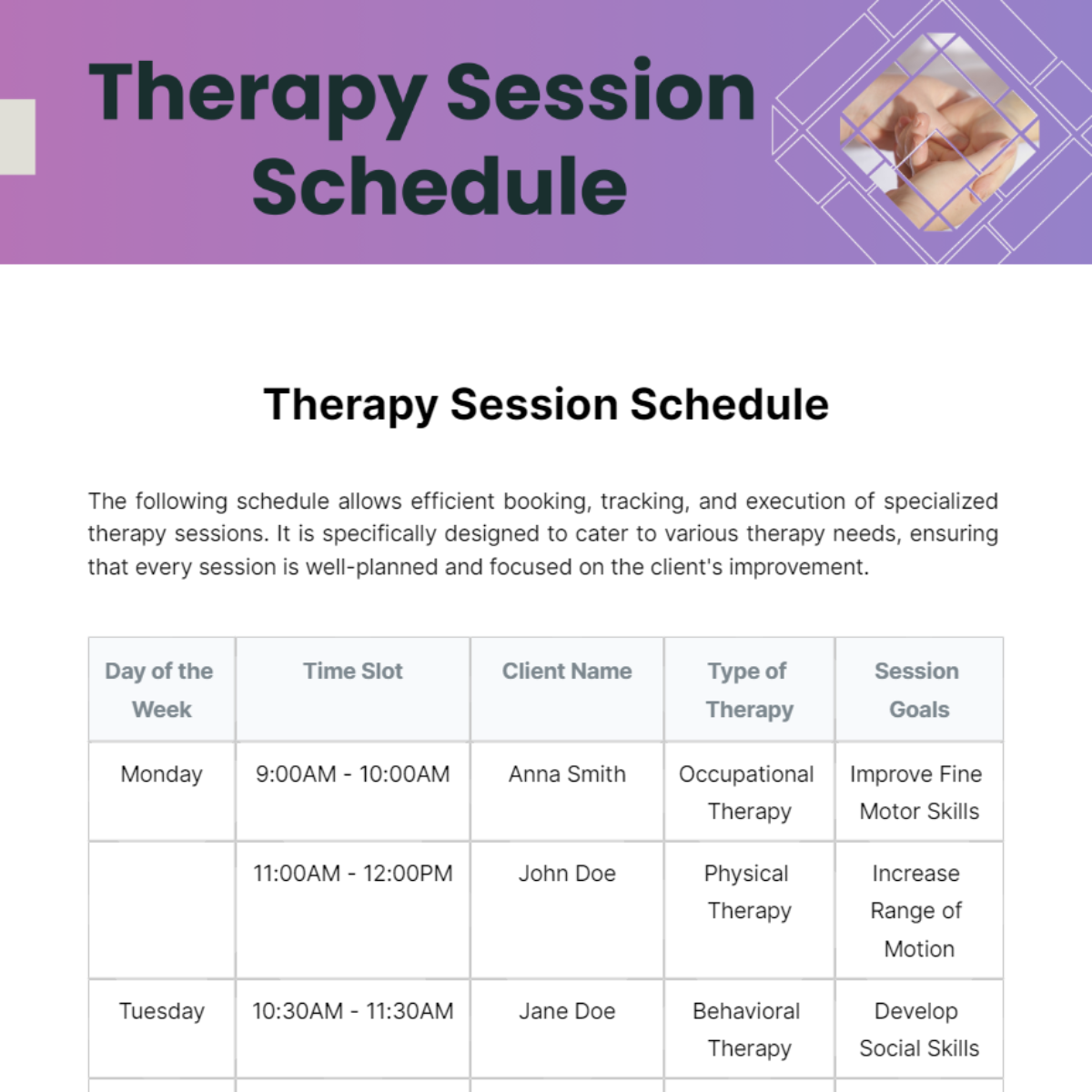
This Therapy Session Schedule template is a simple but powerful tool for organizing your appointments and structuring your week with clarity. It outlines the day of the week, time slots, client names, type of therapy, and session goals so you can plan sessions with intention rather than scrambling to remember details.
🌟 Why you’ll like this template:
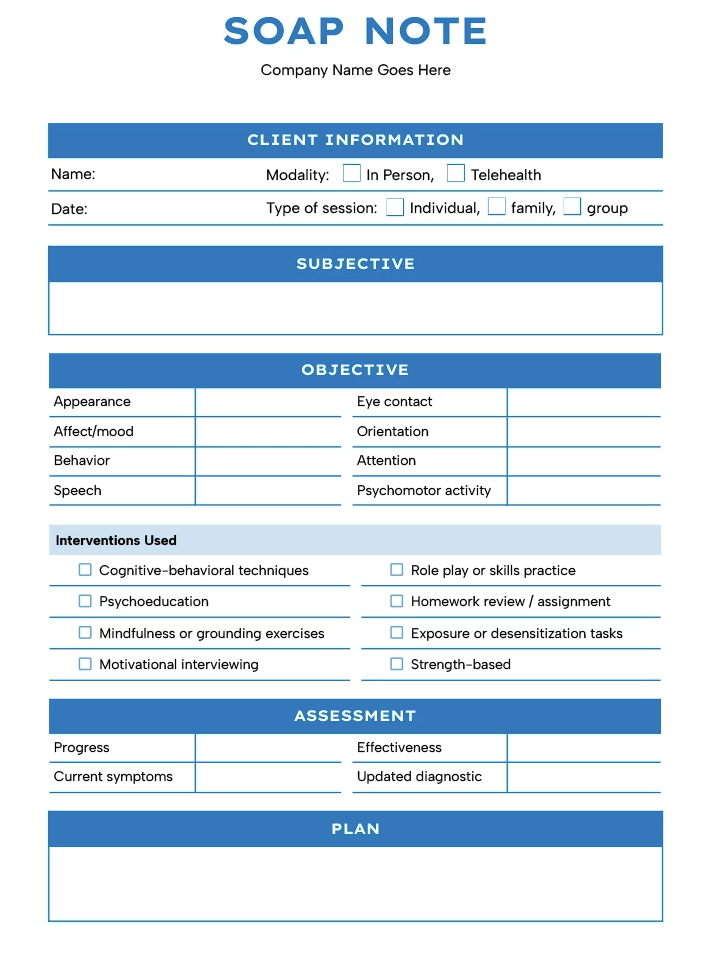
Many clinicians are trained to use the SOAP documentation format and prefer a TheGoodocs’ SOAP Note Template for Therapy Sessions as it’s built specifically for the format. A SOAP note template organizes patient information into four distinct sections:
This Goodocs template is available free in both Google Docs and Microsoft Word, letting you customize and print your session notes with ease. You get ready-made placeholders for each section, so you can focus on capturing meaningful progress instead of reinventing your notes from scratch.
🎥 Bonus: Learning to write better SOAP notes? Get our best tips through this quick explainer video:
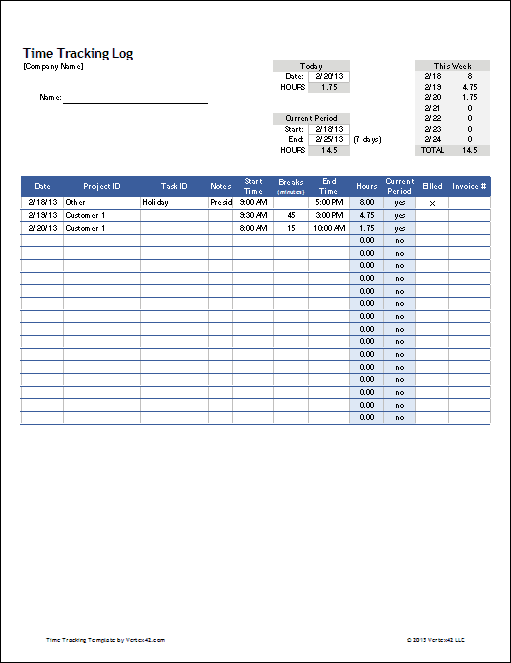
If you bill by the hour or need to track time spent on non-billable work like documentation and supervision, this Time Tracking Template by Vertex42 can help. Use it to og time spent on client sessions, case notes, phone consultations, and other administrative tasks. It simplifies accurate private practice billing and meeting insurance documentation requirements.
💡 Pro Tip: While standalone time tracking templates are available as spreadsheets or dedicated apps, this is another area where an integrated tool can reduce friction. Log session duration directly inside a client’s record without needing a separate tool using native ClickUp Time Tracking within each ClickUp task.
The right therapy session tracker does more than simplify documentation. It shapes how time and attention show up in your practice.
The client therapy session tracker templates listed in this blog post protect your client-facing time. They lower cognitive load and improve follow-through between sessions. The result is clearer continuity for both clinicians and clients.
And how should you pick the right one?
By remembering that good documentation systems don’t feel like admin work. They fade into the background and let therapy stay focused on what matters most. And the best ones? Well, they allow your notes, schedules, homework, and progress tracking to live in one supportive system. Just as ClickUp does.
Try it yourself. Sign up for ClickUp for free!
A therapy notes template (often called psychotherapy notes) is for a clinician’s personal observations and impressions—these are kept separate from the official record and have special privacy protections under HIPAA. A progress notes template is part of the formal client file, documenting treatment details, client response, and plans that may be shared with insurance providers, supervisors, or other clinicians involved in care
Most digital templates allow you to rename or add custom fields to match your preferred format. You can create sections for each component (e.g., Subjective, Objective, Assessment, Plan for SOAP) and remove any fields that don’t apply to your documentation style.
ClickUp offers enterprise-level security features and can sign Business Associate Agreements (BAAs) for organizations that require HIPAA compliance. You should always consult with your own compliance officer and review ClickUp’s security documentation to confirm it meets your practice’s specific requirements.
Digital trackers provide searchable records, automatic backups, and easier collaboration with supervisors. They also allow you to link session notes directly to scheduling and follow-up tasks, reducing the scattered documentation that comes with using paper or disconnected spreadsheets.

© 2026 ClickUp

There’s an easier way. Try a free AI Agent in ClickUp that actually does the work for you—set up in minutes, save hours every week.