Sorry, there were no results found for “”
Sorry, there were no results found for “”
Sorry, there were no results found for “”
🧠 Did you know? 63% of customers consider your onboarding process before committing to your service. That makes onboarding one of your most powerful (and underutilized) parts of the sales process.
If you’ve ever kicked off a project only to realize you’re still chasing basic info—like a business address, current marketing strategy, or even the primary point of contact—weeks in, you need a client onboarding questionnaire.
The right client onboarding questionnaire template saves time. It also sets the tone for a smooth onboarding process, helps you stay aligned with the client’s business goals, and builds a more successful client relationship from day one.
Whether you’re a solo freelancer, part of a marketing agency, or a service-based business, asking the right onboarding questions upfront helps you streamline communication, keep everyone on the same page, and move faster with less friction. For a more holistic onboarding experience, pair your questionnaire with a communication plan template that aligns your team and your client from day one.
In this guide, we’ll cover:
We’ll also show you how to use ClickUp to build out your client onboarding form, manage follow-ups, create reusable templates, and assign team tasks—so you can focus on the work, not the paperwork. 🛠️
A client onboarding questionnaire is your pre-project alignment tool—a structured way to collect information from clients before you start work. Think of it as a smart, strategic pre-sales questionnaire that leads to better deliverables and fewer surprises.
Instead of going back and forth over emails, a well-structured client onboarding form helps you gather details like:
It helps you and your team work more efficiently, set clear expectations, and reduce unnecessary client interactions. And it gives the client a sense of clarity and structure, which is key to building a strong customer relationship. Pair your onboarding questions with a structured customer database software system to centralize and reference client data with ease.
💡Pro tip: Treat onboarding like a product. Test it, iterate it, and improve it continuously—just like you would with any other core offering. Your form isn’t “done”—it’s your MVP.
Whether you’re managing social media, developing a website, designing brand assets, or providing financial services, a client onboarding questionnaire helps you:
🧠 Did you know? That initial onboarding phase isn’t just paperwork – psychologists say it heavily influences a client’s entire perception of your competence and reliability for the whole project! Talk about first impressions!
Ever kick off a project with a vague email thread and a hopeful heart? 😅 Relatable—but also risky.
A solid new client onboarding questionnaire removes the guesswork. It helps you collect information that matters, align on expectations, and build a more successful client relationship from day one.
Here’s why it’s a non-negotiable for any marketing agency, freelancer, or service-based team:
Clients who receive a clear, professional questionnaire know they’re in good hands. It signals that you’ve done this before and are here to make the process smooth and strategic. Think: “Send us your brand assets and ideal launch timeline” instead of “Let me know when you get a chance…”
You’ll know upfront if the client expects three design options or twelve. You’ll also spot timelines or expectations mismatches before they become last-minute emergencies. No more “Wait… you thought this wasn’t a paid add-on?”
When your team has access to all client information in one place—goals, logins, deliverables—it’s easier to kick off tasks without chasing updates. This also means smoother handoffs and fewer bottlenecks.
If their answers are vague, unrealistic, or confusing, that’s your cue to clarify—or reconsider. The right questions surface red flags early, so you’re not stuck in a painful client relationship later.
Instead of writing custom intro emails or hosting long kickoff calls every time, you can send your questionnaire, collect answers, and get moving. Even better? Tools like ClickUp let you automate the entire flow so you’re not starting from scratch each time. 🧠
💡 Pro Tip: Many service pros preview their larger digital marketing strategy or workflow using the onboarding stage. Your form can act as a soft pitch for your full suite of services—just make sure it’s structured and clear.
📮ClickUp Insight: Meetings spark innovation and drive action—when they work. But reality? Nearly half of all employees waste valuable time reaching out to colleagues for answers they should already have at their fingertips, creating constant interruptions at work.
ClickUp’s Connected Search and ClickUp Brain eliminate this costly back-and-forth by delivering instant, AI-powered answers from your entire digital ecosystem. Every file, meeting note, recorded clip, and third-party integration becomes searchable knowledge—so no one has to waste time chasing down teammates for information.
💫 Real Results: Teams like QubicaAMF reclaimed 5+ hours weekly using ClickUp—that’s over 250 hours annually per person—by eliminating outdated knowledge management processes. Imagine what your team could create with an extra week of productivity every quarter!
Every business runs differently. But one thing’s universal: if you don’t ask the right questions at the start, you’ll be chasing clarity the entire project. 😵💫
💡Pro Tip: You can create and manage your questionnaire directly in ClickUp using Forms. You don’t need extra form building software or Google Forms. Plus, ClickUp lets you turn responses into tasks, assign owners, and track completion—all in one place.
You’re not “too small” to streamline. Whether you’re a solopreneur or a growing team, good onboarding makes everyone look and feel more pro.
That’s where a great onboarding questionnaire comes in. Below, we’ve organized the most essential client questions by category, with short explanations so you understand why they matter and how to tailor them to your workflow.
Here are the must-have categories and sample questions for your client onboarding form:
These questions help you uncover the bigger picture—the why behind the project—so you can deliver work that has an actual impact.
1. What are the primary goals of this project?
Understand what the client ultimately wants to achieve—whether it’s more leads, brand awareness, user engagement, or something else.
📌 Helps you tailor your strategy to support real business outcomes.
2. How will success be measured?
This reveals what metrics matter to the client, such as conversions, traffic growth, lower churn, or visual polish.
📌 Keeps expectations clear and sets the foundation for performance reporting.
3. Have you worked with someone on this before?
Learn from their previous experiences—what they liked, what frustrated them, and what they hope will be different.
📌 Helps you avoid repeating mistakes and build trust faster.
4. Are there any must-haves or dealbreakers?
Clients may have platform preferences, brand rules, or non-negotiable deadlines. It’s better to surface these early.
📌 Prevents scope issues and surprises mid-project.
These questions align the work with your client’s business goals and ensure you’re not just delivering assets—you’re delivering impact.
✨ Fun fact: You can embed memes or custom GIFs in ClickUp Docs. Add a dancing corgi GIF to your onboarding Document when clients complete their checklist, because finishing things should feel like a celebration. 🎉🐶
This section sets the foundation for communication and record-keeping. It may seem basic, but it prevents future confusion.
1. What is your full business address and company name?
Collect the official business name for contracts and invoicing, plus the website to review their current branding, messaging, and online presence.
📌 Gives you context and keeps records consistent.
2. Who is the primary point of contact for this project?
Clarifies who’s responsible for approvals, feedback, and communication.
📌 Prevents bottlenecks by ensuring you know who to reach.
3. What’s the best email and phone number for communication?
Even if you’ve been emailing already, this ensures you have the preferred contact details for the project.
📌 Streamlines updates and avoids dropped messages.
4. Are there any other stakeholders we should include?
Some clients need multiple people looped in for approvals or updates. Get clarity now to avoid last-minute surprises.
📌 Helps you manage communication expectations and timelines.
These help you establish communication boundaries and prevent unnecessary delays in client interactions.
💌 Client love tip: Create a “Meet the Team” section in your onboarding Doc with friendly bios and photos—especially helpful if your client will work with multiple people.
This section helps define what’s included, what’s not, and where the boundaries are. It’s essential for avoiding misunderstandings, delays, and scope creep.
5. What services are you expecting us to provide?
Get clarity on the exact nature of the work—design, content creation, development, consulting, etc.
📌 Ensures alignment between your proposal and the client’s expectations.
6. What deliverables are you expecting by the end of the project?
Have them list everything they expect to receive—files, reports, campaigns, training, documentation.
📌 Helps you create accurate timelines, task lists, and handover processes.
7. Are there any services or deliverables you don’t need right now, but may in the future?
This surfaces potential future work (and upsell opportunities) while reinforcing boundaries for the current scope.
📌 Helps you plan for follow-ups while avoiding “just one more thing” requests.
8. What level of involvement or collaboration do you expect from us?
Some clients want high-touch, weekly syncs. Others prefer hands-off, deliver-and-go.
📌 Lets you plan your workflow, meeting cadence, and communication approach.
These questions help you identify potential upsells while ensuring everyone is on the same page about what’s included.
✨ Fun fact: Including a client success timeline in your onboarding doc (e.g. “Here’s what success looks like in 30/60/90 days”) can improve perceived value before sending any deliverables.
These questions help you determine whether the client’s timeline and financial expectations are realistic, and whether they align with your availability and pricing.
9. When would you like the project to start?
This helps you schedule the kickoff and determine if your current workload can accommodate their preferred timeline.
📌 Avoids scheduling conflicts and misaligned expectations.
10. Do you have a fixed deadline, or is the timeline flexible?
Some clients have hard launch dates tied to events or campaigns. Others may have wiggle room.
📌 Informs how you structure milestones and prioritize tasks.
11. What is your estimated budget for this project?
Understanding the budget up front ensures you can tailor the scope, resources, and delivery approach accordingly.
📌 Helps you avoid overdelivering (or underdelivering) and opens the door for scope negotiation.
12. Will the budget cover all deliverables, or should we discuss phased pricing?
This question is especially helpful for large or complex projects where multiple stages may need their budgets.
📌 Gives you flexibility in structuring the engagement and managing expectations.
Clear answers let you manage your sales process more confidently and reduce misunderstandings later.
✨ Fun fact: Checklists reduce stress. According to psychologists, crossing off items gives your brain a dopamine hit. That’s why clients love being guided through onboarding with a clear to-do list.
If you’re creating anything visual, written, or public-facing, you’ll need to match the client’s existing brand identity. This section helps you gather the materials that make that possible.
13. Do you have existing brand guidelines?
This includes voice and tone, color palettes, fonts, image styles, and messaging principles.
📌 Ensures your work aligns with their brand consistently across all channels.
14. Can you share your logo, templates, or branded materials?
Request assets like logo files (in multiple formats), social media templates, past campaigns, or style references.
📌 Prevents back-and-forth and speeds up the design/content process.
15. Are there any brands or styles you love (or hate)?
This question gives you creative direction, even when clients struggle to describe their preferences.
📌 Reduces guesswork and revisions by giving you a visual or stylistic compass.
16. Do you have a preferred tone of voice for content or messaging?
Whether it’s playful, professional, minimal, or bold, tone helps maintain a cohesive customer experience.
📌 Let’s you tailor your writing or communication approach accordingly.
This section supports smoother collaboration on visual or written deliverables and ensures alignment with your current marketing strategy.
💡 Pro tip: You can simplify your client intake and data management even further with a free database software that integrates directly with your onboarding form.
If your work involves managing platforms, analyzing data, or collaborating inside the client’s systems, you’ll need proper access from day one. This section ensures nothing holds up the workflow.
17. What platforms or tools will we need access to?
This could include CRMs from tools like ClickUp, ad accounts, analytics tools, websites, social media, or internal project management platforms.
📌 Helps you plan for setup time and avoids mid-project blockers.
18. How would you prefer to share login credentials securely?
Encourage using tools like LastPass, 1Password, or one-time link generators instead of plain text email.
📌 Keeps the exchange safe, professional, and organized.
19. Will you provide admin or limited access?
Knowing the access level helps you determine what tasks you’ll be able to complete independently.
📌 Avoids delays or dependencies later in the project.
20. Should we create separate accounts for our team members?
Depending on the tool, it may be more secure (and scalable) to have individual logins.
📌 Ensures compliance and helps with permission control and accountability.
21. Do you need us to sign any NDAs or customer onboarding documentation?
Many clients—especially those in regulated industries—require formal agreements before sharing sensitive info.
📌 Establishes trust and protects both sides early in your new client onboarding process.
🚀 Reality check: 86% of the customers say they will remain loyal if onboarding and continuous education are provided. Want to keep clients coming back? Try using customer retention software to track sentiment, engagement, and success metrics across your customer lifecycle.
This section covers the paperwork, regulations, or special considerations that need to be squared away before work officially begins. It’s all about protecting both you and the client.
21. Do we need to sign an NDA or any confidentiality agreements?
Some clients—especially in tech, finance, or legal industries—will require NDAs before sharing sensitive details.
📌 Helps you build trust and ensures data protection protocols are respected.
22. Should we follow any legal, security, or compliance requirements?
Think GDPR, HIPAA, industry certifications, or internal company policies.
📌 Make sure you’re aligned with regulations that affect how data is stored, shared, or handled.
23. Do you have a preferred contract format, or should we send ours?
Some clients use their master service agreements. Others will expect you to provide the contract.
📌 Clarifies who’s responsible for the legal framework and speeds up the kickoff process.
24. Who should sign the agreement or approve legal documents?
Ensure you know who has the authority to sign off—so you’re not chasing approvals later.
📌 Helps you avoid legal or billing delays.
🧠 Did you know? 97% of people believe video is an effective tool for welcoming and educating new customers, and 74% have watched a video to learn how to use a new app or website. 69% feel that more video would improve onboarding.
So, you’ve created your client onboarding questionnaire—that’s a great start. But the next challenge is how to deliver it and manage the responses without getting lost in emails, dealing with messy forms, or chasing down missing attachments.
Manually piecing together client information isn’t ideal if you want to provide a professional experience and stay organized. What you need is a system that reliably:
You can definitely build this kind of efficient onboarding system using ClickUp. Let’s look at how to set it up, step-by-step.
The first step in any onboarding process is collecting the right information. A strong customer onboarding questionnaire should uncover your client’s goals, challenges, timelines, and communication preferences. But writing relevant, clear, and complete questions isn’t always easy, especially when working across industries.
This is where ClickUp Brain becomes a helpful co-creator.
Use it to:
Here is an example of using ClickUp Brain to generating customer onboarding questions based on your industry.
Prompt:
“I want to create a list of customer onboarding questions tailored for a SaaS project management tool like ClickUp. These questions should help me understand customer goals, challenges, and expectations, such as how they plan to use the tool, their team size, and their workflow preferences. Can you generate a comprehensive list of onboarding questions to guide my process?“

Here is an example of using ClickUp Brain to generate insights from the collected data from the customers.
Prompt:
“Here is a set of customer onboarding questions and responses collected from multiple customers during the onboarding process for a SaaS project management tool like ClickUp. Analyze this data to identify one key actionable insight that can significantly improve the onboarding experience. Consider customer goals, challenges, team dynamics, and feature preferences in your analysis.”

🎯 Key benefit: ClickUp AI helps you overcome writer’s block, save time drafting, ensure comprehensive coverage of your questions, and maintain a consistent tone across your onboarding communications. Think of it as your helpful content creation assistant.
Once your form is set, the next step is preparing supportive materials that smooth the onboarding process for both sides. This can include a welcome message, a structured onboarding doc, a client checklist, and detailed instructions about what happens next.

ClickUp Docs makes this part easier and more organized.
Here’s how to use it effectively:
🎯 Key benefit: This “single source of truth” saves time for both you and your client and helps prevent errors caused by using outdated information.
💡Pro tip: Create an automation that assigns a templated subtask like “Send Welcome Email” right after submitting the form. Personalized onboarding = strong first impression.
Sometimes text isn’t enough, especially when explaining how to fill out a form or navigate a shared space. 88% of video marketers say video has helped increase user understanding of their product or service.
Even a well-written onboarding document can leave some questions unanswered, especially when clients need to interact with tools or fill out your onboarding form. Short, contextual videos can help explain processes, reduce confusion, and cut back on repeated questions.
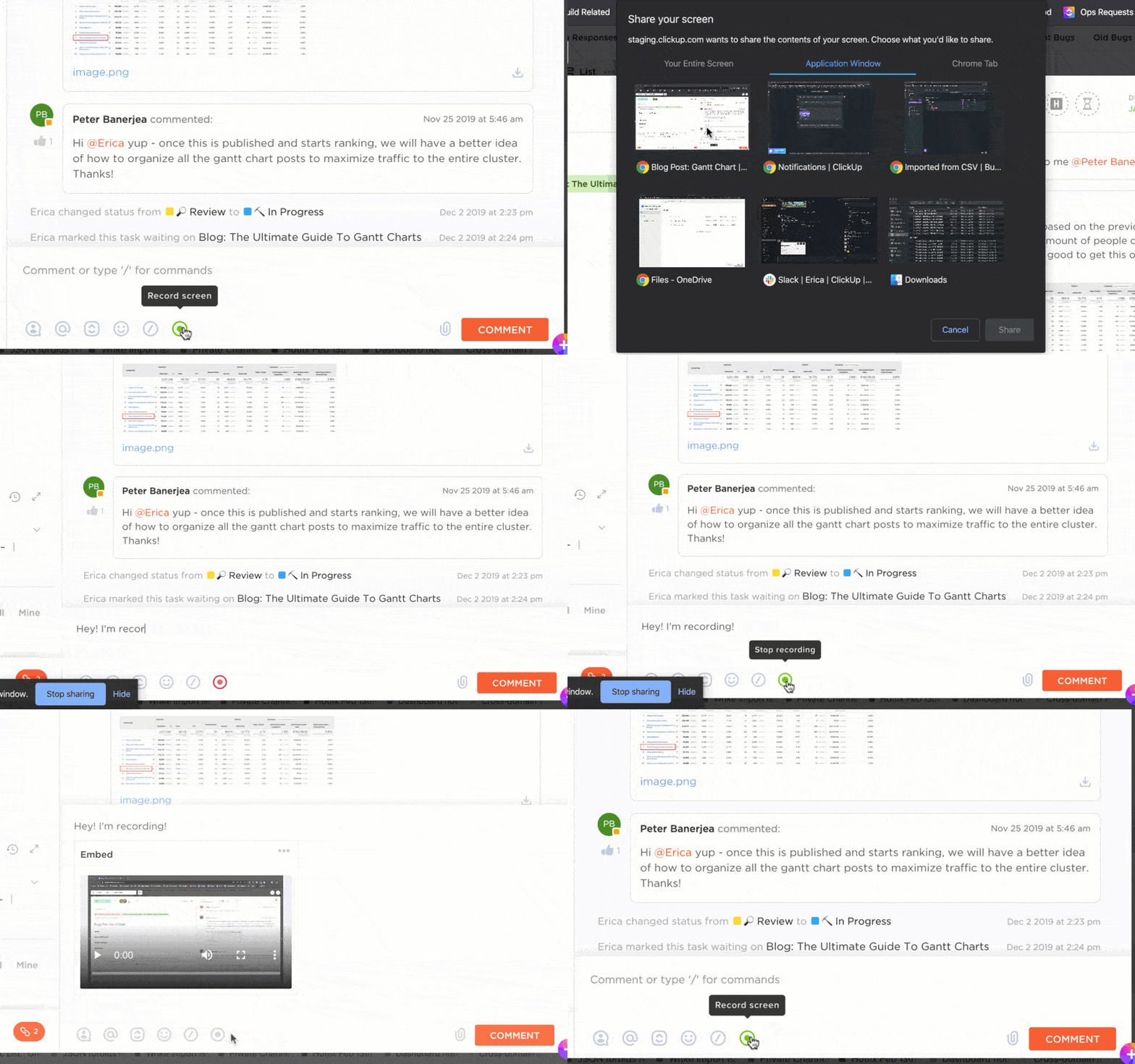
With ClickUp Clips, you can record:
🎬 Clips are automatically transcribed and easily linked inside tasks, comments, or onboarding docs.
Including a short video walkthrough can improve your client’s first impression —and reduce friction before the project begins.
Record insights, create video announcements, share tutorials, and generate AI-powered transcripts with ClickUp Clips
🎯 Key benefit: Clips add a personal touch, make instructions crystal clear, reduce back-and-forth questions, and can make the onboarding process feel more interactive and supportive for your client. Plus, you can easily share Clip links directly within ClickUp tasks, comments, or Docs.
🧠 Did you know? 86% of customers say they’re more likely to stay loyal to a business that invests in onboarding content to educate and welcome them after a deal is closed.
After finalizing your customer onboarding questionnaire, the next step is converting it into a professional, easy-to-complete onboarding form. It should be logically structured, branded, and flexible enough to fit different services or project types.

ClickUp Forms help you build powerful intake workflows that do more than just collect data.
Use it to:
🤖 Bonus: Once a client submits the form, ClickUp AI can summarize their answers, highlight action items, or draft a follow-up message—saving you valuable time.
With this setup, your onboarding form becomes the first actionable step in your workflow, not just a static submission.
🎯 Key benefit: This method ensures you receive organized, consistent data every time, establishing a solid foundation for the project and presenting a polished image to your client.
🧠 Did you know? You can use AI inside ClickUp to summarize form responses, suggest action items, or draft follow-up emails—all without switching tabs.
Your client shouldn’t have to dig through emails to find brand guidelines, timelines, or next steps. After completing the onboarding form, give them one place to access everything.

With ClickUp, you can build a reusable client hub in minutes:
Creating a hub reinforces transparency, boosts client confidence, and keeps your internal team aligned at every step.
Once client information is submitted, the behind-the-scenes work begins. However, manually assigning tasks, updating statuses, and notifying team members can slow you down, especially as your client list grows.
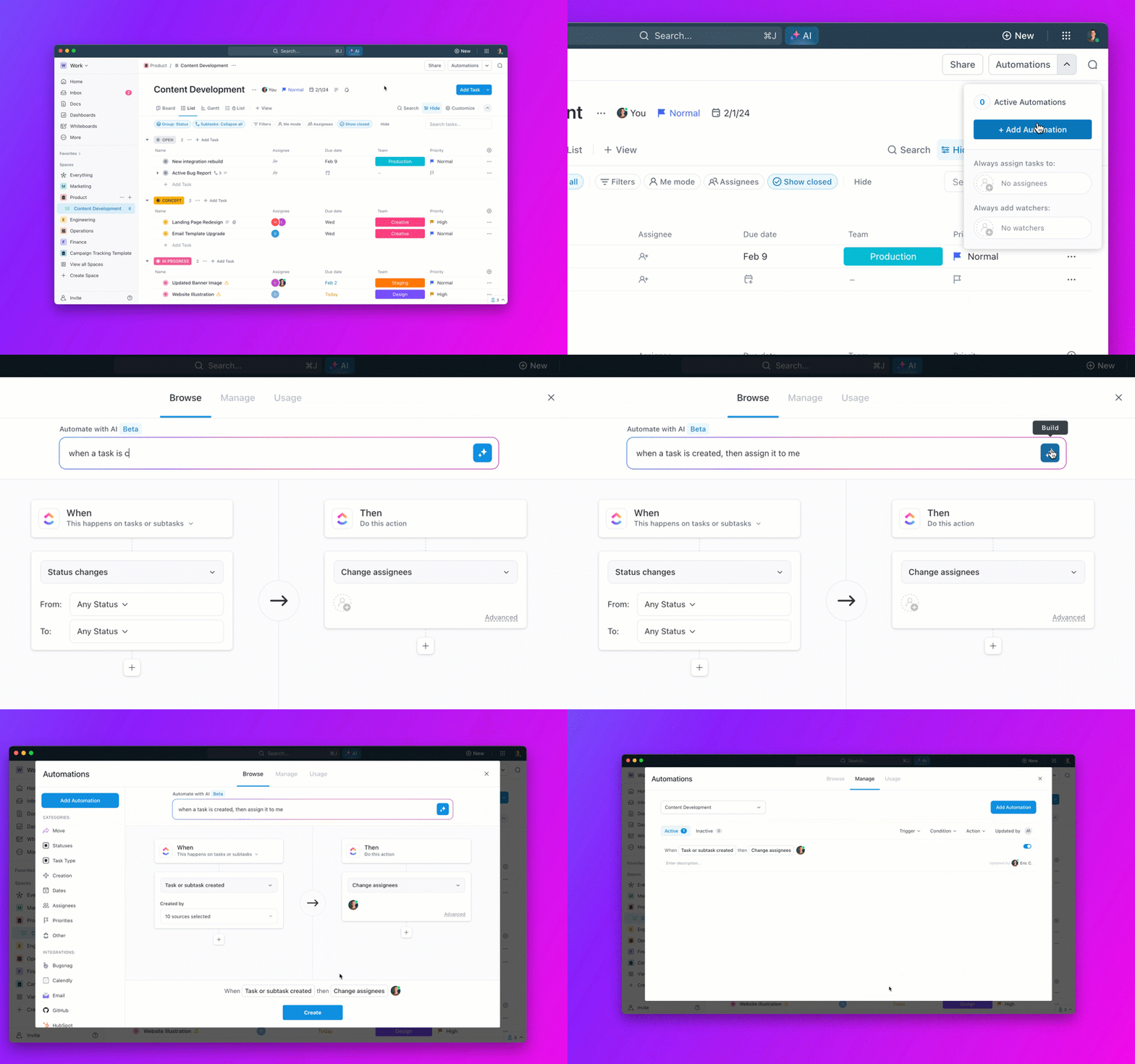
ClickUp Automations let you build smart workflows that respond to form submissions and client actions.
You can:
✅ This turns your onboarding flow into a system that runs itself, giving your team more time to focus on creative work and client delivery.
💡Pro tip: Use automations to notify a team member if a form hasn’t been submitted after X days. It’s a nice way to nudge without nagging.
As your onboarding pipeline grows, it’s not enough to just know what stage each client is in—you also need to keep an eye on timing, team workload, and upcoming milestones. Without a clear system, it’s easy to lose track.
That’s where ClickUp’s visual views and dashboards come in. They give you full visibility into your customer onboarding process—whether you want a quick status check, a high-level report, or a date-based schedule.
Start with a Board or List View to organize clients by onboarding stage. Use custom statuses like Form Sent, Intake Received, Assets Pending, or Onboarding Complete to track progress at a glance. You’ll immediately see who’s stuck, who’s waiting, and who’s ready for kickoff.
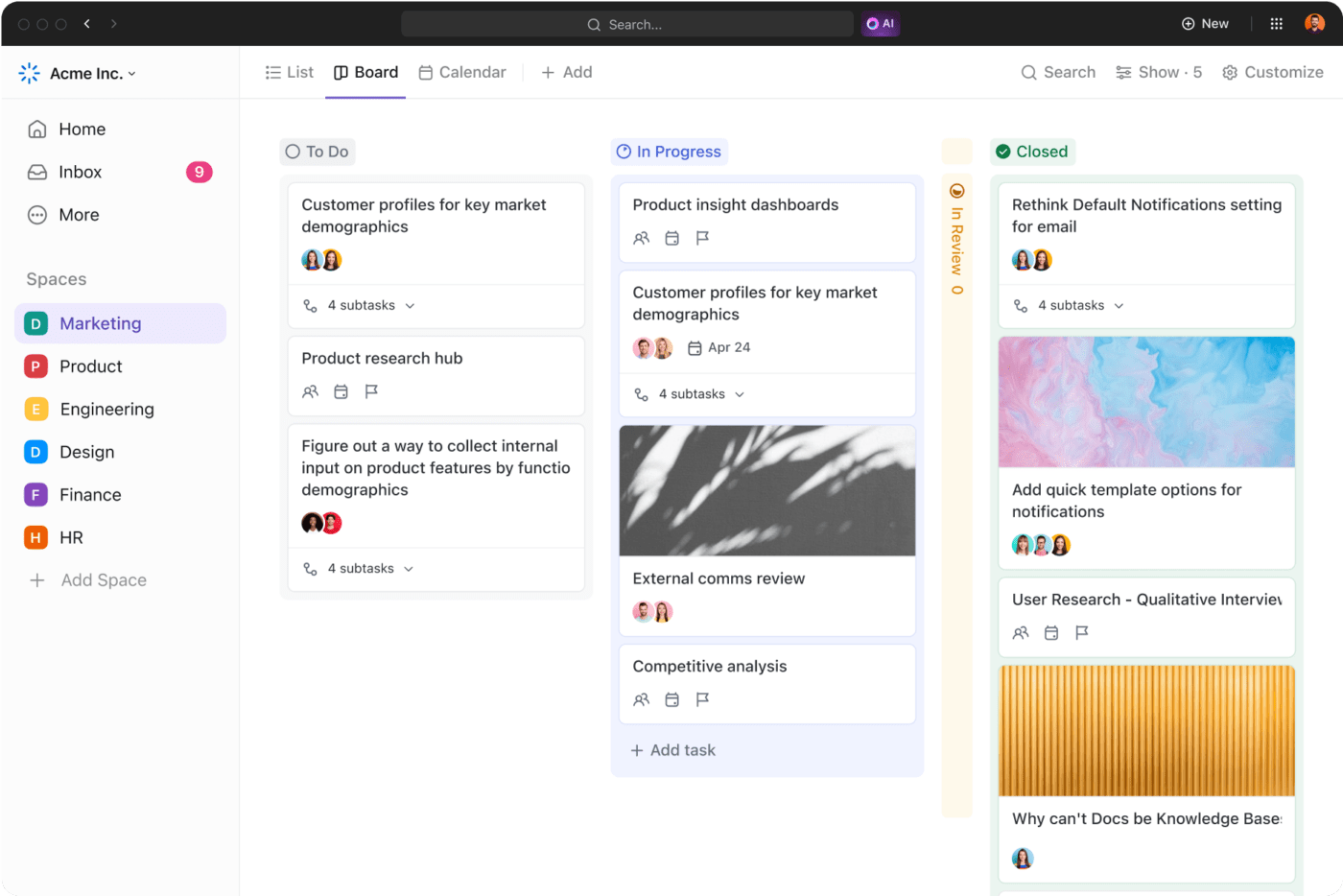
Then, switch to Calendar View to see your onboarding activities over time.
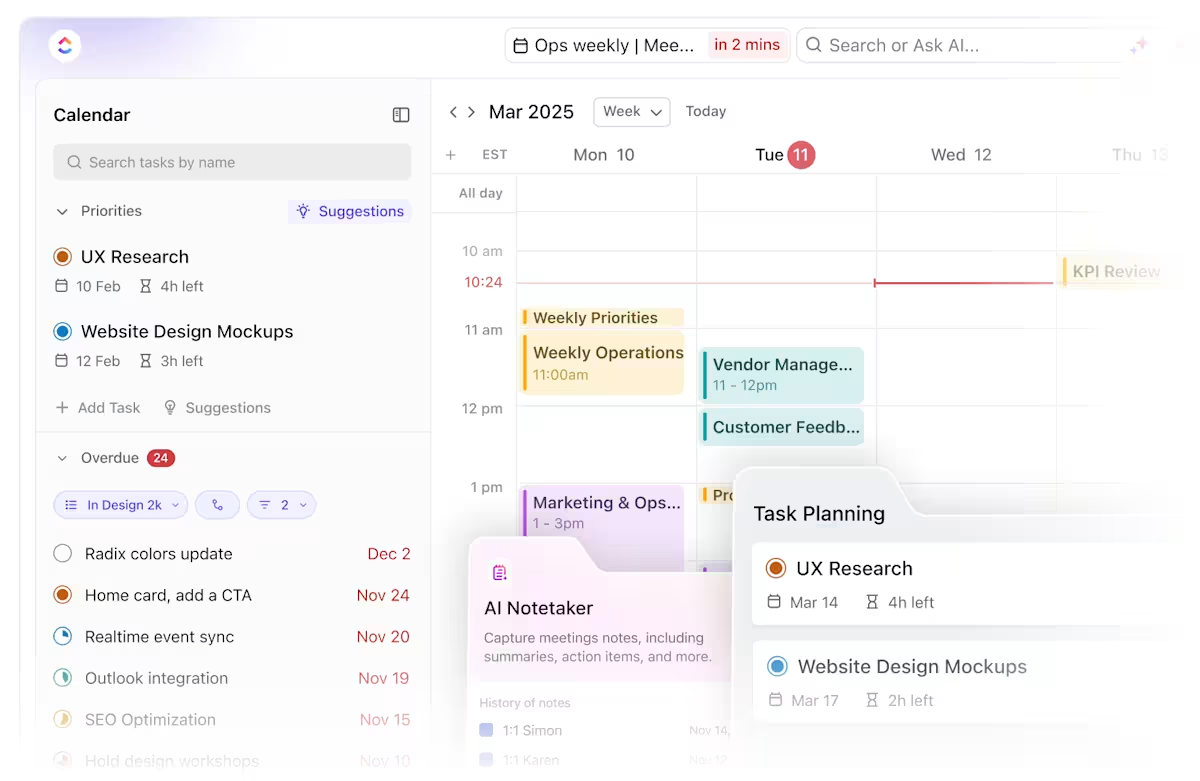
This is especially helpful for:
Need a big-picture view? Build a ClickUp Dashboard to monitor onboarding health across the board.
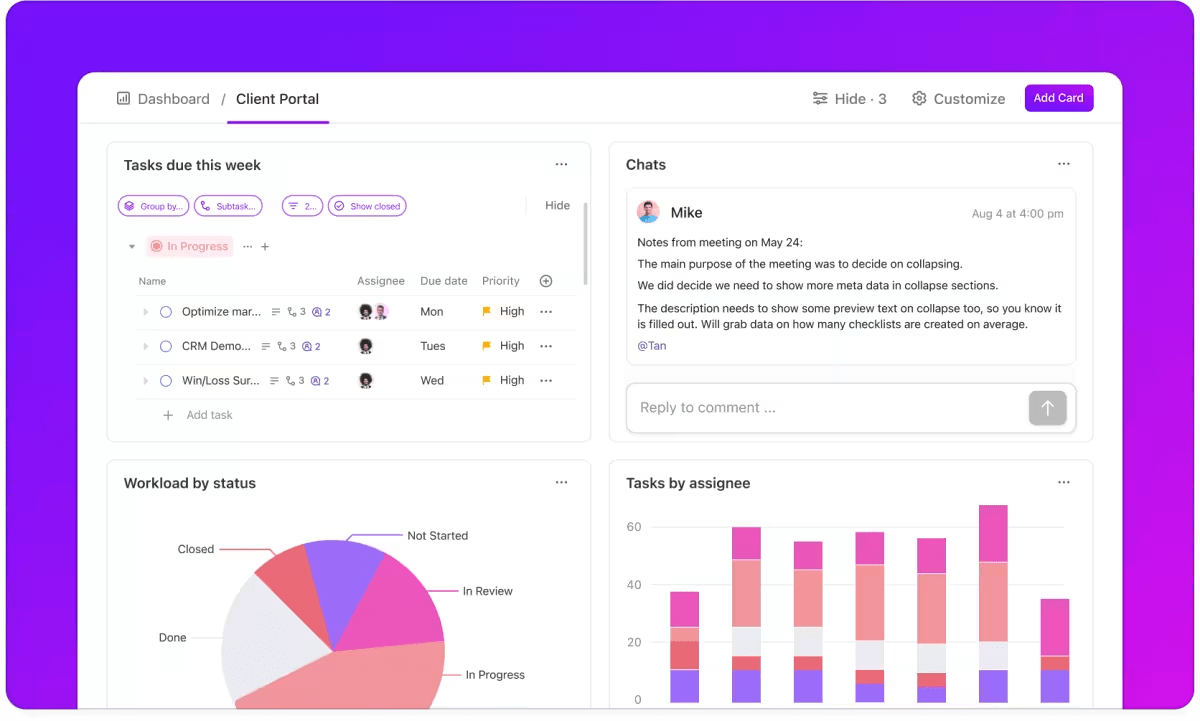
You can include:
You can even share dashboards (with permissions) to keep clients in the loop, without sending constant updates.
💡 Pro tip: Use ClickUp’s Relationships to link onboarding tasks with related projects, shared Docs, or deliverables. This creates a fully connected workflow from initial client intake to project delivery—no gaps, no guesswork.
🎯 Key benefit: Centralized tracking prevents oversight, helps manage team capacity, and allows you to identify potential delays early.
Once onboarding begins, clarity and communication become your most valuable tools. Without a shared system for updates, tasks, and timelines, it’s easy for things to fall through the cracks.
ClickUp helps you centralize collaboration so your clients feel supported and your team stays on track.
Instead of relying on scattered emails or external messaging tools, create a dedicated Chat thread within the client’s onboarding folder or task.
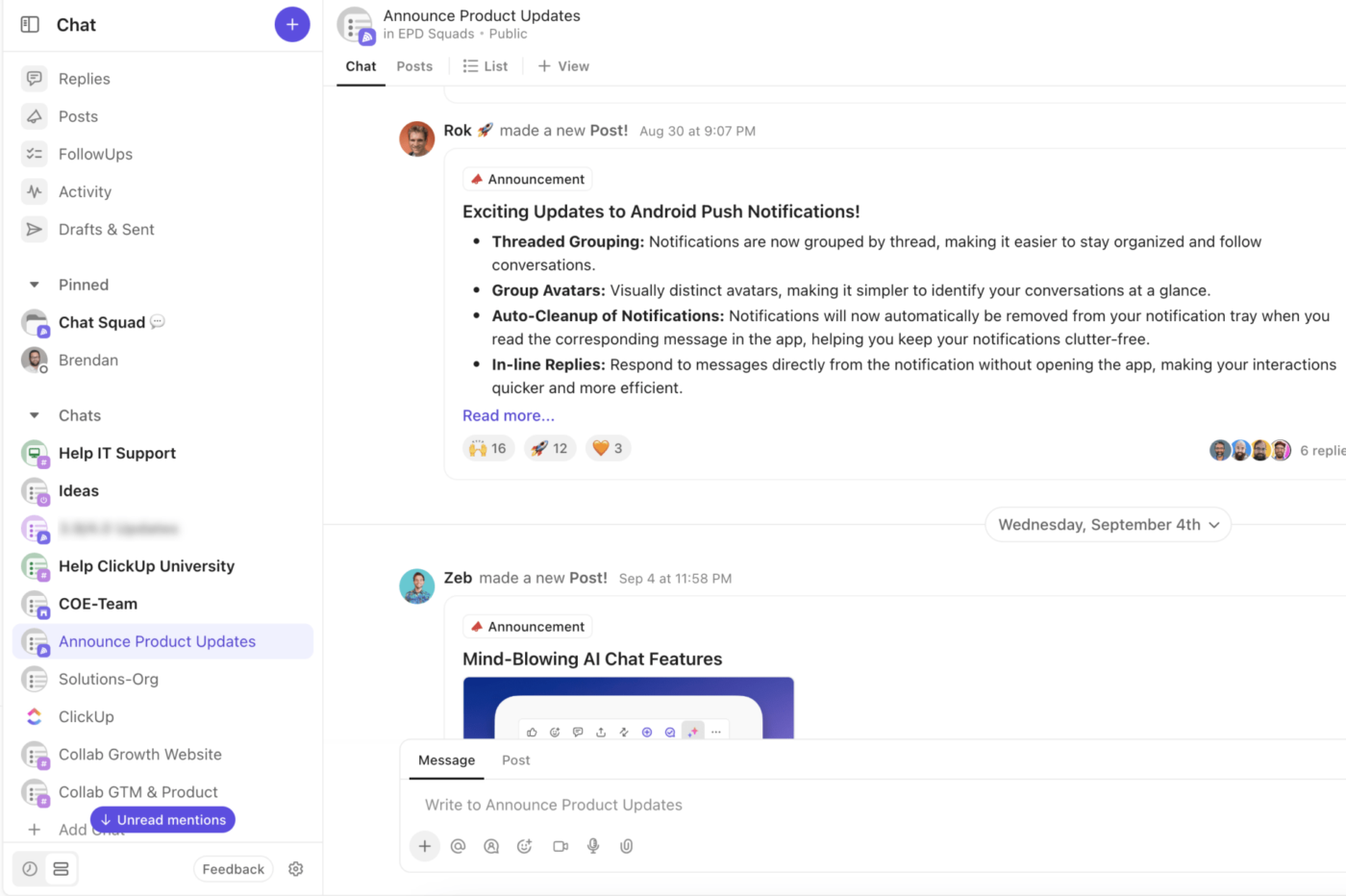
Use it to:
You can create custom Chat channels—like #Client-ABC-Onboarding or #Quick-Approvals—so all communications stay contextually tied to the project.
💡 Pro tip: Pin key messages (like timelines or file links) in the Chat thread so your client doesn’t have to dig through past emails.
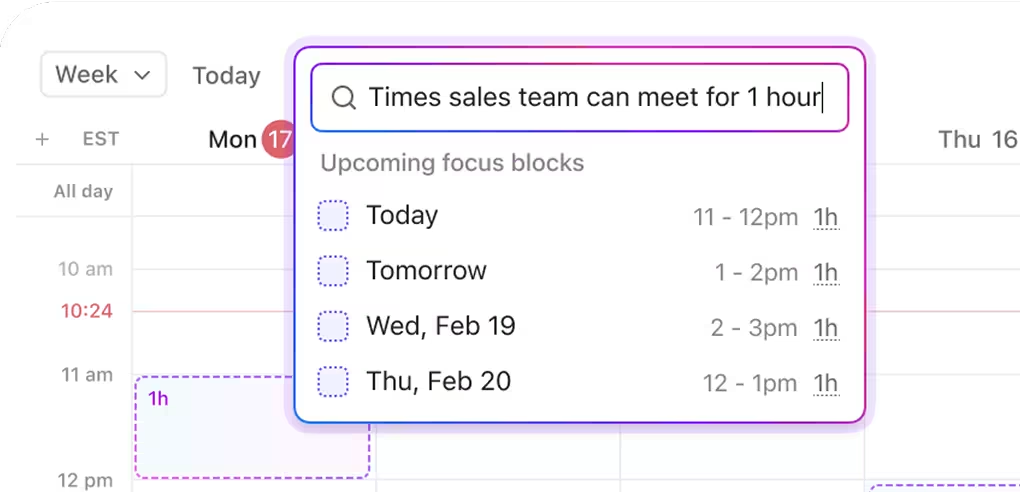
Use ClickUp’s Calendar View to plan your client kickoff meetings. You can also integrate with Google Calendar to sync availability across teams. Attach meeting agendas, notes, and next steps directly to the client’s onboarding task or linked Doc to keep everything in one place.
Set clear expectations from day one with a client checklist. Use them inside a task or Doc to outline essential action items like:
Grant clients visibility where it matters using ClickUp’s Guest Access. Invite them to specific tasks, Lists, or Docs with customized permission settings. This keeps internal details private while giving clients the transparency they need.
ClickUp connects with popular platforms like Slack, Google Drive, and Zoom, so you can share files, schedule meetings, and streamline communication without switching tabs or creating friction in your client’s workflow.💡 The result: A clear, collaborative customer onboarding process that empowers your clients, keeps communication organized, and helps your team confidently deliver.
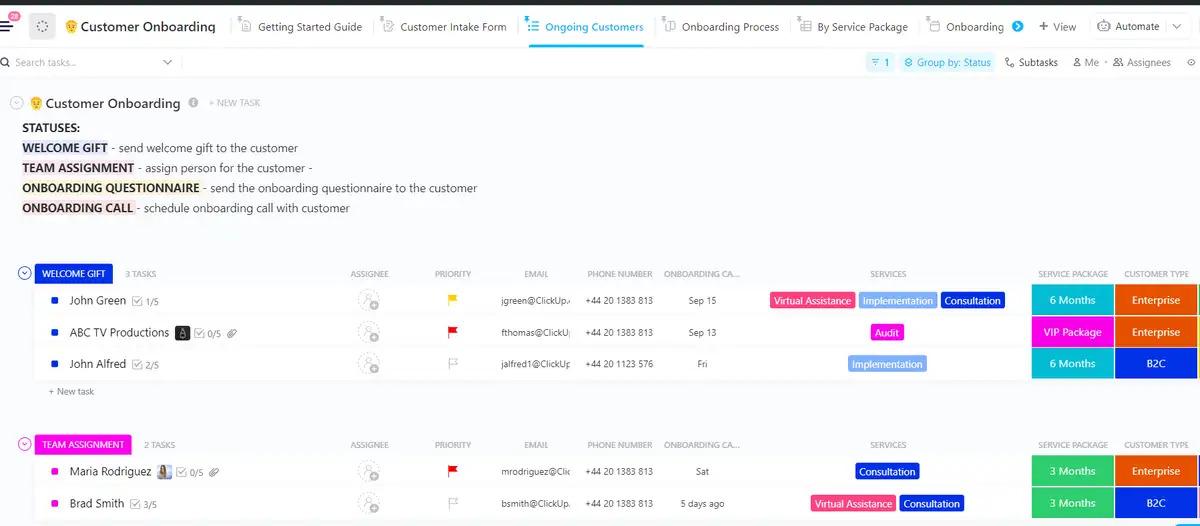
If you don’t want to build all this from scratch, start with the ClickUp Customer Onboarding Template.
It comes with:
Just tailor the template to match your services, duplicate it for every new client, and win back hours of manual work every week.
💡Pro tip: After onboarding, follow up with thoughtful feedback questions like:
🎯 Client success tip: Re-onboard existing clients when new people join or goals evolve. It keeps everyone aligned and re-energized.
A client onboarding questionnaire isn’t just a form—it’s the first step in building trust, setting expectations, and delivering a top-tier experience. When you ask the right questions up front, you’re not just collecting info—you’re laying the groundwork for better communication, fewer roadblocks, and more successful outcomes.
Want to go beyond great service and deliver excellence consistently? These tools for excellent customer service can help you support clients long after onboarding is done.
And with ClickUp? You’re not just sending a form and crossing your fingers. You’re centralizing your process, automating the busywork, and confidently scaling your services.
From intake forms and task templates to Dashboards, Docs, and Automations, ClickUp helps you create a client onboarding workflow that feels seamless, strategic, and actually fun to use.
💡 Ready to build your onboarding flow? Sign up with ClickUp for free today!

Melissa Shymko
Max 13min read

Praburam Srinivasan
Max 12min read

Sudarshan Somanathan
Max 18min read

© 2026 ClickUp