


Sorry, there were no results found for “”
Sorry, there were no results found for “”
Sorry, there were no results found for “”
Some swear by an all-in-one workspace. Others believe in specialized tools for a single purpose.
That’s exactly what’s at play when comparing ClickUp vs. Pipedrive.
One is a powerhouse for managing projects, tasks, and workflows, while the other provides specific services for sales teams.
Both boost productivity, but they do it in different ways. So, which one aligns with how you work?
Let’s find out! 💪
ClickUp vs. Pipedrive—two CRM tools built for different needs, from comprehensive work management to dedicated sales pipeline tracking.
Here are the key comparisons:
A feature breakdown for both ClickUp and Pipedrive:
Why choose ClickUp?

ClickUp is the everything app for work that combines project management, knowledge management, and chat—all powered by AI that helps you work faster and smarter.
One of its key strengths is customization—you can adjust views, automate routine tasks, and integrate with over 1,000 other tools. Plus, with apps for desktop, mobile, and web, you can stay connected no matter where you’re working.
Whether you need a simple task manager or an advanced project hub, ClickUp gives you the tools to structure your work your way.
📮 ClickUp Insight: Knowledge workers send an average of 25 messages daily searching for information, with nearly 1 in 5 employees sending over 50 messages. Plus, over 60% of a team’s time is spent searching for context, information, and action items.
With ClickUp, you can eliminate this struggle and find anything you need in seconds. Teams can quickly access relevant details, whether it’s a customer history, a proposal, or key action items. Everything stays connected and easy to find, so work moves forward without unnecessary back-and-forth.
When it comes to features, ClickUp doesn’t hold back. Unlike other tools that focus on just one aspect of work management, ClickUp brings everything—tasks, docs, goals, chats, and dashboards—under one roof.
Let’s take a closer look at its features. 👀

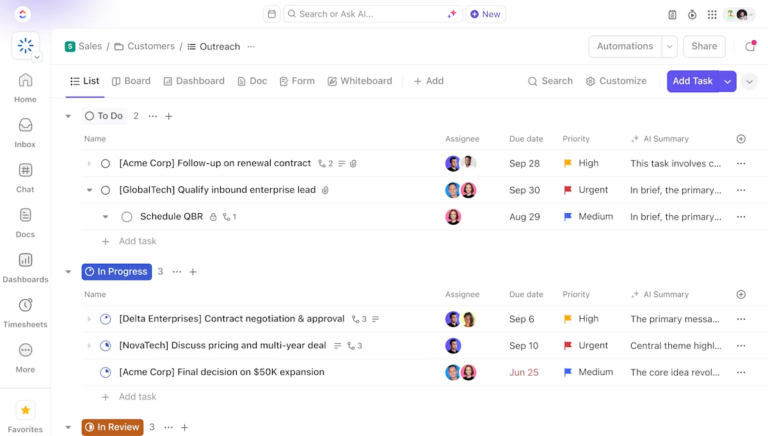
ClickUp CRM Project Management Software provides a unified platform that blends customer relationship management with robust project management capabilities. This ensures that teams manage client interactions, track sales pipelines, and oversee project deliverables on time.
Here’s how you can use the collaborative CRM software:
ClickUp Docs

ClickUp Docs acts as your CRM project management command center.
Let’s say your sales team is working on a major deal. They can draft a proposal in Docs, tag teammates for input, and embed tasks to track follow-ups.
When the deal closes, customer success doesn’t have to dig through emails or outdated notes—everything they need is already linked in the CRM database. They can access the client’s history, review past conversations, and continue the relationship without missing a step.
Beyond proposals, Docs lets you build dynamic user personas, attach key documents to support tickets, and add checklists to ensure every interaction is logged.
Real-time collaboration, version history, comments, and integrations with Google Docs make it easy to keep everyone on the same page.
ClickUp Brain

ClickUp Brain is an AI-powered assistant within ClickUp that instantly pulls key customer details, deal progress, and past interactions anytime you need them. It gives you real-time insights, automatically summarizes conversations, surfaces relevant documents, and even suggests next steps.
Suppose a customer submits a request about a delayed order. ClickUp Brain instantly retrieves past interactions, links the request to the right task, and shares a templated response.
Need a deal summary before your next sales meeting? Brain auto-generates a concise update, referring to relevant emails, task notes, and team discussions for accuracy.
🔍 Did You Know? The revenue for the CRM software market is forecasted to grow steadily, with an annual growth rate of 10.17%, resulting in a market volume of $145.61 billion by 2029. This growth is attributed to the growing demand for CRM software solutions worldwide.
Managing customer service projects can feel like juggling a hundred tasks at once—tracking tickets, resolving issues, and collaborating with different teams, all without missing anything. That’s where the ClickUp Customer Service Project Management Software comes in.
Let’s say a customer reports a technical issue. Instead of losing it in an endless chat thread, a support rep creates a ClickUp Task, assigns it to the right team member, and sets a due date.
Thanks to ClickUp Chat, the entire conversation stays linked to the Task.
ClickUp Chat

Chat takes the chaos out of customer management strategies, bringing conversations, tasks, and workflows into one seamless platform. No more jumping between emails, Slack, and ticketing systems—everything happens within ClickUp.
For instance, a support team handling high-priority customer issues uses Chat to organize everything. Here’s how:
📖 Also Read: Free Customer Journey Map Templates
ClickUp Sales Project Management Software

The ClickUp Sales Project Management Software offers everything a sales team can hope for. It consolidates lead tracking, customer onboarding, and deal collaboration into a single platform.
Let’s say you’re a sales manager overseeing a team closing deals for a SaaS company.
You can create a custom sales pipeline using ClickUp Board View, where each column represents a stage. It’s also convenient to:
ClickUp also offers excellent ready-to-use CRM templates for sales teams. Here’s one of the best:
ClickUp CRM Template
We get it—managing leads, tracking deals, and maintaining customer relationships can feel overwhelming. The ClickUp CRM Template is the ultimate solution for streamlining sales without switching between multiple tools.
It’s highly customizable and adapts to your sales process, whether you’re a solo entrepreneur nurturing leads or a growing sales team managing a high-volume pipeline. This template keeps everything organized, connected, and efficient—all while combining CRM and project management.

Pipedrive is a sales-focused CRM designed to help teams manage their pipeline more effectively. It provides a visual sales process, allowing users to track deals from initial contact to closing. With its deal-driven approach, you can customize pipeline stages to match your unique customer journey, ensuring no opportunity gets missed.
It also offers analytics and reporting tools to support customer segmentation, analyze conversion rates, and monitor deal progress, helping businesses refine their sales strategies. Designed for small to mid-sized teams, it’s an intuitive and cost-effective solution for sales teams.
🧠 Fun Fact: In March 2020, Pipedrive acquired Mailigen, an email marketing platform, to enhance its CRM capabilities with integrated email marketing features.
Pipedrive is built with sales teams in mind, offering features that simplify deal tracking, automate tasks, and provide insights to build successful CRM strategies.
Let’s look at some of its key features. 📔

Pipedrive’s visual sales pipeline gives you a clear, kanban-style overview of where each deal stands. You can customize the pipeline to match your sales process, add unique deal stages, and track progress at a glance.
For instance, a sales manager can set up deal stages like ‘Qualified Lead’ and ‘Negotiation’ to track daily progress and identify bottlenecks before they impact revenue.
🧠 Fun Fact: CRM has emerged as an essential tool for businesses. Tech companies lead the way, with 94% using CRM software to drive sales efficiency and enhance customer relationships. Beyond tech, businesses in manufacturing (86%), education (85%), healthcare (82%), and human resources (81%) are the biggest CRM users.
📖 Also Read: Best Service Desk Software Tools for Support Teams

Not all leads are worth chasing. Pipedrive scores and categorizes leads, helping you focus on high-value opportunities. Plus, web forms capture new leads directly from your website, automatically adding them to your pipeline.
It also pulls in data from LinkedIn and other sources, giving you richer insights before every conversation.
🔍 Did You Know? Amazon’s recommendation engine is basically a giant CRM. Every time you get a ‘customers also bought’ suggestion, that’s CRM technology working behind the scenes to track your preferences and improve your shopping experience.

Repetitive tasks shouldn’t eat up your day. Pipedrive’s AI sales assistant automates follow-up emails, task assignments, and deal updates, so you can focus on closing deals instead of updating spreadsheets.
Pipedrive also helps you predict sales. Customizable reports provide insights into deal conversion rates, sales team performance, and future revenue trends.
📖 Also Read: Top Pipedrive Alternatives for Boosting Your Sales
🔍 Did You Know? 57% of companies couldn’t maintain good customer experience because their CRM wasn’t accessible. While only 32% of companies have a single view of customer information, 90% think it would be valuable.
ClickUp or Pipedrive—which one is right for you?
It all depends on what you need. Are you looking to streamline your sales pipeline and close teams, or do you need a flexible workspace for everything?
Both tools bring powerful features to the table but shine in different areas. Let’s compare them to help you decide what fits your workflow best. 🎯
| Criteria | ClickUp | Pipedrive |
| Purpose | Comprehensive project management and productivity tool | CRM software focused on sales pipeline management |
| Key strengths | Highly customizable workflows, agile project management, and real-time collaboration tools | Simplified sales process, deal tracking, and lead management |
| Ease of use | Moderate learning curve due to extensive features but intuitive for basic tasks | User-friendly interface with minimal setup required for CRM tasks |
| Customization | 15+ views, including Kanban, Gantt, Calendar, Timeline, and Mind Maps for project tracking | Limited customization primarily focused on sales workflows |
| Collaboration | Offers real-time collaboration tools like Whiteboards, Chat, and Assign Comments | Limited collaboration features, mainly focuses on internal sales team coordination |
| Views | Integrates with various tools but less extensive compared to ClickUp | Only pipeline views for managing deals and sales processes |
| Integrations | Integrates with 1,000+ applications, including Pipedrive and Google Workspace | Integrates with various tools but is less extensive compared to ClickUp |
Efficiency depends on how well a platform automates repetitive tasks. Let’s see how Pipedrive and ClickUp handle workflow automation.
Think of ClickUp as your personal productivity assistant.
With integrated ClickUp Brain, you can automate everything from task management to recurring projects, status updates, and notifications. Plus, you can create custom CRM workflows to streamline complex processes across teams.
Pipedrive is ideal for sales workflow automation. It automates follow-ups, deal progression triggers, and email syncing—great for closing deals faster but not as robust for general workflow automation.
🏆Winner: ClickUp for its more versatile automation capabilities across cross-functional teams and industries.
Tracking performance and making data-driven decisions require strong reporting tools. Here’s how ClickUp and Pipedrive compare in analytics and insights.
ClickUp lets you build custom dashboards, track project progress, analyze time spent, and generate reports based on your specific needs. These dashboards can include cards such as task statuses, time tracking, and goal progress to monitor performance in real time and support better resource management.
Pipedrive specializes in delivering in-depth sales analytics.
You can generate visual reports to track deals, forecast revenue, and assess individual and team sales performance, facilitating data-driven decision-making. The platform also offers customizable dashboards that present sales data through charts, graphs, and tables.
🏆 Winner: It’s a tie! You can use ClickUp for general analytics and Pipedrive for sales reporting.
🧠 Fun Fact: The mobile revolution made CRM more flexible. Sales reps once had to be at their desks to access customer data, but now they can manage relationships from their phones while on the go.
Seamless teamwork relies on the right collaboration features. Let’s see how these CRM software examples support team communication and coordination.
ClickUp is packed with teamwork essentials: real-time chat, comment threads, whiteboards, and document sharing. Need to manage workloads across multiple projects with many teams? ClickUp has your back!
Collaboration in Pipedrive is mainly sales-focused—assigning leads, tracking deals, and sharing insights within your pipeline. Great for sales, but not ideal for broader teamwork.
🏆 Winner: ClickUp for team collaboration beyond sales tasks.
🧠 Fun Fact: The most prominent CRM challenges were technology integration (41%), platform feature limitations (40%), and internal knowledge and skills (37%). 43% of leaders cite forecasting and pipeline insights as the most important CRM-based activity organizations prioritize today.
We took to Reddit to see what real users had to say about ClickUp vs. Pipedrive and the responses didn’t disappoint. While no specific threads discuss the two platforms, here’s what users have to say about these tools. 👇
Users have been praising ClickUp for its functionalities to manage everything all at once:
Tried basically anything serious commercial tool out there. What I like about ClickUp is basically what they market: one app for everything. Really like the level of customisation of task mgmt and the kb is pretty solid too. They recently released a huge improvement of the chat so we are replacing also Slack.
ClickUp’s value for money has also been appreciated by Reddit users.
It definitely took me a while to get my head around it…The real superpower of ClickUp is in the ability for different users and teams to be able to work from the same information but view it in whatever format (view) works best for them…ClickUp lets different teams in the organization operate in whatever workflow they prefer, but out of a centralized information structure…ClickUp is an absolutely killer system. Bang for buck and power to ease-of-use, I’ve never seen anything else come close.
On the other hand, some Reddit users praise Pipedrive,
I’ve been using Pipedrive for B2B for about 6 months and I love it. My one qualm, which I’ve written about before is that deduplication isn’t very simple. If you upload 2 excel sheets of contacts or organizations which have some overlapping data, you have to manually deduplicate every applicable entry.
Some users complain about the platform’s pricing,
Pipedrive has an interesting pricing concept—they charge for add-ons at a flat rate per company rather than per user. This can sometimes seem expensive when you initially calculate it per user, but it’s actually quite reasonable. For instance, their Campaigns module is priced at around $20 per month, which isn’t too costly, though it’s not the most robust option available.
🧠 Fun Fact: CRM started with pen and paper. Before software took over, businesses managed customer relationships using handwritten notes, index cards, and Rolodexes. Now, everything is digital, automated, and AI-powered.
The results are in, and we have a clear winner! ClickUp emerges as the superior choice. 👑
While Pipedrive offers a user-friendly interface tailored for sales teams, it falls short in several key areas essential for comprehensive business management. Its focus on sales pipeline management limits its versatility, making it less suitable for teams requiring broader project management capabilities.
On the other hand, ClickUp, the everything app for work, goes beyond CRM functionalities, offering task management, marketing automation, multiple views, and more for a holistic business solution.
Designed for scalability, ClickUp grows with businesses of all sizes, making it a future-proof investment.
Sign up to ClickUp for free today! ✅

Manasi Nair
Max 21min read
Manasi Nair
Max 24min read
Manasi Nair
Max 19min read

© 2026 ClickUp





