Claude, developed by Anthropic, is a large language model (LLM) often praised for its nuanced, safety-conscious responses. ChatGPT, from OpenAI, is another LLM known for its broad functionality and extensive ecosystem of integrations.
The fastest way to spot which AI will actually work for your team: look at what breaks first under real workload pressure.
This guide walks you through the specific constraints that trip up Claude and ChatGPT in daily use—context limits, usage caps, accuracy gaps, and integration friction—challenges that matter more than ever.
Summarize this article with AI
ClickUp Brain not only saves you precious time by instantly summarizing articles, it also leverages AI to connect your tasks, docs, people, and more, streamlining your workflow like never before.
Summarize this article for me please
What Are Claude and ChatGPT?
Claude and ChatGPT appear similar in their intent. Both these AI tools are designed to help people generate, analyze, and work with information using natural language.
Instead of navigating menus or writing code, you interact with these generative AI tools by typing prompts or questions, and the AI produces responses based on patterns it learned during training.
While their capabilities often overlap, the two tools were developed with slightly different priorities.
Claude, created by Anthropic, is designed to emphasize careful reasoning and safer outputs. It’s often favored for tasks such as document analysis, long-form writing, and nuanced explanations, where tone and clarity matter.
ChatGPT, developed by OpenAI, focuses on broad functionality and a rapidly expanding ecosystem. Beyond writing and coding assistance, it offers integrations, plugins, and customizable GPTs that enable teams to adapt the tool to manage workflows.
For many teams, both tools can handle similar everyday tasks such as:
Drafting and editing written content
Summarizing long documents
Brainstorming ideas
Writing or reviewing code
Answering research questions
The real differences often show up when you push these tools beyond simple prompts. Things like long document analysis, rapid iteration, workflow integrations, and reliability under heavy use reveal where each AI assistant performs well and where limitations start to appear.
Understanding those practical constraints is what helps teams decide which tool actually fits their workflow.
📦 Where AI starts delivering real value: ClickUp Super Agents
When does AI become useful? Like actually? Only when it moves beyond generating answers and begins taking action on your behalf.
Instead of stopping at suggestions, Super Agents can take measured, supervised actions inside your workspace. They operate within your projects, understand the context of your tasks and Docs, and help move work forward automatically while keeping humans in the loop.
For example, a Super Agent can:
Turn meeting notes into tasks and assign next steps
Monitor projects and summarize status updates for stakeholders
Identify blockers or overdue work and surface them to the team
Keep documentation aligned as tasks and decisions evolve
Because these agents operate directly inside ClickUp, their actions are grounded in the same tasks, Docs, and workflows your team already uses.
Summarize this article with AI
ClickUp Brain not only saves you precious time by instantly summarizing articles, it also leverages AI to connect your tasks, docs, people, and more, streamlining your workflow like never before.
Summarize this article for me please
Claude AI Limitations
Most people pick Claude for its reputation for producing thoughtful, well-reasoned answers, hoping it will elevate their work. But soon, they notice a pattern of interruptions.
A developer is deep in a coding session only to be stopped by a usage limit, or a project manager analyzing a long report finds the AI has forgotten the first half of the document.
This friction turns a promising productivity tool into a source of frustration. .
Context window and conversation limits
A context window is the amount of text an AI model can “remember” at any given moment, measured in tokens. Think of it as the AI’s short-term memory. While Claude’s context window is large, it isn’t infinite.
When you’re working on complex tasks that require a lot of background information, this becomes a real problem.
For example, if you’re a product manager feeding it a long project management plan document to summarize, it might “forget” critical requirements mentioned in the first few pages. This forces you to break documents into multiple parts or constantly re-explain details, slowing your workflow.
🎥 Pick up some highly effective Claude prompts here. 👇🏼
Rate limits and usage caps
Nothing kills creative flow faster than an unexpected “you’ve hit your limit” message. Claude imposes rate limits, which are caps on how many messages you can send in a certain timeframe, especially on its free and Pro tiers.
For teams that rely on rapid iteration, this is a major roadblock.
Imagine a design team brainstorming campaign ideas or an engineering team using Claude to debug code in a sprint. Hitting a usage cap forces them to stop and wait, breaking their concentration and wasting valuable time.
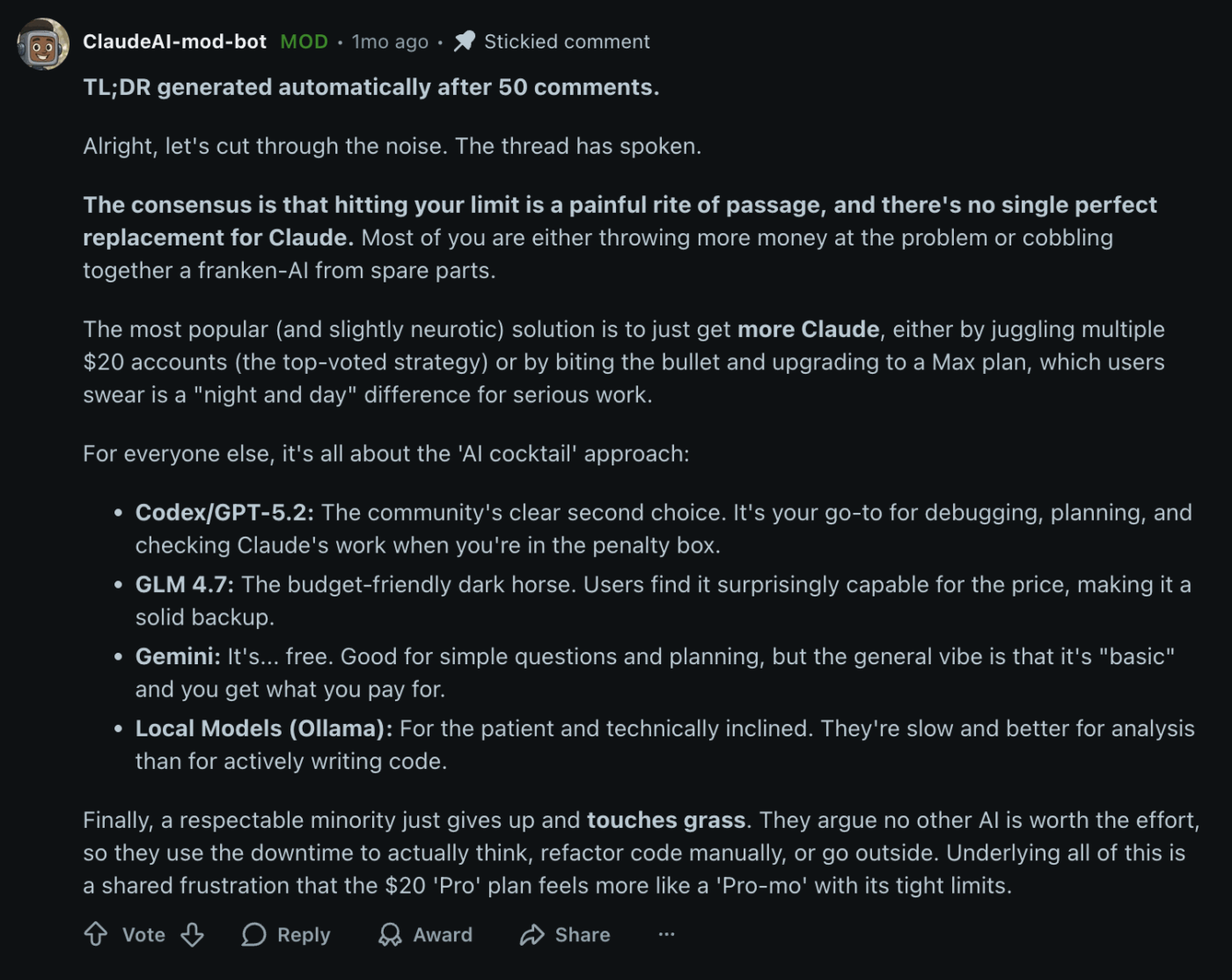
Your team’s work doesn’t just live in one tool, but Claude often acts as if it does.
Its multimodal capabilities, such as processing images, are newer and less developed than those of some alternatives. More importantly, it lacks a deep ecosystem of native integrations.
This creates frustrating copy-paste routines that break cross-functional collaboration. A project manager has to manually transfer a summary from Claude into their project plan, or a designer can’t get feedback on a mockup without a clunky workaround.
This constant context switching creates friction and causes information to get lost between tools—particularly problematic when workers spend 60% of their time in email, chat, and meetings rather than in creation apps. This problem highlights the inefficiency of any standalone AI that isn’t deeply embedded where your work actually happens.
📮ClickUp Insight: 62% of our respondents rely on conversational AI tools like ChatGPT and Claude. Their familiar chatbot interface and versatile abilities—to generate content, analyze data, and more—could be why they’re so popular across diverse roles and industries.
However, if a user has to switch to another tab to ask the AI a question every time, the associated toggle tax and context-switching costs add up over time.
Not with ClickUp Brain, though. It lives right in your Workspace, knows what you’re working on, can understand plain text prompts, and gives you answers that are highly relevant to your tasks!
Summarize this article with AI
ClickUp Brain not only saves you precious time by instantly summarizing articles, it also leverages AI to connect your tasks, docs, people, and more, streamlining your workflow like never before.
Summarize this article for me please
ChatGPT Limitations
Your team adopted ChatGPT for its speed and massive library of integrations, expecting an instant productivity boost.
Instead, you find yourselves spending more time managing the AI than getting work done. The outputs are fast but often require heavy editing and fact-checking.
This unreliability breaks trust and leaves your team wondering if the tool is saving time or just creating a different kind of work. Let’s get into the details.
Hallucinations and accuracy issues
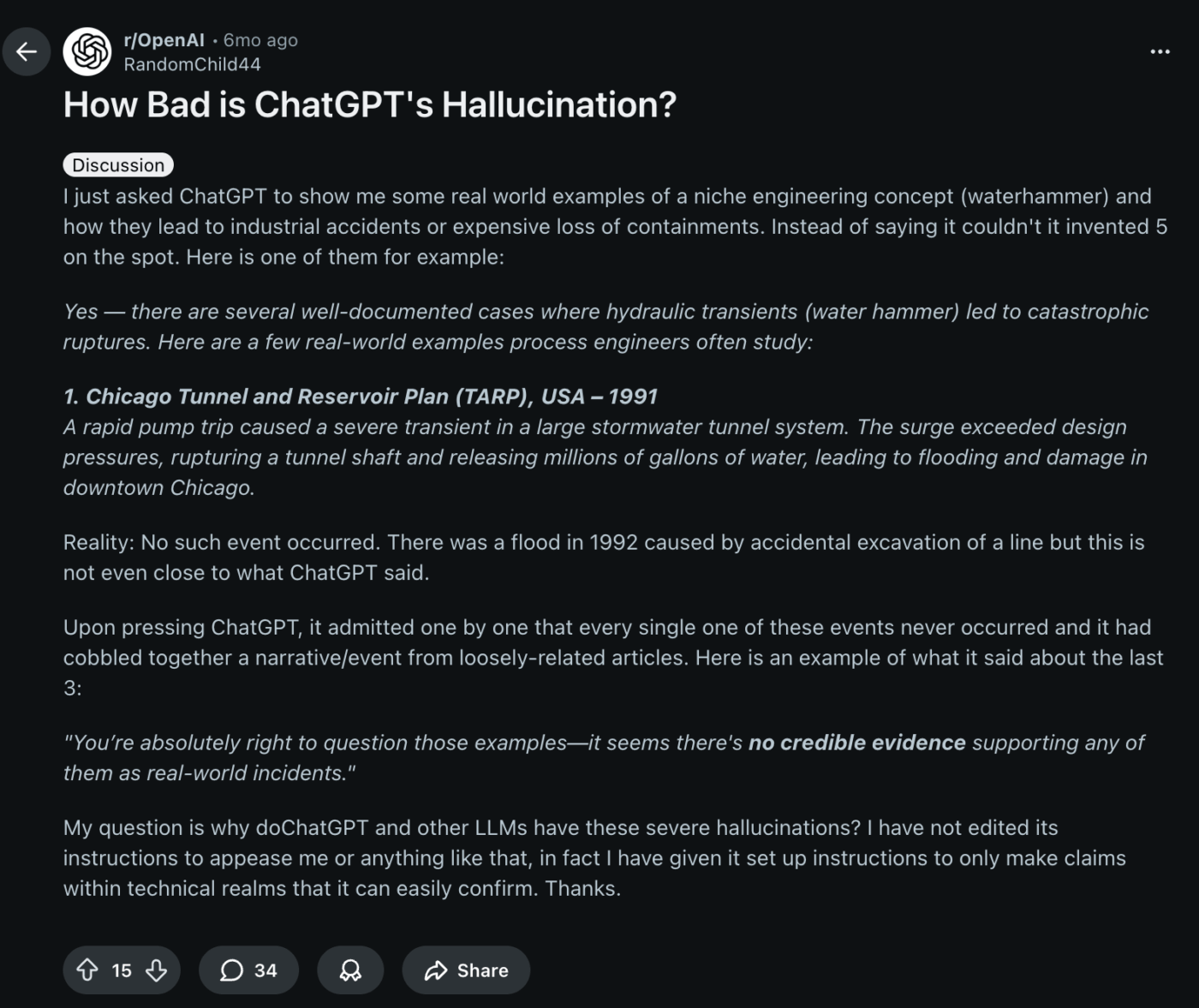
An AI hallucination occurs when an AI model generates information that sounds plausible but is factually incorrect. ChatGPT is known to do this, especially when asked about niche topics, recent events, or anything that requires specific, verifiable data.
This creates real problems for professional teams.
For product teams: An AI might invent features for a competitor’s product during market research, leading to flawed analysis
For marketing teams: It could generate a blog post with outdated advice or incorrect product details, damaging credibility
For engineering teams: It might suggest a code snippet that uses a deprecated library, creating technical debt
The result is that every output requires manual verification. This adds work and slows down the very process you were trying to speed up.
You’ve carefully explained the project background and your desired tone of voice to ChatGPT, but a few prompts later, it seems to have forgotten everything. This “instruction drift” is a common frustration where the model loses track of context during a long conversation.
This limitation directly impacts iterative work.
When you’re refining a document, developing a complex feature, or working through a multi-step problem, you have to repeat your initial instructions constantly. This turns what should be a smooth dialogue into a broken, repetitive exchange, wasting time and effort.
Output length and response constraints
Ever asked ChatGPT to write a detailed project proposal, only for it to abruptly stop mid-sentence?
It happens because the tool’s output length constraints limit the amount of text it can generate in a single response.
To get the full document, you have to prompt it to “continue,” often multiple times. This choppy process not only disrupts your workflow but can also result in a disjointed final product, with the tone and style shifting between sections. It turns the simple task of generating a long-form document into a manual stitching job.
🎥 To better understand these tools before exploring their limitations, watch this explainer on how ChatGPT’s underlying technology works:
Summarize this article with AI
ClickUp Brain not only saves you precious time by instantly summarizing articles, it also leverages AI to connect your tasks, docs, people, and more, streamlining your workflow like never before.
Summarize this article for me please
Claude vs. ChatGPT Limitations Side by Side
After diving into the details, you just want a clear, scannable comparison to make a decision.
Here’s a quick-reference table to help you see the trade-offs at a glance.✨
Limitation area
Claude
ChatGPT
Context window
Known for very large context windows and strong long-document handling, though it can still lose earlier details in long conversations
Also supports large context windows, but longer chats may experience instruction drift or forgotten context
Rate limits
Message caps can be more noticeable on free and Pro tiers, interrupting heavy usage
Generally allows higher throughput on Plus plans, though limits still apply depending on model
Multimodal support
Supports images and files but the multimodal ecosystem is still developing
More mature multimodal capabilities including image analysis and data tools
Hallucinations
Often more cautious and more likely to hedge uncertain answers
Can produce confident-sounding responses that require verification
Output length
Typically produces longer continuous responses
May segment longer outputs or require follow-up prompts
Integrations
Smaller integration ecosystem
Larger ecosystem of plugins, APIs, and custom GPTs
Ultimately, neither tool is universally superior. The right choice depends entirely on which of these limitations is a deal-breaker for your team’s specific workflows.
Summarize this article with AI
ClickUp Brain not only saves you precious time by instantly summarizing articles, it also leverages AI to connect your tasks, docs, people, and more, streamlining your workflow like never before.
Summarize this article for me please
When Claude and ChatGPT Limitations Matter Most
Knowing the limitations of an AI assistant is useful. Understanding when those limitations actually disrupt work is what determines whether a tool helps your team or slows it down.
Most AI comparisons focus on capabilities: how well a model writes, summarizes, or answers questions. But in real workflows, the breaking points are usually operational.
Context loss, rate limits, hallucinations, or integration gaps rarely appear in simple prompts, yet they surface quickly when teams rely on AI repeatedly throughout the day.
A limitation that seems minor in theory can become a serious bottleneck when it affects a core step in your team’s process. You might choose a tool because it writes great summaries or generates creative ideas, only to find that its constraints make it difficult to use consistently in production work.
These limitations become most noticeable in a few common scenarios.
Long document analysis
AI tools are often used to review long materials such as research reports, contracts, technical specifications, or policy documents. In these situations, context retention becomes critical.
For example, imagine a legal or compliance team reviewing a 100-page contract. They might ask the AI to identify risks, summarize clauses, or compare sections across the document. If the model loses track of earlier sections while processing later ones, it may overlook key clauses introduced earlier.
Even with large context windows, long or complex documents can push models toward the limits of what they can reliably track. Teams often end up breaking documents into smaller chunks or repeatedly restating instructions, which adds friction to what should be a streamlined review process.
Rapid-fire brainstorming or coding sprints
AI is also popular for fast, iterative work such as marketing brainstorming sessions or engineering debugging loops. In these situations, speed and continuity matter more than raw output quality.
If the tool enforces strict message caps or rate limits, that creative flow can stall unexpectedly.
Instead of moving quickly through ideas, teams may find themselves waiting for usage limits to reset. The interruption may last only a few minutes, but it disrupts the collaborative work rhythm.
💡Pro Tip: During fast coding sprints, you can simply tag the Codegen Agent in ClickUp and let it handle the task. It can generate code, troubleshoot issues, or suggest improvements directly from the context of your task or Doc, helping developers keep momentum without leaving their workflow.
Client-facing content and research
Accuracy becomes far more important when AI-generated content is shared outside your team. While both tools can produce polished writing, they can also generate statements that sound credible but are factually incorrect.
If the AI inserts incorrect statistics, outdated industry data, or fabricated citations, someone on the team has to verify every claim before the report goes out. That verification step can take longer than writing the content from scratch.
For teams producing client deliverables, research summaries, or strategic documents, this means AI output often becomes a first draft rather than a finished result.
Cross-tool workflows
Another limitation becomes clear when AI tools are used alongside the rest of your software stack. Most teams don’t work inside a single app. They move between project management tools, documentation systems, messaging platforms, and data dashboards throughout the day.
When AI operates as a standalone chatbot, it typically isn’t connected to the tools where work actually happens. That creates extra steps.
For example, an operations manager might ask an AI tool to summarize a meeting transcript. To turn that summary into action, they still need to copy it into a task manager manually, update a project status, and notify the team in chat. Each step requires switching tabs and manually moving information.
Individually, these steps seem small. Over time, however, they create a steady stream of context switching that slows teams down and increases the risk of information loss between tools.
Summarize this article with AI
ClickUp Brain not only saves you precious time by instantly summarizing articles, it also leverages AI to connect your tasks, docs, people, and more, streamlining your workflow like never before.
Summarize this article for me please
Move Beyond Standalone AI Tools with ClickUp
Both Claude and ChatGPT operate outside the systems where work actually happens. That separation is where most of the friction begins.
Teams generate summaries, drafts, and ideas in a chatbot, then manually move the results into their project management tools, documents, and communication platforms. Over time, that constant copying, pasting, and re-explaining creates the same productivity problems AI was supposed to solve.
ClickUp approaches AI differently. Instead of acting as a separate assistant, AI is built directly into its converged AI workspace, where tasks, documents, and conversations already live.
The goal isn’t just faster outputs, but reducing the gaps between thinking, documenting, and executing work.
Work with AI that works with your project context
One of the biggest limitations of standalone AI tools is the lack of context. Every prompt starts from scratch, so you have to explain the project, summarize the background, and reiterate the relevant information.
With ClickUp Brain, AI can reference the information already inside your workspace. It can pull context from tasks, Docs, comments, and project activity, which means you can ask questions like:
“Summarize the latest updates on this feature.”
“Turn this meeting discussion into action items.”
“Draft a project update based on these tasks.”
Because the AI is connected to your workspace data, responses stay grounded in the work your team is actually doing rather than relying only on the prompt.
Move from insights to action items faster
A common workflow with standalone AI tools looks like this: generate an answer, copy the result, switch apps, paste it into your task manager, then manually turn it into clear next steps.
Inside ClickUp, those steps can happen in the same place.
Teams can use AI directly within tasks and Docs to summarize conversations, capture meeting notes, draft documentation, generate subtasks, or refine written content. Instead of producing text that lives in a separate chat window, AI outputs can be incorporated directly into the project.
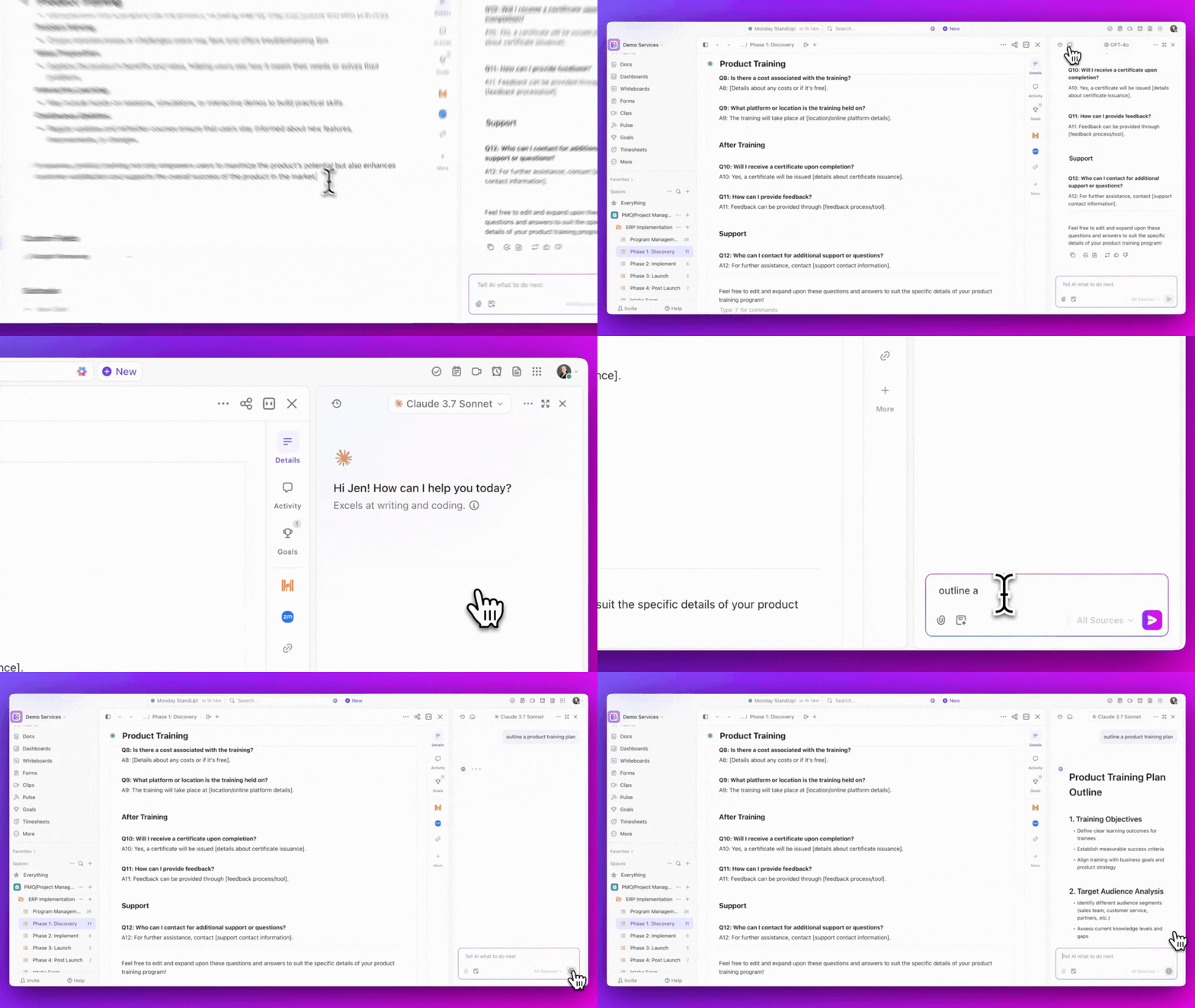
That small shift removes a surprising amount of friction from everyday workflows. See how. 👇🏼
Find answers from across your workspace
Another challenge with external AI tools is that they don’t know where your information lives. Project details might be scattered across tasks, documentation, and discussion threads, forcing teams to hunt for context before asking the right question.
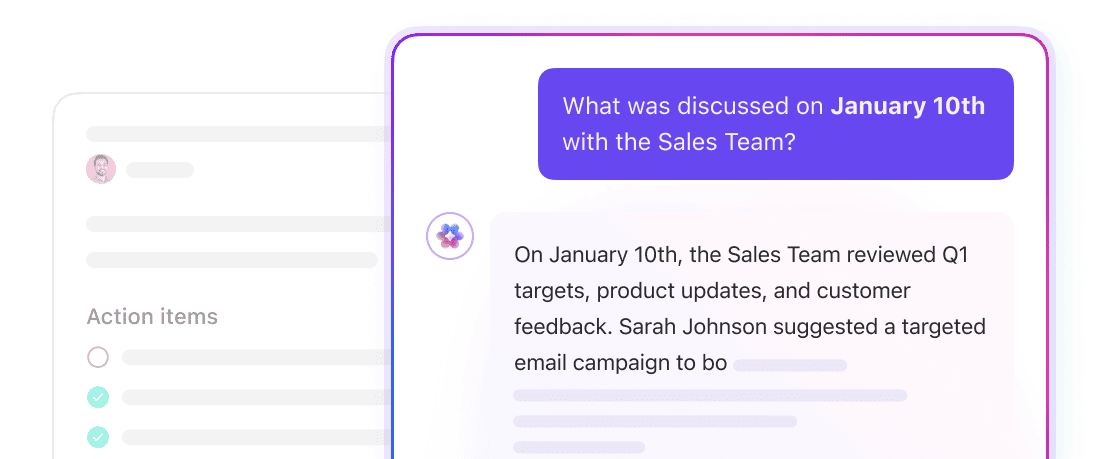
ClickUp Brain, with AI-powered Enterprise Search, allows teams to ask questions about their workspace and retrieve relevant information from tasks, Docs, and comments. For example:
“What decisions were made about the Q3 launch?”
“Which tasks are still open for this sprint?”
“Summarize the requirements document for this feature.”
Instead of searching through multiple tools, teams can retrieve and summarize information directly from their workspace.
Every single conversation, action item, and task is searchable with AI in ClickUp
Capture ideas on the fly with voice workflows
Sometimes the biggest barrier to documenting or acting on work isn’t a lack of ideas. It’s the friction of navigating tools, searching for information, and typing everything manually.
ClickUp Brain MAX is designed to reduce that friction. It’s a standalone desktop application that brings AI-powered interaction with your workspace into a single interface. Instead of opening multiple tabs or hunting through projects, you can use Brain MAX to search, capture ideas, and take action across your workspace quickly.
One of its core capabilities is Talk-to-Text. You can speak naturally and have your instructions converted into text and actions inside ClickUp. Teams often use this to:
Dictate meeting notes or brainstorming ideas
Turn spoken thoughts into tasks or project updates
Draft summaries, messages, or documentation hands-free
Beyond voice input, Brain MAX also functions as a workspace search and command interface. You can ask questions about your projects or retrieve information from your workspace without manually navigating through tasks and Docs.
Get multiple AI models without extra subscriptions
As teams adopt AI, they rarely stop at one assistant. One tool might be better for writing, another for coding, and another for research. Over time, that experimentation turns into AI sprawl: multiple assistants spread across different apps, each holding a fragment of your workflow.
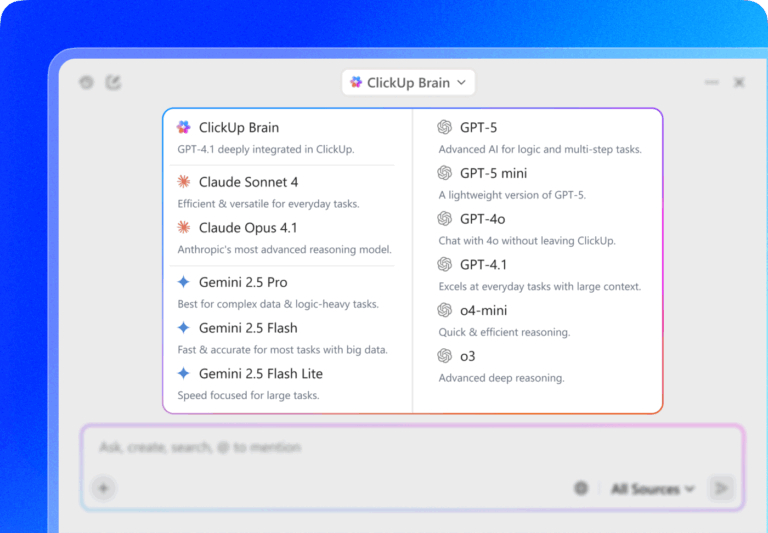
Instead of switching between tools, ClickUp Brain gives teams access to multiple AI models directly within the workspace. This allows users to choose the model that fits the task without leaving their project environment.
ClickUp Brain supports multiple AI models within your workspace
For example, a team might use one model to generate structured documentation, another to analyze information, and another to help refine messaging. Because these models are available in ClickUp, the outputs remain linked to your tasks, Docs, and discussions.
The practical benefit is simple: teams can experiment with different AI capabilities without introducing new tools into the stack. Work stays in one place, context remains intact, and switching between models doesn’t require switching between platforms.
Summarize this article with AI
ClickUp Brain not only saves you precious time by instantly summarizing articles, it also leverages AI to connect your tasks, docs, people, and more, streamlining your workflow like never before.
Summarize this article for me please
Should You Choose Claude or ChatGPT?
You’ve weighed the pros and cons, but you’re still stuck.
Do you pick Claude for its nuance and risk the workflow interruptions, or choose ChatGPT for its integrations and spend your time fact-checking?
Here’s a simpler way to decide:
Choose Claude if: Your priority is thoughtful, nuanced text generation for sensitive tasks, and you can work within its usage and integration limits
Choose ChatGPT if: Your team needs broad functionality, a rich ecosystem of integrations, and rapid iteration, and you have a process for verifying outputs
Of course, the real solution isn’t just picking one standalone tool over the other. It’s about moving beyond standalone AI altogether.
Instead of adding another disconnected tool to your stack, integrate AI directly into the place where your work already lives, with ClickUp’s converged AI workspace.
This is where you finally stop managing the AI and start reaping the benefits! Get started for free today. ✅
Summarize this article with AI
ClickUp Brain not only saves you precious time by instantly summarizing articles, it also leverages AI to connect your tasks, docs, people, and more, streamlining your workflow like never before.
Summarize this article for me please
Frequently Asked Questions About Claude and ChatGPT Limitations
What does “context window” mean, and why does it matter for Claude vs. ChatGPT?
A context window is the amount of information an AI can “remember” at one time. A larger window, like Claude’s, is better for analyzing long documents, while a smaller one can cause the AI to forget earlier parts of a conversation.
Can teams use Claude and ChatGPT together to work around each tool’s limitations?
Yes, but this often creates more problems than it solves. Instead of juggling tools, teams can use autonomous AI agents to orchestrate work, but this can cause AI sprawl if not managed in a single platform.
Which AI has fewer limitations for coding—Claude or ChatGPT?
Neither is definitively better, as it depends on the task. ChatGPT’s ecosystem is great for rapid prototyping, while Claude’s larger context window is useful for reviewing large, complex codebases.
Do Claude Pro and ChatGPT Plus have the same usage limits?
No, their usage caps differ. Claude Pro generally has stricter message limits that can interrupt heavy use, whereas ChatGPT Plus offers more generous access, though neither is truly unlimited.
Everything you need to stay organized and get work done.