


Sorry, there were no results found for “”
Sorry, there were no results found for “”
Sorry, there were no results found for “”
It’s not uncommon to see social media users expressing their frustrations with their feeds. Often, algorithms control these feeds, and rather than seeing posts from friends or creators they follow, the feed is filled with content pushed by algorithms.
This has led many to shift to Bluesky, a decentralized social networking site that aims to be the ‘masterplace of algorithms,’ allowing users to customize their feeds.
However, Bluesky is still evolving. It has a smaller user base than platforms like Instagram and X, and finding people can be tricky due to unique naming conventions and limited search functionality. Plus, Bluesky allows users to create community guidelines, offering a radically different social media experience.
If you are not a fan of Bluesky, there are plenty of other social media platforms you can explore. We’ve compiled a list of 13 Bluesky alternatives to help you find the perfect social media platform!
Here’s a list of the top 13 Bluesky alternatives and competitors:
Here are the capabilities you should look for in a Bluesky alternative:
Think about platforms that give you control by decentralizing how they work. You can join or host a server, so your data isn’t tied to a company’s rules or moderation. Plus, decentralization makes these platforms more resilient, reducing the chances of outages or censorship getting in your way.
Look for platforms that put moderation in the hands of the community. These platforms let users shape their experience with tailored rules and content filters, making it easier to create a safe and inclusive space. It’s all about giving you more control over what you see and engage with.
Go for platforms that can connect with other networks or use federated systems. This allows you to interact with a wider audience, even outside your platform. It’s a great way to stay connected without juggling multiple accounts.
Look for platforms offering unique features, like chronological feeds, customizable profiles, emojis, or options to share photos and videos. A platform that’s easy to navigate and includes tools like polls, communities, or live chats can make your social experience more fun and tailored to your needs.
💡Pro Tip: Join a public server with active moderation and a vibrant community. It’s an easy way to test the platform before hosting your own server or diving deeper into customization!
Here are the 13 best Bluesky alternatives you can choose from:

Threads is Instagram’s take on a microblogging platform designed to keep things simple and familiar for users. Its layout and functionality are similar to those of other text-based platforms, making it easy to share updates, join conversations, and engage with followers—all while staying connected to your Instagram account.
Threads’ standout feature is Tags. Instead of cluttering a post with multiple hashtags, users can simply add one tag that describes the content. This allows people to engage with posts that interest them and connect with others who share similar passions.
I like the Threads app so far. There are many things they need to fix, and some features need to be added, but I totally get why they rushed it out. Now it’s available as a desktop version, and it is easier to toggle between accounts. I think it’s definitely worth joining. Also, sponsorship and brand deals are one of the simplest methods to benefit from the Threads app.
📖 Read More: The Best Enterprise Communication Tools

If you’re looking for a social network that’s all about privacy and control, Diaspora might be worth checking out. Unlike the usual platforms that keep your data on their servers, Diaspora lets you decide where your information lives. You can pick a server on the browser, called a ‘pod,’ or even host your own.
What sets Diaspora apart are its core principles: decentralization, freedom, and privacy. Basically, you get to decide who sees your content, how you connect with people, and where your data is stored.

If you like Instagram’s features but don’t want an algorithm to control your feed, PixelFed might be worth considering. It is a photo-sharing platform that puts you in charge of your content creation and privacy. You can share and edit photos, organize them into albums, and engage with others through likes and comments.
The best part? It’s completely ad-free and doesn’t use algorithms, so your feed stays chronological and distraction-free. Before you sign up, you can browse different servers for art, engineering, and other purposes.
📖 Read More: 10 Best Business Messaging Apps

Nostr is not your typical social platform with a centralized server. It is a programming language used for communication. When you sign up, you generate a private key that acts as your personal access to the platform.
There’s no email or phone number involved, so you’re in full control. Your posts and interactions are sent through relays—essentially servers that forward messages between users. This makes it powerful and flexible but can also feel technical or intimidating for newcomers.

Post News is about thoughtful discussions and curated content, focusing on quality rather than quantity. It’s a space to dive into news, opinions, and discussions without the usual noise.
What sets it apart is its emphasis on content from verified sources, so you’re engaging with trustworthy information. If you value meaningful conversations and reliable news, Post News is worth checking out.

Hive feels like a nice blend of X and Instagram. The feed works a lot like X’s, showing posts in chronological order, while the visual style and fun extras—like profile music, GIFs, and polls—will remind you of Instagram.
This platform allows you to add Profile music, text and image posts, and polls. Hive’s customization features offer a personal touch, making it easier to connect with other users.

Friendica is a social platform that simplifies your online interactions. You can join one of the many free public servers available in various languages or set up your own server if you want complete control over your data.
The platform allows unlimited text length and rich formatting options for posts.
What’s really cool about Friendica is how it connects with other networks—whether it’s Mastodon, X, or Diaspora, you can interact with all of them right from one account.
💡Pro Tip: For decentralized platforms like Mastodon or Friendica, the server you choose can greatly shape your experience. Look for communities that align with your interests and values.

X (previously Twitter) is one of the most popular social platforms, loved for its fast-paced, real-time conversations. It’s where people share short updates, called tweets, that can include text, images, videos, and links.
X makes it easier to join and stay updated with global conversations—whether breaking news, trending topics, or viral memes, everything unfolds in real time. Plus, its Spaces feature lets you jump into live audio chats, adding another layer to how you connect with communities and influencers worldwide.
X is a brilliant way to communicate with followers as well as find up to date information and live commentary on current events happening in the world. X is nice but it seems that I am getting more and more notifications of users or posts that have nothing to do with me and do not interest me at all.
✨ Fun Fact: The first-ever tweet was simply “just setting up my twttr” by the founder, Jack Dorsey. X was initially designed as a way for people to update their status in 140 characters.

Mastodon is an open-source social networking platform where users can choose or create the community that best suits them. It operates through servers, each run by independent organizations or individuals, and these servers can vary in focus, rules, and moderation policies.
Once you pick a server, you can follow anyone across the Mastodon network, no matter which server they are on, ensuring that your choice of community never restricts connections.
I like to dip in and participate in conversations with people and topics of interest, and occasionally share fun things from my life. Mastodon has no algorithm. You follow those accounts that interest you, you get followed by those interested in you, and you converse.

Minds is a social network that puts free speech, privacy, and rewards at the center of the experience. It blends familiar features of traditional platforms with blockchain technology, letting you earn for engaging, posting, and contributing.
What’s great about Minds is its commitment to transparency and open-source development, making it a solid choice for content creators who value freedom and control over their online presence.
Steeper learning curve for new users
💡Pro Tip: Many Bluesky alternatives, like Threads or Minds, offer customization options for profiles and feeds. Take time to personalize your setup to get the most out of the platform.

Trust Cafe is a social network focused on meaningful conversations and reliable information.
Unlike traditional platforms, it avoids algorithms and ads, prioritizing user-driven content and a community-centric approach. It’s designed like a Twitter or Threads feed, and you can make comments, follow, and share content on the platform.
🧠 Did you know? WT.Social was built by Wikipedia co-founder Jimmy Wales. It is an ad-free and crowdfunded platform to promote fact-based discussions.

Farcaster is a decentralized social network that focuses on portability and giving users full control. It lets you own your identity and connections, so you can switch between apps or platforms without worrying about losing your followers or data.
Farcaster is also developer-friendly, making it easy to create or use apps within its ecosystem while keeping your identity consistent. If you’re looking for flexibility and control in a social network, Farcaster is worth exploring.
📖 Read More: Free Social Media Calendar Template Options

AT Protocol is the decentralized technology powering Bluesky, built to create a more open and user-controlled social network. It’s all about giving you the freedom to share your identity, content, and followers across different platforms.
In addition, it offers customizable algorithms so you can shape your feed to fit your preferences. If you’re after portability and transparency, AT Protocol has you covered.
🧠 Did you know? The “AT” in AT Protocol stands for “Authenticated Transfer,” a nod to the network’s goal of creating a truly interoperable and decentralized web of social platforms.
📖 Read More: Social Media Project Management: The Ultimate Guide
📮ClickUp Insight: Our survey found that knowledge workers maintain an average of 6 daily connections at their workplace. This probably entails multiple pings back and forth across emails, chat, and project management tools. What if you could converge all these conversations in one place? With ClickUp, you can! It’s the everything app for work that combines projects, knowledge, and chat in one place—all powered by AI that helps you and your team work faster and smarter.
Bluesky and other platforms, including Hive Social and Diaspora, offer personalized community moderation, better privacy, and greater control. However, different servers and guidelines result in scattered communities. Plus, most of these tools have complex onboarding.
This is where you need a tool with features beyond social networking. ClickUp is the everything app for work that combines project management, documents, and team communication in one platform—accelerated by next-generation AI automation and search.
Let’s see how you can use ClickUp to build a robust community.
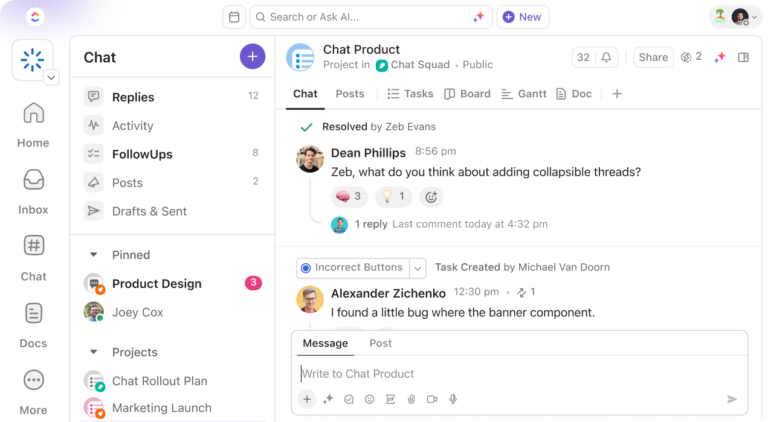
ClickUp Chat provides a built-in communication tool that keeps conversations tied to your projects. You can invite guests to your workspace and create separate discussion channels.
Unlike traditional messaging apps, Chat is directly integrated with your workflows. It links tasks, docs, and messages, making it easy to collaborate without losing context.
You can send important announcements using Posts, turn messages into actionable tasks, sync threads to tasks, and send direct messages to community members for personal interactions.
The best part is that you can summarize threads with ClickUp Brain, ClickUp’s powerful AI assistant. You can also use it to draft engaging, thoughtful posts —personal or on behalf of your organization—to publish across your various social handles.

ClickUp Docs make creating, editing, and sharing documents incredibly easy, all within your workspace. It helps you link project details, brainstorm ideas, or add meeting notes directly to your tasks.
You can organize information by adding comments, setting edit controls, tracking version history, and using rich-formatting options.

ClickUp Whiteboards are a game-changer for teams that love visual organization. They let you brainstorm, plan strategies, and map out workflows with drag-and-drop simplicity. Plus, you can link elements directly to tasks, keeping everything connected.
Whether you’re planning content or aligning your team’s vision, Whiteboards provide a collaborative, all-in-one solution.

ClickUp is also a great tool for social and marketing teams. It helps organize campaigns, plan content, and automate tasks with ClickUp Marketing.
With customizable workspaces like Boards and Gantt charts, ClickUp is easy to tailor to your needs. It stands out by combining project tracking, real-time collaboration, and secure access controls, making it an all-in-one solution for managing and executing projects effectively.
ClickUp offers 1000+ ready-to-use templates to help social media and marketing teams hit the ground running.
The ClickUp Community Management Template offers a great way to stay organized while managing your community. It helps you track interactions, plan events, and keep everything running smoothly. If you’re juggling many community activities, this can simplify things.
The ClickUp Social Media Advanced Template is helpful if you’re working with a big team or running complex campaigns. It’s packed with tools for detailed content planning and performance tracking, so you can stay on top of every detail and keep your team in sync.
That’s not it! You can also use the ClickUp Social Media Template to plan and organize your social media content. It makes scheduling posts and brainstorming ideas easy, helping you stay consistent and on track without overcomplicating things.
[pricing-block]
➡️ Want to stay updated with ClickUp features? Join ClickUp’s Community today!
While Hive Social, Diaspora, and other social media platforms are great for connecting with people and sharing personal updates, they might not help you scale a community because of their own rules, server overload, and low popularity.
If you want to build a large community, ClickUp can be the ideal platform.
It offers easy onboarding. You can invite guests to ClickUp Chat, create separate channels, attach files, create action items from messages, and do much more.
Plus, ClickUp also offers community management templates to help you get started.
Sign up for ClickUp for free today and create meaningful connections!

Manasi Nair
Max 26min read

Arya P Dinesh
Max 16min read
Manasi Nair
Max 24min read

© 2026 ClickUp





