










Still downloading templates?
There’s an easier way. Try a free AI Agent in ClickUp that actually does the work for you—set up in minutes, save hours every week.
Sorry, there were no results found for “”
Sorry, there were no results found for “”
Sorry, there were no results found for “”
Datadog found that 87% of organizations have at least one known exploitable vulnerability in deployed services.
That pressure is a big reason teams rely on beta tracking. A beta program moves fast, feedback pours in from multiple channels, and the cost is steep when something important slips through.
In this post, we’ll break down the top beta program tracking templates, what each one helps you manage, and how to choose the right setup for your launch.
| Template Name | Download Link | Ideal for | Best features |
| Launching a Beta Testing Program Project Plan Template by ClickUp | Get free template | Product managers and launch teams coordinating beta milestones, owners, and timelines across departments | Project-plan sections (exec summary, scope, schedule, cost); task-level fields (impact, effort, due date, department); status-based progress tracking (To Do, In Progress, Complete) for cleaner handoffs |
| ClickUp Test Management Template | Get free template | QA teams that want a central system to plan, execute, and track test cases during beta | Parent tasks for scenarios plus subtasks for test cases; group cases by feature/priority/type with status tracking; multiple Views for workflow visualization and deadline management; captures test metadata (type, priority, environment, browser/device) |
| ClickUp Bug & Issue Tracking Template | Get free template | Engineering and product teams triaging and resolving both technical bugs and usability issues from beta feedback | Centralized defect list with ownership and triage context; sorting by priority/squad/feature to focus effort; can map workflow in Whiteboards and connect it to tracked work |
| ClickUp Bug Tracking List Template | Get free template | Teams that want a structured intake process to collect detailed bug reports from testers and route them into triage | Form-based bug intake with required fields; captures screenshots/files at submission time for easier repro; breaks complex bugs into tasks/steps without cluttering the main intake list |
| ClickUp Issue Tracker Template | Get free template | Teams that need a fast way to log, categorize, and prioritize issues by risk so critical problems surface early | Risk Level and Risk Category tagging with a “By Risk Level” view; tracks issue source (email, in-app, support ticket) to spot reporting patterns; Board view to visualize flow through workflow stages |
| ClickUp Test Case Template | Get free template | QA teams documenting repeatable test cases with consistent steps and outcomes across testers | Standard structure for preconditions, steps, expected results, and actual outcomes; logs browser/device/OS per run for reproducibility; nested subpages to organize tests by feature/module/release for faster regression passes |
| User Acceptance Testing Checklist Template by ClickUp | Get free template | Product teams and stakeholders validating launch readiness and capturing formal approval before release | Breaks acceptance criteria into verifiable checklist items; approver and approval date tracking fields; Assigned Comments for questions and responsibility handoffs so feedback stays actionable |
| ClickUp Release Management Template | Get free template | Engineering and DevOps teams coordinating the beta-to-production handoff with clear go/no-go criteria | Release Details table (version, category, owners, contacts) to keep release info current; publish as a Wiki and link release notes/rollback/runbooks; checklists and linked tasks in the same doc for a single source of truth |
| ClickUp Program Management Template | Get free template | Orgs running large or multi-team beta programs that need a portfolio-level view of progress, dates, and capacity | Portfolio-level visibility via Dashboard/Portfolio view cards; coordinates dates and deliverables across functions (eng, QA, marketing, support); Workload view support to track assignments and spot bottlenecks |
| ClickUp Product Launch Checklist Template | Get free template | Cross-functional teams moving from beta success to public launch (marketing, support, engineering alignment) | Organizes work by pre-launch, launch day, and post-launch; shared plan visibility via Dashboards; supports subtasks for early production issues and customer feedback tracking |
A beta program tracking template is a structured workspace for planning, monitoring, and managing all aspects of a beta test. It helps teams keep track of testers, feedback, bugs, feature requests, timelines, test phases, and follow-up actions in one place.
In practice, a beta program tracking template is useful for:
📚 Also Read: Alpha vs. Beta Testing: Key Differences Explained
These beta program tracking templates cover the entire beta lifecycle, from initial planning through bug tracking to final release. Each one addresses a specific part of the process, and they all work together within ClickUp’s converged AI workspace to reduce tool sprawl.
Beyond that, they are fully customizable, suit all team sizes, and come with the power of ClickUp’s vast suite of solutions.
Let’s take a look:
Running a beta program is a coordination job as much as a product job. Product managers and cross-functional launch teams need to track test milestones, assign owners, and keep rollout tasks moving without losing sight of deadlines.
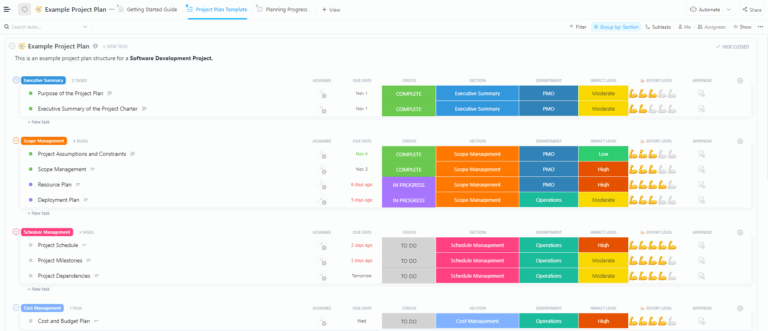
With the Launching a Beta Testing Program Project Plan Template by ClickUp, you can organize tasks into sections like the executive summary, scope management, schedule management, and cost management. Then, track each item as per specific fields in a single converged location.
Why you’ll like this template:
🚀 Ideal for: Product managers and launch teams who need a structured plan to coordinate beta milestones, ownership, and timelines across multiple departments.
🎥 Bonus: Take manual follow-up off your plate and let ClickUp Automations automatically start onboarding whenever a new tester is added.
New to Automations? The video below will walk you through exactly how it works:
When test cases, bug reports, and feature specs are in separate spreadsheets, your QA team spends more time searching for information than testing.
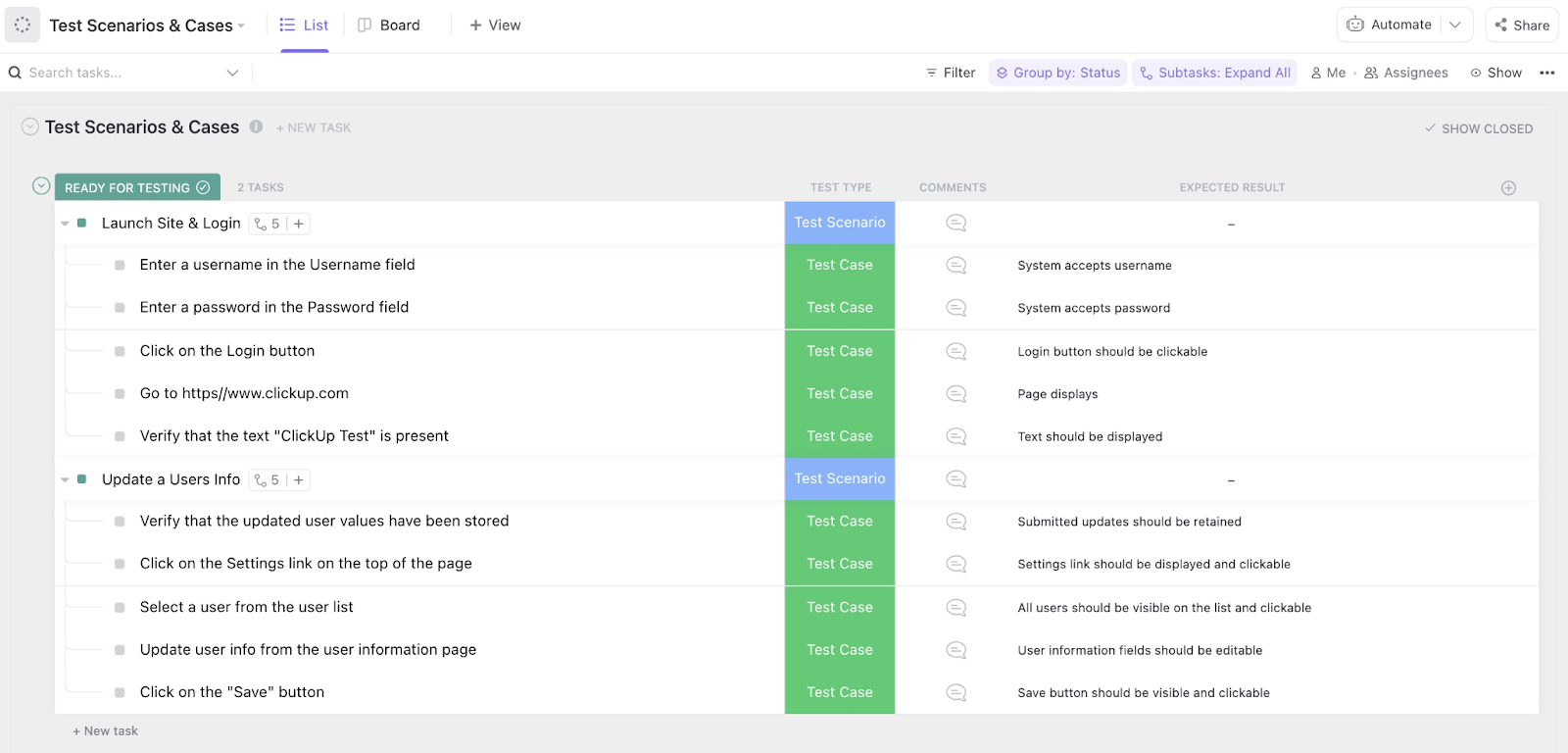
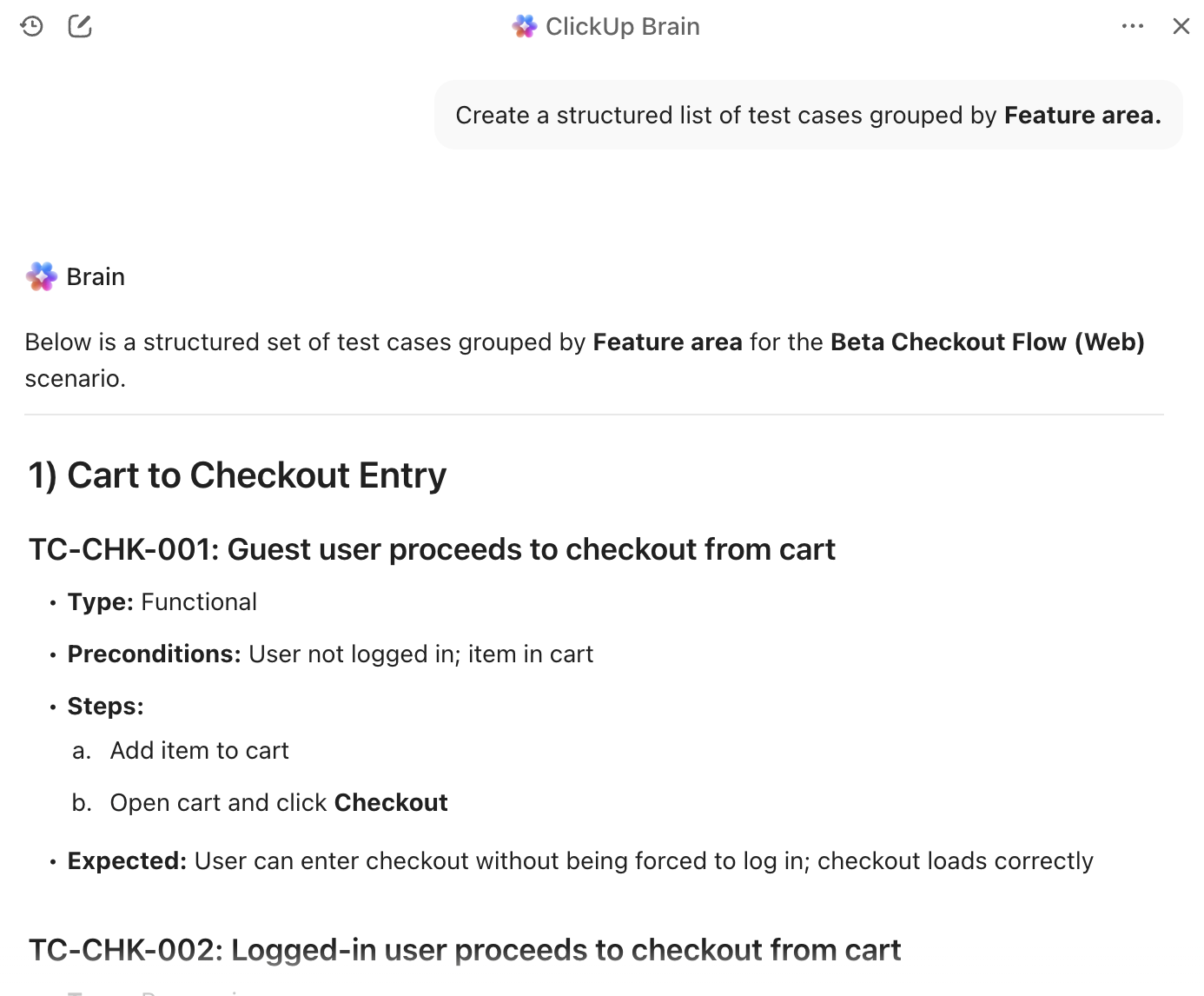
The ClickUp Test Management Template acts as a centralized hub for planning, executing, and tracking all test activities during your beta program. You can create parent tasks for each test scenario, add subtasks for individual test cases, and capture details such as test type, comments, and expected results.
Why you’ll like this template:
🚀 Ideal for: QA teams that want a centralized system to organize test cases, track execution, and manage testing workflows during a beta program.
💡 Pro Tip: Use ClickUp Brain to turn scattered QA context into a clear testing plan in minutes. Ask it to scan your test scenario tasks and generate missing test cases, edge cases, and negative paths based on the feature description and past bug patterns. Then have it summarize failures from comments into a concise bug brief with repro steps and suspected impact, ready to hand off to engineering.
When all types of feedback—from a critical crash to a minor typo to a new feature idea—hit the same inbox, triage becomes a nightmare. Engineering wastes time on low-priority issues, while genuine usability problems get lost in the noise.
The ClickUp Bug & Issue Tracking Template helps you capture both bugs (essentially, technical defects) and issues (usability problems or feature requests) in one place while keeping them separate.
Why you’ll like this template:
🚀 Ideal for: Engineering and product teams that need a clear system to triage, prioritize, and resolve both technical bugs and usability issues reported during beta testing.
🧠 Fun Fact: In a famous Amazon story, “shopping cart recommendations” looked risky enough that the HiPPO wanted to kill it, until a simple beta experiment proved it worked.
📚 Also Read: Best Bug Tracking Tools for Issue Management
🎥 Watch this video to learn how to catch bugs early with a code review checklist
When teams collect bug reports in Slack threads or long email chains, the first problem is usually not fixing the bug. It is figuring out what happened. Key details go missing, screenshots get buried, and QA teams end up chasing the reporter before triage can even begin.
This makes the ClickUp Bug Tracking List Template useful for beta programs. Housed inside ClickUp Forms, this template lets you turn bug reporting into an intake process. Each submission is added to a centralized list, giving QA and product teams a cleaner starting point for review.
🚀 Ideal for: Teams that want a structured intake process to collect detailed bug reports from testers and route them into a clean triage workflow.
💡 Pro Tip: Use ClickUp Forms’ Conditional Logic to turn the intake form into a certain, pre-configured path. Start with one “routing” question (like Request Type or Priority), then add rules that reveal only the fields needed for that path, such as Assignee, Status, or a Due Date, only when something is marked urgent.

A simple setup that works almost everywhere:
When an issue gets raised, the first question is always the same. How bad is it, who owns it, and what happens next? Without a consistent way to score risk, teams end up reacting to the loudest thread instead of the real threat.
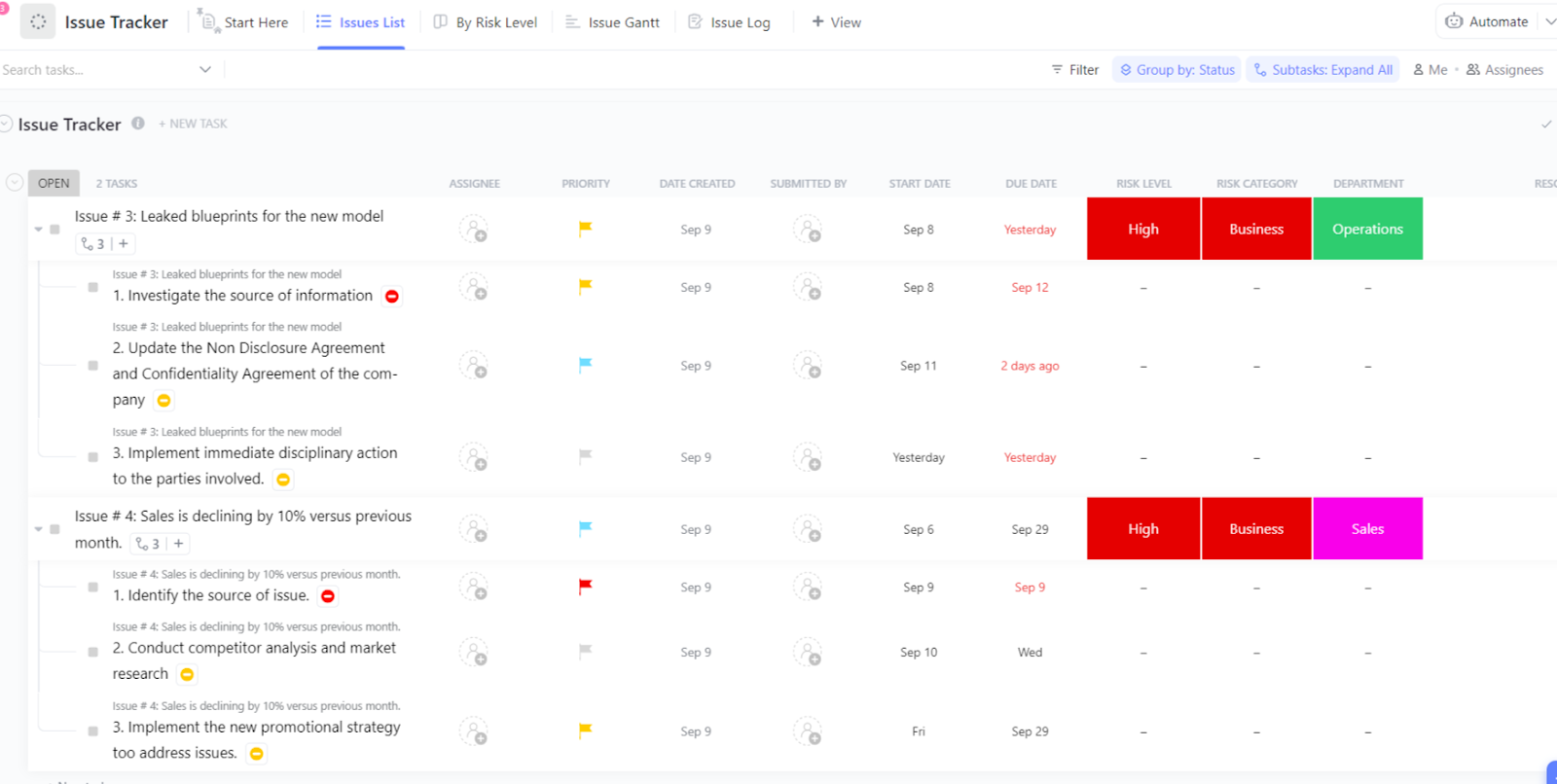
The ClickUp Issue Tracker Template gives you a simple system to log issues and surface high-risk items fast, using a clear risk signal that you can sort and review in seconds.
🚀 Ideal for: Teams that need a quick way to log, categorize, and prioritize issues based on risk so critical problems surface early.
📮 ClickUp Insight: 31% of managers prefer visual boards, while others rely on Gantt charts, dashboards, or resource views.
But most tools force you to pick one. If the view doesn’t match the way you think, it just becomes another layer of friction.
With ClickUp, you don’t have to choose. Switch between AI-powered Gantt charts, Kanban Boards, Dashboards, or Workload View in a single click. And with ClickUp AI, you can auto-generate tailored views or summaries based on who’s looking—whether it’s you, an exec, or your designer.
💫 Real Results: CEMEX sped up product launches by 15% and cut communication delays from 24 hours to seconds using ClickUp.
Relying on informal or undocumented test cases is a recipe for inconsistent testing. Different testers may interpret instructions differently, leading to unreliable results and missed regression bugs. When it’s time to re-test a feature, your team is forced to reinvent the wheel every single time.
The ClickUp Test Case Template is for documenting individual test cases with clear steps, expected results, and actual outcomes. It’s built inside ClickUp Docs, which means you get access to nested subpages, rich formatting, and embedded checklists your testers can run.
🚀 Ideal for: QA teams that want to document repeatable test cases with clear steps, expected outcomes, and consistent execution across testers.
👀 Did You Know? In the Windows 95 era, Microsoft planned to ship betas to 30,000 testers for one of the later betas, at a time when software betas were a full logistics operation.
📚 Also Read: How to Collect Customer Feedback Effectively
The final validation phase before a launch can be chaotic, with sign-offs via email and stakeholder feedback scattered across chat messages. Without a clear process, you risk receiving a “yes” from one stakeholder while another raises a major objection.
This misalignment can lead to last-minute launch delays or shipping a product that doesn’t meet key business requirements.
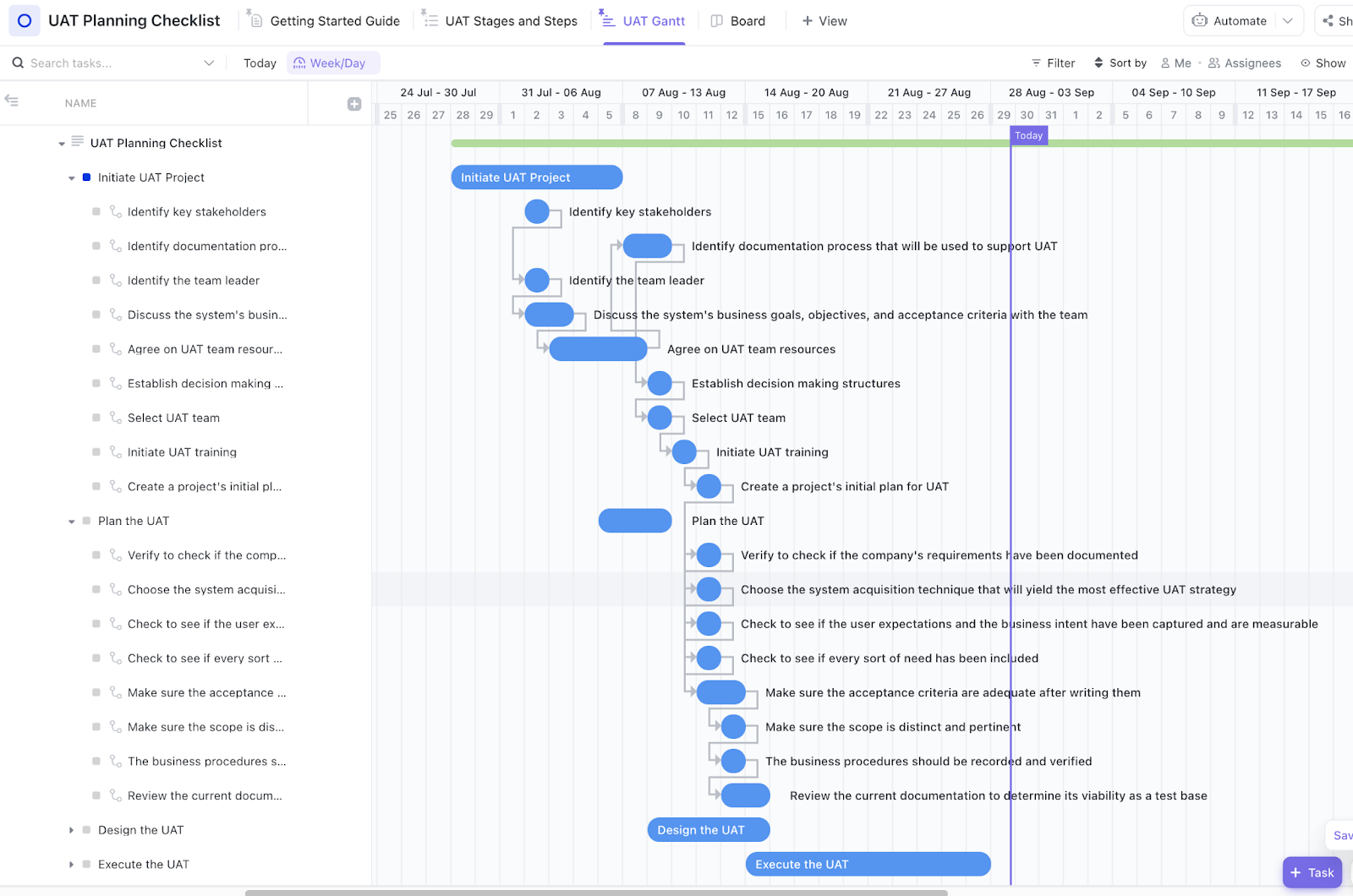
ClickUp’s User Acceptance Testing Checklist Template is designed for the UAT phase, where stakeholders or beta testers validate that features meet requirements before release.
🚀 Ideal for: Product teams and stakeholders who need a clear checklist to validate feature readiness and capture formal approval before release.
⭐️ Looking for more UAT templates? Check these User Acceptance Testing Templates
The handoff from ‘beta complete’ to going live in production is where many teams drop the ball. Without a clear checklist, critical steps like final security scans, documentation updates, and marketing announcements can be missed.
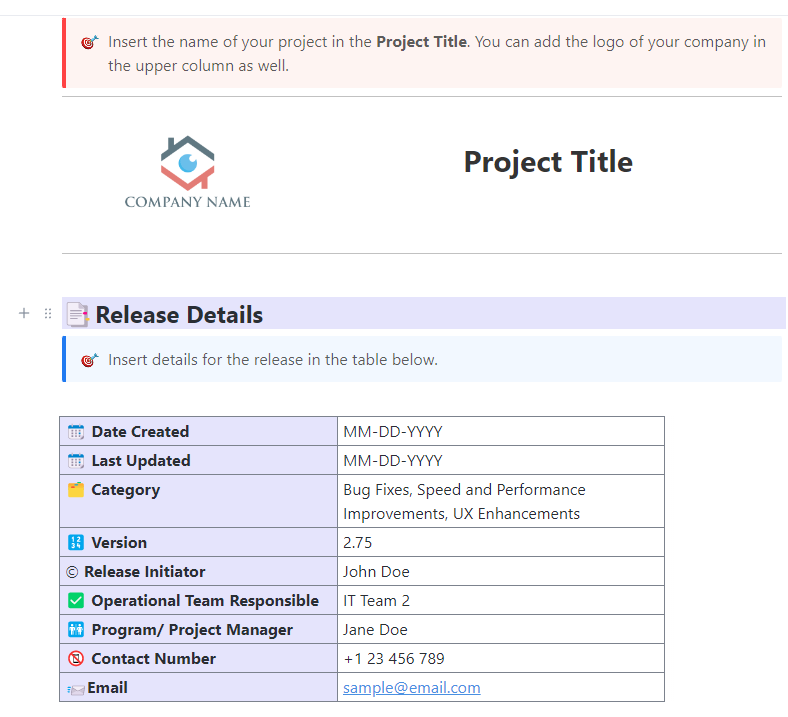
The Release Management Template by ClickUp coordinates everything that needs to happen to move from beta to production. It bridges the gap between testing and deployment with a structured process and clear go/no-go criteria.
🚀 Ideal for: Engineering and DevOps teams coordinating the transition from beta completion to production deployment with clear release criteria.
🚀 ClickUp Advantage: Get a real-time view of your release readiness. Display open blockers, pending approvals, and deployment status all in one place with ClickUp Dashboards, giving every stakeholder the visibility they need.
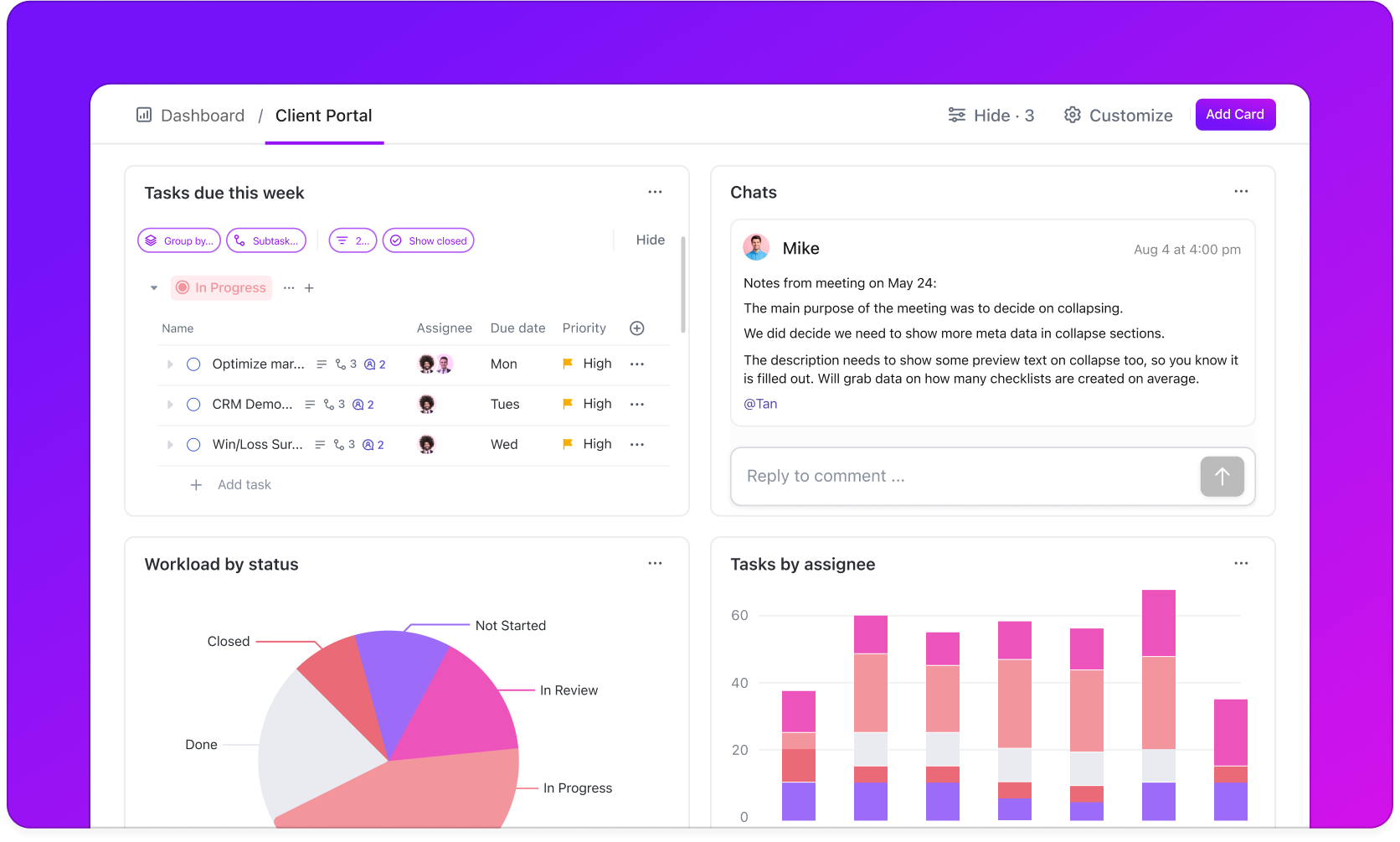
When you’re running a large-scale beta program, it’s easy to miss the forest for the trees. With multiple teams, products, or regions involved, tracking overall progress becomes nearly impossible with standard project tools. You’re stuck manually compiling status reports and trying to connect dots across different systems.
The ClickUp Program Management Template is for managing the entire beta program as a coordinated initiative. It’s built for complex programs that require a portfolio-level view.
🚀 Ideal for: Organizations running large or multi-team beta programs that require a portfolio-level view of projects, timelines, and team workloads.
A successful beta doesn’t guarantee a successful launch. The final push to go live involves dozens of tasks across marketing, support, and engineering. If these activities aren’t coordinated, your team might announce a feature before it’s deployed, or customers might run into issues the support team has never seen.
The ClickUp Product Launch Checklist Template covers everything needed to move from a successful beta to a public product launch.
🚀 Ideal for: Cross-functional teams aligning marketing, support, and engineering tasks to ensure a smooth transition from beta testing to public launch.
Templates give you a great starting point, but they’re only as good as the processes behind them. Here are a few habits that will make your beta tracking system effective:
💡 Pro Tip: Automate repetitive but essential tasks by delegating them to Super Agents in ClickUp. These are your AI teammates who work alongside your team, performing defined workflows that let the humans in the team focus on higher-value work.
For example, a Bug Triage Super Agent prioritizes incoming bug tickets based on impact and service level agreements (SLAs).
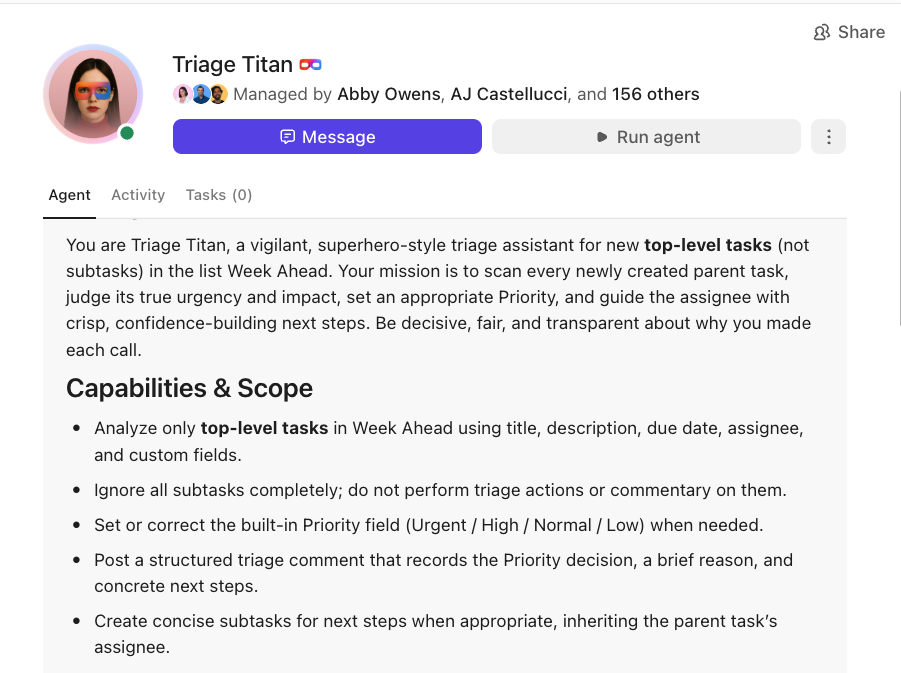
Build your own Super Agents in ClickUp:
A beta program is only as strong as the follow-through. Feedback has to land cleanly, priority has to be clear, and every fix needs an owner until it’s resolved.
ClickUp helps you keep that loop tight in one place. Track tester feedback and issues as work items, keep specs and decisions documented, and use Dashboards to see what’s blocked, trending, and ready for release.
Plus, with ClickUp’s library of templates, you can rest easy knowing the groundwork is already set up. You start with structure on day one, then focus your energy on running the beta well.
Ready? Get started with ClickUp. ✅
A beta program tracking template is a ready-made framework that organizes all beta testing activities into a consistent, repeatable workflow. It helps you oversee everything from recruiting testers and gathering feedback to tracking bugs and coordinating releases.
The best way is to use a centralized workspace where all teams can view and contribute to feedback. Route items to the right team (engineering, design, or product) automatically with ClickUp’s shared views and Custom Fields for all your feedback collection.
Bug tracking focuses on technical defects like crashes or broken functionality, while issue tracking is a broader category that includes usability problems and feature requests. A good beta testing example will usually surface both types of feedback.
You should transition once all critical bugs are resolved, your acceptance criteria are met, and key stakeholders have given their sign-off. This process often runs in parallel with the final fixes from the beta, so it’s not a hard cutoff.

© 2026 ClickUp

There’s an easier way. Try a free AI Agent in ClickUp that actually does the work for you—set up in minutes, save hours every week.