


10 Free AI Escalation Workflow Templates for Clean Handoffs

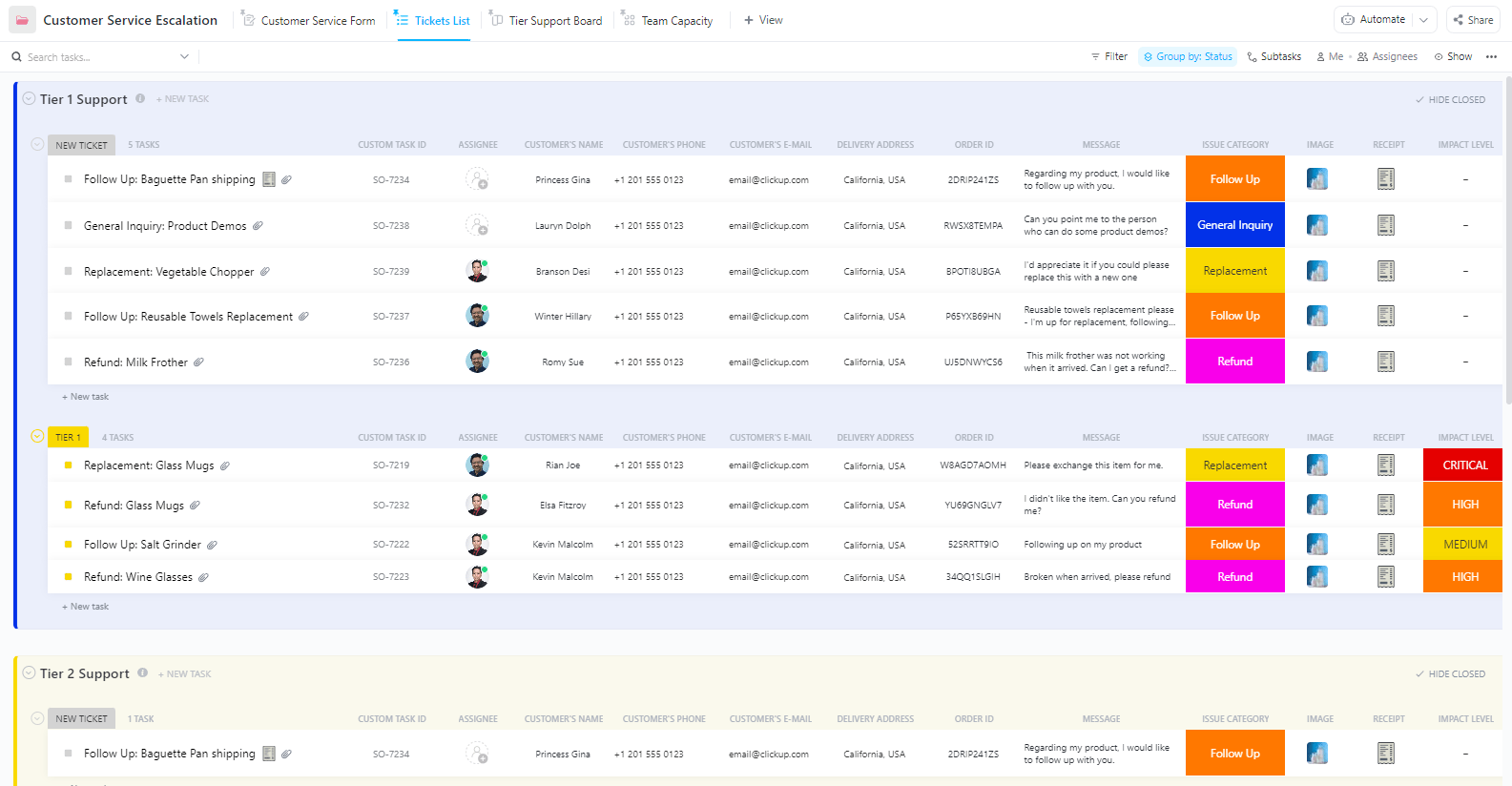
ClickUp Customer Service Escalation Template

Start using ClickUp today

  • Manage all your work in one place
  • Collaborate with your team
  • Use ClickUp for FREE—forever

AI can handle more of your workflow now. The difficult part is knowing exactly where its responsibility should end.

And it’s because you are balancing speed and judgment at the same time. Escalate too quickly, and human teams become the fallback for everything. Escalate too late, and the cost shows up in poor decisions, frustrated users, and preventable errors. The handoff itself also has to be structured well, with the right trigger, owner, and context traveling with the request.

That is why AI escalation workflow templates are so useful. They help you standardize the decision points before the workflow starts breaking under pressure.

In this post, we’ll break down AI escalation workflow templates, what they help you standardize, and how to choose the right setup for your team.

Summarize this article with AI ClickUp Brain not only saves you precious time by instantly summarizing articles, it also leverages AI to connect your tasks, docs, people, and more, streamlining your workflow like never before.
ClickUp Brain
Avatar of person using AI Summarize this article for me please

What Is an AI Escalation Workflow?

An AI escalation workflow is a process that automatically routes issues from AI-powered systems to the appropriate human experts when the AI can’t resolve them with confidence. It’s the system that prevents customer frustration and delays in resolution when automation reaches its limits.

There are two types of handoffs.

  • Reactive escalation, which happens when a customer explicitly asks for a human
  • Proactive escalation, which happens when the AI recognizes its own limitations and automatically routes the issue
Summarize this article with AI ClickUp Brain not only saves you precious time by instantly summarizing articles, it also leverages AI to connect your tasks, docs, people, and more, streamlining your workflow like never before.
ClickUp Brain
Avatar of person using AI Summarize this article for me please

Why AI Escalation Workflow Templates Matter

Building a reliable escalation process from scratch is a huge headache. Without a plan, every team ends up inventing its own inconsistent method, leading to dropped tickets, missed project SLAs, and burned-out agents. This is why you need AI escalation workflow templates.

They provide a pre-built, expert-designed starting point so you don’t have to design your escalation logic from the ground up.

Here’s what a great template offers: ✨

  • Faster resolution times: Clear, automated routing means issues reach the right person immediately instead of bouncing between different queues or getting lost in an inbox
  • Preserved context: The best templates ensure all AI-gathered information—like conversation history and customer data—transfers with the ticket, so your human agents don’t have to start from zero
  • Consistent handling: Every escalation follows the same standardized process, which reduces variability in service quality and makes it easier to train new team members
  • Measurable improvement: With built-in tracking, you can easily identify bottlenecks in your escalation path and refine your AI’s confidence thresholds over time
Summarize this article with AI ClickUp Brain not only saves you precious time by instantly summarizing articles, it also leverages AI to connect your tasks, docs, people, and more, streamlining your workflow like never before.
ClickUp Brain
Avatar of person using AI Summarize this article for me please

What to Look for in AI Escalation Workflow Templates

Most escalation templates fail because they focus only on routing but completely ignore context transfer. That messy handoff is where the entire process breaks down. A truly effective AI escalation workflow is a dynamic system.

Here’s what you should look for when selecting templates:

  • Customizable trigger conditions: Your template must let you define exactly what prompts an escalation. This could be AI confidence thresholds falling below 80%, the presence of keywords like ‘cancel’ or ‘legal,’ a specific customer tier, or a negative sentiment score
  • Clear ownership assignment: An escalated ticket shouldn’t just land in a generic queue. A powerful template has clear ownership built in, like a RACI matrix, so every issue is assigned to a specific person or team
  • Context preservation fields: The template must have dedicated fields to capture and transfer all relevant details. This includes the full conversation history, customer data from your CRM, and a summary of the AI’s attempted solutions
  • SLA and priority tracking: To keep urgent issues from languishing, look for built-in fields for setting priority levels and priority tracking
  • Integration-ready structure: Your template should seamlessly connect with your existing tools, like your CRM, help desk, and communication platforms, to avoid creating more data silos
  • Reporting and feedback loops: The best templates allow you to track escalation outcomes. This data creates a feedback loop that helps you refine your AI confidence thresholds and improve the entire system over time
Summarize this article with AI ClickUp Brain not only saves you precious time by instantly summarizing articles, it also leverages AI to connect your tasks, docs, people, and more, streamlining your workflow like never before.
ClickUp Brain
Avatar of person using AI Summarize this article for me please

10 Free AI Escalation Workflow Templates

Let’s now jump in and take a look at the best AI escalation workflow templates:

1. ClickUp Customer Service Escalation Template

Escalate AI-handled tickets to human agents with the ClickUp Customer Service Escalation Template

Designed for support teams using AI chatbots or automated triage, the ClickUp Customer Service Escalation Template creates a structured path from AI-handled tickets to human agents. It’s a perfect pre-built template for teams managing high ticket volumes and looking to prevent context sprawl.

Why you’ll like this template:

  • It includes pre-built escalation tiers (L1, L2, L3) with clear handoff criteria for each level
  • Helps you track the escalation reason, the AI’s confidence score, and the customer’s sentiment using ClickUp Custom Fields
  • Built-in SLA tracking ensures escalated tickets don’t get forgotten and are addressed on time

✅ Ideal for: Customer support operations managers running AI-first support queues (chatbots + human agents).

2. ClickUp IT Service Management (ITSM) Template

Manage service requests, incidents, and changes with the ClickUp IT Service Management Template

The ClickUp IT Service Management (ITSM) Template gives IT teams a centralized workflow to manage service requests, IT incidents, and change-related tasks in one place.

You can adapt it to handle AI-generated IT alerts, automation failures, access issues, and model-related change requests with statuses, owners, and approval steps.

Plus, IT managers can get a real-time view of all escalated incidents using ClickUp Dashboards.

Why you’ll like this template:

  • Supports structured status-based workflows that make it easier to manage escalation progress from new request to approval to implementation
  • You can use ClickUp Custom Fields to capture escalation type, impact level, affected system, and urgency for AI-related incidents
  • Helps coordinate cross-functional handoffs across IT, security, and operations teams with clear assignees and due dates

✅ Ideal for: Internal IT and IT operations teams managing AI-triggered service requests, access issues, and change approvals across departments.

3. ClickUp Incident Action Plan Template

Coordinate incident response and approvals in one structured doc with the ClickUp Incident Action Plan Template

An AI escalation doesn’t always stop at routing the issue to the right person. In many cases, the real work starts after that, when teams need to align and control the current incident.

The ClickUp Incident Action Plan Template is built for that coordination layer. It gives teams an incident-response document with separated sections for Situation Summary, Execution Plan, and approval checkpoints. That makes it a strong fit for AI-related escalations that require fast human intervention and cross-functional follow-through.

Why you’ll like this template:

  • Separates assessment and execution into dedicated sections (like Situation Summary and Execution Plan), which helps teams avoid mixing diagnosis notes
  • The built-in operational period fields help run incident response in shifts and hand off cleanly between responders
  • The structured layout supports command-style coordination so that leads can document priorities, responsibilities, and next actions

✅ Ideal for: Ops and security teams that need a documented action plan during active incidents with clear coordination and execution steps.

👀 Did You Know? ClickUp’s State of AI Maturity Report says only 10% of respondents report AI acting as an agent that manages and optimizes tasks autonomously, while 38% say they don’t use AI at all in daily work.

4. ClickUp Incident Communication Plan Template

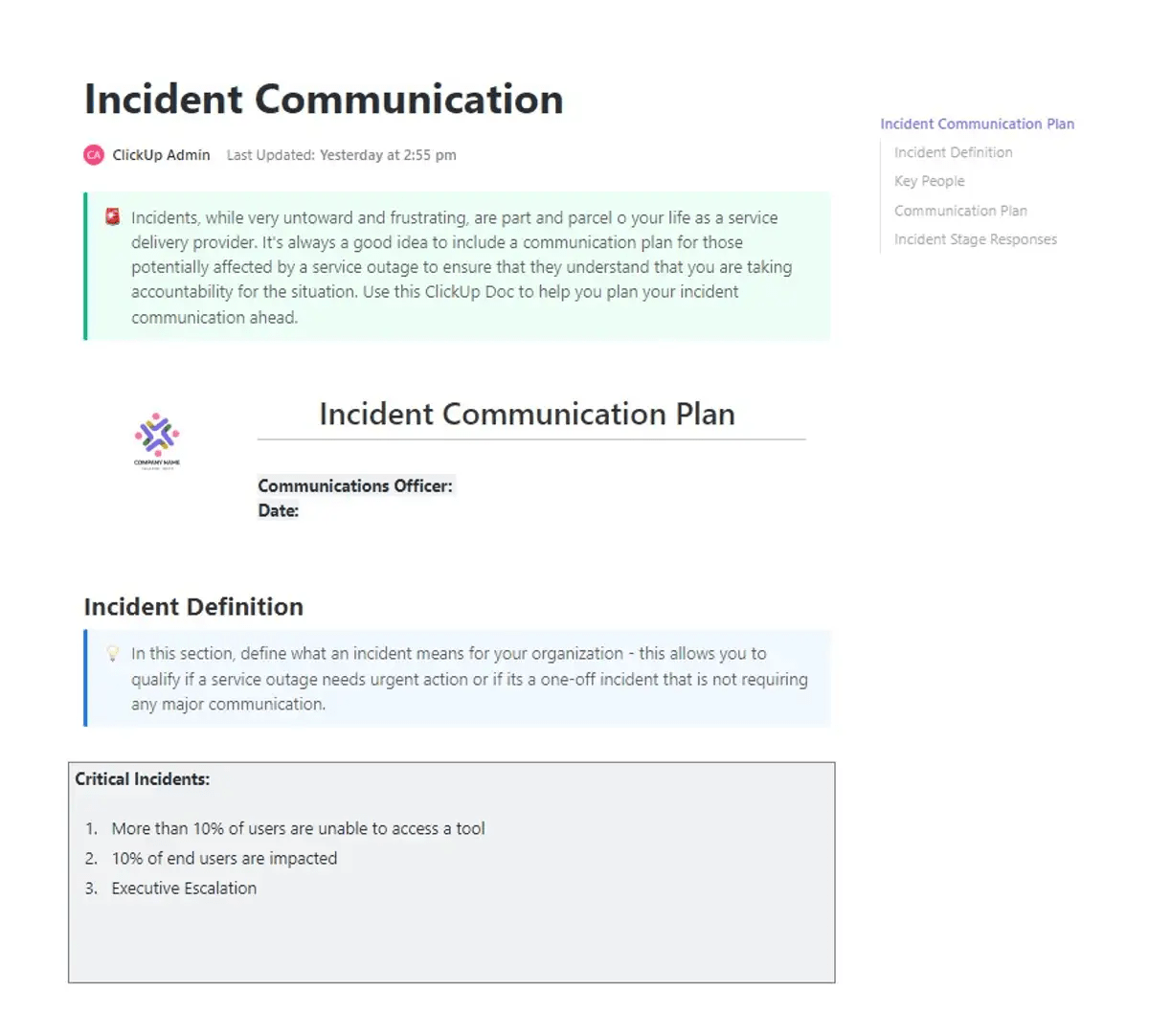
Plan incident messaging and stage-based responses in one place with the ClickUp Incident Communication Plan Template

When an AI escalation turns into a real incident, the hardest part is keeping everyone updated without creating a second problem: conflicting messages, missing stakeholders, or silence at the worst possible time.

The ClickUp Incident Communication Plan Template helps you plan incident messaging end-to-end, from defining what counts as a ‘critical incident’ to listing key people, outlining your communication plan, and mapping stage-based responses.

Pair it with ClickUp Chat to keep incident updates, decisions, and action items in one thread your responders can actually follow.

Why you’ll like this template:

  • Schedule recurring status updates to maintain a consistent and predictable communication cadence
  • Define what qualifies as a critical incident in your environment, with clear communication thresholds for AI-flagged issues
  • Plan stakeholder messaging by documenting key contacts, communication paths, and response expectations in one place

✅ Ideal for: IT service operations leads managing incident response communications across internal teams and stakeholders.

💡 Pro Tip: Treat ClickUp Super Agents as your always-on escalation triage layer.
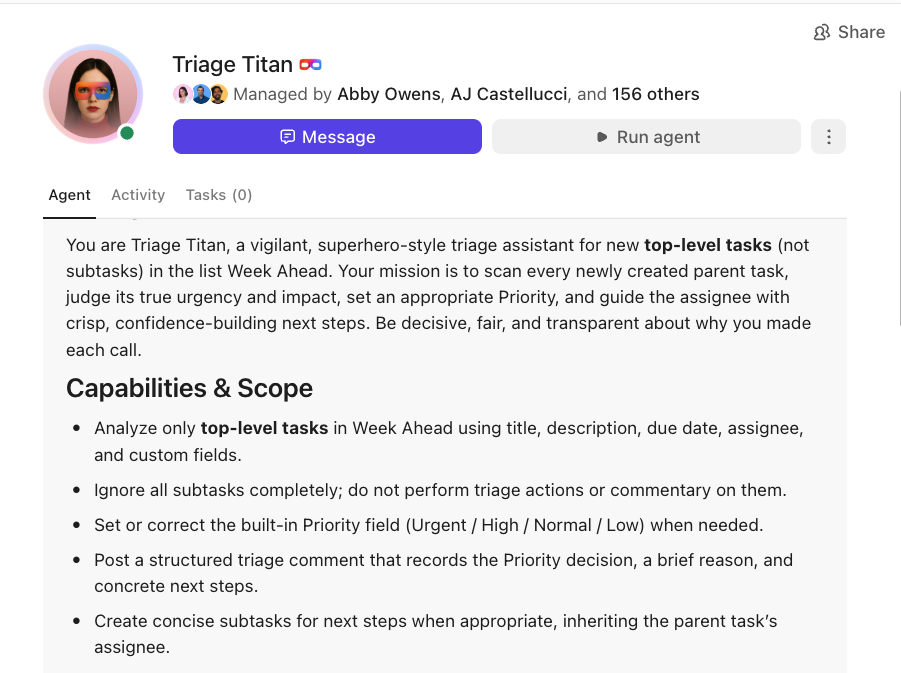
Give your Super Agents clear instructions to guide smarter actions

Set an agent up to monitor a specific workflow (like a high-priority support queue or system alerts), then have it turn complex issues into organized next-step work:

  • Surface decisions: Let the agent distinguish between what needs a manual override vs. what can be resolved through automated recovery scripts
  • Route and assign: Automatically identify the right subject matter expert and assign the task based on the technical stack involved
  • Draft escalation recaps: Have the agent generate a brief in ClickUp Docs summarizing the issue history so the engineer can skip the discovery phase

Learn more about Super Agents here 👇

5. ClickUp Customer Support Template

Track and route support requests by status with the ClickUp Customer Support Template

The ClickUp Customer Support Template helps support teams manage incoming requests in a structured queue while keeping ticket progress easy to track at a glance.

In this template, requests are grouped by status and enriched with support-specific fields such as enquiry type, assignee, due date, and customer details, making it easier to route, prioritize, and follow up on each request.

A strong fit for AI escalation workflows, this template gives you room to separate AI-handled tickets from human-owned work using custom statuses and clear handoff stages. In fact, you can create tasks with 20 different ClickUp Custom Statuses (including In Progress, On Hold, Unassigned, and more) to reflect real support states across triage, investigation, escalation, and resolution.

Why you’ll like this template:

  • Track support requests across detailed workflow stages with customizable statuses, making AI-to-human escalation progress visible from first touch to resolution
  • Capture request context directly in the task list using fields like enquiry type, customer name, company, and due date, which reduces back-and-forth during handoffs
  • Organize Tier 1 operations with multiple views (including request lists, status-based views, and team chat) to manage queue health and escalations in one workspace

✅ Ideal for: Support managers setting up tiered support queues (Tier 1 to Tier 2/3) with clear status tracking and accountability.

🚀 ClickUp Advantage: Pair this template with ClickUp Brain to speed up escalations without sacrificing context. Have Brain summarize long ticket threads, customer history, and internal notes into a quick handoff brief before a request moves from AI triage to a human agent, then use it again to draft response updates or internal escalation notes in the same task.
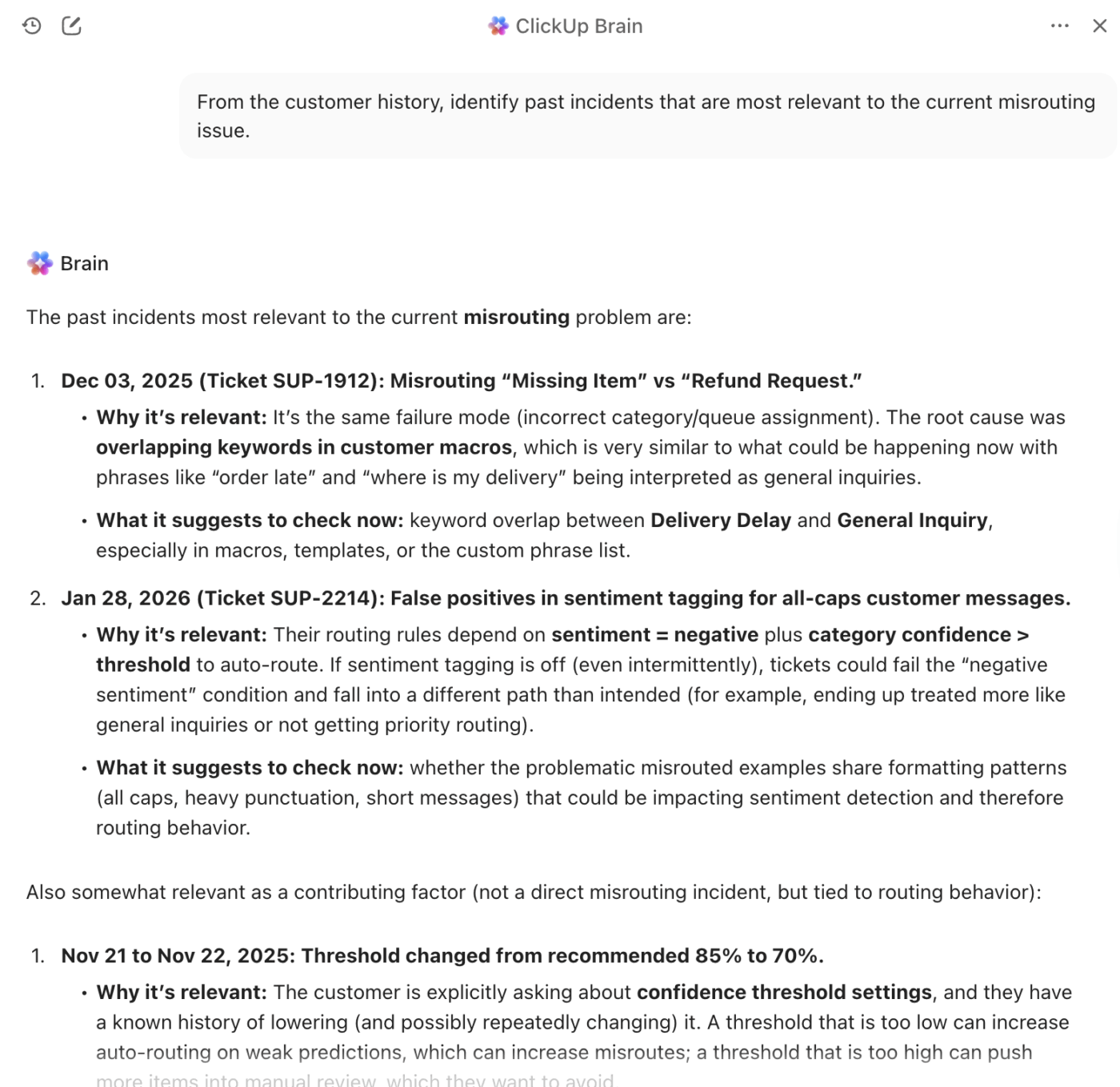
Summarize tickets into handoff briefs and draft escalation updates with ClickUp Brain

6. ClickUp Quality Control Checklist Template

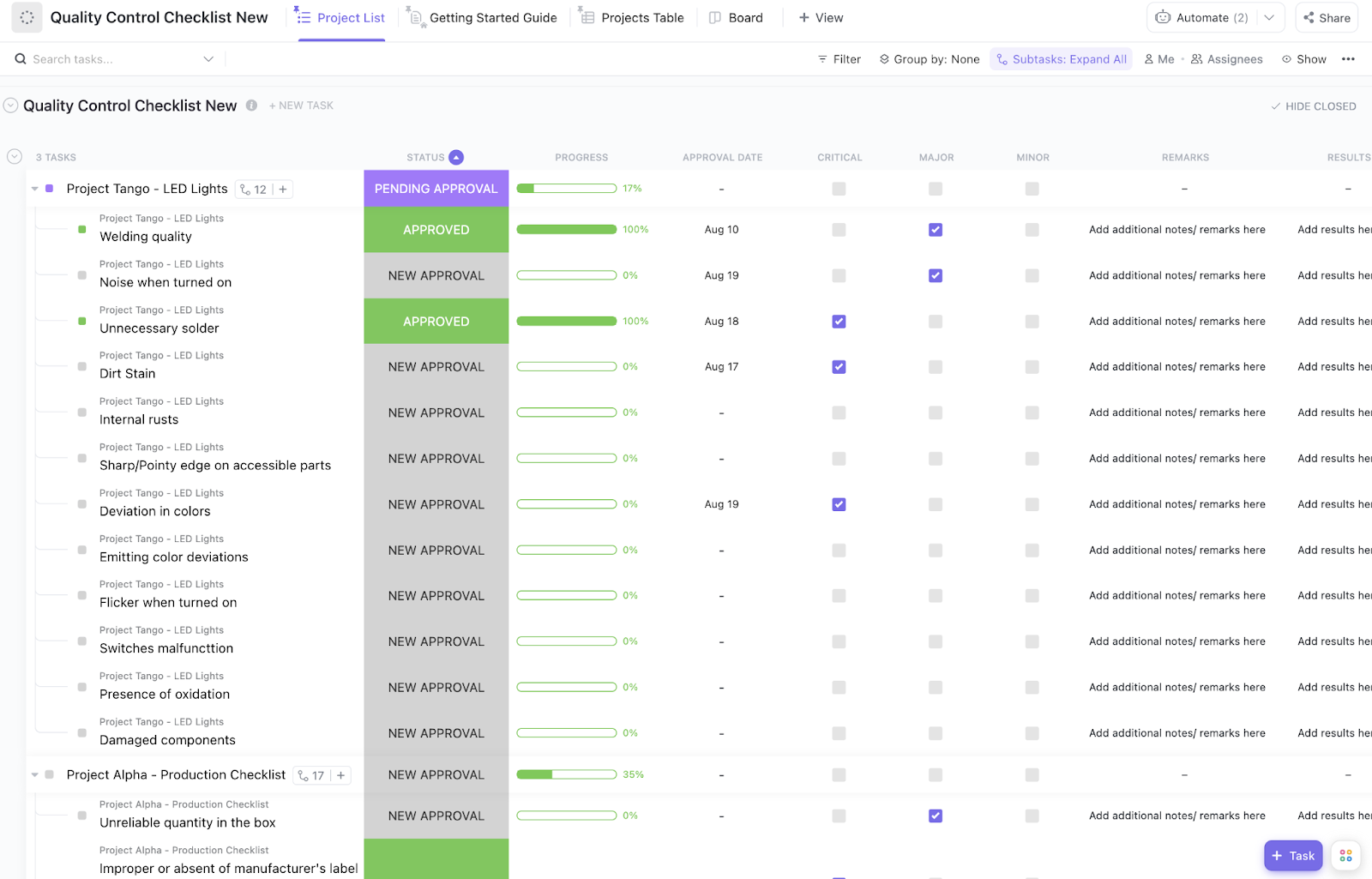
Escalate AI-flagged anomalies for human review with the ClickUp Quality Control Checklist Template

ClickUp Quality Control Checklist Template is for teams where an AI performs initial quality checks and escalates any anomalies to human inspectors. It’s perfect for AI workflows managing community moderation escalations, where an AI flags potentially problematic content and a human performs the final review.

With approval statuses, severity markers, and progress tracking in one place, teams can move faster without compromising review quality.

Why you’ll like this template:

  • Review checklist items in an approval workflow with statuses like Pending Approval, Approved, and New Approval
  • Prioritize issues by severity using Critical, Major, and Minor fields, helping teams separate routine fixes from items that require immediate escalation
  • Set up escalation triggers based on the defect type or the frequency of its occurrence

✅ Ideal for: Team leads building human review checkpoints for quality escalation workflows in production, content, or service processes.

7. ClickUp RACI Planning Template

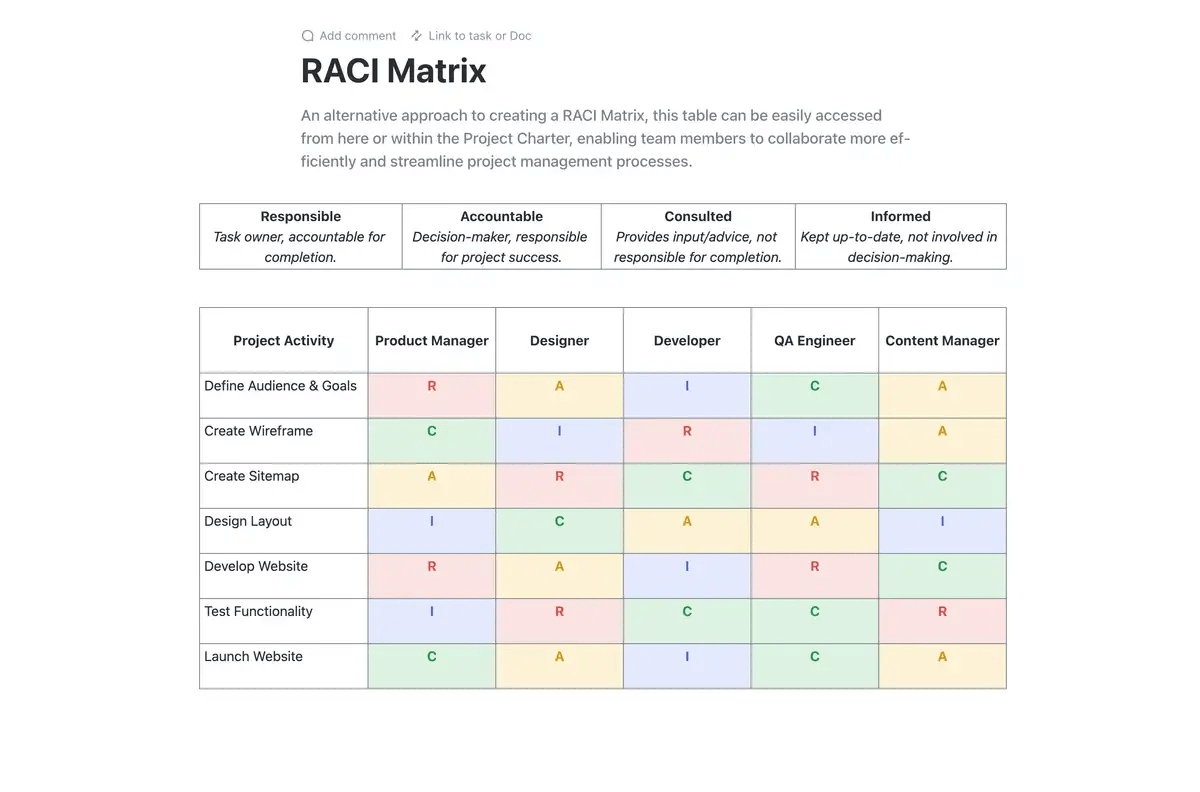
Define RACI accountability for AI escalation stages with the ClickUp RACI Planning Template

ClickUp RACI Planning Template helps you establish crystal-clear accountability for your escalation workflows by defining who is Responsible, Accountable, Consulted, and Informed at each stage.

When AI is involved in drafting, triaging, summarizing, or first-pass execution, this template helps you document human oversight and approval paths upfront.

Because it lives in ClickUp Docs, your RACI plan stays easy to reference, edit, and share alongside project briefs, SOPs, and delegation guidelines. That makes it valuable when teams are testing AI-assisted workflows and need one place to align on decision rights.

Why you’ll like this template:

  • Map RACI roles by project activity to define where AI can assist and where human review is mandatory
  • Make handoffs clearer across PMs, specialists, and approvers by documenting who owns execution versus final sign-off before work begins
  • Create role-based views so each team member can see exactly what they are responsible for

✅ Ideal for: Cross-functional teams that need a shared responsibility map before delegating recurring work to AI.

📮 ClickUp Insight: 46% of people say the biggest potential benefit of AI agents is saving time they didn’t know they still had.

That kind of time rarely comes from speeding up a single step. Instead, it comes from collapsing multi-step workflows: the handoffs, follow-ups, and coordination work that quietly fill your day.

Super Agents in ClickUp can chain actions to move work forward from intake to follow-through in one flow, without needing each step to be triggered manually.

Because time can only be reclaimed via dozens of small transitions that no longer need constant human oversight!

8. ClickUp Software Integration Template

Track integration issues and escalate technical blockers with the ClickUp Software Integration Template

For teams implementing new AI tools that need to connect with existing systems, the ClickUp Software Integration Template tracks all integration issues and escalates technical problems to human moderators.

It is especially handy when your AI flags failures (API errors, data mismatches, sync delays) and needs a clean path to route the issue to the right owner with the right context attached. You can also further reduce the need for complex, custom-coded connections and keep your tech stack manageable with ClickUp’s Native Integrations.

Why you’ll like this template:

  • Break down complex AI escalation workflows into integration-level tasks (data, systems, and process integrations)
  • Use status-based tracking like ‘Needs Input’ to flag points where an AI workflow cannot proceed without human review, missing data, or system confirmation
  • Map step-by-step handoffs across external systems (for example, chatbot → CRM → support queue → human agent) and assign owners for each integration checkpoint

✅ Ideal for: Implementation teams managing ERP, CRM, procurement, or finance integrations with frequent dependency checks and approvals.
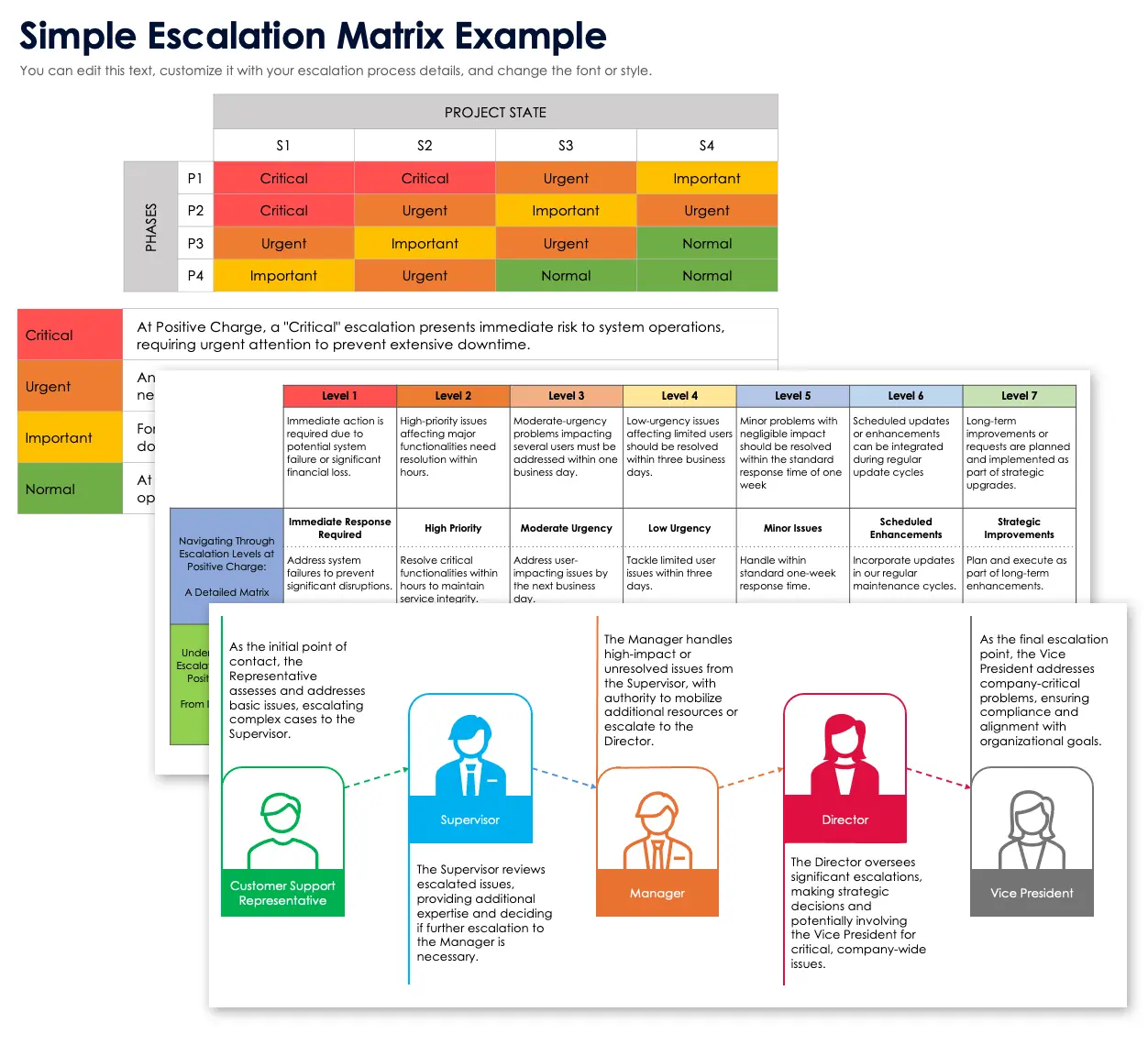
9. Smartsheet Incident Management Escalation Matrix Template

via Smartsheet

Smartsheet’s approach to incident escalation leverages its familiar spreadsheet-style interface. This Smartsheet’s Incident Management Escalation Matrix Template can work well for teams that are already deeply invested in the Smartsheet ecosystem and prefer a grid-based view of their workflows.

Why you’ll like this template:

  • It uses a matrix-based layout to define escalation paths
  • You can apply conditional formatting to visually highlight ticket priorities
  • It offers basic automation capabilities for sending notifications

✅ Ideal for: IT ops and service teams already working in Smartsheet.
10. Template.net Escalation Procedure Template

via Template.net

Template.net’s Escalation Procedure Template is a downloadable document template that helps teams define and document their escalation procedures.

It serves as a good starting point for creating a formal policy, especially when you need something shareable and easy to standardize across teams. And because it is document-first, it helps organizations formalize escalation rules before moving them into a ticketing or workflow tool.

Why you’ll like this template:

  • It provides a standard structure for documenting escalation procedures
  • It includes dedicated sections for defining escalation levels and triggers
  • You can organize contact information for different teams and escalation tiers clearly

✅ Ideal for: Teams that need a documented SOP before implementing escalation workflows in software tools.

Summarize this article with AI ClickUp Brain not only saves you precious time by instantly summarizing articles, it also leverages AI to connect your tasks, docs, people, and more, streamlining your workflow like never before.
ClickUp Brain
Avatar of person using AI Summarize this article for me please

How to Implement AI Escalation Workflow Templates

Finding a template is just the first step—the real work begins when you adapt it to your team’s processes.

Follow these steps to implement your template:

  1. Audit your current escalation patterns: Before you change anything, you need to understand your baseline. Identify where escalations currently happen, what triggers them, and where the process breaks down. Visualize your existing ticket flows and pinpoint bottlenecks using ClickUp Dashboards
  2. Define your AI confidence thresholds: Work with your AI tool’s provider or your internal data science team to establish clear criteria for when an issue should escalate. This could be a confidence score below a certain percentage, the detection of specific keywords, or negative customer sentiment
  3. Map escalation paths to expertise: Not all escalations are created equal. Route technical issues to your engineering team, billing questions to finance, and complex customer situations to your most senior agents
  4. Configure automation triggers: This is where you eliminate the manual work that slows down resolution. Automatically move tasks, notify the correct owner, and update task status the moment your escalation criteria are met by setting up ClickUp Automations
  5. Establish context transfer requirements: Decide what information is non-negotiable for every escalation. Create dedicated fields for AI conversation summaries, customer history, and attempted solutions
  6. Test with real scenarios: Before you go live, run escalation drills using actual past cases. This will help you identify any gaps or confusing steps in your workflow before it impacts a live customer
  7. Monitor and refine: Your escalation workflow is a living process. Track key metrics like escalation volume, time-to-resolution, and first-contact resolution for escalated tickets using ClickUp Dashboards. Use this data to adjust your thresholds and routing rules over time

🎥 Watch this video to see the many ways you can use AI to upgrade your customer service standards.

Summarize this article with AI ClickUp Brain not only saves you precious time by instantly summarizing articles, it also leverages AI to connect your tasks, docs, people, and more, streamlining your workflow like never before.
ClickUp Brain
Avatar of person using AI Summarize this article for me please

Build AI Escalation Paths Your Team Can Trust With ClickUp

The value of a good template is consistency. Your team knows when AI should continue, when a human should step in, and what information needs to travel with the escalation every time.

ClickUp helps you put that into practice in one place. You can document escalation rules, turn them into repeatable workflows, and keep requests, handoffs, and follow-through connected from start to finish. With AI in the workspace, teams can move faster on triage and updates while keeping the human decision points clear.

Get started with ClickUp today!

Summarize this article with AI ClickUp Brain not only saves you precious time by instantly summarizing articles, it also leverages AI to connect your tasks, docs, people, and more, streamlining your workflow like never before.
ClickUp Brain
Avatar of person using AI Summarize this article for me please

Frequently Asked Questions

What is the difference between an AI escalation workflow and a traditional escalation matrix?

A traditional escalation matrix is a static document that defines who handles what at each tier. An AI escalation workflow is a dynamic system that adds automated triggers, intelligent routing, and context preservation that activate based on real-time AI confidence levels and issue characteristics.

How do you set AI confidence thresholds to trigger escalations in workflow templates?

Set AI confidence thresholds based on task risk, not just the model score. In workflow templates, use lower thresholds for low-risk tasks like tagging or summaries, and stricter thresholds (or mandatory human approval) for high-risk tasks like finance, legal, compliance, or customer escalations. It also helps to combine confidence with business-rule checks, such as missing fields, policy flags, unclear inputs, or failed format validation, so escalation decisions are based on reliability in context, not a single number.

Can AI escalation workflow templates work across support, IT, and operations teams?

Yes, the core logic of trigger conditions, routing rules, and context transfer applies across any department. You’ll just need to customize the specific fields and escalation paths to match each team’s unique criteria and areas of expertise.

How do you measure whether your AI escalation workflow is reducing resolution time?

Track three key metrics before and after you implement your workflow: the average time from the escalation trigger to the first human response, the total resolution time for escalated vs. non-escalated issues, and the percentage of escalations that are resolved at the first human contact without needing to be re-routed.

Everything you need to stay organized and get work done.
clickup product image
Sign up for FREE and start using ClickUp in seconds!
Please enter valid email address