Sorry, there were no results found for “”
Sorry, there were no results found for “”
Sorry, there were no results found for “”
Ever tried explaining your family history, only to get tangled in terms like ‘second cousins twice removed’ or ‘great-aunt something-or-other’?
Whether you’re helping your kids connect to their roots or trying to discover your own lineage, a family tree offers a visual way to understand relationships across generations.
Let’s learn how to make a family tree on Google Docs to clarify these connections easily. Google Docs provides tools for adding text and photographs to create a digital version of your family tree.
You can even try free family tree templates to generate an editable family tree you can share with extended family so everyone can add tidbits of information—the story of the great-grandad who landed on Ellis Island in the late 19th century, the adventures of the grandaunt who was part of the Underground Railroad, and so on.
We’ll also explore ClickUp, a smarter alternative to Google Docs that offers advanced features for organizing and personalizing your family tree.
In just a few easy steps, you can create a personalized family tree that’s as unique as your story. All you need is a Google account to get started.
Go to Google Docs and log in to your account. Next, create a new blank Google Docs document.

Navigate to the Insert drop-down menu. Click Drawing > New to open the Drawing pop-up.

Create a drawing by adding shapes based on the number of people in your family group. Click the Shape icon > Shapes option and select a shape to represent each member. This shape will house their details, such as a name.

Repeat these steps to add more shapes for other members. Alternatively, you can simply copy and paste the existing shapes.
Then, click the Line icon to draw lines to connect each shape.
Double-click the shape to add the names and titles of the family members. Each person’s title will be based on the relationship to the first individual, from whose perspective the tree is created.
Alternatively, you can also click the Text Box icon and type names and titles in the box. Position the text box at the center of the shape.

To personalize the family tree, add pictures of each family member by clicking the Image button. You can choose to upload images from various sources, like Google Photos or your system.
Click Save And Close in the pop-up after you have completed the tree. This action will add the diagram to your document.

💡Pro Tip: To have a backup or share your family tree offline, save it to your device. Click File > Download and choose your preferred format.
Now that you know how to make a family tree in Google Docs, let’s understand why it may not be your top choice for the task.
Google Docs comes with a few limitations that may hinder the creation of more complex trees spanning many generations:
📮ClickUp Insight: Context-switching is silently eating away at your team’s productivity. Our research shows that 42% of disruptions at work come from juggling platforms, managing emails, and jumping between meetings. What if you could eliminate these costly interruptions?
ClickUp unites your workflows (and chat) under a single, streamlined platform. Launch and manage your tasks from across chat, docs, whiteboards, and more—while AI-powered features keep the context connected, searchable, and manageable!
Also Read: Best Flowchart Software
If Google Docs isn’t the best choice for creating your family tree, what is? Remember we introduced you to ClickUp right at the beginning? It’s time to explore it in depth!
🧠Fun Fact: The longest family tree in the world is that of Confucius, a Chinese philosopher. It has around 2 million members!
Digital family trees let you map extensive connections across generations. For example, researchers have mapped an astounding 13 million individuals within a single family tree, demonstrating the potential for uncovering deep family histories and ancestral connections.
While Google Docs offers basic features to help you make a family tree, it doesn’t provide the flexibility and visual collaboration needed for more complex trees.
In contrast, ClickUp provides powerful features that support creating visually appealing layouts, adding detailed family member information, and efficiently managing extensive family connections.
Let’s take a look at how to harness some of these features.
As the everything app for work, ClickUp combines your projects, knowledge, and chat into one powerful AI-backed platform.
ClickUp’s strength lies in its multifacetedness and intuitive collaboration functionalities.
Using ClickUp, your whole family can contribute to developing your family tree simultaneously in real time or async. While its Whiteboards and Mind Maps help you visualize the tree structure and add details, ClickUp Docs let you store rich backstories and anecdotes that are part of your family culture and make your shared history more interesting.
Thanks to support for multimedia attachments, you can also smoothly integrate photographs and other images, assign your family members specific responsibilities when collaborating on your family tree, and organize your family details efficiently—far surpassing the abilities of Google Docs.
Let’s find out how:
Let’s start with ClickUp Whiteboards. It’s an intuitive and flexible way to build your family tree online.
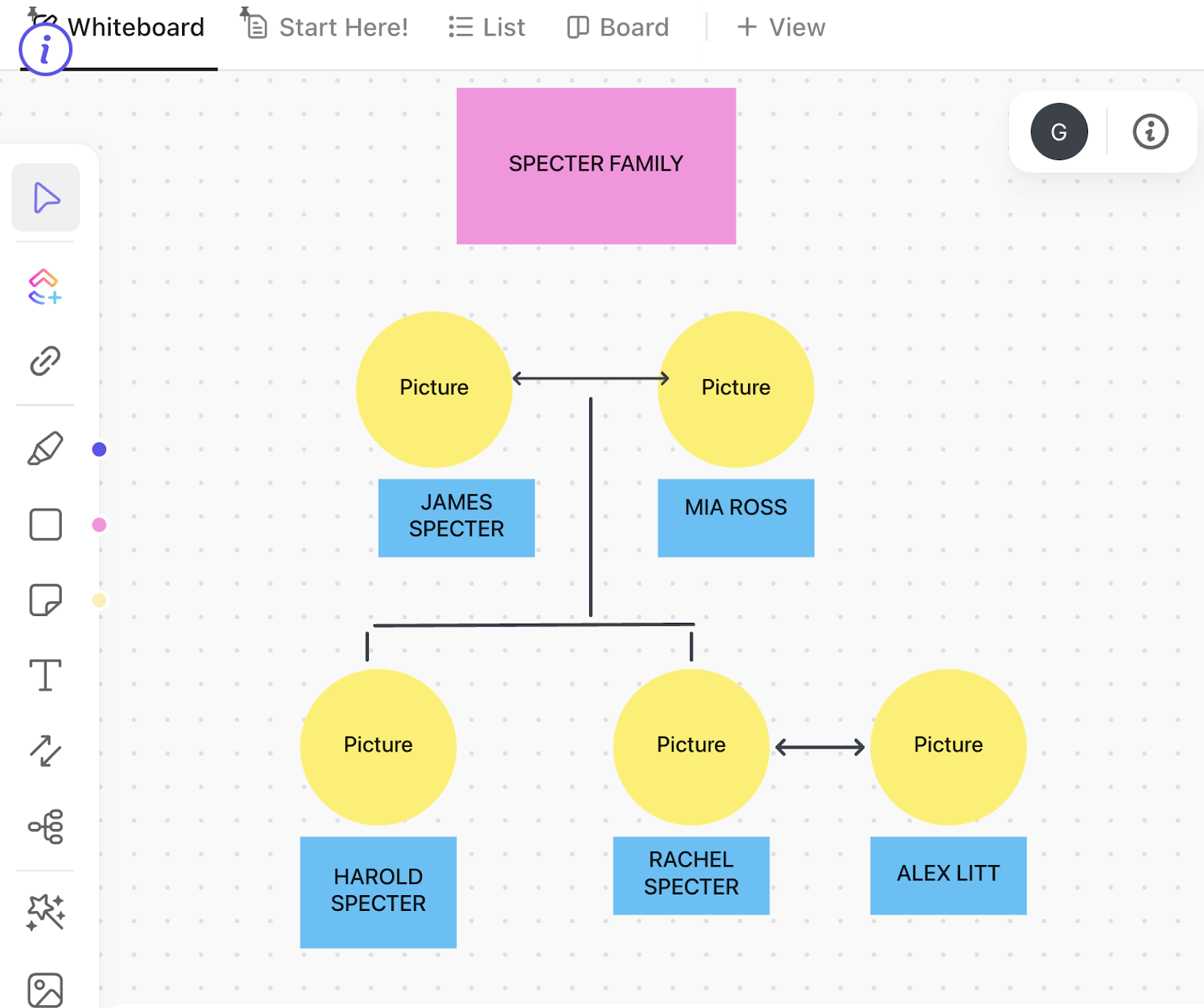
Open ClickUp Whiteboards and create a new board for your family tree. Use shapes for family members and lines to show relationships. Upload photos and color-code generations or family branches.
You can use sticky notes and text fields to create a detailed diagram with birthdates, marriages, and other family facts. Share the Whiteboard in one click with relatives to edit and contribute.
Whiteboards also let you attach ancestry records by embedding Docs. If you want to create ClickUp Tasks for further genealogy research, you can do so directly from your family tree.
Make the most of Whiteboards with the quick start guidelines shared in this video!
Also Read: Best Whiteboard Software Programs
If the above sounds like a lot of effort (which family tree creation definitely is!), use the ClickUp Family Tree Template to get a headstart and reduce manual adjustments.
This simple family tree template helps you easily organize and visualize your family lineage, tracking members and their relationships. Here’s what it offers:
If you want a more polished, flowchart-like, collapsible family tree, ClickUp Mind Maps provide a structured solution.

Easily collapse or expand sections of the tree, managing large family trees better while maintaining a clear overview. This option is great when you don’t want to add pictures for your family members yet want to document your lineage clearly and methodically.
While Whiteboards offer a freeform, drag-and-drop experience, Mind Maps follow a structured hierarchy with auto-arranged branches.
Also Read: Best Mind Map Examples
ClickUp Docs provide a robust platform for creating narrative-style family trees. They let you capture the stories, history, and personal details behind your family tree, rather than just mapping out relationships visually.

Instead of just listing names and dates, you can structure the document like a family history book, blending genealogy with storytelling.
Example:
| Name | Born | Died | Notable Facts |
| John Smith | 1850 | 1920 | Blacksmith, emigrated from England |
| Mary Smith | 1855 | 1930 | Ran a family bakery |
If you prefer a visual, quick-reference structure, Whiteboards or Mind Maps might be better. But if you want a rich, detailed history of your family, Docs is the way to go!
Also Read: Best Organizational Chart Software
🧠Fun Fact: Every single person on Earth right now can trace their lineage back to a single common female ancestor; scientists call her the Mitochondrial Eve. She lived around 200,000 years ago.
So, if you were to draw up a maternal family tree—your mother, her mother, and so on—you’d be related to every single human being on Earth.
Creating your own family tree is an interesting way to visualize your family history and understand the relationships that connect generations. With the help of Google Docs, you can quickly build a simple family tree that’s easy to customize, edit, and share.
However, while Google Docs is a great starting point, it has several limitations in visual representation, scalability, and collaboration. Transitioning to ClickUp allows you to use its advanced features, such as customizable templates, intuitive Whiteboards and Mind Maps, and detailed Docs, to simplify the creation of a family tree.
Whether you’re detailing your family history or collaborating with relatives, ClickUp offers the tools you need to create a comprehensive and visually appealing family tree that stands the test of time.
Get started with ClickUp today!
© 2025 ClickUp