Sorry, there were no results found for “”
Sorry, there were no results found for “”
Sorry, there were no results found for “”
Recently, a viral example of NotebookLM’s capabilities made the rounds on Reddit. The podcast showcased a conversation between two AI hosts that was so convincing that it sparked debates about AI’s capability to perceive or feel things.
This impressive display of AI-powered content creation has left many praising NotebookLM’s potential. But how good is the tool?
And, how can you harness this powerful tool to create your own AI podcasts?
In this article, we will walk through the steps of creating an AI podcast with NotebookLM, discuss the tool’s limitations, and suggest some best practices for your podcasting journey.
As a bonus, we’ll also provide a viable alternative and templates to help notch up your AI podcasting efforts.
Get your podcast up and running with ClickUp Brain. It’s free! 🚀
So what is Google’s NotebookLM?
Podcast planning feels stressful? Try free ClickUp’s Podcast Template to keep everything organized and stress-free.
It’s an experimental AI-powered notebook tool from Google Labs designed to transform how we learn and organize information through a conversational format.
Unlike broad-scope AI models, NotebookLM creates a personalized language model based on user-provided documents, making it a powerful ally for research and personal projects.
💡 Pro Tip: Heading to create a podcast? Before you produce your very first—here’s a list of 15 productivity podcasts to get you motivated.
Here’s how to create your AI podcast step-by-step with NotebookLM.
Head to notebooklm.google.com and sign in with your Google account. Signing in lets you access your workspace, where all your projects will be stored and managed.

Next, if you’re a first-time user, click “Create New”; otherwise, select “New Notebook.” This new notebook sets up a fresh canvas for your podcast project.

NotebookLM allows you to add up to 50 source documents. These can include PDFs, websites, YouTube video links, Google Docs, and Slides.
You can drag and drop files or choose from various sources, including your computer and Google Drive.
Why upload so many sources, you say? Well, by diversifying your input, you’re providing the AI with a rich pool of information to draw from, leading to more detailed and engaging audio discussions.
🎉 Fun Fact: The term “podcast” was coined by combining “iPod” and “broadcasting.” While the name originated with Apple’s iconic device, the podcasting industry has since evolved far beyond its initial association. Today, podcasts are consumed on smartphones, desktops, and even smart speakers, making them accessible to millions globally.

The uploaded files appear in the left sidebar.
You can add more by clicking the plus icon. Uncheck any files you don’t want to include in the summary.
This way, you can fine-tune the input for your AI podcast so it doesn’t “hallucinate,” helping it focus the discussion on the most relevant information.

Now, this is where the magic happens.
Navigate to the “Notebook Guide” section and locate the “Audio Overview” feature. Click the “Generate” button to transform your content into a podcast-style conversation.
NotebookLM’s AI will analyze your source material and create a new conversational script between two AI hosts that have never been produced!
It distills key points from your documents into an engaging audio format.
💡Also Read: Best AI Writing Prompts for Marketers & Writers
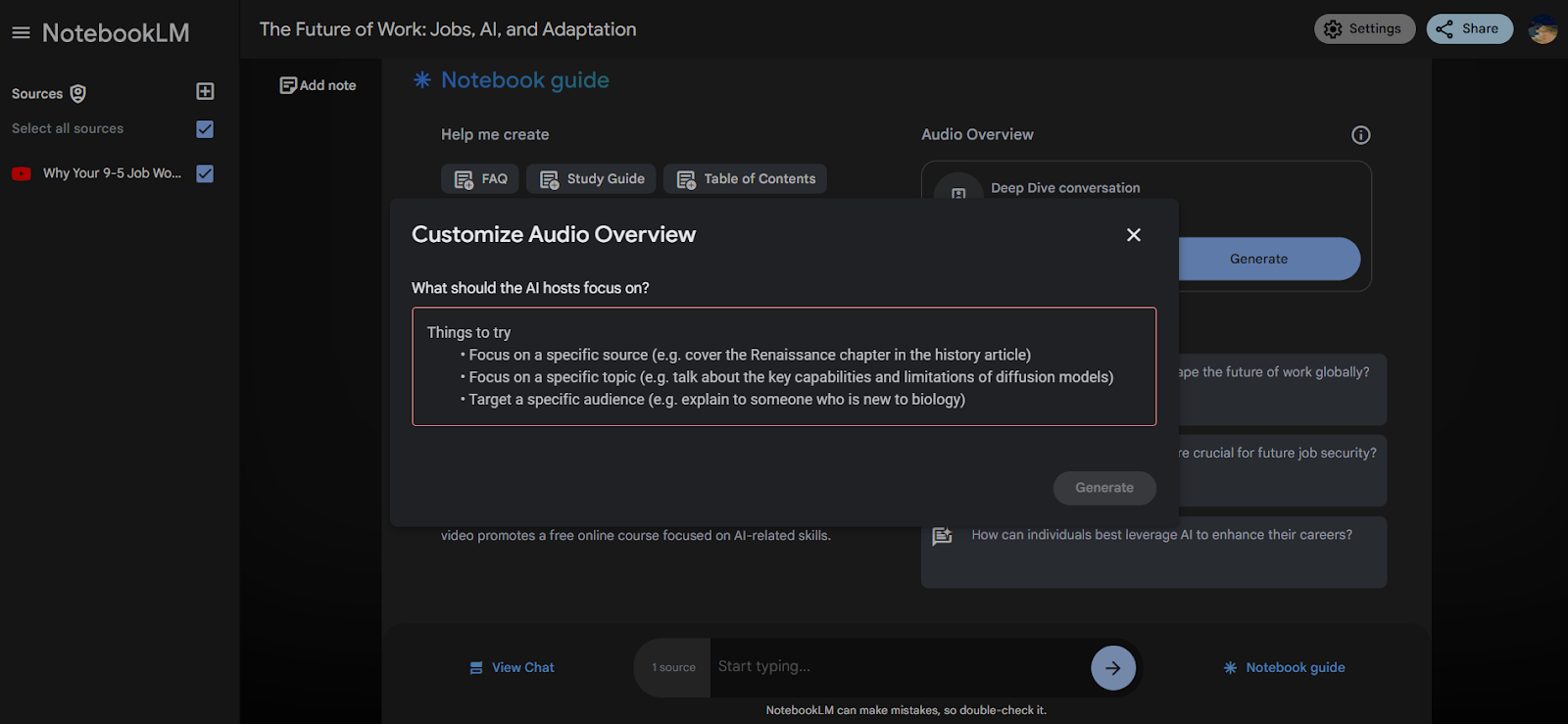
For a more tailored experience, click “Customize” instead of “Generate.”
In the Customize Audio Overview window, add specific instructions to guide the AI in creating your podcast.
Custom instructions add “nuances” that can help guide the AI. It lets you focus on certain topics, adopt a particular tone, or structure the conversation in a way that best suits your needs.
This final step is about quality control and iteration.

Once generated, use the play button and slider to control playback. You can pause, resume, and move forward or backward throughout the podcast.
If you’re not satisfied with the result, you can rate it and provide feedback, then regenerate with adjusted instructions, such as “speak Joe Rogan style,” “ask the questions as Lex Fridman does in his podcasts,” and so on.
Don’t stop until you are satisfied with “the final” output, and that’s it! You’ve just created your very first podcast in seconds with the help of NotebookLM.
💡 Pro Tip: Combine AI-generated content from NotebookLM with personal insights or anecdotes to create a unique voice that resonates with your audience. While AI offers efficiency, your personal touch ensures authenticity and connection.
The following demo podcast proves how easy it is to make podcasts with NotebookLM.
As sources, we uploaded a ChatGPT-generated output of the question, “Logic vs. intuition and how it applies to boiling water,” along with a YouTube video link on the same topic.
Enjoy the conversation! 😄
💡Also Read: Best AI Writing Tools for Content Writing
NotebookLM’s podcast feature, while innovative, comes with several constraints that content creators should be aware of. These limitations can impact the quality of the generated podcasts.
Yes, length restrictions pose a significant challenge. NotebookLM typically caps podcast episodes at around 30 minutes, with some users reporting even shorter limits of 3 to 15 minutes. This constraint can hinder creators looking to produce in-depth, comprehensive episodes on complex topics.
Voice options are another area where NotebookLM falls short. The tool offers only two synthesized voices—one male and one female. This limited selection can make it difficult for creators to establish a unique brand identity or cater to diverse audience preferences.
Moreover, without a voice preview feature, users can’t test how their content will sound before generating the full podcast.
💡 Pro Tip: NotebookLM’s AI is trained to minimize errors but can still “hallucinate” by introducing inaccuracies or fabricating details not present in the original source material. This is why it’s critical to review AI-generated content before publishing.
Customization is a major pain point. NotebookLM’s automated script generator offers minimal control for fine-tuning or adding creative nuances. This lack of flexibility can result in generic podcasts or failure to capture the creator’s intended tone and style.
Language support is another significant limitation. Currently, NotebookLM only supports English, excluding non-English speakers and creators targeting multilingual audiences. This restriction severely limits the tool’s global applicability.
Audio editing capabilities are basic at best. NotebookLM lacks advanced options for adjusting intonation, pacing, or post-production refinements. This means creators might need to rely on additional software for polishing their podcasts—adding an extra step to the production process.
Content accuracy can be a concern. While NotebookLM aims to stay true to the source material, it sometimes introduces inaccuracies or makes up details that weren’t in the original content. This can be particularly problematic for creators producing factual or educational content.
Monetization options are nonexistent within NotebookLM. The tool doesn’t allow for the insertion of advertisements or sponsorships, which can be a significant drawback for creators looking to generate revenue from their podcasts.
Lastly, the lack of integration with external tools and platforms can be frustrating. NotebookLM doesn’t directly connect with podcast hosting platforms or external audio editing software, requiring manual steps to publish and refine content.
📖 Read More: Considering alternatives for your podcasting needs? Checkout our curated lists of the 10 best podcasting software tools and best AI tools for podcasters ”
Considering the above limitations, curating a high-quality podcast now might seem like a tough nut to crack.
But not when you have ClickUp to work with.
ClickUp is an all-in-one productivity and project management tool that helps you achieve your goals.
ClickUp Brain, an AI-powered feature within the ClickUp platform, offers podcasters a complete solution for streamlining their production process. It combines task management, content organization, and AI assistance to improve podcast planning and creation.
ClickUp Brain aids in idea generation by analyzing existing content drafts or outlines and suggesting fresh topics. It can help brainstorm episode titles, create outlines, and draft scripts based on your input.
Tie this up with ClickUp’s task management and content planning features, and you can save time and get your project timeline on track—especially if you’re working with a team and need prompt communication.
For better team collaboration, ClickUp Brain can identify bottlenecks in your production process and recommend solutions to enhance efficiency.
📌 Example: You’re working with a team to produce a podcast series on emerging tech trends. Midway through the project, deadlines slip, and you suspect workflow issues. Using ClickUp Brain, you analyze task completion patterns and identify that script editing is consistently delayed due to overlapping responsibilities. The AI suggests redistributing tasks by assigning a dedicated editor and breaking down editing milestones.
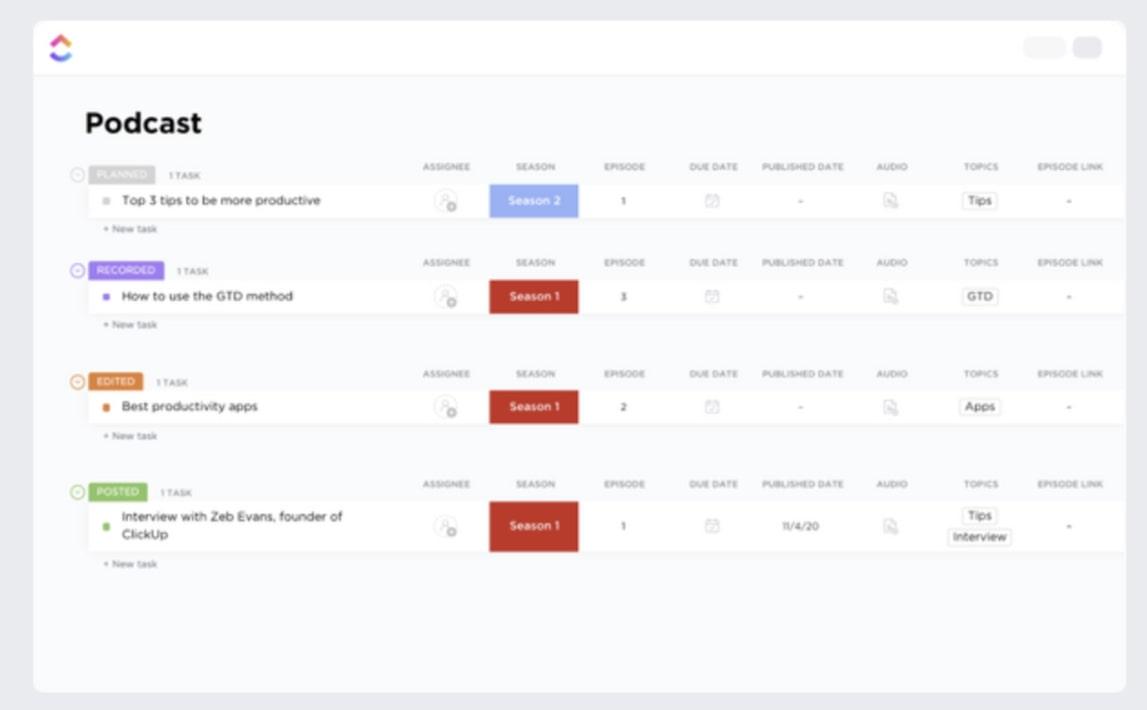
ClickUp’s customizable templates are very useful for podcast planning. The ClickUp Podcast Template, for example, allows users to organize episodes, track progress, and manage resources efficiently.
It includes sections for episode ideas, research notes, and production schedules.
This template makes planning and scheduling episodes easier while also helping you manage assets like audio clips and artwork. You can track progress across episodes and seasons, keeping everything on track.
📌 Example: Imagine you’re planning a podcast series with multiple hosts and guests. Using ClickUp’s Podcast Template, you can create tasks for brainstorming, research, and recording. Assign deadlines to each stage and monitor progress with custom fields like “Recording Status” and “Editing Status.” For instance, you can use the Board view to visualize which episodes are planned, recorded, and ready for release—all in one glance.
ClickUp’s Podcast Calendar Template helps plan and visualize your content release schedule.
This template offers a comprehensive view of upcoming episodes, guest appearances, and topics, making podcast planning and tracking effortless. You can also monitor the status of transcripts, manage show notes, and keep track of sponsors.
This template ensures smooth podcast production with features like time tracking, tags, and dependency warnings.
📌 Example: You’re managing a podcast series featuring weekly guest interviews. Using ClickUp’s Podcast Calendar Template, you assign deadlines for each episode phase—research, recording, editing, and release. For instance, the “Guest Appearance” custom field lets you track confirmed and pending guest schedules, while the Calendar View provides a visual timeline to ensure episodes are spaced evenly. With dependency warnings, you’re alerted if transcript preparation is delayed, allowing you to adjust tasks and avoid disrupting your release schedule.
Step 1: Ideation: Use ClickUp Brain to generate episode ideas and outlines.
Step 2: Planning: Utilize the ClickUp Podcast Template to organize episodes and tasks.
Step 3: Scripting: Collaborate on scripts with your team using ClickUp Docs with AI assistance.
Step 4: Recording: Track recording sessions and manage audio files within ClickUp.
Step 5: Editing: Assign editing tasks and monitor progress using ClickUp’s task management features.
Step 6: Publishing: The Podcast Calendar Template schedules and tracks episode releases.
💡Also Read: How to Use AI for Marketing (Use Cases & Tools)
While AI is a powerful tool for maintaining your unique voice and authenticity, you need to add the “you” factor by adding personal touches to AI-generated content.
To optimize your podcasts with AI:
📌Example: After generating a podcast episode on marketing trends, you use an AI tool like ClickUp Brain to create detailed show notes. Upon reviewing the notes, an SEO tool suggests adding keywords like “AI in marketing” and “content automation” to improve visibility. These notes are then scheduled for release in ClickUp’s Podcast Calendar Template, ensuring timely publication with maximum SEO impact.
AI-powered podcast creation is changing content production, offering creators a variety of tools to optimize their workflow.
NotebookLM and ClickUp Brain represent the breakneck pace of this change, enabling podcasters to generate, plan, and optimize content with remarkable efficiency in a short timeframe.
While AI tools provide incredible capabilities, they’re not replacements for human creativity. The most successful podcasts on YouTube or Spotify blend AI’s analytical power with a creator’s unique voice and perspective.
By combining ClickUp’s AI-driven templates and NotebookLM’s audio generation, you can dramatically reduce production time and unlock new creative possibilities for your podcast.
So, put on your headphones and prepare your AI tools and prompts. Your audience is waiting.
Sign up at ClickUp for free and start your AI-powered podcasting journey.
© 2025 ClickUp