


Collaborative note-taking is changing college teaching and the way an entire class learns together.
This dynamic method involves each student as an active note-taker, allowing them to contribute, edit, and learn from a shared document.
Unlike traditional note-taking, where individuals work in isolation, this approach harnesses the class’s collective knowledge, ensuring that all students benefit from diverse perspectives and insights.
It shifts learning from a solitary to a community-driven activity that enhances student engagement and comprehension.
Understanding these differences can transform how you approach class discussion and information retention if you’re a student, teacher, or educational professional. And in this blog, we’ll tell you how to do this effectively.
How to Implement Collaborative Note-Taking Strategies
- The Concept of Collaborative Note-Taking
- Practical Strategies For Collaborative Note-Taking
- How Technology Tools Make Collaborative Note-Taking A Breeze
- Use Clickup for Smarter & More Efficient Collaborative Note-Taking
- Benefits of Collaborative Note-Taking
- Challenges of Collaborative Note-Taking
- Unlock the Full Potential of Collaborative Note-Taking with ClickUp

 Summarize this article for me please
The Concept of Collaborative Note-Taking
Collaborative note-taking is when students create a single set of notes. It’s like combining everyone’s ideas and takeaways to capture class information in one place.
This note-taking method captures a wider range of information and promotes active student engagement as they interact and learn from each other’s contributions.
Collaborative note-taking works on three most crucial principles, including:
- Engagement: Everyone contributes by adding notes, comments, or questions in real-time
- Interaction: Participants discuss and refine their notes collaboratively, either during or after the session
- Integration: Notes are often compiled into a single document that incorporates insights from various participants, ensuring a diverse range of viewpoints
These principles are integrated into the process of collaborative note-taking. Here’s how it works:
- Set up a digital document: Prior to the class, the teacher creates and shares a digital document using note-taking apps or even just a shared Google document
- Encourage diverse contributions: As the lecture unfolds, each student inputs their own insights, notes, and questions into the shared document
- Facilitate active collaboration: Students interact with other students by adding comments, posing questions, and providing answers
- Refine and enhance post-class: After the lecture, students work to revisit and refine the notes, correcting errors and adding further information based on the feedback from the teacher
After establishing the basic principles and steps of collaborative note-taking, it’s crucial to go beyond the fundamentals to truly enhance this method’s effectiveness. Instructional scaffolding is key in this regard, as it provides the necessary support and structure to maximize students’ learning potential.
What is instructional scaffolding?
Instructional scaffolding is a teaching method that involves providing students with targeted support and guidance as they learn new concepts.
In the context of collaborative note-taking it comprises structured interventions by teachers to help students engage more deeply with the material and with each other’s ideas.
Here are a few strategies teachers should implement to ensure effective scaffolding:
- Establish clear expectations: Clearly define what outcomes students should achieve through their note-taking and set specific, measurable goals for their collaborative efforts
- Assign diverse roles: Rotate roles such as scribe, analyst, and reviewer among students. These might include a lead note-taker, a reviewer who focuses on accuracy and completeness, and an editor who organizes the notes into a coherent structure
- Encourage reflective practice: Facilitate after-class discussions where students reflect on their note-taking process and identify areas for improvement
Summarize this article for me pleasePractical Strategies For Collaborative Note-Taking
Let’s look at the various techniques and tried and tested methods to enhance the note-taking process. These note-taking strategies will help you foster a cooperative learning environment where everyone contributes and benefits.
1. Reduce the workload by sharing note-taking responsibilities
Divide the note-taking duties among students by assigning different topics or sections of a lecture to various students.
For example, one student might focus on key terms, another captures main ideas, and a third jot down any questions that arise.
After class, they combine their own notes into one comprehensive document. This strategy ensures that no single student is overwhelmed and promotes varied perspectives on the material, enriching the learning experience for the entire group.
2. Rotate the task and take turns to enhance collaboration
This method involves students taking turns as the primary note-taker.
In one session, a particular student might take the lead on note-taking, while in the next session, another student takes over. This rotation continues throughout the course.
After each class, the group meets briefly to discuss and refine the notes, ensuring everyone understands and agrees on the content. This method keeps all students actively engaged and helps them develop strong note-taking skills over time by observing and learning from each other.
3. Build bridges to foster an inclusive learning environment
This strategy focuses on building a more inclusive college classroom. It ensures that all students feel valued and supported regardless of their background or learning style. It involves creating diverse note-taking groups in terms of academic strengths and personal experiences.
Each member contributes unique insights, which promotes a deeper understanding of the material. Additionally, this approach allows students who might feel marginalized to have their voices heard and respected, fostering a sense of belonging and mutual respect within the classroom.
Lastly, you need to think of specific tools that bring your collaborative note-taking strategies to life. All the above note-taking strategies are enhanced when paired with technology.
Summarize this article for me pleaseHow Technology Tools Make Collaborative Note-Taking A Breeze
Technology acts as the backbone of modern collaborative note-taking—it supports the entire process. Using platforms like ClickUp, Google Docs, or Microsoft OneNote, you can streamline the logistics of note-taking and deepen student engagement by seamlessly connecting participants. With such tools, you get:
- Visibility and accountability: Everyone can see who contributes what, making the session transparent and collaborative
- Instant updates and corrections: Classmates can immediately correct mistakes and add new information
- Accessibility and inclusion: Whether participants are in the classroom or joining remotely, these collaboration tools for students ensure that no one is left out
What should you look for in collaborative note-taking tools?
When choosing collaborative note-taking tools, it’s crucial to identify features that enhance teamwork and streamline the learning process while meeting your unique needs. Here’s what to look for:
- Real-time collaboration: Choose tools that allow simultaneous edits and contributions, ensuring that every participant can share their insights instantly
- Accessibility: Opt for tools that offer seamless access across all devices. This ensures everyone can join in, no matter where they are or what device they’re using
- Integration capabilities: Select tools that integrate smoothly with other educational and productivity platforms you’re already using. This minimizes disruptions and simplifies workflows
- Visual aids: Look for functionalities that support diagrams, charts, and visual brainstorming, which are crucial for mapping complex ideas and enhancing understanding
- User-friendly interfaces: Focus on tools with intuitive interfaces that are easy to navigate, ensuring a low learning curve and high user engagement
- Scalability: Ensure the tool can handle different group sizes effectively, from small teams to large classes, maintaining performance without glitches
ClickUp is a prime example of a platform that ticks all these boxes. It is a versatile project management and productivity software that serves as an all-in-one workspace for teams across various industries.
Summarize this article for me pleaseUse Clickup for Smarter & More Efficient Collaborative Note-Taking
ClickUp stands out for collaborative note-taking thanks to its note-worthy features that make it your go-to tool. Let’s have a detailed look at ClickUp’s features.
1. ClickUp Docs

ClickUp Docs lets you and your team create and edit documents together right in real time. It provides a rich text editor for detailed note compilation that everyone can contribute to simultaneously.
You can see changes as they happen, leave comments, and even turn parts of your notes into tasks. It’s straightforward and keeps everyone on the same page, making group projects smoother and more interactive.
2. ClickUp Notepad
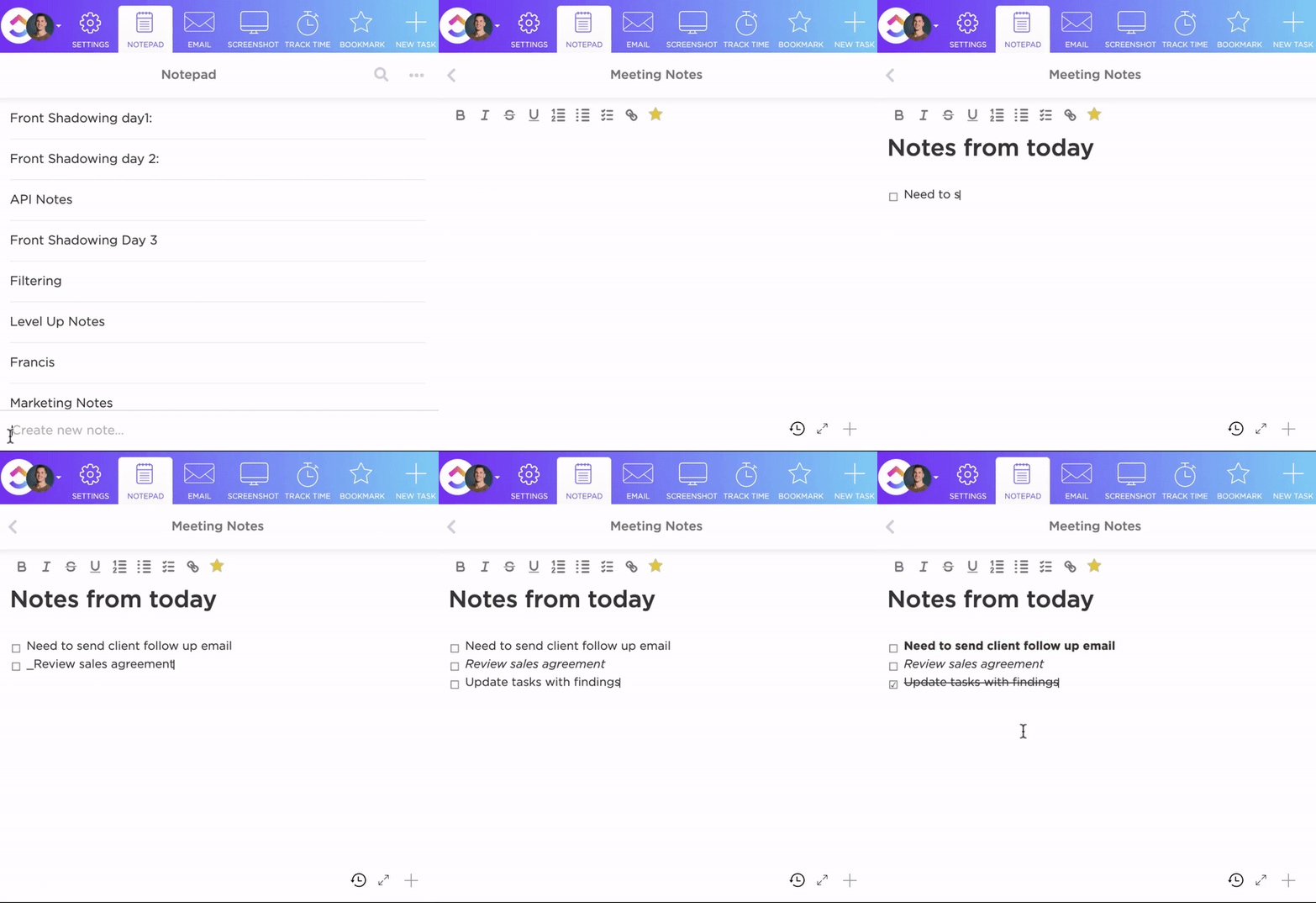
Perfect for quick thoughts and checklists, ClickUp Notepad organizes your notes and tasks all in one easily accessible place. It’s ideal for jotting down ideas during a brainstorming session or compiling a to-do list that helps track your lecture or meeting notes.
It’s easy to organize—drag and drop to reorder items in your checklist or nest them to see your tasks clearly. Plus, you can add any web link, spreadsheet, or video right next to your notes for quick access.
3. ClickUp Whiteboards

For those who think visually, ClickUp Whiteboards act like an online canvas where you can map out thoughts and connect ideas graphically. It’s a dynamic tool for visual learners and an amazing aid for complex idea mapping or brainstorming sessions.
It allows you to work together in real time, even if you’re miles apart, to sketch out ideas, create workflows, and link thoughts directly to tasks. This tool is perfect for anyone looking to visualize concepts and coordinate team efforts smoothly.
4. ClickUp Brain
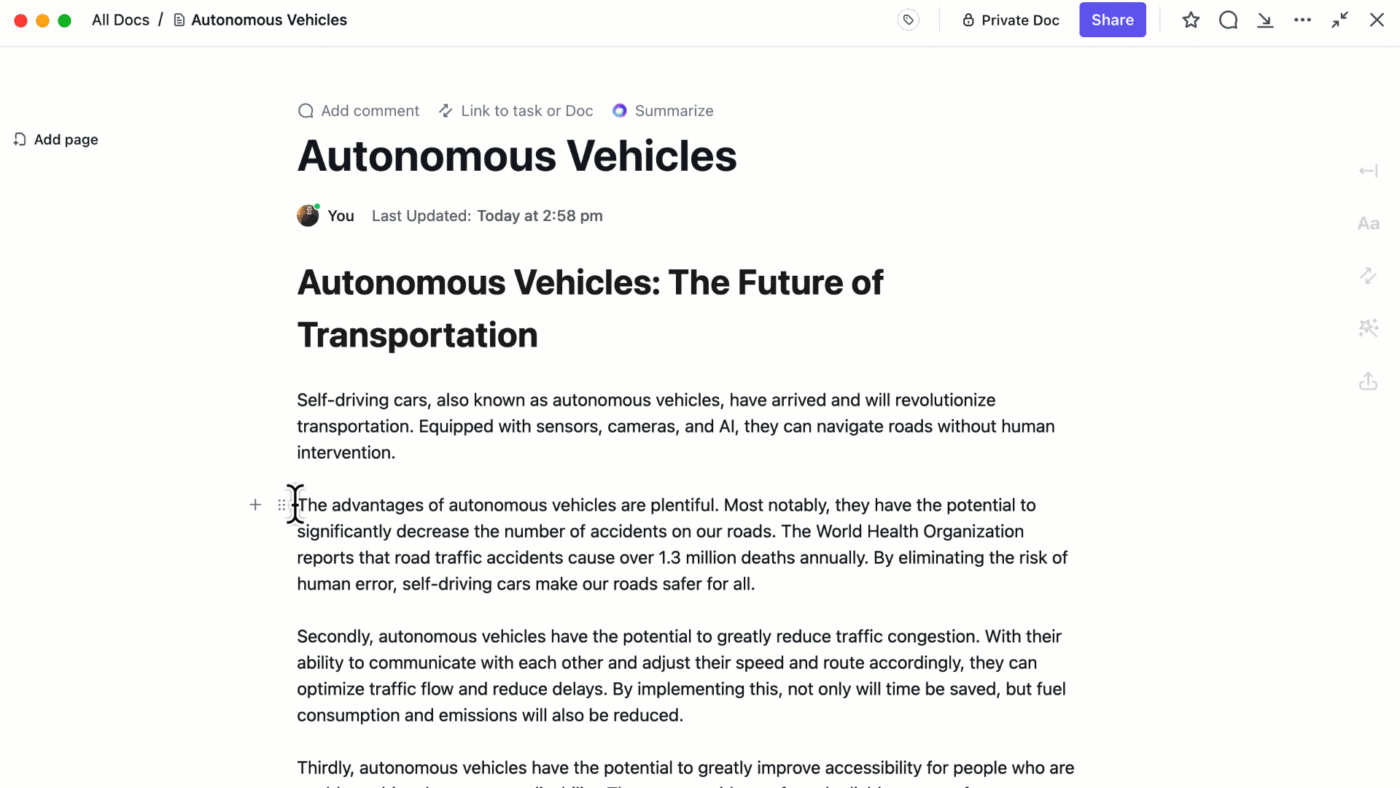
ClickUp Brain is your all-in-one AI that integrates across your workflow to connect apps and streamline tasks. It can drastically enhance how you create and manage notes.
ClickUp Brain helps you:
- Capture your thoughts and organize them
- Generate summaries
- Translate notes into multiple languages
- Generate action points from meeting notes and summaries
- Connect them to relevant tasks and projects
It helps summarize discussions, generate content ideas based on your notes, and even refine and edit notes to keep them concise and impactful. It is ideal for managing complex information, maintaining focus, and ensuring that all your notes lead to tangible outcomes.
5. ClickUp Templates
ClickUp templates offer streamlined, pre-configured setups to help manage tasks and projects efficiently, saving time and ensuring consistency across various activities and processes. From daily notes to class notes, these note-taking templates cater to diverse needs, making them invaluable for both personal and professional use. Here are the two main templates that can enhance your note-taking capabilities:

ClickUp’s Daily Notes Template is ideal for anyone looking to organize their day-to-day activities effectively. It provides a structured way to capture quick notes, track daily goals, and review accomplishments, helping you stay on top of your daily commitments. With this template, you can:
- Jot down thoughts and tasks quickly as they come
- Use easy visuals to monitor your goals and tasks
- Reflect on your mood and productivity at the end of each day
- Access different views like the daily notes view and getting started guide for varied needs

ClickUp’s Class Notes Template simplifies the organization of school notes, assignments, and resources. It supports efficient study habits by keeping all pertinent class information in one easily accessible place. It helps you:
- Keep notes for different subjects neatly organized
- Transform notes into actionable tasks directly within the template
- Navigate your notes effortlessly with a clickable table of contents
- Modify and format the template for each class or project need
Summarize this article for me pleaseBenefits of Collaborative Note-Taking
Collaborative note-taking isn’t just about sharing the load. It boosts every individual’s learning path hugely. Let’s break down the benefits of collaborative note-taking:
- Boosts reading comprehension: When you collaborate, you see how others understand the material, which can deepen your own understanding
- Encourages active learning: You’re not just passively taking notes; you’re actively engaging with the content as you discuss and revise notes with peers
- Increases engagement: Working together keeps everyone more involved, especially in eLearning environments where it’s easy to feel disconnected. This is especially true for those in online classes. Collaborative note-taking pulls you into the lesson, making you an active participant
Read more: All about color-coded notes
Summarize this article for me pleaseChallenges of Collaborative Note-Taking
Collaborative note-taking opens doors to active learning but comes with its own set of hurdles. Let’s explore some common challenges and how you can overcome them.
1. Coordination complexity
Coordinating note-taking among multiple students can be tricky. Often, notes become redundant or incomplete due to a lack of clear direction, fragmenting the learning process.
How to overcome
To streamline coordination and enhance the clarity of collective notes:
- Use mapping techniques: Adopt the mapping note-taking method to create a layout where the main topic forms the center, and branches extend out for related subtopics. Assign specific branches to different students to ensure even coverage and reduce redundancy
- Implement structured outlining: The outline note-taking method structures notes in a hierarchical format, using main topics, subtopics, and details. Begin each class with a clear outline of main topics and subtopics. Assign these sections to students, directing them to fill in detailed notes under their respective headings
💡 Pro Tip: Use ClickUp Mind Maps to organize topics and subtopics visually in a collaborative environment. This mind-map note-taking method makes it easy for each student to see their assignments and contribute effectively to the collective note-taking process.
2. Varying skill levels
Differences in academic backgrounds and note-taking skills can result in uneven quality of notes, with some students capturing detailed information and others not as much.
How to overcome
To standardize note-taking quality and accommodate various skill levels:
- Implement the Cornell method: Teach students the Cornell note-taking method, which organizes notes into cues, details, and summaries. This structure helps students focus on key information and enhances note clarity
- Rotate note-taking roles: Regularly change partners in note-taking tasks to expose students to different note-taking styles and strategies. This encourages peer learning and helps standardize the depth and detail of notes
3. Technological hurdles
In a digital learning environment, not all students may be equally tech-savvy, which can impact their ability to engage effectively in collaborative note-taking. This might lead to some students feeling left out of the collaborative process due to their unfamiliarity with digital tools.
How to overcome
To ensure all students are comfortable and able to participate fully in collaborative note-taking:
- Offer tech literacy workshops: Conduct regular training sessions to familiarize students with the digital tools used for note-taking
- Simplify access with an all-in-one platform: Adopt a unified digital platform like ClickUp that consolidates all educational resources and note-taking tools in one place
4. Engagement variability
Engagement levels can greatly differ among students in collaborative settings. This variability can affect group dynamics, with some students possibly dominating the process while others participate minimally due to shyness or disinterest.
How to overcome
To manage varying engagement levels in collaborative note-taking, it’s crucial to create an inclusive environment where every student feels comfortable contributing. Here’s how you can ensure more balanced participation:
- Set clear participation guidelines: Define expected contributions for each session
- Rotate roles regularly: Assign roles like scribe or reviewer to different students each session
- Implement breakout rooms: Facilitate small group discussions to encourage quiet students to share their thoughts
Also read: Team communication strategies
Summarize this article for me pleaseUnlock the Full Potential of Collaborative Note-Taking with ClickUp
Using technology such as digital and AI tools for note-taking is a game-changer for organizations and learners alike. It shifts how we all learn, making sure everyone in the group can chip in and learn from each other. This is super important because it means you really get the hang of things when you’re all throwing ideas around.
Digital notes taken in a collaborative environment foster a deeper understanding and more effective retention of class notes. ClickUp stands out as a robust note-taking app in this regard, offering features like powerful search and collaborative editing across all your devices. By integrating ClickUp into your routine, you can ensure that every note and insight is captured efficiently and effectively. It transforms the way you handle notes and boosts how you all learn together.
Sign up with ClickUp today!

Everything you need to stay organized and get work done.
