
Sorry, there were no results found for “”
Sorry, there were no results found for “”
Sorry, there were no results found for “”
Gandhi once said, “Live as if you were to die tomorrow. Learn as if you were to live forever.”
This quote reminds us that learning isn’t just a phase confined to school or college—it’s a lifelong journey.
When we view learning as an ongoing adventure, where each day offers a new opportunity to explore, understand, and apply knowledge, we tend to experience exponential growth in our lives and careers.
And when you’re able to build a body of deep knowledge about a subject, you’re better positioned to make decisions, solve problems, and drive innovation.
In this article, we’ll explore tried and tested ways to gain knowledge and demonstrate how true learning extends beyond earning a degree. We’ll also cover practical strategies for lifelong education and personal development. 🎓
To keep learning long-term, focus on strategies that help you understand, retain, and apply what you learn—not just collect information.
Acquiring knowledge isn’t just about stocking up on facts; it’s about understanding concepts deeply and applying them.
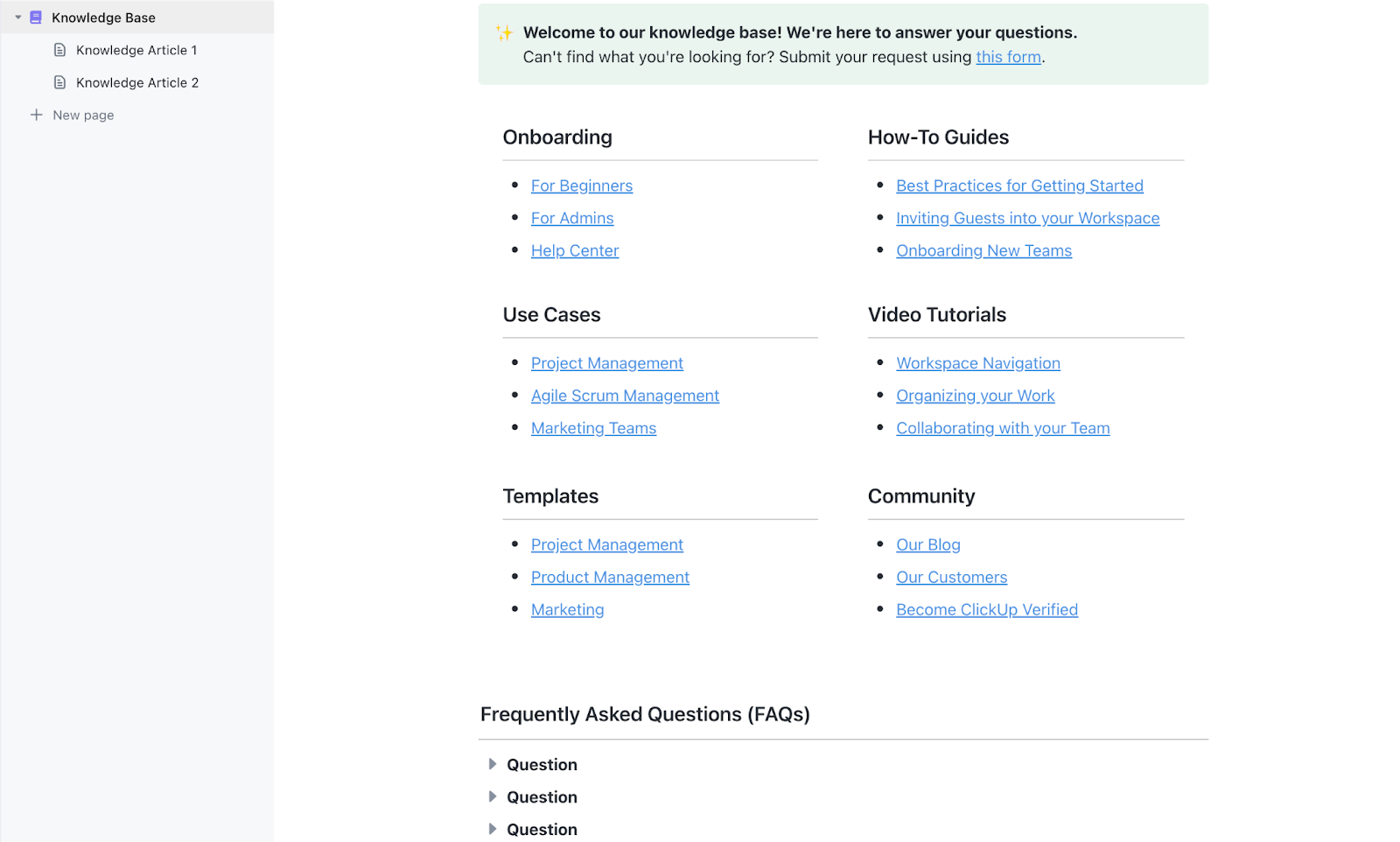
Drowning in info but not retaining much? Try ClickUp’s free Knowledge Base Template to help you organize what you learn, so it actually sticks—and stays easy to find.
Implementing learning strategies can help you absorb, retain, and apply new information more efficiently. Here are seven ways to gain knowledge and stay ahead:
Books are a timeless source of knowledge, offering in-depth insights and perspectives across subjects. Whether fiction, nonfiction, textbooks, or autobiographies, reading enhances your comprehension and understanding of various topics.
Reading good books can also help sharpen cognitive skills like critical thinking and problem-solving. The right books push you to question your beliefs and preexisting notions, offering fresh perspectives and novel ways of approaching situations.
The next time you’re shopping online or in a bookstore, pick a book outside of your regular fare. Curating an eclectic range of books for your reading list can help keep your mind malleable and agile. It might also be fun to try out books written by authors outside your culture, as this can help broaden your understanding of the world.
So whether you choose to read a physical book with printed pages or an e-reader, immerse yourself in a distraction-free book and build a habit of lifelong learning.
Reading tips:
Workshops are short, focused sessions where you learn specific skills through practical, hands-on activities. They typically cover real-life scenarios and include group activities and live demonstrations. Workshops are a great way to pick up new skills quickly and network with others in your field.
Additionally, professional events like seminars, forums, and conferences can also add value. Experts in their fields usually speak at these events, so attending them is a good way to stay up to date with industry trends and developments.
As an attendee, you may also get first-hand insights and opportunities to connect with peers and leaders in your industry, making these events ideal for exchanging ideas and gaining a fresh, broader perspective.
Workshop/seminar/conference tips:
Education has never been more accessible, and today, you can probably find online courses on every subject under the sun. E-learning platforms like Coursera have seen explosive growth due to the fact that anyone can access online learning from anywhere in the world at a competitive cost.
Additionally, as businesses evolve, there’s always a need for new skills in emerging technologies and models.
Here’s the data on online courses. 👇

Online courses are flexible and affordable. They provide a structured learning experience (similar to classroom learning) but with the convenience of learning at your own pace, location, and schedule.
Many online courses also offer certifications once you complete them. These certifications can boost your resume and showcase your commitment to professional growth to prospective employers.
Online learning tips:
Subscribing to industry newsletters and following relevant social media accounts enhances your knowledge acquisition process.
Newsletters give you curated, relevant content, delivering the latest updates, trends, and insights directly to your inbox.
Meanwhile, social media can also be a valuable online teaching tool—until, of course, you get distracted by the distracting content available on these platforms 👀!
So, if you’re trying to learn something on social media, it’s going to take some discipline and a strictly curated feed.
Social media platforms like LinkedIn, which are meant for professionals, are a prominent source of learning for both recent entrants into the job market and veterans.
By following educational accounts on social media platforms, you can gain access to real-time updates, thought leadership articles, and diverse perspectives from industry experts, CEOs, and professionals.
Many companies and organizations also share free resources like white papers and case studies, helping you stay up-to-date on industry trends and facilitating self-education, collaborative learning, and professional growth.
Newsletter and social media tips:
Professional networks, whether they’re online forums or offline associations, provide a community where sharing information and learning from others is easy and accessible.
Being a part of professional networks fosters collaborative growth. You can share your insights, receive feedback, and work on projects or ideas with others, making these networks a valuable learning tool for building strong professional relationships.
Networking and community engagement tips:
No matter your industry, experience level, or career stage, there’s a mentor out there for everyone—the Gandalf to your Frodo, who can guide you to your goals and help you realize your aspirations.
A great mentor offers personalized guidance and advice. They also help you navigate professional challenges and change your perspective on things.
Unlike general resources, mentors draw from their firsthand experiences to provide practical strategies for overcoming obstacles. Their insights can be invaluable, offering you the wisdom and knowledge needed to enhance your personal and professional growth.
Mentor-mentee tips:
Educational technology is revolutionizing how we learn, offering new and exciting ways to build knowledge and grow. Tools like virtual reality (VR), augmented reality (AR), and gamified learning make education engaging and immersive.
You can learn anything, from coding to cooking, at your time and pace. Many platforms offer knowledge base templates and other interactive elements like quizzes, videos, and forums, which turn learning into engaging and enjoyable activities.
Even in workplaces, digital learning tools are widely used for training and professional development. For instance, ClickUp is a tool that we’ll explore in detail below 👇
Ed-tech tips:
ClickUp supports interactive learning by centralizing planning, progress tracking, and collaboration—so learning stays structured, measurable, and easy to manage in one place.
We all know ClickUp as a leading productivity platform. It’s also among the best knowledge base software and educational AI tools in the market. It’s perfect if you’re looking to create a consistent, collaborative learning framework and improve student engagement.
ClickUp’s Education Management Software stands out for its ability to simplify and centralize management and administrative tasks in the educational setting.
The software helps you organize coursework, manage student information, track lesson information, and automate workflows and administrative duties—all in one convenient place.
With ClickUp Tasks, you can break down bigger goals into small achievable steps, allowing you to create detailed to-do lists, set deadlines, and prioritize tasks.
Additionally, managing dependencies by linking related tasks helps you understand how different learning activities interconnect, preventing delays and ensuring a smooth progression toward your learning goals.

When it comes to note-taking, ClickUp Notepad ensures you never miss a detail. So the next time you pick up that book or attend a long-awaited seminar, use the notepad to jot down notes, format them with rich editing options, and turn any note into a trackable task.
This way, you can manage your learning materials and tasks efficiently, all accessible from your browser or mobile device.

No matter your aspiration, every success starts with a clear goal. ClickUp Goals links tasks and checklists directly to your goals, making sure everything in your learning pipeline feeds directly into the bigger picture.
If you’re working on learning a new skill, you can associate all related tasks, like reading chapters or completing exercises, with a specific goal. ClickUp will automatically track your progress as you complete these tasks.

ClickUp Dashboards provide a clear view of your progress toward your goals, helping you visualize your progress and adjust your efforts to stay on schedule.
Use ClickUp Docs to create detailed documents and wikis with nested pages, rich styling, and customizable templates. This makes it easy to organize and share educational content.
Integrate Docs with your workflows, linking documents to tasks and projects for a centralized hub of study materials, lecture notes, and research articles. It’s ideal for your group learning and knowledge-building activities.
ClickUp also works well with tools like Gmail and Outlook, so you can easily communicate with your team, discuss topics, clarify doubts, and share insights.

ClickUp Whiteboards offer a dynamic visual space for brainstorming and planning. Consider them the perfect collaboration tool for learning concepts in a group setting. You and your team can brainstorm ideas, create mind maps, draw links, and refine ideas.

Overall, ClickUp provides ample opportunities for networking and collaboration. The shared workspaces and project spaces facilitate communication and interaction among team members, fostering a collaborative environment.
You can also join ClickUp’s global community to deepen your knowledge, showcase your skills, and connect with others in the productivity space.

To organize learning materials and track progress in one system, ClickUp templates give you ready-made structures for storing knowledge, managing coursework, and monitoring deadlines.
Organizing your data effectively is crucial for maintaining clarity and efficiency in any project. ClickUp Templates provides a powerful solution for structuring your information, with options to integrate lesson plan templates from Google Docs. These customizable templates help you organize data, track progress, and maintain consistency across your projects.
ClickUp’s Knowledge Base Template is a powerful tool for organizing and managing information within an educational or professional setting. It includes:
By centralizing information in this structured way, you can improve communication, foster collaboration, and simplify knowledge management for educational purposes.
ClickUp’s Student Education Template helps you stay organized and manage your coursework effectively. This template allows you to track tasks, plan projects with due dates, and manage your workload by prioritizing important activities. It simplifies keeping up with assignments, exams, and deadlines, reducing stress and enhancing your ability to focus on learning.
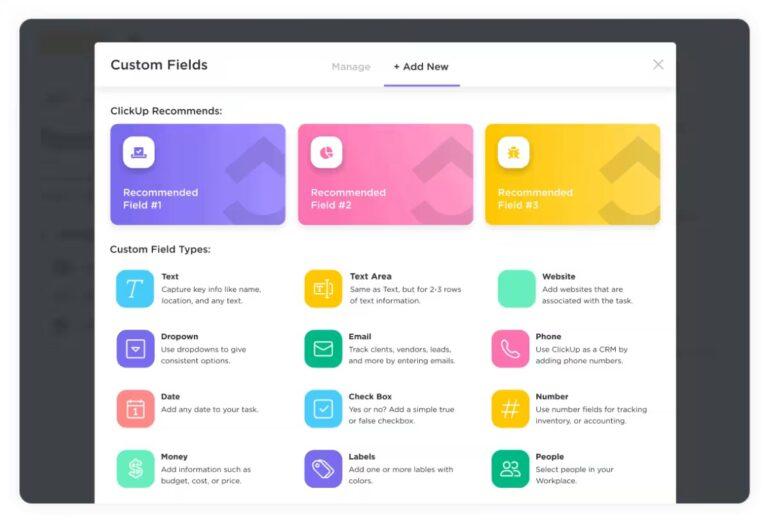
The template features custom statuses for tracking progress, custom fields for vital information, and various views like Curriculum View and Prerequisites View to keep all course details organized.
With these templates and features, ClickUp will become your knowledge acquisition and retention partner.
Gaining knowledge and skills requires dedication and commitment to continuous learning The raw ingredients are curiosity and consistency. But a strategic approach and the right tools can help you apply what you’ve learnt to deliver tangible outcomes.
Using tools like ClickUp can significantly enhance your learning journey by providing features like document management, goal tracking, and task organization.
Whether you’re studying for an exam, working on a group project, or pursuing personal growth, ClickUp can help you stay organized, motivated, and on track with your learning goals.
Sign up now and discover how ClickUp can help you master new skills and knowledge!

Manasi Nair
Max 20min read

Praburam Srinivasan
Max 14min read
Manasi Nair
Max 32min read

© 2026 ClickUp