
Sorry, there were no results found for “”
Sorry, there were no results found for “”
Sorry, there were no results found for “”
Your morning had started with three client calls, followed by back-to-back team meetings. Now, at 4 p.m., you haven’t even touched your most important tasks, and your energy is drained.
If this is what every day looks like, it’s time for you to consider a dedicated digital planner app. And if you’ve done the research, you’ve likely come across two popular options: Sunsama vs. ClickUp.
Both tools promise to help you manage your time better, but they take different approaches. While one focuses on daily planning and mindful productivity, the other offers a complete workspace solution. The real question is: which one matches your needs? Let’s find out!
| ClickUp is best for: | Sunsama is best for: |
| Teams and businesses of all sizes that need a versatile project management tool | Solo professionals and freelancers focused on daily planning |
| Users seeking extensive customization and an all-in-one workspace solution | Users who prioritize a simple, intuitive interface, focus mode, and timeboxing |
| Those who want AI assistance for task automation and insights | Those who want to integrate existing tools into a centralized planner |
| Individuals who need robust features and project management capabilities | Individuals seeking a streamlined, distraction-free planning experience |
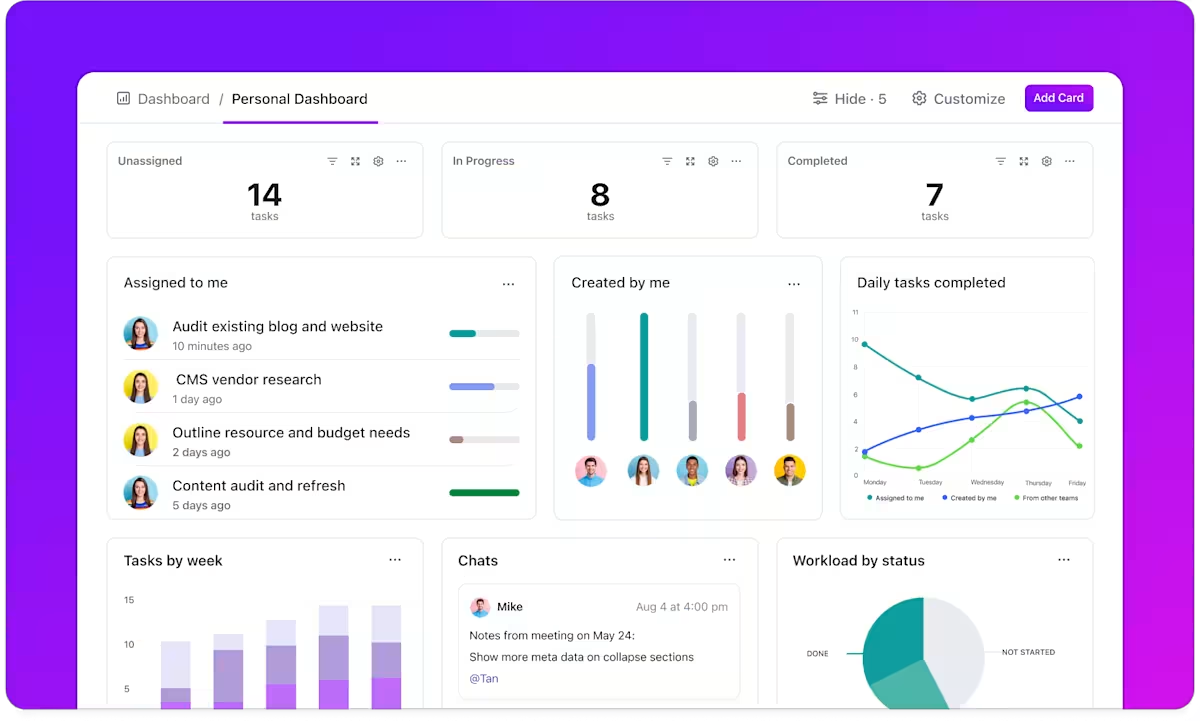
Your individual to-dos are on your notes app, your team projects in a shared workspace, and every time you need help, you’ve to ping colleagues on a separate chat tool.
A not-so-fun fact? We toggle between apps 1,200 times a day. That’s 9% of our annual work time wasted.
ClickUp fixes this with the everything app for work that combines project, knowledge, and chat in one place—all powered by AI that helps you work faster and smarter.
You can use it as easily for task scheduling, time management, and project tracking, as for team collaboration. Designed to replace multiple tools, it offers a highly customizable interface for planning, organizing, and executing work your way.
Whether you’re a freelancer managing personal tasks or part of a large team handling complex projects, ClickUp adapts to your needs with features like task automation, collaborative documents, and even AI-powered tools.
ClickUp provides the tools to stay ahead of your schedule and deliver results, from customizable calendar views to AI-driven insights and ready-to-use daily planner templates. Let’s explore these features and see how they can transform your work and improve your daily planning efficiency.
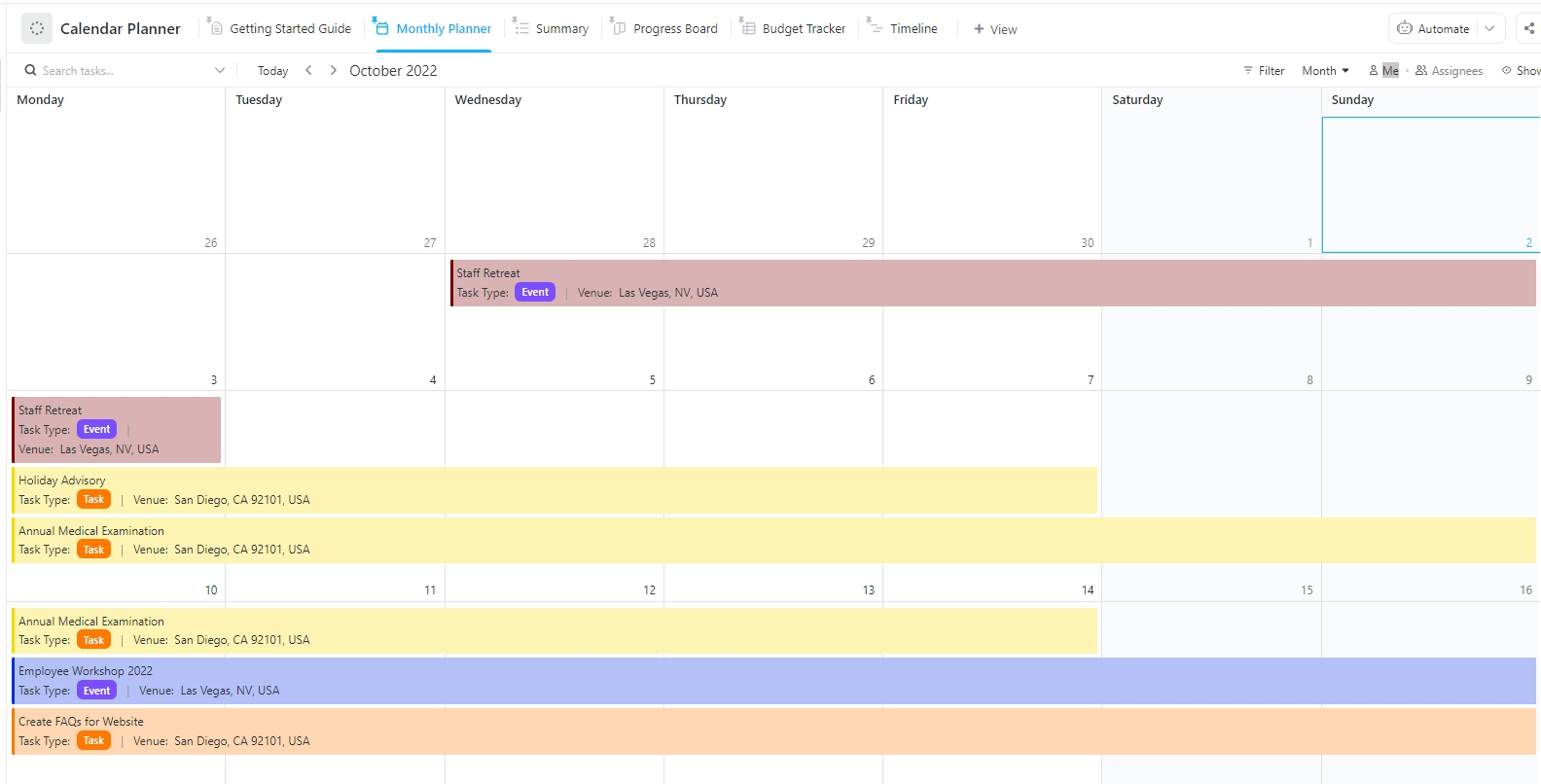
The ClickUp Calendar Planner Template makes scheduling and managing events, deadlines, and tasks effortless. You can tailor the template to match your unique workflow with features like Custom Statuses and Custom Fields to record task details and progress.
Whether you need to track milestones, monitor costs, or categorize tasks, this template effortlessly adapts to your task management, project management, or overall planning needs.
The template offers a variety of views, such as the Monthly Planner and Timeline, letting you visualize your schedule in the way that makes the most sense for you, ensuring nothing slips through the cracks.
It automates reminders and provides a bird’s-eye view, helping reduce the chaos of scheduling tasks and transforming how you manage your time.
However, if you want a template to help you schedule your personal and professional commitments daily, you can check out the ClickUp Daily Planner Template. On the other hand, you can use the ClickUp Weekly Planner Template to organize your tasks for the week. It displays your whole week in an efficient two-page format.
Learn how to create your project calendar with this handy video explainer:
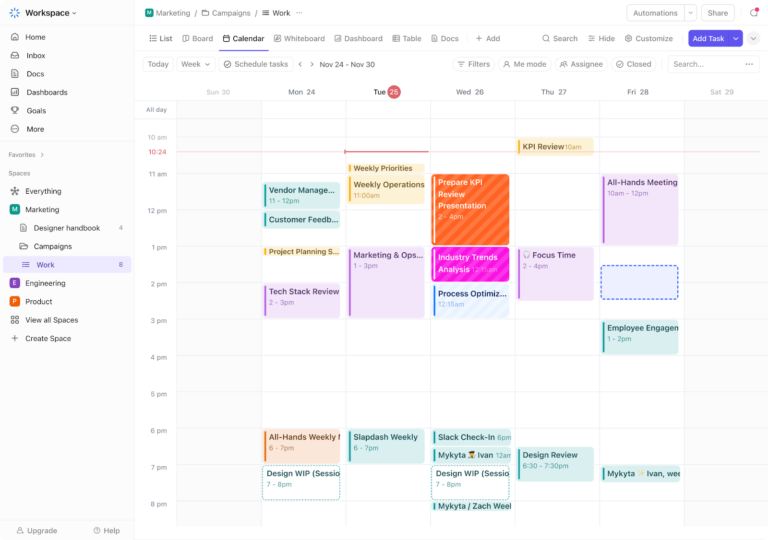
The ClickUp Calendar goes beyond simple task scheduling, offering a centralized platform for visualizing work, coordinating events, and effortlessly managing task timelines.
Whether you need to monitor multiple work deadlines or manage personal commitments, ClickUp’s AI-powered Calendar keeps your plans organized and adaptable.

Switch between daily, weekly, or monthly layouts to focus on what matters most. The drag-and-drop functionality makes scheduling a breeze—simply move tasks or adjust durations and dependencies directly within the calendar.
ClickUp’s AI calendar capabilities, such as smart scheduling for your meetings and to-dos and integrations with external tools like Google Calendar, simplify your planning process.
You can also securely share your calendar with clients, teammates, or guests, ensuring everyone stays informed and aligned on task priorities and timelines.
Add to that the power of customizable reminders, and you’ll never miss an important meeting or deadline again!
Here’s a handy guide on making the most of your ClickUp Calendar.
ClickUp’s in-house AI assistant, ClickUp Brain, connects your tasks, docs, people, and external apps like Google Drive, creating a centralized, smarter workspace.
This AI feature also lets you implement time-saving productivity hacks, such as automating project updates and seamlessly crafting high-quality content using simple prompts.
If your workload has ever spiraled out of control, and you’ve wondered how to keep track of tasks, ClickUp Brain shares automated standup reports and activity summaries to keep you informed.
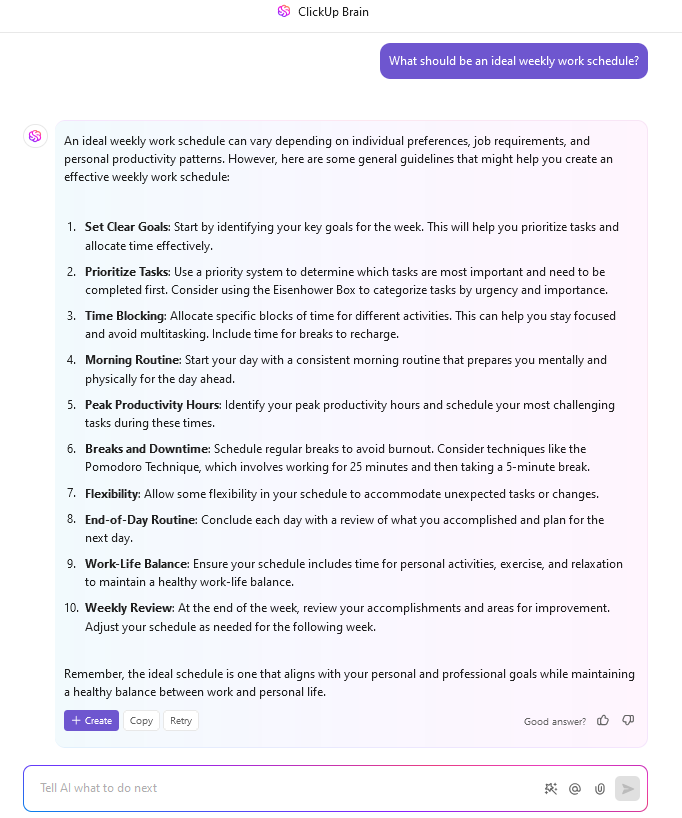
Use ClickUp Brain to:
👀 Did You Know? 93% of companies that invested in AI in project management saw a positive return on investment in just 12 months.
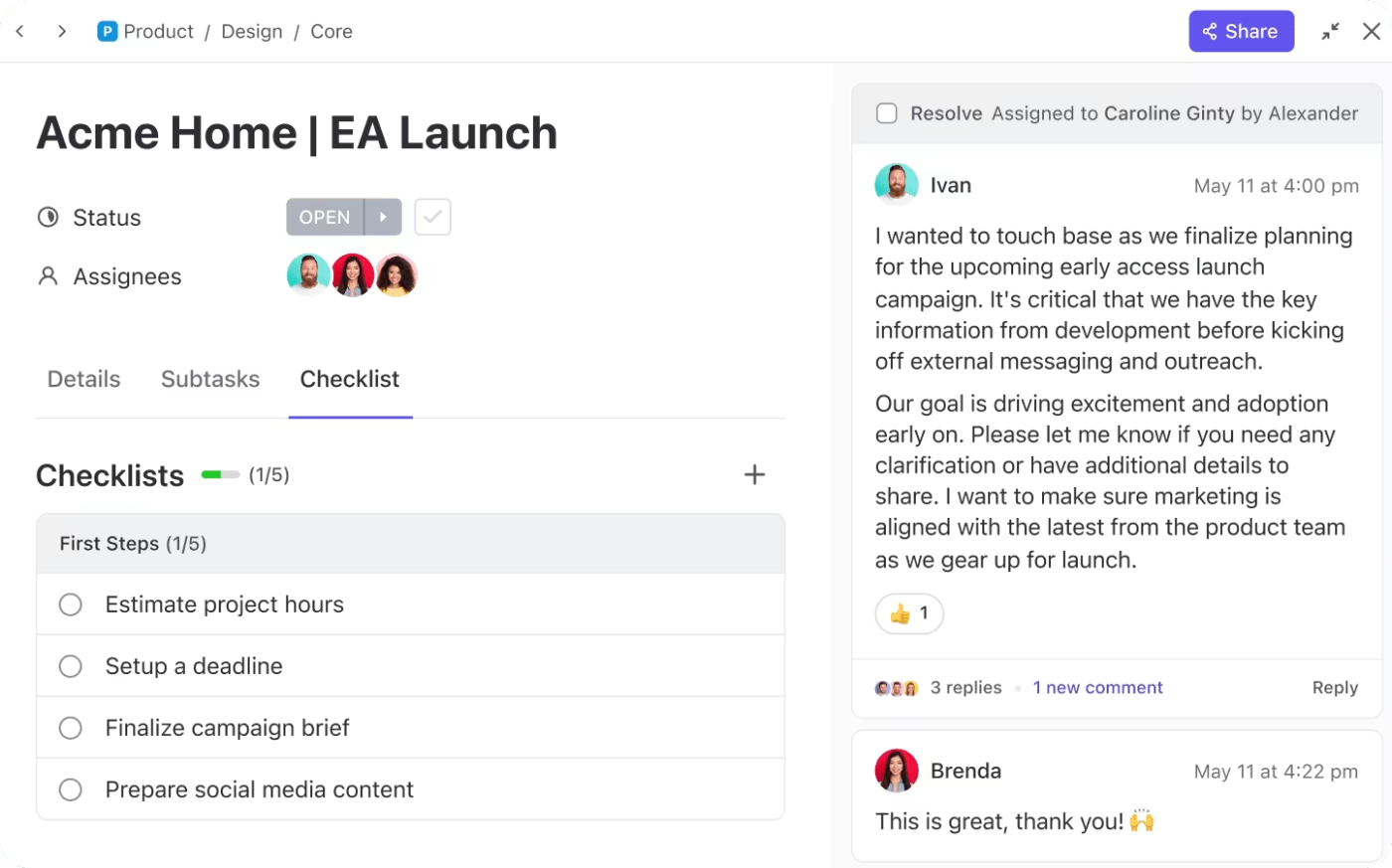
ClickUp Tasks lie at the core of ClickUp’s task management functionality, helping you organize everything from simple to-dos to complex projects.
Use them to:
ClickUp’s task tracking brings order to your work by providing a central hub for communication, collaboration, and getting things done.
If you want a simpler solution for task management, try the ClickUp Task Management Template. It offers four different views—List, Board, Box, and Calendar—to help you visualize tasks by priority or department, track their status, and collaborate efficiently with your team.
📮ClickUp Insight: 92% of workers use inconsistent methods to track action items, which results in missed decisions and delayed execution. Whether you’re sending follow-up notes or using spreadsheets, the process is often scattered and inefficient.
ClickUp’s Task Management Solution ensures seamless conversion of conversations into tasks—so your team members can act fast and stay aligned.
ClickUp can be tailored to nearly any project management need. It is technical enough to handle large year-over-year interdepartmental projects, yet customizable to operate as a simple daily checklist.
Also Read: Free Sunsama Alternatives and Competitors
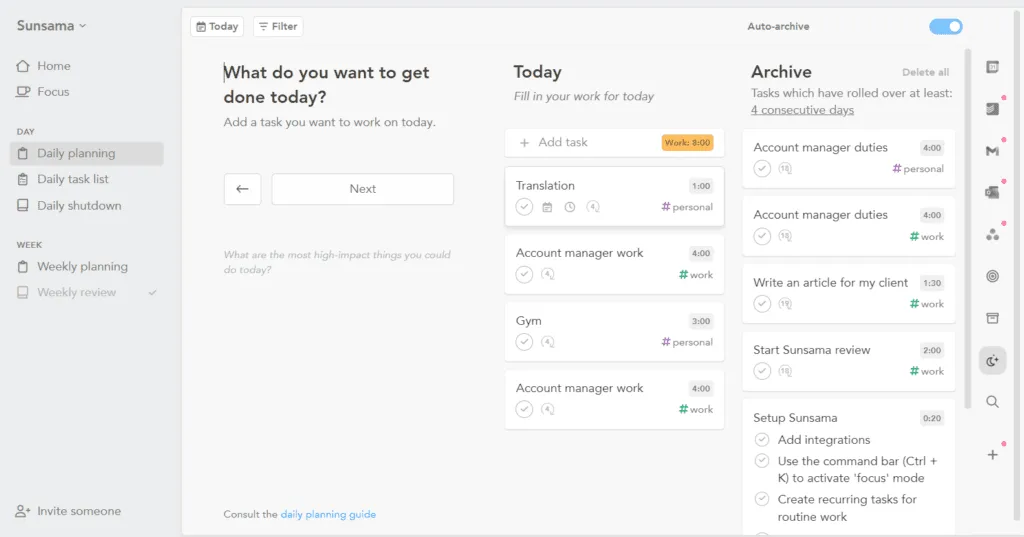
Sunsama is a daily planning app designed to help users organize routine tasks and schedules in a single, simplified workflow.
It allows users to combine work and personal priorities, allocate time for tasks, and track progress throughout the day.
With a focus on structured planning, Sunsama offers features that aim to support productivity and help users manage tasks and their responsibilities.
Also Read: Free Sunsama Alternatives and Competitors
Now, let’s look at some of Sunsama’s features:
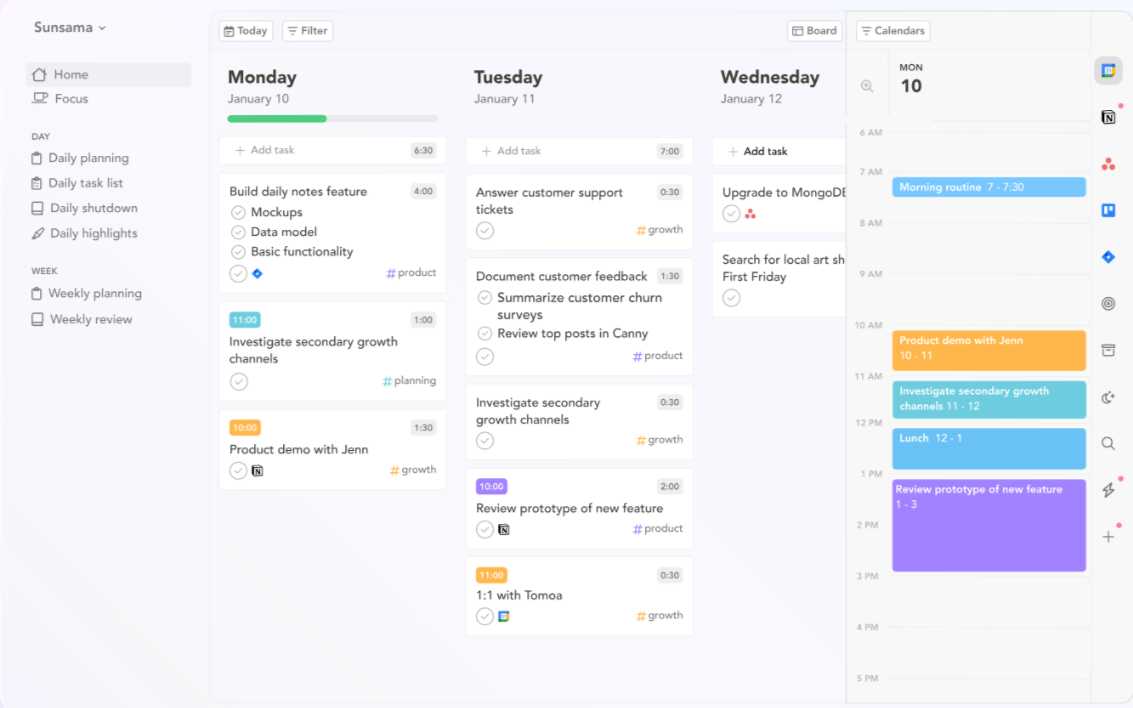
Sunsama’s daily planning feature provides a simple way to structure your day by aligning your tasks and schedule in one place. It enables you to set realistic goals, block time for critical tasks, and visualize your workload within a clean, intuitive interface.
Sunsama helps you break down work into manageable steps by focusing on daily priorities, ensuring progress without unnecessary stress. The feature also encourages planning, reflection on completed tasks, and setting priorities for the next day, promoting a balanced approach to productivity.
💡 Pro Tip: Prioritize personal development by scheduling time for skill-building, workshops, or reading industry insights. Incorporating these into your planning routine enhances your productivity and equips you to make more informed decisions in your daily tasks.
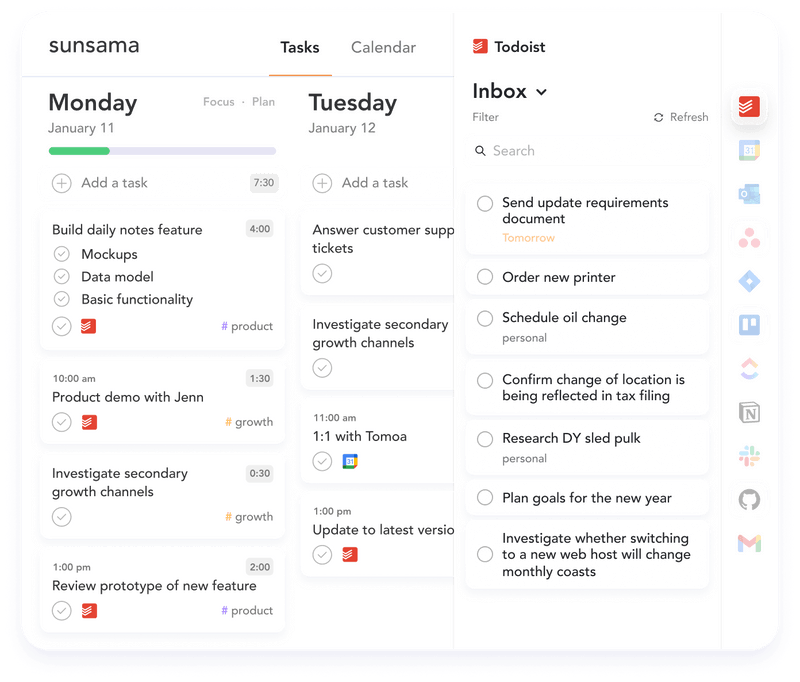
One of Sunsama’s strengths is its ability to seamlessly integrate with popular tools like Google Calendar, Trello, Asana, and Jira.
This integration allows you to pull tasks from multiple platforms into Sunsama, creating a centralized hub for planning and execution.
By eliminating the need to switch between apps, you can view all your tasks and appointments in one place, simplifying your workflow. Sunsama’s integrations make bridging the gap between different tools easy, ensuring better organization and task visibility.
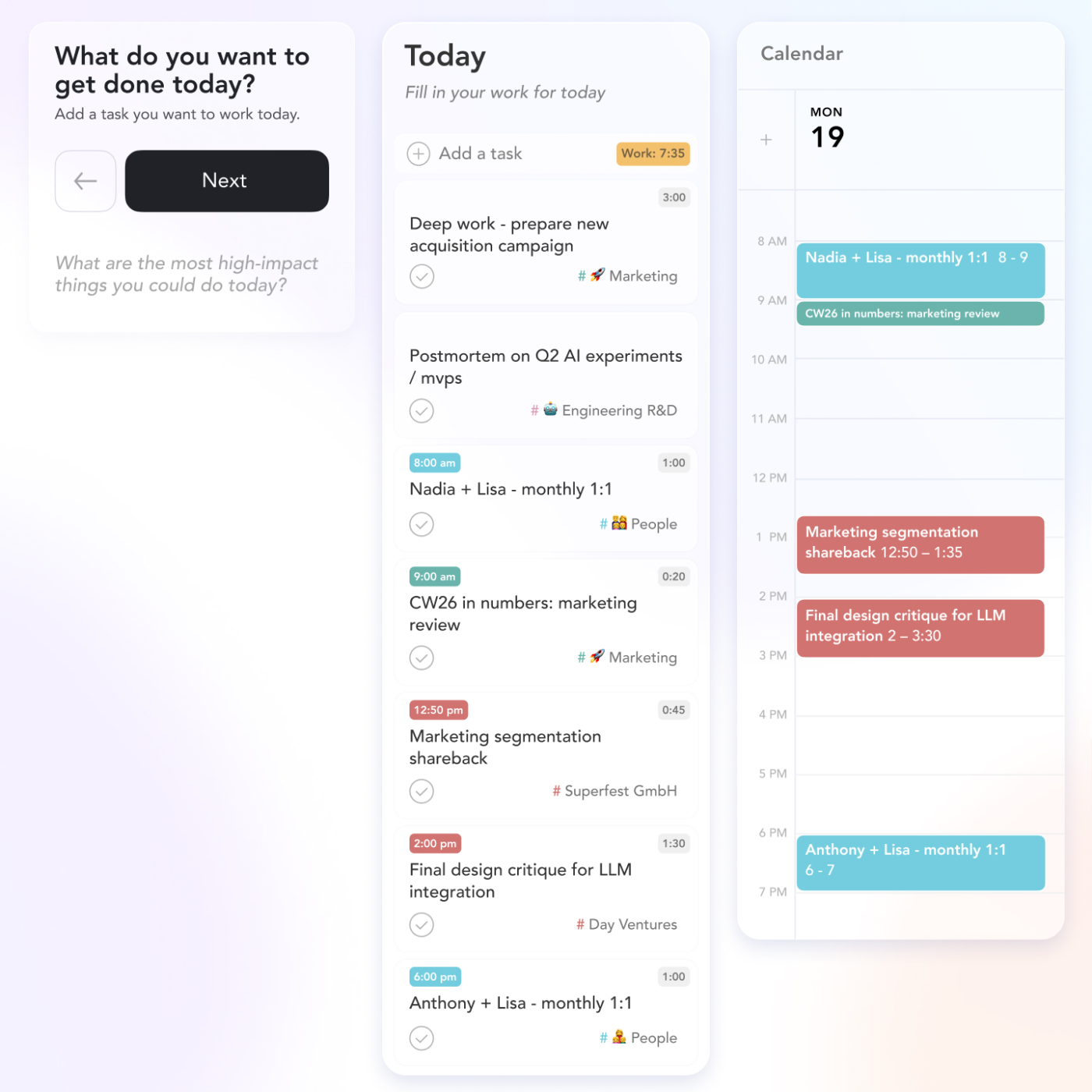
Sunsama’s timeboxing feature helps users allocate specific blocks of time to tasks, promoting focus and productivity.
By visually scheduling work on a calendar, it encourages you to set boundaries for each task and stick to the plan. This structured approach helps prevent overloading your schedule while ensuring each task gets the attention it needs.
For those who value precise time management, timeboxing offers a practical way to stay in control of their workload.
Here’s a brief overview of the features of the two tools:
| Feature | ClickUp | Sunsama |
| Best for | Teams and businesses of all sizes | Solo professionals, freelancers |
| AI scheduling suggestions | Yes | No |
| Daily and weekly reviews | Yes | Yes |
| Project management tools | Yes | No |
| Timeboxing | Yes | Yes |
| Team collaboration | Yes | Limited to tasks and calendar |
| Integrations | Extensive, including Google Calendar, Slack, Salesforce, and more | Moderate, focuses on task-focused tools |
| Ready to use Templates | Yes | No |
| Progress tracking | Yes, with builtin, custom dashboards and reporting | Yes, focuses on individual goals |
Now, let’s dig deeper and see how Sunsama and ClickUp’s approach to digital planning varies. Here’s a detailed comparison of their key features:
ClickUp’s AI-powered scheduling suggestions automatically plan blocks for your tasks based on deadlines, priorities, and existing workloads.
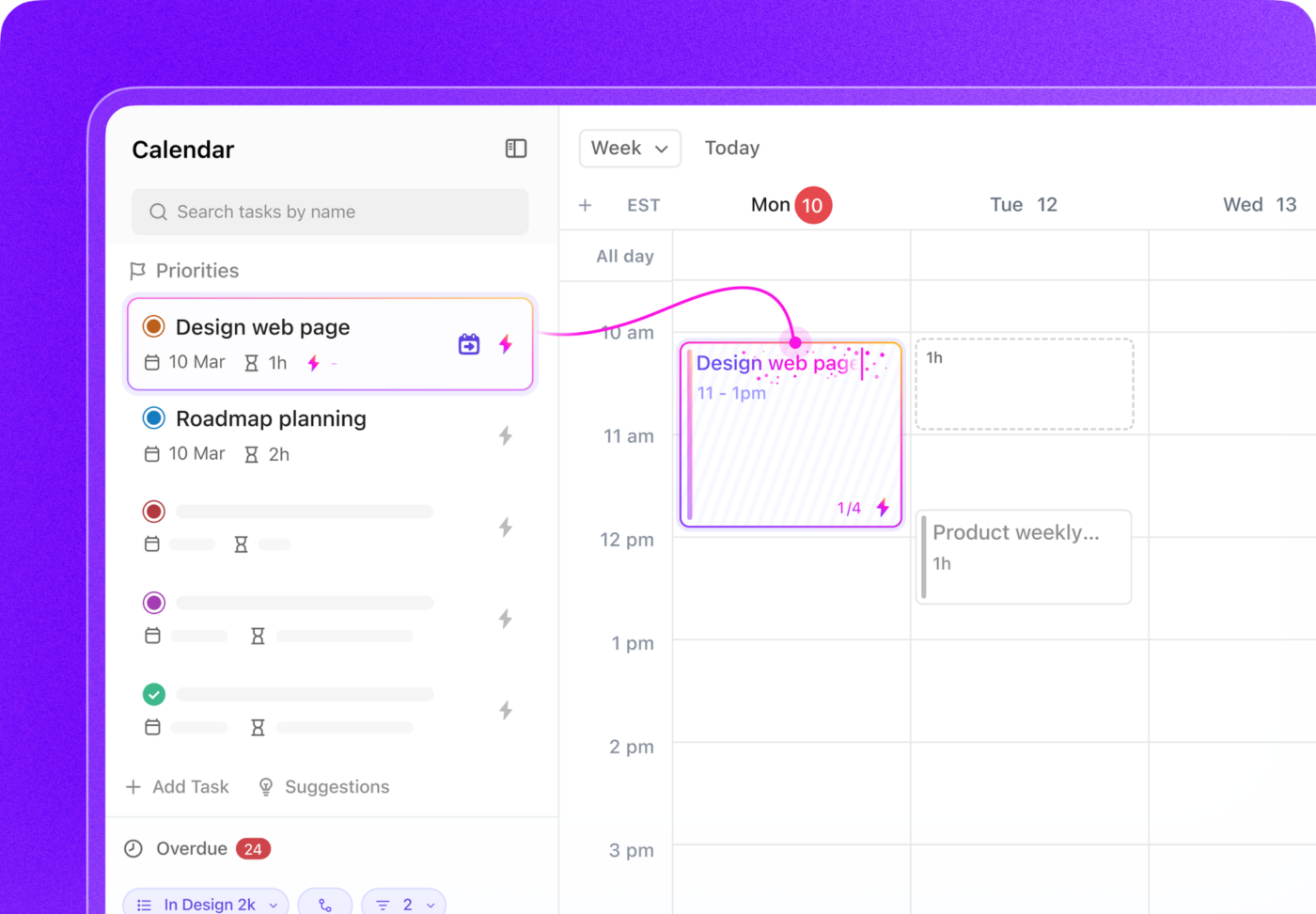
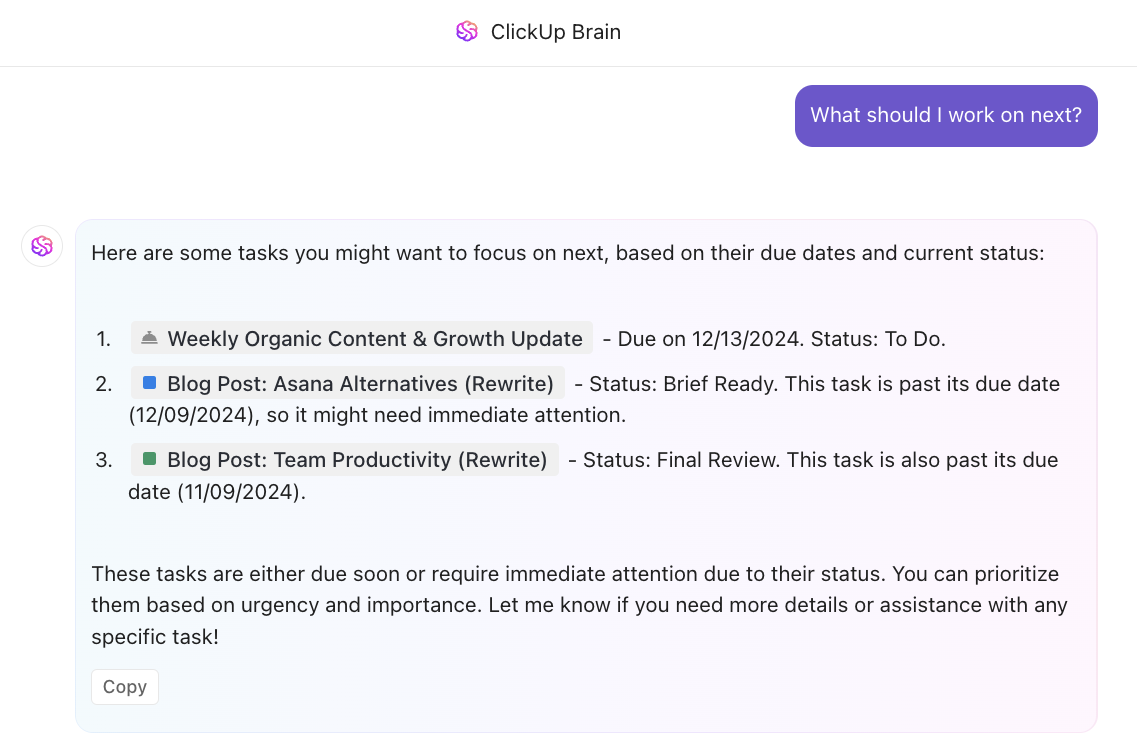
Simply ask ClickUp Brain to recommend:
You’ll get tailored suggestions that enable you to organize your day around your most essential tasks and peak productivity levels.
Sunsama does not include AI scheduling. Instead, you can set your overall working hours as a Default Schedule. You can also set up custom schedules on a per-channel basis, which will override your default schedule.
🏆 Winner: ClickUp wins for its advanced, hands-off AI scheduling capabilities.
👀 Did You Know? An estimated $48 trillion is allocated to projects worldwide each year. However, data from the Standish Group reveals that only 35% of these projects succeed. The remaining 65% represents a staggering amount of wasted resources and missed opportunities.
ClickUp excels as a project management software for individuals and teams alike, offering tools like Gantt charts, task dependencies, and progress tracking.
Further, threaded comments & @mentions maintain context within tasks and docs.
Brainstorm and visualize workflows directly within ClickUp using Whiteboards and Mind Maps, create and store project documentation with real-time collaboration, and manage emails and messages without leaving ClickUp.
These features make it ideal for managing complex workflows across teams.
📮ClickUp Insight: About 41% of professionals prefer instant messaging for team communication. Although it offers quick and efficient exchanges, messages are often spread across multiple channels, threads, or direct messages, making it harder to retrieve information later.
With an integrated solution like ClickUp Chat, your chat threads are mapped to specific projects and tasks, keeping your conversations in context and readily available.
Sunsama focuses on individual productivity and does not include project management tools, making it less suitable for teams planning complex projects.
🏆 Winner: ClickUp is the clear winner for teams or businesses that need comprehensive project management.
ClickUp offers an extensive range of project planning and project management templates catering to diverse needs. These templates are highly customizable to fit individual or team projects.
Sunsama doesn’t offer predefined, ready-to-use templates, but users can create their own by adding tasks to their backlog and marking them as templates. These tasks can then be duplicated as needed to reuse task structures.
🏆 Winner: ClickUp wins for its variety and customizability of templates.
| Feature | ClickUp | Sunsama | ||
| Price (per month) | Free Forever Plan | Unlimited | Business | $20 |
| $0 | $7 | $12 | ||
| AI-scheduling | No | Yes, with ClickUp Brain | Yes, with ClickUp Brain | No |
| Automated planning | Yes | Yes | Yes | No |
| Calendar view | Yes | Yes | Yes | Yes |
| Collaborative docs | Yes | Yes | Yes | No |
| Sprint Management | Yes | Yes | Yes | No |
| Project templates | Yes | Yes | Yes | No |
| Real-time chat | Yes | Yes | Yes | No |
| Number of tasks | Unlimited | Unlimited | Unlimited | Unlimited |
ClickUp offers a range of pricing options to suit different needs. The Free Forever plan is ideal for individuals, while the Unlimited Plan costs $7 per month per user. The Business Plan, designed for growing teams, costs only $12 per monthly user.
For larger organizations, ClickUp offers a customizable Enterprise Plan. And if you need AI, ClickUp Brain can be added to any paid plan for $7 per member per month.
Sunsama charges $20 per month per user for a 14-day free trial with full functionality. This flat rate has no tiers, making the pricing clear and straightforward, but not adaptable to unique individual and team needs. If you choose the annual plan, you can save $48 annually.
🏆 Winner: ClickUp’s tiered pricing options provide more flexibility, making it suitable for individuals and teams, without tying your money up for features you don’t need.
The Sunsama vs. ClickUp debate often arises in conversations on Reddit. Both have dedicated fans, but let’s look at what Redditors love (or hate) about these apps and how they compare.
Reddit users often describe ClickUp as a comprehensive project management software, with many users appreciating its ability to manage multi-year projects and smaller tasks alike.
Chihulytea, for instance, notes,
I’ve used ClickUp for years to manage different multi-year research projects and smaller scale stuff. To me it’s more of a project manager whereas Sunsama is a daily fast manager.
On other threads, ClickUp has also been praised for its versatile calendar features, AI-powered tools, and customizable task management options. These features give users a centralized, all-in-one platform for organizing their work.
When you search for opinions on Sunsama, a common sentiment among users is its ability to centralize tools and streamline workflows:
As Cappy2020 says,
The main thing it’s helped me with is combine the multiple apps I have to use (Gmail, Google Calendar, Things, Asana) into one central, friendly UI/programme, which I can then use to plan and time block my day properly.
Several task management threads on Reddit also appreciate the minimal interface, which helps them simplify planning with features like timeboxing that streamline their day.
However, some Reddit users express concerns about the pricing, especially when comparing Sunsama to other software options:
I’d love to continue using it, but I just can’t justify that sort of price tag on the app, which is actually a very simple application,
The results are in, and we have a clear winner! 🏆
Between Sunsama and ClickUp, ClickUp emerges as the superior choice.
While Sunsama shines with its simplicity, intuitive daily planning, and timeboxing features, its limited functionality and higher price point make it less appealing for users who require more robust tools.
Sunsama’s minimalist approach is ideal for those seeking a streamlined, distraction-free daily planning experience but lacks advanced features and comprehensive project management capabilities.
ClickUp, on the other hand? 💜
It’s the all-in-one solution that delivers value. With its extensive features, like customizable task management, versatile calendar views, AI-powered tools, and seamless integrations, ClickUp is truly the everything app built to scale with users’ needs.
Whether you’re an individual planning daily tasks or a team managing complex projects, ClickUp offers the flexibility and functionality to handle it all.
Teams that use ClickUp report:
Ready to experience similar time and money savings? Try ClickUp today!

Manasi Nair
Max 26min read
Manasi Nair
Max 20min read

Arya P Dinesh
Max 23min read

© 2026 ClickUp