


Efficient stakeholder management is crucial to any project’s success. After all, everything—from finalizing project objectives to delivering the outcomes—involves the enthusiastic participation of internal and external stakeholders.
However, the different stakeholder roles, interests, and levels of influence make it harder for project managers to handle this responsibility. Fortunately, using a stakeholder mapping template makes it easier to manage these variables.
It offers a well-defined structure for effectively identifying, analyzing, and managing stakeholders.
We have listed five highly useful stakeholder mapping templates in Excel and six more (non-Excel) for bringing project stakeholders on the same wavelength.
Free Stakeholder Mapping Templates in Excel for Project Success

 Summarize this article for me please
What Makes a Good Stakeholder Mapping Template?
Before diving into our list, let’s find out what exactly makes a good stakeholder mapping template.
Here are a few features of any good stakeholder mapping template:
- Stakeholder categorization: The stakeholder mapping template should contain defined sections to classify different project stakeholders based on their roles, interests, priorities, and influence
- Role clarity: It should assign roles and responsibilities to keep everyone informed and accountable
- Interest and influence analysis: For effective stakeholder management, the template should contain tools for assessing each stakeholder’s interests and influence to facilitate targeted communication
- Omnichannel communication: The stakeholder mapping template must contain built-in prompts and communication formats across different channels for curating personalized messages that align with the stakeholder preferences
- Risk planning: It should contain a dedicated space for performing stakeholder risk analysis, along with appropriate responses for different challenges
Summarize this article for me pleaseStakeholder Mapping Templates in Excel
Now that we understand the characteristics of a good stakeholder map template, let’s talk about the tool.
Excel is a versatile and cost-effective platform for stakeholder mapping templates. It’s particularly useful for its familiarity and gentle learning curve, which help project managers get started almost instantly.
Here is our list of five stakeholder mapping templates in Excel for external and internal stakeholders:
1. Stakeholder Map Template by ProjectManager
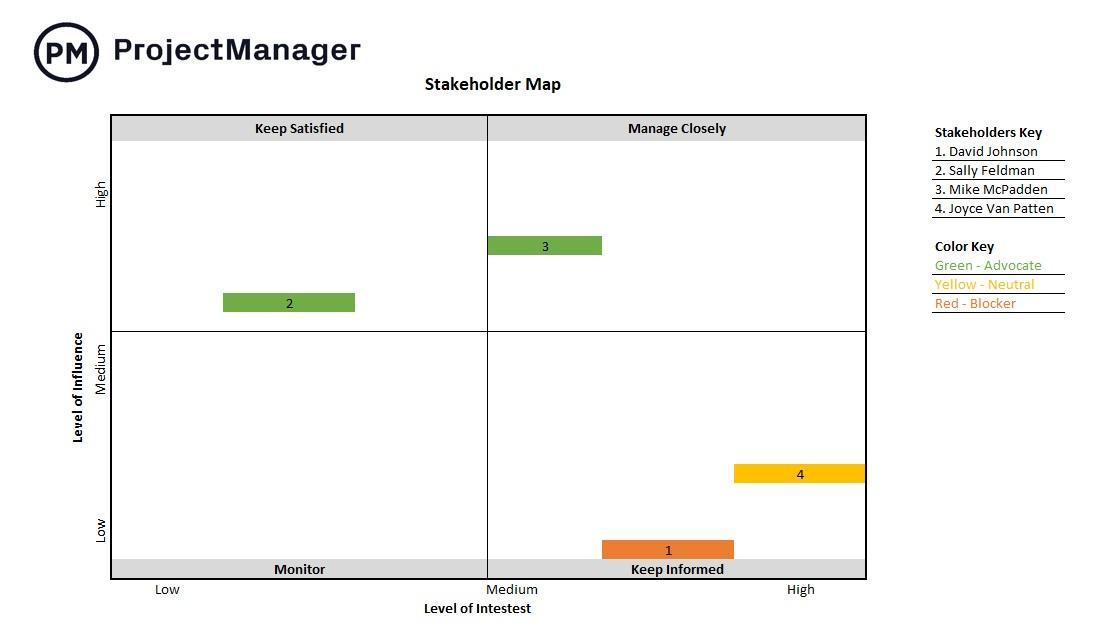
The Stakeholder Map Template by ProjectManager offers a visual representation to project stakeholders.
It allows you to perform stakeholder mapping across a grid, with the X-axis representing the level of influence and the Y-axis representing the level of interest.
With this graph, you can identify key stakeholders at a glance and prioritize them. It also helps with crafting communication plans and allocating resources.
Why you’ll love it
- Organize stakeholders visually along an influence-interest stakeholder matrix
- Identify and prioritize major stakeholders across different project phases
- Create custom categories for varying levels of stakeholder engagement and communication
Ideal for: Projects that require stakeholder management. It can benefit project managers working in the IT, construction, and healthcare sectors, as it helps them balance different interests.
💡 Pro Tip: Use Excel’s Pivot Tables to analyze data from multiple angles and generate custom reports.
2. Stakeholder Analysis Template by ProjectManager
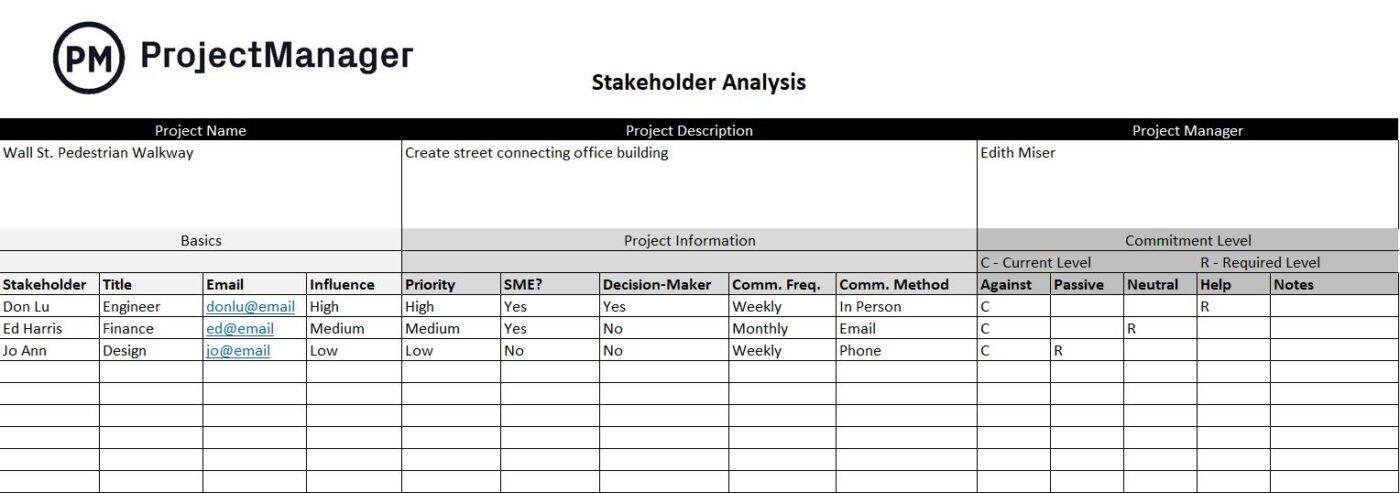
As the name indicates, the Stakeholder Analysis Template helps identify stakeholders and their roles, responsibilities, and levels of influence. Such a thorough stakeholder analysis helps identify stakeholder motivations and prepare for potential conflict areas.
Use it to divide the project team into individual stakeholders. Map out their interests against outcomes to improve collaboration and minimize disruptions.
Why you’ll love it
- Analyze stakeholder expectations and interests and expectations for greater alignment
- Track engagement levels and frequency as the project evolves
- Tailor action plans according to stakeholder roles and influence
Ideal for: Complex projects where it is crucial to generate detailed, role-specific insights, such as projects in financial services, corporate initiatives, and the public sector.
3. Stakeholder Analysis and Communication Plan by AxiaConsulting
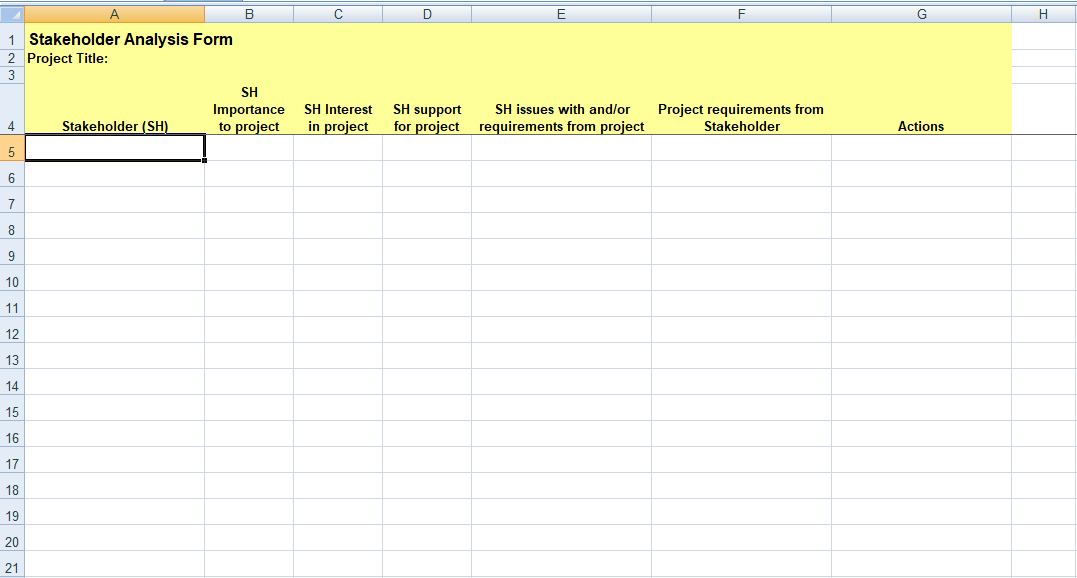
AxiaConsulting’s Stakeholder Analysis and Communication Plan Template is a two-in-one solution that integrates stakeholder communication and analysis.
The project team can use it to assess the influence and interest of external stakeholders and customize the communication plan to match their preferences. Doing so empowers the project manager to engage with stakeholders, address concerns, and maintain responsiveness.
Why you’ll love it
- Map stakeholders based on their influence and communication needs
- Track stakeholder queries or concerns and respond to them promptly
- Adapt communication strategies to match stakeholder interests and increase project buy-in
Ideal for: Industries with dynamic communication requirements, such as marketing, event management, and large-scale manufacturing, where everything hinges on clear, adaptive communication.
💡 Pro Tip: Use conditional formatting and color coding to highlight important information or trends.
4. Stakeholder Advanced Analysis Template by Goleansixsigma
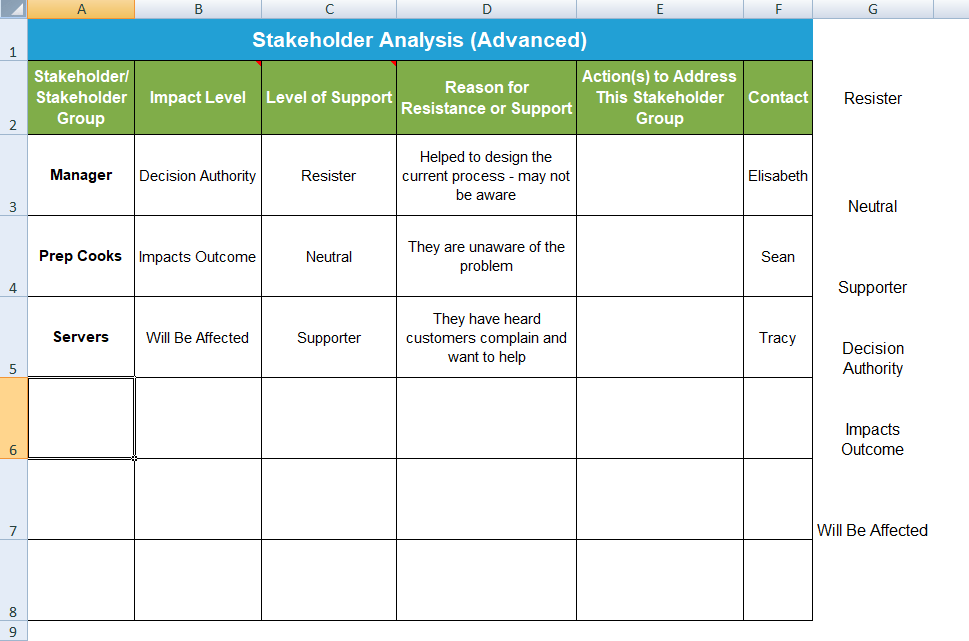
Goleansigma’s stakeholder mapping template in Excel is designed for in-depth analysis. It features a quantitative scoring mechanism and categorization feature that allows the project manager to assign values based on stakeholder interest, influence, and other critical metrics.
Such a data-driven approach fuels informed decision-making, allows benchmarking for identifying trends, and improves project adaptability.
Why you’ll love it
- Rate and score project stakeholders based on multiple factors
- Track changes over a period to keep up with changing stakeholder requirements
- Segment and categorize stakeholders for sharper prioritization
Ideal for: Projects requiring quantitative and granular stakeholder analysis, which are more common in process improvement and data-centric projects that follow the Six Sigma principles.
5. Stakeholder Register & RACI Matrix Template by Templatelab
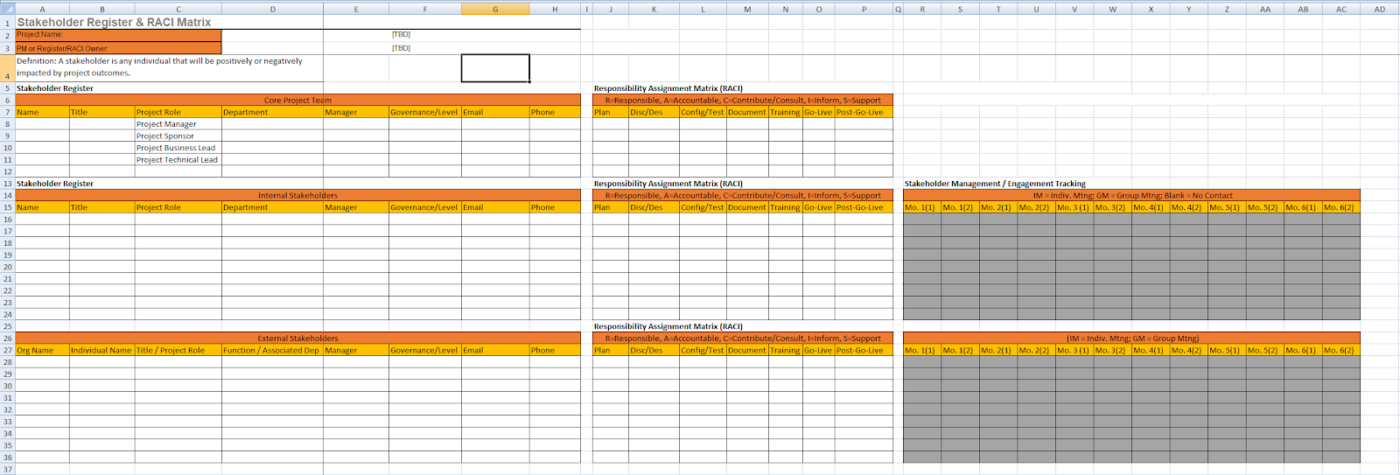
If you want to improve stakeholder management through hands-on project governance, then Templatelab’s stakeholder mapping template in Excel is a great choice.
It offers a blend of stakeholder registry against the RACI (Responsible, Accountable, Consulted, Informed) matrix, allowing project teams to track their roles and responsibilities, increase accountability, and reduce confusion.
The template keeps all internal stakeholders on the same page and moves them towards the common goal.
Why you’ll love it
- Organize the stakeholder registry across an RACI matrix
- Define the roles and responsibilities of individual stakeholders to improve collaboration and reduce overlaps
- Update stakeholder roles as the project evolves, allowing teams to adjust dynamically
Ideal for: Projects involving multiple internal stakeholders with role-based requirements. Think of projects in HR, consulting, and logistics where clarity of role is needed.
Summarize this article for me pleaseLimitations of Using Stakeholder Mapping Templates in Excel
While Excel is a handy tool for stakeholder mapping, it has limitations that can hinder efficiency and collaboration. It is not comparable to stakeholder management software.
Here are a few areas where it pales in comparison:
- Limited visualization: Excel offers the classic grid format of rows x columns—and graphs and charts if you’re a power user. This does little to support intuitive visualization when you have multiple stakeholders involved, each representing complex relationships and influence
- No support for stakeholder relationships: Excel must represent the relationships or interdependencies between key stakeholders, which may influence hierarchies and priorities. It’s harder for complex projects where relationships between potential stakeholders evolve with time
- Static stakeholder groups: Excel does not support dynamic updates as you group stakeholders. As such, it will be unable to keep up with and reflect real-time changes as you manage stakeholders, along with their changing roles and responsibilities
- Limited analytics: Sure, we’ve covered advanced stakeholder analysis templates. However, even these are limited by the platform’s analytical capabilities. Excel isn’t optimized for multidimensional analysis or scoring systems that may be required for complex analysis where you have to consider motivations or impact
- No engagement tracking: The static stakeholder mapping templates in Excel make it harder to track changes in influence or interest. This requires manual intervention for monitoring trends, driving engagement, and sharing timely updates
- Limited collaboration: Collaboration brings stakeholders on the same boat, especially the internal stakeholders working on the project. Excel’s limited collaborative features hamper teamwork and efficiency while giving rise to versioning issues and data silos
Summarize this article for me pleaseAlternative Stakeholder Mapping Templates
Despite its several benefits, Excel leaves a lot to be desired. Here’s where ClickUp comes to the rescue.
As a versatile project management tool, it packs advanced stakeholder mapping features that are a major upgrade.
Project managers get a dynamic platform with rich visual representation, real-time engagement tracking, centralized stakeholder maps, and integrated communication for effortless management and collaboration.
At the same time, you can access several superior templates in Excel.
Here’s a preview of some of the best stakeholder map templates on ClickUp:
1. ClickUp Stakeholder Map Template
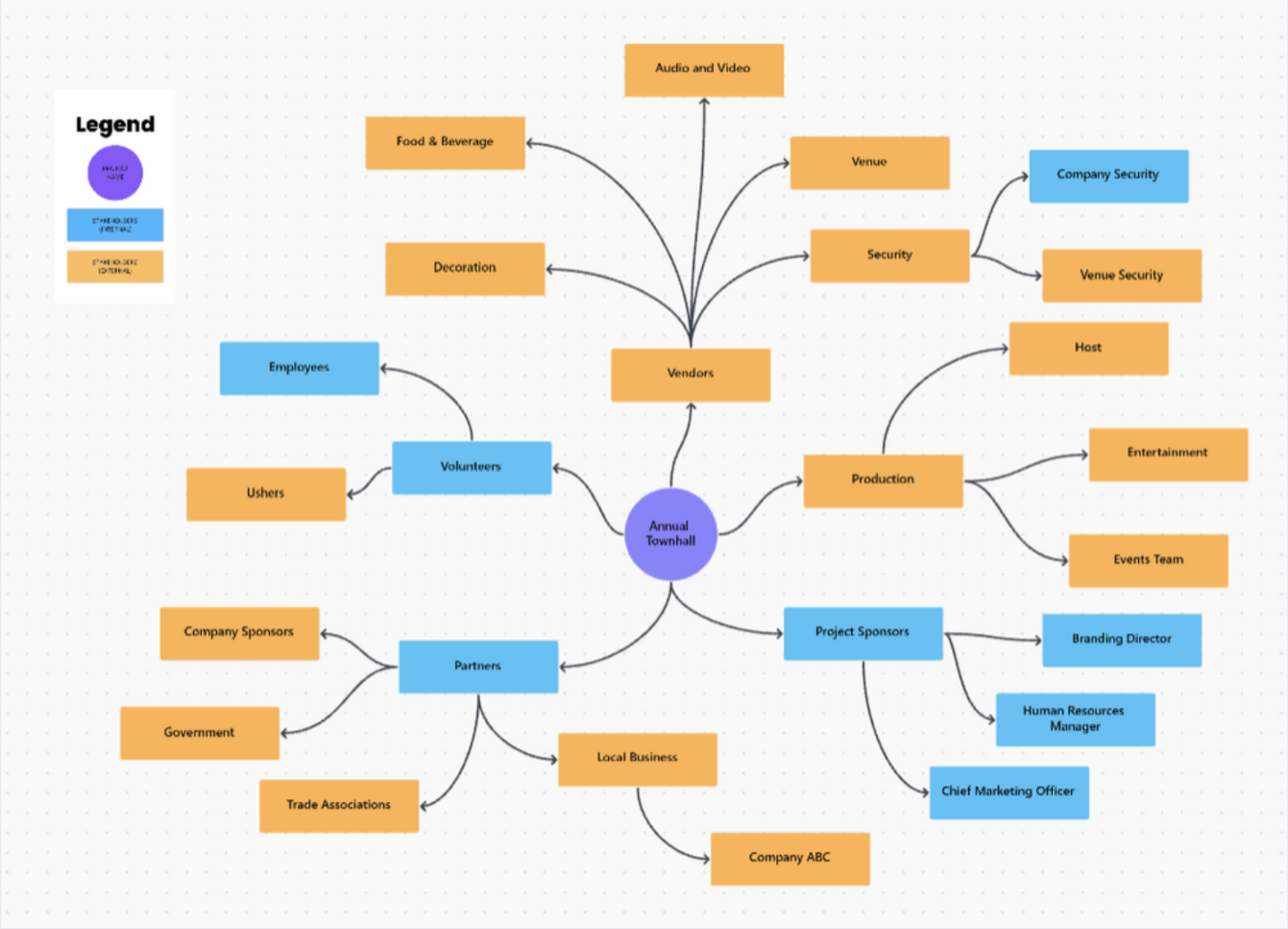
ClickUp Stakeholder Map Template is a visual tool for mapping stakeholder influence and interest.
Sporting an intuitive drag-and-drop interface, you can assign or update stakeholder categories in real time, allowing teams to modify their strategies accordingly.
The resulting stakeholder map ona dynamic whiteboard offers a clear overview of the key players involved.
Why you’ll love it
- Visualize all your stakeholders by priorities, influence levels, and stakeholder impact
- Update or reorganize stakeholder groups in real time and with just a few clicks
- Boost team collaboration with brainstorming sessions and interactive stakeholder chart
- Color code stakeholders to gain insights at a glance
Ideal for: Fast-paced projects involving multiple stakeholders. Think of projects in event planning, public relations, and product development where stakeholder influence and interests may change dynamically.
💡 Pro Tip: Use ClickUp’s task automation feature to set reminders for stakeholder check-ins and updates.
2. ClickUp Stakeholder List Template
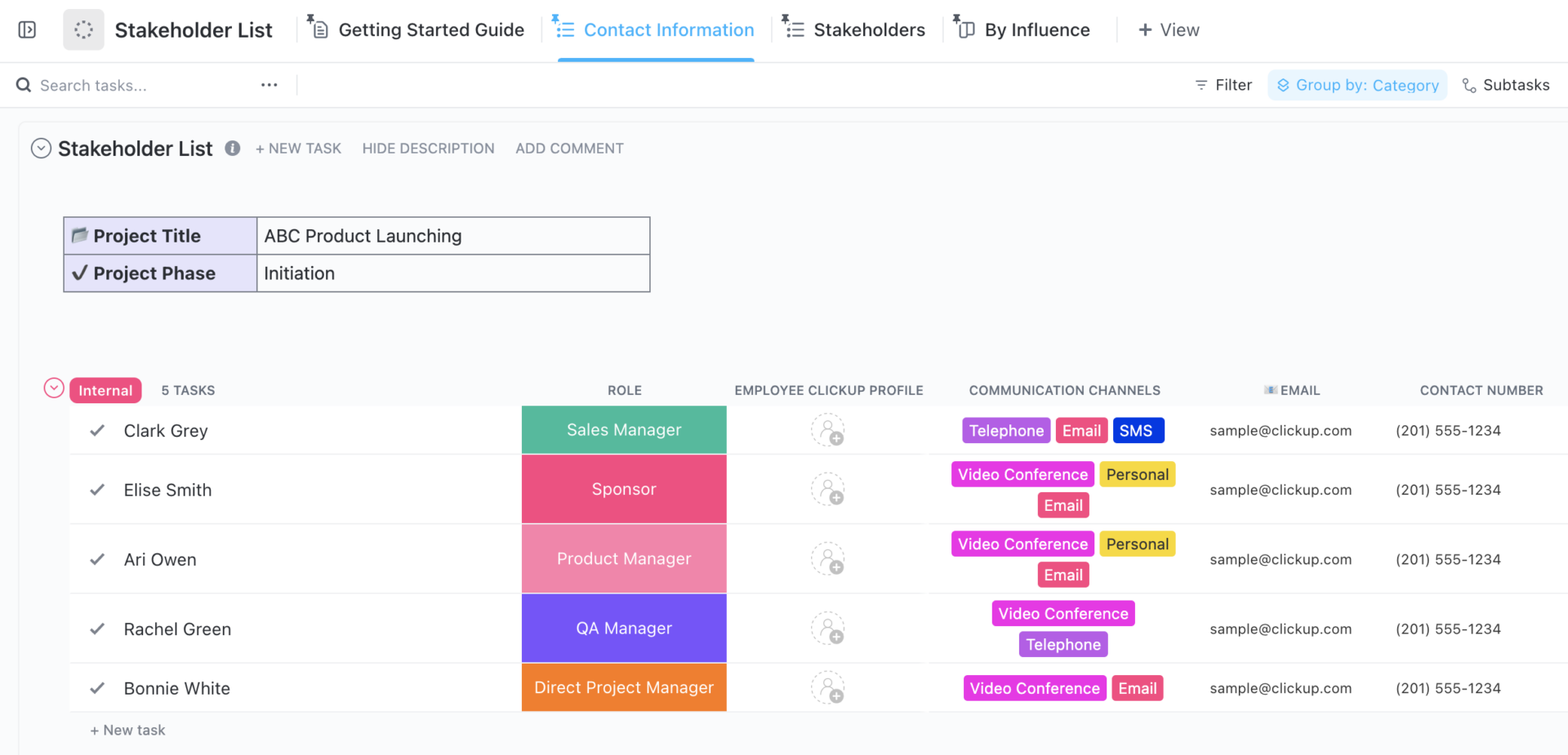
Looking for a stakeholder management plan that allows you to document granular stakeholder details? The ClickUp Stakeholder List Template is perfect for you.
The template allows you to list all the stakeholders involved in the project, along with their roles, interests, and communication preferences. It is a great way to maintain a stakeholder registry and organize information in an easy-to-sort/filter form.
Why you’ll love it
- Maintain an up-to-date stakeholder registry with searchable columns
- Categorize stakeholders as highly interested, interested, and disengaged to engage proactively
- Track stakeholder engagement metrics and communication preferences to personalize interactions
- Prepare a centralized stakeholder repository that updates in real time and share it among team members
Ideal for: Large, multi-departmental projects like government contracts, non-profit campaigns, or corporate initiatives.
3. ClickUp Stakeholder Analysis Matrix Template
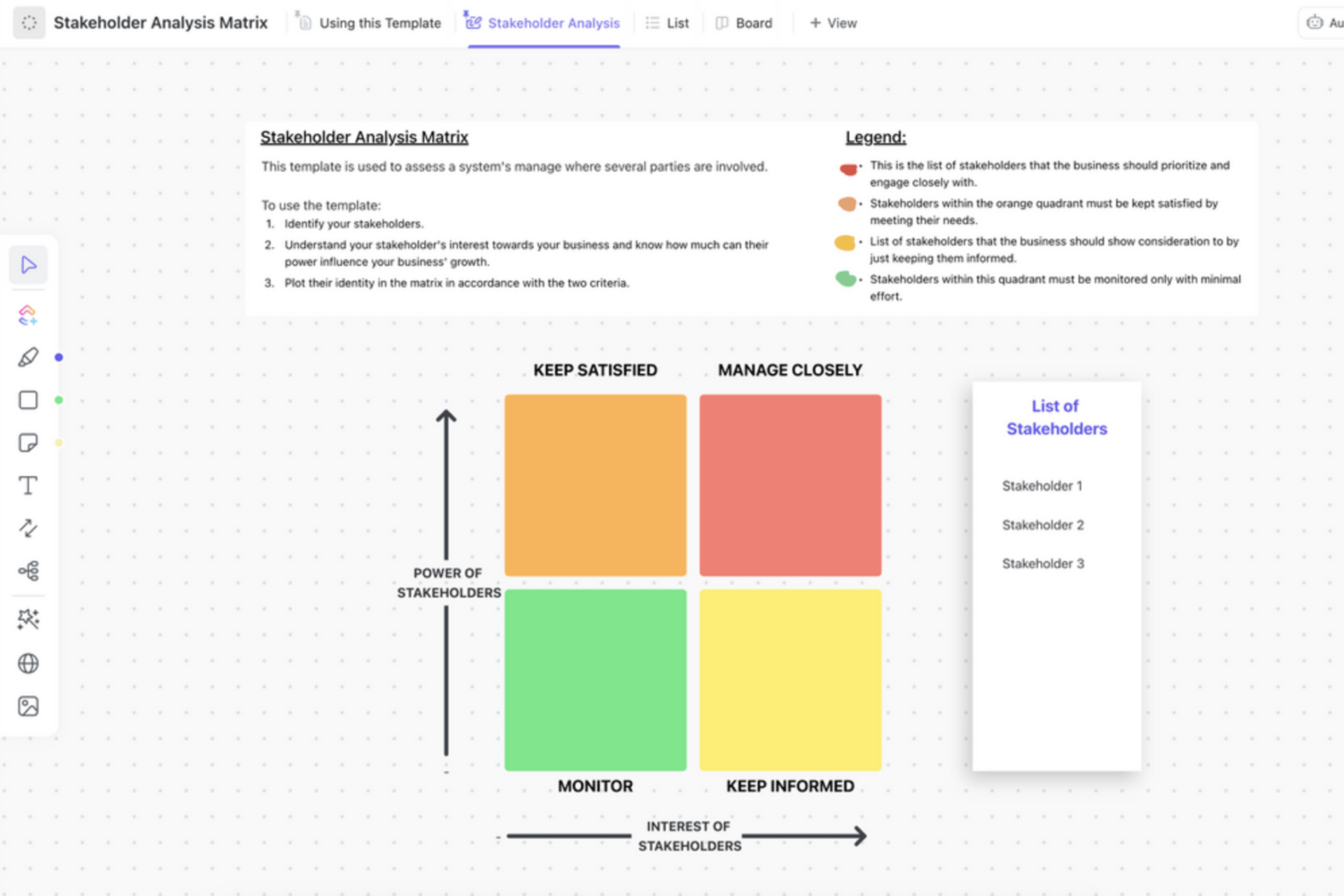
The stakeholder map quadrants in ClickUp’s Stakeholder Analysis Matrix Template are categorized into four sections: Keep Satisfied, Manage Closely, Monitor, and Keep Informed.
The matrix does more than help manage stakeholders—it lets you manage stakeholder influence and interest to set expectations, prioritize stakeholders, anticipate potential conflicts, and formulate an engagement strategy.
The resulting matrix offers a systematic framework for aligning project goals with stakeholder needs, so everyone contributes to the stakeholder theory!
Why you’ll love it
- Visualize stakeholder maps as a function of power and interests of stakeholders for a better understanding
- Map the stakeholder against four clearly defined goals for each stakeholder group
- Identify high-impact stakeholders and possible conflicts in the early stages of the project plan
- Adapt strategies on the fly with prompt stakeholder communications
Ideal for: Cases where detailed stakeholder analysis is crucial. It can be helpful in complex engineering projects, projects involving strategic partnerships, or policy-making, where the stakeholders directly impact the outcomes.
4. ClickUp Stakeholder Analysis Template
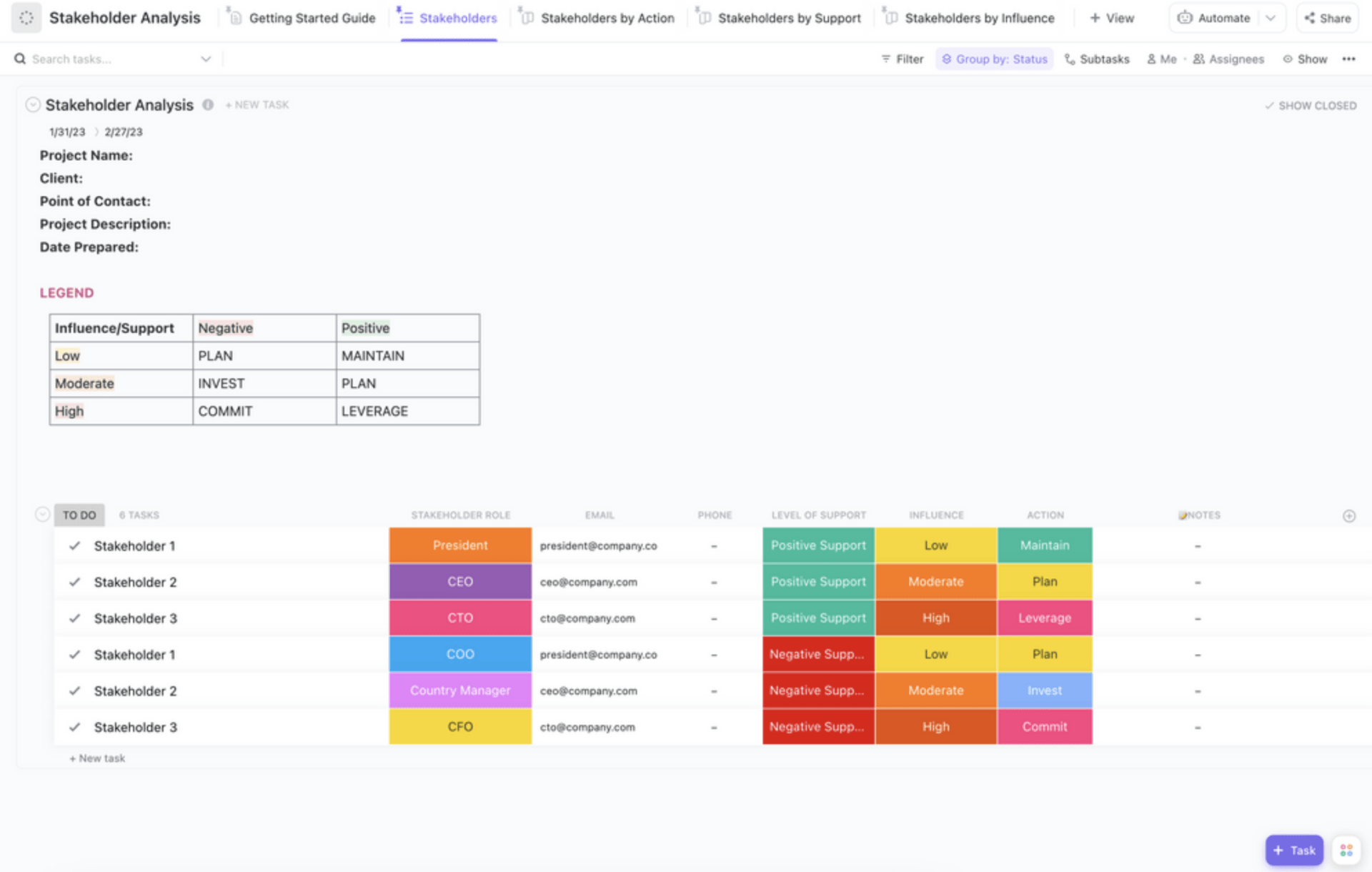
If you’re looking for a comprehensive stakeholder mapping template, end your search with the ClickUp Stakeholder Analysis Template.
It allows you to map out each stakeholder’s unique needs and concerns against project milestones or other stakeholders’ requirements. These insights help you customize the engagement plan and prioritize stakeholders effectively.
Why you’ll love it
- Explore stakeholder roles, impact, and perspectives for proactive stakeholder management
- Customize engagement plans depending on project stages, stakeholder concerns, and baseline expectations
- Align roles and expectations to a clear understanding of stakeholder dynamics
- Color code critical information, such as stakeholder priorities, to gain insights at a glance
Ideal for: Projects that require continuous stakeholder alignment, like during project launches, change management, and feedback-based projects.
💡 Pro Tip: To get a tailored analysis, use the scoring criteria to reflect factors specific to your project, such as urgency, influence, or potential impact.
5. ClickUp Executive Project Status Template
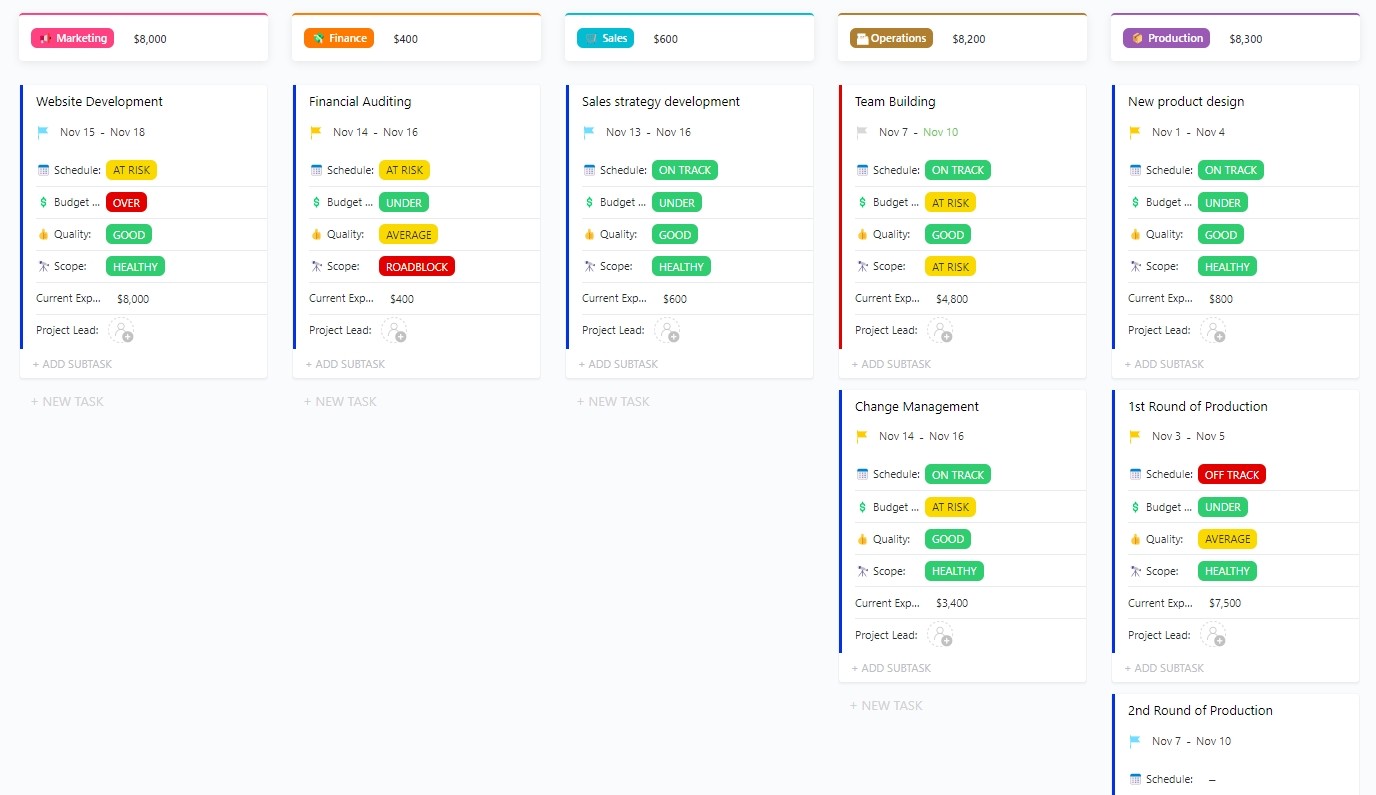
The ClickUp Executive Project Status Report Template has two primary roles:
First, keeping all stakeholders informed
Second, ensuring that the project is on track
To do this, it lends structure to project tracking by offering a high-level overview of the progress outlined in the project charter. This information is then shared with executive stakeholders, who share timely updates and simplify communications.
Why you’ll love it
- Define specific timelines, milestones, and risks that can trigger automated stakeholder communications
- Share critical project updates to keep executive stakeholders engaged
- Summarize project risks and progress to clarify project status and upcoming events
- Generate concise yet informative reports that offer a bird’s eye view of all ongoing activities
Here’s why users love it 🚀
Ideal for: Crucial projects that require the involvement of executives and top management. Some typical use cases include corporate events, strategic partnerships, and enterprise-level software deployment.
6. ClickUp PERT Chart Template
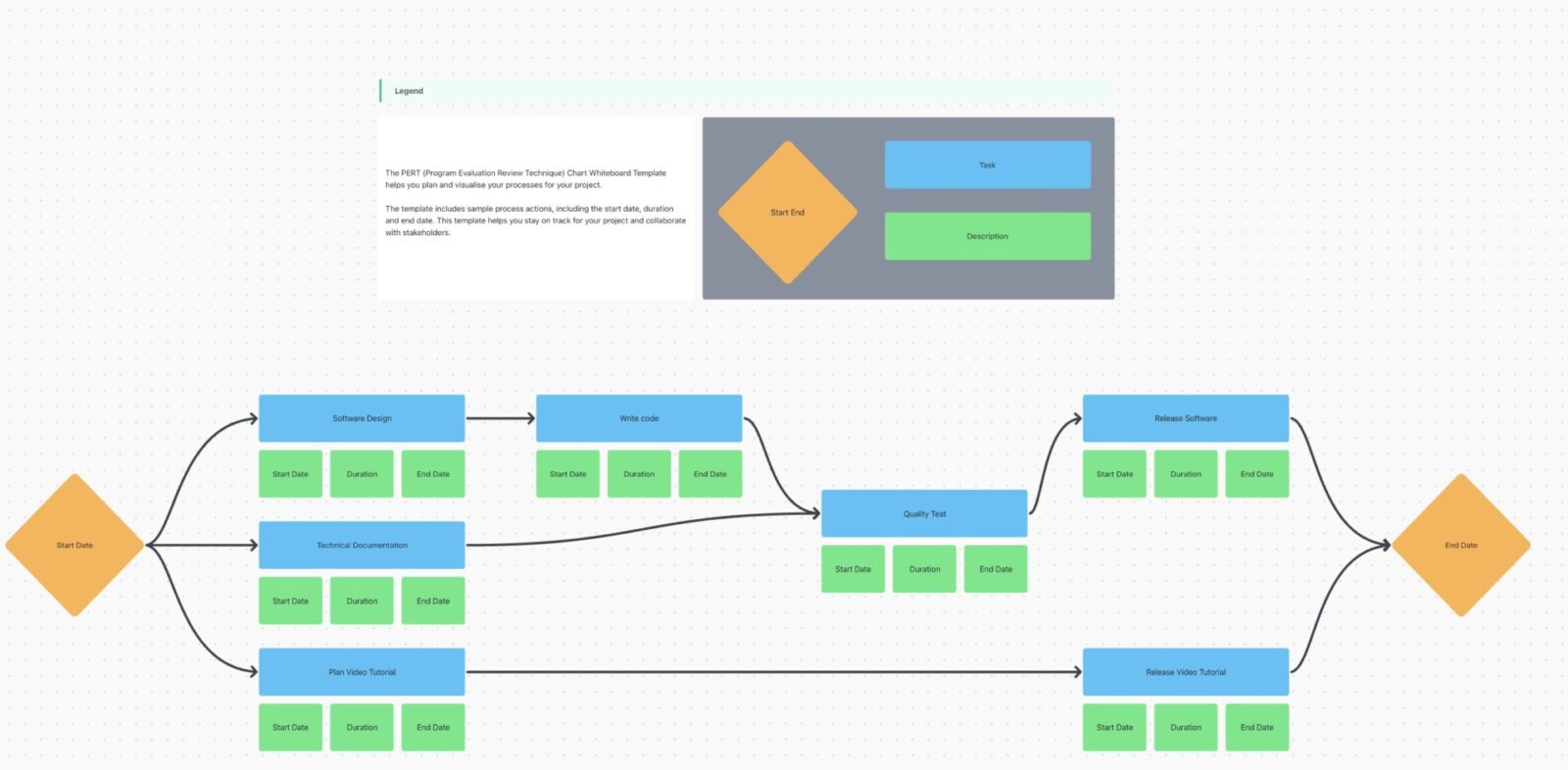
The ClickUp PERT Chart Template maps out project timelines and dependencies in a visual flowchart.
Its process-oriented design allows you to illustrate different project stages efficiently, highlight interdependencies, allocate resources, and forecast timelines.
This template helps identify bottlenecks and inefficiencies early on so that you can mitigate risks and keep the project moving forward.
Why you’ll love it
- Demonstrate complex timelines and dependencies in flowchart format
- Anticipate potential setbacks or delays due to dependencies across different project stages
- Forecast and optimize project timelines by identifying the critical path
- Plan and allocate resources efficiently through task sequencing
Ideal for: Large, multi-phase construction, engineering, and software development projects. Essentially, it is for any time-bound project that involves detailed project planning and dependency management and follows the critical path method.
Summarize this article for me pleaseBring Stakeholders on the Same Page with ClickUp
Stakeholder mapping is a critical part of successful project management, and selecting the right stakeholder map template is key to this success.
Sure, Excel is familiar and easy. You also have a selection of stakeholder mapping templates in Excel for the job. However, it fails in comparison to what ClickUp has to offer.
ClickUp’s sheer range of stakeholder mapping templates makes it an ideal choice. To add to it, you get data visualization tools, real-time analytics, data-driven frameworks, and so much more to keep the project running from start to finish.
Are you ready to bring your stakeholders on the same plane? Then sign up for ClickUp today and check out the stakeholder map templates.


Everything you need to stay organized and get work done.

Recent Articles
10 Free Project Status Report Templates (Daily, Weekly, Monthly) 
10 Free Project Status Report Templates (Daily, Weekly, Monthly)
