







Still downloading templates?
There’s an easier way. Try a free AI Agent in ClickUp that actually does the work for you—set up in minutes, save hours every week.
Sorry, there were no results found for “”
Sorry, there were no results found for “”
Sorry, there were no results found for “”

Sharing your quarterly goals with your manager isn’t just about checking a box.
It’s how you stay aligned, get the support you need, and build a track record that makes performance reviews way easier.
In this blog, we’ll guide you through preparing your goals, presenting them with confidence, and maintaining momentum throughout the quarter.
Sharing your quarterly goals with your manager is the surest way to secure the support you need to succeed.
When you proactively communicate your ambitions, you build trust and position yourself as someone who takes true ownership of their professional growth. This simple act of communication shows you understand how your individual contributions connect to the bigger picture.
By sharing your goals upfront, you create a shared understanding from day one.
Having this documented conversation makes future performance reviews much smoother. Instead of trying to remember everything you accomplished, you’ll have a clear, documented track record of your contributions and progress throughout the year.
Unlike a mid-year performance review for example, quarterly reviews consistently map progress over consistently defined time-blocks with comparatively shorter goals. This builds a strong foundation for conversations about your career development and future opportunities.
ClickUp’s Individuals Goal Setting Template gives you a clear, structured way to turn your personal goals into a plan you can track and confidently share with your manager. You can use the SMART framework and custom fields to define exactly what you’re aiming for, break your goals into manageable steps, and map out the effort required.
BrainGPT helps you sharpen the language so your goals read cleanly and professionally, and the template’s views make it easy to show how each goal connects to your growth or team impact. When it’s time to check in, you can share your progress, updates, and milestones directly from ClickUp, creating a transparent, ongoing dialogue with your manager that keeps both of you aligned throughout the quarter.
⚡️ Template Archive: 13 Free Annual Planning Templates
A productive goal-sharing conversation starts long before you walk into the meeting room.
Thoughtful preparation demonstrates to your manager that you respect their time and are committed to your performance. Let’s walk through the essential groundwork.
To make your quarterly goals truly matter, they need to connect to what the rest of your team and the company are trying to achieve.
Before you start writing your own goals, take some time to review your company’s OKRs (Objectives and Key Results), your department’s strategic initiatives, or any other high-level priorities.
When your goals directly support these larger objectives, it’s much easier for your manager to see their value and advocate for them.
This alignment shows that you’re not just focused on your own tasks, but on driving meaningful business outcomes. A bit of SMART goal-setting can help here.
📖 Read More: 10 SMART Goal Templates to Define Your Goals
It’s tempting to create a long list of everything you want to accomplish, but it’s more effective to focus on quality over quantity. Aim to present your top three to five goals for the quarter.
To figure out which goals are the most impactful, ask yourself a few key questions:
❗️Business impact: Does this goal directly contribute to the team’s or company’s success? Think about whether it will help generate revenue, improve efficiency, or enhance customer satisfaction
❗️Feasibility: Can you realistically achieve this goal within one quarter, considering your other responsibilities? It’s better to accomplish a few meaningful goals than to fall short on many
❗️Growth potential: Does this goal stretch your skills in a way that will help you advance in your career? Look for opportunities that push you out of your comfort zone
❗️Visibility: Will completing this goal be noticed and valued by key stakeholders, including your manager and other leaders? High-visibility work can open doors to new opportunities
📮ClickUp Insight: Think your to-do list is working? Think again.
Our survey shows that 76% of professionals use their own prioritization system for task management. However, recent research confirms that 65% of workers tend to focus on easy wins over high-value tasks without effective prioritization.
ClickUp’s Task Priorities transform how you visualize and tackle complex projects, highlighting critical tasks easily. With ClickUp’s AI-powered workflows and custom priority flags, you’ll always know what to tackle first.
Vague goals are hard to track and even harder to celebrate.
To avoid any confusion, make sure every goal you present is specific and measurable. This means defining what “done” looks like with clear key results or success metrics, so both you and your manager can objectively track your progress.
Here’s how you can transform a vague goal into a well-documented one:
| Vague goal | Well-documented goal |
|---|---|
| Improve customer satisfaction | Increase customer satisfaction survey scores from 85% to 90% by the end of the quarter |
| Learn new skills | Complete the Advanced Google Analytics certification and apply learnings to our Q3 marketing report |
| Be more productive | Reduce the average time to resolve support tickets by 15% by automating two manual processes |
Once you’ve done your prep work, it’s time for the conversation itself.
The way you present your goals is just as important as the goals themselves. Here’s a simple framework you can use for any goal-sharing discussion. ✨
Don’t try to squeeze this important conversation into the last five minutes of your regular one-on-one. Book a separate, dedicated meeting to discuss your quarterly goals. This signals to your manager that you take this process seriously and ensures you both have enough time for a thoughtful discussion.
Keep all your meeting details organized and easily find a time that works for both of you using ClickUp’s Calendar. This feature lets you plan, schedule, and manage your time visually, and you can even attach your goal-planning Doc directly to the meeting invite to keep everything connected.
Send your documented goals to your manager (via ClickUp Docs) at least a day in advance as a pre-read. This gives them time to review your thoughts and come to the meeting prepared with meaningful feedback.
When you present your goals, don’t just read them off a list. Frame each one with context to help your manager understand your thinking. For every goal, be ready to explain what you want to do, why it’s important, and how you’ll measure success.
Follow this simple structure to make your presentation clear and compelling:
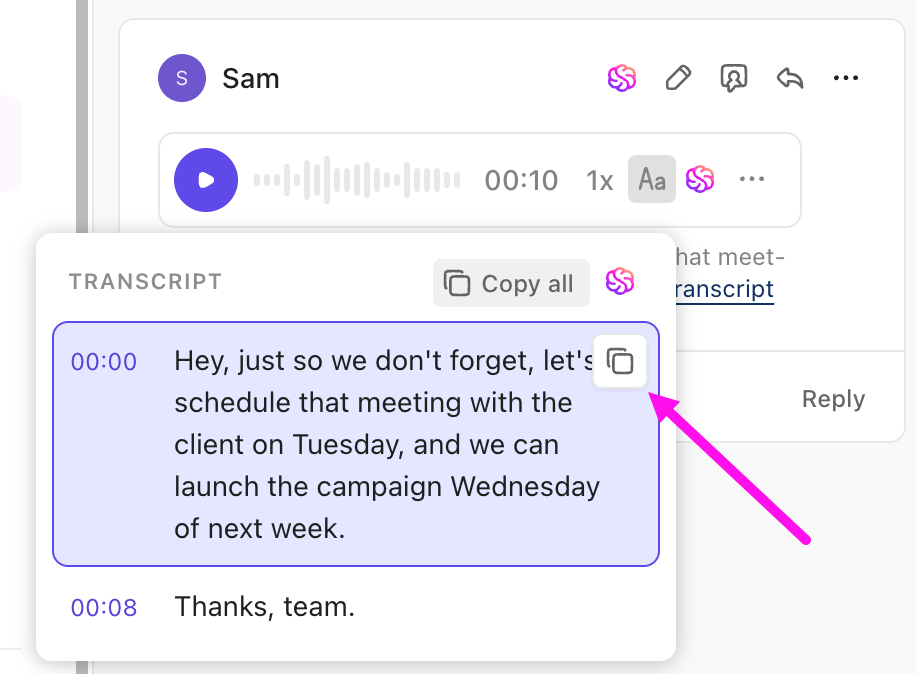
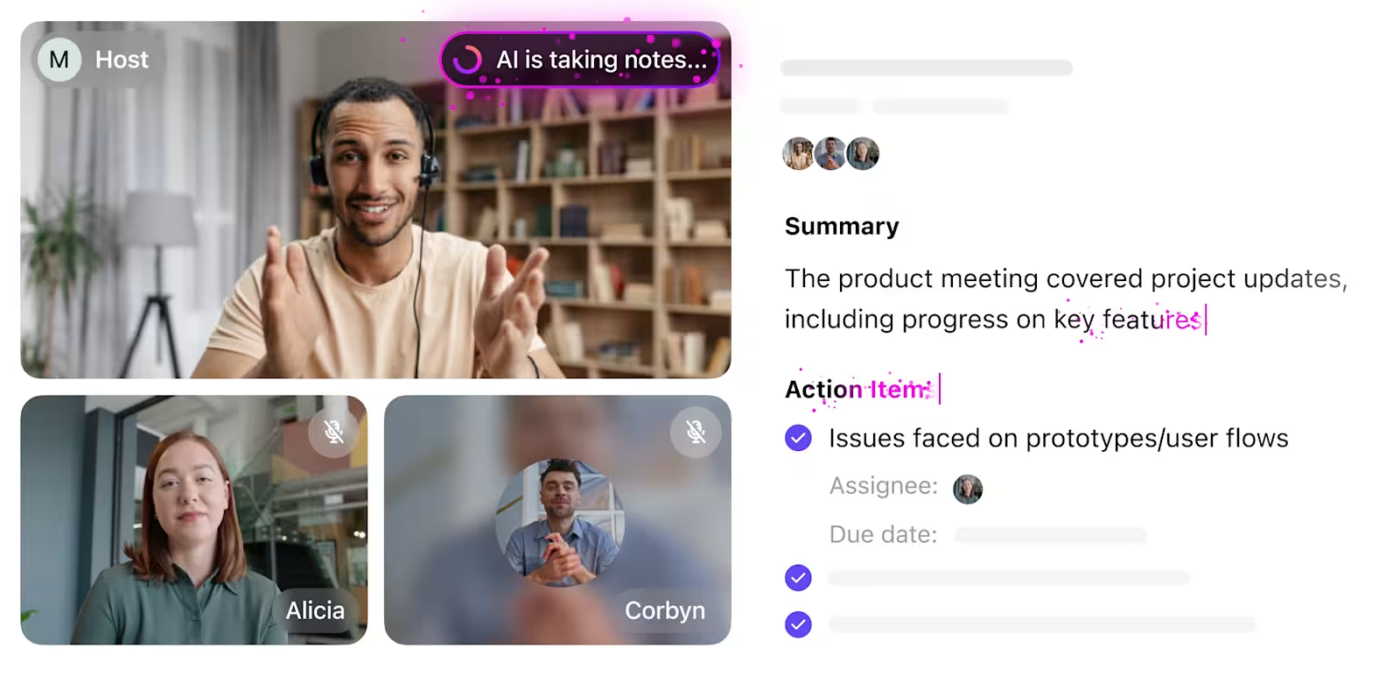
Coming to the reality of it, goal-setting conversations may take multiple detours and discussions before you land on those solid goals. And you may lose track of some of these notes while actively taking part in the discussion. This is where a built-in notetaker can make all the difference.
ClickUp’s AI Notetaker makes goal-setting conversations effortless to capture and act on. It automatically records the key points from your discussion, pulls out decisions and next steps, and turns those insights into follow-up tasks you can assign right away.
Instead of trying to remember what you and your manager agreed on, everything is neatly summarized and ready to plug into your goals— keeping your plans clear, accurate, and moving forward. See the workflow in action below! 👇🏼
Remember, sharing your goals is a conversation, not a monologue.
Your manager’s input is incredibly valuable, as they often have a broader perspective on team and company priorities. Be open to their feedback and ready to make adjustments.
Ask open-ended questions to encourage a collaborative discussion. You might ask, “What would make this goal even more impactful?” or “Are there any other priorities I should be considering?” This shows that you’re a team player who values collaboration. Your manager may have insights into upcoming projects or strategic shifts that could influence your goals.
Keep all your valuable feedback in one place by capturing it directly where your work lives using ClickUp Comments. Ensure you follow up on any agreed-upon changes by assigning comments as action items in ClickUp.
📮 ClickUp Insight: 69% of employees say reviews help clarify their goals, but 22% say reviews aren’t tied to any specific priorities at all!
That’s a lot of missed opportunities for focused growth and alignment. So, how do you make sure that every review is actionable? With ClickUp Tasks!
Link feedback directly to measurable objectives, break them down into milestones, and connect each one to tasks or projects you’re working on. No more vague promises—just a clear, actionable roadmap for your next steps.
Need some inspiration? Here are a few examples of well-structured quarterly goals that you can adapt for your own role.
Notice how each one is specific, measurable, and aligned with potential business needs.
| Category | Quarterly goal example | Measurable outcome |
|---|---|---|
| Skill development | Complete a project management certification (e.g., PMP) and apply the framework to the next product launch | Improve on-time delivery by 10% |
| Process improvement | Identify and document the top three bottlenecks in the content review process and implement a streamlined workflow | Reduce review cycles from 5 days to 3 |
| Project delivery | Lead development of the new customer onboarding portal and launch by quarter-end | Achieve ≥8/10 user satisfaction |
| Cross-functional collaboration | Set up a weekly sync with sales to align on product marketing updates | Increase usage of new collateral by 20% |
| Customer impact | Create five new help center articles addressing common questions | Reduce high-priority support tickets by 15% |
| Efficiency | Migrate all team project tracking into a unified workspace and train team members | Cut context-switching time by 25% |
| Data and reporting | Build a monthly performance dashboard for marketing campaigns | Improve reporting accuracy and speed by 30% |
| Leadership | Mentor two junior team members through a structured development plan | Support each in achieving one major skill milestone |
| Innovation | Run a pilot experiment with an AI tool to automate repetitive documentation tasks | Reduce manual documentation time by 20% |
| Stakeholder alignment | Host a quarterly planning workshop with product, design, and engineering | Deliver an aligned roadmap with clear ownership for all milestones |
The goal-setting meeting is just the beginning.
To keep your goals from being forgotten, you need to maintain momentum by treating communication and tracking as part of the work itself, not an afterthought.
When updates flow steadily, you create a shared sense of direction, eliminate ambiguity, and keep your goals from drifting into that foggy “I thought we agreed on…” territory 👀
The quarter becomes easier to manage because progress is visible, expectations stay aligned, and course corrections happen early instead of in a final-week scramble.
Here’s what to do after your meeting:
Go back to your goal document and update it with the exact language, changes, and expectations you aligned on. Capture targets, scope adjustments, dependencies, and any new measures of success. This turns your meeting into a single, authoritative source of truth — not a memory test. It also gives your manager confidence that you’re operating from the same playbook.
Note: If you’re using ClickUp, you will already have this as a structured ClickUp Doc collated by ClickUp AI Notetaker.
Agree on how often progress updates should happen and what form they’ll take. Weekly updates work well for fast-moving projects, while biweekly or async updates might be enough for longer initiatives.
Define the format as well: a short written note, a dashboard update, or a quick rundown during your one-on-one. This rhythm builds predictable visibility, which reduces the need for ad hoc status checks.
Keep your goals in a shared space where both you and your manager can view status changes, milestones, blockers, and context in real-time.
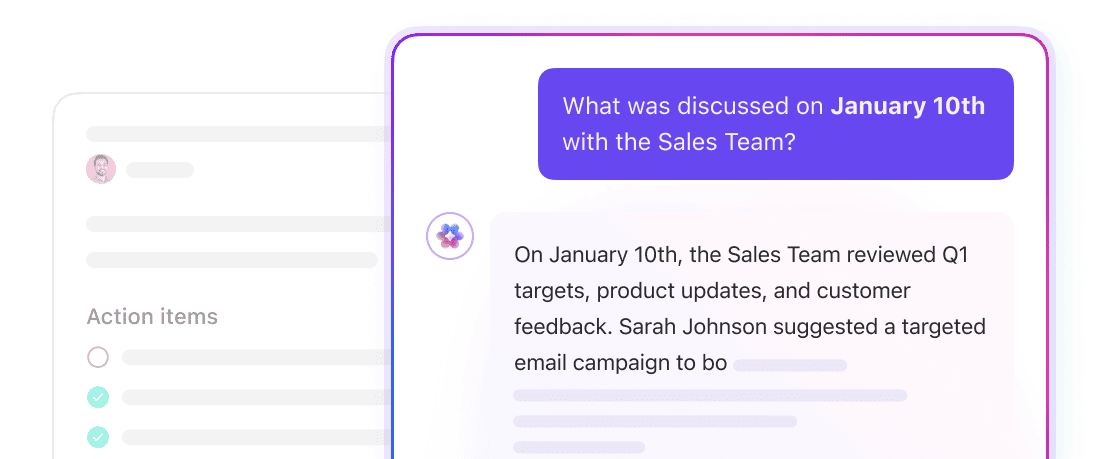
Visibility removes friction: you won’t need to re-explain past decisions, your manager won’t need to hunt for updates, and both of you can reference the same source when discussing progress. This is also where a contextual AI can make all the difference.
For instance, you can ask BrainGPT what you discussed in last quarterly goal setting meeting and it’ll instantly surface insights from the transcript, making it easier to compare goals vs. actual performance.
Eliminate the endless cycle of switching between spreadsheets, documents, and chat apps by bringing everything together in ClickUp’s converged AI workspace.
It’s a unified platform where projects, documents, conversations, and analytics live together, powered by contextual AI that understands your work and helps move it forward.
Kick things off in a Doc. It’s the easiest place to jot down ideas, sketch themes for the quarter, and get your thoughts out of your head without committing to anything formal yet.
For instance, you might be thinking, “I should improve onboarding…maybe align better with sales?” Docs lets you explore those thoughts before you start worrying about numbers and due dates.
Or, you may already have this summary from the AI Notetaker as shown above.
⚡️ Template Archive: Free 12-Week Year Templates to Crush Your Goals
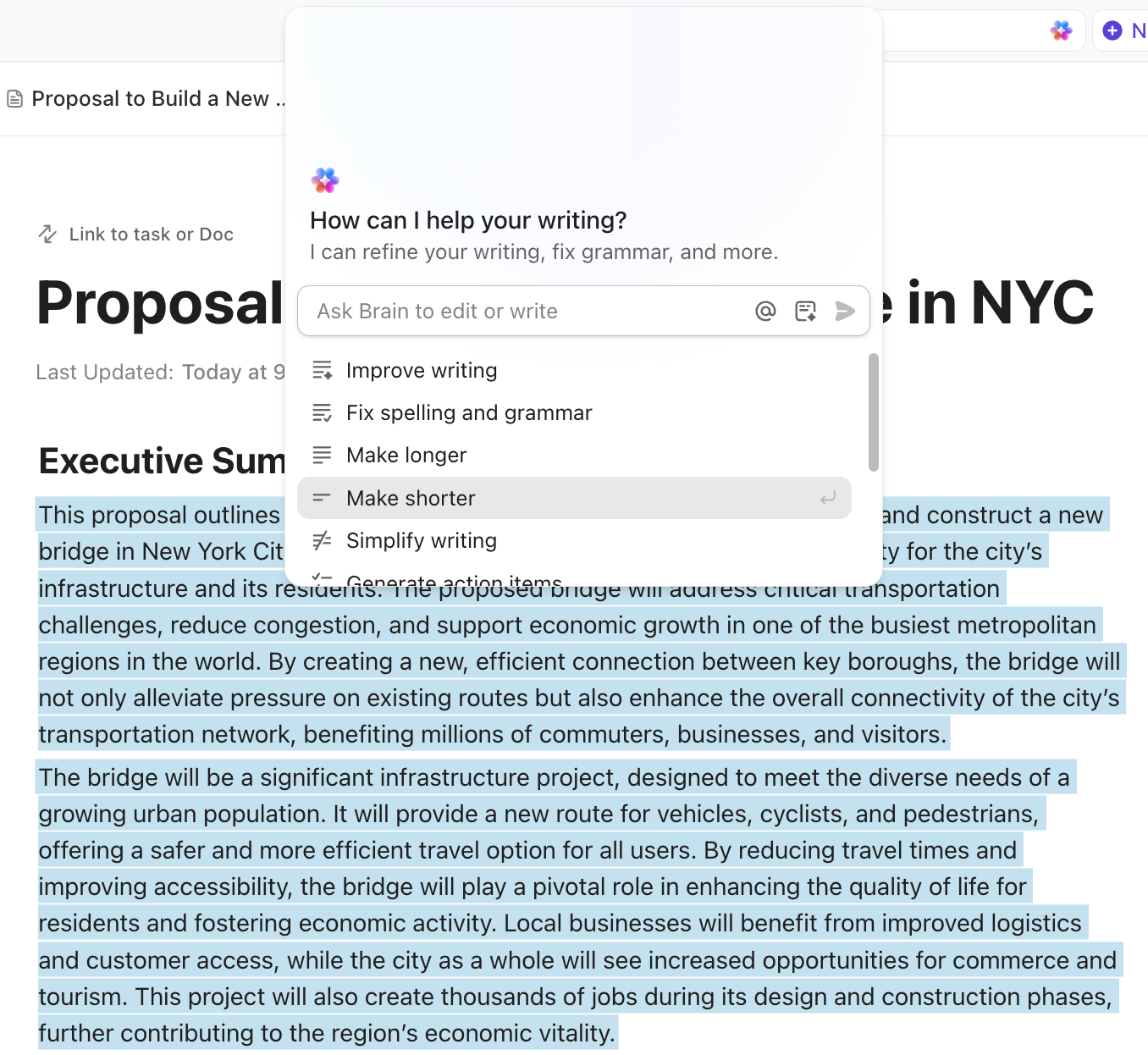
Once you have a rough pass, bring in BrainGPT to help sharpen the wording. It can suggest clearer phrasing, propose measurable targets, and clarify anything vague or ambiguous.
That placeholder “optimize reporting” suddenly becomes “launch a weekly reporting workflow that cuts manual prep time by 30%.” Much cleaner, much easier to track.
Now bring your manager into the Doc. They can comment directly on the text, flag any missing information, and help confirm what success should actually look like. All the back-and-forth stays in one place.
Instead of emailing versions back and forth, your manager gets to simply add an Assigned Comment beside the goal saying, “Let’s add a milestone here,” and you’re instantly aligned.
Once the wording is finalized, convert each goal into a ClickUp Task. Add assignees, due dates, priorities, subtasks, and Custom Fields for metrics and milestones so the goal becomes actionable.
Your polished statement becomes a real plan: a task with a specific metric to achieve, a clear timeline to follow, and well-defined next steps.
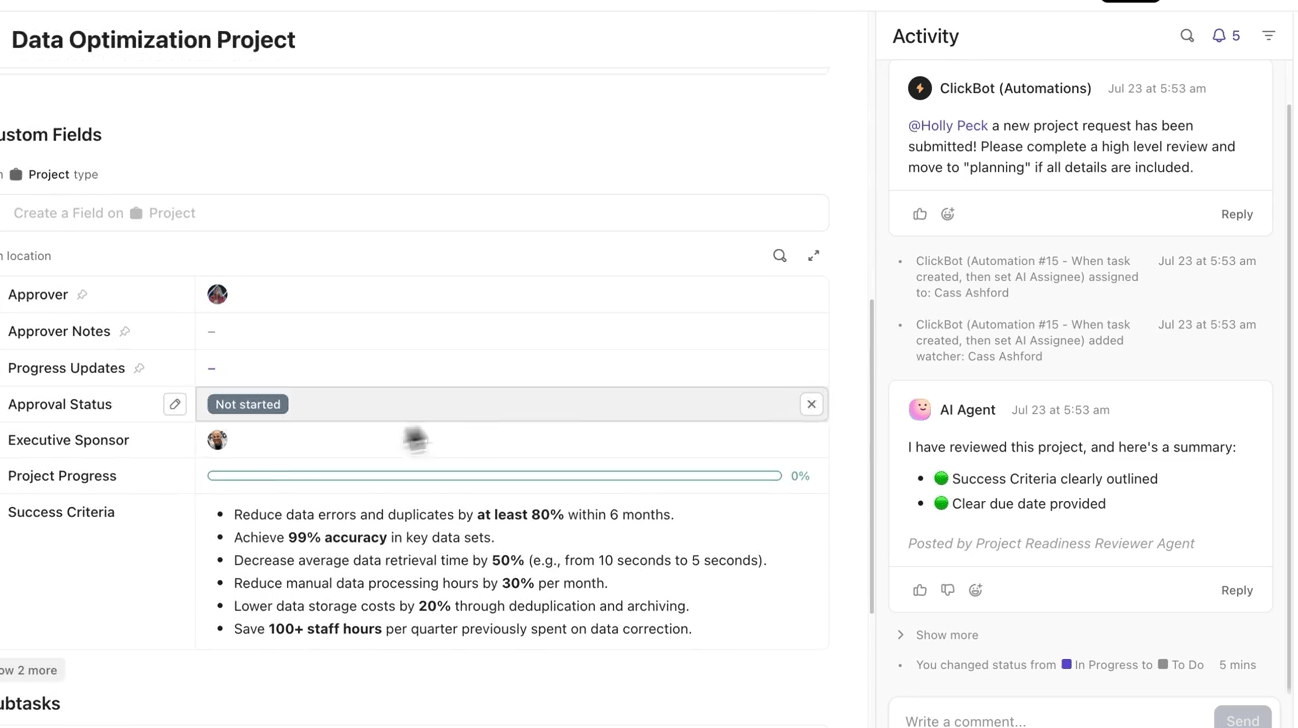
Link the original Doc to each Task so you never lose the story behind the goal, the decisions, the comments, and the reasoning. It all travels with the work.
During a mid-quarter sync, you open the Task, and the Doc is right there, giving you the “why” behind every detail.
Decide how often you’ll check in on each goal: a short weekly update, a biweekly status review, or an async note. Use comments, statuses, and checklists to keep things moving.
For instance, your manager knows to expect updates every Thursday, and you don’t have to scramble to remember what happened; it’s all logged in the Task, with built-in AI summaries.
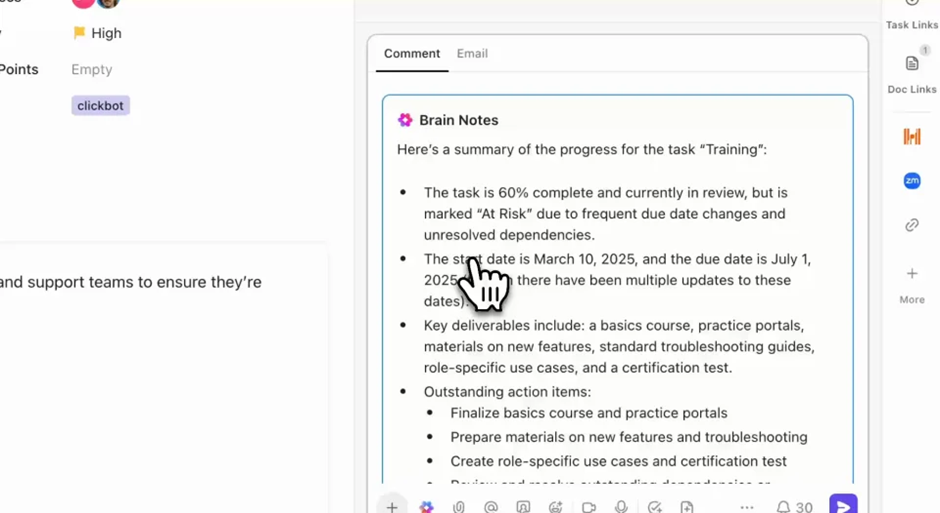
As the quarter rolls along, continue to keep your Tasks up to date: shift statuses, log blockers, update metrics, and mark milestones as complete. When your manager asks how things are going, you just pull up the Task—the full picture is already there.
Don’t want to do this manually? Let a ClickUp Agent take care of this workflow end-to-end. It can collate insights, create reports, and share them in channels or directly with your manager. See how. 👇🏼
📖 Read More: How to Use AI for Goal Setting and Productivity
When your Tasks and Custom Fields are populated, create a no-code Dashboard in ClickUp that visualizes everything: progress, workload, blockers, deadlines.
It becomes your real-time overview. Instead of writing a weekly status doc, you point your manager to the dashboard. It has the full picture mapped and ready to go.
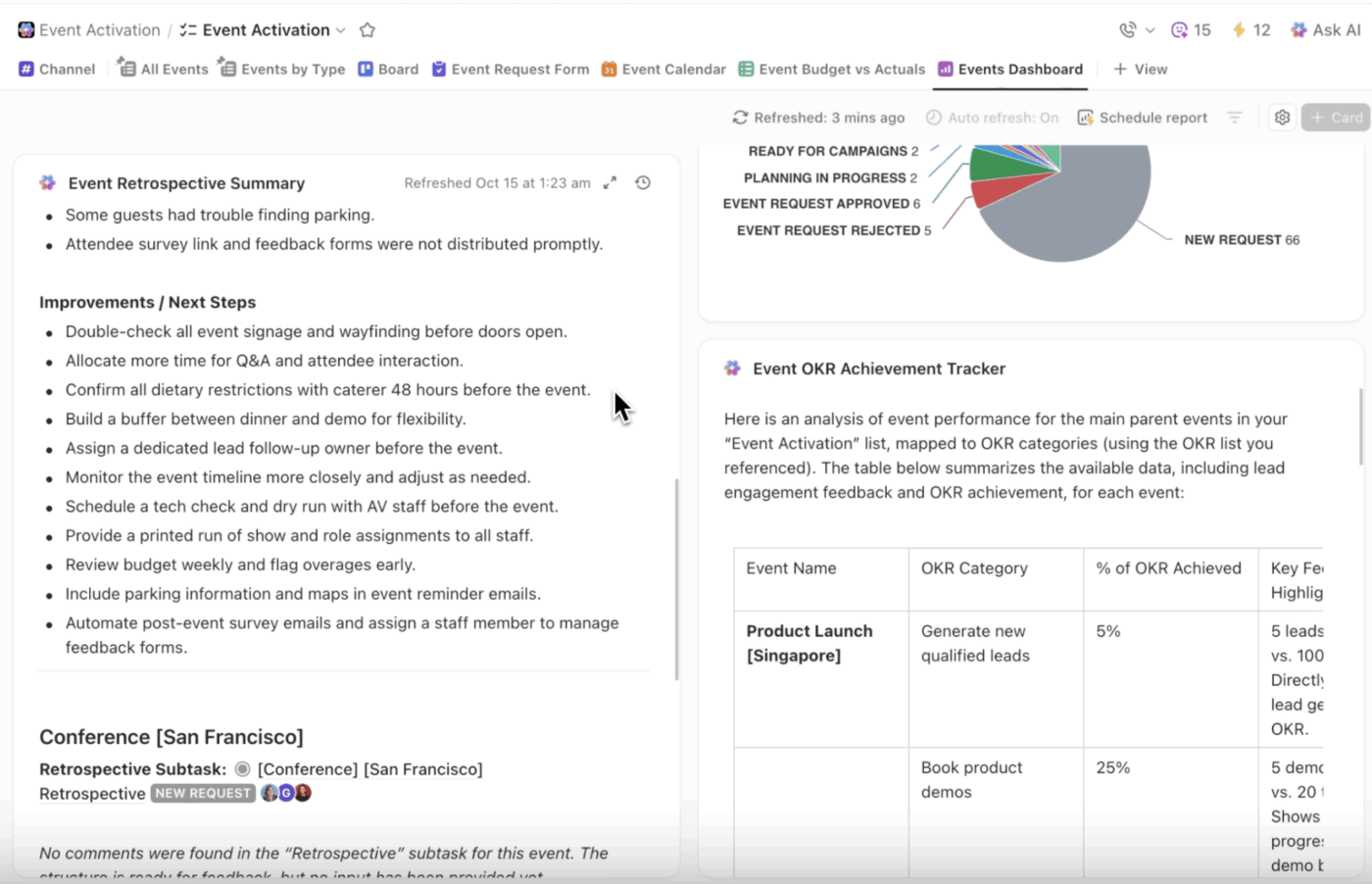
By the time you get to your one-on-ones or your quarterly review, everything is already captured.
The decisions, the progress, the blockers, the wins, it’s all right there. The conversation then shifts from explaining to planning. Instead of struggling to build a slide deck for your review, you walk in with your workspace open. The quarter is already documented.
Now you can use AI Cards to pull in those at-a-glance summaries or drill down to the details with BrainGPT!
When everything is connected in one workspace, you maintain alignment with your manager and save time by reducing the need for constant status meetings. Your goals, tasks, and conversations are all right where you need them, when you need them.
💟 Bonus: Brain MAX is your AI-powered desktop companion that makes creating and sharing quarterly goals with your manager effortless. With deep integration across your tasks, documents, and calendar, Brain MAX helps you organize your objectives, break them down into actionable steps, and set realistic timelines.
You can use talk-to-text to quickly brainstorm ideas or outline your goals, and Brain MAX will help you refine them, prioritize key results, and generate clear summaries. Brain MAX can even suggest measurable KPIs, flag potential roadblocks, and format your goals into a polished document or presentation. When you’re ready, you can easily share your goals with your manager via email, chat, or a shared workspace—ensuring alignment and transparency every quarter.
📖 Read More: How to Deal with a Micromanaging Boss
Sharing your quarterly goals with your manager is an ongoing conversation. It covers what matters on a daily basis, what you’re prioritizing, and how your work ties into the bigger picture.
When you approach that process with clarity, thoughtful goal setting, steady communication, and a system that keeps everything visible, you make it easier for your manager to support you and far easier for you to stay focused.
ClickUp gives you the structure to make that alignment effortless. You capture ideas, refine them with AI, collaborate on the language, turn them into actionable tasks, and track progress in a way that’s transparent every step of the way.
Ready to make your next goal-sharing conversation the most productive one yet? Try ClickUp and see how it makes the entire process seamless.
OKRs are a specific goal-setting framework with qualitative objectives and measurable key results, while quarterly goals can follow any format. Think of OKRs as one structured way to set your goals each quarter.
Aim to provide brief updates every one to two weeks, either during your regular one-on-ones or asynchronously through a shared platform. This keeps your manager in the loop without adding unnecessary meetings to their calendar.
Ask clarifying questions to understand their perspective and concerns, then collaborate to find a middle ground. The best goals are ones that align with team priorities while also supporting your personal career growth.

© 2026 ClickUp

There’s an easier way. Try a free AI Agent in ClickUp that actually does the work for you—set up in minutes, save hours every week.