
Sorry, there were no results found for “”
Sorry, there were no results found for “”
Sorry, there were no results found for “”
Your work calendar shouldn’t feel like a ticking time bomb! Yet, here you are, juggling double bookings, last-minute rescheduling, and meetings that eat up your entire day. It’s exhausting, right?
Turns out, it’s also dangerous. The World Health Organization warns that unmanaged stress from chaotic work schedules can seriously impact your health.
But when done right, effective scheduling keeps teams organized, reduces stress, and (finally) allows you to prioritize your work correctly.
Let’s break down the most common work schedule conflicts and, more importantly, how to fix them before they wreck your sanity.
A well-planned schedule should make work smoother and not stressful. However, in many workplaces, scheduling problems lead to burnout, confusion, and missed deadlines.
Here’s a closer look at the typical scheduling conflicts employees face.
It’s Friday evening, and Sarah, a retail store manager, finally settles in for the weekend. Just as she’s about to relax, she gets a frantic text—two employees have taken time off, and no backup plan is in place. She scrambles to find replacements, but most of her team is unavailable.
Last-minute changes like these are common in industries with unpredictable demands. Employees feel blindsided, morale drops, and businesses suffer from inefficient operations without a structured approach.
📖 Also Read: Best Employee Rostering Software
👀 Did You Know? Over 11 million meetings happen daily in the U.S.—55 million a week and over a billion a year!
Overlapping meetings is a common scheduling conflict, forcing employees to skip one discussion or juggle two at once, often multitasking through both.
The result? Important decisions are missed, tasks get delayed, and employees feel overwhelmed by constant calendar conflicts.
📮ClickUp Insight: Our meeting effectiveness survey data shows that 25% of meetings involve 8 or more participants on average. We also found that an average meeting lasts approximately 51 minutes. These large meetings can result in at least 6 to 8 hours of collective meeting time spent per week at an organizational level.
What if you could cut it down? ClickUp transforms how teams communicate! Instead of lengthy meetings, collaborate directly within tasks using comments, attachments, voice notes, video clips, and more—in one place.
💫 Real Results: STANLEY Security’s global teams already saved 8+ hours weekly on meetings and updates with our everything app for work!
In the same team, two employees can have wildly different experiences:
This imbalance leads to burnout for some and disengagement for others. Overloaded employees start making mistakes, while those with less work feel undervalued. Over time, resentment builds, and productivity suffers.
A McKinsey report on the Great Resignation found that 19 million knowledge workers quit their jobs due to poor internal communication and a lack of meaningful interactions. When employees feel out of the loop, frustration builds—and scheduling is no exception.
Imagine this: A software development company launches a big project but fails to update teams on changes in the project schedule.
The design team thinks they have two more weeks to finalize visuals—until they learn the deadline has already passed. Cue last-minute panic, rushed work, and a subpar end product.
When schedules and deadlines aren’t clearly communicated, teams get stuck in a cycle of confusion, missed expectations, and unnecessary stress.
Manager: “Let’s schedule a quick call for 3 PM EST.”
Remote team member, in Sydney: “Uh… that’s 5 AM for me.”
Sound familiar? Time zone struggles are a constant headache for global teams. Scheduling across multiple time zones often leads to employees attending meetings at odd hours or missing important discussions entirely.
🧠 Fun Fact: While office employees often juggle back-to-back meetings, 43% of remote workers and 44% of hybrid employees say they often feel left out of the conversation.
When remote teams aren’t considered in scheduling decisions, collaboration becomes messy, and work-life balance suffers.
When deadlines are unclear, projects start to unravel:
Task dependencies mean that one team’s delay can disrupt an entire workflow. Without clear deadlines, bottlenecks form, productivity slows down, and projects fall behind.
Retail and hospitality workers often face unpredictable shifts that disrupt their work-life balance. A well-known lawsuit against McDonald’s highlighted issues with erratic night shift schedules, unpaid overtime, and missed breaks, making it difficult for employees to manage their health, finances, and personal lives.
Shift conflicts arise when schedules are posted too late, employees aren’t given enough notice, or managers make last-minute adjustments without consulting their team.
The result? Higher employee turnover rates, frustrated staff, and inconsistent service quality.
The ideal workday would include employees starting their day with a plan, dedicating time to deep work, and using meetings only when necessary.
However, meetings fill every available time slot, in reality, leaving no room for actual work. Employees jump from call to call, multitasking during discussions and struggling to complete tasks on time.
👀 Did You Know? According to Microsoft’s Work Trend Index, corporate employees spend 252% more time in meetings now than they did before 2020.
More meetings don’t always mean better productivity, but it definitely results in more meeting conflicts.
📮ClickUp Insight: According to our meeting effectiveness survey, 12% of respondents find meetings overcrowded, 17% say they run too long, and 10% believe they’re mostly unnecessary.
In another ClickUp survey, 70% of the respondents confessed that they would happily send a substitute or a proxy to the meetings if they could.
ClickUp’s integrated AI Notetaker can be your perfect meeting proxy! Let AI capture every key point, decision, and action item while you focus on higher-value work. With automatic meeting summaries and task creation assisted by ClickUp Brain, you’ll never miss critical information—even when you can’t attend a meeting.
💫 Real Results: Teams using ClickUp’s meeting management features report a whopping 50% reduction in unnecessary conversations and meetings!
Meet David. He’s a working parent juggling client calls, project deadlines, and school drop-offs. His rigid 9-to-5 schedule doesn’t account for real-life responsibilities, leaving him constantly stressed.
Rigid schedules don’t care if daycare pickup runs late or a forgotten personal commitment pops up. Without flexibility, stress piles up, job satisfaction tanks, and burnout sneaks in before you even realize it.
Scheduling systems are great—until they crash. Without a backup plan, businesses may be left scrambling, leading to missed shifts, project delays, and frustrated employees.
Take Southwest Airlines’ infamous meltdown in December 2022. A winter storm hit, but while other airlines recovered quickly, Southwest’s outdated crew scheduling system collapsed under pressure. Pilots and flight attendants were stranded in the wrong cities, and thousands of flights were canceled, causing a ripple effect of chaos.
Relying too much on automated scheduling without a contingency plan is unwise. When systems fail, and there’s no manual backup process, businesses can face significant disruptions that take days (or even weeks) to fix.
Now that you know the most frequent causes behind scheduling issues, let’s figure out how to solve them.
Tired of last-minute scrambles and back-to-back meetings? A few smart fixes can turn scheduling issues at work into a smooth, productive routine. Here’s how to make it happen:
If scheduling feels like a guessing game, that’s a red flag. Effective workforce management means everyone should know when they’re working, who’s on call, and how to handle swaps.
🎯 How do you fix it? Labor laws in many countries set rules for employee work hours, overtime, leave management, and shift scheduling.
Employers should follow these while also creating clear internal policies for meetings, shift changes, and time-off requests. Keep them easy to find, easy to follow, and impossible to ignore.
📖 Also Read: How to Create a Weekly Schedule for Work
Without a solid system, schedules become a mess of endless meetings and scattered tasks. That’s where a work management tool comes in.
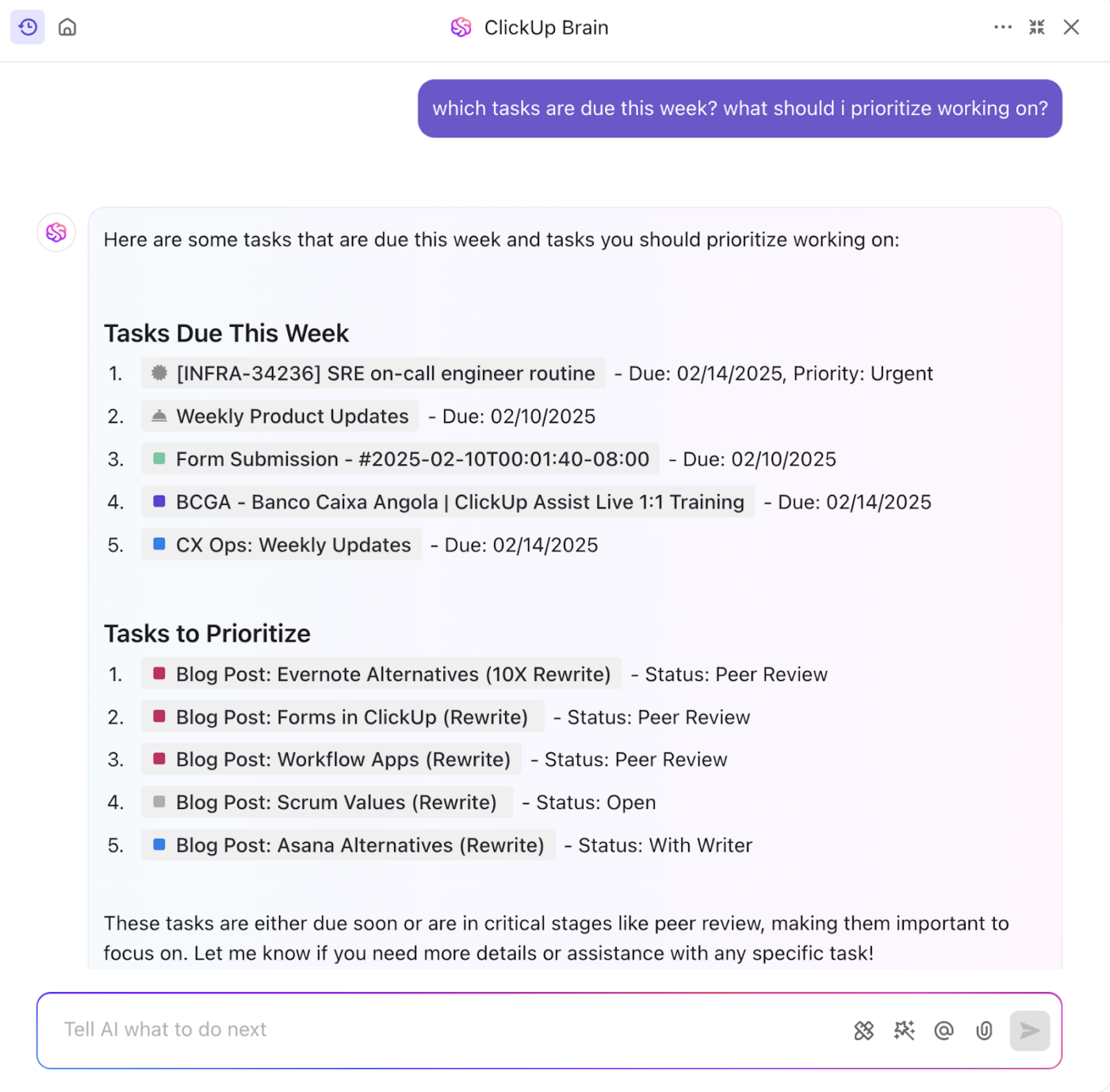
ClickUp—the everything app for work—does it all. From scheduling and task prioritization to automating workflows, it helps your teams stay organized without chaos. It also offers various time management templates to simplify scheduling.
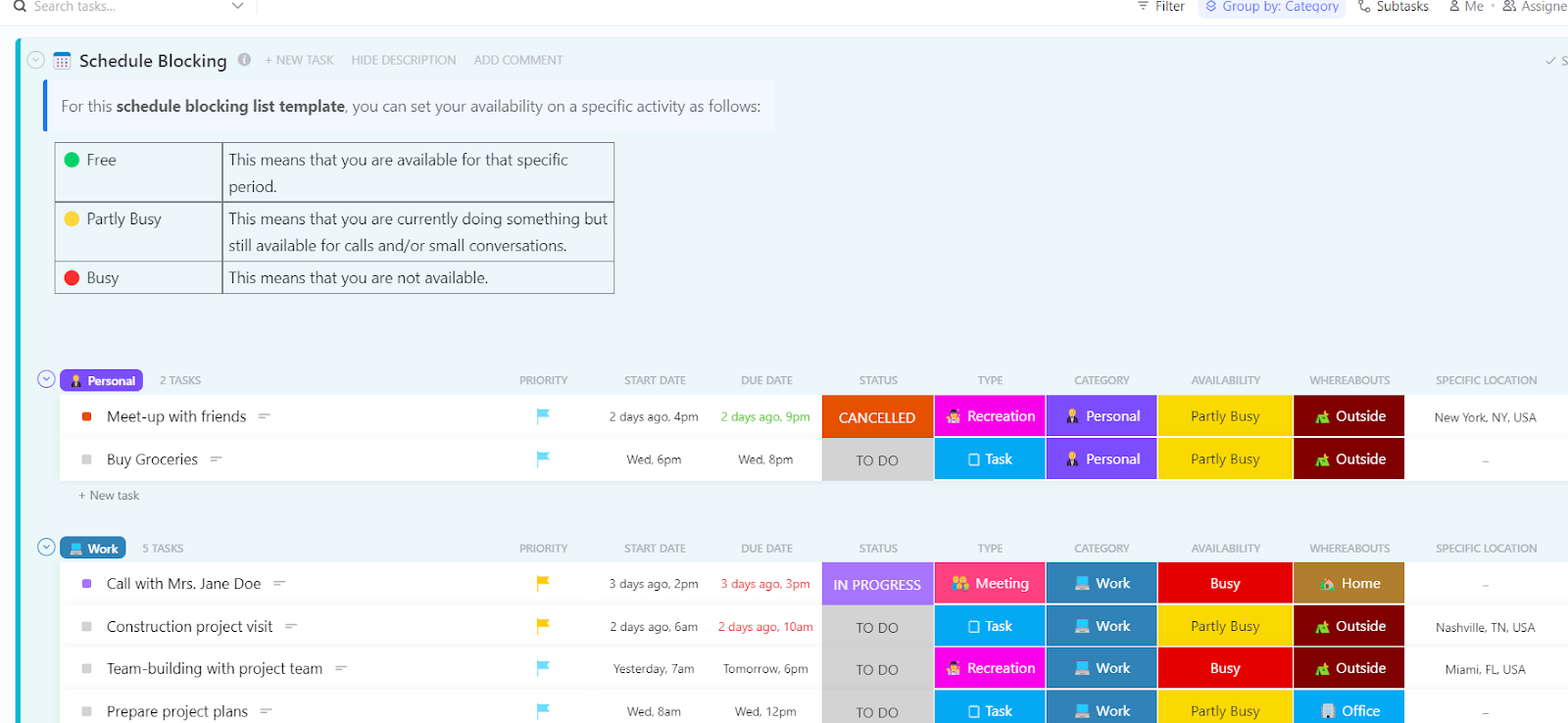
One of these is the ClickUp Schedule Blocking Template—designed to organize tasks, meetings, and deep work sessions into structured time blocks.
Here’s what’s inside:
💡 Pro Tip: Struggling to decide what needs your attention first? The best way to cut through the chaos is to set your priorities straight. The ClickUp Prioritization Matrix Template helps sort tasks by urgency and importance, so you can focus on what truly matters.
Most importantly, if an update works as an email, make it one. But if a meeting is necessary, keep it short and purposeful and only invite those who actually need to be there.
Rigid schedules and siloed work slow teams down, but a little flexibility goes a long way.
70% of employees believe better collaboration could significantly boost productivity and save time.
When teams communicate openly and adapt to changing priorities, work moves more smoothly, and deadlines don’t feel like constant fire drills. To achieve this:
After all, collaboration isn’t just about working together; it’s also about working smarter.
📮ClickUp Insight: About 41% of professionals prefer instant messaging for team communication. Although it offers quick and efficient exchanges, messages are often spread across multiple channels, threads, or direct messages, making it harder to retrieve information later.
With an integrated solution like ClickUp Chat, your chat threads are mapped to specific projects and tasks, keeping your conversations in context and readily available.
Even the best schedules need fine-tuning. Without regular check-ins, they can quickly become outdated and inefficient. A smarter approach? Make schedule reviews a habit.
You can start with these steps:
Managing schedules doesn’t have to be a guessing game. Zeroing in on and deploying shift management software may be the simplest way to resolve many of your issues.
📖 Also Read: How to Calculate Hours Worked
Keeping schedules organized manually is a never-ending struggle, which can lead to missed deadlines, double-booked shifts, and constant rescheduling. ClickUp takes the hassle out of scheduling with its countless features designed to make your life easier.
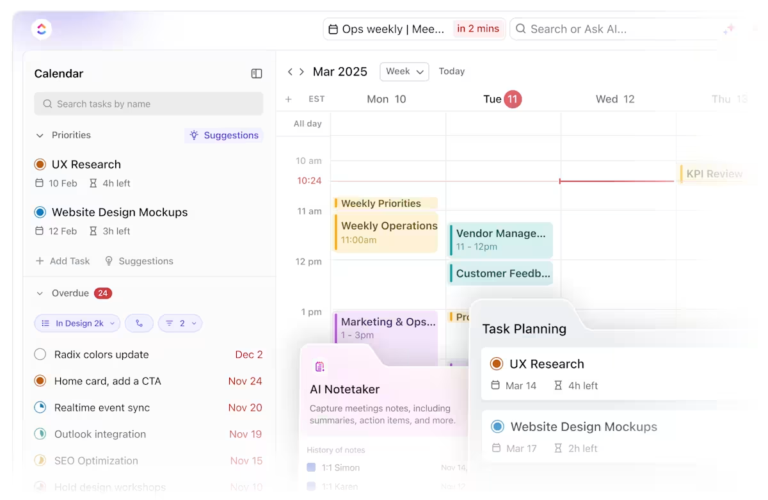
ClickUp Calendar elevates scheduling beyond basic time management by seamlessly blending calendar functions with task prioritization:

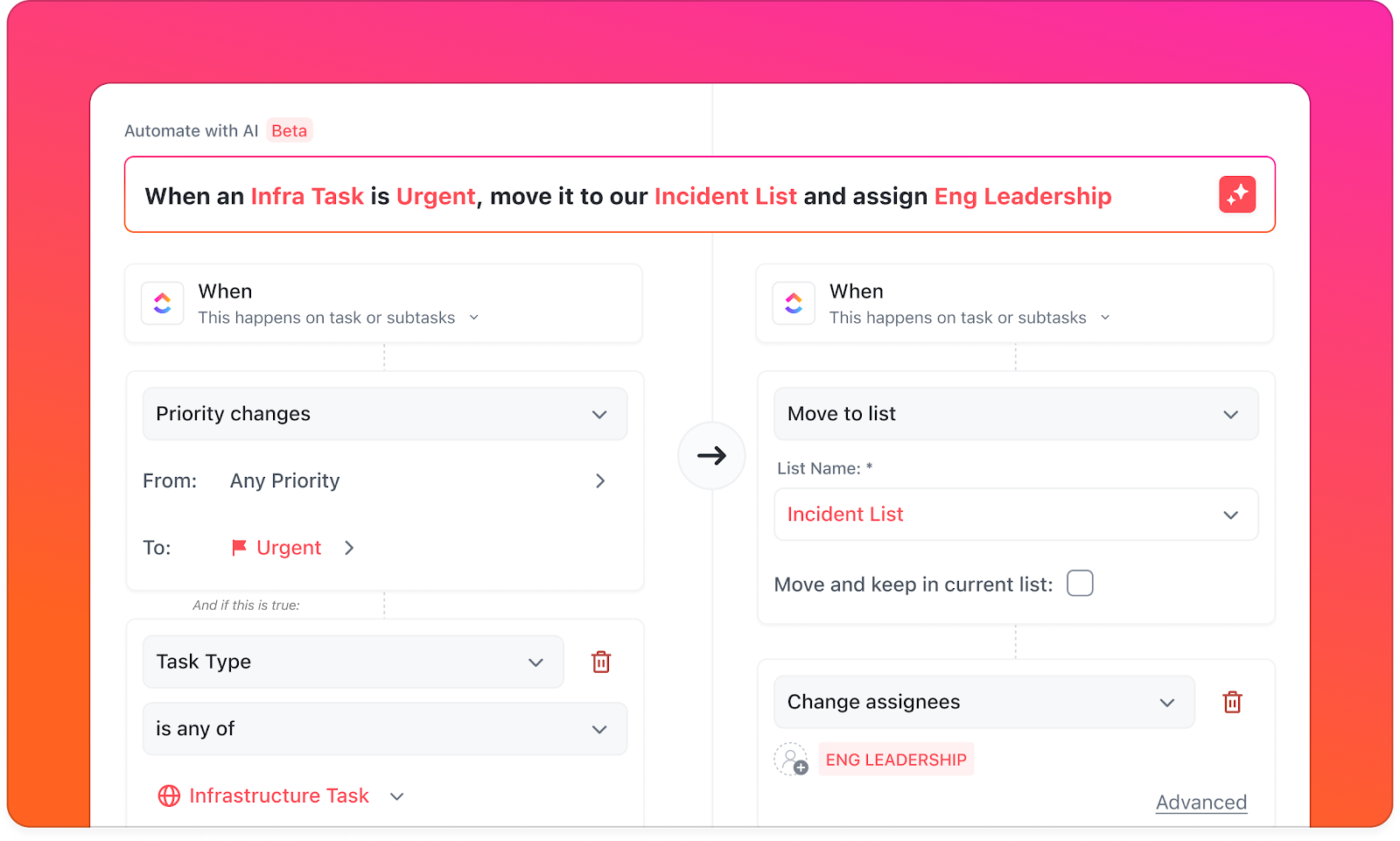
Why struggle with perfecting schedules manually when ClickUp Automations can do it for you? From auto-assigning shifts to sending deadline reminders, you can build intelligent workflows to handle the busy work.
And, if you want to plan team shifts, assign roles, and track attendance, without the usual scheduling headaches, ClickUp’s work schedule templates come in handy.
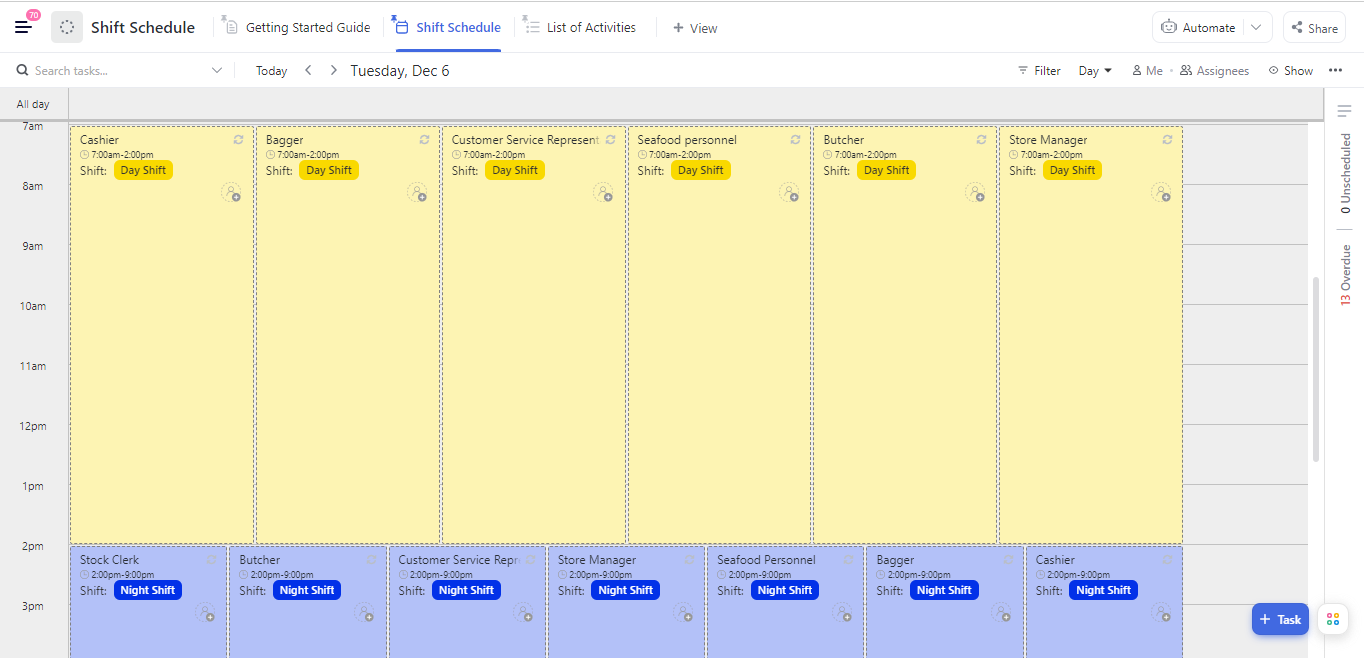
The ClickUp Shift Schedule Template, for example, makes it easier to manage rotational shifts and avoid conflicts with enhanced visibility.
Here’s what the template has for you:
Another great way to keep schedules on track is with the ClickUp Team Schedule Template. It makes it easy to see who’s available, assign shifts without gaps, and keep projects running smoothly.
That’s not all! ClickUp acts as an employee management software by offering so much more for smarter scheduling, like:
🧠 Fun Fact: The idea of the five-day workweek became mainstream thanks to Henry Ford in 1926. He did it to boost productivity, not just give workers a break. Companies worldwide are now experimenting with 4-day workweeks, proving that sometimes less is more!
Smart scheduling practices look different across industries. What works for a retail store won’t cut it for a hospital or factory. Let’s break down proven scheduling best practices for creating rosters employees will love in different sectors.
Retail scheduling success starts with understanding foot traffic patterns and what employees actually need. With 54% of managers admitting leadership is out of touch with employee expectations, it’s clear that balancing business needs with staff well-being is just as crucial.
Here’s how retail managers can strike the right balance:
Healthcare scheduling needs to run like a well-oiled machine. A single gap can throw off everything, from routine checkups to urgent cases. Plus, no-shows in existing schedules don’t just waste appointment slots; they drain time and resources, leaving staff scrambling to adjust.
A more thoughtful approach includes:
A study by NIH showed that predictive phone outreach, in tandem with standard automation, can cut no-shows, making schedules more efficient and reducing wasted time.
The key is in not spending time, but in investing it.
If managed well, every meeting, shift, and deadline is an investment in productivity. However, without the right tools, the scheduling process can feel more like an uphill task than a strategic advantage.
But ClickUp is built for resolving scheduling conflicts! With powerful scheduling tools, automation, and customizable templates, managing shifts, meetings, and team availability becomes effortless. No more crossed wires, just a smarter way to organize your team’s time.
Ready to take control of your schedule? Try ClickUp for free and keep your project management on track!

Sudarshan Somanathan
Max 22min read

Manasi Nair
Max 20min read
Manasi Nair
Max 31min read

© 2026 ClickUp