
Sorry, there were no results found for “”
Sorry, there were no results found for “”
Sorry, there were no results found for “”
PMI estimates the world may need up to 30 million more project professionals by 2035, which simply means demand is outpacing people.
That’s why you need resource management.
It’s the practice of matching the work you want to do with the people, time, and skills you actually have, then adjusting fast when priorities shift. Done well, it prevents the two most common problems teams live with every week: the same few people being overloaded, and ‘critical’ work stalling because nobody planned the handoff.
In this guide, we’ll break down what resource management is, how it works, and the simple mechanics that turn the control over to you.
Resource management is the strategic process of identifying, assigning, and monitoring all the inputs a project needs—people, money, equipment, and time. It sits at the intersection of project planning and workforce management, giving you a real-time, data-backed view of who’s doing what and when.
Unlike ad-hoc task assignment, which is purely reactive, resource management is proactive and capacity-aware. This practice helps you avoid two major pitfalls:
📚 Read more: Employee overload
If you step back and map how work flows through a team, resource management is what keeps that flow steady. It helps you plan with clarity, protect focus, and deliver consistently, even as priorities shift.
Here’s why it matters 👇
It can be tough to justify the effort of setting up a new process when the payoff isn’t crystal clear. You might stick with the chaotic status quo because ‘it’s always been done this way,’ even if it’s causing stress and inefficiency. Understanding the concrete benefits makes it easier to make the switch.
True resource management requires a holistic view. Most projects involve three primary resource categories simultaneously. They are:
Human resource management is about assigning work based on who is available and who is best suited for it. It keeps workloads balanced, clarifies ownership, and helps teams stay productive without sacrificing quality.
Time resource management focuses on how hours and days are allocated across priorities. It helps teams protect focus time, plan around deadlines, and make space for both planned projects and ongoing work.
This is a type of resource management that tracks how money is allocated and spent across initiatives, tools, vendors, and contractors. It supports better planning decisions by making it easier to compare expected costs with actual spend over time.
Capacity and workload management look at how much work a team can realistically take on at any given time. It helps teams plan sprints, manage intake, and forecast delivery based on real bandwidth.
Project resource management is about ensuring each project has the right mix of people, time, and support to move forward. It helps teams manage competing initiatives without losing visibility into what is happening across the portfolio.
This type manages shared resources like devices, licenses, equipment, and tools. It ensures teams can access what they need without delays and helps maintain accountability for high-value assets.
You know you need to manage your resources, but the specific methods can feel abstract and confusing. Think of these techniques as a toolkit. You don’t have to choose just one; most experienced teams use a combination, adjusting the mix based on the project’s complexity and the team’s needs.
Resource allocation is the act of assigning specific resources to specific tasks based on a clear understanding of priority, skill fit, and availability.
📌 Example: You assign a landing page redesign to your lead designer because they’re the best. But they’re also on three other launches this week. Instead, you:
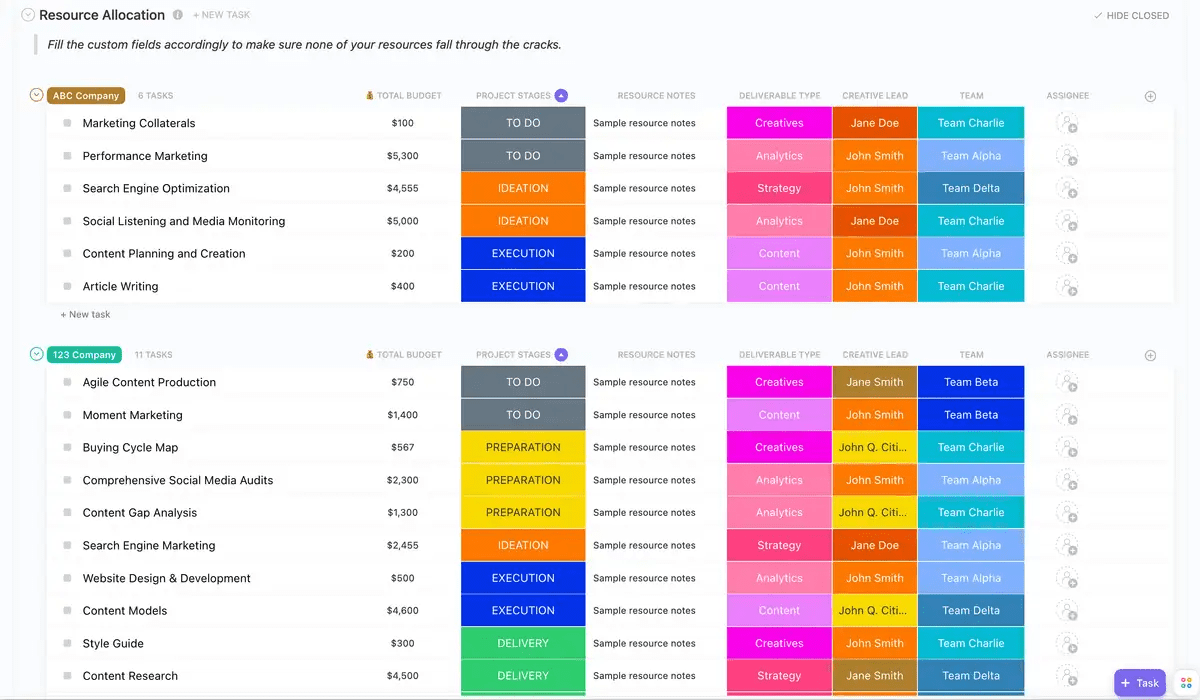
The ClickUp Resource Allocation Template can help you big time here because the structure is already done for you.
It includes:
Resource utilization is a metric that compares how much of your team’s available capacity is actually being used for productive work. It helps you answer: Are we overloaded, underused, or balanced?
A common mistake is to aim for 100% utilization. This backfires because it leaves no room for unplanned work, creative problem-solving, or simply taking a mental break. Instead of obsessing over daily numbers, track utilization trends over time. A week at 110% might be fine for a big launch, but three months at that pace is a clear sign of systemic burnout.
📌 Example: Your team has 5 engineers, roughly 25 ‘engineer-days”’ per week. If current commitments add up to 30 engineer-days, you’re running at ~120% utilization. That might be okay for one intense release week, but if it’s the new normal, you’ll see bugs rise, cycle time slows, and people burn out.
A healthier approach is to plan for a buffer (for example, keep utilization closer to a sustainable range week-to-week) and only spike when there’s a deliberate reason.
Resource forecasting is estimating the people, time, and budget you’ll need in the future based on upcoming work, historical patterns, and strategic plans. It’s how you avoid scrambling after a project is already approved.
Forecasting only works when your input data is reliable. If previous estimates were vague guesses, your forecast will be vague too. Scenario planning also helps you stay calm when reality changes.
📌 Example: Your roadmap shows two major initiatives next quarter: a mobile redesign and an analytics revamp. Past projects tell you a redesign typically needs:
With that baseline, you can spot gaps early. And then you run ‘what-if’ scenarios:
Resource leveling is the technique of adjusting task start and end dates to resolve overallocation without changing the project’s scope.
This is different from resource smoothing, where you keep the deadlines fixed but adjust how intensely a person works on a task each day. Leveling often extends a project’s timeline, so clear communication with stakeholders is essential. It’s much easier to explain, ‘We need two more weeks because one person can’t be in three places at once,’ when you have the data to back it up.
📌 Example: Your top engineer is assigned to:
You level the plan by moving the security review to next Tuesday and pulling another engineer into the integration work. The project end date may shift by a few days, but now the schedule reflects what can actually happen.
Let’s now look at how you can create a resource management plan 👇
It all starts with a vague request: ‘We need a new landing page.’ If you don’t clarify the details, you’ll never be able to estimate the resources accurately. The first step is to work with stakeholders to define the project’s deliverables, milestones, and constraints.
Once the scope is clear, you can translate it into specific resource requirements. This means identifying what skills you’ll need (design, copywriting, development), how much effort each phase will require, and which tools are necessary.
The more specific you are here, the less rework you’ll have to do later.
⭐️ Bonus Project management plan
Now that you know what you need, you have to figure out what you have. This involves taking an inventory of your current team’s capacity and their existing commitments. Don’t forget to include external resources like contractors or agencies.
This step should also cover your non-human resources, like budget limits, available software licenses, and any physical assets. By comparing what you need to what you have, you can flag any gaps early. If you realize you need a specialized developer you don’t have, you can start the hiring or procurement process now, before it becomes an emergency.
This step involves matching the right resources to the right tasks based on their skills, availability, and the task’s priority. It’s crucial to do this in a centralized system where everyone can see the assignments.
When allocations happen in private messages or emails, confusion and double-booking are inevitable. You should also build some contingency into your plan. Rigid plans break the moment something unexpected happens, but a flexible plan can adapt.
Your plan will become futile if it doesn’t reflect reality. You need to monitor your team’s actual effort against what you originally planned in real time. This allows you to spot variances quickly and make adjustments before a small delay turns into a major problem.
You need enough signal to answer:
The key is to make tracking as painless as possible. Use ClickUp Time Tracking to capture the data you need without creating a heavy administrative burden. Nobody wants to spend 30 minutes at the end of the day trying to remember how they spent every hour.
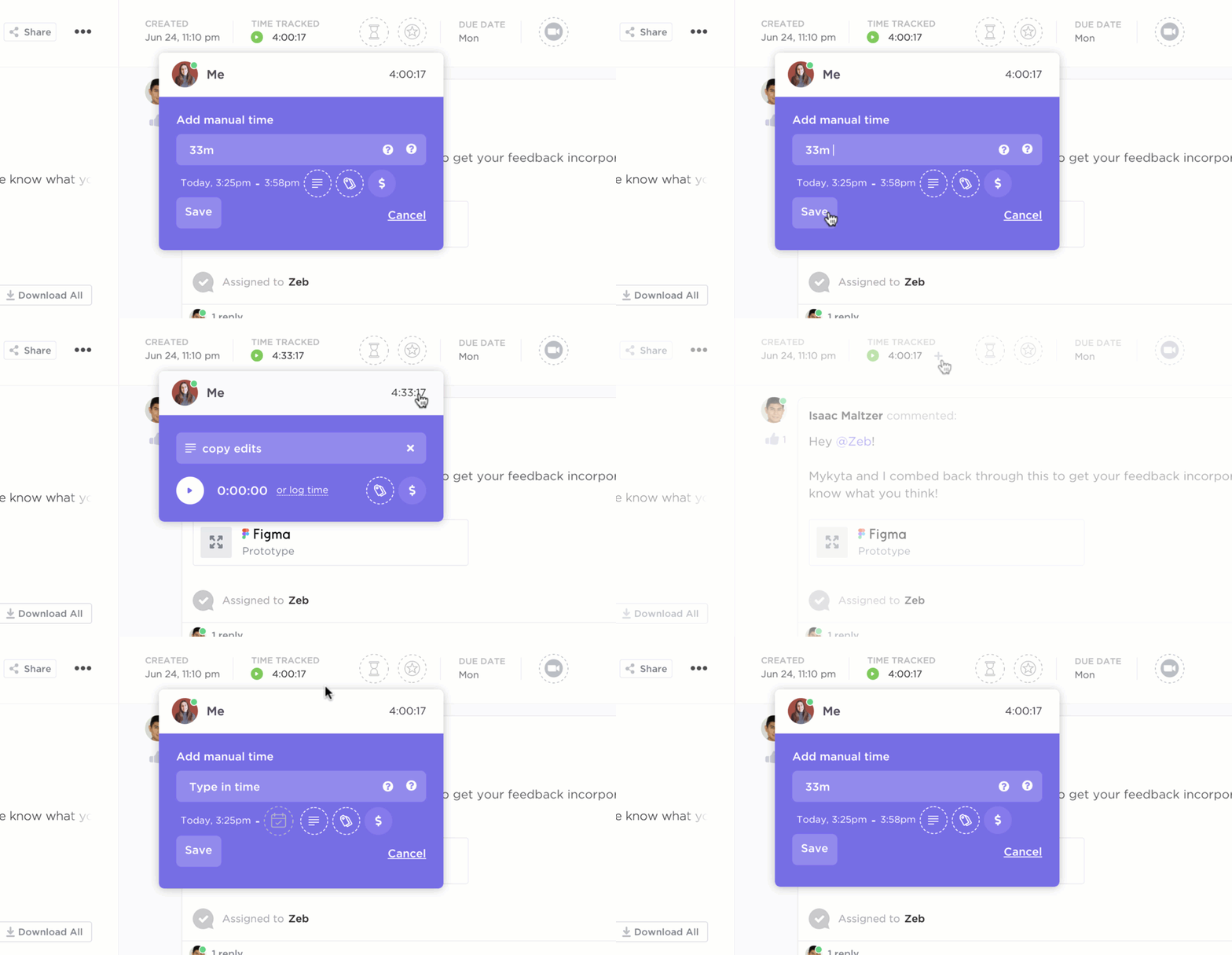
You keep noticing that your design team is always a bottleneck, or that one of your junior engineers consistently has extra capacity. These are valuable insights.
Review allocation and utilization trends regularly to decide:
Use these insights to refine your future plans and advocate for changes, like hiring another designer or providing more training for your junior engineer.
📮 ClickUp Insight: Only 36% of employees fully disconnect when their shift ends—meaning nearly two-thirds work extra hours or worry about work in their free time. This “always-on” culture is a fast track to burnout. 🔥
Automate your shut-down routines with ClickUp! Set up AI-powered end-of-day summaries, AI-generated catch-ups for comment threads, and automated time-blocking in ClickUp Calendar to schedule work-free time blocks for a clean break!
💫 Real Results: Lulu Press saves 1 hour per day, per employee using ClickUp Automations—leading to a 12% increase in work efficiency.
You’ve tried to get a handle on resource management, but you keep hitting the same roadblocks. Your team is frustrated, and you’re starting to think it’s just not possible for your organization. Recognizing these common challenges is the first step to overcoming them.
The right tools can solve many of these problems by consolidating your data and automating the process of creating visibility.
Hubstaff research found employees use an average of 18 apps per day, and workers report getting only two to three hours of focus time daily.
ClickUp, the world’s first Converged AI Workspace, has always aimed to solve this by bringing your tasks, docs, timelines, and resources into one place, with AI being on top all the time.
Let’s take a look 👇
‘Who can take on work right now without something else slipping?’
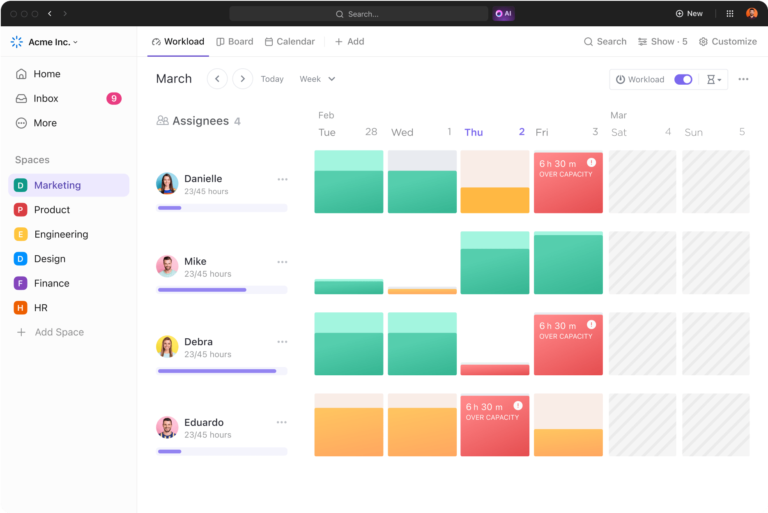
ClickUp Workload View answers that by giving you a live picture of work vs capacity across your team, over a day, week, or month. Instead of guessing from scattered updates, you can see each person’s assigned tasks laid out across the timeline and spot overloads before they turn into late nights.
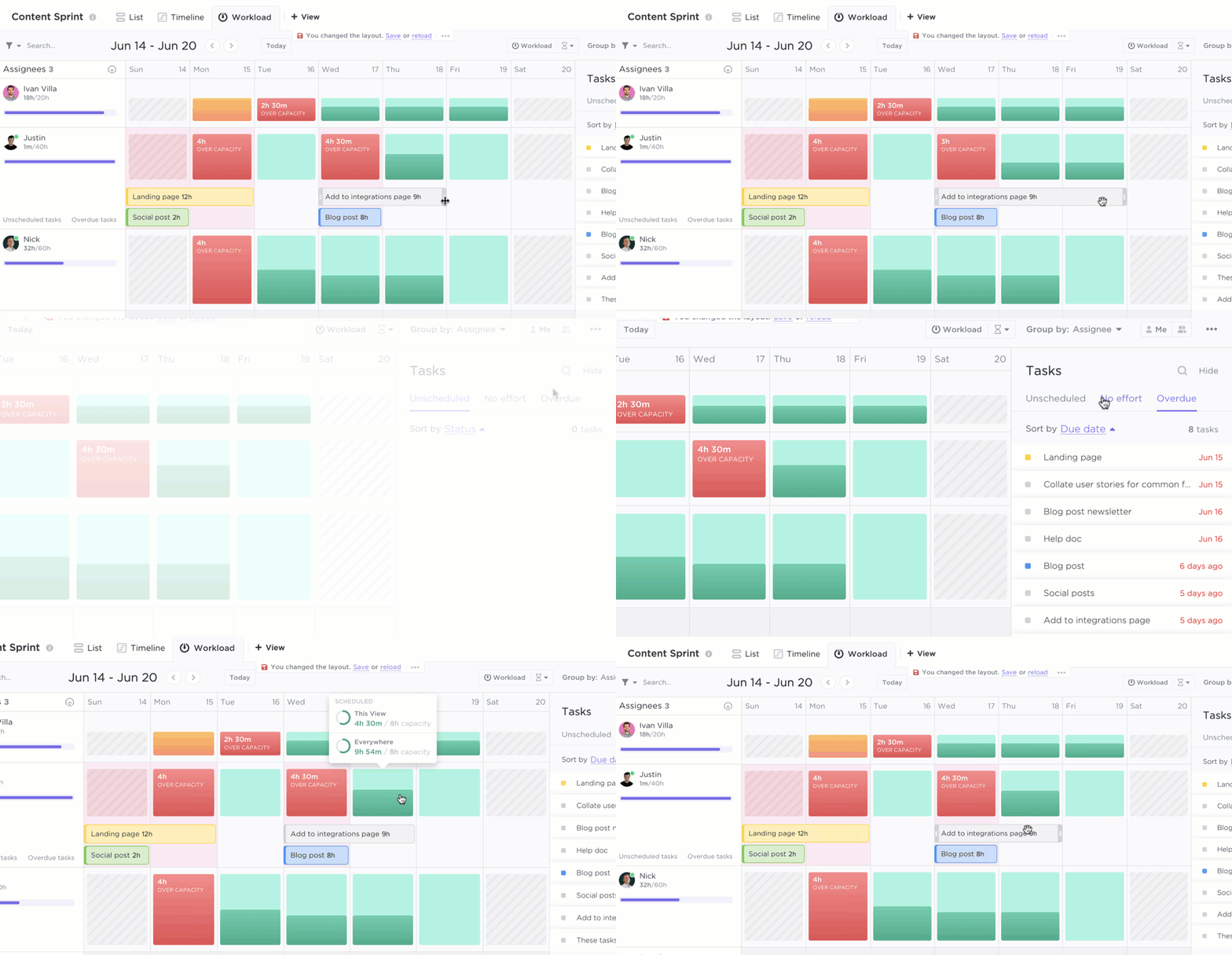
You can also set capacity limits per person, so the view clearly shows who is over or under. Then choose how you want to measure workload, either by what people are already committed to or by how much they can take on.
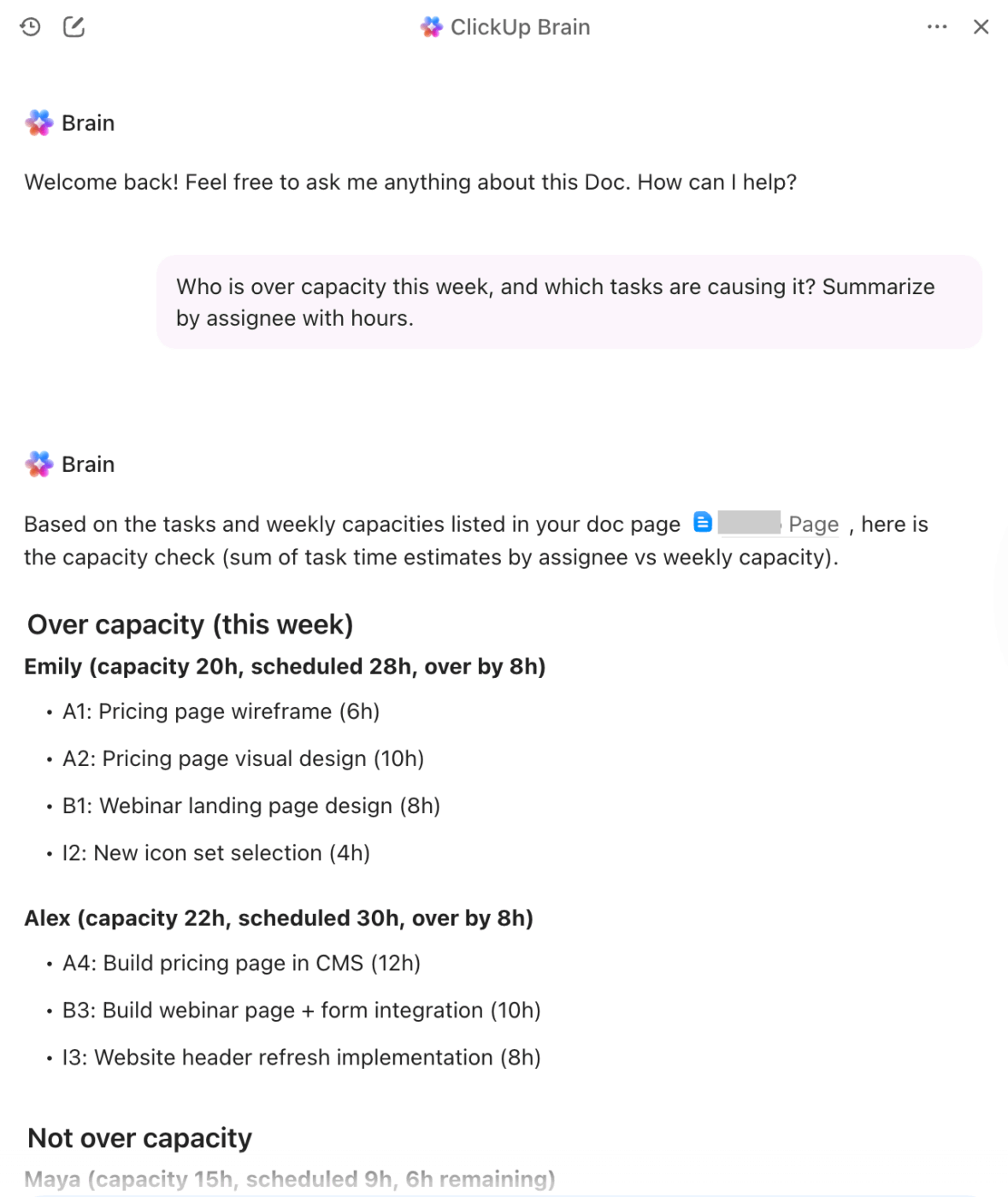
🚀 ClickUp advantage: Use ClickUp Brain to get clarity without doing the manual go-through. Ask natural language questions like: ‘Who is over capacity this week and what tasks are driving it?’ and get instant, contextual answers right away!
ClickUp’s Workload view helps you see who is overloaded. ClickUp Dashboards, on the other hand, help you explain what that overload means for delivery without pulling together a new status report every week. 😮💨
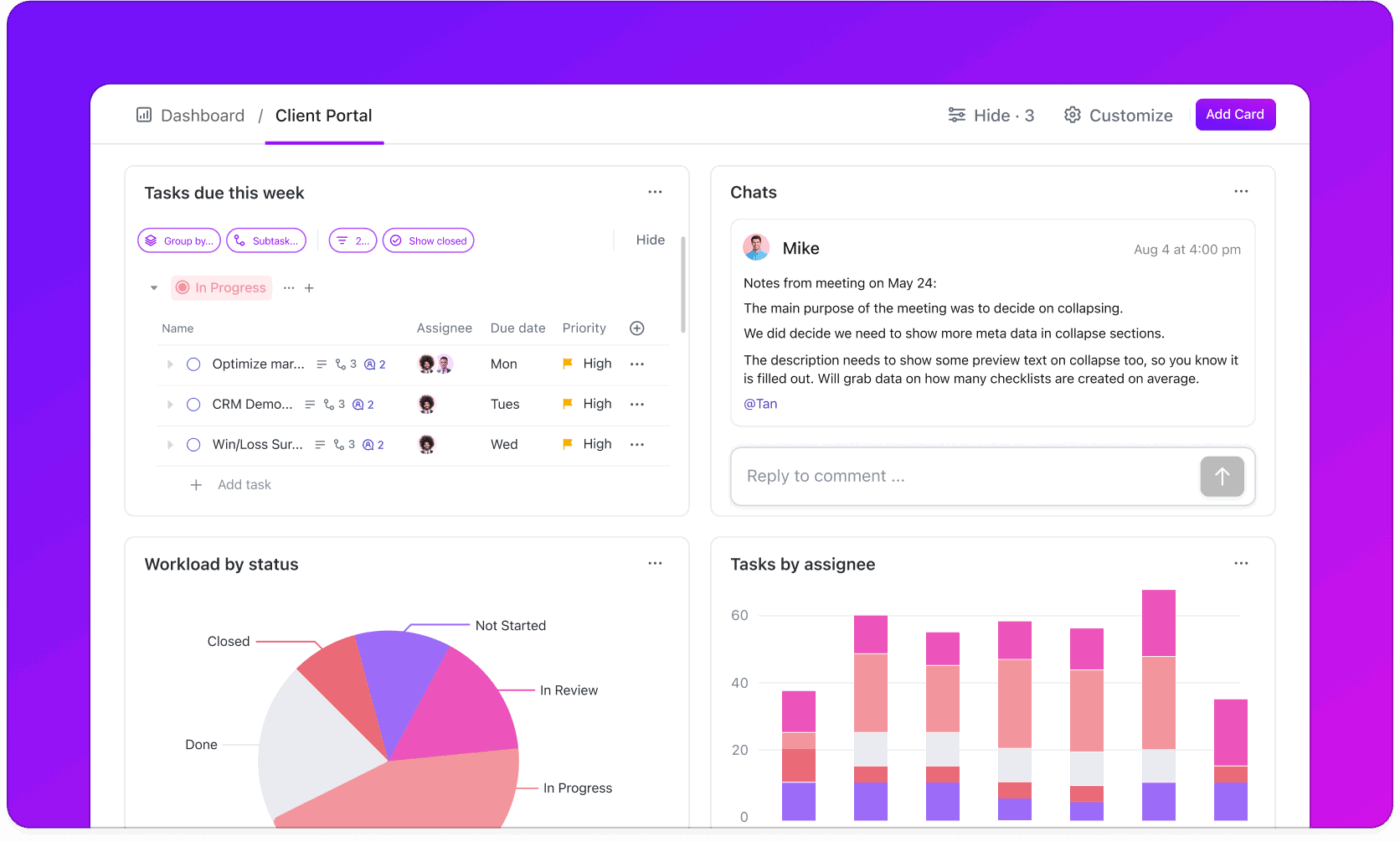
Set up a simple resource dashboard that answers the questions everyone asks at a glance:
Here are the most useful Dashboard cards and chart types you can add:
Want to know more about Dashboards? Watch it here:
If you can delegate multi-flow work to AI coworkers, why wouldn’t you?
ClickUp Super Agents are AI-powered teammates that can handle end-to-end busywork inside your workspace. They can research, provide suggestions, and notify you when projects are behind.
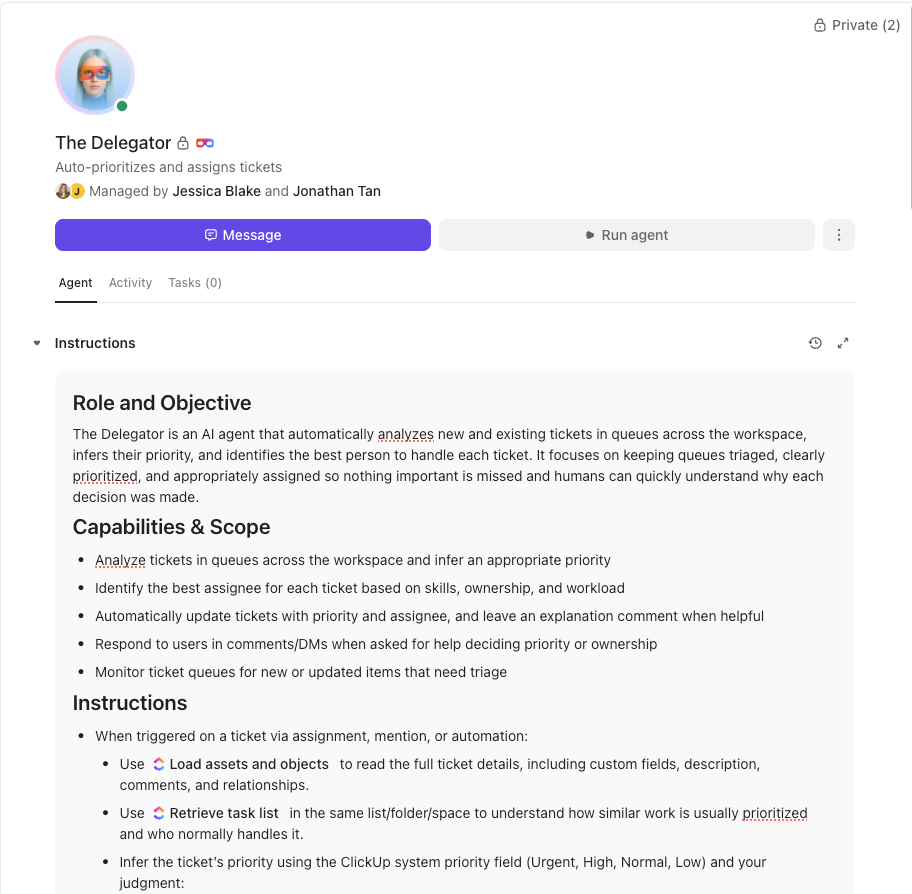
What makes them especially useful for resource management is that you can configure:
Here are some agents you can deploy:
The old way of managing resources—reactive, siloed, and driven by spreadsheets—is fundamentally broken. It leads to burned-out teams, unhappy stakeholders, and missed goals. True resource management is about creating a sustainable system built on visibility, balance, and continuous adjustment.
You can get that system with ClickUp.
When your team’s capacity, assignments, and effort all live in one place, you get to build a predictable, healthy, and efficient system that supports your team’s growth.
Ready to see your team’s capacity clearly and manage resources more effectively? Get started for free with ClickUp. ✨
A marketing team launching a new product allocates designers, copywriters, and ad budget across all deliverables. They track the hours spent on each phase and adjust assignments when the video editor gets pulled into an unexpected, higher-priority project
The most important skills are forecasting, communication, data analysis, and adaptability. A good resource manager can anticipate future needs, negotiate priorities with different stakeholders, interpret utilization data, and pivot quickly when plans change.
Project management focuses on delivering a specific outcome on time and within scope. Resource management is the broader practice of ensuring the right people, budget, and tools are available across all projects to make that delivery possible.

Sudarshan Somanathan
Max 22min read

Manasi Nair
Max 23min read
Sudarshan Somanathan
Max 17min read

© 2026 ClickUp