


You and your team are working steadily on an important deliverable. You’re completely immersed in the details only to be suddenly reminded that you must provide a progress report to your stakeholders. Instead of smoothly transitioning from work to reporting, you scramble through spreadsheets, emails, and tools to create an acceptable progress report.
Sounds stressful?
it shouldn’t be. Though we’ve all experienced the stress of preparing progress reports, we know they’re essential for tracking activities, accomplishments, challenges, and potential delays. And with the right project management tool in place, creating an updated progress report becomes a breeze.
In this guide, we’ll cover everything you need to know about writing progress reports, including their key components and the best practices.
How to Create an Effective Progress Report

 Summarize this article for me please
What Is a Progress Report?
A progress report is a comprehensive document providing a snapshot of a project’s current status at a specific time. It typically covers project milestones, accomplishments, challenges encountered, and plans.
This report keeps stakeholders aligned on project progress, facilitating necessary changes and strategic decisions to stay on track.
Why is a progress report important?
Progress reports are important as they keep everyone updated and accountable. They keep stakeholders informed about what’s happening in the project and what may get delayed. This reduces the chances of miscommunication or last-minute hiccups in project completion.
But what makes progress reports important are the more profound questions they answer, such as:
- What are you working on, and how is it progressing? A project status report gives a clear picture of project status, guiding stakeholders decisions about resource allocation, budget adjustments, and risk mitigation
- Are there possible delays, roadblocks, or spillovers expected? If there are challenges, discussing them in advance helps the entire team make strategic decisions to enable proactive problem-solving and course correction
- What is the key focus area for each team member? By providing a regular progress report to key stakeholders and leadership, you can keep every team member accountable for their tasks
The common types of progress reports
Four common types of progress reports can exist depending on the frequency of the project progress reports, the requirements, complexity, and stakeholder needs.
Daily progress reports
These are daily progress reports that capture daily actions like tasks completed, planned tasks for the next day, urgent items, or any roadblocks or delays you may have encountered.
The daily progress report is ideal for a daily standup meeting with your team members or for scrum project progress, which requires day-to-day insights to help plan dependent tasks and overall project progress.
Weekly progress reports
A weekly progress report is one of the most common reporting types, where each team member or project owner provides weekly insights into:
- The project’s overall health and progress made (using color coding like green, yellow, and red)
- Key accomplishments of the week
- Upcoming tasks and milestones for the next week
- Important key performance indicators (KPIs) for the weekly progress report
Monthly progress reports
A monthly progress report provides a broader perspective on a project’s progress, particularly about the long-term horizon of the project. This can include:
- Activities completed in the month and the overall status of the project
- Progress against the project milestones and set timelines
- Budget or financial metrics that are key for the project
- Key achievements for the month
- Risks or potential delays that could impact the overall project
- Practical steps and defined activities for the next month
A monthly report is crucial for senior management and external stakeholders, who need a high-level overview of the project timelines and want these updates to stay informed and make strategic decisions wherever necessary.
Quarterly progress reports
Quarterly status reports capture the progress of a project over three months. This is ideal for high-level decision-making and is often required by stakeholders and leadership teams to understand the project progress within the context of the entire project lifecycle for future planning. This report typically includes insightful information like:
- Project summary and goals
- Major milestones achieved
- Upcoming activities and plan for the next quarter
- Learnings from the project and how it will be used for upcoming projects
- KPIs and other project metrics
- Risks or delays that happened and how these were resolved or risks that can impact the next quarter
- Budget status and projections
- Resource or other requirements for the next quarter
- Strategic recommendations
💡 Pro Tip: Keep your audience in mind
Tailor your report to the audience. Senior management may want a high-level overview, while team members might need more detailed task-level information. Always consider who will be reading the report and adjust the content accordingly.
The difference between a progress report and a status report
While progress reports and status reports are often used interchangeably, there are some key differences:
- Scope: Progress reports focus on the overall project status, while status reports dive into specific tasks or deliverables
- Frequency: Progress reports follow regular intervals (e.g., weekly, monthly), while status reports may be generated more frequently as needed
- Content: Progress reports may discuss challenges, risks, and plans, while status reports may be more focused on current accomplishments and tasks
Summarize this article for me pleaseCrucial Components of Effective Progress Reports
Depending on the scope and frequency of your project, there are several insights that you need to include as part of the project status report. In general, creating progress reports is about capturing all the crucial information, such as:
Project details
At the beginning of any progress report, you must briefly overview the overall project details. This section typically includes:
- Project name
- Report date
- Reporting period (e.g., weekly or monthly)
- Team members or departments involved
Current quantifiable results
Next, provide the project’s important metrics and quantifiable details. These include completed tasks, hours logged, budget status, or milestones reached, giving stakeholders a clear picture of the project’s current status.
🎯 Example: When discussing progress, include specific numbers: ‘This week, the team completed 80% of the tasks scheduled for Sprint 3, leaving only two minor features remaining.’ This gives a clear snapshot of progress.
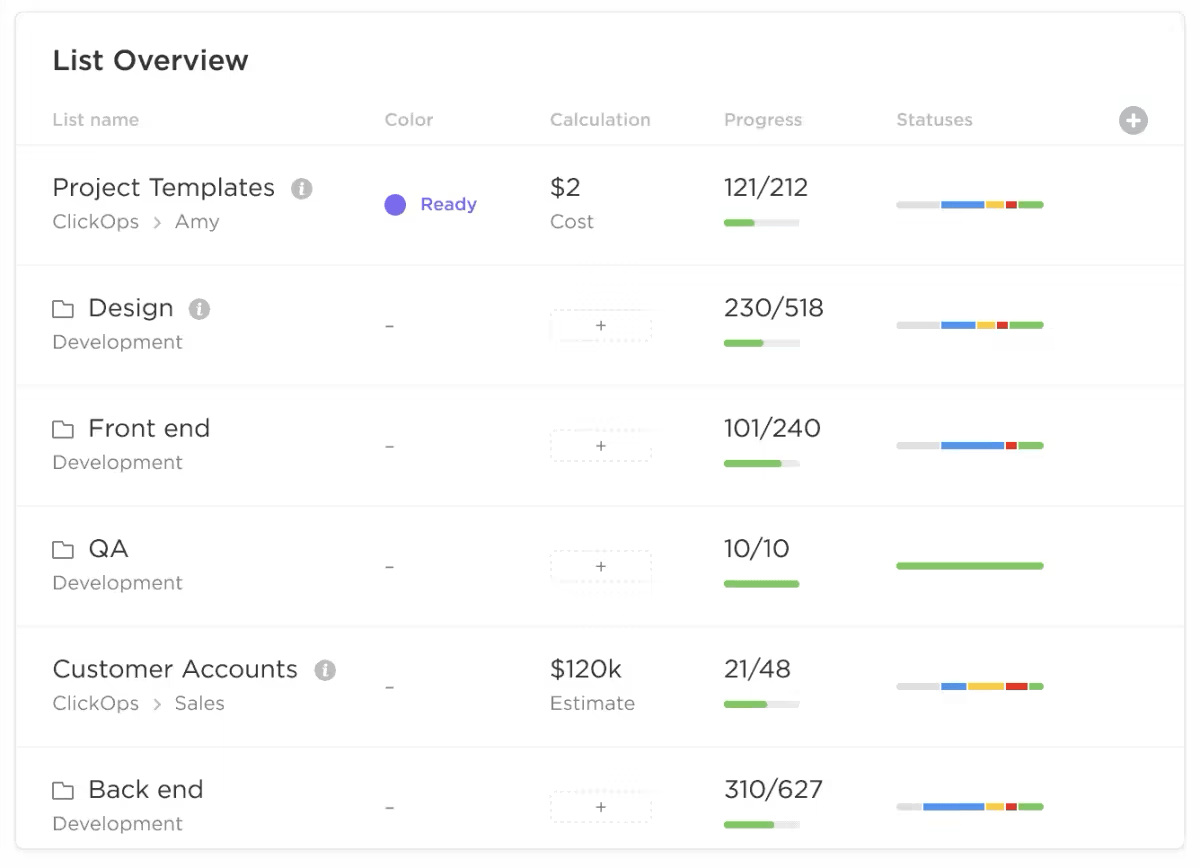
If you have trouble keeping track of your tasks and activities, use a project management tool like ClickUp. The tool allows you to visualize data about your project’s overall progress, tasks and deadlines, and team members involved.
With ClickUp Dashboards, you can customize the data you want to report and get a clear glimpse of all your KPIs and important actions. This allows you to streamline the reporting process and ensure that the updates in your progress report are accurate and up-to-date.
Challenges encountered and roadblocks identified
While milestones and activities completed are essential, most executives and stakeholders are interested in the challenges and roadblocks encountered. A good progress report highlights these delays or roadblocks, including information about the following:
- Roadblocks encountered: Any issues or difficulties that have arisen during the project
- Risk assessment: An evaluation of potential risks and their impact on the overall project timeline
- Mitigation strategies: Plans to address challenges and minimize risks
🎯 Example: If there’s a delay due to a supplier issue, outline the challenge and describe the steps taken to resolve it, such as ‘Switching to a backup supplier to avoid further delays in production.’ This reassures stakeholders that problems are being managed.
The goal here is transparency—sharing roadblocks helps stakeholders understand what might be slowing down progress and allows them to provide support or suggestions to resolve these issues. They can even help you with project focus areas so you can manage your resources and focus on completing these critical activities for a higher chance of project success.
Accomplishments: Showcasing wins
Along with challenges, it’s equally important to highlight wins, which usually involve:
- Success stories: Significant achievements or milestones for the project in the reporting period
- Positive outcomes: Completed activities and how they will help impact the overall project
- Quantifiable results: Data demonstrating the progress you have made over this reporting period
🎯 Example: If a team reduced development time by 15% by adopting new processes, include this win in your report: ‘Implementing agile sprint planning helped us cut 15% off the original development timeline for feature XYZ.’
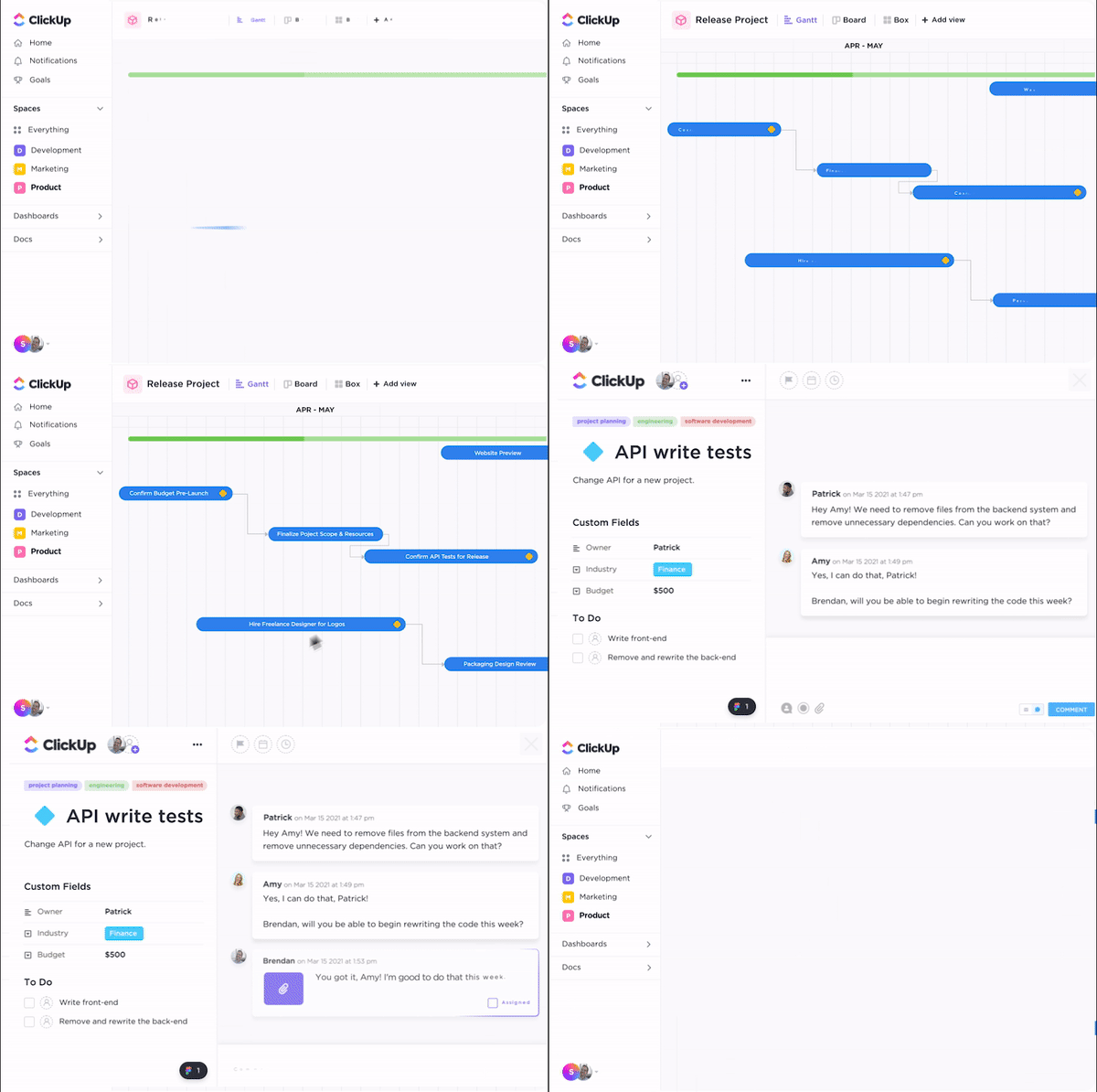
To gather this data, you can use ClickUp Milestones, a smart feature that allows you to understand your progress quickly in a given period. With a Gantt view, Board view, or a number of other visualizations, you can summarize your project milestones and provide a realistic report that captures your project’s success stories.
Suggestions and recommendations for future action
Lastly, it’s always helpful to gather feedback from your teams and capture suggestions to be shared with the stakeholders and leadership. These recommendations can include:
- Next steps: Outline the planned activities for the upcoming period
- Recommendations: Suggest improvements or adjustments to the project plan
- Future outlook: Provide a forecast of expected outcomes
🎯 Example: For a product launch, the next steps could be:
- October 5th: Final user testing (QA Team)
- October 7th: Resolve bugs (Development Team)
- October 10th: Prepare marketing materials (Marketing Team)
- October 12th: Soft launch to select users (Product Team)
- October 15th: Full product launch (Operations Team)
This roadmap outlines tasks, deadlines, and team responsibilities, ensuring clarity and keeping the project on track.
Summarize this article for me pleaseThe Process of Creating a Progress Report
To create the final report, collate all your project data and format it according to the stakeholders’ requirements. Here is the exact process for crafting a detailed and concise progress report.
1. Set goals and reporting frequency
Before writing a progress report, establish clear goals for what you aim to track and how frequently you’ll report. Defining these upfront ensures that your reports stay focused and relevant. Consider the following when setting goals:
- Key project milestones to track
- Metrics that reflect project performance (e.g., timelines, budget, resources)
- Frequency of reporting based on project needs—weekly, monthly, or quarterly
You can use agile estimation techniques to create draft timelines for your project and use input from your teams and previous projects to determine whether these timelines are realistic.
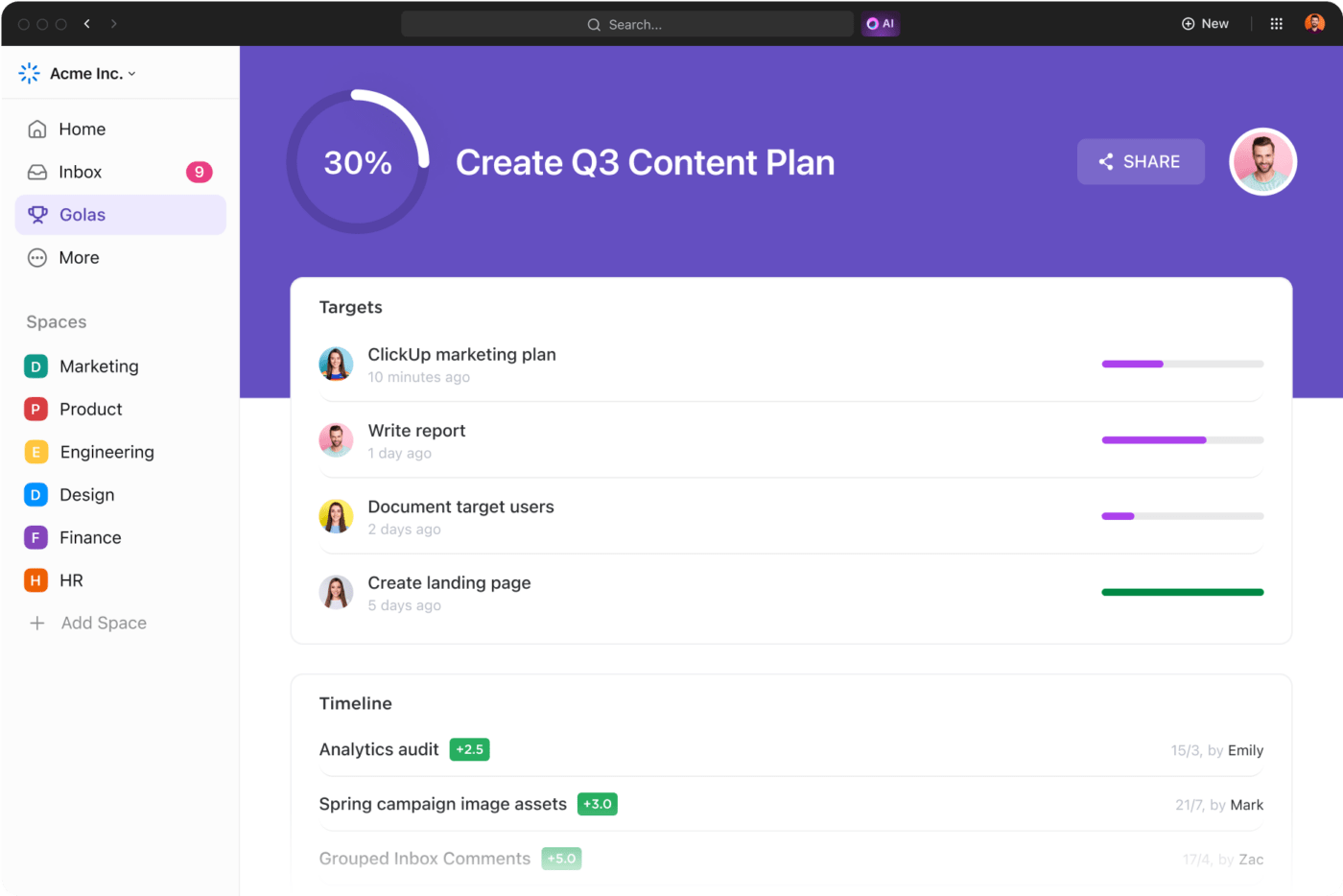
Once the goals are set, you can input them into ClickUp Goals, allowing you to track progress toward specific objectives. This tool lets you break down big goals into smaller, actionable targets, helping you stay on top of what needs to be included in your progress reports.
2. Involve team members
A well-rounded progress report includes input from your team members. They may have keen insights on challenges and roadblocks that you could have overlooked and can suggest improvements or solutions.
Involving team members from diverse roles ensures that you consider multiple perspectives and create a more complete picture of the project’s status. For example, developers can spot technical hurdles that marketing might miss while customer-facing teams provide insights into client feedback that affects future strategies.
This cross-functional input not only helps identify issues but also uncovers opportunities for innovation. Plus, when team members see their contributions in the report, it boosts morale and fosters engagement, making them feel valued and invested in the project’s success.
With this process, you can provide a well-rounded report that reflects the project’s reality, helping stakeholders gain in-depth insights.
🎯 Example: Each team member can provide valuable insights for your progress report:
- Jessica, a software engineer, shares updates on coding tasks and highlights technical challenges
- Mark, a project coordinator, notes workflow improvements that have boosted team efficiency
- Emily, a quality assurance analyst, discusses testing results and identifies areas needing extra focus
By gathering these unique contributions, your report captures a comprehensive view of the project, helping stakeholders understand achievements and challenges.
3. Gather information
To create an effective progress report, gather all relevant data, including analytics, performance metrics, and feedback. This step involves tracking progress toward goals, reviewing task completion, and identifying any deviations from the plan.
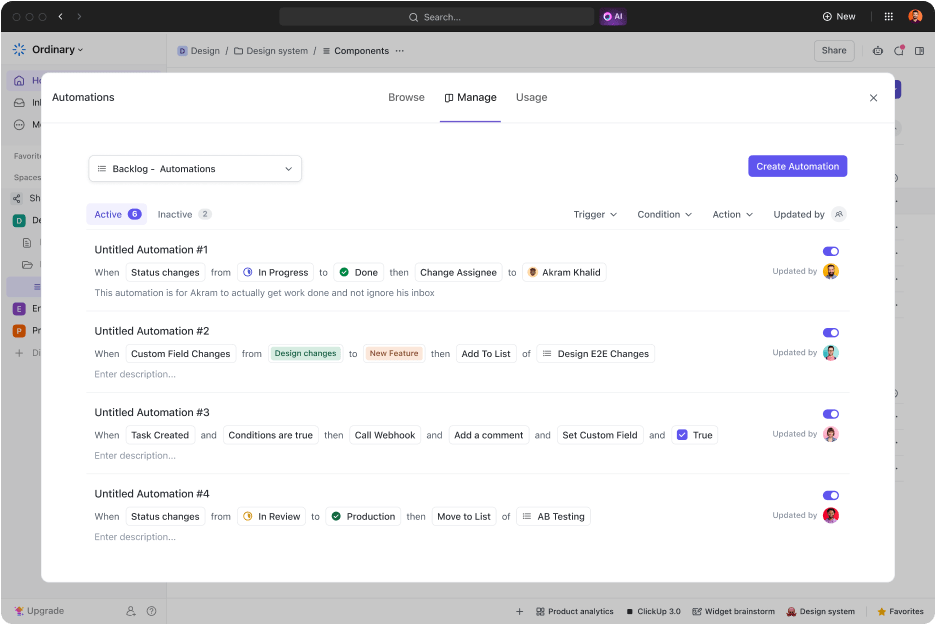
If you spend a lot of time gathering this data from multiple tools and teams, you can set trigger-led automation or automate routine workflows using ClickUp Automation. This lets you automatically pick data from various tasks, reports, and project pipelines and present it in the expected format.
4. Write the report
Once you’ve gathered all the necessary data, write the report. The progress report should include critical information such as:
- Project overview, status, and timelines
- Upcoming tasks, with team member assignments
- Details of completed activity, including human resources, time spent, and cost incurred
- Additional information on lessons learned, potential risks, plans moving forward, and other crucial updates

The ClickUp Docs feature is perfect for drafting reports. It lets you structure your content efficiently and collaborate with your team in real time.
Using this tool, you can create beautiful documents, wikis, and more, including details like graphs, visualizations, tables, and links to obtain additional information on a particular activity.
💡 Pro Tip: Add a “lessons learned” section to your progress report for continuous improvement. This helps teams avoid repeating mistakes and fosters a culture of growth and continuous improvement within the project.
5. Bring reports to life with visual dashboards
Let’s be honest—nobody enjoys reading walls of text or endless columns of numbers in a progress report. That’s where dashboards come in. They turn data into easy-to-digest, visually appealing reports that instantly show where your project stands.
Using tools like ClickUp Dashboards, you can create visual snapshots of:
- Project progress: Instantly see how far along tasks are with progress bars or pie charts.
- Budget tracking: Break down budget allocations and spending with clean bar charts.
- Timeline management: Gantt charts help track milestones, deadlines, and potential delays all in one view.
Dashboards aren’t a game-changer. They give stakeholders an instant, high-level overview without sifting through paragraphs of updates. Plus, they make your reports more engaging and easy to absorb and interpret at a glance.
🎯 Example: Instead of listing budget figures, present a bar chart showing the initial budget versus actual spending. This provides a quick visual cue for financial health, helping stakeholders absorb information faster.
6. Share with stakeholders
Once your progress report is ready, it is time to share it with the right stakeholders. Whether it’s internal team members, clients, or executives, sharing progress reports helps keep everyone informed and engaged with the project.

With ClickUp Project Management, you can speed up your report creation and sharing process using the all-in-one knowledge management and job-tracking software, resulting in faster, smarter reporting.
Because reports in ClickUp are built using up-to-date information from your project management tool, you can rest assured that they’re accurate. Reports generated from ClickUp provide real-time visibility into the project challenges, including the risks, resource challenges, or other roadblocks. This allows you to document all your project details without requiring you to spend too much time collecting this data from multiple sources.
💡 Pro Tip: Use the “3-sentence rule” for key updates. For each major update, summarize the key in three sentences: What happened, why it matters, and what’s next. This keeps the report concise and easy to skim while delivering essential information.
Get started with your progress reports using ready-to-use templates
The power of ClickUp lies in its ease of use and ability to provide all the crucial metrics and visualizations you need for your progress reporting process. It also has several ready-to-use customizable progress report templates to help standardize your reporting process and boost efficiency.
ClickUp Progress Report Template
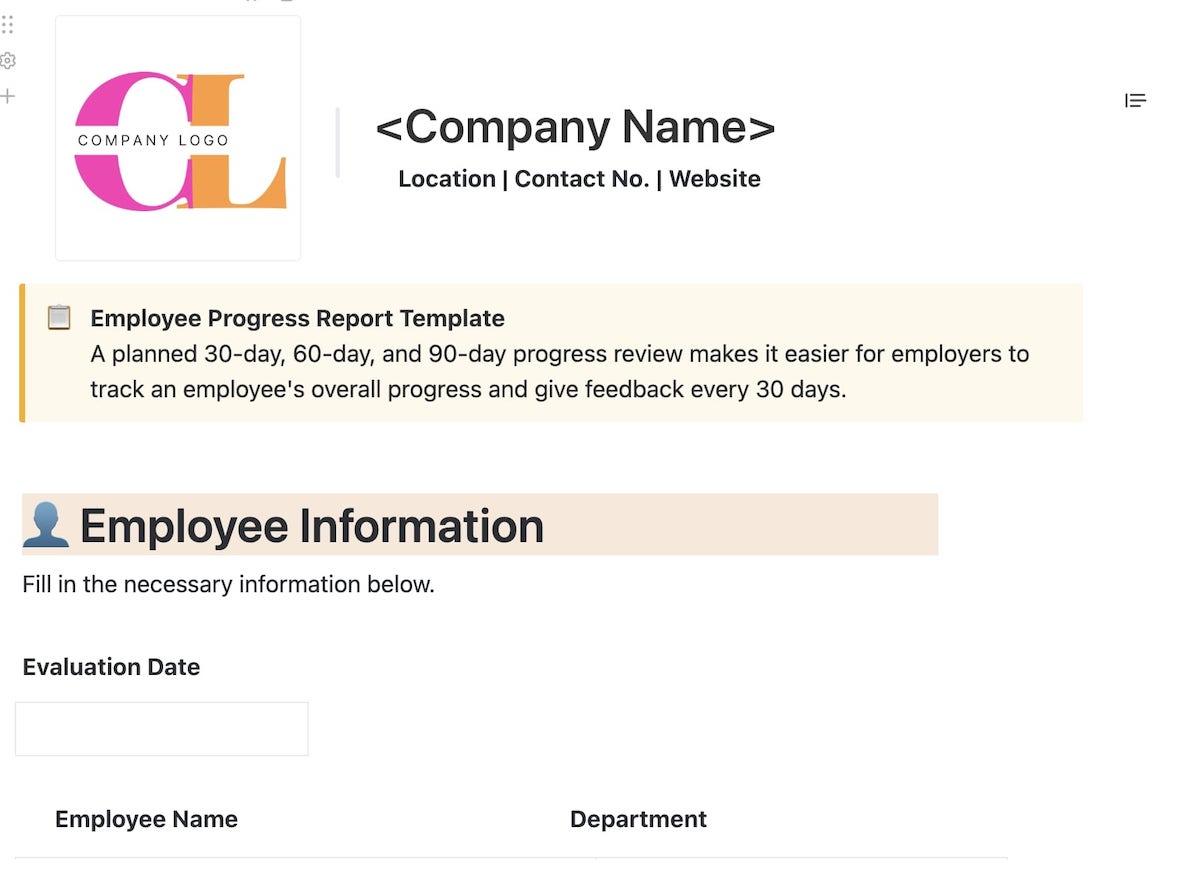
For a detailed progress report on your entire project or deliverable with insights like resources used, upcoming deadlines, and other key metrics, you can use the ClickUp Progress Report Template. This template will help you get a structured framework to write progress reports, including information like:
- Key project deliverables and goals
- Evidence of project progress, including metrics and timelines
- Snapshot of the overall project progress, which is presented in a clear and easy-to-understand format
ClickUp Project Status Report Template
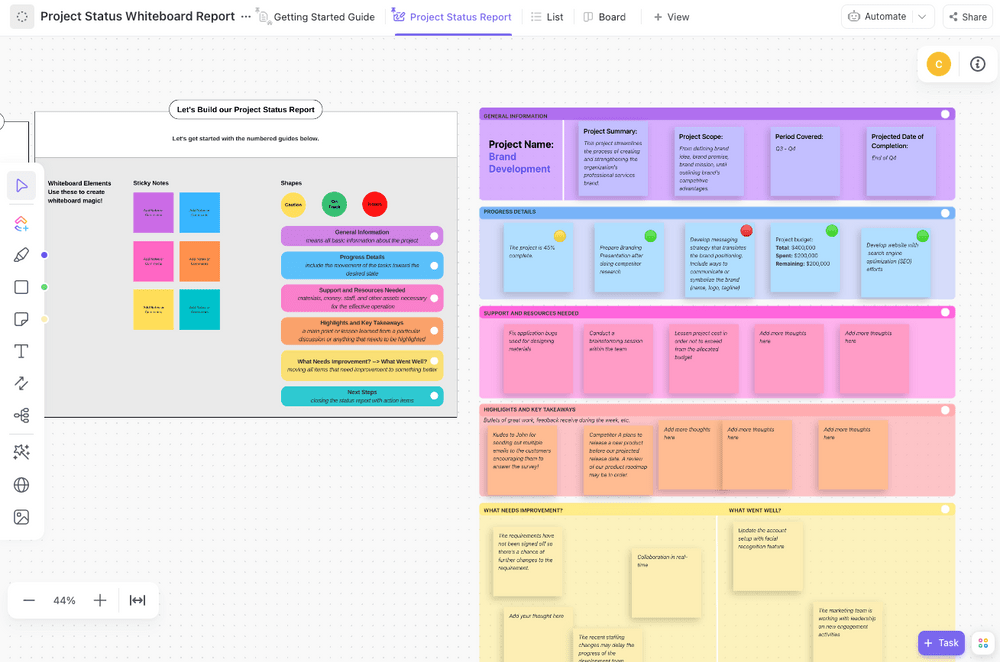
Meanwhile, if you need to provide a quick status update to your stakeholders and team members, you can quickly get this done using the ClickUp Project Status Report Template. This template helps you pick all the information about your project, including the development made, activities in the pipeline, the ownership for each task, and the status of each activity. This makes it easy for you to:
- Stay organized on your project and provide digestible information using labels, filters, and task views
- Align teams around the key activities and create accountability for each team member
- Visualize information with automated charts and graphs
ClickUp Weekly Progress Template
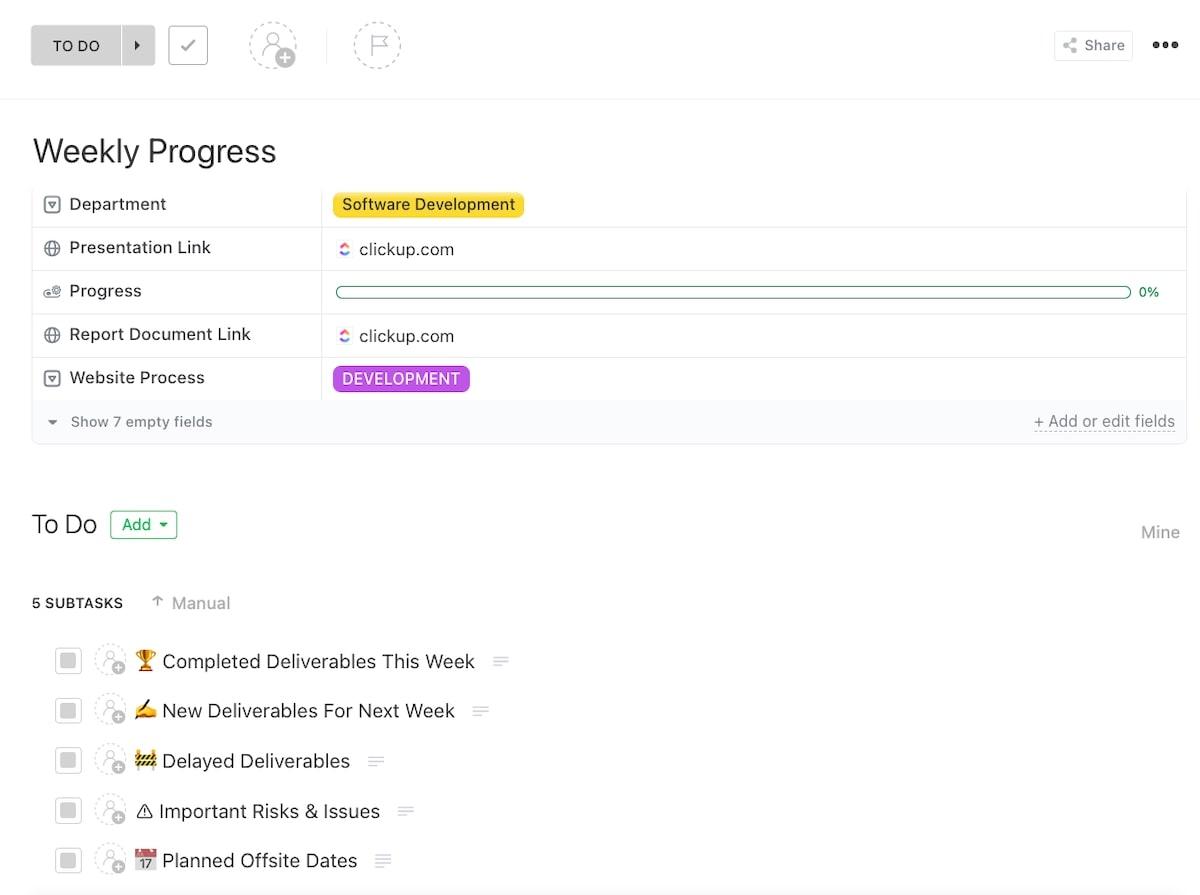
Also, if you provide a weekly progress report in your organization, the ClickUp Weekly Progress Template can be your go-to guide. Like the previous reports, this customizable weekly report allows you to quickly capture detailed information about your current project from different teams and tools, allowing you to:
- Organize project timelines in an easy-to-follow format
- Provide clear updates to your stakeholders on weekly tasks, goals, and important milestones
- Gain visibility into each team member’s activities, helping improve task completion rates
Summarize this article for me pleaseBest Practices for Writing a Progress Report
While various project update templates can help you provide comprehensive information to your stakeholders, ensuring that your reports are logical, clear, and concise for quick consumption is always a good practice.
To make your progress reports as effective as possible, follow these best practices:
- Be precise and to the point: While including every detail is tempting, clarity is key. Write directly, focusing on key updates, challenges, and recommendations. This approach holds the reader’s attention and makes it easier for them to digest information quickly
- Use data and metrics: Use quantifiable data points to support your claims or statements. These include key metrics, such as completed tasks, milestone achievements, and budget usage, to provide a factual basis for your updates
- Use visuals: Wherever possible, use charts, graphs, and other visuals that can help illustrate key points and make the report more engaging
- Tailor the report to your audience: Consider the specific needs and interests of your stakeholders when writing the report
- Proofread carefully: Before sharing any report, ensure the report is free of errors and inconsistencies. Proofread it yourself, or have a team member check it for errors before you share it with the stakeholders
💡 Pro Tip: Determine a regular reporting schedule (weekly, bi-weekly, or monthly) for progress reports. This will keep everyone informed on a routine basis and ensure accountability without last-minute rushes.
Summarize this article for me pleaseCreate Detailed Progress Reports in Minutes With ClickUp
Effective progress reports are crucial for project success. The more detailed and well-structured your progress report is, the easier it is to gain the trust of your stakeholders and avoid communication gaps.
As a project manager, leverage ClickUp to track progress easily, ensure transparency, and foster stakeholder trust. Create detailed reports with key metrics, challenges, and actionable recommendations in an aesthetically-pleasing format.
Sign up for ClickUp today to streamline your reporting process and drive project success.


Everything you need to stay organized and get work done.

Recent Articles
Jira Project Management: What It Does Well and Where It Taps Out 
Jira Project Management: What It Does Well and Where It Taps Out
8 Communication Strategies That Actually Fix Team Chaos
8 Communication Strategies That Actually Fix Team Chaos
