







Still downloading templates?
There’s an easier way. Try a free AI Agent in ClickUp that actually does the work for you—set up in minutes, save hours every week.
Sorry, there were no results found for “”
Sorry, there were no results found for “”
Sorry, there were no results found for “”
Need a landing page for that last-minute launch? Or a slick microsite to catch leads from your next webinar? Lovable AI jumps in like your fastest dev; no code, just vibes.
It’s smart, scalable, and charmingly simple. What’s not to love, right?
The “idea to app in seconds” promise starts to fade when you hit customization walls. And if you like hands-on control, you might feel a little boxed in.
Before long, you’re eyeing the exits. The good news? There’s a whole world of AI tools that offer more flexibility without losing the user-friendliness factor.
The real challenge is knowing where to look. Not to worry; we’ve rounded up the top Lovable AI alternatives, their standout features, pricing options, and user reviews.
| Tool | Key features | Best for | Pricing* |
|---|---|---|---|
| ClickUp | – AI for writing, coding, summarizing, automations – Whiteboards, Docs, Notetaker, Forms, Calendar, CRM – Brain + Autopilot Agents for proactive workflows | Best for small to enterprise teams seeking all-in-one AI-powered marketing, dev, and workflow automation | Free plan available; Customizations available for enterprises |
| Uizard | – Screenshot-to-mockup & wireframe-to-prototype – Natural language UI generation – Interactive, editable design tools | Best for marketing and sales teams at startups or SMBs needing fast landing page & campaign mockups | Free plan available; Paid plans from $19/month/user; Custom pricing for enterprises |
| Deco.cx | – Real-time editing with code-level control – Built-in form/data storage & A/B testing – Reusable components for rapid personalization | Best for eCommerce marketing teams and mid-sized businesses building fast, interactive sites | Free plan available (2 users); Paid plans from $9/month/user |
| Reflex | – Full-stack Python dev with one-click deployment – 60+ customizable UI components – Built-in auth & cloud infrastructure | Best for founders and marketers in mid-sized teams wanting full-stack app prototypes with minimal setup | Free Hobby tier; Paid plans from $20/month/user; Custom pricing for enterprises |
| Windsurf (formerly Codeium) | – Code autocomplete & contextual AI chat – 70+ language support – DevOps suggestions & IDE integrations | Best for marketing and dev teams at startups automating email templates, code snippets, and campaign tweaks | Free plan available; Paid plans from $15/month/user |
| Jitter | – Drag-and-drop browser-based animation – Social media presets & infinite canvas – Timeline control and feedback sharing | Best for designers and social teams at startups/SMBs creating social media visuals and brand animations | Free plan available; Studio plan at $19/month/user; Custom pricing for enterprises |
| Rosebud AI | – AI-generated animations, mini-games, chat flows – Visual prototyping for campaigns – Instant remix & Discord-based sharing | Best for creative and growth marketing teams in small businesses needing ad visuals and interactive content | Free plan available; Paid plans from $10–$50/month/user |
| LocoKit | – Geographic and logic-based app builder – PostGIS & data modeling for custom workflows – Visual SQL-free backend for apps | Best for developers and field ops teams in mid-sized orgs needing mapping and geo-personalized app flows | Free and open-source |
| WebSim.ai | – AI-powered website simulation – Revision history & in-page interaction – Fixes & generates HTML code for web UX | Best for small business owners and frontend developers simulating user journeys & checkout flows | Free plan available |
| Tabnine | – AI code suggestions & private model training – Secure deployment & test auto-gen – Provenance checks for IP-safe outputs | Best for software teams and dev-centric orgs automating code and customizing web integrations | Free plan available; Paid plans from $9–$20/month/user |
Lovable AI might leave you craving more control or flexibility, but the right alternative should do more than build. It should empower you to blend relevant products and impactful marketing.
Here are a few elements that are a must in the solution you lock in on:
Our editorial team follows a transparent, research-backed, and vendor-neutral process, so you can trust that our recommendations are based on real product value.
Here’s a detailed rundown of how we review software at ClickUp.
With your eyes set on what you need, let’s go through the top Lovable alternatives available in the market.
Lovable AI focuses on app and code generation using natural language chatting, but that’s it. It often leaves businesses juggling story points, app code, and other deliverables across disconnected platforms.
As teams adopt more AI tools, AI Sprawl becomes a real problem, insights scattered across tools with no shared context. Without a centralized AI layer, automation stays shallow and decision-making stays fragmented.
ClickUp, on the other hand, is the AI-powered everything app for work that embodies every productivity solution in a single space for marketers and devs alike.
Beyond its 30+ tools for everything from survey prep to analytical visualization, ClickUp also offers a dedicated AI solution for all work-related issues—from project management and knowledge management to content creation and agentic automation.

At the heart of ClickUp’s AI capabilities is ClickUp Brain, the “neural network” that understands your workspace context—connecting your ClickUp Tasks, Docs, comments, voice and video Clips, Dashboards, and wikis—to deliver instant, relevant answers.
From generating personalized stand-ups, project updates, and action-item lists—even technical documentation like PRDs and test plans—to summarizing long discussions and transcribing voice/video clips, it’s designed to work smartly and fulfill your day-to-day requirements.
It unites your marketing, sales, and operational efforts. It helps you brainstorm product ideas and even creates comprehensive launch documents.
Once you connect your CRM and sales data, it can uncover trends and handle a huge chunk of customer research.

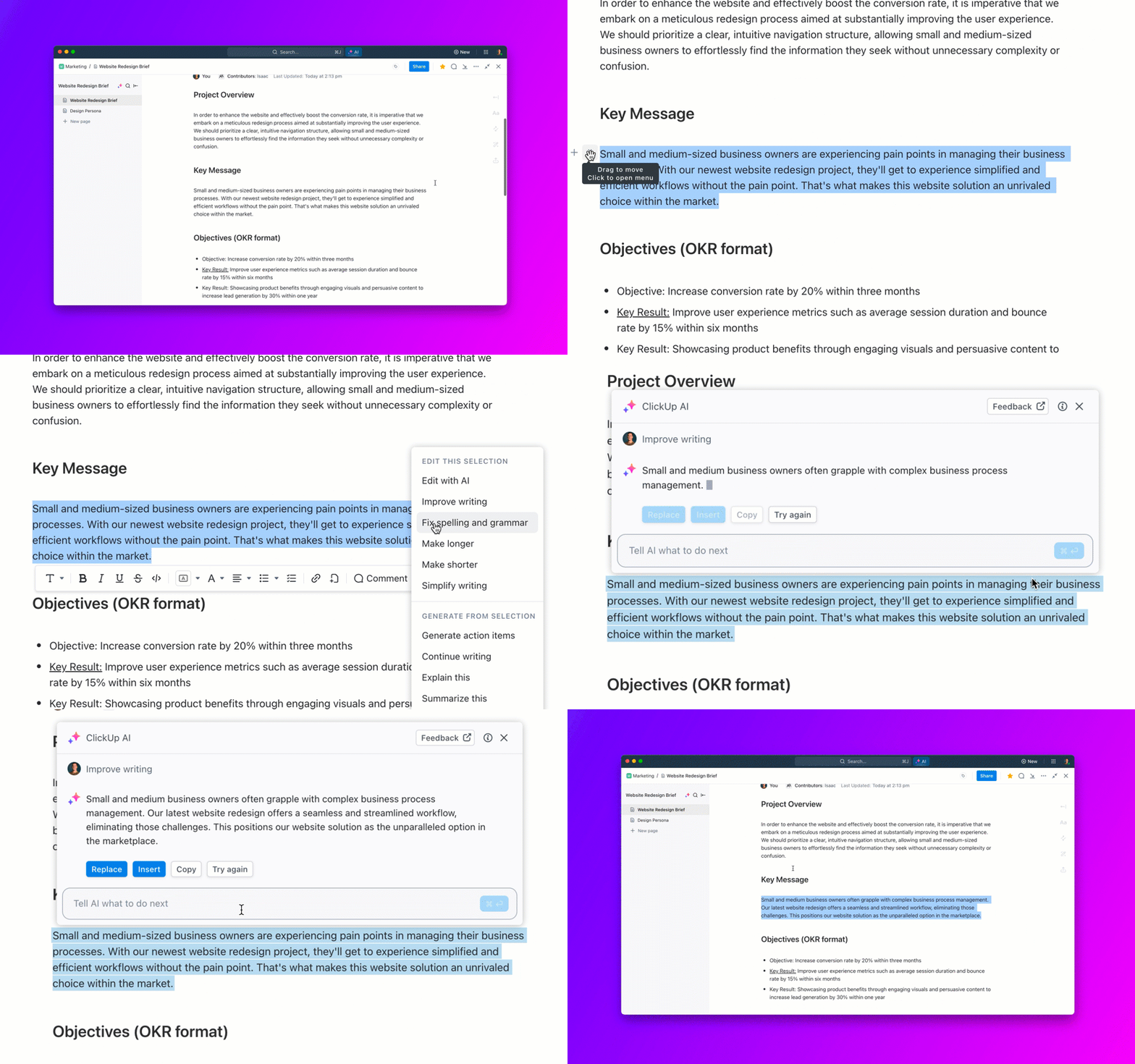
In task descriptions, comments, Docs, and ClickUp’s native Chat, you can ask questions, auto-summarize, improve writing, spell‑check, or translate content in seconds using ClickUp Brain. Further, AI Fields can auto-generate task summaries and action items directly in your workflow.
Want unlimited AI-generated images? Head to ClickUp Whiteboards and bring your ideas to life using plain English prompts.
Want to generate, debug, or refine code for building your own app? Just describe your app idea, and ClickUp Brain generates code tailored to your brand’s tone, functionality, and design. No technical deep dive is needed; just specify the use case to the AI, and it’s done.
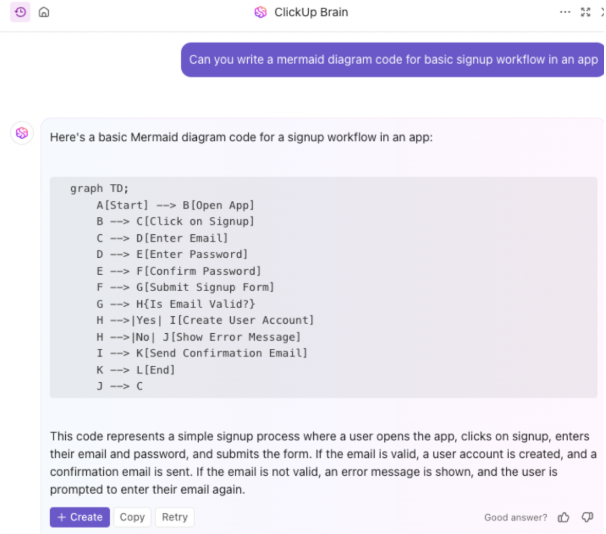
The bottom line is that the Brain is every marketer’s backstage pass to product planning, from deep research to deployment solutions. Additionally, if there’s anything left for the developer team to act on, ClickUp Brain can auto-generate and auto-assign tasks to them.
🧠 Fun fact: Only 12% of people use AI features built into productivity tools regularly. Imagine how far ahead you’d be by being in that group.
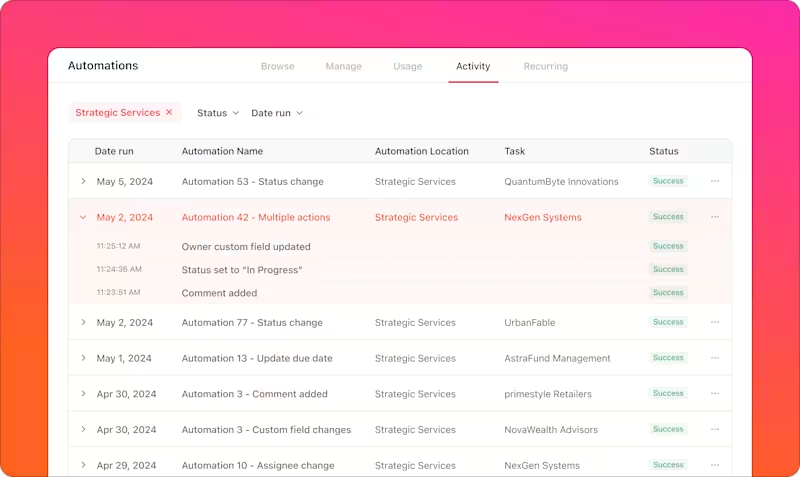
Are you worried that all these powerful features will mean more manual work? Spoiler alert: they don’t. Not with ClickUp Automations doing the heavy lifting.
For sales and marketing teams, this means auto-tagging high-intent leads, assigning follow-ups based on form inputs, or triggering campaign updates as deals progress. You can set smart conditions to update tasks, move files, and assign action points automatically.
When used alongside ClickUp’s natural‑language automation builder, you can craft complex workflows (“when X happens, do Y”) through intuitive prompts.
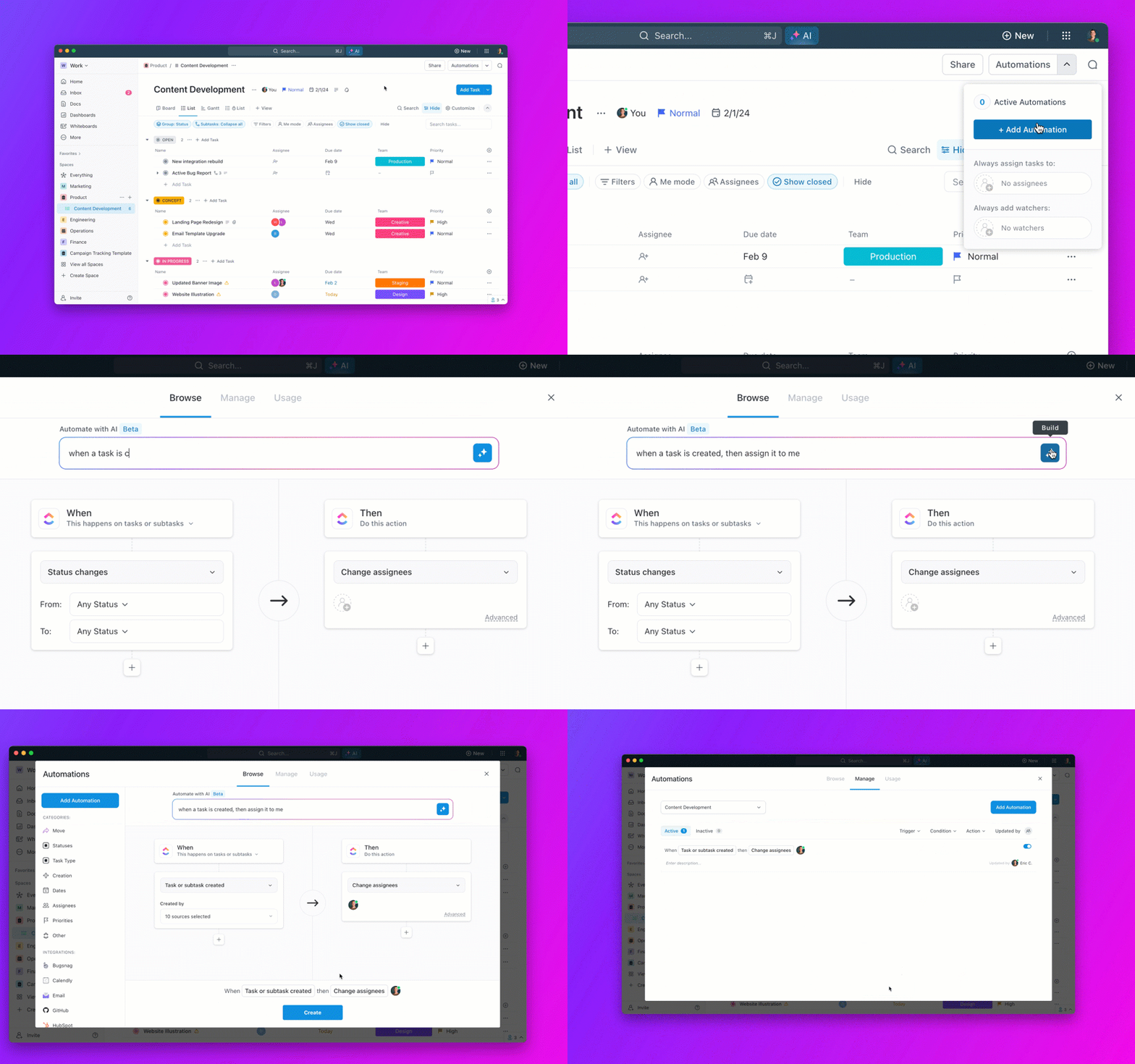
You can even build end-to-end workflows, such as CRM updates integrated with your marketing pipeline or automating client handoffs from outreach to onboarding. Whether you’re sharing agency briefs or syncing with your GitHub integration, Automations clears the clutter so your team can focus on what moves the needle.
💡 Pro Tip: Keep a few automation examples ready, based on what your team frequently takes time with. This lets you focus on more strategic and impactful product development.
Want even more hands-off automation?
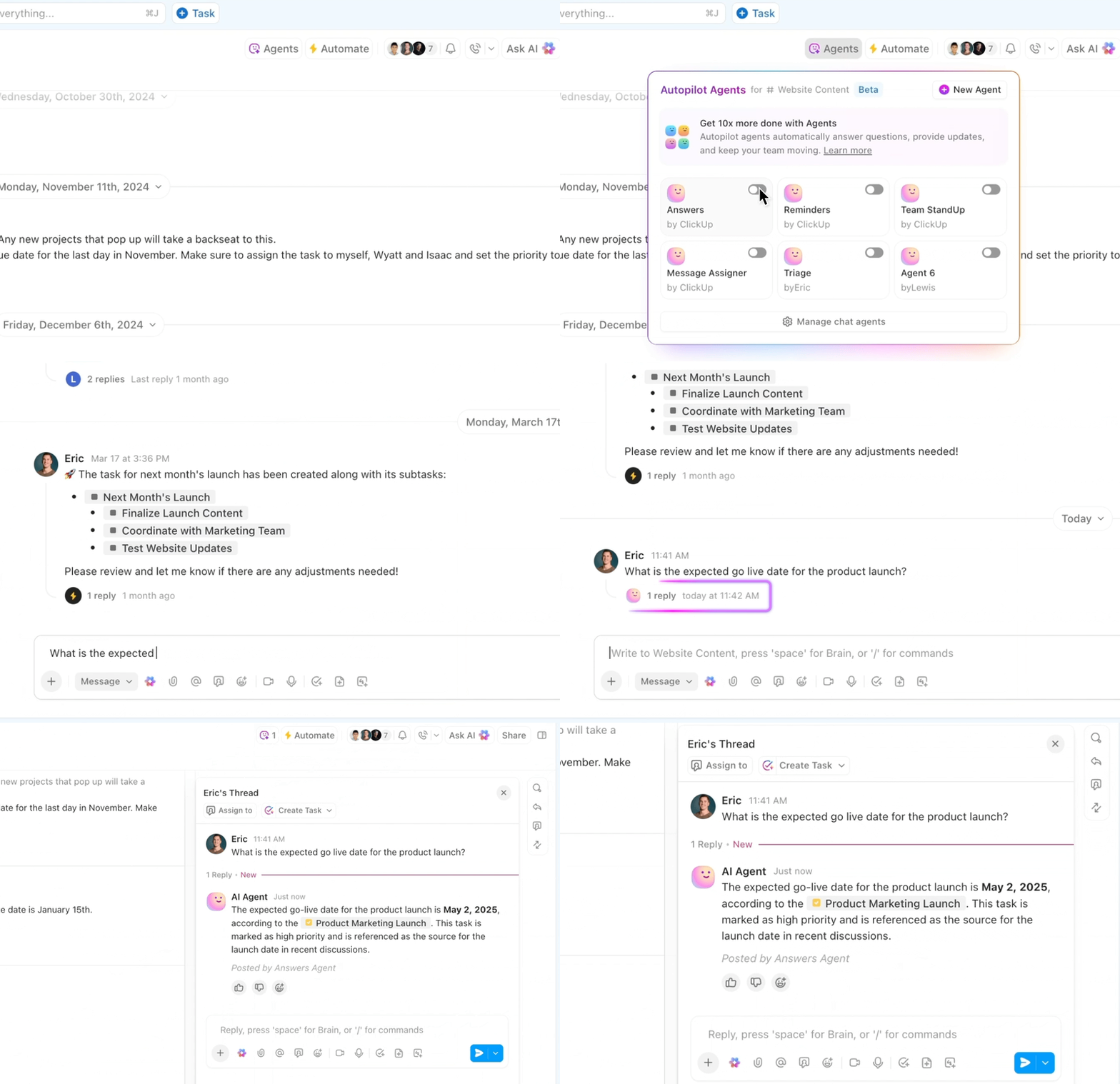
ClickUp’s Autopilot Agents are proactive AI companions that observe, decide, and act based on prebuilt or custom rules.
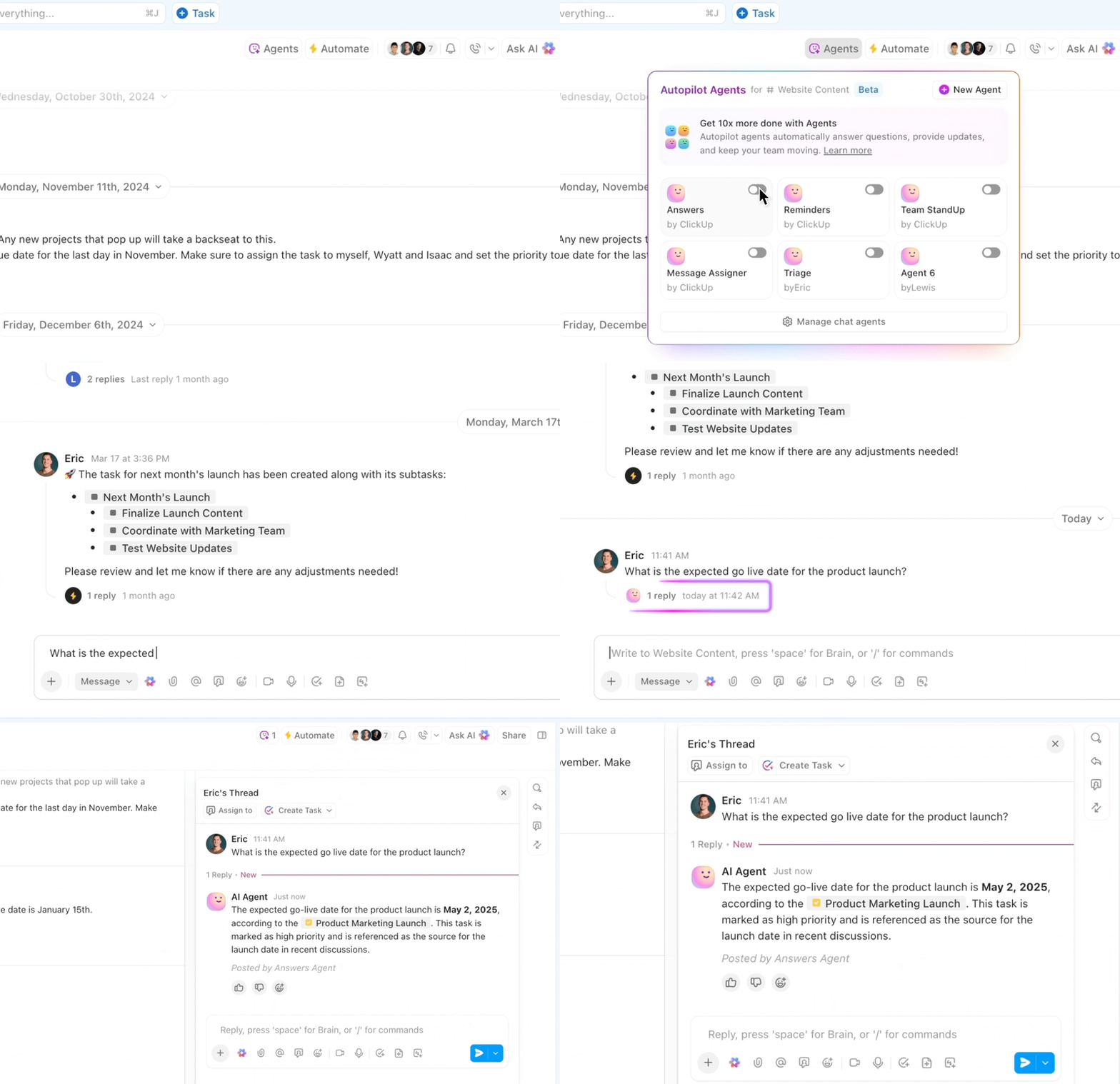
They use no‑code builders with triggers, conditions, actions, tools, and knowledge sources, making them ideal for intelligent, adaptable automation.
From answering questions to summarizing work, drafting content to triggering workflows, ClickUp’s AI layer is deeply woven into every touchpoint—bridging intelligence with execution, and making productivity feel joyful and human.
💡 Pro Tip: When using ClickUp AI (ClickUp Brain), you can seamlessly toggle between different LLMs—GPT‑4o, o1, o3‑mini, Claude 3.7 Sonnet, and Gemini 2.0 Flash‑Lite—straight from the Brain assistant dropdown.
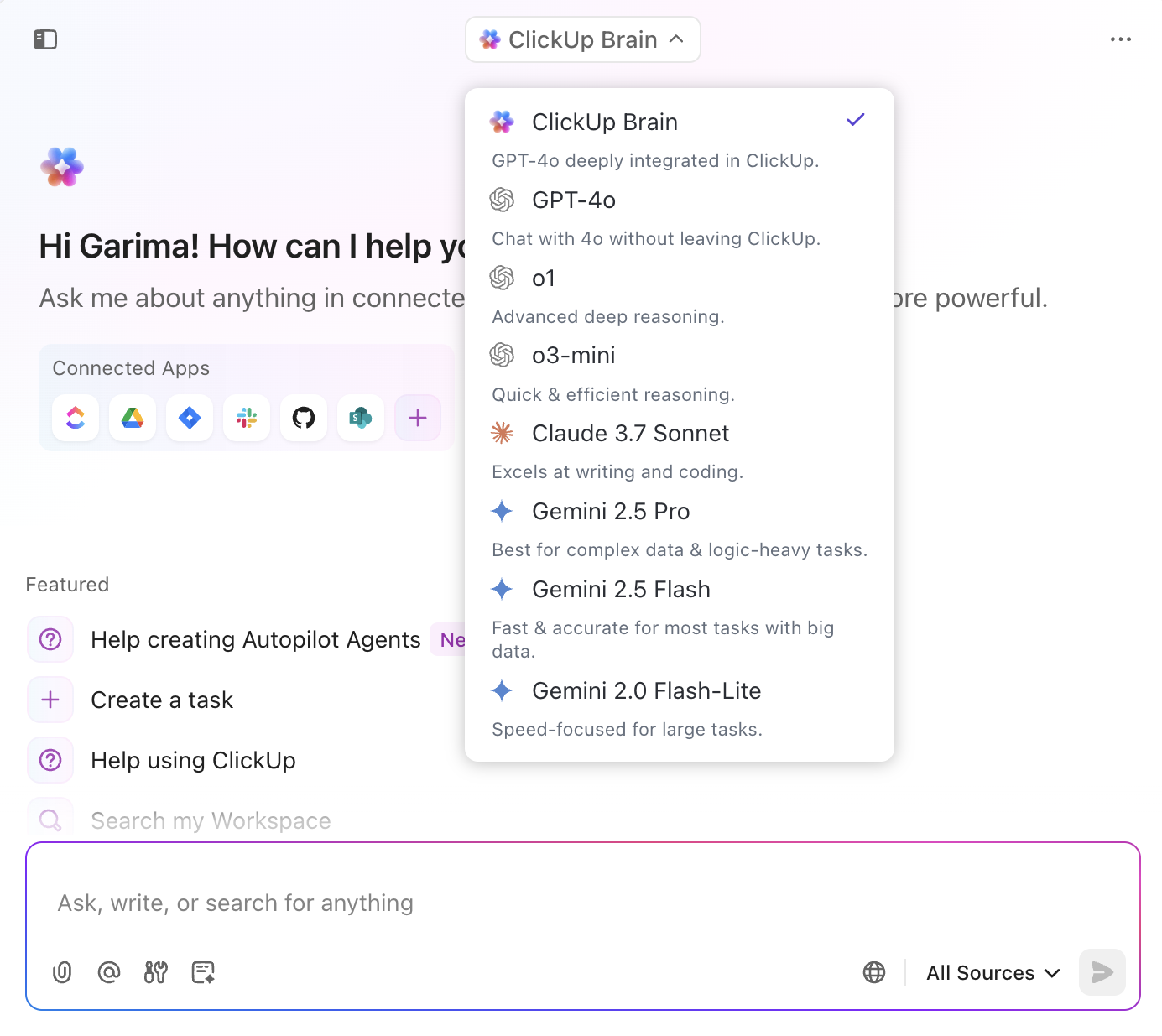
Align the model’s strengths with your task:
✅ Result: You avoid overloading on cost or latency, while still unlocking GPT‑4o’s or Claude’s capabilities when needed—all without leaving your ClickUp workspace.
A G2 reviewer shares:
It’s not just a project management tool; it’s a whole Operational Hub for us! We manage everything from Client work to our CRM and love the flexibility of options and the in-built automations. We also love that ClickUp is constantly evolving and that they listen to their clients!
📮 ClickUp Insight: 37% of our respondents use AI for content creation, including writing, editing, and emails. However, this process usually involves switching between different tools, such as a content generation tool and your workspace. With ClickUp, you get AI-powered writing assistance across the workspace, including emails, comments, chats, Docs, and more—all while maintaining context from your entire workspace.
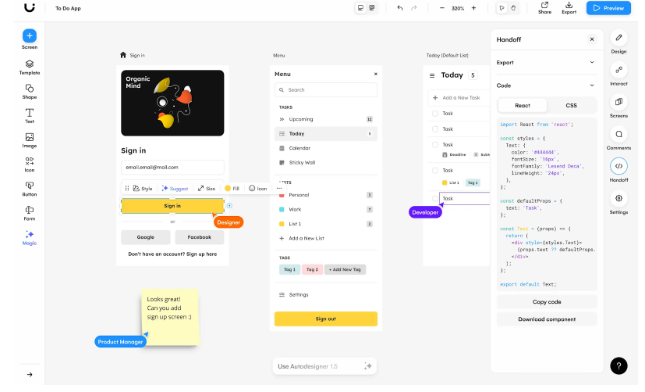
Ever wonder if you could transform a napkin doodle into a functioning prototype? Uizard does it in the blink of an eye. With its AI-based UI design tool, teams can create mockups, wireframes, and interactive prototypes by simply describing their ideas or uploading screenshots.
It is well-suited for marketing and sales teams that need to visualize campaigns quickly, test-and-learn user flows, or develop landing pages without the assistance of development teams.
Whether brainstorming or presenting, Uizard keeps your creative juices flowing, making design as easy as writing a sentence.
🔎 Did You Know? Uizard began as an ML project called pix2code in 2017. Like many Silicon Valley cliches, it was founded almost a year later after a garage hackathon in Mountain View.
A G2 user says:
You just describe your idea, and Uizard creates a polished design that can be easily turned into a prototype or code.
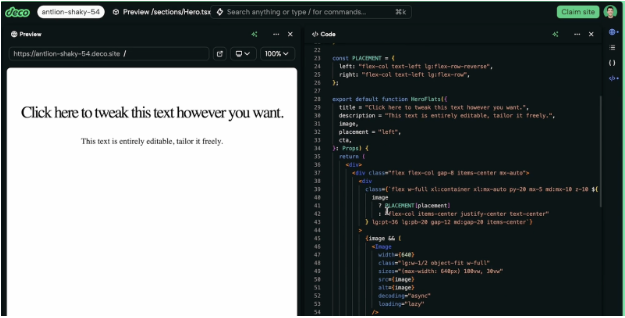
Deco.cx is a blazing-fast front-end platform that enables sales and marketing teams to build high-converting experiences, particularly in eCommerce. From dynamic landing pages to personalized storefronts, its no-code interface is built for speed, flexibility, and performance.
Deco.cx also integrates seamlessly with modern stacks and gives teams full control over customer-facing content. Whether A/B testing offers or localizing campaigns, Deco.cx empowers you to launch quickly, iterate frequently, and engage more effectively.
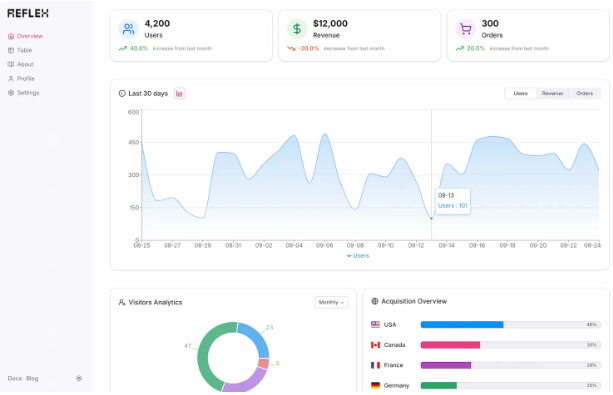
Reflex is a popular solution for teams building their software in Python. Its backend and frontend logic framework is ideal for founders and marketers who want custom tools without juggling multiple languages.
The solution has over 60 customizable UI components and offers fast cloud deployment. This makes Reflex specialized for rapid prototyping and AI-powered app launches.
Plus, anything from dashboards and CRMs to customer portals, this tool helps you deliver faster and more innovative projects.
This is how a Reddit review of the tool reads:
It’s actually pretty slick once you understand the ecosystem. I’ve got one app I built for our security team that is deployed to an autoscaling group behind a load balancer.
➡️ Read More: The Top Prototyping Tools for Designers
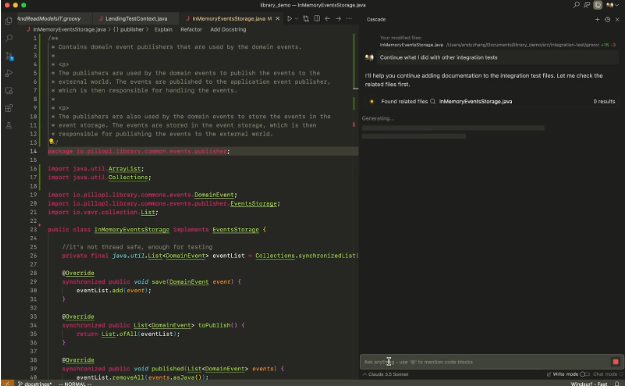
Do you wish you had a mind-reading coding buddy? Windsurf (formerly Codeium) may feel like that, especially for sales and marketing teams wanting to tweak final products without chasing developers.
The tool integrates with VS Code and PyCharm, providing DevOps automations and intelligent suggestions in over 70 languages to accelerate your editing. Windsurf also features an AI chat that efficiently handles landing page fixes and email template updates.
A Reddit user says:
Been playing with Windsurf today. It is really quick to get a project bootstrapped. I’ve noticed so far working on a Laravel project and it can do most things I’m asking without having to ask it to fix things. When I do ask it to fix things, it’s really good at which files it needs to edit. I did have to restart from the beginning of the project because I let it get ahead of itself without checking to see if what it was doing was the right way.
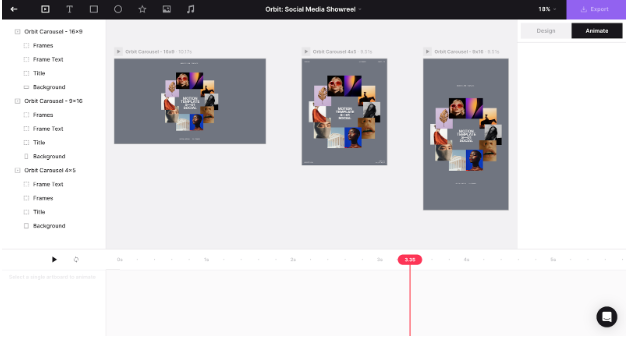
Jitter is a design solution for fast, fun, and frustration-free animation. Its browser-based editor is sleek, simple, and includes social media elements.
It also offers an infinite canvas to test endless versions and layouts until your brand visuals hit just right. It’s lightning-fast, with real-time previews that keep your creative flow going.
Additionally, Jitter has built-in size presets for Instagram, YouTube, Facebook, and more, meaning no more manual resizing of campaigns. Just pick, animate, and post.
A G2 review says:
Jitter proved useful in making smooth and short animations useful in social networks and explainer videos. There is virtually no technical knowledge required to get going since the program is user-friendly and comes with pre-built assets.
➡️ Read More: Top AI Product Idea Generator Tools
Get our best tips on using AI for marketing in this video:
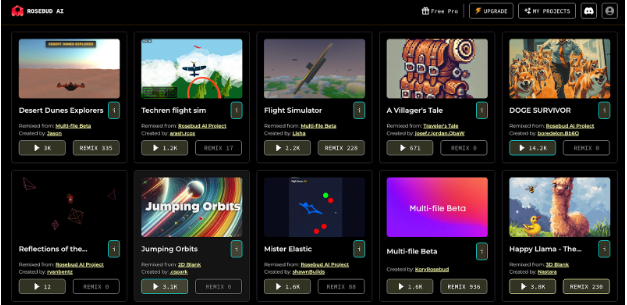
Rosebud AI gives marketers and creative teams a bold new way to craft interactive content, ad visuals, and animated personas, without writing code. Just describe what you want; the platform brings it to life with AI-generated character animations, games, or chatbot flows.
Rosebud AI always delivers with minimal effort, whether you need a campaign, a branded mini-game, or an immersive landing page. Bottom line: this tool helps you focus on ideas, not integrations, to deliver standout digital experiences.
🔎 Did You Know? Rosebud AI was named after the cheat code in The Sims that gave players unlimited resources to play in build mode.
Here’s what a Redditor has to say:
“It’s awesome how I can achieve a lot more this way than by using GameMaker. It’s much easier to create complex game elements and features using the AI.”
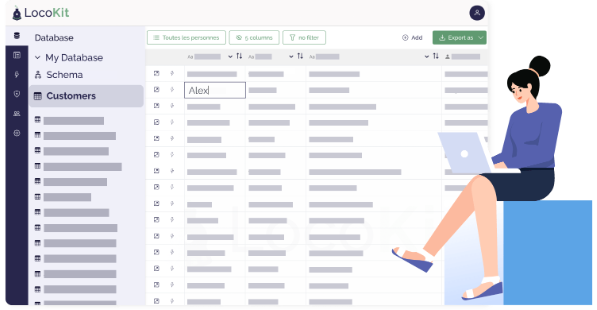
LocoKit is designed to create polished, database-driven apps in minutes that need to follow custom logic. This tool specializes in full-stack web apps like mapping territories and route optimization, nailing high personalization and contextual engagement. Its spreadsheet-like, intuitive interface and customizable data modeling keep the layout familiar and avoid SQL add-ons
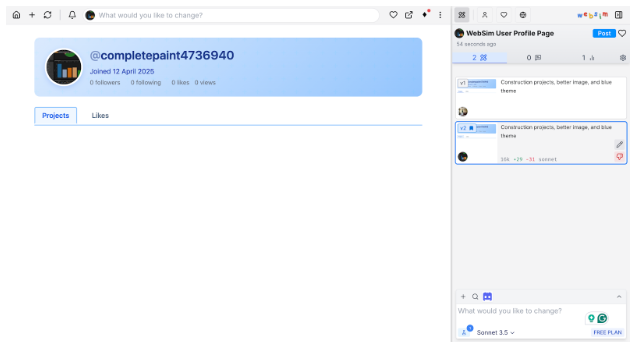
Another tool specializing in simulations is WebSim.ai. The solution stands out with its on-demand interactive web experiences and builds functional HTML websites based on your themes or URLs. It is powered by AI models like Sonnet 3.5 and DeepSeek R1.
Small businesses and web app developers can quickly mock up different user paths and customer interactions with various page layouts or checkout flows.
A Reddit review says:
I’m floored by how awesome WebSim is in making creativity reality for lay people. Can’t believe it’s not more popular.
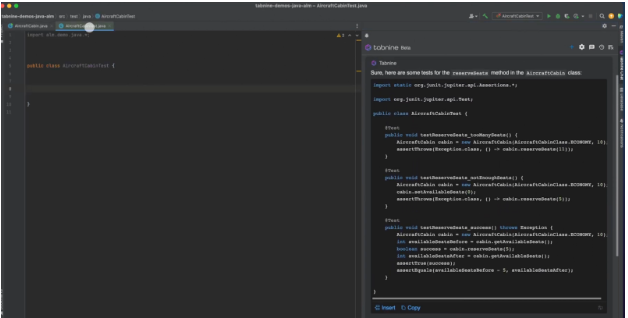
Tabnine is a hidden gem for software businesses that want to move fast, especially marketing teams. Its standout feature, AI-powered code personalization, helps deliver rapid-fire web tools, lead scoring scripts, or custom dashboards without waiting on developers.
Whether you’re automating outreach or personalizing customer journeys, Tabnine’s AI suggestions complete full code snippets as you type. It also has secure deployment that keeps data private while you scale.
A G2 user shares:
It provides code suggestions based on the programming language we use. As a developer, I work with many languages, and I am scrambled with the syntax, but it helps me a lot.
➡️ Read More: How to Use AI in Software Development
Minimizing app build time enables businesses to respond more quickly to the unique needs of their customers. But choosing the right AI app builders isn’t about sticking with Lovable AI just because it’s popular.
Marketing teams require low-code solutions that provide agility without technical headaches. With ClickUp, you get real-time analytics, one-click deployment, and seamless integrations in addition to AI code generation.
More than just an app development tool, ClickUp streamlines task management, team collaboration, and campaign oversight. Its AI-powered assistance and workflow tools deliver a standout customer experience from start to finish.
Ready to nail marketing campaigns and software management in one fell swoop? Sign up for ClickUp today!
Many teams outgrow Lovable AI when they need deeper customization, better integrations, or tighter control over workflows beyond app generation.
Yes. Several alternatives support no-code or low-code building while still offering advanced flexibility for technical teams when needed.
AI app builders focus on creating interfaces or apps, while all-in-one platforms combine building, execution, collaboration, and automation in a single workspace.
Some alternatives are designed to reduce tool sprawl by combining AI, project management, documentation, and automation in one system.
Teams should prioritize scalability, integration depth, workflow automation, and how well the tool supports execution after the app or asset is built.

© 2026 ClickUp

There’s an easier way. Try a free AI Agent in ClickUp that actually does the work for you—set up in minutes, save hours every week.