Sorry, there were no results found for “”
Sorry, there were no results found for “”
Sorry, there were no results found for “”
Hiring may seem straightforward—post a job, conduct interviews, and choose a candidate. But HR professionals know the truth: it’s one of the most challenging and high-stakes responsibilities in any organization.
Each hire isn’t just about matching key skills and finding the right fit for the company’s culture, team, and long-term goals. So, is there a way to make hiring more efficient?
The answer is interview evaluation form templates. These templates can transform disorganized, subjective HR processes into measurable, objective ones. They clearly outline every candidate’s strengths, weaknesses, and potential, ensuring job interviews aren’t just conversations but purposeful assessments.
Let’s explore the best interview evaluation form templates out there.
Interview evaluation form templates are structured documents designed to help recruiters and HR teams assess job applications systematically. They provide a clear framework for analyzing a candidate’s competencies, including technical expertise, interpersonal skills, problem-solving abilities, and cultural alignment.
This ensures each candidate is evaluated fairly, based on the specific requirements for the role. For example, if you’re hiring a software developer, the interview evaluation form might include sections to evaluate coding proficiency, project experience, and teamwork.
Interview evaluation templates can also have open-ended questions.
📌 Let’s say you are hiring for a leadership role. The form might include open-ended prompts, such as:
Detailed prompts and tailored evaluation sections allow interviewers to record specific observations, making it easier to review candidates later. These templates are especially helpful for group decision-making, where you need inputs from multiple stakeholders.
But amidst a sea of interview evaluation form templates, how do you choose the best one for your unique needs? Don’t worry—we cover that, too!
📖 Read More: Best AI Recruitment Tools for Hiring Teams
A well-designed evaluation form will ensure that all candidates are assessed against the same benchmarks, reducing biases and improving the overall quality of hiring decisions.
Whether you are looking to hire an intern or CFO, here are some key factors you must consider in an interview evaluation template:
📖 Read More: Best Applicant Tracking System Software (ATS)
ClickUp, an all-in-one software that helps streamline HR processes, has created the best interview evaluation form templates.
These templates help businesses find the right talent and make the life of an HR professional less chaotic. Explore the templates right below!
Preparing to conduct half-yearly or annual performance reviews for promotions or team bonuses? The ClickUp Evaluation Form Template is the perfect tool to evaluate your employees’ skills and performance.
The template has an easy-to-fill form that includes fields for hours worked, job descriptions, and ratings for communication and technical skills, ensuring fair and structured evaluations. It helps track employee progress and identify areas of improvement.
Plus, you can add a field for extra awards and accomplishments to identify the highest-performing team members.
🎯 How to use this template effectively:
🌟 Ideal for: Team managers and HRs for performance reviews or quarterly appraisals.
💡Pro Tip: Jot down specific examples or quotes to support ratings. For example, instead of “seemed prepared,” write, “Presented a detailed plan for handling client objections.”
Your hiring process is in full swing, but you’re struggling to keep track of application statuses. The ClickUp Hiring Selection Matrix Template sorts the hiring process by organizing all candidate profiles for similar roles in one centralized location.
This template allows you to easily compare applications and ratings based on their initial screening, interview, or skills. It ensures a fair and objective hiring process. The best part is that you can set the evaluation criteria, plan when to conduct interviews, and assign hiring tasks to team members.
🎯 How to use this template effectively:
🌟 Ideal for: Teams looking to standardize their hiring process and make objective, data-driven hiring decisions.
📖 Read More: How to Improve Your Recruitment Skills
The ClickUp Hiring Candidates Template visualizes the recruitment process to help make informed and efficient hiring decisions.
Want to assign specific tasks to each applicant? Connect a ClickUp Form, Google Form, Typeform, or any application tool via Zapier to automatically share tasks.
You can even use customizable rating scales to assess tasks or use interactive tables and tracking boards to compare the performance of different candidates. The template also lets you create checklists and reminders for all HR tasks, exchange insights, discuss roles, and provide feedback on candidates directly within the system.
🎯 How to use this template effectively:
🌟 Ideal for: Talent acquisition teams and recruiters looking to streamline the candidate shortlisting process and improve collaboration during hiring drives.
📮ClickUp Insight: About 43% of workers send 0-10 messages daily. While this suggests more focused or deliberate conversations, it could also indicate a lack of seamless collaboration, with important discussions happening elsewhere (like email). To prevent unnecessary platform hopping and context switching, you need an everything app for work, like ClickUp, that combines projects, knowledge, and chat in one place—all powered by AI that helps you work more efficiently.
The ClickUp Interview Management and Report Template provides a structured approach for qualitatively and quantitatively assessing candidates.
The interview report form helps interviewers add candidate details like position and department and a narrative report summarizing their overall feedback. It includes dropdown options for communication skills, technical skills, culture fit, and experience, all rated as ‘Excellent,’ ‘Good,’ ‘Acceptable,’ or ‘Not Acceptable.’ And, of course, you can customize them all!
The template is extended with two additional tabs, ’Interview Reports’ and ‘Report Status,’ to offer detailed, visual representations of candidate evaluations.
🎯 How to use this template effectively:
🌟 Ideal for: HR specialists and hiring panels managing high volumes of interviews and seeking detailed reporting for better hiring decisions.
🧠 Did you know? 28% of candidates want to know your interview process ahead of time. Remember, transparency is key to creating a positive candidate experience.
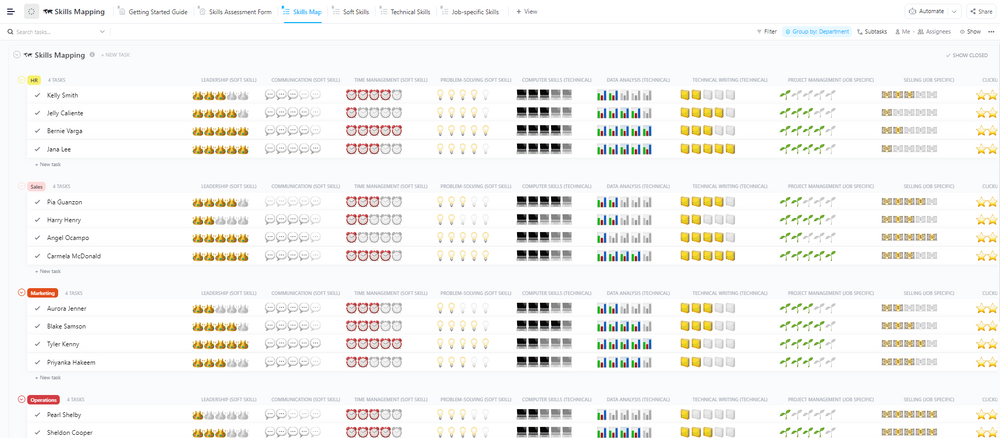
The ClickUp Skill Mapping Template evaluates candidates’ job-specific and soft skills. You can customize the skills assessment form to rate candidates’ proficiency in various areas, such as leadership, communication, and technical skills.
The cool part? All ratings are given using engaging emojis! The Skill Map View lists each candidate’s name alongside their skill ratings, offering a quick visual overview of their abilities across different areas. This makes it easier to identify each candidate’s strengths and weaknesses and make informed hiring decisions.
🎯 How to use this template effectively:
🌟 Ideal for: Workforce planners and team leads aiming to identify skill gaps and strategically align employee competencies with organizational goals.
🧠 Did you know? It typically takes around 42 days to fill a job position. That’s almost enough time to master a new hobby or binge-watch a TV series!
The ClickUp Recruiting and Hiring Template helps you manage job postings and candidate recruitment easily.
The template includes an All Roles tab to track all open roles, ensuring you stay updated on available positions. The Hiring Pipeline and schedule tabs help monitor candidate status, from initial application to final selection, keeping your recruitment process super organized.
Have to give feedback? Done. Want to open a new role? Easy. This template also has a user-friendly Job Application Form tab, allowing candidates to submit their applications easily.
🎯 How to use this template effectively:
🌟 Ideal for: Recruitment managers and agencies handling end-to-end hiring processes and needing a centralized hub for organizing tasks and communications.
📖 Read More: Build Your Dream Recruitment Tech Stack: Top Tools
If there is one template that handles a company’s complete hiring cycle, it’s the ClickUp Evaluation Form Task Template.
You can use this template to create a detailed checklist for evaluating job applications. Add action items like ‘Resume review,’ ‘Initial screening,’ and ‘Technical skills assessment,’ and assign tasks to your team members to ensure an objective assessment of each candidate.
Additionally, you can incorporate rating scales for different skills, allowing evaluators to provide a nuanced view of each candidate’s strengths and weaknesses
🎯 How to use this template effectively:
🌟 Ideal for: Team leaders and department heads conducting structured employee evaluations to track individual and team performance metrics.
💡Pro Tip: In the evaluation template, dedicate a section to overall impressions and recommendations, summarizing whether the candidate is a strong fit and why.
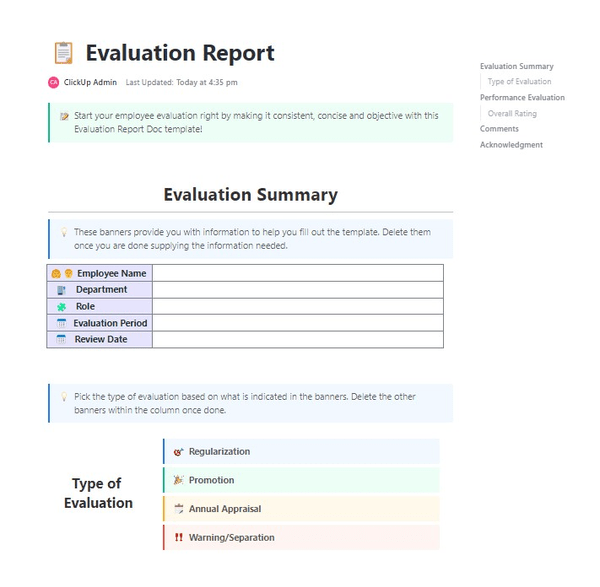
Want a beginner-friendly template to conduct an in-depth evaluation of prospective candidates? The ClickUp Evaluation Report Template is the ideal resource. Even though this template is for employee evaluation, you can customize it to assess the skills and performance of job applicants.
It helps you evaluate performance across multiple factors, such as behavioral assessment, skills assessment, cultural fit, and situational tasks. You can also add KPI-based ratings like leadership potential, collaboration skills, and problem-solving abilities.
The template offers predefined categories for adding feedback: Exceeds Expectations, Meets Expectations, Below Expectations, or Needs Improvement.
🎯 How to use this template effectively:
🌟 Ideal for: Managers and CEOs reviewing and creating annual appraisal reports.
The ClickUp Interview Process Template helps you conduct structured interviews by breaking down the interview stages into segments. For instance, The ‘Initial Interview’ segment includes a company overview and role-specific questions to assess a candidate’s expertise.
The ‘Reference Check’ section highlights this template, allowing you to focus on qualitative feedback from past professional relationships. It includes key prompts such as the duration of collaboration, areas of strength, adaptability to feedback, and much more to verify a candidate’s skills and experience.
🎯 How to use this template effectively:
🌟 Ideal for: HR coordinators and interviewers in sensitive industries requiring high-level background checks.
✨ Fun Fact: Patagonia, an outdoor clothing company, assesses candidates on skills and their connection to the outdoors and sustainability commitment. So aligning with a company’s mission can be as important as technical expertise while hiring.
A smooth hiring process is essential for HR and candidates. It enhances your employer brand and helps you attract quality talent. So, if you want to collect constructive criticism and identify areas to improve the hiring process for candidates, the ClickUp Feedback Form Template is just what you need.
This form helps create a feedback management system by gathering insights from candidates. You can also use the template to ask questions like, “How would you rate the overall experience we provided?”
🎯 How to use this template effectively:
🌟 Ideal for: HR teams and organizational leaders who want to collect actionable feedback from employees, clients, or stakeholders to drive improvements.
🧠 Did you know? A staggering 55.9% of candidates report receiving no feedback after an unsuccessful interview, and only 5.5% find the feedback they do get useful.
As an HR manager, managing everything from recruitment to employee engagement can feel like juggling too many balls at one time. You might be lost in a sea of spreadsheets, endless email threads, and missed follow-ups.
But not with ClickUp for HR Teams. As the everything app for work, ClickUp combines HR project management, documents, and team communication, all in one platform—accelerated by next-generation AI automation and search.
ClickUp Forms can collect candidate information and streamline the recruitment pipeline. You can also monitor employee performance and track the progress of recruitment tasks with ClickUp Dashboards.

ClickUp for HR teams helps with:
Hiring the right candidate is like finding a needle in a haystack. It’s challenging. It’s time-consuming. But it doesn’t have to be that way.
Whether hiring for a fast-growing startup or a large corporation, using templates that fit your hiring needs is essential to making more intelligent decisions.
ClickUp’s interview evaluation form templates simplify this process by offering an easy way to assess, compare, and finalize decisions without unnecessary complications.
Don’t let hiring overwhelm you! Sign up for ClickUp today and transform your hiring processes.

Praburam Srinivasan
Max 27min read

PMO Team
Max 9min read
Praburam Srinivasan
Max 16min read

© 2026 ClickUp