






Still downloading templates?
There’s an easier way. Try a free AI Agent in ClickUp that actually does the work for you—set up in minutes, save hours every week.
Sorry, there were no results found for “”
Sorry, there were no results found for “”
Sorry, there were no results found for “”
The best way to have a good idea is to have a lot of ideas.
But having ideas can sometimes be the easy part.
The hard part starts when ideas show up everywhere. In half-written notes, random tabs, voice memos, and messages you swear you will come back to. Then the best ones disappear, or worse, get buried under the good-enough ones.
Idea organizer templates are here to fix that. Capture every thought in one place, sort them by theme, score what matters, and keep a clear view of what to do next.
In this list, you will find 10 free idea organizer templates to help you collect ideas, prioritize them without overthinking, and move the right ones forward.
An Idea Organizer Template is a pre-designed, ready-to-use structure (often digital, but sometimes printable) that helps you capture, categorize, prioritize, and develop ideas in a systematic way instead of letting them stay scattered in notes or random documents.
It is basically a form of a graphic organizer or productivity system focused specifically on idea management—turning random sparks of creativity or thoughts into something actionable and trackable.
Now, let’s take a look at why you should use an idea organizer template:
ClickUp, the world’s first Converged AI Workspace, offers a vast library of ready-to-use templates designed to help you capture ideas quickly, organize them with the right structure, and move the best ones toward execution.
On a mission to end tool sprawl, ClickUp also makes sure your templates do not live in isolation.
From the moment you start brainstorming, you have one place for the 1,000+ templates you might need, plus Tasks, Docs, Dashboards, Notepad, and knowledge, all connected and powered by AI, so you can stop context switching and keep moving as your ideas get bigger.
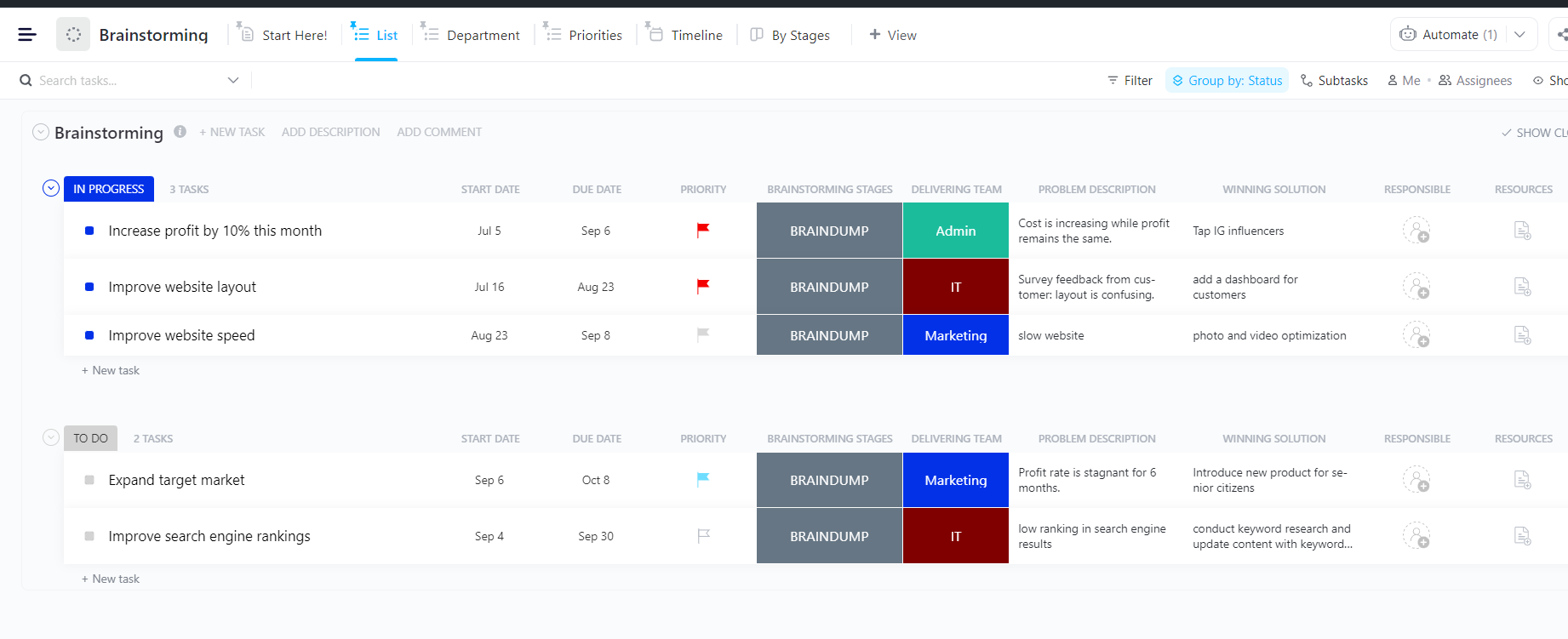
Organize ideas by the problems they solve using the ClickUp Brainstorming Template
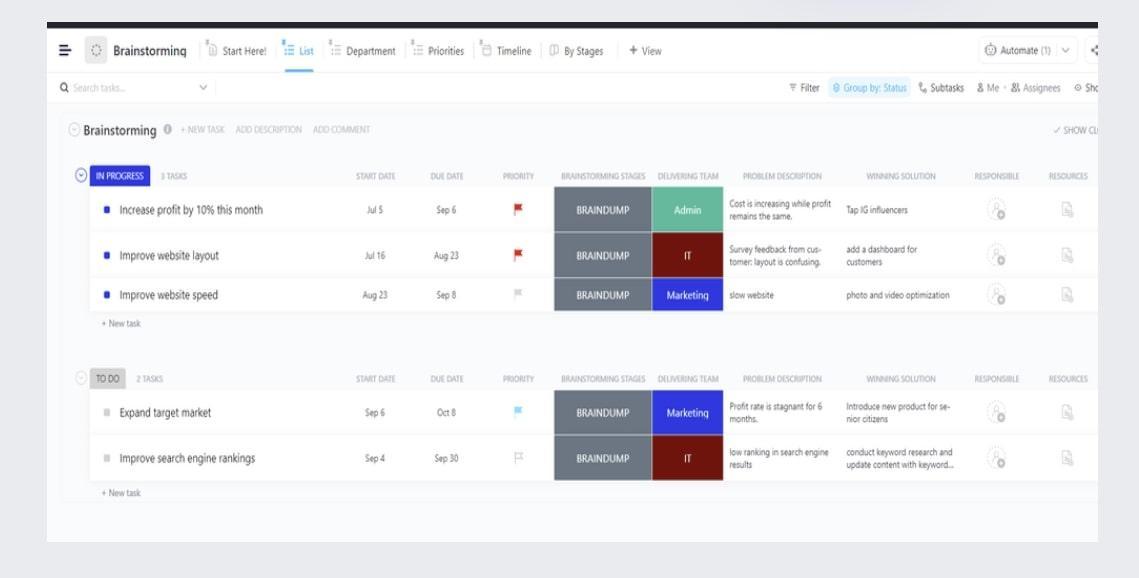
The ClickUp Brainstorming Template helps you organize ideas around the problems they solve. This ensures your best concepts are easy to find, compare, and prioritize. Each idea is captured as a ClickUp Task with a Problem Description field to keep questions clear from the start.
Once your ideas are in, you can group and review them in different ways, then add the details that move a concept forward, like a proposed Winning Solution and who should own the next step.
✅ Ideal for: Product managers and marketing leads who need a structured way to prioritize ideas.
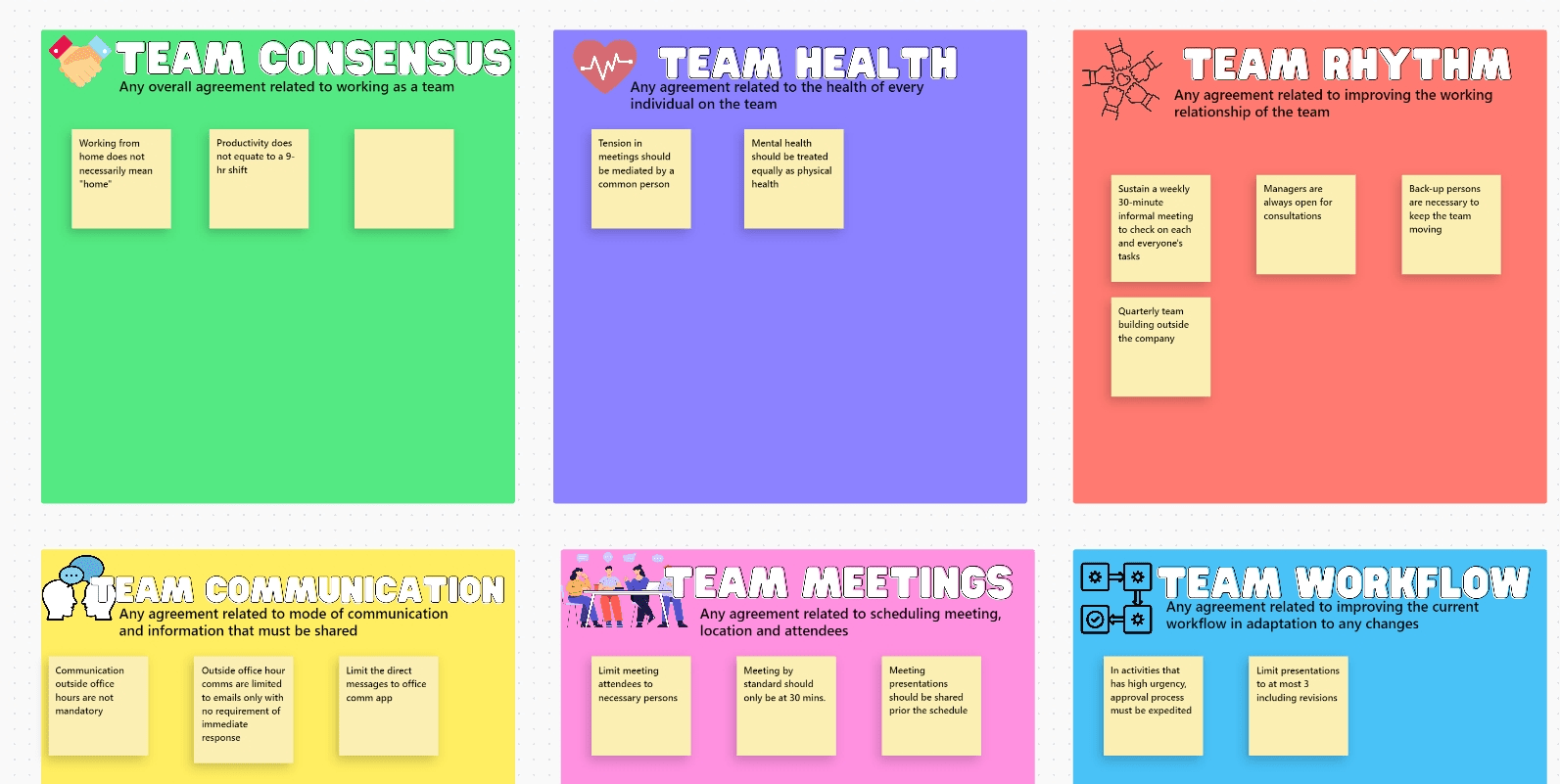
The ClickUp Squad Brainstorm Template gives your team a shared Whiteboard canvas to map ideas together in real time. Use it to capture team consensus, cluster related thoughts, and turn workflows into work that connects the entire team.
Once your ideas start taking shape, you can convert ideas into tasks without leaving the board. This means you get to plan and execute from the same interface on the go.
✅ Ideal for: Project leads and their teams running cross-functional brainstorms.
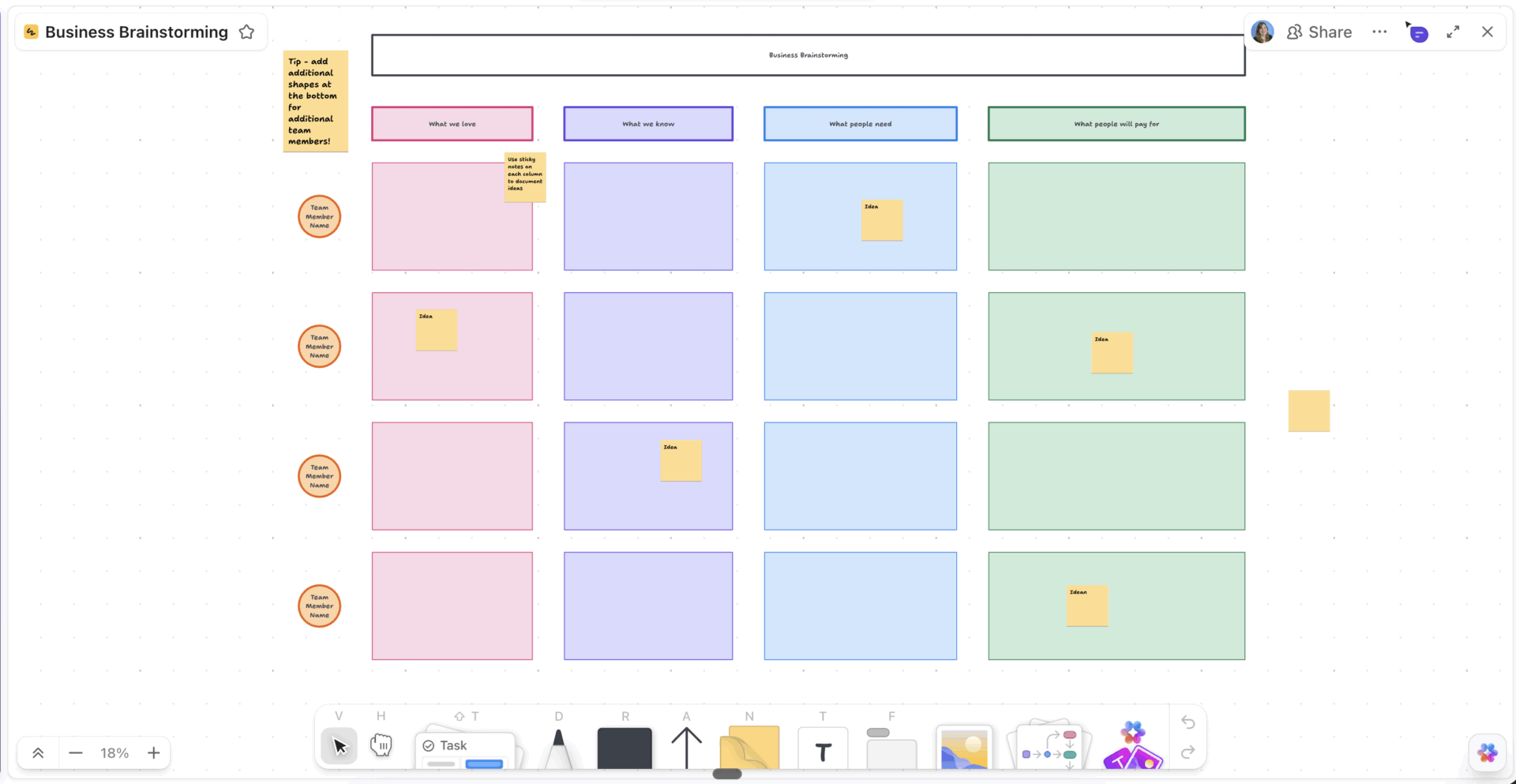
The ClickUp Business Brainstorming Template comes with a simple Whiteboard framework to pressure-test new ideas before you commit time and budget. It’s centered on four prompts to help your team separate evidence and spot what’s worth pursuing.
Add sticky notes under What we love, What we know, What people need, and What people will pay for, then review the full board to see where your strongest opportunities are building.
✅ Ideal for: Startup founders and product managers validating new business ideas.
📮ClickUp Insight: 11% of our respondents leverage AI primarily for brainstorming and ideation. But what happens to these brilliant ideas afterward? This is where you need an AI-powered whiteboard, like ClickUp Whiteboards, which helps you instantly turn ideas from the brainstorming session into tasks.
And if you can’t quite explain a concept, simply ask the AI image generator to create a visual based on your prompt. It’s the everything app for work that enables you to ideate, visualize, and execute faster!
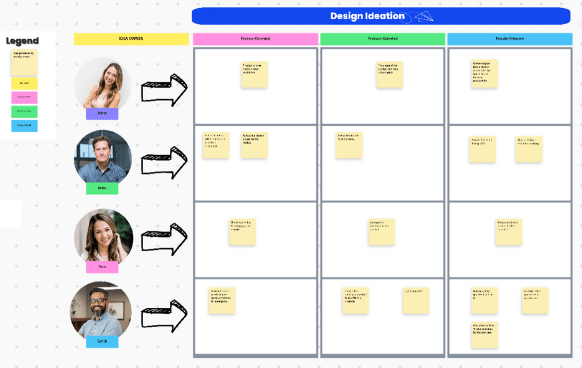
When a design brainstorm turns into a wall of sticky notes, it’s hard to tell what you genuinely learned. The ClickUp Design Ideation Template helps you guide the session with a layout that separates ideas into meaningful buckets from the start.
Add ideas to the Whiteboard under Process-Oriented, Product-Oriented, and People-Oriented, then tag each contributor as the Idea Owner so you can trace concepts back to the right context when it’s time to review.
And when your team wants faster follow-through, ClickUp Automations can handle the handoffs after ideation, like assigning owners or updating statuses when ideas become tasks.
✅ Ideal for: UX designers and product designers running concept ideation sessions.
🚀 ClickUp advantage: ClickUp Brain MAX is an AI desktop companion that helps you search, summarize, and connect context across your workspace.

Use it to pull the strongest themes from a busy Whiteboard, combine overlapping concepts, and turn fragmented notes into a prioritized shortlist. You can also ask it to draft tighter idea descriptions, suggest simple impact and effort labels, and convert the top picks into structured tasks with clear next steps so your best ideas move forward instead of fading out after the session.
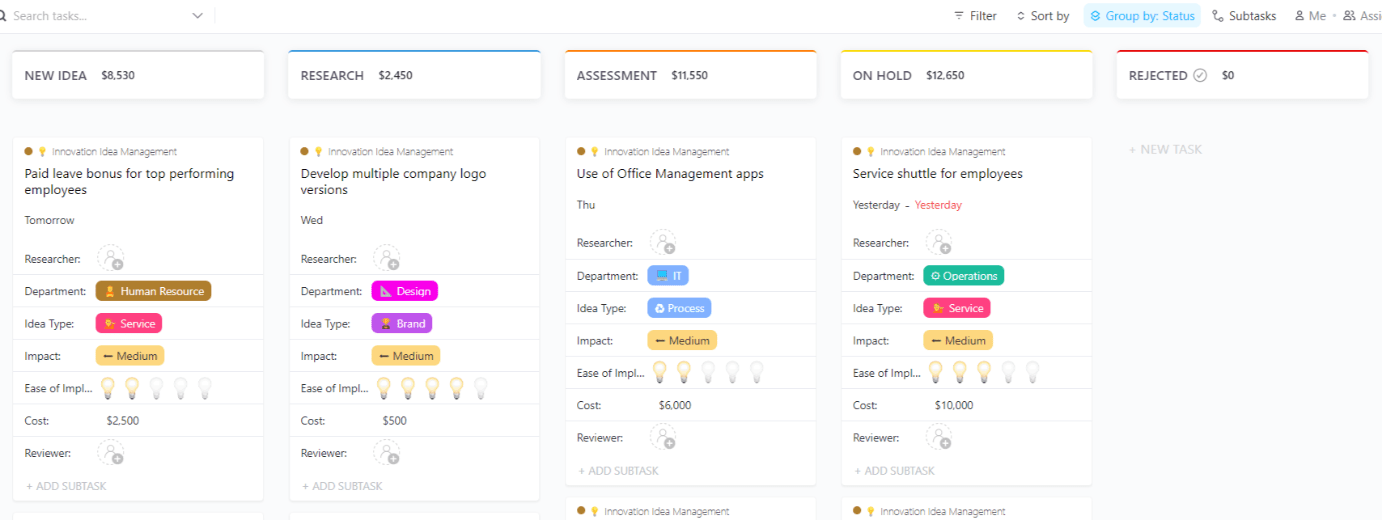
The ClickUp Innovation Idea Management Template helps you move ideas through a clear intake-to-decision workflow. Ideas progress across stages like New Idea, Research, Assessment, and more, giving you a quick read on what’s explored versus what’s ready for review.
Each idea is tracked with the details you need to evaluate it, including Department, Idea Type, Impact, Ease of Implementation, and Cost, along with assigned roles.
For times you want quicker summaries and easier handoffs, ClickUp Brain can help you pull key takeaways from each idea card and draft next-step notes for reviewers.
✅ Ideal for: Innovation program managers and operations managers running an internal idea pipeline.
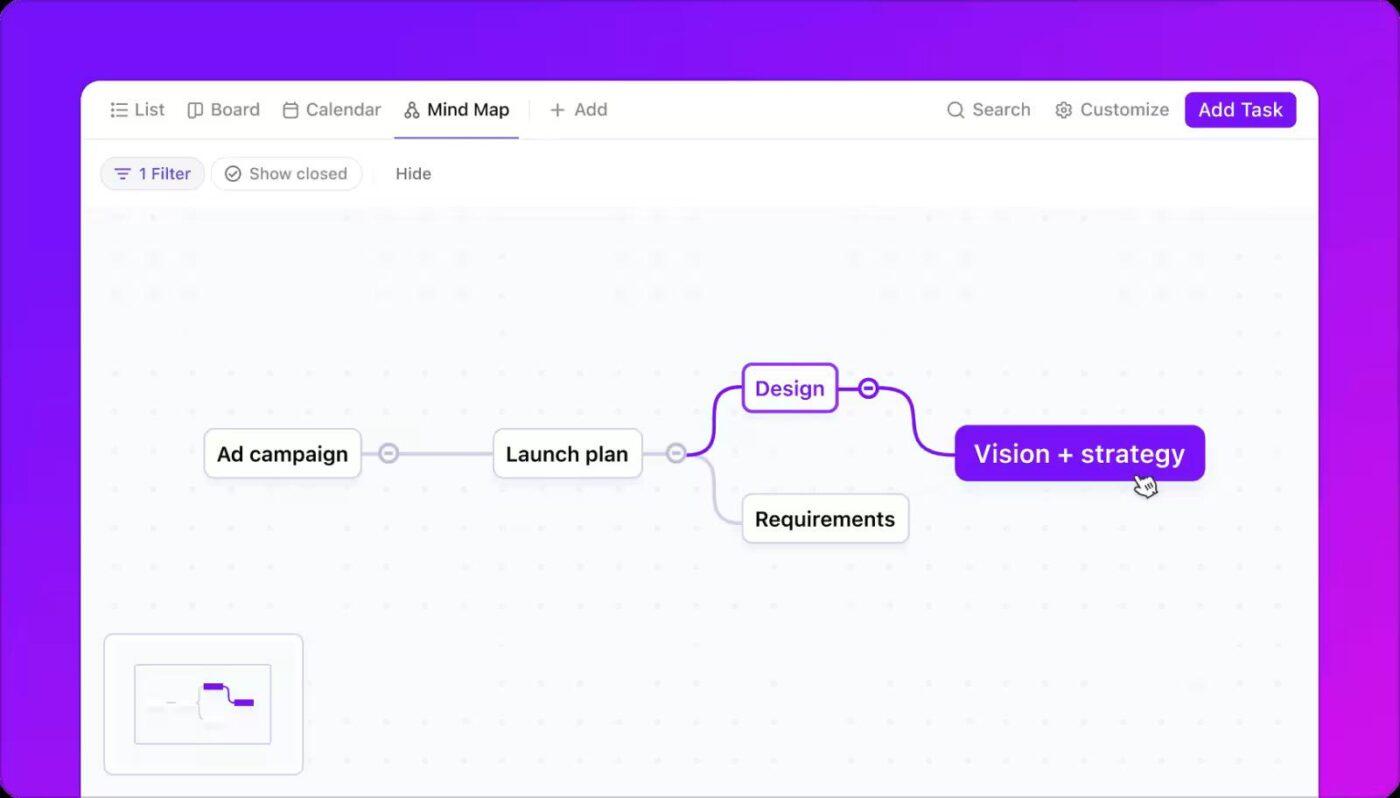
💡 Pro Tip: Use ClickUp Mind Maps to turn a big idea into a clear build order.
Map ideas into a clear build order and convert branches into tasks with ClickUp Mind MapsStart with your core theme in the center, branch into categories like Problem, Audience, Solution, and Proof, then add sub-branches for individual ideas. Once you’ve the structure, convert the best branches into tasks to let your priorities move straight from concept to execution without rewriting everything.
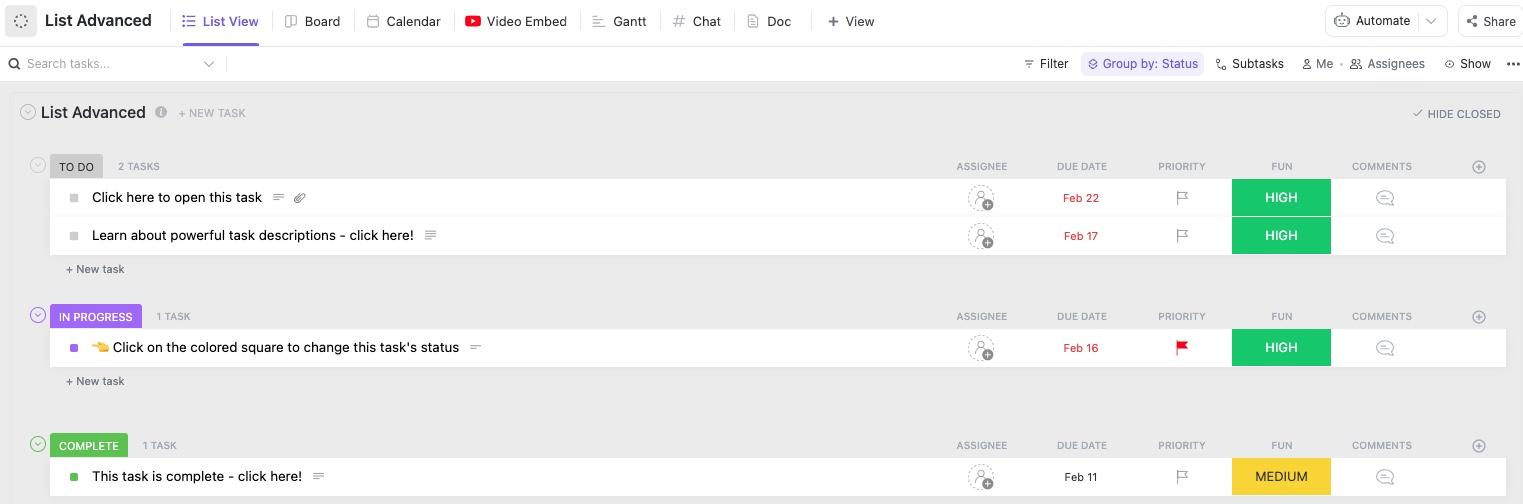
The ClickUp List Template keeps your day-to-day work organized in a sleek List view, with tasks grouped by status so you can track what is To Do, In Progress, and Complete at a glance. It also includes a FUN Custom Field that helps you signal importance and urgency as new tasks trickle in.
For lightweight follow-through, ClickUp Reminders nudges you for time-sensitive decisions. And when you need to zoom out, ClickUp Dashboards turn the same list into a zoomed-out snapshot of progress, upcoming deadlines, and priorities across the week.
✅ Ideal for: Operations coordinators and project assistants managing high-volume task lists.
⭐ Bonus Read: Top Mind Map Maker Tools to Use
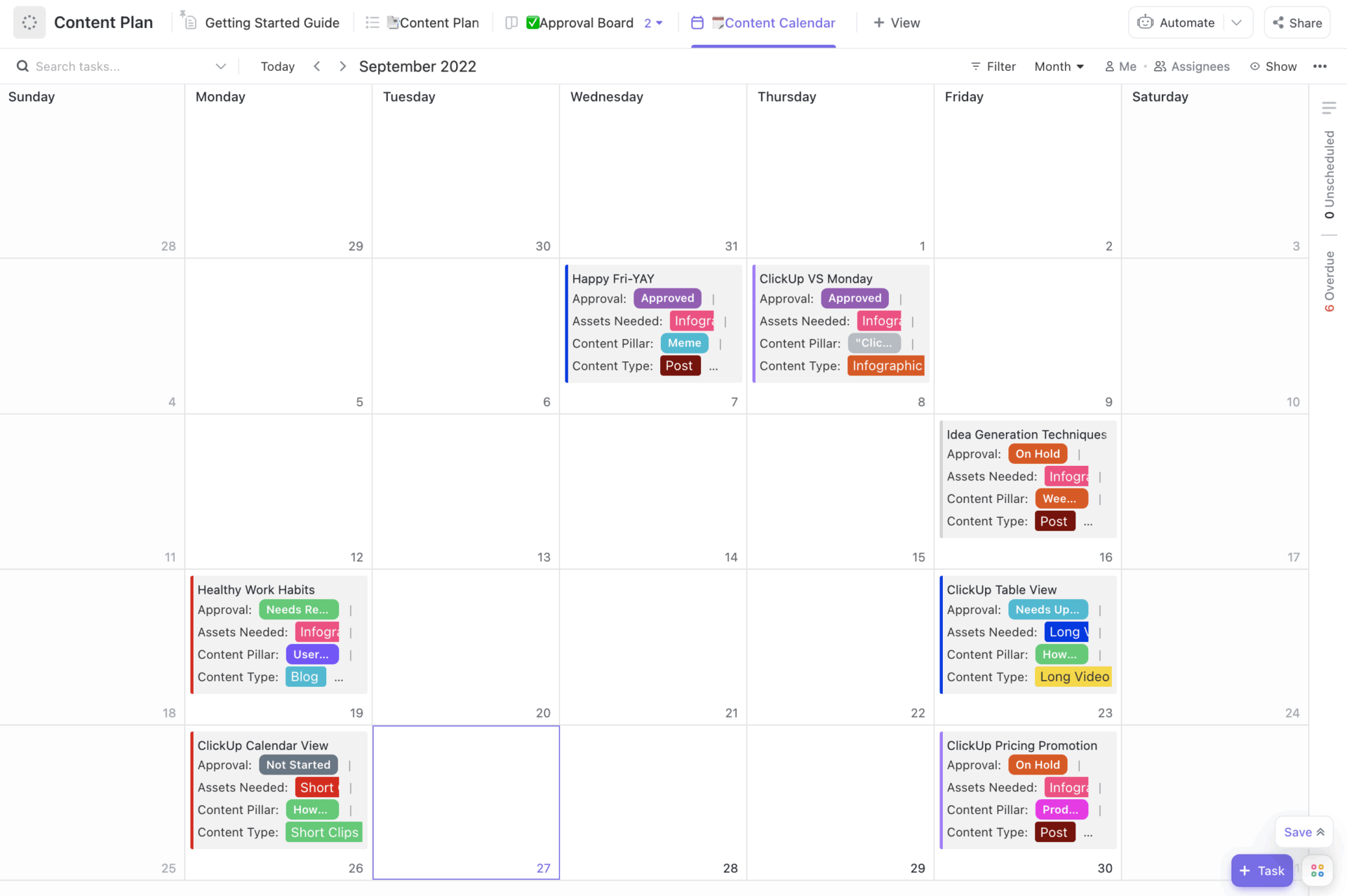
The ClickUp Content Plan Template gives content ideas a path from draft to publish, with a calendar view that shows what’s planned for the month and what still needs a slot. Each item carries context like Approval status, Assets Needed, Content Pillar, and Content Type, so the plan stays consistent even when multiple people contribute.
In addition, you can tie in ClickUp Brain in the process to generate the assets you need, like content fillers, angle ideas, and recommendations on the right content type to publish next, based on your needs.
✅ Ideal for: Content strategists and social media managers ideating on an editorial calendar.
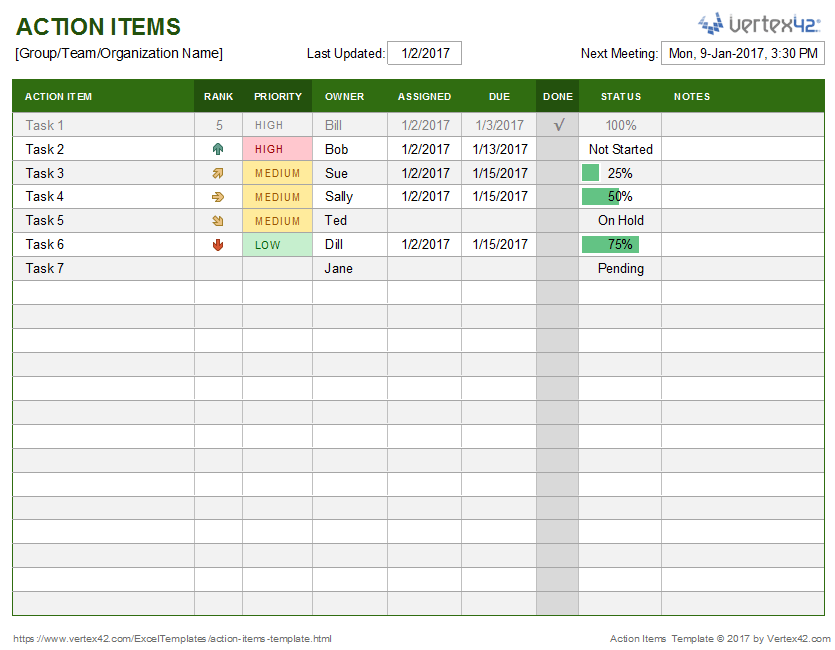
Teams that are deeply embedded in the Microsoft ecosystem can start with a framework as familiar as Excel. The Vertex42’s Action Items Template turns ideas into trackable action items with a simple spreadsheet structure with columns for task description, owner, due date, and status.
✅ Ideal for: Program managers and team leads who need a simple way to track post-brainstorm follow-ups.
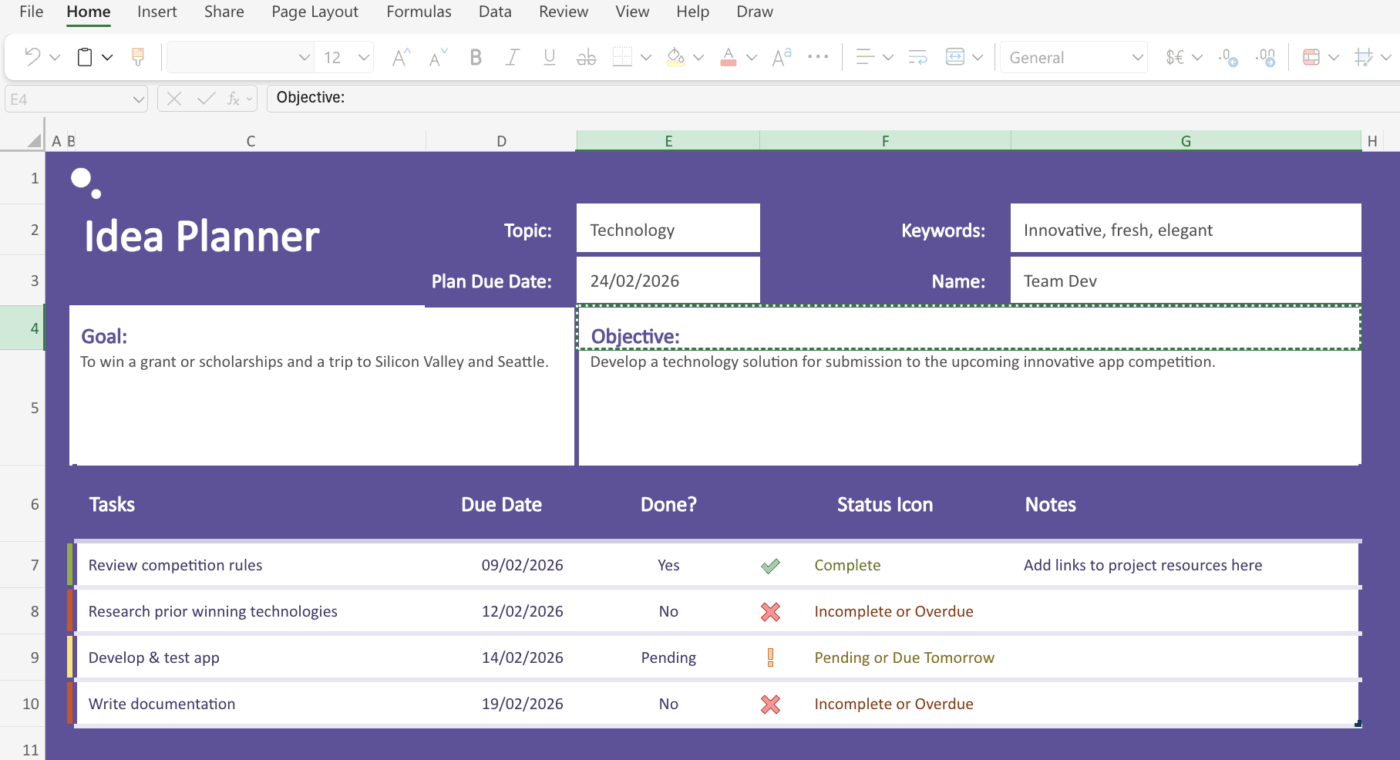
If your organization is standardized on Microsoft 365, using Microsoft’s Idea Planner Template can ensure compatibility with your existing workflows and IT policies. This idea planner is part of a larger pack of planner and tracker templates.
The template uses a multi-tab workbook structure to separate the initial idea capture from the evaluation and planning stages. It includes dropdown menus and scorecards to help standardize how different ideas are assessed.
✅ Ideal for: Student teams preparing competition submissions and early-stage founders outlining a project plan.
You’ve seen ten different templates, but the ‘best’ one is the one that fits how your team thinks and works.
Here’s how to match your needs to the right structure. 👀
Start with a template that matches your current workflow, and don’t be afraid to evolve it as your ideation process matures.
Free idea organizer templates are a great first step when you need a place to capture thoughts, sort priorities, and spot the ideas worth pursuing.
But ideas only get valuable when they move forward. With ClickUp, you get a space to ideate, and when you need more, you have all the tools needed to move the work forward. Whiteboards for brainstorming, Docs for shaping concepts, and Tasks to assign owners and deadlines, ClickUp helps you turn rough notes into a plan your team can execute. Add Dashboards to track what is moving, and ClickUp AI to summarize, refine, and pull next steps when you are ready to commit.
Sign up for ClickUp for free today. ✅
A mind map is a visual organizer that branches out from a central concept to explore relationships, making it great for divergent thinking. An idea organizer template is more focused on capturing, categorizing, and prioritizing a list of ideas for action, which supports convergent thinking.
They work for both. For instance, ClickUp has ready-to-use templates for individual and team brainstorming, which is quite helpful when you want separate templates on separate days.
The best templates have this built in. Convert any idea from a Whiteboard or List into a task with one click, automatically carrying over the context and adding assignees or due dates, all in ClickUp.
You can create a basic list of ideas in any document tool, but you’ll miss out on the dynamic features that make dedicated templates powerful, like filtering, sorting, and automated workflows. For anything beyond a simple personal list, a purpose-built tool will save you significant time.

© 2026 ClickUp

There’s an easier way. Try a free AI Agent in ClickUp that actually does the work for you—set up in minutes, save hours every week.