






Still downloading templates?
There’s an easier way. Try a free AI Agent in ClickUp that actually does the work for you—set up in minutes, save hours every week.
Sorry, there were no results found for “”
Sorry, there were no results found for “”
Sorry, there were no results found for “”
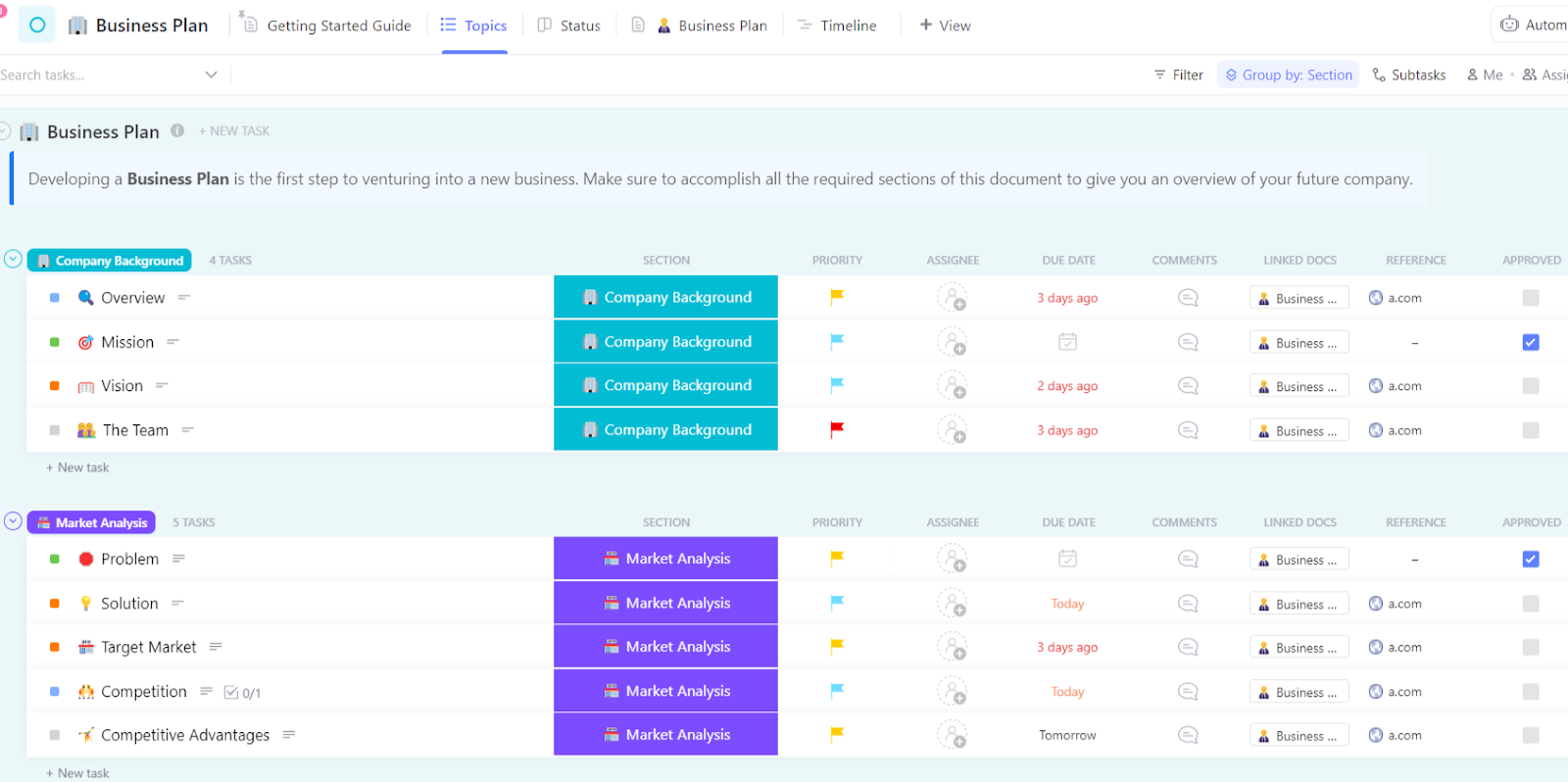

You spend weeks defining goals, mapping strategies, and building projections. Everyone agrees on the plan, but then Monday arrives. Deadlines pile up, tasks shift, and decisions get made on the fly, while the business plan quietly fades into the background.
This happens more often than you might realize. The challenge isn’t creating a plan. It’s keeping it connected to the work your team is actually doing. Bain found that 88% of business transformations fail to achieve their original ambitions.
In this blog post, we’ll show you how to turn a traditional business plan into a living system that stays visible and actionable.
You’ll learn how tools like ClickUp can help you link strategy, tasks, and conversations so your plan doesn’t just sit in a folder, but actually drives your team’s daily decisions and helps you achieve your goals.
Let’s get into it!💪🏽
Claude is an AI assistant from Anthropic, designed to handle complex conversations and generate nuanced, context-aware text.
Claude helps you brainstorm ideas, explore market assumptions, draft structured sections, and refine language so it sounds clear and professional instead of rushed or vague.
Where Claude stands out for business planning is in context. It can keep track of long conversations, remember earlier inputs, and help you shape scattered thoughts into a cohesive narrative. That makes it especially useful when you’re working through a multi-section document like a business plan.
📮ClickUp Insight: 62% of our respondents rely on conversational AI tools like ChatGPT and Claude. Their familiar chatbot interface and versatile abilities—to generate content, analyze data, and more—could be why they’re so popular across diverse roles and industries.
However, if a user has to switch to another tab to ask the AI a question every time, the associated toggle tax and context-switching costs add up over time.
Not with ClickUp Brain, though. It lives right in your Workspace, knows what you’re working on, can understand plain text prompts, and gives you answers that are highly relevant to your tasks! Experience 2x improvement in productivity with ClickUp!
Summarize this article with AI ClickUp Brain not only saves you precious time by instantly summarizing articles, it also leverages AI to connect your tasks, docs, people, and more, streamlining your workflow like never before.How to Use Claude for Business Planning
Planning a business can feel messy. You’ve got dozens of ideas bouncing around. At the same time, there’s a blank page staring back at you. That’s where Claude comes in. Think of it as a teammate who remembers what you’ve already shared, asks smart questions, and helps turn your scattered thoughts into tangible plans with clear milestones.
To get value from Claude, don’t treat it like a search box. Give it enough context to work with, share the details that matter, and keep building on what it gives you until it feels right.
Follow these steps, and you’ll move from vague ideas to a plan you can actually act on.
Step 1: Define your business vision with Claude
Have a dozen great ideas but struggle to weave them into a single, cohesive vision? That’s more common among founders than you’d think. It’s equally dangerous. If you don’t know exactly where you’re going, your business plan becomes a roadmap to nowhere, and every section will feel disconnected and weak.
This is the perfect time to use Claude as a thinking partner. Instead of just telling it to draft a plan, you can ask it probing questions to help you crystallize your abstract ideas into concrete statements. It can help you uncover what you truly want to build.
But remember, a vision document created in isolation can easily get lost in a folder and overlooked by the very team that’s meant to bring it to life. That’s why it needs to live where the work actually happens.
💡 Pro Tip: Adding another AI tool to your workflow might seem helpful, but without a plan, it can quickly create AI Sprawl. Too many tools without oversight can lead to wasted money and increased security risks.
ClickUp’s Converged AI Workspace brings everything together. Projects, documents, conversations, and AI all live in one place, so your work stays connected. The AI understands the context of what you are doing, helping you spend less time moving information around and more time actually getting work done.
Your team keeps tweaking the mission statement, yet it still sounds like it could belong to any company. What you end up with is a clean, well-written line that no one remembers and no one feels invested in. It doesn’t energize your team, and it doesn’t clearly explain to customers why you exist.
A strong mission statement should do the opposite. It should be specific, action-oriented, and rooted in real emotion so people can immediately understand what you stand for.
👀 Did You Know? Only 55% of managers explain the ‘why’ behind projects by tying tasks to larger challenges or goals. Which means that 45% defaulting to process over purpose can lead to a lack of motivation and drive among team members. Even high performers need to see how their work matters and find meaning in what they do.
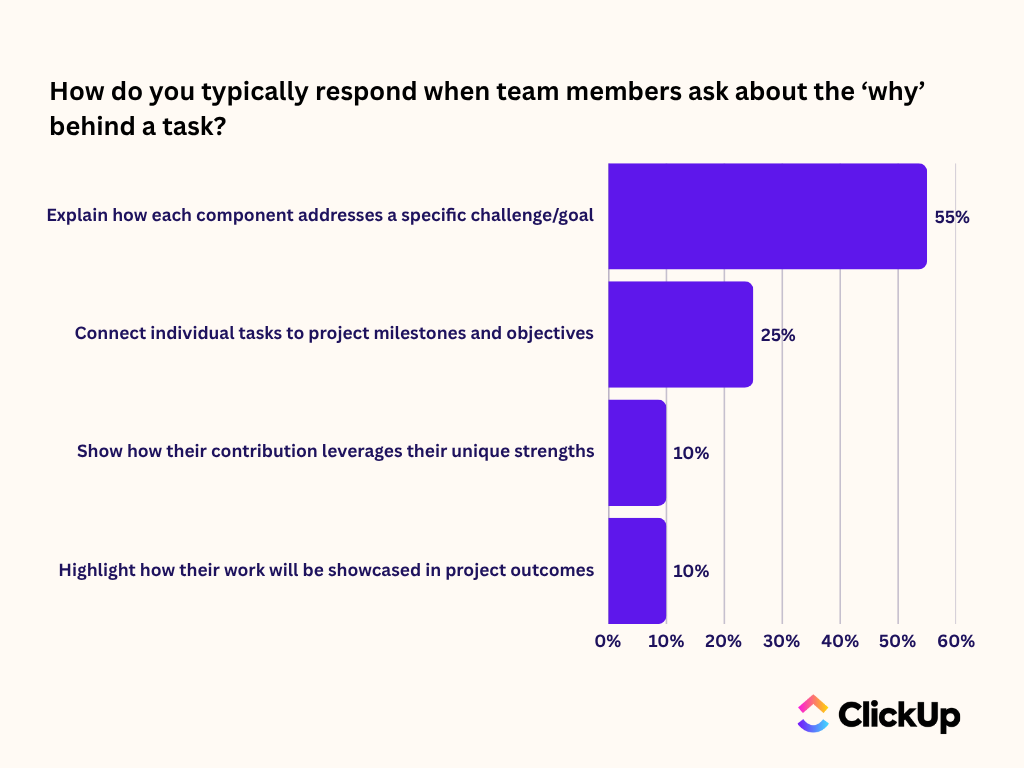
Claude helps turn fuzzy, half-formed ideas into clear, purposeful language that actually resonates.
🛠️ Give it a prompt such as: “Help me write a mission statement for a sustainable coffee subscription box that serves eco-conscious millennials by providing ethically sourced, single-origin beans.”
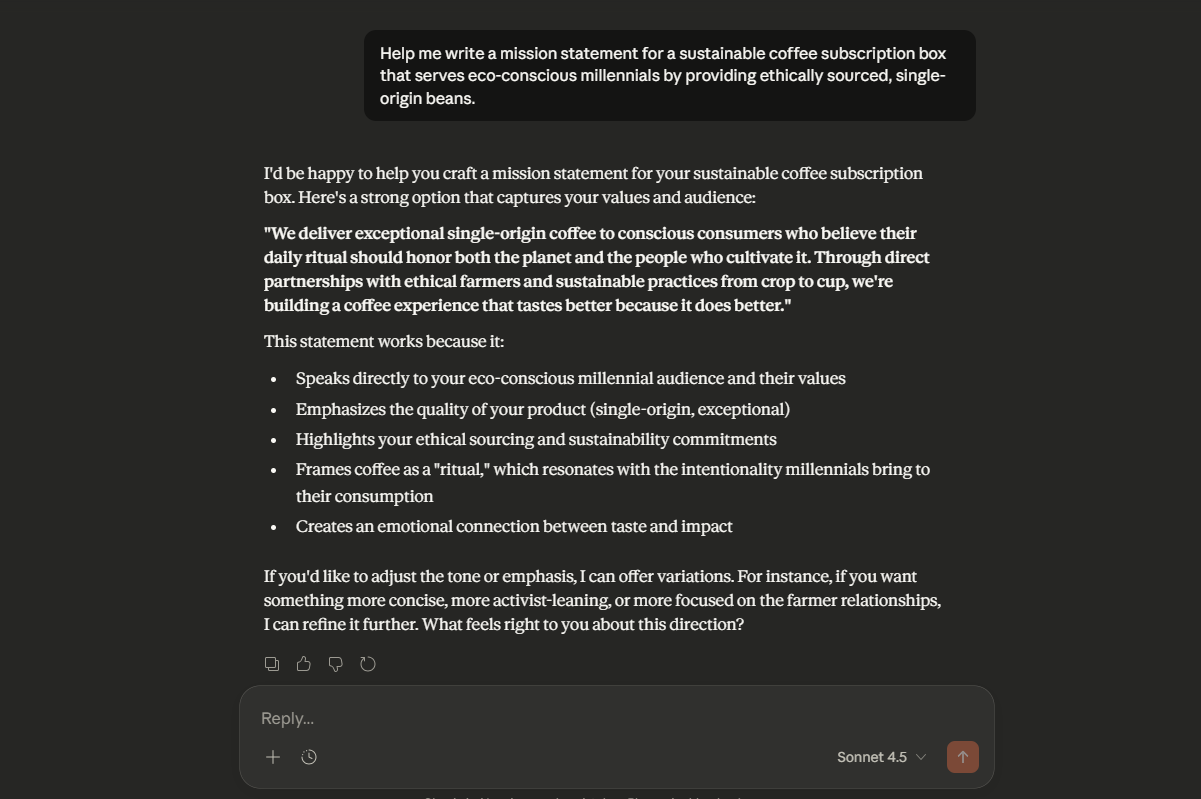
Then, ask it to iterate, making the language more specific or emotionally compelling. A great mission statement isn’t just a sentence you write once. It’s a living guide for your business.
As you refine it, use these principles to turn your mission from something generic into something that actually moves people:
If you can’t answer ‘Why should a customer choose you over anyone else?’ in a single, clear sentence, you have a positioning problem. This confusion makes your marketing ineffective and leaves investors wondering if you truly understand your market.
Your unique value proposition (UVP) is the core of your competitive advantage. Use Claude to pressure-test your ideas. Ask it to play devil’s advocate and poke holes in your initial UVP.
🛠️ For example, prompt it with, “My UVP is ‘high-quality project management software.’ Critique this and suggest three stronger alternatives that focus on a specific customer pain point.” This helps you move beyond just listing features.
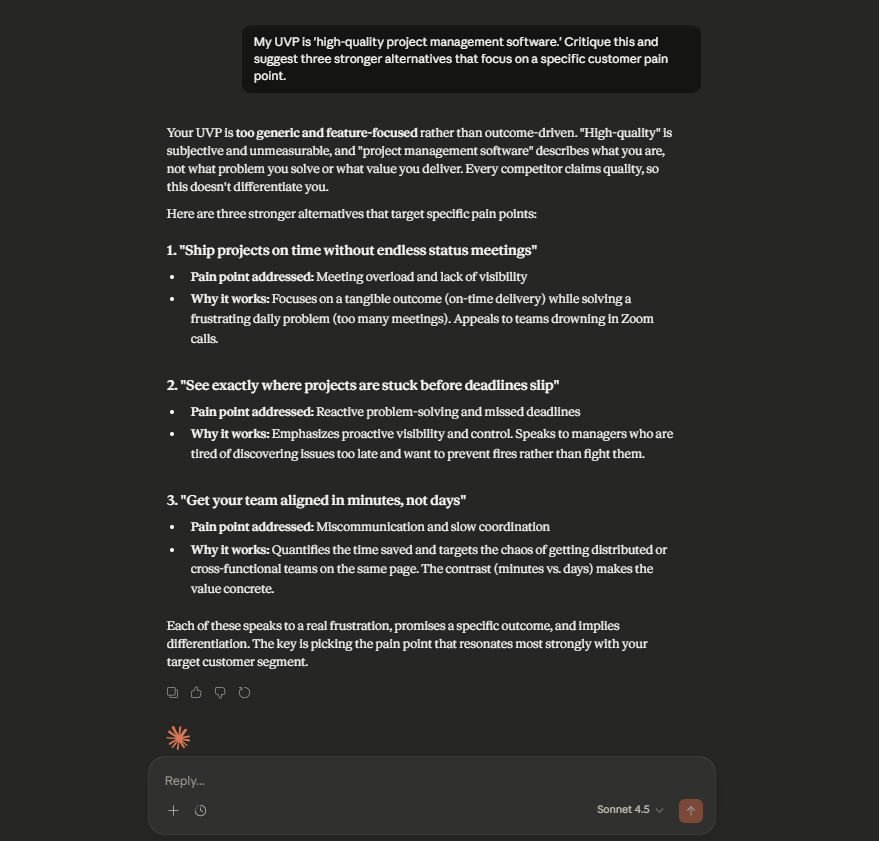
A strong UVP clearly defines these four elements:
Defining your market as ‘everyone’ is a classic mistake that signals to investors you haven’t done your homework. On the other hand, defining it too narrowly can make your business seem small and unscalable. This is a balancing act that many founders get wrong. It can result in a business plan that feels untethered from reality.
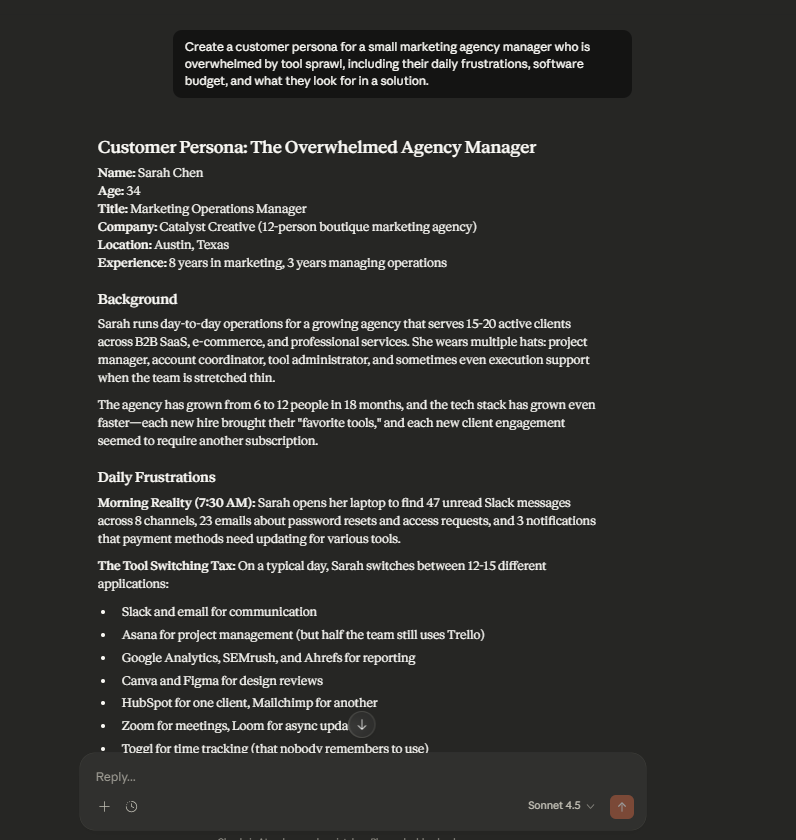
You can use Claude to find the sweet spot. Prompt it to conduct a market segmentation analysis for your industry and then develop detailed customer personas.
🛠️ For example, ask it to “Create a customer persona for a small marketing agency manager who is overwhelmed by tool sprawl, including their daily frustrations, software budget, and what they look for in a solution.” This forces specificity and helps you identify underserved niches.
Your executive summary matters most, yet it’s usually rushed and filled with jargon. If it’s weak, investors won’t read any further.
The executive summary should be a concise, powerful synthesis of your entire plan, written after all other sections are complete. It needs to be confident but not arrogant, specific but not overwhelming.
🛠️ You can feed your business plan’s completed sections into Claude and ask it to “Write a one-page executive summary for an investor based on the following business plan content.”
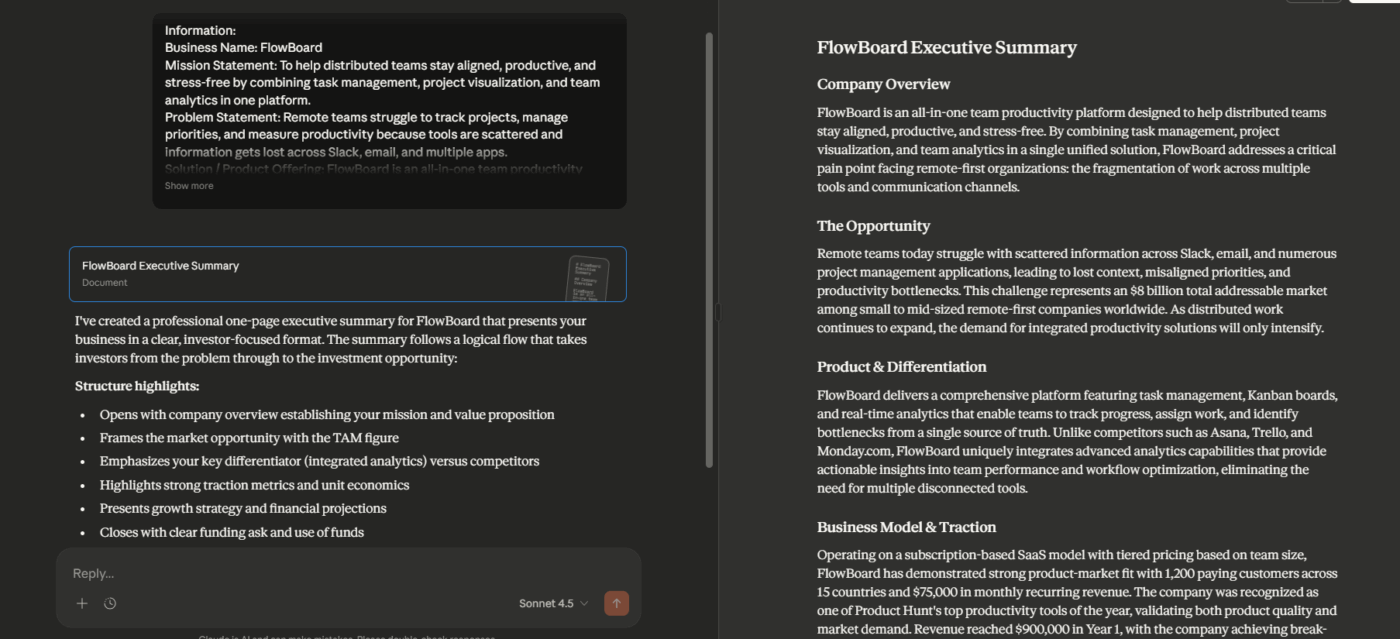
A great executive summary primarily includes:
As you build out your business plan, you’re juggling market research, product specs, marketing strategies, and financial models. We know it’s a lot.
But tackle it step-by-step and keep these sections consistent. Here are some tips to get you started:
Entrepreneurs often get stuck in market analysis, either drowning in data or providing a superficial overview that lacks credibility. This section needs to prove you understand your industry, customers, and competitors on a deep level. A weak analysis makes your entire business idea seem like a guess.
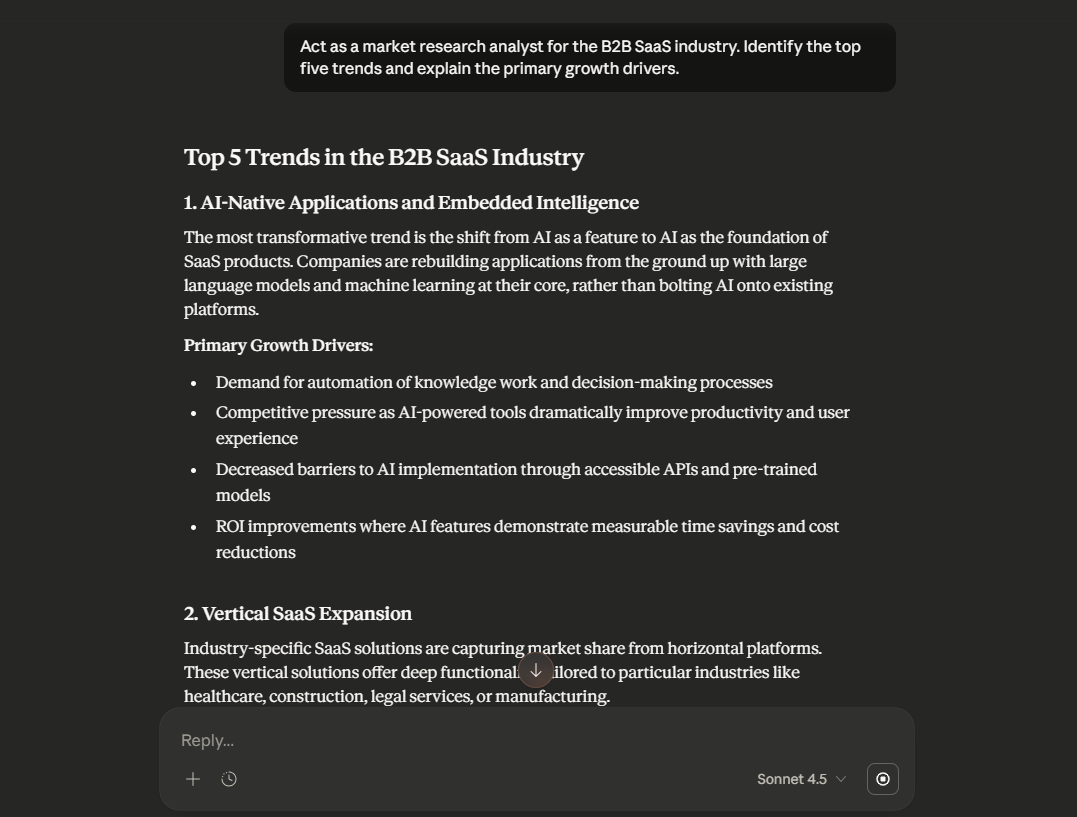
Use Claude to synthesize publicly available market reports and identify key trends.
🛠️ For example, prompt it to “Act as a market research analyst for the B2B SaaS industry. Identify the top five trends and explain the primary growth drivers.”
For competitive analysis, ask it to identify direct, indirect, and potential competitors. Always validate Claude’s claims with current research and cite your sources, since its knowledge has a cutoff date (unless you ask it to search the web directly and explicitly).
Your market analysis should cover:
Here’s a pro tip: Investors bet on teams, not just ideas. If your business plan underplays your team’s expertise or ignores obvious gaps in your organizational structure, it raises a major red flag. It signals that you either don’t have the right people or you don’t know what you need.
Use Claude to help you write professional bios that highlight experience relevant to your business. Ask it to identify the critical roles you need to fill based on your business stage and model.
Be honest about any gaps. Stating ‘We plan to hire a VP of Sales in Q3’ shows self-awareness and strategic thinking, which is far better than pretending you don’t need one.
Founders often make one of two mistakes here: they either get lost in technical jargon that confuses the reader, or they’re too vague about the customer benefit.
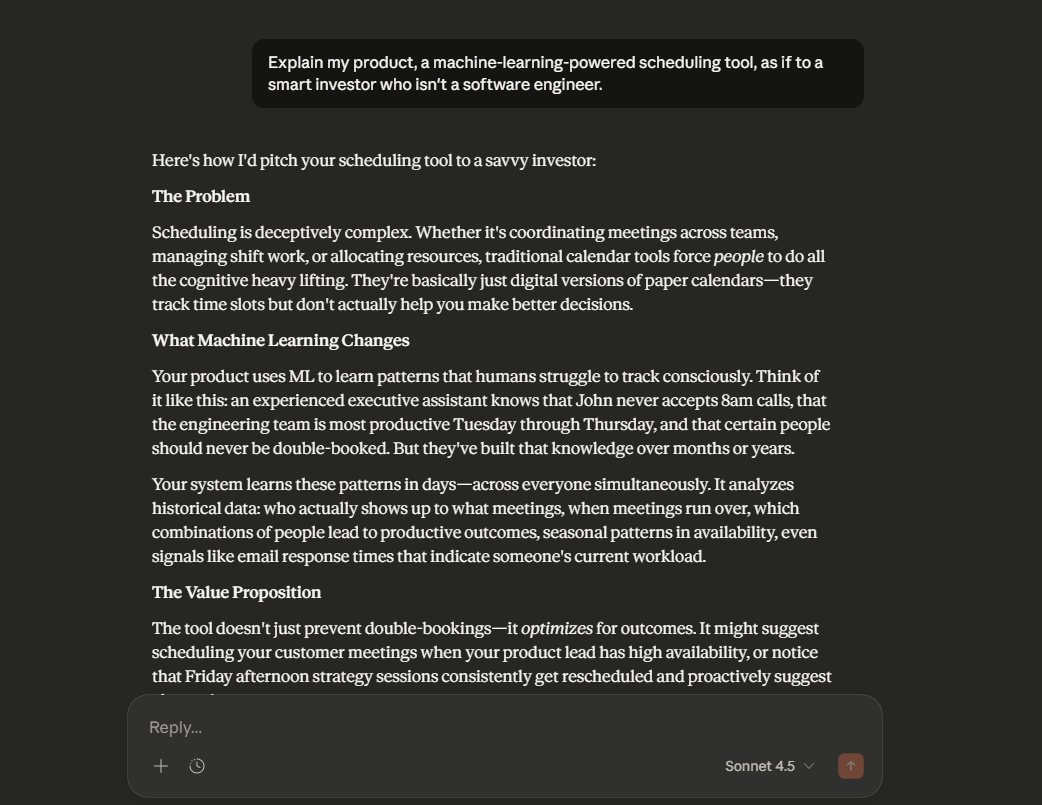
Your product section needs to be both technically accurate and easy for a non-expert to understand. It’s a tough balance to strike. Ask Claude to help you find that balance.
🛠️ Prompt it to “Explain my product, a machine-learning-powered scheduling tool, as if to a smart investor who isn’t a software engineer.” Make sure you cover the core features, the customer benefits they deliver, your current development stage, any intellectual property, and your future product roadmap.
For every feature, articulate the ‘so what’—the unique selling proposition and product differentiation that explains why a customer should care.
A brilliant product with no go-to-market strategy is a common reason startups fail. Founders get so excited about what they’re building that they neglect to plan how they’ll actually acquire customers. This oversight can make your entire business plan seem naive and unviable.
👀 Did You Know? 35% of startups fail due to insufficient demand, proving that even brilliant products need a solid go-to-market strategy to survive.
Use Claude as a brainstorming app to explore different marketing ideas and customer acquisition scenarios.
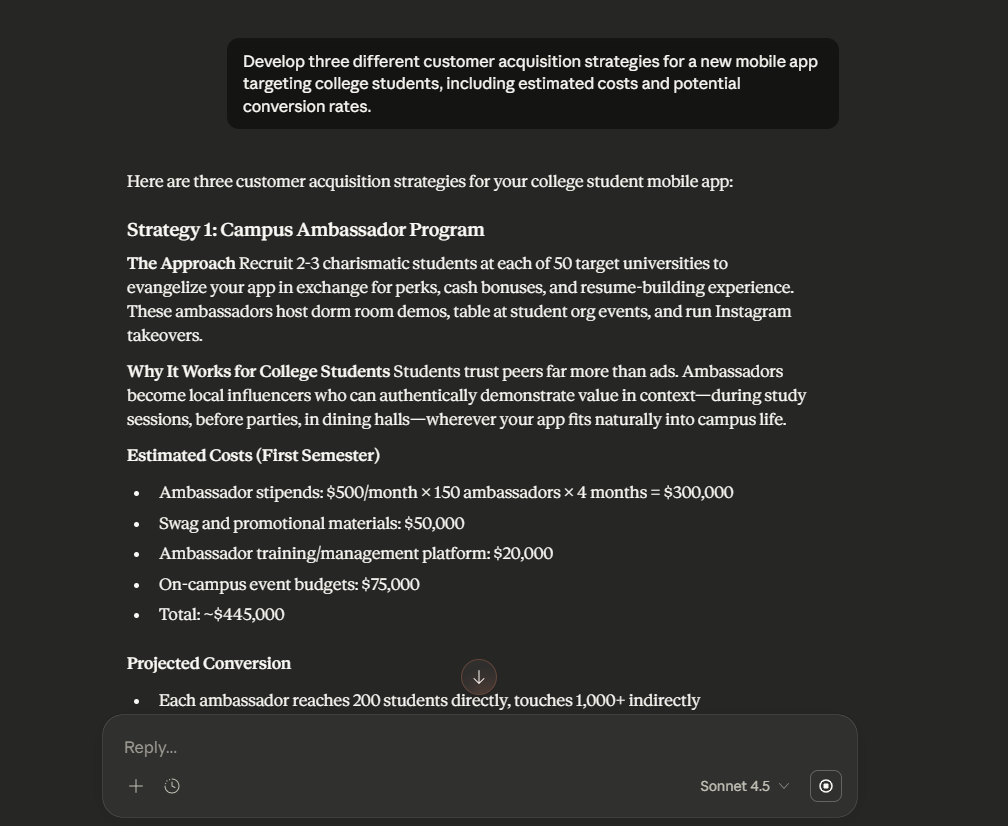
🛠️ Prompt it to outline a marketing and sales strategy covering your positioning, pricing model, promotional channels, and sales process. For example, ask it to “Develop three different customer acquisition strategies for a new mobile app targeting college students, including estimated costs and potential conversion rates.”
Your strategy should include:
Nothing destroys credibility faster than unrealistic financial projections. Investors have seen thousands of ‘hockey stick’ growth charts and are more interested in the logic behind your numbers than the numbers themselves. If you can’t defend your assumptions, your projections are worthless.
This is where many non-finance founders feel intimidated. You can use Claude to structure your financial statements, but you must provide the core assumptions.
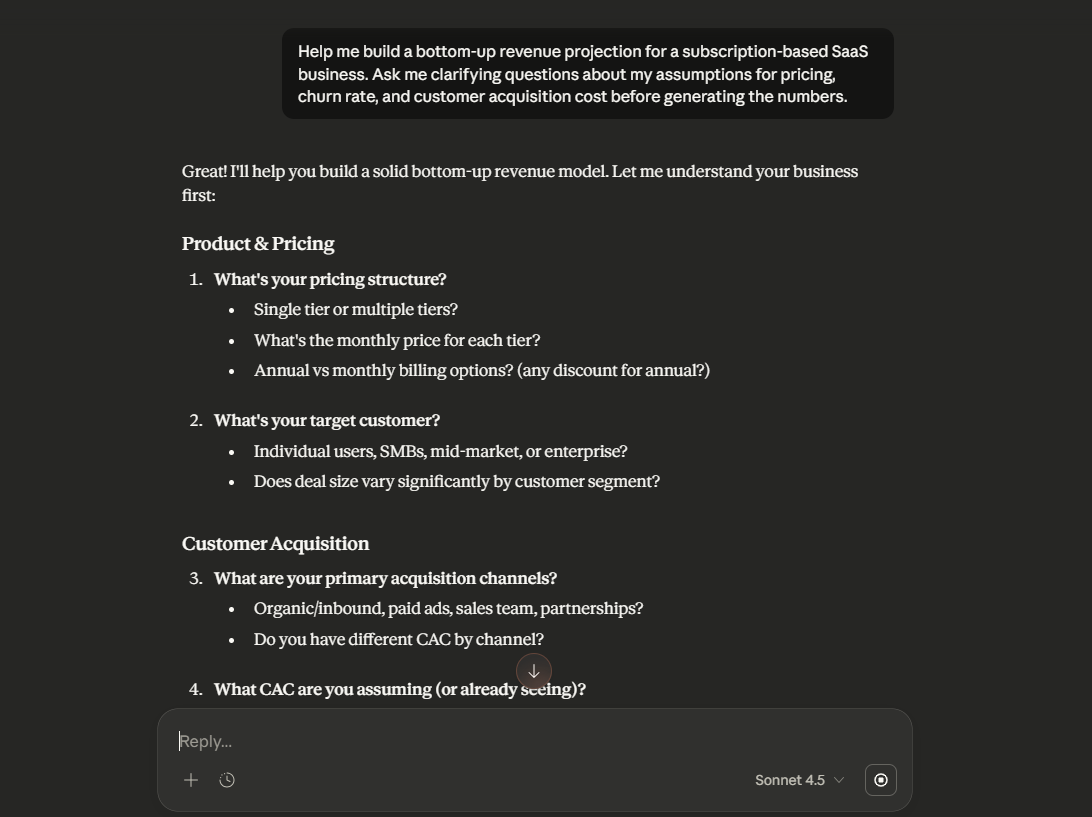
🛠️ Prompt it to “Help me build a bottom-up revenue projection for a subscription-based SaaS business. Ask me clarifying questions about my assumptions for pricing, churn rate, and customer acquisition cost before generating the numbers.”
Always create three scenarios—conservative, moderate, and optimistic. Document every assumption.
Your financial projections should include:
💡 Pro Tip: Need one place to store all your plan components? Try ClickUp’s Business Plan Template for free!
Treat this template like your “business plan HQ”—every section becomes a trackable item you can actually move forward. Use the Topics View to organize key areas, Timeline View to map your execution schedule, and Business Plan View to store the actual plan docs in one place. Then track progress with the built-in statuses (To Do, In Progress, Needs Revision, Complete), so your plan stays current as you build.
Getting underwhelming results from an AI tool can be frustrating. But most of the time, the issue isn’t the AI itself. It’s the prompt. When your prompts are vague or overly broad, the output tends to be just as generic.
If you want stronger, more useful content for your business plan, you need to write effective AI prompts that give Claude clear context and specific instructions. This helps the AI understand what you’re trying to achieve and produce results that actually move your work forward.
👀 Did You Know? Claude cuts task time 80% from 90 mins to 18 mins, showcasing AI speed for business plan drafting.
A table of example prompts for different sections of your business plan:
| Business plan section | Example prompt |
|---|---|
| Mission statement | 🛠️ “Write three mission statement options for a direct-to-consumer skincare brand targeting Gen Z. Make each progressively more specific and emotionally compelling, focusing on clean ingredients and sustainability.” |
| Market analysis | 🛠️ “Act as a market research analyst. Identify the top five trends affecting the global e-learning market and explain how each creates an opportunity or threat for a new language-learning app.” |
| Competitive analysis | 🛠️ “Analyze competitors like Duolingo and Babbel. Identify gaps in their offerings that a new AI-powered language app could exploit. Be specific about underserved customer needs, like advanced conversational practice.” |
| Financial projections | 🛠️ “Help me build a bottom-up revenue projection for a freemium mobile game. Ask me questions about my assumptions for user acquisition cost, conversion rate to paid, and average revenue per user before generating numbers.” |
| Executive summary | 🛠️ “Based on the following business plan sections, write a compelling one-page executive summary that would make a venture capitalist want to read more: [paste completed sections here]” |
Relying solely on a standalone AI tool like Claude for your business plan can lead to critical errors. You might end up with a plan based on outdated information or factual inaccuracies, completely disconnected from the reality of your business.
👀 Did You Know? 60% of IT leaders report the challenge of siloed data, leading to AI-generated plans that are flawed and disconnected from business reality.
This happens because AI tools, for all their power, have inherent limitations. Understanding these limitations helps you use AI as a powerful partner, not a flawed replacement for your own strategic thinking.
Here are the main gaps you need to be aware of before you rely on AI to do the thinking for you:
Your business plan is only useful if it actually connects to the work your team is doing—and that’s where a Converged Workspace like ClickUp comes in.
It brings everything into one place. Your plan, tasks, projects, and conversations all live together. That means when you make an update or assign a task, it’s connected to the bigger picture. Your business plan isn’t just a document anymore; it becomes a roadmap that actually guides your team’s work.
No more switching tabs or copying info across tools. Everything you need is already there, linked, and ready to act on. From tracking progress to keeping everyone aligned, ClickUp makes it simple to move from planning to doing.
ClickUp Brain, ClickUp’s native AI, bridges the gap between planning and doing by using context from your team’s actual work. Because it has access to your projects, docs, tasks, and chats inside ClickUp, it responds with real, relevant, grounded answers—not generic suggestions.
You can ask it questions in plain English:
Just type @Brain in a task comment or Chat message, and you’ll get instant insights pulled from live workspace data.
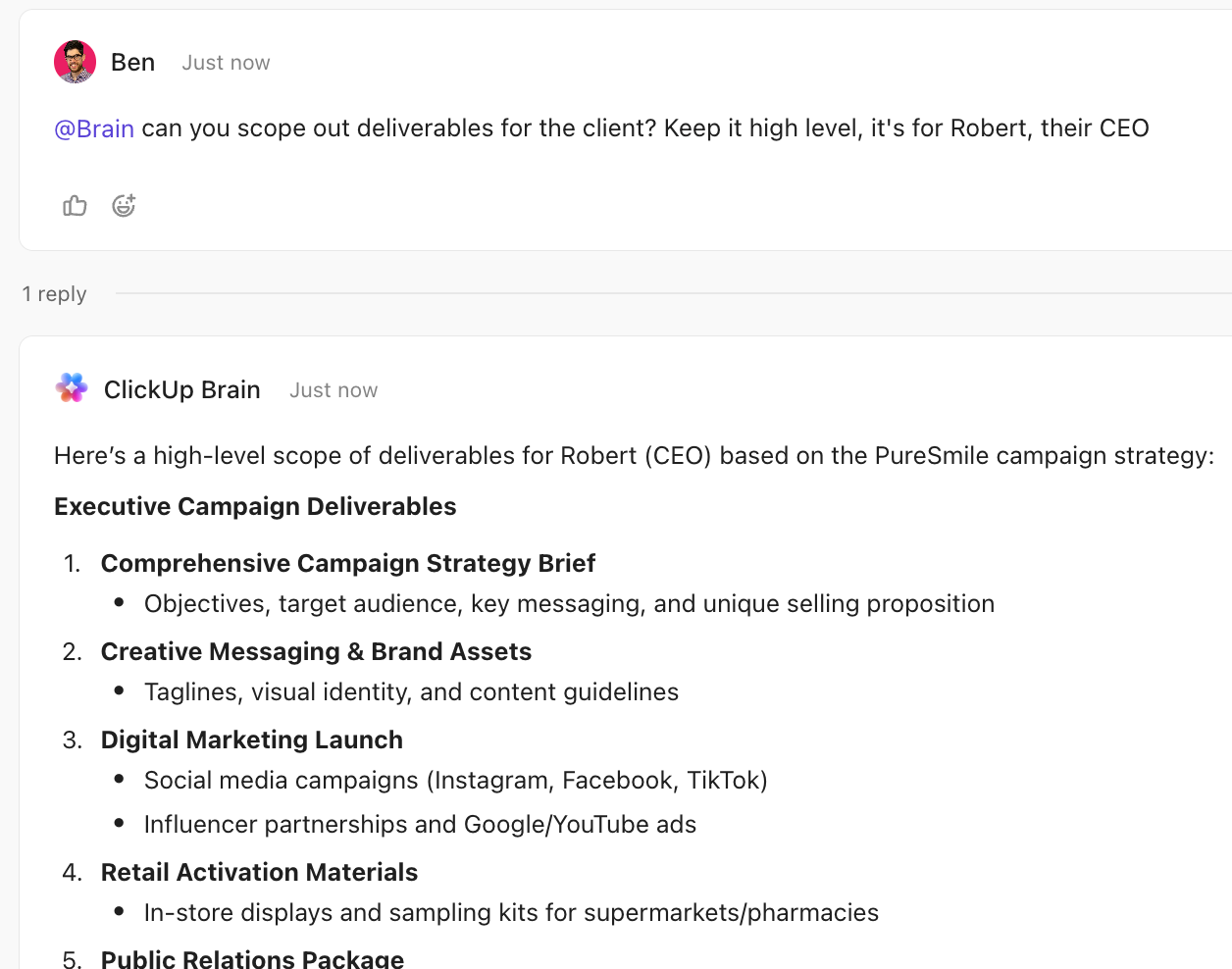
For example, you can prompt ClickUp Brain with:
🛠️ “Create a go-to-market plan for a B2B SaaS startup entering a crowded market, including key milestones, success metrics, and execution risks.”
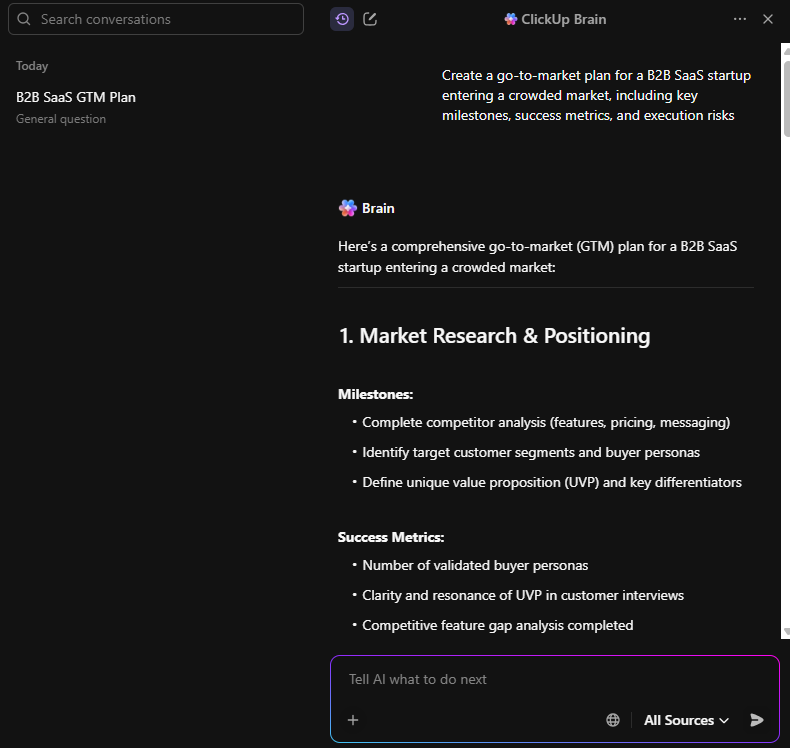
Another prompt can be:
🛠️ “Draft a marketing campaign plan for a new eco-friendly product launch, including target audience, messaging, channels, and KPIs.”
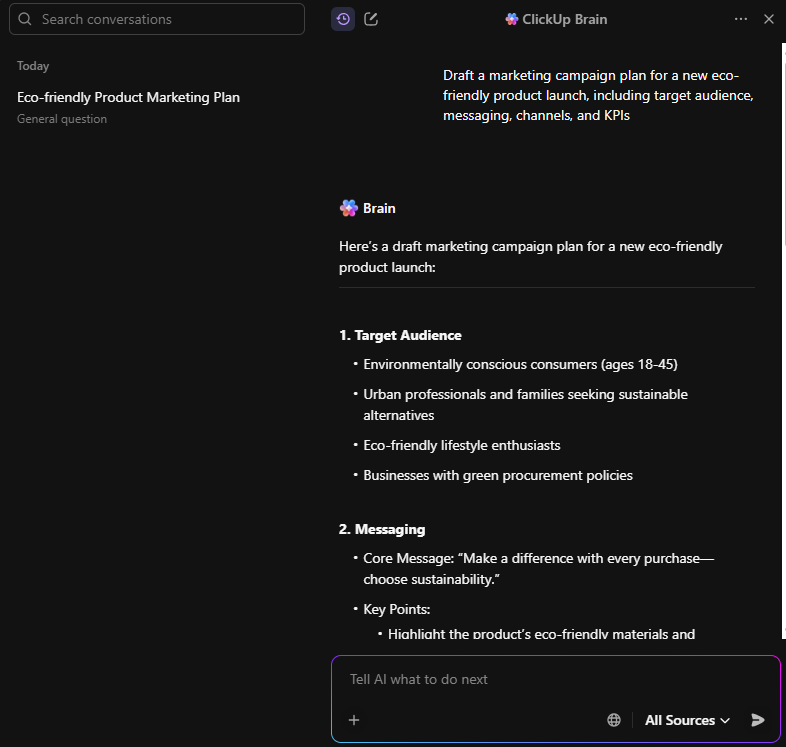
Using prompts like these, ClickUp Brain makes it easy to turn ideas into actionable tasks, helping plans actually get carried out instead of just sitting inside a doc.
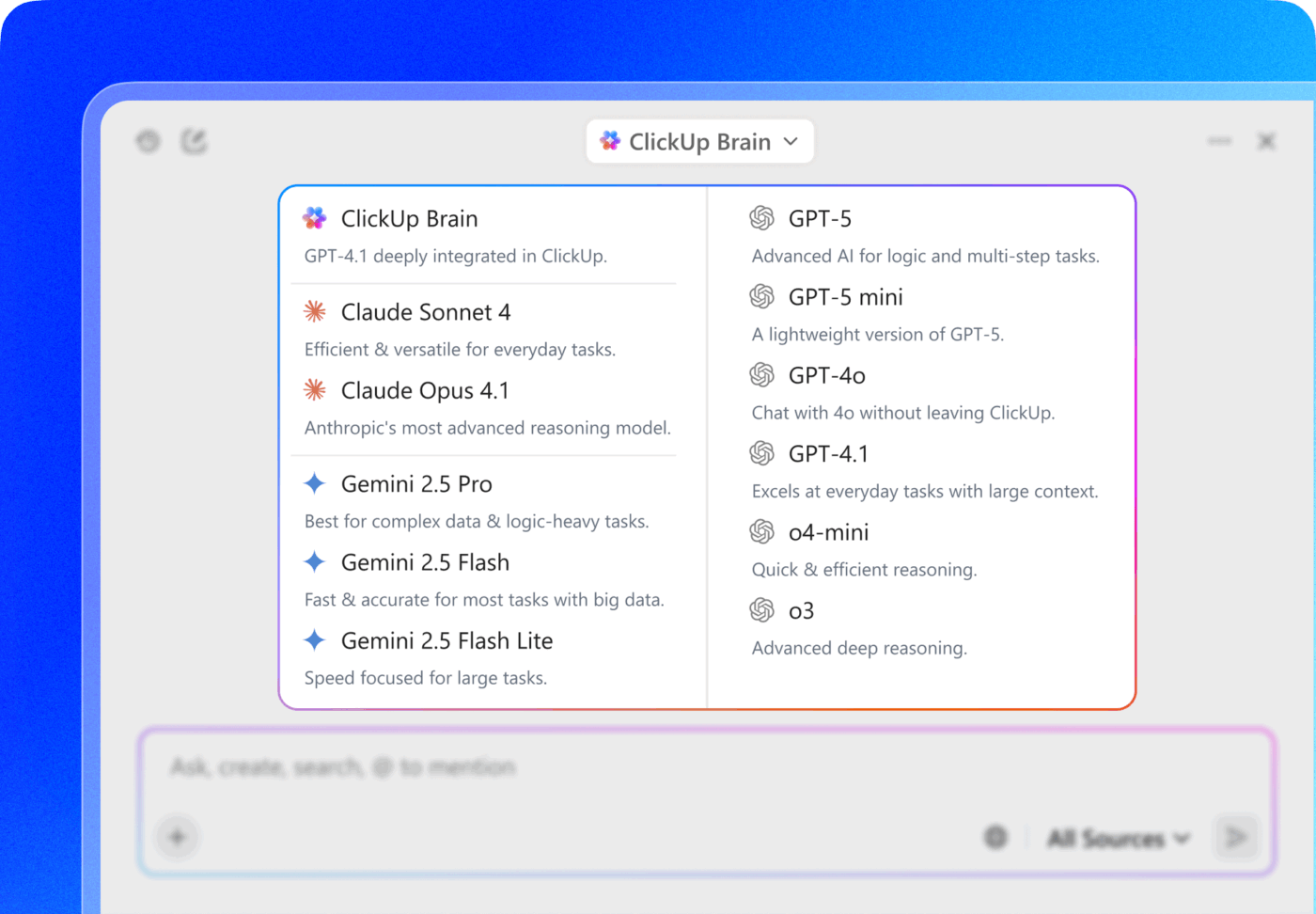
💡 Pro Tip: In ClickUp Brain, you can switch between multiple LLMs (including Claude) depending on what you need—use one model for fast summaries, another for sharper writing, and another for deeper reasoning. That way, you’re not copy-pasting between tools or losing context. Keep everything inside your workspace so the AI can respond based on the tasks, docs, and projects you’re already working in.
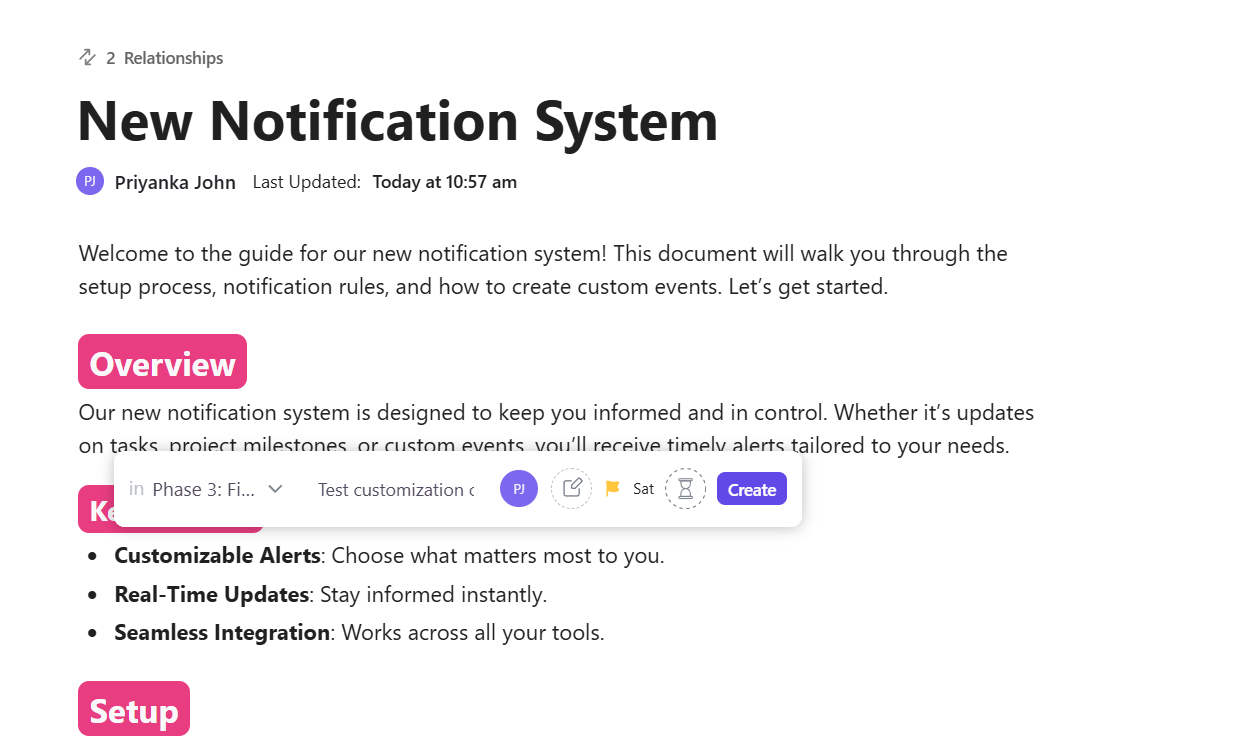
ClickUp Docs lets you collaborate on your business plan in real time—while keeping it tightly connected to execution.
As you outline goals, milestones, or strategies, you can highlight any text and instantly turn it into a task. Assign it to a teammate, add a due date, and link it to a project—all without leaving the document.
📽️ Watch this video to see how ClickUp’s templates and features can transform any type of planning into an executable roadmap:
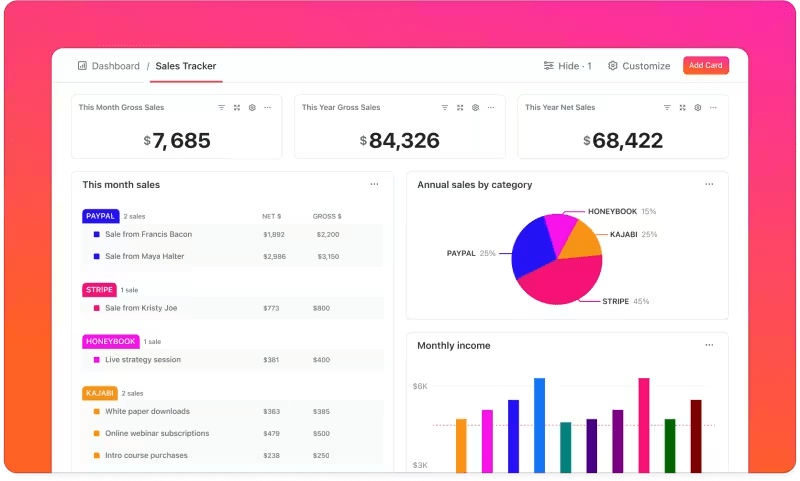
Planning doesn’t stop once work begins. With ClickUp Dashboards, you can track progress against your business plan in real time.
Dashboards let you turn workspace data into visual insights—charts, graphs, and timelines that show how work is tracking across teams and initiatives. Share them with stakeholders to keep everyone aligned without manual reporting.
AI tools like Claude make business planning faster and less intimidating. They help you organize ideas, draft sections, and move past the blank page. But speed alone doesn’t create impact.
A business plan only matters when it stays connected to execution. When goals, tasks, and conversations live in different tools, even the best plan gets ignored.
ClickUp helps close that gap by bringing planning and work into the same space. Your business plan lives alongside the tasks that bring it to life, making it easier for teams to stay aligned and act on strategy.
You don’t need to change everything at once. Start small by connecting one plan to real work. Try ClickUp for free and turn planning into progress, today. ✨
Claude can draft all sections of a business plan, but it requires your input for business-specific details, assumptions, and strategic decisions. Think of it as an accelerator, not a replacement for your founder insight.
Using Claude alone produces isolated documents, while ClickUp Brain works within your connected workspace. This means your business plan sections can link directly to tasks, timelines, and team collaboration for actual execution.
Claude excels at narrative sections such as executive summaries, market analyses, and product descriptions, where it can synthesize information and craft compelling language. Financial projections, however, require more human oversight and validation of assumptions.
A Claude-assisted business plan can be investor-ready if you validate all claims, customize the content to your specific business, and ensure financial projections are based on defensible assumptions. Investors evaluate the thinking behind the plan, not just the polish.

© 2026 ClickUp

There’s an easier way. Try a free AI Agent in ClickUp that actually does the work for you—set up in minutes, save hours every week.