


Understanding how to track productivity isn’t just about measuring time spent on tasks.
It’s about identifying what drives efficiency, where workflows break down, and how to optimize performance without adding unnecessary complexity.
With the right approach, teams can eliminate guesswork, make data-driven decisions, and improve productivity sustainably. Let’s dive in! 🚀

 Summarize this article for me please
⏰ 60-Second Summary
Tracking productivity isn’t just about monitoring hours—it’s about optimizing workflows, improving efficiency, and ensuring meaningful progress:
- Define clear goals using SMART criteria to measure employee productivity effectively
- Use key metrics like task completion rate, engagement levels, and workload distribution to identify areas for improvement
- Leverage dashboards and reports to gain real-time visibility into team performance and track productivity at work without micromanagement
- Automate workflows with AI to eliminate repetitive tasks, improve accuracy, and free up time for high-impact work
- Address common challenges such as data overload, misleading insights, and resistance to tracking by focusing on transparency and value
- Turn insights into action by refining processes, balancing workloads, and making informed decisions
Streamline productivity tracking with ClickUp’s dashboards, automations, and AI-powered insights to keep teams focused and efficient.
How to Track and Monitor Productivity for Better Results?
Summarize this article for me pleaseThe Importance of Work Productivity Tracking
Imagine working tirelessly all day, only to wonder where the time went. Did the effort translate into results, or did distractions eat away at productivity?
Without a clear strategy for how to track productivity, it’s impossible to measure real progress.
Businesses that overlook tracking employee productivity often face the following:
- Missed deadlines and inefficient workflows
- Unbalanced workloads that lead to burnout
- Unclear benchmarks for employee productivity, making performance reviews difficult
Why tracking productivity leads to better results?
Teams that prioritize monitoring employee productivity work smarter. They don’t just track hours but also analyze impact. By setting clear expectations, recognizing small accomplishments, and using a structured productivity tracking system, teams can refine their workflows and boost efficiency.
For remote workers, the challenge is even greater. Without direct supervision, productivity can be harder to gauge. Tracking productivity at work ensures:
- Projects move forward without constant check-ins
- Workloads are distributed fairly, reducing bottlenecks
- Performance is measured by task completion rate, not just hours worked
Beyond efficiency, monitoring productivity strengthens employee engagement. It helps managers identify patterns, reward quality work, and provide constructive feedback. The right monitoring software turns productivity tracking into a valuable tool, ensuring every effort contributes to the company’s success.
Summarize this article for me pleaseKey Metrics for Tracking Productivity
Measuring productivity isn’t just about tracking hours—it’s about understanding where time and effort go. A strong productivity tracking system helps businesses make data-driven decisions, optimize workflows, and ensure teams stay on the same page.
Without these insights, it’s impossible to measure productivity effectively or improve performance.
1. Task completion rate: Are deadlines being met?
A high task completion rate signals efficiency, while frequent delays may point to tracking productivity issues, unclear priorities, or workflow bottlenecks. Monitoring employee productivity through completion trends helps managers identify whether deadlines are realistic or if adjustments are needed.
✨ Use case: A software development team monitors sprint completion rates. If delays become frequent, they investigate whether the backlog is too complex or if developers need additional support
2. Employee engagement levels: Are employees motivated?
Engaged employees contribute more, collaborate better, and boost employee productivity. Tracking employee engagement through surveys, participation levels, and real-time feedback helps gauge morale and commitment.
✨ Use case: A remote marketing team sees engagement drop in project discussions. By running pulse surveys, they identify workload concerns and implement performance metrics to balance responsibilities
3. Time spent on tasks: Are workflows efficient?
Tracking time spent on tasks helps determine whether employees are working efficiently or if improvements in task management are needed. If routine tasks take too long, automation or process optimization may be necessary.
✨ Use case: A customer support team finds that handling technical issues takes twice as long as basic inquiries. They introduce a knowledge base to improve response times
4. Task accuracy and quality: Is the work up to standard?
Productivity isn’t just about speed—it’s about measuring quality too. If employees complete tasks quickly but require multiple revisions, productivity suffers. Tracking accuracy ensures that efficiency doesn’t come at the cost of quality.
✨ Use case: A content team tracks revision rates. When certain writers require frequent edits, managers provide constructive feedback and additional writing training
5. Workload distribution: Is work evenly spread across the team?
Uneven workloads lead to burnout and decreased employee productivity. By analyzing task assignments, teams can ensure fairness and prevent overload, improving both efficiency and employee happiness.
✨ Use case: A project manager notices that two employees handle 80% of high-priority tasks. Using a productivity tracking system, they redistribute work more evenly
6. Deadlines met vs. missed: Are projects staying on track?
A pattern of missed deadlines signals potential time management issues, unrealistic expectations, or inefficient workflows. Tracking deadlines helps teams track performance and adjust accordingly.
✨ Use case: A sales team monitors proposal submission deadlines. If delays increase, they assess workload distribution and introduce monitoring tools to identify workflow inefficiencies
👀 Did You Know? Ever notice how deadlines tend to stretch when there’s no accountability? That’s Parkinson’s Law in action—the idea that work expands to fill the time available
Tracking deadlines helps keep projects on schedule and prevents unnecessary delays.
7. Employee satisfaction and work-life balance: Is productivity sustainable?
A stressed, overworked team isn’t a productive one. Tracking employee sentiment, absenteeism, and feedback helps businesses balance work hours and prevent burnout.
✨ Use case: An HR team reviews survey responses and notices rising concerns about workload. Leadership implements flexible scheduling to improve work-life balance
8. Performance reviews and feedback: Is there room for improvement?
Regular performance reviews ensure employees receive clear constructive feedback to refine their skills. When paired with goal setting, reviews help employees align their efforts with business objectives.
✨ Use case: A design agency conducts quarterly reviews using a productivity tracking system. They analyze employee performance and provide tailored coaching to improve future output
By focusing on these key metrics, teams gain valuable insights into productivity trends, enabling informed decisions that drive efficiency and engagement.
Read More: Best Employee Monitoring Software for Mac
Summarize this article for me pleaseHow to Track and Monitor Productivity?
Effectively tracking and monitoring productivity involves a combination of strategic planning, leveraging technology, and fostering a culture of continuous improvement.
With the right approach, teams can eliminate inefficiencies, optimize workflows, and measure real progress.
Set clear and measurable goals
Without defined goals, productivity tracking becomes guesswork. Establishing Specific, Measurable, Achievable, Relevant, and Time-bound (SMART) goals provides a clear roadmap for your team. This approach ensures that everyone understands their responsibilities, priorities, and expected outcomes.
📌 Why it matters:
- Goals act as benchmarks, helping measure employee productivity over time
- Teams stay aligned with organizational objectives and can adjust workflows when necessary
- Clearly defined targets reduce ambiguity, increasing efficiency and accountability
With ClickUp Goals you can set and track your goals efficiently. To streamline this process further, consider using the ClickUp SMART Goals Template.

This template helps in:
- Defining clear objectives with structured goal-setting frameworks
- Visualizing progress to keep teams motivated and on track
- Organizing tasks into manageable steps for better execution
Utilize dashboards and reports
Raw data alone isn’t enough; teams also need real-time visibility of their productivity levels. Dashboards and reports help analyze workloads, track performance, and monitor efficiency at a glance.
📌 Why it matters:
- Provides an overview of productivity trends, helping identify strengths and inefficiencies
- Helps in tracking employee productivity by monitoring task completion, workload balance, and performance metrics
- Prevents bottlenecks by offering data-driven insights into progress

ClickUp Dashboards provide customizable views of your team’s tasks, progress, and key performance indicators (KPIs).
Teams can tailor dashboards to:
- Monitor task completion rates and overall team efficiency
- Analyze workload distribution to prevent burnout
- Generate automated reports for better decision-making
Additionally, the Using ClickUp for Productivity Template simplifies tracking by offering:
- Pre-built workflows to structure and automate work
- Real-time analytics to measure productivity tracking
- Task prioritization tools to optimize daily operations

Leverage AI and automation
AI and automation are game-changers in productivity tracking. Instead of manually managing updates, teams can automate repetitive tasks, generate reports, and gain predictive insights into performance trends.
📌 Why it matters:
- Reduces manual work by automating status updates, notifications, and progress reports
- Boosts employee productivity by cutting time spent on routine administrative tasks
- Enhances accuracy by eliminating human error in tracking data
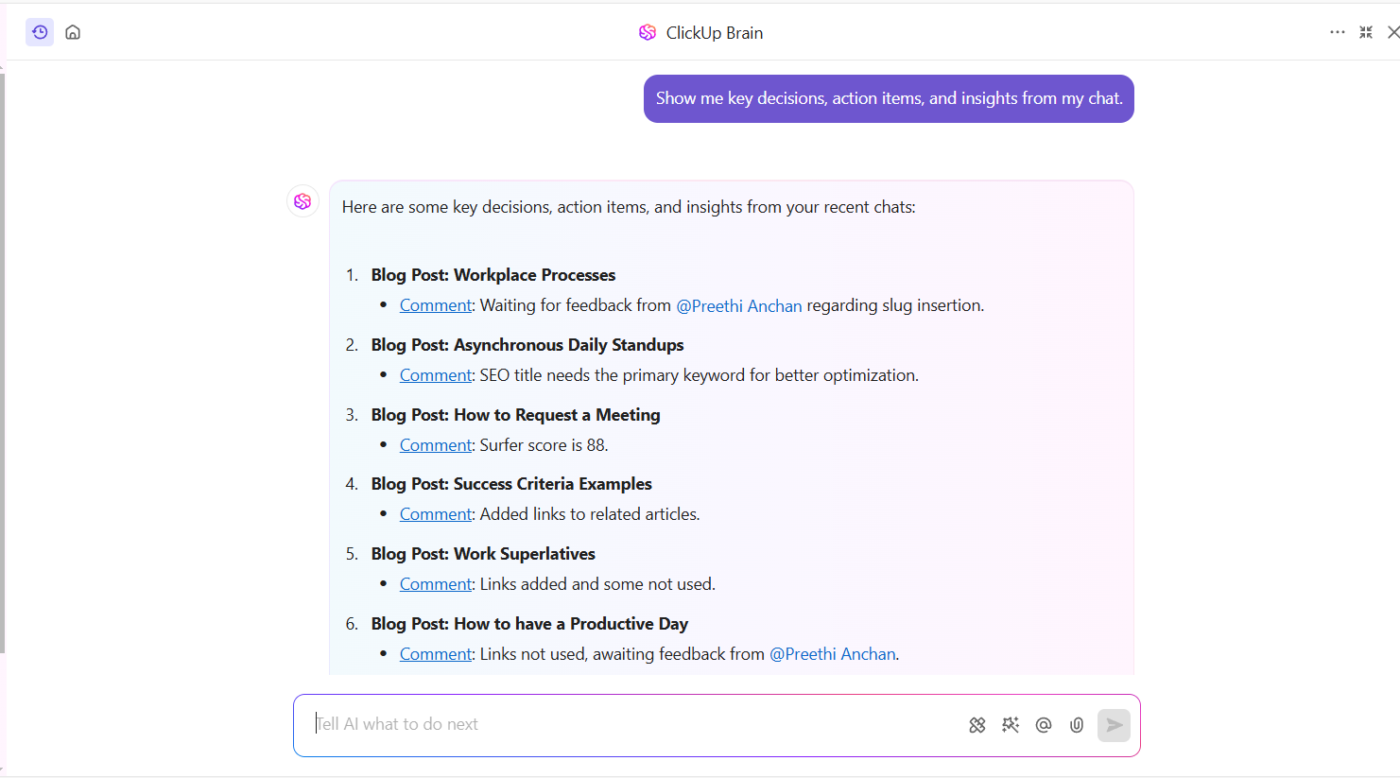
ClickUp Brain leverages AI to automate task prioritization, generate instant summaries, and provide actionable insights. When combined with ClickUp Automations, teams can:
- Automatically assign tasks based on workflow triggers
- Set up recurring check-ins to track progress without micromanagement
- Integrate with multiple tools for seamless data tracking
If you want to understand more about using AI for productivity, check this out 👇
For meetings and discussions, ClickUp AI Notetaker ensures no critical insights are lost. It automatically records, transcribes, and summarizes key takeaways that you can quickly turn into tasks, allowing teams to focus on discussions rather than scrambling to take notes.
Implement regular reviews and feedback loops
Tracking productivity isn’t a one-time effort—it requires continuous monitoring and course correction. Regular performance reviews and structured feedback loops ensure that employees receive insights into their efficiency and growth areas.
📌 Why it matters:
- Provides constructive feedback, improving employee engagement and motivation
- Helps in identifying patterns of high and low performance over time
- Enhances accountability, ensuring team members stay focused on deliverables
Using the ClickUp Personal Productivity Report Template, individuals and teams can:
- Track individual progress with structured self-assessments
- Identify areas for improvement through performance analytics
- Create personalized reports to measure output against set goals
Tracking productivity is about working smarter. When teams set clear goals, leverage dashboards, automate workflows, and review progress regularly, productivity stops being a guessing game.
With the right tools and insights, work becomes more structured, decisions become data-driven, and efficiency turns into a measurable outcome.
Summarize this article for me pleaseHow to Improve Productivity Using Data Insights?
Tracking productivity is one thing, but using data to improve it is where the real impact happens. When you analyze employee productivity beyond just hours worked, you uncover opportunities to work smarter, eliminate inefficiencies, and keep your team aligned with business goals.
Identify hidden productivity barriers
Numbers don’t always tell the full story unless you know what to look for. If tasks are repeatedly delayed or workloads feel unbalanced. Monitoring employee productivity over time helps you identify whether the issue is unrealistic deadlines, workflow inefficiencies, or a lack of resources.
Instead of reacting to problems after they occur, data allows you to adjust proactively.
Move from measuring productivity to optimizing it
Traditional productivity tracking systems focus on monitoring output, but the real value comes from using insights to refine how work is done.
When you track task completion rates, time spent on projects, and performance metrics, patterns start to emerge.
Recognizing these trends helps you streamline repetitive processes, eliminate unnecessary steps, and focus your team’s efforts on high-impact work.
Turn insights into smarter decisions
Data is only useful if it drives action. Instead of simply reporting on what happened, use real-time productivity tracking to make immediate improvements.
If a team consistently struggles to meet deadlines, a closer look at the workload distribution and task dependencies can highlight where adjustments need to be made. Small changes based on data lead to measurable improvements in productivity, employee performance, and overall efficiency.
Use real-time reports to make productivity measurable
Instead of waiting for monthly reviews, tracking employee productivity through real-time reports allows you to spot inefficiencies as they happen.
You don’t have to rely on guesswork to improve performance when data provides a clear picture of what’s working and what’s slowing teams down.
Data-driven decisions help you refine processes, align team efforts with key objectives, and make long-term productivity improvements sustainable. Instead of tracking more, you focus on working smarter with the right insights.
Also Read: Best Goal Tracking Apps
Summarize this article for me pleaseOvercoming Challenges in Tracking Productivity
Even with the right tools, tracking employee productivity doesn’t always lead to better efficiency. The biggest challenges aren’t just data accuracy or resistance to tracking tools—they come from misinterpreted insights, poor execution, and a lack of clear outcomes.
When productivity tracking creates more work than it saves
Some teams spend more time tracking productivity at work than actually improving it. If managers rely on manual reports, disconnected tracking tools, or excessive performance monitoring, productivity tracking itself becomes a burden.
🛠 The fix: Automate data collection using integrated tracking systems that require minimal input. Focus on high-value insights, such as task progress, work quality, and efficiency trends, rather than tracking every detail
👀 Did You Know? 51% of businesses implement automation initiatives primarily to boost efficiency?
By automating repetitive tasks, companies can reduce the risk of missed deadlines and streamline their workflows.
When tracking leads to misleading conclusions
Numbers don’t always tell the full story. Measuring employee productivity by hours worked, instead of impact, can make high-performing but strategic workers look unproductive, while inefficient but always-busy employees appear more effective.
🛠 The fix: Balance quantitative metrics (task completion rates, missed deadlines) with qualitative insights (project impact, employee engagement). Combine self-reported insights with data-driven performance tracking to avoid misleading conclusions
💡 Pro Tip: Use ClickUp Forms to collect direct feedback from employees about their workload, blockers, and productivity challenges. These responses provide real-world context that data alone may miss, ensuring a more accurate and well-rounded view of team performance

When productivity tracking feels like micromanagement
Employees may push back against productivity tracking systems when they feel like they’re being constantly monitored. This can lower employee engagement and even reduce productivity.
🛠 The fix: Reframe tracking as a tool for better work allocation and reduced burnout. Instead of focusing on monitoring hours, help employees use tracking tools for self-improvement, showing them where they can reduce repetitive tasks, improve efficiency, and achieve better work-life balance
When productivity insights don’t lead to action
Many organizations track performance but fail to act on the data. Simply identifying inefficiencies isn’t enough—if teams don’t know how to interpret or apply insights, tracking becomes useless.
🛠 The fix: Build a culture of data-driven adjustments. Use regular check-ins to review trends, adjust priorities, and refine workflows based on real performance insights, not just reports. Ensure tracking leads to specific, measurable improvements, such as optimizing workflows or redistributing workloads
When productivity tracking doesn’t adapt to different work styles
Not all teams operate the same way. Standardized tracking methods may not work across creative roles, technical teams, and client-focused positions.
🛠 The fix: Use customizable tracking solutions that allow teams to define productivity based on role-specific goals. Instead of rigid time tracking, use goal-based benchmarks, task progress reports, and collaborative feedback loops to ensure tracking aligns with how work actually gets done
Tracking employee productivity should feel like a workflow improvement tool, not a performance surveillance system. When teams focus on smarter automation, qualitative insights, and adaptable tracking methods, they avoid common pitfalls and turn productivity tracking into a strategic advantage.
Read More: 10 Factors Affecting Productivity at Work
Summarize this article for me pleaseTurn Productivity Tracking Into Meaningful Results
The real value of productivity tracking comes from what you do with the insights. When teams move beyond just measuring performance and start refining workflows, balancing workloads, and eliminating inefficiencies, they see real progress.
With the right approach, tracking becomes less about monitoring and more about empowering teams to work smarter. A system that removes obstacles, fosters accountability, and optimizes efficiency leads to sustained productivity without burnout.
Sign up for ClickUp to streamline productivity tracking, automate workflows, and keep teams focused on what truly matters.


Everything you need to stay organized and get work done.

Recent Articles
Marketing Agency Productivity: Where Your Margin Actually Goes 
Marketing Agency Productivity: Where Your Margin Actually Goes
8 Communication Strategies That Actually Fix Team Chaos 
8 Communication Strategies That Actually Fix Team Chaos
What Is Tacit Knowledge? Definition, Benefits and Examples
What Is Tacit Knowledge? Definition, Benefits and Examples
