






Still downloading templates?
There’s an easier way. Try a free AI Agent in ClickUp that actually does the work for you—set up in minutes, save hours every week.
Sorry, there were no results found for “”
Sorry, there were no results found for “”
Sorry, there were no results found for “”
To err is human. Everyone makes mistakes at work.
Nearly every organization has felt the impact at some point; only 1.3% of teams report never experiencing issues caused by human error.
The difference, then, isn’t between who makes a mistake and who doesn’t. It’s in what happens after.
A mistake is an event, but your response is a choice. The ownership you take, the clarity you bring to communication, and the solution you put forward matter far more than the misstep itself.
So, how do you make the right choice when a mistake happens?
Let’s walk through how to handle mistakes at work and reduce repeat errors, without damaging trust or confidence along the way.
Some mistakes are obvious right away. Others surface later when something breaks or a conversation goes sideways. But they fall into four predictable patterns:
Communication challenges happen when something you meant to say doesn’t land the way you expected, or doesn’t get said at all.
📌 Examples:
Task and execution misses show up when the work delivered doesn’t match what was expected, but they rarely get you fired.
📌 Examples:
Process and documentation errors happen when systems rely too heavily on memory instead of structure. They’re rarely dramatic in the moment, but they compound over time and can cause massive confusion.
📌 Examples:
Unlike task or process mistakes, interpersonal mistakes aren’t always visible. The work gets done, but something feels off in the relationship.
📌 Examples:
👀 Did You Know? Studies suggest that extreme perfection is bad for your health. People who are constantly trying to avoid mistakes or meet impossibly high standards end up with lower job satisfaction. They’re more prone to higher burnout than their counterparts.
You’ve made a mistake. Now what? The way you respond in the moments that follow matters far more than the mistake itself. Here are six practical tips:
Before you do anything, you need to get out of panic mode. It’s completely normal to feel a rush of frustration, anxiety, or negative feelings. But those emotions can cloud your judgment and affect your mental health.
Here’s what to do:
📮 ClickUp Insight: More than half of respondents type into three or more tools daily, battling “app sprawl” and scattered workflows.
While it may feel productive and busy, your context is simply getting lost across apps, not to mention the energy drain from typing. BrainGPT brings it all together: speak once, and your updates, tasks, and notes land exactly where they belong in ClickUp. No more toggling, no more chaos—just seamless, centralized productivity.
Your instinct might be to explain why the mistake happened. But leading with context can sound like an excuse, even if it’s true. So, the best thing you can do is accept the mistake as yours to fix.
So, pause and say this to yourself: “I made this mistake. It is my responsibility to address it.” When you claim the mistake, you gain control over the next steps.
👀 Did You Know? Our brains resist acknowledging mistakes because it can feel like a threat to self-image and status, which leads people to double down rather than adjust course.
This resistance creates cognitive dissonance, a mental conflict that many people avoid by sticking to incorrect beliefs or denying errors. Psychologists argue that learning to acknowledge mistakes is essential for personal growth, healthier relationships, and better decision-making at work
Now that you own the narrative, you want to shape it. Here’s what to do:
This helps you do three things: state what happened, show that you prioritize communication, and promise a solution-focused follow-up. It builds trust at the very moment it could be breaking.
📚 Read More: How to Create a Positive Work Environment
Anyone can bring a problem to the table. What your team needs right now is someone who shows them the path forward.
It doesn’t have to be perfect; it just has to show you’ve thought about the next step.
Here’s what to do:
📚 Read More: Learn How to Perfect Client Communication
Decided on the solution? Great.
What next?
Fix the issue quickly, even if it means putting in some extra hours initially. You want to limit the potential damage and prove your commitment. If you need help, ask for it.
Also, reflect on why the mistake happened. Was the learning process unclear? Was there a communication gap? Did any advice go ignored? Note down what you noticed.
You could keep a simple log for yourself, like:
Your responsibility doesn’t end with fixing the mistake.
Following up provides reassurance that the issue is truly resolved and shows that the mistake wasn’t just a one-time slip.
So, once the dust settles, send a brief follow-up to anyone affected.
Something like, “Hi everyone, just circling back to confirm that [corrective action] has been completed. Thank you for your patience. I’ve also [updated the process/document] to prevent this in the future.”
This message turns the page, improves workplace collaboration, and helps you make sure the mistake leaves a positive legacy.
🤯 How job insecurity affects mistakes at work: Feeling insecure about your job makes you more likely to make mistakes. Research shows that when employees perceive their job as uncertain or unstable, their ability to detect and avoid errors decreases. This effect is tied to burnout.
Here’s how to apologize for a mistake professionally 👇
If a deadline has already passed, here’s how to talk about the mistake:
“Hi Jane, I’m so sorry to have missed the deadline for the project. I take full responsibility for this. To fix this, I am prioritizing this task above all else today. You will have the completed deliverable by tomorrow at the latest.”
The moment you find an error in the information you just shared, you want to correct the record fast. Every minute the wrong data is out there, it creates more work and confusion for others.
Here’s how to structure your apology:
“Hello everyone, I need to send a correction regarding my earlier message about [project]. The [figures] I provided were incorrect. The correct figures are [correct figures]. I’ve also [corrected the source document/updated the shared dashboard]. I apologize for any confusion or extra work this error has caused.”
Someone was counting on you, and you forgot. In your apology, you want to show that their priority is now your priority, and you have a concrete plan to ensure it’s your last lapse. Here’s what to say:
“Hi Sarah, I’ve just realized that I completely dropped the ball on the [task] you asked me for [on day/in our meeting]. I’m sorry for the delay and any frustration it has caused.
This is my priority now. I have blocked [time] on my calendar to focus on this exclusively. You will have [the deliverable/my update] by [specific time]. Thank you for your patience as I fix this.”
If you’ve miscommunicated with a client or provided poor service to a customer, your apology has to correct the fact and reconfirm your shared goals. Your response would be:
“Hi David, thank you for your feedback on [specific point of confusion]. I’ve gone over our notes, and I see a clear disconnect on our end regarding [the specific point]. I apologize for that lack of clarity on our part.
Moving forward, I will share a brief written summary after each call to confirm action items and decisions. Does this sound right to you?”
When you’ve made a mistake that impacts your company’s revenue, you need to issue an apology and a corrective action plan that mentions exactly how you’ll solve the issue. Take cues from the following script:
“Hi Jake, I need to correct an error I made. I [describe the action]. This led to an undercharge of [amount]. I’ve already [describe the solution] and notified the client with my apologies for the error.
To prevent this, I am adding a step to my process to double-check rate sheets against client agreements before finalizing any invoices. I will ensure this is isolated and won’t happen again.”
The fix is complete. Your apology has been sent. Now comes the hard part: moving on.
This will ultimately affect how your mistake impacts your career and how the consequences ripple out.
Here’s how to rebuild yourself after a mistake:
After a mistake, your brain might replay your error on a loop, which can increase guilt, make you feel worried, and dent your confidence. A major concern at this point is that the mistake will define you, but it will not.
You want to cut this loop to see the mistake as a single event, not a definition of your capability. Here’s what to do:
If you’re worried that one mistake will overshadow your entire body of work, this Reddit user’s perspective may help:
From my experience I think people also remember all the good things you do way more than the mistakes. They expect everyone to make mistakes occasionally. When I first started working I took a pretty bold and aggressive approach, often putting myself in the deep end. Means I often stood out in a positive way but also often made mistakes. Generally people have only positive things to say about my work, noone remembers the dozens of mistakes I’ve made.
An error can create an invisible crack in your team’s trust. The question they’re unconsciously asking is, “Will this happen again?” You want to answer that question with a series of consistent, predictable actions that seal that crack for good. Here’s what to do:
You know what’s the truest sign of learning from your mistake at work?
Course correction. It could be a checklist, a change in processes, or automation that protects you and your team going forward.
You would want to share the fix in the meeting or team channel. Talk about the issue you ran into and how you fixed it. This shows you’re a problem solver.
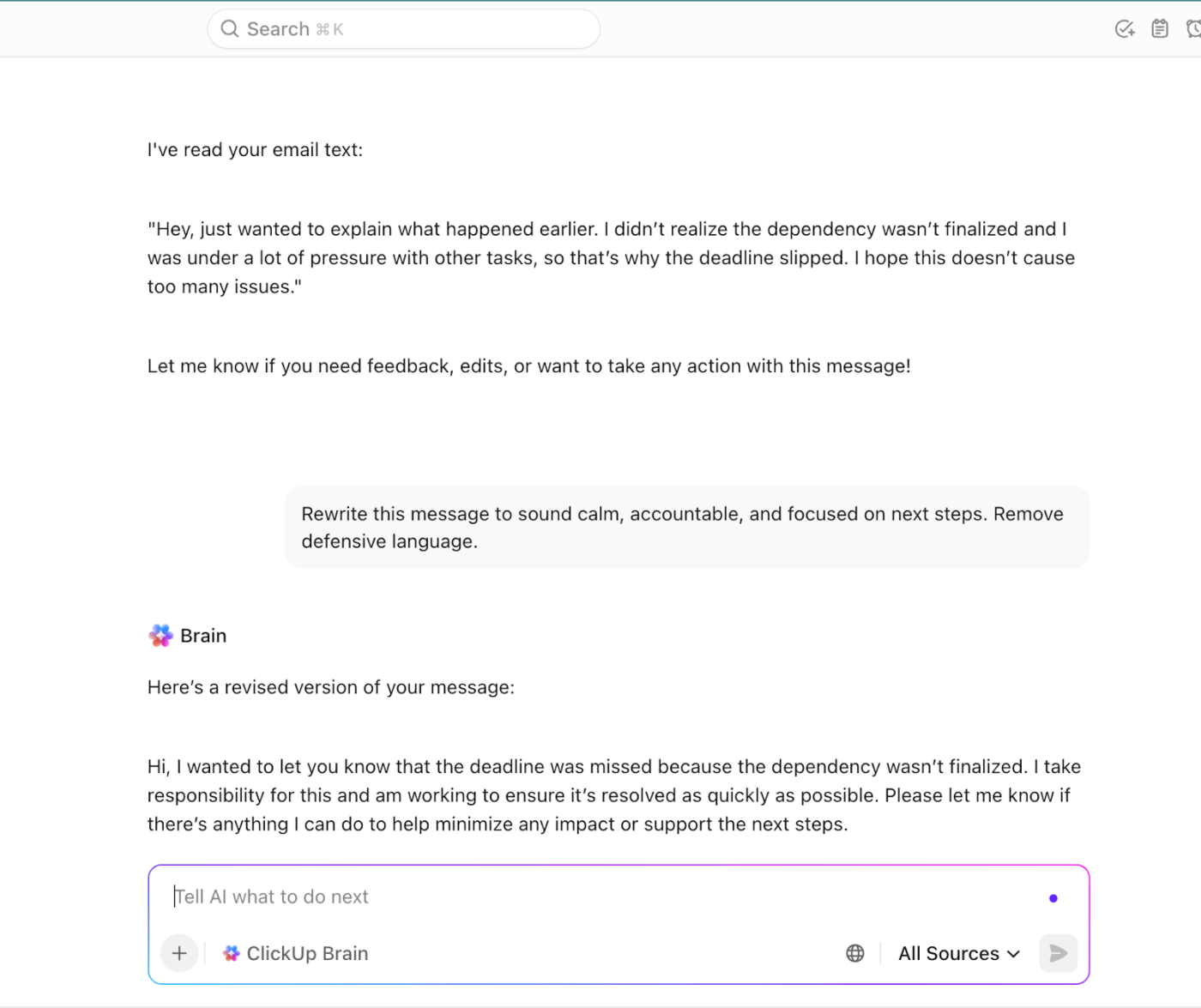
💡 Pro Tip: Use ClickUp BrainGPT to rewrite communication after a mistake.
After making a mistake at work, you don’t want to overexplain or under-communicate.
BrainGPT, your AI writing assistant, helps you reset the tone before the message goes out.
Use BrainGPT to:
Mistakes are inevitable, but the right systems can make them far less likely. Work today is broken. Tasks, documents, and communication are scattered across tools, which makes errors easy to miss.
ClickUp, the world’s first converged AI Workspace, unifies all your digital tools and workflows.
It helps you reduce work sprawl by bringing everything needed to get work done into one place.
When everything lives in one place, teams stop relying on memory, inboxes, and mental checklists. Context doesn’t get lost between tools. Dependencies are visible. Ownership is clear.
And mistakes are caught earlier because work is easier to track, review, and revisit.
Let’s see how:
Most repeat mistakes happen because important steps live in someone’s head. When a task starts to feel familiar, it’s time to get it out of your brain and into a system.
ClickUp makes this easy because SOPs, Docs, and checklists live directly inside the work.
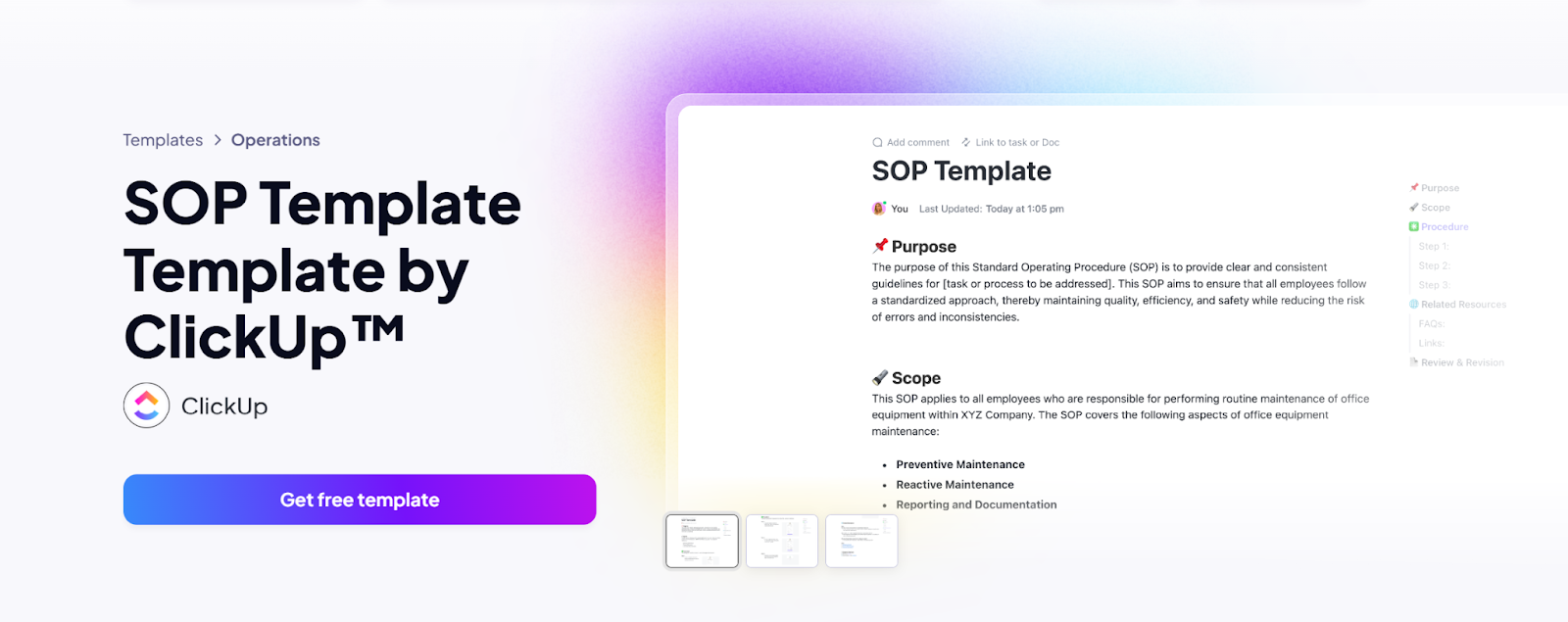
Use ClickUp’s SOP Template to note the purpose, steps, and handoffs once, then apply that process to every relevant task or project.
With this template:
From there, turn the SOP into an actionable checklist or set of subtasks inside the task itself. That way, the process shows up exactly when the work does. You can’t mark the task complete without moving through the steps, which prevents skipped actions.
⭐ Bonus: Draft or refine SOPs in ClickUp Docs. Then use ClickUp BrainGPT to summarize steps, rewrite unclear instructions, or generate quick checklists from long process documents.
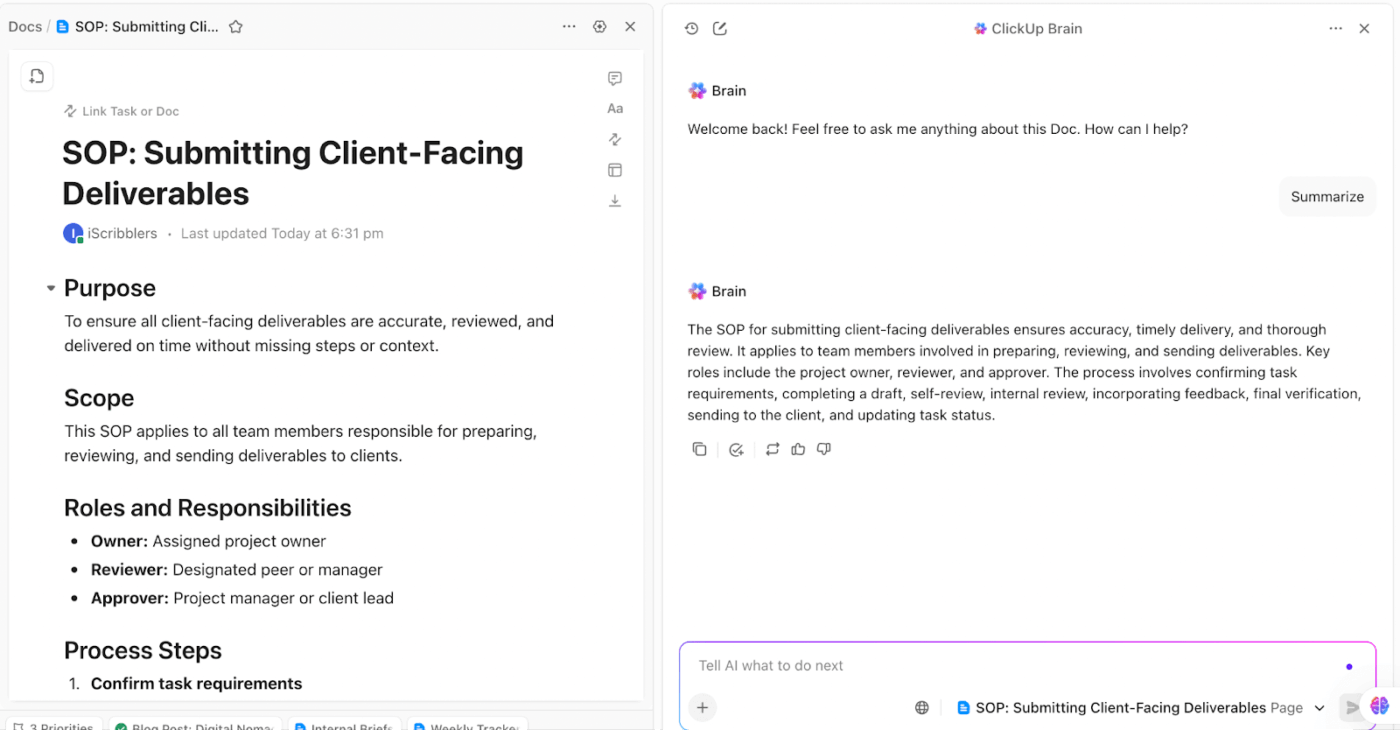
Docs + BrainGPT helps you keep documentation clear, up to date, and easy to follow. It reduces mistakes caused by outdated or ambiguous processes.
Here’s what happens when priorities aren’t explicit: Teams default to urgency, visibility, or guesswork. Dependent tasks start too early or too late.
As a result, important work gets delayed.
And if you’re dealing with prioritization paralysis, we’ve created this video to help you. It gives you actionable tips and strategies to prioritize tasks at work 👇
ClickUp Tasks help you break work into manageable subtasks.
You can assign priority levels, due dates, and owners to every task so expectations are explicit.
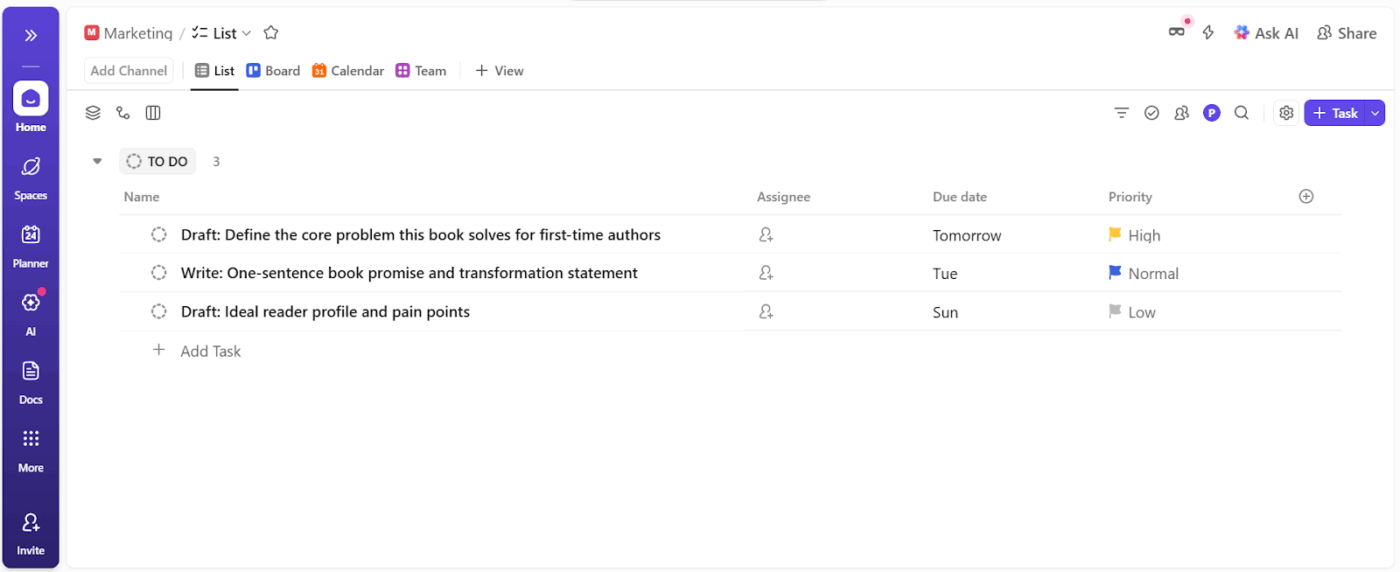
Task Dependencies add another layer of protection. When one task can’t start until another is complete, dependencies prevent work from moving forward prematurely. It helps you avoid rework caused by missing inputs.
Especially for recurring workflows, this feature ensures progress happens in the right order.
🧠 Fun Fact: In 2025, ClickUp’s users created over 3.6 billion tasks! 🤯
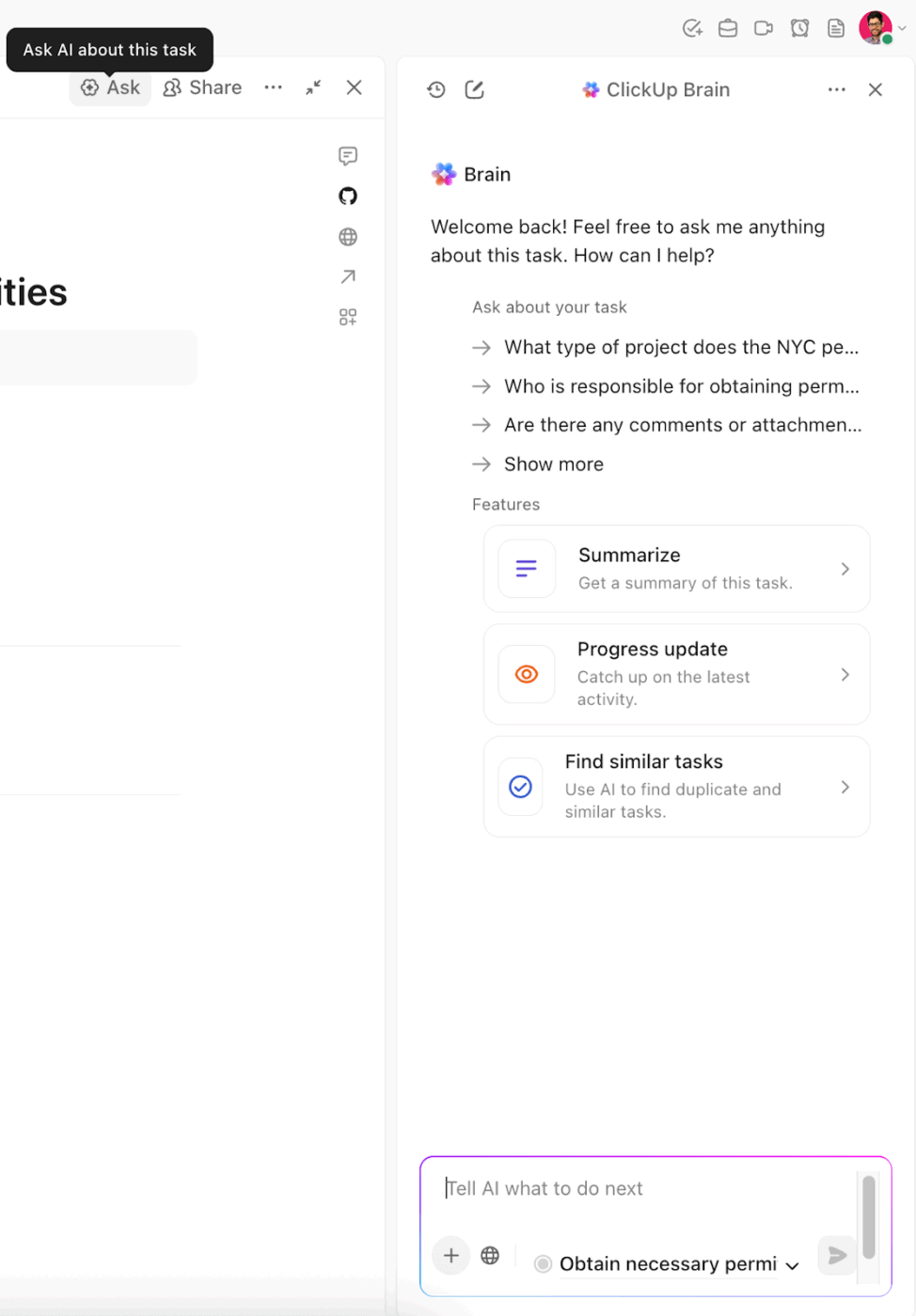
⭐ Bonus: Pair task prioritization with AI support. Use ClickUp Brain to quickly summarize task lists, identify overdue or blocked work, or clarify next steps when priorities change.
You ask a colleague for an update on a task in Slack.
They reply later in an email, attaching a file but leaving out context about timelines or dependencies.
The result? Work moves forward based on assumptions. A small gap in context turns into rework, delays, or unnecessary back-and-forth.
This is how communication-driven mistakes usually happen. Because conversations and work are split across too many tools.
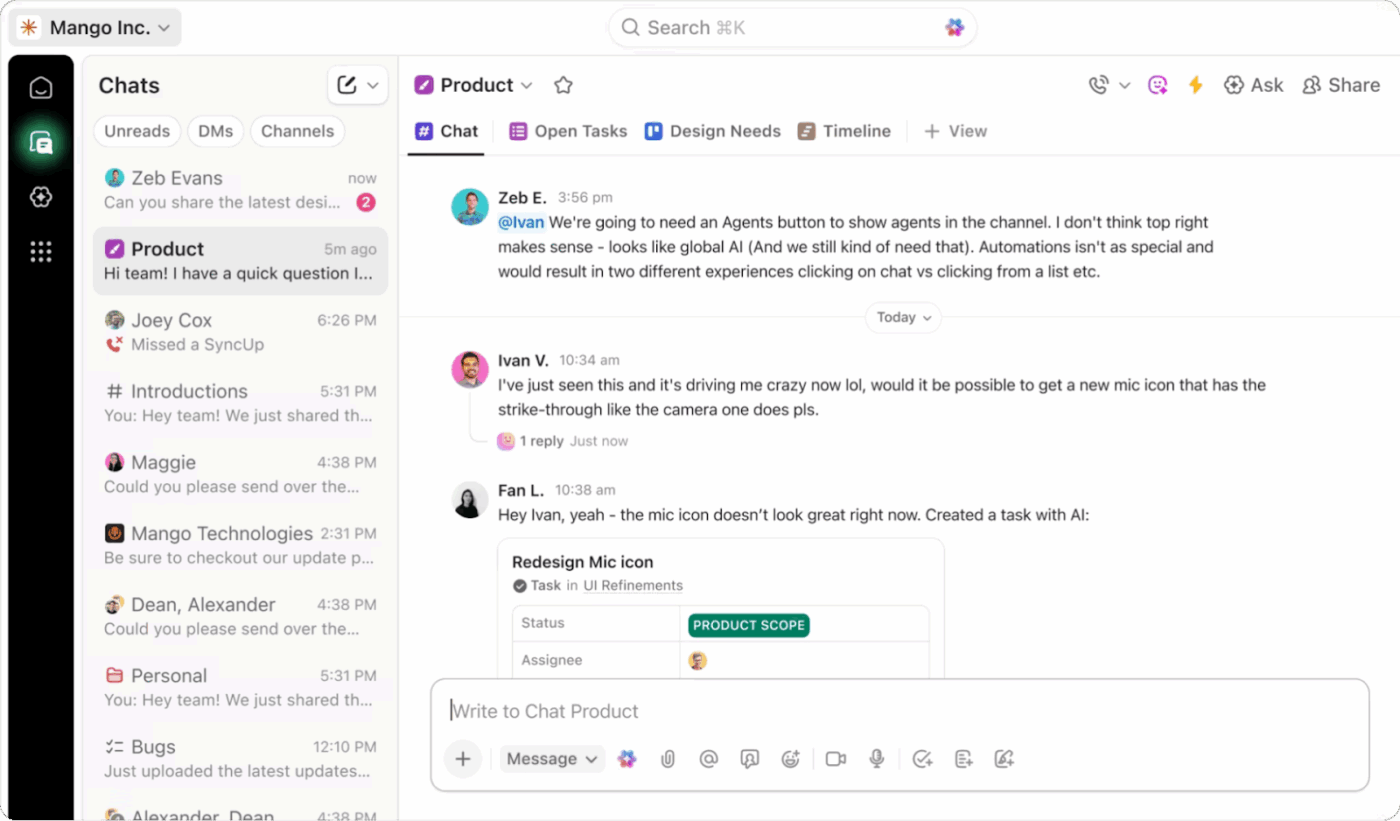
ClickUp Chat solves this problem. It brings team conversations directly into the workspace where your tasks live. It saves you from switching between emails, messaging apps, and comments to find context or even work.
You can collaborate instantly in a central, searchable space tied to work.
The key highlights of ClickUp Chat are 👇
💡 Pro Tip: Instead of typing long explanations or re-explaining the same steps in chat, record a short screen walkthrough using Clips. A quick video showing how something should be done often removes more ambiguity than paragraphs of text.
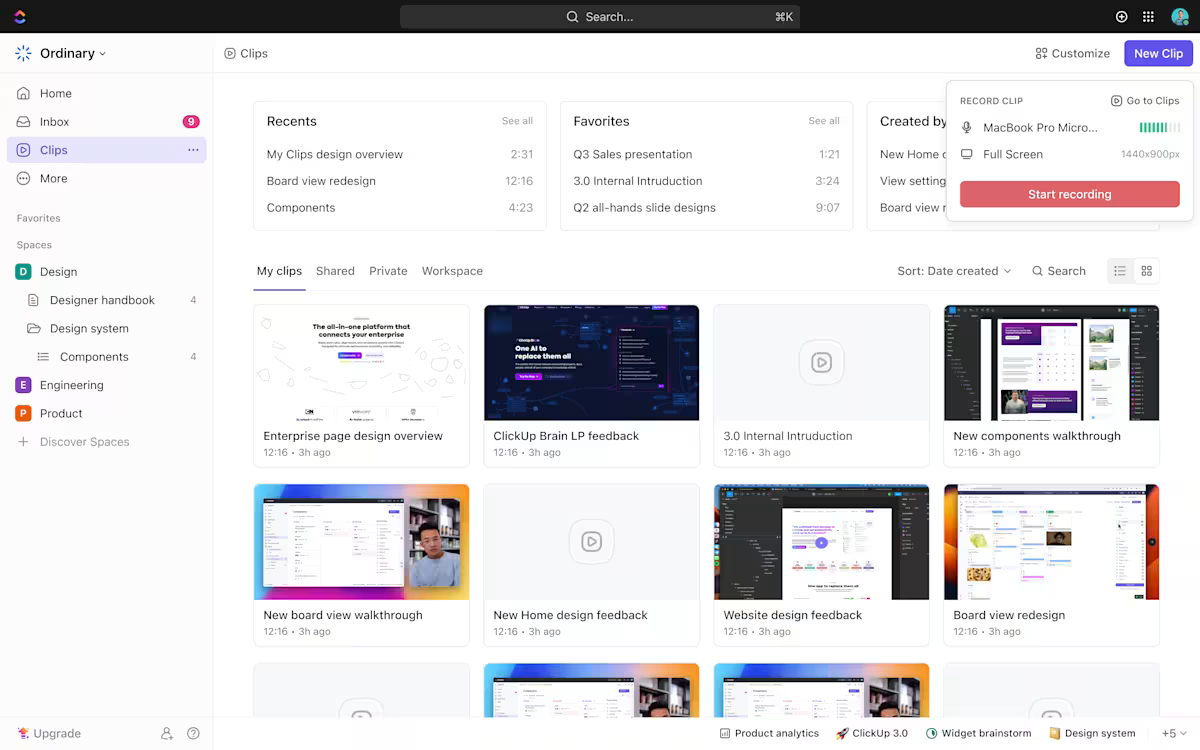
Use Clips to:
Once recorded, store these videos in the Clips Hub so they’re easy to find and reuse. Over time, this builds a lightweight video knowledge base that reduces repeated questions, inconsistent execution, and communication-driven errors.
Before asking others for clarification, the fastest way to reduce risk is to check whether the answer already exists.
But when it’s dispersed across apps, files, and conversations, it’s easy to lose track of critical work.
ClickUp BrainGPT Enterprise Search addresses this by pulling deep context from all your connected tools and third-party apps. It surfaces meaningful, tailored answers that reflect how your work actually happens.
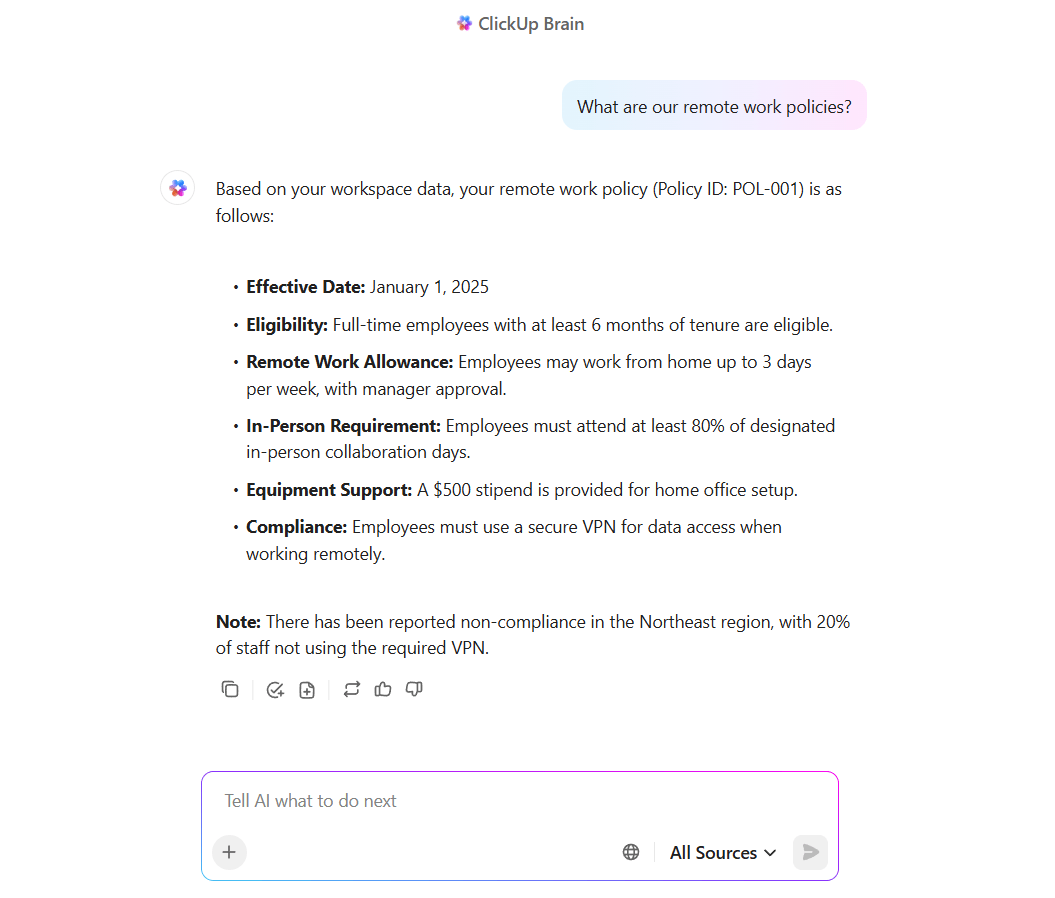
Available through a browser extension or desktop companion, Enterprise Search gives you unified search and action across your workspace and the web.
You have access to external AI models like ChatGPT, Claude, and Gemini, along with automation capabilities. You can both understand context and act on it without switching apps.
💡 Pro Tip: Super Agents can monitor work in the background and step in when something looks off.
Use Super Agents to:
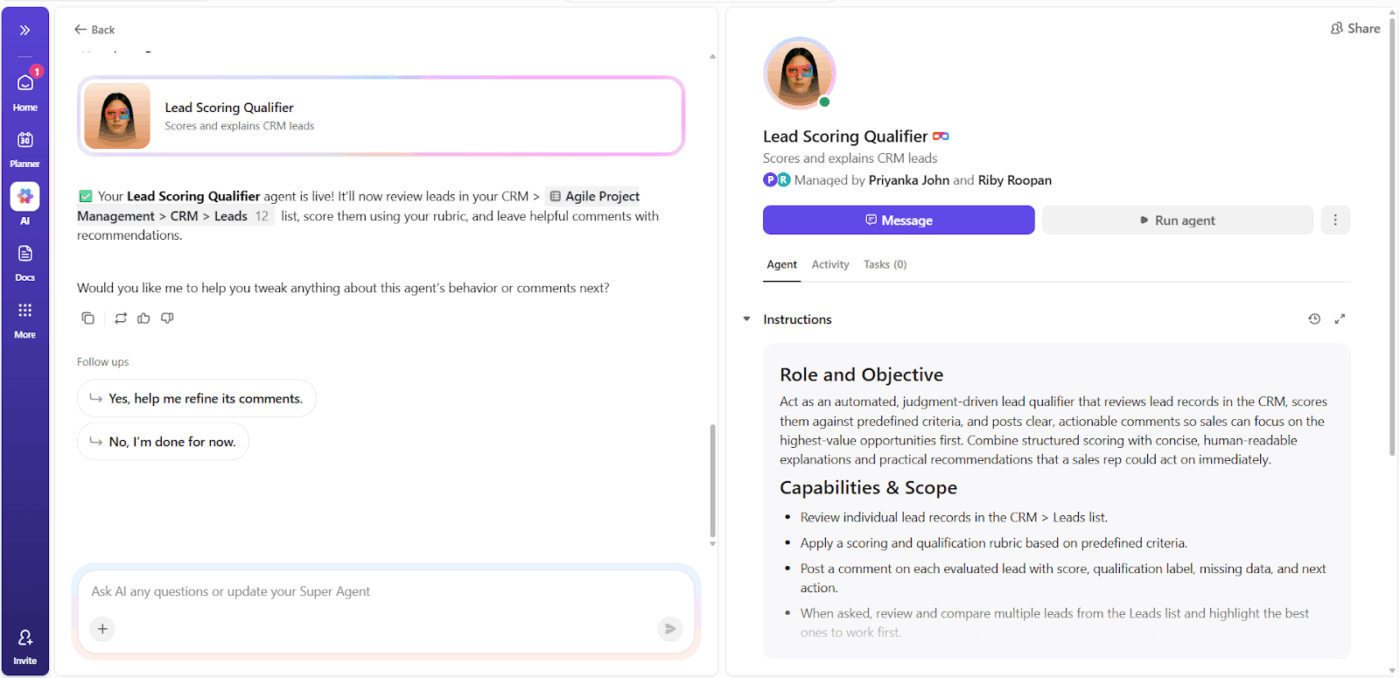
Because Agents understand context across your workspace, they adapt to how your team works. That makes them especially useful for preventing the kinds of quiet, assumption-driven mistakes that slip through manual checks.
Sounds too good to be true? This video shows you how to set up your Super Agents 🤯
Repetitive actions are where fatigue-induced risks happen and cause workflow breakdowns. You can automate these tasks to save your time and avoid human error.
With ClickUp Automations, you can automate routine actions using simple, no-code rules.
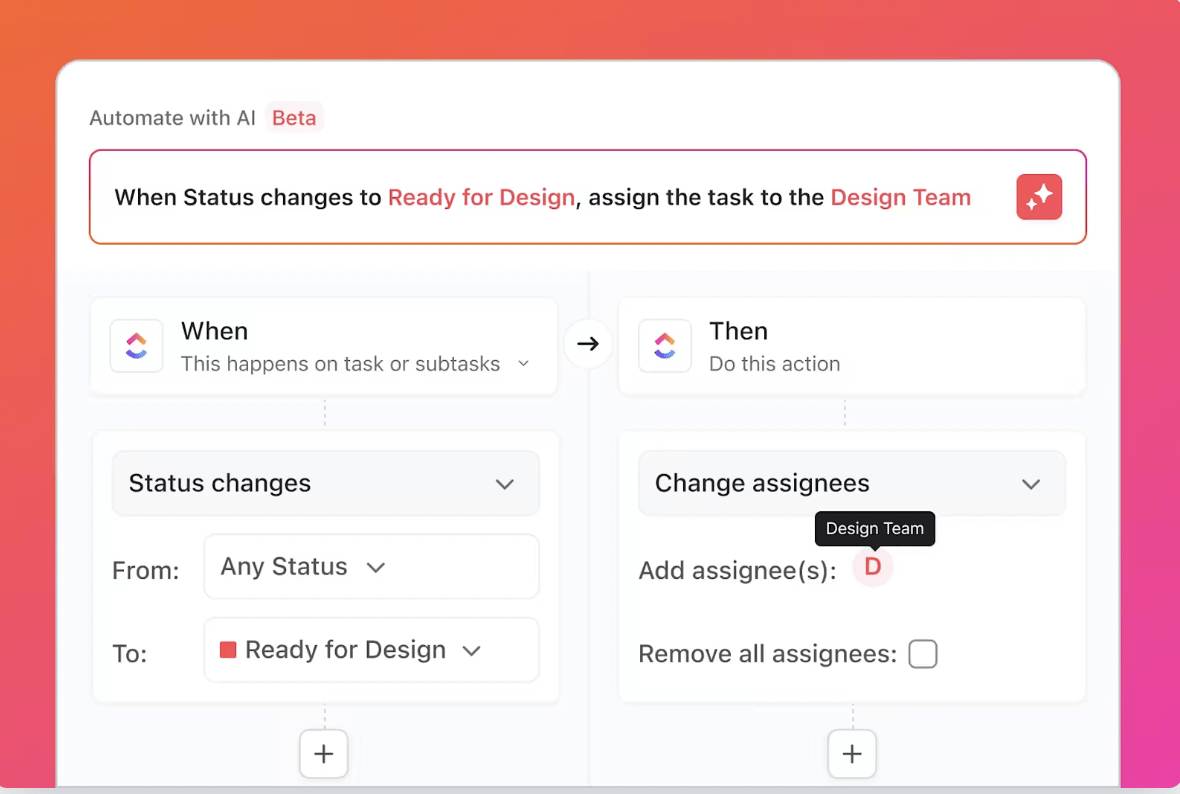
Some tasks that you can automate are:
Some errors cross a line where the potential damage is too great to handle alone. Here are three signs to know when to escalate:
If a mistake affects other teams, shared systems, compliance requirements, or important client relationships, it likely requires decisions you’re not authorized to make. Even if you understand the problem, you may not have the visibility or authority to assess second-order consequences.
Escalating early ensures that the right stakeholders are involved before the issue grows. It also prevents well-intentioned fixes from creating new risks elsewhere.
Escalate when:
Some problems cannot be solved with effort alone. They require budget approvals, specialized expertise, system access, or cross-team coordination that sits outside your role.
Trying to power through without the right resources often delays resolution and increases damage. Escalation allows leaders to unblock constraints instead of leaving you to compensate for them.
Escalate when:
A single mistake can be human error. Repeated mistakes usually point to a broken process, unclear ownership, or structural gaps. If the same issue keeps resurfacing despite individual fixes, the risk is no longer isolated.
Escalation at this stage involves surfacing systemic problems early. They should be addressed at the root level.
Escalate when:
Mistakes at work are not a question of if, but when. But they don’t have to happen twice. Workplace errors often stem from unclear processes, missed steps, and communication gaps across scattered tools.
ClickUp’s contextual AI gives you the structure to prevent these errors. It’s an all-in-one platform that helps you build checklists and SOPs to lock down processes, use task dependencies to prevent skipped steps, and set up automations to handle repetitive handoffs.
With ClickUp, you can create a single source of truth for your team and design mistakes out of your work.
Sign up on ClickUp for free to get tasks done right on the first try ✅
Not necessarily every tiny typo, but you need to report any mistake that could cause damage to the company. Use this simple rule: If the mistake affects someone else’s work, a client, a deadline, the budget, or the quality of a deliverable, you have to tell your manager.
Overthinking is your brain stuck in a loop of the past. You have to forcibly redirect it to the future. Here’s what to do:
Give yourself a limited “worry period,” such as ten minutes, to feel the frustration or fear
Shift your focus by asking: “What is one small, constructive action I can take right now?” This could include documenting a lesson learned or setting up a preventive checklist
Start by owning it. Don’t let your mistake impact your well-being, or be afraid of the fallout; say a simple, sincere “I messed up” and explain the impact your error had on your team. Then focus on what you can do to improve your team accountability.
In the future, become the most predictable, transparent person on the project. Deliver early, communicate when needed, and help your teammates wherever you can. This will show that you’ve internalized the lesson and slowly build the team trust you lost.
Yes, but apologize for your part, not the whole event. You could say something like: “I’m sorry for missing the meeting. I should have asked for clarification sooner. Let’s focus on how we fix this together.”
This shows that you understand your role in the situation and want to focus on bringing everything back to working condition, not shifting blame.
You have to set up a system that will help you avoid the slip-up next time. So, right after fixing the mistake, ask yourself: “What one change could make this impossible to repeat?” Then build it in.
You can add a ClickUp checklist, an automation for double-checks, or a mandatory review step in your SOP. When it’s part of your workflow, you’re making the right action the automatic one.

© 2026 ClickUp

There’s an easier way. Try a free AI Agent in ClickUp that actually does the work for you—set up in minutes, save hours every week.