






Still downloading templates?
There’s an easier way. Try a free AI Agent in ClickUp that actually does the work for you—set up in minutes, save hours every week.
Sorry, there were no results found for “”
Sorry, there were no results found for “”
Sorry, there were no results found for “”
Ever feel like you’re spending way too much time sending the same updates in Slack?
If you’re a project manager, team lead, operations pro, or marketer, you know how quickly manual Slack messages can eat up your day.
Good news: automating Slack messages isn’t just possible—it’s surprisingly easy.
Whether you want to schedule reminders, send recurring updates, or connect Slack with your favorite tools (like ClickUp!), this guide will walk you through every option.
Let’s make your digital life a whole lot easier with some Slack hacks.
Need a better way to organize your team chats? The ClickUp Instant Message Template has your back! It brings all your work-related instant messages into one tidy spot, so you never lose track of important conversations (or those random “Got a sec?” pings).
With custom statuses and fields, you can easily see what needs attention, prioritize replies, and keep your team in sync, without the chaos. It’s perfect for anyone who wants faster responses and smoother teamwork, all in one place.
Before you dive headfirst into fancy integrations or Slack alternatives, let’s look at what Slack can do natively within the application.

Ever drafted a message at midnight but didn’t want to ping your team until morning? Slack’s built-in scheduling lets you write now and send later.
How to do it:
🌻 Perfect for: Announcements, reminders, or anything you want to send at just the right time. It’s all about maintaining good Slack etiquette, folks!
⚡️ Template Archive: 15 Free Project Communication Plan Templates: Excel, Word, & ClickUp
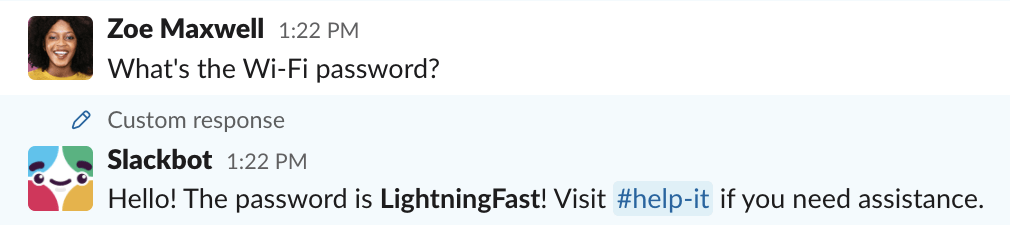
Slackbot is like your personal assistant inside Slack. You can set up custom responses to keywords or phrases.
Example:
Type “help me remember the WiFi password” and Slackbot can reply with the info you set up.
How to set it up:
🌻 Great for: Asynchronous communication, like FAQs, onboarding, or quick info your team asks for all the time.
💡 Sidebar: What’s Slack AI All About?
Slack AI is like your personal assistant in Slack—it can quickly summarize long threads, highlight action items, and help you find exactly what you’re looking for with smarter search.
But it is great for organizing information, Slack AI doesn’t actually automate sending messages or running workflows. For real automation, you’ll still want to use Workflow Builder, third-party tools, or ClickUp.

Need to nudge your team every Monday? Slack’s /remind command is your friend.
How to use it:
/remind [@someone or #channel] [what] [when]/remind #marketing Standup at 10am every weekdaySlack will handle the rest—no more sticky notes needed.
🌻Works well for: Sending files, completing reviews or tasks on time, or even responding to messages within a certain timeframe.
➡️ Read More: How to Organize Slack Channels at Work
Need more ammo for your advanced workflows? Let’s look at the level two of Slack automation.
These tools let you automate Slack messages based on triggers, workflows, and integrations.
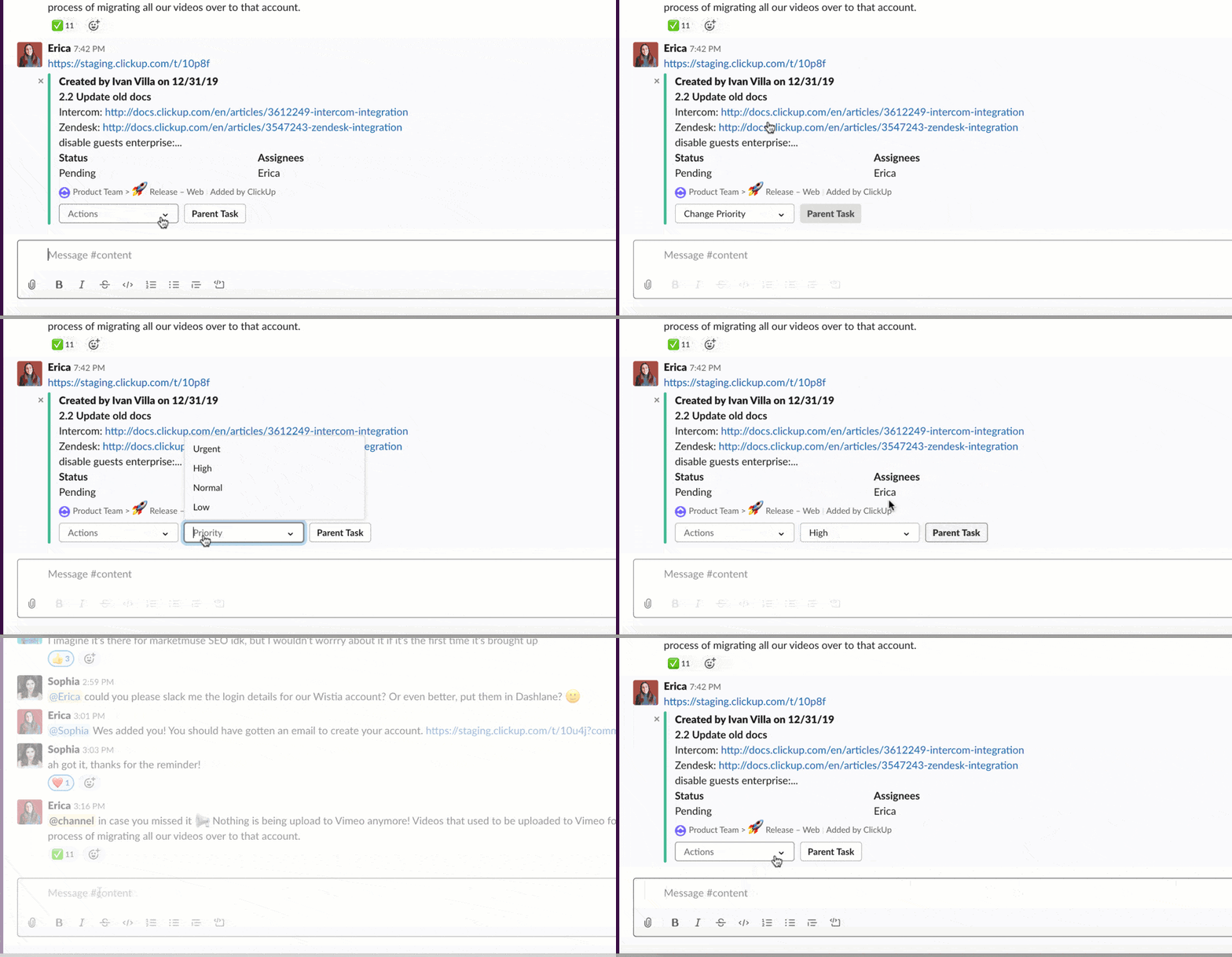
If you’re already using ClickUp to manage projects, this ClickUp + Slack integration is a game-changer.
What you can do:
How to set it up:
Now, your team communication game stays sharp—without you lifting a finger.
💟 Bonus: Add some fun to your Slack workspace with custom Slackbot responses!
You can make Slackbot reply with jokes, memes, or inside references when someone types a certain phrase, like responding to “Need motivation” with “You got this! 💪🔥”
It’s a great way to keep team morale high and inject a little personality into your daily chats.
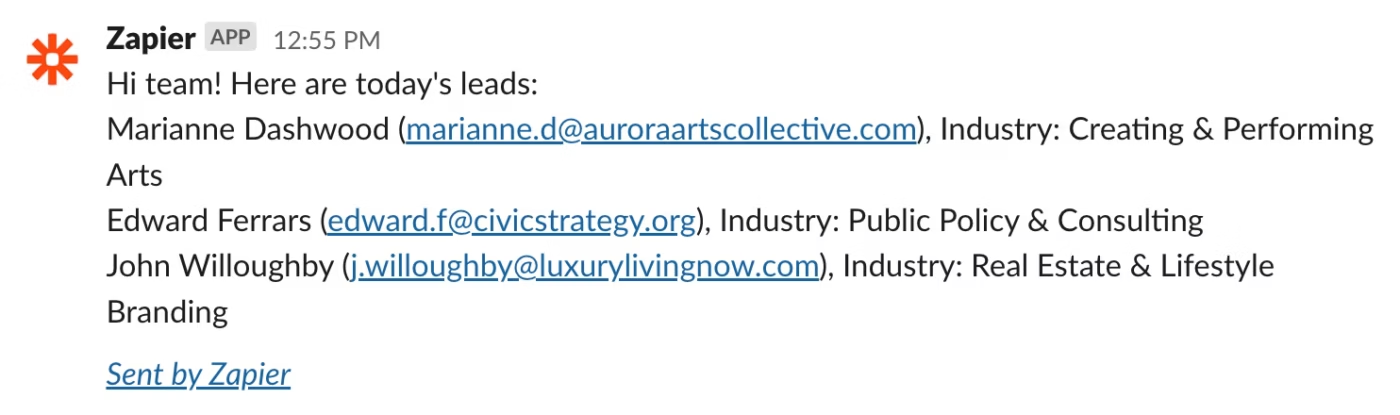
Want to connect Slack with hundreds of other apps? Zapier and Make (formerly Integromat) are your best friends.
Examples:
How to get started:
📮ClickUp Insight: 92% of workers use inconsistent methods to track action items, which results in missed decisions and delayed execution.
Whether you’re sending follow-up notes or using spreadsheets, the process is often scattered and inefficient. ClickUp’s Task Management Solution ensures seamless conversion of conversations into tasks, so your team can act fast and stay aligned.
Slack’s Workflow Builder lets you automate multi-step processes—right inside Slack. Best part? Ready-to-use templates run the workflow end to end.
What you can automate:
How to use it:
Now, on to the good stuff. If you’re managing a team, you know the pain of repeating yourself (and then repeating yourself again). Here’s how real teams are using Slack automation to save their sanity:
The golden rule? If you’ve ever thought, “Didn’t I just say that yesterday?”—it’s probably time to automate.
Slack is a lifesaver for quick chats and GIF wars, but project management in Slack comes with some quirks that can drive you up the wall:
The native AI does bridge a lot of these Slack problems but still leaves much to be desired when it comes to building a unified workflow. And that’s where Slack competitors come in.
➡️ Read More: What are The Pros and Cons of Slack at Work
Slack is fantastic for quick chats, but when your workday involves juggling project management, tracking updates, sharing docs, and keeping everyone on the same page, things can get messy—fast.
Suddenly, you’re bouncing between a dozen different apps, piecing together conversations, tasks, and files, and relying on endless integrations just to keep your workflow afloat.
That’s where ClickUp shines. Because ClickUp isn’t just a project management tool—it’s the everything app for work, which brings together chat, tasks, docs, reminders, automations, and more, all in one place.
Instead of stitching together team communication apps, project trackers, note apps, and automation tools, ClickUp consolidates everything you need into a single, powerful platform.
You get seamless communication, real-time updates, and robust automation—without the headache of managing countless integrations.
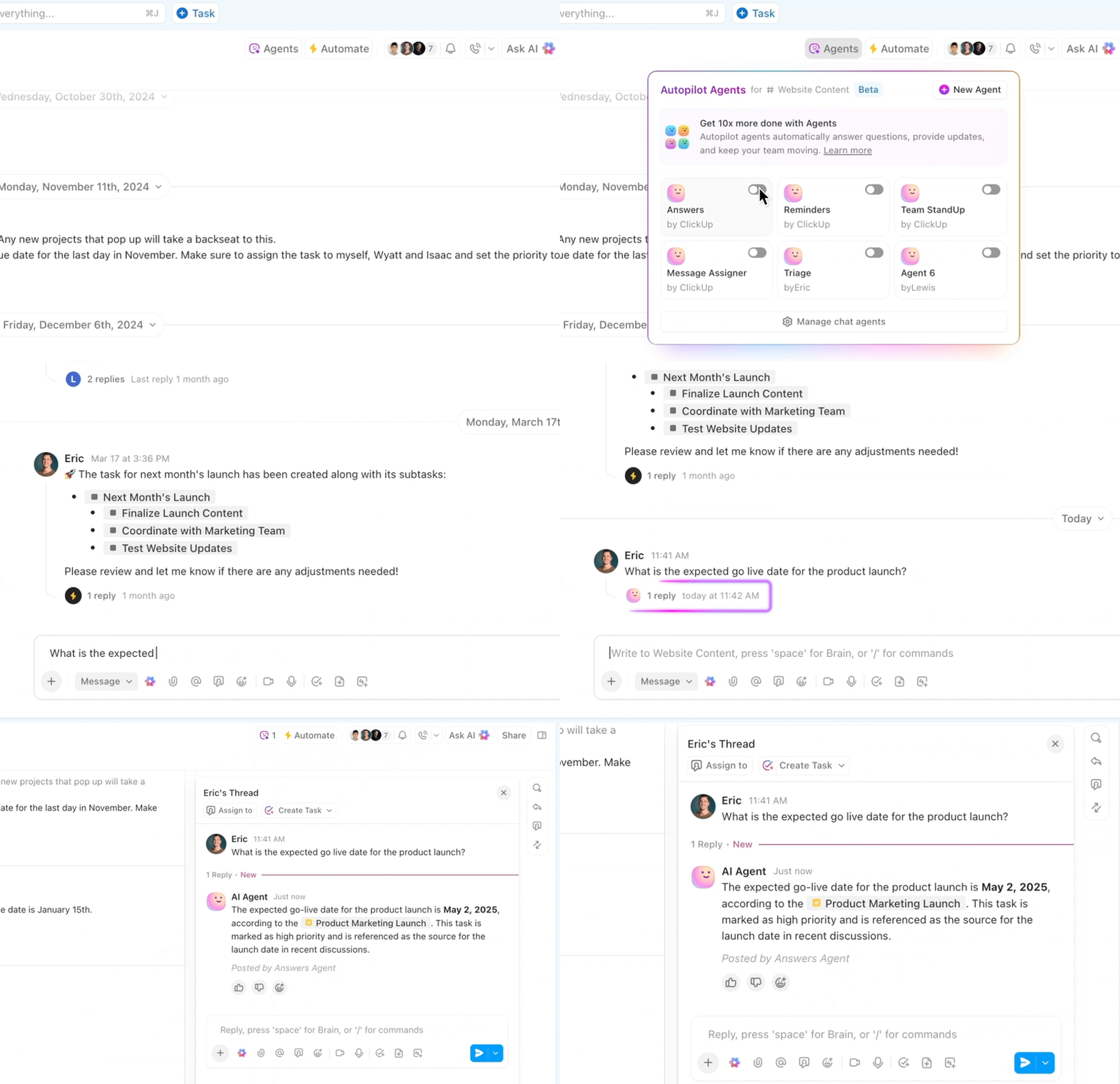
Imagine having all your project discussions, brainstorming sessions, and quick check-ins right next to your tasks and docs. With ClickUp Chat, you finally get to experience what that feel like!
Integrated right within your ClickUp Workspace, it helps you:
No more “Where did we talk about that?” moments!
When I set up our first ClickUp automation, it was like a lightbulb moment. Now, with something as simple as adding a tag, the entire subtask template applies automatically. We no longer waste time digging through subtasks or worrying that someone forgot a crucial step.
We’ve also added automations that assign tasks, update statuses, and send reminders; all small things on their own, but together they’ve completely streamlined how we operate. It’s not just about saving time (though we definitely do); it’s about creating a smoother, less stressful environment where the team can focus on doing their best work without getting bogged down by admin.
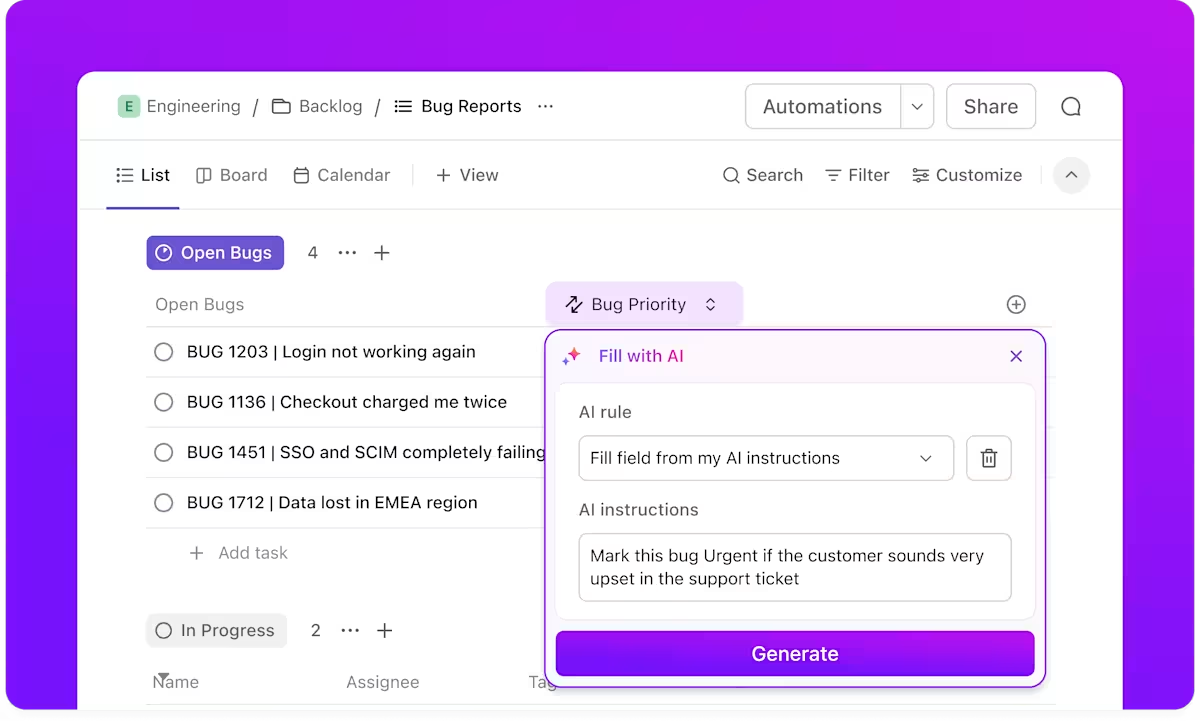
Tired of manually pinging your team about status changes or deadlines? ClickUp’s Automation engine lets you set up rules that do the work for you:
With ClickUp’s automation engine, you can finally stop micromanaging the little things and focus on the big picture, knowing your team will always be informed and on track.
🎉 Fun Fact: Slack has hidden easter eggs—like typing /pony in a channel (in some workspaces) used to trigger a tiny pony galloping across your screen! 🐴✨
Another one? If you type /shrug, it automatically adds the ¯\_(ツ)_/¯ emoji. Classic Slack sass built right in.
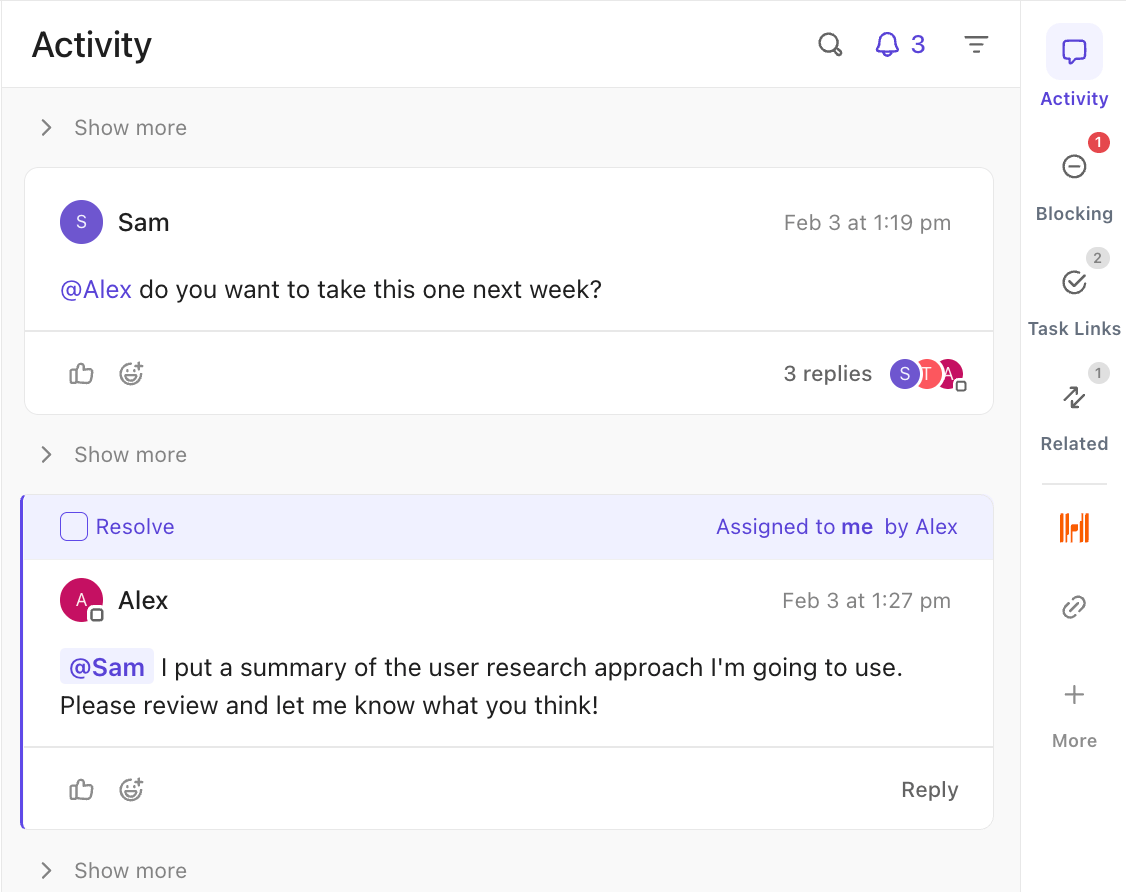
Unlike Slack, where conversations can get scattered across channels, ClickUp keeps everything tied to your work:
No more lost context, no more missed messages. Just clear, actionable communication.

ClickUp Brain, ClickUp’s built-in AI assistant, your behind-the-scenes productivity partner, quietly handles the details so you can focus on the big picture. Here’s how it transforms the way you work:
With ClickUp Brain, your workspace feels less like a juggling act and more like a well-oiled machine—one that’s always learning and adapting to help you work smarter.
Already have favorite tools your team can’t live without? ClickUp Integrations plays nicely with them all, so you don’t have to choose between what works and what’s possible.
With ClickUp, you’re not just adding another tool—you’re building a smarter, more connected workspace. No more juggling tabs or losing context. Just streamlined workflows, richer conversations, and everything tied back to your actual work.
➡️ Read More: Best All-in-One Messenger Apps
Automating Slack messages is all about reclaiming your time, reducing manual errors, and making sure your team always has the information they need, right when they need it.
Whether you’re using Slack’s built-in tools, exploring advanced automations, or leveling up with ClickUp’s powerful integrations, you’re setting your team up for smoother, smarter collaboration.
Remember, the best workflows are the ones that work for you, not the other way around. With ClickUp, you can connect your favorite tools, centralize your communication, and automate the busywork, so you can focus on what really matters: moving projects forward and celebrating wins together.
Ready to leave repetitive updates behind? Try Automation in ClickUp today and watch your team’s productivity (and sanity) soar.

© 2026 ClickUp

There’s an easier way. Try a free AI Agent in ClickUp that actually does the work for you—set up in minutes, save hours every week.