






Still downloading templates?
There’s an easier way. Try a free AI Agent in ClickUp that actually does the work for you—set up in minutes, save hours every week.
Sorry, there were no results found for “”
Sorry, there were no results found for “”
Sorry, there were no results found for “”
Fun fact: Gmail is the preferred email platform for nearly one out of three email users worldwide! The Gmail inbox is a productivity powerhouse with appreciable storage space and adaptive security features like spam filtering.
Its intuitive design and built-in email organization tools make it suitable for personal and professional use. Not to forget, allied services from Google Workspace, such as Google Drive, Google Calendar, Google Meet, Google Tasks, etc., amplify its value proposition.
However, outside the confines of your inbox lies a sea of untapped potential. And we’re here to help you unlock new possibilities your Gmail account offers. The Gmail integrations we’re about to share will transform your inbox into a productivity hub enabling you to achieve more.
On that note, let’s get started!
Before diving into the different Gmail integrations that can take your inbox to the next level, allow us to explain the rationale behind our picks. Understanding the logic behind our recommendations will also help you make an informed decision if you wish to explore other Gmail integrations. Think of this as an express guide.
The following are a few parameters that we’ve factored in while evaluating their relevance for popular Gmail workflows:
Now that you have some background on how we created this list let’s explore the various integrations that will elevate your Gmail experience.
ClickUp is an all-in-one project management tool, and Gmail is an end-to-end workplace communication hub. As such, the combination of ClickUp and Gmail is a match made in heaven.
So, use it to empower your team as they collaborate, organize and manage tasks, track progress, share files, and knock goals out of the park.
Here’s a lowdown on some of ClickUp’s best features that make it one of the best Gmail integrations:
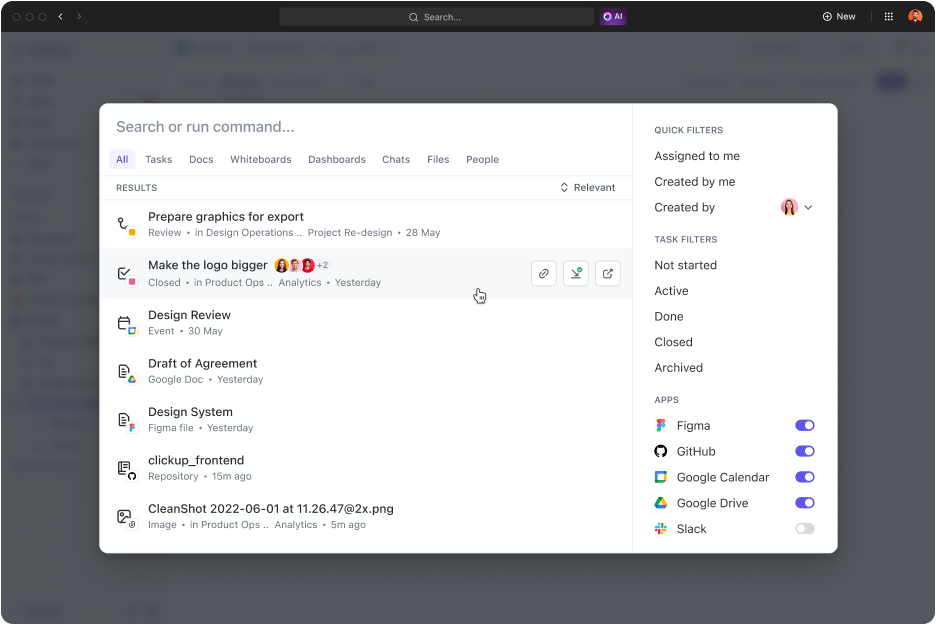
Although Gmail has impressive search functionalities, ClickUp’s Universal Search is even better. At best, Gmail searches through your inbox and Google Chat logs.
However, the Universal Search feature scans the entire digital ecosystem, from ClickUp to all its integrated apps. Now, find what you seek in just a few clicks!
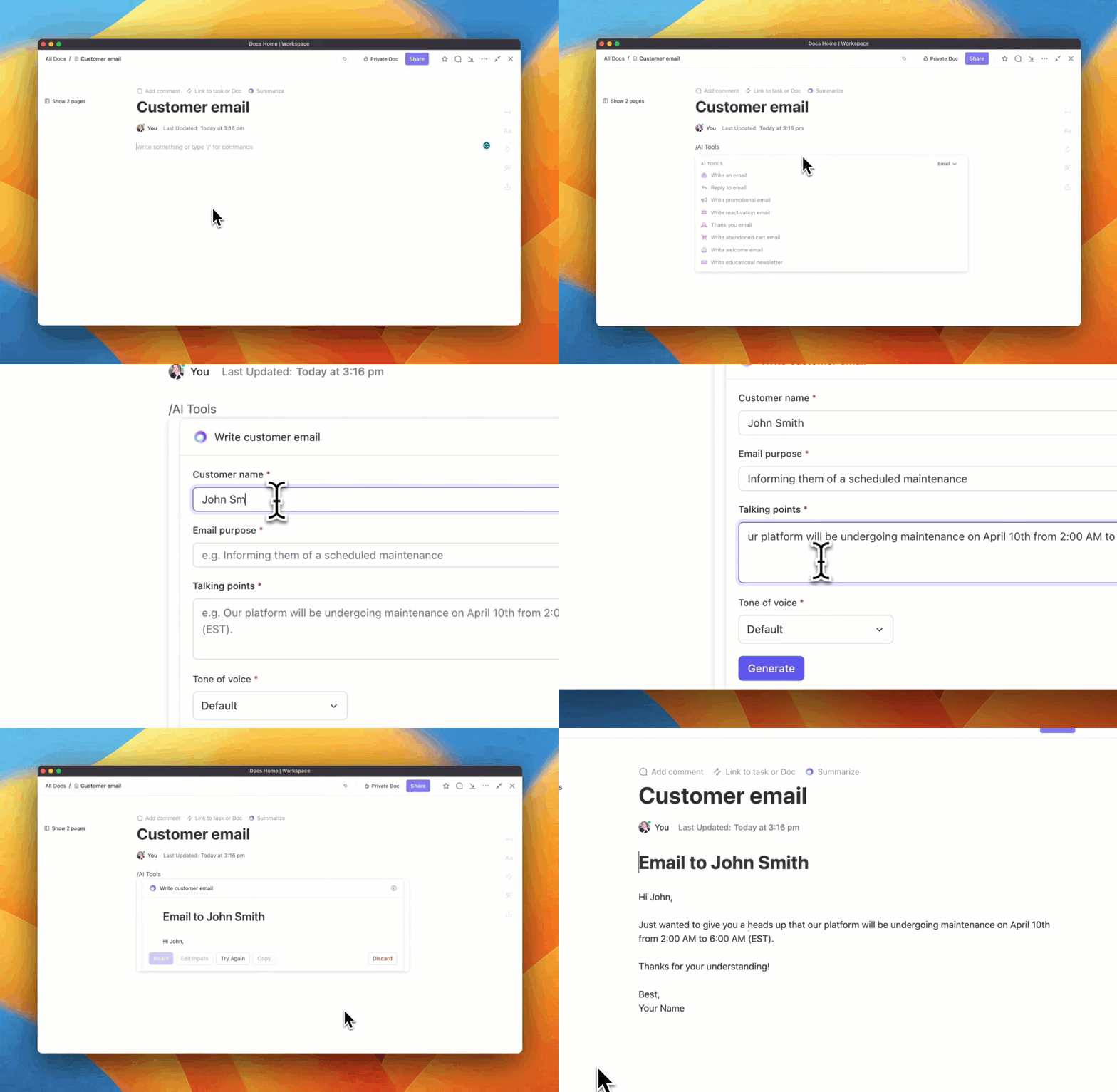
Whether you’re drafting mail for follow-ups, generating transcripts from audio Gmail attachments, or creating a summary of a long email message, ClickUp AI can do it. ClickUp AI is a powerful assistant that supports writing and makes email actionable.
With its built-in summarizer and intelligent content generation abilities, you can send emails in a few clicks. On the other hand, it is an equally capable knowledge management tool that extracts value from all Gmail attachments and email sequences or threads to save you time.

As a full-stack project management platform, ClickUp comes equipped with various task management activities. But did you know you can use ClickUp to convert emails into actionable tasks from your Gmail inbox?
Similarly, you can attach emails to your task on ClickUp. Once these tasks find their way onto the ClickUp platform, the control you enjoy over them will put Google Task to shame! Such a seamless Gmail integration is bound to save you hours of work, minimize distractions, and limit context-switching—a productivity boost!

Gmail can automatically detect events, appointments, bookings, etc., and add them to your Google Calendar. However, when you connect Gmail with ClickUp, you get timely notifications and reminders on pending matters. This makes sure that everything runs smoothly.

The ClickUp app is available on mobile, desktop, and smart wearables. It is also integrated with voice assistants and add-ons for popular browsers. Plus, the app is available as an email add-on.
Such portability puts the ClickUp app on par with the Gmail app, which means you can get work done even while on the move!

Google Sheets is a cloud-based spreadsheet application part of the Google Workspace. Use this Gmail integration to perform data analytics and visualization with finesse as you create, edit, and collaborate on spreadsheets in real-time.
Slack is a popular team collaboration and messaging platform. When you connect Gmail with Slack, you expand the asynchronous nature of email communication by augmenting real-time instant messaging. It is an excellent alternative to Google Chat. It can even act as an email alternative!

Webhooks allow applications to communicate with each other in real time. To do this, they use basic API call mechanisms. At the same time, you may use them to set up event triggers to automate workflows.
Configure this Gmail integration to perform actions, like automatically sending emails, in response to trigger events, like when you receive an email message containing a specific keyword.
N/A

Hive is a project management and collaboration platform that uses tasks, file sharing, and messaging to create a digital workspace for teams. Connect Gmail with Hive to streamline email collaboration by setting up shared inboxes, task assignments, and real-time communications.

Zoom is a widely used video conferencing platform for virtual meetings, online events, webinars, and collaborative working. Integrating Zoom with your Gmail will allow you to schedule, host, or attend video conferences without switching apps. Such cohesion adds a boost to coordination and collaboration.
Zoom One pricing for calls from the United States is as follows:

EmailAnalytics offers data-backed insights into your email usage patterns. This helps you understand your email habits and behaviors to optimize productivity. When you link EmailAnalytics with your Gmail account, you can visualize your activity, response times, and top contacts. Use this information to optimize your Gmail experience.

If you’re unsatisfied with Google Drive, then Dropbox can be an excellent alternative. Dropbox is a cloud storage platform where users can upload files and documents, share them, and collaborate. As a Gmail integration, it allows users to share and collaborate without worrying too much about document management.

Todoist is a task management app that helps businesses and individuals effectively organize and prioritize action items on their to-do lists. When integrated with Gmail, Todoist customers can convert emails into action items for effortless task organization, prioritization, and tracking

Hiver is an email collaboration platform operating on Gmail. It leverages shared inboxes and collaborative features for teams to send emails, respond to incoming emails, assign tasks, and streamline communication.
Connecting Gmail with Hiver allows you to set up capable teams for handling customer support, sales inquiries, and general emails.
That’s a wrap on our list of best Gmail integrations available. We’ve tried to create a comprehensive list covering various requirements and applications to enhance your Gmail experience.
While each Gmail integration has something unique, ClickUp offers all that and more. With such powerful features and functionalities, you can reinvent your Gmail inbox without weighing down your Google Drive and achieve much more.
Get in touch with ClickUp to know how!

© 2026 ClickUp

There’s an easier way. Try a free AI Agent in ClickUp that actually does the work for you—set up in minutes, save hours every week.