


How to Build a High-Engagement Community: The End-to-End Playbook

How to Build a High-Engagement Community: The End-to-End Playbook

Start using ClickUp today

  • Manage all your work in one place
  • Collaborate with your team
  • Use ClickUp for FREE—forever

You log into your community space and notice the same thing you’ve seen all week: posts with views but hardly any replies.

Then, one member shares a thoughtful question about a real challenge. Within hours, the thread fills up. People you haven’t heard from in months start offering tips, sharing experiences, and tagging others who might help. 

This shift happened because someone felt comfortable enough to speak up, making others feel connected. 

Studies how meaningful involvement, not just broadcasting information, is what strengthens trust, loyalty, and long-term participation in groups. Communities thrive when people feel heard, valued, and connected to something they want to contribute to.

Consider this blog post an official community engagement playbook that scales your product and brand. 📑

P.S. You also get insights into how ClickUp helps you build one seamlessly! ✨

Summarize this article with AI ClickUp Brain not only saves you precious time by instantly summarizing articles, it also leverages AI to connect your tasks, docs, people, and more, streamlining your workflow like never before.
ClickUp Brain
Avatar of person using AI Summarize this article for me please

What Is a Community Engagement Playbook?

A community engagement playbook is a practical, end-to-end guide that shows your team exactly how to design, run, and scale your community programs to hit specific business outcomes.

It defines your target member personas, the purpose of the community, and the engagement journey from first touch to advocacy. This shared operating manual outlines the rituals, campaigns, workflows, roles, and metrics you’ll use to keep members active and aligned with your product strategy.

🧠 Fun Fact: The concept of communities dates back thousands of yearsAncient guilds in medieval Europe were early forms of professional communities, where craftsmen shared knowledge, supported one another, and regulated quality.

Summarize this article with AI ClickUp Brain not only saves you precious time by instantly summarizing articles, it also leverages AI to connect your tasks, docs, people, and more, streamlining your workflow like never before.
ClickUp Brain
Avatar of person using AI Summarize this article for me please

Why Brands Need a Playbook

Clarity on goals, messaging, and how your team shows up builds a strong community. You need a playbook to: 

  • Create predictable experiences: Ensure every new member gets the same warm onboarding and path to value
  • Protect brand reputation: Set tone and escalation rules so mistakes don’t become crises
  • Prioritize scarce resources: Focus staff time on high-impact programs, not firefighting
  • Scale repeatable programs: Turn one successful webinar into a quarterly series
  • Measure what matters: Link community activity to product adoption, retention, and revenue
  • Close the feedback loop: Capture member signals and route them to product, marketing, and CS quickly

📮 ClickUp Insight: 1 in 4 employees uses four or more tools just to build context at work.

A key detail might be buried in an email, expanded in a Slack thread, and documented in a separate tool, forcing teams to waste time hunting for information instead of getting work done.

ClickUp converges your entire workflow into one unified platform. With features like ClickUp Email Project Management, ClickUp Chat, ClickUp Docs, and ClickUp Brain, everything stays connected, synced, and instantly accessible. Say goodbye to “work about work” and reclaim your productive time.

💫 Real Results: Teams are able to reclaim 5+ hours every week using ClickUp—that’s over 250 hours annually per person—by eliminating outdated knowledge management processes. Imagine what your team could create with an extra week of productivity every quarter!

Summarize this article with AI ClickUp Brain not only saves you precious time by instantly summarizing articles, it also leverages AI to connect your tasks, docs, people, and more, streamlining your workflow like never before.
ClickUp Brain
Avatar of person using AI Summarize this article for me please

Step-by-Step Community Engagement Playbook

Follow this roadmap to plan community engagement work better, activate members faster, and track impact as you scale. 👇

Step #1: Define community purpose and success

Start by getting clarity on why your community exists and how it supports your product and business. Anchor your purpose in a specific audience, a core value promise, and a measurable business outcome.

Some examples of a clear purpose statement: 

  • A home for PMMs using our platform to share launch playbooks and support each other so they ship faster and stick with us longer
  • A builder community where startup founders swap real-world experiments, give feedback on new features, and help shape our roadmap
  • A customer success hub where admins help each other troubleshoot implementation and champion best practices to improve retention

Then define what success looks like in two layers:

  • Community-level: Active members, recurring contributors, advocates, program participation
  • Business-level: Activation, feature adoption, retention, expansion, referrals

🚀 ClickUp Advantage: Map out your purpose and plan onto a visual canvas with ClickUp Whiteboards:
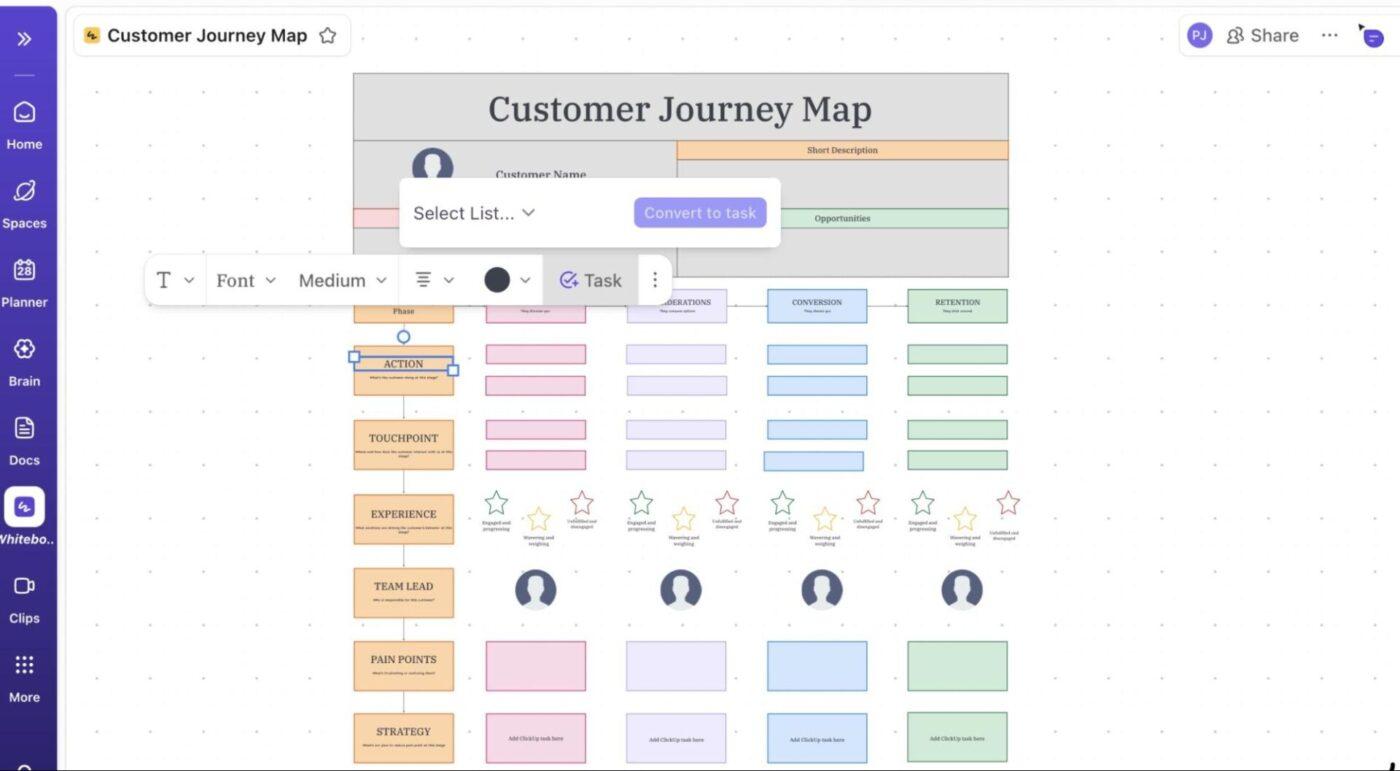
  • Sticky notes to capture who the community is for, what problems you’re solving, what behaviors matter most, and risks like low participation
  • Connectors to show how the behaviors you want drive the outcomes you need
  • Text boxes to label each metric with a target and time frame (e.g., 10% post in week 1). You can then convert them into ClickUp Tasks, so your strategy moves straight into execution
ClickUp Whiteboards: Collaborative boards help teams map community ideas and guide development
Map member experiences, milestones, and touchpoints directly on ClickUp Whiteboards

Step #2: Identify your priority community member personas

Before you try to ‘boost engagement,’ clarify who you’re actually engaging. Treat community personas with the same rigor as product or marketing personas, but grounded in community behaviors.

Create a ‘Community Personas Doc’ inside ClickUp Docs with sections like Profile, Motivations, Behaviors, Programs, and Risks. Inside this, you can store the essentials for each profile:

  • Who they are: Role, seniority, company size, primary use cases
  • What motivates them: Recognition, answers, peer connection, influence
  • What blocks them: Time, confidence to post, product knowledge, constraints
  • What success looks like in the community (e.g., gets 3 peer-reviewed solutions monthly, shares frameworks, and gains visibility)

Start with 2-3 core personas, such as:

  • Onboarding owners (CS/Ops) who need fast answers and implementation templates
  • Power users or creators who crave visibility, early access, and influence on the roadmap
  • Busy exec champions who post rarely but want high-level value and proof of impact

If you need help drafting these, turn to ClickUp Brain. The AI-powered assistant helps you by: 
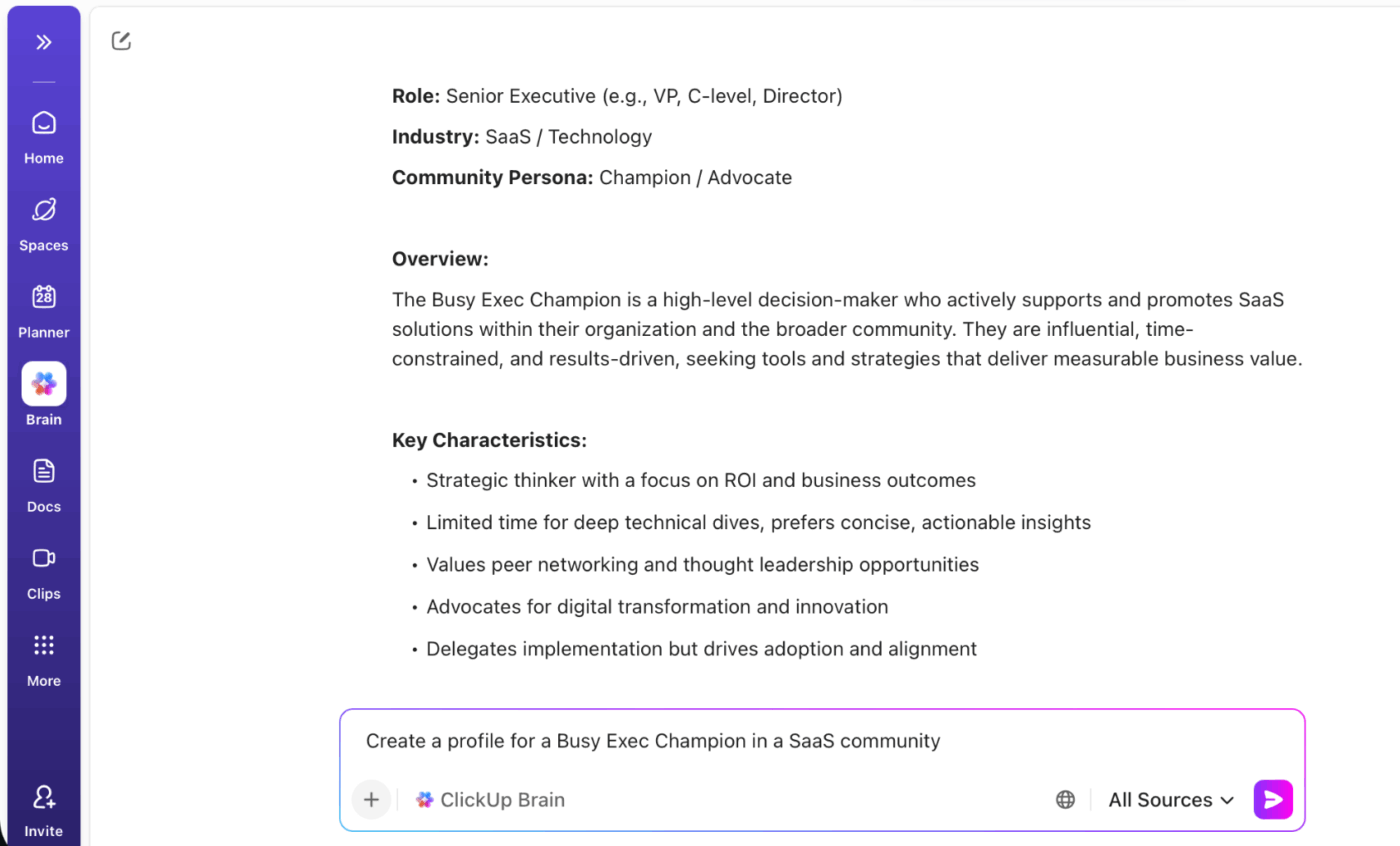
  • Drafting your first version of each persona using real workspace insights
  • Summarizing behaviors and feedback to ground personas in data
  • Suggesting tailored content engagement ideas and measurable success signals
  • Comparing personas side by side to spot gaps, overlaps, and unique opportunities
  • Turning personas into actionable checklists for content, events, or community programs
ClickUp Brain: AI helps teams develop detailed personas for community planning
Use ClickUp Brain to create a consistent persona template your team can reuse

🧠 Fun Fact: In 17th‑century England, coffeehouses acted as egalitarian meeting spaces where people from diverse social backgrounds came together to debate politics, philosophy, and current events. These ‘penny universities’ helped spark the circulation of ideas, print news, and even laid some of the foundations for Britain’s financial markets.

Step #3: Map your community engagement funnel

Treat your community’s growth as a product-led journey, with members moving through different stages. You’ll need to explicitly define what each stage means in your context and what behaviors move people forward.

Here’s a simple funnel:

  1. Awareness: Members discover the community through email, in-product prompts, onboarding, or social channels
  2. Activation: New members join and take a first meaningful action, like posting an intro or attending an event
  3. Contribution: Active participants begin adding value by answering peers, sharing templates, or hosting sessions
  4. Advocacy: Top contributors elevate the community by sharing success stories, referring others, co-creating content, or joining advisory groups

For each stage of your community journey, decide on two things: 

  • What gets someone into that stage: It could be a specific action they take, like joining the community, posting an introduction, or attending their first event
  • Engagement triggers: Things that nudge them forward in the journey. These could be tailored actions, like sending a welcome DM and tagging them in the intro thread, which encourages first interaction

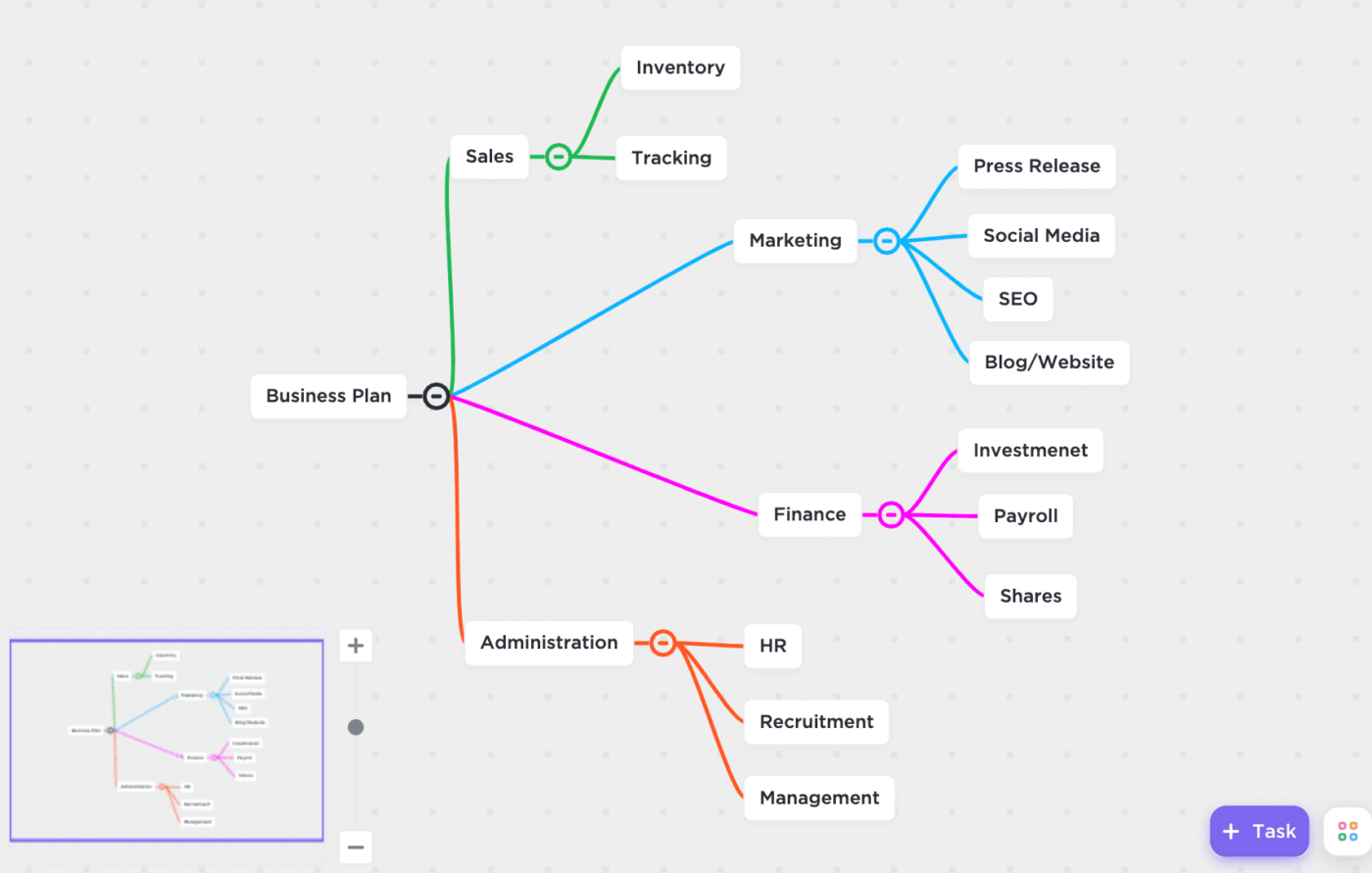
🚀 ClickUp Advantage: Bring your engagement funnel to life with ClickUp Mind Maps

Build a Mind Map with the core nodes such as awareness, activation, contribution, and advocacy.​ Under each node, branch out:

  • Channels (where they discover or engage)
  • Key behaviors (what they do)
  • Triggers/Programs (what you run to move them forward)
ClickUp Mind Maps: Visual mapping connects themes and insights from local member activity
Convert map branches into Tasks directly from ClickUp Mind Maps

Step #4: Create a 90-day community programming calendar

Once the funnel is clear, design a 90-day programming calendar that intentionally supports your personas and the various funnel stages.

Mix event types to keep the community lively and varied, such as:

  • AMAs or Q&A sessions: Live chats with founders, product experts, or guest speakers
  • Product walkthroughs/demos: Regular sessions showing new features or use cases
  • Challenges or contests: Member-driven activities (e.g., best hackathon projects and writing challenges)
  • Newsletters or blog digests: Curated updates highlighting top discussions, resources, or announcements
  • Peer groups: Small meetups (industry-specific or role-based) for networking and support

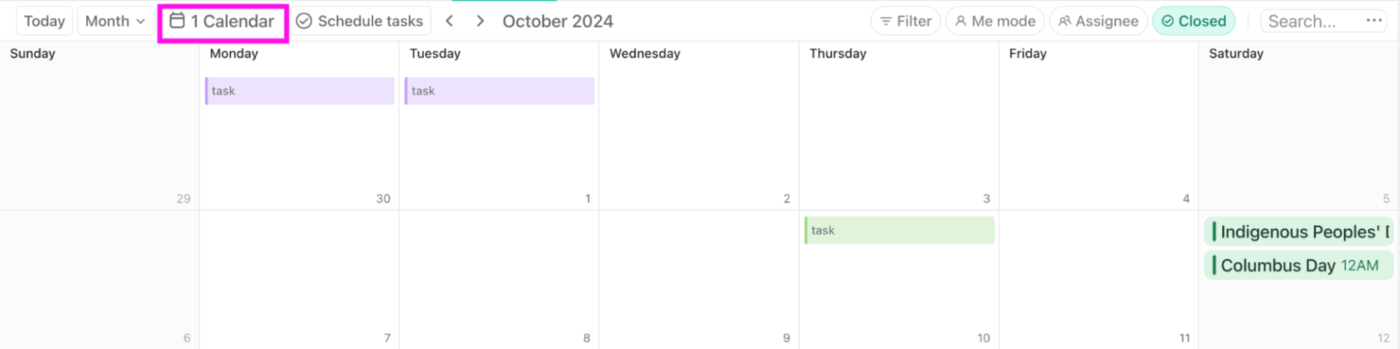
Use a content plan template to set your posting cadence for consistency:
  1. Weekly: Welcome/intros thread or one tactical post
  2. Monthly: AMA, deep-dive session, contributor spotlight, or feedback thread
  3. Quarterly: Big themed initiative (e.g., ‘Playbook Month,’ ‘Launch Lab)
ClickUp Calendar View: Plan events and workflows that support leadership across engagement cycles
Drag and drop Tasks and schedule to balance workload across weeks in the ClickUp Calendar View

The ClickUp Calendar View helps you turn this plan into a visual schedule. Create it inside your ‘Community Programs’ List, then map each activity: weekly welcome threads, monthly AMAs, product demos, peer group meetups, and quarterly challenges as individual Tasks with set dates. 

The platform automatically displays them on the calendar, and you can drag and drop events to reschedule without breaking your cadence. Set recurring tasks, such as weekly intros or monthly newsletters, as ClickUp Recurring Tasks to automate them. 

💡 Pro Tip: Categorize each event with ClickUp Custom Fields and AI Fields with details such as ‘Persona Target,’ ‘Funnel Stage,’ and ‘Channel. ’
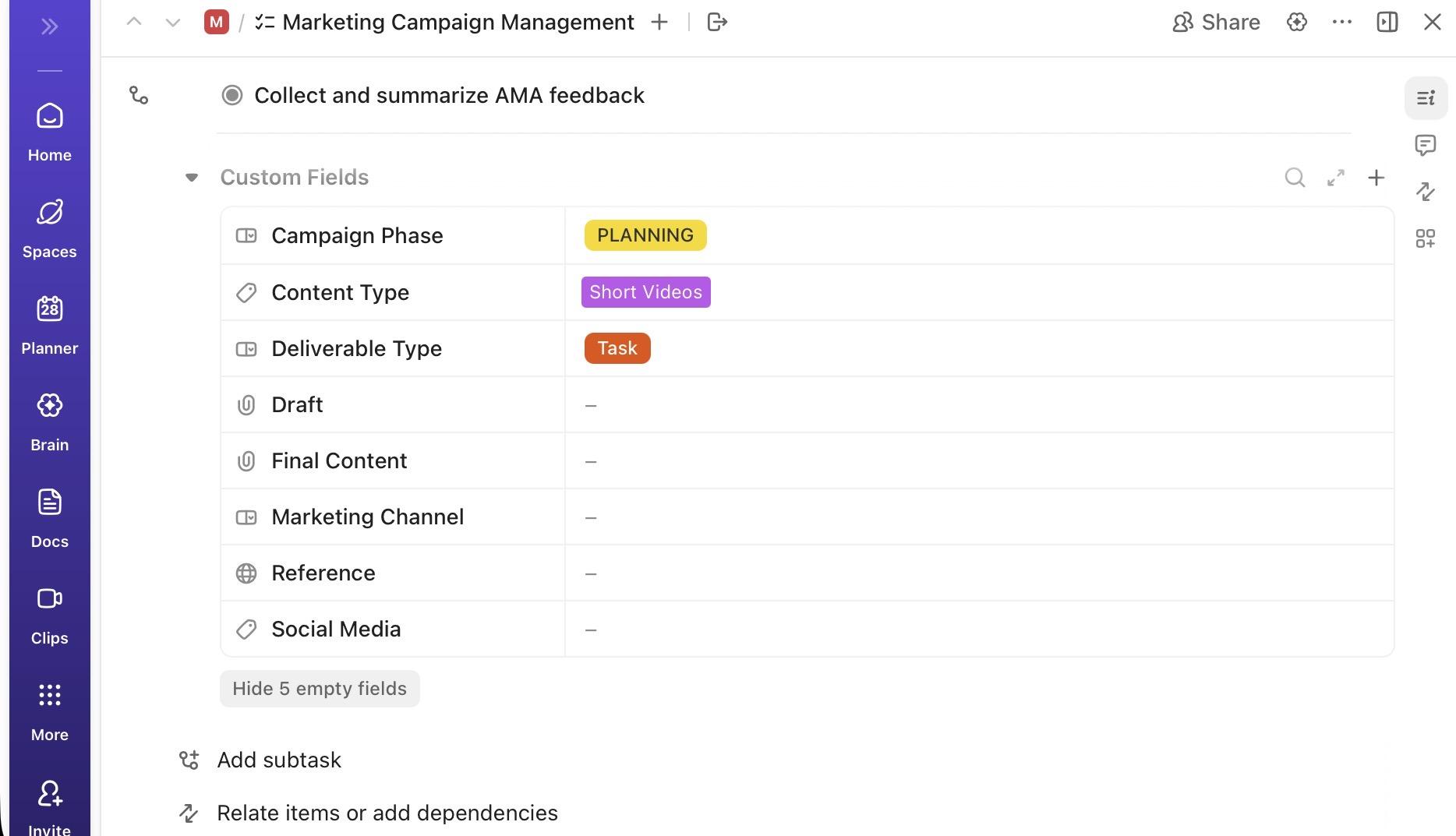
Capture those critical details and make them easily visible via Custom Fields

Step #5: Build your moderation and engagement guidelines

Establish clear rules of engagement and moderator protocols. Cover three main areas:

1. Tone and voice

  • How your brand ‘talks’ in community vs. marketing (e.g., more candid, less polished)
  • Do’s and don’ts, including what’s encouraged (empathy, clarity, specificity) and what’s not (snark, dismissiveness, jargon overload)

2. Escalation rules

  • What gets escalated to support, legal, PR, or product
  • How quickly moderators should respond to sensitive issues
  • Three strikes rule (educate, warn, remove)

3. Role expectations

  • Who’s responsible for approvals, interventions, answering product questions, and closing loops
  • Time expectations (e.g., Daily sweep, priority threads within 2 hours, and weekend coverage plan)

Create a ‘Community Moderation & Engagement Guidelines’ ClickUp Doc with sections for tone, escalation matrix, role-by-role expectations, and sample responses.​ ClickUp Brain can generate pre-approved response templates that match your tone guidelines.
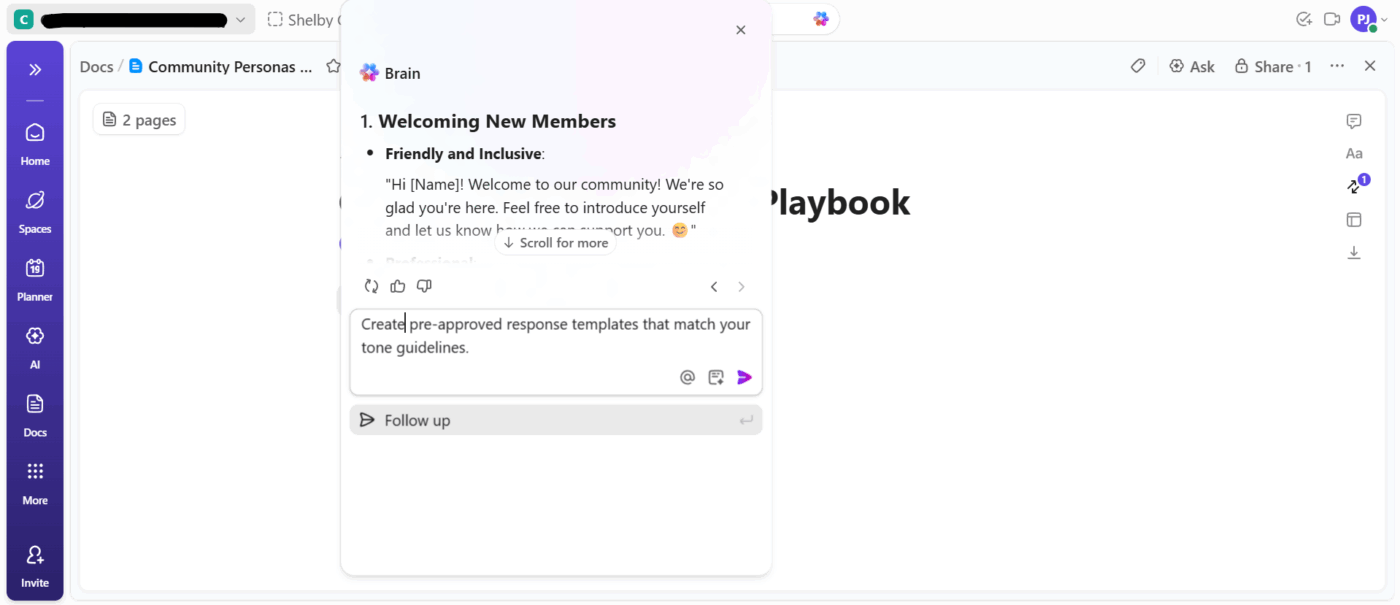
Ask ClickUp Brain within ClickUp Docs to create templates for your tone guidelines with replies for different scenarios 

You can even ask for variations of replies for common community scenarios (feature confusion, mild frustration, high praise, off-topic thread) so moderators stay consistent but not robotic.​

Note: ClickUp Brain can also help you generate the right prompts.

📌 Example prompts:

  • Generate a section for our community moderation guide describing the brand tone and voice, using friendly, professional, and approachable language
  • Create an escalation matrix for community issues, including low, medium, and high severity scenarios, and who should be notified at each level
  • Provide three alternative responses for a member asking about a product feature they don’t understand, maintaining our tone guidelines

Step #6: Launch engagement workflows

With the foundations set, you can now build repeatable workflows that move people through your engagement funnel. 

Key workflows to implement:

  • Welcome campaign: Send a series of onboarding messages (or emails) to new members over their first weeks, introducing resources and how to get started
  • Weekly engagement loops: Post a fun prompt or question every week (e.g., What’s a tip you’d share with new members?) and follow up with a recap of answers
  • Content contribution prompts: Invite members to submit blog posts, success stories, or tutorials; create tasks for your team to review and publish the best ones
  • Creator/ambassador workflows: Identify power users and set up workflows to recognize them. For instance, send tasks to managers to mention ambassadors in newsletters or assign them as event hosts

Now, instead of manually chasing every engagement touchpoint, you can let ClickUp Automations do the heavy lifting. You can build custom workflows using triggers (e.g., task or subtask created, status changes, due dates arrives, or start date arrives), conditions, and actions (e.g., AI Assign, add a comment, send a channel message, or a direct message).
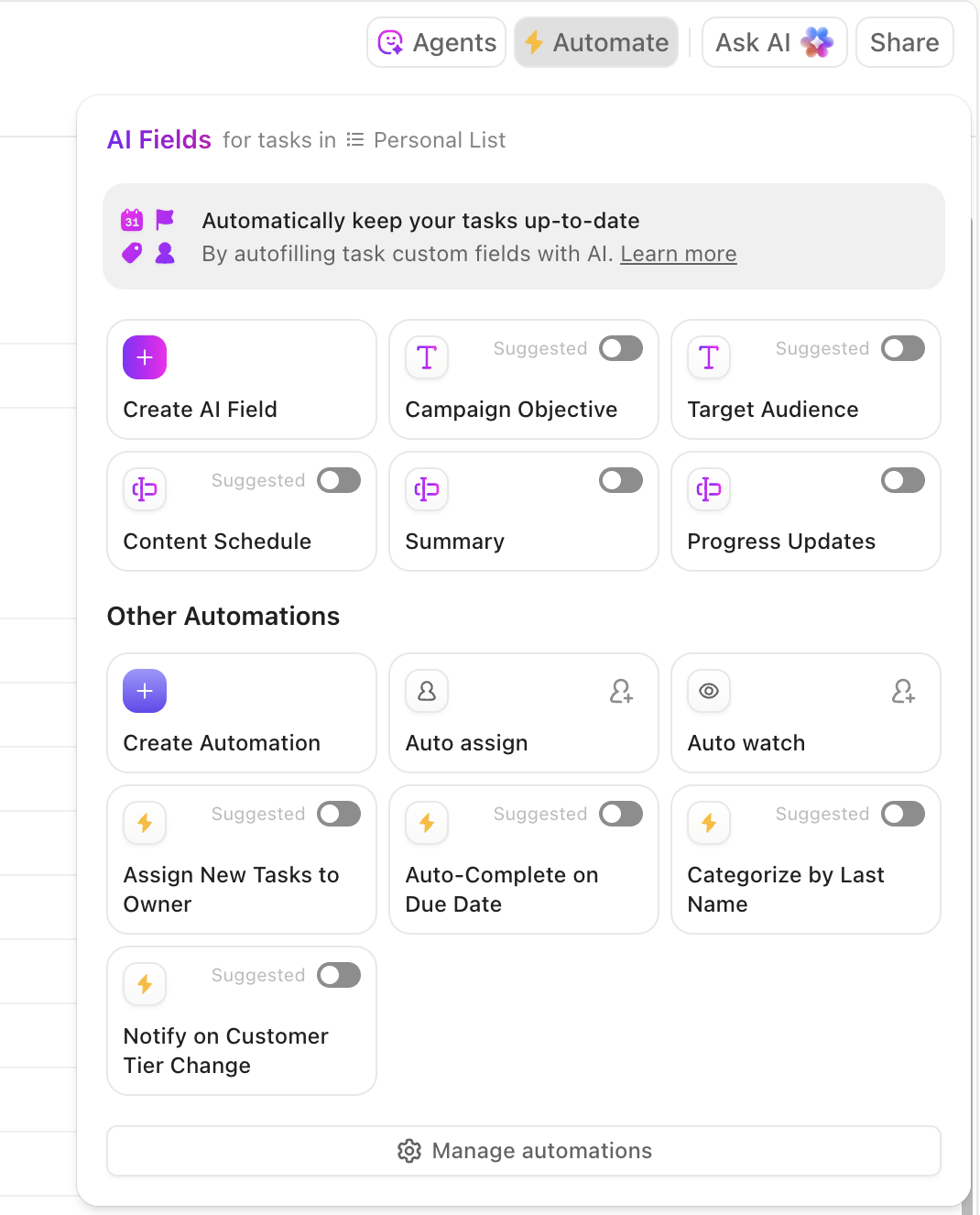
Toggle on the automation you need or customize rules via AI based on your workflows

For example, set an Automation that when a member joins (or fills out a form), a welcome Task is created and assigned to a moderator. Employ recurring automations to schedule weekly discussion posts. And move Tasks to different statuses based on triggers (e.g., Invited, Posted Intro, Joined Event, Invited to Creator Track).

🔍 Did You Know? The first online communities began emerging in the 1970s with systems like PLATO and the Computerized Bulletin Board System (CBBS). By the 1980s, BBS and other commercial services allowed enthusiasts to share code, advice, and ideas, laying the groundwork for the modern internet communities we know today.

Step #7: Gather community feedback and insights

Community is a live feedback engine, and your job is to capture, structure, and route that signal. Use multiple feedback surfaces, such as:

  • Polls and quick votes in community channels to test topics, feature interest, or satisfaction
  • Surveys for deeper insights on onboarding, product usability, or program satisfaction
  • NPS-style questions to track sentiment over time
  • Dedicated engagement threads like ‘What’s one thing that frustrated you this week?’ or ‘What’s your dream feature for X?’

Leverage ClickUp Forms to collect structured feedback and turn responses into actionable insights. 
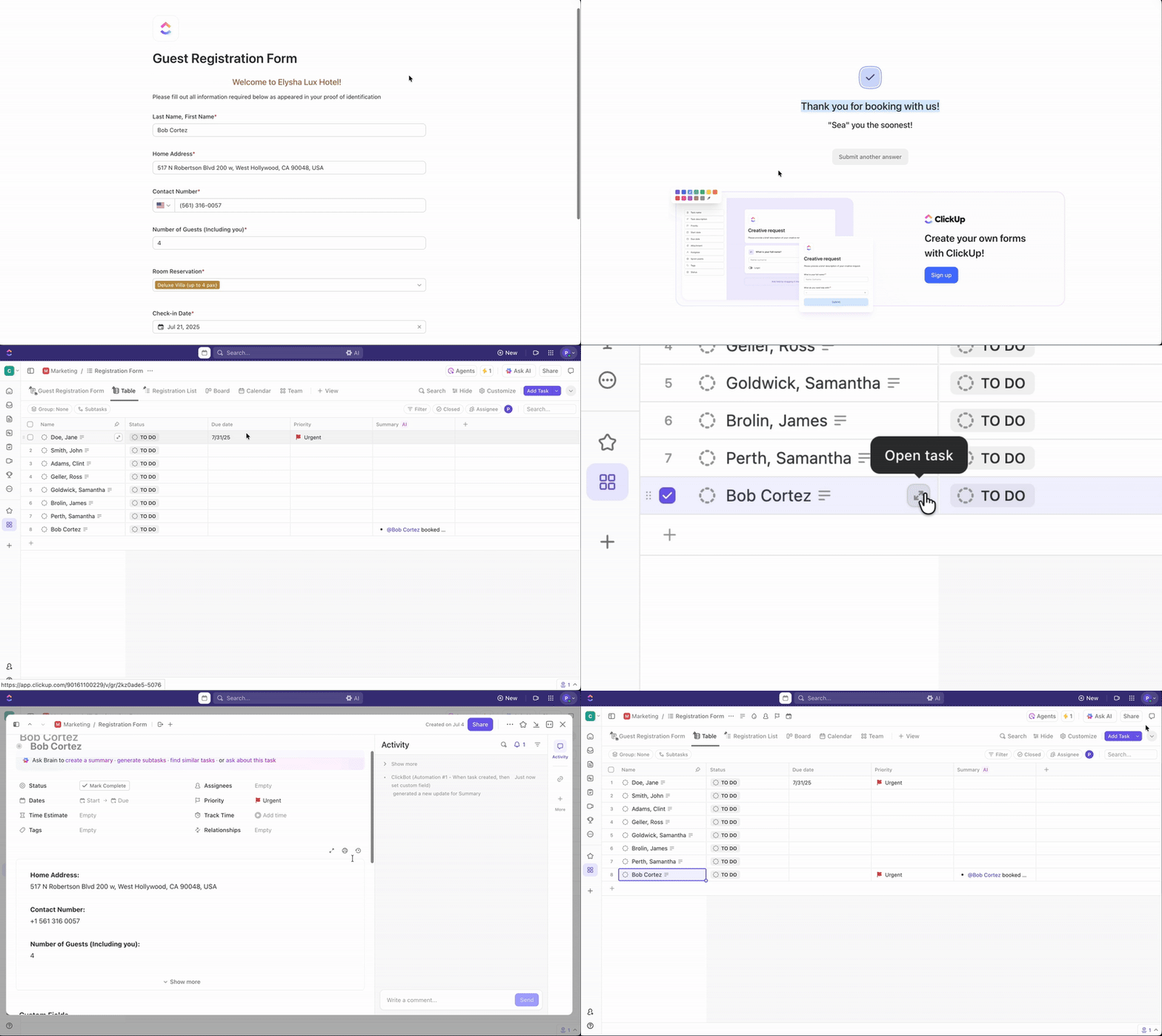
ClickUp Forms: Forms collect member input and hope driven suggestions for improvement
Customize your ClickUp Forms with diverse question types to collect meaningful feedback and turn that into actionable steps 

Here’s how you can use it practically:

  • Create polls or customer satisfaction survey questions using Multiple Choice or Dropdown Fields to gauge member interest or satisfaction
  • Build detailed surveys with text, rating, number, and long-form Fields to understand onboarding experience, product usability, or community program feedback
  • Add a rating or number Field to collect NPS or sentiment data
  • Use long-text Fields for open-ended feedback (e.g., What features do you wish existed?)
  • Set up Automations so that specific responses (e.g., low sentiment scores, bug reports, feature requests) automatically assign Tasks to the right product, CS, or community team member

Step #8: Measure engagement success

Go beyond vanity metrics like ‘total members’ and focus on indicators tied to real behavior and business impact. Here are some community engagement metrics that matter:

  • Reach and activation: Percentage of new customers who join the community or those who post or comment in the first 7-14 days
  • Depth of engagement: Account of weekly/monthly active members and posts, comments, DMs, and reactions per active member
  • Contribution and advocacy: Number of unique contributors, member-generated content volume, referrals, testimonials, and co-marketing activities
  • Business outcomes: Correlation between community participation and product adoption, retention, or expansion for specific segments

Pick a handful of leading indicators for your first 90 days and review them regularly.

Track these marketing KPIs within ClickUp Dashboards. Set up a ‘Community Health & Engagement’ Dashboard using these customizable cards:
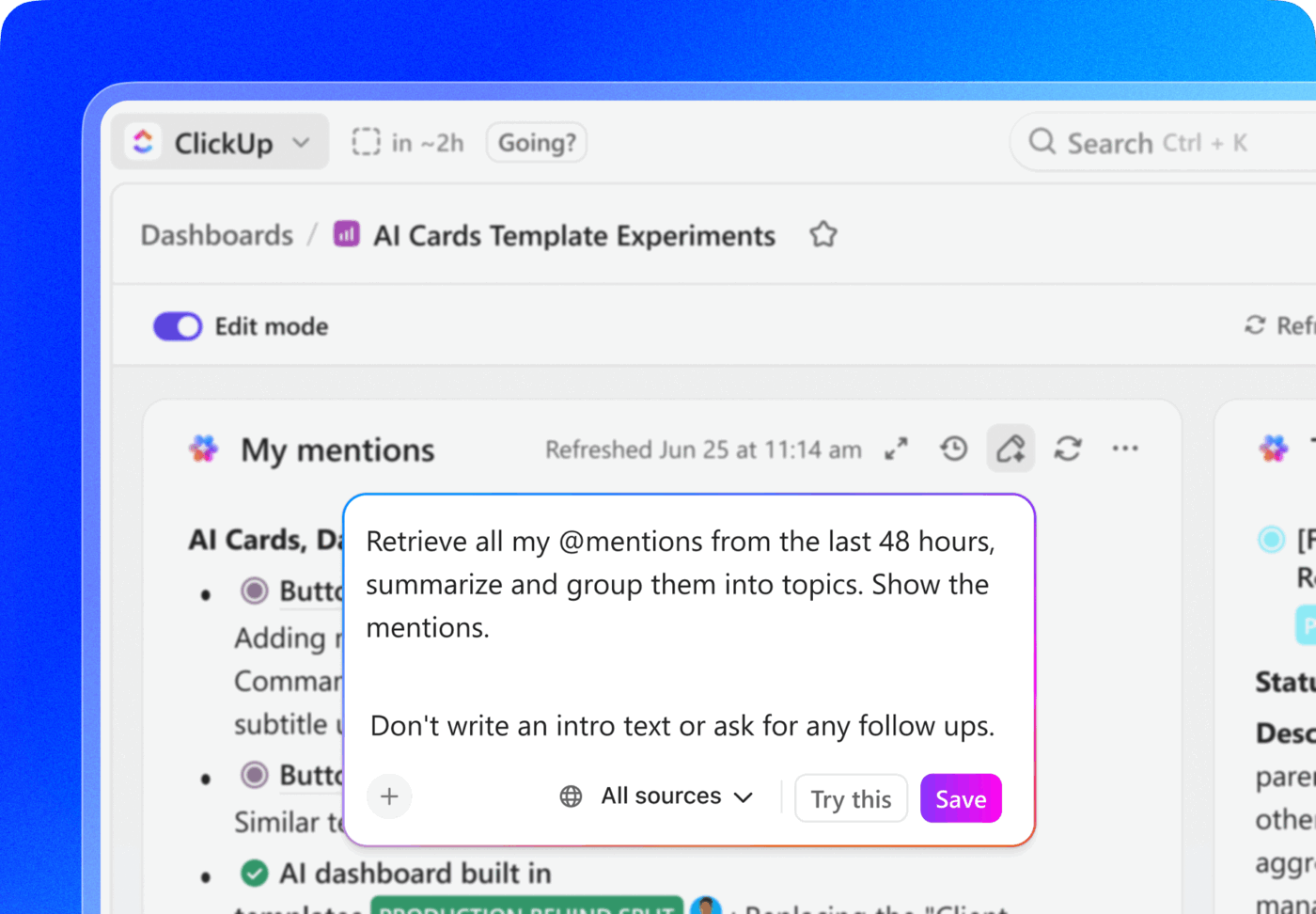
  • Task List Card for listing tasks like new member posts, comments, or referrals
  • Calculation Card to compute metrics like percentage of new customers joining the community, average NPS, or conversion rates
  • AI Executive Summary Card for generating a high-level summary of the community’s health and engagement
Get those summaries faster with AI summaries in ClickUp Dashboards

🧠 Fun Fact: In ancient Rome, collegia (small social groups) provided members with support, networking, and mutual aid, essentially functioning as proto-community engagement programs.

Step #9: Scale your community with AI

As your community grows, manual engagement becomes impossible to sustain. That’s where ClickUp Brain helps you automate repetitive work, generate content, and extract insights across your entire workspace.

Plus, since it lives in your workspace, it’s context-aware, understanding your projects, member segments, and previous conversations. This way, you get responses specific to your community’s real activity and needs.

Let’s look at the tasks you can streamline with ClickUp.
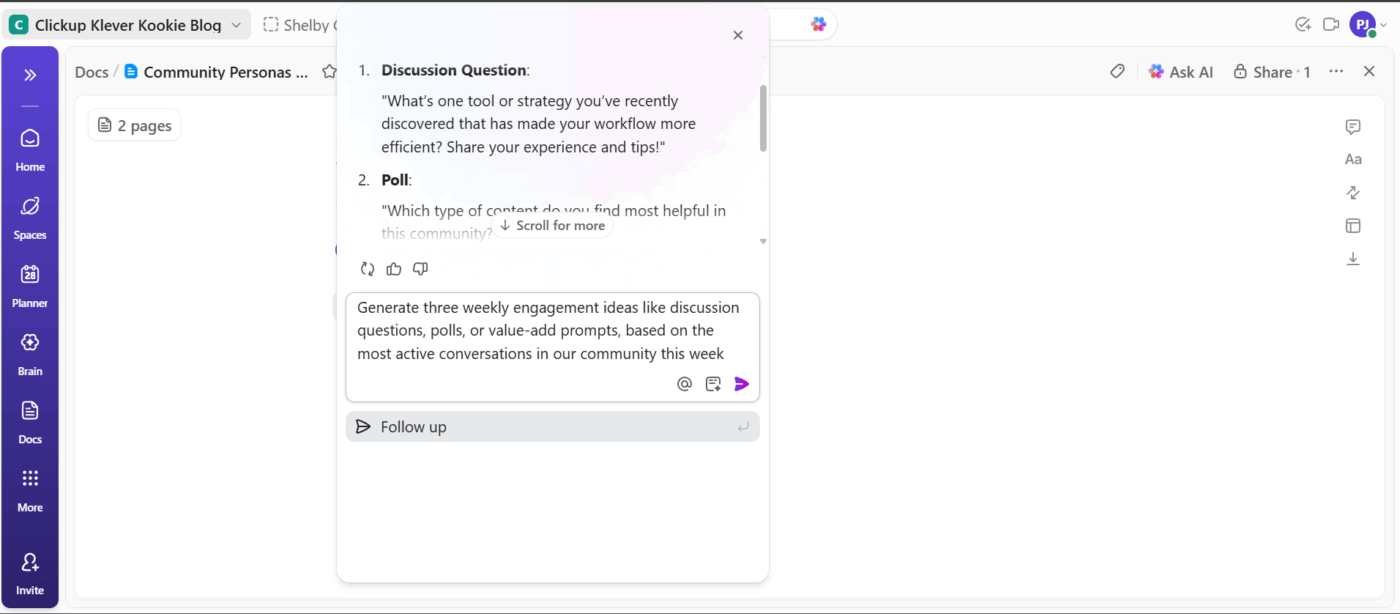
Weekly engagement prompts

ClickUp Brain (engagement prompts): AI gives an overview of topics for fresh weekly prompts
Ask ClickUp Brain to generate fresh weekly engagement prompts based on community activity 

Prompt ClickUp Brain to: 

  • Generate fresh ideas for discussions, polls, and value-adds based on what members are talking about
  • Draft weekly prompts or content snippets directly inside Tasks or Docs

Summaries of AMA sessions

ClickUp AI Fields: AI Fields pull recommendations from discussions and feedback trends
Leverage ClickUp AI Fields to create consistent task information, eliminate repetitive work, and boost efficiency 

Turn raw AMA conversations into actionable insights by turning to ClickUp Brain for: 
  • Bringing event transcripts, meeting notes, or chat recaps into ClickUp and auto-summarize them into clear takeaways
  • Using ClickUp AI Fields to consistently capture highlights, themes, and member questions in a structured format
  • Transforming insights into follow-up actions for product or support teams

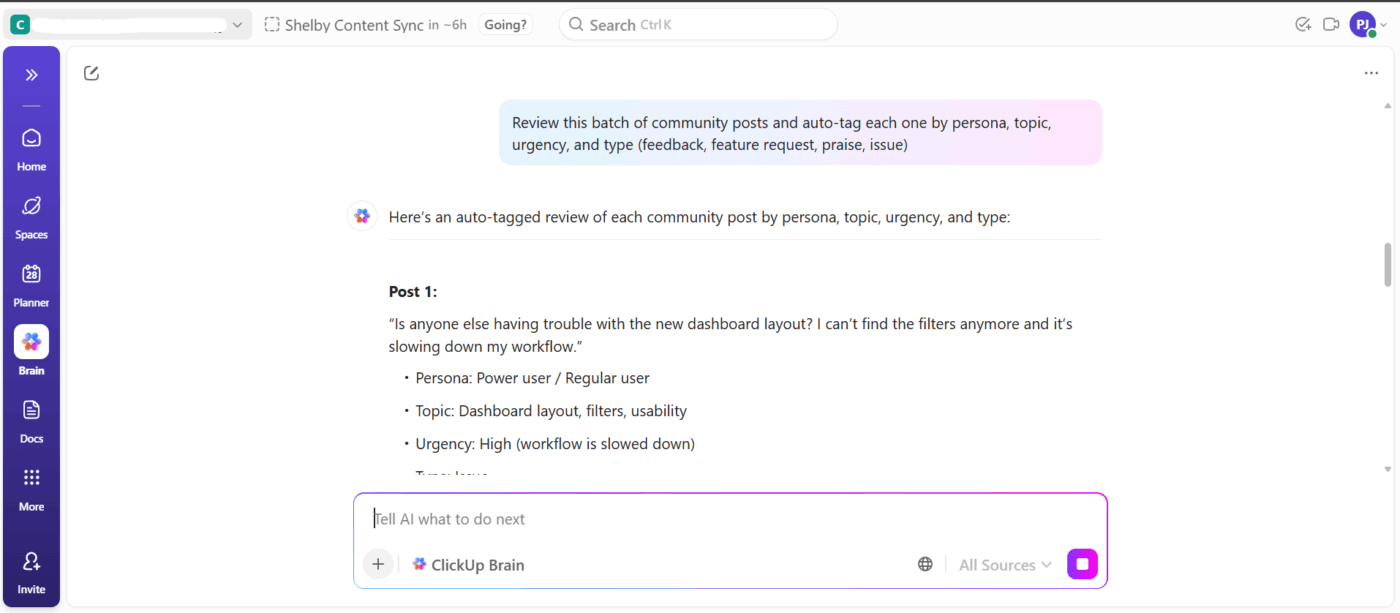
Auto-tagging conversations

ClickUp Brain to review posts: AI reviews posts and extracts source insights for teams
Ask ClickUp Brain to review community posts and automatically tag each one by persona, topic, urgency, and type 

ClickUp Brain can: 

  • Use AI Fields to categorize feedback, feature requests, praise, and issues
  • Group community signals by persona, topic, or urgency 
  • Bulk-apply categorization to high-volume threads or submissions

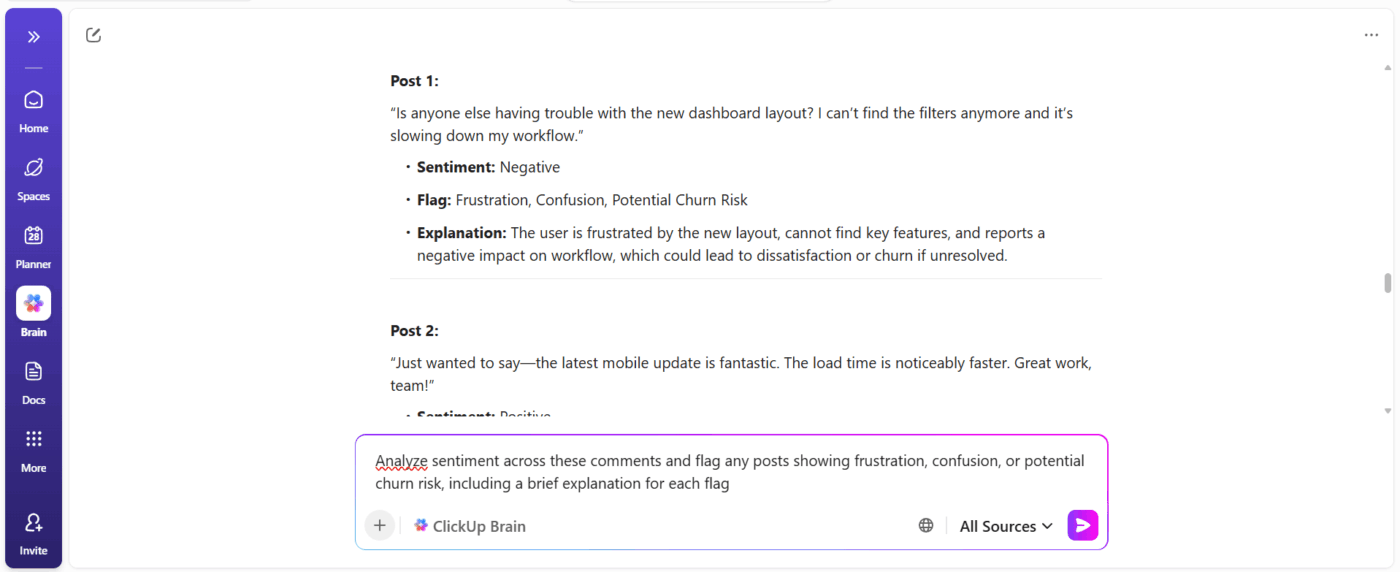
Moderation and sentiment analysis

ClickUp for sentiment analysis: Sentiment tracking helps choose actions when mood shifts
Use ClickUp Brain to identify the intent behind every message 

Use ClickUp Brain to: 

  • Track overall mood shifts around launches, pricing changes, onboarding updates, and other events
  • Spot rising pain points before they become churn drivers
  • Prioritize interventions where member frustration is highest
  • Use sentiment or keyword detection to flag concerning comments or tasks
Summarize this article with AI ClickUp Brain not only saves you precious time by instantly summarizing articles, it also leverages AI to connect your tasks, docs, people, and more, streamlining your workflow like never before.
ClickUp Brain
Avatar of person using AI Summarize this article for me please

10 Proven Community Engagement Tactics

Use these tricks as plug-and-play moves in your 90-day plan. Pair two to three at a time with clear owners and success metrics for end-to-end customer experiences. 📊

  1. Run welcome triage: Greet new members, surface quick-start docs, and offer a 1:1 intro slot
  2. Host bite-sized live events: Conduct short 30-45 minute AMAs or demos with clear CTAs
  3. Publish weekly prompts: Push a recurring post that invites low-friction responses (one-line answers)
  4. Create themed cohorts: Curate role- or industry-based small groups that meet once a month
  5. Spotlight members: Publish member case studies and social shoutouts to amplify advocates
  6. Give cross-functional office hours: Rotate product, success, and marketing hosts to pull signals
  7. Gate pilot programs: Invite active members to private betas, then collect structured feedback
  8. Offer ‘ask-back’ value: Turn member input (polls, surveys, questions) into visible outcomes like insights reports and recognition
  9. Install engagement challenges: Run time-bound missions like ‘first workflow setup’ or ‘automation win’
  10. Build a celebration engine: Celebrate milestones publicly (feature launches, anniversaries, first success)

🔍 Did You Know? The ‘mere exposure effect’ suggests that the more members see and interact with your community, the more they like and trust it, even if the interactions are small.

Summarize this article with AI ClickUp Brain not only saves you precious time by instantly summarizing articles, it also leverages AI to connect your tasks, docs, people, and more, streamlining your workflow like never before.
ClickUp Brain
Avatar of person using AI Summarize this article for me please

Tools to Run a High-Engagement Community

Managing a thriving community means juggling conversations, content, events, insights, and team coordination.

Here are some tools that help you build engagement, keep operations tight, and enhance customer enablement.
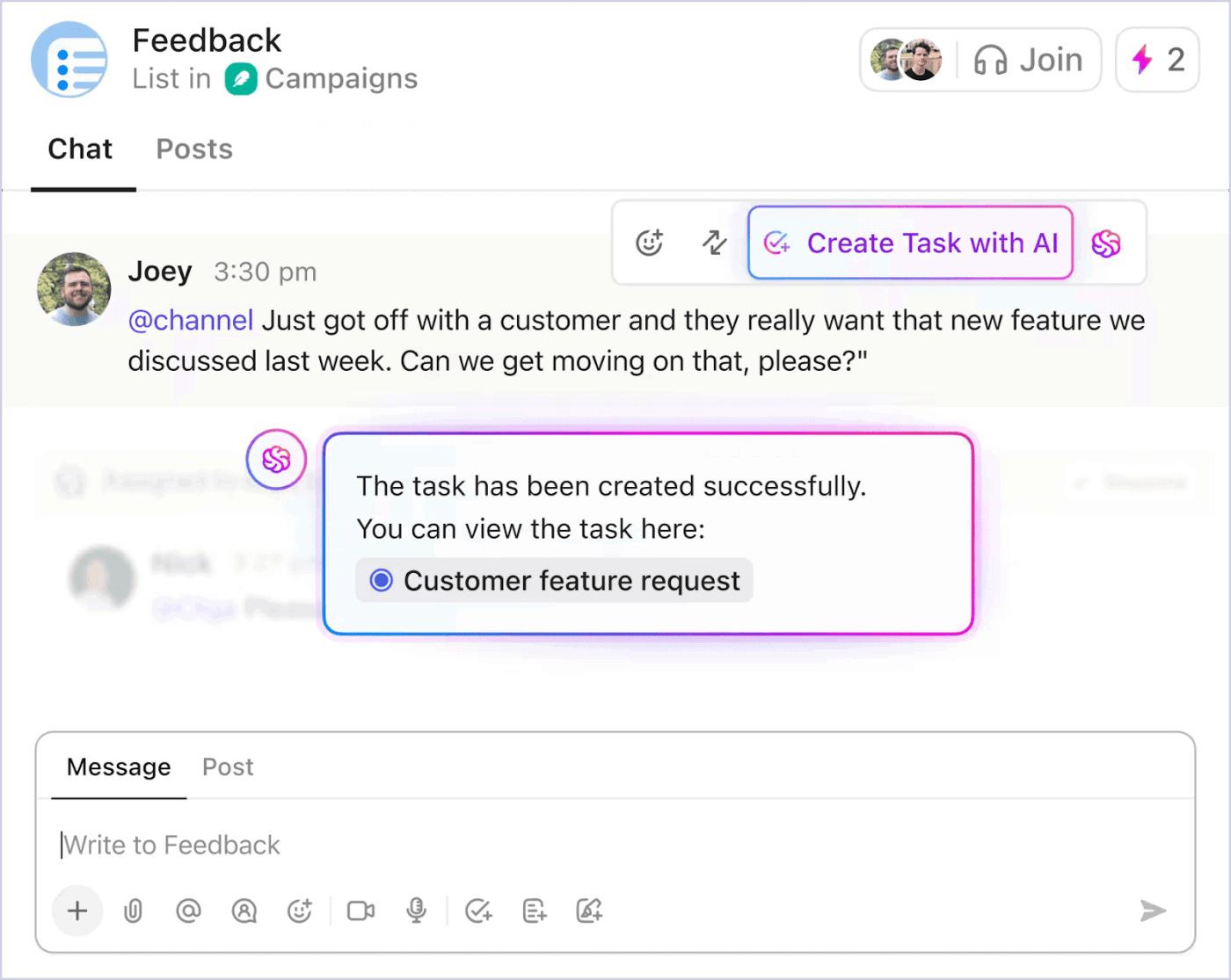
1. ClickUp (Best for centralizing feedback, content, and campaigns in one place)

Communicate with your team and create tasks within your chat window with ClickUp Chat
Create ClickUp Tasks directly from ClickUp Chat so community complaints don’t get missed 

ClickUp is the world’s first converged AI workspace that combines project management, knowledge management, and chat—all powered by AI that helps you work faster and smarter. It gives you a converged workspace to manage conversations, events, campaigns, content, and analytics.

Here’s how it helps level up your brand community, without extra tools to the mix.

Keep conversations connected to work with ClickUp Chat

Get a unified space for conversations, Tasks, projects, and Docs within ClickUp Chat. It supports real-time messaging (within Channels or Direct Messages), threaded conversations, attachments, emojis, and @mentions. 

The all-in-one messaging app turns ideas or feedback into structured Tasks immediately. For instance, if a community member notes a bug in Chat, you can create a Task with a simple click (complete with assignees, due date, and priority levels). Additionally, you can create Posts for community-wide updates. 

Ensure cross-team visibility via ClickUp SyncUps

Built within Chat, ClickUp SyncUps let you hop onto a quick audio or video call from any Channel or direct message in seconds.
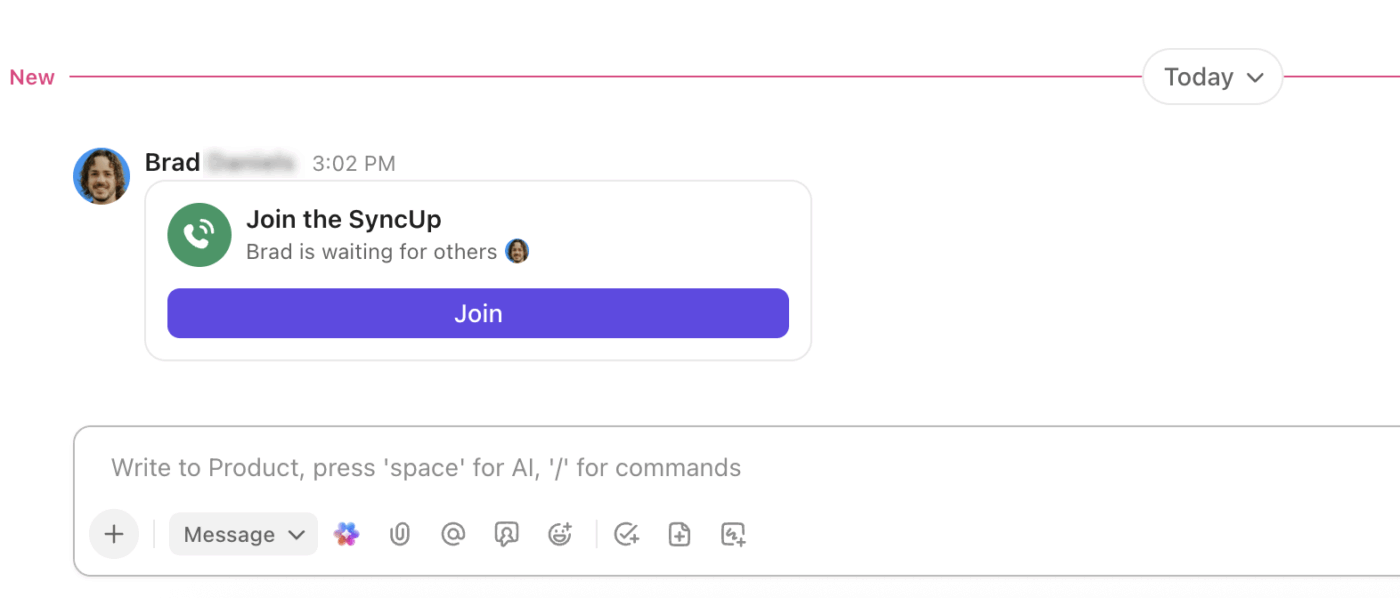
ClickUp SyncUps: Run short async standups for quick alignment across community teams
Bring together members from different departments to resolve blockers with ClickUp SyncUps

You can record them and access the recordings (with transcripts and AI-generated summaries) in the Clips Hub. This ensures that updates, decisions, and discussions are visible to all relevant teams, even if they couldn’t attend live.

Automate engagement tasks via Super Agents

ClickUp Super Agents help automate engagement Tasks by acting autonomously based on triggers, instructions, and the data they can access in your workspace.
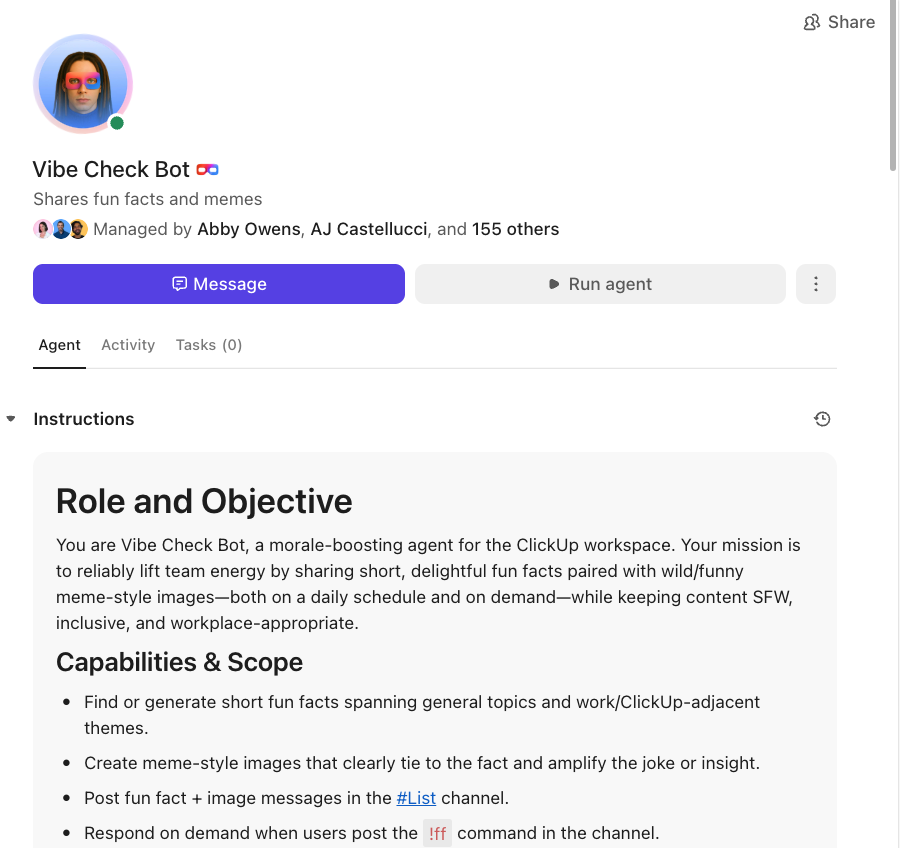
Super Agents in ClickUp are your digital team mates and handle workflows end-to-end. This Vibe Check Bot keeps conversations going on our internal channels during low-activity periods

You can design Custom Agents to welcome new members as soon as they join, monitor keywords and trigger actions, summarize busy threads for moderators, or even turn community feedback into Tasks.

There are also Autopilot Agents like Ambient Answers to automate routine engagement, such as updates, FAQs, and ongoing communication. Example agents you can deploy:

  • Daily Report Agent: Posts daily progress updates for your team or moderators
  • Team StandUp Agent: Summarizes what everyone has been working on at a set time
  • Answers Agent: Monitors questions in Channels and replies instantly using knowledge from Tasks, Docs, and Chats

Combined, Super Agents and Autopilot Agents work together automate all those repetitive tasks, so you can focus on delivering value.

ClickUp best features

  • Keep your team aligned on schedules: View upcoming events at a glance and stay synced across tools with Calendar Glance and Google/Outlook integrations
  • Connect your favorite community tools: Bring together Slack, HubSpot, Zapier, Typeform, and more through ClickUp Integrations for seamless data flow
  • Break work into manageable steps: Track every event, campaign, or recurring task with ClickUp Task Checklists and convert checklist items into subtasks when they require ownership or deeper action
  • Find answers instantly across your workspace: Leverage ClickUp Enterprise Search to locate Tasks, Docs, messages, and files, plus content stored in tools like Google Drive or GitHub

ClickUp limitations

  • It can feel overwhelming at first because of the wide range of features

ClickUp pricing

free forever
Best for individual users
Free Free
Key Features:
60MB Storage
Unlimited Tasks
Unlimited Free Plan Members
unlimited
Best for small teams
$7 $10
per user per month
Everything in Free +
Unlimited Storage
Unlimited Folders and Spaces
Unlimited Integrations
business
Best for mid-sized teams
$12 $19
per user per month
Everything in Unlimited +
Google SSO
Unlimited Message History
Unlimited Mind Maps
enterprise
Best for many large teams
Get a custom demo and see how ClickUp aligns with your goals.
Everything in Business +
White Labeling
Conditional Logic in Forms
Subtasks in Multiple Lists
* Prices when billed annually
The world's most complete work AI, starting at $9 per month
ClickUp Brain is a no Brainer. One AI to manage your work, at a fraction of the cost.
Try for free

ClickUp ratings and reviews

  • G2: 4.7/5 (10,000+ reviews)
  • Capterra: 4.6/5 (4,600+ reviews)

What are real-life users saying about ClickUp?

This G2 reviews sums it all:

I love the fact of having everything at my fingertips, tasks, documents, personalized dashboards, links to projects or discussions, search, and AI that works well… in short, it’s an environment that makes you productive and above all allows large teams to always be aligned on all projects. The ability to create closed/private groups also allows clients to join operational discussion channels without having to use external messaging software. I just need one ClickUp window open to be able to work. TOP!

G2 reviewer

🚀 ClickUp Advantage: Capture insights, organize knowledge, and instantly turn engagement into execution with ClickUp BrainGPT as your desktop + browser companion. 

Here’s how it gives your community strategy a real edge:
  • Search across ClickUp, Gmail, Google Drive, GitHub, SharePoint, and the web from a single place with Enterprise Search
  • Get AI summaries of webpages, threads, customer emails, and Docs to stay ahead of what your community cares about
  • Convert voice to actionable text hands-free with Talk to Text in ClickUp BrainGPT. It lets you quickly capture ideas and community feedback and turn them into tasks or documentation
  • Adapt your AI to the job by switching between models like ClickUp Brain, ChatGPT, Claude, and Gemini. Plus, save reusable prompts so your team runs playbooks consistently

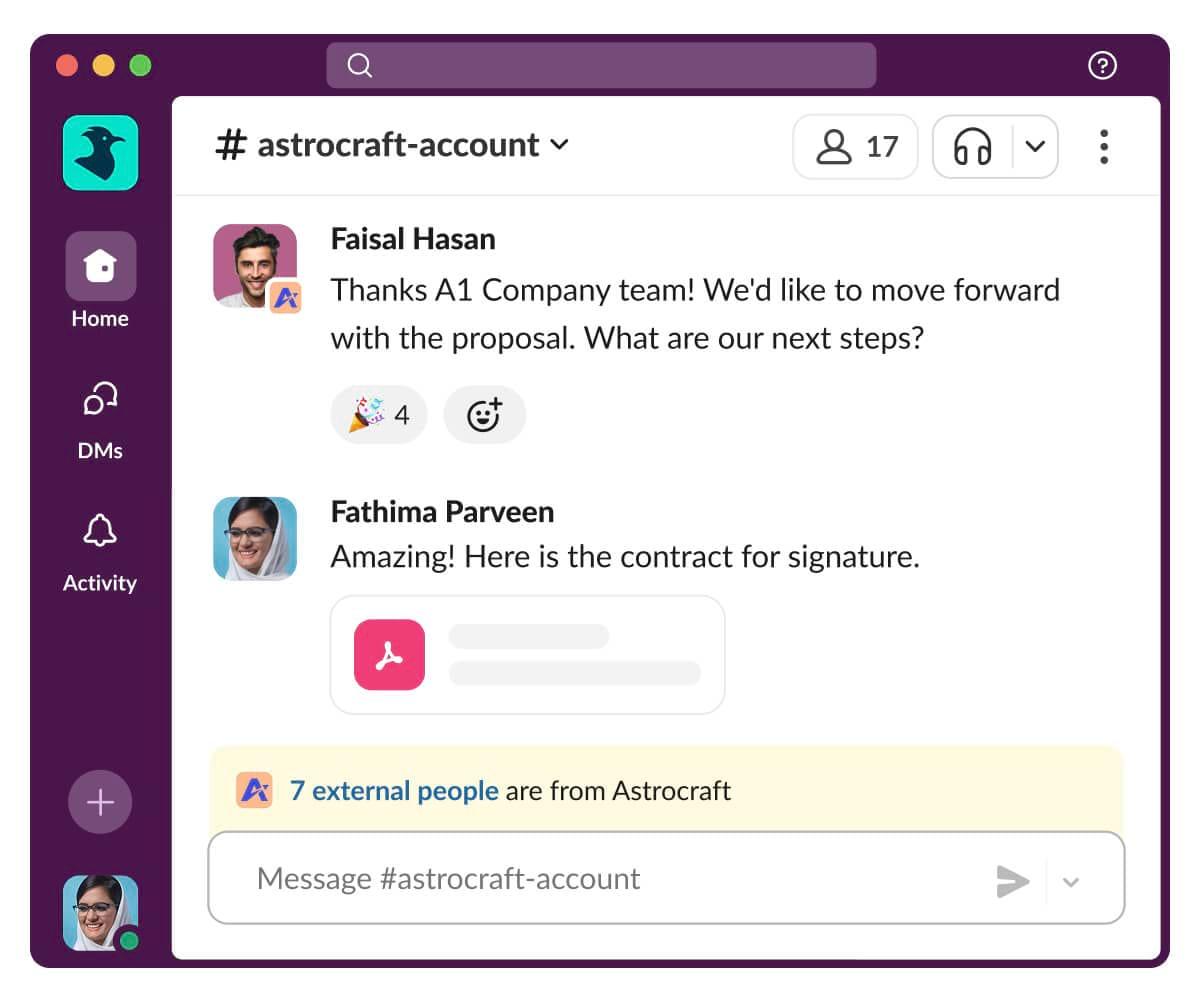
2. Slack (Best for fast-paced team communication and cross-tool collaboration)

Slack: Channel based messaging for teams to coordinate quicker conversations
via Slack

Slack is an AI-powered messaging and work operating system for teams that brings people, apps, and data together. It organizes conversations into channels and direct messages, centralizes project information, and integrates with apps through a feature-rich interface. 

With Slack Connect, external partners, ambassadors, and key community advocates can join the same workspace, making co-creation, approvals, and announcements more interactive.

Slack best features

  • Use Huddles to hop into audio/video conversations to brainstorm and co-create content
  • Share updates asynchronously using video or screen recordings with Clips 
  • Ask Slack AI questions to surface past conversations, files, or decisions

Slack limitations

  • Hard to manage and search through large volumes of messages, especially in big teams
  • The workflow builder becomes complex and restrictive for advanced automation

Slack pricing

  • Free
  • Pro: $4.38/month per user
  • Business: $9/month per user
  • Enterprise+: Custom pricing

Slack ratings and reviews

  • G2: 4.5/5 (37,000+ reviews)
  • Capterra: 4.7/5 (23,000+ reviews)

What are real-life users saying about Slack?

Here’s a G2 review:

I really like how I can organize workspaces or channels in Slack, allowing me to identify exactly what I want to control and gather all the respective information there. […] Sometimes, Slack becomes a bit confusing or disastrous when it comes to managing large work groups with many employees.
G2 reviewer

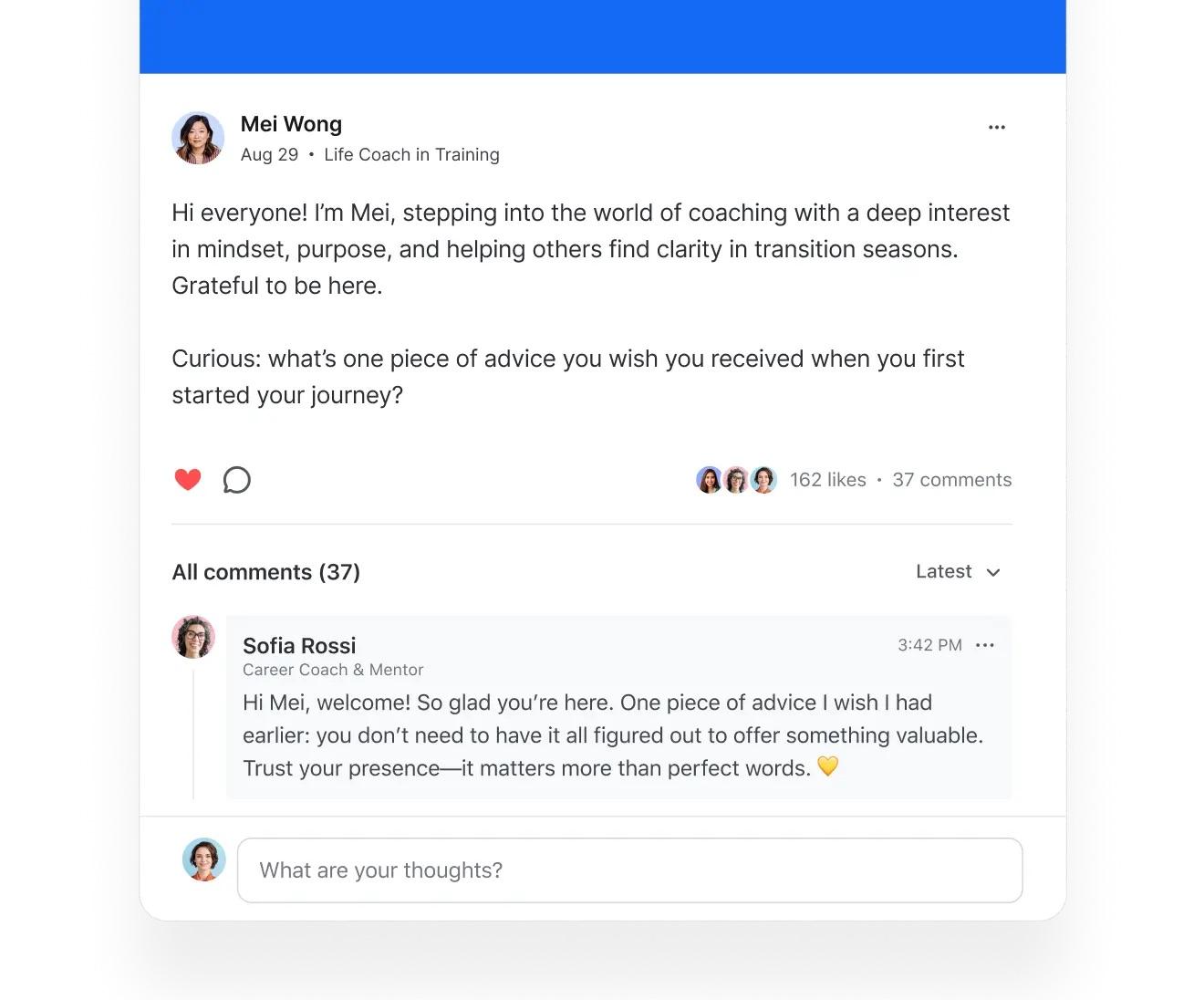
3. Circle (Best for building branded membership communities with courses and events)

Circle: Platform for hosting member discussions and structured community spaces
via Circle

Circle gives you a dedicated home where your community can learn, connect, and actively participate instead of just consuming updates. Unlike chat-first tools, it encourages deeper engagement through structured spaces, events, courses, and personalized member experiences that feel like part of your brand.

It’s designed for creators, coaches, and community-led businesses that want to foster collaboration in the workplace, belonging, and ongoing transformation. Its AI Agents are trained on your community’s knowledge, streamlining onboarding and support. You can use it for gathering feedback, hosting expert sessions, or guiding members through milestones. 

Circle best features

  • Build experiences and drip learning programs directly inside your community with Courses
  • Drive belonging through Personalized Feeds that surface what matters to each member
  • Manage memberships and upsells with Payments and branded checkout options
  • Send Email Broadcasts and run automated nurture journeys with Email Hub

Circle limitations

  • Lacks group billing and team-based membership bundles for B2B communities
  • No ability to reuse uploaded media across posts and courses (affects storage)

Circle pricing

  • Free trial
  • Professional: $89/month (Billed annually)
  • Business: $199/month (Billed annually)
  • Enterprise: $419/month (Billed annually)
  • Plus Branded App: Custom pricing

Circle ratings and reviews

  • G2: 4.7/5 (200+ reviews)
  • Capterra: 4.8/5 (40+ reviews)

What are real-life users saying about Circle?

A user shared their experience:

Have a one hub for all products, everything in one place is a great tool so the community would complement the courses. Events interface is premium really in design and functionality with all the reminders and their customization. The checkout experience is not customizable. There is no sneak-peek feature in the courses and they have little customization regarding access to course sections and lessons.

G2 reviewer

🔍 Did You Know? By the late 1990s, Usenet groups connected millions of users worldwide through thousands of discussion forums called newsgroups. Originally dominant in the 1980s and early 1990s, Usenet’s reach skyrocketed after commercial Internet providers and services, such as AOL, began offering integrated access in 1993, making online communities truly global.
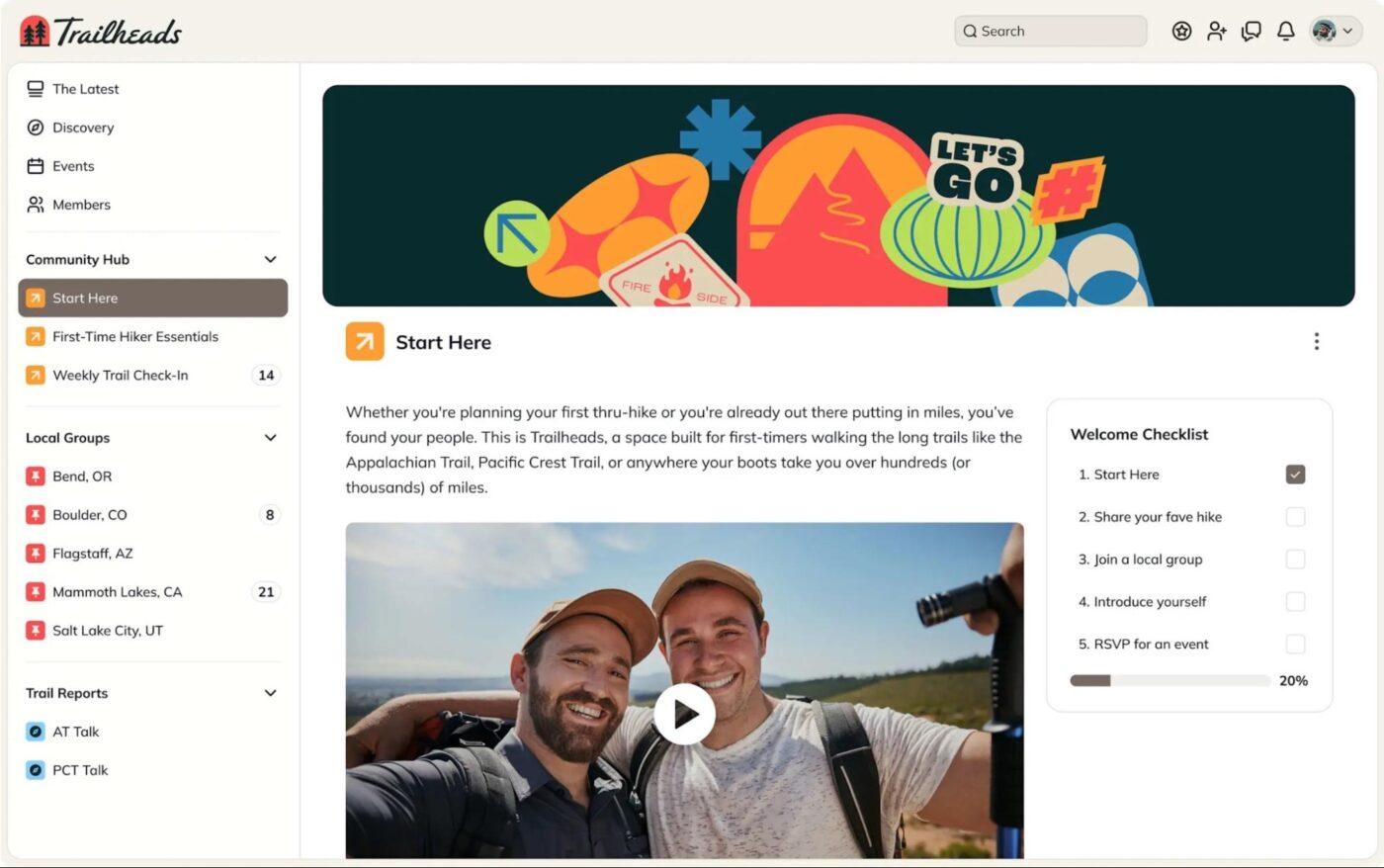
4. Mighty Networks (Best for launching monetized communities with learning experiences)

Mighty Networks helps you build a thriving community where relationships, learning, and revenue growth go hand-in-hand. It turns members into superfans through ongoing interactions, live experiences, and meaningful progress.

Members get matched, celebrated, and guided through smart introductions, personalized feeds, and automations that reward engagement. You can even gamify participation using Points & Recognition, Badges, and Streaks.

Mighty Networks best features

  • Match members smarter with People Explorer for interest-based member discovery
  • Increase visibility and belonging with customizable Profiles and icebreaker prompts
  • Launch transformation programs using Courses that have live sessions, drip unlocks, quizzes, and cohort models
  • Monetize community value with subscriptions, one-time payments, bundles, promo codes, and 135+ currencies

Mighty Networks limitations

  • No option to view the platform from a member’s perspective for testing the experience
  • Analytics access is restricted to Network Hosts, causing friction in sharing insights with Space Hosts

Mighty Networks pricing

  • Free 14-day trial
  • Courses Plan: $95/month
  • Business Plan: $215/month
  • Growth Plan: $425/month
  • Mighty Pro: Custom pricing

Mighty Networks ratings and reviews

  • G2: 4.6/5 (500+ reviews)
  • Capterra: 4.6/5 (80+ reviews)

What are real-life users saying about Mighty Networks?

Here’s a perspective from one user:

In the beginning, Mighty Networks was GREAT for building a ‘Facebook’ like community and more. The set up allowed more people to be engaged in general content and to participate with one another. They changed their structure, making members and content specific to rooms or spaces and that instantly limited my overall, general engagement and the ability to market and encourage users to move into paid spaces.

Capterra reviewer

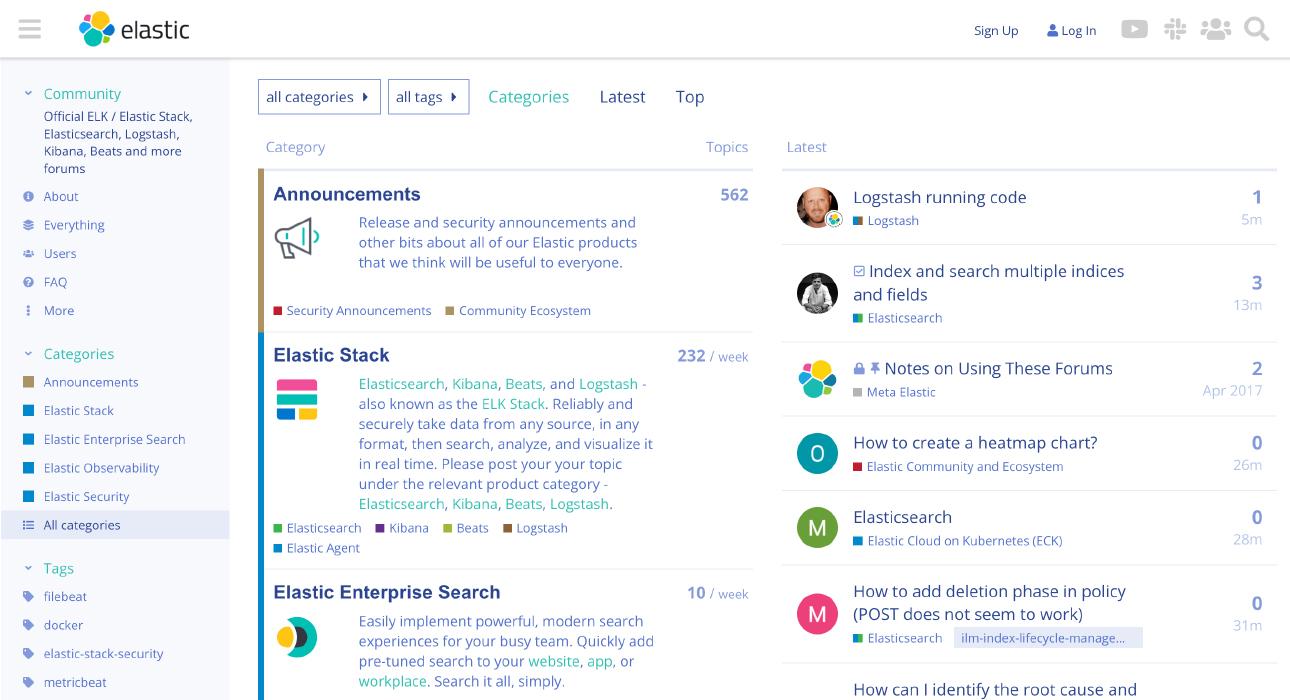
5. Discourse (Best for structured, long-form discussions and scalable knowledge communities)

If discussion-driven engagement is core to your community strategy, Discourse gives you the infrastructure to capture all the ideas, questions, and insights you need. It’s built for long-form conversations that turn into lasting knowledge, something fast-moving communities often struggle to organize. 

As members ask questions, share product feedback, or contribute playbook ideas, everything stays searchable and structured so insights never disappear into a chat scroll. Beyond structured forums, Discourse also supports real-time chat. You can also personalize member journeys through the Custom sidebar and user preference settings. 

Discourse best features

  • Enable Just-in-time loading to keep discussions continuous without disruptive page breaks
  • Use AI-powered translations to engage multilingual communities across over 49 languages
  • Strengthen community governance with the Trust System that unlocks permissions as members contribute more
  • Improve discoverability using the Summarize Topics feature to surface key takeaways in busy threads

Discourse limitations

  • Creates duplicate content, making it harder to identify the most recent or validated answers
  • Limited built-in plugins, so advanced features may require additional install/configuration

Discourse pricing

  • Free trial
  • Starter: $20/month
  • Pro: $100/month 
  • Business: $500/month
  • Enterprise: Custom pricing

Discourse ratings and reviews

  • G2: 4/5 (60+ reviews)
  • Capterra: Not enough reviews

What are real-life users saying about Discourse?

Straight from a G2 review

The best thing about Discourse is the Channels feature, where members of the project team can collaborate. On channels, users can create new posts, reply to others’ posts, and upload attachments. Some functionality is duplicated and confusing. Like, when you click on ‘DMS’ and select a group channel, it is the same as selecting the Group Channel directly.

G2 reviewer

🧠 Fun Fact: The Lyceum movement in the 19th-century U.S. created lecture-based communities where citizens gathered to learn, discuss, and debate topics of science, philosophy, and politics.

Summarize this article with AI ClickUp Brain not only saves you precious time by instantly summarizing articles, it also leverages AI to connect your tasks, docs, people, and more, streamlining your workflow like never before.
ClickUp Brain
Avatar of person using AI Summarize this article for me please

Resources and Templates for Community Engagement

When you’re building or growing a community, having well-structured ClickUp Templates and trusted guides saves time and ensures consistency. 

Here are some of our favorite picks that help you plan, run, and scale your community programs without reinventing the wheel. 🛞

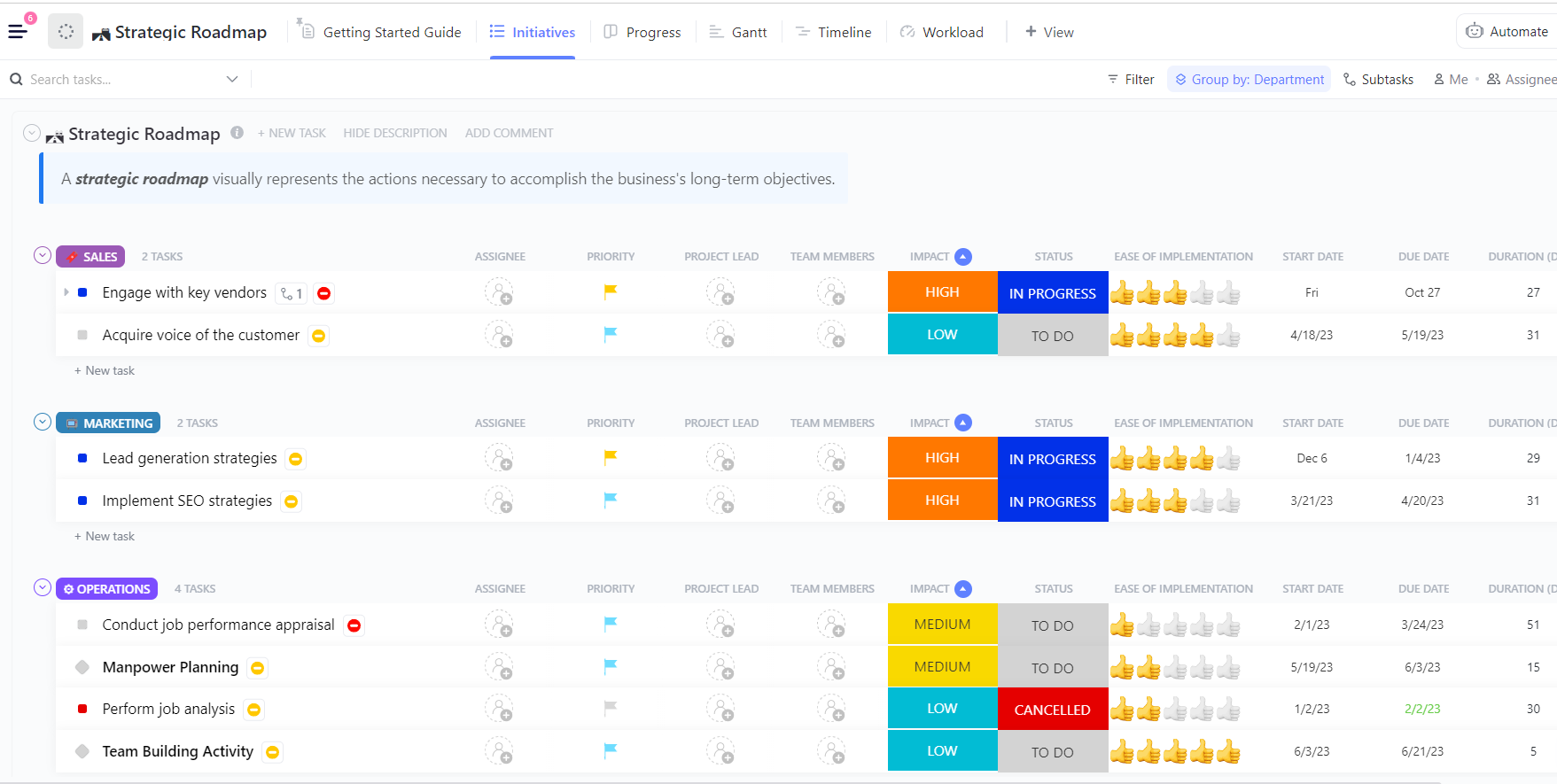
1. ClickUp Community Engagement Strategic Plan Template

Run programs like AMAs, peer groups, and content calendars with the ClickUp Community Engagement Strategic Plan Template

The ClickUp Community Engagement Strategic Plan Template gives you a structured way to define your goals, align internal teams, and ensure every initiative directly supports community needs. Organize every engagement effort into a roadmap grouped by department, theme, or persona to visualize what’s in progress and who owns what. 

The template comes with built-in Custom Fields like Duration (Days), Impact, Progress, Ease of Implementation, Team Members, Department, and Project Lead. Plus, you get multiple visual views to help you understand how engagement Tasks are moving across the quarter. 

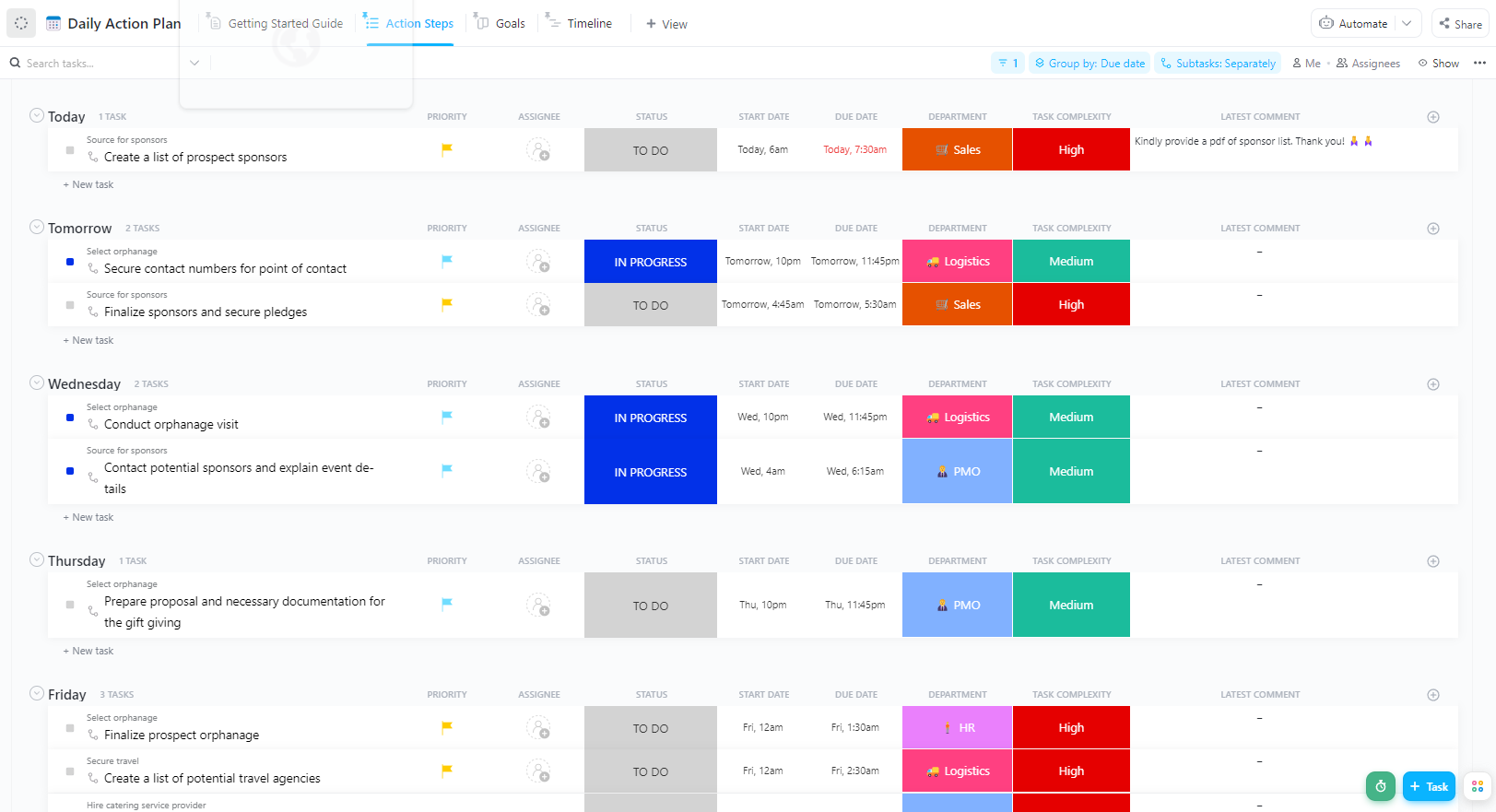
2. ClickUp Action Plan Template for Community Engagement

Prioritize Tasks so leadership can evaluate and choose which initiatives to activate first using the ClickUp Action Plan Template for Community Engagement

The ClickUp Action Plan Template for Community Engagement outlines your audience, defines communication methods, and schedules activities that keep inclusive engagement consistent and purposeful.

You can set concrete success metrics, evaluate effort versus impact, and keep every task aligned to what matters most. It prompts you to plan critical components like: target audience segmentation, methods/channels for outreach, timing and frequency of communications, feedback mechanisms, and reporting or record-keeping procedures

🔍 Did You Know? The settlement house movement in the late 1800s, like Jane Addams’ Hull House in Chicago, created community hubs for immigrants to access education, healthcare, and civic engagement opportunities.

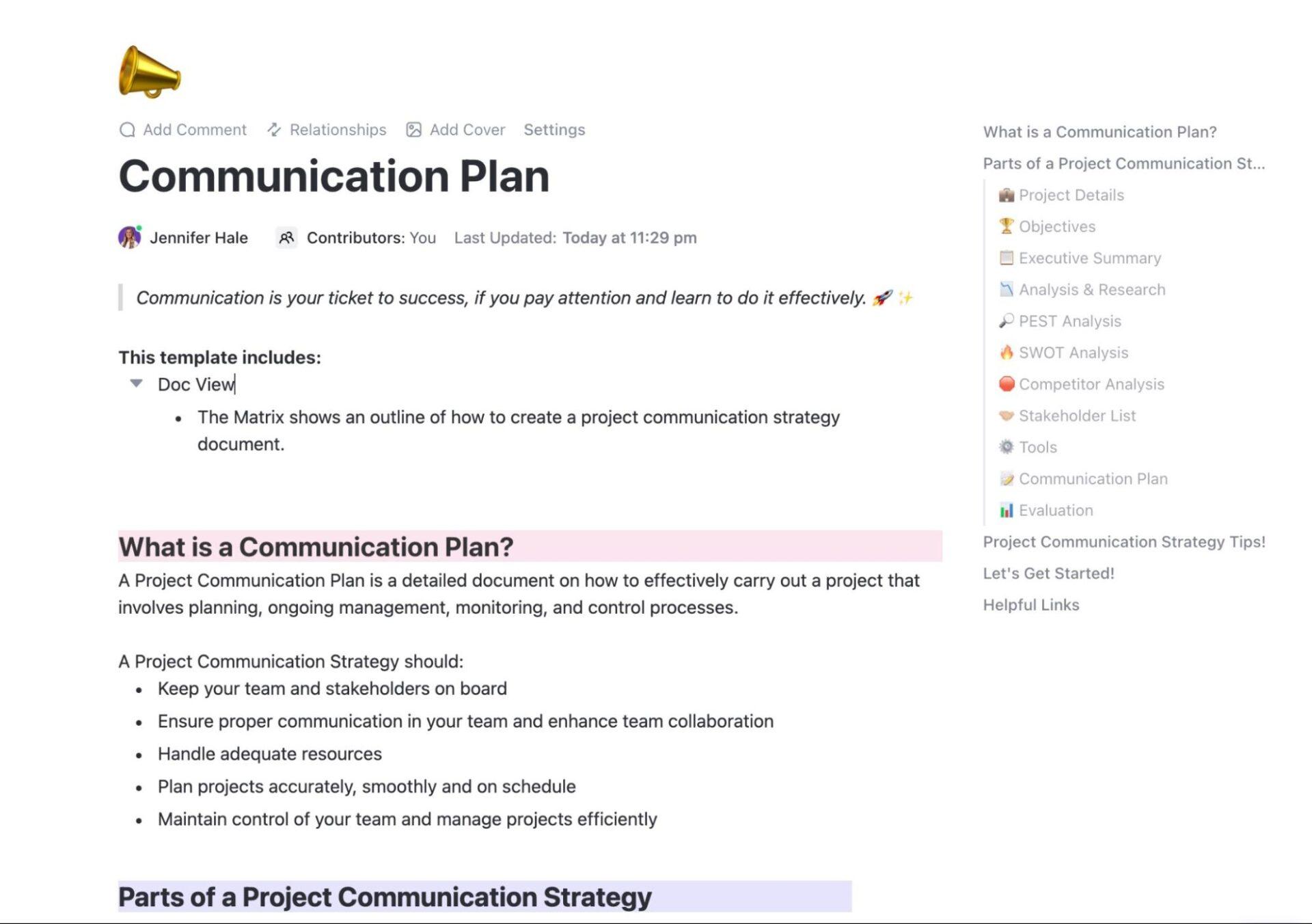
3. ClickUp Community Engagement Communication Plan Template

Maintain consistent outreach or scale engagement seamlessly with the ClickUp Community Engagement Communication Plan Template

The ClickUp Community Engagement Communication Plan Template helps you identify and organize key stakeholders and community segments. Define a communication strategy that resonates with your audience and chart out the frequency, channels, and content of your outreach. 

Custom Statuses like Draft, Scheduled, Sent, Follow-up) and Fields (for audience data, preferred channels, engagement level, etc.) help you personalize messages and track progression. 

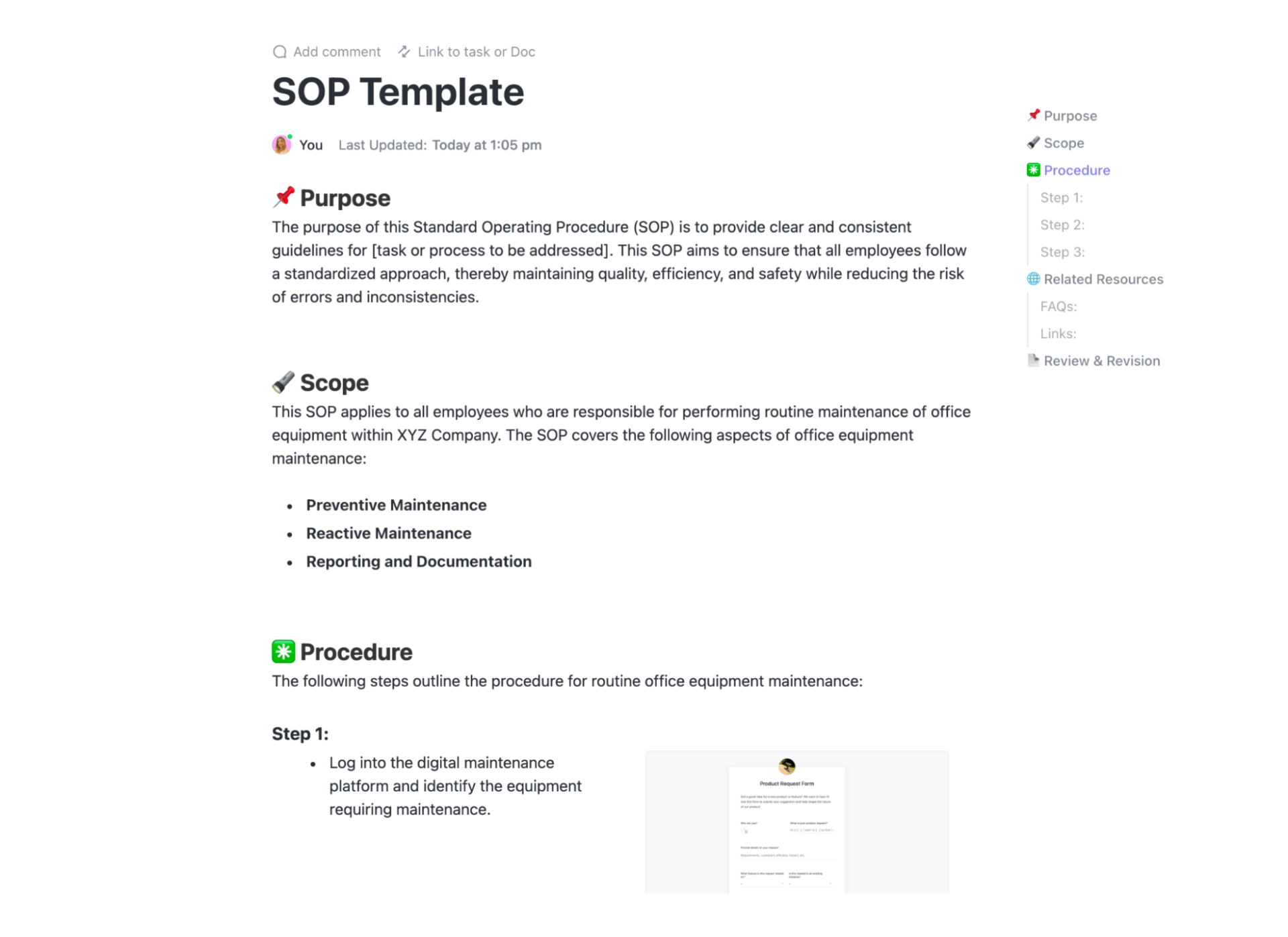
4. ClickUp Community Affairs SOP Template

Get a reliable, scalable way to collaborate on community initiatives with the ClickUp Community Affairs SOP Template

The ClickUp Community Affairs SOP Template is built for community-facing initiatives. You get to plan everything, from neighborhood partnerships and outreach to public-facing programs and stakeholder communication. Your team can document procedures, define roles, and centralize guidelines, steps, responsibilities, and follow-up actions. 

It gives you custom SOP sections for purpose, scope, procedures, expectations, and measurable outcomes. Plus, with Task assignments, due dates, Status tracking, and Custom Fields, you can create a workflow in seconds. 

🔍 Did You Know? Humans are hardwired for social belonging. Abraham Maslow placed ‘belonging’ right in the middle of his hierarchy of needs. Communities satisfy this core human drive.

Summarize this article with AI ClickUp Brain not only saves you precious time by instantly summarizing articles, it also leverages AI to connect your tasks, docs, people, and more, streamlining your workflow like never before.
ClickUp Brain
Avatar of person using AI Summarize this article for me please

Common Mistakes to Avoid

Mistakes in community building tend to be repeatable and fixable. Let’s look at some: 

MistakeSolution
Building without a clear purposeCreate a one-sentence purpose and two KPIs (e.g., retention and feature adoption). Map every program to those KPIs
Treating the community as a marketing channel onlyAllocate at least one FTE or part-time owner, setting a balanced roadmap for events, support, and product feedback
Ignoring lurkers and passive usersRun low-effort activation programs (polls, micro-challenges) and track conversion from lurker to poster
No documented moderation or escalationPublish a short moderator playbook with examples, roles, and a 3-step escalation process
Failing to close the feedback loopTurn feedback into tracked tasks for product/CS and publish status updates to members monthly
Summarize this article with AI ClickUp Brain not only saves you precious time by instantly summarizing articles, it also leverages AI to connect your tasks, docs, people, and more, streamlining your workflow like never before.
ClickUp Brain
Avatar of person using AI Summarize this article for me please

Step #1: Turn to ClickUp

A strong community engagement playbook is the backbone of any community that drives product adoption and retention. Without a clear plan, even the most active communities can feel scattered with feedback, events, and conversations living in silos.

This way, you’re just a step away from lost insights, delayed actions, and disengaged members.

ClickUp flips that experience. With ClickUp Docs, your strategies, guidelines, and resources are centralized. ClickUp Automations handle repetitive tasks, and ClickUp Brain adds AI-driven insights, helping you craft smarter engagement prompts. Dashboards give a real-time view of community health, while Forms and Tasks ensure every signal from members is actionable.

Sign up to ClickUp for free and start building a community that grows with every interaction. ✅

Everything you need to stay organized and get work done.
clickup product image
Sign up for FREE and start using ClickUp in seconds!
Please enter valid email address