Sorry, there were no results found for “”
Sorry, there were no results found for “”
Sorry, there were no results found for “”
Most teams think they’re communicating with clients. In reality, they’re just pushing updates into the void.
That’s a real problem when knowledge workers spend 88% of their week communicating across scattered tools.
Real client communication isn’t about sending more messages. Instead, it focuses on creating a connected system. One where conversations, decisions, and feedback live together. When miscommunication reduces, trust grows. As a result, your client relationships improve over time.
In this blog post, we’ll look at evergreen strategies to perfect client communication. We’ll also share free tools (such as ClickUp!) and templates to help you get the job done. Let’s go! 🗣️
Client communication is the structured exchange of information, ideas, and feedback between your team and your clients. The aim is to stay aligned on the goals, build trust, and move work forward without confusion.
Many teams think just sending updates is the same as communicating, but that misses the entire point. You’re not just checking a box; you’re building a relationship that keeps clients coming back.
It requires consistency across every touchpoint, such as:
⚠️ Problems arise when these conversations happen in different tools. This creates Context Sprawl. Important details get buried. Decisions disappear in emails. Feedback lands in the wrong place.
Without a single system, even strong communicators struggle to keep clients aligned.
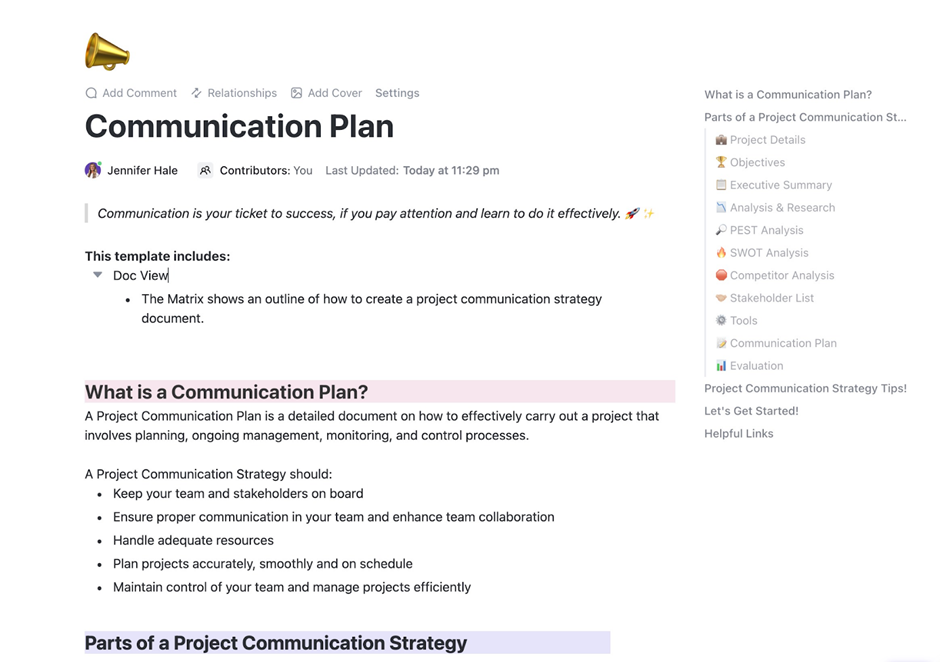
The Customer Communication Plan Template in ClickUp helps you stay on top of client conversations without overthinking it. It gives you one place to track who you’re talking to, what’s been shared, and what needs a follow-up. You can note each client’s preferred channel, see which messages are waiting on a reply, and plan check-ins ahead of time.
Many teams treat communication as an afterthought. Then they wonder why clients disappear or projects spiral out of control.
Poor communication is a direct hit to your bottom line. It leads to endless revision cycles, kills team morale, and sends clients running to your competitors.
| ✅ Strong communication | ❌ Weak communication |
|---|---|
| Clear expectations | Scope creep |
| Faster approvals | Delayed timelines |
| Client retention | Churn and complaints |
| Referrals | Damage to brand reputation |
When your team is constantly scrambling to find the “latest version” of feedback or hunting through email chains for an approval, you’re paying the price of Work Sprawl. You’re wasting time and energy across multiple, disconnected tools, platforms, and systems that don’t talk to each other.
👀 Did You Know? The average knowledge worker now toggles between multiple apps over 3,600 times per day—that’s over 4 hours per week lost to app-switching.
Keeping conversations, tasks, and documents connected changes everything. ClickUp’s Converged AI Workspace brings your projects, docs, chat, and reporting into one system—so teams can focus on delivery instead of tool-hopping.
📮 ClickUp Insight: The average professional spends 30+ minutes a day searching for work-related information—that’s over 120 hours a year lost to digging through emails, Slack threads, and scattered files. An intelligent AI assistant embedded in your workspace can change that. Enter ClickUp Brain. It delivers instant insights and answers by surfacing the right documents, conversations, and task details in seconds—so you can stop searching and start working.
💫 Real Results: Teams like QubicaAMF reclaimed 5+ hours weekly using ClickUp—that’s over 250 hours annually per person—by eliminating outdated knowledge management processes. Imagine what your team could create with an extra week of productivity every quarter!
One missed message rarely causes damage on its own. The problem is how quickly small gaps add up.
It’s a domino effect. Unclear expectations lead to the wrong deliverables. They cause endless revision loops, which result in missed deadlines and destroy client trust.
Most clients don’t leave because of bad work. They leave because they feel ignored or confused.
Here’s what’s at stake:
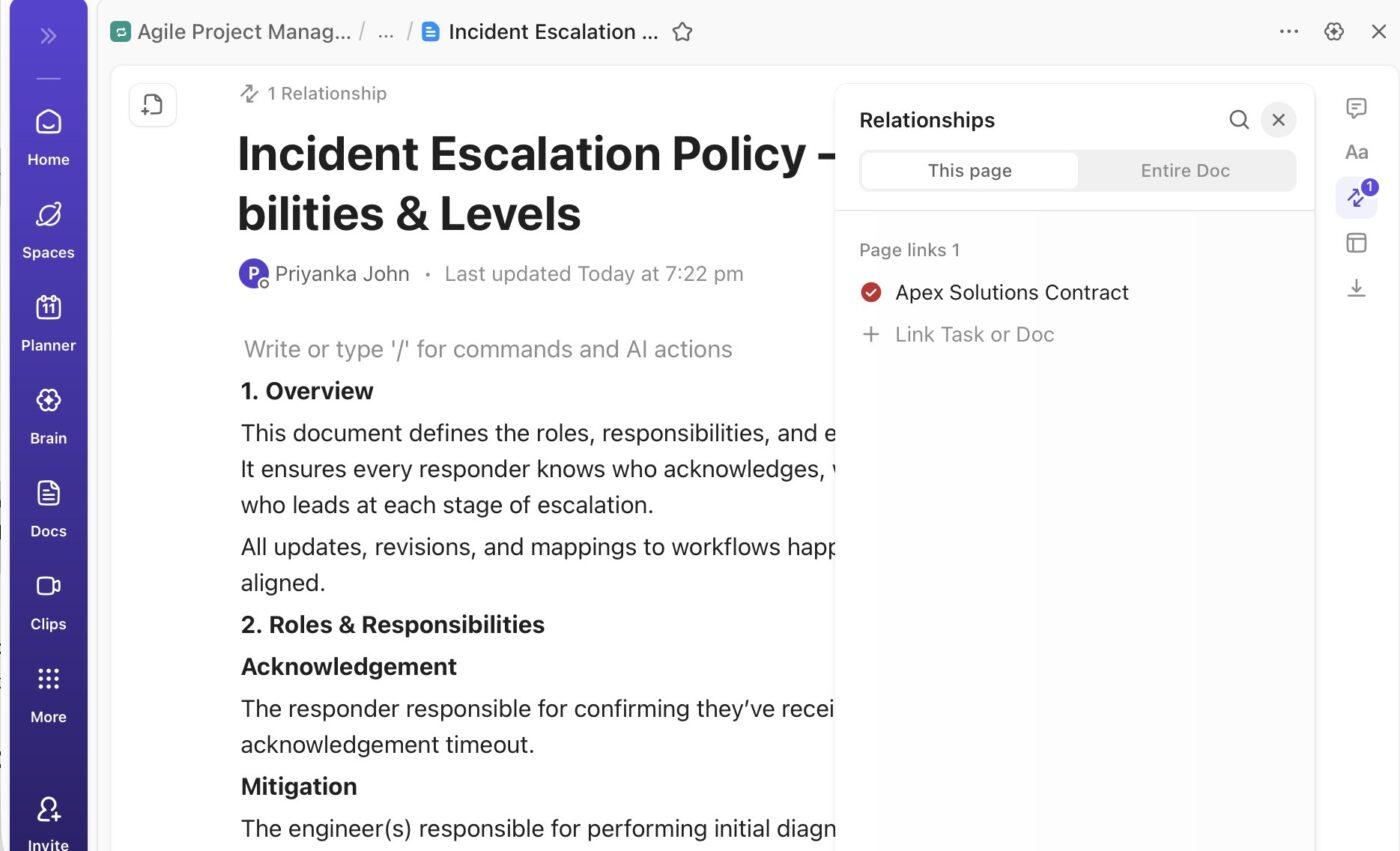
💡 Pro Tip: Create an automatic paper trail for every decision. Linking approvals and feedback directly to the work itself creates a clear record. Use ClickUp Docs to document every project detail in one place. Then link these to the right ClickUp Tasks—so there’s no room for dispute.
Most teams are stuck in a reactive loop, putting out client fires instead of proactively managing the relationship. Without a system, every new project feels like you’re starting over.
That’s why a client communication strategy is essential. And no, it’s not about being available 24/7; it’s about being intentional.
How? Focus on five core elements:
💡 Pro Tip: ClickUp’s communication templates help teams stay clear and consistent across every client touchpoint. You can use ready-made templates for client onboarding, weekly status updates, meeting follow-ups, and feedback requests. Because these templates live inside ClickUp, they stay directly connected to tasks, timelines, and owners—so updates never drift from the actual work.
🧠 Fun Fact: You can build and execute your entire strategy in one place! Store templates, automate status updates, and give clients real-time visibility into progress using ClickUp Docs, ClickUp Automations, and client-facing ClickUp Dashboards.
Generic advice like “be responsive” isn’t helpful when your team is flooded with notifications. These are the practical, actionable tactics that actually work, especially when you have the right systems in place. 🛠️
Projects fall apart when clients expect one thing and get another. This often happens because no one aligned on the basics at the start.
In your first conversation, be clear about what you’ll deliver, when it’s due, how many revisions are included, and how you’ll communicate. Also decide who makes final decisions.
To avoid “I didn’t know that” moments, create a simple onboarding guide in ClickUp Docs that clients can revisit anytime. Link tasks directly to that doc so everyone stays aligned from day one.
📚 Also Read: Client Onboarding Questionnaire
Those formal client presentations matter more than you think. They’re not just about sharing work. They’re about building trust and helping clients make decisions.
Whether you’re pitching an idea or sharing results, keep it clear and focused. Walk clients through what matters, why it matters, and what happens next.
🎥 Watch this guide on creating client presentations that actually close deals:
Your client emails you an urgent request, Slacks feedback, and texts a “quick question.” Sound familiar?
This kind of chaos makes it easy to miss important messages. Not every message belongs in every tool.
Keep conversations tied to the work. And never hunt through email inboxes again. Use ClickUp Chat to:
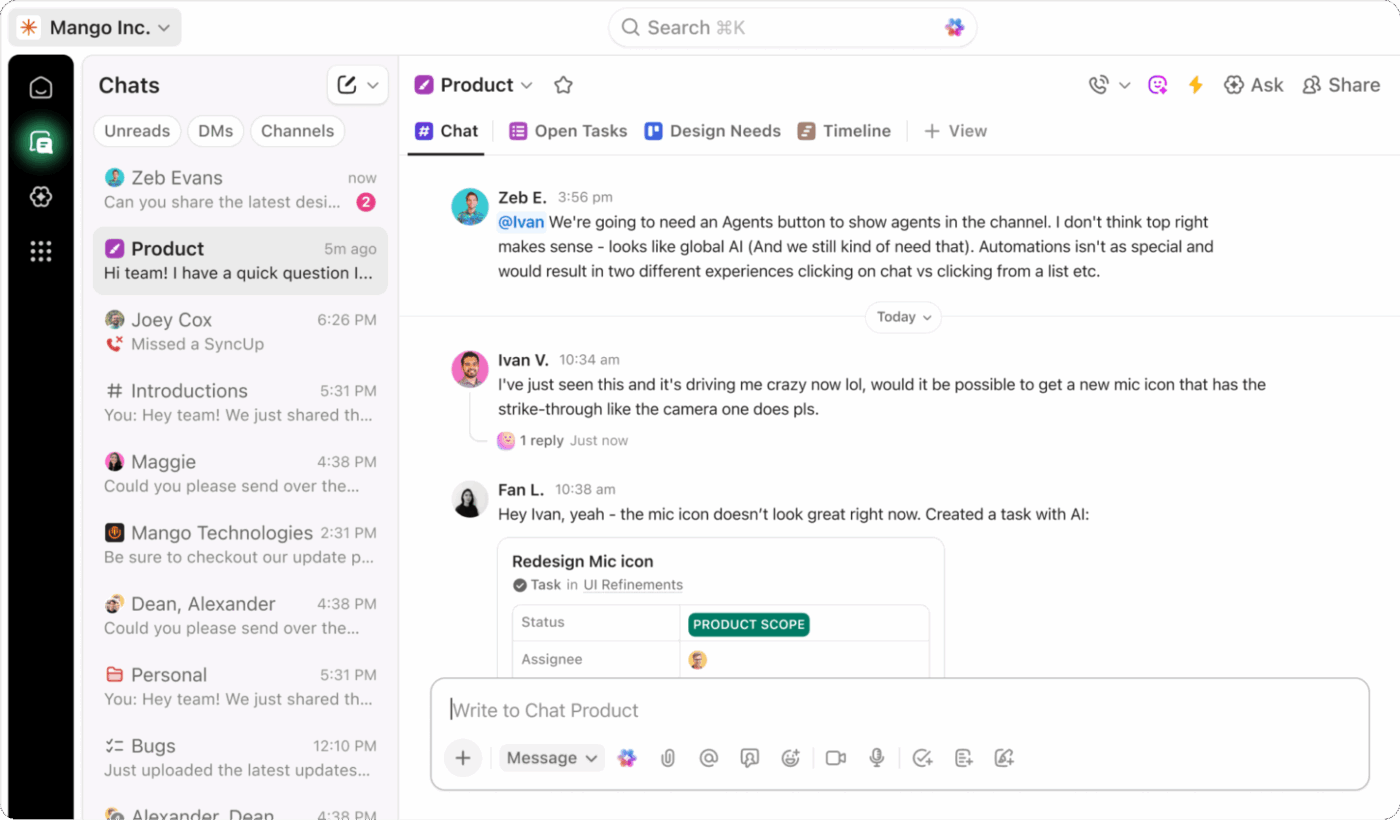
💡 Pro Tip: Tired of switching tools to hop onto “quick calls”? With ClickUp Sync Ups, start a short audio or video call right inside a project or channel. Talk through feedback and make decisions faster. Zero context-switching involved!
Most of us listen to reply, not to understand. Active listening is about hearing the “why” behind a client’s request, not just the “what.”
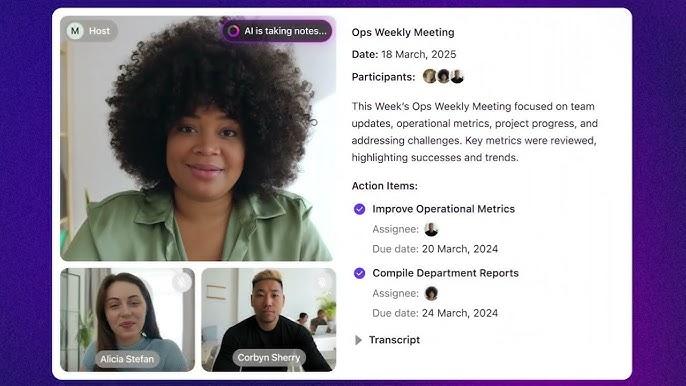
Stay focused on the conversation while ClickUp’s AI Notetaker transcribes the call. It shares a summary and transcript right after the call—so you can act on key points without delays.
Too many teams hide problems until they become full-blown crises. They hope they can fix it before the client notices. Plot twist: clients almost always notice them faster. They hate surprises, especially bad ones delivered at the last minute.
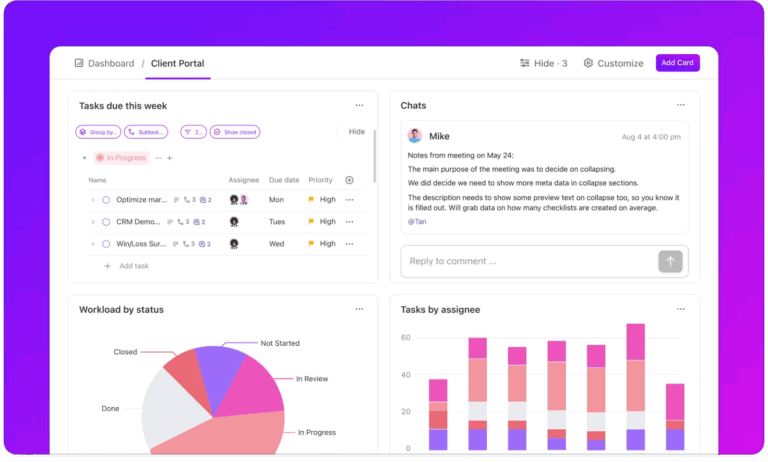
Transparency builds trust faster than perfection ever will. Clients can handle bad news if it comes early and with a clear plan of action. Keep clients informed with real-time visibility into project status using ClickUp Dashboards, and automatically notify them of progress with ClickUp Automations—so they always know what’s happening without needing to ask.

Prompt doesn’t mean instant. It means predictable. Your clients are running a business, and they just need to know what to expect. If replies come fast one day and days later the next, it creates stress.
Don’t let that happen. Finetune ClickUp Notifications and ClickUp Task Assignments to ensure every client comment is assigned to the right person with a due date for timely follow-up.
You wouldn’t give a data-loving CFO the same bullet-point summary you’d give a creative director who wants to see visuals. Yet, many teams use a one-size-fits-all communication style.
Pay attention to how each client communicates. Track preferences like communication style, channels, time zone, and key stakeholders with ClickUp Custom Fields.
If you only talk to clients when something goes wrong, you’re managing a transaction, not building a relationship.
Regular check-ins help catch small issues early and keep clients feeling involved. They also build trust over time.
Want to make sure you remember to do them? Make them automatic by setting up ClickUp Recurring Tasks. This way, your ‘Weekly Client Check-in’ always appears on your ClickUp Calendar. And you can also share them with your clients directly from the Calendar!
By the way, here’s a video on everything you can automate with ClickUp’s AI-powered Calendar!
“We talked about this months ago” is how projects fall apart.
When decisions live in emails, chats, and meeting notes, no one knows what’s final. This leads to confusion and blame.
Documentation isn’t bureaucracy; it’s your business’s insurance policy. Find any decision or comment instantly by linking Docs to Tasks in ClickUp, keeping comments on the work itself, and searching your entire workspace instantly with ClickUp Brain.
Writing status update emails is a soul-crushing waste of time. You spend hours each week crafting messages that essentially say “things are on track,” when you could be doing the actual work your clients are paying you for. Automation saves this human effort for work that actually matters.
Let ClickUp AI Super Agents handle this for you.
ClickUp AI Super Agents are AI teammates that live right in your workspace and act like real collaborators. They watch your work, understand context, and take action when needed.
For client comms, Super Agents can:
Here’s a super quick guide on how to build your own AI agent inside ClickUp!
📚 Also Read: How to Automate Manual Business Processes
Most teams operate on a “no news is good news” policy. They assume silence means the client is happy. Then, they feel blindsided when the contract isn’t renewed.
The culprit? A dozen small issues that were never surfaced.
Proactive feedback requests show clients you care about their experience, not just their invoice.
Want to give clients a safe way to speak up early? Send feedback surveys created in ClickUp Forms. The advantage? Each form response is converted into an actionable task. You can assign ownership, track its resolution, and monitor key metrics to improve customer relationships (before it’s too late!).
Even with the best systems, you’re still dealing with humans. Defensive reactions, unspoken motivations, and emotional undercurrents can sabotage even the most well-intentioned communication. Understanding client psychology can make all the difference.
Your team is juggling email for approvals, Slack for quick questions, spreadsheets for timelines, and a project tool for the actual work. This is the context sprawl that makes consistent, high-quality client communication impossible. You don’t need another tool. You need a converged solution.
Bring all your client communication into one connected system and eliminate tool sprawl with ClickUp, the converged AI workspace.
| Problem | Solution with ClickUp 🦄 |
|---|---|
| Scattered conversations | Keep every discussion connected to the work with ClickUp Chat and task comments |
| Manual, time-wasting status updates | Trigger client notifications automatically with ClickUp Automations |
| Lost documentation and verbal agreements | Create a permanent, searchable record by linking ClickUp Docs directly to tasks |
| Wasting time searching for context | Instantly search across every conversation, doc, and task with ClickUp Brain |
| Clients feel out of the loop | Give clients a real-time, high-level view of project progress with ClickUp Dashboards |
| Forgotten follow-ups and action items | Ensure every client request is assigned, tracked, and completed with ClickUp’s connected tasks |
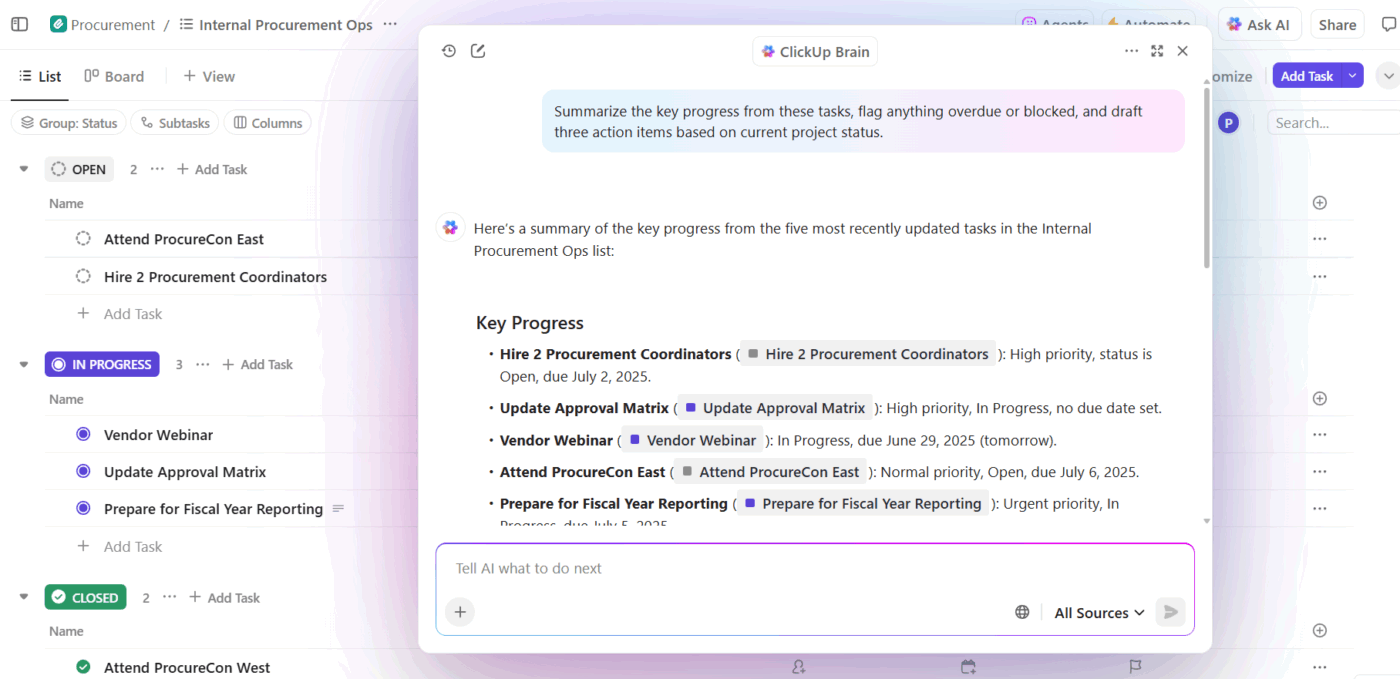
Save hours of communication overhead every week by letting ClickUp Brain draft client emails, summarize long comment threads, and pull action items from meeting notes.
When everything lives in one place, nothing falls through the cracks. Your clients feel informed, your team stays focused, and your relationships thrive.
Try ClickUp for free and experience the difference. ✨
Client communication is typically for ongoing, relationship-based work like in agencies or consulting. Customer communication is often for one-to-many, transactional interactions.
A weekly status update is a great baseline, with extra touchpoints for major milestones. However, consistency is more important than frequency. Clients should know when to expect the next update from you.
The five pillars are clarity, consistency, transparency, responsiveness, and documentation. Mastering these will form the foundation of any great client relationship.
AI can draft routine emails, summarize long conversations, and automate status updates, freeing up your team for strategic work. ClickUp Brain connects these AI capabilities directly to your project context, making its assistance far more relevant than standalone tools.

Manasi Nair
Max 23min read
Manasi Nair
Max 21min read

Sudarshan Somanathan
Max 26min read

© 2026 ClickUp