

Sorry, there were no results found for “”
Sorry, there were no results found for “”
Sorry, there were no results found for “”
A team experiments with an AI writing tool to save time on content. Soon after, someone tries an AI image generator. Later, another tool is added to automate a few repetitive tasks.
Individually, these tools seem helpful. But over time, the setup starts to feel messy.
The tools don’t talk to each other. Some do similar things. Outputs are scattered across different apps, and it’s hard to tell what’s actually helping versus what’s just adding noise.
For teams new to AI, this chaos, also known as AI sprawl, is a common first phase. It’s a part of the learning curve.
But guess what? You don’t need more AI tools; rather, the right combination that meets your team’s specific needs and level of AI maturity.
In this blog, we’ll show you how to move past ad-hoc AI adoption and build an effective AI tech stack. One that actually reduces the gruntwork for you.
AI-powered applications are hitting the market faster than ever before.
Anyone can build an AI tool with a handful of APIs, pre-trained models, and cloud infrastructure. Each tool promises faster work, smarter decisions, or fewer manual steps.
You’ve got dozens of machine learning frameworks, cloud platforms, and data storage tools to choose from. The more options available, the more severe the decision paralysis.
But that’s not all. The real challenge begins after that:
Early adoption is fragile for teams new to AI. What you need is a simple setup with high usability and seamless integration throughout.
The right AI tech stacks add the much-needed structure to the entire AI lifecycle, making the shift to AI much easier.
How? Let’s find out!
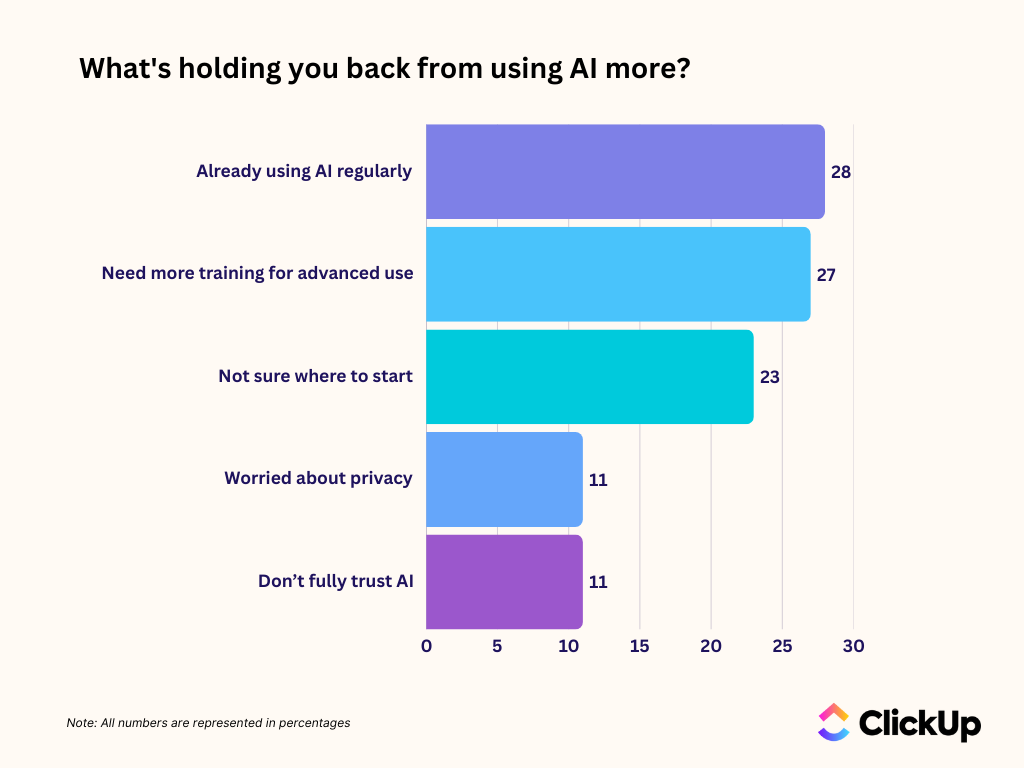
👀 Did You Know: As per ClickUp’s AI Usage Gap survey, 23% of professionals are essentially “AI-paralyzed”—they want to use the tech but have no idea where to start or how to plug it into their actual daily tasks without making things more complicated.
An AI stack is the interconnected set of tools, technologies, infrastructure, and frameworks you use to run AI capabilities across your entire team or organization.
AI tech stacks are built in layers. You choose the right tools to form each layer, and together these layers comprise your AI stack.
The three core layers are:
AI learns from the information you give it. This layer comprises everything the AI can learn from. It ensures your company’s information is organized, clean, and easy for the AI to find.
✅ Key components include:
This is the thinking part of your AI technology stack. It processes the collected data to offer predictions, summaries, or automated decisions.
✅ Key components include:
The application layer connects AI to your workflows so that team members can actually use it to get work done.
✅ Key components include:
🧠 Fun Fact: In the 1770s, a Swiss watchmaker, Pierre Jacquet-Droz, built “The Writer,” a mechanical boy made of 6,000 parts that could write any custom sentence up to 40 characters long. It is considered one of the earliest examples of the computer.

When choosing standalone AI tools, you would ask: What does this tool do?
Immediate speed and convenience take priority. You prefer a plug-and-play solution that solves a single problem right now.
📌 Example: You copy-paste your monthly sales data, insights, and summaries into an AI report generator to quickly whip up a professional report.
When building an AI stack, the focus is on: How does this tool fit into our workflow?
The goal is to invest in AI solutions that:
📌 Example: You set up a system where your internal sales records and project notes automatically flow into an AI model that’s been trained on your brand’s voice. That model drafts the report and drops it directly into your team’s shared folder for review.
It’s tempting to grab a couple of AI tools and run your shop with them. But if you want your AI to scale alongside your team, building an integrated, modular setup matters a ton.
Here’s why:
📮 ClickUp Insight: Low-performing teams are 4 times more likely to juggle 15+ tools, while high-performing teams maintain efficiency by limiting their toolkit to 9 or fewer platforms. But how about using one platform?
As the everything app for work, ClickUp brings your tasks, projects, docs, wikis, chat, and calls under a single platform, complete with AI-powered workflows. Ready to work smarter? ClickUp works for every team, makes work visible, and allows you to focus on what matters while AI handles the rest.
Think AI stacks are complicated? In practice, they are much simpler and don’t require advanced engineering or AI development from scratch.
What matters is choosing the right AI apps and stacking them with proper planning. Do that, and you’re set to get real value from AI—with less confusion, minimal workflow disruption, and lower costs.
Below are a few simple examples of how teams stack AI-powered tools for everyday work.
📌 Example: You run a sales team handling hundreds of active leads. Instead of asking reps to scan CRM records manually, you layer AI-powered analytics on top of your CRM to track recent lead behavior and buying signals.
When the system identifies a lead with high purchase intent, it passes that context to an AI writing tool. The tool drafts a personalized follow-up email, which the rep quickly reviews and sends.
📌 Example: During your team sync, a meeting tool listens in, transcribes the conversation, and identifies every “to-do” mentioned.
It automatically sends those action items to your project management tool. By the time the meeting ends, the project board is updated with all the new tasks.
AI also automatically analyzes each team member’s workload and skill before assigning the tasks and notifying them.
📌 Example: Instead of team members pinging each other for context or lost files, you layer AI into your company’s wiki and shared folders. The AI reads through everything—your HR policies, past project plans, and technical guides
You then link this to your internal chat app. When a team member has a question, they type it into the chat, and the AI fetches the info for them.
📚 Read More: How AI is Transforming Professional Services
Here’s how to choose the right stack for successful AI deployment:
Start by looking at how your team works today.
Is your team mainly using AI for individual tasks like drafting content, summarizing notes, or brainstorming ideas? In that case, a few standalone AI tools might feel sufficient at first.
But if AI is starting to touch shared workflows—status updates, task creation, reporting, or internal documentation—you’ll quickly run into friction. Copy-pasting context, re-explaining work, and tracking outputs across tools becomes a daily tax.
Next, consider where AI is expected to save time.
If the goal is speed on one-off tasks, a lightweight setup can work.
But if you want AI to reduce coordination, follow-ups, and manual updates across the team, you’ll need tools that plug directly into your existing workflows.
Finally, think about adoption.
If AI requires your team to learn new interfaces or switch tools constantly, usage will drop. For teams new to AI, the right stack integrates into the everyday tools your team uses.
👀 Did You Know: The word “robot” comes from a 1920 Czech play titled Rossumovi Univerzální Roboti (R.U.R.) by Karel Čapek. “Roboti” is derived from “robota,” which means forced labor or drudgery.
In the play, the robots are actually bio-engineered soulless entities with human-like flesh and blood. They eventually revolt and wipe out the entire human race.
Why do you need to organize your pain points and AI goals before selecting the tools?
Say, the marketing team needs help with drafting ad copy. The sales team needs help with writing sales pitches.
If both teams buy separate AI writing tools, you’ve doubled your costs without solving a new problem.
To avoid this, remember: don’t group pain points by teams or departments. Group them by the type of AI capability required.
| AI Capability | What It Covers | Common Examples |
| AI generation | Creating or transforming content | Summarizing long documents, rewriting internal updates, generating meeting agendas, and creating images |
| AI analysis | Interpreting data and identifying patterns | Analyzing customer behavior trends, flagging underperforming campaigns, and spotting data inconsistencies |
| AI routing and automation | Moving work without manual coordination | Converting meeting action items into tasks, routing approvals, categorizing incoming work, and updating task statuses |
Next, take one capability at a time and evaluate each problem using two questions:
Problems that occur daily and block progress should come first. These are the capabilities your AI stack cannot afford to compromise on.
Treat these high-impact problems as your pilot use cases.
When choosing the right tools for your modern AI stack, aim to build a cohesive ecosystem, not just find the right capabilities to solve pain points.
Some key considerations to keep in mind when selecting AI tools:
What happens when you deal with too many AI tools?
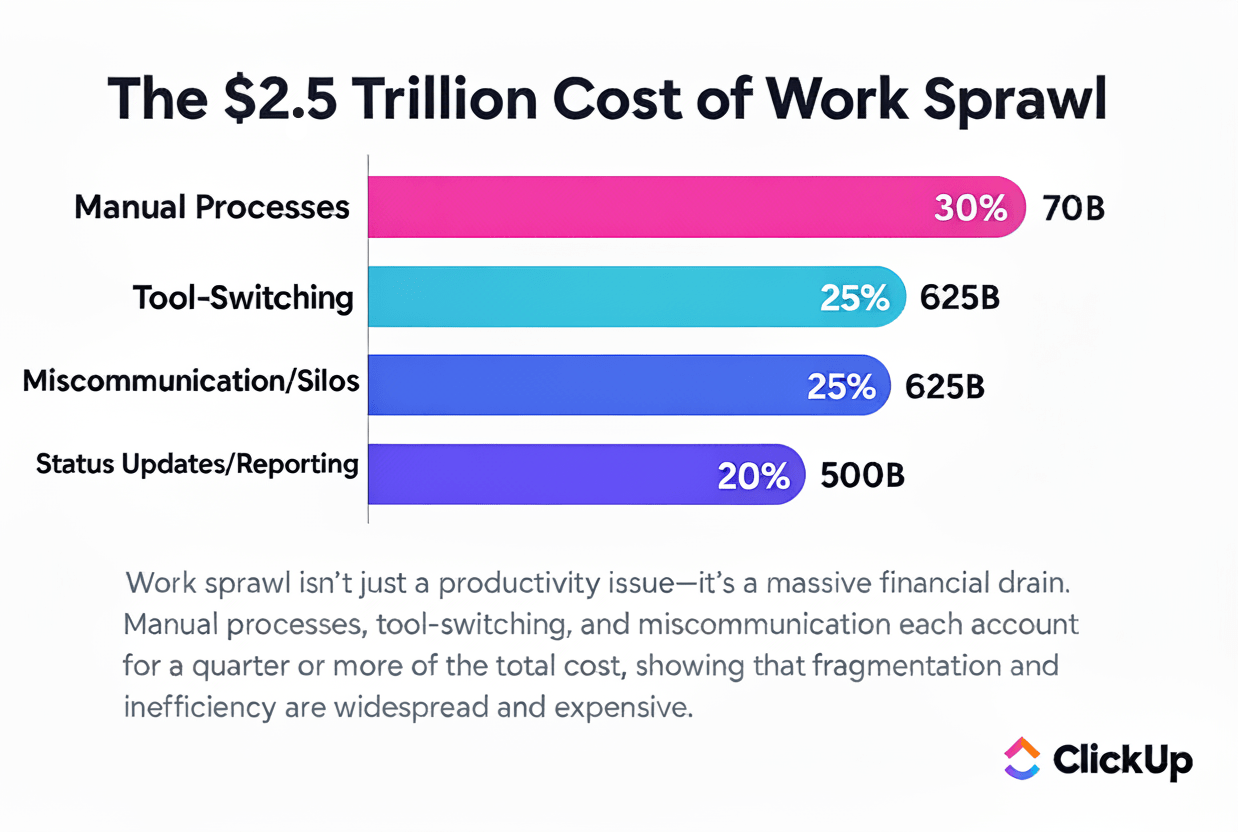
Tool sprawl drains your productivity, budgets, and focus. Before you know it, it adds up to work sprawl, where files, updates, and decisions are spread across apps, threads, and inboxes.
And the cost is massive—an estimated $2.5 trillion global productivity loss every year.
Once your AI stack is in motion, you need a single orchestration layer to connect everything—across tools, workflows, and teams.
This orchestration layer acts as the system of record for:
ClickUp becomes that orchestration layer. The world’s first Converged AI Workspace connects apps and workflows into a unified platform.
What does that even mean for you? Watch this video to find out 👇
Once your AI stack is ready, roll it out in phases to keep adoption smooth and risk low.
Start with workflows that deliver immediate value, such as summarizing updates, drafting routine content, or routing repetitive requests. Refine these workflows before expanding further.
If your team is small, deploy the stack on a single project first.
Use early wins to build confidence and stakeholder buy-in, then scale AI adoption gradually across teams.
💡 Pro Tip: Use ClickUp Automations to handle repetitive coordination tasks so your team can focus on meaningful work.
Set up simple triggers like task status changes, due date reminders, or priority adjustments that automatically update task fields, send notifications, or create follow-ups.
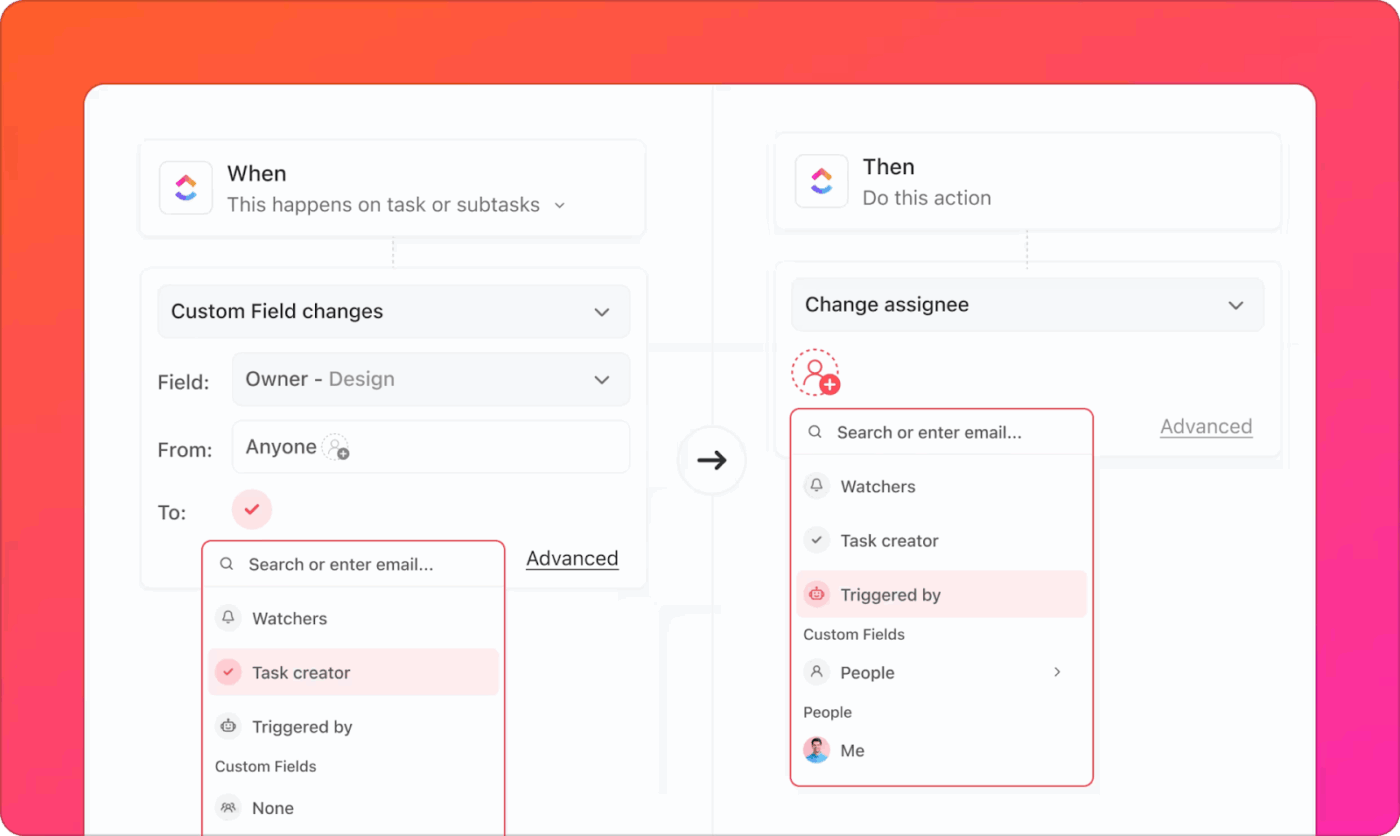
For example, you can automate status transitions when a subtask is completed, notify stakeholders when a key milestone is hit, or auto-assign tasks based on workload rules.
If you’re starting with automations for the first time, we’ve made this video for you 👇
Monitoring the AI stack means two things:
Remember also that progress tracking is an ongoing process.
📮 ClickUp Insight: More than half of respondents type into three or more tools daily, battling “app sprawl” and scattered workflows.
While it may feel productive and busy, your context is simply getting lost across apps, not to mention the energy drain from typing. BrainGPT brings it all together: speak once, and your updates, tasks, and notes land exactly where they belong in ClickUp. No more toggling, no more chaos—just seamless, centralized productivity.
Below is a complete look at an AI tech stack built for beginners. We’ve hand-picked tools that give you the best bang for your buck while keeping things simple.
Use this as your tech stack inspo and adjust as you like.
This layer is the foundation of the tech stack. It helps gather information from your website, ads, and CRM so that every other AI tool in your stack can work with the same high-quality data.
It includes tools responsible for quality data collection, ingestion, storage, validation, analytics, and overall management.
Airbyte is an open-source data integration platform. It helps move data from hundreds of different sources—like your Facebook Ads, Shopify store, or Stripe account—into a central warehouse.
Google BigQuery is a serverless data warehouse that can handle massive amounts of data and run complex searches (queries) in seconds. It has built-in features that allow you to run AI models directly on your stored data.
Great Expectations is an AI-powered solution that ensures only high-quality data flows through your pipelines. For instance, if there’s a negative price or a missing email address, it alerts you before the incorrect/incomplete data reaches your AI models.
🚀 ClickUp Advantage: While BigQuery stores the data, Airbyte moves it, and Great Expectations validates it, you still need a tool to analyze and visualize the outputs.
ClickUp Dashboards turn raw, real-time data into easy-to-understand insights for everyone in your company.
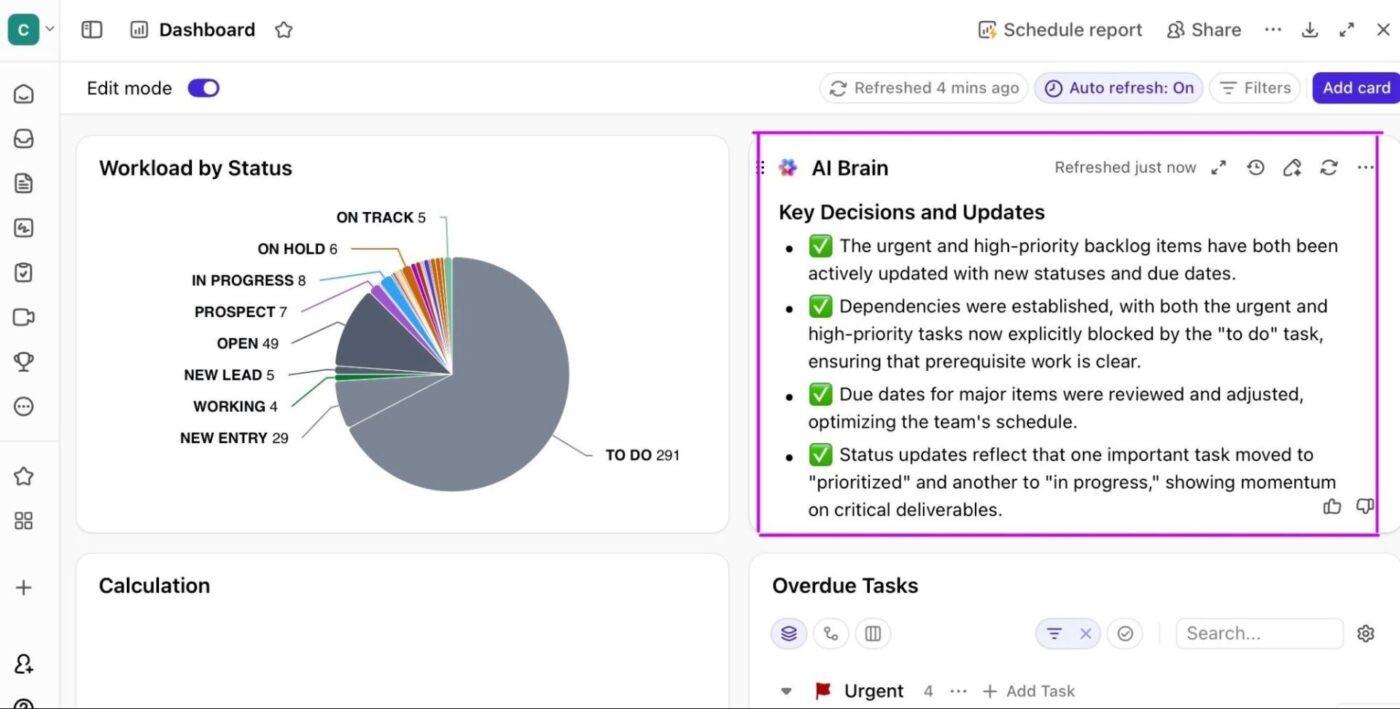
Customize your dashboard by arranging multiple cards (pie, chart, bar, etc.) to track work, time, revenue, sprints, and team performance in one view.
With AI Cards, you can auto-summarize work, surface bottlenecks, and generate narrative status summaries using the same underlying data.
This combo of drag-and-drop customization + AI cards helps create exec-ready dashboards with charts, KPIs, and automated summaries in one place.
AI can’t replace creativity. But it can reduce the time spent on first drafts, revisions, and repurposing.
Keeping this in mind, let’s explore key AI tools for the content creation layer:
The AI content automation platform Jasper unifies your brand voice, connects your workflows, and automates your content lifecycle through intelligent content pipelines.
Canva Magic Studio is an all-in-one AI design suite. It simplifies complex tasks like photo editing, layout design, and video creation into one-click actions.
Use the AI video generation platform HeyGen to produce professional-grade videos, even from just a script. It automates the process and saves you hours of production time. Generate high-quality videos with a voiceover, visuals, and an AI avatar.
🚀 ClickUp Advantage: Looking for an all-in-one AI content generation tool that integrates with your tasks, docs, and entire workspace?
Try ClickUp Brain. Whether you’re drafting a project brief in a Doc, designing an image, or writing a task description, all it takes is a single click to get it done.
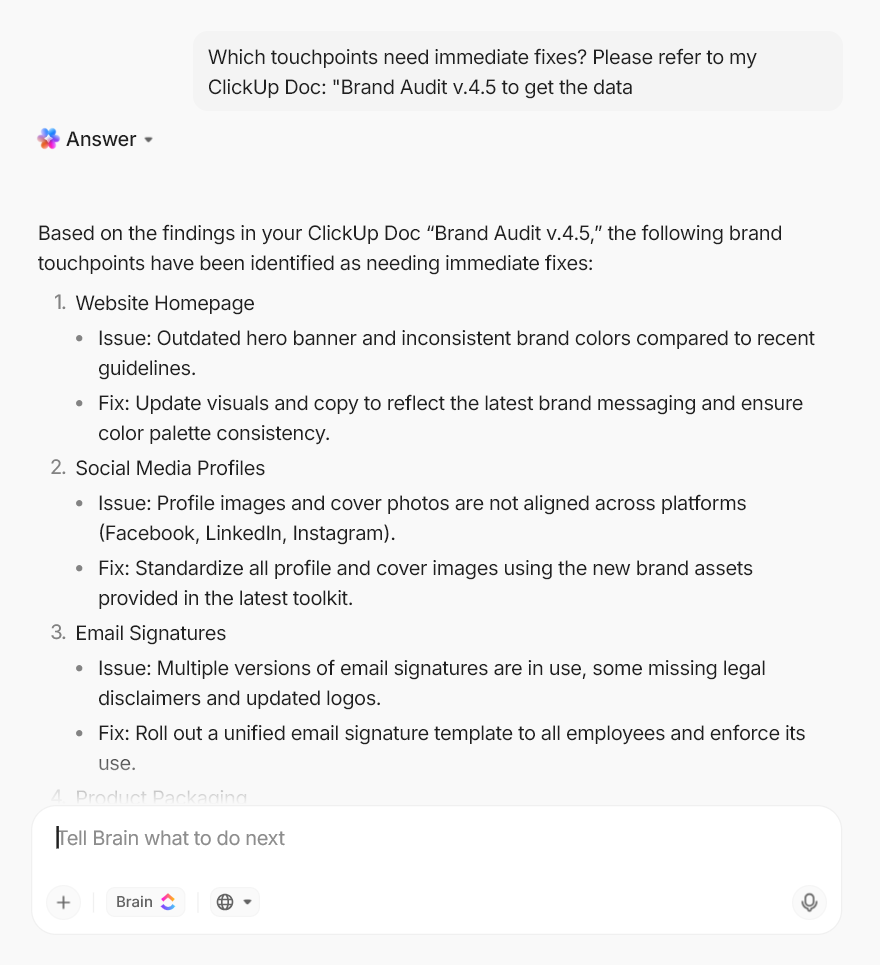
With Brain, you can:
If you run a marketing or sales team, your AI initiatives should focus on hyper-personalization, scheduling and outreach automation, and behavior analytics. Exactly what the tools in this layer cover:
ActiveCampaign handles marketing strategy and execution across multiple channels. It uses AI to orchestrate the entire customer journey, manage end-to-end marketing campaigns, build audience segments, and personalize messages.
Apollo.io is a B2B sales intelligence and engagement platform that combines a massive, verified database of over 275 million contacts with automated outreach tools. It’s the ideal primary interface for any prospecting team.
Integrating AI into your CX layer means moving from reactive troubleshooting to proactive service. The goal is to resolve simple inquiries instantly using bots while equipping human reps with the necessary context to handle complex, high-emotion situations.
The following two tools lay the groundwork for this layer:
Intercom handles real-time customer communication across chat, in-app messages, and support inboxes. Its AI capabilities help triage requests, suggest answers, and resolve common questions before they reach a human agent.
Gong acts as the ears and eyes of your post-sales team. It records, transcribes, and analyzes every customer interaction (calls, emails, and meetings) to identify patterns, risks, and opportunities that human reps often miss.
It’s one thing to purchase and implement systems, and another to build AI-powered workflows for everyday operations. No wonder it’s the most intimidating step for teams new to AI.
ClickUp lowers this barrier with no-code, beginner-friendly workflow automation. It provides built-in, intuitive tools to start small—like automating task status updates—and quickly scale up to building fully autonomous AI agents that manage entire projects for you.
Let’s explore its capabilities as a contextual AI agent for your team:
ClickUp BrainGPT is your always‑on desktop AI assistant that understands your work, tasks, docs, chats, projects, roadmaps, and teams. Everything lives inside and is connected to your ClickUp workspace.
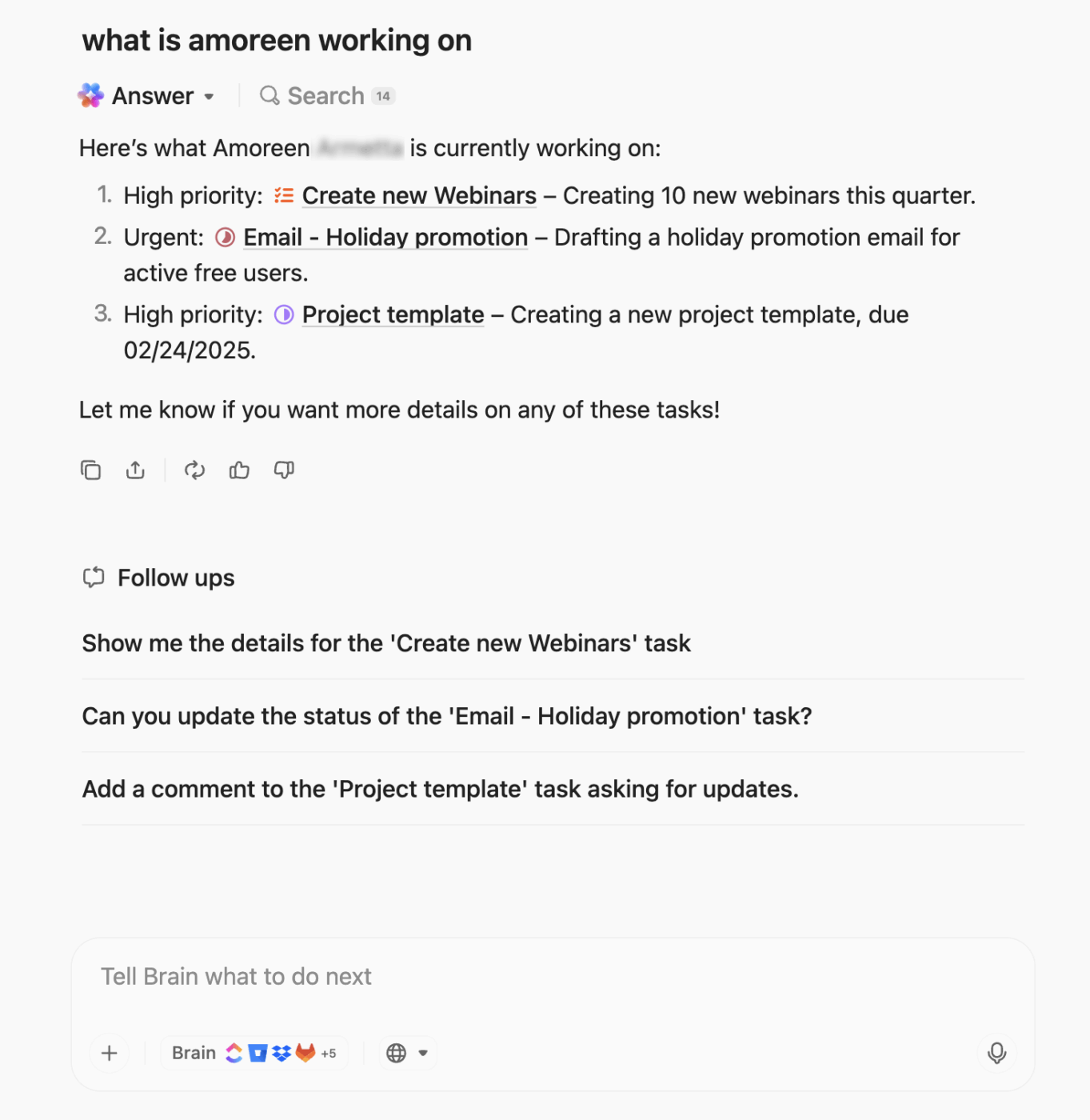
BrainGPT, the contextual AI, understands the context of your work. Because it is embedded directly into your workflows, it can answer:
📌 Example: Imagine a project lead joining work mid-week after a day packed with calls. Instead of chasing updates across chats and documents, they ask BrainGPT: What’s the current status of the website launch?
BrainGPT pulls context directly from the workspace and responds with a concise summary:
From there on, BrainGPT can also summarize blockers and create a short status update for stakeholders.
AI sprawl usually starts with good intentions. One tool for writing. Another for meetings. A third for search. Soon, your team is juggling multiple AI apps, each with its own interface, pricing, and learning curve.
Instead of simplifying work, AI adds friction.
Here’s how BrainGPT reduces AI sprawl:
Here’s what you can do with AI Notetaker 👇
Together, these capabilities replace a patchwork of AI tools with a single, contextual AI layer. For teams new to AI, this consolidation is what keeps early adoption sustainable.
For custom, multi-step, or complex business process automations, you have ClickUp Super Agents.
Super Agents are AI-powered agents designed to handle complex, end-to-end workflows without constant human supervision. Instead of triggering a single action, they can observe work, interpret context, and take a sequence of actions based on predefined goals.
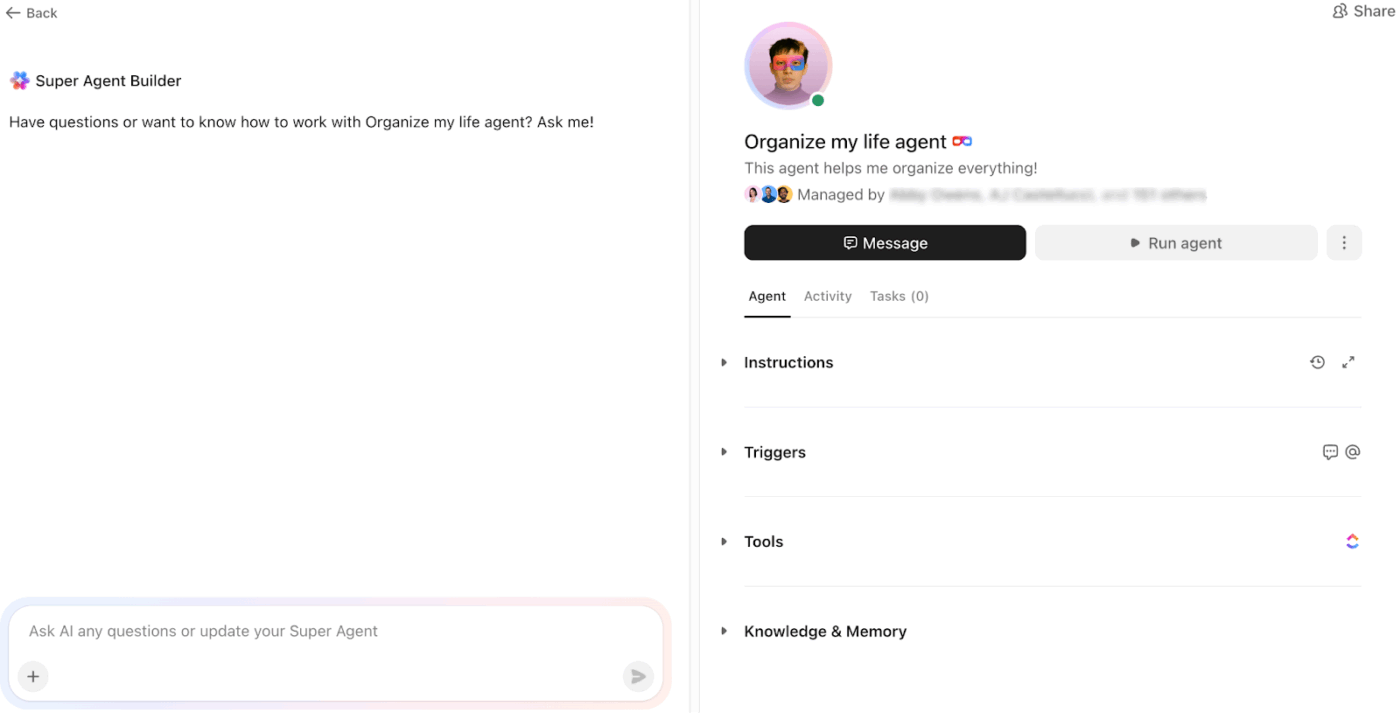
Because Super Agents live inside ClickUp, they operate with full awareness of your tasks, docs, statuses, owners, and deadlines.
📌 Example: Super Agents shine when workflows span across multiple tools or steps and can be repeated across teams. Use cases include:
| Use Case | What the Super Agent Does |
| Creative briefs | Draft creative briefs using context from tasks or Chat conversations and suggest actionable improvements |
| Feature briefs | Converts raw feature requests into structured briefs with scope, assumptions, and key requirements |
| Follow-up emails | Turns AI Notetaker meeting notes into concise, client-ready follow-up emails with decisions, owners, and due dates |
| Issue escalation | Maintains a centralized escalation summary Doc linked to each task |
| Job descriptions | Generates complete job descriptions using task details and relevant web context |
| SharePoint search | Searches SharePoint directly from ClickUp to answer questions posted in a Chat Channel |
Connect your AI tech stack with 1000+ core business tools like Google Sheets, Gitlab, Figma, Intercom, HubSpot, Twilio, etc., using ClickUp Integrations.
Simply select the tool you want and toggle it on to quickly set it up. You can also set up custom integrations using APIs to complete your tech stack.
But do you know what truly makes ClickUp AI beginner-friendly?
Pre-built templates for everything—workflows, automations, content calendars, vision boards, marketing campaigns, competitor analysis, fleet management, project management, and more.
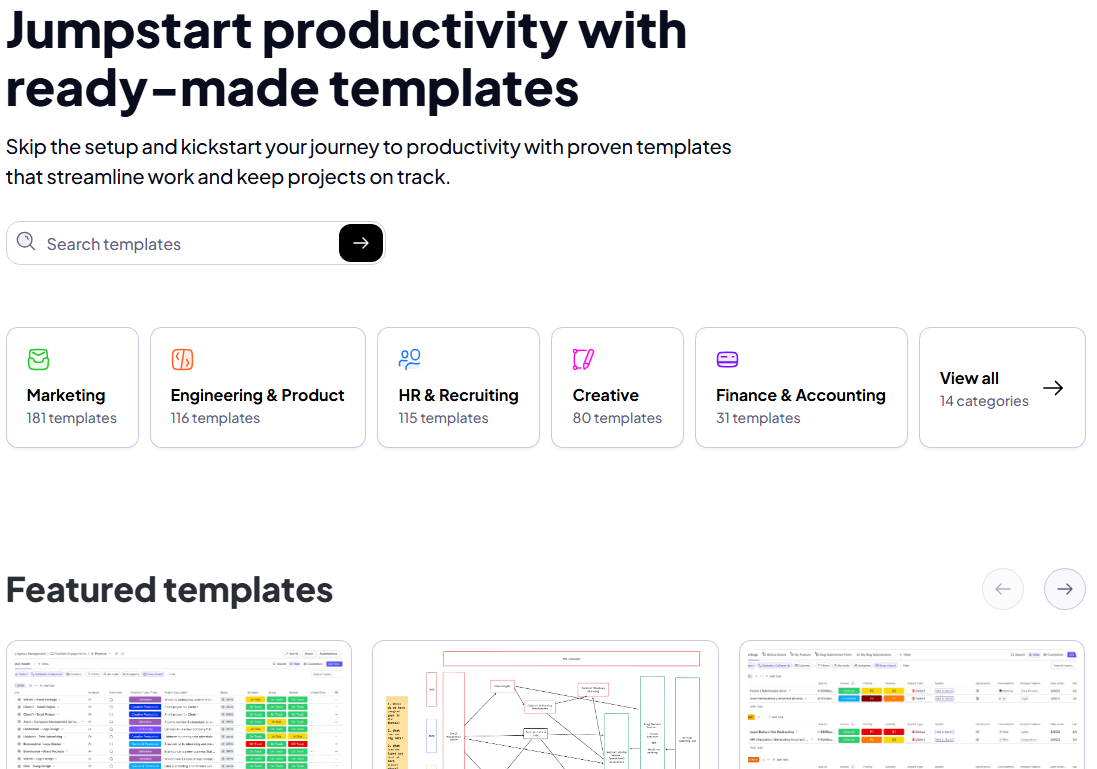
Every template offers a starting point. For example, you can adopt a content production template and then easily tweak the AI agents within it to fit your unique requirements.
This eliminates the “blank state” anxiety that often stalls AI adoption in new teams.
Not only can you choose from ClickUp’s extensive template library, but you can also create and save custom templates for future use.
Here are four common AI adoption challenges and practical solutions to fix them:
| Common Pitfalls | Why This Happens | Solutions ✅ |
| Automating broken processes | Teams assume AI will “clean up” inefficient workflows. They push incomplete or inconsistent data, which leads to unreliable outputs and amplifies existing errors. | Stabilize the workflow first for seamless machine learning operations. Use AI to remove friction from a clear process, not to compensate for a broken one. |
| Buying AI tools for the hype | New AI tools promise broad capabilities and quick wins, creating pressure to adopt early. | Evaluate tools based on integration quality, data access, operational fit, and the vendor’s strong track record. |
| Overinvesting upfront | Evaluate tools based on integration quality, data access, and operational fit. | Start with limited data, a small user group, and one or two workflows. Expand only after workflow performance and model accuracy are measured. |
| Assuming all AI tools are “easy” to use | Teams assume “AI is easy,” then struggle with inconsistent usage and poor adoption. | To enhance team expertise on AI tools, give them a playbook. Create a library of proven AI prompts, conduct short tutorials, and have AI champions to ease adoption |
Here are five key benefits of starting with a beginner-friendly AI stack:
We’re witnessing the fastest tech adoption in history, and while it’s natural to feel overwhelmed, you can’t afford to wait.
ClickUp offers a head start here, helping you adopt AI without the learning curve.
ClickUp offers the perfect no-code production environment to build custom AI stacks. You can integrate all your apps, set up complex automations, analyze real-time metrics, and generate creative assets in minutes.
Most importantly, ClickUp’s contextual AI acts as the glue that connects your entire stack together without any hassle.
So, what are you waiting for? Sign up for ClickUp today!
An AI stack is a strategically planned mix of AI tools to automate and enhance business operations.
It typically includes three layers: data (for storing and processing data before it feeds AI tools), intelligence (contains all your AI models and intelligence infrastructure), and application (these are the tools you use to access AI).
For those starting out, the stack focuses on user-friendly, no-code tools that solve immediate bottlenecks without requiring deep technical expertise or custom coding.
Start by mapping existing processes to identify core bottlenecks. This will help you understand the AI goals you need to follow for your stack.
Next, group these problems to define the specific capabilities you need, like summarization or data extraction.
Select reputable vendors, configure the software to your workflow, and conduct team training. Finally, monitor performance through regular audits to ensure the stack remains reliable.
The “best” tools for small teams prioritize high versatility, low maintenance, and cost-effectiveness. They should serve multiple functions to prevent tool sprawl.
Top choices include ClickUp for all-in-one project intelligence and automation, ActiveCampaign for marketing, Intercom for customer support, and Jasper for writing.
ClickUp simplifies AI adoption by providing a unified, no-code environment where intelligence is natively integrated. Features like ClickUp BrainGPT offer instant answers from your company’s knowledge base, while no-code Automations handle data entry and status updates automatically.
It eliminates the toggle tax by allowing teams to access multiple elite LLMs—like GPT and Claude—directly within their existing tasks and documents.
Measure success by comparing before-and-after performance baselines. Key metrics include time-to-complete for specific tasks, a reduction in manual steps, and improved rework rates. Additionally, track the ROI by calculating hours saved versus tool costs.

© 2026 ClickUp




