






Still downloading templates?
There’s an easier way. Try a free AI Agent in ClickUp that actually does the work for you—set up in minutes, save hours every week.
Sorry, there were no results found for “”
Sorry, there were no results found for “”
Sorry, there were no results found for “”
Your AI stack looks like a digital Frankenstein’s monster. Models here, APIs there, data pipelines everywhere, and none of them talk to each other without throwing tantrums.
What you need is an AI orchestration tool. These platforms promise to make your scattered AI components come together like a well-trained team.
They help manage the flow of data between different AI models and optimize the use of resources, allowing you to build more sophisticated AI-powered applications.
So your AI-powered customer service gives helpful answers, data pipelines process terabytes without human intervention, and enterprise workflows run themselves while you sleep.
We tested some of the best-known tools that promise to tame AI sprawl with effective AI orchestration. Here’s a closer look! 👀
Let’s break down the best AI orchestrators and their pricing models.
| Tool | Best for | Best features | Pricing* |
| ClickUp | AI-integrated task management for individuals, startups, mid-market teams, and enterprises | Voice-powered search, premium AI models, Autopilot Agents, task automation, Chat/Docs/Tasks sync, enterprise search, desktop + mobile productivity tools | Free forever; customizations available for enterprises |
| Airflow | Complex data pipeline scheduling for engineering teams and large data ops organizations | DAG-based workflows, Python configuration, web UI, Celery/Kubernetes execution, 200+ connectors | Free |
| Kubeflow | Machine learning pipeline management for cloud-native ML teams | Visual + SDK-based pipeline building, KServe deployment, Katib for tuning, seamless integration with Jupyter | Free |
| Prefect | Python-first workflow automation for developers and hybrid teams | Native Python syntax, hybrid cloud execution, retries + state recovery, real-time dashboards | Free plan available; Paid plans start at $100/month |
| Metaflow | Data science workflow scaling for AWS-based data teams | Local-to-cloud scaling, versioning, step-level caching, snapshotting, Python client and notebook support | Free |
| LangChain | LLM application orchestration for AI builders, startups, and enterprise R&D teams | Multi-agent chaining, function calling, memory systems, LangGraph for loops, prompt engineering tools | Free developer tier; Paid plans start at $39/month |
| AutoGen | Conversational agent coordination for LLM-powered app builders | Dialogue-driven orchestration, multi-agent collaboration, agent personas, logging + review tools | Free |
| Workato | Business process automation for mid-sized and enterprise organizations | 1000+ connectors, visual recipe builder, audit logging, compliance reporting | Custom pricing |
| Crew AI | Role-based agent teams for structured AI task orchestration | Agent job titles + reporting structure, role-based templates, automatic handoffs, project tracking | Free (open source); Paid plans start at $99/month |
| Orby AI | Workflow discovery and automation for process-heavy teams | AI workflow observation, desktop + web automation, continuous learning, cross-tool execution | Custom pricing |
| IBM watsonx Orchestrate | Enterprise AI workflow management for large organizations using IBM services | Natural language prompts, multi-AI model orchestration, compliance tooling, contextual learning | Free trial; Paid plans start at $500/month |
| ZenML | ML pipeline standardization for collaborative data science teams | Reproducible pipelines, artifact lineage, stack abstraction, plugin architecture | Free; Custom pricing for advanced tiers |
| MLflow | ML experiment orchestration for model versioning and deployment | Experiment tracking, model packaging, registry, deployment staging, visual comparison tools | Free; Custom pricing for advanced tiers |
AI orchestration tools are platforms that connect and manage your AI workflows automatically. They handle the coordination between different AI models, APIs, and data systems.
These tools automate the flow of data and tasks across your AI stack. They turn a messy collection of separate AI components into one smooth operation that runs by itself.
Some AI applications will save your sanity, others will drive you crazy. So, here’s what matters when you pick the ‘right’ tool:
🧠 Fun Fact: The first workflow diagrams date back to 1921, when mechanical engineer Frank Gilbreth presented ‘process charts’ to the American Society of Mechanical Engineers. They were the ancestors of today’s Business Process Model and Notation.
Now, let’s go over our top picks for the best AI orchestration tools. 👇
Our editorial team follows a transparent, research-backed, and vendor-neutral process, so you can trust that our recommendations are based on real product value.
Here’s a detailed rundown of how we review software at ClickUp.
ClickUp, the everything app for work, combines project management, documents, and team communication, all in one platform—accelerated by next-generation AI automation and search.
Let’s walk through how it works as a complete orchestration tool. 🔁
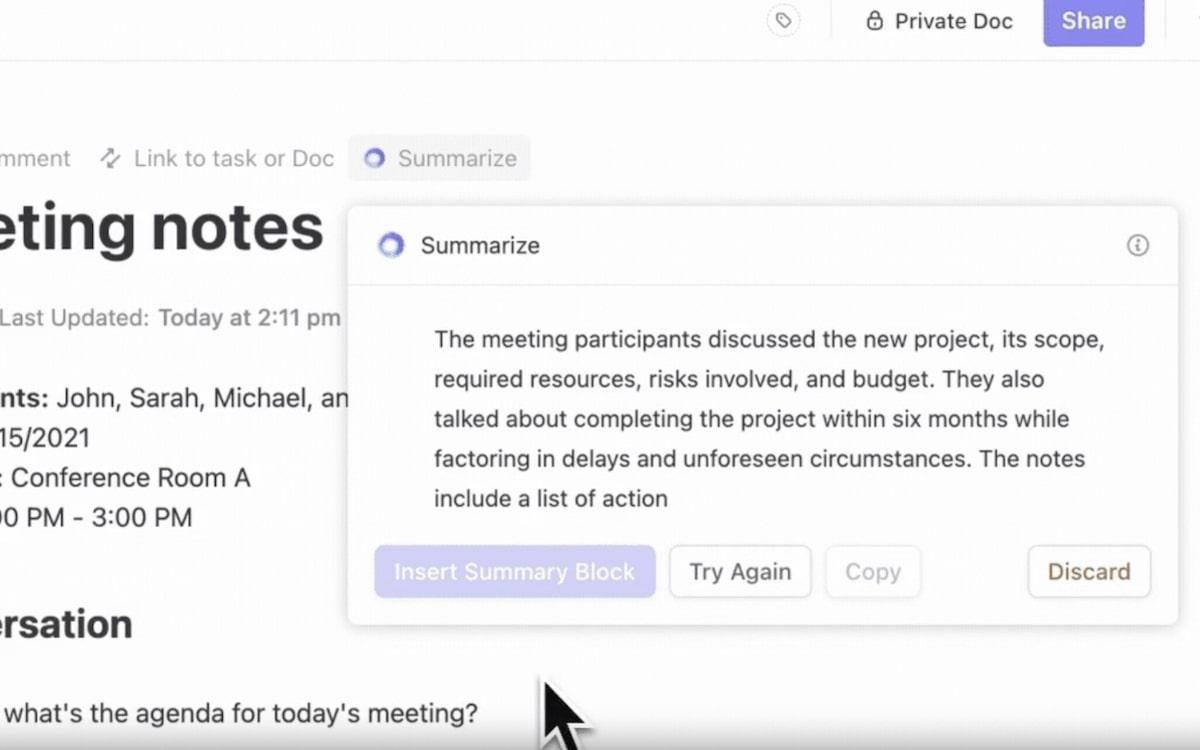
A design lead is in a review meeting and someone asks, ‘Did the new onboarding flow reduce drop-off in step two?’ Normally, that question triggers a pause: someone has to dig through Mixpanel dashboards, share a half-finished report, and follow up later.
With ClickUp Brain, the lead can type the question in the relevant task and get a breakdown: sign-up numbers, where users dropped off, and how it compares to the old flow.
📌 Example Prompt: ‘Compare user drop-off rates between the old and new onboarding flows, specifically at step two.’
The answer is immediate, in the same place where the design work lives, and the team can decide on changes right there instead of pushing it to another meeting.
This video explains how ClickUp Brain speeds up your workflow:
Teams often test different AI models for different strengths: Claude for reasoning, ChatGPT for flexible drafting, and Gemini for concise summaries. The headache comes from jumping between apps, losing context, and copying text back and forth.
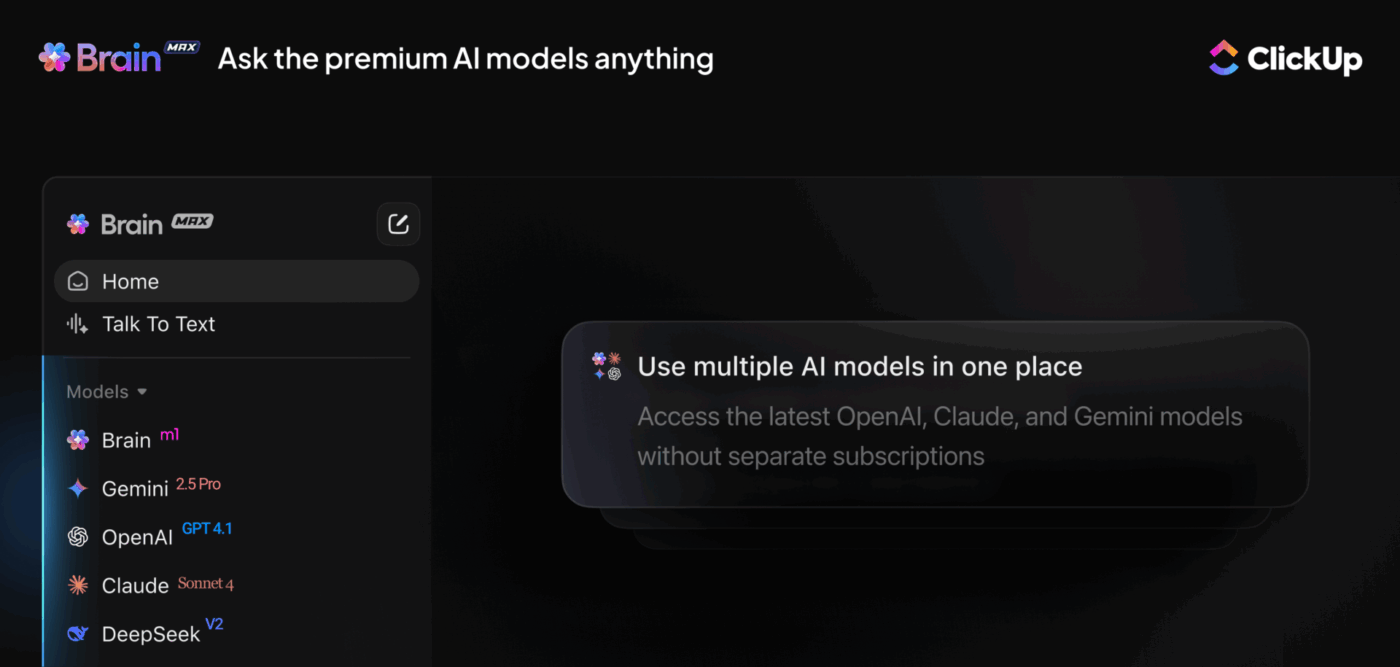
ClickUp Brain MAX removes that friction.
A product marketer writing a competitive analysis can generate structured competitor matrices with Claude and polish the narrative tone using ChatGPT. They also get an executive-ready summary from Gemini, all inside Brain MAX.
Plus, since it pulls context from ClickUp tasks and docs, the analysis stays accurate to the team’s work without manual shuffling.
Here’s a glimpse of how ClickUp Brain MAX brings your work and tools together:
Even with ClickUp Brain and Brain MAX cutting down search time, a lot of daily effort still goes into the same repetitive updates.
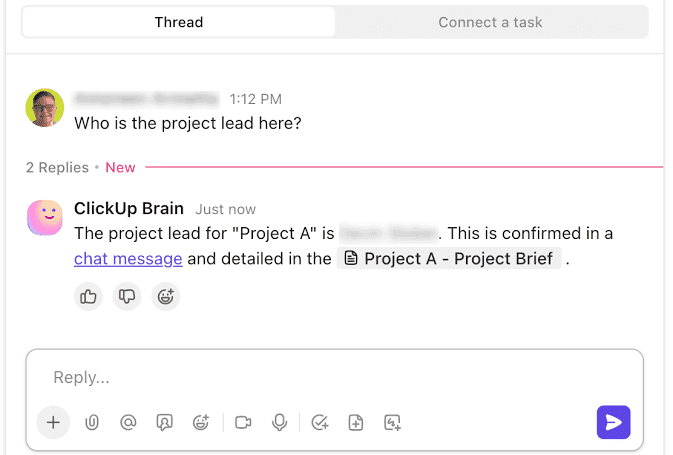
Think of morning standups, weekly reports, or the constant ‘Hey, what’s the status?’ questions in chat. Someone has to collect the information, format it, and share it. That’s the type of work ClickUp Autopilot Agents quietly take over.
Choose Prebuilt Autopilot Agents you can activate in seconds, or build your custom AI agents with triggers, conditions, and instructions.
For example, enable the Weekly Report Agent to automatically receive a digest of team activity, progress, and delays.
Handoffs often stall because updates are manual. When a sales deal moves to ‘Closed,’ someone has to remember to alert finance, assign onboarding, and sync the CRM.
ClickUp Automation can help you here.
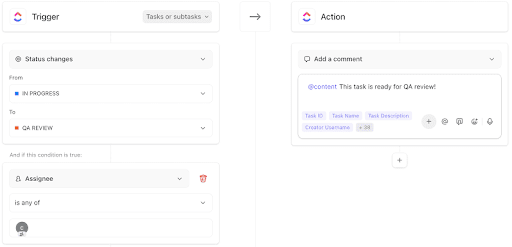
Set ‘if this, then that’ custom rules to trigger certain events. So, the second the status changes, Finance sees a new invoice task, an onboarding checklist is created, and Salesforce updates in the background. The rep moves on to the next deal, confident the client journey is already in motion.
This G2 review really says it all:
The new Brain MAX has greatly enhanced my productivity. The ability to use multiple AI models, including advanced reasoning models, for an affordable price makes it easy to centralize everything in one platform. Features like voice-to-text, task automation, and integration with other apps make the workflow much smoother and smarter.
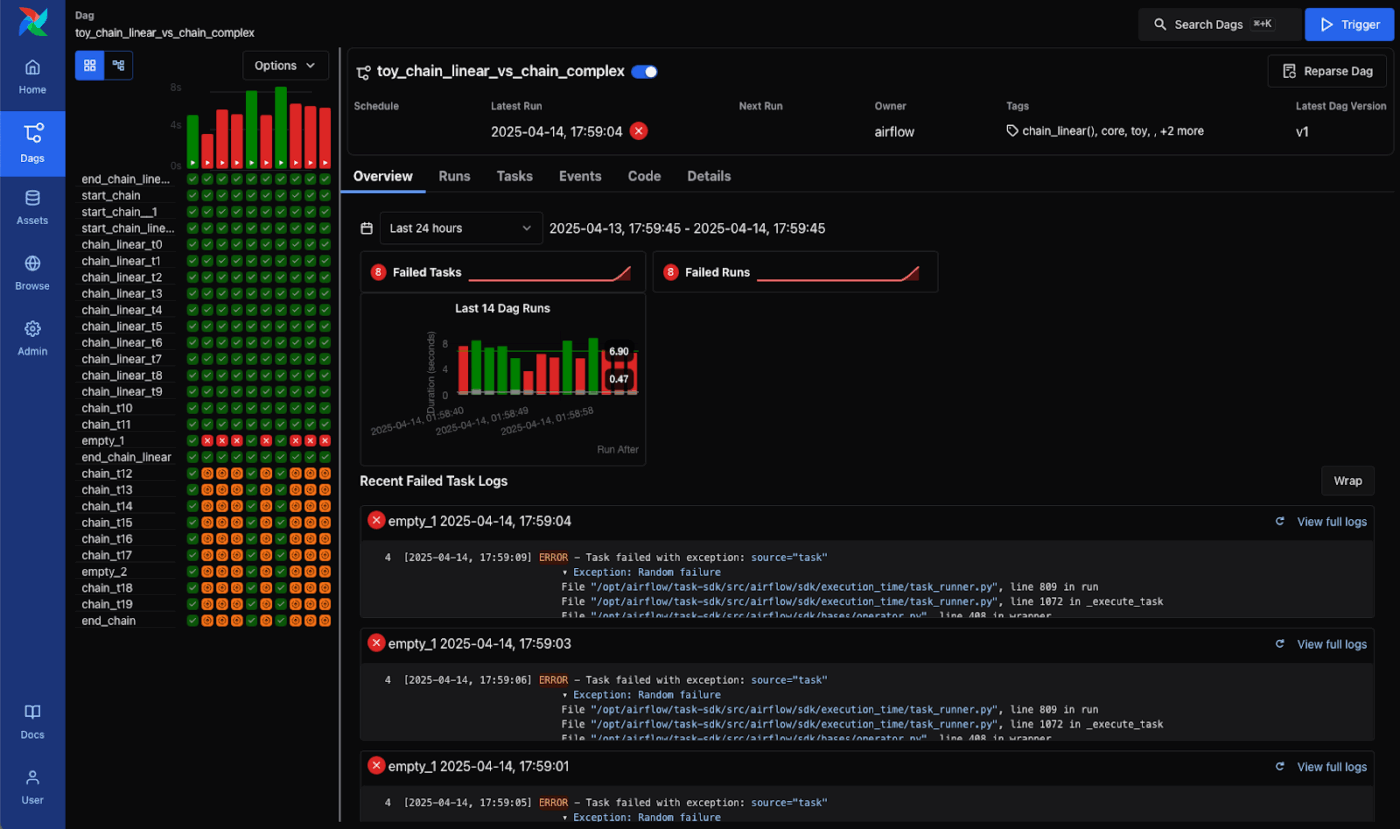
Apache Airflow originated as an internal Airbnb project before evolving into a widely adopted platform for managing complex data workflows. It operates on a ‘configuration as code’ philosophy, meaning your entire workflow logic lives in Python files.
The open source platform thrives in environments where teams need granular control over task dependencies, retry mechanisms, and execution schedules.
DAGs (Directed Acyclic Graphs) serve as workflow blueprints that Airflow transforms into executable pipelines.
As shared on G2:
Apache Airflow offers excellent flexibility in defining, scheduling, and monitoring complex workflows. The DAG-based approach is intuitive for data engineers, and the extensive operator ecosystem allows easy integration with various systems. Its UI makes tracking and debugging workflows straightforward, and its scalability ensures smooth operation even with large pipelines.
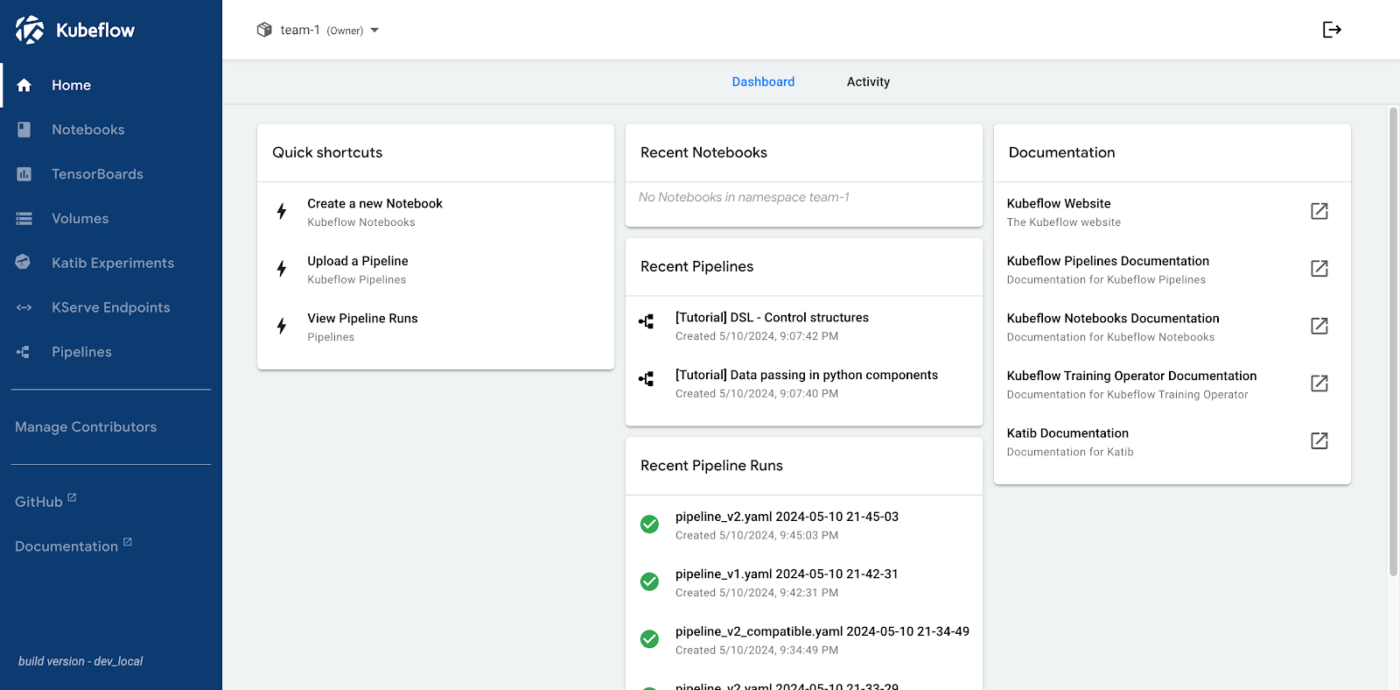
Google developed Kubeflow to remodel Kubernetes clusters into machine learning platforms, addressing the challenge of making ML workflows portable across different cloud providers.
The framework turns containerized environments into end-to-end ML platforms, focusing specifically on reproducibility and scalability.
The Kubeflow Pipelines component serves as the orchestration engine, allowing data scientists to build workflows using either a visual interface or SDK.
Its seamless data integration with Jupyter notebooks makes the tool stand out. This creates a familiar environment for ML practitioners already comfortable with notebook-based development.
Per a G2 review:
I like the portability of it, which makes easier to work with any kubernete clusters whether it’s on single computer or in cloud…It was difficult to setup initially we had to keep dedicated team members to setup it.
🧠 Fun Fact: Henry Ford’s assembly line in 1913 is often considered the first large-scale ‘workflow automation.’ Instead of software, it used moving conveyor belts to orchestrate people and machines.
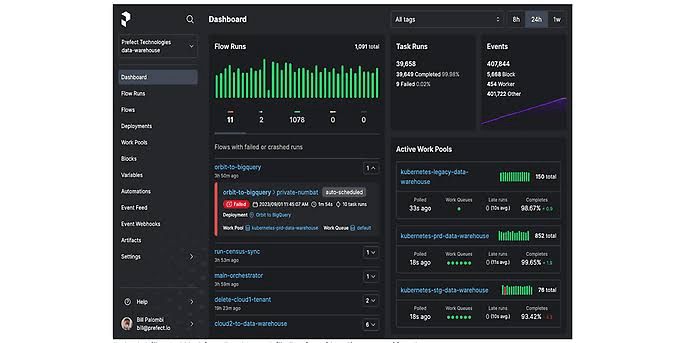
Modern Python developers often find traditional orchestrators too rigid and configuration-heavy for their daily workflows. Prefect addresses these frustrations, prioritizing developer experience over configuration overhead.
The platform treats workflows as regular Python functions decorated with its flow and task decorators.
Unlike traditional orchestrators, Prefect separates workflow definition from execution infrastructure. This allows teams to run identical workflows locally, on-premises, or in the cloud, which is invaluable during development and testing phases.
Based on a G2 review:
The thing our team has enjoyed the best about the prefect is how easy it is to convert any python code into a working and automated pipeline via the prefect decorators. We were able to migrate our cloud function workflows into prefect in just a couple of days. The declarative deployments yaml file is also easy to understand and when used in our CI/CD pipelines.
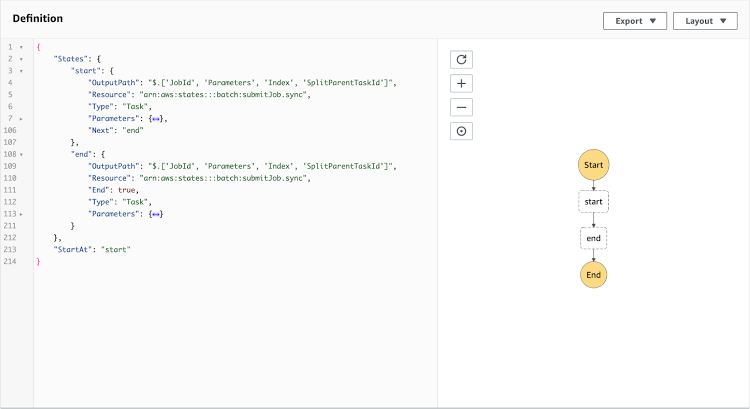
Netflix engineers built Metaflow to help data scientists transition from laptop prototypes to production systems without DevOps complexity.
In this open-source platform, every workflow run becomes a versioned artifact. The system automatically captures code, data, and environment snapshots. This versioning approach makes reproducing experiments effortless, months after the original run.
Scaling happens through decorators that seamlessly handle the transition from local computation to cloud instances with a single line of code. Moreover, Metaflow integrates natively with AWS services, making it appealing for teams already invested in Amazon’s ecosystem.
You can also choose to deploy on Azure, GCP, or a custom Kubernetes cluster.
A G2 user says:
What I like best about Metaflow is how it makes building and running data science pipelines feel…well, normal. You just write regular python code without getting lost in endless config files or worrying too much about infra setup. The way it handles data versioning and lets you jump between running stuff localy and on the cloud is super handy. It kinda removes that “devops headache” so you can focus on the actual problem you’re trying to solve.
🔍 Did You Know? The term orchestration was borrowed from music. Just like a conductor coordinates different instruments into harmony, orchestration platforms coordinate multiple applications, APIs, and AI agents.
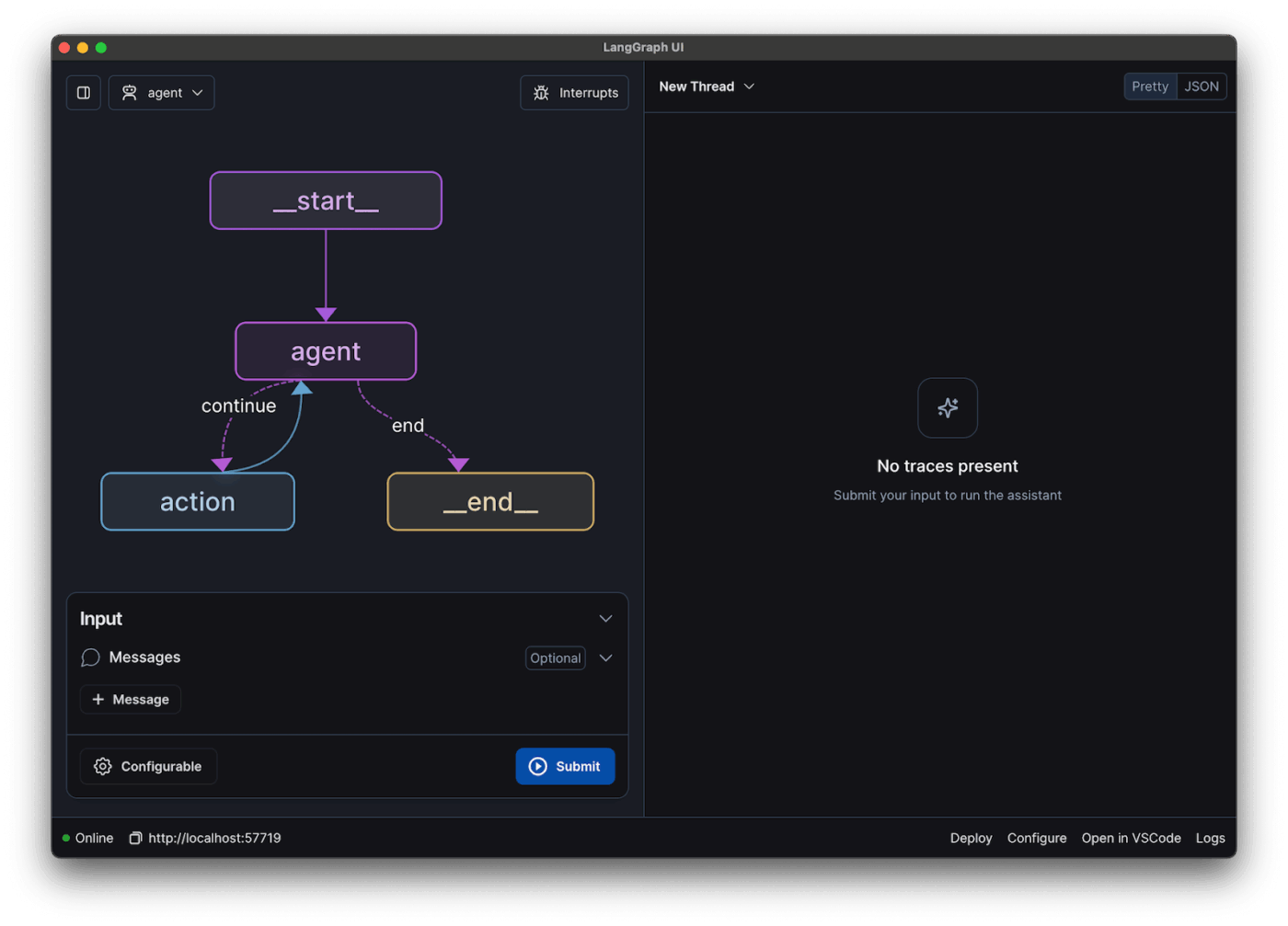
The explosion of large language models created a new challenge: chaining multiple AI operations together into coherent applications. LangChain fills this gap, providing abstractions that break down complex AI workflows into manageable components.
Its modular architecture allows custom components, such as prompt templates, memory systems, and tool integrations.
LangChain offers multi-step AI processes, from simple question-answering to complex research tasks. Plus, LangGraph extends to cyclic workflows where agents can iterate and refine their outputs based on feedback loops.
A Reddit post shares:
Langchain is very good for RAG specific takss because the chaining works very good in it. However the problem arises when you want a chatbot which can store memory and for tracing here langchain has limitations because you have to manually do this stuff. This can be done using langgraph because it is very versatile.
📖 Also Read: How to Use AI to Automate Tasks
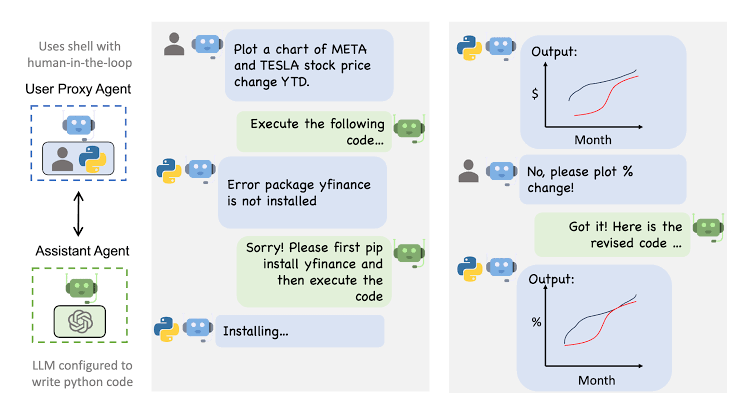
Microsoft Research developed this framework to ensure that AI agents negotiate solutions and reach consensus through natural dialogue rather than predetermined sequences.
Multiple agents in an AutoGen system can have different personas, capabilities, and access to specific tools, creating rich collaborative environments.
The open-source platform supports both human-in-the-loop and fully autonomous modes, allowing teams to increase automation as confidence grows gradually. It also generates detailed conversation logs that reveal how agents arrive at their conclusions.
🧠 Fun Fact: The roots of workflow automation go back to the Industrial Revolution (18th century). Businesses first used mechanical systems, like Jacquard looms with punch cards, to automate repetitive tasks. These also worked on an ‘if this, then that’ logic.
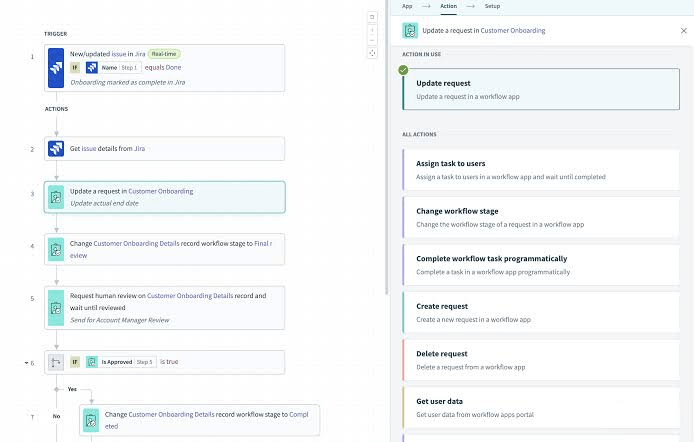
Workato tackles orchestration from an enterprise perspective, focusing on connecting business applications. The platform offers a visual recipe builder that even non-technical users can understand. But don’t be mistaken, developers still get advanced capabilities when needed.
As an AI orchestration tool, Workato goes beyond simple automation to enable dynamic processes, such as sentiment analysis, intelligent document processing, and predictive lead scoring. Business processes convert to workflows that automatically handle error recovery, data transformation, and compliance logging.
Enterprise features, such as role-based access control, audit trails, and SOC 2 compliance, make Workato suitable for regulated industries where both governance and functionality matter.
As shared on Reddit:
As a non-integrations person, I love Workato’s UI. I can jump on with the person building the integrations and pretty easily understand the interface
📖 Also Read: Workato Alternatives to Automate Workflows
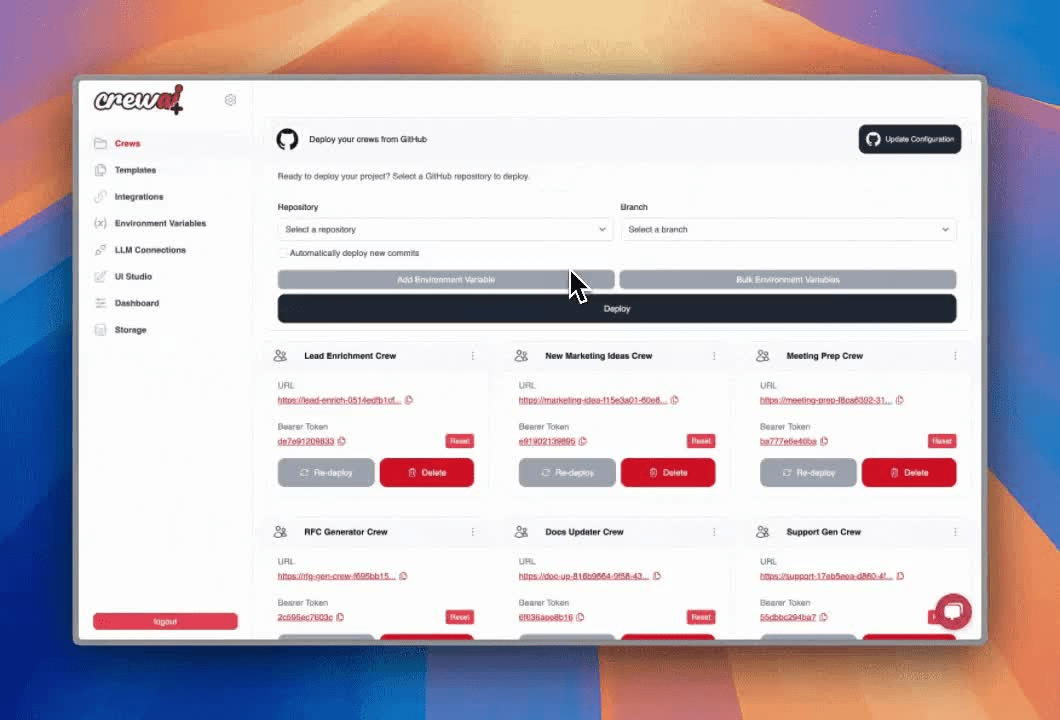
CrewAI operates like a digital project management system where agents have job titles, skills, and reporting relationships that mirror real-world teams.
This role-based approach makes complex workflow design surprisingly intuitive. Researchers gather information, analysts process data, and writers create reports, just like human teams. Built-in coordination mechanisms handle task delegation, progress tracking, and quality control automatically.
The platform emphasizes structured collaboration over free-form conversation, making outcomes more predictable than purely conversational frameworks.
🧠 Fun Fact: The Y2K bug crisis caused a global scramble to fix problems, leading to massive IT upgrades. Those investments built a stronger tech foundation.
📮 ClickUp Insight: 32% of workers believe automation would save only a few minutes at a time, but 19% say it could unlock 3–5 hours per week. The reality is that even the smallest time savings add up in the long run.
For example, saving just 5 minutes a day on repetitive tasks could result in over 20 hours regained each quarter, time that can be redirected toward more valuable, strategic work.
With ClickUp, automating small tasks—like assigning due dates or tagging teammates—takes less than a minute. You have built-in AI Agents for automatic summaries and reports, while custom Agents handle specific workflows. Take your time back!
💫 Real Results: STANLEY Security reduced time spent building reports by 50% or more with ClickUp’s customizable reporting tools—freeing their teams to focus less on formatting and more on forecasting.
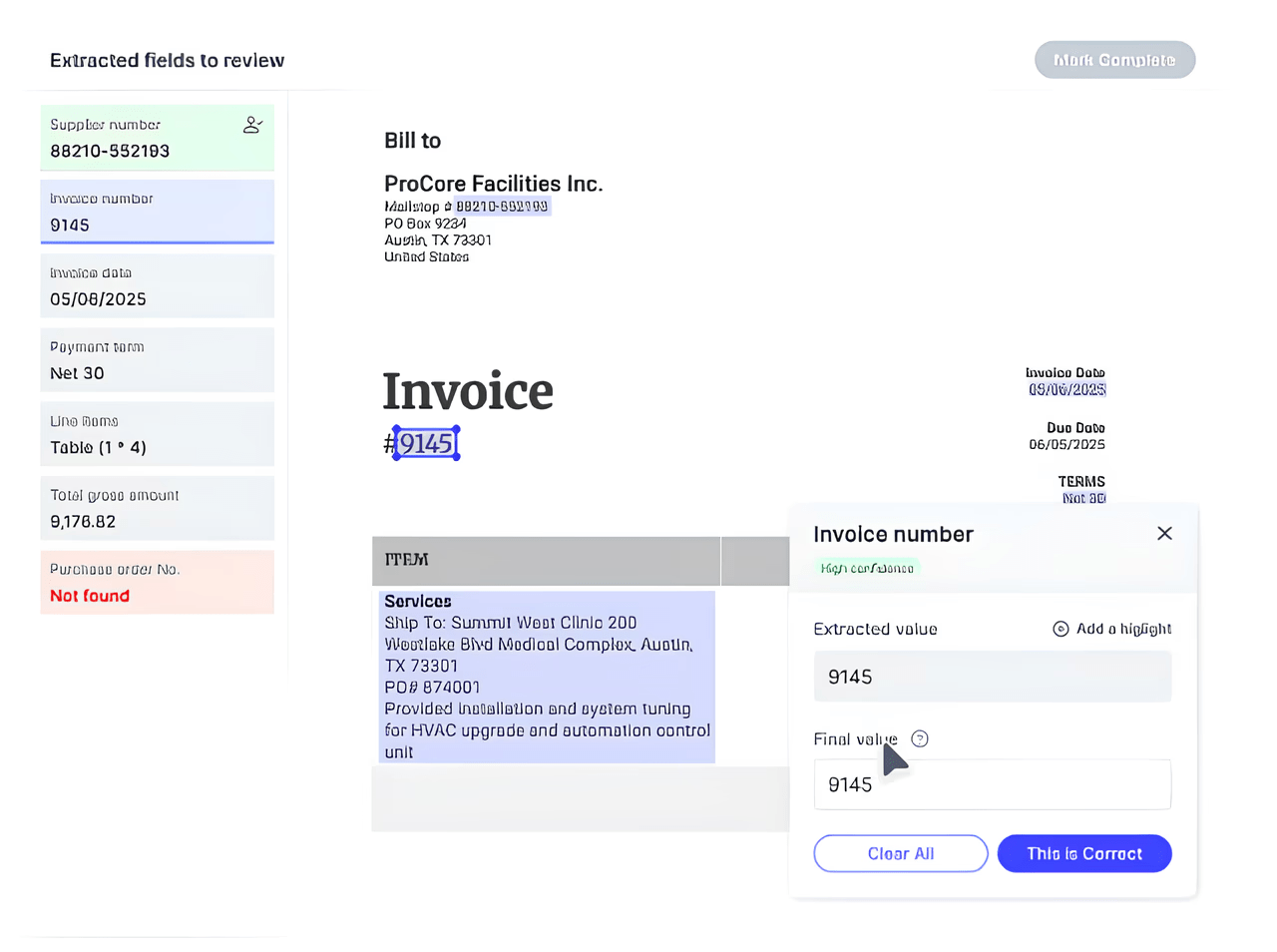
Orby AI takes a refreshingly different approach to orchestration. It uses neuro-symbolic artificial intelligence, powered by its proprietary Large Action Model (LAM), to analyze user interactions across different applications. This identifies repetitive tasks and workflow patterns that might otherwise remain invisible.
Once workflows are discovered, the platform can automate entire sequences across both desktop applications and web-based tools.
Key strengths include logic-backed reliability (no hallucination risk), full auditability with step-by-step reasoning, and iterative feedback loops to improve its accuracy.
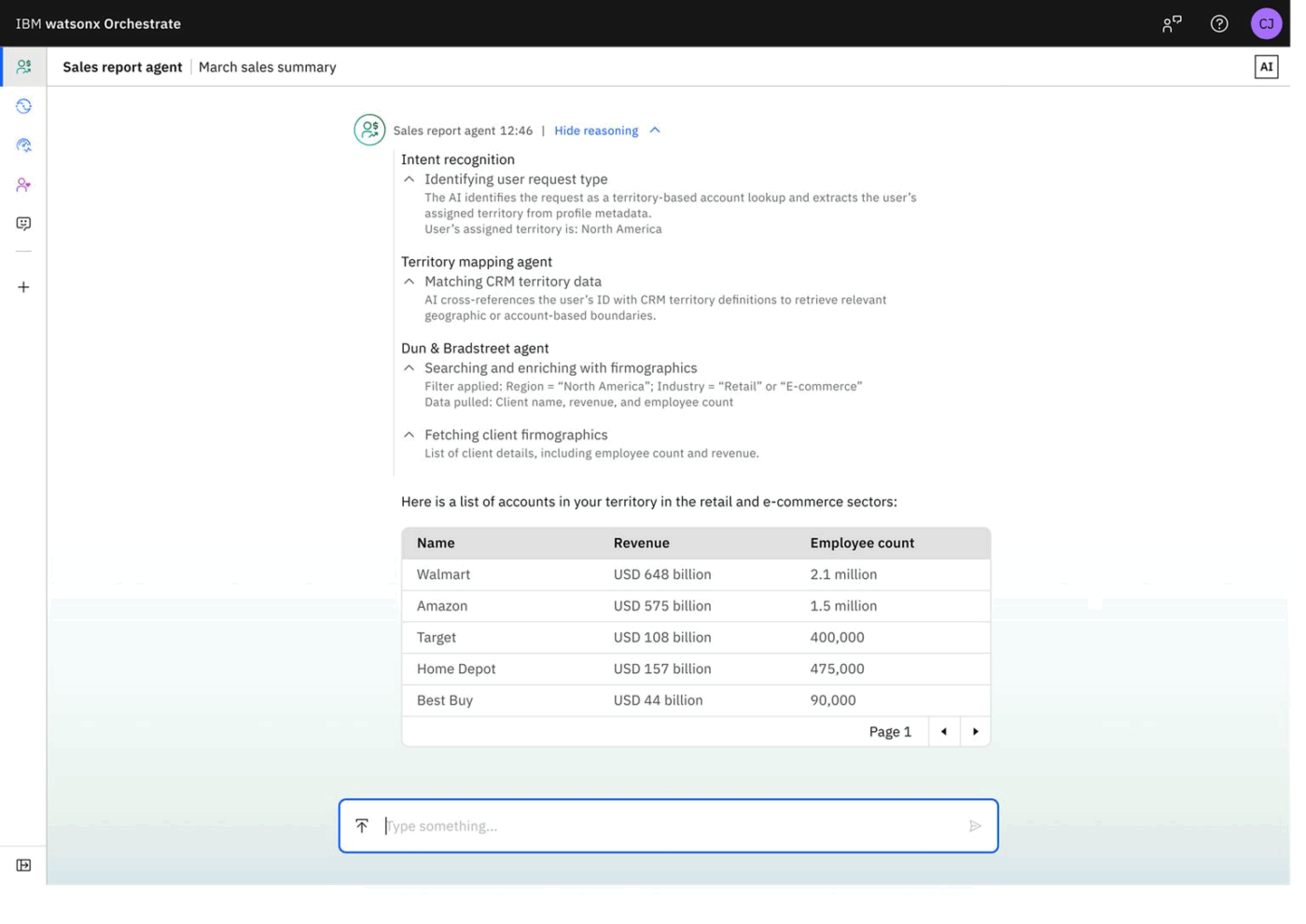
IBM watsonx Orchestrate connects various AI models, applications, and data sources through natural language requests.
It performs sophisticated business tasks, such as analyzing customer sentiment from recent support tickets and creating summary reports. Over time, the system improves its contextual understanding and adapts to evolving business needs.
Behind the scenes, the platform orchestrates multiple AI services, data transformations, and application interactions seamlessly. Enterprise features, like security controls, compliance tracking, and integration with existing IBM infrastructure, make it work well for large organizations.
A review on G2 shares:
A new thing I like about IBM watsonx Orchestrate is how it simplifies task automation by letting you create “skills” using natural language. It’s user-friendly and allows non-developers to automate repetitive tasks across tools like email, calendars, and business apps without writing code. The integration with Watson AI makes it smarter and more context-aware.
🔍 Did You Know? In the 1960s, IBM introduced mainframes that could schedule batch jobs. This was the first step toward digital orchestration, where IT teams managed thousands of tasks across massive centralized systems.
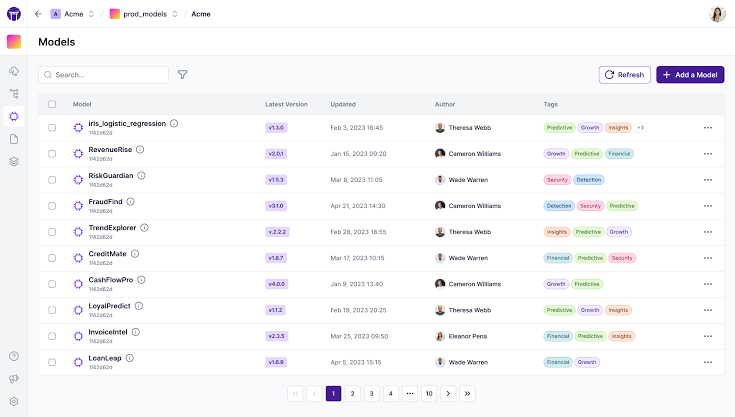
ZenML provides a standardized ML workflow framework that remains flexible enough to accommodate various tools and preferences. The platform treats ML pipelines as first-class software artifacts, complete with versioning, testing, and deployment processes.
ZenML’s artifact store concept ensures that all pipeline inputs, outputs, and metadata get tracked and versioned automatically. This systematic approach makes experiments reproducible and auditable, turning ad-hoc ML development into professional software practice.
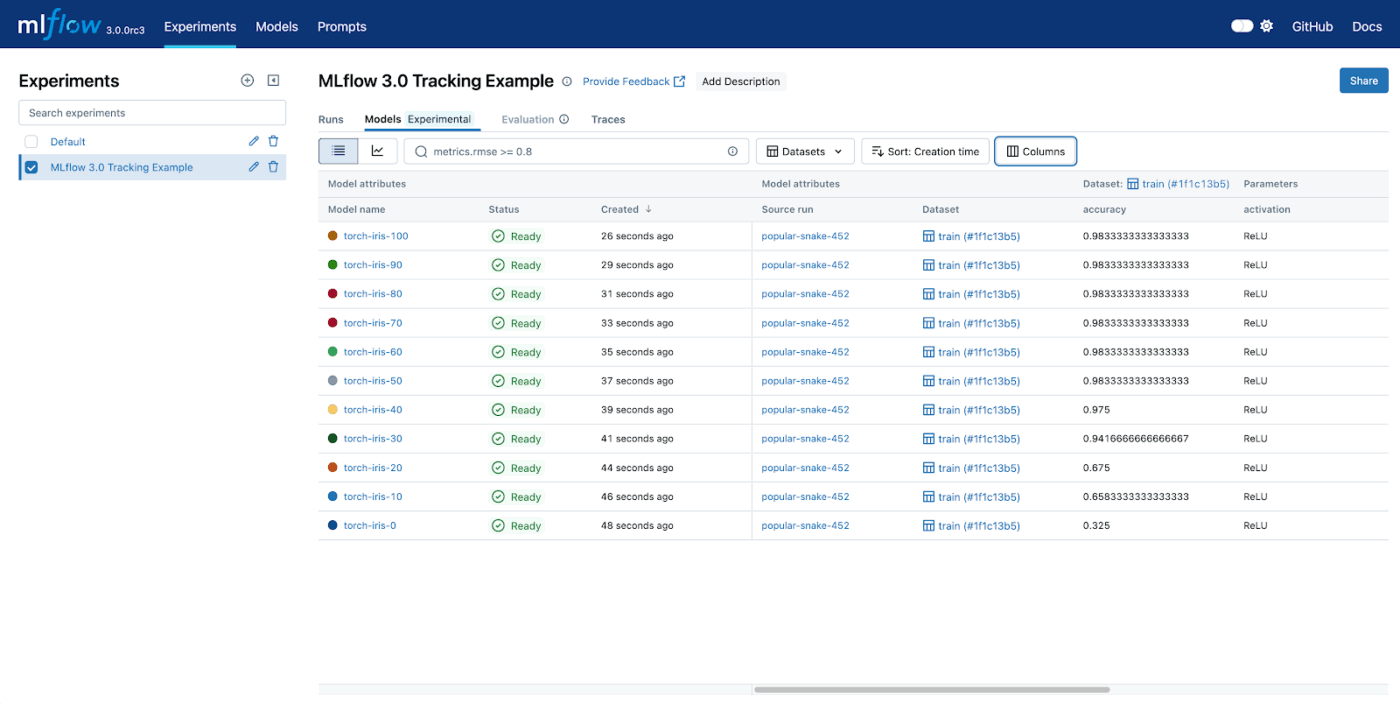
Databricks created MLflow to tackle scattered experiment results, inconsistent model packaging, and deployment headaches. It organizes everything around experiments and runs, automatically tracking parameters, metrics, and artifacts for every AI model training session.
The interface manages models from development through production, handling versioning, staging, and deployment approval workflows smoothly.
Its model registry serves as a central catalog where teams can discover, evaluate, and promote models across different environments.
🧠 Fun Fact: The term ‘Business Process Reengineering (BPR)’ surged in the 1990s. Companies like Ford and General Electric began rethinking workflows end-to-end, laying the foundation for modern workflow automation and AI-powered optimization.
Teams running multiple AI systems spend most of their time coordinating rather than innovating. AI tools handle the grunt work so your people can focus on what matters:
Most AI orchestration platforms look identical in demos but perform very differently in production.
Here’s how to separate marketing promises from reality:
🔍 Did You Know? 93% of enterprise IT leaders plan to implement autonomous AI agents, and nearly half have already applied them. This signals a massive shift toward AI orchestration across business operations.
AI orchestration is moving from theory into practice, and research shows just how quickly it’s taking shape.
A recent study on modern workflow orchestration platforms highlights how frameworks are being designed to connect multiple AI agents, manage their tasks, and guide them toward shared goals. This shift allows systems to cooperate more naturally, without leaving users to piece together tools on their own.
In fields like healthcare, orchestration is already proving its impact. Researchers working on self-driving labs have shown how orchestration platforms can coordinate lab instruments, AI models, and human input at once. The outcome is faster experiments, fewer mistakes, and results that can be reproduced consistently.
Similar patterns are appearing in finance and manufacturing, where orchestrated AI is helping teams make quicker and more reliable decisions.
Another perspective comes from the idea of Orchestrated Distributed Intelligence. This approach imagines networks of AI systems that adapt and share context across tasks, working alongside humans as collaborative partners rather than isolated tools.
🔍 Did You Know? 95% of organizations still grapple with integration issues, limiting AI deployment effectiveness. Integration remains the key barrier to realizing AI’s full potential in enterprise workflows.
As more businesses adopt AI to boost productivity and gain insights, they often end up with multiple AI solutions without a clear strategy. This growing AI sprawl makes it harder to govern, optimize, and fully harness the potential of AI technology. What teams need is clarity: one place to find answers, track updates, and keep projects moving.
That’s exactly what ClickUp gives you. ClickUp Brain pulls insights from the work you’re already doing, and gives you the power of generative AI right where you work. ClickUp Brain MAX lets you tap into multiple AI models without losing context, and work hands-free. And all this while Autopilot Agents handle the daily grind and Automations accelerate work.
Sign up for ClickUp today and make every AI/ML project click into place! ✅
AI automation focuses on carrying out a single task, like sending a notification or updating a spreadsheet. AI orchestration goes further by linking multiple automated tasks and AI systems so they work together as one coordinated process.
AI agent orchestration is the structured coordination of several AI agents, each designed for a specific role. The orchestrator manages how they interact, share information, and complete tasks as a group rather than in isolation.
Yes, AI orchestration can reduce AI sprawl by consolidating scattered tools and systems into a single, organized framework. This eliminates the problem of overlapping platforms and makes it easier to manage everything from a single point of control.
Not all platforms require coding skills. Many offer user-friendly dashboards, drag-and-drop features, and prebuilt workflows. However, advanced customization and integration with complex systems may still require technical expertise.

© 2026 ClickUp

There’s an easier way. Try a free AI Agent in ClickUp that actually does the work for you—set up in minutes, save hours every week.