






Still downloading templates?
There’s an easier way. Try a free AI Agent in ClickUp that actually does the work for you—set up in minutes, save hours every week.
Sorry, there were no results found for “”
Sorry, there were no results found for “”
Sorry, there were no results found for “”
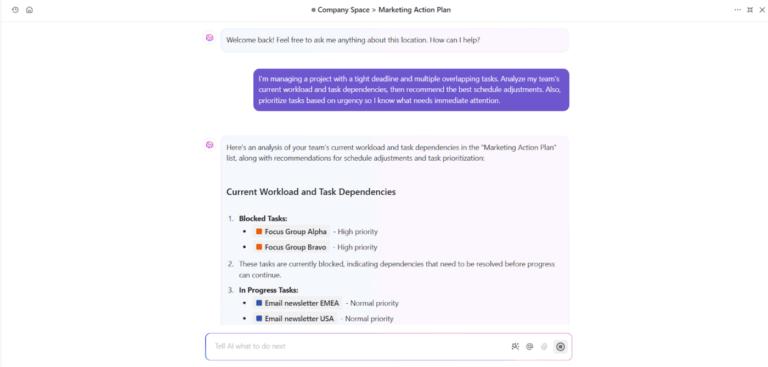
By 2028, Gartner expects 15% of daily business decisions to be made autonomously by agentic AI, compared to virtually none in 2024. That tells you where things are headed.
As workflows grow more interconnected—spanning tools, teams, and data sources—single agent systems start to break down. They can complete tasks, but they struggle with orchestration, coordination complexity, and parallel execution.
An AI multi-agent workflow changes that dynamic. Instead of one agent doing everything, multiple specialized agents collaborate to move complex work forward.
In this article, you’ll explore how AI multi-agent workflows work, where they create real value, and how to design them effectively.
An AI multi-agent workflow is a structured system where multiple agents collaborate to complete a goal, rather than relying on a single model to handle everything. Instead of one generalized assistant trying to manage an entire process, you design an environment where intelligent agents divide responsibilities and coordinate outcomes.
In a single-agent setup, one model perceives input, reasons through it, and produces output. That works for isolated tasks. But in more dynamic environments, a single decision-maker can become a bottleneck.
A multi-agent setup distributes responsibility across different agents, each designed for a specific role within the broader agent workflow.
These specialized agents might focus on research, analysis, validation, or execution. Together, they form a structured multi-agent architecture where the entire system operates more like a real team than a single assistant. The power lies in how agents collaborate, share context, and pass outputs between one another.
📖 Also Read: Powerful AI Agents Examples Transforming Industries
At a practical level, multi-agent systems operate through structured coordination rather than isolated execution. Instead of relying on one model to handle everything, you design a system where individual agents operate independently but remain connected through shared logic, memory, and routing.
A typical setup includes a supervisor agent responsible for oversight and orchestration. It interprets the objective, distributes subtasks to worker agents, and manages agent coordination across the broader entire system. Each agent focuses on a defined responsibility while contributing to a complete workflow.
Behind the scenes, several mechanisms keep things aligned:
As coordination scales increase, coordination complexity increases. That’s where thoughtful agent orchestration, controlled data access, and robust error handling matter. Some agents may pause while an agent waits for validation, while others continue operating independently.
When designed correctly, multi-agent systems work as a distributed intelligence layer—executing complex tasks with greater flexibility, resilience, and system performance than traditional automation.
As your operations scale, complexity compounds. A single automation rule or isolated assistant can only go so far.
Multi-agent systems are built for environments where coordination, specialization, and speed matter. When multiple specialized agents operate together, your team gains leverage without increasing headcount.
Here’s where the impact becomes tangible:
✅ Faster execution through parallel processing: With parallel agents handling different parts of a task simultaneously, complex initiatives move forward without waiting on one bottlenecked resource
✅ Better handling of complex systems: Distributed agent coordination allows you to break down complex tasks into manageable components across the entire system
✅ Improved system performance and cost efficiency: Workloads are distributed intelligently, reducing redundancy and optimizing resource usage
✅ Stronger decision support: Multi-agent setups can assist with risk assessment, vendor evaluation, and other high-stakes enterprise tasks where layered validation improves accuracy
✅ Scalable automation with context awareness: By maintaining shared memory and structured workflows, agents operate independently while still contributing to a unified outcome
📖 Also Read: AI Super Agents & the Rise of Agentic AI
Multi-agent systems reshape how work gets executed across operations, service, and knowledge-driven teams. When multiple agents collaborate inside a structured agent workflow, the impact becomes industry-agnostic but outcome-specific.
In operations-heavy environments, complexity compounds quickly. Whether you’re managing software development, compliance tracking, or cross-functional launches, relying on a single automation layer often falls short.
A multi-agent setup distributes responsibility across specialized agents that coordinate parts of a complete workflow:
This structure enhances workflow automation and strengthens business process automation across teams. In large organizations, it also supports document processing pipelines, contract reviews, and structured approvals without overwhelming one system node.
When you’re building AI agents for operations, the goal isn’t replacement. It’s orchestration. By distributing logic across multi-agent systems, teams reduce bottlenecks and improve system-wide visibility across the entire system.
📮 ClickUp Insight: Half of our respondents struggle with AI adoption; 23% just don’t know where to start, while 27% need more training to do anything advanced.
ClickUp solves this problem with a familiar chat interface that feels just like texting.
Teams can jump right in with simple questions and requests, then naturally discover more powerful automation features and workflows as they go, without the intimidating learning curve that holds so many people back.
📖 Also Read: Best AI Productivity Tools to Use
Customer experience is where multi-agent coordination becomes visibly powerful. Instead of a basic chatbot answering FAQs, you deploy parallel agents that interpret intent, validate actions, and resolve requests in real time.
Imagine this flow:
This layered agent orchestration improves response speed while maintaining governance. With built-in customer memory capability, agents personalize responses based on past interactions rather than restarting every conversation from scratch.
Importantly, high-impact systems still include a human in the loop for escalation scenarios. The result is a coordinated intelligence that enhances CSAT while maintaining accountability.
Knowledge-intensive teams benefit immensely from structured multi-agent workflows. Research rarely follows a linear path. It involves gathering data, validating sources, synthesizing insights, and presenting findings.
In a structured research system, the workflow might look like this:
This is especially useful for complex research tasks where a single model struggles to maintain depth and structure. A strong research feature involves separating sourcing, reasoning, and presentation into modular stages.
In advanced setups, teams may deploy multiple Claude agents or other specialized models to cross-verify outputs. This approach supports a research process based on layered validation rather than single-pass generation.
When building multi-agent systems for knowledge work, the value lies in coordination. Agents maintain context, reduce cognitive overload, and execute the full research lifecycle with precision.
⚡ Quick hack: Always look for scalable AI solutions that integrate with your existing tech stack. Make sure to have detailed workflow documentation as well.
To go deeper, here are some questions you should ask yourself:
✅ How does system performance (response time, throughput) change when usage increases 10x or 100x?
✅ Are there specific user load thresholds or concurrency limitations we should know?
✅ How efficiently does the solution scale in terms of infrastructure costs (compute, storage, networking)?
✅ How often are integrations updated to match the tech stack’s lifecycle (e.g., new software versions)?
✅ What hidden costs or usage-based costs might emerge as the solution scales?
Here are some of the most popular tools to create multi-agent workflows:
For orchestration in production, you might also integrate with:
📖 Also Read: Best Document Management Software to Get Organized
Many teams are excited about adopting AI agents to automate work. But once experimentation begins, reality sets in. Instead of efficiency, organizations encounter work sprawl with fragmented tools, siloed automations, and disconnected agent workflows.
Individual systems may work well in isolation, yet without coordination, they struggle to support complex workflows across the entire system.
This is where ClickUp becomes valuable. As the converged AI workspace, it acts as a central hub where multi-agent workflows can operate within a shared environment. Instead of scattered tools operating independently, ClickUp helps agents coordinate, maintain shared user context, and complete tasks across one workspace.
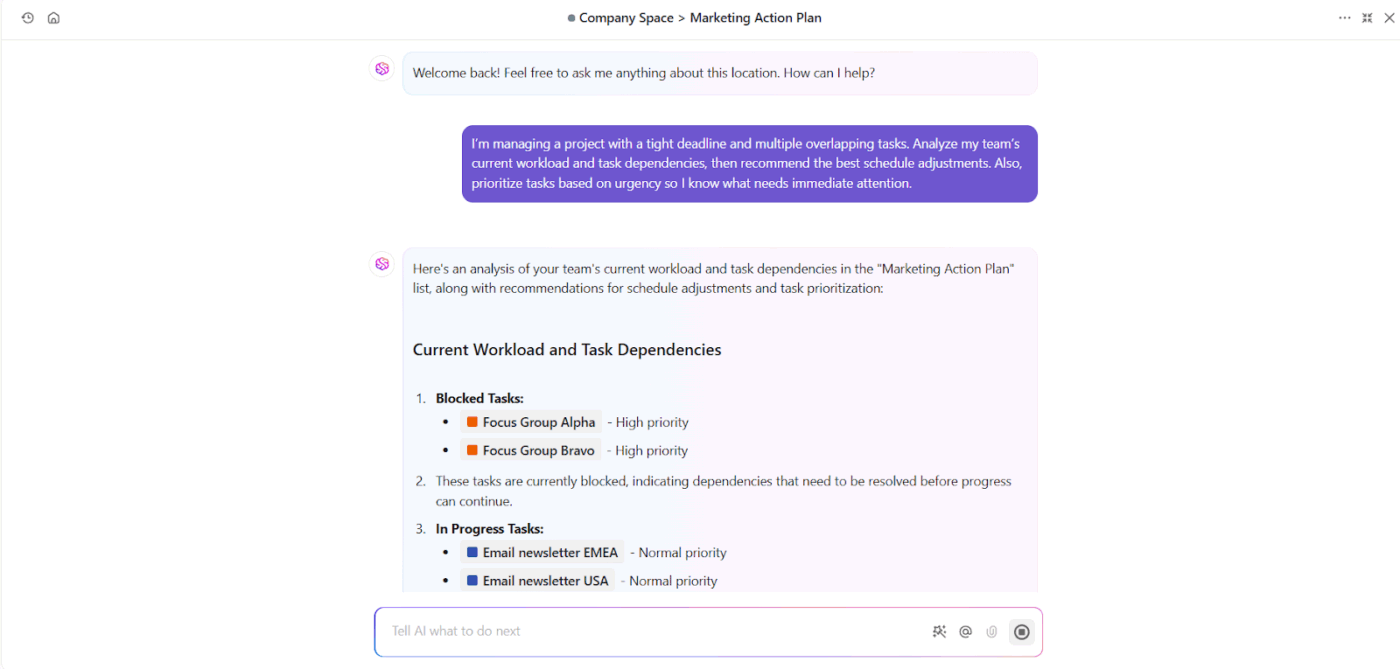
ClickUp Brain acts as a coordination engine that connects different agents and workflows. Instead of configuring complex logic manually, teams can describe the automation they want in natural language.
For instance, a product manager might describe a workflow where urgent tasks are automatically routed to a priority team. ClickUp Brain interprets that request, configures triggers, and establishes the logic that guides agent behavior.
Because Brain analyzes activity across tasks, deadlines, and dependencies, it supports dynamic routing across different agents. It can also maintain shared user context, helping agents understand priorities across projects rather than operating in isolation.
The result is a system where parallel agents manage data entry, task routing, reporting, and analysis without breaking workflow continuity.
💡 Pro Tip: ClickUp Brain powers much of the automation you’ve seen above—but with ClickUp Brain MAX, you take it further.
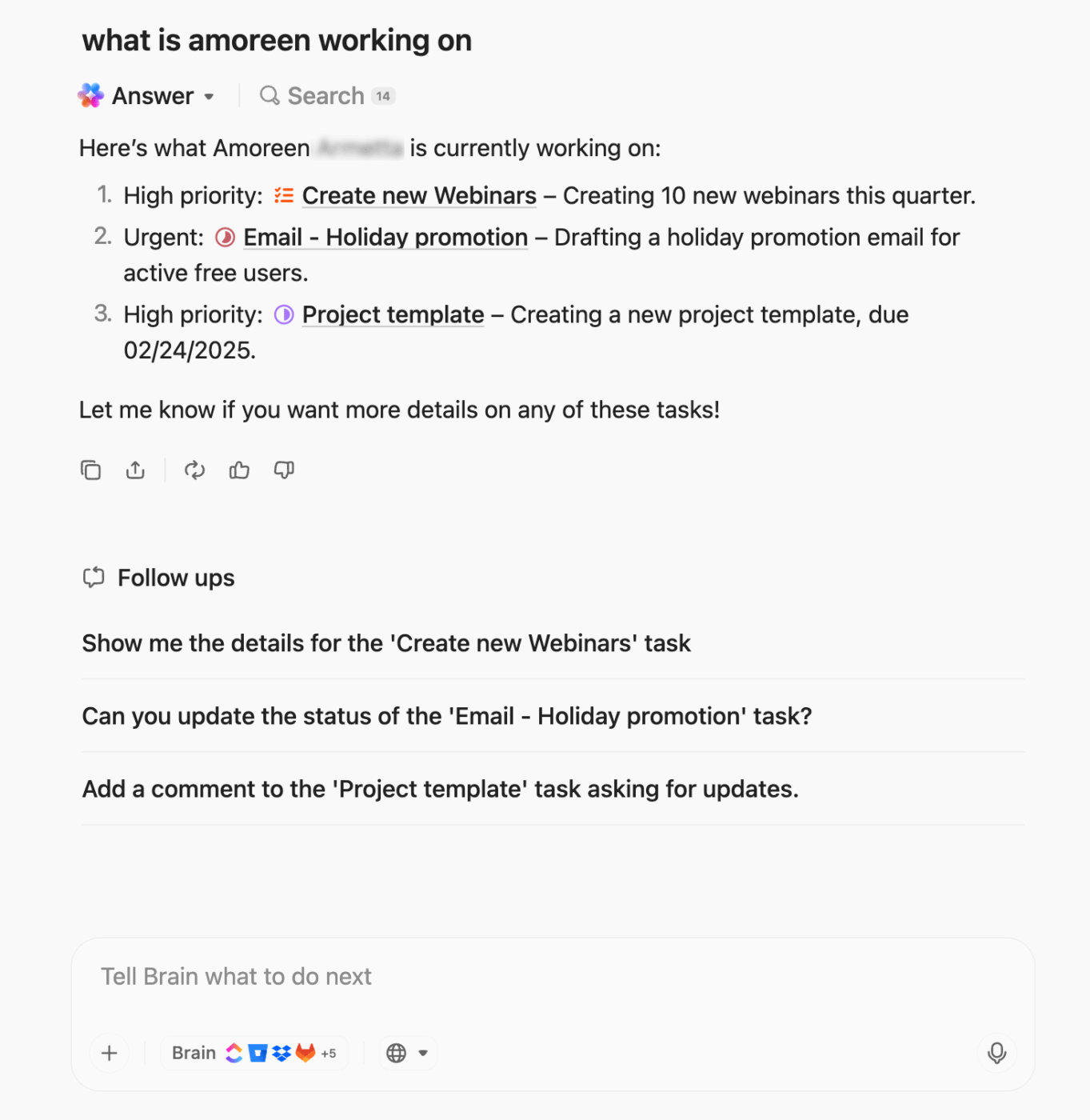
ClickUp Brain Max is about more adaptive AI agents. By switching between leading models like GPT-4, Claude 3.7, and others, teams can choose the right “brain” for each workflow—speed for quick decisions, nuance for sensitive communication, or depth for complex analysis.
And with Talk to Text, part of ClickUp Brain MAX, you can dictate ideas directly into ClickUp. Spoken thoughts instantly become tasks, docs, or action items—removing typing bottlenecks and making agentic workflows feel as natural as conversation.
Together, ClickUp Brain MAX and Talk to Text bridge human input with autonomous agents—so ideas flow faster, context stays intact, and your AI-powered workflows scale without friction.
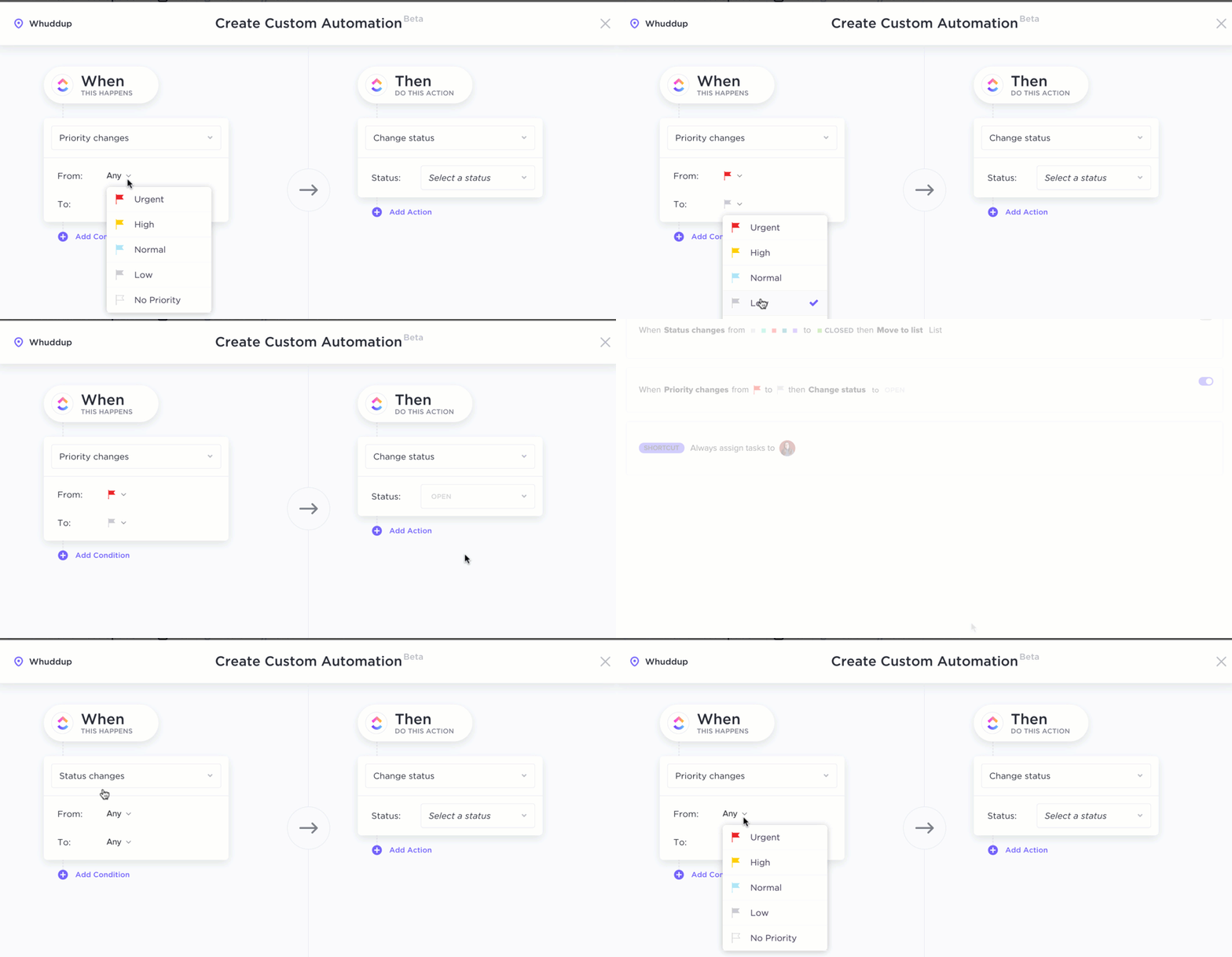
While ClickUp Brain helps interpret intent and guide agent behavior, ClickUp Automations bring the execution layer that turns those insights into action. Together, they form a practical environment for running multi-agent workflows inside your workspace.
ClickUp Brain analyzes your projects, deadlines, and dependencies, while Automations ensure tasks move through the complete workflow without manual intervention. This combination allows different agents to coordinate across workstreams while maintaining shared user context.
Here’s how this collaboration typically plays out:
Instead of disconnected automation rules, Brain and Automations create a coordinated system where agents collaborate, tasks route intelligently, and work progresses smoothly across teams.
📖 Also Read: Free Productivity Templates in Excel & ClickUp
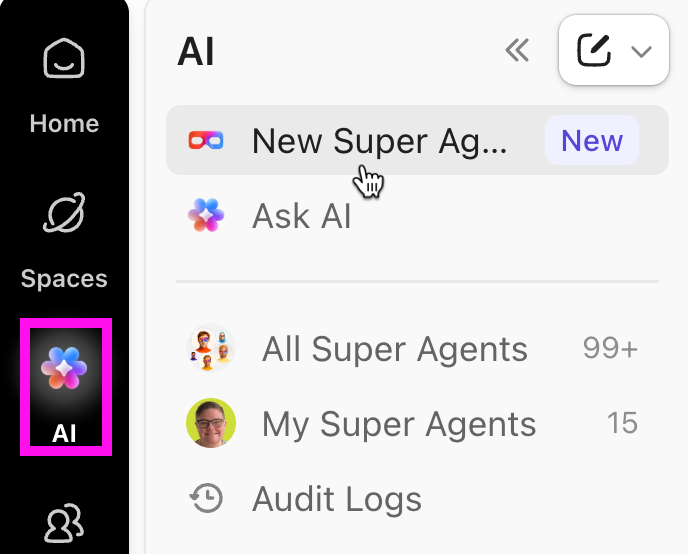
💡 Pro Tip: You can use ClickUp Super Agents as your AI coworkers that are built right into your ClickUp Workspace. They show up just like teammates, because under the hood, they’re modeled as real users.
Watch this video to understand how to create customizable AI agents with ClickUp Super Agents:
You can:
📖 Also Read: How to Choose a Super Agent
AI becomes most powerful when it connects with the tools your team already uses. ClickUp enables integrations with platforms like ChatGPT, Make, Twilio, and Zapier, allowing external tools to participate in the broader multi-agent systems operating inside your workspace.
This integration layer supports tool calls, external triggers, and structured data access across systems. Updates from GitHub can automatically create tasks, while insights generated from AI research tools can feed directly into project workflows.
When these systems work together, teams move beyond isolated automation toward coordinated multi-agent systems work—where agents collaborate, process information in parallel, and deliver outcomes faster.
💡 Pro Tip: Create a dashboard to monitor the impact of your AI-powered workflows. Tracking metrics such as time saved, reduced errors, and productivity gains helps quantify how your multi-agent systems improve operational efficiency across teams.
📖 Also Read: Key Trends on the Rise and Rise of Agentic AI
The shift toward multi-agent systems isn’t just a technical trend—it’s a new way to execute work. As organizations adopt AI agents to handle complex tasks, the focus moves from isolated automation to coordinated systems where multiple agents collaborate, share context, and complete outcomes across the entire system.
From operations and software development to research and customer support, well-designed agent workflows help teams scale decision-making, improve system performance, and manage complex systems more efficiently. But the real advantage comes from bringing those agents into one unified environment where work, context, and coordination live together.
That’s exactly where ClickUp fits in. Try ClickUp for free and start building intelligent workflows where your agents—and your teams—can move work forward faster.
A single-agent system relies on one model to interpret inputs and complete tasks. In contrast, multi-agent systems use multiple agents that specialize in different roles, collaborate through agent interactions, and coordinate across the entire system to handle more complex workflows.
Not always. While developers may write custom logic when building AI agents, many modern platforms support visual tools that support multi-agent workflows without heavy coding. These tools help teams orchestrate multiple specialized agents for enterprise and operational tasks.
Traditional automation follows fixed rules for predefined tasks. Agent orchestration, however, enables AI agents to adapt dynamically, coordinate with other agents, and manage complex workflows using context, memory, and decision-making logic instead of static triggers.

© 2026 ClickUp

There’s an easier way. Try a free AI Agent in ClickUp that actually does the work for you—set up in minutes, save hours every week.