






Still downloading templates?
There’s an easier way. Try a free AI Agent in ClickUp that actually does the work for you—set up in minutes, save hours every week.
Sorry, there were no results found for “”
Sorry, there were no results found for “”
Sorry, there were no results found for “”
You probably didn’t become an insurance agent out of passion for manual data entry.
You’re here to protect people’s livelihoods. But it’s hard to be a trusted advisor when much of your day disappears into admin work.
That trade-off is finally becoming optional.
Smart insurance workers are using AI for insurance agents to claw back hours of their week. We’re talking about a 37% jump in productivity by having automation handle the repetitive tasks clogging our calendar, and this article shows you how to capture that time.
Here’s how to use insurance agency automation to free up time and focus on high-value conversations that grow your book while keeping everything organized in ClickUp. ⏳
AI for insurance agents is a suite of tools that automates repetitive tasks, pulls insights from client data, and personalizes customer interactions. It’s no longer a niche technology; 76% of insurers have already implemented artificial intelligence in at least one business function.
It’s especially helpful for eliminating context sprawl. Right now, you might jump between your CRM, inbox, quoting tool, and policy system just to answer one client question. That constant task switching is a massive time sink.
Insurance agency automation gets you your time back. But workflow automation alone isn’t enough. You also need an intelligence layer that understands the data and responds in real time.
The context stays tied to the work. If a task changes, the answer changes. Similarly, a document update is reflected everywhere. You’re not piecing information together or relying on memory to stay aligned.
Under the hood, this works through three capabilities:
Used together, automation stops being just another AI tool for insurance agents and becomes the connective layer that keeps your workflows running smoothly.
Our suggestion: Move your agency’s operations into a converged workspace like ClickUp!
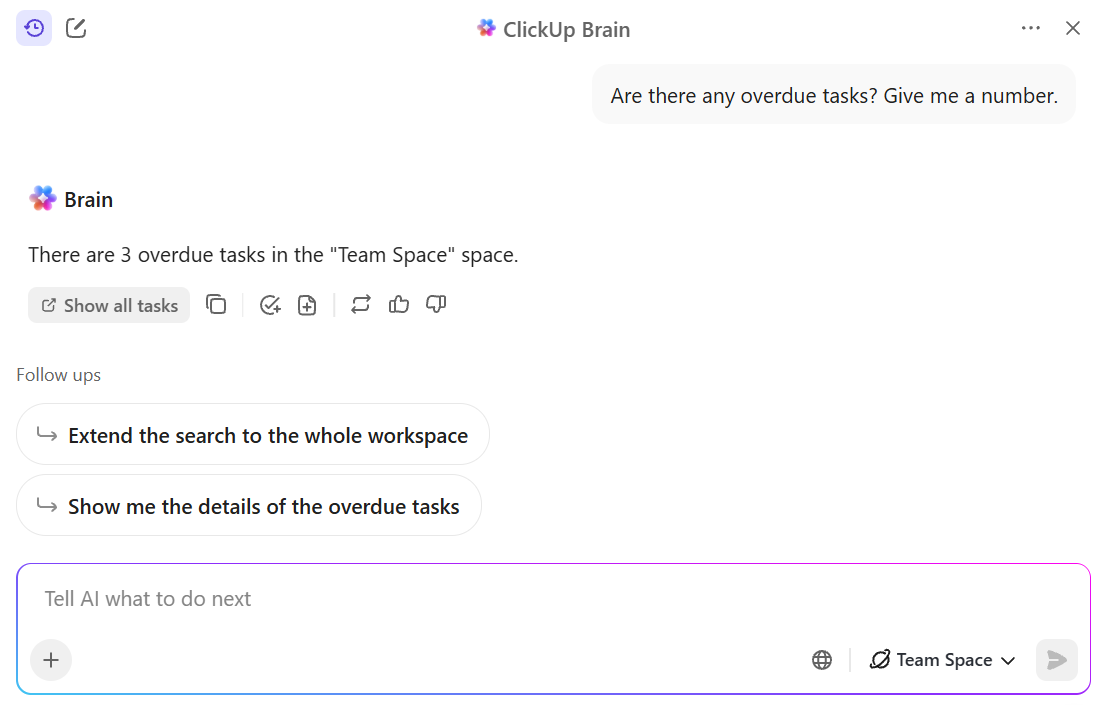
It lets you access ClickUp Brain—an AI built directly into your tasks, docs, and team chats. Instead of checking multiple tools before a client call, you can ask questions and see policy status, renewal blockers, follow-ups, and next steps in one place.
AI shows up in small, practical ways throughout your day. Here’s how it improves insurance knowledge management.
Client follow-ups in insurance are non-negotiables, but keeping them consistent can be a hassle. Once a quote is sent or a claim is filed, the next step depends on status changes and client responses. Holding that logic in your head, or relying on a separate reminder system, doesn’t scale.
Rather, you can attach follow-up logic directly to the work itself using ClickUp Automations. For example, when you mark a task as Quote sent, ClickUp can automatically create a follow-up task scheduled a few days later.
You define this once using a prebuilt automation or the AI Automation Builder, which lets you describe the outcome in plain language and then review the trigger and action before publishing it.
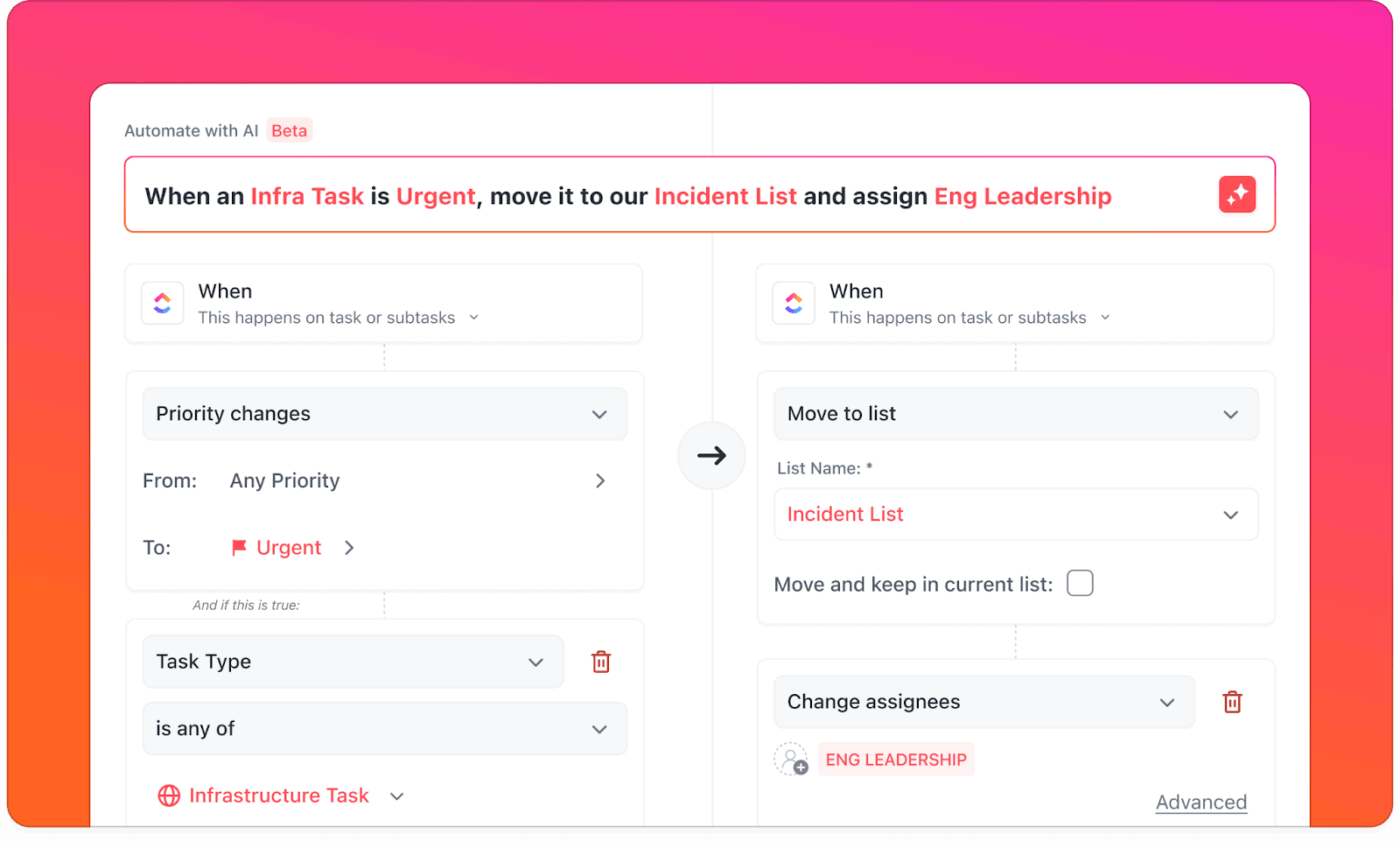
The same approach applies across other AI workflows for insurance:
Since these automations are tied to task activity, they stay aligned with how your agency already works. Tasks can assign themselves using dynamic assignees, emails can be sent based on task actions, and updates are logged automatically.
When your process changes, you adjust the rule once, and it applies everywhere.
In practice, this usually means setting up a small set of rules, like:
Outcome: With these rules in place, follow-ups will occur as a direct result of work, not as something you have to remember to check.
Claims don’t demand constant attention, but they do require timely checks. The problem is needing to reorient yourself every time you come back to one.
🔍 Did You Know? Even as average claim repair times have improved, repair costs have increased by 26% over the past two years. With premiums also rising, errors and delays in claims handling are more costly than ever.
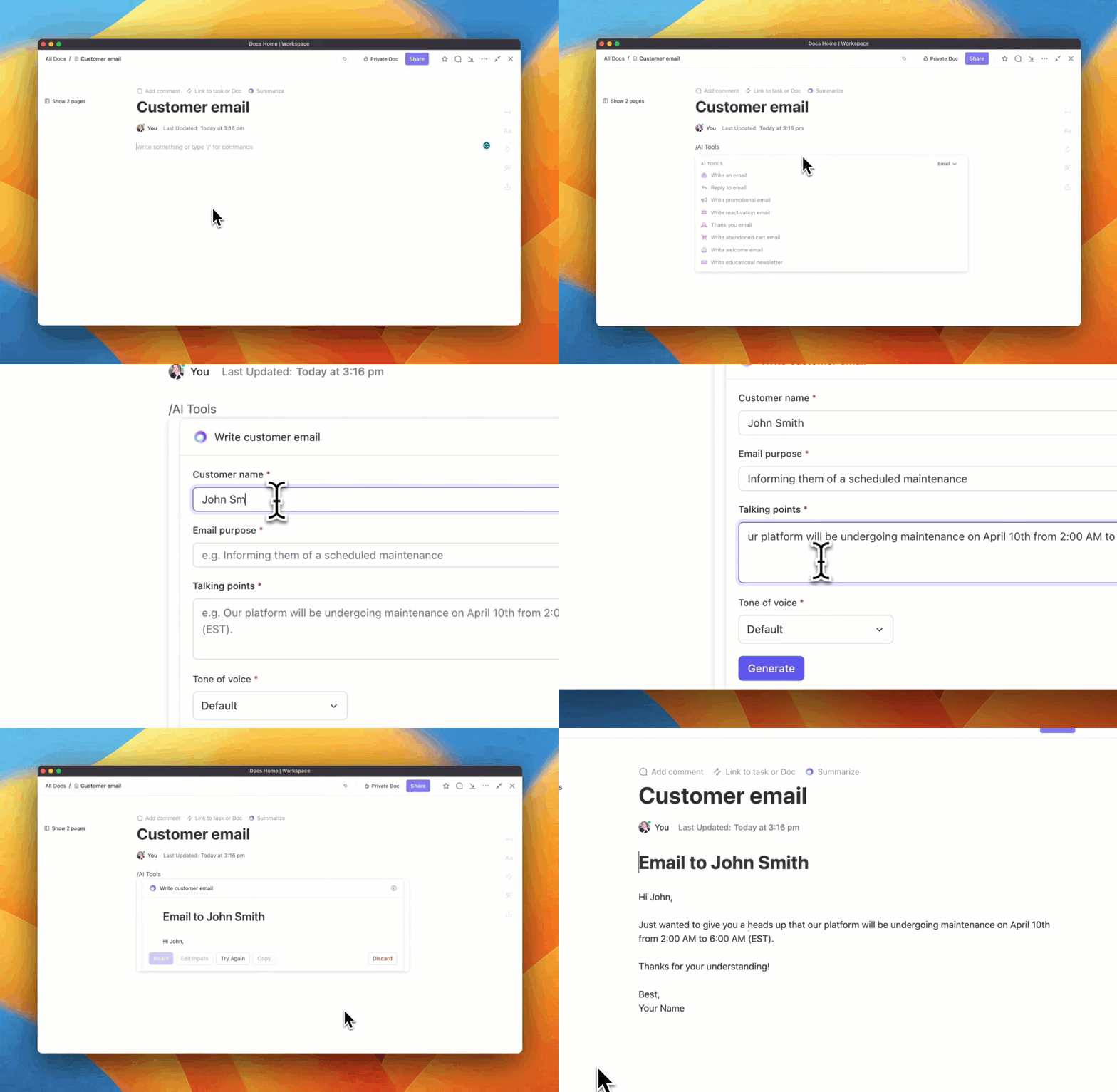
In ClickUp Docs, you can keep each claim anchored to a single task and store everything related to it in a connected space. Intake forms, supporting documents, timelines, and notes are linked to the task itself, so the claim always has a clear source of truth.
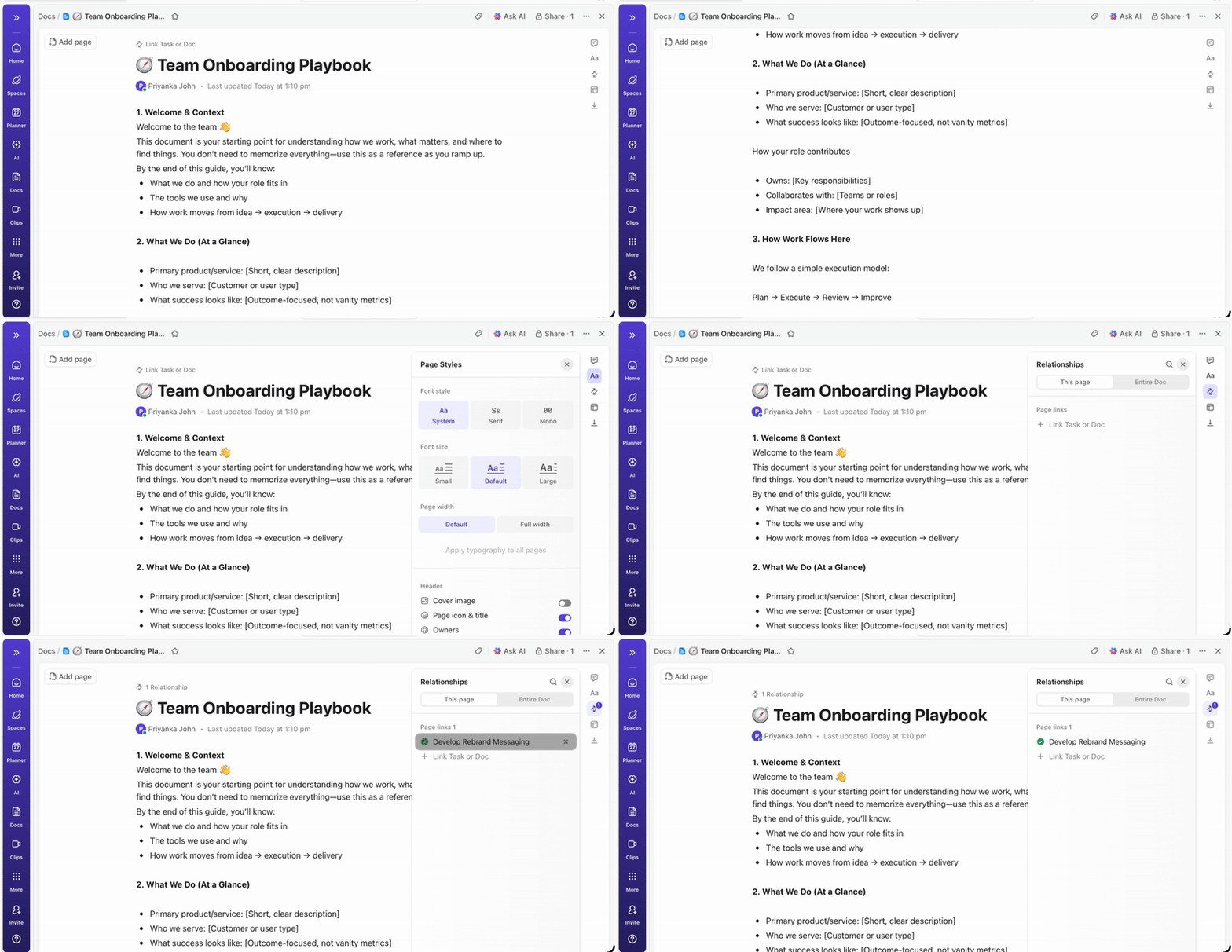
As documents and comments pile up, ClickUp Brain helps you work through them faster. You can ask it to summarize a claim file, retrieve key details such as dates or policy numbers, or provide a quick status update before a client call.
Calls don’t break that flow either. When you speak with a carrier, adjuster, or client, ClickUp AI Notetaker can capture the conversation, generate a transcript, and automatically turn next steps into tasks.
Those notes are logged in ClickUp Docs and remain connected to the claim processing workflow, so decisions and action items don’t disappear into meeting notes or personal notebooks.
Outcome: You can work out a complete claims management workflow in which documents, updates, and decisions remain tied to the work itself. Open a claim task at any point and see what’s happened, what’s pending, and what needs to happen next without searching across systems or reconstructing context.
Content marketing work usually gets squeezed in between everything else. You try to fit outreach into whatever time is left between client work and renewals.
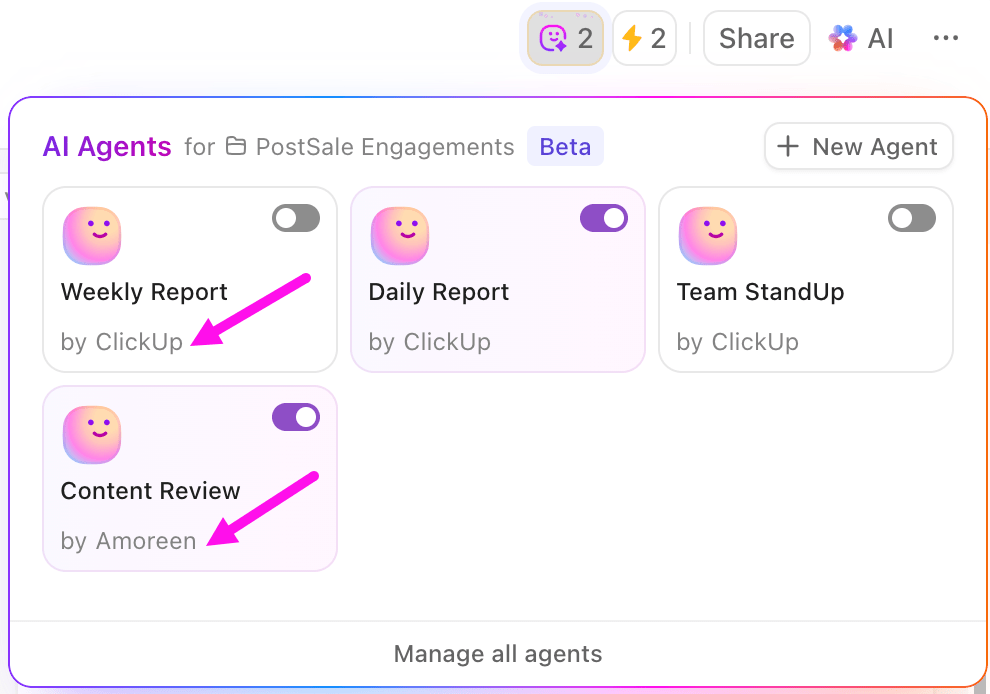
But you can outsource this task to ClickUp Super Agents, which handles the drafting and follow-through.
You can spin up agents that work like teammates—ones that remember your audience, understand your workspace, and keep operating in the background. Instead of prompting AI each time, you assign intent once and let agents generate, adapt, and refine content as work progresses.
For example, you might create a Marketing Agent that drafts outreach based on policy type, recent activity, or campaign goals. You can @mention that agent in a ClickUp Task or Doc, request a specific piece of content, and get a draft aligned with your agency’s tone and context.
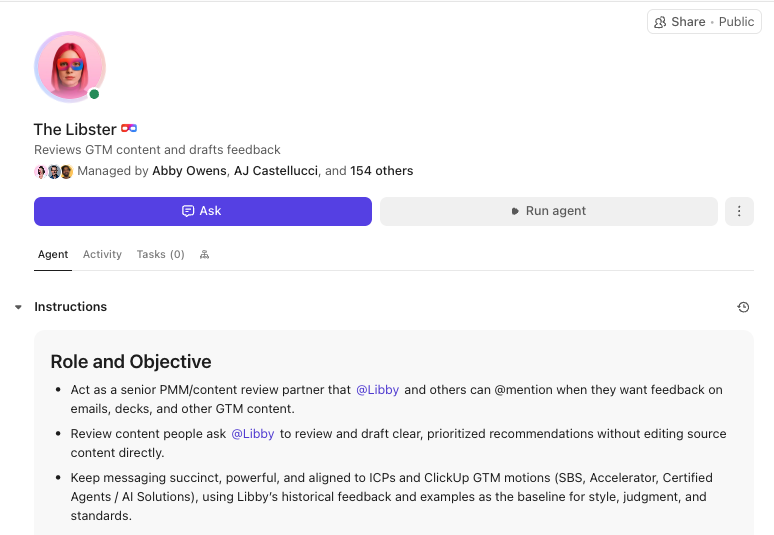
Here’s what that looks like in practice:
| Use case | Prompt to an agent | Outcome |
|---|---|---|
| Audience segmentation | ‘Create versions of this post for small business owners and high-net-worth clients.’ | Tailored messaging without rewriting |
| Renewal outreach | ‘Write a renewal reminder for homeowners with recent claim activity.’ | Context-aware email copy tied to client history |
| Educational content | ‘Outline a blog post on winter driving risks for auto policyholders.’ | Structured content you can publish or expand |
| Local prospecting | ‘Write a prospecting email for restaurant owners in my city.’ | Outreach grounded in local business context |
Given workspace awareness, Super Agents don’t treat each request as a one-off. They recall prior drafts, understand ongoing campaigns, and improve over time. You stay in control, but you’re no longer starting from scratch each time.
Outcome: Your marketing stays consistent and personal, even when client work takes priority. Hence, outreach doesn’t depend on finding spare time.
Prioritization is a daily task. Deciding where to focus depends on understanding lead activity, renewal timing, and client engagement. Without a clear view, those decisions become harder than they need to be.
ClickUp Dashboards give you a live view of that data without requiring you to manually assemble reports. You choose what to track, and Dashboards turns it into visual reports that update automatically as work changes.
For example, you can build a pipeline dashboard that shows where deals fall off, which leads convert faster, and how different sources perform over time. You can add CRM-style widgets that highlight clients approaching renewal or policies that may need a review, and see risk and opportunity surfaced in one place.
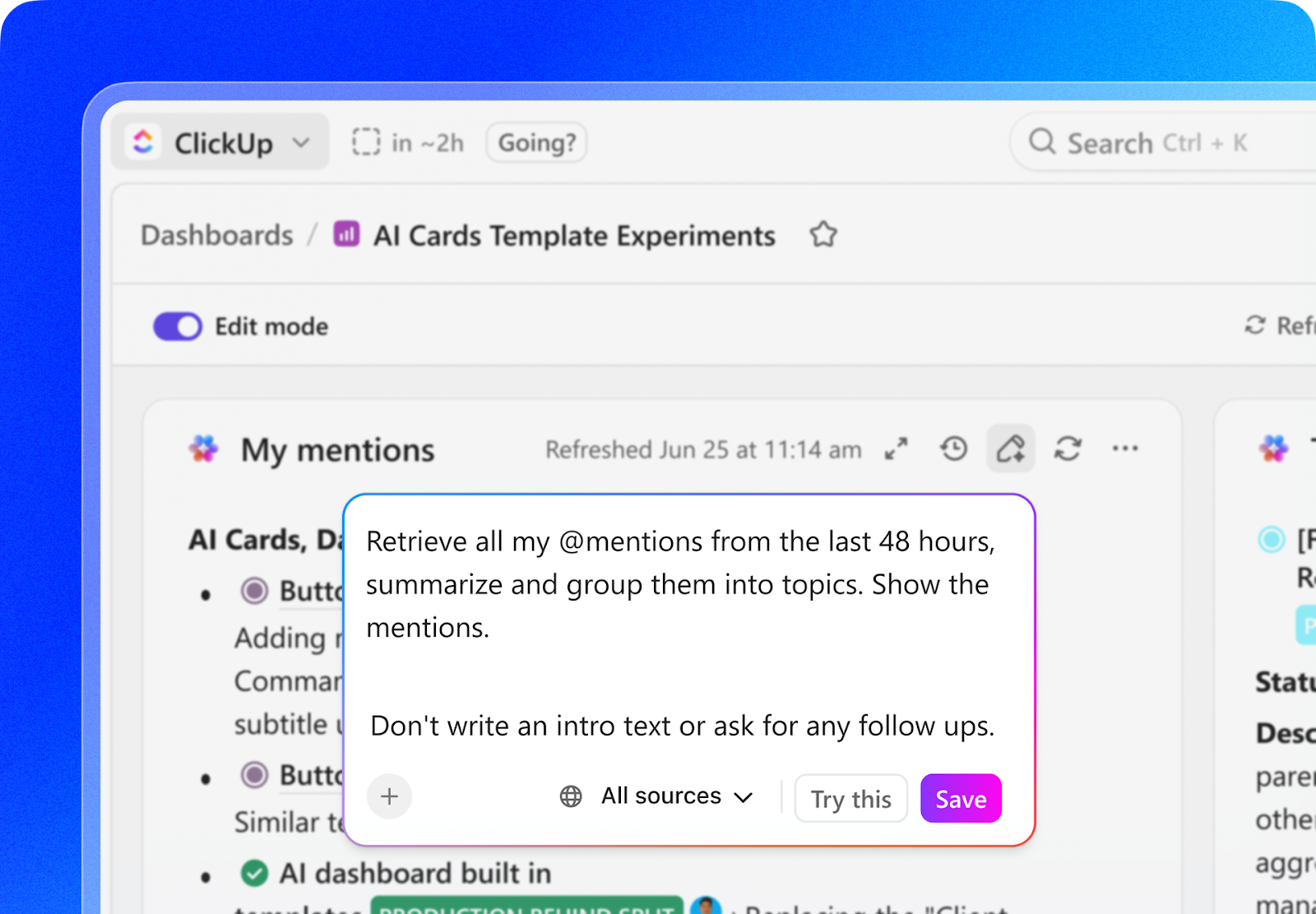
ClickUp Brain adds another layer of visibility. When you’re looking at a dashboard, you can ask direct questions like ‘Which leads are most likely to close this month?’ or ‘Which renewals need attention this week?’.
Brain reads the underlying dashboard data and provides a clear answer, without requiring you to interpret charts manually. Agents can then assign your team member to monitor patterns in lead engagement or status changes across your workspace and proactively surface insights.
Rather than checking dashboards repeatedly, you get notified when something crosses a threshold that matters to you.
ClickUp Dashboards help you:
The data you already generate in your daily work is monitored to support informed decision-making.
These prompts are copy-paste-ready for you to use in any AI tool, or let ClickUp Brain handle the work. We’ll also show you how it works when the AI has access to live workspace information.
Use these prompts to generate client messages that stay specific to the account.
Prompt 1: ‘Draft a follow-up email for [Client Name] who received a quote for [Coverage Type] three days ago. Reference their concern about [Specific Concern] and explain [Key Benefit] in a consultative tone.’
For example, this is how ClickUp Brain will respond to this complete prompt:
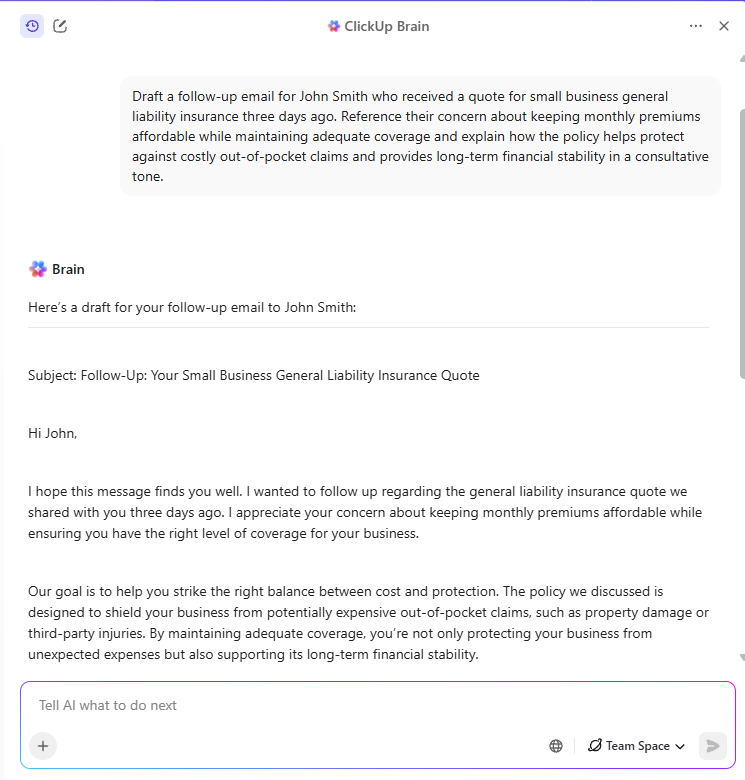
Additional prompts:
‘Write a renewal reminder for [Client Name] whose auto policy expires in 45 days. Mention their claims-free status and invite a coverage review.’
‘Create a short status update for [Client Name] confirming receipt of [Document Name] and outlining next steps.’
Use these prompts to consolidate the key details in one place so you’re not piecing together updates from emails before an important call.
Prompt 1: ‘Summarize key dates, coverage amounts, and exclusions from the attached policy documents in bullet points.’
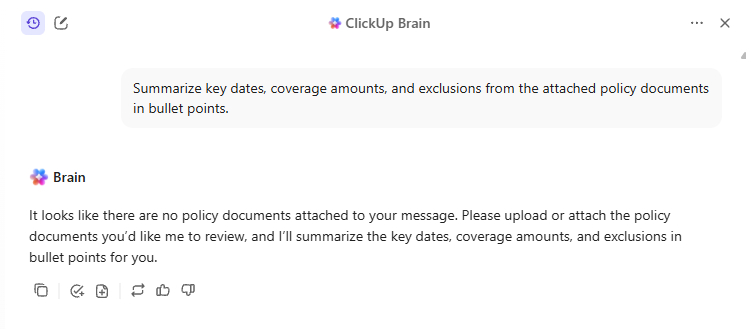
Additional prompts:
‘Create a client briefing for my upcoming call with [Client Name] using recent task updates and comments.’
‘Extract policy numbers, effective dates, and named insureds from these documents and format them into a table.’
Use these prompts to create contextual, educational, client-relevant marketing content without starting from a blank page.
Prompt 1: ‘Write a LinkedIn post explaining umbrella coverage for young families in a clear, advisory tone.’
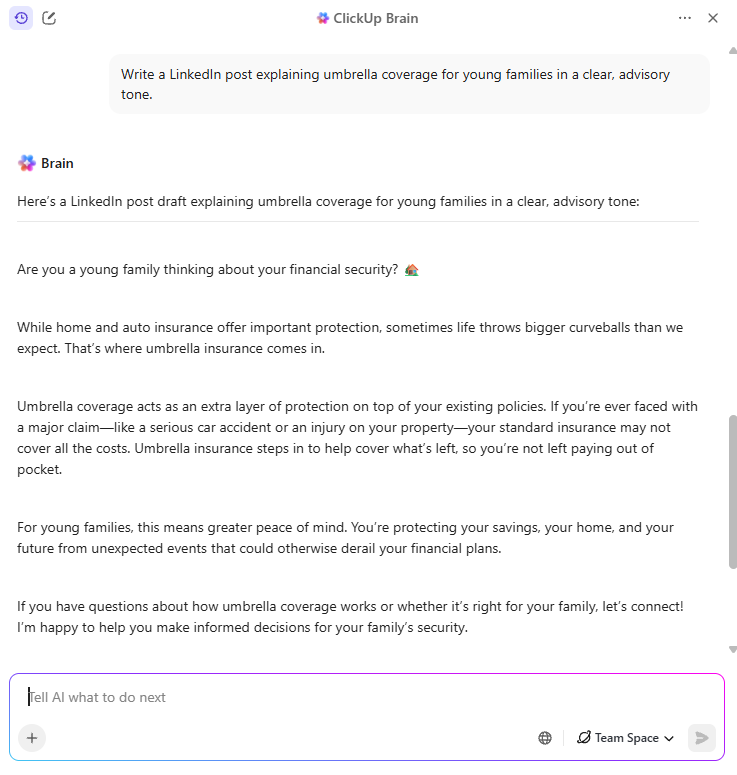
Additional prompts:
‘Draft a three-email nurture sequence for new homeowners explaining standard coverage versus optional endorsements.’
‘Generate five blog ideas about common insurance mistakes people make in their 30s.’
Use these prompts when you’re unsure who to follow up with first, which renewals need attention, or where cross-sell opportunities exist.
Prompt 1: ‘Flag accounts that may benefit from a policy review based on recent activity.’
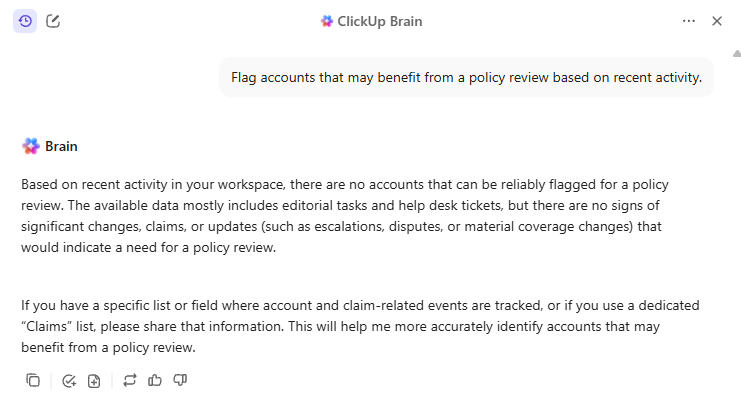
Additional prompts:
‘Identify clients with renewals in the next 90 days who haven’t responded to outreach in the last 30 days.’
‘From my client list, identify accounts with auto insurance but no umbrella coverage and summarize potential cross-sell opportunities.’
Prompts produce better results when the AI has access to real context. Inside ClickUp, Brain can read tasks, Docs, comments, and Dashboards instead of relying on pasted text. That’s what allows the output to reflect actual client activity, not generic assumptions.
Use these prompts as starting points. The more your workspace reflects how you work, the more useful the results become.
📮ClickUp Insight: 83% of knowledge workers rely primarily on email and chat for team communication. However, nearly 60% of their workday is lost switching between these tools and searching for information.
With ClickUp‘s converged AI workspace, your project management, messaging, emails, and chats all converge in one place! It’s time to centralize and energize!
The easiest way to automate processes with AI is to introduce it gradually.
Trying to change everything at once creates friction in budget pushback, workflow disruption, and compliance anxiety. A phased approach lets you prove value early and expand with confidence.
Pick a single, high-friction task and improve that before touching anything else. For most agencies, this is either client follow-ups or claims documentation. Choose one workflow, improve it end-to-end, and ensure it saves time before expanding to other areas.
Once you know what you’re improving, be intentional about where AI functions. Tools that sit outside your core workflow add overhead. Look for a setup where AI works alongside tasks, documents, and client records so context doesn’t have to be recreated.
Before adding more automation, make sure your basics are in place. Consistent client names, clear policy identifiers, and simple folder structures go a long way. This doesn’t require a complete overhaul, just enough consistency for the AI to read and connect information accurately.
Introduce AI through small, repeatable actions your team can adopt quickly, such as reminders or summaries. Once those are routine, layer in more advanced workflows, such as multi-step automations or analyses. Adoption sticks when change feels incremental.
Progressively layering capability works better than asking your team to change how they work overnight.
As you expand, focus on key performance indicators that matter: time saved on specific tasks, improved follow-up consistency, faster claim resolution, or higher client response rates. These outcomes tell you what’s working and where to invest next.
Throughout the process, keep documentation and traceability front and center. Choose tools that tie actions, decisions, and communication to specific records with timestamps and ownership. When AI for compliance and audit is built into the workflow, it doesn’t slow you down later.
AI is actively reshaping how insurers operate today. From reducing claims turnaround times to augmenting underwriting decisions and disaster assessments, leading carriers and insurtechs are deploying AI tools that tangibly boost efficiency and service quality.
Below are four concrete instances of AI in use across the industry.
Major insurer Allstate is using generative AI to draft customer emails and communications at scale, with program managers reporting that AI-generated messages are more empathetic and clearer than human-written drafts. Insurers are now automating tens of thousands of daily communications previously managed by human reps, improving clarity and reducing misunderstanding in claims follow-ups.
InsurTech firm Lemonade has deployed its AI, “AI Jim,” to automate claims processing, famously settling a genuine insurance claim in as little as 2 seconds by ingesting the claim, validating policy terms, running fraud filters, and issuing payment instructions—all without human intervention. Lemonade reports that a significant portion of its claims flow through AI systems, reducing processing time significantly.
Progressive uses AI-powered computer vision to estimate vehicle damage based on customer-submitted photos. By training models on extensive historical claims imagery, Progressive’s systems can generate initial automated damage estimates, speeding up first notice of loss processing and reducing manual review time in the early stages of claims.
Australian insurer Suncorp operates an AI-enhanced disaster management center that overlays real-time geospatial imagery with customer and claims data to assess storm and flood damage. This system expedites property evaluations after natural disasters by comparing pre- and post-event imagery, helping insurers estimate impact more quickly and initiate payout processes sooner.
AI is most reliable when it handles supporting work, not decision-making.
It’s useful for drafting follow-ups, summarizing claim files, pulling details from documents, or highlighting patterns and correlations in your data. It should not be the final authority on coverage explanations or recommendations. Those still require your review.
Additionally, while AI can generate the right information, it can also be wrong or incomplete if the context is fragmented. The safest way to work is to treat its output as a first pass. Let it assemble the pieces, then apply your judgment before anything reaches a client. This keeps speed gains without compromising correctness.
Once accuracy is addressed, the next concern is data governance. Client information is sensitive, and not all AI tools handle it consistently. Before relying on any system, you need to know where your data goes, who can access it, and whether actions are logged.
AI that operates inside a controlled workspace, for example, ClickUp Brain in the ClickUp ecosystem, makes those answers easier to verify than tools that might send data elsewhere.
Viewed this way, it’s apparent that AI cannot be trusted in isolation. It needs to be verified whether it’s being used within clear limits, reviewed by humans, and grounded in systems you already control. AI reduces the overhead around your role when these conditions are met.
Insurance agent productivity improves when routine work no longer competes with client conversations for your attention.
Throughout this guide, the pattern is consistent: when follow-ups trigger themselves, claims stay documented in one place, outreach stays relevant, and reporting doesn’t require manual effort, your day becomes easier to manage. AI works best when it stays close to the work you already do and reduces coordination, not when it adds another layer to manage.
If improving insurance agent productivity is the goal, the next step is straightforward: start with a workspace like ClickUp that supports your existing workflows rather than replacing them.
Get started with ClickUp for free, so progress happens without constant context switching.
No, AI does not replace insurance agents. It handles administrative and repetitive work, like follow-ups and reporting, so agents can spend more time advising clients, reviewing coverage, and managing complex cases that require judgment and trust.
AI tools typically perform single functions, such as drafting an email, while AI workflow automation connects multiple steps to run a process end-to-end. It triggers actions, moves data between systems, and maintains context across the entire client lifecycle without manual intervention.
Agencies measure AI productivity gains by tracking operational outcomes. Common indicators include time saved on routine tasks, improved follow-up consistency, faster response times, fewer stalled claims or renewals, and the ability to handle more accounts without increasing headcount.
The main risks are incorrect outputs, poor data quality, and privacy concerns. AI-generated content should always be reviewed before client use, especially for coverage or policy details. Agencies also need tools that keep client data secure, auditable, and confined to controlled systems.

© 2026 ClickUp

There’s an easier way. Try a free AI Agent in ClickUp that actually does the work for you—set up in minutes, save hours every week.