






Still downloading templates?
There’s an easier way. Try a free AI Agent in ClickUp that actually does the work for you—set up in minutes, save hours every week.
Sorry, there were no results found for “”
Sorry, there were no results found for “”
Sorry, there were no results found for “”

Every team has that one persistent question: ‘Are we making the right call?’
And most of the time, the answer is buried in ten different tools, a dozen docs, and a hundred messages.
Artificial intelligence puts these pieces together to help you decide confidently. It shows you what’s already happened, surfaces what’s important, and highlights the trade-offs nobody has the bandwidth to track manually.
This blog post dives into how teams are actually using AI systems to make complex decisions faster, smarter, and with less friction. We’ll also look at how ClickUp takes it a step further by keeping everything and everyone on the same page.
Let’s get started! 🤩
Decision-making in modern teams is an ongoing process of gathering context, weighing tradeoffs, and committing to a direction, often with incomplete information and real-time pressure.
Your decision quality is defined less by perfect outcomes and more by whether the process was clear, informed, and repeatable. Here’s what modern decision-making looks like in practice:
⚡ Template Archive: Define roles and responsibilities, assign ClickUp Tasks and establish ownership, and improve communication and accountability with the ClickUp RACI Matrix Template. This way, you stay on top of your projects and ensure that everyone knows their part in the process.
Once the decision structure is clear, AI’s role becomes much easier to define.
While goals, values, or acceptable risk rely on human intelligence, AI models operate within existing decision frameworks to improve how quickly and reliably teams can understand situations before committing to action.
In other words, AI works as a ‘cognitive amplifier.’ It processes large volumes of information, connects signals across systems, and surfaces patterns that are difficult to detect manually.
Used well, AI lets human expertise come in when evaluating options and consequences instead of assembling context.
Here’s how leveraging AI capabilities meaningfully supports decision-making:
📖 Also Read: How to Use ClickUp for Decision Logs
AI algorithms add the most value in decisions shaped by many moving parts.
When inputs come from different systems, signals change over time, and outcomes can’t be predicted with certainty, teams need help making sense of what matters most. That’s where AI’s ability fits naturally. It’s also useful in decisions that can’t be reduced to fixed rules and require ongoing judgment as conditions evolve.
Here’s how AI-assisted decision-making works in different types of real decisions:
These are the big bets: what to prioritize, where to invest, which markets matter, and how the roadmap aligns with long-term outcomes. Strategic decisions benefit from AI in ways that go beyond simple data reporting:
🧠 Fun Fact: Ahoona is an online decision-making platform, originating from a National Science Foundation I-Corps initiative, that crowdsources inputs to help individuals and groups make better-informed decisions. It acts as a ‘decision-making social network.’
These occur day-to-day and keep the organization running. AI’s value here is less about creativity and more about precision under uncertainty:
Product choices often sit between strategy and operations. And AI supports product decisions that require interpreting many weak or indirect signals at once.
🔍 Did You Know? The formalization of Decision Support Systems (DSS) in the 1970s and 1980s was a critical, direct precursor to modern AI-driven decision-making. It represented a shift from simple transactional processing to interactive model-driven analysis.
These are where product, brand, and customer converge, and where uncertainty about customer behavior and channel effectiveness is highest:
Decision-making fails because information is scattered, context is fragmented, and too much time is spent going behind the ‘why’ of a decision. AI comes into play to reduce that friction.
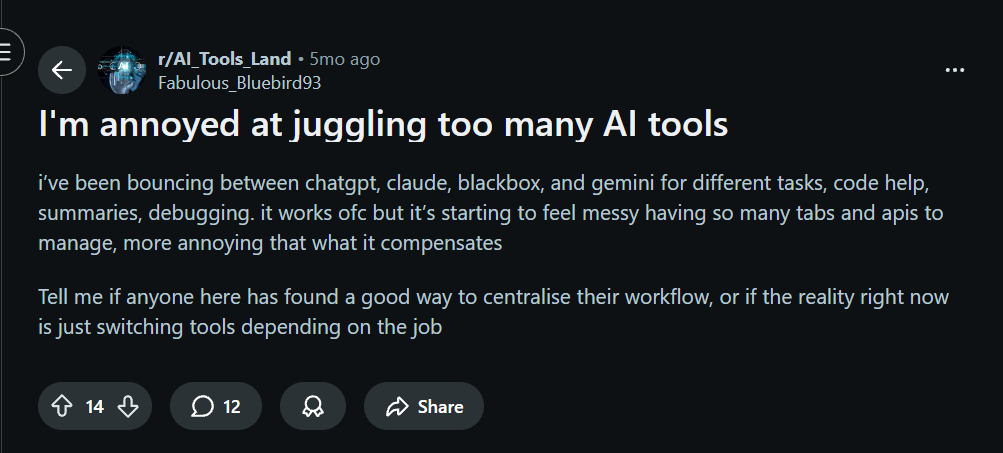
But the problem is that teams usually adopt AI the same way they’re adopting other tools. One AI agent for data analysis, another for research, and another for writing. Each one helps in isolation, but none of them sees the full picture of the work.
Here’s how a Reddit user explains it accurately:
Now, let’s look at some ways teams use AI for decision-making today.
P.S. We’ll also show you how ClickUp tools make each step faster, clearer, and easier to act on.
Before a decision can be made, you need to reconcile scattered inputs. This includes updates from different functions, dashboard metrics, comments across docs, and context buried in tasks or Slack threads. AI removes friction immediately.
Using AI tools like ClickUp Brain, you can summarize task activity, Docs, comments, and project updates into a single, coherent brief. As a context-aware AI, it reflects the current state of work, not assumptions or after-the-fact summaries. This is especially useful before reviews, planning sessions, or async approvals.
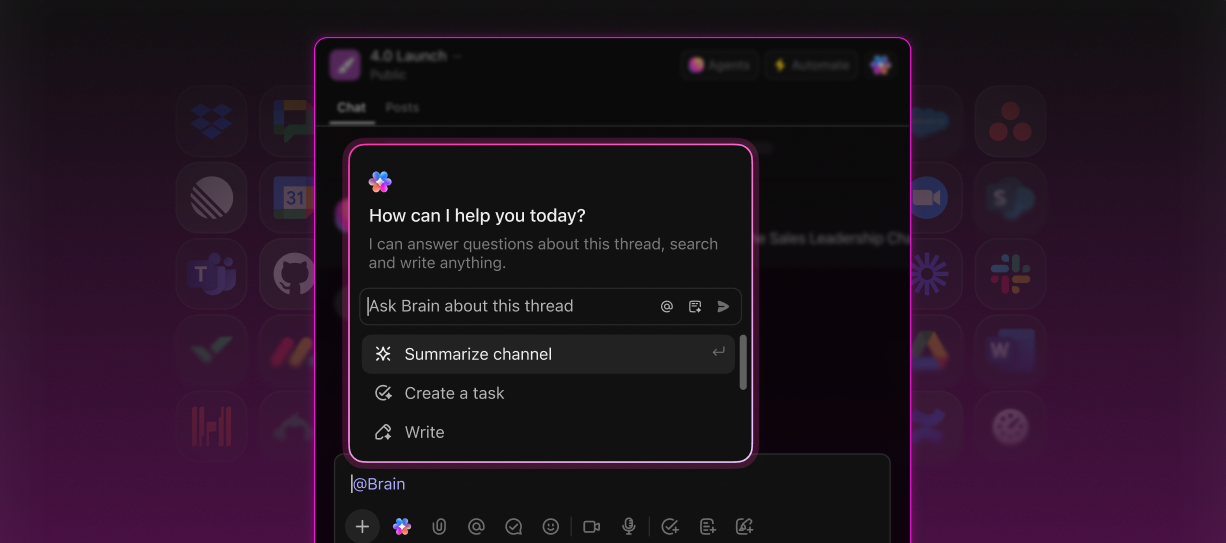
📌 Example: Ahead of a cross-functional go-to-market meeting, a decision owner needs to confirm whether Feature X is ready to be positioned in an upcoming campaign. They ask ClickUp Brain to pull together a summary of all recent activity related to Feature X.
ClickUp Brain uses natural language processing to turn data into actionable insights and consolidate progress updates, open questions, recent decisions, and key discussion threads into a single brief.
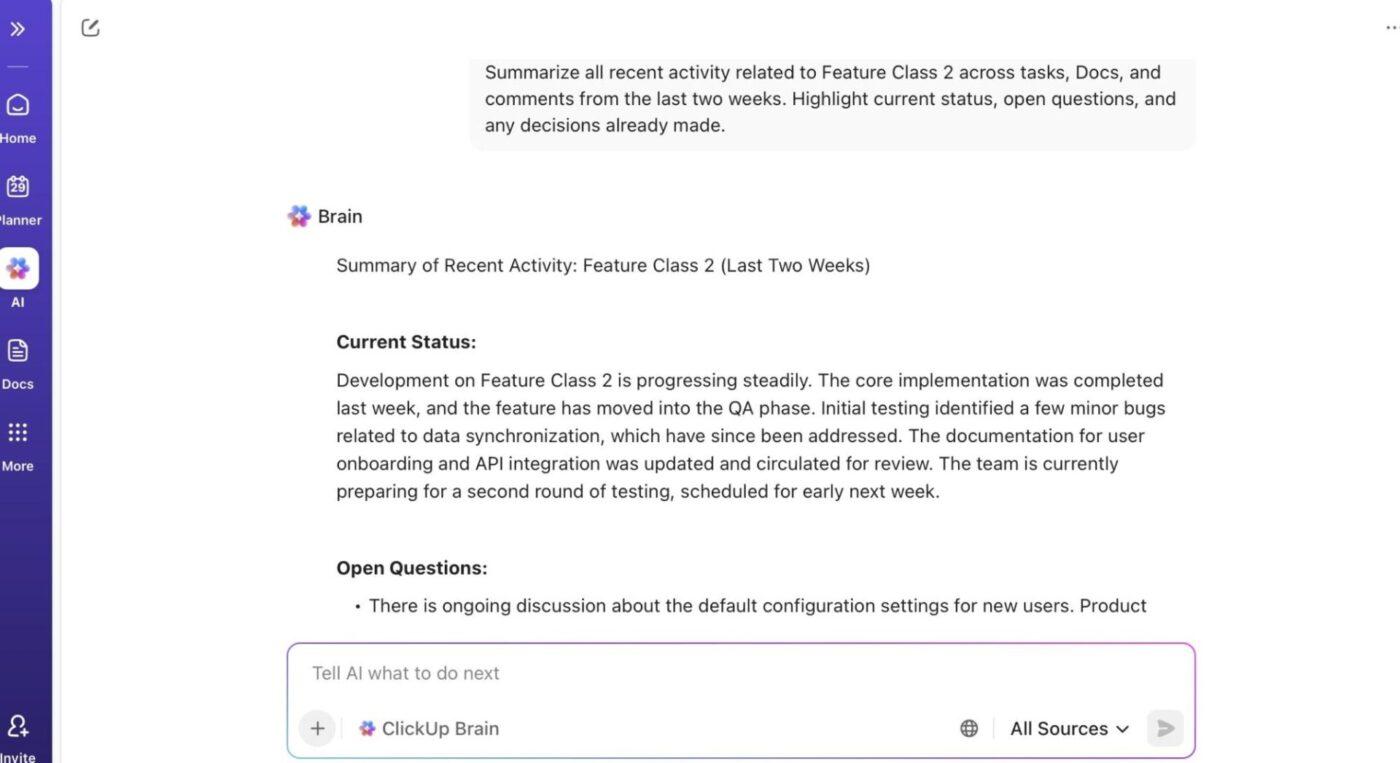
🤩 Try these prompts:
Before high-stakes decisions, the problem becomes identifying unspoken assumptions, unresolved risks, and open questions that still affect the outcome but haven’t been explicitly accounted for.
Here’s where you can ask AI to:
ClickUp BrainGPT would be the perfect fit here. It is an AI-powered desktop companion that helps teams interrogate their work across tools, not just within ClickUp. Its Enterprise Search uncovers risk and uncertainty because it works across both internal and external contexts.
📌 Example: Before committing to a major platform migration, an engineering leader wants to understand what could go wrong, based on what the organization has already learned. They ask BrainGPT to search across ClickUp, GitHub, and internal Docs for prior migration discussions tied to similar projects.
BrainGPT surfaces earlier incidents, unresolved performance concerns raised during a past rollout, and assumptions documented months ago that no longer hold given current traffic levels.
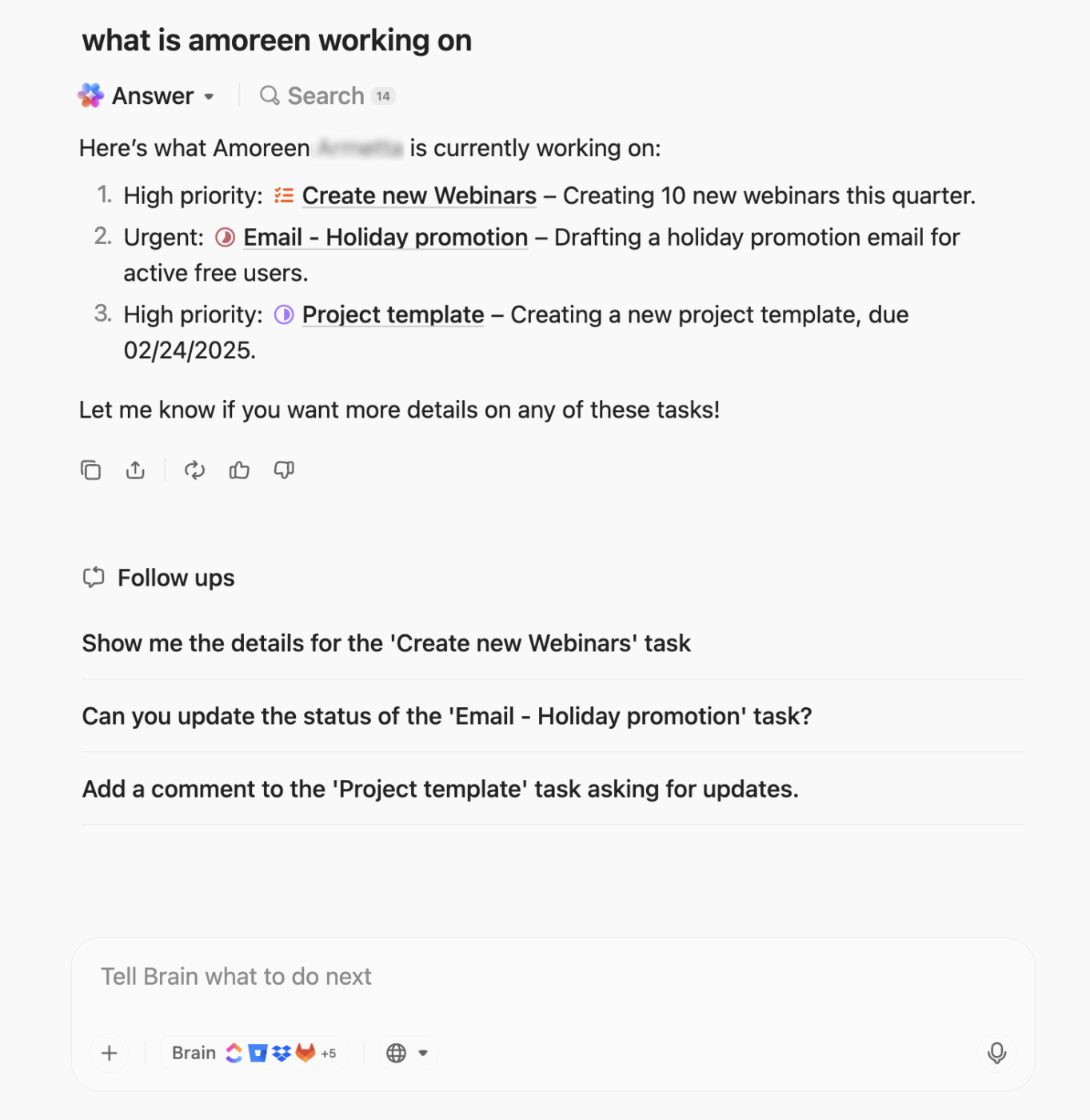
🤩 Try these prompts:
Many decisions stall because options aren’t evaluated consistently. Different stakeholders argue from different frames, and the trade-offs remain vague. This is where AI can impose structure: the goal is to make sure every option is examined through the same mental models, criteria, or levels of detail.
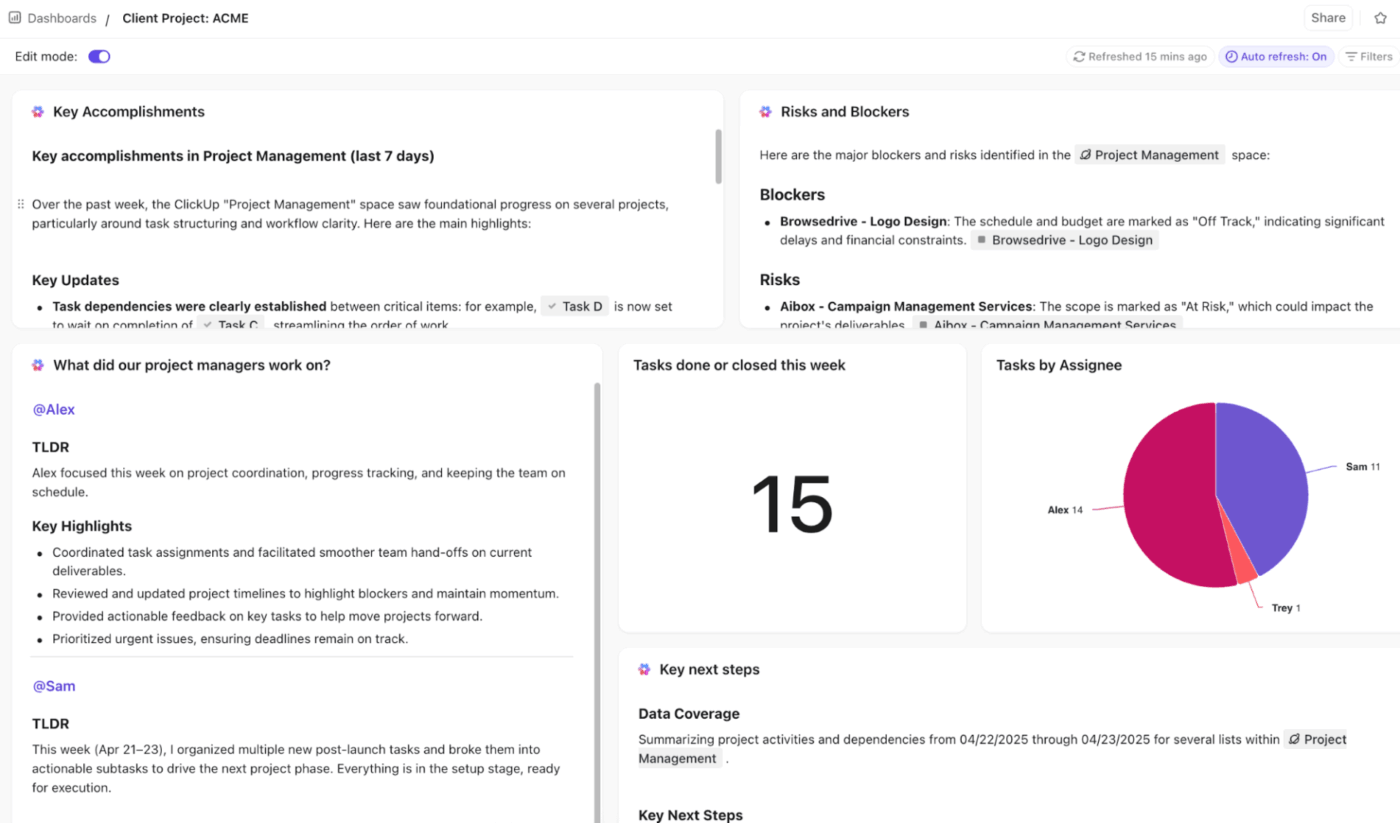
Tools such as ClickUp AI Cards provide a shared, structured surface for evaluating alternatives using consistent criteria. You can add cards to custom ClickUp Dashboards, configure which teams, people, or locations to analyze, and generate structured comparisons from your workspace. The results can be refreshed, edited, or used to create tasks, Docs, or follow-up prompts.
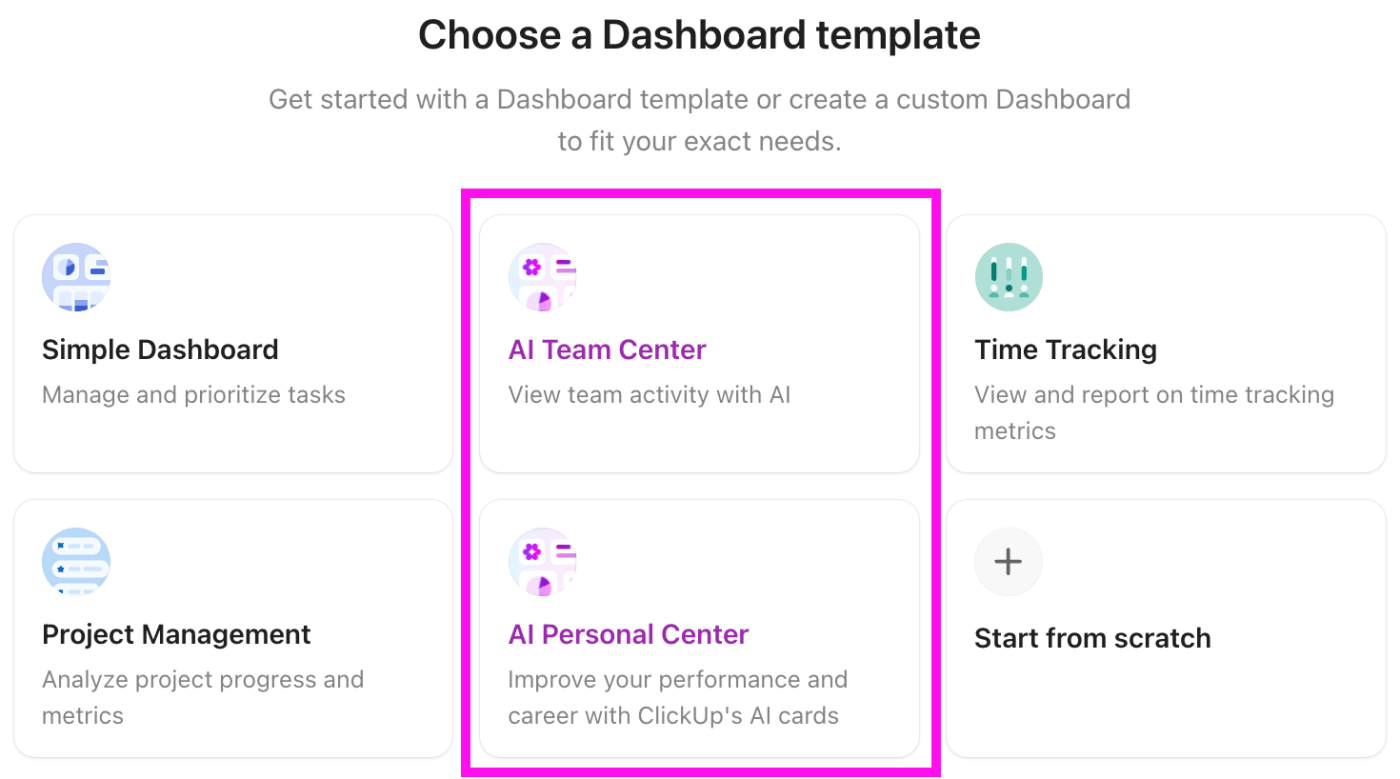
📌 Example: A product team must choose between three feature rollout strategies for their next predictive analytics software. Using the AI Brain Card, they run a comparison prompt across impact, effort, cost, and timing. It generates a clear table showing each option side by side.
Next, the AI Executive Summary Card distills the key differences into a concise overview, highlighting where options diverge and which factors matter most. And while the AI Project Update Card summarizes current progress, open questions, and constraints, the AI StandUp Card collects input from engineering, design, and marketing to include all perspectives.
📮 ClickUp Insight: Nearly a third of workers (29%) hit pause on their tasks while waiting for decisions, left in a state of uncertainty, unsure when or how to move forward.
A productivity limbo no one wants to be in. 💤
With ClickUp’s AI Cards, every task includes a clear, contextual decision summary. Instantly see what’s blocking progress, who’s involved, and the next steps—so even if you’re not the decision maker, you’re never left in the dark.
Decisions don’t end when they’re made; they need to be communicated clearly to leadership, cross-functional teams, or external partners.
ClickUp Super Agents act like AI-powered teammates living right in your workspace, pulling context from tasks, docs, chats, and schedules so their work isn’t just output, it’s outcome-aware and traceable.
You can assign them tasks, @mention them in conversations, or trigger them on a schedule to handle reporting, summaries, and workflow coordination while storing context and memory that make follow-ups and stakeholder narratives easier to craft and defend
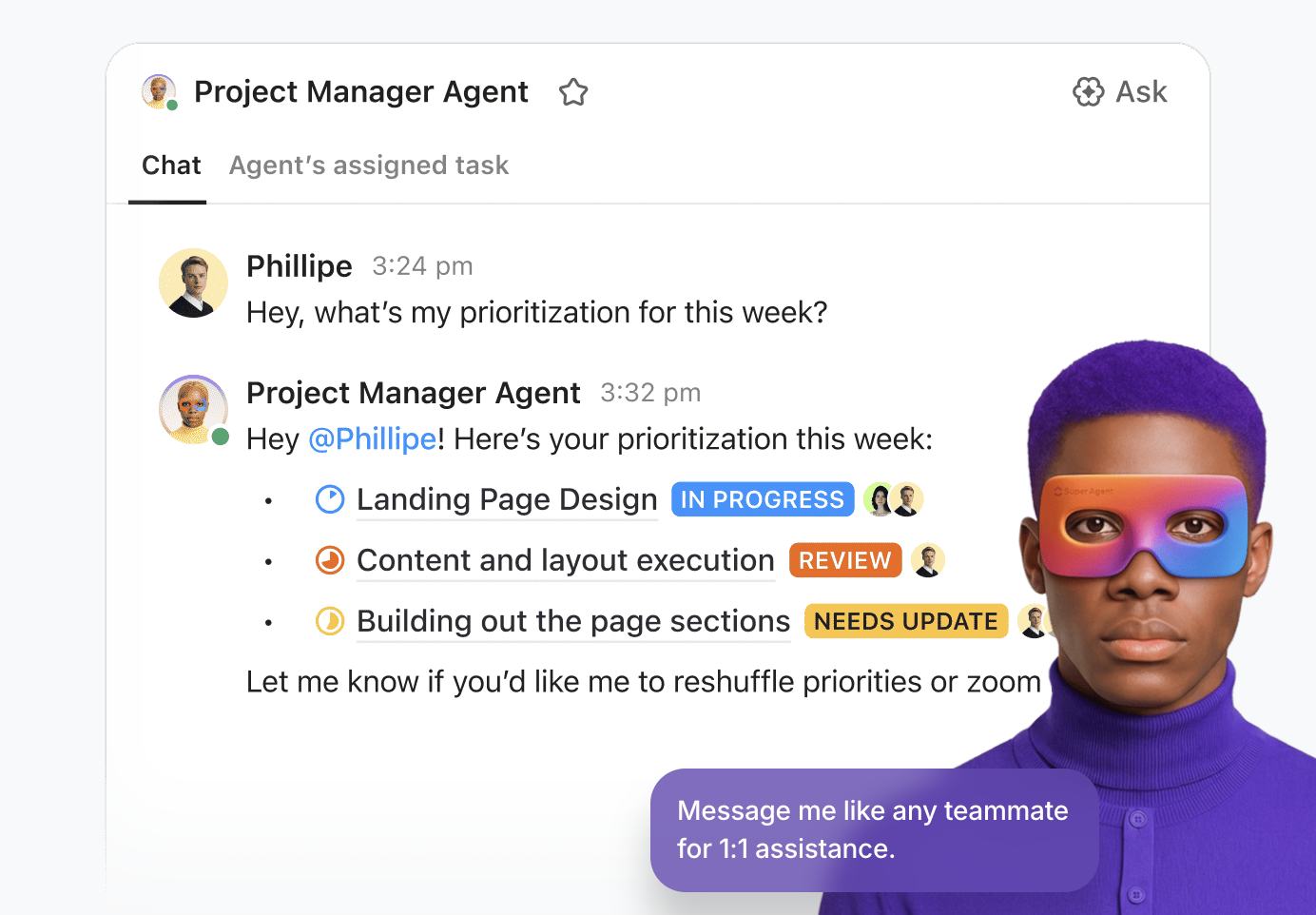
The platform offers ready-to-use agents, designed to evaluate options, analyze risk factors, and produce structured explanations for decisions. It’s ideal for summarizing why a choice was made, what tradeoffs were considered, and what assumptions underlie the decision.
📌 Example: A marketing leader needs to justify a shift in campaign strategy to executives. Using the Reasoning AI Agent, they input campaign performance data, budget allocations, and customer feedback.
As an AI with access to real-time data, it generates a structured brief that highlights expected ROI, trade-offs between channels, and the key assumptions behind each option. The leader shares this brief during a stakeholder review, allowing the team to focus on discussion and alignment rather than manually preparing data and slides.
🔍 Did You Know? In 1958, IBM researcher Hans Peter Luhn published a seminal paper titled A Business Intelligence System. He defined business intelligence as the ability to apprehend the interrelationships of presented facts to guide action toward a desired goal.
Along with supporting teams with decision-making, AI also reduces the work around decisions. Teams increasingly lean on automation to ensure decisions don’t stall, get lost, or leave ends that slow execution.
In practice, AI is used here to:
ClickUp Automations handle predictable, repeatable steps in decision-making. You define triggers (e.g., a task status change, a review due date approaching, or a custom field update), and it automatically takes action, such as creating tasks, updating fields, notifying teams, or moving work to the next phase.
Automations keep work flowing without anyone having to remember the rinse‑repeat steps that surround decision cycles.
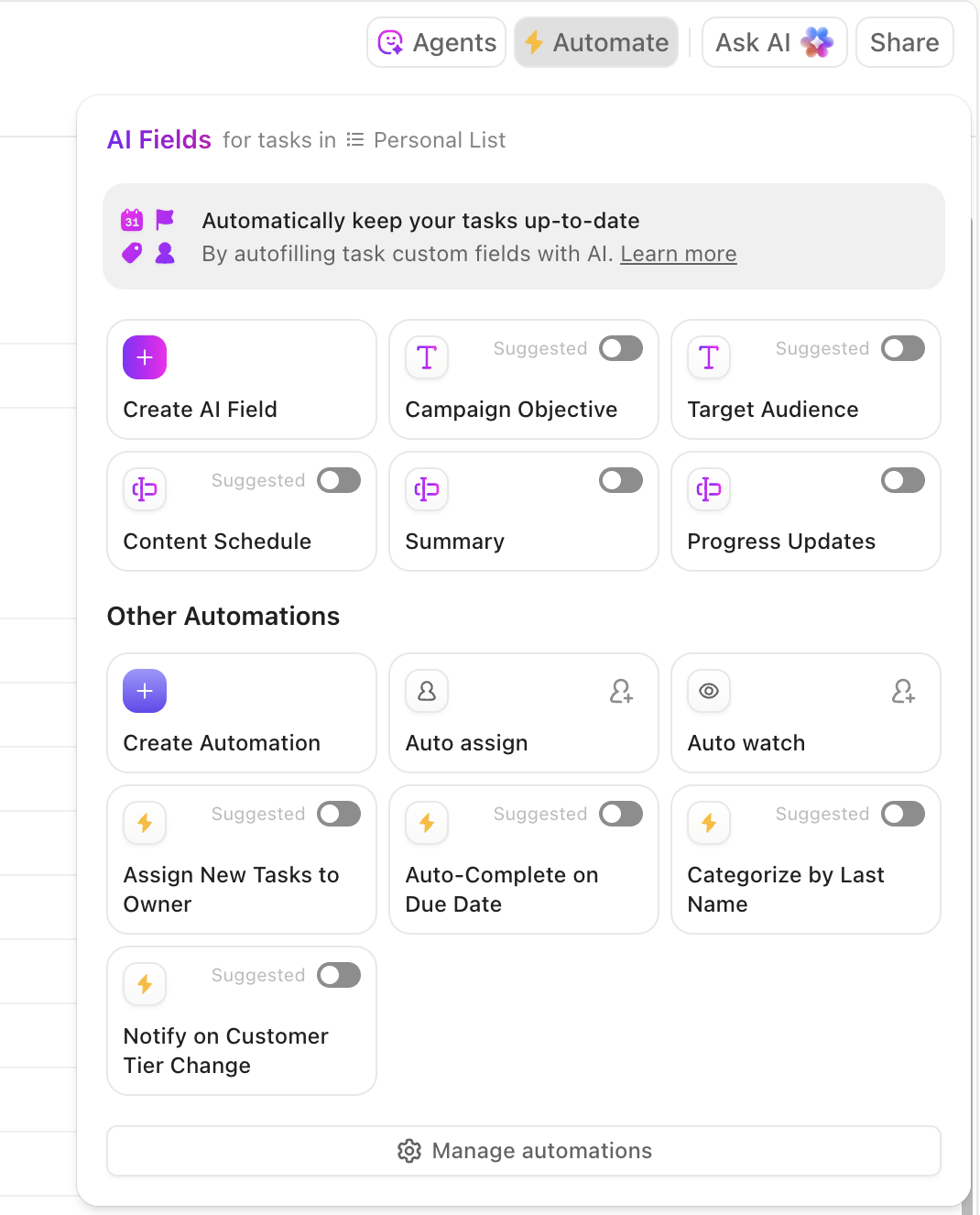
📌 Example: A hospital operations team is deciding whether to adopt a new patient scheduling system. Rather than manually gathering input from doctors, nurses, and admin staff, they configure a ClickUp Automation to handle decision prep and follow-through.
When a task status moves to ‘Ready for Review’ in the project list, the agent generates a decision brief with links to patient workflow data, staff feedback, and regulatory requirements.
As milestones in the decision-making process are reached, the agent posts a contextual summary in the team channel. Once a decision is made, the agent automatically creates follow-up tasks, assigning training sessions, software rollout steps, and compliance checks with due dates and owners.
AI works best when it helps human decision makers rather than replacing them. Using it strategically and responsibly helps teams make faster, clearer, and more aligned decisions:
🔍 Did You Know? The economist Herbert A. Simon, who later won a Nobel Prize, argued that real-world decision-making is about making a good enough choice given limited information.
📖 Also Read: Feedback vs. Feedforward for Performance Management
Even teams that adopt AI enthusiastically can fall into predictable traps that reduce decision quality or lead to unintended consequences. Here are some common mistakes to avoid:
| Mistake | Solution |
| Vague prompts leading to inaccurate or unhelpful AI outputs | Use structured prompts: Role + Task + Context + Format (e.g., ‘As a project manager, analyze Q1 sales data for trends, include Mumbai market, output as bullet points’). Let AI ask clarifying questions first |
| Overloading or under-supplying the context, causing generic or confused results | Provide essentials only: set the scene with key facts, data, and constraints; chunk large info and test iteratively |
| Overreliance on AI without human oversight, eroding critical thinking | Always review outputs for hallucinations or bias; use AI to augment, not replace, decisions. Pair with mentorship and domain expertise |
| Ignoring data quality, bias, or governance, amplifying ‘garbage in, garbage out’ | Audit training data for freshness and fairness; implement governance like bias checks and ethical reviews before deployment |
| Automating broken processes or chasing ‘quick wins’ without strategy | Map AI to high-impact use cases aligned with business goals; pilot small, measure ROI, and fix workflows first |
| Blindly trusting AI confirmations, especially erroneous ones (false reassurance) | Cross-verify AI advice against multiple sources; delay integration for reflection in time-sensitive decisions |
You can use AI for data analysis and pattern recognition, but it has inherent boundaries that teams must understand before relying on it for high-stakes choices:
💡 Pro Tip: Design your 360 evaluation questionnaire to capture how decisions are made, not just outcomes. Include questions about how often data, AI insights, or documented reasoning were used so leaders can see where AI is informing decisions.
Good decisions depend on seeing the full picture, including what’s been discussed, what’s in motion, who’s responsible, and what follows. ClickUp keeps that context connected, so teams don’t have to piece it together manually.
Here’s how ClickUp provides the entire context:
Most critical decisions don’t start as documents. They happen in meetings, reviews, and fast-moving conversations, then get lost in personal notes or scattered chat threads.
This is where ClickUp AI Notetaker fills the gap.
When meetings happen inside or alongside ClickUp workflows, AI Notetaker can automatically capture:
Those decisions are summarized, timestamped, and stored directly in ClickUp Docs or attached to the relevant task, feature, or project. No one has to remember to “write it up later,” and no context is lost between conversation and execution.
Instead of hunting through calendars or replaying recordings, teams can open the work and see the decision trail immediately.
🔍 Did You Know? Early Artificial Intelligence (AI) research in the mid-1950s, exemplified by the Logic Theorist (1956), was primarily focused on simulating human cognitive processes and proving mathematical theorems, rather than commercial applications or business automation.
Once documented, decisions in ClickUp aren’t isolated. They connect directly to tasks, features, issues, and execution plans:
This means the context stays with the work, and teams can review what was decided without jumping back to fragmented notes or disconnected leadership tools.
Here’s what Morey Graham, Director, Alumni & Donor Services Project, Wake Forest, had to say about using the platform:
Before ClickUp, teams worked on separate platforms, and it created work silos that made it challenging to communicate task updates and progress effectively. As for data reporting, our leaders struggled to find accurate reports they needed to make strong business decisions for our organization. The most frustrating part was we wasted duplicating work efforts due to the lack of project visibility across teams.
Because decisions live inside tasks, Docs, comments, and meeting summaries, they become searchable through ClickUp Brain.
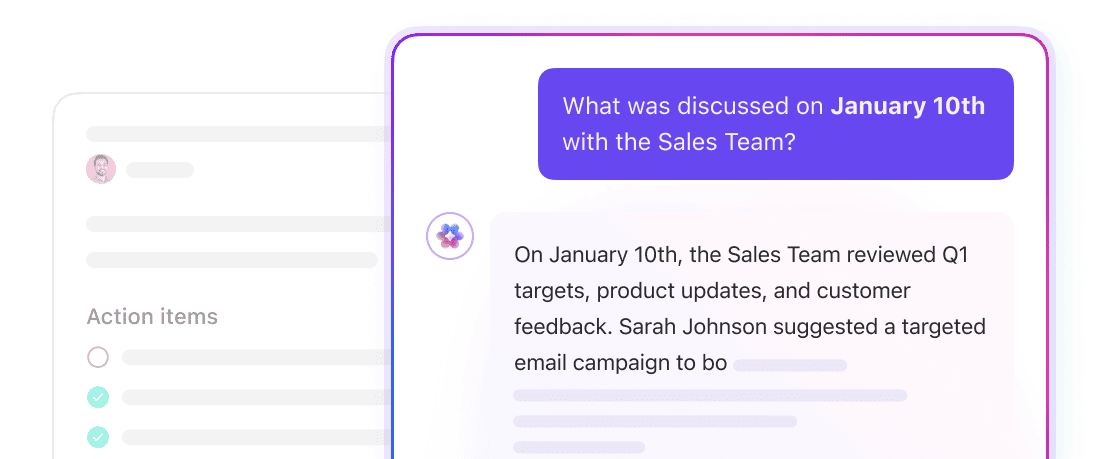
Teams can ask questions like:
ClickUp Brain pulls answers from live workspace context, including Docs, task history, comments, and meeting summaries, instead of relying on static reports or memory. That turns decision history into an active system teams can query, not a passive archive no one revisits.
Not every decision is fast. When teams need deeper analysis, ClickUp templates provide structure and clarity without slowing execution.
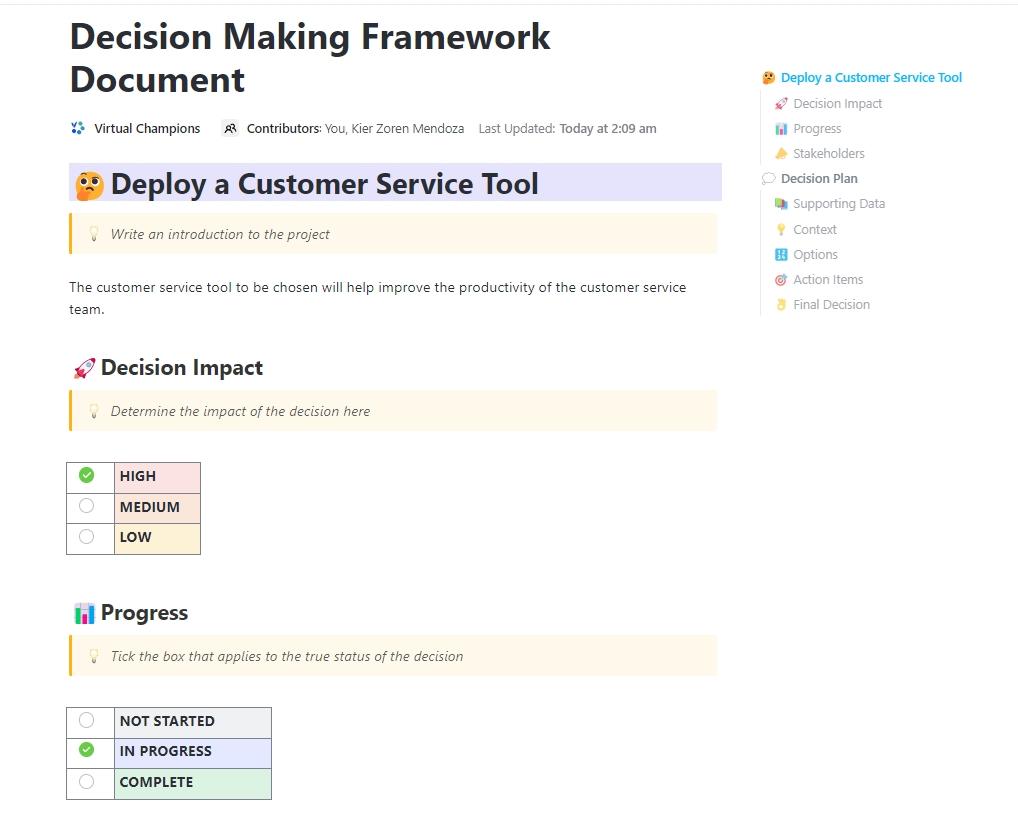
With the ClickUp Decision Making Framework Document Template, you get a clear structure for working through decisions instead of debating them in circles. You can lay out every option, weigh pros and cons using the same criteria, and see which ideas deserve priority before anything moves forward.
The template comes with ClickUp Custom Statuses to track each stage of the decision (from proposed to approved), ClickUp Custom Fields to capture key inputs and tradeoffs. As work evolves, your decisions stay visible, traceable, and easy to reference.
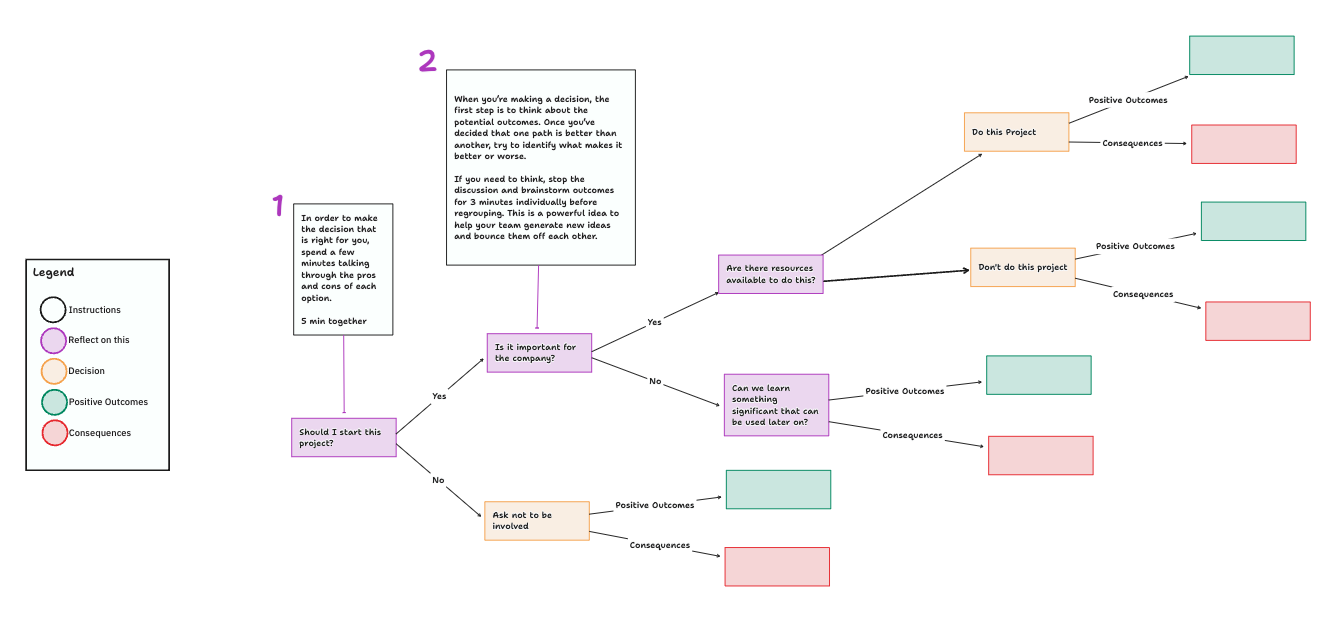
For more complex choices, where multiple paths and outcomes matter, the ClickUp Decision Tree Template lets teams visualize decisions in a structured whiteboard format. This decision-making template turns abstract logic into something tangible, showing:
Decisions become transparent and easier for everyone to follow because the reasoning is mapped out where the team already collaborates.
Decisions are only as good as the context, clarity, and follow-through behind them. AI can help you connect the dots, surface hidden risks, and organize complex options, but it works best when it lives alongside the work itself, not in a silo.
With ClickUp, you get a converged workspace where tasks, Docs, updates, and decision-making all live together.
From summarizing scattered inputs with ClickUp Brain to comparing options with AI Cards, reasoning with Super Agents, and automating follow-ups with Autopilot Agents, every part of your decision process is connected, visible, and actionable.
Sign up to ClickUp today for free! ✅
AI can support and inform decisions by processing large datasets, identifying patterns, forecasting outcomes, and suggesting options. However, it doesn’t replace human judgment or accountability. In most real-world settings, businesses use AI to augment decision-making rather than delegate full authority to it.
Decisions that involve many inputs, uncertainty, or complex trade‑offs benefit most from AI support. Examples include operational decisions like resource allocation, tactical decisions like campaign adjustments, and strategic decisions like market entry or investment prioritization. In such situations, AI can surface trends and scenarios human analysis alone might miss.
Teams avoid over‑reliance by keeping humans in the loop: validate AI outputs against domain expertise, set clear boundaries for when AI suggestions must be reviewed, and treat AI as input. Building critical checkpoints and requiring justification for decisions helps maintain human oversight.
AI can be trustworthy as part of a broader process, especially when models are explainable and combined with human insight. Transparency and understanding of how AI arrives at suggestions (e.g., explainable models) improve trust, but humans must still judge appropriateness in context.
Document decisions by capturing inputs, criteria, assumptions, and reasoning, including which AI insights were used and why. This creates a decision trail for accountability, helps teams revisit past decisions, and supports learning over time. Linked decision documents to tasks and outcomes so work and reasoning stay connected.
The ‘best’ AI for decision-making depends on your team’s context. ClickUp Brain works well for modern teams by fusing workspace intelligence with agentic power. It pulls real-time insights from tasks, docs, and chats. Plus, it auto-generates project plans, prioritizes risks, and triggers Autopilot Agents for actions like task assignments, saving hours on decisions.

© 2026 ClickUp

There’s an easier way. Try a free AI Agent in ClickUp that actually does the work for you—set up in minutes, save hours every week.