






Still downloading templates?
There’s an easier way. Try a free AI Agent in ClickUp that actually does the work for you—set up in minutes, save hours every week.
Sorry, there were no results found for “”
Sorry, there were no results found for “”
Sorry, there were no results found for “”
Creative agencies have a bad rep. Both as service providers and employers.
Clients complain that agencies overpromise to land more work, only to underdeliver later. Team members struggle to produce quality work under constant pressure.
Yet, some of the biggest names—Hub, Wieden+Kennedy, Ogilvy—prove that brilliant creative work is possible. Their secret? A tight, frictionless link between project management and creative execution.
In this blog, we show how agencies can integrate project management and creative tools to streamline daily operations.
Looking for a cleaner, faster, and simpler way to track every client and their campaigns at once?
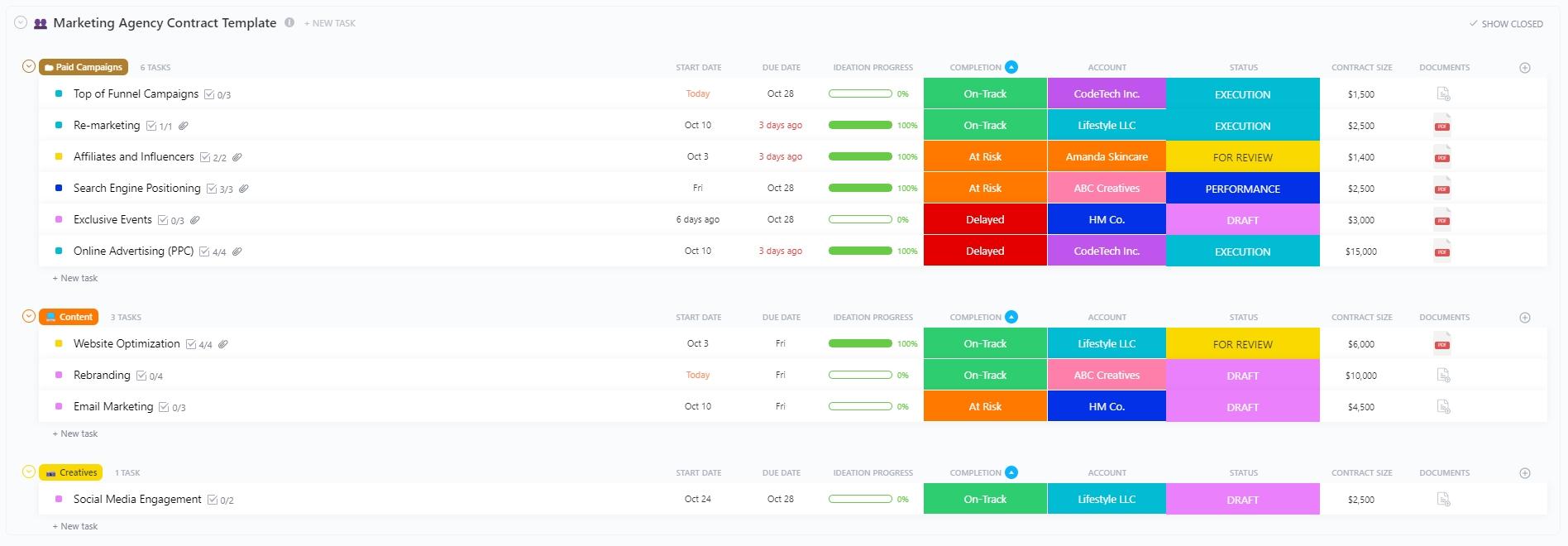
The ClickUp Marketing Agency Template lets you do just that. Categorize your campaigns for quick navigation, add Custom Fields to define each campaign, and track live progress without switching tabs.
Project management and creative processes are interdependent. Yet, most agencies struggle to align them. Here are two reasons why:
Your creative team uses multiple specialized tools to produce work:
On top of this, you’ve got account and project managers (PMs) switching between editorial calendars (spreadsheets), email threads, Slack messages, etc.
Everyone works with their tools, without collaborating. The project is stretched in every direction.
📌 Example: Imagine your client leaves a comment on a specific frame in Figma. Since the project manager only uses spreadsheets and email threads, they never see the feedback.
The creative process is dynamic, iterative, and complex. One asset goes through multiple rounds of feedback, while the other one gets approved right away.
Project management, on the other hand, is all about structure. It thrives on clear timelines and predictability.
When agencies try to integrate them, they end up jeopardizing one or the other. You either lose the creative flexibility that makes work actually good, or you break the planning structure that keeps the lights on.
📌 Example: The project manager assigns a blog post to the writer, expecting it to be delivered, edited, and ready for publishing within a week. The account manager tells the client to mark their calendar.
The writer hits their personal deadline, but then the creative process kicks in. The editor wants a different hook, the tone needs a redo, and suddenly, the one-week task is on day 10.
Now the project is running late, and you look unprofessional to the client.
🧠 Fun Fact: Yoshiro Nakamatsu, the inventor of the floppy disk (and over 3,000 other patents), had a creative process that involved diving deep underwater and remaining there until his brain was deprived of oxygen. He claimed his best ideas came seconds before death. He would then write them down on a special waterproof notepad he invented just for this purpose.
You create a shared system that both your creative and project teams use.
Project managers get real-time visibility into the creative workflows. They can plan, adjust, and communicate schedules proactively (not when the client asks for an update).
Creative teams stop wasting time on administrative tasks and enjoy protected creative hours. This integration leads to:
📮 ClickUp Insight: The average professional spends 30+ minutes a day searching for work-related information—that’s over 120 hours a year lost to digging through emails, Slack threads, and scattered files.
An intelligent AI assistant embedded in your workspace can change that.
Enter ClickUp Brain. It delivers instant insights and answers by surfacing the right documents, conversations, and task details in seconds—so you can stop searching and start working.
💫 Real Results: Teams like QubicaAMF reclaimed 5+ hours weekly using ClickUp—that’s over 250 hours annually per person—by eliminating outdated knowledge management processes. Imagine what your team could create with an extra week of productivity every quarter!
Below are some examples that show what integrated creative project management looks like:
Before: When a new project comes in, the project manager manually pings everyone on the creative team to learn about their bandwidth. While they plan the allocation, an editor suggests a major revision for two writers.
The PM has no idea about this and assigns new work to those writers, unknowingly overloading them.
After: The creative project management tool shows live availability of each creative professional. When an editor assigns a revision, the writer’s schedule is automatically updated. The PM sees that the writer is busy and assigns the new task to someone else.
📚 Read More: Best Strategic Planning Software Tools
Before: The client reviews a file and emails the account manager. The account manager tells the project manager, who forwards it to the designer. With so many people relaying the message, the designer often gets confusing or incomplete feedback.
After: All tasks in the project management tool include links to creative files. The client leaves feedback directly on the asset or in the task’s comment section. Everyone sees the exact same feedback immediately without any passing along of messages.
Before: Team members waste hours digging through Google Drive folders, email chains, and internal chat to find the right asset. They constantly ping each other to confirm whether it’s the latest version or the old one.
After: Creative assets are linked to tasks inside the PM tool. The moment they are marked as “Approved,” the PM system automatically moves the file to the correct folder in your digital asset library. When someone needs the asset, they simply search for how the asset looked, the text it contains, or the project it was related to, and the PM tool quickly fetches it for you.
👀 Did You Know: At the legendary agency Doyle Dane Bernbach (DDB) in the 1960s, Bill Bernbach fundamentally changed agency life. He was the first to pair an art director and a copywriter in the same room. Before this, writers wrote the copy and “sent it down” to the art department like an assembly line.
Let’s see how agencies can build a unified system that integrates project management and creative work.
We’ll also look at how ClickUp’s Creative Agency Software simplifies this integration, along with ClickUp’s Project Management Software.
Start by pulling all your existing campaigns into a single hub.
If you manage multiple campaigns for different clients, organize them into client folders for easy tracking.
Next, standardize the basic layout for all campaigns. It must include:
Don’t want to design this structure from the ground up? ClickUp offers numerous prebuilt templates that agencies can customize in minutes to centralize marketing campaign management.
Here are our top two recommendations:
Do you run a mid-to-large agency that juggles 10+ clients?
ClickUp’s Marketing Agency Template offers a ready-made operating system to manage multiple clients, campaigns, and internal teams in a single centralized view.
Key features:
Before you know it, you’ve got all your campaigns laid out neatly, with minimal hassle.
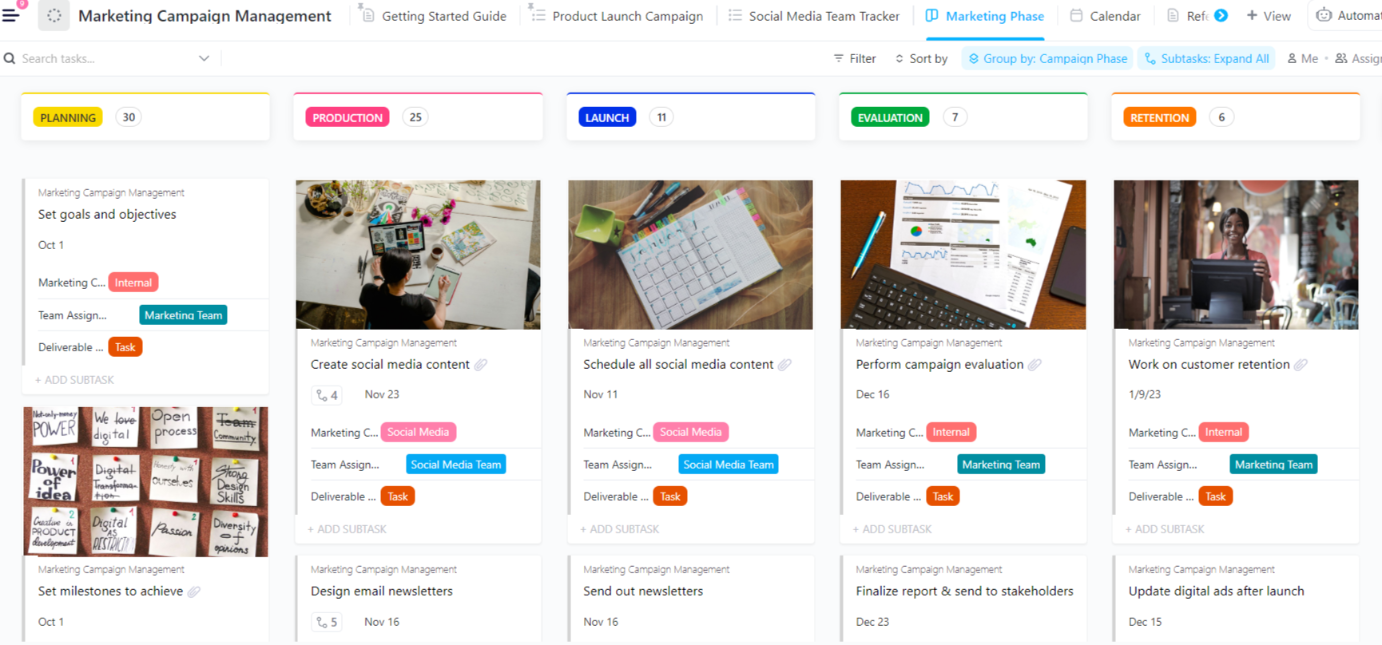
Plan, track, and measure individual campaigns in real time using the ClickUp Marketing Campaign Management Template.
Create different stages for each campaign, add tasks, set due dates, define roles, and assign work without leaving your campaign tracker.
Key features:
By using this template, you can quickly condense the full project lifecycle into one structured board.
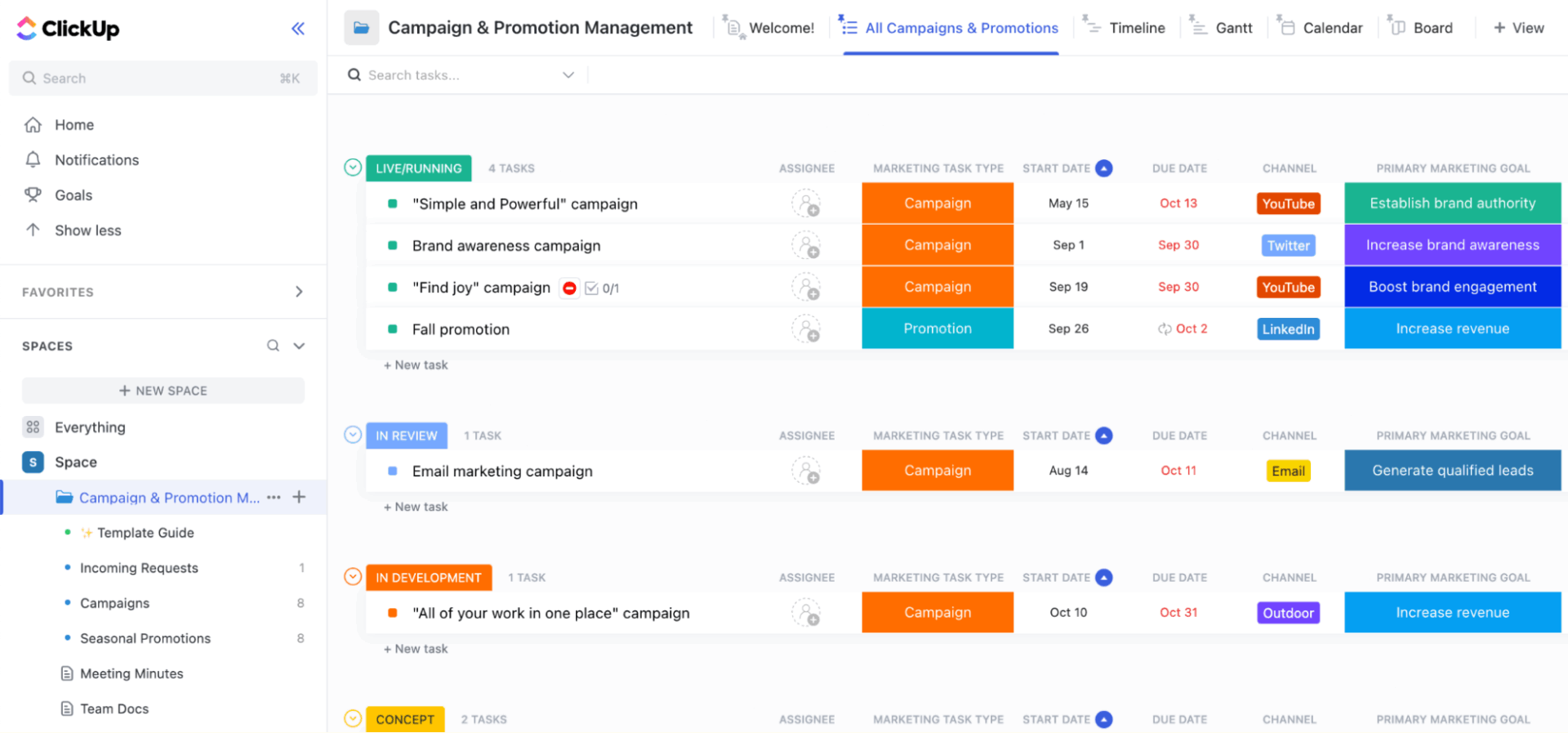
💡 Pro Tip: Need an all-in-one tool to manage both client campaigns and promotions? Try the ClickUp Campaign & Promotion Management Template. It centralizes request intake, planning, production, and launch tracking to help agencies manage campaigns and promos at every stage.
Next, create tasks for each campaign and link creative assets directly to them.
📌 Example: If a designer is working on an ad, the link to the Figma file or the Photoshop cloud document should be included in the task card.
Organize these assets in your digital asset management tool to mirror the project structure. So, if a task is part of “Q1 Social Campaign,” its creative asset should be added to the “Q1 Social Campaign” folder.
Standardize naming conventions for your creative assets. This way, everyone immediately knows which version of an asset is the latest, even at a quick glance.
ClickUp Tasks makes it super-easy to manage hundreds of campaign action items at once without losing your creative assets.
Create a task in ClickUp and add the necessary details, including task description, assignees, start and due dates, priority levels, QA checklists, etc. Upload images, documents, videos, and other files directly to this task as attachments to keep all related assets in one place.
Here’s how to keep track of your marketing tasks at work:
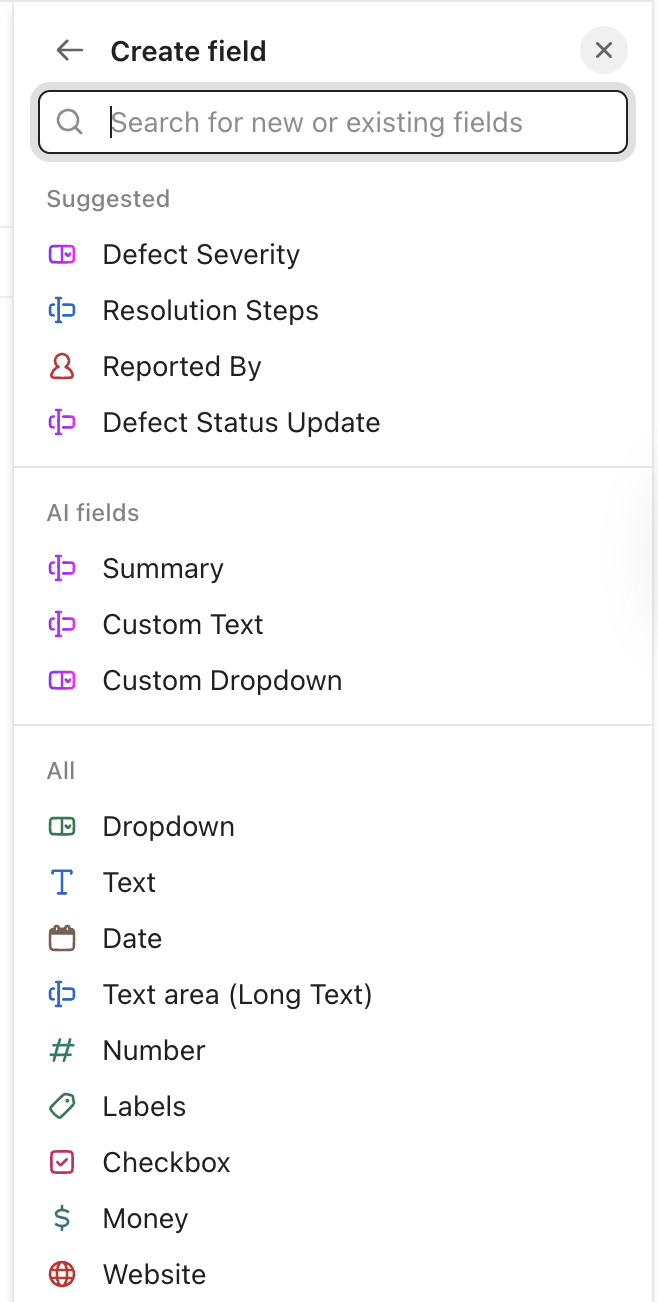
Custom Fields help you neatly organize these assets inside a task. For example, create a custom field like “Canva Link” so that the designer drops the link there, while the writer uploads the blog document to the “Blog Draft” field.
🚀 ClickUp Advantage: Creative teams drown in scattered assets—files split across Drive, Figma, email, and chat threads. People spend more time searching for information instead of actually designing and shipping campaigns.
ClickUp BrainGPT sits on top of this mess and acts as the understanding layer for your work. It reads your tasks, folders, spaces, and external tools to find the right file or information within seconds.
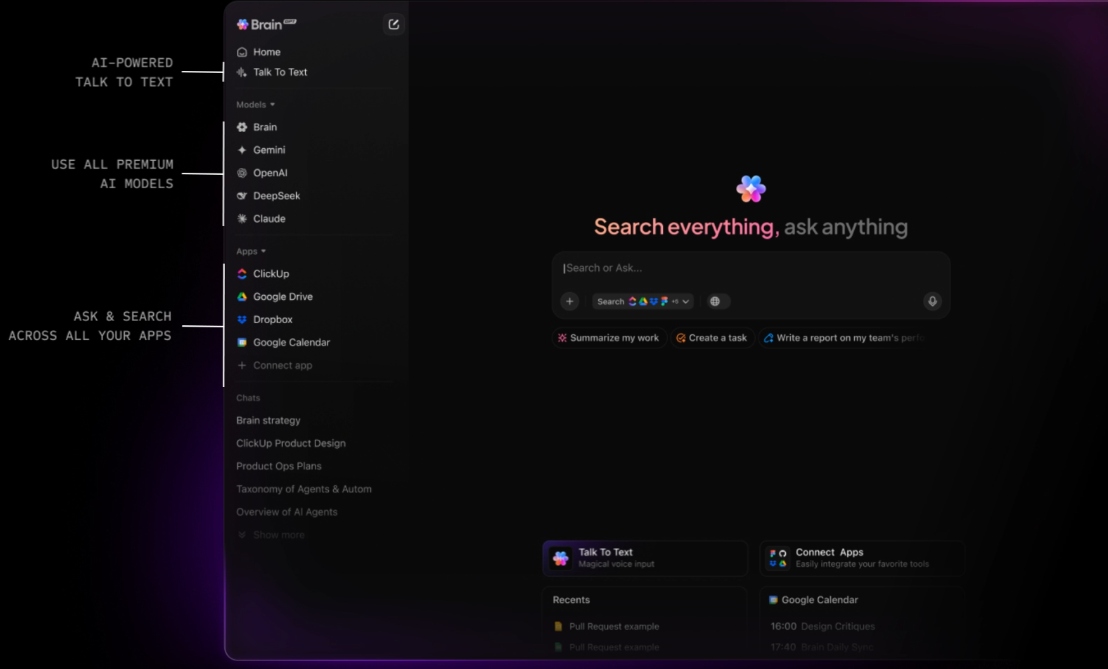
Here’s a sneak peek into ClickUp Brain:
Encourage approvers and clients to give feedback directly on the asset. For example, if it’s a video, comment on the timestamp. If it’s a design, pin a note to the specific element.
Most importantly, keep all discussions about a revision inside the task itself. This creates a clear history of why changes were made. Defining approvers is equally important. Set a clear order for who needs to sign off to avoid disorderly feedback.
Finally, make sure even approvers have a fixed window to review creatives and respond. This prevents projects from stalling.
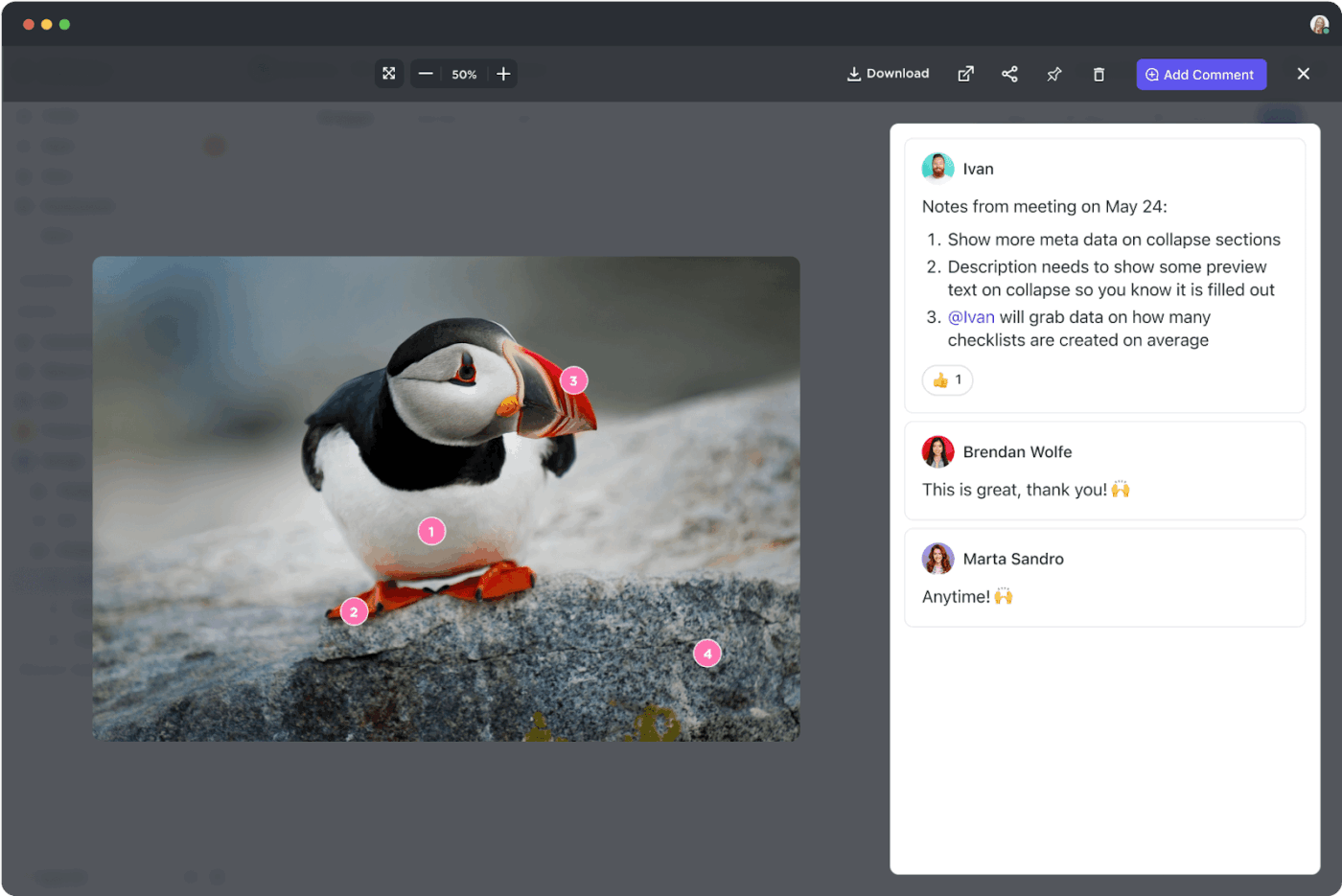
ClickUp’s Proofing feature streamlines the feedback process through asset annotations and task management tools.
Reviewers can click any spot on an uploaded image, video, or PDF to add their suggestions. They can insert text notes, draw shapes, and highlight areas to precisely explain issues.
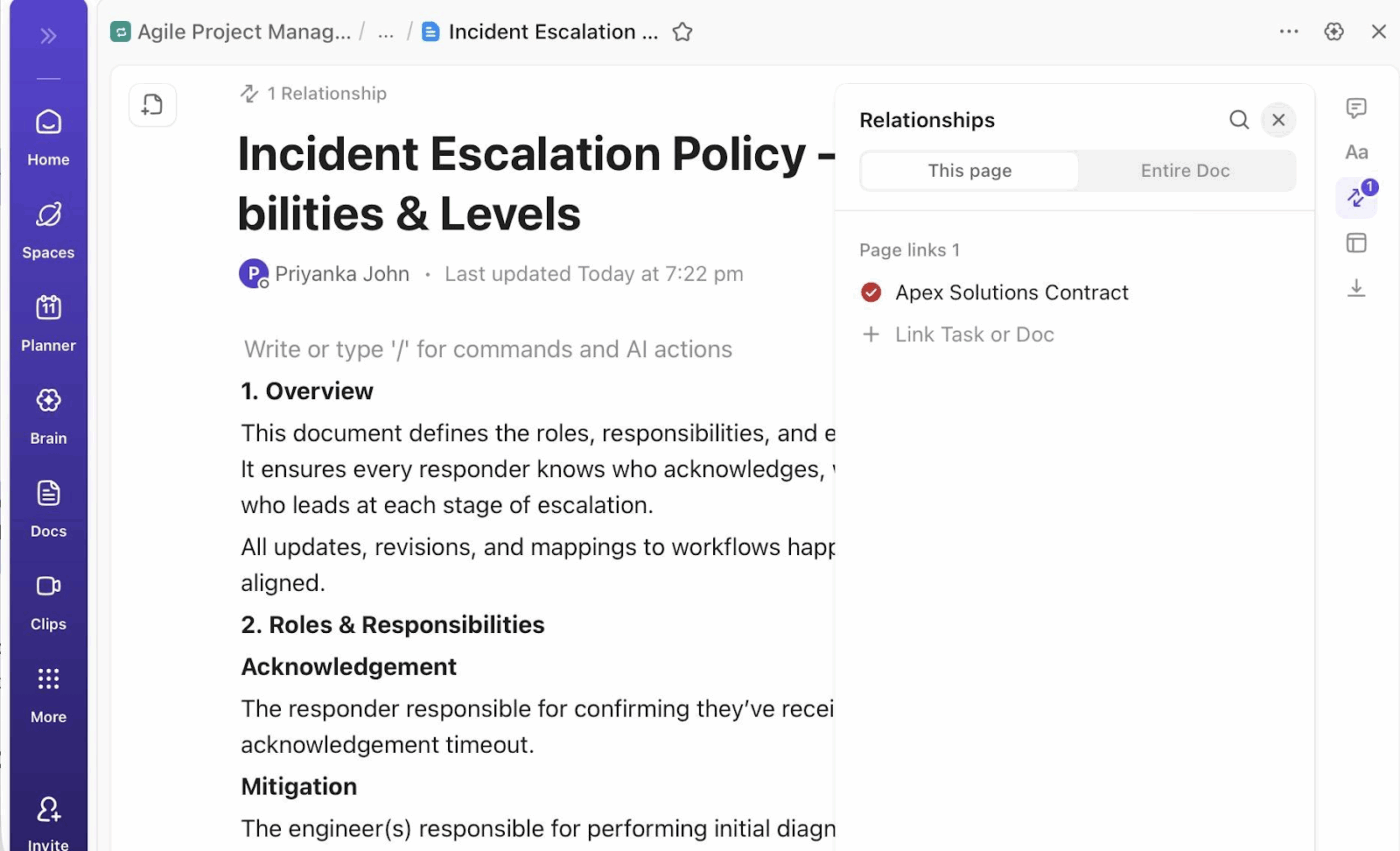
🚀 ClickUp Advantage: Use ClickUp Docs to keep all feedback inline and trackable within the document itself.
Editors can highlight text, add comments with @mentions, and assign action items for writers to resolve. The sidebar shows threaded discussions and status (open/resolved) across the entire Doc.
This works well for creative briefs, copy drafts, or mood boards stored as text.
Nothing kills your agency’s momentum faster than manual workflows.
Creative project managers spend their day moving details from briefs to tasks, relaying last-minute client requests, and chasing updates. While the creative team is expected to stop what they’re doing to report every bit of progress.
Automations handle the background work so that both sides focus on their actual jobs instead of moving data.
Below are some examples of basic automations:
ClickUp Automations make it a breeze to put repetitive workflows on autopilot. You can define automation triggers, conditions, and actions using a simple drag-and-drop interface.
For example, when a task status changes to “Ready for Review,” auto-assign it to the account manager, add specific reviewers, update the deadline by +1 day, and notify them.
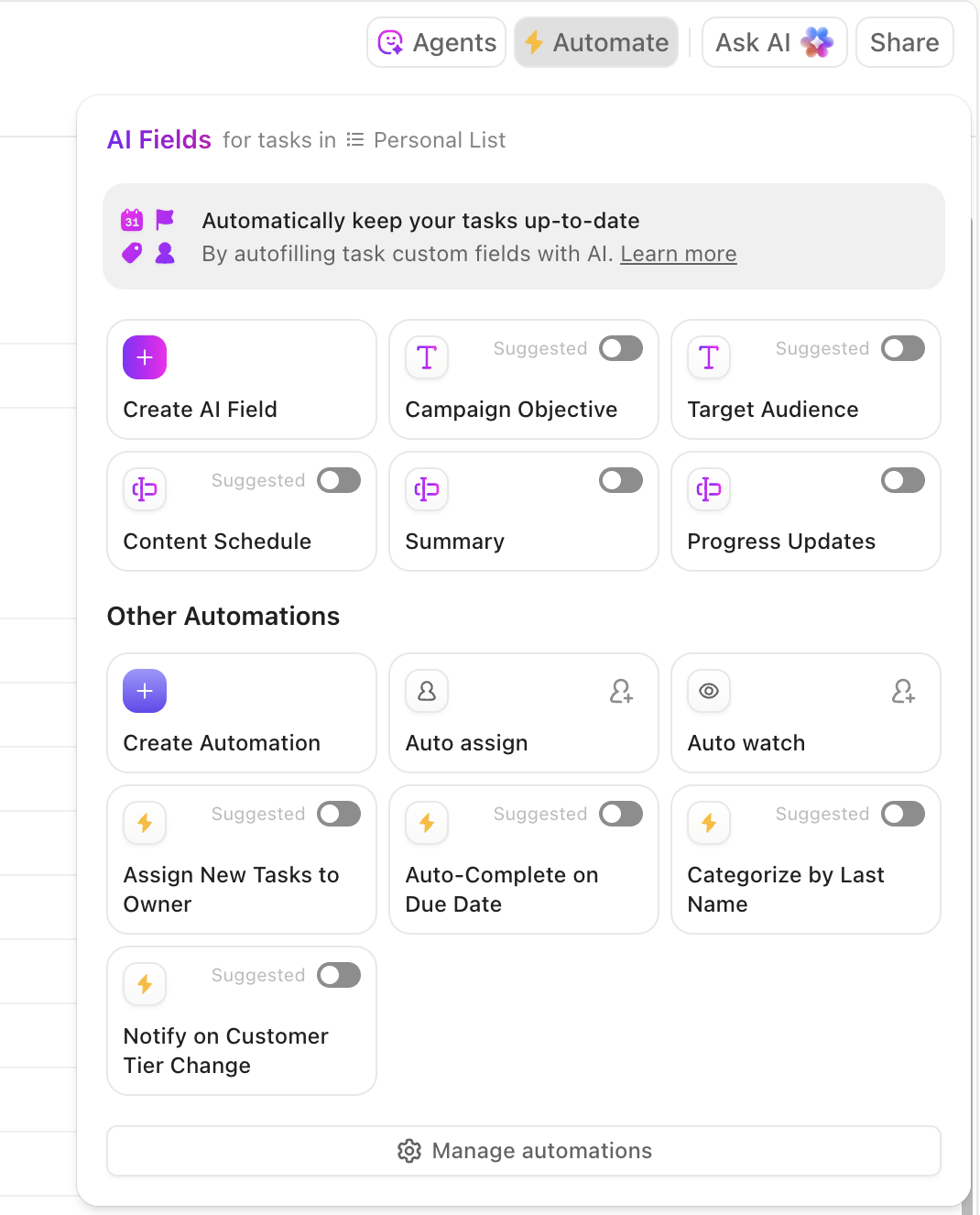
In addition, ClickUp’s Super Agents act as full-time assistants, monitoring your workflows, making decisions, and executing actions autonomously.
For instance, when someone leaves feedback on a task, the AI agent scans comments and inline annotations to create action items for the task owner. Watch this video to learn more about creating AI Agents 👇
You’ve integrated your project management tools with creative software. But how do you know if this setup will actually increase your project’s profitability? Through real-time performance tracking!
For starters, measure how long it takes for a task to move from Brief to Approved before vs after integration. Identifying where work gets stuck helps you enhance the efficiency of your creative agency project management setup.
But mind you: this monitoring is only effective when it isn’t siloed. If you track creative performance in one tool and project management in another, the whole point of integration is lost.
ClickUp Dashboards pull live insights directly from your tasks, projects, client portals, and connected tools so that you can track everything in one place.
You can create client- or campaign-specific dashboards and customize them with relevant widget cards. For example, add burnup charts when you want to measure tasks completed vs the total scope over time.
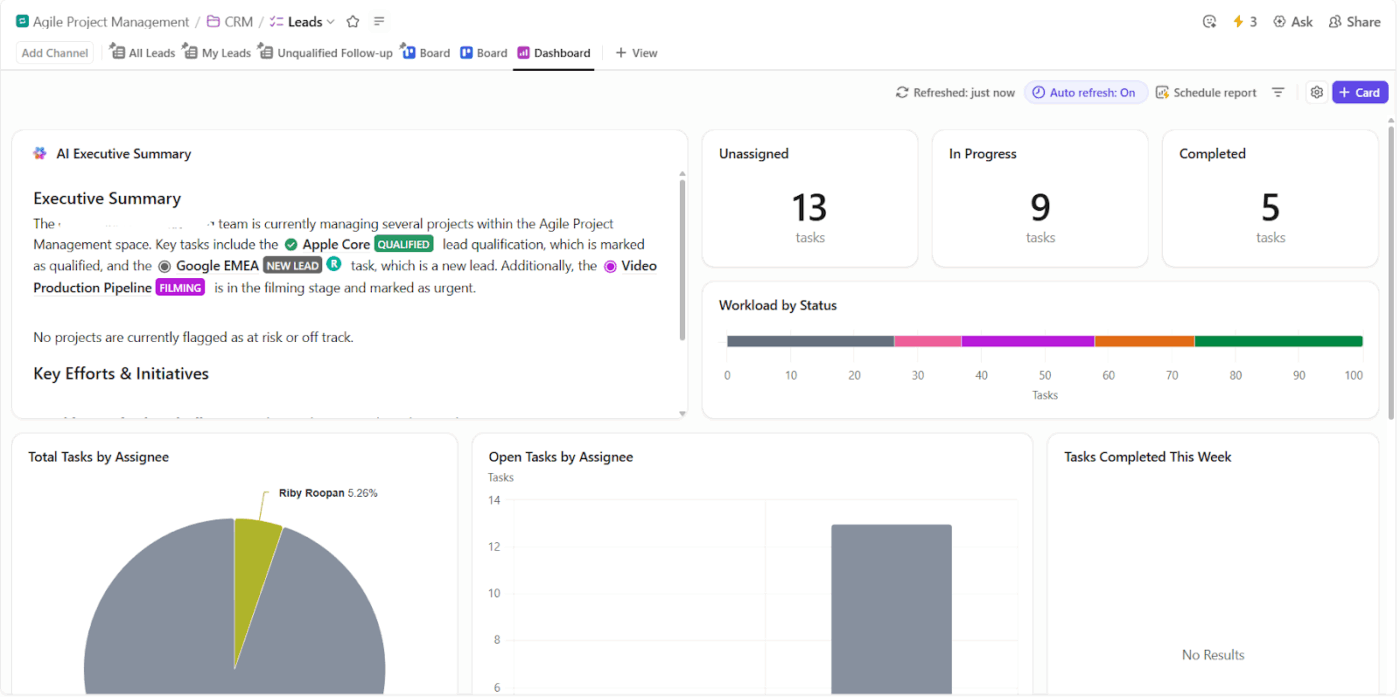
These dashboards can feed into a master dashboard that offers key insights at a glance, like team performance, overall client work, financial management, etc.
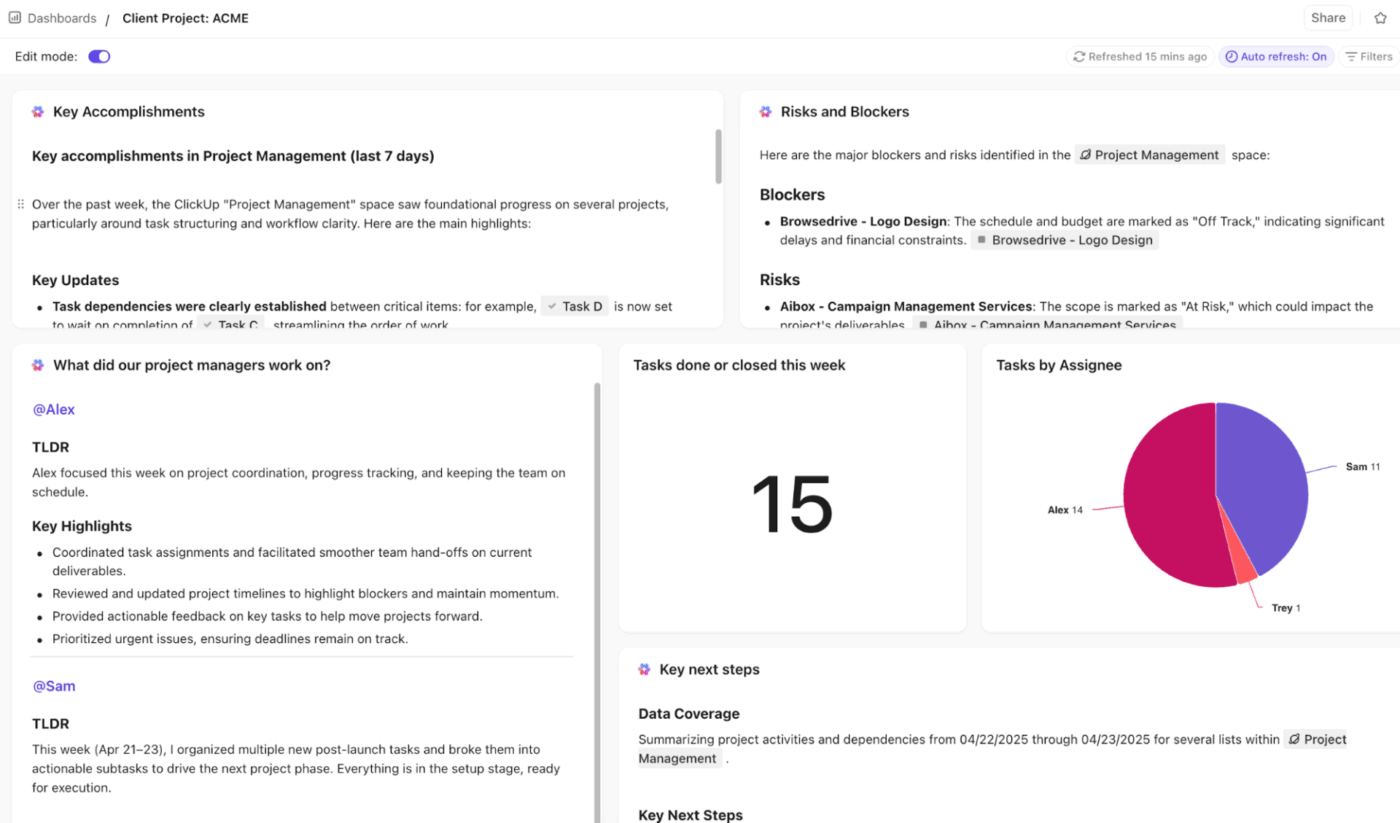
🚀 ClickUp Advantage: Pair your ClickUp Dashboards with AI Cards. These dynamic widgets analyze your task data and deliver natural language summaries or recommendations directly on your Dashboard.
For example, instead of staring at raw numbers like “12 tasks overdue,” the AI card tells you “Marketing has 8 overdue creatives—assign 2 to Sarah (20% capacity) or push deadline to Friday?”
👀 Did You Know: In the Wellingtone State of Project Management report, it was found that 50% of project managers spend a significant amount of their time—often an entire day or more every month—just manually typing up reports instead of actually managing their teams.
Here are some real-world use cases where agencies have integrated their project management and creative tools to streamline operations:
Challenge: New Reach Marketing was growing fast, but running campaigns across scattered tools, spreadsheets, and Slack threads. The team struggled to manage client expectations across multiple projects and scale their agency.
Solution: They adopted ClickUp as the all-in-one solution for project and client management. Standardized workflows replaced ad-hoc spreadsheets, while dashboards surfaced workload and client health in real time. Work became more predictable, trackable, and easier to delegate.
Results:
Challenge: Pharmacy Mentor’s small Client Relations team managed 200 clients using a scattered set of apps, including Google Workspace, email, and Docs. This led to chaos: tool sprawl, constant context switching, duplicated work, no real-time project visibility, and poor internal goal tracking.
Solution: Unlike traditional project management, ClickUp provided Pharmacy Mentor with a consolidated toolset for managing projects, client collaboration, and live analytics. It replaced the folder-trouble with structured tasks, simplified client intake forms, and centralized project tracking.
Results:
⚡Template Archive: Free Project Management Templates
Here are common challenges agencies face when managing creative projects:
| Common pitfalls | Why this happens |
| Context-switching between tools | Separate tools for project management and creative work waste time as teams constantly jump between apps and lose focus |
| Scattered feedback loops | Comments arrive via email, chats, or docs without clear ties to assets, causing endless back-and-forth |
| Scope creep | Because the design work and the project board aren’t synced, agencies lack visibility and agree to last-minute extra work |
| Jeopardised creative freedom | Rigid processes, tight deadlines, or excessive approvals stifle designers’ ideas, forcing safe choices over bold work |
👀 Did You Know: According to research from the Harvard Business Review, only 35% of projects across all industries are considered truly successful. This means nearly two-thirds of all professional projects fail to meet their original goals, exceed their budget, or miss their deadline.
Artificial intelligence continues to evolve. For agencies, this means that creative project management will become natively intelligent, faster, and more efficient.
Here are some trends we can expect:
But the most notable difference lies in the changing role of a project manager.
Future project managers will be facilitators. With AI handling the grunt work, PMs will focus on project strategy, creative vision, client communication, and team coordination.
Running a profitable agency is an art. You must constantly balance creative quality against strict deadlines and tight budgets.
We’re not saying having a slim tech stack with only a couple of tools is the answer. If anything, that’s highly unrealistic for any agency.
But complete, automated integration across all your systems is a must.
ClickUp bridges the gap between high-level project planning, daily creative production, and long-term creative excellence.
Agencies can streamline creative cycles with Tasks and Proofing, automate workflows, share real-time insights, and embed contextual AI (ClickUp BrainGPT) for peak efficiency.
Ready to see how? Sign up for ClickUp today to get started.
By integrating project management and creative tools, you remove the friction between planning and execution.
Project managers get real-time visibility into the creative process without pestering the team for updates. Creative professionals focus on their work as they no longer have to manually log progress or hunt for an asset.
This reduces expensive errors, speeds up delivery times, enhances creative output quality, and keeps your clients happy.
ClickUp acts as a central hub that connects directly to your creative stack through native integrations and APIs. It allows you to embed live design files, sync cloud storage, and automate task updates based on file activity. This keeps your communication, files, and timelines in one place, ensuring your data stays consistent across multiple teams.
Yes, ClickUp offers a variety of pre-built templates designed specifically for creative agencies and design teams. Start with the ClickUp Marketing Agency Template to build your high-level plan for all clients and their campaigns. Next, detail each campaign using the ClickUp Marketing Campaign Management Template.
Use these as a foundation and customize them to match your agency’s requirements.
Clients do not need a paid ClickUp account to review work or provide feedback. You can use Public Sharing features to send live links to your project boards or specific documents. Additionally, the Proofing feature allows clients to leave comments directly on images or videos using a simple guest access link. This keeps the feedback loop fast and centralized.
Agencies can use ClickUp Dashboards to monitor high-level performance in real-time. You can track billable hours, project budgets, and team capacity using visual widgets that update automatically as work progresses. By linking time-tracking directly to tasks, you can see exactly where resources are being spent.

© 2026 ClickUp

There’s an easier way. Try a free AI Agent in ClickUp that actually does the work for you—set up in minutes, save hours every week.