
Sorry, there were no results found for “”
Sorry, there were no results found for “”
Sorry, there were no results found for “”
Choosing the right communication tool can be overwhelming, especially when trying to balance cost with the features your team needs.
Finding the right Slack pricing plan can be confusing—you want to enhance collaboration and productivity without overspending.
Whether you’re a business owner, team leader, or professional, you need clarity on what each plan offers to eliminate the frustration of paying for unused features or lacking essential ones.
In this article, we’ll break down Slack’s pricing plan to help you find the perfect plan that fits your organization’s needs and budget. 👇
How much does Slack cost? Let’s take a look at all its different plans:
If you’re starting or running a small team, the Free Plan can be a great option for essential communication without any cost. Slack’s free plan covers basic needs, including direct messages and limited integrations.
However, the plan does have some limitations that might not fully support your team’s long-term growth as your needs evolve.
The Free Plan is ideal for small teams, startups, or organizations looking for a basic workplace communication tool for routine tasks. It’s a cost-free way to get started with Slack, but it has limitations in message history, integrations, and calling capabilities.
If you’re managing a small to medium-sized business and need more advanced features to support your growing team, the Pro Plan is a great option.
It enhances your communication with more features, like unlimited direct messages, audio and video meetings, and the ability to create custom monitoring tools for better project management. This plan is a solid step up from the Free Plan, providing everything you need to boost both productivity and team collaboration.
Other features: Unlimited workflow builders, ability to collab on lists and documents
The Pro Plan is perfect for growing businesses that need advanced tools to keep teams connected and efficient. It’s ideal for those who require full direct messages, call history, more Slack integrations, and the ability to host group meetings.
Designed for mid-sized to large businesses, this plan offers better security, compliance features, and administrative controls—perfect for managing more complex organizational needs.
Other features: Everything in the Pro plan, plus user provisioning and de-provisioning for guest accounts, identity management, and data exports for all messages.
The Business+ Plan gives businesses that have outgrown the Basic and Pro Plans more control over their operations. If your business needs strict compliance and advanced security, the Business+ Plan offers the tools to keep everything in check.
Features like priority support and guest access help resolve issues quickly and allow secure collaboration with external partners, making it ideal for companies handling sensitive information and large-scale operations.
📖 Also Read: Slack Hacks to Improve Workplace Communication
Slack’s Enterprise Grid Plan (its most expensive plan) is suitable for large enterprises with complex communication requirements. Unlike other plans, it customizes the pricing based on your organization’s specific needs.
This plan provides a solid suite of features that enhance collaboration and security across interconnected workspaces.
Other features: Everything in the Business plan, plus support for data loss prevention, audit logs, integration with Enterprise Mobility Management (EMM), domain claiming, custom terms of service, and more.
The Enterprise Grid Plan is perfect for large enterprises with thousands of employees who need a secure, scalable, and customizable communication remote collaboration tool.
It’s best for organizations in regulated industries like healthcare, finance, or government, where data security and compliance are important. Plus, you can manage multiple workspaces and get advanced security features.
Offering the most comprehensive feature set, this plan is the premium option for businesses that demand top-tier service from their communication platform.
| Plan | Price | Key features | Who’s it for |
| Free Plan | Free | 90 days of message and file history Up to 10 Slack integrations One-on-one voice and video calls | Small teams, startups, or organizations with basic communication needs and tight budgets |
| Pro Plan | $7.25 per user/month (billed annually) $8.75 per user/month (billed monthly) | Unlimited message history Unlimited app integrations Group calls with up to 50 participants Customizable retention policies 24/7 support | Small to medium-sized businesses that need advanced communication features and multiple app integrations |
| Business+ Plan | $12.50 per user/month (billed annually) $15 per user/month (billed monthly) | SAML-based SSO 24/7 support with 4-hour response time 99.99% uptime SLA Enhanced security features | Mid-sized to large businesses that require enhanced security, compliance, and administrative controls |
| Enterprise Grid Plan | Custom pricing | Unlimited workspaces Advanced security and compliance (HIPAA, DLP) eDiscovery and legal holds 99.99% uptime SLA Dedicated 24/7 support with a 4-hour response time | Large enterprises with complex communication needs, especially in regulated industries like healthcare, finance, or government |
📄 Note: Slack AI add-on is available for the Pro Plan and above.
Choosing the right Slack plan can improve your team’s productivity and communication flow. With each plan offering its own pros and cons, picking the wrong one could leave you dealing with limitations that slow your team down.
Here’s how you can choose the best Slack plan by focusing on the factors that matter most to your organization:
📖 Also Read: The Pros and Cons of Slack at Work
What if we told you there’s a better Slack alternative?
Yes, we’re talking about ClickUp, a popular project management and collaboration tool that is more versatile.
While Slack has been popular for team chats for a while now, if you’re after something that does more than messaging, ClickUp will surprise you.
Let’s see why ClickUp outperforms Slack:
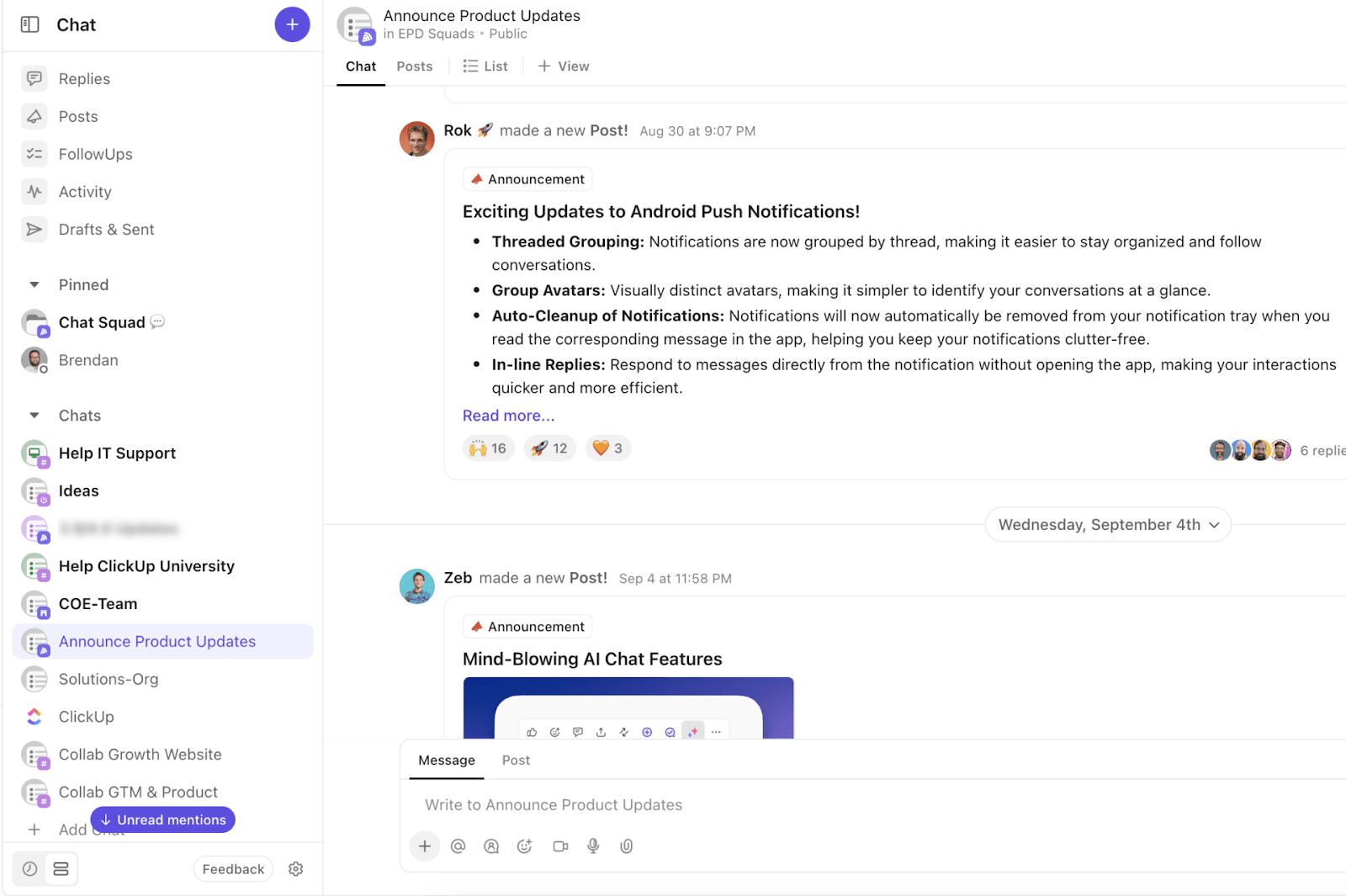
Since we’re looking at a chat platform alternative, let’s start with ClickUp Chat.
Unlike Slack, where chatting is the main event, ClickUp takes it further by tying your conversations directly to your tasks.
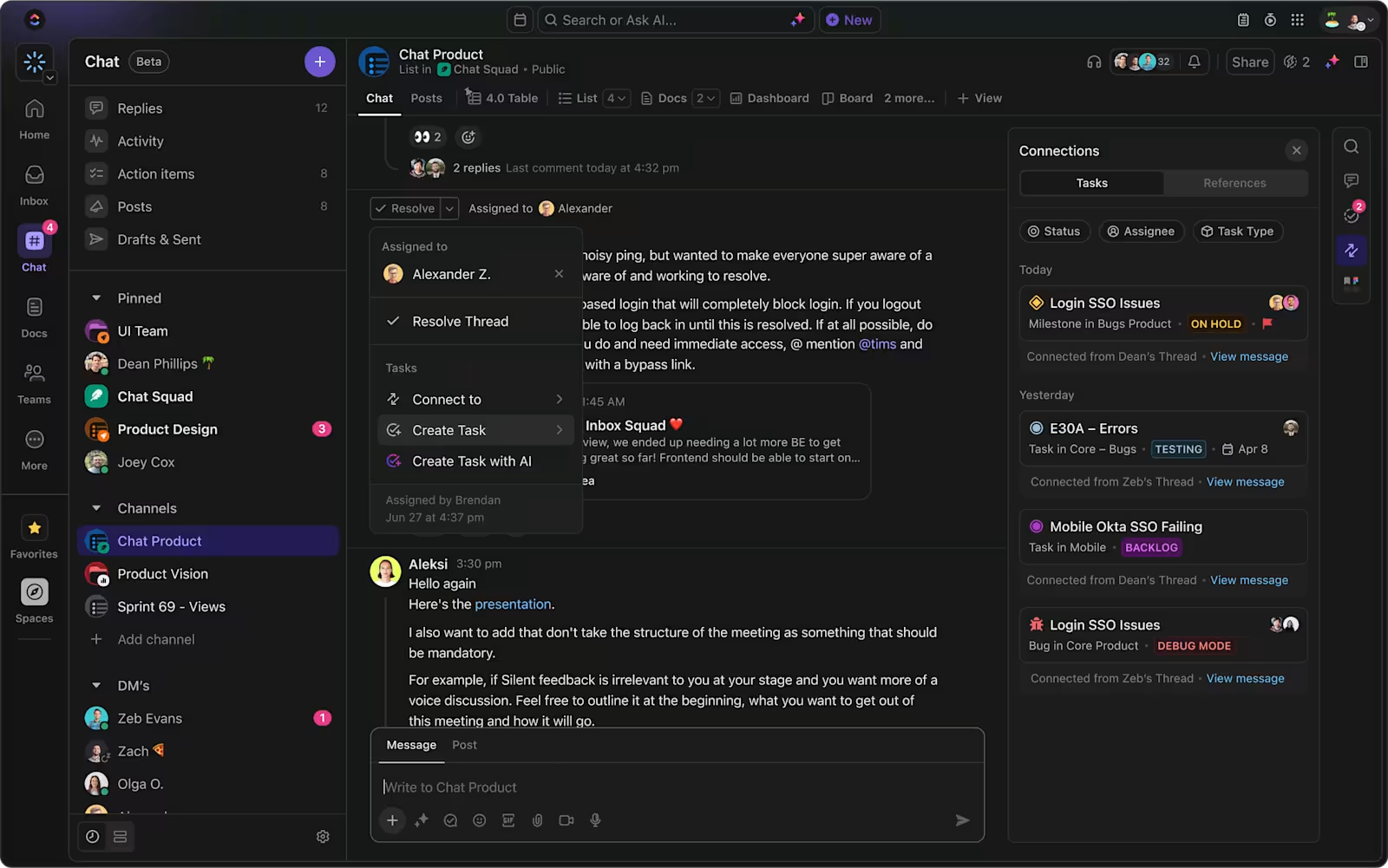
With ClickUp Chat, all your tasks and conversations converge in one place, eliminating the need to switch between apps like Slack. Instead of jumping between tools or losing context, ClickUp keeps your team chats, tasks, and files unified and connected within one workspace.
ClickUp also stands out by allowing you to instantly convert important chat messages into actionable tasks.

Unlike Slack, where key comments can get buried in threads, ClickUp provides useful features, like Assigned Comments, to assign tasks to specific team members and ensure accountability at all times. Start a conversation anywhere in your workspace, across tasks, docs, or directly in chat, and say goodbye to the toggle tax!
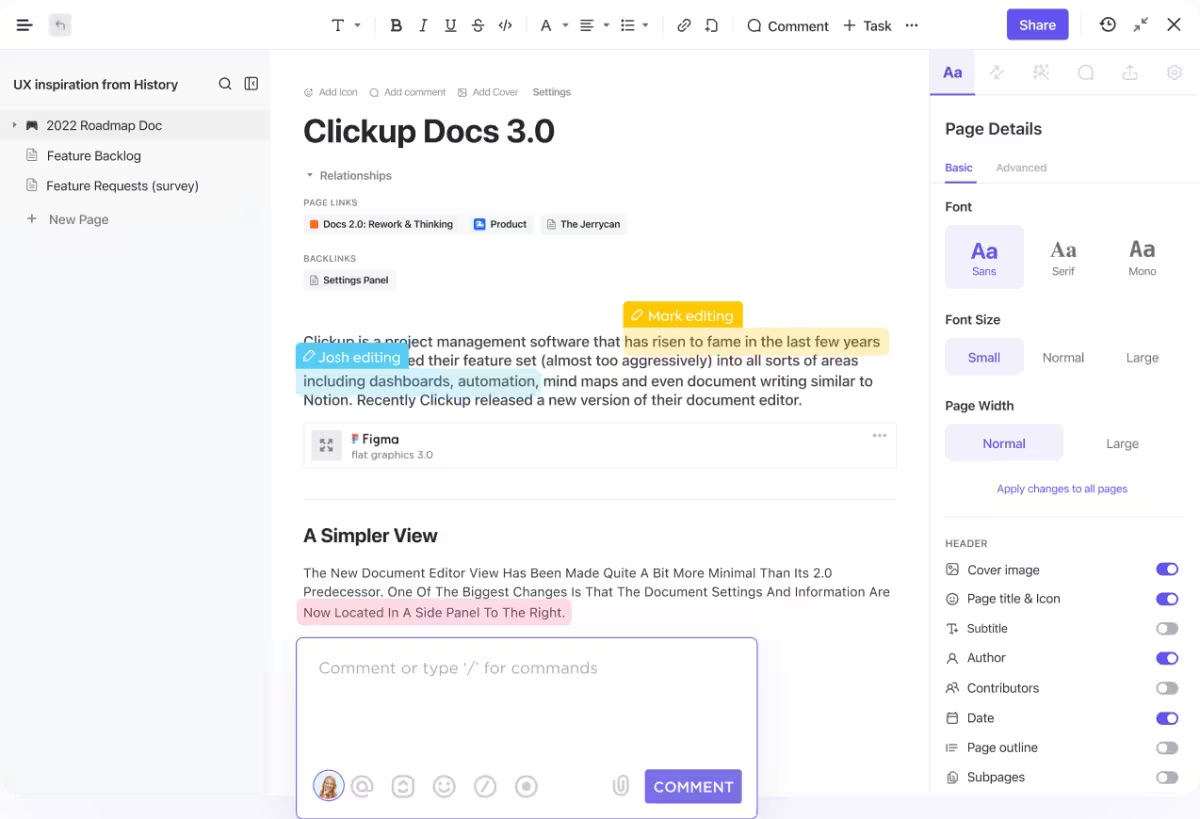

While Slack excels at communication, ClickUp Docs goes a step further by combining communication with documentation, task management, and workflow organization—all in one platform.
Use features like ClickUp Collaboration Detection, version history, and seamless integration with tasks to create a project outline with your colleagues and assign project tasks directly from your documents. Docs come with rich formatting elements like banners and embedding capabilities, allowing you to customize the appearance of the documents and add images and links to them.
Best part? You can organize pages as nested items and categorize them further into different ClickUp Spaces using folders and tags.
🌈Did you know? Team Liquid, a popular eSports brand, used ClickUp to boost its efficiency by 3x. The major challenges they faced included disconnected teams across multiple tools, miscommunication, and poor documentation.
By consolidating four different tools into ClickUp, they streamlined workflows, enhanced team collaboration, and gained better visibility across their projects.
This switch resulted in 100% adoption of ClickUp across the organization and helped drive an impressive 10x company growth in just four years.

ClickUp Brain offers more than just task summaries—it’s a complete AI assistant built directly into your workspace. With 100+ pre-built prompts, it automates everything from writing content to summarizing long discussions, boosting productivity by streamlining tasks in one place.
This minimizes the need for external apps and enhances productivity by seamlessly integrating AI capabilities with project management, documentation, and task tracking.
Unlike Slack AI, which focuses mainly on communication threads, ClickUp Brain integrates with your entire workflow, making it ideal for teams managing complex projects and multiple tools. Slack AI is limited only to summarizing conversations or helping find quick answers.
✨Additional resource: For teams looking to further enhance communication, using effective communication plan templates and exploring the best communication strategies can help with collaboration even more.
Together, these features make ClickUp the best Slack competitor.
📮 ClickUp Insight: 1 in 4 employees uses four or more tools just to build context at work. A key detail might be buried in an email, expanded in a Slack thread, and documented in a separate tool, forcing teams to waste time hunting for information instead of getting work done.
ClickUp converges your entire workflow into one unified platform. With features like ClickUp Email Project Management, ClickUp Chat, ClickUp Docs, and ClickUp Brain, everything stays connected, synced, and instantly accessible. Say goodbye to “work about work” and reclaim your productive time.
💫 Real Results: Teams are able to reclaim 5+ hours every week using ClickUp—that’s over 250 hours annually per person—by eliminating outdated knowledge management processes. Imagine what your team could create with an extra week of productivity every quarter!
ClickUp’s free plan is quite generous, offering 100MB of storage, unlimited tasks, and access to most features. Our paid plans start at just $7 per user per month (billed annually) and provide unlimited storage and advanced tools.
In comparison, as detailed in our ClickUp vs Slack guide, Slack’s free plan is more limited, especially with message history and storage restrictions. The starting price for the Slack Pro plan in the US is $8.75 per user (billed monthly). If you’re looking for a paid plan to maximize your budget, ClickUp’s pricing offers more flexibility and value for teams.
💡Pro Tip: Explore these ClickUp free communication plan templates to simplify communication with your team and keep everything organized.
ClickUp is the Swiss Army knife of workspaces—it has everything you need in one spot.
You can chat, manage tasks, track time, and even handle documents without leaving the platform. It’s a great way to reduce tool overload and keep everything organized.
On the flip side, Slack is all about keeping things simple. It’s easy to use and perfect if you need straightforward, no-fuss communication. But if your team needs more than that, you might find yourself juggling Slack with other project management tools.
So, if you’re a Slack fan, it might be worth checking out ClickUp. It could be the all-in-one solution you didn’t know you needed—making your work life much more accessible and maybe even more fun.
Sign up for ClickUp for free, and see for yourself why ClickUp could be a better choice.
© 2025 ClickUp