


Website analytics provide valuable data but don’t explain why users abandon carts or struggle with navigation. Figuring this out remains a challenge for businesses that want to go deeper.
Session replay software welds this gap by clearly recording every user session on your website. It captures every click, scroll, and form interaction in detail.
This is the power of session replay—the ability to analyze real user journeys, pinpoint drop-offs, and help you optimize your website for a seamless and engaging customer experience.
I have compiled a list of 2024’s top session replay tools for every use case and budget. Let’s dive in and see how they can elevate your end-user experience. ?
10 Best Session Replay Software Tools in 2024

 Summarize this article for me please
What Should You Look for in Session Replay Software?
Selecting the perfect user session replay software requires careful consideration of several factors beyond just the key features themselves.
- Functionality: Do you need full replays, filtered recordings, or code-level analysis? Look for search, heatmaps, segmentation, and funnel tracking for in-depth insights
- Privacy and security: Ensure data encryption and access controls to protect user information
- Compatibility: Verify the user session replay software works with your website/app technology and integrates with your existing tools
- Performance: Choose a solution that minimizes impact on website loading speeds and works well across all devices
- Data analysis: Look for easy search and filtering, segmentation capabilities, and clear data visualizations. AI-powered insights are a bonus
- Support: Good documentation and responsive customer support are crucial since you might need a lot of those in the early stages
- Cost: Choose a pricing model that fits your current needs and scales with your growth
? Pro tip: Don’t forget to check the user session replay software’s data retention policy. Knowing how long they store your recordings will help you choose the right plan for your needs.
Summarize this article for me pleaseTypes of Session Replays
There are ways to categorize session replays based on how they capture and present user-tracking sessions. Here’s a quick rundown of some common approaches:
- Full session replay: This is the most comprehensive type of session replay, capturing the user’s entire journey on a website or app. You’ll see every click, scroll, form interaction, and page visit, which allows you to analyze the user’s entire experience
- Filtered session replay: Under this option, you can focus on specific parts of a user session based on predefined filters. For example, you might want to see only sessions where users abandoned a shopping cart or encountered an error message
- Heatmap-based replay: With this kind of session replay, you will see a combination of functionality with heatmaps, visually representing user focus areas (clicks and scrolls). It lets you see where users clicked and then replay the session to understand the context behind their actions. It also helps UX researchers in testing the usability of a website
- Event-based replay: You get specific user actions or events you define as important. For instance, you might want to replay sessions where real users signed up for a newsletter or completed a purchase
- Code-level replay (for advanced users): This is a more technical approach developers use. It replays the session alongside the website’s code execution, allowing them to see how user actions interact with the underlying code and identify potential bugs or performance issues
These categories can sometimes overlap. A session replay tool might offer features that combine elements from different categories, allowing you to customize the analysis to your needs.
Summarize this article for me pleaseThe 10 Best Session Replay Software to Use in 2024
Some session replay software excels at basic functionalities like session playback, recordings, and heatmaps. In contrast, others boast advanced capabilities like AI-powered insights, bug reports, code-level analysis, and user segmentation.
Let’s explore the best session replay software options available in 2024.
1. Hotjar
Best for visual heatmaps, recordings, and surveys to understand user behavior

Hotjar is an all-in-one user behavior analysis software. It’s great for beginners because it offers heatmaps to see where users click, recordings to watch how they interact with your site, and surveys to gather direct feedback.
While it doesn’t go super deep into things like form analysis, it gives you a solid foundation for understanding user behavior on your website.
Hotjar best features
- Easy-to-use interface for beginners
- Generates heatmaps that visualize user clicks and scrolls
- Enables session recordings to replay how users interact with your website
- Helps conduct surveys and feedback polls to gather user input
- Integrates seamlessly with all popular web hosting and analytics tools
Hotjar limitations
- Some users find it difficult to make sense of the heatmap data
- Difficulty filtering data by specific date ranges
Hotjar pricing
- Hotjar Observe
- Basic: $0 forever
- Plus: $39/month
- Business: $99/month
- Scale: $213/month
- Hotjar Ask
- Basic: $0 forever
- Plus: $59/month
- Business: $79/month
- Scale: $159/month
- Hotjar Engage
- Basic: $0 forever
- Plus: $49/month
- Business: $550/month
- Scale: custom pricing
Custom Package: Pick any two paid plans from Observe and Ask and get an extra 10% savings on the lowest plan
Hotjar rating and reviews
- G2: 4.3/5 (300+ reviews)
- Capterra: 4.7/5 (500+ reviews)
2. Contentsquare
Best for advanced web analytics with AI-powered insights and visitor segmentation

Unlike Hotjar, Contentsquare goes way beyond basic heatmaps and recordings. It uses AI to unlock deep insights about website visitors, such as segmenting your audience by demographics, behavior patterns, and intent.
Contentsquare helps you see exactly why users convert (or bounce!), letting you optimize your website or app experience for maximum impact. It’s a favorite for businesses that want to understand their user base in-depth and optimize their digital products for better results.
Contentsquare best features
- Powerful AI-powered insights for advanced user understanding
- Visitor segmentation capabilities to analyze specific user groups
- Creates comprehensive session replay with detailed user actions
- Customizable dashboards for tailored data visualization
- Integrates A/B testing to optimize user experience
Contentsquare limitations
- Users observed a steeper learning curve compared to other tools
- Some users encountered bugs and glitches while using the product
Contentsquare pricing
Custom pricing
Contentsquare rating and reviews
- G2: 4.7/5 (450+ reviews)
- Capterra: 4.8/5 (100+ reviews)
3. Smartlook
Best for user session replays and heatmaps

Smartlook is great for behavior analysis, offering a user-friendly and comprehensive toolkit. It captures user sessions, enabling you to precisely monitor user behavior, including how users navigate, interact with elements, and complete or abandon tasks.
Smartlook also provides heatmaps to visualize click patterns and areas of user interest. You can watch session recordings and heatmaps to see if users struggle to find a button or if there’s a confusing layout element.
Smartlook best features
- User-friendly interface for recording and analyzing user sessions on websites and mobile apps
- Session replay comes with filters and heatmaps to visualize user behavior
- Event tracking helps monitor specific user actions and interactions
- Create funnels to analyze conversion paths and identify drop-off points
Smartlook limitations
- Lacks some advanced features found in more expensive tools, like in-depth AI-powered insights or very granular user segmentation
- Depending on the website’s complexity and traffic volume, Smartlook might not scale as effectively as some enterprise-grade solutions
Smartlook pricing
- Free plan: $0
- Pro plan: $55/month
- Enterprise plan: Custom pricing
Smartlook rating and reviews
- G2: 4.6/5 (850+ reviews)
- Capterra: 4.7/5 (130+ reviews)
4. Mouseflow
Best for a well-rounded user behavior analysis

Mouseflow equips you with various tools to enhance user experience. It records user sessions, letting you witness firsthand how users navigate your website.
It also offers heatmaps, a visual representation of where users click and scroll the most. This helps you identify areas of high user interest and potential conversion points.
With this combined view of user clicks, navigation patterns, and form behavior, Mouseflow helps you optimize your website for a seamless user journey and potentially higher conversion rates.
Mouseflow best features
- User-friendly interface with clear data visualization capabilities
- Heatmaps are equipped with features like attention maps and click paths
- Form analytics can be used to identify user dropoff points in forms
- It comes with funnel analysis to track conversion rates at different stages
Mouseflow limitations
- Some users had to dig deeper to uncover user insights for certain data points
- It may not be ideal for very complex websites with a lot of data
Mouseflow pricing
- Free: $0
- Starter: $39/month
- Growth: $129/month
- Business: $259/month
- Pro: $499/month
- Enterprise: Custom pricing
Mouseflow rating and reviews
- G2: 4.6/5 (550+ reviews)
- Capterra: 4.7/5 (100+ reviews)
5. LogRocket
Best for detailed session replay log and error tracking for debugging and troubleshooting

LogRocket captures user sessions and provides a detailed breakdown of actions, clicks, mouse movements, and even console logs. You can replay a session and see where an error message popped up, causing the user to abandon their task.
This session replay software helps identify bugs and glitches that hinder user experience. It’s a valuable asset for developers and product teams that want to ensure a smooth and error-free user journey on their website or app.
LogRocket best features
- Detailed session recording with user actions and console logs
- Error tracking and replay to identify bugs and user frustration
- Retroactive analysis for troubleshooting issues in past sessions
- Integration with developer tools for deeper technical insights
- Customizable dashboards to focus on specific user interactions
LogRocket limitations
- Some users faced playback issues where longer session replays glitched
- UI feels a bit outdated
LogRocket pricing
- Free: $0
- Team: $99/month
- Professional: $350/month
- Enterprise: Custom pricing
LogRocket rating and reviews
- G2: 4.6/5 (1400+ reviews)
- Capterra: 4.9/5 (25+ reviews)
6. Fullstory
Best for heatmaps and funnels with advanced search and segmentation

Fullstory helps you follow every user on your website or app, recording their actions, clicks, and even heatmaps to create a comprehensive picture of their journey.
Fullstory goes beyond simple session recordings by offering powerful search and filtering capabilities. Need to see how users behaved on a specific product or web page last Tuesday? Fullstory can help you find those exact sessions in seconds.
Fullstory best features
- Comprehensive session replay with powerful search and filtering capabilities
- Track user behavior analytics with heatmaps, funnels, and event-tracking
- Advanced segmentation to analyze specific user journeys
- Integrates seamlessly with other marketing and analytics tools
Fullstory limitations
- Videos take a lot of time to load initially
- Pricing is on the premium side, as per some users
Fullstory pricing
- Data Direct: Custom pricing
- Business: Custom pricing
- Advanced: Custom pricing
- Enterprise: Custom pricing
Fullstory rating and reviews
- G2: 4.5/5 (350+ reviews)
- Capterra: 4.6/5 (60+ reviews)
7. Dynatrace
Best for application performance monitoring alongside user session recording

Dynatrace is a bit of a two-fer. It focuses on application performance monitoring (APM) alongside user session recording, giving you a combined view of user experience and technical performance.
If you’re dealing with slow loading times or app glitches, Dynatrace can help you identify the culprit and show you how these issues affect mobile applications and user behavior.
Dynatrace best features
- Combined APM and user session recording
- Helps correlate user experience with technical performance issues
- Real-time monitoring of user actions and website performance
- AI-powered insights that help you pinpoint the root causes of user problems
- Customizable dashboards to visualize both user and technical data
Dynatrace limitations
- Primarily focused on enterprise-level organizations with complex applications
- Some users found the product hard to navigate
Dynatrace pricing
Pricing starts at $0.002 per hour
Dynatrace rating and reviews
- G2: 4.5/5 (1200+ reviews)
- Capterra: 4.5/5 (50+ reviews)
8. Lucky Orange
Best at offering heatmaps and session recordings for budget-conscious users

Lucky Orange is a great option if you’re on a budget. They offer live chat functionality alongside heatmaps and session recordings, providing good value for the price.
It won’t have all the bells and whistles of some pricier tools, but it’s a solid option for getting started with user behavior analysis.
Lucky Orange best features
- Use live chat functionality to connect with customer support teams
- Session recordings to replay user interactions on your website
- Heatmaps visualize user clicks and scrolls
- Comes with conversion funnels to track user journeys toward specific goals
Lucky Orange limitations
- Lacks some advanced features found in more expensive tools, like advanced segmentation and AI-powered insights
- It may not be scalable for very large websites or high-traffic volumes
Lucky Orange pricing
- Free: $0
- Build: $39/month
- Grow: $79/month
- Expand: $179/month
- Scale: $749/month
Lucky Orange rating and reviews
- G2: 4.6/5 (170+ reviews)
- Capterra: 4.7/5 (190+ reviews)
9. Heap
Best for analyzing user flows and conversion paths

Heap positions itself primarily as a user analytics tool but also includes session recording. This makes it a good choice if you already use Heap for user analytics and want to explore specific user flows and conversion paths more deeply.
By analyzing recordings alongside your existing user data, you can gain in-depth insights into user behavior on your web page.
Heap best features
- User-centric analytics with built-in session recording functionality
- Analyzes user behavior alongside other sensitive data for a holistic view
- Automatically tracks events like user interactions without manual setup
- Integrates with other marketing and analytics tools
Heap limitations
- A bit of a learning curve for those with a non-tech background
- Some users encountered longer load times when they booted the product
Heap pricing
- Free: $0
- Growth: Custom pricing
- Pro: Custom pricing
- Premier: Custom pricing
Heap rating and reviews
- G2: 4.4/5 (1000+ reviews)
- Capterra: 4.6/5 (40+ reviews)
10. Glassbox
Best for technical session replay with server-side data capture

Glassbox goes beyond clicks, scrolls, and form interactions. It captures technical data, providing developers with a valuable behind-the-scenes look at website performance.
It allows you to see beyond what individual users are doing and understand how the website might contribute to user pain points. This combined view of user behavior and technical performance makes Glassbox particularly valuable for development teams.
Glassbox best features
- Captures technical data (server-side events, Javascript errors, etc.) alongside user actions for a complete website journey view
- Pinpoint website performance issues hindering user experience
- Helps analyze user journeys by group with segmentation to help tailor your website for each audience
- Powerful replays, heatmaps, and funnels to help you understand user behavior
Glassbox limitations
- The user interface is not very intuitive
- Some users encountered problems with sharing session replays within their team
Glassbox pricing
- Conversion optimization: Custom pricing
- Customer engagement: Custom pricing
- Production support: Custom pricing
- Compliance: Custom pricing
Glassbox rating and reviews
- G2: 4.9/5 (650+ reviews)
- Capterra: 5/5 (50+ reviews)
Summarize this article for me pleaseOther Website Management Tools
Session replays are awesome, but you need a dedicated team for a website to thrive!
ClickUp’s Website Management feature integrates user insights from replays with other tools. You can assign dev fixes based on replays, centralize user feedback in one place, or plan content based on user behavior—all within ClickUp! It’s a complete website project management solution that keeps everyone on the same page.
Building your website doesn’t have to be a monstrous project. ClickUp Tasks lets you break it down into bite-sized tasks, like designing calls to action (CTAs) or building forms for your landing page.

Assign tasks to your team, set deadlines, and see everything moving forward in real time.
ClickUp also helps you plan your development sprints—those focused bursts of work—and manage everyone’s workload. This results in fewer bottlenecks and more clarity.
Plus, ClickUp connects with your favorite web design tools and code repositories, so you can ditch the app-switching and focus on creating your website.

ClickUp’s Website Planner template takes the load out of planning the website and provides everything you need for a smooth launch. With this template, you can:
- Visually represent the overall website development project
- Use it as a framework to plan the structure, content, and design of your website
While website planning is crucial, a successful launch requires more. You need a robust system to manage tasks, integrate UX design tools, and centralize feedback, building upon the foundation you have laid.
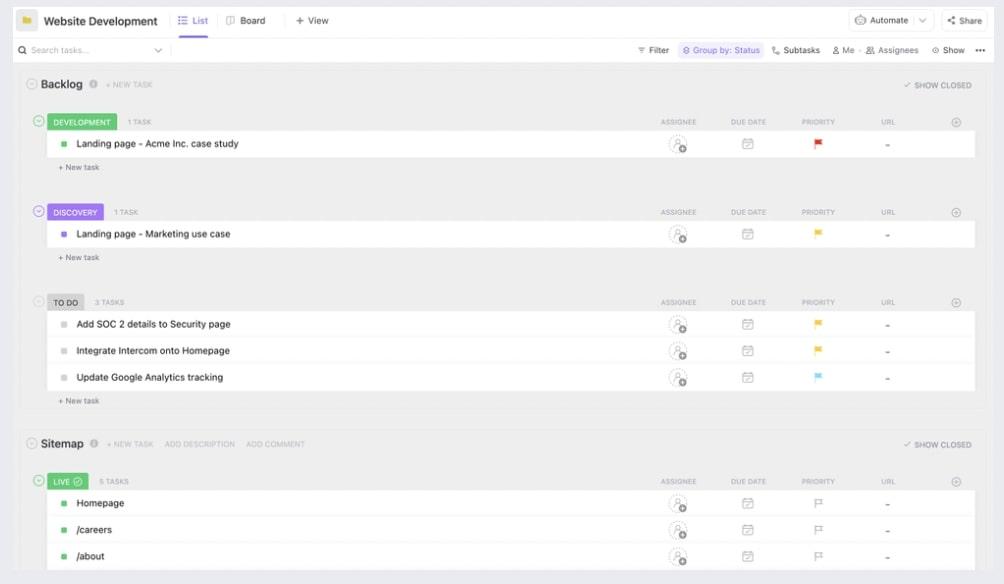
ClickUp’s Website Development template is a customizable template streamlining your website creation process.
Break down your website development plan into tasks like creating illustrations, landing pages, sitemaps, QA, etc., assign them to your team, and track progress using this template.
This template also helps you gather and centralize feedback and tweak your product strategy accordingly.
Summarize this article for me pleaseLevel Up Your Website Analysis Game
While website analytics tools offer valuable insights, user behavior remains a puzzle.
Session replay software bridges this gap, providing a crystal-clear picture of every user’s journey on your website.
But here’s the thing: knowledge without action is just knowledge. That’s where ClickUp swoops in.
ClickUp acts like your website mission control center. It keeps everything organized, fosters seamless collaboration between your team, and ensures all those user insights translate into a website that converts.
Sign up for ClickUp today!

Everything you need to stay organized and get work done.
