
Sorry, there were no results found for “”
Sorry, there were no results found for “”
Sorry, there were no results found for “”
Writing a project report can feel overwhelming, especially when you’re managing deadlines, deliverables, and team updates all at once. But a well-crafted project report isn’t just a formality. It’s a key tool for keeping stakeholders informed, aligned, and confident in your progress.
In this guide, you’ll learn how to write an effective project report step by step. We’ll break down what to include, how to format it, and which types of reports suit different project stages. Plus, you’ll get access to free project report templates to help you save time and create reports that are clear, professional, and actionable.
📌 Not sure what to include in your report?
From timelines and milestones to risks and results, we’ll show you exactly what to add (and what to skip) so your project report hits the mark every time. Keep reading!

Reports exist because leadership can’t see status in real-time. These CEO dashboard templates make manual reporting obsolete: project health, blockers, and progress trackers update themselves.👇🏼
A project report is a document offering a comprehensive overview of a project’s objectives, progress, team performance, and milestone accomplishments. It also gives an account of the challenges faced during a project’s execution, solutions devised to tackle them, and the lessons learned during the process.
Project managers create these reports to communicate with other project stakeholders—including team members, sponsors, clients, and other interested parties—to ensure everyone’s on the same page. The document also serves as a foundation for further evaluation and analysis to ensure the project stays on track and achieves its goals. 🎯
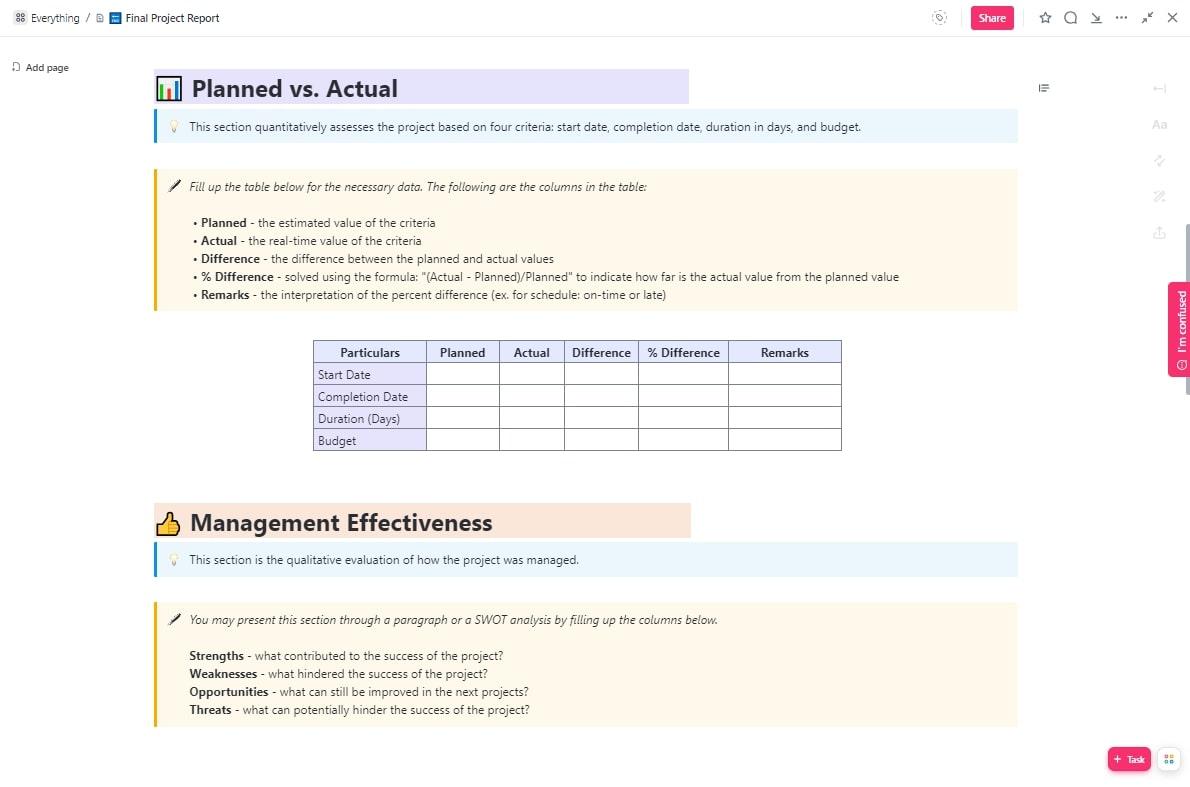
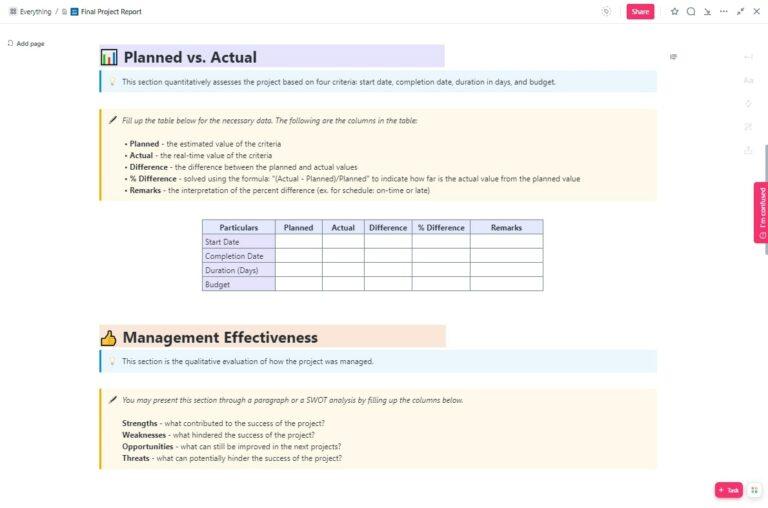
Creating a final project report can be tedious and time-consuming but it doesn’t have to be. The right template can make the process much easier. ClickUp’s Final Project Report Template will help you stay organized and productive throughout the entire process.
Creating a project report doesn’t have to be a daunting task. Follow these three simple steps to create your first project report with ease.
ClickUp streamlines every stage of project report writing—from planning and information gathering to formatting and collaboration—making the process faster, more organized, and more collaborative.
Before you create a project report, you need to understand its purpose (the “why”) and know your target audience (the “who”). This will guide the content, structure, and tone of the report.
How ClickUp helps:
Check out this video to discover how to write a project report that checks all boxes.👇
At this point, you need to gather project information relevant to your project report. Make sure your data is accurate, reliable, and up-to-date. Organize the gathered information in a logical and structured manner.
We’ve already gone over the main elements in a project report; plan these out at this stage.
How ClickUp helps:
Once you have gathered all your data and details, format them in their correct places. Ensure that your project report follows a consistent formatting style—headings, subheadings, and bullet points will make it easier to read.
In addition, scan your report for spelling, grammar, and typos.
How ClickUp helps:
Apart from proofreading, ClickUp AI can supercharge your project report writing by streamlining drafting, summarizing, and automating key tasks:
See how ClickUp Brain instantly generates a structured project report—summarizing accomplishments, blockers, and next steps with just one prompt👇

Sure, you could write project reports from scratch and spend countless hours formatting and structuring them. But why would you when you can use free project report templates? They provide a structure and format for your report so you can simply plug in your data and customize the design to fit your needs. Not only do project report templates speed up the report creation process, but they also enhance the overall quality of your reports.
Let’s jump right in to explore our top project report templates. 📈
A final project report is the perfect finishing touch to conclude a project and highlight its achievements. ClickUp’s Final Project Report Template provides a solid structure to help you put it together with the following key sections:
This template is built in ClickUp Docs, which means you have unlimited flexibility for customization—add extra sections and tweak the appearance to suit your taste.
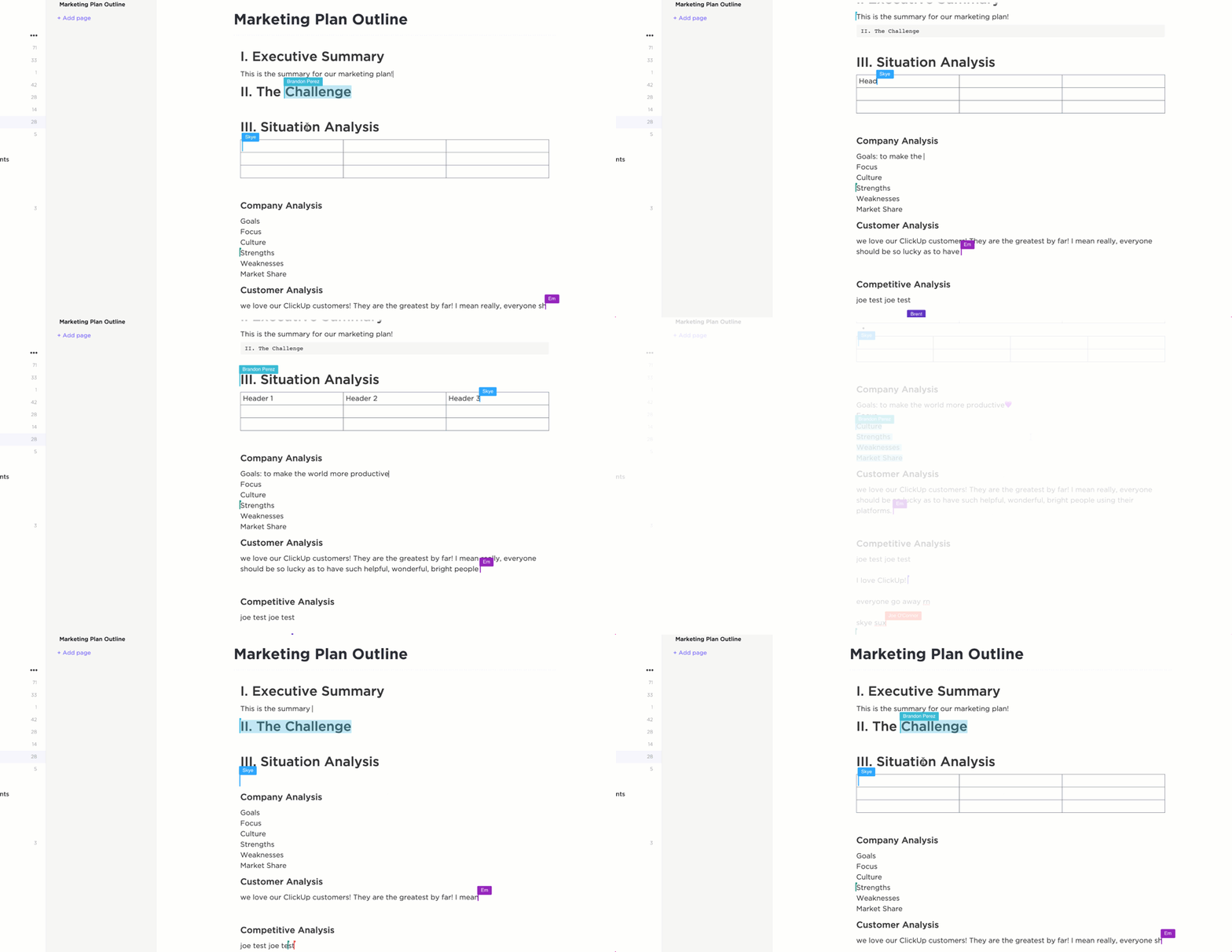
ClickUp’s Project Status Report Template, built inside ClickUp Whiteboards, provides a hassle-free method to quickly capture key project details in a visually engaging way.
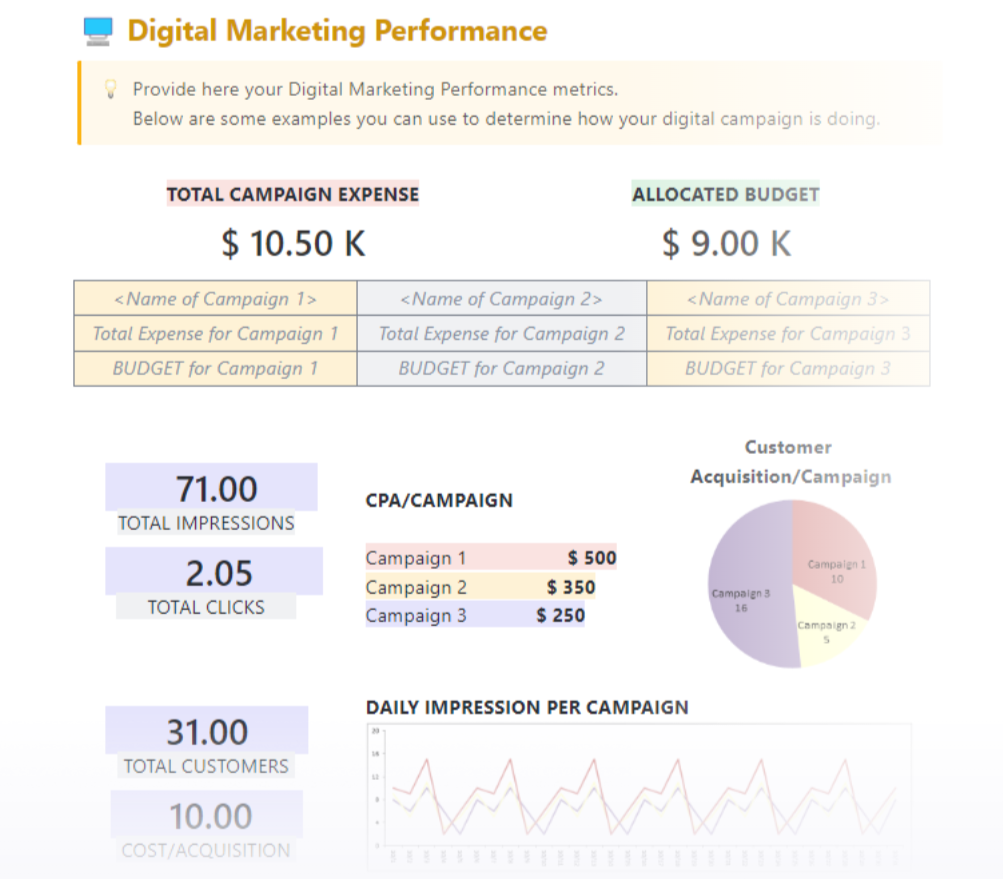
After running a digital marketing campaign project, you need to gather key metrics from the campaign and present them to key stakeholders for evaluation, performance analysis, and notes for future improvements.
Sharing this info across multiple digital channels can get overwhelming but there’s no need to worry. ClickUp’s Digital Marketing Report Template has you covered with everything you need. Plus, it’s neatly broken down into the following sections:
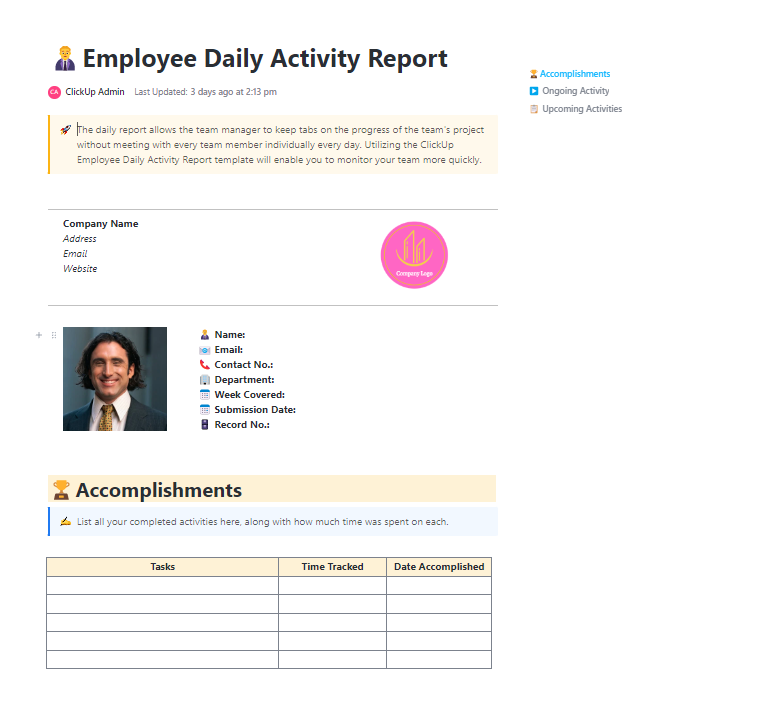
A key way to stay on track and guarantee overall project success is to engage team members in the process. The Employee Daily Activity Report Template by ClickUp has a simple tabular layout that makes it easy for team members to record and keep track of:
This template encourages each team member to get work done and ask for support when needed—while allowing you to keep the project on track by providing support and maximizing team performance.
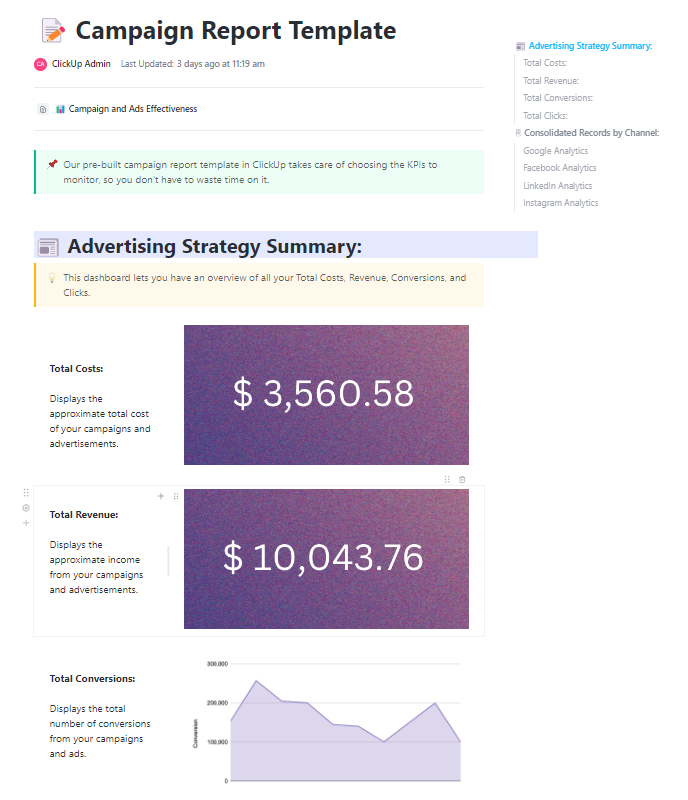
Remember the Digital Marketing Report Template we looked at earlier? You can choose to further analyze the marketing performance section, with elements from this Campaign Report Template by ClickUp.
Dive deeper into how each marketing channel contributed to overall ad cost, ad revenue, and ad conversion rate. You can further break down each channel’s performance by analyzing the metrics from each individual campaign on that channel.
ClickUp’s Project Progress Report Template is designed to help you document and track the progress of a project. Whether you’re managing an engineering product launch or organizing a company event, this template will help keep key players across your organization up-to-date.
The template includes everything you need to break down tasks, measure performance, and communicate project updates quickly and accurately.
ClickUp’s Monthly Business Status Report Template is designed to help you keep track of the progress of your company’s projects. This Doc template helps you and your team:
ClickUp’s Project Reporting Template helps project managers prepared reports around project activities, task statuses, budget, schedule, and more.
It is a customizable Docs template that simplifies the task of reporting project progress to stakeholders. Use this project report template to keep tabs on the progress of important project elements like tasks, expenses, and outstanding action items.
Creating an effective project report format requires clarity, structure, and relevance to the audience. Here are some best practices to follow:
By following these best practices, you can create project reports that are clear, actionable, and valuable to stakeholders.
📮ClickUp Insight: Knowledge workers send an average of 25 messages daily, searching for information and context. This indicates a fair amount of time wasted scrolling, searching, and deciphering fragmented conversations across emails and chats. 😱
If only you had a smart platform that connects tasks, projects, chat, and emails (plus AI!) in one place. But you do: Try ClickUp!
Purpose: A brief summing up of the entire report, with a gist of the key findings, objectives, methodology, and conclusions. Provides a high-level overview of the project status, key achievements, and critical issues.
As its name suggests, this project summary gives readers a quick overview of the whole report. While it’s placed at the start of the report, it’s often written last.
📌 Example: “This report evaluates the redesign of XYZ Company’s website, focusing on improved user experience and SEO. The project led to a 35% increase in traffic and a 20% reduction in bounce rate.”
Purpose: This sets the context and expectations of the entire report. It explains the background, objectives, scope, and significance of the project.
The introduction includes the project’s purpose and scope, the project schedule, the problems it aims to address, and the methodologies to get there. It also outlines the structure and organization of the rest of the report.
📌 Example: “XYZ Company aimed to enhance its website’s usability and SEO performance. This project was initiated to redesign the website with improved navigation, faster load times, and a modern interface.”
Purpose: Defines what the project aims to achieve in measurable terms.
📌 Example: “We aim to reduce page load time by 30% and increase customer engagement by 25%.”
Purpose: Describes the approach, tools, and techniques used in the project.
📌 Example: “We used Agile methodology with biweekly sprints to iteratively develop and test the new website design. A/B testing and heatmaps were used to analyze user behavior.”
Purpose: Details progress against planned timelines, budget utilization, and resource allocation.
📌 Example: “Sprint completion rate is at 92%, with 45 out of 49 planned user stories delivered. Current spend is $180,000 against the $200,000 quarterly budget. Team velocity has increased 15% since last quarter.”
Outlines current risks, realized issues, and risk mitigation strategies.
📌 Example: “A major challenge was slow approval cycles, which were resolved by setting up weekly review meetings.”
Tracks major project milestones and their completion status.
📌 Example: “Phase 1 user authentication system: Completed (2 days ahead of schedule). Phase 2 payment integration: In progress (15% delay, new completion date March 15).”
Documents team allocation, skills gaps, and capacity planning
📌 Example: “Development team operating at 85% capacity. Two additional QA engineers are required for the next phase. Current contractor agreements extended through Q2.”
Purpose: Presents key outcomes based on project execution and data analysis.
📌 Example: “User engagement increased by 25%, and bounce rate decreased from 60% to 40% after the redesign.”
Purpose: These summarize the project’s success and suggest improvements. Based on your findings and analysis, identify opportunities for improvement, suggest strategies for addressing them, or propose avenues for future research.
📌 Example: “The project successfully met its objectives. For future improvements, we recommend integrating AI-driven chat support and further optimizing for accessibility.”
📚 Related Read: A Beginner’s Guide to Dashboards in ClickUp
Project reports come in diverse formats, with each serving different use cases. Here are the most commonly used types of project reports.
A project status report is a document that gives a snapshot of where your project stands at any given moment. It’s like answering the question, “How’s the project doing?”
But instead of just saying “The project is fine,” you actually dive into the project goals, tasks completed, milestones achieved, challenges faced, lessons learned, potential roadblocks, and next steps.
A project progress report is slightly similar to a status update report, as they both discuss task progress. However, the progress report is more quantitative and zooms in on individual tasks and project milestones.
It’s like taking a magnifying glass and examining the progress of each task, one by one.
The cost-benefit analysis report is usually prepared before a project is put into motion. Of the various project reports, this one aims to answer a simple question: “Is it worth pursuing this project?”
To answer this question, the report first assesses all project costs like operational expenses, materials, salaries, equipment, and potential risks.
It then considers the projected benefits, such as increased profit margins, cost savings, improved efficiency, or happier customers. Finally, the report compares the costs to the benefits to determine if it’s time to move forward or explore other options.
A project time-tracking report is a document that records and summarizes time spent on project activities. Each project team member contributes to writing this report—they track and record the amount of time they’ve spent on tasks and submit it to the project manager. ⏰
Thankfully, project management tools has eliminated the need for paper-based time-tracking submissions.
A project resource dashboard offers a bird’s-eye view of how resources (e.g., labor, equipment, materials, budget, etc.) are allocated in a project. Think of it as a comprehensive resource inventory, listing every project task, the responsible party, and the resources being used.
A project risk report offers a comprehensive analysis of potential risks, their likelihood of occurrence, their potential impact on the project, and recommended mitigation strategies.
Rather than waiting for future events to derail the project, project reports like this one allow project managers to take a more proactive approach to risk management—thereby boosting the chances of overall project success.
A project variance report reveals the gaps or deviations between project plans and the actual performance or results achieved. It compares various factors—like budget, time, resources, and scope—and their planned values with their actual values, then computes the differences (or variances).
A project performance report evaluates the overall performance and achievements of a project against predetermined metrics and objectives. It includes information on project deliverables, key performance indicators (KPIs), and stakeholder satisfaction.
A project completion report marks the end of a project journey. It summarizes the entire project lifecycle, from initiation to closure. This report contains an overview of the project’s objectives, deliverables, milestones, challenges, and recommendations for future projects.
A project management report summarizes a project’s progress, status, and performance for stakeholders. It includes an overview, current status, timeline, budget, risks, resource allocation, key performance indicators (KPIs), and next steps.
The report helps ensure transparency, track milestones, address issues, and guide decision-making. It provides a snapshot of where the project stands and what actions are needed to keep it on track.
Unlike detailed project updates, a board or executive report is designed for senior leadership and focuses on key performance indicators (KPIs), major milestones, budget status, and critical risks. It provides high-level insights into a project’s progress, challenges, and strategic impact.
📌 Example: If a project is exceeding its budget or missing deadlines, the report may propose adjusting the scope, reallocating resources, or securing additional funding to keep it on track.
A gap analysis report identifies discrepancies between current performance and desired goals within a project, process, or organization. It helps answer:
📌 Example: In a software project, a gap analysis might reveal that the development team lacks expertise in a new programming language, leading to delays. The report would then suggest hiring external consultants or upskilling existing staff to close the gap.
A workload report provides an overview of team members’ task distribution, workload balance, and capacity utilization. It helps project managers identify overloaded employees, bottlenecks, and underutilized resources.
This report typically includes:
📌 Example: If a report shows that one team member is handling 60% of critical tasks while others have lighter workloads, the manager may need to reassign tasks or hire temporary support to maintain efficiency.
A budget report tracks project expenses, budget utilization, and financial health over time. It helps stakeholders assess whether the project is staying within financial constraints or exceeding projections.
Key components include:
📌 Example: If a budget report shows that a construction project has already spent 75% of funds but is only 50% complete, decision-makers might need to renegotiate vendor contracts, adjust project scope, or secure additional funding.
📚 Also Read: How to Manage a Project Budget
Writing project reports may initially seem redundant and time-consuming. However, it plays a crucial role in achieving project success. While a few benefits were hinted at earlier, let’s get a better picture of why project reports should not be overlooked.
Creating a project report allows you to step back and reflect on the project’s progress. As you record the milestones, successes, and challenges, a wealth of insights begins to unfold—strengths, weaknesses, and areas that need attention.
This holistic view of the project’s health helps you steer it toward the desired outcomes and ensure it stays on track.
Project reports allow you to evaluate and analyze the different aspects of a project in a systematic way—gathering relevant data, analyzing it, and evaluating its significance. By giving your project a critical analysis, you can uncover valuable insights, identify patterns, draw meaningful conclusions, and take strategic action. 🛠️
Creating a project report challenges you to present the project’s progress and results to stakeholders in a clear and coherent manner. A well-written report promotes project transparency and ensures everyone is on the same page.
It also facilitates collaboration by providing a common reference point for discussions, feedback, and decision-making.
When you present a comprehensive and well-structured report, it shows that you have conducted thorough research, followed a methodical approach, and can effectively communicate complex information. This, in turn, boosts your reputation, enhances your credibility, and showcases your expertise among peers, colleagues, and potential employers.
A project report serves as a valuable reference for future research or projects. By documenting your process, methodologies, challenges, lessons, and results, you create a resource that can be consulted and built upon by others.
This contributes to the cumulative knowledge in your field and fosters a culture of collaboration and innovation.
Project reports are instrumental in enhancing team alignment. They provide a clear, concise snapshot of progress, identifying accomplishments, challenges, and next steps. This enables all team members to understand the project’s current status and their respective roles in achieving the overall objectives.
💡 Pro Tip: Save hours on project reporting by using ClickUp AI to automatically summarize progress, highlight blockers, and suggest next steps—so your team always stays aligned and informed.
There you have it—your secret sauce for creating an effective project report in a fraction of the time. And that’s only scratching the surface; working inside ClickUp unlocks a lot more perks.
Not only does ClickUp make project reporting easy and quick, but it also gives you access to free project management templates to enhance your workflow. Quickly assign tasks to your team, keep track of progress, discuss updates, and collaborate on documents and whiteboards—all in one place. ✨
Did we mention the integrations? ClickUp plays nicely with other apps, allowing you to seamlessly connect your favorite tools to supercharge your team’s productivity. And let’s not forget about the time you’ll save using ClickUp’s Automations—a feature that lets you breeze through repetitive tasks that used to eat up valuable time across project management reports.
In fact, with project management, communication, and knowledge management all available in one AI-powered platform, ClickUp is the everything app for all things project management.
Get started by signing up for free on ClickUp today … Ready? Set? Report!

Sudarshan Somanathan
Max 23min read
Sudarshan Somanathan
Max 22min read
Sudarshan Somanathan
Max 22min read

© 2026 ClickUp